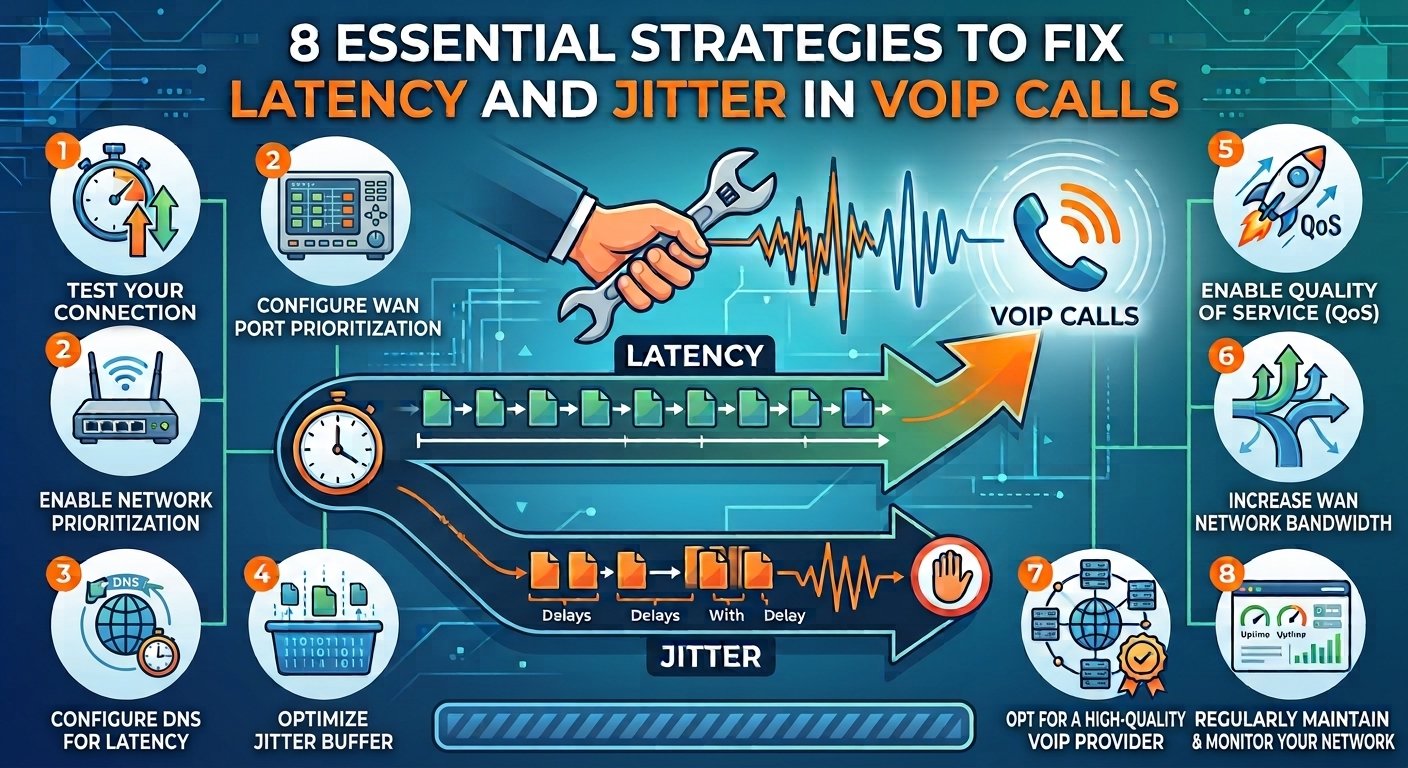
Latest News

The Blog

voip blogs
functions of Network Interface Card

Network Interface Device: Key Concepts and Importance Explained

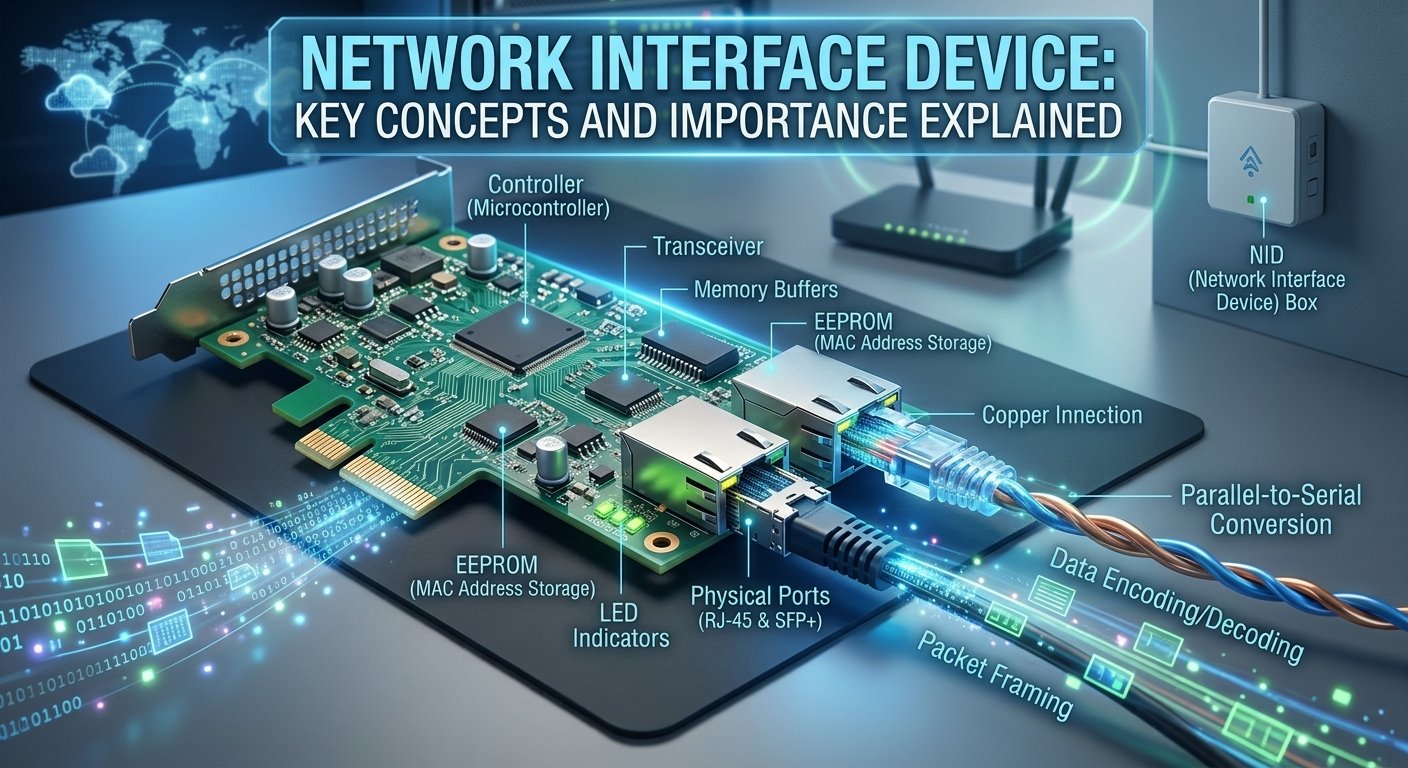
A network interface device is the basic connection between a local computer system and a larger network infrastructure. A special hardware or software device that converts the internal signals of a computer into a signal that can be sent over a different medium, like copper wire, fiber optics, or radio waves. In today’s telecom world, this device is frequently the last point of demarcation between the service provider and the customer’s internal wiring. The network interface device is a crucial component in both home and business networks, whether it’s built into a motherboard or installed as a separate expansion card, it’s responsible for ensuring reliable communication, handling data packets, and maintaining seamless connectivity. How to Define a Network Interface A network interface can be defined as a point of interconnection between a computer and a private or public network. It serves as a gateway that controls the flow of data in and out, making sure that all the data reaches its intended destination. The term is typically used to describe physical hardware, but it can also be used to describe software-defined interfaces that enable virtual machines to interact in a cloud environment. Essentially, what is network interface device logic boils down to its role as a translator and traffic controller. The definition also applies to the logical identification of the connection point. Each network interface device has a unique hardware address, called the Media Access Control address, that ensures that data is sent to the right physical machine. Research by the IEEE has shown that the adoption of such standards, such as 802.3, has been the main reason for the growth of the internet around the world. These interfaces ensure that data is handled in a uniform manner, enabling different systems to communicate without compatibility issues. The Other functions of Network Interface Card (NIC) Parallel-to-Serial Conversion: Transforms high-speed data from the computer’s internal bus (parallel format) into serial format for sending over network cables, maintaining data integrity and synchronization over long distances. Wake-on-LAN (WoL): Remotely powers on a computer using a network message, making it easier to manage large-scale office environments. Quality of Service (QoS) Management: Prioritizes time-sensitive traffic such as video conferencing and online gaming over less critical data, such as email downloads, to ensure a smooth user experience. Data Encoding and Decoding: Converts digital data into the signals needed for transmission and receives signals and converts them back into digital data that the computer can understand. Error Detection: Implements Cyclic Redundancy Check (CRC) to detect and correct data corruption that can happen during transmission. Network Traffic Filtering and Buffering: Controls the incoming and outgoing data packets, discards unwanted packets and buffers to avoid data loss during high traffic. Protocol Offloading: Offloads complex network processing functions to the card to free up CPU cycles, thus alleviating the load on the computer’s main processor. Electrical Signal Management: Manages the physical transmission of electrical signals for wired connections, ensuring they are transmitted with the proper voltage and timing for reliable communication. Various Uses of the Interface in Networking Sector / Environment Device Examples Primary Function Key Benefits Home / Residential Verizon NID, AT&T NID Connects residence to the global internet backbone. Entry point for high-speed data; allows multiple users to share a connection via a router. Industrial / Enterprise Phone network interface box Separates internal PBX systems from the public telephone network. Creates secure network segments; allows for quick isolation of problems for maintenance. Specialized (Trading / Research) Ultra-low latency interfaces Moves massive amounts of data in microseconds. High-speed data transfer with minimal delay. How Does a Network Interface Card (NIC) Work? When the computer’s operating system sends data to be transmitted, the operation of a NIC starts. The card converts these digital bits into frames, and adds header information such as the source and destination MAC addresses. When the frame is ready, the NIC transforms the digital data into electrical pulses, light signals or radio waves. The conversion process is controlled by strict timing rules so that the receiving device can correctly interpret the signal. The process is reversed when receiving data. The NIC receives the signals on the transmission medium and stores the frames that are destined for its particular MAC address. It checks the data for integrity, ensuring that it has not been corrupted in transit. When the data is correct, the NIC removes the networking headers and sends the raw data to the computer’s CPU for processing. In a typical network interface device, this process of encapsulating and decapsulating occurs thousands of times per second. The essential parts of a Network Interface Card Controller (Microcontroller)The controller is the main processor or “brain” of the network interface card. It manages the intricate logic involved in data framing and protocol handling, ensuring that data is properly structured to comply with networking protocols such as Ethernet or Wi-Fi. The controller frees up the main CPU from these functions, enabling the system to communicate efficiently without compromising overall performance. TransceiverThe transceiver is the physical device that performs modulation and demodulation of the data signals. It translates digital data into electrical signals for copper or light signals for fiber in a wired NIC, or radio frequency signals for wireless in a wireless card. It essentially connects the logic of the card with the physical network medium. Memory BuffersMemory buffers are used to temporarily store data packets while they are being transferred between the computer and the network.  These integrated storage areas are essential when there is a sudden surge of traffic or network congestion, when they store packets until the network medium is free. This will help to avoid data loss and keep the data flowing smoothly even under heavy traffic. EEPROM (MAC Address Storage)The EEPROM is a special type of non-volatile memory chip that contains the permanent Media Access Control (MAC) address set by the manufacturer. This unique identifier is also known as the “burned-in address” and is used to distinguish each network interface device in the world from another. The identity is stored in the EEPROM, so it doesn’t change when the device is turned off. Physical PortsPhysical ports are the physical location where network cables connect to the card. They can come with RJ-45 connectors for regular Ethernet, SFP+ connectors for high-speed fiber optics, or BNC connectors for older coaxial networks, depending on the application. These ports are intended to accommodate the physical connectors and in wired cards, they are typically used in conjunction with electrical transformers to shield the internal circuits. LED IndicatorsLED indicators are small lights placed next to the physical ports that give real-time visual feedback of the card’s status. A “Link” LED will be solid when the device is physically connected to a switch or router, and will flash when data is being sent or received.A “Link” LED will be solid when the device is physically connected to a switch or router, and will flash when data is being sent or received. These lights are vital for quick and easy troubleshooting of connectivity problems at a single glance. Methods Used by a NIC to Transmit Data A NIC uses multiple methods of communication to facilitate efficient communication in various network environments. One of the most popular is Half-Duplex transmission, which means that a device can either transmit or receive data, but not both simultaneously. This was typical of older hub-based networks, but has been superseded by Full-Duplex transmission. Full-Duplex mode allows the network interface device to transmit and receive data at the same time, thereby doubling the maximum bandwidth of the connection. Collision detection and avoidance is another important technique. The NIC in Ethernet networks employs a protocol called CSMA/CD to listen to the cable before sending data. When two devices transmit data simultaneously, a collision occurs. The NIC sees this, halts transmission, and waits for a random amount of time before attempting again. Wireless interfaces employ a similar avoidance method called CSMA/CA to avoid overlapping signals in the airwaves. Classification of Network Interfaces Network interfaces are generally categorized according to the medium they use and the speed at which they operate. In stationary environments, the most common interfaces are wired, which are typically copper or fiber optic. They are classified according to their maximum speed, for example 10/100/1000 Mbps for standard Ethernet. Wireless interfaces, on the other hand, are classified by their IEEE standards, such as 802.11ac or 802.11ax (Wi-Fi 6), which determine their range and data capacity. The other type of classification is the physical location of the device. Companies such as Verizon or AT&T may provide an external network interface device box, while internal interfaces are those found within user devices. Knowing what is a network interface device classification can assist you in picking the correct hardware for your networking requirements, from a small home office to a worldwide data center. What are the Different Types of Network Interfaces? Interface Type Protocol / Standard Transmission Medium Key Features & Use Cases Ethernet Interface IEEE 802.3 Twisted-pair copper (RJ-45) or Fiber-optic (SFP) The most ubiquitous interface; features auto-negotiation, plug-and-play functionality, and is the backbone of most LANs. Wireless Interface IEEE 802.11 (Wi-Fi 6/6E) Radio Waves (RF) Provides mobility for laptops and IoT; uses MIMO technology and antennas; requires encryption like WPA3 for security. Virtual Interface Software-defined (Hypervisor) Emulated (Software-based) Allows one physical card to support multiple virtual machines; essential for cloud computing and Software-Defined Networking (SDN). Fiber NID Optical Standards Optical Fiber Cables Designed to handle immense bandwidth for gigabit internet; becoming the standard for modern high-speed home and business connections. InfiniBand Specialized High-Speed High-bandwidth interconnects Used specifically in supercomputing clusters where extremely high bandwidth and low latency are required. Cellular Modem 4G LTE / 5G Radio waves to cell towers Acts as the interface for mobile devices to access cellular networks; optimized for long-distance wireless communication. Telephone NID Analog/Digital Telecom Copper phone lines An older standard used to connect analog voice lines to digital networks; primarily found in legacy telecommunications systems. Fundamentals of Network Interface Configuration and Management Setting up network interfaces is an essential process for maintaining connectivity, security, and performance in various operating systems. Administrators manage IP addresses, subnet masks, and gateways in Windows using the Network and Sharing Center or PowerShell, typically using DHCP to automate this process or manually configuring it for static devices such as servers. Linux uses command line utilities such as the ip utility and configuration files (e.g. Netplan) to disable, modify and re-enable interfaces. IP assignment is a key part of this process, which assigns a logical address to a device on a network using static assignment or dynamic DHCP assignment; modern systems may use a “dual-stack” approach to support both IPv4 and IPv6. Also, the loopback interface (127.0.0.1) is a vital software-defined communication and troubleshooting tool that enables systems to test network applications without relying on external hardware. When these areas are managed properly, there is seamless communication throughout the network hierarchy. How do these Network Interfaces cooperate with the different layers of an OSI model? OSI Layer / Component Role of the Network Interface (NIC) Key Functions & Mechanisms Layer 1: Physical Layer Hardware Transmission • Manages physical hardware (cables, fiber optics, wireless signals). • Converts digital data into electrical, light, or radio signals for transmission. Layer 2: Data Link Layer Node-to-Node Transfer • Framing: Wraps data into Ethernet frames. • MAC Addressing: Uses the hardware address to identify the source and destination. • Error Detection: Adds bits to check for data corruption; discards or requests retransmission of bad data. • Switching: Provides the headers used by switches to direct data to specific physical ports. Layer 3: Network Layer Routing & Interfacing • Encapsulation: Takes IP packets from the OS and wraps them into Link Layer frames. • Address Resolution: Uses ARP (Address Resolution Protocol) to link IP addresses to physical MAC addresses. • Handoff: Strips frames from incoming data and passes the IP packet up to the Operating System. MAC Address (Hardware Level) Unique Identification • Permanent ID: A 48-bit hexadecimal identifier (e.g., 00:1A:2B:3C:4D:5E) burned into the device. • Uniqueness: Combines a manufacturer ID and a unique serial number to ensure no two devices on a network are the same. • Local Delivery: Acts as the final destination address for data moving through physical equipment. Application Layer (Top Layers) Abstraction • Provides a stable platform so developers can write software (like email clients) without needing to know the physical medium (fiber vs. Wi-Fi). Read More: Toll-Free Numbers with VoIP and How to Get One? Final Thoughts The network interface device is still one of the most important but neglected parts of today’s technology. Whether they’re in the gray NID box on the side of a house or the virtual interfaces that power global cloud servers, these devices enable the translation between raw data and physical signals. Knowing what they do, from the physical layer all the way up to the intricacies of the OSI model, gives us a better idea of how our interwoven world remains online. The network interface will continue to grow in sophistication as fiber optics and 5G continue to evolve, and will be the next generation of digital communication. Frequently Asked Questions (FAQs) What is a network interface device and why is it needed? A network interface device is a hardware or software device used to connect a computer to a network. It is required because it converts information stored in a computer into signals that can be sent through wires or air. If a computer didn’t have this device, it would be unable to communicate with routers, other computers, or the internet. How does a network interface identifier work? The identifier, or MAC address, is a unique hardware name for each network card that works by doing just that. This identifier is used when data is sent over a local network to make sure that the data is sent to the right physical device. It is similar to a permanent address for the hardware. What is the difference between a physical and virtual network interface? A physical network interface is a physical component of a computer system, like an Ethernet card or a Wi-Fi chip. A virtual network interface is a software simulated version that is used in virtualization and cloud computing. The virtual one is used to send data between virtual machines in a server, while the physical one is used to send actual electrical signals. Where does the network interface fit in the OSI model? The network interface is mainly used at the Physical Layer (Layer 1) and the Data Link Layer (Layer 2). It controls the physical attachment to the network medium and frames data and hardware addresses. It is the basis for the higher level protocols such as IP and TCP. How are network interfaces involved in IP addressing? Network interfaces are the physical or logical points to which IP addresses are assigned. The interface’s MAC address is permanent, but the IP address is a logical label assigned to the interface to enable it to be located on a larger network. The interface controls the process of encapsulating IP packets into frames for sending. Which protocols do network interfaces interact with most? Network interfaces are heavily involved with Ethernet (802.3) and Wi-Fi (802.11) at the lower levels. They also communicate with ARP to resolve hardware addresses and communicate with TCP/IP to ensure that data packets are properly formatted for the network they are crossing. What are some common examples of network interfaces? These include Ethernet NICs in desktop PCs, Wi-Fi adapters in smartphones, and fiber-optic SFP modules in high-speed servers. The gray box on the exterior of a house, commonly referred to as a telephone nid or fiber nid, is another common example in telecommunications. How can I view or configure network interfaces on my computer? In Windows, you can use the Command Prompt and type ipconfig /all or go to the Network Connections menu in the Control Panel. On Linux, the command ip addr or ifconfig is used to see active interfaces. These tools can be used to monitor status, switch IP addresses, and troubleshoot connectivity problems. What is the role of a NID in a telephone or fiber network? In such networks, the NID is used to separate the service provider’s lines from the customer’s internal wiring. It shields the home network from electrical surges and offers a straightforward location for a technician to test the signal to see if the issue is inside or outside the house.
Read More
867 area code

867 Area Code: Understand Time Zone, Location and Cost

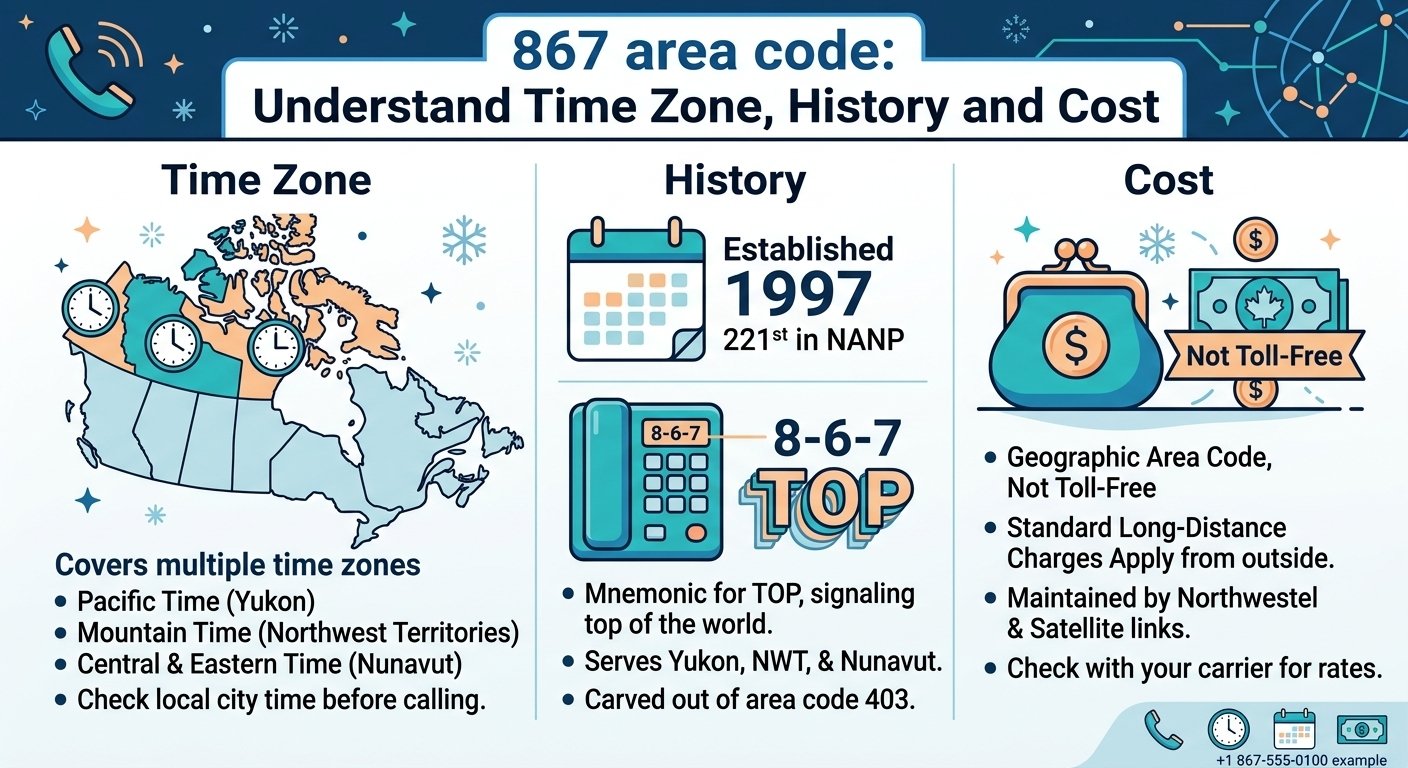
The 867 area code is the main telephone code for the large northern regions of Canada, including the Northwest Territories, Nunavut and the Yukon. It was created in 1997 and covers one of the largest geographic areas in the North American Numbering Plan, but one of the smallest population bases. This code spans some 3.9 million square kilometers and is an essential link for people living in the Arctic and sub-Arctic. It is special in that it spans several time zones and three different territories. It’s a prefix that links the North to the rest of the world, whether you’re calling a local business in Whitehorse or a government office in Iqaluit. Where is the 867 Area Code? The 867 area code area is located in the northernmost region of North America, covering all three territories of Canada. This particular area is characterized by its harsh climate, rocky landscape and tundra. This prefix is not just limited to one city or province, but extends throughout the Yukon, Northwest Territories and Nunavut. It is still the only geographical name for these places and is a familiar symbol of the north. When people see area code 867 on their caller ID, they wonder where is area code 867? The answer is in the vast Canadian North. To grasp the location of 867, one must have an understanding of the vast expanse of land that it encompasses. It borders Alaska to the west and borders several Canadian provinces to the south. Some may think it is the same area code as 907 usa for Alaska, or 807 for northern Ontario, but the 867 area code is unique to the Canadian territories. It was officially separated from the 403 area code, which also covered these northern areas, in Alberta. It is still a vital infrastructure today for remote communities where communication is a key element for safety and business. 867 Area Code Time Zone The 867 area code is quite large, and as such, it does cross time zones. In particular, it is active in the Pacific, Mountain and Central time zones. The Yukon Territory observes Pacific Time, the Northwest Territories and parts of Nunavut observe Mountain Time. The eastern part of Nunavut is on Eastern Time, including the capital city of Iqaluit, while the western region could be on Central or Mountain Time. This difference can result in Alaska having an hour difference with the westernmost area code 867. For people outside the 867 area code time zone, it can be difficult to navigate. For instance, if it is noon in the Central time zone (403) for parts of the south, it could be 10:00 AM in Whitehorse. The majority of these territories follow daylight saving time, except for some areas of Nunavut and most of Saskatchewan to the south. This geographical diversity means that a 867 phone number may be for someone who wakes up in the Arctic sunrise or someone who is going to bed in the Yukon. Callers should check the exact city time prior to making an 867 exchange call to prevent waking up residents in other zones. Cities in 867 Area Code The 867 area includes a number of major northern centres and hundreds of smaller, more remote centres. The population density is extremely low, but the cities in this zone are important hubs for government, mining and tourism. These areas are the lifeblood of the northern economy and the lifeline of the surrounding wilderness. The area 867 covers all three territories from the shores of the Arctic Ocean to the mountainous border of British Columbia. People who are searching for area code 577 or area code 837 may find that they are actually searching for this northern Canadian prefix. The cities are served by Northwestel, which controls most of the area’s landline prefixes. Residents also have access to wireless services from other carriers such as Iristel and Bell Mobility. Some of the main areas served are listed below: Yukon Territory: Including the capital and various mining towns. Northwest Territories: Covering the Great Slave Lake region and the northern coast. Nunavut: Including the vast Arctic Archipelago and the Hudson Bay coastline. Remote Settlements: Such as Resolute, Sanikiluaq, and Trout Lake. Yellowknife Yellowknife is the capital of the Northwest Territories and one of the most prominent cities in this numbering plan. It is the Diamond Capital of North America and is located on the north shore of Great Slave Lake. The city is a key center for the 867 exchange, and also plays a vital role in the mining sector and northern logistics. It’s a place where modern infrastructure meets raw beauty of the sub-Arctic. The city is rich in history and has been associated with gold and diamond mining, and therefore, has a strong communication network. This 867 number is used by residents and businesses here to connect with markets around the world and southern Canadian offices. Although it is far from the rest of the world, Yellowknife has a very high standard of living and is a starting point for those who want to travel further north into the Arctic circle. Whitehorse Whitehorse is the capital of the Yukon and one of the largest cities in the 867 area code. It’s known as the Wilderness City and sits in the valley of the Yukon River. It is the largest city in the three territories and has a large proportion of the population. The city is a hub for tourism, particularly for visitors coming down the Alaska Highway, which connects it to neighbouring American area 907. Communication in Whitehorse is vital for the tourism and transportation sectors. The local 867 exchange handles a high volume of traffic from international visitors and local businesses alike. According to a report by the Canadian Radio-television and Telecommunications Commission, telecommunications in the north face unique challenges due to satellite reliance, yet Whitehorse remains well-connected with modern fiber-optic technology. Is 867 Toll-Free? One common mistake is that the 867 area code is a toll-free number like 800 or 888. This is not so. It is a geographical area code for the north of Canada. Out-of-area calls to this code are generally considered long-distance calls. The cost of maintaining the satellite or specialized microwave links in many of the northern communities can be greater than in southern urban communities. Also, it should be noted that this is not a 867 country code. All North American countries (Canada, USA) use the country code +1. Thus, a complete international number would look like +1 867. When calling from North America, just dial 1 and then the area code and the seven-digit number. Some users may think that this is an international area code such as 377 (Monaco) or 780 (Canada, but actually an Alberta area code), but 867 is a Canadian area code. The History and Cultural Impact of Area 867 On October 21, 1997, the 867 area code was activated. Prior to its formation, the territories had been covered by a number of codes, such as 403 for the Yukon and NWT and 819 for what is now Nunavut. As the need for phone lines increased, it became necessary to introduce 867 as a separate numbering space for the territories. It was the 221st area code to be introduced in North America. The numbers 867 were selected because they represent the word TOP on a standard telephone keypad, which means the top of the world. This code has since been a source of pride to the people of the north. It is a large, cohesive area with common problems and successes. A person living in a 317 area code california city may never have to see a winter with sub zero temperatures, but they do have something in common: their surroundings. Interestingly, the North American Numbering Plan Administrator says that area codes that span such expansive areas are uncommon, with 867 being one of just three area codes that span across major jurisdictions. The code was created to alleviate pressure on the 403 prefix in Alberta. It serves the least densely populated region in North America. The geographic size is roughly half the size of the contiguous United States. It is the only area code where you can find three different time zones in one prefix. Dialing and Communication Logistics in Northern Canada The 867 area code is a code that is used in the northern part of the country, and it is important to understand the logistics of the area when dialing within it. Until recently, residents had to dial only seven numbers for local calls. But with the introduction of more services and wireless devices, the 867 exchange became more complicated. In many areas of North America, 10-digit dialing is the norm, but the change in the north has been slow. It should also be noted that many numbers in this area are related to satellite phones, which may have varying billing arrangements. If you’re searching for area code 807 or area code 567, you can easily see how numbers can be transposed. The 867 prefix is exclusive to the territories, though. If you are calling someone in the 907 area code, you are calling a different country jurisdiction, Alaska. The north’s telecom market is in constant flux, with new investments in subsea cables and low-earth-orbit satellites designed to deliver high-speed connectivity to every 867 phone number. When calling from outside Canada or the US, always dial the +1 prefix, watch for long-distance charges, know the time zone of the city (Pacific to Eastern), and be aware that wireless service may be limited outside of major cities such as Whitehorse or Yellowknife. Read More: What is DSL (Digital Subscriber Line) ? Working, Types, and Importance Final Thought The 867 area code is more than just a string of numbers; it’s a lifeline for those who call Canada’s northern frontier home. It spans the Yukon, Northwest Territories and Nunavut, connecting some of the most distant regions of the world to the rest of the world. Whether you’re looking for an 867 area code business phone number or a personal one, it’s important to know what it means and where it’s located. With the continued evolution of technology, this code will continue to be a testament to the strength and bond of the Canadian North. Frequently Asked Questions  What area code is 867? The 867 area code is the telephone prefix used for the three northern territories of Canada: Yukon, Nunavut and the Northwest Territories. It was created in 1997 to offer these regions a unique numbering plan, different from the southern provinces. Where is area code 867 located? This area code is in northern Canada and covers an enormous geographical area of almost 4 million square kilometers. It covers all communities from the Alaska border to the shores of Greenland, in the Yukon, Northwest Territories and Nunavut. Is area code 867 a toll-free number? No, 867 is not a toll-free area code. Other area codes will typically be charged as long-distance calls from the telecommunications company. It should not be confused with toll-free prefixes such as 800, 888 or 877. What time zone is area code 867? The 867 area code covers the Pacific, Mountain and Central time zones. The local time is dependent on the territory and community you are calling, as it spans a vast area from west to east. Is 867 a US area code? No, 867 is a Canadian area code. It is part of the North American Numbering Plan (NANP), which encompasses the United States, but it is fully under the Canadian territories. The 907 area code is used by the neighboring U.S. state of Alaska. Which major cities use the 867 area code? The largest cities that use this code are Whitehorse (Yukon), Yellowknife (NWT), and Iqaluit (Nunavut). It also provides service to a number of smaller towns and indigenous communities across the Arctic and sub-Arctic. What is the 867 country code? The country code for calls to the 867 area is +1, the same for all countries in the North American Numbering Plan (NANP), such as Canada and the USA. The number would be preceded by +1 867 and then the seven-digit local phone number. Why was the 867 area code created? It was created in 1997 to provide the Canadian territories with their own unique identity and to free up numbers in the 403 area code. The numbers 867 were selected as a mnemonic for TOP, which means the top of the world.

Read More
What is a Bridged Call Appearance

Bridged Call Appearance: The Complete Guide for Modern Business Communication

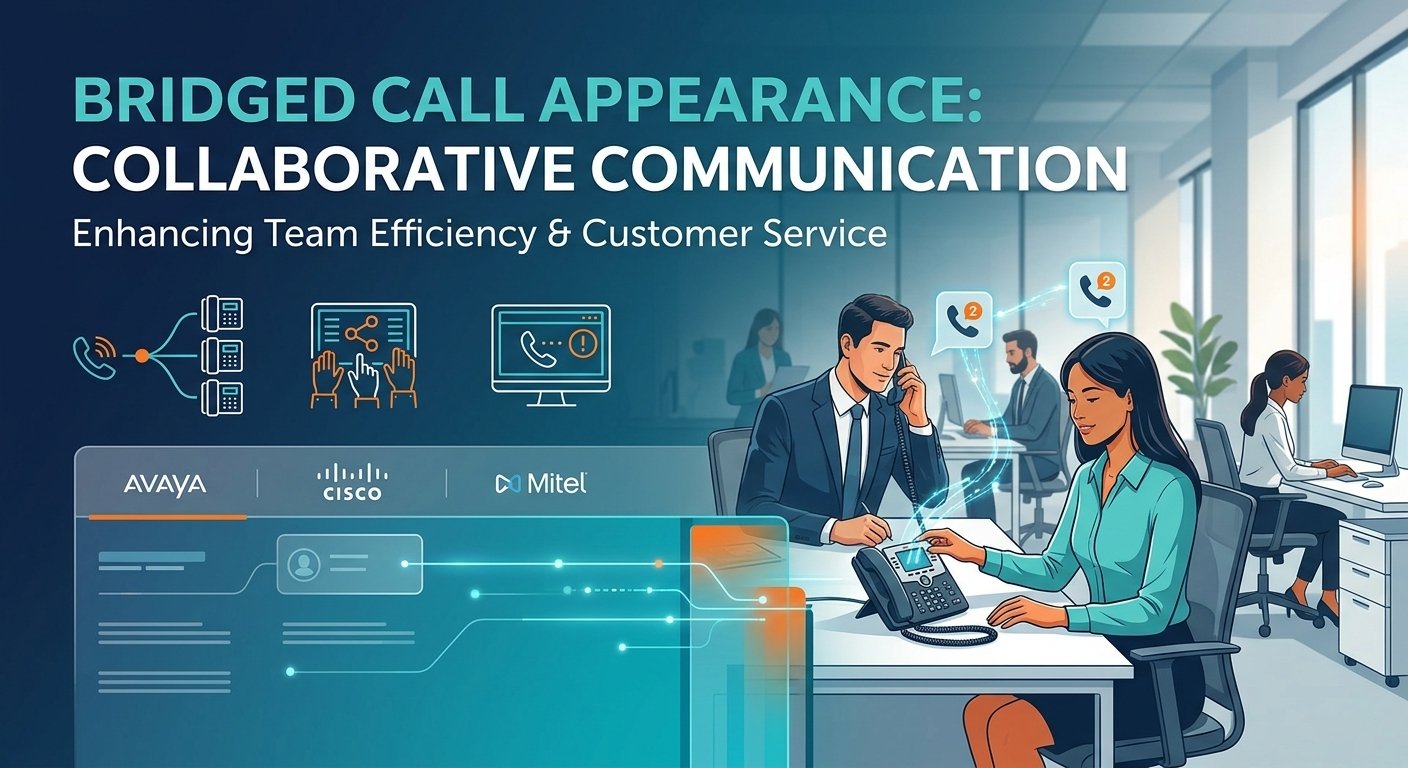
Bridged call appearance is a high-end telephony function that enables a main phone extension to be duplicated on one or more secondary phone extensions. This feature allows several people to see the status of a particular line, accept incoming calls and participate in an ongoing conversation. It is a fundamental aspect of group communication, especially for administrative assistants who share an executive line or sales teams who have a large number of contacts. This system offers real-time visibility and shared control, ensuring that no critical inquiry goes unanswered, which boosts team responsiveness and operational efficiency in professional settings. The Critical Role of Collaborative Call Handling Collaborative call handling is a crucial component of efficient communication within any successful organization, and it is essential for keeping the lines of communication open. With a high volume of incoming traffic, it’s important to share the responsibility to avoid bottlenecks and to minimize caller frustration. If multiple team members are able to see the same extension in a bridged call appearance, they can function as a single team. This way, if the main owner of the extension is busy or out of the office, the client’s request is still addressed in a timely manner. Studies show that 75% of customers think it takes too long to get a live agent’s attention, directly affecting brand loyalty. This can be addressed by using collaborative tools such as a bridging call setup, which helps to distribute the workload. It creates a positive culture for staff to support each other without the need of complicated transfers. This smooth integration not only enhances the efficiency of the internal processes but also conveys a professional and reliable image to external parties. What is a Bridged Call Appearance? A bridged call appearance is essentially a virtual extension of one user’s telephone set to another user’s. Bridging is different from simple call forwarding, which is the process of sending a call from one location to another; bridging is the process of establishing a shared environment. If a call comes in to the primary extension, then all the bridged terminals get a call at the same time. The handset can be picked up by any authorized user and used to communicate with the caller, and status indicators on other handsets will indicate that the line is in use. This functionality is a link between privacy and team access. It enables more complex interactions like “bridging into” an ongoing conversation, useful for training or problem-solving. This is different from shared lines as it preserves the identity of the main extension and provides controlled access to others. It’s a key element for companies that value high-touch customer service and transparency within the company. How BCA Works Step-by-Step? A bridged call appearance is based on a complex signaling protocol in a Private Branch Exchange (PBX) or Voice over IP (VoIP) system. If the system receives a signal from the primary station, it checks a database to determine all the secondary stations associated with that extension. An external or internal call request is received by the PBX for Extension A. The system recognizes that Extension B and Extension C have an “apparent” bridge to Extension A. A ring tone is played to all three devices, sometimes with a different visual or audible pattern to make it different from a direct call. When Extension B responds, the PBX sets up a media path between the caller and Extension B. Extension A and Extension C will be given a “line in use” status update, usually in the form of a steady red light or a particular icon. Extension A may dial the bridged number to add the extension to the conference, if configured. Business Applications and Use Cases: Solving Real-World Problems In the corporate world, time is often the most valuable resource. The Executive-Assistant relationship is one of the main use cases for a bridged call appearance. The assistants can screen calls, take messages or answer routine questions without the executive ever being interrupted. This delegation of communication enables leadership to concentrate on high level tasks and ensure that key contacts are still being attended to by a knowledgeable member of staff. According to a study by Salesforce, 70% of customers say connected processes are very important to winning their business. Another important use is in niche technical support or sales groups. For example, a small group of experts may have a single line for high priority accounts. These teams can implement a bridging call strategy to ensure that the most available expert receives the call, resulting in a seamless experience and higher customer satisfaction and retention. Platform-Specific Implementation: Avaya, Cisco, and Mitel Each hardware and software vendor will have their own approach to deploying this feature. The objective is the same, but the terminology and configuration procedures differ among the major industry vendors such as Avaya, Cisco and Mitel. For IT administrators who have to deal with multiple vendors or want to optimize their existing environment, it’s essential to understand these nuances. Avaya IP Office Bridged Call Appearance Avaya systems use the IP Office Manager or Web Manager to configure the system. A separate button on the user’s telephone interface is needed for each bridged call appearance. The “Primary” and the “Bridged” users need to be specified in the user settings by the administrator. The number of available call paths on the physical handset should be equal to the number of calls expected to be made so that the “Busy” signal is not displayed when the lines are available. Cisco Unified Communications Manager Shared Line Appearance Cisco takes this capability in what they call Shared Line Appearance (SLA). In the Cisco Unified Communications Manager (CUCM), a single Directory Number (DN) is assigned to multiple devices. This provides a great deal of flexibility, since the system can be set to ring all devices or only a portion of them. Cisco’s solution is very scalable, and can be used by large enterprises with thousands of endpoints that need collaborative access. Mitel MiVoice Office Call Bridging Mitel has a comprehensive offering of this functionality in its MiVoice Office 250 and Business platforms. The configuration consists of “Secondary Extension Keys” that are associated with a primary station. Mitel offers fine-grained control over the actions of these keys, including the ability to ring them immediately, after a delay, or just to alert the user visually. This is especially helpful in situations where multiple team members are responsible for a single line. Advanced Troubleshooting: Diagnosing Common BCA Failures Even the most stable systems can have problems because of configuration problems or network instability. When troubleshooting a bridged call appearance, it is important to take a systematic approach to determine if the issue is with the physical handset, user profile, or network infrastructure. Many common pitfalls can be avoided by monitoring the system and updating the system firmware regularly. Problem 1: “Avaya Bridged Appearance Not Ringing” – A Systematic Diagnosis The first step is to check the “Status” of the station in the management console, if the bridged line is not ringing. Sometimes, a user may have accidentally set “Do Not Disturb” (DND) or “Send All Calls” to prevent the ringing of bridged lines. Also, make sure that the “Ring” attribute is programmed as “Yes” on the button. A reset of the physical handset may solve localized software bugs that stop the alerting signal from reaching the handset. Problem 2: Inconsistent or Intermittent Ringing If the performance is inconsistent, it may indicate network congestion or Quality of Service (QoS) problems. When the voice packets are delayed, the phone may not receive the signaling message in time to trigger the ringer. The path between the PBX and endpoint must be checked. Check the system logs for any “Registration Lost” messages, which means that the phone is temporarily disconnected from the server and will not receive incoming calls. Problem 3: One-Way Audio or Call Control Issues Post-Answer One-way audio is a common VoIP problem that can impact a bridged call appearance. This usually happens when the media stream (RTP) is blocked by a firewall or incorrectly routed through a Network Address Translation (NAT) gateway. If the bridged user can answer the call, but cannot hear the caller, check the IP routing tables. Make sure that the appropriate codecs are enabled on both the primary and secondary devices to enable a smooth audio handshake during the call setup process. Best Practices for Configuration, Management, and Security There are best practices to follow when using a bridged call appearance to maximize benefits. The first is to keep the number of bridges in each extension to a reasonable level; too many appearances can make a phone’s interface too cluttered and confusing for the user. Label each button on the handset that is bridged to prevent accidental pickups or interruptions. Security is also a huge concern, so make sure that only authorized individuals are able to bridge to ensure sensitive conversations are protected. Regular Audits: Periodically review who has access to which bridged lines. Labeling Standards: Use consistent naming conventions for all bridged keys. User Training: Educate staff on how to join or drop from a bridged call without disconnecting others. Firmware Updates: Keep all endpoints and PBX software current to benefit from the latest features and security patches. Bandwidth Management: Monitor network usage to ensure that multiple bridged lines do not saturate the available data capacity. Read More: 846 vs 864 Area Code: A Non-Existent number Conclusion A bridged call appearance is a revolutionary change for companies looking to enhance their internal communication and external service levels. Organizations can avoid lost opportunities and create a truly collaborative work environment by enabling multiple users to work with the same extension. The concepts of clear configuration and proactive troubleshooting are the same, regardless of whether you are working with Avaya, Cisco, or Mitel. With the ongoing advancement of communication technology, bridging calls will continue to be a crucial feature for ensuring connectivity and professionalism in the modern business landscape. Frequently Asked Questions (FAQ) What is the concrete difference between a Bridged Call Appearance and a Call Pickup Group? A bridged call appearance shows a live view of another extension on your phone and lets you answer or join a call with a single click. A Call Pickup Group, on the other hand, enables you to answer a call that is ringing at another station by dialing a code or pressing a “Pickup” softkey, but it is not as persistent as a Call Pickup Group and does not offer the same visibility or the ability to join an active conversation that is already in progress. Can I bridge a call appearance to an external cell phone number directly? Typically, a direct bridge to a standard mobile phone number is not supported by the standard BCA features, because the BCA features need special signaling between the PBX and the hardware. But you can get the same effect with mobile apps offered by your VoIP provider (such as Avaya Workplace or Cisco Webex). These apps are software-based endpoints that can be set up to look like a desk phone. What are the system limits for bridged appearances on a single extension? The limits are usually determined by the specific hardware of the telephone and the capacity of the PBX software. Most modern desk phones have 3 to 10 bridged appearances, and the system software may enable up to 32 or more secondary stations to monitor a single primary line. It is best to consult your specific platform’s technical documentation to find the exact constraints for your model. Why does my bridged line key show as ‘busy’ when I’m not on a call? The ‘busy’ status on a bridged call appearance key reflects the state of the primary extension, not your individual phone. If the primary user is currently on a call, or if another person with the same bridged appearance has answered a call, the line will appear busy to everyone else. If the line shows busy and no one is actually using it, there may be a “stuck” session in the PBX that requires an administrator to clear the line manually. How does BCA interact with voicemail? Generally, if a call to a bridged appearance goes unanswered, it will follow the coverage path of the extension. This means the message will be left in the primary user’s voicemail box. Secondary users can often see a message-waiting indicator for the primary extension if their phone is configured to do so, allowing them to know when a message has been left for the shared line. Does answering a bridged call use up a license on the PBX? In most cases, the bridged appearance itself does not require an additional user license, as it is a feature mapped to an existing station. However, some advanced systems may charge a small fee for the “bridging” feature or require a specific tier of service. You should check with your service provider to ensure your licensing agreement covers the number of bridged lines you intend to deploy. Can I silence the ringer for a bridged line without affecting my main extension? Yes, most systems allow for “delayed ringing” or “visual only” alerting for bridged appearances. This allows you to see the incoming call on your screen and the flashing light on the button without hearing the audible ring. This is particularly useful for assistants who only need to answer calls if the primary user does not pick up within a certain number of rings. What happens if two people try to answer a bridged call at the exact same time? The PBX handles these requests in milliseconds. The first person whose “answer” signal reaches the server is connected to the caller. The second person will typically receive an error tone or their phone will simply return to an idle state. In some configurations, the second person might automatically be added to the call as a third party, depending on the “Privacy” settings of the system. Is it possible to prevent someone from joining my call even if they have a bridged appearance? Yes, most systems include a “Privacy” or “Manual Exclusion” button. When this feature is activated during a call, it prevents any other user with a bridged call appearance from joining the conversation. This is an essential security feature for sensitive discussions where the primary user needs to ensure their communication remains confidential.

Read More
predictive dialer

Predictive Dialer: A Complete Guide

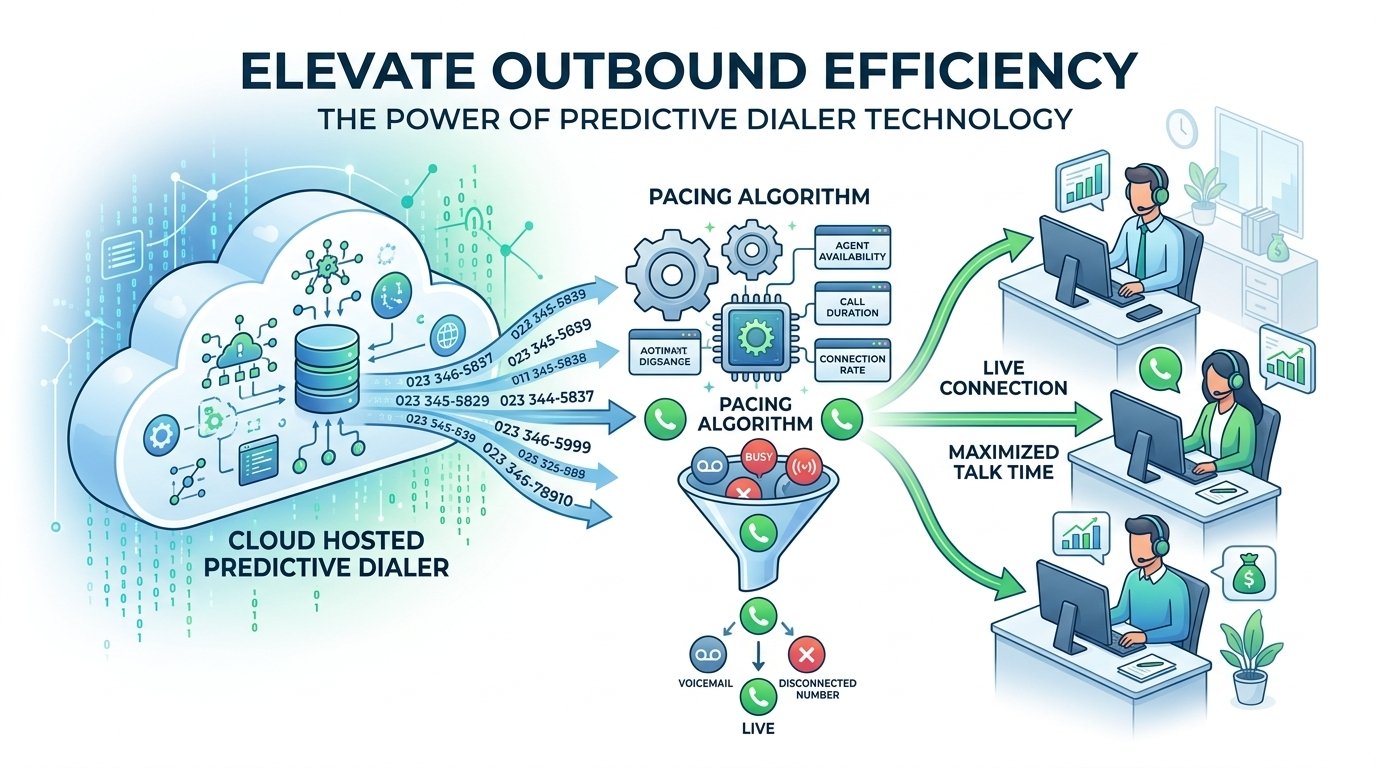
A predictive dialer is an advanced automated dialer that optimizes outbound contact centers. It employs mathematical algorithms to forecast agent availability and dials several phone numbers at once, only making connections with answered calls to available agents. This technology eliminates busy signals, voicemails and disconnected lines, allowing agents to spend more time talking to live prospects and less time waiting between calls. Today, hosted predictive dialers can help businesses grow rapidly and enhance their connection rates and agent productivity in a competitive sales environment. What is a predictive dialer? A predictive dialer is an intelligent automated system that is mainly employed in outbound call centers for making customer calls more efficient. This technology was first developed in the late 1980s by Douglas Samuelson to improve the efficiency of debt collection processes through the use of telemarketing. It has grown from specialized hardware to a wide range of predictive dialer software for different industries over the decades. This system is mainly used to start calls before an agent is done with their interaction. It determines precisely when a representative is available and makes sure that a live person is on the line when the agent is ready. This proactive method cuts down on the downtime usually involved with manual dialing, and is a standard feature of call center predictive dialer operations. What is the difference between a predictive dialer and an auto dialer? Feature Auto Dialer (Basic) Predictive Dialer (Advanced) Complexity Foundational tool for automated dialing. Advanced version of the auto dialer. Dialing Logic Typically dials one number at a time for each available agent. “Thinks” ahead by placing multiple calls simultaneously. Intelligence Processes contact lists systematically without manual input. Analyzes historical data to predict call connection timing. Primary Goal Removes manual input errors and ensures list systematic processing. Ensures a live connection occurs exactly when an agent becomes free. Efficiency Eliminates manual dialing time. Maximizes agent talk time by minimizing idle gaps. Ideal Environment General automated dialing needs. High-volume contact center environments. Data-driven power dialer that promotes sales-driven success By using a predictive dialer system, a business can discover a smooth road to more sales opportunities. This will help companies maximize their revenue potential by routing agents to more live calls and fewer dead ends. Studies have shown that contact centers that implement an outbound predictive dialer can achieve connection rates of up to 200% to 400% on the first day of use. This success is achieved by the capacity to maintain agents in meaningful conversations at all times. The software can be used for telemarketing, market research, or proactive customer service, ensuring that the workforce is used to its full potential. These systems are data-driven, which means they are continually learning and adapting to the unique cadence of your calling campaigns. How does a predictive dialer work? The key to this technology is the complex pacing algorithms that track multiple variables simultaneously. It monitors the average call duration, the percentage of calls that are answered by a human, and the number of agents available. This information is used in real-time to adjust the dialing speed to match the predicted availability of the team. Analyzes call patterns to determine average call duration and connection rates. Modifies dialing speed automatically to align with agent availability. Initiates multiple calls simultaneously to ensure constant workflow. Automatically bypasses unanswered calls, busy signals, and fax machines. Connects live answers to the next free agent instantly. Logs unsuccessful attempts for future follow-up or list cleaning. Aggregates performance metrics to refine campaign strategies. Facilitates multi-campaign management for diverse business goals. The technology is specifically designed to minimize the awkward silence that occurs when a customer answers and no agent is ready. By balancing the dialing rate with the agent pool size, the system maintains a high level of professionalism while driving maximum output. Predictive dialers vs other auto-dialers It’s crucial to grasp the differences between the various dialing modes to select the right approach. The predictive dialer is designed for volume, but other dialer types such as the progressive dialer or preview dialer are geared toward other aspects of the customer interaction. Both serve a specific purpose, depending on whether you’re interested in the number of contacts or the amount of research you did prior to calling. Type How it works Use cases Progressive dialer Places one call at a time only when an agent is available. Quality interactions over quantity. Preview dialer Allows agents to view customer records before the call is placed. High-value clients and complex sales. Robo-dialer Sends pre-recorded messages or SMS to multiple customers. Reminders, updates, and prospecting. The Benefits of Predictive Dialing Software 1. Increase output and operational efficiency The biggest advantage of predictive dialer technology is the significant decrease in idle time. Agents don’t need to dial the next number or wait for the tenth ring and then get an answering machine. The system takes care of the logistics, so the team can concentrate on the conversation and the conversion. 2. Provides better agent experience If your team has the right tools, they will be more confident and this will result in better sales outcomes. Call center predictive dialers are designed to work with CRM systems to give agents immediate access to customer history. This means they never come as a surprise and can offer a personalised experience from the first second of the call. The user interface of these systems is usually simple, minimizing the representative’s mental workload. They can follow guided engagement flows, which adjust to the conversation, rather than dealing with complex software. This streamlined approach can help you to win customers and reduce the stress of the job. 3. Improve coaching and analytics A predictive dialer system is a great source of information for supervisors and managers. Real-time dashboards allow leadership to see exactly how a campaign is doing and where agents may need more assistance. Call monitoring and “barge-in” options enable real-time coaching during key sales interactions. 4. Built for trust Compliance with the regulations, such as the TCPA, is an essential component of any outbound operation. A good predictive dialer service will have the capability to handle Do Not Call (DNC) lists and time zone restrictions. This will keep your business within legal limits and still achieve your objectives. Professional interactions also help to establish trust with the customer. The system uses local caller ID and guarantees that there is always a live agent when the call is answered, which decreases the chances of being marked as spam. This respectful approach helps in fostering long-term relationships and protecting the brand’s reputation. How much does a predictive dialer cost? The cost of this technology is dependent on the deployment model. Traditionally, on-premises systems have been costly, ranging from $5,000 to $25,000 in hardware and licensing. This limited the technology to large companies with large IT budgets. Today, predictive dialer pricing is much more accessible with cloud-based models. The price of a hosted predictive dialer varies from $14 to $65 per user per month, depending on the features and size of the business. This change has made the technology accessible to all, including small businesses and startups, giving them a level playing field with the big boys. How do I choose the right dialer for my business? When it comes to selecting the right predictive dialer, it’s essential to understand your existing workflow and objectives. You need to assess the amount of time your agents spend on non-voice work versus actual conversation. When your team is small and your lead list is huge, a predictive system is almost always the right solution to effectively penetrate the market. Assess your standard operating procedures for each call interaction. Consider the size of your team and their ability to handle back-to-back calls. Evaluate the volume of your contact list and the duration of your campaigns. Inquire about the level of support and training provided by the vendor. Check for customization options to fit your specific industry needs. According to a study by the National Association of Sales Professionals, agents who use automated tools like a predictive dialer spend up to 75% more time talking to prospects than those using manual methods. This statistic highlights why choosing a solution that integrates well with your existing CRM is essential for maximizing ROI. Read More: Latency and Jitter in VoIP Calls: 8 strategies to fix the trouble Final Thought For any outbound-oriented business, the decision to implement a predictive dialer is a game-changer. With algorithmic pacing and automated filtering, companies can transform a slow sales floor into a high-performance machine. The secret to success is to combine the technology with the human element of your agents, so that every connected call is a quality call. As technology advances, the ones who embrace these smart dialing solutions will stay ahead of the curve in terms of sales efficiency and customer engagement. Predictive Dialer FAQs What is a predictive dialer? A predictive dialer is an automated outbound calling system that uses algorithms to predict agent availability and dial multiple numbers at once. It filters out non-productive results like busy signals and voicemails, only connecting live answers to available agents to maximize talk time. What is the difference between a predictive dialer and an auto dialer? The main difference is intelligence and pacing. An auto dialer simply dials numbers automatically one by one or in a basic sequence. A predictive dialer uses complex mathematical formulas to dial multiple lines simultaneously based on the predicted time an agent will become free. What is the difference between predictive and progressive dialer? A predictive dialer calls contacts before an agent is actually free, while a progressive dialer only places a call when an agent has finished their previous interaction. Predictive is better for volume, whereas progressive is often preferred for high-touch B2B sales. Which dialer is best for calling? The best dialer depends on your lead quality and volume. For large lists of cold leads, a predictive dialer is most efficient. For smaller lists of high-value prospects where research is required before the call, a preview dialer is usually the superior choice. What is predictive dialer in a call center? In a call center, it is a tool used to automate the outbound process. It manages the dialing rate so that agents are constantly on the phone with live prospects, significantly reducing the idle time that usually occurs between manual dials. Are predictive dialers illegal? No, they are legal as long as they meet regulations such as the TCPA in the USA or the TPS in the UK. Compliance includes keeping a Do Not Call list up-to-date and keeping the abandoned call rate under a specific percentage. How much is a predictive dialing software? Cloud-based solutions are generally offered on a monthly subscription model, from $15 to $100 per agent. This is far more cost-effective than the traditional on-premises systems that had thousands of dollars in initial hardware investments. Why get a cloud-hosted predictive dialer software? Cloud-based systems provide greater scalability, reduced initial investment, and the flexibility to work from anywhere. They also offer automatic updates and seamless integration with other cloud applications such as CRM and helpdesk software. What is a dialer? A dialer is a software or hardware system that automatically places telephone calls. It can be as simple as a click-to-dial feature or as sophisticated as an algorithmic system that can handle thousands of calls per hour for a large contact center.

Read More
How to Make Phone Calls From Your Computer

How to Make Phone Calls From Your Computer?

The main technology used to make phone calls from your computer is Voice over Internet Protocol (VoIP). This process turns your voice into digital data packets that are sent over the internet rather than over the telephone. These calls can be started from desktop applications such as Nextiva, Zoom, or Google Voice. The minimum requirements are a stable internet connection, a microphone and a speaker or headset. After you install the software you select and set up your audio preferences, you can call any number in the world, control your business communications and even sync your contacts between devices for a seamless experience. How does making a phone calls from your computer work? Once you choose to make a phone call from computer devices, the system uses VoIP technology to connect digital and analog networks. This technology uses a microphone to record your voice and an analog-to-digital converter to turn your voice into digital signals. These signals are then subdivided into small data packets and sent over the internet to the recipient. For landline calls, the VoIP service handles the conversion from the Internet to the public switched telephone network (PSTN). This is a very efficient way of computer telephone calls as it does not require any dedicated physical copper wires. Research indicates that businesses switching to VoIP systems can reduce their local call costs by up to 40% and save even more on international communication. Since the data is shared on the same network as your email and web browsing, you can enjoy a seamless experience, with phone call from computer applications seamlessly connecting with your daily workflows and contact lists. How Calling from Your Computer Works 1. The setup you will need To make a call from computer, you need to make sure that your hardware is prepared for voice transmission. A computer with a working sound card is required, and this is found in virtually all modern computers, including laptops. Built-in speakers and microphones are sufficient for casual calls, but a dedicated USB or Bluetooth headset is recommended for professional calls. This eliminates echo and background noise from interfering with your conversation, so that every call a phone from computer sounds crisp and professional. You also have to choose a service provider that provides a desktop application or a web-based interface. These providers give you a unique phone number, so you can call from computer free or paid based on the plan. A separate app means you will be alerted to incoming calls even if you are working in other apps. Most setups also enable you to sync your mobile contacts, so that you can dial a number from computer without having to type the numbers each time. 2. Check your internet connection The stability of your internet connection is a crucial factor in the quality of calling on the computer. For VoIP calls to be smooth, there must be a steady flow of data, otherwise there will be lag, jitter, or dropped calls. A speed test is recommended to ensure that there is at least 0.5 Mbps of bandwidth allocated to your voice traffic. When it comes to the best results, a wired Ethernet connection is better than Wi-Fi, since there is no chance of interference from other household or office devices. If you have a lot of audio delays when you make a phone call from computer, you may want to look at your router settings for Quality of Service (QoS) options. This prioritizes voice traffic over other traffic like large file downloads or video streaming. A study by Deloitte found that a stable connection is essential for anyone who wants to make phone calls on computer regularly, as it is the backbone of remote productivity. 3. Choose and install a calling app When you wish to call your phone from computer or contact with your clients, you need to choose the right software. Whether you’re using it for personal or enterprise communication, you should find an application that suits your needs. Most providers, such as Nextiva or Zoom, have a Windows and macOS installer that can be downloaded. After installation, you log in with your credentials to access your dial pad, call history and contact settings. Once you’ve installed the app, you can easily make a phone call from computer by going to the dialer interface. Many apps also have a web-browser version, which is useful when working on a temporary or public workstation. These platforms may also have extra capabilities, such as SMS messaging and presence indicators, which let you know whether your coworkers are available for a call. The correct installation of the app guarantees that you can get phone calls on computer without any technical problems. 4. Set up your sound system The last technical step to make phone calls from your computer is to set up your audio. You’ll need to enter the application settings and choose your input and output devices. If you have a headset, be sure to set it as the default device for the microphone and speakers. It’s a good idea to test your audio before your first call to avoid the typical “can you hear me?” problem that new setups can cause. Select the correct Input Device (Microphone) in settings. Choose the correct Output Device (Headset or Speakers). Adjust the gain levels to ensure your voice is loud enough but not distorted. Enable noise cancellation features if your software provides them. Perform a test call to a built-in automated service to hear your own playback. Top Benefits of Making Calls From a Computer This transition to computer-based calling is due to the tremendous benefits that it provides over traditional telephony. You can streamline your communication by consolidating your devices, so you don’t have to switch between them and stay focused and productive. Additionally, if you can make free phone calls from pc with particular applications, you can save a lot of money each month. For businesses, it’s a modernization of the workspace for remote and hybrid working. 1. Cost Savings The greatest advantage of calling from a pc is the savings on communication costs. Landlines can be costly to install and have high long-distance rates. VoIP providers, on the other hand, typically have flat rate monthly plans with unlimited calling in specific areas. This is much more affordable to make free phone calls from computer for personal use or to run a large sales team without having to worry about per minute charges. 2. Flexibility and Portability If you use a laptop for your communication, your office is wherever you can get an internet connection. This portability is crucial for today’s professionals who travel or work from different locations. Call from laptop devices in coffee shop, airport or home office and use the same professional phone number. This way you can never miss an important call, no matter where you are. This is also true when it comes to time and availability. Most computer-based calling systems enable you to program “Do Not Disturb” times or to forward calls to your cell phone when you are away from your desk. This seamless device-to-device transition allows you to initiate a call on your computer and then switch to your phone if you need to leave the building. Making a call from your computer offers a degree of freedom that traditional telephones can’t match. 3. Advanced Business Call Features Professional software for phone call for pc frequently comes with a package of features that exceed just voice transmission. These tools are created to boost collaboration and boost the customer experience. For example, you can use call recording to listen to calls for training or quality assurance. Even small businesses can look more professional and established if they have auto-attendants that can direct callers to the right department without any human interaction. Call Recording: Keep a digital log of all important conversations. Voicemail-to-Email: Receive audio files and transcriptions in your inbox. Screen Sharing: Collaborate in real-time while on a voice call. Call Analytics: Track call volume, duration, and peak times for better staffing. CRM Integration: Automatically log calls and view customer history during the conversation. VoIP Providers That Let You Make Calls from Your Computer 1. Google Voice Google Voice is a popular option for people and small business owners who would like to make a free or low-cost phone call from the computer. It offers a seamless interface with other Google Workspace apps, and it’s simple to use. You can select a custom phone number and send text messages or make phone calls from your web browser. It’s a great starter for people who are already familiar with Gmail and Google Calendar. 2. Zoom Zoom has expanded far beyond video conferencing to become a major player in the VoIP space with Zoom Phone. It enables users to make a phone call from computer as easily as joining a video meeting. This integrated solution is ideal for teams that are already collaborating within Zoom. It offers a professional dial pad and advanced call routing capabilities, making it ideal for modern call centers and large offices. How to choose the right platform to make calls from a computer Analyze Your Specific Requirements: Determine whether you need a service for casual personal check-ins or high-volume professional sales outreach. Your specific use case will dictate the level of features and security required. Prioritize Reliability and Call Quality: The most vital factors are consistent connections and clear audio. Look for providers that offer guaranteed uptime, low latency, and positive reviews regarding audio clarity to ensure uninterrupted communication. Ensure Robust Security and Compliance: When handling sensitive data over the web, choose a platform that protects your information. Ensure the service supports industry-specific regulations such as HIPAA or GDPR to provide peace of mind for both your team and your customers. Look for Seamless Integrations: Select a service that connects with the tools you already use, such as CRM systems and workforce management software. This streamlines workflows and provides agents with the necessary context for every call. Evaluate Scalability for Growth: For expanding teams or call centers, choose a platform that can grow with you. A good service should allow you to add new agents or features easily without the need for additional hardware. Consider Affordability and Value: Balance upfront costs with ongoing fees. A quality hosted VoIP platform should combine essential features with cost efficiency, providing a sustainable solution for your communication needs. Read More: What is DSL (Digital Subscriber Line) ? Working, Types, and Importance Final Words Switching to a computer-based phone system is a good idea for anyone who wants to modernize their communication. It is cost-effective, has a lot of advanced features and is extremely flexible, which is something that traditional phones cannot offer. From a basic solution such as Google Voice to a comprehensive business solution such as Nextiva or Zoom, having all your calls in one place will make your day easier. With a reliable internet connection and a decent headset, you’re all set to communicate with the world right from your screen. Frequently Asked Questions Can I use my PC to make phone calls? Indeed, you can call from your PC using VoIP software or web-based calling applications. These programs send voice information over the internet to regular landlines, cell phones, or other computers. All you need is a microphone and speakers to start communicating without a phone. Can I call my own phone from my computer? You can use Google Voice, Skype, or even Apple and Google’s “Find My Device” features to call your own phone from your computer. This can be helpful if you have lost your phone in your home and want it to sound to help you find it easily. How do I use my laptop to call my phone? To use your laptop to call your phone, install a calling app like Nextiva or Zoom, log in, and enter your mobile number into the dial pad. Alternatively, if you use an iPhone and a Mac, you can use the built-in FaceTime or Continuity features to bridge calls from your laptop to your cellular network. Can I make phone calls from my computer for free? There are several ways to make phone calls from your computer for free, especially for app-to-app communication. Services like WhatsApp, Messenger, and Skype allow free voice calls between users of the same app. For calling actual phone numbers, Google Voice offers free calls within the US and Canada. Do I need a special phone number for my computer? While you can often use your existing mobile number with some sync apps, most VoIP providers will assign you a dedicated virtual phone number. This number allows you to receive incoming calls directly on your computer independently of your mobile carrier or physical location. What hardware is best for computer calls? For the best experience, a dedicated USB or Bluetooth headset with a noise-canceling microphone is recommended. This setup provides much better audio quality than built-in laptop microphones and prevents the person on the other end from hearing their own voice echoing back through your speakers. Can I receive text messages on my computer too? Most modern VoIP and computer calling platforms include integrated SMS and MMS capabilities. This means you can send and receive text messages using the same interface you use for voice calls, allowing for a unified messaging experience across all your digital devices. Is calling from a computer secure? Calling from a computer is generally very secure, provided you use a reputable service provider that employs end-to-end encryption. Using a professional business VoIP service ensures that your voice data is protected from interception, which is a significant advantage over traditional, unencrypted analog phone lines.

Read More
ACD vs IVR

What’s the Difference Between ACD and IVR? A 2026 Guide

The main difference between ACD and IVR debate is that they are used in different stages of the communication process. Interactive Voice Response is the front-end interface that welcomes callers and collects preliminary information via menus. Automatic Call Distribution is the back-end engine that intelligently routes those calls to the most qualified available agent. IVR is customer intent and self-service, while ACD is about operational efficiency and logic-based routing. When combined, these two technologies can cut wait times by almost 80 percent and make sure that every customer’s query gets to the right department without passing through unnecessary manual transfers. What is Automatic Call Distribution (ACD)? Automatic Call Distribution (ACD) is a type of telephony system used to process a high volume of incoming calls. It is the call center‘s brain that makes sure that no call is missed and that every call is routed to the most appropriate destination. For companies with multiple departments like sales, technical support, and billing that receive a lot of traffic, this technology is crucial. This is not a simple call forwarding system, but a more complex one that relies on logic to decide where to forward a call. It takes into account the time of day, the caller’s geographic location and the status of the workforce. Automating the distribution process helps businesses keep a professional image and ensure resources are being used effectively throughout the team. How Does ACD Work? The distribution of calls goes through a well-defined sequence for accuracy and speed. The system first recognizes the caller by matching the caller’s information, such as the phone number or by recalling information previously entered into an automated menu. This identification process enables the system to retrieve relevant customer records from a connected database or CRM system. The system puts the caller into a virtual queue once the caller has been identified. At this point, the software determines the priority of the call using business rules that are preprogrammed. Finally, the system performs the routing phase and routes the caller to an agent. This is accomplished through a number of distribution channels that are best suited for the company. Some of the most common ways to distribute include: Fixed Order: Calls are always placed with the first person on a list, and if they are busy, the call is placed with the second person on the list. Simultaneous Ringing: All the available agents’ phones ring at the same time and the first agent to answer takes the call. Uniform Distribution: The system distributes the call to the agent with the longest idle time. Weighted Logic: Calls are routed according to a percentage or priority of the team members. Benefits of ACD Systems The major benefit of these systems is the dramatic increase in operational efficiency. Automating the routing process saves agents time from manually transferring calls and allows them to focus on resolving customer issues. This results in a more even workload, which is crucial to keeping the contact center environment’s morale high. Moreover, these systems offer in-depth analysis that is essential for management. Leaders can monitor real-time data, such as average hold times and abandonment rates, to make informed staffing decisions. Industry research shows that companies that use advanced routing logic can boost agent productivity by 25 percent, as agents are only dealing with tasks that align with their skill sets. Automated callbacks are also a great feature that enhances the customer experience. Customers can choose to be called back when an agent is available, rather than waiting on hold for long periods of time. This feature saves the caller’s time and helps to minimize the frustration that is often experienced on high volume support lines. What is Interactive Voice Response (IVR)? Interactive Voice Response (IVR) is an automated technology that enables callers to communicate with a company’s phone system using their voice or keypad. It acts as a virtual receptionist, and it is the first person that the business will interact with when someone contacts them. This system is meant to give instant help and lead the caller through a series of choices. Today, this technology is used in a more natural way, with the help of natural language processing to interpret speech, making it more of a conversation. The main purpose is to find out the reason for the caller’s call in order to offer a self-service option or collect information for a human agent. It’s a basic instrument for any business that wants to offer round-the-clock support without having to be staffed all the time. How Does IVR Work? The workflow starts as soon as the call is connected and the recorded greeting is played. The caller is given a choice of options, such as a language or a particular department. The software follows different branches of a decision tree as the user interacts with the system to reduce the purpose of the interaction. In many cases, the system can answer the query without any human intervention. For instance, a customer may dial in an account number and receive the balance of the account. If the query is more complex, the system gathers the necessary information and prepares it for the next step in the communication process. This data collection is crucial for a seamless handoff from the automated interface to a real person. The technology relies on two main types of input: Dual-Tone Multi-Frequency (DTMF): This recognizes the specific tones created when a user presses buttons on their telephone keypad. Speech Recognition: Advanced systems use software to interpret spoken language, allowing users to state their needs naturally. Benefits of IVR Systems An automated menu system can save businesses of all sizes a lot of money. The company can answer common questions such as store hours or order status without the need for a paid agent, which decreases the overall number of calls that need to be answered. Studies have shown that the average call handling time can be cut by as much as 40 percent by using efficient automated menus, which will enable the team to concentrate on more important matters. One of the other key advantages is the capacity to be available 24 hours a day. A physical office may be closed at 5pm, but an automated system can be left on to take messages, process payments or give basic information. This way, customers in various time zones or those who need service outside of business hours can still get service. Also, these systems enhance the accuracy of call routing. This gives the caller the freedom to choose their own department, reducing the chance of a call being routed to the wrong department. This helps to minimize the number of times the product needs to be transferred, one of the most frequent consumer complaints. Key Differences Between ACD and IVR Systems While both technologies are essential for modern communication, their functions are distinct. The following table highlights the primary variations between these two systems. Feature ACD (Automatic Call Distribution) IVR (Interactive Voice Response) Primary Role Back-end routing engine Front-end customer interface User Interaction Invisible to the caller Direct interaction with the caller Main Objective Optimize agent efficiency and routing Provide self-service and determine intent Timing Occurs after the intent is known Occurs at the very start of the call Logic Type Distribution algorithms (Skill, Round-robin) Menu-driven trees and voice recognition Data Usage Uses data to find the best agent Collects data from the caller The basic difference is that one system communicates with the customer and the other one communicates with the internal network. The distribution engine would not have the context it needs to make smart decisions if it didn’t have the automated menu. On the other hand, if there was no distribution engine, the menu system would have no place to put the caller when the automated options were used up. ACD vs IVR for Customer Experience In assessing the effect of ACD vs IVR on the consumer journey, it’s evident that they are a symbiotic duo. The automated menu eliminates the first hurdle of having to wait for a human to respond. It allows the user to get the answer to a simple problem quickly, something that is very much desired by today’s consumers. If a human is needed, the routing engine makes the transition smooth and the caller doesn’t need to repeat information. With a well configured setup, the “queue fatigue” that can cause high abandonment rates can be avoided. High value customers can be automatically placed in front of the line if the routing logic is correctly configured. This kind of personalization can only be achieved if the data collected from the front-end menu is immediately acted upon by the back-end distribution rules. They form a professional and responsive environment that fosters long-term brand loyalty. Use Cases for ACD vs IVR These technologies are used in the retail sector to control peak traffic. A customer may call and ask if a certain product is available; the automated menu will respond immediately by consulting the database. When the customer requires a complicated return, the distribution system sends them to a specialist who is able to provide a refund, which is resolved quickly. These systems are used by healthcare providers to handle patient privacy and emergency care. The voice menu can be used to confirm appointment times or to request prescription refills without talking to a nurse. The routing engine can also be used to route calls to a medical professional without going through the normal queue for urgent medical inquiries, using priority logic. This makes sure that life-critical information is treated with the proper urgency. These tools are crucial for secure transactions in the financial sector. Voice biometrics are employed in the menu system by banks to confirm the identity of a caller before revealing account information. After verification, the routing engine can route the user to a dedicated financial advisor depending on the size of the portfolio or the type of loan that the user is asking about. Future Trends and Innovations The most important trend in the telephony world today is the integration of Artificial Intelligence. AI menus can now interpret complex sentences and even analyze the caller’s sentiment using sentiment analysis. The system can detect frustration or anger and immediately escalate the call to a manager, avoiding a small problem from becoming a big PR issue. Another area of growth is omnichannel integration. Today, modern systems are no longer restricted to voice calls, but can be used to route video calls, SMS messages, and social media inquiries through the same centralized logic. This provides a seamless customer journey, ensuring that the customer’s history is maintained across all channels of interaction with the company. You can find the latest documentation on cloud communication platforms to learn more about how these technologies are developing. Voice biometrics will also be a common security measure. Callers will be identified by the unique characteristics of their voice, rather than remembering a password or answering security questions. This not only makes the call more secure, but also cuts down on the time spent on the authentication process, making the entire customer interaction smoother. Read More: Toll-Free Numbers with VoIP and How to Get One? Final Words It’s crucial to grasp the function of these two systems if any business wants to deliver the best customer support. They have different technical functions, but the same purpose: to make the experience more efficient and enjoyable for all concerned. Companies can manage large volumes of communication with accuracy and attention to detail by combining the automated self-service of one with the intelligent routing of the other. In today’s competitive landscape, where every second of a customer’s time counts, investing in a comprehensive platform with both features is no longer a luxury but a necessity. Frequently Asked Questions What’s the main difference between ACD vs IVR? The main difference between ACD and IVR is that IVR is the menu that the customer sees and interacts with to determine what they need, while ACD is the logic system that routes the call to the best agent for the job. Imagine the menu is the receptionist who asks what you’re doing here and the routing engine is the office manager who knows which expert is available to help you. What does ACD stand for in a call center? ACD is an acronym for Automatic Call Distributor. It is a system that automatically routes incoming calls to a group of terminals or agents according to programmed routing instructions. Can a business use one without the other? Yes, but it’s not recommended for high volume environments. An IVR without ACD can give information, but can’t intelligently route calls to agents, and an ACD without an IVR will have no initial data to send callers to the right specialized departments. What are ACD calls exactly? ACD calls are any incoming communications that are handled and distributed by an automatic call distribution system. These calls are usually queued and then allocated to agents depending on their availability or skills. What does IVR stand for? IVR is an acronym for Interactive Voice Response. It is a technology that allows humans to interact with a computer-operated phone system through the use of voice and DTMF tones input via a keypad. How do these systems reduce costs? They cut down on expenses by allowing customers to handle simple tasks on their own, thereby minimizing the need for agents. They also reduce call handling time by routing callers to the appropriate person on the first call, avoiding costly and repetitive transfers. What is the purpose of ACD time? In a call center, ACD time refers to the duration an agent spends handling calls distributed by the system. Monitoring this helps managers understand agent utilization and the overall efficiency of the routing rules. Does Avaya use these systems? Yes, ACD in Avaya refers to the software’s ability to manage hunt groups and skill-based routing. It is a core feature of their communication manager platforms used by large enterprises globally. What is the best practice for setting up a menu? Keep the options limited to three or four per level to avoid confusing the caller. Always provide a clear and easy path to speak with a live human agent if the automated options do not meet the caller’s specific needs.

Read More
Toll-Free Numbers with VoIP and How to Get One

Toll-Free Numbers with VoIP and How to Get One?

A toll-free VoIP number is a business phone number that allows eligible callers to reach a company without paying the usual toll charges for the call. In North America, toll-free numbers use prefixes such as 800, 888, 877, 866, 855, 844 and 833. With VoIP, incoming toll-free calls can be routed over an IP-based phone system to desk phones, computers, mobile apps or other configured destinations. This setup eliminates geographical barriers, enabling organizations to establish a national presence while providing a cost-effective communication channel for their global customer base, ultimately fostering better engagement and professional credibility. What is a Toll-Free Number? A toll-free number is a professional business phone line that starts with a specific three-digit code, allowing customers to call your company without being charged for the minutes. Common examples of toll-free numbers include those starting with 800, 888, 877, 866, 855, 844, and 833. The primary toll free meaning involves the shifting of call costs from the caller to the recipient, ensuring that price is never a barrier for a customer looking for support or sales information. In the modern landscape, a toll free number is often hosted on a cloud-based system. This means that instead of being tied to a physical copper wire in a building, the number exists in the digital space. Businesses use these digits to present a unified, national image that transcends local boundaries. Whether a customer is calling from a landline, a mobile device, or a computer, the experience remains seamless and free for them. How Does a Toll-Free Number Work on a Virtual Call? When someone calls a toll-free number, the telephone network identifies the number and routes the call according to the toll-free service configuration. If the number terminates on a VoIP platform, the provider delivers the call to the business’s IP-based phone system, which can then route it to users, queues, IVRs, desk phones or apps. The technical infrastructure behind toll free number services ensures that calls are directed based on pre-set rules. This might include call forwarding to a mobile device or routing to a specific department through an automated attendant. Even if the caller is in another country, the system recognizes the prefix and applies the billing to the business account, maintaining the toll free call meaning of zero cost for the person initiating the contact. Benefits of Virtual Toll-Free Numbers Using virtual toll free numbers offers a wide array of advantages that go beyond just saving money for the caller. It transforms how a brand is perceived and how easily it can be reached by a diverse audience. 1. Added Legitimacy One of the most significant advantages of having a toll free virtual number is the instant credibility it provides. Small businesses and startups can appear as established as Fortune 500 companies by simply offering a professional 800 line. Research indicates that approximately 74.8% of Fortune 500 companies continue to utilize these numbers because they signal stability and a commitment to customer accessibility. 2. Easy to Remember Many businesses choose to buy toll free number options that are easy to recall, often referred to as vanity lines. These digits often follow a pattern or spell out a word that relates to the industry. When a number is easy to remember, it increases the likelihood of repeat calls and word-of-mouth referrals, as customers do not have to search for the contact information every time they need assistance. 3. Increased Branding A toll free business phone serves as a powerful branding tool that remains consistent regardless of where the company is physically located. By incorporating the number into marketing materials, advertisements, and social media, a business creates a recognizable touchpoint. This consistency helps in building brand equity and ensures that the company stays top-of-mind for potential leads who see the number frequently. 4. Free for Customers The most basic benefit is that it is a free number phone toll for the person calling. By removing the financial hurdle of long-distance charges, businesses encourage more frequent interactions. This is particularly vital in sectors like healthcare, where studies have shown that 88% of patients still prefer to schedule their appointments via a voice call rather than using digital forms or apps. How to Get a Toll-Free Number Securing a professional line for your business is a straightforward process when working with modern digital service providers. Following a structured approach ensures you get the best prefix and features for your specific needs. Step 1: Decide on a Toll-Free Number Type and Prefix To begin, you must identify whether you want a standard prefix like 800 or a newer option such as 833. As you make this choice, decide if a vanity number that spells a specific word would better suit your brand strategy and marketing goals. You should also check the availability of different area codes to see which specific prefix resonates best with your target demographic. Step 2: Contact Your RespOrg to Claim the Toll-Free Number The next move is to find a Responsible Organization, or RespOrg, which is an entity authorized by the FCC to manage the national toll-free database. Most modern communication providers act as RespOrgs and can help you search through available digits to find your desired match. Once you have found the right sequence, submit your formal request to reserve those specific numbers for your business. Step 3: Subscribe to The Toll-Free Number from Your Provider Once the number is reserved, you must select a service plan that includes the necessary minutes and features to accommodate your expected call volume. It is important to ensure that the provider offers a VoIP 800 number that integrates seamlessly with your existing hardware or software. Additionally, confirm the monthly subscription costs and inquire about any additional fees for advanced features like call recording or automated attendants. Step 4: Use the Number for Calling and Texting With your service active, configure your system to properly handle both inbound calls and outbound caller ID displays. If you plan to use the line for customer support texting or appointment reminders, you should enable SMS capabilities at this time. Finally, perform thorough testing of the line from various devices to ensure the routing is correct and the audio quality meets your standards. Step 5: Return the Toll-Free Number When You Don’t Need It If your business model changes or you no longer require the service, you can notify your provider to release the number back into the general pool. This process allows the number to be recycled and made available for other businesses after a specific cooling-off period has passed. To maintain a good standing with the RespOrg, ensure that all outstanding billing is fully settled before officially closing the account. How Are Toll-Free Numbers Assigned? The Federal Communications Commission (FCC) sets the rules for how these numbers are distributed to the public. They are generally assigned on a first-come, first-served basis through authorized RespOrgs. This system prevents any single entity from hoarding desirable numbers and ensures that new businesses have a fair chance to acquire a professional presence. It is important to note that while you use the number, you do not technically own it in the way you own physical property. You have the right to use it as long as you maintain your subscription with a provider. If a number is abandoned or the service is canceled, it eventually returns to the general pool for reassignment according to the FCC guidelines. Types of Toll-Free Numbers Understanding the different variations of these numbers helps you choose the right one for your specific operational goals. While they all offer free calls to the user, their geographic reach and appearance vary. Standard Toll-Free Numbers These are the traditional numbers using well-known prefixes such as 800, 888, or 877. They are universally recognized and work across the entire country. Most people are familiar with these sequences, making them a safe choice for businesses that want to appear established and traditional. Vanity Numbers A vanity number is a customized sequence that spells a word or a memorable phrase, such as 1-800-FLOWERS. These are highly effective for radio and television advertising where the audience only has a few seconds to memorize the contact information. They serve as both a communication channel and a marketing asset. Local Toll-Free Numbers In some cases, a business might want a number that is free to call but appears to have a local presence. While true toll-free numbers are non-geographic, some providers offer local numbers that are set up so the business pays for the incoming calls. This can be useful for targeting specific cities or regions while still providing a free service to those residents. International Toll-Free Numbers These numbers allow customers from different countries to call your business without paying international long-distance rates. They are essential for companies with a global customer base. Setting up an international line ensures that your support team is accessible to everyone, regardless of their physical location on the globe. Virtual Toll-Free Numbers These are modern versions tied to cloud platforms. They do not require any physical hardware installation and can be managed through a computer or smartphone app. They are highly flexible, allowing for easy updates to call routing and features through an online dashboard. Cost of Toll-Free Numbers The expense associated with maintaining a professional 800 line depends on the provider and the volume of calls you receive. Most services charge a monthly subscription fee that can range from a few dollars to a significant amount for enterprise-level plans. Additionally, you may pay a per-minute rate for every call that is answered by your team. Some providers offer bundled plans that include a set number of minutes each month, which can help in budgeting. It is also common to see a one-time activation fee, especially if you are looking for a highly desirable vanity number. Since the business covers the cost of the call, it is vital to monitor usage to avoid unexpected expenses during high-traffic periods. Who Should Use Toll-Free Numbers? Small businesses and startups find these numbers particularly useful because they help level the playing field against larger corporations. By providing a national number, a small team can operate out of a single office while serving clients across multiple states. This removes the “local-only” stigma that sometimes follows smaller operations. Marketing agencies also rely heavily on these lines to track the effectiveness of different campaigns. By assigning a unique number to a specific advertisement, they can accurately measure how many leads were generated from that source. Furthermore, any organization that prioritizes customer service will benefit from removing the cost barrier for their clients to reach out for help. Toll-Free Number Use Cases Customer support is perhaps the most common use case for these numbers. It provides a dedicated line for troubleshooting and inquiries, ensuring that the customer does not feel penalized for seeking assistance. Many companies also use them for automated notifications, where the system calls or texts a customer with important updates about their account or orders. Another growing use case is for verification messages and two-factor authentication. Toll-free lines are often used to send secure codes to users to verify their identity during login processes. Additionally, they are excellent for conducting post-call surveys, allowing businesses to gather valuable feedback without any cost or inconvenience to the participant. Toll-Free Regulations and Compliance Information Operating these numbers requires adherence to specific rules set by the FCC to protect consumers. For instance, businesses are prohibited from “hoarding” numbers or “warehousing” them without the intent to use them. This ensures that the limited supply of prefixes remains available for active businesses that truly need them. There are also strict guidelines regarding the use of these numbers for text messaging. Companies must ensure they have proper consent before sending SMS marketing to customers. Furthermore, certain industries, such as those related to gambling or controlled substances, may face additional restrictions on how they can use toll-free lines for outbound communication. Overview of Top Toll-Free Number Providers Selecting the right partner for your communication needs involves comparing features and pricing structures. The following table provides a snapshot of some industry leaders and what they offer. Provider Pricing Model Key Advantage RingCentral Monthly Subscription Robust collaboration tools Dialpad Per User Monthly AI-driven call insights Grasshopper Tiered Plans Ideal for very small teams Nextiva Monthly Subscription High-quality IVR systems 800.com Usage-Based Dedicated to toll-free lines Phone.com Per User Monthly Flexible for basic needs Final Thought Integrating toll-free numbers with VoIP is a strategic move for any business aiming to enhance its professional image and improve customer accessibility. By removing the cost of communication for the caller, you create an inviting environment that encourages engagement and builds long-term loyalty. Whether you choose a memorable vanity number or a standard 800 prefix, the flexibility of a virtual system ensures your business remains connected and credible in an increasingly digital world. Frequently asked questions about toll-free and virtual phone numbers What is a toll-free number? A toll-free number is a professional phone line that allows people to call a business without paying any long-distance fees. The business owning the number pays for the incoming call costs instead of the caller. These numbers are easily identified by their three-digit prefixes like 800, 888, or 877 and are widely used to improve customer service and brand recognition. Can I transfer my business number? Yes, you can typically port or transfer your existing business number to a new VoIP provider. This process involves your new service provider working with your current one to move the number into their system. It is a standard procedure that allows you to keep your established contact information while upgrading your communication technology. Can I use a toll-free number for faxing? Many modern VoIP providers allow you to use your toll-free line for digital faxing services. Instead of a physical fax machine, the system receives the document and converts it into a PDF file that is sent to your email. This adds another layer of utility to your business line without requiring extra hardware. Who pays for a toll-free number? The business or individual who subscribes to the number is responsible for all costs associated with it. This includes the monthly subscription fee and the charges for the minutes used by callers. The caller pays nothing for the call, making it an attractive option for customer support lines. What is a toll-free vanity number? A vanity number is a customized sequence that spells out a word or phrase on the telephone keypad. These are designed to be highly memorable for marketing purposes. Examples include numbers that end in words like “CARE,” “HOME,” or “TAX,” which help customers remember the brand easily. What is a virtual phone number? A virtual phone number is a line that is not directly tied to a physical telephone wire or a specific location. It operates over the internet using cloud technology, allowing you to answer calls on multiple devices like your laptop, tablet, or smartphone. This provides great flexibility for remote teams and growing businesses. What are the advantages of using toll-free numbers for businesses? Businesses benefit from these numbers by appearing more professional and established to their audience. They also help in tracking marketing campaign success and ensure that customers are not deterred by long-distance charges. Furthermore, they provide a consistent national presence that is not tied to a single city. What are the benefits of using virtual phone numbers? Virtual numbers offer unmatched flexibility, allowing team members to work from anywhere while still using a professional business line. They are also much cheaper to set up than traditional landlines because they require no physical installation. Additionally, they come with advanced digital features like automated attendants and call analytics. What are the potential drawbacks of using virtual phone numbers? The primary drawback is the reliance on a stable internet connection for high-quality audio. If your internet service is slow or unreliable, the call quality may suffer or calls could be dropped. Additionally, some older security systems or specialized hardware may not be fully compatible with purely virtual lines.

Read More
What is DSL

What is DSL (Digital Subscriber Line) ? Working, Types, and Importance

DSL (Digital Subscriber Line) is an internet access technology that transmits digital data over copper telephone lines. It uses frequency ranges above those traditionally used for analog voice calls, allowing compatible DSL services to provide an always-on internet connection while the telephone line can still be used for voice. DSL speed depends on the DSL technology, line quality and distance from the provider’s equipment. What Is DSL? A digital subscriber line, commonly referred to as DSL, is a communication medium designed to provide high-speed bandwidth over a local telephone network. Historically known as a digital subscriber loop, this technology was a major leap forward from dial-up, which required exclusive use of the phone line. Each DSL subscriber typically has a dedicated copper pair for the local loop between the premises and the provider’s DSL equipment. However, capacity farther upstream in the provider’s network is shared, so DSL should not be described as an entirely dedicated internet connection. The dsl meaning in the context of modern networking refers to a family of technologies that provide digital data transmission over the wires of a local telephone network. It remains a popular choice for homes and small businesses because it leverages existing infrastructure, making it widely available. Unlike satellite internet, which can suffer from high latency, or fiber optics, which require expensive new installations, this technology offers a balance of accessibility and performance. It is particularly effective for users situated within a specific radius of a central switching station. How Does DSL Work? To understand how does dsl work, one must look at the hardware used at both ends of the connection. At the consumer’s location, a dsl transceiver, often called a dsl modem, connects to the computer or router. This device converts digital data from the computer into a high-frequency signal that can travel over the phone lines. On the other end, the internet service provider uses a Digital Subscriber Line Access Multiplexer (DSLAM) to receive these signals and route them to the wider internet. DSL Type Download/Upload Pattern Typical Use Status ADSL/ADSL2+ Asymmetric Residential broadband Legacy/common in some areas VDSL/VDSL2 Usually asymmetric Faster broadband over shorter copper loops Still used in FTTC networks SHDSL Symmetric Business/legacy connectivity Specialized/legacy HDSL Symmetric Legacy business circuits Legacy IDSL Symmetric/low speed Extended-reach legacy use Largely obsolete The core mechanism involves splitting the signals. Since human speech occupies a very narrow frequency range of 0 to 3,400 Hertz, the copper wires have significant unused capacity. DSL technologies utilize frequencies that reach into the millions of Hertz to carry data packets. Because these frequencies are distinct, there is no interference between a phone conversation and a web browsing session. This separation allows the connection to remain always-on, eliminating the need to dial a number to gain access to the web. Top 7 Types of DSL 1. Asymmetric DSL (ADSL) ADSL is the most common version used by residential consumers because it allocates more bandwidth for downloading than for uploading. This reflects typical user behavior, where people stream more content than they create. Research from the early 2000s indicated that by mid-2002, there were roughly 26 million ADSLs in operation globally, with 80% serving residential users. It provides an efficient way to handle high-speed downloads without the need for symmetrical lines. 2. High-bit-rate DSL or HDSL HDSL was developed to provide symmetric transmission, meaning it offers the same speed for both uploading and downloading data. It typically requires multiple pairs of copper wires to achieve high performance and was originally designed for professional environments. By eliminating the need for midspan repeaters, it simplified line architecture for early digital services. This version laid the groundwork for more advanced symmetric technologies used in modern business environments. 3. Very high-bit-rate DSL or VDSL VDSL is a powerhouse in the xDSL family, offering significantly faster speeds over short distances. It can support downstream speeds up to 52 Mbps, making it suitable for high-definition television and complex multimedia applications. This type of connection is often used as the final leg in a network where fiber optics reach a neighborhood node and then distribute data to individual homes via existing copper lines. 4. Symmetric DSL (SDSL) SDSL is a single-wire variant of HDSL that provides equal speeds for both sending and receiving information. It is often the preferred choice for businesses that run their own web servers or frequently upload large files to the cloud. Because it uses a single pair of wires, it is easier to implement than HDSL while still providing the reliability required for corporate applications. 5. Single-pair, high-speed DSL or SHDSL Standardized in 2001, SHDSL is designed for professional use and can transmit data across multiple multiplexed copper lines. It offers symmetrical connectivity that is highly effective for linking distant local area networks (LANs) across a campus or large facility. It is particularly valued for its ability to provide high-speed service over longer distances than many other symmetric technologies. 6. Very-high-bit-rate DSL 2 (VDSL2) VDSL2 is an enhancement of the original VDSL technology, designed to support the “Triple Play” of voice, video, and data. It can provide speeds up to 100 Mbps, which rivals some cable and fiber connections. According to the International Telecommunication Union (ITU), these standards allow for much more robust performance over existing infrastructure, ensuring that copper lines remain relevant in the age of 4K streaming. 7. ISDN Digital Subscriber Line (IDSL) IDSL is a hybrid technology that uses ISDN signaling to provide data services. While it is slower than most other forms of DSL, it has the advantage of working over longer distances where other types might fail. It remains a niche solution for very specific legacy systems or areas with extremely limited infrastructure. Importance of DSL 1. High-speed file downloads The primary advantage of this technology is the ability to achieve high-speed downloads without specialized wiring. Modern modems can support multiple users in a single household, allowing for seamless streaming and browsing. When connected via an Ethernet cable, these systems provide a stable environment for heavy data tasks. 2. The opportunity to have a dedicated line Unlike some other internet technologies, a dsl connection provides a dedicated link from your home to the central office. This means your speed is not directly impacted by your neighbors’ internet usage during peak hours. This consistency is vital for professionals who require a steady connection for video conferencing and remote work. 3. Less dependence on additional cables One of the most significant benefits is the use of existing telephone infrastructure. This reduces the need for invasive installations and expensive construction projects to lay new cables. It makes high-speed internet accessible in older buildings and established neighborhoods where fiber might not yet be available. 4. Cost-effectiveness Because it utilizes current phone lines, the setup costs for both the provider and the consumer are relatively low. This affordability has made it a standard choice for budget-conscious households and small businesses. Users can choose from various tiers of service to match their specific financial and performance needs. 5. Greater reliability and transparency Dealing with a single telecommunications provider often simplifies the troubleshooting process. The technology is well-established and mature, meaning the hardware is reliable and service interruptions are generally rare. This transparency in service makes it an excellent choice for those who value uptime and predictable performance. 6. Support for security measures Each connection is a point-to-point link, which inherently offers more privacy than shared-bus technologies like cable internet. This structure makes it easier to implement robust security protocols and authentication services. It provides a safer environment for handling sensitive business data and personal information. 7. Better uptime assurance Dedicated connections typically experience less downtime because they are not subject to the same network congestion as shared systems. Businesses can rely on this stability to maintain productivity and serve their customers without interruption. Monitoring and maintenance are also more straightforward on a dedicated line. DSL vs Cable Cable internet utilizes the coaxial cables originally designed for television to provide data services. While cable often offers higher peak speeds than standard DSL, it is a shared medium, meaning your bandwidth can drop significantly when everyone in the neighborhood is online. In contrast, a dsl connection maintains a more consistent speed regardless of the surrounding traffic. Geographic availability also differentiates these two services. Cable is highly prevalent in urban and suburban areas where television infrastructure is dense. However, in rural areas, telephone lines are much more likely to be present than coaxial cables. This makes what is dsl a more common answer for rural residents seeking a reliable broadband connection. DSL vs Fixed Wireless Internet Fixed wireless internet provides a connection through radio waves transmitted from a local tower to a receiver on the user’s property. This is an excellent solution for extremely remote areas where even telephone lines are in poor condition or nonexistent. However, it requires a clear line of sight to the tower and can be negatively impacted by weather conditions like heavy rain or fog. DSL remains more stable than fixed wireless because it is a physical, wired connection. While fixed wireless can sometimes offer higher speeds, it is usually more expensive to set up and maintain. Most users prefer the wired stability of a telephone-based system if the infrastructure is available to support their needs. DSL vs Fiber Optic Internet Fiber optic internet is currently the gold standard for speed, using pulses of light sent through glass strands to transmit data. It can achieve speeds of up to 2 Gbps, which is significantly faster than any copper-based technology. However, fiber is expensive to install and is currently limited mostly to major metropolitan areas and technology hubs. While fiber is superior in performance, DSL wins on availability and cost for many average users. For standard tasks like browsing, emailing, and streaming 1080p video, the speeds provided by advanced VDSL2 connections are often more than sufficient. It serves as a practical alternative for those who do not yet have access to a fiber-to-the-home network. Final Words: How to Determine the Right Internet Connection for You Choosing the right connection involves balancing your budget with your specific performance requirements. If you live in an area where fiber is unavailable, a high-speed dsl connection is often the most reliable and cost-effective alternative. It offers the stability of a dedicated line and the convenience of using your existing phone jacks. Consider your daily data usage, the number of people in your household, and whether you need symmetrical speeds for heavy uploading. For small businesses and home offices, the reliability of a dedicated line cannot be overstated. While cable might promise higher numbers, the consistency of a telephone-based digital line often leads to a better user experience. Always check with local providers to see which versions of xDSL they support in your specific location. Taking the time to understand your infrastructure will ensure you stay connected without overpaying for features you don’t need. Frequently Asked Questions What is dsl and how does it differ from dial-up? DSL is a high-speed, always-on connection that uses copper phone lines but operates at higher frequencies than voice calls. Unlike dial-up, it does not require you to dial a phone number to connect and it does not tie up your phone line while you are online. Does a dsl connection require a special phone line? No, it works over standard copper telephone lines that are already installed in most homes and businesses. You will, however, need a dsl modem and filters to prevent noise on your voice calls. Can I use my phone while the internet is active? Yes, one of the primary benefits of this technology is that it separates data and voice signals into different frequencies. This allows you to talk on the phone and browse the web simultaneously without any interference. How fast is a typical dsl connection? Speeds can range from 256 Kbps to 100 Mbps depending on the type of service and your distance from the provider. VDSL2 is the fastest version, often providing speeds comparable to cable. What factors affect the speed of the connection? The main factor is the physical distance between your location and the service provider’s central office. Other factors include the quality of the copper wiring and the type of dsl technology being used. Is dsl better than cable internet? It depends on your needs. DSL offers more consistent speeds because it is a dedicated line, whereas cable offers higher peak speeds but is shared with neighbors. What is a DSLAM? A Digital Subscriber Line Access Multiplexer is a network device located at the service provider’s central office. It connects multiple customer lines to a high-speed internet backbone. Do I need a router with my dsl modem? If you want to connect multiple devices via Wi-Fi, you will need a router. Many modern providers offer a gateway device that combines both a modem and a wireless router into one unit.

Read More
Latency and Jitter in VoIP Calls

Latency and Jitter in VoIP Calls: 8 strategies to fix the trouble

Latency and Jitter in VoIP Calls are the two most common technical hurdles that disrupt digital communication and business productivity. Latency is the total duration required for a data packet to travel from the sender to the receiver, appearing as a lag or delay during a conversation. Jitter is the variation in that delay, causing packets to arrive at irregular intervals rather than a steady stream. When these metrics exceed acceptable thresholds, users experience choppy audio, robotic voices, and dropped calls. Managing these factors through Quality of Service settings and wired connections ensures high-definition voice clarity and seamless real-time interaction. What is Latency and Jitter in VoIP Calls? Latency and Jitter in VoIP Calls represent the technical foundation of how voice data travels across the internet. Latency is the fixed delay that occurs as your voice is converted into digital packets and sent across various routers to the destination. While some delay is inevitable in any global network, excessive lag makes it difficult for participants to have a natural conversation, often leading to people accidentally talking over one another. This metric is the heartbeat of your connection speed, determining how “real-time” your communication actually feels to both parties involved. When you examine what is voip jitter specifically, it helps to think of it as the stutter or inconsistency of that digital journey. High levels of jitter in voip mean that the receiving device receives fragments of the conversation in unpredictable bursts rather than a continuous flow. Because voice communication is a time-sensitive application, the receiving software cannot wait too long for late-arriving packets. If the variation is too high, the system simply discards the delayed information, which is why you hear gaps in words or distorted audio during a business call. Why Does Network Jitter Matter? Stable network environments are essential for effective VoIP communication because, unlike video streaming, real-time voice calls require immediate delivery and cannot tolerate the delays caused by large buffers. High jitter disrupts the natural flow of conversation and significantly lowers user satisfaction; research indicates that even a small increase in packet variation or as little as 0.3% packet loss can lead to a 25% drop in satisfaction scores. Furthermore, studies establish that once jitter exceeds a 30ms threshold or latency reaches 150ms, the Mean Opinion Score (MOS) of call quality plummets, making professional interactions difficult and frustrating. Consequently, organizations must prioritize network optimization and monitoring to address the underlying hardware issues or congestion that these performance metrics signal, ensuring the reliability of their cloud-based phone systems. Metric Target Goal Impact of Poor Performance Latency Under 150ms Delayed responses, talking over each other Jitter Under 30ms Choppy audio, robotic voice, distorted sound Packet Loss Under 1% Missing words, dropped calls, audio gaps Revisiting IP Network Fundamentals To solve issues with Latency and Jitter in VoIP Calls, one must understand how data moves through an IP network. Digital voice communication does not travel as a single continuous stream but is broken down into small units known as packets. These packets are handled by various protocols that determine how quickly and reliably they reach their destination. 1. Data packets Data packets function as the small envelopes that carry your voice across the web. Each packet is small enough to navigate the complex pathways of the internet without causing massive congestion. When you speak into a VoIP phone, your voice is sliced into thousands of these packets every second, each carrying a tiny fragment of the overall conversation. Data packets contain the following: Source and destination IP addresses for routing Sequence numbers to help reassemble the audio Payload data containing the actual voice signal Error-checking information to ensure data integrity Timestamp data to help calculate jitter and latency 2. Transport protocols Transport protocols are the rules that govern how these packets are sent. VoIP primarily uses User Datagram Protocol because it is faster and does not require the constant “handshaking” that slows down other methods. This speed is essential for maintaining low latency voip but comes with the trade-off that there is no built-in mechanism to resend packets if they arrive out of order. The choice of protocol directly affects the voip latency and the overall stability of the call. While Transmission Control Protocol is excellent for web browsing because it ensures every bit of data is perfect, its tendency to resend lost packets creates massive voip delay. Therefore, UDP remains the standard for voice applications where speed is more important than 100% packet perfection. What Causes Network Jitter? Identifying the source of network instability is the first step toward a solution. Many factors can contribute to a high voip jitter test result, ranging from your local hardware to the very cables running through your building. Most issues are related to how the network manages traffic during peak usage times. Cause #1: Network congestion Network congestion occurs when the volume of data being sent across a connection exceeds its capacity. This is common in offices where multiple people are streaming video, downloading large files, and making VoIP calls simultaneously. When the router becomes overwhelmed, it places packets in a queue, leading to increased latency in voip and inconsistent delivery times. Cause #2: Network interference and poor network systems Old or faulty hardware can significantly increase the jitter for voip. Routers that are not designed for high-throughput voice traffic may struggle to process packets quickly enough. Additionally, electromagnetic interference from other electronic devices can corrupt data packets, forcing the network to work harder and causing fluctuations in the transmission speed. Cause #3: Wireless signal quality degradation Using Wi-Fi for voice calls is a frequent cause of what is voip jitter issues. Wireless signals are susceptible to interference from walls, furniture, and other wireless networks. As the signal strength fluctuates, the time it takes for packets to reach the router varies wildly, creating a high jitter score that ruins call clarity. Cause #4: Packet prioritization, QoS, and network configuration A lack of proper network configuration can lead to “fairness” issues where a large email download is treated with the same priority as a voice call. Without Quality of Service settings, your voice packets have to wait in line behind less urgent data. This lack of prioritization is a leading reason why your network is causing poor call quality during busy hours. How Jitter Affects VoIP Call Quality The impact of jitter on a conversation is immediate and frustrating. Because VoIP relies on a steady stream of data, any variation in packet arrival times forces the software to make a choice: wait for the slow packets or move on without them. Neither option is ideal, but understanding these effects helps in diagnosing voip delay problems. What Does VoIP Jitter Sound Like? When jitter in voip becomes excessive, the audio usually becomes “choppy.” You might hear bits of words missing, or the person on the other end may sound like a robot. In severe cases, the audio may speed up and slow down as the system tries to catch up with the delayed packets, a phenomenon often referred to as the “concertina effect.” What is an acceptable jitter? According to industry standards set by major providers like Cisco, the acceptable jitter for voip is generally anything under 30 milliseconds. If your jitter exceeds this threshold, the human ear begins to notice the distortion. For the best experience, a voip acceptable jitter level should ideally stay below 20ms to ensure that the conversation feels fluid and natural. Research by the International Telecommunication Union (ITU) suggests that while humans can tolerate some delay, a one-way latency for voip exceeding 150ms starts to interfere with the natural rhythm of conversation. Keeping both latency and jitter within these bounds is essential for professional environments. How to Measure Network Jitter To fix a problem, you must first quantify it. Measuring your network performance helps you determine if the issue is with your local setup or your internet service provider. Several tools are available to help you perform a comprehensive voip jitter test and check your latency voip levels. 1. Online speed tests The easiest way to check your connection is through browser-based speed tests. Many of these tools now include metrics for jitter and latency alongside traditional download and upload speeds. These tests provide a quick snapshot of your current network health and can help identify if you are meeting the voip latency requirements for your specific service. 2. Terminal-based ping jitter test For a more accurate and technical measurement, you can use the command prompt or terminal on your computer. By running a ping test to a reliable server, such as Google’s DNS, you can see the individual travel times for a series of packets. Open your terminal or command prompt. Type “ping -n 20 8.8.8.8” (Windows) or “ping -c 20 8.8.8.8” (Mac/Linux). Look at the “Average” and “Standard Deviation” (mdev) to see your jitter. 3. Advanced network monitoring tools Enterprise environments often require more robust solutions that monitor the network 24/7. These tools can track maximum latency for voip and provide historical data on when jitter spikes occur. This information is invaluable for identifying patterns, such as network congestion that happens every day at a specific time, allowing for more targeted troubleshooting. How to Fix Jitter (Troubleshooting Tips) Once you have identified that you have a problem, you can take several steps to improve your connection. Fixing jitter often involves a combination of hardware upgrades and software configurations. Here are the most effective ways to how to reduce net jitter and ensure your calls remain clear. 1. Test your connection for jitter issues Before making big changes, consistently test your network at different times of the day. This helps you understand if the problem is constant or related to specific activities. Use various tools to find the maximum jitter for voip that your network experiences during peak hours. Knowing the baseline helps you measure the success of your future adjustments. 2. Use a wired internet connection The single most effective way to how to fix internet jitter is to switch from Wi-Fi to an Ethernet cable. Wired connections are not subject to the same interference and signal drops as wireless ones. Optimize your VoIP connection by plugging devices directly into the router using high-quality, undamaged Cat6 or Cat7 Ethernet cables and ensuring all hardware ports are clean and functional. 3. Check Firewall and Security Appliance Performance Firewalls and security appliances can affect VoIP performance if they are overloaded, incorrectly configured or unable to process traffic at the required rate. Check CPU utilization, firmware, traffic policies and VoIP-related configuration. If security inspection appears to be contributing to latency, consult your network administrator or equipment vendor rather than disabling security controls broadly. 4. Set up a jitter buffer A jitter buffer voip is a specialized tool that collects incoming packets and holds them for a very short period before sending them to the audio processor. This “waiting room” allows late-arriving packets to catch up so they can be played in the correct order. Access your VoIP phone or software settings. Locate the “Jitter Buffer” or “Buffer Size” option. Set the buffer to a dynamic mode if available. Keep the buffer size under 200ms to avoid creating too much voip delay. 5. Enable Quality of Service (QoS) Quality of Service is a router setting that tells your network to prioritize voice traffic over everything else. When QoS is active, your voice packets “jump the line” ahead of Netflix streams or file downloads. This is a critical step in meeting voip latency requirements in a shared household or office. Most modern routers have a dedicated section in their settings to enable this feature for specific devices or traffic types. 6. Increase your WAN network bandwidth If your network is constantly congested, you may simply need more “space” for your data. Increasing your bandwidth doesn’t necessarily speed up individual packets, but it prevents the “traffic jams” that cause high jitter for voip. Upgrading to a fiber-optic connection is often the best long-term solution for businesses that require low latency voip for multiple simultaneous users. 7. Opt for a high-quality VoIP provider Not all VoIP services are created equal. Some providers have better infrastructure and more localized servers, which reduces the distance packets have to travel. When looking for a provider, ask about their acceptable latency for voip standards and if they offer tools to help you monitor your connection. A good provider will have multiple data centers to ensure that your voip jitter remains low regardless of your location. 8. Regularly maintain and monitor your network Networking hardware requires regular attention to perform at its best. Dusting your equipment to prevent overheating and checking for firmware updates can prevent unexpected spikes in what causes jitter. Update your router’s firmware every few months, and Restart your modem and router weekly to clear the cache. Also, keeo inspecting cables for kinks or fraying that could cause interference with monitoring the number of devices connected to your network. Read More: What Is SIP Trunking? Working and Benefits Final words: Easy and Reliable VoIP Calls Ahead Managing Latency and Jitter in VoIP Calls is an ongoing process that requires attention to both hardware and network settings. By implementing Quality of Service, switching to wired connections, and utilizing a jitter buffer voip, you can virtually eliminate the choppiness and delays that plague many internet-based phone systems. Clear communication is the backbone of any successful venture, and a stable network is the foundation upon which that communication is built. With the right tools and a bit of troubleshooting, crystal-clear audio is well within your reach. FAQs What is a good jitter score? A jitter measurement under 30ms is considered excellent for VoIP. Anything above 50ms will cause noticeable performance issues, such as choppy audio and dropped words. For the most professional experience, aim for a score below 20ms. Is jitter the same as latency? No. Latency is the total time it takes for data to travel from point A to point B. Jitter is the variation in that travel time. While latency is a constant delay, jitter is an inconsistent delay that causes packets to arrive out of order. How can I tell if my network is causing poor call quality? You can identify network-related issues by looking for specific symptoms like robotic voices or audio gaps. If your internet speed is high but your calls are still choppy, perform a jitter test to see if the variation in packet arrival is the culprit. What is the maximum acceptable jitter for voip? Most industry experts agree that 30ms is the maximum threshold for high-quality voice communication. Once jitter exceeds this limit, the reassembly of audio packets becomes difficult for the hardware, leading to significant distortion. Does Wi-Fi affect voip jitter? Yes, Wi-Fi is one of the most common causes of high jitter due to environmental interference. Walls, other electronic devices, and even distance from the router can cause packets to be delayed inconsistently, resulting in poor call quality. What does a jitter buffer do for voip calls? A jitter buffer stores incoming voice packets for a brief moment to ensure they can be played back in the correct sequence. By creating a tiny intentional delay, it smooths out the arrival times of packets that were delayed by network congestion. Can a slow internet connection cause voip delay? A slow connection often lacks the bandwidth to handle voice traffic alongside other data, leading to queuing and delays. While VoIP doesn’t require much speed, it does require a “clear path” which is harder to maintain on low-bandwidth connections. Why do I hear static on voip calls? Static is often a sign of packet loss or extreme jitter where the audio signal is being interrupted. When the system cannot fill in the gaps left by missing or late packets, it may produce clicking, popping, or static-like sounds. Is fiber internet better for low latency voip? Fiber-optic technology generally offers the lowest latency and jitter because it uses light signals rather than electrical ones. It is less susceptible to interference and provides much higher bandwidth, making it the ideal choice for VoIP systems.

Read More
Scroll to Top