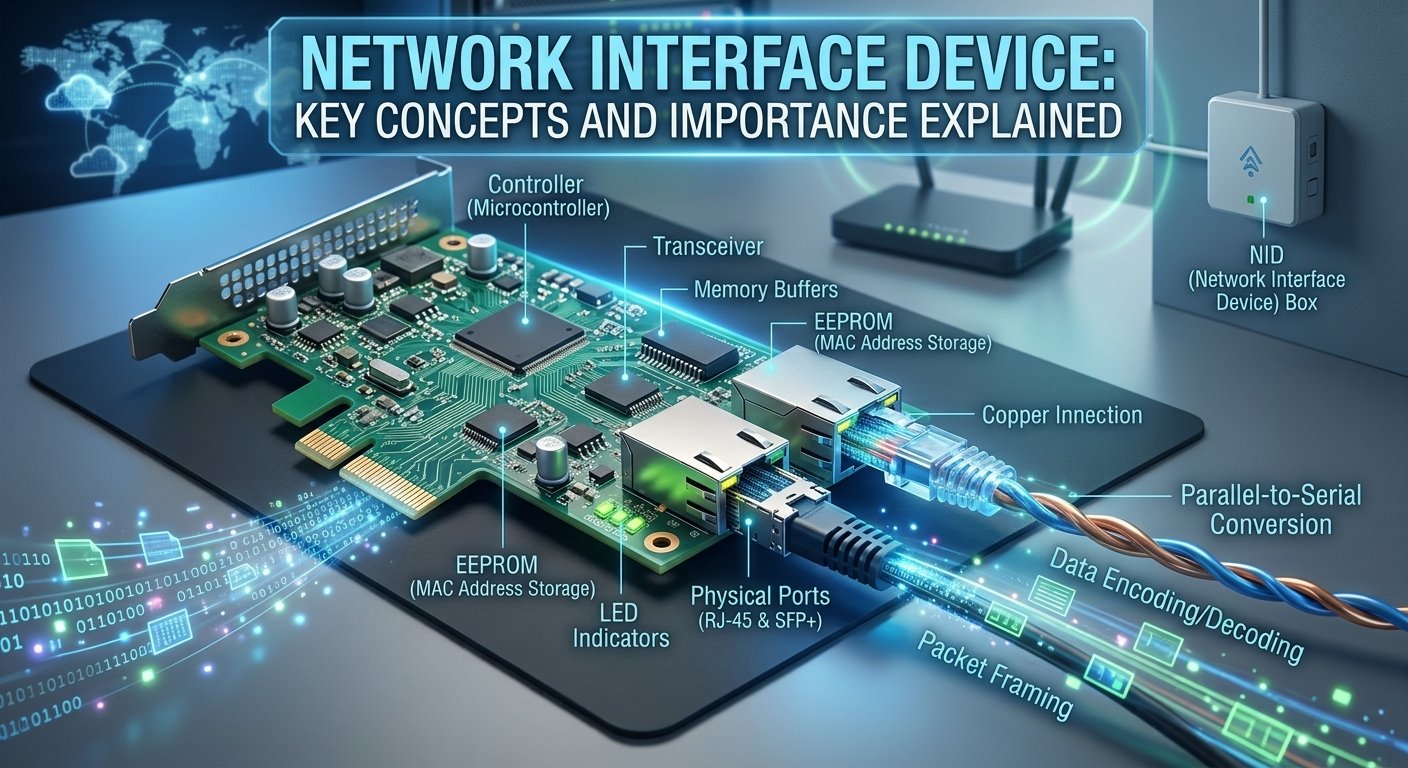
A network interface device is the basic connection between a local computer system and a larger network infrastructure. A special hardware or software device that converts the internal signals of a computer into a signal that can be sent over a different medium, like copper wire, fiber optics, or radio waves. In today’s telecom world, this device is frequently the last point of demarcation between the service provider and the customer’s internal wiring.
The network interface device is a crucial component in both home and business networks, whether it’s built into a motherboard or installed as a separate expansion card, it’s responsible for ensuring reliable communication, handling data packets, and maintaining seamless connectivity.
How to Define a Network Interface
A network interface can be defined as a point of interconnection between a computer and a private or public network. It serves as a gateway that controls the flow of data in and out, making sure that all the data reaches its intended destination. The term is typically used to describe physical hardware, but it can also be used to describe software-defined interfaces that enable virtual machines to interact in a cloud environment. Essentially, what is network interface device logic boils down to its role as a translator and traffic controller.
The definition also applies to the logical identification of the connection point. Each network interface device has a unique hardware address, called the Media Access Control address, that ensures that data is sent to the right physical machine. Research by the IEEE has shown that the adoption of such standards, such as 802.3, has been the main reason for the growth of the internet around the world. These interfaces ensure that data is handled in a uniform manner, enabling different systems to communicate without compatibility issues.
The Other functions of Network Interface Card (NIC)
-
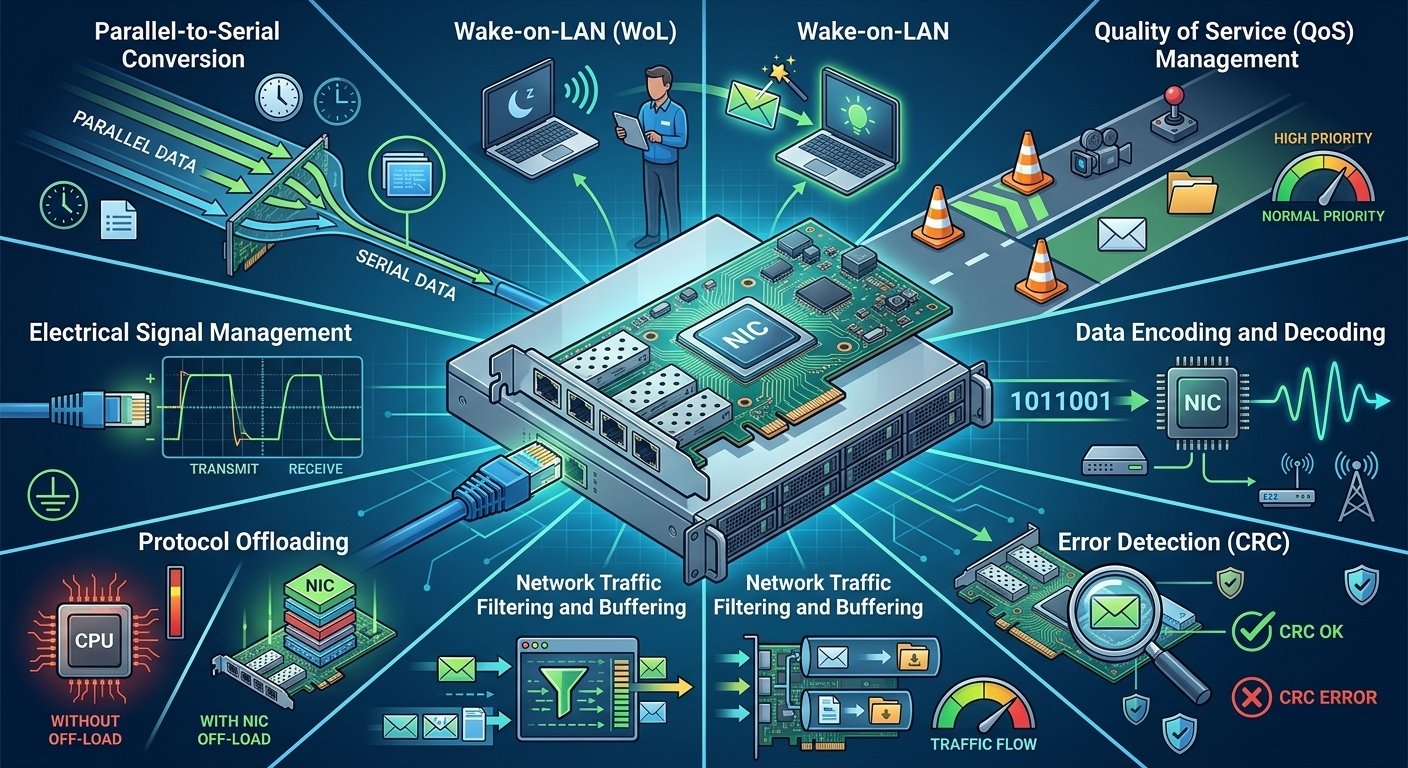
Parallel-to-Serial Conversion: Transforms high-speed data from the computer’s internal bus (parallel format) into serial format for sending over network cables, maintaining data integrity and synchronization over long distances.
-
Wake-on-LAN (WoL): Remotely powers on a computer using a network message, making it easier to manage large-scale office environments.
-
Quality of Service (QoS) Management: Prioritizes time-sensitive traffic such as video conferencing and online gaming over less critical data, such as email downloads, to ensure a smooth user experience.
-
Data Encoding and Decoding: Converts digital data into the signals needed for transmission and receives signals and converts them back into digital data that the computer can understand.
-
Error Detection: Implements Cyclic Redundancy Check (CRC) to detect and correct data corruption that can happen during transmission.
-
Network Traffic Filtering and Buffering: Controls the incoming and outgoing data packets, discards unwanted packets and buffers to avoid data loss during high traffic.
-
Protocol Offloading: Offloads complex network processing functions to the card to free up CPU cycles, thus alleviating the load on the computer’s main processor.
-
Electrical Signal Management: Manages the physical transmission of electrical signals for wired connections, ensuring they are transmitted with the proper voltage and timing for reliable communication.
Various Uses of the Interface in Networking
| Sector / Environment | Device Examples | Primary Function | Key Benefits |
| Home / Residential | Verizon NID, AT&T NID | Connects residence to the global internet backbone. | Entry point for high-speed data; allows multiple users to share a connection via a router. |
| Industrial / Enterprise | Phone network interface box | Separates internal PBX systems from the public telephone network. | Creates secure network segments; allows for quick isolation of problems for maintenance. |
| Specialized (Trading / Research) | Ultra-low latency interfaces | Moves massive amounts of data in microseconds. | High-speed data transfer with minimal delay. |
How Does a Network Interface Card (NIC) Work?
When the computer’s operating system sends data to be transmitted, the operation of a NIC starts. The card converts these digital bits into frames, and adds header information such as the source and destination MAC addresses. When the frame is ready, the NIC transforms the digital data into electrical pulses, light signals or radio waves. The conversion process is controlled by strict timing rules so that the receiving device can correctly interpret the signal.
The process is reversed when receiving data. The NIC receives the signals on the transmission medium and stores the frames that are destined for its particular MAC address. It checks the data for integrity, ensuring that it has not been corrupted in transit. When the data is correct, the NIC removes the networking headers and sends the raw data to the computer’s CPU for processing. In a typical network interface device, this process of encapsulating and decapsulating occurs thousands of times per second.
The essential parts of a Network Interface Card
-
Controller (Microcontroller)
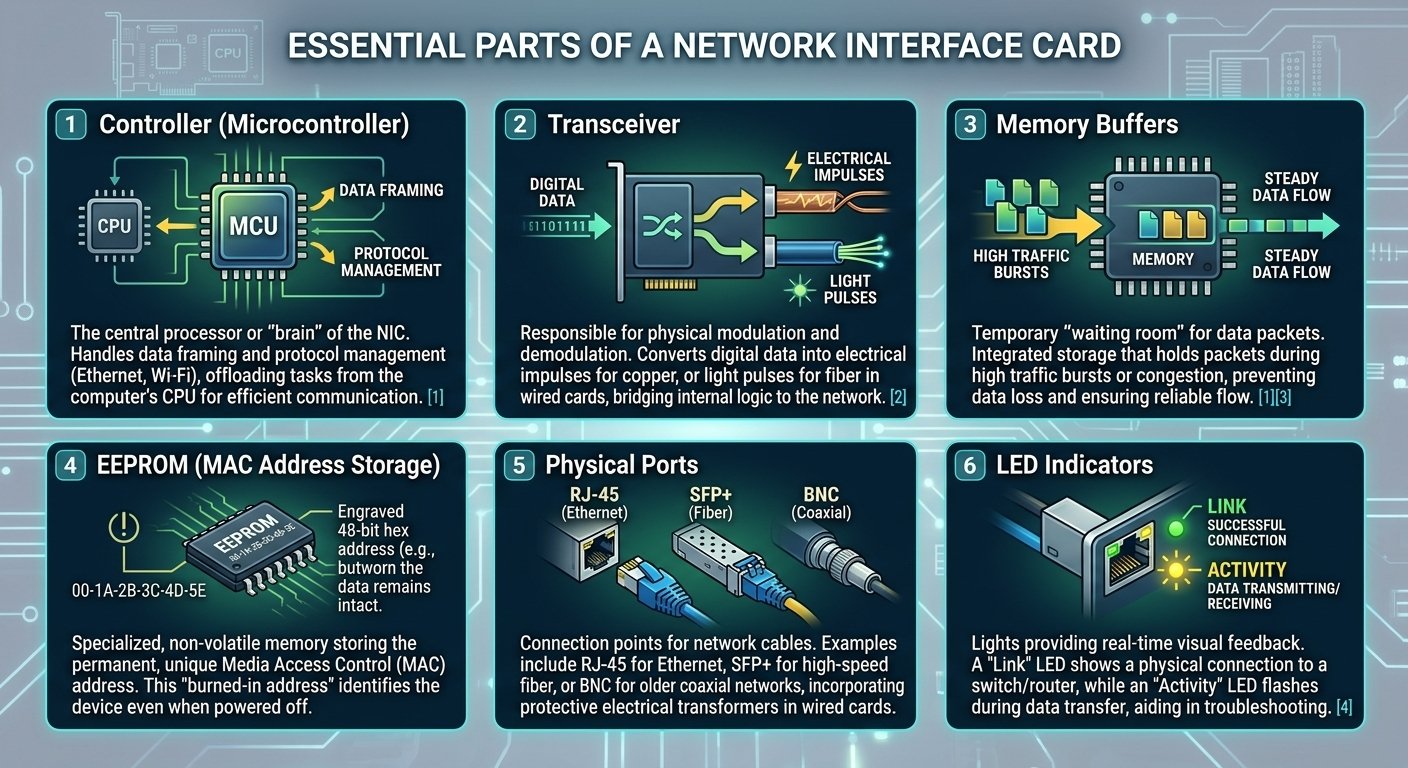
The controller is the main processor or “brain” of the network interface card. It manages the intricate logic involved in data framing and protocol handling, ensuring that data is properly structured to comply with networking protocols such as Ethernet or Wi-Fi. The controller frees up the main CPU from these functions, enabling the system to communicate efficiently without compromising overall performance. -
Transceiver
The transceiver is the physical device that performs modulation and demodulation of the data signals. It translates digital data into electrical signals for copper or light signals for fiber in a wired NIC, or radio frequency signals for wireless in a wireless card. It essentially connects the logic of the card with the physical network medium. -
Memory Buffers
Memory buffers are used to temporarily store data packets while they are being transferred between the computer and the network. These integrated storage areas are essential when there is a sudden surge of traffic or network congestion, when they store packets until the network medium is free. This will help to avoid data loss and keep the data flowing smoothly even under heavy traffic. -
EEPROM (MAC Address Storage)
The EEPROM is a special type of non-volatile memory chip that contains the permanent Media Access Control (MAC) address set by the manufacturer. This unique identifier is also known as the “burned-in address” and is used to distinguish each network interface device in the world from another. The identity is stored in the EEPROM, so it doesn’t change when the device is turned off. -
Physical Ports
Physical ports are the physical location where network cables connect to the card. They can come with RJ-45 connectors for regular Ethernet, SFP+ connectors for high-speed fiber optics, or BNC connectors for older coaxial networks, depending on the application. These ports are intended to accommodate the physical connectors and in wired cards, they are typically used in conjunction with electrical transformers to shield the internal circuits. -
LED Indicators
LED indicators are small lights placed next to the physical ports that give real-time visual feedback of the card’s status. A “Link” LED will be solid when the device is physically connected to a switch or router, and will flash when data is being sent or received.A “Link” LED will be solid when the device is physically connected to a switch or router, and will flash when data is being sent or received. These lights are vital for quick and easy troubleshooting of connectivity problems at a single glance.
Methods Used by a NIC to Transmit Data
A NIC uses multiple methods of communication to facilitate efficient communication in various network environments. One of the most popular is Half-Duplex transmission, which means that a device can either transmit or receive data, but not both simultaneously. This was typical of older hub-based networks, but has been superseded by Full-Duplex transmission. Full-Duplex mode allows the network interface device to transmit and receive data at the same time, thereby doubling the maximum bandwidth of the connection.
Collision detection and avoidance is another important technique. The NIC in Ethernet networks employs a protocol called CSMA/CD to listen to the cable before sending data. When two devices transmit data simultaneously, a collision occurs. The NIC sees this, halts transmission, and waits for a random amount of time before attempting again. Wireless interfaces employ a similar avoidance method called CSMA/CA to avoid overlapping signals in the airwaves.
Classification of Network Interfaces
Network interfaces are generally categorized according to the medium they use and the speed at which they operate. In stationary environments, the most common interfaces are wired, which are typically copper or fiber optic. They are classified according to their maximum speed, for example 10/100/1000 Mbps for standard Ethernet. Wireless interfaces, on the other hand, are classified by their IEEE standards, such as 802.11ac or 802.11ax (Wi-Fi 6), which determine their range and data capacity.
The other type of classification is the physical location of the device. Companies such as Verizon or AT&T may provide an external network interface device box, while internal interfaces are those found within user devices. Knowing what is a network interface device classification can assist you in picking the correct hardware for your networking requirements, from a small home office to a worldwide data center.
What are the Different Types of Network Interfaces?
| Interface Type | Protocol / Standard | Transmission Medium | Key Features & Use Cases |
| Ethernet Interface | IEEE 802.3 | Twisted-pair copper (RJ-45) or Fiber-optic (SFP) | The most ubiquitous interface; features auto-negotiation, plug-and-play functionality, and is the backbone of most LANs. |
| Wireless Interface | IEEE 802.11 (Wi-Fi 6/6E) | Radio Waves (RF) | Provides mobility for laptops and IoT; uses MIMO technology and antennas; requires encryption like WPA3 for security. |
| Virtual Interface | Software-defined (Hypervisor) | Emulated (Software-based) | Allows one physical card to support multiple virtual machines; essential for cloud computing and Software-Defined Networking (SDN). |
| Fiber NID | Optical Standards | Optical Fiber Cables | Designed to handle immense bandwidth for gigabit internet; becoming the standard for modern high-speed home and business connections. |
| InfiniBand | Specialized High-Speed | High-bandwidth interconnects | Used specifically in supercomputing clusters where extremely high bandwidth and low latency are required. |
| Cellular Modem | 4G LTE / 5G | Radio waves to cell towers | Acts as the interface for mobile devices to access cellular networks; optimized for long-distance wireless communication. |
| Telephone NID | Analog/Digital Telecom | Copper phone lines | An older standard used to connect analog voice lines to digital networks; primarily found in legacy telecommunications systems. |
Fundamentals of Network Interface Configuration and Management
Setting up network interfaces is an essential process for maintaining connectivity, security, and performance in various operating systems. Administrators manage IP addresses, subnet masks, and gateways in Windows using the Network and Sharing Center or PowerShell, typically using DHCP to automate this process or manually configuring it for static devices such as servers. Linux uses command line utilities such as the ip utility and configuration files (e.g. Netplan) to disable, modify and re-enable interfaces.
IP assignment is a key part of this process, which assigns a logical address to a device on a network using static assignment or dynamic DHCP assignment; modern systems may use a “dual-stack” approach to support both IPv4 and IPv6. Also, the loopback interface (127.0.0.1) is a vital software-defined communication and troubleshooting tool that enables systems to test network applications without relying on external hardware. When these areas are managed properly, there is seamless communication throughout the network hierarchy.
How do these Network Interfaces cooperate with the different layers of an OSI model?
| OSI Layer / Component | Role of the Network Interface (NIC) | Key Functions & Mechanisms |
| Layer 1: Physical Layer | Hardware Transmission | • Manages physical hardware (cables, fiber optics, wireless signals).
• Converts digital data into electrical, light, or radio signals for transmission. |
| Layer 2: Data Link Layer | Node-to-Node Transfer | • Framing: Wraps data into Ethernet frames.
• MAC Addressing: Uses the hardware address to identify the source and destination. • Error Detection: Adds bits to check for data corruption; discards or requests retransmission of bad data. • Switching: Provides the headers used by switches to direct data to specific physical ports. |
| Layer 3: Network Layer | Routing & Interfacing | • Encapsulation: Takes IP packets from the OS and wraps them into Link Layer frames.
• Address Resolution: Uses ARP (Address Resolution Protocol) to link IP addresses to physical MAC addresses. • Handoff: Strips frames from incoming data and passes the IP packet up to the Operating System. |
| MAC Address (Hardware Level) | Unique Identification | • Permanent ID: A 48-bit hexadecimal identifier (e.g., 00:1A:2B:3C:4D:5E) burned into the device.
• Uniqueness: Combines a manufacturer ID and a unique serial number to ensure no two devices on a network are the same. • Local Delivery: Acts as the final destination address for data moving through physical equipment. |
| Application Layer (Top Layers) | Abstraction | • Provides a stable platform so developers can write software (like email clients) without needing to know the physical medium (fiber vs. Wi-Fi). |
Final Thoughts
The network interface device is still one of the most important but neglected parts of today’s technology. Whether they’re in the gray NID box on the side of a house or the virtual interfaces that power global cloud servers, these devices enable the translation between raw data and physical signals. Knowing what they do, from the physical layer all the way up to the intricacies of the OSI model, gives us a better idea of how our interwoven world remains online. The network interface will continue to grow in sophistication as fiber optics and 5G continue to evolve, and will be the next generation of digital communication.
Frequently Asked Questions (FAQs)
-
What is a network interface device and why is it needed?
A network interface device is a hardware or software device used to connect a computer to a network. It is required because it converts information stored in a computer into signals that can be sent through wires or air. If a computer didn’t have this device, it would be unable to communicate with routers, other computers, or the internet.
-
How does a network interface identifier work?
The identifier, or MAC address, is a unique hardware name for each network card that works by doing just that. This identifier is used when data is sent over a local network to make sure that the data is sent to the right physical device. It is similar to a permanent address for the hardware.
-
What is the difference between a physical and virtual network interface?
A physical network interface is a physical component of a computer system, like an Ethernet card or a Wi-Fi chip. A virtual network interface is a software simulated version that is used in virtualization and cloud computing. The virtual one is used to send data between virtual machines in a server, while the physical one is used to send actual electrical signals.
-
Where does the network interface fit in the OSI model?
The network interface is mainly used at the Physical Layer (Layer 1) and the Data Link Layer (Layer 2). It controls the physical attachment to the network medium and frames data and hardware addresses. It is the basis for the higher level protocols such as IP and TCP.
-
How are network interfaces involved in IP addressing?
Network interfaces are the physical or logical points to which IP addresses are assigned. The interface’s MAC address is permanent, but the IP address is a logical label assigned to the interface to enable it to be located on a larger network. The interface controls the process of encapsulating IP packets into frames for sending.
-
Which protocols do network interfaces interact with most?
Network interfaces are heavily involved with Ethernet (802.3) and Wi-Fi (802.11) at the lower levels. They also communicate with ARP to resolve hardware addresses and communicate with TCP/IP to ensure that data packets are properly formatted for the network they are crossing.
-
What are some common examples of network interfaces?
These include Ethernet NICs in desktop PCs, Wi-Fi adapters in smartphones, and fiber-optic SFP modules in high-speed servers. The gray box on the exterior of a house, commonly referred to as a telephone nid or fiber nid, is another common example in telecommunications.
-
How can I view or configure network interfaces on my computer?
In Windows, you can use the Command Prompt and type ipconfig /all or go to the Network Connections menu in the Control Panel. On Linux, the command ip addr or ifconfig is used to see active interfaces. These tools can be used to monitor status, switch IP addresses, and troubleshoot connectivity problems.
-
What is the role of a NID in a telephone or fiber network?
In such networks, the NID is used to separate the service provider’s lines from the customer’s internal wiring. It shields the home network from electrical surges and offers a straightforward location for a technician to test the signal to see if the issue is inside or outside the house.