
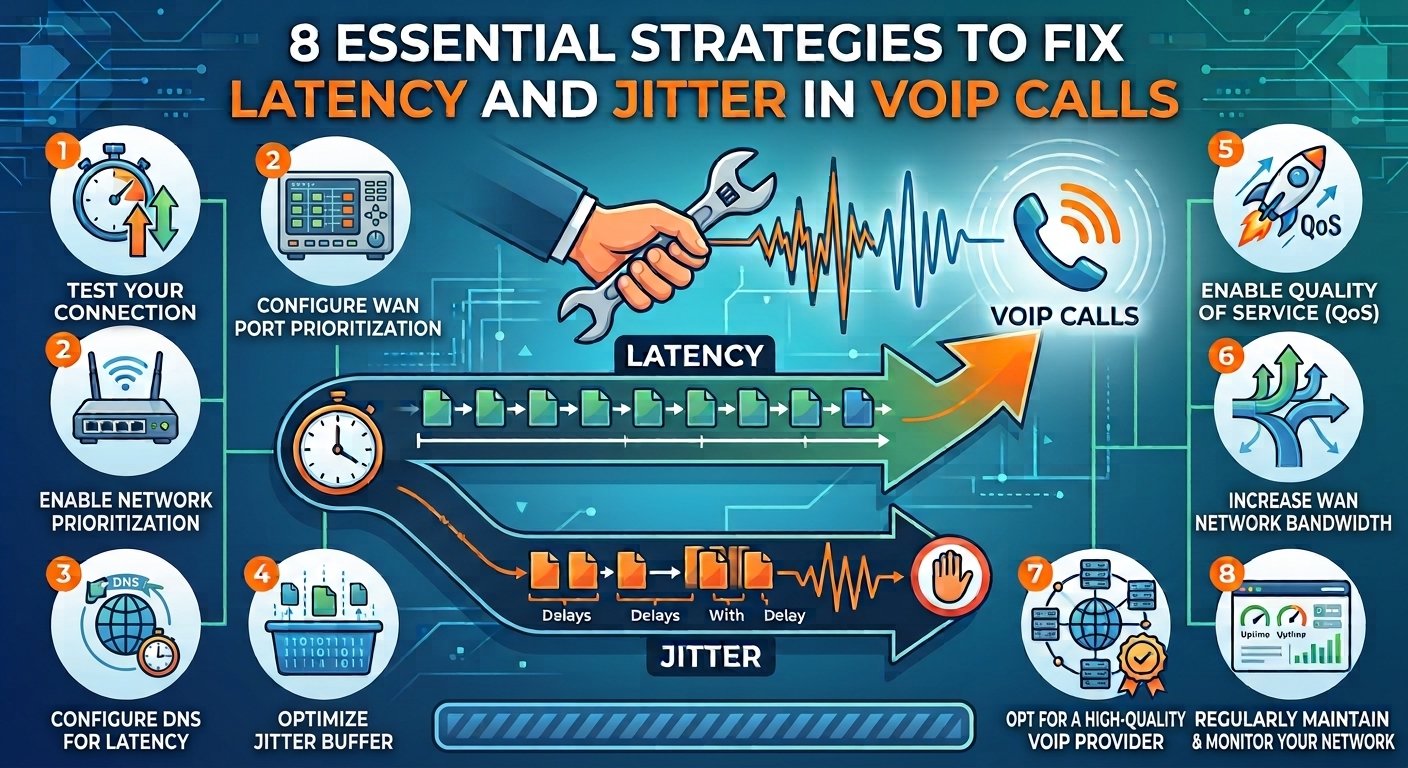
Latency and Jitter in VoIP Calls are the two most common technical hurdles that disrupt digital communication and business productivity. Latency is the total duration required for a data packet to travel from the sender to the receiver, appearing as a lag or delay during a conversation. Jitter is the variation in that delay, causing packets to arrive at irregular intervals rather than a steady stream.
When these metrics exceed acceptable thresholds, users experience choppy audio, robotic voices, and dropped calls. Managing these factors through Quality of Service settings and wired connections ensures high-definition voice clarity and seamless real-time interaction.
What is Latency and Jitter in VoIP Calls?
Latency and Jitter in VoIP Calls represent the technical foundation of how voice data travels across the internet. Latency is the fixed delay that occurs as your voice is converted into digital packets and sent across various routers to the destination. While some delay is inevitable in any global network, excessive lag makes it difficult for participants to have a natural conversation, often leading to people accidentally talking over one another. This metric is the heartbeat of your connection speed, determining how “real-time” your communication actually feels to both parties involved.
When you examine what is voip jitter specifically, it helps to think of it as the stutter or inconsistency of that digital journey. High levels of jitter in voip mean that the receiving device receives fragments of the conversation in unpredictable bursts rather than a continuous flow. Because voice communication is a time-sensitive application, the receiving software cannot wait too long for late-arriving packets. If the variation is too high, the system simply discards the delayed information, which is why you hear gaps in words or distorted audio during a business call.
Why Does Network Jitter Matter?
Stable network environments are essential for effective VoIP communication because, unlike video streaming, real-time voice calls require immediate delivery and cannot tolerate the delays caused by large buffers. High jitter disrupts the natural flow of conversation and significantly lowers user satisfaction; research indicates that even a small increase in packet variation or as little as 0.3% packet loss can lead to a 25% drop in satisfaction scores.
Furthermore, studies establish that once jitter exceeds a 30ms threshold or latency reaches 150ms, the Mean Opinion Score (MOS) of call quality plummets, making professional interactions difficult and frustrating. Consequently, organizations must prioritize network optimization and monitoring to address the underlying hardware issues or congestion that these performance metrics signal, ensuring the reliability of their cloud-based phone systems.
| Metric | Target Goal | Impact of Poor Performance |
| Latency | Under 150ms | Delayed responses, talking over each other |
| Jitter | Under 30ms | Choppy audio, robotic voice, distorted sound |
| Packet Loss | Under 1% | Missing words, dropped calls, audio gaps |
Revisiting IP Network Fundamentals
To solve issues with Latency and Jitter in VoIP Calls, one must understand how data moves through an IP network. Digital voice communication does not travel as a single continuous stream but is broken down into small units known as packets. These packets are handled by various protocols that determine how quickly and reliably they reach their destination.
1. Data packets
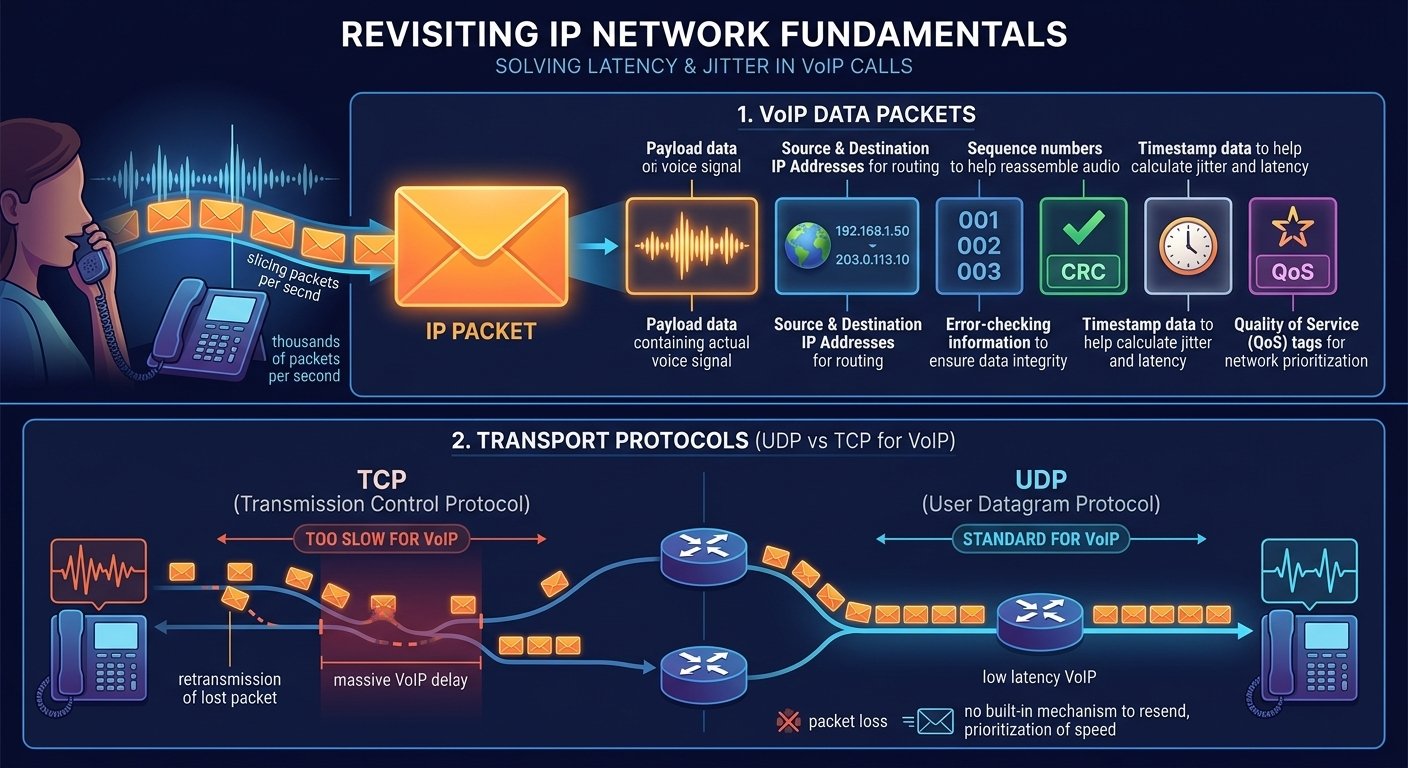
Data packets function as the small envelopes that carry your voice across the web. Each packet is small enough to navigate the complex pathways of the internet without causing massive congestion. When you speak into a VoIP phone, your voice is sliced into thousands of these packets every second, each carrying a tiny fragment of the overall conversation.
Data packets contain the following:
Source and destination IP addresses for routing
Sequence numbers to help reassemble the audio
Payload data containing the actual voice signal
Error-checking information to ensure data integrity
Timestamp data to help calculate jitter and latency
2. Transport protocols
Transport protocols are the rules that govern how these packets are sent. VoIP primarily uses User Datagram Protocol because it is faster and does not require the constant “handshaking” that slows down other methods. This speed is essential for maintaining low latency voip but comes with the trade-off that there is no built-in mechanism to resend packets if they arrive out of order.
The choice of protocol directly affects the voip latency and the overall stability of the call. While Transmission Control Protocol is excellent for web browsing because it ensures every bit of data is perfect, its tendency to resend lost packets creates massive voip delay. Therefore, UDP remains the standard for voice applications where speed is more important than 100% packet perfection.
What Causes Network Jitter?
Identifying the source of network instability is the first step toward a solution. Many factors can contribute to a high voip jitter test result, ranging from your local hardware to the very cables running through your building. Most issues are related to how the network manages traffic during peak usage times.
Cause #1: Network congestion
Network congestion occurs when the volume of data being sent across a connection exceeds its capacity. This is common in offices where multiple people are streaming video, downloading large files, and making VoIP calls simultaneously. When the router becomes overwhelmed, it places packets in a queue, leading to increased latency in voip and inconsistent delivery times.
Cause #2: Network interference and poor network systems
Old or faulty hardware can significantly increase the jitter for voip. Routers that are not designed for high-throughput voice traffic may struggle to process packets quickly enough. Additionally, electromagnetic interference from other electronic devices can corrupt data packets, forcing the network to work harder and causing fluctuations in the transmission speed.
Cause #3: Wireless signal quality degradation
Using Wi-Fi for voice calls is a frequent cause of what is voip jitter issues. Wireless signals are susceptible to interference from walls, furniture, and other wireless networks. As the signal strength fluctuates, the time it takes for packets to reach the router varies wildly, creating a high jitter score that ruins call clarity.
Cause #4: Packet prioritization, QoS, and network configuration
A lack of proper network configuration can lead to “fairness” issues where a large email download is treated with the same priority as a voice call. Without Quality of Service settings, your voice packets have to wait in line behind less urgent data. This lack of prioritization is a leading reason why your network is causing poor call quality during busy hours.
How Jitter Affects VoIP Call Quality
The impact of jitter on a conversation is immediate and frustrating. Because VoIP relies on a steady stream of data, any variation in packet arrival times forces the software to make a choice: wait for the slow packets or move on without them. Neither option is ideal, but understanding these effects helps in diagnosing voip delay problems.
What Does VoIP Jitter Sound Like?
When jitter in voip becomes excessive, the audio usually becomes “choppy.” You might hear bits of words missing, or the person on the other end may sound like a robot. In severe cases, the audio may speed up and slow down as the system tries to catch up with the delayed packets, a phenomenon often referred to as the “concertina effect.”
What is an acceptable jitter?
According to industry standards set by major providers like Cisco, the acceptable jitter for voip is generally anything under 30 milliseconds. If your jitter exceeds this threshold, the human ear begins to notice the distortion. For the best experience, a voip acceptable jitter level should ideally stay below 20ms to ensure that the conversation feels fluid and natural.
Research by the International Telecommunication Union (ITU) suggests that while humans can tolerate some delay, a one-way latency for voip exceeding 150ms starts to interfere with the natural rhythm of conversation. Keeping both latency and jitter within these bounds is essential for professional environments.
How to Measure Network Jitter
To fix a problem, you must first quantify it. Measuring your network performance helps you determine if the issue is with your local setup or your internet service provider. Several tools are available to help you perform a comprehensive voip jitter test and check your latency voip levels.
1. Online speed tests
The easiest way to check your connection is through browser-based speed tests. Many of these tools now include metrics for jitter and latency alongside traditional download and upload speeds. These tests provide a quick snapshot of your current network health and can help identify if you are meeting the voip latency requirements for your specific service.
2. Terminal-based ping jitter test
For a more accurate and technical measurement, you can use the command prompt or terminal on your computer. By running a ping test to a reliable server, such as Google’s DNS, you can see the individual travel times for a series of packets.
Open your terminal or command prompt.
Type “ping -n 20 8.8.8.8” (Windows) or “ping -c 20 8.8.8.8” (Mac/Linux).
Look at the “Average” and “Standard Deviation” (mdev) to see your jitter.
3. Advanced network monitoring tools
Enterprise environments often require more robust solutions that monitor the network 24/7. These tools can track maximum latency for voip and provide historical data on when jitter spikes occur. This information is invaluable for identifying patterns, such as network congestion that happens every day at a specific time, allowing for more targeted troubleshooting.
How to Fix Jitter (Troubleshooting Tips)
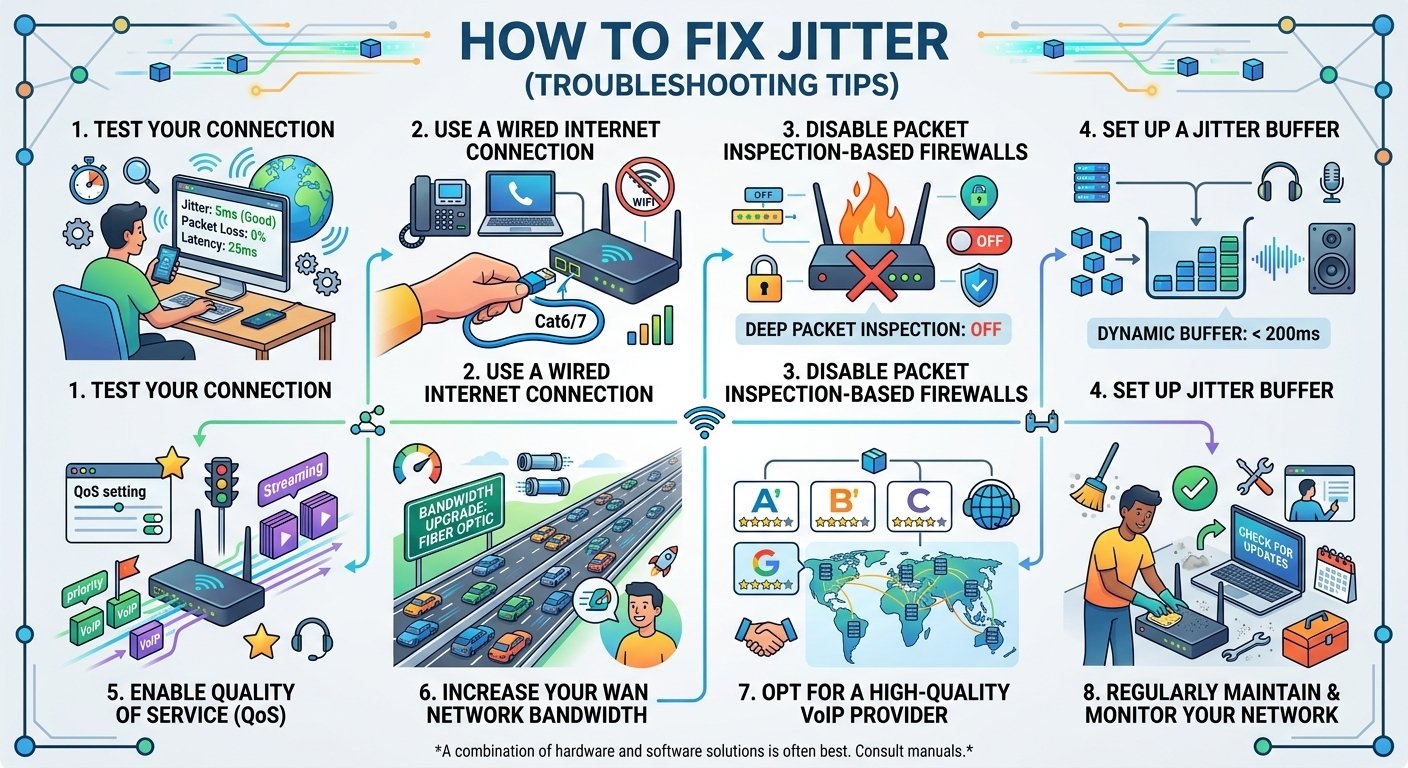
Once you have identified that you have a problem, you can take several steps to improve your connection. Fixing jitter often involves a combination of hardware upgrades and software configurations. Here are the most effective ways to how to reduce net jitter and ensure your calls remain clear.
1. Test your connection for jitter issues
Before making big changes, consistently test your network at different times of the day. This helps you understand if the problem is constant or related to specific activities. Use various tools to find the maximum jitter for voip that your network experiences during peak hours. Knowing the baseline helps you measure the success of your future adjustments.
2. Use a wired internet connection
The single most effective way to how to fix internet jitter is to switch from Wi-Fi to an Ethernet cable. Wired connections are not subject to the same interference and signal drops as wireless ones. Optimize your VoIP connection by plugging devices directly into the router using high-quality, undamaged Cat6 or Cat7 Ethernet cables and ensuring all hardware ports are clean and functional.
3. Check Firewall and Security Appliance Performance
Firewalls and security appliances can affect VoIP performance if they are overloaded, incorrectly configured or unable to process traffic at the required rate. Check CPU utilization, firmware, traffic policies and VoIP-related configuration. If security inspection appears to be contributing to latency, consult your network administrator or equipment vendor rather than disabling security controls broadly.
4. Set up a jitter buffer
A jitter buffer voip is a specialized tool that collects incoming packets and holds them for a very short period before sending them to the audio processor. This “waiting room” allows late-arriving packets to catch up so they can be played in the correct order.
Access your VoIP phone or software settings.
Locate the “Jitter Buffer” or “Buffer Size” option.
Set the buffer to a dynamic mode if available.
Keep the buffer size under 200ms to avoid creating too much voip delay.
5. Enable Quality of Service (QoS)
Quality of Service is a router setting that tells your network to prioritize voice traffic over everything else. When QoS is active, your voice packets “jump the line” ahead of Netflix streams or file downloads. This is a critical step in meeting voip latency requirements in a shared household or office. Most modern routers have a dedicated section in their settings to enable this feature for specific devices or traffic types.
6. Increase your WAN network bandwidth
If your network is constantly congested, you may simply need more “space” for your data. Increasing your bandwidth doesn’t necessarily speed up individual packets, but it prevents the “traffic jams” that cause high jitter for voip. Upgrading to a fiber-optic connection is often the best long-term solution for businesses that require low latency voip for multiple simultaneous users.
7. Opt for a high-quality VoIP provider
Not all VoIP services are created equal. Some providers have better infrastructure and more localized servers, which reduces the distance packets have to travel. When looking for a provider, ask about their acceptable latency for voip standards and if they offer tools to help you monitor your connection. A good provider will have multiple data centers to ensure that your voip jitter remains low regardless of your location.
8. Regularly maintain and monitor your network
Networking hardware requires regular attention to perform at its best. Dusting your equipment to prevent overheating and checking for firmware updates can prevent unexpected spikes in what causes jitter. Update your router’s firmware every few months, and Restart your modem and router weekly to clear the cache. Also, keeo inspecting cables for kinks or fraying that could cause interference with monitoring the number of devices connected to your network.
Read More: What Is SIP Trunking? Working and Benefits
Final words: Easy and Reliable VoIP Calls Ahead
Managing Latency and Jitter in VoIP Calls is an ongoing process that requires attention to both hardware and network settings. By implementing Quality of Service, switching to wired connections, and utilizing a jitter buffer voip, you can virtually eliminate the choppiness and delays that plague many internet-based phone systems. Clear communication is the backbone of any successful venture, and a stable network is the foundation upon which that communication is built. With the right tools and a bit of troubleshooting, crystal-clear audio is well within your reach.
FAQs
What is a good jitter score?
A jitter measurement under 30ms is considered excellent for VoIP. Anything above 50ms will cause noticeable performance issues, such as choppy audio and dropped words. For the most professional experience, aim for a score below 20ms.
Is jitter the same as latency?
No. Latency is the total time it takes for data to travel from point A to point B. Jitter is the variation in that travel time. While latency is a constant delay, jitter is an inconsistent delay that causes packets to arrive out of order.
How can I tell if my network is causing poor call quality?
You can identify network-related issues by looking for specific symptoms like robotic voices or audio gaps. If your internet speed is high but your calls are still choppy, perform a jitter test to see if the variation in packet arrival is the culprit.
What is the maximum acceptable jitter for voip?
Most industry experts agree that 30ms is the maximum threshold for high-quality voice communication. Once jitter exceeds this limit, the reassembly of audio packets becomes difficult for the hardware, leading to significant distortion.
Does Wi-Fi affect voip jitter?
Yes, Wi-Fi is one of the most common causes of high jitter due to environmental interference. Walls, other electronic devices, and even distance from the router can cause packets to be delayed inconsistently, resulting in poor call quality.
What does a jitter buffer do for voip calls?
A jitter buffer stores incoming voice packets for a brief moment to ensure they can be played back in the correct sequence. By creating a tiny intentional delay, it smooths out the arrival times of packets that were delayed by network congestion.
Can a slow internet connection cause voip delay?
A slow connection often lacks the bandwidth to handle voice traffic alongside other data, leading to queuing and delays. While VoIP doesn’t require much speed, it does require a “clear path” which is harder to maintain on low-bandwidth connections.
Why do I hear static on voip calls?
Static is often a sign of packet loss or extreme jitter where the audio signal is being interrupted. When the system cannot fill in the gaps left by missing or late packets, it may produce clicking, popping, or static-like sounds.
Is fiber internet better for low latency voip?
Fiber-optic technology generally offers the lowest latency and jitter because it uses light signals rather than electrical ones. It is less susceptible to interference and provides much higher bandwidth, making it the ideal choice for VoIP systems.


