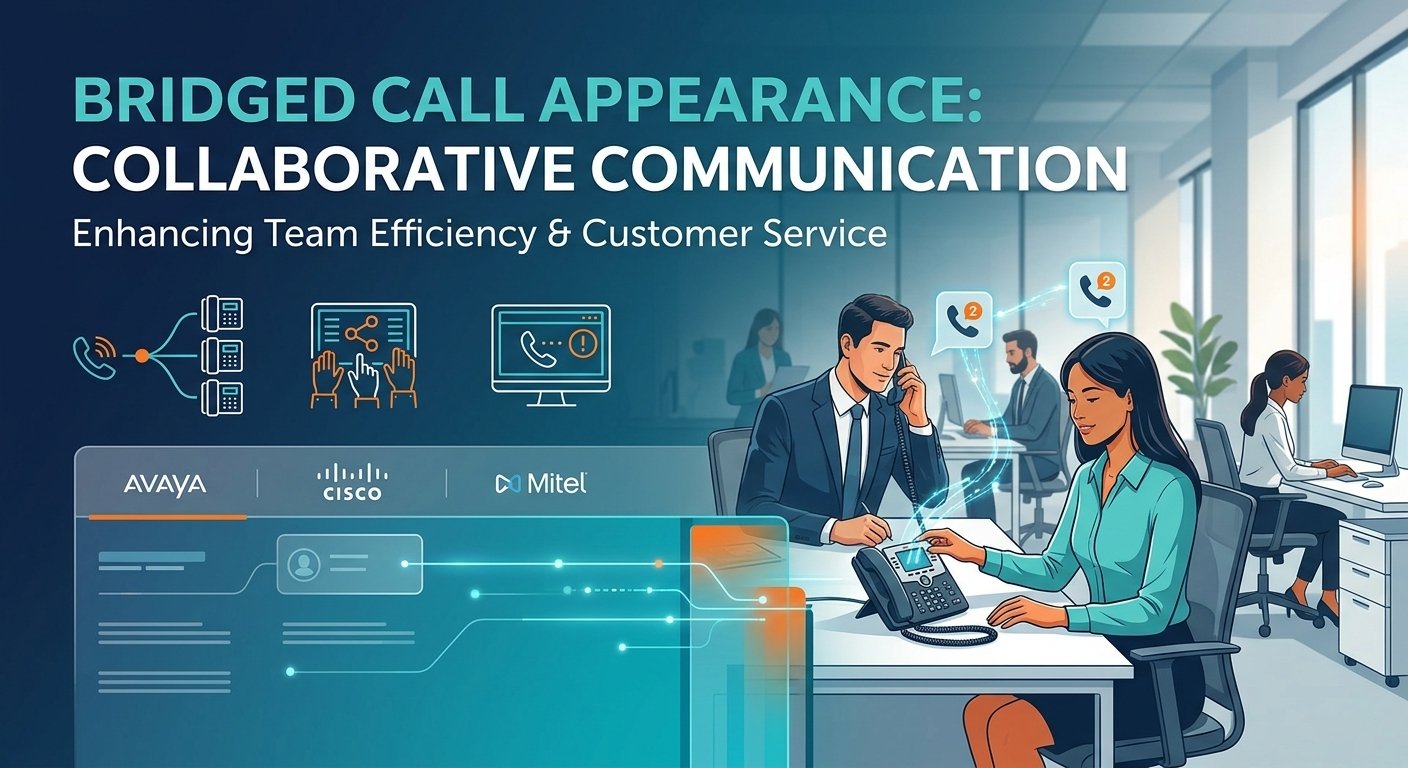
Bridged call appearance is a high-end telephony function that enables a main phone extension to be duplicated on one or more secondary phone extensions. This feature allows several people to see the status of a particular line, accept incoming calls and participate in an ongoing conversation. It is a fundamental aspect of group communication, especially for administrative assistants who share an executive line or sales teams who have a large number of contacts. This system offers real-time visibility and shared control, ensuring that no critical inquiry goes unanswered, which boosts team responsiveness and operational efficiency in professional settings.
The Critical Role of Collaborative Call Handling
Collaborative call handling is a crucial component of efficient communication within any successful organization, and it is essential for keeping the lines of communication open. With a high volume of incoming traffic, it’s important to share the responsibility to avoid bottlenecks and to minimize caller frustration. If multiple team members are able to see the same extension in a bridged call appearance, they can function as a single team. This way, if the main owner of the extension is busy or out of the office, the client’s request is still addressed in a timely manner.
Studies show that 75% of customers think it takes too long to get a live agent’s attention, directly affecting brand loyalty. This can be addressed by using collaborative tools such as a bridging call setup, which helps to distribute the workload. It creates a positive culture for staff to support each other without the need of complicated transfers. This smooth integration not only enhances the efficiency of the internal processes but also conveys a professional and reliable image to external parties.
What is a Bridged Call Appearance?
A bridged call appearance is essentially a virtual extension of one user’s telephone set to another user’s. Bridging is different from simple call forwarding, which is the process of sending a call from one location to another; bridging is the process of establishing a shared environment. If a call comes in to the primary extension, then all the bridged terminals get a call at the same time. The handset can be picked up by any authorized user and used to communicate with the caller, and status indicators on other handsets will indicate that the line is in use.
This functionality is a link between privacy and team access. It enables more complex interactions like “bridging into” an ongoing conversation, useful for training or problem-solving. This is different from shared lines as it preserves the identity of the main extension and provides controlled access to others. It’s a key element for companies that value high-touch customer service and transparency within the company.
How BCA Works Step-by-Step?
A bridged call appearance is based on a complex signaling protocol in a Private Branch Exchange (PBX) or Voice over IP (VoIP) system. If the system receives a signal from the primary station, it checks a database to determine all the secondary stations associated with that extension.
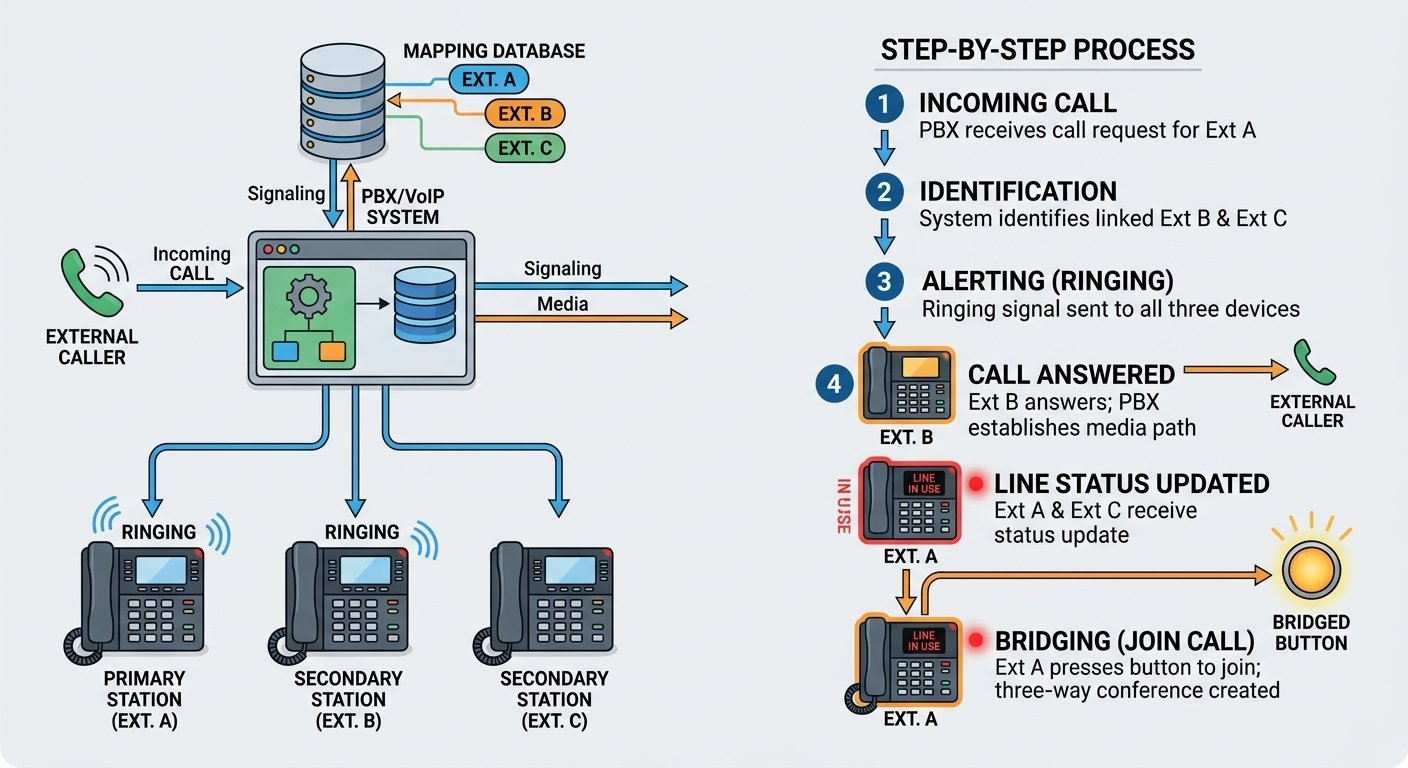
- An external or internal call request is received by the PBX for Extension A.
- The system recognizes that Extension B and Extension C have an “apparent” bridge to Extension A.
- A ring tone is played to all three devices, sometimes with a different visual or audible pattern to make it different from a direct call.
- When Extension B responds, the PBX sets up a media path between the caller and Extension B.
- Extension A and Extension C will be given a “line in use” status update, usually in the form of a steady red light or a particular icon.
- Extension A may dial the bridged number to add the extension to the conference, if configured.
Business Applications and Use Cases: Solving Real-World Problems
In the corporate world, time is often the most valuable resource. The Executive-Assistant relationship is one of the main use cases for a bridged call appearance. The assistants can screen calls, take messages or answer routine questions without the executive ever being interrupted. This delegation of communication enables leadership to concentrate on high level tasks and ensure that key contacts are still being attended to by a knowledgeable member of staff.
According to a study by Salesforce, 70% of customers say connected processes are very important to winning their business.
Another important use is in niche technical support or sales groups. For example, a small group of experts may have a single line for high priority accounts. These teams can implement a bridging call strategy to ensure that the most available expert receives the call, resulting in a seamless experience and higher customer satisfaction and retention.
Platform-Specific Implementation: Avaya, Cisco, and Mitel
Each hardware and software vendor will have their own approach to deploying this feature. The objective is the same, but the terminology and configuration procedures differ among the major industry vendors such as Avaya, Cisco and Mitel. For IT administrators who have to deal with multiple vendors or want to optimize their existing environment, it’s essential to understand these nuances.
-
Avaya IP Office Bridged Call Appearance
Avaya systems use the IP Office Manager or Web Manager to configure the system. A separate button on the user’s telephone interface is needed for each bridged call appearance. The “Primary” and the “Bridged” users need to be specified in the user settings by the administrator. The number of available call paths on the physical handset should be equal to the number of calls expected to be made so that the “Busy” signal is not displayed when the lines are available.
-
Cisco Unified Communications Manager Shared Line Appearance
Cisco takes this capability in what they call Shared Line Appearance (SLA). In the Cisco Unified Communications Manager (CUCM), a single Directory Number (DN) is assigned to multiple devices. This provides a great deal of flexibility, since the system can be set to ring all devices or only a portion of them. Cisco’s solution is very scalable, and can be used by large enterprises with thousands of endpoints that need collaborative access.
-
Mitel MiVoice Office Call Bridging
Mitel has a comprehensive offering of this functionality in its MiVoice Office 250 and Business platforms. The configuration consists of “Secondary Extension Keys” that are associated with a primary station. Mitel offers fine-grained control over the actions of these keys, including the ability to ring them immediately, after a delay, or just to alert the user visually. This is especially helpful in situations where multiple team members are responsible for a single line.
Advanced Troubleshooting: Diagnosing Common BCA Failures
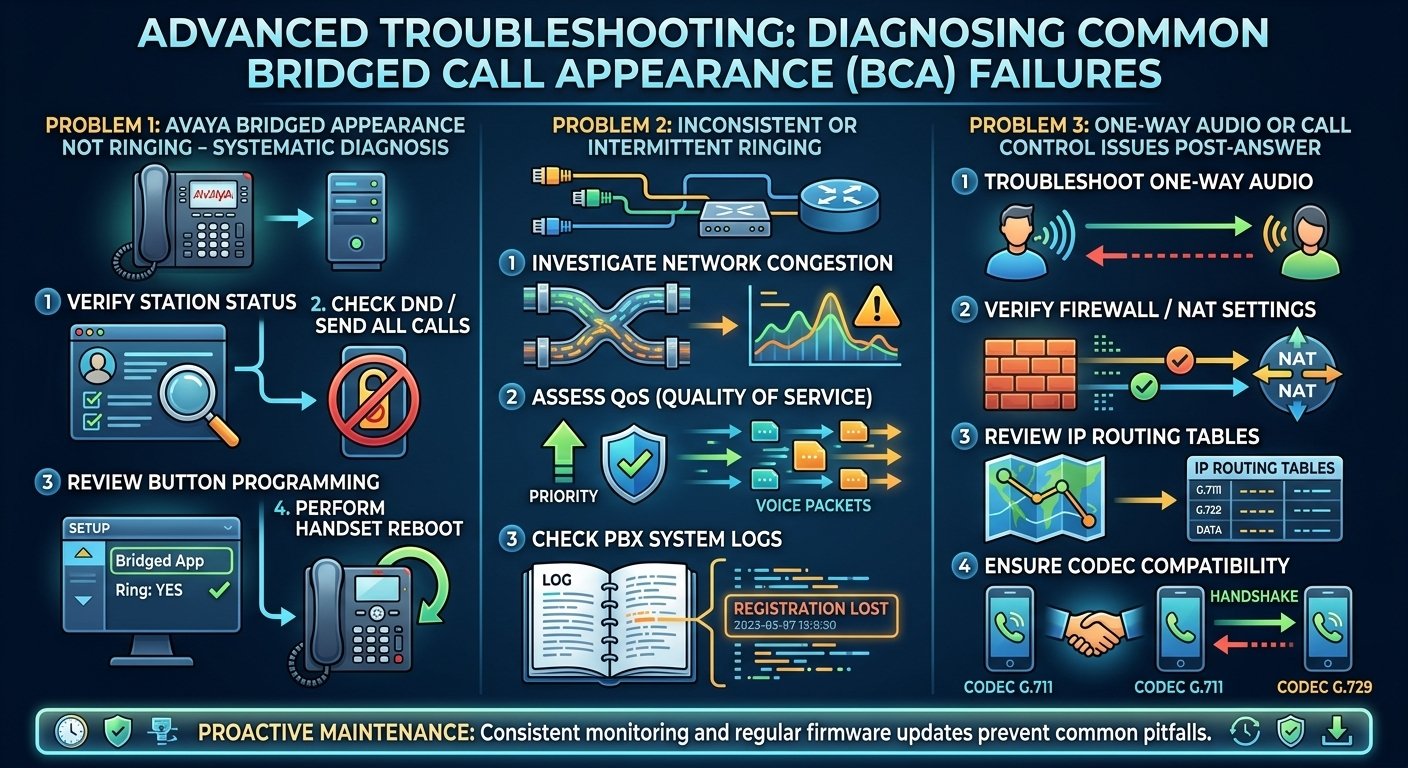
Even the most stable systems can have problems because of configuration problems or network instability. When troubleshooting a bridged call appearance, it is important to take a systematic approach to determine if the issue is with the physical handset, user profile, or network infrastructure. Many common pitfalls can be avoided by monitoring the system and updating the system firmware regularly.
-
Problem 1: “Avaya Bridged Appearance Not Ringing” – A Systematic Diagnosis
The first step is to check the “Status” of the station in the management console, if the bridged line is not ringing. Sometimes, a user may have accidentally set “Do Not Disturb” (DND) or “Send All Calls” to prevent the ringing of bridged lines. Also, make sure that the “Ring” attribute is programmed as “Yes” on the button. A reset of the physical handset may solve localized software bugs that stop the alerting signal from reaching the handset.
-
Problem 2: Inconsistent or Intermittent Ringing
If the performance is inconsistent, it may indicate network congestion or Quality of Service (QoS) problems. When the voice packets are delayed, the phone may not receive the signaling message in time to trigger the ringer. The path between the PBX and endpoint must be checked. Check the system logs for any “Registration Lost” messages, which means that the phone is temporarily disconnected from the server and will not receive incoming calls.
-
Problem 3: One-Way Audio or Call Control Issues Post-Answer
One-way audio is a common VoIP problem that can impact a bridged call appearance. This usually happens when the media stream (RTP) is blocked by a firewall or incorrectly routed through a Network Address Translation (NAT) gateway. If the bridged user can answer the call, but cannot hear the caller, check the IP routing tables. Make sure that the appropriate codecs are enabled on both the primary and secondary devices to enable a smooth audio handshake during the call setup process.
Best Practices for Configuration, Management, and Security
There are best practices to follow when using a bridged call appearance to maximize benefits. The first is to keep the number of bridges in each extension to a reasonable level; too many appearances can make a phone’s interface too cluttered and confusing for the user. Label each button on the handset that is bridged to prevent accidental pickups or interruptions. Security is also a huge concern, so make sure that only authorized individuals are able to bridge to ensure sensitive conversations are protected.
-
Regular Audits: Periodically review who has access to which bridged lines.
-
Labeling Standards: Use consistent naming conventions for all bridged keys.
-
User Training: Educate staff on how to join or drop from a bridged call without disconnecting others.
-
Firmware Updates: Keep all endpoints and PBX software current to benefit from the latest features and security patches.
-
Bandwidth Management: Monitor network usage to ensure that multiple bridged lines do not saturate the available data capacity.
Read More: 846 vs 864 Area Code: A Non-Existent number
Conclusion
A bridged call appearance is a revolutionary change for companies looking to enhance their internal communication and external service levels. Organizations can avoid lost opportunities and create a truly collaborative work environment by enabling multiple users to work with the same extension. The concepts of clear configuration and proactive troubleshooting are the same, regardless of whether you are working with Avaya, Cisco, or Mitel. With the ongoing advancement of communication technology, bridging calls will continue to be a crucial feature for ensuring connectivity and professionalism in the modern business landscape.
Frequently Asked Questions (FAQ)
-
What is the concrete difference between a Bridged Call Appearance and a Call Pickup Group?
A bridged call appearance shows a live view of another extension on your phone and lets you answer or join a call with a single click. A Call Pickup Group, on the other hand, enables you to answer a call that is ringing at another station by dialing a code or pressing a “Pickup” softkey, but it is not as persistent as a Call Pickup Group and does not offer the same visibility or the ability to join an active conversation that is already in progress.
-
Can I bridge a call appearance to an external cell phone number directly?
Typically, a direct bridge to a standard mobile phone number is not supported by the standard BCA features, because the BCA features need special signaling between the PBX and the hardware. But you can get the same effect with mobile apps offered by your VoIP provider (such as Avaya Workplace or Cisco Webex). These apps are software-based endpoints that can be set up to look like a desk phone.
-
What are the system limits for bridged appearances on a single extension?
The limits are usually determined by the specific hardware of the telephone and the capacity of the PBX software. Most modern desk phones have 3 to 10 bridged appearances, and the system software may enable up to 32 or more secondary stations to monitor a single primary line. It is best to consult your specific platform’s technical documentation to find the exact constraints for your model.
-
Why does my bridged line key show as ‘busy’ when I’m not on a call?
The ‘busy’ status on a bridged call appearance key reflects the state of the primary extension, not your individual phone. If the primary user is currently on a call, or if another person with the same bridged appearance has answered a call, the line will appear busy to everyone else. If the line shows busy and no one is actually using it, there may be a “stuck” session in the PBX that requires an administrator to clear the line manually.
-
How does BCA interact with voicemail?
Generally, if a call to a bridged appearance goes unanswered, it will follow the coverage path of the extension. This means the message will be left in the primary user’s voicemail box. Secondary users can often see a message-waiting indicator for the primary extension if their phone is configured to do so, allowing them to know when a message has been left for the shared line.
-
Does answering a bridged call use up a license on the PBX?
In most cases, the bridged appearance itself does not require an additional user license, as it is a feature mapped to an existing station. However, some advanced systems may charge a small fee for the “bridging” feature or require a specific tier of service. You should check with your service provider to ensure your licensing agreement covers the number of bridged lines you intend to deploy.
-
Can I silence the ringer for a bridged line without affecting my main extension?
Yes, most systems allow for “delayed ringing” or “visual only” alerting for bridged appearances. This allows you to see the incoming call on your screen and the flashing light on the button without hearing the audible ring. This is particularly useful for assistants who only need to answer calls if the primary user does not pick up within a certain number of rings.
-
What happens if two people try to answer a bridged call at the exact same time?
The PBX handles these requests in milliseconds. The first person whose “answer” signal reaches the server is connected to the caller. The second person will typically receive an error tone or their phone will simply return to an idle state. In some configurations, the second person might automatically be added to the call as a third party, depending on the “Privacy” settings of the system.
-
Is it possible to prevent someone from joining my call even if they have a bridged appearance?
Yes, most systems include a “Privacy” or “Manual Exclusion” button. When this feature is activated during a call, it prevents any other user with a bridged call appearance from joining the conversation. This is an essential security feature for sensitive discussions where the primary user needs to ensure their communication remains confidential.