Latest News

The Blog

voip blogs
Bandwidth Requirements for VoIP

Bandwidth Requirements for VoIP: A 2026 Guide

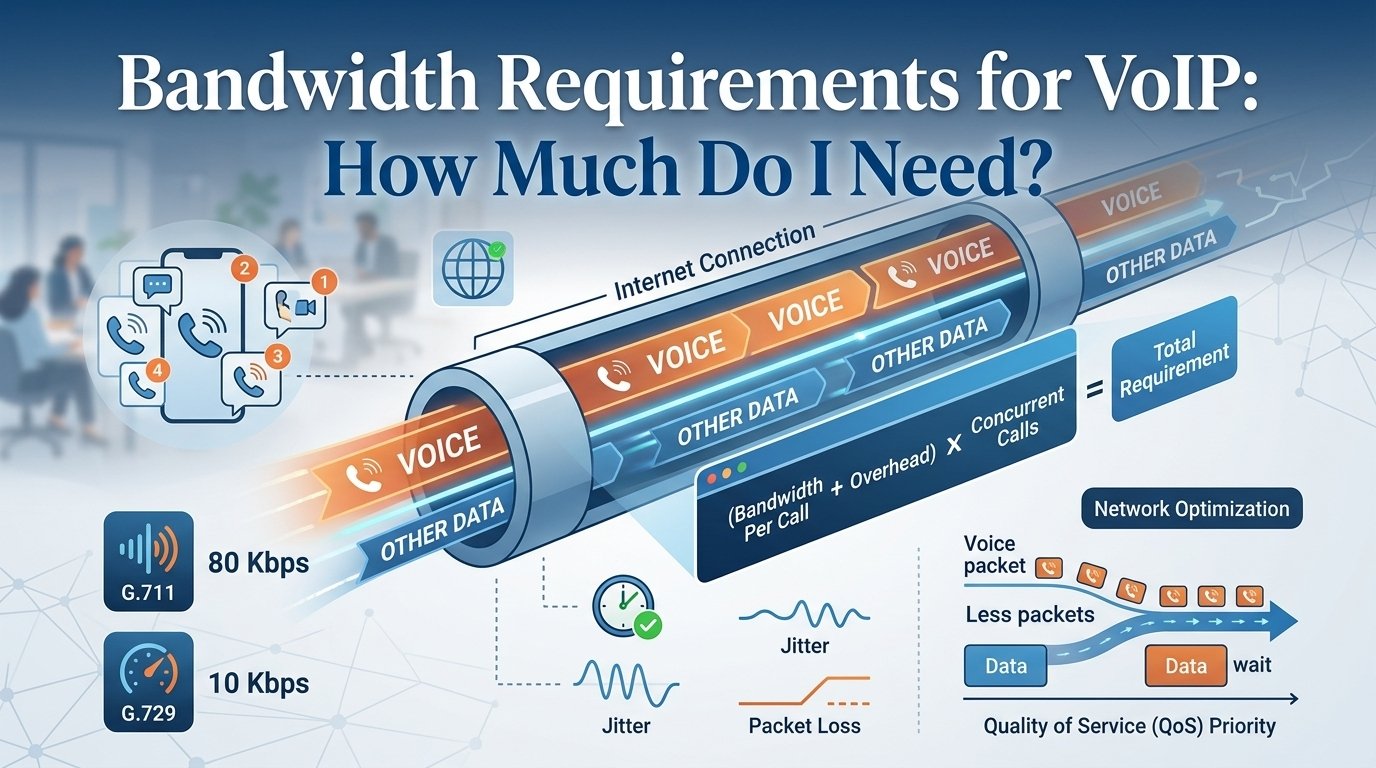
For reliable VoIP calls, plan for roughly 100 Kbps of upload and download bandwidth per simultaneous voice call as a practical baseline. Actual usage depends on the codec, packet size and network overhead. For example, a G.711 call can use about 87 Kbps over Ethernet, while compressed codecs such as G.729 can require considerably less. Bandwidth Requirements for VoIP refer to the amount of data capacity needed on an internet connection to facilitate high-quality voice calls without interruptions. For most businesses, a standard high-definition voice call consumes approximately 85 to 100 Kbps of bandwidth in both upload and download directions. To ensure optimal performance, your network must account for the number of concurrent calls and the specific codec used for data compression. Calculating these needs accurately prevents common issues like jitter, latency, and dropped calls, allowing for a professional communication experience across your entire organizational infrastructure. What Is Bandwidth and How Does VoIP Use It? Bandwidth represents the maximum data capacity of an internet connection, often compared to a water pipe where a wider diameter allows for greater flow. In the context of VoIP, this capacity determines how many simultaneous, high-quality conversations a network can sustain. Because voice communication relies on the real-time transmission of digital packets, any network congestion caused by heavy downloads or video streaming can lead to audio lag and degradation. As the business world shifts toward cloud telephony to reduce costs and support remote work, proper network provisioning has become essential. With the global VoIP market projected to reach $102.5 billion by 2026, the demand for reliable, data-intensive communication is growing rapidly. To maintain high-quality voice and video services, businesses must prioritize their internet infrastructure and ensure their service providers can handle the increasing load required for modern professional growth. Bandwidth Requirements for VoIP : Calculating How Much You Need 1. Identify the Codec Used A codec is a software algorithm that compresses your voice into a digital format for transmission and سپس decompresses it at the other end. Different codecs offer different levels of audio quality and data consumption. For instance, the G.711 codec provides high-quality audio but uses more data, while the G.729 codec is designed for efficiency and consumes much less bandwidth. Knowing which codec your system defaults to is essential for any voip bandwidth calc process. 2. Determine the Bandwidth Per Call Each call consists of the actual voice data plus the “overhead.” Overhead includes the necessary routing information, such as IP and UDP headers, which tell the data packets where to go. While the voice data might only be 64 Kbps, the total bandwidth per call often reaches 80 Kbps or more once the overhead is included. Accurate voip stats show that neglecting this overhead is a common mistake that leads to underestimated network needs. 3. Estimate the Number of Concurrent Calls You do not necessarily need enough bandwidth for every single employee to be on the phone at the same time, unless that is a common occurrence in your office. Instead, look at your peak usage times. For a call center, the number of concurrent calls might be 90% of the total staff. For a standard administrative office, it might only be 20% to 30%. This estimation is a vital component of any voice over ip bandwidth calculator. 4. Calculate Total Bandwidth Once you have the codec data and the number of simultaneous calls, you can find your total requirement. Use the following table to visualize how these numbers scale as your business grows. This vertical representation shows the difference between the high-quality G.711 and the compressed G.729 options. Metric G.711 Codec G.729 Codec Bandwidth Per Call (Kbps) 80 10 10 Concurrent Calls (Mbps) 0.8 0.1 20 Concurrent Calls (Mbps) 1.6 0.2 50 Concurrent Calls (Mbps) 4.0 0.5 100 Concurrent Calls (Mbps) 8.0 1.0 To work out your VoIP bandwidth requirement, follow this general formula:Total Bandwidth = (Bandwidth Per Call + Overhead) x Number of Concurrent Calls. For example, let’s assume a business uses the G.711 codec and needs to support 20 concurrent calls.Total Bandwidth = 80 Kbps × 20 = 1600 Kbps.This means the business would need 1.6 Mbps of bandwidth for 20 concurrent VoIP calls using the G.711 codec. Using a voip bandwidth calculator helps automate this math, especially when accounting for fluctuating overhead. How Much Bandwidth Does VoIP Require? There is no single answer to how much bandwidth is required because every network environment is unique. A small startup with three employees has vastly different needs than a multinational corporation using megapath voip solutions. Beyond the raw numbers of the calls, you must also consider the “background noise” of your network. Other applications like cloud storage backups, video conferencing, and even automated software updates compete for the same bandwidth voip. To maintain high voip performance, many experts recommend having at least 15% to 20% more bandwidth than your calculated maximum. This buffer accounts for unexpected spikes in traffic or temporary network inefficiencies. If your internet connection is shared between guest Wi-Fi and office operations, your requirements will be even higher. Many businesses choose to implement Quality of Service (QoS) settings on their routers, which ensures that even if the network is busy, voice packets are given the “right of way” over other types of data. How Internet Speed Can Affect Call Quality Latency (Delay) Latency is the measure of time it takes for a data packet to travel from your device to the destination and back. In a voice conversation, high latency manifests as a frustrating delay where both parties end up talking over each other because they don’t realize the other person has started speaking. According to the International Telecommunication Union (ITU), a one-way latency of less than 150 milliseconds is required for a high-quality user experience. If your latency exceeds 300 milliseconds, the conversation becomes virtually impossible to maintain effectively. Jitter Jitter refers to the variation in the time it takes for packets to arrive. Because packets are sent individually, they might take different paths through the internet. If they arrive at irregular intervals, the receiving device has to wait for them, resulting in choppy audio or sounds that seem to speed up and slow down. High levels of jitter are a clear indicator that your voip bandwidth usage is reaching its limit or that there is congestion on your local network that needs to be addressed. Packet Loss Packet loss occurs when data packets are dropped entirely during transmission. In a standard email, this isn’t a problem because the system just asks for the missing part to be sent again. However, in a real-time voice call, there is no time to re-send data. If a packet is lost, a tiny “hole” is left in the audio. This results in clipped words, garbled sentences, and missing information. Excessive packet loss is usually a sign of a failing hardware component or an extremely overloaded internet connection. How To Test Your Internet Speed Before you commit to a new service provider or add more lines to your office, you must perform a voice over ip speed test. This test measures the actual performance of your network under real-world conditions. It provides a baseline that tells you if your current infrastructure can handle the load or if you need to upgrade your hardware. A regular voip bandwidth test should be part of your quarterly IT maintenance routine to ensure that performance has not degraded over time. 1. Prepare the Network Environment To get the most accurate results from a voip bandwidth test, you need to eliminate as many variables as possible. This means running the test during a period of low activity if you want to see the “best case” scenario, or during a peak period to see how the system performs under stress. Close unnecessary applications and tabs, pause all large data transfers, stop high-definition streaming, and disconnect non-essential devices from the network. 2. Choose the Right Device The device you use for the test can significantly impact the results. Testing over a Wi-Fi connection is rarely accurate for professional planning because wireless signals are subject to interference from walls, other electronics, and even microwave ovens. Connect directly to the router via Ethernet using a computer with a capable network card, run the test through a dedicated VoIP bandwidth tool, and repeat the process three times to calculate an accurate average. 3. Test Multiple Locations For businesses with large offices or multiple branches, a single test at the main router is not enough. You need to know how the bandwidth is distributed throughout the building. If the warehouse has poor connectivity compared to the front office, the staff there will experience frequent call drops. Test at both the main internet entry point and individual workstations to compare results and identify potential bottlenecks in your internal wiring or switches. How Low Bandwidth and Poor Internet Speed Can Negatively Affect Your Business Ignoring your voip bandwidth requirements can have a domino effect on your entire operation. While it might seem like a minor technical detail, the quality of your phone system is often the first impression a customer has of your company. If that impression is marred by static, echoes, and dropped calls, it reflects poorly on your professional standards. In an era where 92% of all customer interactions happen over the phone, maintaining a high-quality connection is a vital business strategy. 1. Decreased Productivity When communication tools fail, work slows down to a crawl. Employees who have to repeat themselves constantly or call customers back because of a dropped line lose valuable time. This frustration also impacts morale. No one wants to work with tools that make their job harder. Over time, the cumulative effect of these small delays can lead to hundreds of lost man-hours every year, directly affecting your company’s bottom line and operational efficiency. 2. Customer Dissatisfaction In a competitive market, customer experience is everything. If a client calls with an urgent problem and the call is choppy or disconnected, their frustration will only grow. They may feel that your business is unreliable or behind the times. Frequent technical issues during calls can drive customers toward competitors who offer a smoother communication experience. Reliable voip performance is therefore not just a technical requirement, but a cornerstone of your customer retention strategy. 3. Security Risks Surprisingly, poor internet speed can also pose a threat to your security. Many modern security systems, including real-time monitoring and encrypted backups, require a stable and fast connection. If your bandwidth is completely consumed by poor-quality voice traffic, your security software might fail to sync or update properly. Furthermore, slow speeds can affect the performance of encrypted tunnels, potentially leaving your data more vulnerable to interception or cyber-attacks during transmission. Read More: Dfference Between SIP and VoIP: The Future of Business Phones Explained Final Words: Optimize Your VoIP Call Bandwidth Requirements Mastering your VoIP bandwidth requirements is a continuous process of assessment and optimization. As your business grows and you add more users or transition to high-definition video conferencing, your data needs will inevitably increase. By understanding the relationship between codecs, concurrent calls, and network overhead, you can build a communication infrastructure that is both resilient and scalable. Regularly testing your connection and prioritizing voice traffic through Quality of Service settings will ensure that your team can communicate clearly with clients and colleagues, regardless of how busy the network becomes. Quick rule: Budget approximately 100 Kbps upload and 100 Kbps download per simultaneous VoIP call when you don’t know the exact codec and network overhead. Then multiply that figure by your expected maximum number of concurrent calls and leave additional capacity for other internet traffic. FAQs How much bandwidth do I need for VoIP? The amount of bandwidth you need depends on the number of simultaneous calls and the codec used. Generally, you should allocate about 100 Kbps per call for both upload and download to ensure high quality. For example, if your office regularly has 10 people on the phone at once, you would need at least 1 Mbps of dedicated bandwidth just for your voice services, though having a higher buffer is always recommended for stability. Can I run VoIP on a standard home internet connection? Yes, most modern home fiber or cable connections have more than enough speed to handle several VoIP calls. However, the stability of a home connection can be an issue if other family members are gaming or streaming 4K video at the same time. Using a wired Ethernet connection instead of Wi-Fi can help significantly in maintaining call quality. What is the difference between G.711 and G.729 codecs? G.711 is an uncompressed codec that provides the best audio quality but uses more bandwidth (about 80-100 Kbps per call). G.729 is a compressed codec that uses much less data (about 24-30 Kbps per call) but may result in slightly lower audio fidelity. G.729 is often used in environments where bandwidth is limited or expensive. How does upload speed affect my VoIP calls? Upload speed is just as important as download speed for VoIP because voice communication is two-way. While you download the other person’s voice, you must upload your own. If your upload speed is too low, the person on the other end will hear you as choppy or garbled, even if they sound perfectly clear to you. What is a good ping for VoIP? For the best VoIP experience, your ping (latency) should ideally be under 100 milliseconds. Anything under 150ms is generally acceptable. Once you cross the 200ms mark, you will notice significant delays in the conversation, leading to people accidentally interrupting each other. Does VoIP use a lot of data? Compared to video streaming, VoIP uses very little data. A one-hour voice call typically uses about 30MB to 90MB of data. However, for businesses making thousands of calls a month, this can add up, so it is important to have an unlimited data plan or monitor your usage if you are on a metered connection. How can I prioritize VoIP traffic on my network? You can prioritize voice traffic by enabling Quality of Service (QoS) settings on your office router. QoS allows you to tell the router that voice packets are more important than other data. This ensures that even if someone is downloading a large file, your phone calls remain clear and uninterrupted. What happens if my bandwidth is too low? If your bandwidth is insufficient, you will experience a variety of audio issues. These include jitter (choppy audio), latency (delayed responses), and packet loss (missing words). In severe cases, the connection will fail entirely, and calls will be dropped or will not connect at all. Is fiber internet better for VoIP than cable? Fiber is generally better because it offers symmetrical speeds, meaning the upload speed is just as fast as the download speed. Cable internet often has high download speeds but much lower upload speeds, which can become a bottleneck for businesses with many concurrent VoIP users.
Read More
846 area code cost

846 vs 864 Area Code: A Non-Existent number

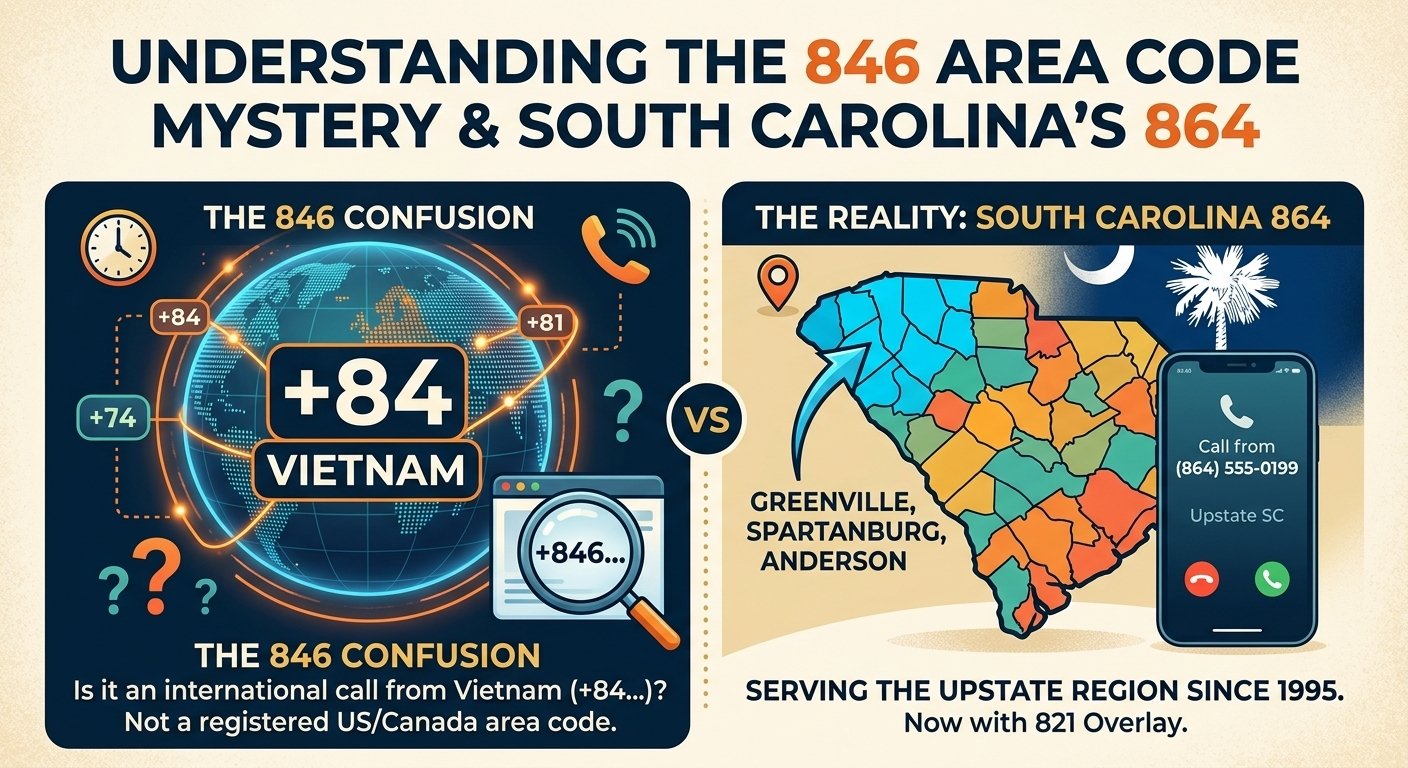
The 846 is not currently a registered North American Numbering Plan area code for any specific US city, it is often confused with the 864 area code serving Greenville and the Upstate region of South Carolina. Understanding the distinction between these numerical prefixes is essential for identifying callers and avoiding potential telemarketing scams. This guide provides a comprehensive look at the 864 region, the status of 846, and how to manage incoming calls from various similar prefixes. Is 846 an Area Code? When people search for information regarding the 846 area code, they are often encountering a misunderstanding of the North American numbering system. Currently, there is no designated geographic region in the United States or Canada that utilizes 846 as its primary identification prefix. It is possible that this number is used in a private capacity or as part of an internal routing system, but it does not appear on official maps of the North American Numbering Plan Administrator. Often, individuals receiving a call starting with these digits are actually seeing an international prefix. The country code for Vietnam is +84, and if a phone number in that country starts with the digit 6, it can appear on a caller ID as +846. This common confusion leads many to believe there is a new domestic area code when they are actually receiving an international transmission. What Area Code is 848 in the United States? While the 846 area code does not serve a US state, the 848 code is a very active part of the telecommunications grid. The 848 prefix serves as an overlay for the 732 area code in the state of New Jersey. This region encompasses central parts of the state, including major areas like Edison, New Brunswick, and the Jersey Shore. Overlays are implemented when the original numbers in a specific region are nearly exhausted. By adding 848 to the same geographic area as 732, the telecommunications system can provide new lines to residents and businesses without requiring existing customers to change their current digits. This practice has become standard across the United States as the demand for mobile devices and internet connections continues to grow. The Geography of Area Code 864 Many people searching for the 846 area code are actually looking for the 864 code located in South Carolina. The 864 region covers the northwestern corner of the state, commonly referred to as the Upstate. This area is characterized by a mix of bustling urban centers and scenic mountainous landscapes, making it one of the most diverse regions in the Palmetto State. The 864 code was officially established in 1995 when it was split from the 803 area code. At that time, it was the second area code created for South Carolina. Since its inception, it has served as a vital identifier for the residents of Greenville, Spartanburg, and Anderson. The region is known for its strong economic growth, particularly in the automotive and manufacturing sectors. Top Counties Served by the 864 Region The 864 prefix covers a wide variety of counties in South Carolina. Each county contributes to the unique culture and economy of the Upstate. Below is a detailed breakdown of the primary counties that fall within this telecommunications zone. County Name Total Population % of Area Code Coverage Greenville 451,225 100% Spartanburg 284,307 100% Anderson 187,126 100% Pickens 119,224 100% Oconee 74,273 100% Greenwood 69,661 100% Laurens 66,537 99% Cherokee 55,342 100% Union 28,961 91% These counties represent the heart of the Upstate South Carolina economy. Greenville County is the most populous, serving as a hub for finance and technology, while Spartanburg and Anderson remain essential for industrial and educational development. Major Cities within the 864 Prefix The 864 area code is home to several major cities that drive the culture and business of northwestern South Carolina. Residents in these cities use the 864 prefix for both residential landlines and mobile devices. City Name Population Statistics Regional Impact Greenville 58,409 Regional Hub Spartanburg 37,013 Educational Center Anderson 26,686 Manufacturing Base Greer 25,515 Transportation Link Greenwood 23,222 Medical Hub Mauldin 22,889 Residential Suburb Taylors 21,617 Community Focused Greenville is often cited as one of the best places to live in the United States due to its vibrant downtown and proximity to the Blue Ridge Mountains. As the area continues to grow, the demand for phone numbers has increased significantly, leading to the recent introduction of the 821 overlay code. Historical Timeline of Upstate South Carolina Codes The evolution of telecommunications in the Palmetto State serves as a mirror for its rapid modernization and industrial success. Research into the North American Numbering Plan reveals that 1995 was a landmark year for area code expansion, with the 864 prefix being one of 14 codes introduced to relieve pressure on existing systems. This period was defined by the sudden necessity for dedicated fax lines and the explosion of dial-up internet. While many people mistakenly search for the 846 area code today, the actual transition in December 1995 allowed the Upstate to establish a distinct identity separate from the coastal regions. The need for expansion has not slowed down as the decades progressed and technology advanced. A study by the South Carolina Revenue and Fiscal Affairs Office highlights that the Upstate region has consistently outpaced the national average for population growth. This demographic shift directly led to the exhaustion of available digits, necessitating the implementation of the 821 overlay in August 2024. This pattern is common in high-growth corridors where economic prosperity drives technological demand, ensuring that residents in Greenville and Spartanburg remain connected despite the rising density of mobile devices. Understanding the Time Zone for 864 All regions using the 864 prefix operate within the Eastern Time Zone. This is the same time zone used by major cities such as New York, Washington D.C., and Atlanta. During the summer months, the region observes Eastern Daylight Time, and in the winter, it reverts to Eastern Standard Time. Knowing the time zone is crucial for anyone making calls into the 864 region from other parts of the world. Because it follows the America/New_York time standards, callers from the West Coast need to remember that the Upstate is three hours ahead. This ensures that business calls and personal inquiries are made at appropriate times of the day. Technical Details and Dialing Procedures With the introduction of overlays like 821, the way residents dial numbers in the 864 region has changed. In the past, local calls could often be made by simply dialing the seven-digit phone number. However, modern telecommunications standards now require ten-digit dialing for almost all calls within the region.  This means that even if you are calling your neighbor in Greenville, you must include the 864 or 821 prefix before the seven-digit number. This change helps the routing systems distinguish between different overlays and ensures that calls are connected accurately. It is a small adjustment that reflects the growing complexity of our national phone network. Distinguishing Between Domestic and International Calls One of the primary reasons for the confusion surrounding the 846 area code is the similarity between domestic prefixes and international country codes. When you see a number on your screen, the presence of a plus sign or double zeros at the beginning is a major indicator of its origin. A call originating from Vietnam will often display as +84 followed by the local digits. Check for the + sign: International calls almost always begin with a + symbol. Count the digits: US numbers typically follow a 10-digit format (plus the country code 1). Verify the prefix: Use a trusted database to see if the three-digit code is assigned to a US state. Look for overlays: Some regions have multiple codes for the same city, which can be confusing. By paying attention to these small details, you can quickly determine if a call is coming from a local business in South Carolina or an international entity. This simple check is a great first step in protecting your privacy and managing your daily communications effectively. Read More: Difference Between SIP and VoIP: The Future of Business Phones Explained Why Am I Receiving Calls from 866 Numbers? Receiving a call from an 866 number typically indicates that a commercial entity is trying to reach you. These calls are often related to customer service follow-ups, appointment reminders, or verified business inquiries. However, because toll-free numbers are easily accessible to many organizations, they are also frequently used by telemarketers and automated dialers. If you receive a call from an 866 number and do not recognize the caller, it is wise to exercise caution. Many legitimate banks and government agencies use these prefixes, but scammers also use them to mask their actual location. According to the Federal Communications Commission (FCC), legitimate businesses will never ask for sensitive personal information like your social security number or passwords over an unsolicited phone call. Frequently Asked Questions 846 area code belongs to which city? The 846 area code is not currently assigned to any city in the United States or Canada. It is often a result of a typo for the 864 code in South Carolina or an international call originating from Vietnam using the +84 prefix. Is the 864 area code in South Carolina? Yes, the 864 code serves the northwestern part of South Carolina, including major cities like Greenville, Spartanburg, and Anderson. It has been the primary identifier for the Upstate region since its creation in 1995. What is the time zone for 864? The 864 region is located in the Eastern Time Zone. It follows the same time as New York City, meaning it is three hours ahead of Pacific Time and observes Daylight Saving Time transitions. Is 866 a scam area code? The 866 prefix is a legitimate toll-free area code used by many reputable businesses. However, because these numbers are easy to obtain, they are also used by scammers, so you should always verify the caller’s identity before sharing information. What cities are covered by 864? The main cities covered by this code are Greenville, Spartanburg, Anderson, Greer, and Greenwood. It encompasses several counties in the Upstate region of the state. How do I call a number in the 864 region? To call a number in this region, you must use ten-digit dialing. This involves dialing the 864 prefix followed by the specific seven-digit phone number, even for local calls. Is there a new area code for Greenville SC? Yes, the 821 area code was recently introduced as an overlay for the 864 region. This means new phone lines in Greenville and the surrounding area may now begin with 821. Why does my caller ID say +846? A caller ID showing +846 likely indicates an international call from Vietnam. The +84 is the country code for Vietnam, and the 6 is the beginning of the specific local number or internal area code. Can I get an 864 number for my business? Yes, you can request an 864 number through most major telecommunications providers if you are operating within the Upstate South Carolina region, although availability may be limited due to the overlay.

Read More
How to Integrate VoIP with CRM

How to Integrate VoIP with CRM? A Quick Guide

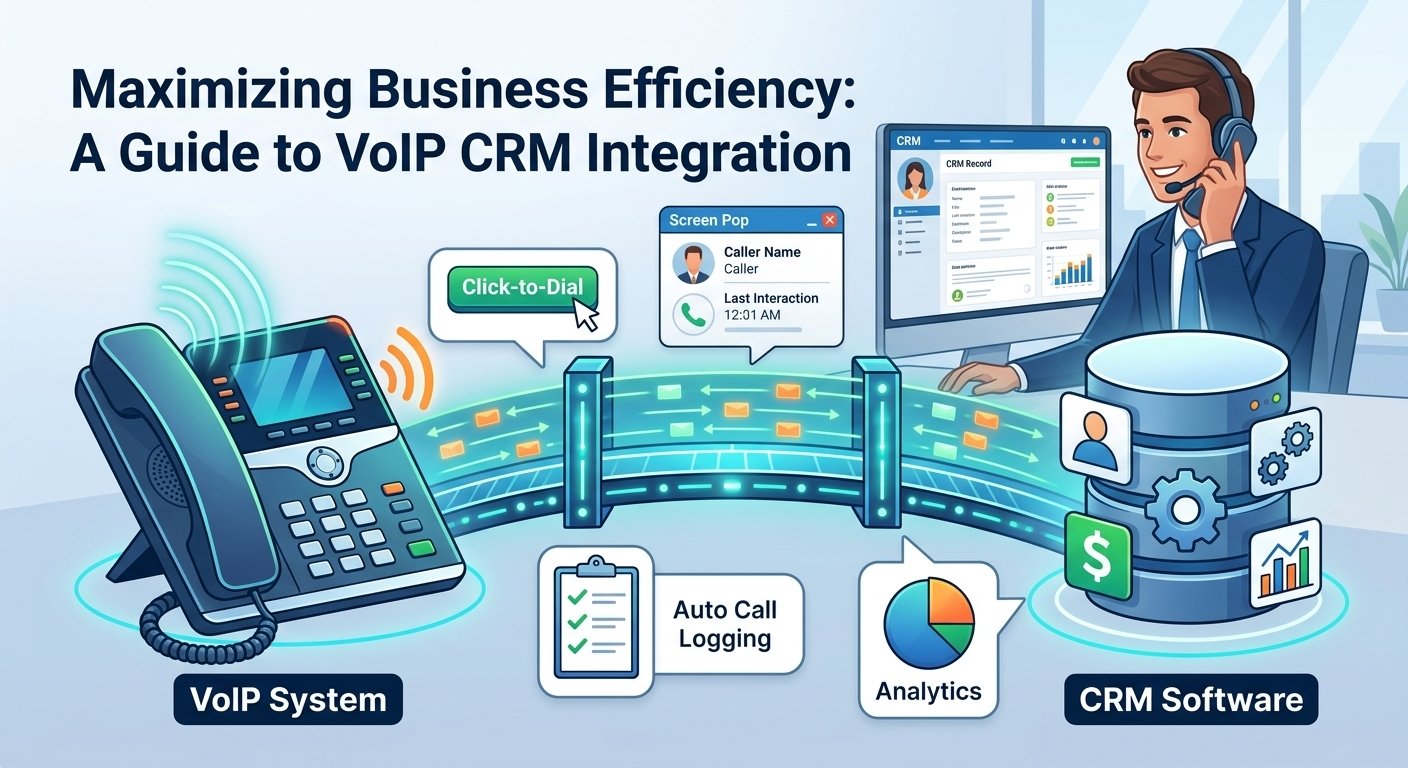
To integrate VoIP with a CRM, first choose a VoIP provider that supports your CRM or offers an API. Connect the two platforms through the provider’s integration settings, authorize access, map contacts and call data, then test features such as click-to-call, automatic call logging, contact pop-ups and call notes. For custom setups, you may need an API, webhook or third-party connector such as Zapier. VoIP CRM integration is the seamless connection between your Voice over Internet Protocol phone system and your Customer Relationship Management software. This technology allows data to flow bi-directionally, ensuring that every phone interaction is logged, tracked, and utilized to improve customer service. By merging these two critical business tools, companies can automate call logging, enable click-to-dial functionality, and provide agents with real-time caller insights via screen pops.  What Does a VoIP CRM Integration Mean? In April 2026, KPMG surveyed 300 executives and found that 87% of leaders call front-office integration a critical priority. Only 5% have actually achieved it. This staggering gap highlights a significant opportunity for businesses that are ready to modernize. The connectors are mature, and installing one takes an afternoon. Yet 19 out of 20 companies still haven’t managed to integrate their phone system and customer relationship management platform as one. This lag often results from a lack of technical awareness rather than a lack of available tools or budget. When you integrate VoIP with a CRM, you create a connection between your business phone system and customer database. For example, an incoming phone number can be matched with an existing CRM contact, allowing the agent to see relevant customer information when the call arrives. How a CRM System Is Used in a Call Center Storing, Organizing, and Accessing Customer Data Businesses hold vast volumes of valuable customer data including buying habits, past interactions, preferences, demographics, and much more. Call centers can use this information to improve and personalize customers’ calling experiences effectively. However, so much data can easily become disorganized, siloed, and lost without a proper voip crm system. The software pulls customer data from across your channels and departments including marketing systems, point-of-sale systems, your website, social media, and your call center software. Track Relationships Over Time A robust crm with voip integration gives you full visibility into every unique customer journey. You can see all of your interactions with your customers over time including calls, emails, texts, and chats, as well as purchases, milestones, and feedback. This is useful because it can help you understand and strengthen customer relationships through deep contextual knowledge. Call center agents can spot trends, identify patterns, and gauge what stage of loyalty or churn customers are in and adapt their communication strategy in response. By utilizing voip and crm together, the history of the relationship becomes a tool for building trust and ensuring that the customer feels the company is paying attention to their specific needs. Use Customer Data To Improve By giving you access to real-time customer data and KPIs, these systems are instrumental in your continuous improvement strategy. For example, they provide the data you need to segment customers based on common characteristics such as demographics, buying habits, and interests. They can tell you which leads are interested in which types of products. Outbound sales teams can use this data to tailor sales strategies for each segment, boosting conversions, satisfaction, and loyalty throughout the sales cycle. The Value of CRM Integration With a Phone System The process of connecting these two technologies provides a more personalized service that is difficult to match with standalone tools. While some companies try to cobble together solutions and workflows manually, those that adopt a crm with voip integration can automate the process of syncing valuable data. This empowers agents with timely insights they can use to provide exceptional service. Ultimately, with this integration, both the phone system and the database become more powerful and useful for the entire team. Modern providers like Salesforce and various VoIP leaders offer pre-built connectors that make this transition smooth. These integrations act as business communications superpowers that enhance customer experiences and employee collaboration. When the phone system understands the CRM data, it can make routing decisions that save time. For instance, a high-value client can be automatically routed to their dedicated account manager based on the record stored in the database, ensuring a premium experience. The Advantages of CRM-VoIP Integration 1. Make Calls Within the CRM Platform Click-to-call functionality streamlines your agents’ workflows and boosts productivity significantly. Instead of bouncing back and forth between your call center software and your database application, agents can call customers from within the platform in a single click. This is a game-changer for agents who make lots of outbound calls. With no need for tedious app-switching or manual dialing, agents can efficiently connect with more leads and customers throughout their workday. 2. Provide Personalized Service for Every Customer The voip crm integration places comprehensive customer data at your agents’ fingertips at all times. Whether they’re calling a customer from the software or the interface, they can immediately view data like past interactions, complaints, purchases, and more. Leveraging this accessible data, your team can provide fast, personalized experiences and customized solutions. Agents don’t need to put customers on hold while they hunt for information in different tabs or physical files. 3. Optimize (or Automate) Data Collection Manually inputting customer data and transferring it from your phone software to your database is a timely task that’s prone to error. Telephony integrations optimize or completely automate data collection to improve accuracy and save agents valuable time. Essentially, the data automatically syncs with your call center software and vice versa. There is no need to input the same phone number or contact name into each system separately, which drastically increases agent productivity. 4. Streamline Post-Call Work for Agents After every call, agents need to update customer records to reflect what was discussed. It may only take a couple of minutes after each call, but those minutes add up and eat away at productivity over the course of a week. The crm and phone integration streamlines post-call work by automatically collecting call data and adding it to the file. The system can proactively record calls, take notes, and pre-fill forms, reducing the volume of manual work required. Why CRM-VoIP Integration Matters If you are unconvinced whether these integrations are worth the effort, consider the current state of customer expectations. According to Salesforce’s State of the Connected Customer report, 80% of customers consider their experience with a company to be of equal importance to the products and services it provides. Integration is the key to providing this high-quality experience consistently. Without it, your agents are working with one hand tied behind their back, lacking the information needed to meet these modern standards. According to Zendesk’s CX Trends 2024 report, customers are likely to reach out via phone or email for simple questions, but they are almost twice as likely to reach for the phone for complex questions. When a customer calls with a complex issue, they expect the person on the other end to be an expert who knows their history. The voip crm software makes it easier for your agents to provide the answers they are looking for by presenting the entire history of the account the moment the phone rings. How To Integrate a CRM With a VoIP System Because integration is a widely acknowledged best practice, many providers make it easy to connect these vital systems. In fact, integrating the two systems isn’t too different from installing a browser extension in many cases. Your provider will often be willing to help you figure out how to integrate the tools and offer support along the way. The process typically involves using an application programming interface which acts as a set of rules that allow different applications to communicate. Clean the CRM data: Normalize phone numbers to E.164 and merge duplicates. This single step determines whether the integration looks competent on day one, because formatting and duplicates drive screen pops and caller matching. Decide logging rules and dispositions: Set the loggable-call thresholds and the two-layer disposition taxonomy from the sections above. Write them down. This step keeps the timeline readable at day 30. Confirm authentication and permissions: Establish single sign-on, which roles get the softphone, and who can access recordings. Do this before the pilot, because permission changes mid-rollout erode trust. Map fields and agree on where call data lands: Verify which CRM fields the integration writes, what updates last-contacted, and who owns the mapping going forward. Pilot with one team: Run for two weeks, then review the actual activity records the pilot generated. Adjust rules before rolling wider. The Future of CRM Integration The future of these systems lies in deeper automation and artificial intelligence. McKinsey reports that 71% of consumers expect businesses to personalize their interactions, and 76% feel frustrated when this doesn’t happen. The value of getting personalization right will only increase as AI begins to analyze call recordings in real-time to suggest the best responses to agents. We are moving toward a world where the phone system doesn’t just store data but actively helps the agent solve problems. As we look forward, the crm integration with phone system will become even more predictive. Systems will be able to analyze the sentiment of a caller’s voice and match them with an agent who has the highest success rate with similar personalities. This level of sophistication is only possible when your communication tools and your customer data reside in the same ecosystem. Businesses that fail to adopt these integrations now will likely find themselves unable to compete with the efficiency of AI-driven competitors in the near future. Read More: What Is SIP Trunking? Working and Benefits Final Words Integrating VoIP with a CRM can make customer-facing workflows more efficient by connecting call activity with the customer information your team already uses. Features such as click-to-call, screen pops, automatic call logging and contact synchronization can reduce repetitive work and give sales and support teams more context during conversations. Before integrating the two systems, check compatibility, permissions, data mapping and the specific features supported by your VoIP provider and CRM. Frequently Asked Questions How much does VoIP CRM integration cost? Costs vary by provider, but VoIP CRM integrations usually range from $25 to $50 per user/month. CloudTalk offers CRM integrations starting from its Essential plan at $29 per user/month, which is a competitive rate for small to medium businesses looking to scale their operations efficiently. What are some must-have features for VoIP CRM integration? For softphone integration with CRM, look for call logging, click-to-call, contact sync, call recording, real-time caller ID, analytics, and workflow automation. These features ensure that your team can handle high call volumes without losing the personal touch that keeps customers coming back. How do I choose a VoIP provider? Consider pricing, CRM compatibility, call quality, support, global coverage, and features like IVR and analytics. It is vital to check if they have a native integration with your specific CRM to avoid the need for expensive custom development or complex third-party middleware. What is CRM in voice process? It means using a CRM to manage and track voice-based customer interactions, improving efficiency and personalization in calls. This process ensures that every spoken word is documented and used to build a better understanding of the client’s needs and preferences over the long term. What is a CRM phone system? It’s a CRM with calling. In other words, a CRM phone system integrates calling features with CRM software to manage, track, and log customer calls in one place. This creates a unified environment where agents never have to leave their primary workspace to handle a phone call. How to integrate VoIP into CRM? Choose a VoIP provider, ensure CRM compatibility, use built-in integrations or APIs, then configure call routing and settings. Most providers offer a step-by-step wizard that guides you through the authorization process, making it possible to be up and running in just a few minutes. What is an example of a CRM or calling system? Examples include Salesforce and HubSpot for CRM, and RingCentral for VoIP calling systems. These platforms are designed to work together, offering robust APIs that allow for the deep synchronization of data and communication features needed for modern business environments. How to integrate IVR with CRM? To enable IVR integration with CRM, choose a VoIP provider that supports both IVR and CRM integration. Then configure call flows to route based on CRM data or lead status. This allows the system to recognize a “VIP” caller in the IVR and route them to a priority queue automatically.

Read More
SIP Trunking Explained

What Is SIP Trunking? Working and Benefits

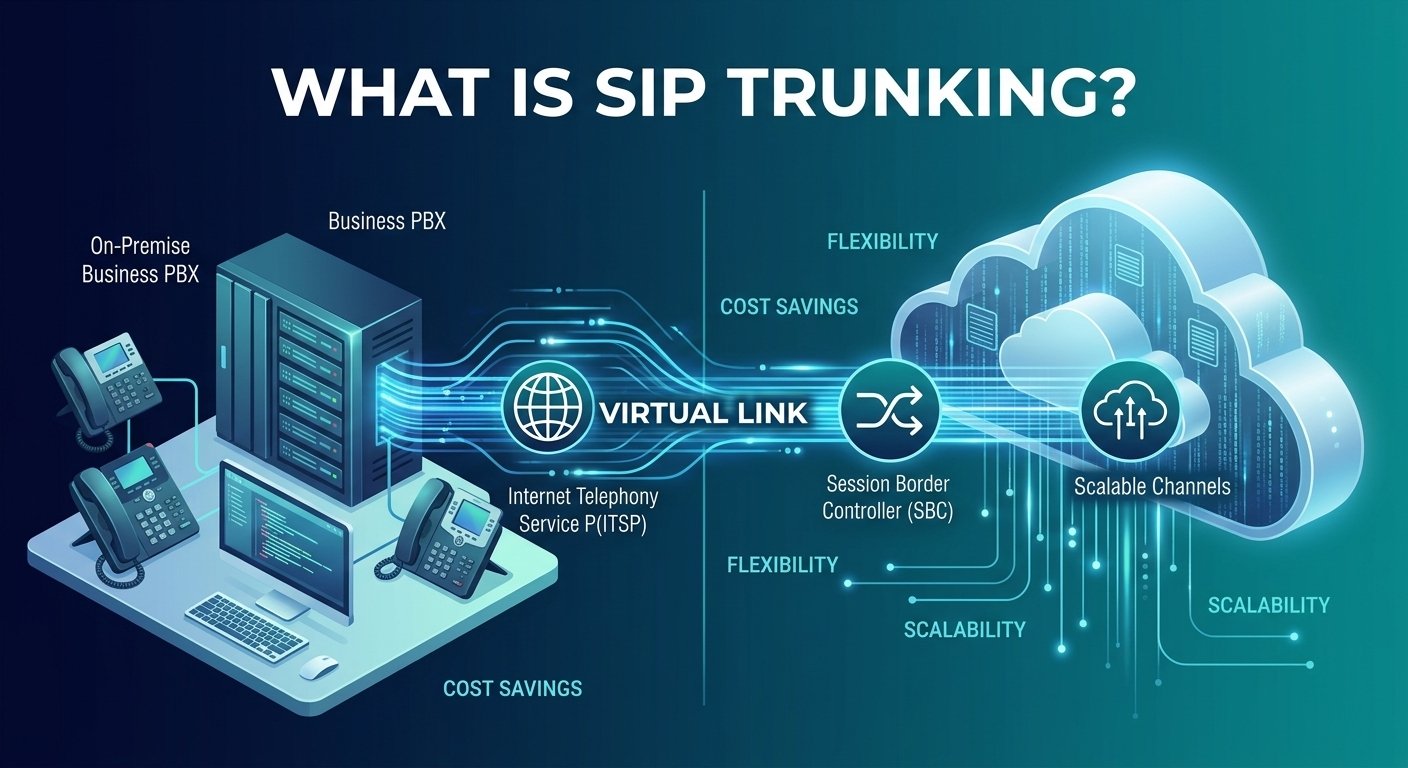
Sip trunking is a modern communication technology that allows businesses to make and receive phone calls over the internet rather than through traditional physical phone lines. By using the Session Initiation Protocol, it connects an on-premise private branch exchange to the public switched telephone network via a virtual link. This digital transformation enables companies to consolidate voice and data services into a single network, significantly reducing infrastructure costs while improving call quality. It serves as a bridge between legacy hardware and the cloud, providing the flexibility to scale channels up or down based on real-time business requirements. What Is SIP Trunking? Business communications have undergone a massive shift from legacy hardware to internet-based connectivity. At its core, sip trunking is the digital version of a traditional phone line. While a traditional line uses physical copper wires to connect a business to the telephone company, this technology uses your existing data connection to route voice traffic. It allows a business with an on-site phone system to send and receive calls digitally, utilizing voice over internet protocol technology to manage sessions effectively. The adoption of this technology is growing rapidly across various industries. According to research from the Eastern Management Group, nearly 80% of businesses have migrated or are currently planning to migrate to sip trunking because it offers a significantly lower total cost of ownership compared to legacy circuits. This shift is also driven by the global phase-out of traditional analog lines, as telecommunication providers move toward entirely digital infrastructures. Core components of SIP trunking To understand the sip trunk meaning, you must look at the different parts that make the system functional. Each component plays a specific role in ensuring that voice data travels securely and clearly from one point to another. Private branch exchange (PBX): This is the internal switching system used within a business. It manages how calls are routed to different extensions and handles features like voicemail and call transfers. In this setup, the PBX is typically an IP-enabled device that can speak the language of the internet. Internet telephony service provider (ITSP): This is the company that provides the actual sip trunking service. They act as the middleman between your office network and the global telephone network, ensuring your calls reach their destination regardless of whether the recipient is on a mobile phone or a landline. Session border controller (SBC): Think of this as a specialized firewall for voice traffic. The SBC manages security by encrypting signals and protecting the network from unauthorized access or service attacks, while also maintaining high voice quality. SIP channels and trunks: A channel represents a single concurrent call. A trunk is a collection of these channels. Unlike physical lines that come in fixed bundles, virtual sip trunk options allow you to buy exactly the number of channels you need. Network infrastructure: This includes your routers, switches, and the actual internet connection. For a telephony sip trunking setup to work perfectly, the network must be optimized to prioritize voice data over standard web browsing traffic. How Does Session Initiation Protocol (SIP) Trunking Work? The process starts when a user initiates a call from a sip trunk phone system. The system uses the protocol to establish a session between the caller and the receiver. It sends digital packets of information across the internet, which are then reassembled into audio at the other end. This happens almost instantaneously, providing a seamless experience that feels identical to a traditional phone conversation but with much higher clarity. Direct inward dialing is a major part of how this works in a professional setting. With a sip trunk line, a provider can assign multiple phone numbers to a single connection. This means every employee can have their own direct number without the business needing to pay for dozens of physical lines. The sip routing technology identifies the incoming number and directs the call to the correct desk or mobile app within the company network. A significant technical advantage is the use of sip trunk integration with existing data networks. Instead of maintaining two separate sets of wiring—one for phones and one for computers—everything runs over the same fiber or broadband connection. This unification simplifies IT management and allows for more advanced call trunking features, such as automatic failover to a secondary internet connection if the primary one fails. Benefits of SIP Trunking Implementing a sip trunking solution offers several advantages that go beyond simple voice calls. It changes the way a business interacts with its customers and manages its internal resources. 1) Cost savings and efficiency One of the most immediate advantages of sip trunking is the reduction in monthly expenses. Traditional phone companies often charge high fees for physical line maintenance and long-distance calls. Because sip trunking over internet connections bypasses these legacy networks, businesses often see their communication bills drop by as much as 50%. There is also no need to purchase expensive hardware every time you want to add a new line, as everything is handled through software configurations. 2) Virtual presence With a sip trunk voip setup, your physical location no longer limits your business identity. You can have local phone numbers in different cities or even different countries, regardless of where your office is actually located. This creates a sense of local presence for customers, which can increase trust and improve sales conversion rates. It also allows remote employees to appear as if they are calling from the main office, maintaining a professional image. 3) Room for growth and scalability Scalability is a core feature of business sip trunking. In the past, if a company grew, they had to wait for a technician to come out and install new physical lines. With voip sip trunks, adding capacity is as simple as updating your service plan. You can add one or one hundred channels instantly to handle peak seasons or permanent expansion. This flexibility ensures that you are never paying for more capacity than you actually use. 4) Reliable technology Modern sip trunking services are designed with high redundancy. If an office experiences a power outage or a local network issue, calls can be automatically rerouted to mobile phones or other branch offices. This level of business continuity is difficult to achieve with analog systems. Many providers offer a 99.99% uptime guarantee, ensuring that your voice sip trunking stays active even during unexpected local disasters. Drawbacks of SIP trunking While the benefits are extensive, there are certain challenges that organizations must consider before making the switch. Understanding these allows for better planning and mitigation strategies. 1) Dependence on internet connectivity The most significant risk is that an internet sip trunk is entirely dependent on your web connection. If your internet goes down, your phone system goes down with it. Unlike old landlines that had their own power source, voip trunks require a functioning data link. To solve this, most businesses invest in a secondary internet provider to act as a backup, ensuring that the sip trunk connection remains stable even if one line fails. 2) Quality of Service (QoS) issues If your network is not properly configured, you might experience issues like jitter or lag. This happens when the network treats voice data the same as a large file download. To prevent this, IT teams must implement QoS settings on their routers. This ensures that voip sip trunking traffic is always given the highest priority, maintaining crystal-clear audio even when the network is busy with other tasks. 3) Security vulnerabilities Because the system operates over the internet, it can be susceptible to hacking or toll fraud if not properly protected. Standard ip trunking security involves using encrypted signals and strong authentication protocols. Utilizing a session border controller is a vital step in safeguarding the system from external threats. Organizations must also keep their PBX software updated to patch any known vulnerabilities that could be exploited by bad actors. 4) Power dependency Since SIP phones and network routers require electricity, a power outage will silence the phone system. Traditional analog phones could often work during blackouts because they drew power from the phone line itself. Businesses using a telephone sip trunk must ensure they have uninterruptible power supplies or backup generators in place for their critical networking equipment to maintain communication during emergencies. PRI vs. SIP Trunking vs. VoIP Understanding the differences between these technologies is crucial for making an informed decision about your communication infrastructure. While they all handle voice, their methods and flexibility vary greatly. Feature PRI SIP Trunking VoIP Technology Traditional phone lines Internet Protocol (IP) Internet Protocol (IP) Scalability Limited, requires physical lines Highly scalable, no physical limits Highly scalable, no physical limits Cost Higher maintenance and scaling Lower costs, no physical expenses Lower costs, no physical expenses Mobility Limited to physical locations Supports remote workers Supports remote workers Features Basic voice calling Protocol dependent (e.g. SIP) Advanced (Video, App integration) Flexibility Rigid, aging technology Flexible, adaptable to needs Flexible, adaptable to needs Future-proof May become obsolete soon Future-proof using IP networks Future-proof using IP networks How much does SIP trunking cost? The cost of this service is generally much lower than traditional alternatives, but it varies based on the specific needs of the business. Most providers offer two main pricing models: metered and unmetered. Metered plans charge a small monthly fee per channel and then a per-minute rate for calls, which is ideal for businesses with low call volumes. Unmetered plans offer a flat monthly rate per channel for unlimited calling, providing predictable costs for call-heavy environments. Additional costs may include the initial setup fees and the price of an SBC if one is required for security. However, since the technology uses your existing internet, there are no recurring costs for separate physical lines. According to recent industry data from various sip trunk news sources, businesses typically save between 30% and 60% on their total monthly telephony expenses after switching to an ip sip trunk. What to look for in a SIP trunk provider Choosing the right partner is essential for a successful transition. Not all providers offer the same level of service, and the quality of your business communication depends on their infrastructure. Reliability and uptime Look for a provider that offers a robust service level agreement with high uptime guarantees. Reliable sip trunking services use multiple data centers across different geographic regions. This ensures that if one data center goes offline, your traffic is automatically moved to another, preventing any service interruption for your customers. Call quality and geographic coverage A provider should have a “Tier 1” network, meaning they connect directly to the backbone of the internet. This reduces the number of hops a call takes, which improves clarity and reduces delay. Additionally, ensure they offer numbers in the regions where you do business. Global coverage is a major advantage of a virtual sip trunk if you plan to expand internationally. PBX and platform compatibility Before signing a contract, verify that the sip trunking service is compatible with your specific PBX model. While the protocol is standardized, different manufacturers may have slight variations in how they implement features. Most top-tier providers maintain a list of certified hardware and software platforms to ensure a smooth integration process. Elastic scalability Your provider should offer elastic sip trunking, which allows you to adjust your capacity on the fly. This is particularly important for seasonal businesses that may need hundreds of extra lines in December but only a few in July. The ability to manage these changes through a self-service portal without calling a sales representative is a major convenience. Security and compliance Ensure the provider supports TLS (Transport Layer Security) and SRTP (Secure Real-time Transport Protocol) for encryption. If your business is in the healthcare or financial sector, check if the provider meets specific regulatory standards like HIPAA or PCI-DSS. Security is a non-negotiable aspect of any modern sip trunking definition. Self-service and analytics A good sip trunking service should provide a user-friendly dashboard. This allows you to view real-time call logs, monitor usage patterns, and troubleshoot issues. Analytics can help you identify peak calling times, which allows you to staff your customer service teams more effectively based on actual data. Programmable voice capabilities For businesses that want to innovate, look for providers that offer APIs. This allows you to integrate voice functions directly into your own software or CRM. Features like automated appointment reminders or custom call routing logic can be built on top of the sip trunking definition, adding immense value to your business processes. Possible real-world examples of SIP trunking in action Seeing how this technology is applied in different scenarios can help you visualize how it might benefit your own organization. Example 1: Scaling a seasonal contact center A retail company experiences a 500% increase in call volume during the holiday season. By using an elastic sip trunking solution, they can instantly add 50 new channels to their existing PBX. Once the holiday rush is over, they scale back down to their original capacity, ensuring they only pay for the extra resources when they actually need them. Example 2: Supporting a hybrid global workforce A consulting firm has employees working from home across three different continents. By implementing a private sip trunk, they provide every employee with a softphone app on their laptop. Even though workers are in different time zones, they can all make calls from the same corporate number, and internal calls between them remain free of charge. Example 3: Modernizing legacy PBX systems A manufacturing plant has a reliable but older PBX system that is not ready for the cloud. Instead of replacing all their desk phones and wiring, they install a sip adapter. This allows the old hardware to connect to a modern sip trunk service, giving them access to lower international rates and digital call quality without a massive capital expenditure. Example 4: Adding AI voice automation to customer interactions A healthcare provider uses sip trunk integration to connect their phone system to an AI-powered virtual assistant. When patients call to book an appointment, the AI handles the initial request over the sip trunk line. This reduces the workload on the front desk staff and provides patients with 24/7 service without needing a human operator on standby. Read More: Is Wireless Caller Spam? Meaning & Benefits Final Words The transition to sip trunking represents a significant milestone in the modernization of business communications. By moving away from rigid, expensive physical lines and embracing the flexibility of the internet, organizations can achieve a more agile and cost-effective telephony infrastructure. Whether you are looking to reduce monthly bills, support a remote workforce, or simply ensure your business is ready for the future, this technology provides the necessary foundation. As the global telecommunications landscape continues to phase out analog systems, adopting a reliable sip trunk service is no longer just an option but a strategic necessity for staying competitive in a digital world. SIP Trunking FAQs What does SIP stand for in SIP trunking? The acronym stands for Session Initiation Protocol. It is a specific set of rules used in multimedia communication to start, manage, and end a data session between two or more participants. While it is most commonly used for voice calls, it can also manage video and instant messaging. Can SIP trunking work with my existing PBX? Yes, most modern PBX systems are already compatible with this technology. If you have an older analog PBX, you can still use it by adding a specialized piece of hardware called a gateway. This device converts the analog signals into digital packets, allowing you to enjoy the benefits of a sip trunk without replacing your entire phone system. How many SIP channels does my business need? The number of channels you need depends on your peak volume of simultaneous calls, not your total number of employees. For example, a company with 50 employees might only ever have 10 people on the phone at the exact same time. In this case, you would only need 10 channels. Most providers make it easy to add more if you find your customers are getting busy signals. Is SIP trunking secure? It is very secure as long as you implement standard protection measures. Most providers offer encryption for both the signaling and the actual voice data. Using a session border controller and ensuring your internal network has a strong firewall are the best ways to keep your communication private and prevent unauthorized access. What’s the difference between SIP trunking and PRI? The main difference is the underlying technology. PRI relies on physical copper wires and is limited to 23 channels per line. It is often expensive and difficult to scale. Conversely, sip trunking uses your internet connection and can scale to an unlimited number of channels instantly, usually at a much lower cost. Do I need a dedicated internet connection for SIP trunking? While it is not strictly required, many businesses choose to have a dedicated connection for their voice traffic to ensure the highest quality. If you use a shared connection, you must configure Quality of Service settings on your router. This ensures that a large file download in the office doesn’t cause your phone calls to sound choppy or drop. Can SIP trunking support remote workers? Yes, this is one of its greatest strengths. Because the system is internet-based, employees can connect to the business phone system from anywhere in the world using a softphone app on their computer or mobile device. They can make and receive calls as if they were sitting at their desk in the main office. What happens to calls during a network outage? If your internet goes down, most providers offer automatic failover routing. You can pre-set the system to forward all incoming calls to a mobile phone or a different office location. This ensures that you never miss an important customer call, even if your local office is experiencing technical difficulties. Is SIP trunking only for large enterprises? No, it is highly beneficial for businesses of all sizes. Small businesses often benefit the most from the cost savings and the ability to look more professional with features like auto-attendants and local numbers in multiple cities. Because you can buy as few as one or two channels, it is a very accessible solution for startups and small shops.

Read More

Difference Between SIP and VoIP: The Future of Business Phones Explained

The primary difference between SIP and VoIP lies in their scope; VoIP (Voice over Internet Protocol) refers to the broad technology of sending voice signals over the internet, while SIP (Session Initiation Protocol) is a specific signaling protocol used to initiate and manage those multimedia sessions. Essentially, you can have VoIP without SIP by using other protocols, but most modern business communication systems rely on SIP to manage voice, video, and messaging. While VoIP describes the type of service, SIP is the technical engine that allows diverse digital devices to connect and communicate seamlessly within that service. SIP Overview Session Initiation Protocol is a foundational set of rules that computers use to establish, maintain, and terminate multimedia communication sessions. It is not a service in itself but a language that devices speak to ensure they are synchronized. While many people associate it only with voice calls, this protocol is much more versatile. It handles various data types, including video conferencing, instant messaging, and media distribution. It acts as the digital signaling system that tells the network how to handle a specific request between two endpoints. This protocol has become the industry standard because of its ability to bridge different communication mediums. It identifies user locations, determines user availability, and manages the setup and teardown of the connection. For instance, when you start a video call, the protocol ensures that both devices agree on the video quality and audio codecs before the data begins to flow. This flexibility makes it indispensable for unified communications, where businesses need more than just a simple phone line to stay productive. VoIP Overview Voice over Internet Protocol is an umbrella term that describes the technology used to deliver voice communications and multimedia sessions over the internet. Instead of using traditional circuit-switched landlines, it converts your voice into digital packets that travel across the web. These packets are reassembled at the destination to recreate the sound for the listener. This technology allows for calls to be made from anywhere with a stable internet connection, using devices like laptops, tablets, or specialized IP desk phones. The adoption of this technology has transformed the corporate landscape by reducing costs and increasing mobility. A report from Transparency Market Research indicates that the global market for these services is projected to reach over $100 billion by the end of the decade. This growth is driven by the shift toward remote work and the need for scalable communication tools. By removing the need for physical hardware and long-distance charges, businesses can allocate their resources toward more strategic growth initiatives while maintaining high-quality voice connectivity. Key differences between VoIP and SIP Feature VoIP SIP Trunking Primary Goal Voice communication over the internet Connecting a PBX to the internet Communication Type Voice only (primarily) Voice, Video, and Multimedia Hardware Needed Internet connection and a calling device On-premise PBX and SIP provider Setup Speed Nearly instantaneous Requires configuration of local PBX Scalability Scale per user Scale per channel Management Managed by the service provider Managed by internal IT or engineers How does VoIP work? This technology functions by transforming analog sound waves into digital data packets. When you speak into a microphone, the system slices your voice into tiny pieces of data. Each packet is assigned a destination address and sent over the internet using the most efficient path available. At the other end, the system gathers these packets and puts them back in the correct order so the person you are calling hears your voice clearly. This entire process happens in a fraction of a second. Because it relies on the internet, this system is not tied to a specific physical location. This allows employees to use the same business phone number whether they are in the office or working from a cafe. The service provider handles the complex task of routing these packets through the global telephone network. As long as you have a reliable broadband connection, the system ensures that the communication is stable and the audio quality remains high. How does SIP trunking work? Trunking is a method used to connect a business’s existing Private Branch Exchange (PBX) to the internet. Instead of using physical analog lines from a traditional phone company, a digital trunk is established to carry calls. This allows a company to keep its physical desk phones and internal wiring while gaining the cost benefits of internet-based calling. The trunk acts as a virtual link between the office’s internal phone system and the Public Switched Telephone Network (PSTN). This technology uses the internet or a dedicated circuit to transfer multimedia data. Unlike traditional circuits that have a fixed capacity, digital trunks can be adjusted to handle more or fewer concurrent calls. If an office grows, the IT department can simply add more channels to the existing trunk without waiting for a technician to install new wires. This makes it a highly efficient solution for large organizations that want to modernize their communications without discarding their current hardware investment. What are the pros and cons of using SIP trunking vs. VoIP? Choosing between these two options involves weighing the benefits of managed simplicity against the advantages of granular control. A hosted service is often the best fit for smaller businesses or those that prioritize ease of use. It provides a complete package with minimal setup required. On the other hand, trunking is often preferred by larger enterprises with established IT teams who want to maintain their own on-site equipment. Both paths offer significant improvements over traditional landlines. It is vital to consider your current technical expertise before making a decision. Hosted services take the burden of maintenance off your shoulders, as the provider handles all updates and security patches. Trunking requires more hands-on management but offers the ability to customize every aspect of the communication environment. Research suggests that companies can save between 50% and 70% on their communication costs by moving away from legacy circuits and adopting these digital alternatives. Pros of VoIP 1. Cost-efficiency One of the biggest advantages is the reduction in upfront capital expenditure. Since there is no need to purchase expensive servers or PBX hardware, the initial investment is very low. You simply pay a monthly subscription fee per user, which often includes local and long-distance calling. This predictable pricing model helps businesses manage their budgets more effectively without worrying about unexpected repair costs for on-site equipment. 2. Scalability As your business grows, adding new team members is incredibly simple. With a hosted system, you can add new lines through an online dashboard in a matter of minutes. There is no need to wait for a service technician or install new physical ports in the wall. This flexibility allows your communication system to grow alongside your business, whether you are adding one employee or opening an entire new department. 3. Work from anywhere Mobility is a core feature of internet-based calling. Since your phone system is hosted in the cloud, employees can access their business lines from any device. By downloading a specialized application, they can make and receive calls on their smartphones or laptops as if they were sitting at their desks. This ensures that your team stays connected and productive, regardless of their physical location. 4. Quality by design (call and audio) Modern digital systems are engineered to provide high-definition audio that often surpasses the quality of traditional landlines. As long as your network has sufficient bandwidth, the system uses advanced codecs to ensure that every conversation is crystal clear. Many top-tier providers use a dual-cloud architecture, which leverages multiple data centers to ensure that calls are always routed through the most efficient path with minimal latency. 5. Security and encryption Contrary to some misconceptions, digital communication can be more secure than analog systems. Leading providers use powerful encryption tools to protect data both in transit and at rest. This includes not just your voice calls, but also your chat logs, user data, and analytics. Advanced security features like multi-factor authentication and regular security audits ensure that your business communications remain private and protected from unauthorized access. Cons of VoIP While the benefits are numerous, there are certain drawbacks that businesses should keep in mind. Because these systems are managed by a third party, you have less control over the underlying infrastructure. This means that if the provider experiences an issue, your service may be affected. Understanding these limitations is important for creating a comprehensive communication strategy that includes backup plans for potential outages. 1. Recurring costs A hosted model relies on a subscription-based pricing structure. While this lowers upfront costs, the monthly fees can add up as your team grows. Some features that you might consider essential could be locked behind higher-priced tiers. It is important to carefully review what is included in your plan to ensure there are no hidden fees for things like toll-free numbers or additional local lines that your business might need. 2. Dependence on “network” The quality of your service is entirely dependent on the strength of your internet connection. Factors like latency and jitter can negatively impact audio quality if your network is congested. While high-speed internet is common today, businesses must ensure they have enough bandwidth to handle voice traffic alongside their regular data needs. Some companies choose to dedicate a specific internet channel solely to their phone system to avoid these issues. Pros of SIP trunking 1. Flexibility Trunks are incredibly easy to adapt to your specific needs. If you already have a functioning PBX system, adding a digital trunk allows you to modernize your setup without starting from scratch. You can easily add or change handsets across multiple locations while maintaining a centralized management system. This flexibility also makes it easier to keep your existing phone numbers even if your business relocates to a new city. 2. Customizable With a trunking solution, you have full control over the features and settings of your phone system. You can disable features that your team doesn’t use and request specific upgrades that fit your immediate operational needs. Since the trunk essentially delivers the voice signal to your hardware, the software on your end can be configured to handle calls exactly how you want, providing a truly bespoke communication experience. 3. Can accommodate multiple users This technology is excellent for large companies that operate across different sites. A single central PBX can use digital trunks to distribute phone lines across an entire campus or multiple facilities. Each trunk can contain several channels, which are easily extended as the company expands. This centralization simplifies the billing and management process for the IT department while providing a consistent experience for all employees. Cons of SIP trunking Despite its power, trunking comes with significant management responsibilities. It is not a “set it and forget it” solution and requires a certain level of technical proficiency to maintain. For many small businesses, the complexity of managing an on-site system may outweigh the benefits of customization. It is important to evaluate whether your team has the resources to handle the technical demands of this setup. 1. Requires dedicated PBX and telecom engineers The most significant drawback is the need for specialized personnel. Setting up and maintaining a PBX system requires experienced telecom engineers who understand the nuances of the hardware and software. This adds to the ongoing costs of the business, as you will need to account for both the salaries of these experts and the costs associated with maintaining and upgrading the physical equipment. 2. Harder to use A system based on trunking can be more complex for the average employee to navigate. Since it often involves proprietary hardware and older interfaces, there may be a steeper learning curve compared to modern, intuitive apps. Training employees on new processes and hardware can be time-consuming and may lead to frustration if the system is not as user-friendly as the consumer apps they use daily. 3. Not call recording and transcription-friendly Older on-premise systems often lack the advanced features that come standard with cloud-based solutions. Features like automatic call recording and real-time voice transcription usually require additional hardware or expensive third-party licensing. This can make it difficult for businesses to gain valuable insights from their customer interactions without making a significant additional investment in their local infrastructure. 4. Troublesome troubleshooting When an issue occurs with a trunking system, identifying the root cause can be difficult. The problem could lie with the internal hardware, the local network, the trunk provider, or the internet service provider. This often leads to a complex troubleshooting process where different vendors may blame each other, potentially extending the time your phone system is down and disrupting your business operations. 5. Not always efficient for SMS While this protocol supports multimedia, traditional trunks are not always optimized for text messaging. Setting up SMS functionality can be complicated and may require additional integrations or third-party services. If your business relies heavily on text-based communication with customers, you may find that a hosted service offers a much more integrated and efficient solution for handling these interactions. 6. Limited integrations On-premise systems often struggle to integrate with modern business software like CRM platforms or helpdesk tools. While it is sometimes possible to build these connections, it usually requires custom development work and ongoing maintenance. This can leave your communication data siloed, making it harder for your sales and support teams to access the information they need to provide a personalized customer experience. Time to implement a VoIP system for your business? Deciding when to switch to a digital system is a critical choice for any growing company. If you are still using traditional landlines, you are likely paying more for fewer features. The move to an internet-based system can immediately improve your team’s productivity by providing them with better tools for collaboration. Whether you are a small startup or a large enterprise, the advantages of modernizing your voice communication are clear. Start by auditing your current phone bill to identify potential savings from moving to the internet. Evaluate your internal IT capacity to decide between a hosted service or a trunking solution. Test your current internet bandwidth to ensure it can support high-quality voice sessions. Identify the key features, such as video calling or CRM integration, that your team needs to succeed. Read More: Ghost Calls Explained: Causes & How to Stop Them SIP vs VoIP: Put the debate to rest The debate between these two technologies often stems from a misunderstanding of how they relate to each other. Instead of seeing them as competing options, it is more accurate to see them as different ways to achieve the same goal of digital communication. For most businesses today, the question isn’t whether to use these technologies, but rather how to deploy them most effectively. By choosing a solution that fits your specific infrastructure, you can enjoy clear, reliable, and cost-effective communications. Modern systems have matured to the point where they are more reliable and feature-rich than the analog systems they replaced. With the right provider and a solid network foundation, your business phone system can become a powerful asset rather than a simple utility. Embracing the difference between SIP and VoIP allows you to build a future-proof communication strategy that will grow with your organization for years to come. SIP Trunking vs VoIP FAQs Is there a difference between SIP and VoIP? The primary difference between SIP and VoIP is that VoIP is an umbrella term for making calls over the internet, while SIP is a specific protocol used to set up and manage those calls. You can have a VoIP service that uses a different protocol, but you cannot have a SIP call that isn’t also a form of VoIP. Is WhatsApp a VoIP call? Yes, WhatsApp utilizes this technology to transmit voice and video data over the internet. When you make a call through the app, your voice is converted into digital packets and sent through your data connection, allowing you to bypass traditional cellular voice minutes. What is the difference between SIP and IP phones? An IP phone is a device that connects to the internet to make calls. A SIP phone is a specific type of IP phone that follows the Session Initiation Protocol standards, making it compatible with most modern business phone systems and service providers. What is the difference between SIP and RTP in VoIP communication? SIP is responsible for the signaling part of the call, such as finding the other person and starting the session. RTP (Real-time Transport Protocol) is the protocol that actually carries the audio or video data once the connection has been established by the signaling protocol. Is SIP calling free? While the protocol itself is an open standard and free to use, the service of connecting your calls to the global telephone network usually involves a monthly fee. Most businesses pay a provider for the ability to reach landlines and mobile phones outside of their internal network. Can I use my existing internet for VoIP? Yes, you can use your existing broadband connection to support your phone system. However, it is vital to ensure you have enough bandwidth to handle your voice calls alongside your regular data usage to maintain high audio quality. What happens to my calls if the power goes out? In a hosted system, calls can usually be automatically rerouted to mobile apps or other locations. With a trunking system, you may need a backup power supply for your on-site PBX or a pre-configured failover plan with your service provider to ensure continuity. Do I need a special router for these services? While many standard business routers will work, it is often beneficial to have a router that supports Quality of Service (QoS) settings. This allows you to prioritize voice traffic over other types of data, ensuring that your calls remain clear even when the network is busy. Can I keep my current phone numbers? Yes, you can usually port your existing phone numbers to a new digital provider. This process is common and allows your business to maintain its established contact information while upgrading the underlying technology and features of your system.

Read More
Best International VoIP

Best International VoIP Plans: Pricing + Top Providers for 2026

Finding the best international VoIP plans is essential for modern businesses and individuals who need to maintain global connections without incurring astronomical costs. These plans leverage cloud-based technology to route voice over ip international calls, offering a more flexible and affordable alternative to traditional landlines. Whether you are a small startup targeting European markets or a frequent traveler needing a voip international phone, the right provider can reduce communication expenses by up to 90%. By choosing the best international calling service, you gain access to features like local virtual numbers, advanced call routing, and unlimited global coverage that scales with your specific communication requirements. Personal vs. Business: Know What You Need Feature/Requirement Personal Use Business Use Primary Goal Ease of use and low cost for reaching family/friends. Establishing a global presence and building customer trust. Key Features Basic calling and messaging. AI receptionists, CRM integrations, 24/7 routing, and call recording. Provider Type App-to-app (e.g., WhatsApp, Viber) or mobile apps. Enterprise VoIP providers and global phone systems. Number Type Standard mobile number or app ID. Local phone numbers in multiple countries served. Pricing Model Free options or simple pay-as-you-go. Value-based pricing with transparent international rates. Collaboration Not typically required. Team collaboration tools integrated into the system. Technical Quality Standard app connectivity. Reliable call quality over Wi-Fi with guaranteed uptime. Language Support Limited to the user’s preference. Multi-language support for greetings and AI agents. Primary Concern Avoiding hidden fees on per-minute rates. Comprehensive feature sets and professional presentation. International Scope Specific regions or occasional calls. Unlimited international calling areas and a local presence in foreign markets. What Makes a Great International VoIP System A superior system for VoIP calling international should provide more than just a dial tone. It must offer a smooth experience that bridges the gap between different time zones and technical infrastructures. High-quality voip providers international calls focus on latency reduction and crystal-clear audio, ensuring that your international voice over ip experience feels as natural as a local conversation. 1. Unlimited global coverage The most competitive plans include unlimited calling to 40 or 50 countries. While most providers offer unlimited domestic calls, leading international voip providers extend this privilege to 40 or 50 countries. This is crucial for businesses that operate across borders and want to avoid the unpredictability of metered billing. Having a flat monthly rate for international voip calling allows for better budget forecasting and encourages teams to communicate more frequently without fear of overage charges. 2. Local numbers that build trust An international virtual number gives your business a local presence anywhere in the world. Customers are significantly more likely to answer a call from a local area code than an unfamiliar international number. Reliable international did providers allow you to purchase numbers in over 100 countries. This capability is a cornerstone of voip global strategies, as it removes the barrier of international dialing codes for your clients, making it easier for them to reach you. 3. Multilingual AI receptionist Your voip international call system should be able to greet callers in their native language. Advanced systems incorporate multilingual auto-attendants that can route calls based on the caller’s language preference or geographic origin. This feature is vital for international voip wholesale provider services and large-scale enterprises that serve a diverse customer base. It ensures that your global voip operations remain professional and accessible 24/7. 4. Transparent pricing Hidden fees can quickly turn a cheap plan into an expensive mistake. The best international calling service will provide a clear breakdown of voip call rates for every destination. Look for providers that offer a mix of unlimited zones and competitive per-minute rates for the rest of the world. Transparency in voip service for international calls means no surprise connection fees or maintenance charges, allowing you to focus on your conversations rather than your bill. Pricing Overview for International VoIP Calling When comparing voip calling plans, it is helpful to see how the major players stack up against each other in terms of their base costs and primary coverage areas. Provider VoIP Service Starting Price Unlimited Calling Area RingCentral $20 monthly per user US and Canada Ooma $19.95 monthly per user US, Canada, Puerto Rico, and Mexico Dialpad $15 monthly per user US and Canada 8×8 Quote-based Up to 48 countries Vonage $13.99 monthly per user US, Canada, Puerto Rico, and Mexico Grasshopper $14 monthly per account US and Canada Intermedia $26 monthly per user US and Canada GoTo Connect Quote-based Over 50 countries Zoom Phone $10 $15 monthly per user US and Canada Best VoIP Providers for International Calling Choosing among international calls voip providers requires looking at specific features and geographical strengths. According to research from Future Market Insights, the global VoIP market is projected to reach $118.8 billion by 2032, highlighting the massive shift toward these cloud-based solutions. 1. RingCentral RingCentral offers a unified platform for international calls, SMS, and video. Their platform, RingEX, is a comprehensive solution for businesses that need more than just a phone. They provide support in 45 countries and offer international numbers in over 105 locations. Pricing: Plans start at $20 and go up to $35 monthly per user. International rates are competitive, such as $0.039 to China and the UK. Standout Features: They offer real-time analytics, call center monitoring, and a multi-level auto attendant for professional call routing. Who is RingCentral Best For? US-based companies that need high-level collaboration tools like file sharing and whiteboards integrated with their phone system. Why We Picked Them: Their reliability and the sheer depth of their feature set make them a top choice for professional voice over ip international calls. 2. Ooma Ooma is widely recognized for its high-definition voice quality and user-friendly interface. It is a strong contender for those looking for voip for international calls that focuses on small business needs. They provide several international-specific add-on plans to help control costs. Pricing: Business plans range from $19.95 to $29.95 per user. They offer a World Plan for $17.99 that includes unlimited landline calls to 60+ countries. Standout Features: Virtual receptionist with multilingual support and voicemail transcription to email. Who is Ooma Best For? Small businesses that primarily call within North America but need an affordable way to reach landlines in Europe or Asia. Why We Picked Them: Their Ooma World plans provide one of the most straightforward ways to get voip unlimited calls to a vast number of international destinations. 3. Dialpad Dialpad sets itself apart through the heavy use of artificial intelligence. It is an excellent choice for voip international calling where data and transcription are prioritized. Their AI tools help agents stay productive by automating note-taking and providing real-time feedback. Pricing: Starts at $15 per user. While the unlimited area is focused on the US and Canada, their per-minute rates for international voip are very low. Standout Features: AI-generated post-call summaries and live speech coaching for better customer interactions. Who is Dialpad Best For? Modern, tech-savvy teams that want to leverage AI to improve their international did providers experience. Why We Picked Them: The innovation in their AI coaching is unmatched, making it a unique tool for global sales teams. 4. 8×8 If your primary goal is finding voip unlimited international calls, 8×8 is often the industry leader. Their X Series plans are designed specifically for global reach, covering nearly 50 countries in their unlimited tiers. This makes them a premier international calling service for high-volume users. Pricing: Quote-based pricing allows for customization based on company size. Standout Features: Conversation IQ for sentiment analysis and extensive call monitoring tools for supervisors. Who is 8×8 Best For? Companies with a heavy focus on international markets that need a predictable monthly cost for global voip calls. Why We Picked Them: Their unlimited calling area is one of the most generous in the industry, effectively removing the stress of per-minute billing. 5. Vonage Vonage is a household name in the voip service international calls market. They offer incredible flexibility through their “add-on” style of features, allowing users to pay only for what they need. Their global calling plans are particularly useful for targeted international growth. Pricing: Base plans start at $13.99. They offer unique global calling bundles for prepaid minutes. Standout Features: A unified business inbox for SMS and social media, plus a very intuitive mobile app. Who is Vonage Best For? Businesses that need a reliable voip international phone system with the lowest per-minute rates for specific countries. Why We Picked Them: They provide excellent per-minute rates, starting as low as $0.02 for the UK and India. 6. Grasshopper Grasshopper serves solo entrepreneurs and small teams by adding a virtual line to existing mobile devices. It works as an overlay on your existing mobile phone, making it a simple voip for international calls solution without the need for new hardware. It is perfect for maintaining a professional image on the go. Pricing: They charge per account rather than per user, with plans starting at $14 per month. Standout Features: Instant text response for missed calls and easy-to-configure custom greetings. Who is Grasshopper Best For? Freelancers and startups in the US and Canada who need a professional secondary number for basic international use. Why We Picked Them: Their unique pricing structure can make them the cheapest option for teams that share a few lines. 7. Intermedia Intermedia provides a highly secure and integrated UCaaS platform. They are a significant voip service for international calls provider for those who want a “hands-off” approach, as they even include free hardware with their plans. They focus heavily on reliability and support. Pricing: Monthly plans start at $26 per user. Standout Features: Detailed supervisor analytics and multi-level IVR that integrates with CRMs. Who is Intermedia Best For? Businesses that want a high-end, fully managed voip global solution with integrated contact center features. Why We Picked Them: The inclusion of free desk phones and their focus on high-level security makes them a premium choice for growing companies. 8. GoTo Connect GoTo Connect, part of the GoTo family, is a top-tier provider for international calls voip providers. Their focus is on simplicity and broad coverage. Their standard plans often include much more international reach than competitors’ base plans, making them a high-value option. Pricing: Quote-based, but known for including over 50 countries in their unlimited calling area. Standout Features: Visual dial plan editor and robust call recording that can be saved to the cloud. Who is GoTo Connect Best For? High-growth companies that need a simple way to manage complex international call flows. Why We Picked Them: Including 50 countries in their unlimited zone puts them at the top of the list for value in international voip calling. 9. Zoom Phone Zoom Phone has rapidly become a favorite for international voip because so many people are already familiar with the Zoom interface. It is a streamlined, efficient system that integrates perfectly with the video conferencing tool everyone knows. Pricing: Very affordable starting at $10- $15 monthly per user. Standout Features: Smooth call handoff between devices and automatic call distribution groups. Who is Zoom Phone Best For? Companies already using Zoom for meetings that want to consolidate their communications into a single app. Why We Picked Them: Their global select plans offer incredible value for companies with offices in multiple different countries. How to Make International Calls with VoIP Making a voip international call is very similar to using a traditional phone, but you must ensure you have the correct prefixes. Most voip international phone systems handle the digital conversion automatically, but you still need to follow the international dialing format. Enter the Exit Code: If you are calling from the US or Canada, you usually use the “+” sign or “011”. Most other regions use “00”. Input the Country Code: Every nation has a specific code. For example, India is “91”, and the UK is “44”. Add the Area Code: This targets the specific city or region within that country. Dial the Subscriber Number: Finish with the specific 7 to 10-digit number of the person you are reaching. Using a voip call international feature on a mobile app often simplifies this by allowing you to select the country from a dropdown menu, which automatically adds the correct codes. This reduces errors and ensures your call is routed through the cheapest paths available. How to Choose a Provider for International VoIP Calls Selecting the best international calling service requires a deep look at your calling patterns and geographic needs. Research from Startup NZ indicates that businesses can save up to 90% on international call costs by switching from traditional PSTN to VoIP services. To maximize these savings, you should evaluate several key factors before signing a contract. Verify the Unlimited Zone: Do not assume “international” means everywhere. Check the specific list of countries included in the voip unlimited calls tier of your chosen provider. If your main clients are in voip europe regions, ensure those specific countries are on the free list. Examine Local Presence Options: If you need to receive calls, check if the provider offers an international voip number in the countries where your customers reside. This makes it free or local for them to call you, which is a major competitive advantage. Assess Technical Requirements: Most international calls with voip work on standard internet connections, but if you have a large team, you might need to check your bandwidth. Ensure the provider offers high-quality codecs to maintain audio clarity during voice over ip international calls. Review Support and Uptime: Global business doesn’t stop. Look for international calls voip providers that offer 24/7 support and have a guaranteed uptime of at least 99.99%. This ensures your voip global operations are always active. Read More: Ghost Calls Explained: Causes & How to Stop Them Final Thought The best international VoIP plans in 2026 is about balancing cost with the specific geographical needs of your business or personal life. Whether you prioritize the AI-driven insights of Dialpad, the massive unlimited calling area of 8×8, or the budget-friendly simplicity of Zoom Phone, there is a solution tailored for everyone. By moving away from legacy telephone systems and embracing international voip, you unlock a world of mobility, professional features, and significant savings. The right choice will not only lower your monthly bills but also provide the reliable infrastructure needed to thrive in a truly globalized economy. FAQ’s Can I use VoIP internationally? Yes. That’s exactly what VoIP was designed for. International VoIP lets you call and receive calls from anywhere in the world, as long as you have internet access. You can even buy local phone numbers in foreign countries to appear local to clients or partners. For example, having a +33 French number while working from Miami. Providers like RingCentral and JustCall make this possible in over 70 countries. Can I keep my current number when switching to a VoIP provider? In most cases, yes. This process is called number porting. You can transfer your existing mobile or landline number to your new VoIP provider so your clients keep dialing the same number. Most modern providers allow you to either port your number or buy a new one instantly in minutes through their online dashboard. Can I receive calls abroad with a VoIP number? Absolutely. That’s one of the main benefits. You can receive calls on your VoIP number wherever you are, as long as you have Wi-Fi or mobile data. For example, if your business has a French number and you travel to the U.S., incoming calls ring on your phone through the app, at no extra cost. Can I use Google Voice to call internationally for free? Not exactly. Google Voice is free for calls within the U.S. and Canada, but international calls are pay-as-you-go. Rates start at $0.01 per minute for countries like France or Mexico and can go higher depending on the destination. It’s a great option for personal or occasional calls, but for daily business use, a dedicated plan with unlimited international calling will end up far cheaper. Is international VoIP reliable? Yes, as long as you choose a provider with solid telecom infrastructure. Top players like Zoom Phone and RingCentral use Tier-1 global carriers and redundant servers to ensure call stability and 99.99% uptime. Poor-quality VoIP usually comes from cheap or free apps that rely on peer-to-peer routing instead of dedicated voice networks. Is VoIP free for international calls? It depends. Some providers include unlimited international calling in their plans, while others charge per minute. Apps like WhatsApp or FaceTime offer free VoIP, but only between users of the same app; you can’t call real phone numbers. Business VoIP systems connect to the public phone network, so calling a landline or mobile abroad usually involves a small fee unless it’s covered in your plan. What countries support local VoIP numbers? Most developed countries allow local VoIP numbers. Providers offer numbers in the U.S., Canada, U.K., France, Germany, Spain, Brazil, Australia, and more. Some countries like Mexico or Israel may require extra documentation, such as proof of address or business registration, to comply with local telecommunications laws. Will I need to buy additional hardware to use international VoIP? No, you don’t need any special equipment to use VoIP internationally. Most providers, including Zoom Phone and Dialpad, work directly from your smartphone, tablet, or computer. You just need a stable internet connection via Wi-Fi or 4G/5G. While some larger companies still use desk phones, that’s completely optional for small businesses and freelancers.

Read More
automatic call distribution software

Automatic Call Distribution Software: A Complete Guide

Automatic call distribution software is a specialized telephony technology designed to manage incoming calls by routing them to the most suitable agents based on predefined rules. This system forms the core of modern contact centers, ensuring that callers are connected to the right department without unnecessary delays or manual transfers. By leveraging intelligent algorithms, the software evaluates agent availability, caller intent, and priority levels to streamline communication flows. Implementing an automatic call distributor system helps businesses reduce wait times, enhance agent productivity, and significantly improve the overall customer experience through organized and efficient call handling processes. What Is Automatic Call Distribution (ACD)? Automatic call distribution (ACD) is a foundational contact center technology that intelligently routes incoming communications to the most appropriate agents based on specific criteria such as caller ID, time of day, and required expertise. By eliminating the need for manual transfers, ACD prevents queue congestion and ensures that inquiries are handled by professionals with the exact skills needed for a resolution, such as directing technical billing issues straight to a finance specialist. This automated precision not only streamlines the customer experience by reducing wait times but also boosts operational efficiency and job satisfaction by allowing agents to focus on their specific areas of expertise. According to research by the SQM Group, nearly 90% of customers expect their issues to be resolved during their very first interaction. Failing to meet this expectation results in a 15% drop in customer satisfaction for every subsequent follow-up required. By using an automatic call distributor system, companies can increase their first-call resolution rates by ensuring the most qualified person answers the phone immediately. This immediate matching is what separates a basic phone setup from a high-performing contact center. What Is the Difference Between IVR and ACD? Feature IVR (Interactive Voice Response) ACD (Automatic Call Distribution) Primary Role The “Digital Receptionist”; the initial point of contact. The “Router”; the engine that executes call delivery. Main Function Greets callers and gathers information via voice or keypad. Applies algorithms to determine the best destination for a call. Interaction Interacts directly with the caller to identify their needs. Works in the background to manage agent queues and workloads. Analogy Asks the questions. Finds the person with the answers. Data Usage Classifies calls based on language, department, or intent. Uses the context provided by the IVR to route the call logically. Key Benefit Understands why the person is calling. Ensures efficiency and balances agent occupancy. Standalone Limitation Collects info but cannot balance workloads or manage high-occupancy queues. Operates on limited data (like phone numbers) without specific caller context. How Does ACD Work?  An ACD system processes and directs calls through a six-step workflow: 1. Classifies incoming calls The system immediately identifies the purpose of the call by looking at the dialed number or the inputs provided through an integrated IVR. By categorizing calls into groups such as sales, technical support, or general inquiries, the software can prepare the routing path before the caller even hears a ring tone. This classification is the foundation of an organized queue system. 2. Evaluates agent availability After classification, the software scans the current status of all logged-in agents to see who is ready to accept a new task. It looks at various factors, including whether an agent is currently on another call, finishing up notes from a previous session, or scheduled for a break. This real-time visibility ensures that calls are never sent to someone who is unavailable to help. 3. Assigns call priority Not all calls are treated with the same level of urgency. An automatic call distribution system can recognize VIP customers or urgent support tickets based on CRM data and move them to the front of the line. This ensures that high-value interactions are handled with the speed they require, maintaining loyalty among the most important client segments. 4. Routes call to the best-fit agent If a caller needs help with a specific software bug, the ACD will target an agent with a high proficiency in that particular product. This targeted routing reduces the need for internal transfers and speeds up the resolution process. 5. Offers callback option if needed During peak hours when agent availability is low, the system provides callers with the choice to receive a callback instead of waiting on hold. Preserves the caller’s place in line without forcing them to wait on hold. When an agent becomes free, the software automatically triggers an outbound call to reconnect with the customer. 6. Call monitoring and agent performance The final stage involves tracking the entire interaction through computer telephony integration to gather valuable data. Managers can view metrics such as average handle time, wait durations, and abandonment rates. This information is used to refine routing rules and provide targeted training to agents who may be struggling with specific types of calls. Six Types of ACD Distribution Methods Different businesses require different ways of handling their incoming traffic. Choosing the right distribution method depends on your team size, the complexity of your products, and your specific customer service goals.  Round-robin: Distributes calls in a continuous loop among all available agents to ensure a perfectly balanced workload for teams with similar skill levels. Talk time-based: Routes the next call to the agent with the least cumulative talk time, ensuring fairness and preventing burnout when call lengths vary significantly. Fixed order: Follows a specific hierarchical sequence, always attempting to reach a primary expert first and only moving to backup staff if the lead is busy. Uniform: Directs calls to the agent who has been idle for the longest period, maintaining a steady rhythm and keeping all team members engaged. Simultaneous: Rings all available agents at once, allowing the first person who answers to take the call; this is ideal for emergency services or high-stakes sales. Weighted: Assigns specific percentages of call volume to agents based on their experience level, allowing for controlled training of new hires while prioritizing top performers. Benefits of ACD Integrating automatic call distribution software into your business operations offers a wide range of advantages that extend from the front-line agents to the executive boardroom. It transforms a basic communication tool into a strategic asset that drives growth. 1. Greater Productivity and Efficiency By automating the routing process, your team no longer spends time manually transferring calls or trying to figure out who is available to help. Agents can move frictionless from one interaction to the next, knowing that the system is feeding them calls they are actually qualified to handle. This streamlined workflow allows a smaller team to manage a much larger volume of inquiries without sacrificing quality. 2. Improved Workforce Management Managers gain a clear overview of how their team is performing and where bottlenecks are occurring. The data provided by an automatic call distribution system allows for better scheduling, ensuring that you have the right number of people on the clock during peak hours. This proactive approach to staffing reduces overhead costs and prevents agent fatigue during busy seasons. 3. Smooth Integrations Modern ACD solutions are designed to work in tandem with other business tools like Customer Relationship Management (CRM) platforms and helpdesk software. When a call comes in, the agent can see the customer’s entire history on their screen immediately. This context allows for a more personalized conversation, as the agent doesn’t have to ask the customer to repeat basic information or past issues. 4. Higher Customer Satisfaction The primary benefit for the customer is a clear reduction in wait times and a higher likelihood of speaking to a competent professional on the first try. Features like the callback option show that you value the customer’s time, which builds trust and long-term loyalty. When customers feel heard and helped quickly, they are much more likely to remain vocal advocates for your brand. 5. Lower Costs While there is an initial investment, the long-term savings are substantial. Efficient routing means shorter call durations and fewer total minutes used on your telephony plan. Additionally, the increase in agent productivity often means you can handle business growth without needing to exponentially increase your headcount. Cloud-based systems further reduce costs by eliminating the need for expensive on-site hardware maintenance. Implementation Challenges With ACD While the advantages are clear, transitioning to a new automatic call distribution system requires careful planning to overcome potential hurdles. Recognizing these challenges early allows for a smoother deployment and faster return on investment. Upront Cost For small businesses, the upfront price of high-end software and potential hardware upgrades can be significant. However, many modern providers offer subscription-based models that allow you to pay per user, making the technology more accessible. It is vital to view this not as a simple expense but as an investment in your company’s operational scalability. Team Onboarding & Training Introducing new software requires a dedicated period for agent and manager training. If the team does not understand how to use the features or how the routing rules work, the system could lead to confusion rather than clarity. Providing comprehensive documentation and hands-on workshops is essential to ensure everyone is comfortable with the new interface and workflows. Potential Operational Disruption The process of switching from an old system to a new one can cause temporary downtime or glitches if not managed correctly. It is often best to conduct a phased rollout, testing the system with a small group of agents before moving the entire department over. This approach allows you to identify and fix any technical issues without impacting your entire customer base at once. How To Choose the Right ACD System for Your Call Center Selecting the perfect software for your specific needs requires a thorough evaluation of several key factors. Not all systems are created equal, and the best choice for one company might not be the right fit for another. Volume Analysis: Analyze historical data to ensure the system can handle peak traffic while scaling for your expected three-year growth. Customized Routing: Match your routing complexity—whether skills-based or round-robin—to your specific industry needs and product diversity. Data Insights: Prioritize real-time dashboards and historical reporting to monitor current wait times and inform long-term staffing decisions. System Flexibility: Choose cloud-based solutions that allow you to quickly scale agent numbers and modify routing rules as business needs change. Long-term Costs: Evaluate the total cost of ownership over five years, accounting for subscriptions, maintenance, and technical support fees. Agent Experience: Opt for an intuitive, clean interface to reduce training time and help staff focus entirely on customer service. Reliable Support: Prioritize vendors that offer robust technical support and documentation to minimize the impact of potential service outages. Finding the Right ACD System for Your Business Modern cloud communication platforms now commonly integrate automatic call distribution (ACD) as a standard feature, providing businesses with a unified, cost-effective alternative to maintaining legacy PBX hardware. By transitioning to these cloud-based solutions, organizations can more easily adopt a distributed call center model, which enhances business continuity and provides access to a global talent pool. Ultimately, moving away from physical infrastructure in favor of integrated cloud tools allows for greater operational flexibility and ensures that remote or decentralized teams remain productive and connected. Read More: Is Wireless Caller Spam? Meaning & Benefits Final Words Automatic call distribution software is more than just a tool for answering phones; it is a vital component of a successful customer service strategy. By intelligently routing calls and providing deep analytical insights, it empowers businesses to deliver the fast, professional service that modern consumers demand. While there are challenges to implementation, the benefits of increased productivity and higher customer loyalty far outweigh the costs. As communication technology continues to evolve, staying ahead with a robust ACD system will ensure your business remains competitive and responsive in an ever-changing marketplace. FAQs What is automatic call distribution software and why is it used? Automatic call distribution software is a technology that routes incoming calls to the most appropriate agent or department based on specific rules like agent skill, availability, or caller priority. It is used to eliminate manual transfers, reduce customer wait times, and ensure that every caller is handled by the person best equipped to resolve their issue, thereby increasing operational efficiency. How does ACD differ from a standard business phone system? A standard phone system typically rings all phones or follows a simple sequence, whereas an ACD uses intelligent logic to manage large volumes of calls. It considers complex factors like the caller’s identity, the purpose of the call, and real-time agent performance data to make routing decisions that a basic phone line cannot handle. Can ACD software integrate with my current CRM? Yes, most modern automatic call distribution systems are designed to integrate smoothly with popular CRM platforms. This allow agents to see a customer’s history and contact details the moment a call is connected, which facilitates a more personalized and efficient service experience. What is the difference between ACD and IVR? IVR is the interactive menu that collects caller intent, while ACD is the underlying engine that uses that data to route the call to an available agent. How many calls can an ACD system handle at once? The capacity of an ACD system depends on your specific software provider and your bandwidth, but cloud-based systems can virtually handle thousands of simultaneous calls. The software manages these calls by placing them in virtual queues until an agent becomes available to take them. What software do most call centers use? Most modern call centers use cloud-based contact center as a service (CCaaS) platforms such as RingCentral, Nextiva, or Vonage. These platforms provide a suite of tools including ACD, IVR, and advanced analytics in a single package. How many calls do call centers get a day? The number of calls varies wildly depending on the size of the business, ranging from a few dozen for small local offices to hundreds of thousands for global enterprise support centers. ACD software is essential for managing these fluctuating volumes efficiently. What does ACD mean in an Avaya system? In an Avaya environment, ACD stands for Automatic Call Distribution and refers to the specific feature within their communication manager software that directs incoming calls to agent hunt groups based on programmed distribution methods.

Read More
automated receptionist

Automated Receptionist: Types, Features, and Top Picks

An automated receptionist is a sophisticated telephony solution that manages incoming calls without human intervention. By using it, businesses can greet callers, provide essential information, and route calls to the correct departments or extensions efficiently. Often referred to as an auto attendant or virtual phone assistant, this technology ensures that no call goes unanswered, even during peak hours or after business hours. Modern systems use advanced AI to provide a seamless experience, allowing companies to maintain a professional image while significantly reducing overhead costs associated with traditional front-desk staffing. What Is an Automated Receptionist? An automated receptionist acts as a digital tool that serves as the first point of contact for anyone calling your business. It replaces or assists physical staff members by answering incoming calls, playing recorded greetings, and offering clear menu options. Using Interactive Voice Response (IVR), this technology guides callers to their intended destination through standard keypad inputs or natural voice commands. Because Superpath reports that 85% of callers will not attempt to contact a business again after a missed first try, having a reliable system in place is critical. A digital receptionist handles diverse tasks—ranging from providing business hours to transferring calls to remote services—ensuring every interaction remains consistent and professional. By utilizing this solution, your business can comfortably manage high call volumes without requiring an expansive on-site staff. Automated receptionist vs. human receptionist Comparing a digital system to a live person helps businesses determine which model fits their current needs. While a live receptionist service offers high empathy, a digital solution provides unmatched speed and availability. Feature Automated Receptionist System Human Receptionist Availability 24/7/365 Standard business hours Cost Low monthly subscription High salary + benefits Consistency Uniform greetings every time Varies by mood or energy Capacity Multiple simultaneous calls One call at a time Scalability Instant and easy Requires more hiring Types of Automated Receptionists There are several variations of this technology, ranging from basic menus to complex AI integrations. A standard automatic attendant provides a simple “press 1 for sales” menu, which is ideal for small offices needing basic organization. For more advanced needs, an automated solution uses natural language processing to understand spoken requests, creating a more conversational experience for the caller. Another category is the virtual answering service, which often bridges the gap between automation and live support. Some businesses utilize a virtual receptionist that incorporates on camera features for office lobbies. Whether you need a simple virtual auto attendant or a comprehensive virtual call assistant, the type you choose should align with your call volume and customer service goals. Key Functions of Automated Receptionists Professionalism: Ensures a polite first impression and maintains a consistent brand voice by providing immediate acknowledgement for every caller. Efficiency: Routes calls directly to the correct department or extension, reducing wait times and allowing for specialized after-hours protocols. Preparation: Collects vital caller information and account details upfront, allowing staff to be fully informed before they even pick up the phone. Automation: Streamlines scheduling by allowing callers to book, cancel, or reschedule appointments through direct digital calendar integration. Reliability: Captures missed connections through voicemail-to-email features and automated text-back options that keep mobile leads engaged. Intelligence: Employs AI to understand caller intent and provide natural, conversational self-service for complex queries like order tracking. Top Use Cases for Automated Receptionists Small businesses For a small business, a virtual receptionist free or low-cost trial can be a game-changer. It allows a one-person operation to appear as a much larger, more established company. Using a virtual phone receptionist gives the owner time to work on the business rather than just answering the phone all day. Small teams benefit from the receptionist telephone answering service by ensuring professional representation. It provides the infrastructure of a large corporation without the high overhead costs. This allows small players to compete effectively in crowded markets. Healthcare providers In the medical field, a virtual medical answering service is essential for managing patient inquiries and appointments. It can provide automated answers to common questions about clinic hours, location, and insurance. This allows the medical staff to focus on patient care rather than administrative tasks. These systems also help in emergency situations by providing clear instructions on how to reach an on-call physician. It make sure that patients always have a way to get the information they need, even during busy flu seasons or public health events. Property management Property managers often deal with a high volume of calls ranging from maintenance requests to leasing inquiries. These digital system can categorize these calls and route them to the appropriate person. Maintenance emergencies can be flagged for immediate attention, while general inquiries go to the leasing office. Using a virtual call receptionist helps manage the diverse needs of tenants and prospective renters. It ensures that no inquiry is lost, which is vital for maintaining high occupancy rates and tenant satisfaction. Professional services Law firms, accounting practices, and consultants use virtual receptionist services to maintain a high level of professionalism. These businesses often require a confidential virtual receptionist to handle sensitive information properly. An automated system can provide initial screening before transferring a client to a professional. This setup ensures that billable hours are spent on client work rather than administrative screening. A virtual assistant answering service can also help in managing calendars and setting up initial consultations, making the firm more efficient overall. After-hours and holidays Many businesses only need help when their main office is closed. An after hours virtual receptionist can take over at 5:00 PM and on weekends. This ensures that if a customer has an issue on a Saturday, they can still leave a detailed message or get basic troubleshooting help. Using an electronic receptionist for holiday coverage prevents the need to pay staff overtime for holiday shifts. It provides a consistent experience for the customer, regardless of the date on the calendar. This is a key feature of any remote receptionist service. High-call-volume enterprises Large corporations use enterprise virtual receptionist solutions to manage the sheer volume of incoming communications. These systems act as a sophisticated gatekeeper, routing thousands of calls to the correct departments across multiple locations. They are often integrated with CRM software to provide a personalized experience. In these environments, an automated operator is not just a convenience; it is a necessity for operational flow. It prevents the telephone system from becoming a bottleneck and ensures that internal communications remain fluid and organized. How to Choose an Automated Receptionist System Selecting the right system requires a clear understanding of your specific needs. Start by evaluating your average daily call volume and the complexity of your typical inquiries. If you only need to route calls to three people, a basic auto receptionist will suffice. However, if you need integration with a CRM or appointment software, you will need a more advanced digital receptionist system. Consider the user interface of the software. It should be easy for you to change greetings and routing rules without needing a technical degree. Also, look for features like multi-language support and mobile app integration, as these are becoming standard in virtual receptionist software. Lastly, check the reputation of the digital receptionist companies you are considering to ensure they offer reliable uptime and good support. Best Automated Receptionist Tools 1. Nextiva Nextiva is widely recognized for its robust automated receptionist system. It offers a comprehensive suite of tools that include IVR, call recording, and advanced analytics. Their system is highly reliable and designed to grow with your business, making it a top choice for enterprises. 2. Ooma Ooma provides an excellent VR for business, specifically targeting small to medium-sized enterprises. Their system is known for its clarity and ease of use. It includes features like a virtual secretary answering service and flexible routing options that are perfect for offices with hybrid work models. 3. Vonage Virtual Receptionist The vonage virtual receptionist is a part of their unified communications platform. It is highly customizable and integrates seamlessly with other business tools like Salesforce and Microsoft Teams. This makes it an ideal virtual receptionist service for businesses that are already using the Vonage ecosystem. 4. Grasshopper Grasshopper is a popular choice for entrepreneurs and very small businesses. It focuses on providing a virtual phone receptionist experience through a mobile app. This allows business owners to maintain a professional image while working from their personal smartphones. 5. Goodcall Goodcall offers an AI-powered receptionist that is specifically designed to handle common customer questions. It uses conversational AI to interact with callers, providing a more modern experience than traditional press-button menus. It is an excellent example of how VR software is evolving. Read More: Ghost Calls Explained: Causes & How to Stop Them Final Thoughts Implementing an automated system is one of the most effective ways to modernize your business communications. By providing 24/7 availability, reducing costs, and ensuring every caller receives a professional greeting, these systems provide a significant return on investment. Whether you are a solo entrepreneur using a virtual phone assistant or a large corporation utilizing an enterprise virtual receptionist solution, the benefits of automation are clear. Choosing the right tool depends on your specific needs, but the shift towards digital reception is a vital step for any business looking to improve efficiency and customer satisfaction. FAQ’s What tasks can an automated receptionist handle? An automated solution can manage a wide variety of administrative duties, including answering every incoming call with a professional greeting, routing callers to the appropriate department or individual extension, and providing basic information like business hours or locations. Advanced systems can also handle appointment scheduling, gather customer data before transferring, and even process simple orders or look up status updates via AI. How can Virtual Receptionist improve customer service? A virtual receptionist improves customer service by ensuring that no call is left unanswered, which significantly reduces caller frustration. It provides an immediate response and quickly directs the customer to the right resource or person, minimizing hold times. By offering 24/7 availability, it also allows customers to get the information they need at any time of day or night. Can Virtual Receptionist handle multiple languages? Yes, many professional systems virtual receptionist are designed to handle multiple languages. You can set up menus that ask the caller to choose their preferred language, and the system will then play greetings and instructions in that specific language to ensure a better experience for a diverse customer base. How secure is VBC Virtual Receptionist? Modern virtual receptionist systems are built with high-level security protocols to protect both the business and the caller’s data. They use encrypted connections for call routing and data storage, ensuring that any information gathered during the call remains confidential. Compliance with industry standards like GDPR or HIPAA is often a standard feature for reputable providers. Is an automated receptionist system difficult to set up? Most modern cloud-based systems are designed for ease of use and do not require extensive technical knowledge to set up. Most providers offer a web-based dashboard where you can simply type in your greetings, select your menu options, and assign extensions with a few clicks. Many companies also provide templates and support to help you get started quickly. What is the difference between an auto attendant and a virtual receptionist? While the terms are often used interchangeably, an auto attendant usually refers to a simpler system with a numerical menu (press 1 for sales). A virtual receptionist is often a more comprehensive term that includes AI-driven conversational features or even a hybrid service where a live person answers calls remotely. Can I keep my existing business number with an automated system? Yes, almost all virtual receptionist companies allow you to port your existing business phone number into their system. This ensures that you don’t have to change your marketing materials or notify all your clients of a new number. The transition is usually seamless and happens behind the scenes. Are automated receptionists better than live answering services? The choice depends on your business priorities. Automated systems are more cost-effective and available 24/7 without extra fees, making them great for high volumes and efficiency. Live answering services offer a more personal touch and empathy, which might be preferred for high-end boutique services or sensitive industries.

Read More
mpls meaning

Mpls Meaning: How Does It Work in 2026?

Multiprotocol Label Switching (MPLS) is a specialized routing technique used in high-performance telecommunications networks. It directs data from one network node to the next based on short path labels rather than long network addresses, effectively avoiding complex lookups in a routing table. Operating at a layer that sits between traditional Layer 2 (Data Link) and Layer 3 (Network), it is often called a Layer 2.5 protocol. This technology ensures that time-sensitive applications like voice and video receive priority, providing businesses with a reliable, private-like connection that guarantees consistent performance and high-speed data transfer across various locations. What Is MPLS? Multiprotocol Label Switching is an ultra-reliable, premium-grade, IP-connected bandwidth solution that helps organizations build robust private networks. This technology has served as a bedrock of corporate networking for more than twenty-five years, proving its longevity in an ever-changing digital landscape. In standard IP routing, packets of data contain no information beyond the target destination IP address. Consequently, every router along a packet’s journey must make an independent forwarding decision based on the network-layer header, which can lead to inefficiencies. The mpls meaning in networking is best understood as a way to streamline this process. By using labels to make forwarding decisions, the system avoids the need for routers to reference large in-memory routing tables at every hop. This efficiency is vital for modern enterprises that rely on real-time communications. While the technology is decades old, it remains a preferred choice for companies that require guaranteed uptime and predictable latency for their mission-critical applications. How Does MPLS Work? This routing technique leverages the concept of predetermined labels to route traffic instead of relying solely on ultimate source and destination addresses. When a packet enters the network, it is assigned to a specific Forwarding Equivalence Class, which is indicated by appending a short bit sequence or label to the packet. This label tells the routers exactly where the data needs to go without requiring a deep dive into the IP header at every single stop along the path. The efficiency of this system comes from the fact that routers only need to look at the label to determine the next hop. This process is much faster than traditional routing, where each device must inspect the entire IP packet and consult a complex routing table. By following a Label Switched Path, the data travels along a path that has been pre-calculated for speed and reliability. This mechanism allows network administrators to specify paths for different types of traffic, ensuring that the most important data takes the most efficient route. Key MPLS Components: Labels, FEC, and LSPs The functionality of these networks depends on several control and forwarding elements working in harmony. Labels provide the necessary instructions for routers, while Forwarding Equivalence Classes define how groups of packets with similar characteristics should be treated. Label Switched Paths serve as the actual highways through the network. When these components interact, they create a seamless flow of data that is both fast and secure. 32-bit label stack entry Every packet in this environment carries at least one label stack entry. This entry is small, consisting of only 32 bits, yet it contains all the information required for forwarding, quality of service treatment, and loop prevention. The following table breaks down the specific fields within this entry: Field Bits Role Label 20 Forwarding value Traffic Class 3 QoS priority, formerly EXP Bottom of Stack (BoS) 1 Last label flag TTL 8 Hop limit LDP vs. RSVP-TE: when to use which Labels and paths do not appear spontaneously; they are created and distributed by specific signaling protocols. Two of the most common options are the Label Distribution Protocol (LDP) and the Resource Reservation Protocol with Traffic Engineering. Choosing between them depends on whether the network needs to follow the shortest path or requires stricter control over the route and bandwidth. Feature LDP RSVP-TE Path selection Follows IGP shortest path Explicitly defined, strict/loose hops Bandwidth reservation No Yes, admission control Fast Reroute (FRR) Not native, requires extensions Built-in, sub-50ms protection Label distribution Hop-by-hop Downstream-on-demand Typical use Best-effort VPNs Traffic engineering, latency-sensitive flows The Benefits of MPLS for Your Business The advantages of deploying this networking technology are numerous and impact both the technical performance and the end-user experience. By providing better bandwidth management and utilization of resources, companies can scale their operations without compromising on quality. It has established itself as the gold standard for connecting corporate locations, such as retail stores, warehouses, and data centers, where mission-critical data must move reliably. Business need MPLS mechanism that addresses it Site-to-site WAN with consistent delay LSPs remain unchanged; forwarding behavior stays predictable Voice / video Traffic Class bits prioritize real-time flows over bulk data Private connectivity without encryption L3 VPN isolates customer routes natively Contractual performance SLA with measurable metrics, uptime, latency, and jitter The implementation of these services often results in a significant reduction in network congestion. According to research by various networking experts, the deterministic nature of label switching allows for much higher levels of uptime compared to public internet routing. Additionally, the security provided by native route isolation means that data stays private as it moves between branch offices and headquarters, which is a vital requirement for industries like finance and healthcare. MPLS and SD-WAN Software-Defined Wide Area Networking emerged to address the need for high-performance networking at a more accessible price point. SD-WAN moves the routing intelligence to the customer premises, allowing for the use of multiple internet connections concurrently. It determines the best path for data based on real-time performance metrics of each individual circuit. While some might see these as competing technologies, they actually serve different purposes and can be used together. SD-WAN provides high resiliency and multi-path capabilities, making it excellent for general internet traffic and cloud-based applications. However, it lacks the inherent end-to-end quality of service guarantees that a dedicated circuit offers. While SD-WAN can simulate high performance by moving packets between broadband links, it cannot match the physical priority given to traffic within a provider’s core network. This is why many enterprises continue to value the stability of a managed service. MPLS + SD-WAN: Enter MPLS+ Melding a primary private network with an SD-WAN overlay is the next logical step for many businesses. This hybrid approach, commonly referred to as a Hybrid WAN (combining MPLS and SD-WAN). It allows a company to keep its most sensitive and critical traffic on a guaranteed path while offloading less important data to cheaper broadband connections. This setup provides an additional layer of redundancy and diversity to the network architecture. Critical voice and video traffic stay on the prioritized circuit to ensure no drops or lag. General web browsing and cloud backups move through the SD-WAN managed broadband links. The SD-WAN appliance acts as the brain, automatically rerouting traffic if one connection fails. This combination enables the network to be both agile and stable. If a primary circuit experiences issues, the SD-WAN component can immediately shift priority traffic to an alternative path, ensuring business continuity. This evolution of the technology demonstrates that it is not being replaced, but rather enhanced by newer software-defined capabilities to meet modern demands. MPLS Advantages and Limitations When deciding on a wide area network strategy, it is important to weigh the pros and cons of label switching. It remains a powerful tool for network operators because it grants total control over how traffic moves across the infrastructure. However, the very features that make it reliable also contribute to its complexity and cost. Businesses must evaluate their specific needs for speed, control, and budget before committing to a specific solution. Advantages The main advantages of this technology are tied to predictability and traffic control. This makes it the preferred choice for business-critical traffic that cannot afford the unpredictability of the public internet. Deterministic forwarding ensures that packets take the same path every time, reducing jitter. Built-in security via VPNs allows for traffic separation without the need for complex encryption overlays. Traffic engineering capabilities allow administrators to reserve bandwidth for specific applications. The multi-protocol nature of the technology means it can carry IP, Ethernet, and even legacy traffic types. Limitations Despite its many strengths, this solution is not the most flexible option for every type of traffic. Its limitations are most apparent when a company needs to move quickly or reduce costs. The cost per megabit is generally much higher than standard broadband or fiber internet. Provisioning new circuits can be a slow process, often taking several weeks or months to deploy. Using a specific provider for these services can lead to vendor lock-in, making it harder to switch. Cloud routing can be inefficient, as traffic often needs to be backhauled to a central hub before reaching the internet. Read More: Is Wireless Caller Spam? Meaning & Benefits Final Words The meaning of mpls in the modern business world has evolved from a simple routing speed-up technique to a comprehensive solution for reliability and quality. While newer technologies like SD-WAN offer flexibility and cost savings, the deterministic nature and service level agreements of a labeled network remain unmatched for mission-critical operations. By understanding how these systems work and how they can be combined with modern software-defined tools, businesses can create a robust, high-performance network that supports their growth and ensures seamless communication across the globe. FAQ’s What is MPLS in simple terms, and why do companies still use it? In simple terms, it is a way of labeling data packets so they can take a “fast lane” through a network. Companies still use it because it offers guaranteed performance and reliability that the standard internet cannot provide, which is essential for phone calls and video meetings. What is the MPLS full form? The acronym stands for Multiprotocol Label Switching. It is called multiprotocol because it can handle various types of network traffic, and label switching refers to the method of using short labels to direct data instead of long IP addresses. What is MPLS in networking for a non-technical reader? For a non-technical reader, think of it like a VIP pass at an airport. While everyone else has to wait in long lines and have their documents checked at every gate, the labeled data has a pre-cleared pass that lets it move quickly through special checkpoints, reaching its destination much faster and more reliably. How does MPLS work when data travels from one office to another? When data leaves the first office, the entry router attaches a label to it. Every router in the provider’s network simply looks at that label and passes it to the next designated stop. Once it reaches the destination office, the label is removed, and the data is delivered. How MPLS is different from sending traffic over the internet? It is a private network managed by a service provider. Unlike the internet, which is a public “best effort” system where your data competes with everyone else’s, this private network provides a dedicated path with a contract that guarantees speed and quality. What is an MPLS circuit, and what does a customer actually receive? A circuit is the physical and logical connection provided to a business. A customer receives a dedicated port and a connection that links their site directly to the provider’s private network, usually accompanied by a service level agreement (SLA) that guarantees performance. What is an MPLS service, and how is it usually delivered by a provider? This is a managed networking service where the provider takes care of the routing and hardware. It is delivered via a dedicated line (like fiber) that connects the business premises to the provider’s core network equipment. What is MPLS used for in everyday business networks? In everyday business, it is used to connect remote offices to the headquarters, support crystal-clear VoIP phone systems, and ensure that important databases and applications run smoothly without being slowed down by other internet traffic. What are the benefits of using MPLS instead of a basic broadband connection? The main benefits include consistent speeds, much lower latency, higher security, and a professional support team. Broadband can be inconsistent and slow during peak hours, whereas this technology provides a stable environment 24/7.

Read More
Scroll to Top