Latest News

The Blog

voip blogs
Call Recording Benefits and Laws in USA

What are the Call Recording Benefits and Laws in USA?

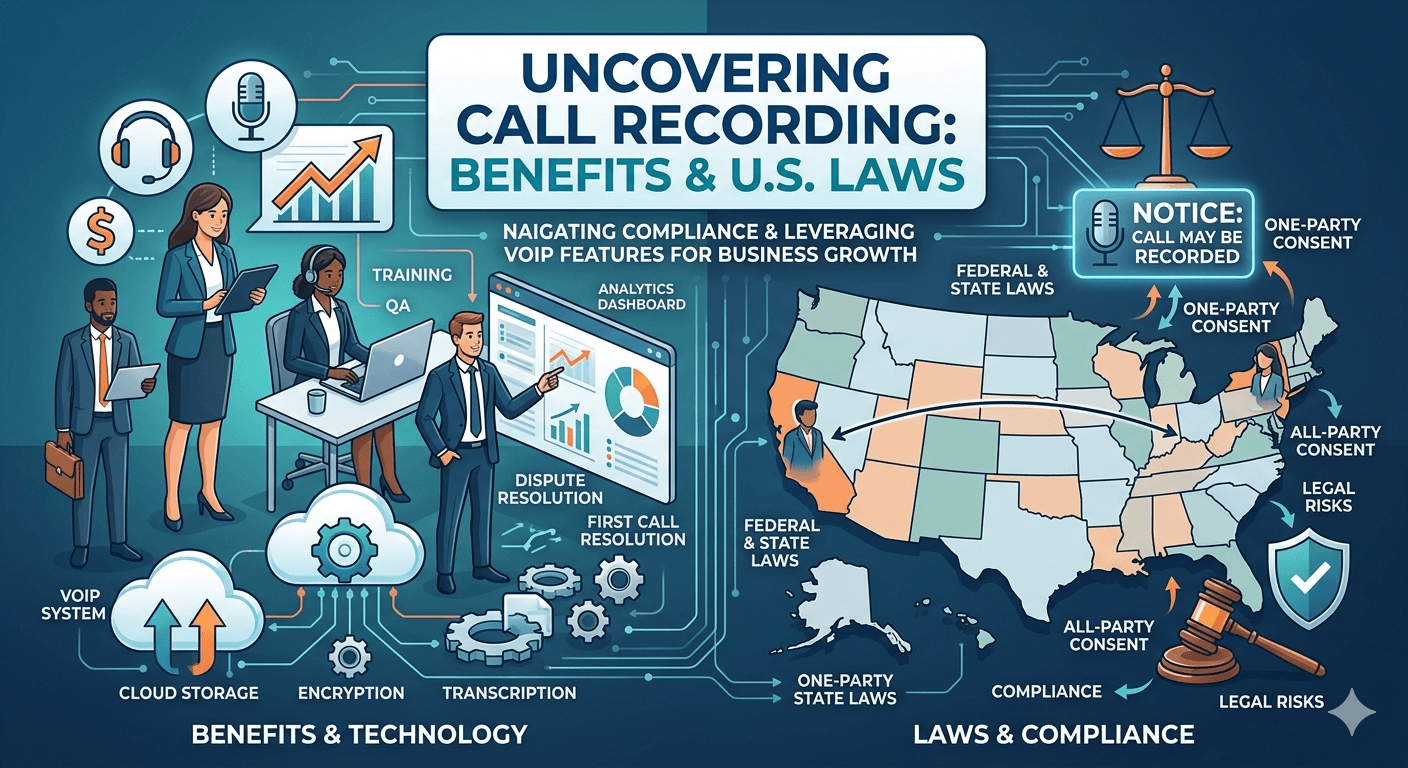
Call recording benefits and laws are a cornerstone of modern business communication, governed by a complex framework of federal and state laws in the United States. While the federal Electronic Communications Privacy Act generally permits recording if one participant consents, several states require the agreement of all parties involved. Understanding these regulations is essential for businesses utilizing advanced voip phone features to ensure they remain compliant while capturing vital customer data. By integrating recording into a broader voip phone system features strategy, organizations can enhance employee training and provide a verifiable record for dispute resolution, provided they navigate the diverse landscape of one-party and two-party consent requirements accurately. Leveraging voip phone features for Quality Assurance and Training The integration of recording tools within a corporate environment provides an unparalleled opportunity for professional development and service refinement. By utilizing modern voip phone features, managers can capture real-time interactions between staff and clients to identify specific strengths and weaknesses in communication styles. This data serves as a foundation for evidence-based training programs, replacing generic instruction with tailored feedback derived from actual customer service scenarios. When teams can listen to their own performances, they gain a better understanding of how to handle objections, clarify complex information, and maintain a professional tone under pressure. Beyond the educational value, these recordings offer a robust layer of protection against liability and misunderstandings. In many industries, verbal agreements and telephonic consultations are common, and having an audio record ensures that both parties are held to the facts of the conversation. These voip phone features allow for the quick resolution of disputes regarding pricing, service promises, or contract terms. Research from the Aberdeen Group indicates that organizations that utilize comprehensive call recording and integrated analytics see a twenty percent improvement in first-call resolution rates, as agents have better access to historical context and management can refine scripts based on successful outcomes. The technical implementation of these features often involves automated cloud storage, which ensures that recordings are indexed and searchable. This level of organization is vital for large-scale operations where thousands of calls may occur daily. Instead of manually sifting through tapes or local files, supervisors can use filters to find specific interactions based on the agent’s name, the date, or even the customer’s account number. This systematic approach to data management not only saves time but also ensures that the business maintains a high standard of accountability and transparency in all its external communications. Understanding State and Federal Mandates for voip features Navigating the legalities of audio capture starts with the fundamental question of whether can you record phone calls within your specific jurisdiction. At the federal level, the United States follows a one-party consent rule under 18 U.S.C. § 2511, which permits the recording of a conversation as long as at least one person participating in the call knows it is happening and agrees to it. This federal baseline allows individuals to record their own conversations without needing further authorization. However, businesses must be cautious because state laws often impose stricter requirements that override the federal standard in many practical scenarios. When determining is it illegal to record a phone call, one must look closely at the specific state statutes that apply to the parties involved. Currently, thirty-eight states and the District of Columbia are recognized as one party recording states, meaning they generally follow the federal model where only one participant’s consent is necessary. These states include places like New York, Texas, and Georgia. In these regions, businesses have more flexibility in how they deploy their recording tools for internal monitoring or record-keeping, though ethical best practices still suggest providing some form of notice to maintain trust and professional standards. The landscape changes significantly when dealing with states that require all-party consent. In these areas, every single person on the line must be made aware that the conversation is being recorded. Failure to provide this notice can lead to severe legal consequences, including the possibility of criminal charges or civil lawsuits. Therefore, any business operating across the country must configure their voip features to provide a clear, audible disclosure at the start of every interaction. This proactive measure ensures that the organization meets the highest legal standard, effectively shielding itself from potential litigation regardless of where the caller is located. Managing the Complexity of Recording Phone Calls Across State Lines One of the most challenging aspects of modern telecommunications is the act of recording phone calls across state lines. In a globalized economy, it is common for a business in a one-party state to communicate with a customer located in a two-party state. Legal precedents, such as the California Supreme Court case Kearney v. Salomon Smith Barney Inc., have established that the stricter law typically applies in these situations. This means that even if your business is based in a one-party state like Ohio, if you record a call with a person in California without their consent, you could be held liable under California’s stringent privacy laws. The risk associated with interstate recording makes it critical for businesses to ask themselves are you allowed to record phone calls without a universal disclosure policy. Given the difficulty of knowing exactly where a caller is physically located at any given moment, especially with the prevalence of mobile numbers, a one-size-fits-all approach is the most secure strategy. By implementing an automated message that states the call is being recorded for quality purposes, a business covers its legal obligations across all jurisdictions. This ensures that no matter where the call originates or terminates, the necessary consent has been established through the participant’s decision to remain on the line. Furthermore, the data generated from these interactions must be stored and handled according to the privacy regulations of the most restrictive state involved. This includes managing how the data is encrypted, who has access to it, and how long it is retained in the company’s archives. Modern voip features often include location-based triggers that can adjust disclosure settings dynamically, but reliance on technology alone is not a substitute for a comprehensive legal policy. Organizations should regularly audit their communication protocols to ensure they are keeping pace with evolving state laws and judicial interpretations regarding digital privacy. Addressing the Risks of Unauthorized Recording and Victim Rights Individuals often find themselves concerned about their privacy and wonder what to do if someone records you without permission in a way that violates local laws. If a person discovers they have been recorded in an all-party consent state without being notified, they may have the right to pursue legal action against the recording party. In such cases, the unauthorized recording is often inadmissible as evidence in court and can lead to statutory damages or fines for the offender. Documentation of the incident, including the time of the call and any evidence of the recording, is essential for anyone looking to protect their rights in these circumstances. For businesses, the question of can you record a phone call without consent is usually met with a firm negative in a professional context. Even if a business is technically within a one-party state, secret recording can lead to a PR nightmare and a total loss of consumer confidence. Ethical communication is built on transparency, and most successful companies choose to lead with honesty by notifying every caller of the recording. This not only satisfies the legal requirements for all-party states but also sets a tone of professionalism and respect for the individual’s privacy, which can actually improve the quality of the interaction. When an unauthorized recording is suspected, the affected party should first consult with a legal professional to determine the specific statutes that apply to their situation. Many states have specific procedures for filing complaints with telecommunications regulators or consumer protection bureaus. On the other side of the coin, businesses must have clear internal guidelines on the use of their voip phone system features to prevent unauthorized or accidental recordings by employees. Proper administrative controls and user permissions are necessary to ensure that recording tools are used only for their intended business purposes and in full compliance with the law. The Technical Architecture of a Secure voip phone system features A robust communication infrastructure relies on well-integrated voip phone system features that prioritize both functionality and security. When a business selects a provider, it must ensure that the call recording module is not just an add-on but a core part of the system’s security framework. This involves the use of end-to-end encryption for both the audio stream and the stored files, preventing unauthorized interception by third parties. Secure access controls, such as multi-factor authentication, should be mandatory for any staff member who needs to review or download recorded conversations for business purposes. The flexibility of a modern voip phone system features suite also allows for selective recording, where certain departments or specific types of calls are targeted for data collection. For example, a sales team might record every call to ensure lead accuracy, while a human resources department might only record specific interviews or disciplinary meetings with prior written consent. This granular control helps an organization manage its data storage costs while also minimizing the amount of sensitive information it holds. By limiting the scope of recording to what is strictly necessary, a business can reduce its overall risk profile and simplify its compliance efforts. Cloud-based storage solutions offer redundant backups to prevent data loss. Automated transcription services turn audio into searchable text for easier auditing. Integration with Customer Relationship Management software allows for seamless data flow. Advanced reporting tools provide insights into call volumes and agent performance metrics. Customizable retention policies ensure that data is deleted automatically after a set period. These technical capabilities ensure that the organization can handle vast amounts of data without becoming overwhelmed or falling out of compliance. When the technology is configured correctly, it acts as a silent partner in the business’s success, providing the tools needed for growth while maintaining the high standards of privacy and security that modern consumers expect. Choosing a provider that understands the nuances of United States recording laws and offers features designed to facilitate compliance is a critical step for any forward-thinking management team. Ethical Standards and Best Practices in voip features Usage While legal compliance is the minimum requirement, high-performing businesses often go beyond the law to establish ethical standards for their voip features. Transparency is the most important element of an ethical recording policy. This means not just providing a legal disclaimer at the start of a call, but also ensuring that customers understand why their data is being collected and how it will be protected. When customers feel that their information is being used responsibly to improve their experience, they are much more likely to provide consent and engage positively with the brand. Internal ethics are equally important when managing how voip features are used for employee monitoring. Staff members should be fully informed about when and why their calls are being recorded, and they should have access to the recordings for self-review. Using these tools for punitive measures without clear communication can lead to low morale and a culture of fear. Instead, the focus should always be on growth, development, and the collective improvement of the team. A positive culture around data and recording encourages employees to use the technology as a tool for their own success rather than seeing it as a form of constant surveillance. Implementing a clear data privacy policy that is accessible to both employees and customers is a hallmark of a responsible organization. This policy should outline the security measures in place, the purpose of the recordings, and the rights of the individuals involved. By being proactive and open about these practices, a business distinguishes itself as a leader in corporate responsibility. In an era where data breaches and privacy scandals are common, a commitment to ethical communication can become a significant competitive advantage that attracts both top talent and loyal customers. Read More: How to Perfect Your Business Voicemail Greeting for Success? Final Thought Successfully navigating the landscape of call recording within the United States requires a balanced approach that considers both the technical power of modern communication systems and the strict requirements of privacy laws. By understanding the differences between federal and state mandates, and by preparing for the complexities of interstate interactions, businesses can leverage their communication tools to drive growth and protect their interests. The key to long-term success lies in transparency and the ethical application of technology. When an organization treats its recording capabilities as a professional asset used for mutual benefit, it creates a secure and productive environment that fosters trust and excellence in every conversation. FAQs Regarding Call Recording and Legalities Is call recording legal in the USA? Yes, call recording is legal in the United States, but it is subject to varying state and federal laws. Federal law requires at least one party to consent to the recording, but many states require all participants to agree. It is essential for businesses to know the laws in the jurisdictions where they and their customers are located to ensure full compliance. What are the benefits of call recording? The primary benefits include improved employee training through the review of real interactions, a clear audio record for resolving customer disputes, and ensuring compliance with industry-specific regulations. Additionally, many voip phone system features allow these recordings to be used for sentiment analysis and transcription, providing valuable data for business intelligence. What are the laws around recording calls? The laws are divided into “one-party consent” and “two-party consent” categories. In one-party states, only one person on the call needs to know it is being recorded. In two-party states, every person on the line must be notified and give their permission. When a call spans across state lines, the stricter of the two laws usually applies to the interaction. Can I record my husband’s cell phone conversations? Recording someone else’s private conversations without their knowledge or consent is generally illegal and could be considered a violation of wiretapping laws. Unless you are a participant in the call in a one-party consent state, recording a third party’s conversation without their permission is a serious legal offense that can lead to criminal charges. How do I ensure my business is recording calls legally? The safest method is to use voip features that play an automated message informing all callers that the interaction may be recorded. This provides transparent disclosure and establishes implied consent for anyone who chooses to stay on the line. Regularly auditing your recording policies and consulting with legal counsel can further protect your organization from liability.
Read More
Interactive Voice Response (IVR) Systems

Interactive Voice Response (IVR) Systems: optimizing Business Communication

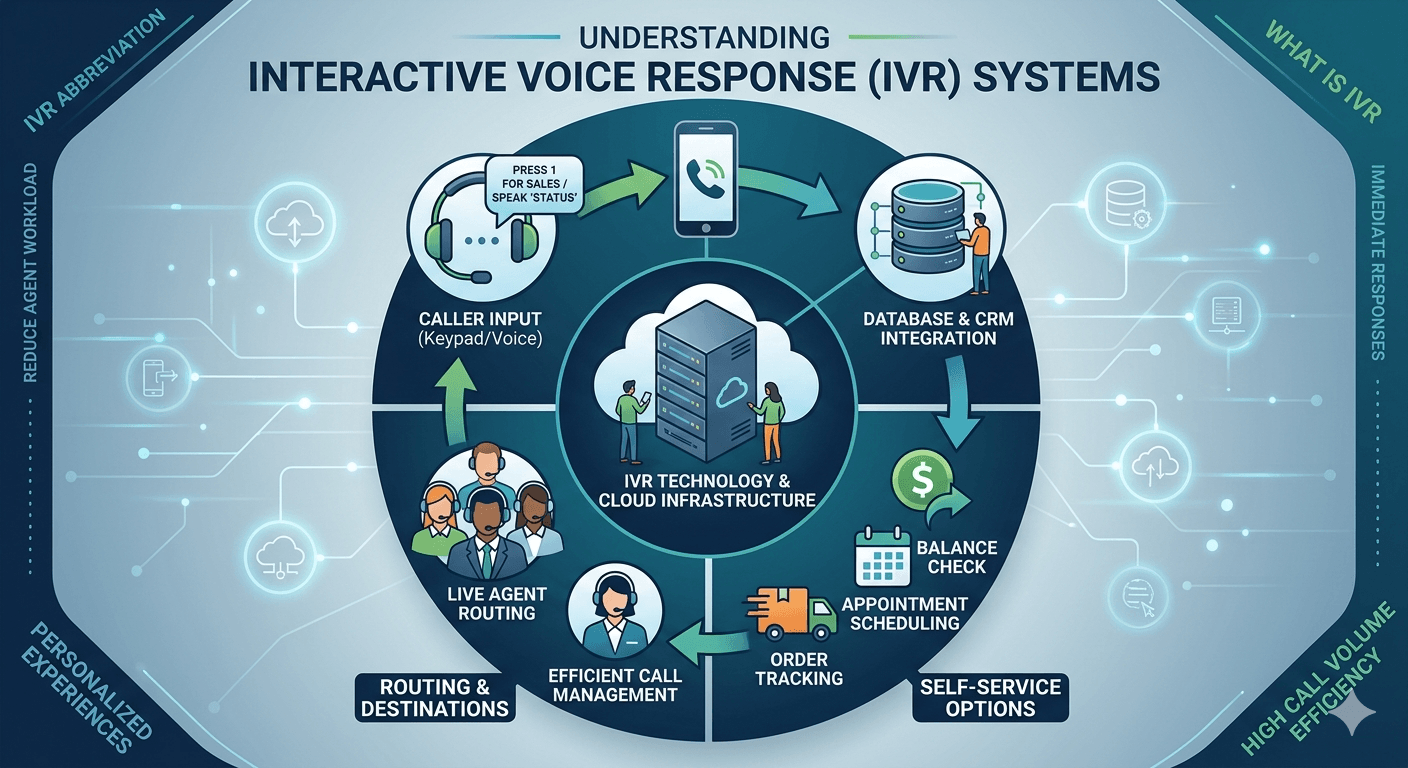
Interactive voice response technology is an automated telephony system that interacts with callers, gathers necessary information, and routes calls to the appropriate destinations. It functions through a combination of pre-recorded voice prompts and touch-tone keypad entry or voice recognition. This system allows businesses to manage high call volumes efficiently by providing self-service options for routine inquiries like balance checks or appointment scheduling. By utilizing this technology, organizations reduce the workload on human agents while ensuring that customers receive immediate responses. Modern versions often integrate with cloud databases to deliver personalized experiences, making them a fundamental component for modern customer service operations. Understanding Interactive Voice Response (IVR) Systems The basic ivr meaning refers to a technology that allows a computer to interact with humans through the use of voice and DTMF tones input via a keypad. When a customer dials a business number, the system answers with a professional greeting and presents a menu of options. This automated voice response system acts as a digital receptionist, ensuring that every caller is greeted instantly regardless of the time of day. The ivr abbreviation is one of the most recognized terms in the telecommunications industry, representing a shift from manual switchboards to sophisticated digital routing. Knowing what is ivr involves looking at it as a bridge between the caller and the information they seek. In a standard ivr call, the system plays a recorded file or uses text-to-speech technology to communicate. If a user wants to check their order status, they might press one, or they might speak the word status if the system supports voice recognition. This interaction provides a streamlined path for the user while gathering data that can be used by the business to improve service delivery. Essentially, ivr means providing a structured interface for voice-based data exchange. The evolution of what is ivr in call center environments has moved from simple “press one for sales” menus to complex conversational interfaces. Modern systems can identify a caller based on their phone number and provide personalized greetings or account-specific information immediately. This level of sophistication transforms the ivr phone meaning from a simple routing tool into a comprehensive customer engagement platform. Whether used for outbound notifications or inbound support, these systems are designed to maximize the efficiency of every connection made over the telephone network. How Interactive Voice Response Technology IVR Systems Work The technical process of an ivr calling system begins when the telephony server receives an incoming signal. The system then executes a script that dictates the interaction flow, starting with an audio prompt. The caller responds either by pressing a key on their telephone or by speaking. If the user uses the keypad, the system detects the specific frequency of the tone, known as Dual-Tone Multi-Frequency signaling. If the user speaks, the ivr service utilizes speech recognition software to convert the audio into data that the computer can understand and process. Once the input is received, the ivr interactive voice response software checks the information against a database or passes it to a routing engine. For instance, if a caller provides an account number, the system can retrieve the associated balance and read it back to the caller without ever involving a human representative. This demonstrates how an ivr phone system serves as a front-end interface for complex back-end data systems. The communication between the telephone network and the internal business database is seamless, allowing for real-time information retrieval and updates. The caller dials the business number and the call is intercepted by the automated server. An audio menu is played, providing various options based on the department or service required. The caller provides input via voice or keypad, which is then processed by the system logic. The system either provides the requested information directly or routes the call to a live agent with the gathered data already displayed on their screen. Research by Grand View Research indicates that the global IVR market size was valued at USD 4.2 billion in 2020 and is expected to grow significantly. This growth is attributed to the increasing demand for self-service options and the integration of artificial intelligence into cloud based ivr solution platforms. Another study by the Aberdeen Group found that companies using advanced automated systems see a 12.1% increase in customer retention rates compared to those that rely solely on manual routing. These facts highlight the critical role that automated voice technology plays in modern business sustainability. The Role of Best Interactive Voice Response IVR Systems in Customer Service Implementing a high-quality ivr solution is essential for businesses that want to maintain high levels of customer satisfaction. When a customer encounters a well-designed menu, they feel that their time is respected and that the business is organized. The ivr customer service experience depends heavily on the clarity of the voice prompts and the simplicity of the menu structure. If a system is too complex, it can lead to caller frustration, but a streamlined system ensures that users reach the right department on the first attempt, reducing the need for multiple transfers. The best ivr system designs prioritize the most common reasons for calling, placing them at the beginning of the menu. This approach minimizes the time a caller spends listening to irrelevant options. Furthermore, an ivr solution often includes features like “callback,” where a customer can hang up and wait for an agent to call them back instead of staying on hold. This feature is particularly valuable during peak hours, as it reduces the perceived wait time and improves the overall perception of the brand’s service quality. Self-service capabilities allow customers to complete transactions, such as paying bills or activating cards, without waiting for a human agent. Data collection features ensure that when a call is eventually routed to an agent, the agent already has the caller’s account details and the reason for the call. Multilingual support enables businesses to serve a diverse customer base by offering menus in different languages based on the caller’s preference or geographic location. Different Types of IVR Systems Businesses can choose from several different types of setups depending on their technical requirements and budget. A traditional on-premise ivr system requires physical hardware located within the company’s office, which offers high levels of control but requires significant maintenance. In contrast, a cloud ivr is hosted by a service provider and accessed over the internet. This model is increasingly popular because it eliminates the need for expensive hardware and allows for rapid scaling as the business grows. Another distinction exists between touch-tone systems and directed-dialogue systems. Touch-tone systems rely strictly on keypad inputs, whereas directed-dialogue setups allow for simple voice commands like “yes” or “billing.” The most advanced version is the natural language ivr, which uses sophisticated AI to understand full sentences. This type of interactive voice response system allows a caller to state their problem in their own words, such as “I am calling because my internet is not working,” and the system intelligently routes the call based on the intent of the statement. Visual IVR is a newer variation that provides a menu on a caller’s smartphone screen instead of an audio-only experience. When a customer calls, they receive a link to a digital menu where they can tap their way to a solution. This hybrid approach combines the familiarity of a phone call with the speed of a mobile app. For companies looking for a cloud based ivr solution, platforms like amazon connect ivr provide highly flexible tools that can be customized with minimal coding, allowing for a more dynamic and responsive customer journey. Industry Use Cases for IVR Technology In the financial sector, what is ivr phone system functionality is used most frequently for account management. Customers can call their bank to check balances, review recent transactions, or report a lost credit card. Because these systems are secure and can be integrated with biometrics, they provide a safe way to handle sensitive data. The banking industry relies on these automated systems to handle the massive volume of daily inquiries that do not require the specialized knowledge of a human bank teller. The healthcare industry also benefits significantly from ivr uses, particularly for appointment reminders and prescription refills. Patients can receive automated calls reminding them of an upcoming doctor’s visit and can confirm or cancel the appointment by pressing a key. This reduces the number of no-shows and allows clinic staff to focus on patient care rather than administrative tasks. Additionally, healthcare providers use these systems to deliver lab results securely, ensuring that patients get their information quickly and privately. Retailers use automated systems for order tracking and providing store hours or location information to callers. Utility companies deploy them for outage reporting, allowing thousands of customers to report a power failure simultaneously without crashing the call center. Travel and hospitality businesses use them for flight status updates, hotel reservations, and automated check-in processes. Challenges of Implementing IVR Systems While the benefits are numerous, there are several challenges associated with an interactive voice response call center setup. One of the most common issues is “ivr jail,” where a caller becomes trapped in a loop of menus without an easy way to speak to a live person. This often happens when a business tries to automate too many processes without providing a clear exit strategy for complex problems. To avoid this, businesses must ensure that the option to speak with an agent is always available and easy to find within the menu structure. Another challenge is the quality of the voice recognition. If an ivr calling system cannot understand a caller’s accent or if there is background noise, the interaction can quickly become frustrating. This requires companies to invest in high-quality speech engines and to regularly test their scripts with diverse groups of users. Furthermore, maintaining the content of the menus is essential; outdated information or broken links within the menu system can damage a company’s reputation and lead to a loss of customer trust. The technical integration of an ivr system with existing CRM software can also be a hurdle. For the system to be truly effective, it needs to be able to read and write data to the company’s central records in real-time. This often requires specialized IT skills or the use of modern APIs. However, once the integration is complete, the benefits of having a unified view of the customer journey far outweigh the initial difficulties of the setup process. Essential Features of Top-Tier IVR Software When looking for the best interactive voice response ivr systems, businesses should prioritize platforms that offer robust reporting and analytics. Understanding how callers navigate the menu, where they drop off, and how long they spend in each section is crucial for continuous improvement. These insights allow managers to refine the menu structure and eliminate bottlenecks that might be causing friction in the customer experience. Analytics can also reveal peak calling times, helping businesses staff their live agent teams more effectively. Dynamic routing is another essential feature of modern ivr services. This allows the system to change the call flow based on external factors, such as the caller’s geographic location or the current wait time in the queue. For example, if the wait time for technical support is over ten minutes, the system could automatically offer the caller a callback or suggest they visit the online help center. This level of responsiveness makes the automated voice response system feel more like an intelligent assistant rather than a static recording. Standardized API access allows for easy connection to third-party tools like Salesforce, Zendesk, or internal proprietary databases. Text-to-speech engines enable the system to read out dynamic information, such as names or specific dollar amounts, in a natural-sounding voice. Advanced security protocols, including voice biometrics and multi-factor authentication, ensure that customer data remains protected during the call. The Future of Interactive Voice Response Technology IVR Systems The future of these systems is closely tied to the advancement of artificial intelligence and machine learning. As natural language processing becomes more accurate, the distinction between talking to a bot and talking to a human will continue to blur. Future ivr interactive voice response software will likely be able to detect the emotional state of a caller through their tone of voice and adjust the interaction accordingly. If a system detects frustration, it could automatically escalate the call to a senior manager to prevent further dissatisfaction. We are also seeing a shift toward omnichannel integration, where the ivr system is just one part of a unified communication strategy. A customer might start a conversation with a chatbot on a website and then transition to an ivr call, with all their previous information being carried over seamlessly. This provides a consistent experience across all touchpoints. As more businesses adopt cloud based ivr solution models, the ability to deploy these advanced features quickly and cost-effectively will become a standard requirement for any competitive organization. The integration of video and screen-sharing into the voice interface is also an emerging trend. In some specialized support scenarios, a caller might start with a voice menu and be prompted to switch to a video call for better troubleshooting. This evolution ensures that interactive voice response technology ivr systems remain a vital part of the business landscape, adapting to the changing preferences of a digital-first consumer base. By staying informed about these trends, companies can ensure their communication infrastructure remains relevant and effective. Read More: What is Visual Voicemail? How to Check Voicemail on Android Final Thought Interactive voice response (IVR) systems have evolved from simple automated menus into sophisticated, AI-driven platforms that are essential for modern business. By choosing the right ivr solution and focusing on the user experience, companies can significantly reduce operational costs while providing faster, more personalized service to their customers. Whether you are looking for a basic ivr call center setup or a complex cloud-based system, the key to success lies in simplicity, integration, and continuous optimization based on real-world caller data. FAQs What does IVR stand for? IVR stands for Interactive Voice Response. It is a technology that allows callers to interact with a computer-operated telephone system through the use of voice or a touch-tone keypad. This system is designed to route calls, provide information, and handle routine tasks without the need for a live human agent. How do you set up an IVR? To set up a system, you first need to choose between an on-premise or cloud-based provider. You then map out your call flow, which is a diagram of the different menu options and where they lead. After that, you record your voice prompts or use text-to-speech tools, and finally, you integrate the system with your existing phone lines and customer database. Are IVR calls recorded? Most modern systems have the capability to record both the automated interaction and the subsequent conversation with a live agent. These recordings are typically used for quality assurance, training purposes, and maintaining a record of customer transactions. Businesses usually notify callers that the call is being recorded at the start of the interaction. How much does IVR cost? The cost varies widely depending on the complexity of the system and whether it is hosted in the cloud or on-premise. Cloud-based solutions often charge a monthly fee per user or per minute of use, which can range from a few dollars to several hundred depending on features. On-premise systems involve higher upfront costs for hardware and installation but may have lower ongoing monthly fees. What’s the difference between IVR and an auto-attendant? An auto-attendant is a basic system that simply routes calls to different extensions or departments (e.g., “Press 1 for Sales”). An IVR is a more advanced system that can interact with databases to provide or collect information, such as checking a bank balance or processing a payment, making it a much more functional tool for customer self-service.

Read More
VoIP vs PBX: Which Should You Choose?

VoIP vs PBX: Which Should You Choose?

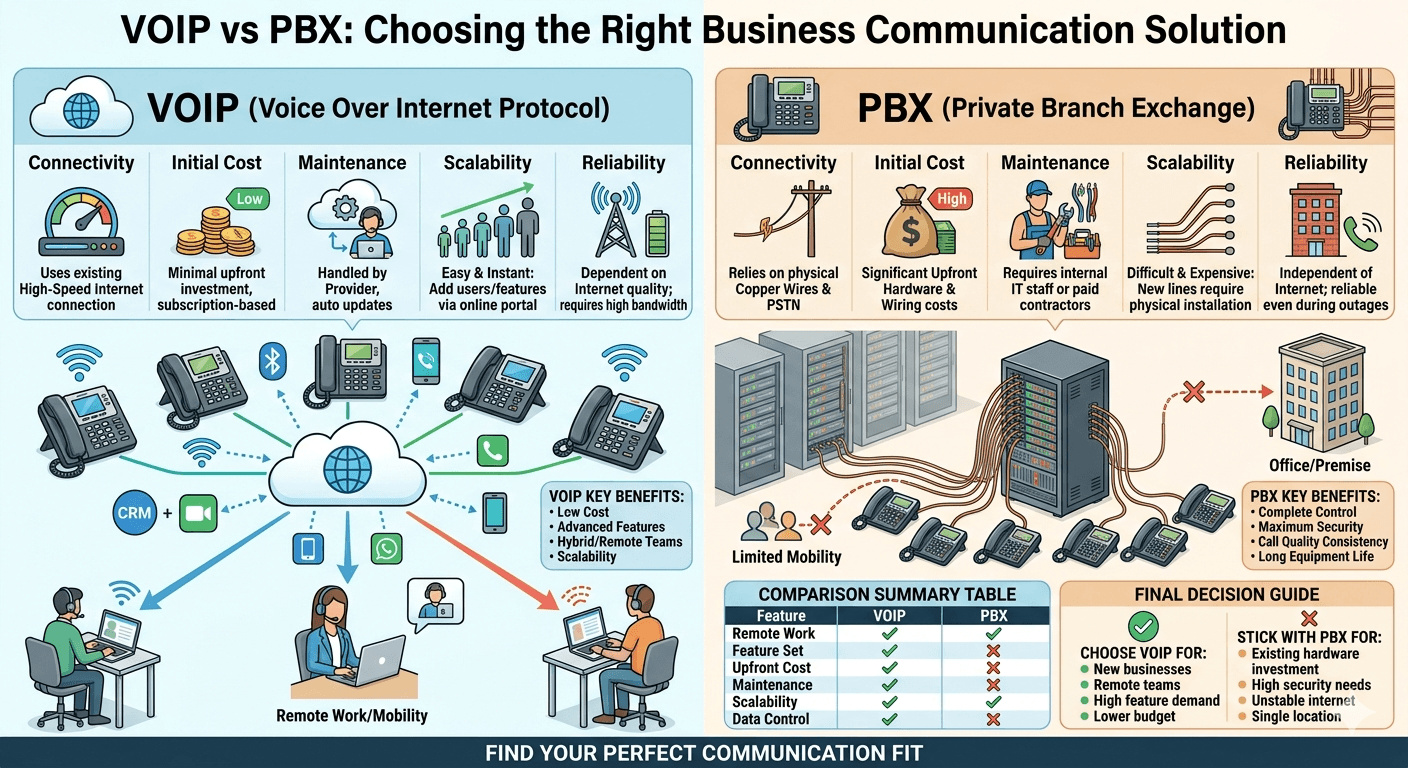
The decision between a traditional phone system and a modern internet-based solution depends on your organizational needs for reliability, scalability, and budget. When looking at VoIP vs PBX: Which Should You Choose?, businesses often weigh the physical hardware requirements of a Private Branch Exchange against the flexibility of Voice over Internet Protocol. While a traditional system relies on physical copper wires and local hardware to manage internal and external calls, modern internet-based systems transmit voice data over the web. Choosing the right path involves analyzing your current internet infrastructure, the geographical distribution of your workforce, and your long-term communication goals. VoIP vs. PBX: Why Do People Compare PBX and VoIP? The comparison between these two technologies arises because both serve the fundamental purpose of managing business communications, yet they operate on entirely different architectural foundations. Companies often find themselves at a crossroads when their legacy hardware reaches the end of its life cycle or when they start expanding into remote work environments. The pbx meaning refers to a private telephone network used within a company, allowing users to talk to each other and share a certain number of external phone lines. On the other hand, newer technologies use data packets to send voice signals, making the physical constraints of traditional wires obsolete. Many decision-makers look at pbx vs voip because they want to balance the historical reliability of landlines with the advanced features of digital transformation. A pbx stands for Private Branch Exchange, which historically acted as a central hub for all office desk phones. As internet speeds increased and became more stable, the voip pbx system emerged as a hybrid solution, leading to confusion about which technology is superior for a specific business model. Understanding the evolution of these systems helps in recognizing why a company might prefer one over the other based on their existing investments and future growth projections. The debate is further fueled by the shift toward unified communications where voice is just one part of the package. When comparing pbx phone system vs voip, organizations are often looking for more than just dial tones; they seek video conferencing, instant messaging, and CRM integrations. Because both systems can technically offer these features in various configurations, the comparison remains a hot topic for IT departments globally. The drive for cost efficiency also plays a major role, as the operational expenses associated with maintaining physical copper lines often exceed the subscription costs of cloud-based services. VoIP vs. PBX: What is the Key Difference? The fundamental difference between these two systems lies in how voice traffic is routed and the hardware required to facilitate those connections. A traditional system is a localized network that connects to the Public Switched Telephone Network through physical trunk lines. This means that if you want to understand what does pbx stand for in a practical sense, it is essentially a private switchboard located on the business premises. In contrast, voice over ip pbx utilizes the internet to route calls, bypassing the need for heavy physical infrastructure and allowing for a more virtualized communication environment. Another significant distinction involves the medium of transmission. Traditional setups use analog signals transmitted over copper wiring, which requires a dedicated technician for installation and repairs. However, an ip pbx vs voip comparison shows that modern systems use internet protocol to convert voice into digital packets. These packets travel over the same network as your email and web browsing data. This convergence of voice and data networks is what differentiates a standard pabx voip setup from an older analog one, providing a more streamlined approach to office technology management. Ownership and control also represent a major point of divergence. With an on-site system, the company owns the equipment and is responsible for all upgrades and security. With a voip pbx phone system, especially a hosted version, the service provider manages the servers and software updates in a remote data center. This means the pbx system meaning has evolved from a physical box in a closet to a cloud-resident service. The difference in maintenance requirements is a primary factor when businesses decide to move from a local pbx to voip solutions. Types of PBX Phone Systems Understanding the various types of systems available is crucial for making an informed choice. The most traditional form is the Analog PBX, which connects to the phone company via copper lines. While these are becoming less common, they are still found in areas with poor internet connectivity. The pbx meaning phone in this context refers to a reliable but limited system that lacks modern features like mobile integration or voicemail-to-email. These systems are often characterized by high upfront costs and the need for significant physical space within the office building. As technology advanced, the ip pbx emerged as a bridge between the old and new worlds. This system uses internet protocol to manage internal calls while still potentially connecting to traditional external lines. An ip pbx system is often preferred by companies that want to keep some control over their hardware while benefiting from the flexibility of digital call routing. This setup allows for the use of ip phone pbx hardware, which looks like a standard desk phone but plugs into an ethernet port instead of a traditional telephone jack. The most modern iteration is the cloud or hosted system. In a hosted pbx vs voip scenario, the service provider hosts the entire infrastructure in their own data center, and the business simply connects to it via the internet. This removes the need for any on-site pbx voice hardware other than the phones themselves. There is also the hybrid pbx with voip, which combines the reliability of an on-site system with the cost-saving benefits of internet-based external calling. This variety ensures that no matter the size or location of a business, there is a configuration that fits its specific operational needs. Feature Traditional PBX VoIP IP PBX (Hybrid) Connectivity Copper wires (PSTN) High-speed Internet Both IP and PSTN Initial Cost High (Hardware/Wiring) Low (Setup/Phones) Moderate (Server/IP Phones) Maintenance Requires onsite tech Managed by provider Managed by IT or provider Scalability Difficult/Expensive Instant/Easy Moderate Reliability High (not internet dependent) Depends on ISP High (Redundancy options) Feature Set Standard Calling Advanced (AI, Video, CRM) Advanced Features PBX System Benefits Despite the rise of cloud technologies, traditional and on-premise systems offer specific advantages that keep them relevant in certain industries. One of the primary benefits is the level of control a company has over its own data and security. Because a pbx phone system meaning implies a private network, call data remains within the company’s firewall. For organizations in highly regulated sectors like finance or healthcare, the ability to manage every aspect of the pbx abbreviation hardware and software is a significant security advantage. Another benefit is the consistency of call quality in environments where internet bandwidth might be unstable. Since a traditional pbx stands for a system that uses dedicated lines, it does not compete with other data-heavy applications for bandwidth. This ensures that voice pbx communications remain crystal clear even if the office network is under heavy load from large file transfers or video streaming. Reliability during power outages is also a factor, as traditional landlines often continue to function when local internet services are interrupted. Furthermore, the longevity of the equipment is a notable benefit for many businesses. Once the initial investment in pbx phone system definition hardware is made, the system can last for decades with proper maintenance. This can lead to a lower total cost of ownership over a very long period compared to monthly subscription models. For a company with a massive office building and thousands of existing phone jacks, the cost of re-wiring for a pure voip ip pbx might be higher than simply maintaining their current infrastructure. VoIP vs PBX: Why VoIP Phone System over Analog PBX? The shift toward internet-based communication is driven by the unparalleled flexibility and feature density that modern systems provide. When evaluating voip vs pbx, the ability to support a remote or hybrid workforce is often the deciding factor. A voip pbx allows employees to take their business extension with them anywhere in the world using a laptop or a mobile app. This level of mobility is impossible with a traditional system, which ties an extension to a specific physical desk in a specific office building. Cost is another major driver for choosing a voip pbx phone system over an analog one. Traditional systems require expensive hardware, professional installation, and ongoing maintenance fees for the physical lines. Conversely, internet-based calling typically operates on a per-user, per-month subscription model that includes long-distance and international calling. Businesses can significantly reduce their monthly overhead by switching to a cloud pbx vs voip model, as they no longer need to pay for multiple individual trunk lines from a local carrier. Modern systems offer advanced features like auto-attendants, call recording, and integration with popular business software like Salesforce or Microsoft Teams without needing additional hardware modules. Scalability is simplified because adding a new user only requires a few clicks in an online dashboard and a new handset or software license, rather than a visit from a telephone engineer. The infrastructure requirements are minimal since the system runs on the existing office data network, eliminating the need for separate telephone wiring throughout the building. Choosing Between VoIP And PBX Making the final choice requires a deep dive into the specific circumstances of your business environment. If your company operates from a single location with a stable, existing phone system and limited need for remote work, sticking with a traditional pbx mean approach might be the most cost-effective solution for now. However, if you are starting a new business or planning a major expansion, the agility of pbx voip systems usually makes them the superior choice. You must also consider your IT staff’s capability to manage the system; an on-site server requires hands-on expertise, while a hosted system is largely hands-off. Internet reliability is perhaps the most critical technical factor in this decision. Since voip and pbx systems that rely on the web need consistent bandwidth, you must ensure your local internet service provider can guarantee high uptime and low latency. If your office is in an area with frequent internet outages, a hybrid or traditional ip pbx meaning setup might be safer. On the other hand, if you have a fiber-optic connection with built-in redundancy, a full cloud solution will likely provide the best experience for your team. According to a report by Transparency Market Research, the global VoIP market is expected to reach $145.8 billion by 2024, driven by the increasing adoption of cloud-based services among small and medium-sized enterprises. This statistic highlights a clear trend: businesses are moving away from rigid, expensive hardware toward flexible, software-driven communication tools. Additionally, research from IDC suggests that businesses can save up to 30% on their telecommunications costs by migrating to a hosted environment, making the financial case for internet-based systems very strong. How To Choose The Right VoIP PBX Phone System? Once you have decided to move toward a digital solution, selecting the right provider becomes the next priority. Start by assessing the specific features your team needs to be productive. Do you require advanced analytics for a call center, or just simple call forwarding for a small office? A true what is voip pbx solution should offer a comprehensive suite of tools that go beyond simple voice calls. Look for providers that offer high-definition audio, robust security protocols, and a user-friendly management interface that doesn’t require a computer science degree to navigate. The quality of customer support is another vital consideration when choosing a voip hosted pbx. Since your business communication is the lifeblood of your operations, you need a provider that offers 24/7 support and has a proven track record of uptime. Check for Service Level Agreements (SLAs) that guarantee at least 99.99% uptime. Furthermore, consider the hardware compatibility; some providers lock you into their own expensive handsets, while others allow you to use any standard pbx with voip compatible ip phone. Evaluate the mobile application’s functionality to ensure your remote workers have the same communication power as those sitting in the physical office. Check for integration capabilities with your existing software stack, such as your CRM, email, and helpdesk tools, to create a seamless workflow. Analyze the total cost of ownership, including any hidden fees for international calling, additional extensions, or premium features that might not be in the base price. Setting up a PBX system The setup process varies significantly depending on whether you are installing a physical server or a virtual one. For an on-premise pbx telephone system, the process begins with installing the physical cabinet in a climate-controlled server room. Technicians must then run wires to every desk in the office and connect them to the central unit. This is followed by configuring the software to manage extensions, hunt groups, and external line access. It is a labor-intensive process that usually takes several days or even weeks for larger installations. Setting up a modern pbx voip system is considerably faster and less invasive. Because it uses the existing internet connection, there is no need to tear open walls or run new cables. Once you sign up with a provider, you simply configure your users and call flows in an online portal. The ip pbx system hardware, if you choose to use physical phones, arrives pre-configured. You simply plug them into an internet-connected port, and they automatically download their settings from the cloud. This “plug and play” nature is a hallmark of modern voice pbx solutions. For businesses opting for a hybrid approach, the setup involves connecting the local server to the internet via a SIP trunk. This allows the company to use its existing internal hardware while routing external calls over the internet to save money. Regardless of the type, the setup phase must include a rigorous testing period. You should test call quality under heavy network load and ensure that emergency services like E911 are correctly configured to identify the physical location of the caller, a step that is often overlooked in digital transitions. Tips for choosing the right PBX When finalizing your decision, focus on future-proofing your investment. Technology moves fast, and you don’t want to buy a pbx stands for system today that will be obsolete in three years. Choose a platform that receives regular software updates and has an open architecture for future integrations. If you are looking at pbx means for a long-term strategy, prioritize vendors that have a strong roadmap for incorporating Artificial Intelligence and advanced data analytics into their platforms. Consider the user experience for both your employees and your customers. A system that is difficult for employees to use will lead to frustration and decreased productivity. Similarly, if your what is pbx stand for system has a confusing automated menu, it will negatively impact your customer satisfaction scores. Opt for a system that offers a simple, intuitive interface and provides clear, high-quality audio. Testing the system with a small group of users before a full company-wide rollout is always a wise strategy. Finally, do not ignore the importance of data security and compliance. As voice calls are now digital data, they are subject to the same risks as any other part of your IT infrastructure. Ensure your pbx abbreviation provider uses encryption for all voice traffic and has robust measures in place to prevent toll fraud and unauthorized access. By following these tips and carefully weighing the pros and cons of voip pbx systems, you can choose a communication solution that will serve your business reliably for years to come. Read More: Why Hosted PBX Phone System is the New Standard for Businesses? Final Thought Deciding between VoIP and a traditional PBX is no longer just about choosing a phone system; it is about choosing a foundation for your company’s digital collaboration. While traditional systems offer a sense of permanence and local control, the shift toward global connectivity and remote work makes internet-based solutions increasingly attractive for the modern enterprise. By evaluating your specific infrastructure, budget, and growth plans, you can select a system that not only facilitates clear conversations but also enhances your overall business efficiency. FAQs Can I use VoIP with my existing PBX system? Yes, you can use VoIP with an existing system by using a technology called SIP trunking. This allows your traditional on-site hardware to connect to the internet to make and receive calls, effectively giving you the cost benefits of modern calling while keeping your existing handsets and internal wiring. What’s the difference between SIP trunking and VoIP? While the terms are often used interchangeably, VoIP is a broad term for any voice call made over the internet, whereas SIP trunking is a specific method used to connect a physical PBX system to the internet. Think of VoIP as the technology and SIP trunking as the “pipe” that brings that technology to your on-premise hardware. How does cloud PBX differ from on-premise PBX? A cloud system is hosted and managed by a third-party provider in a remote data center, requiring no hardware on your premises other than the phones. An on-premise system involves a physical server located in your office building that your IT team must maintain and update manually. Can VoIP improve customer experience for support teams? Modern internet-based systems significantly enhance customer experience by offering features like intelligent call routing, CRM integration, and detailed analytics. These tools allow support agents to see customer history instantly and ensure that callers are directed to the right department without long wait times. What does PBX stand for in simple terms? PBX stands for Private Branch Exchange, which is essentially a private telephone network used within a company. It allows users to communicate internally with each other and externally with the rest of the world using different communication channels like analog, ISDN, or the internet.

Read More
voicemail to text

Voicemail to Text: Guide for perfect Voicemail Transcription

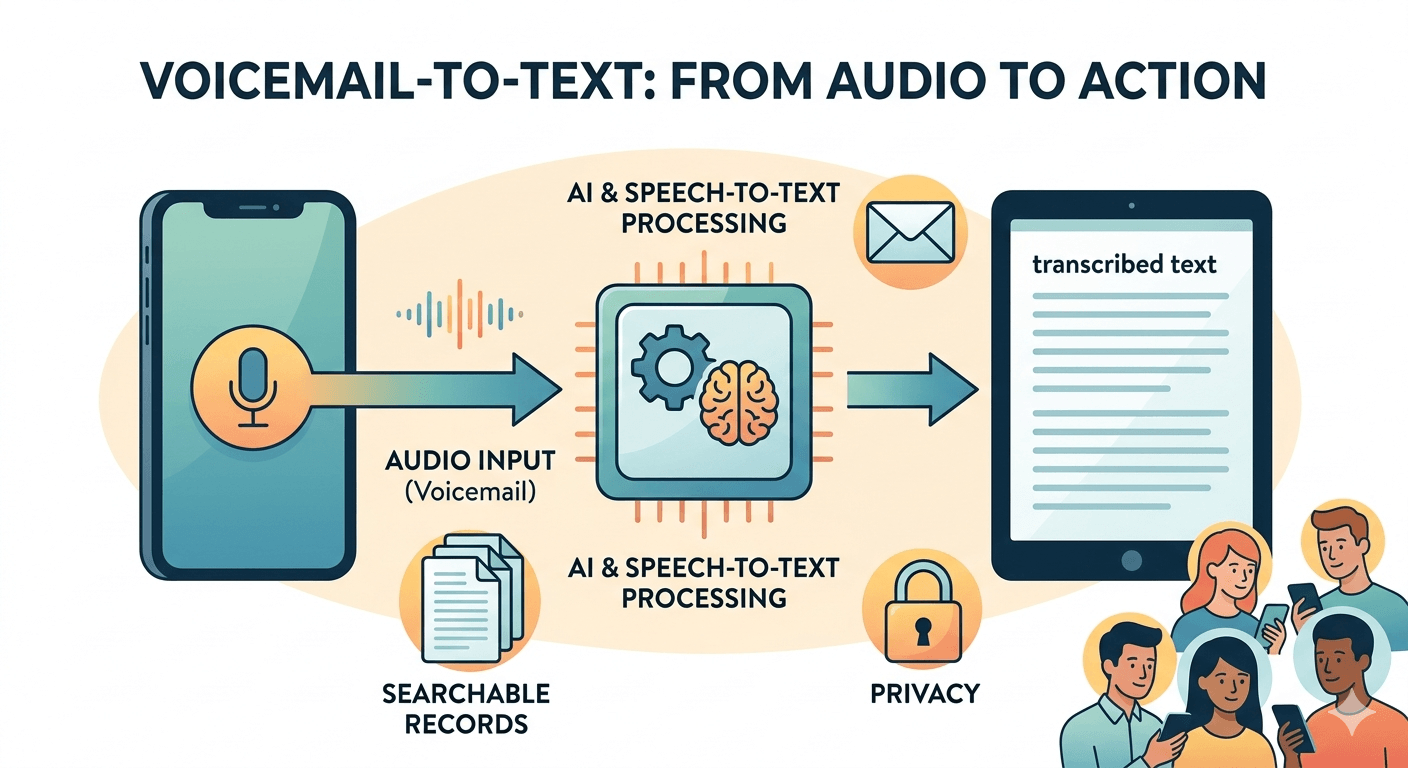
Voicemail to text transcription is a modern communication feature that converts audio messages into a written format, allowing users to read their messages rather than listening to them. This technology bridges the gap between traditional voice calling and modern text-based communication. By leveraging speech recognition software or human transcriptionists, users can receive an accurate written version of any spoken message left on their phone. This process has become an essential tool for professionals who manage high call volumes and need a quick way to screen and prioritize their responses without the time-consuming process of dialing into a mailbox. What Is Voicemail Transcription and How Does It Function? The core of voicemail transcription involves converting audio signals into written characters through a process known as speech-to-text. When a caller leaves a message, the audio file is processed by a voicemail transcription service which analyzes the phonetic sounds and matches them with words in a digital dictionary. This technology is often referred to as automated speech recognition. In many cases, a text voicemail is delivered to the recipient via email or an app notification almost instantly after the caller hangs up. The system attempts to identify the speaker, the context, and the specific words to provide a coherent summary or a full word-for-word transcript. There are two primary ways this technology operates: Automated transcription uses artificial intelligence and machine learning algorithms to process the audio. This method is incredibly fast and is commonly found in smartphone operating systems and basic voicemail to text service offerings. Human-verified transcription involves a person listening to the audio and typing it out. While this is slower, it provides a much higher level of accuracy, especially for complex technical terms, different accents, or poor audio quality. Many premium voicemail transcription services offer this hybrid approach to ensure that every voicemail converted to text is as accurate as possible for professional use. The Technology Behind Voicemail to Text Transcription The underlying technology for a voicemail to text message relies on sophisticated digital signal processing. When the audio is captured, it is broken down into small segments called phonemes, which are the basic units of speech. The voicemail to text transcription software then uses statistical models to determine the most likely sequence of words that correspond to those phonemes. Modern systems also utilize natural language processing to understand the context of the sentence, which helps the software choose the correct spelling for homophones or clarify ambiguous phrases. This is why a voicemail-to-text system becomes more accurate over time as it learns the specific speech patterns and vocabulary of the users. Research indicates that the efficiency of these systems has improved dramatically over the last decade. A report by the National Institute of Standards and Technology notes that word error rates in automated speech recognition have dropped significantly, allowing many voicemail to text transcription tools to reach an accuracy rate of over 90 percent in quiet environments. This technological leap has made it feasible for businesses to rely on voicemail to txt conversions for official records and quick client updates. Voicemail to Text Android Setup and Management For users on the most popular mobile platform, voicemail to text android features are often integrated directly into the phone dialer or provided through specific carrier applications. Most modern Android devices utilize the Google dialer, which has a built-in ability to transcribe voicemail messages automatically. To access this, users typically navigate to their voicemail settings within the phone app and toggle on the transcription feature. This allow them to see a text preview of the message directly on the screen where they would normally see the play button for the audio. If the native dialer does not support it, many users turn to an android voicemail transcription app like Google Voice. By porting a number or using a Google Voice number for business, you can get voicemail as text sent directly to your inbox or as a notification. This is particularly useful for those who prefer to keep their personal and professional lives separate while still having the ability to receive voicemail as text for all incoming business inquiries. Some carriers also offer a premium voicemail text service that adds this functionality to the standard visual voicemail app provided with the phone. The Benefits of Moving Your Voicemail Into Text One of the most significant advantages of using voicemail into text is the ability to save time. Listening to a long, rambling voicemail can take several minutes, whereas reading a transcribed voicemail takes only a few seconds. This efficiency is vital for individuals working in fast-paced environments where every minute counts. Furthermore, a text message voicemail provides a searchable record of communication. If you need to find a specific phone number or an address mentioned in a message three weeks ago, you can simply search your email or text history rather than re-listening to every saved audio file. Privacy and accessibility are also major benefits of using a voicemail transcribe feature. In a crowded office or a public space, listening to a voicemail on speakerphone or even holding it to your ear can be indiscreet. Having the voicemail text available to read on your screen ensures that the contents of your messages remain private. For individuals with hearing impairments, these services are not just a convenience but a necessity, providing them with equal access to voice-based communication through visual means. Pros and Cons of Automated Voicemail Transcription Services While the technology is advanced, it is important to understand both the strengths and weaknesses of voicemail transcription services. The primary pro is the speed and cost-effectiveness of automated systems. Most modern smartphones include some form of basic speech to text voicemail at no additional charge. However, the cons often involve accuracy issues. Automated systems may struggle with background noise, heavy accents, or industry-specific jargon, leading to a transcript that might be difficult to understand. When a message is critical, such as a legal or medical update, relying solely on an automated voicemail to text messages system might be risky. This is why many organizations prefer a professional voicemail transcription service that includes a human review step. These services ensure that the voicemail message to text is perfect and ready for professional use. On the other hand, for a quick “I will be home at five” message, the standard automated voicemail to text messages delivered to your phone are usually more than sufficient. Using VoIP to Text for Business Communication Voice Over Internet Protocol, or VoIP, has revolutionized how businesses handle phone calls and voicemail. Most modern VoIP systems include a feature known as voicemail to text messages as a standard part of their package. This integration allows for a seamless flow of information between the phone system and other business tools like CRM software or email clients. When a client leaves a message on a VoIP line, the system can automatically convert voicemail to text message format and route it to the appropriate department’s email address or a specific Slack channel. Who uses this technology? Almost every sector from legal firms to real estate agencies benefits from VoIP-to-text. It allows teams to collaborate on a response more effectively. Instead of one person listening to a message and relaying the info, the entire team can see the text voice mail and understand exactly what the client needs. This transparency reduces errors and ensures that the client’s needs are met quickly. Many VoIP providers allow for the customization of these alerts, ensuring that you only receive a voicemail to text message for high-priority numbers or during specific business hours. Practical Ways to Use Voicemail to Text Transcripts There are numerous practical applications for a transcript voicemail in both personal and professional settings. In the legal profession, having a written record of what was said during a call can be used for documentation and evidence. In the healthcare sector, doctors can use these transcripts to quickly update patient files with information left over the phone. For general business use, it allows for better task management. You can copy and paste the details from a voicemail to text transcription directly into a calendar event or a to-do list. Another practical use is for archival purposes. Audio files take up significant storage space compared to text files. By keeping a text message voicemail archive, businesses can maintain years of records without worrying about server capacity. Additionally, these transcripts can be indexed by search engines, making it possible to find specific customer interactions from months or years ago by simply typing in a keyword. This level of organization is nearly impossible to achieve with traditional audio-only voicemail systems. Top Transcription Services for Reliable Voicemail to Text If you are looking for more than what your basic phone carrier provides, there are several high-end voicemail transcription services available. Companies like SpeakWrite provide human-powered transcription that guarantees a high level of accuracy. These services are ideal for users who receive complex messages that automated systems fail to capture correctly. Another popular option is Google Voice, which provides a free and reliable automated service that integrates well with other Google Workspace tools. For those who want a dedicated app for their phone, YouMail is a strong contender that replaces your standard carrier voicemail. It provides advanced features like scam call blocking alongside its voicemail to text service. These third-party apps often provide better user interfaces and more reliable transcribing voicemail features than the stock apps found on older smartphones. When choosing a service, consider the volume of messages you receive and the level of accuracy you require for your daily operations. How to Transcribe a Voicemail Manually or Automatically If you find yourself needing to know how to transcribe a voicemail that didn’t automatically convert, there are a few steps you can take. Use a secondary device or computer with a high-quality microphone to record the playback of your message directly into a transcription software. Programs such as Google Docs Voice Typing or specialized apps like Otter.ai can listen as you play the audio through your phone speaker. While this is considered a manual workaround, it is an effective strategy for capturing long or important messages that your standard phone service failed to process during the initial call. Export the audio file from your visual voicemail application and upload it to a professional voicemail transcription service. Most modern smartphones allow you to save voicemails as digital audio files which can then be transferred to cloud-based platforms for a professional voicemail transcribe. This method is the best choice when the original audio quality is poor or when you require a verbatim transcript for official business documentation or legal records. Share the audio file directly with integrated mobile applications that specialize in speech-to-text conversion. By utilizing the share or send icon found on your voicemail management screen, you can bypass the need for manual recording and send the file straight to an automated service. This provides a more streamlined approach that maintains the digital integrity of the original recording, which usually leads to much higher accuracy in the final text output for the user. The Future of Voice Mail to Text Technology As artificial intelligence continues to evolve, the future of voice mail to text looks incredibly promising. We are moving toward a time where transcription will not only be word-for-word but also include sentiment analysis. This means your phone could potentially tell you if a caller sounds frustrated or urgent before you even read the transcript. Furthermore, real-time translation is becoming a reality. A caller could leave a message in Spanish, and the voicemail into text system could automatically translate and transcribe it into English for you. According to a study by Grand View Research, the global speech-to-text market is expected to grow at a compound annual growth rate of nearly 20% over the next few years. This growth is driven by the increasing demand for automation in customer service and the widespread adoption of smart devices. As this technology becomes more ubiquitous, the distinction between a voicemail and a text message will continue to blur, leading to a more unified and efficient communication experience for everyone. Steps to Receive Voicemail as Text on Your Smartphone To start getting your messages in written form, the first step is to check if your mobile carrier supports this feature. Most major carriers offer a visual voicemail app that includes a basic version of get voicemail as text. You may need to subscribe to a premium tier to unlock this, but it is often worth the small monthly fee for the convenience it provides. Once activated, the messages will appear in a list format, and tapping on one will reveal the text beneath the audio controls. If your carrier does not offer this, or if you find the quality lacking, downloading a third-party app is the next best step. Apps like Rev or SpeakWrite allow you to receive voicemail as text by forwarding your missed calls to their specialized systems. This setup usually takes only a few minutes and involves entering a few codes into your phone’s dialer to change your conditional call forwarding settings. Once configured, every message left for you will be handled by the third-party voicemail transcription services, ensuring you get the most accurate results possible. Read More: The Guide to Voicemail: Setting Up Your Voicemail Number and Managing Voicemail Messages Final Thought Embracing voicemail to text technology is a simple yet powerful way to modernize your communication habits. Whether you are using a standard voicemail to text android feature or a high-end professional transcription service, the ability to read your messages provides unmatched convenience and organization. By converting your voicemail into text, you ensure that you never miss an important detail and can respond to your contacts with greater speed and accuracy. Voicemail to Text Transcription FAQs Can you send a voicemail as a text message? Yes, most modern smartphones and VoIP services allow you to share a voicemail. You can typically find a share icon on the voicemail screen which allows you to send the audio file or the transcribed text through your messaging app to any contact. Some third-party applications can be configured to automatically forward every new voicemail converted to text directly to your SMS inbox as a standard text message. How do I text a voicemail message? To text a voicemail message, you first need to have it transcribed. Once the voicemail transcription is visible on your screen, you can copy the text. Open your messaging app, start a new conversation, and paste the text into the message box. Alternatively, you can use the share function within your visual voicemail app to send the text directly. How does the voice to text work? The technology uses a microphone to capture audio and software to convert that audio into a digital signal. This signal is then analyzed by an algorithm that identifies speech patterns and matches them to a linguistic database. The system uses natural language processing to ensure the words make sense in context, and then it outputs the final result as a written transcript on your device. What is voice to text called? Voice to text is most commonly referred to as speech-to-text or automated speech recognition (ASR). In the context of phone messages, it is specifically called voicemail transcription. In some business circles, it may also be referred to as speech-to-data, especially when the text is being used to populate a database or a customer relationship management system. How much does voice to text cost? Basic voicemail transcription is often included for free with many smartphone plans and email services like Google Voice. Professional voicemail transcription services that use human editors for 100% accuracy typically charge a per-minute or per-message fee, which can range from a few cents to a couple of dollars depending on the turnaround time and complexity.

Read More
business voicemail greeting

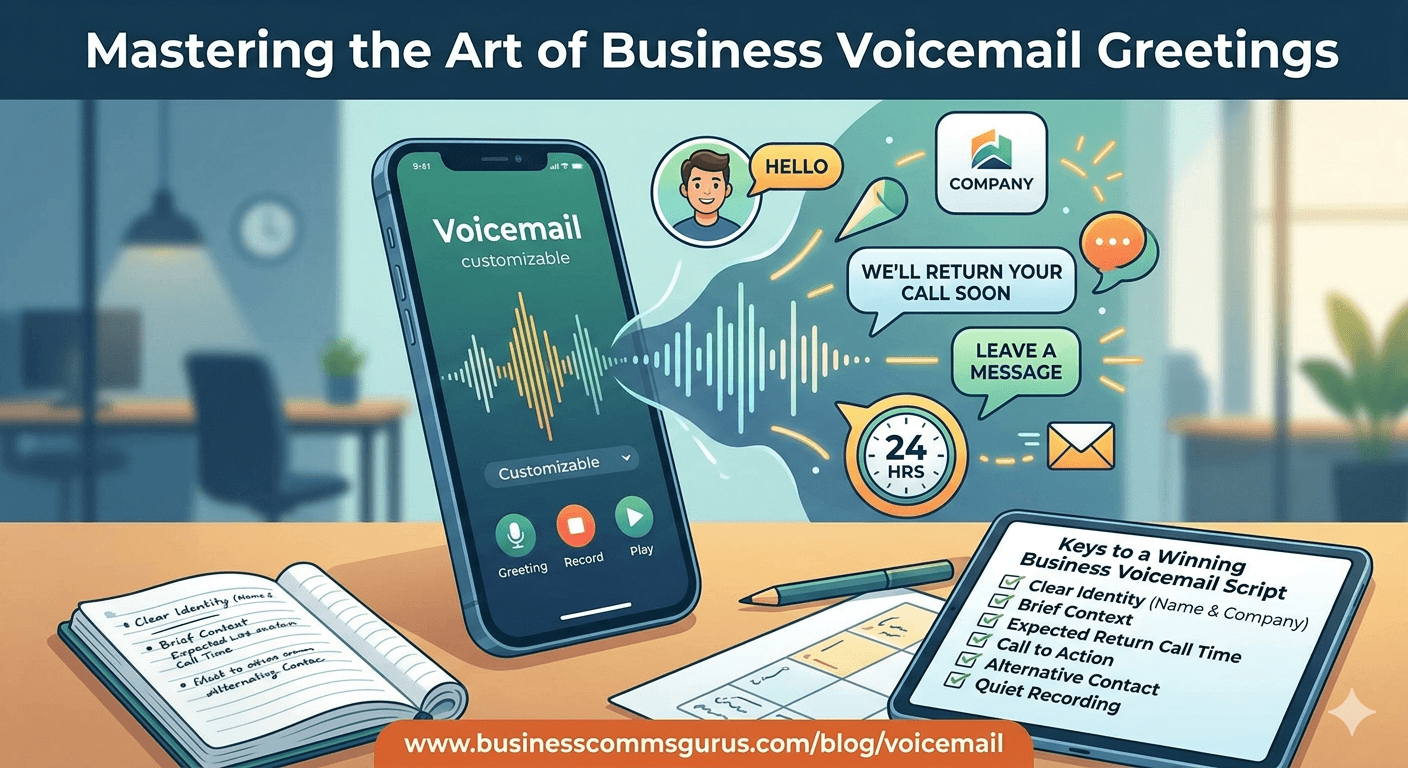
How to Perfect Your Business Voicemail Greeting for Success?

A business voicemail greeting is a recorded message that plays when a caller is unable to reach a person or department directly. It serves as a vital touchpoint in professional communication, acting as a digital receptionist that informs, reassures, and directs callers on what to do next. Unlike personal messages, a company voicemail greeting must strike a balance between being approachable and maintaining a high level of professionalism. It is often the first impression a potential client or partner has of your brand, making it essential to convey competence and reliability through your business voice mail setup even when you are not available to pick up the phone. What is a Business Voicemail and Why It Matters A business voicemail is an automated system designed to handle incoming calls during off-hours, when lines are busy, or when staff members are away from their desks. It is more than just a place to leave a recording; it is a component of a comprehensive business voicemail service that helps manage lead flow and customer service expectations. When a caller hears a clear and professional business phone message greeting, they are more likely to leave their contact details rather than hanging up and calling a competitor. This system ensures that no communication opportunities are lost, providing a reliable way for clients to reach out and for businesses to respond in a timely manner. The importance of this tool cannot be overstated in the modern corporate landscape. Statistics from various customer service studies indicate that approximately 80 percent of callers will not leave a message if they encounter an unprofessional or generic greeting. Furthermore, research from the Harvard Business Review suggests that the speed and quality of a company’s response to an inquiry can significantly impact conversion rates. A well-structured business voicemail script ensures that the information provided is concise, helpful, and reflective of the brand values, which helps in maintaining a professional image even during periods of unavailability. Professional Voicemail Greeting: Simple Ways to Improve Improving your professional voicemail greeting for business does not require expensive equipment or a professional voice actor. The most effective way to enhance your message is to focus on clarity and the information provided. Start by stating your name, the name of your company, and a brief explanation for why you cannot take the call. This immediately validates to the caller that they have reached the right place. Additionally, providing an estimated timeframe for a callback helps manage expectations and reduces caller frustration. A script that is practiced and recorded in a quiet environment will always sound more professional than an impromptu recording made in a noisy office. Another simple improvement is to offer alternative contact methods within the greeting. This might include a website address, an email for general inquiries, or an extension for another department that might be available. By providing these options, you are actively solving the caller’s problem even without speaking to them. Using a business voicemail script that is updated regularly to reflect holiday hours or temporary absences also shows a high level of attention to detail. These small adjustments transform a basic message into a helpful resource that enhances the overall customer experience and reinforces the credibility of your business phone greeting script. Advantages of a Personalized Business Voicemail A personalized business voicemail offers several advantages over the standard, pre-installed recordings provided by phone carriers. Firstly, it builds trust by letting the caller know exactly who they are dealing with and that their message is going to the correct person. This personal touch is particularly important for small businesses where the owner is the primary point of contact. Using small business voicemail greeting examples that include the owner’s name and a warm opening can make a significant difference in how clients perceive the company’s accessibility and friendliness. Secondly, a customized message allows you to control the narrative of your brand. You can use specific language that matches your company culture, whether that is formal and corporate or casual and creative. This consistency across all communication channels, including your business voice mail, strengthens brand identity. Moreover, personalized greetings can be used to filter calls. By asking for specific information in the message, such as an account number or the reason for the call, you can prioritize your responses and be better prepared when you eventually return the call. This level of organization is a hallmark of a professional business voicemail setup. How to Use Your Voicemail Message to Serve Your Customers Using your voicemail message for business as a customer service tool involves anticipating what the caller needs when they reach out to you. If your business receives many calls about office hours or location, including that information directly in the greeting can save the caller time and eliminate the need for them to even leave a message. This proactive approach shows that you value their time and understand their common concerns. For customer service departments, a specific greeting can direct callers to an online FAQ page or a help desk portal for faster resolution of common issues. To effectively serve customers through your voicemail, consider the following strategies: Clearly state your name and organization so the caller knows they have reached the intended destination without any doubt. Mention your standard business hours and any upcoming holiday closures to explain your current unavailability and set clear expectations for a return call. Provide a specific call to action, such as asking the caller to leave their phone number, the best time to call them back, and a brief description of their inquiry. Offer an emergency contact number or an alternative staff member’s extension for urgent matters that cannot wait until the next business day. Keep the entire message under thirty seconds to ensure the caller remains engaged and does not hang up before they reach the tone. A Winning Business Voicemail Greeting for Success Creating a winning business voicemail greeting involves a combination of tone, content, and delivery. The tone should be upbeat and helpful, reflecting a positive attitude that makes the caller feel welcome. Even if you are having a busy day, taking a moment to smile while recording your business voicemail greetings examples can actually be heard in your voice, making the message sound more pleasant. The content should be strictly professional, avoiding any unnecessary fluff or long-winded explanations. A concise message respects the caller’s time and demonstrates that your business is efficient and organized. A successful greeting also needs to be easy to follow. Use simple language and avoid industry jargon that might confuse the caller. If you are providing a phone number or a website URL, speak slowly and repeat the information to ensure the caller has time to write it down. Testing your greeting by calling it from a different phone is a great way to hear exactly what your customers hear and make necessary adjustments to volume or pacing. When you combine these elements, you create an example of business voicemail greeting that not only captures messages but also enhances your professional reputation. Small Business Voicemail Greeting Examples and Scripts Small businesses often need to sound larger or more established than they are, and a professional phone messages for business strategy can help achieve this. Here are a few scripts that can be adapted for various needs: Standard Business Hours Script: Hello, you have reached the office of Company Name. We are currently assisting other clients or are away from the desk. Please leave your name, number, and a brief message after the tone, and a member of our team will return your call within one business day. For more information about our services, please visit our website at Website Address. After-Hours Script: Thank you for calling Company Name. Our office is currently closed. Our standard business hours are Monday through Friday, 9 AM to 5 PM. Please leave your contact details and the reason for your call, and we will get back to you as soon as we return. Thank you for reaching out. Direct Extension Script: You have reached the voicemail of Name at Company Name. I am currently away from my desk or on another line. Your call is very important to me, so please leave a detailed message and your phone number, and I will call you back as soon as possible. If you require immediate assistance, please press zero to speak with our receptionist. These scripts provide a solid foundation for any small business voicemail greeting examples you might need. They are direct, professional, and provide all the necessary information without being overly long. By using these as a template, you can ensure that your voicemail for business remains consistent and helpful. Short and Effective Business Voicemail Greetings In a fast-paced world, many callers prefer a short and direct voicemail message business format. A brief greeting tells the caller that you are a person of action who values efficiency. This type of greeting is especially useful for mobile phones or individual extensions where callers might be reaching out for quick updates or simple questions. A short greeting should still contain the essentials: who you are and when you will call back. It avoids any mention of your website or alternative numbers, focusing purely on the immediate interaction. For those who want to keep it brief, consider these best business voicemail greetings: Hi, you have reached Name at Company Name. I am sorry I missed your call. Please leave your name and number, and I will get back to you shortly. Thank you for calling Company Name. No one is available to take your call right now. Please leave a message after the tone. Hello, this is Name. I am currently in a meeting. Please leave your details and I will call you back by the end of the day. You have reached the general inbox for Company Name. Please leave your name, number, and a brief message so we can route your call to the correct department. Customer Service and Departmental Voicemail Messages When a caller reaches a specific department, such as sales or technical support, the voicemail greeting should reflect that department’s specific function. For example, a sales department greeting might include a mention of current promotions or a link to a product catalog. A technical support greeting, on the other hand, might ask for a ticket number or direct the caller to an online knowledge base. These targeted message greetings for business help streamline the process and ensure that the person returning the call has the right information to help the client. Departmental greetings also help in managing high call volumes. If a specific team is experiencing delays, mentioning this in the voicemail can help reduce customer frustration. A message like “We are currently experiencing a high volume of inquiries and may take longer than usual to return your call” provides context and shows transparency. This is a key part of using voicemail greeting for business examples to improve operational efficiency. By tailoring the message to the department, you provide a more relevant and helpful experience for the caller, which is essential for maintaining high customer satisfaction levels. Industry-Specific Voicemail Greeting for Business Examples Different industries require different approaches to their business phone greeting script. A law firm or medical office will likely need a more formal and serious tone compared to a creative agency or a retail store. In professional services, it is also common to include a disclaimer or specific instructions regarding confidentiality or emergency situations. For instance, a medical office should always include a prompt for callers to dial 911 if they are experiencing a medical emergency. This ensures that the voicemail is not only a communication tool but also a safety measure. In contrast, a retail or hospitality business might use their greeting to highlight an upcoming event or a seasonal sale. This turns the voicemail into a passive marketing tool. A greeting for a boutique could say, “Thanks for calling our shop! We are currently busy helping customers find the perfect outfit, but we would love to talk to you. Please leave a message, and don’t forget to ask about our upcoming spring collection when we call you back.” This approach makes the business feel more dynamic and engaged with its customers, which is a great example of how to use best voicemail greetings for business to drive brand engagement. Tips for Recording the Best Business Voicemail Greetings The quality of the recording is just as important as the script itself. To ensure your business voicemail greetings examples sound professional, you should record in a space that is free from background noise, such as traffic, fans, or other people talking. Using a high-quality microphone can also make a significant difference, although most modern smartphones have excellent built-in microphones that are sufficient if used correctly. Before you record, take a few deep breaths and sit or stand with good posture to ensure your voice sounds clear and confident. When recording, follow these steps for the best results: Write out your business voicemail script beforehand and read it aloud several times to ensure it flows naturally and does not contain any tongue-twisters. Speak at a moderate pace, slightly slower than you would in a normal conversation, to ensure that every word is easily understood by the caller. Inflect your voice to sound warm and welcoming, avoiding a monotone delivery that can make your business sound robotic or uncaring. Listen to your recording immediately after finishing and re-record it if you notice any stumbles, heavy breathing, or distracting background sounds. Check the volume level to ensure it is not too quiet or so loud that it distorts, as this can be jarring for a caller who has their phone held to their ear. The Impact of Professionalism on Company Voicemail Messages Professionalism in your company voicemail message is a reflection of your company’s overall standards. When a caller hears a well-articulated and informative message, they associate that level of quality with your products or services. Conversely, a sloppy or outdated greeting can lead to doubts about your company’s reliability. It is a good practice to audit all company voicemails once a quarter to ensure that the information is still accurate and that the tone remains consistent with any changes in your branding strategy. Research by the industry leader RingCentral suggests that clear communication through automated systems can increase customer retention by providing a sense of stability. When customers feel that they can always get the information they need, even if they can’t talk to a human immediately, they are more likely to remain loyal to that brand. This is why investing time into professional business voicemail management is not just a clerical task, but a strategic move that supports long-term growth and customer satisfaction. Read More: How to Choose the Best Internet Business Phone Service for Reliable Internet Business Phone Systems? Final Thought A well-crafted business voicemail greeting is a fundamental tool for any organization looking to maintain a professional image and provide excellent customer service. By taking the time to write a clear business voicemail script and recording it with care, you turn a simple missed call into a positive brand experience. Whether you are a small startup or a large corporation, your voicemail messages serve as a bridge between you and your clients, ensuring that every interaction is handled with professionalism and respect. Business Voicemail Greeting FAQs What is the best greeting for a voicemail? The best greeting is one that is professional, concise, and informative. It should include your name, company name, a brief explanation of why you are unavailable, and a clear instruction for the caller to leave their contact details and the reason for their call. It should also provide a realistic timeframe for when the caller can expect a response, which helps in managing expectations and building trust with the customer or client. What is a good business greeting? A good business greeting sounds welcoming and helpful while remaining formal enough to represent a corporate environment. It should be free of background noise and spoken with a clear, confident voice that reflects the brand’s personality. Including an alternative way to get help, such as an email address or a website URL, is also a hallmark of a good greeting as it provides the caller with immediate options to resolve their inquiry. What is the basic voicemail greeting? A basic greeting is a short message that identifies the person or company being called and asks the caller to leave a message. For example: “You have reached Company Name. We are sorry we cannot take your call. Please leave a message after the tone.” While basic, these greetings are much better than the default system messages provided by carriers, as they at least confirm to the caller that they have dialed the correct number. What is a creative voicemail greeting? A creative greeting uses humor or a unique brand voice to stand out from the competition. This is often used by marketing agencies, design firms, or fun retail brands to showcase their creativity and make a memorable impression. For example: “You’ve reached the creative minds at Design Co. We’re currently busy turning coffee into cool logos. Leave a message, and we’ll get back to you as soon as the caffeine kicks in!”

Read More
internet business phone

How to Choose the Best Internet Business Phone Service for Reliable Internet Business Phone Systems?

An internet business phone service uses Voice over Internet Protocol (VoIP) to transmit calls via the web instead of traditional copper wires. This modern communication tool allows businesses to manage calls through computers, specialized desk phones, or mobile applications. By utilizing a high-speed connection, companies gain access to advanced features like video conferencing, automated attendants, and voicemail-to-email. It offers a scalable and cost-effective alternative to traditional landlines, enabling team members to stay connected from any location with internet access, which is essential for remote work environments and growing enterprises looking for flexibility. Internet business phone technology has fundamentally changed how modern enterprises interact with clients and internal team members. By converting voice signals into digital data packets, these systems allow for a level of flexibility that traditional analog telephony simply cannot match. This shift is not just about moving from a physical wire to a digital stream; it represents a comprehensive upgrade in communication capabilities. Organizations no longer need to be tethered to a physical desk, as the system follows the user wherever an active web connection exists. This adaptability has become a cornerstone for businesses transitioning to remote or hybrid work models, ensuring that professional presence remains consistent regardless of geographic location. Research into telecommunications trends has shown significant financial benefits for companies making the switch. For example, a report by IT World indicates that small businesses switching to an internet-based system can reduce their local call costs by up to forty percent and their international call costs by as much as ninety percent. This drastic reduction in overhead allows companies to reinvest capital into other growth areas. Furthermore, the Journal of Business Communication has highlighted that unified communication systems, which often accompany these digital services, can save employees up to thirty minutes of search time daily by integrating various communication channels into a single manageable interface. The underlying infrastructure of an internet business phone relies on robust servers and cloud technology rather than local switches. When a call is initiated, the voice data is compressed and sent over the network to the service provider’s gateway. From there, it is routed to the recipient, whether they are on a mobile device, a computer, or a traditional landline. This process happens in milliseconds, providing high-definition audio that often exceeds the clarity of traditional calls. As long as the bandwidth is sufficient, the system can handle multiple simultaneous calls without the need for expensive physical line installations or additional hardware. Essential Components of a Reliable Internet Business Phone Service Implementing an internet business phone service requires a few critical pieces of infrastructure to ensure high-quality communication and reliability. The most important requirement is a stable, high-speed connection that can handle the data load of voice traffic. Since voice data is sensitive to delays, having a router that supports Quality of Service settings is beneficial. These settings allow the network to prioritize voice traffic over other data-heavy activities like large file downloads or video streaming. This prioritization helps prevent issues like jitter or dropped calls, ensuring that client interactions remain professional and uninterrupted. In addition to the network requirements, businesses must decide on the hardware that best fits their operational style. Some organizations prefer physical desk units that resemble traditional phones but connect via ethernet cables. Others opt for a completely softphone-based approach, where employees use headsets paired with software on their laptops or mobile devices. This choice often depends on the specific needs of the workforce. For instance, a call center might benefit from specialized hardware, while a mobile sales team would find more value in a versatile mobile application that keeps them connected on the go. Verify that your current internet bandwidth can support the number of concurrent users expected during peak hours to avoid latency. Select a service provider that offers a comprehensive suite of features, including auto-attendants, call forwarding, and integrated video conferencing tools. Ensure that all hardware, such as headsets and desk phones, is compatible with the selected provider’s software platform to prevent technical glitches. Establish a backup plan, such as automated routing to mobile phones, to maintain communication during unexpected local network outages. Train your staff on the advanced features of the system, such as call transfer protocols and using the digital dashboard for managing personal settings. Evaluating the Best Internet Business Phone Internet Business Phone Service for Growth Choosing the best internet business phone internet business phone service involves looking beyond the monthly subscription price to see the long-term value provided. A system that is easy to scale is vital for growing companies. Traditional systems required a technician to come on-site to add new lines, which was both time-consuming and expensive. With modern digital services, adding a new user is often as simple as clicking a few buttons in an administrative dashboard. This allows businesses to expand their communication capacity instantly as they hire new staff or open new branch locations. Reliability and uptime are also major factors when evaluating different options in the market. The leading providers maintain multiple data centers across different geographic regions to ensure that if one facility experiences an issue, traffic is automatically rerouted to another. This redundancy is what allows modern systems to boast ninety-nine percent uptime. When comparing services, it is helpful to look for those that provide real-time status updates and have a proven track record of maintaining connectivity even during high-traffic periods or maintenance windows. Assess the integration capabilities of the service, specifically how well it connects with existing tools like customer relationship management software and email platforms. Look for a provider that offers twenty-four-hour technical support to resolve any issues quickly and minimize potential downtime for your business operations. Evaluate the mobile application’s performance, ensuring it provides a seamless transition from the desktop environment to a mobile workspace for remote employees. Compare the security protocols offered by different providers, such as end-to-end encryption for calls and multi-factor authentication for account access. Consider the international calling rates and the availability of local numbers in different countries if your business operates on a global scale. Strategies for Implementing Internet Business Phone Service Free Options and Trials Exploring an internet business phone internet business phone service free trial is an excellent way for organizations to test the waters before committing to a long-term contract. Many top-tier providers offer a limited-time period where companies can use the full suite of features without any initial investment. This trial period allows the IT team to assess the voice quality on the existing network and see how well the staff adapts to the new interface. It is a risk-free method to identify any potential hurdles, such as bandwidth limitations or hardware incompatibilities, that might need to be addressed before a full rollout. While some platforms offer completely free tiers, these are often restricted in terms of the number of users or the features available. For a small startup, these free versions might be sufficient for basic communication needs. However, as the company grows, the limitations of free services usually become apparent. These limitations might include a lack of professional greetings, limited call duration, or the absence of advanced analytics. Using the free version as a stepping stone is a strategic move, but businesses should have a clear roadmap for when they will need to upgrade to a paid tier to unlock more robust professional capabilities. Small business owners should be wary of services that are entirely free without a clear business model, as this can sometimes lead to issues with data privacy or poor call quality. It is often better to invest in a low-cost, professional-grade service than to rely on a consumer-grade free app for business-critical communications. High-quality communication builds trust with clients, and a dropped call or poor audio quality can reflect negatively on the brand. Therefore, the goal of using a trial should be to verify the value of the paid service rather than trying to find a permanent zero-cost solution. Managing Large Teams Through the Phone Com Admin Login Portal Efficiently managing a distributed workforce requires a centralized control center, which is where the phone com admin login becomes an essential tool for administrators. This portal provides a high-level overview of the entire communication network, allowing managers to monitor call volumes, manage user permissions, and adjust system-wide settings from any location. Through this interface, an administrator can set up complex call routing rules, such as directing after-hours calls to a specific voicemail box or forwarding urgent inquiries to an on-call technician’s mobile device. The data provided within these administrative portals is invaluable for making informed business decisions. Managers can view detailed reports on call duration, wait times, and peak call hours. This information can be used to optimize staffing levels, ensuring that there are enough representatives available during the busiest times of the day to minimize customer hold times. Furthermore, the ability to record calls for training and quality assurance purposes is often managed directly through this dashboard. This ensures that the team maintains a high standard of service and provides a way to resolve any disputes that may arise from client interactions. Use the administrative dashboard to create specific user roles, ensuring that each employee has access only to the features and data necessary for their job. Monitor real-time call analytics to identify any bottlenecks in customer service and adjust routing rules to improve the caller experience. Set up automated alerts for unusual activity, such as a high volume of international calls, to protect the account from potential toll fraud. Regularly update the system-wide directory through the portal to ensure that callers are always directed to the correct extensions and departments. Manage billing and subscription details in one place, making it easy to track expenses and adjust the service level as the business grows. Finding Top Business Phone Service Providers for Small Business Success The search for business phone service providers for small business needs often leads to a comparison of specialized features designed for efficiency. For small teams, every missed call can represent a lost opportunity. Therefore, features like a professional auto-attendant that can route calls to the right department are highly valued. This gives even a one-person operation the professional appearance of a larger corporation. Many providers now offer tiered plans that allow small businesses to start with a basic set of tools and add more advanced features, like call recording or CRM integration, as their budget and needs expand. In recent years, the market has seen an influx of providers specifically catering to the needs of the small business sector. These companies focus on providing a user-friendly experience that does not require a dedicated IT staff to manage. The setup process is designed to be plug-and-play, with intuitive interfaces that anyone can navigate. This democratization of high-end communication technology has allowed small businesses to compete on a level playing field with much larger competitors, as they now have access to the same professional tools at a fraction of the cost. Identify providers that offer transparent pricing models without hidden fees for setup or hardware maintenance to help manage your monthly budget effectively. Read customer reviews specifically from other small business owners to see how the provider handles support requests and technical issues. Check if the provider allows you to keep your existing business phone number, as porting your number is essential for maintaining brand continuity. Look for flexible contract options that do not lock you into long-term commitments, providing you the freedom to change services if your needs evolve. Assess the quality of the provider’s onboarding materials, such as video tutorials and documentation, to ensure a smooth transition for your team. Exploring the Cheapest Business Landline Phone Service Alternatives Many traditional companies are currently searching for the cheapest business landline phone service alternatives as they realize that physical lines are no longer the most cost-effective option. While a traditional landline might seem reliable, the maintenance costs and the lack of modern features make it an expensive choice in the long run. Digital alternatives provide much more than just a dial tone; they offer a complete suite of communication tools that can replace several different services. By combining voice, video, and messaging into one platform, businesses can often eliminate multiple monthly bills, leading to significant overall savings. The transition from a landline to a digital system is often motivated by the desire to eliminate expensive long-distance charges. In a traditional setup, calling across the country or internationally involves per-minute fees that can quickly add up. With an internet-based system, these calls are often included in a flat monthly rate or offered at drastically reduced prices. For businesses that deal with a global supply chain or have clients in different time zones, this change can result in hundreds or even thousands of dollars in savings every year. When looking for business phone service providers in my area, it is important to remember that digital services are not limited by geography. Unlike traditional phone companies that have a monopoly on a specific local region, digital providers can serve a business regardless of where its physical office is located. This competition in the marketplace is what keeps prices low and drives innovation. It allows a business in a small town to access the same high-end communication infrastructure as a major corporation in a large metropolitan city, further breaking down the barriers to growth for smaller enterprises. Read More: Guide to Business Communication: Definition, Importance, and Modern Strategies Final Thought Transitioning to an internet-based communication system is more than just a technical upgrade; it is a strategic move that prepares a business for the future. By moving away from traditional lines and embracing the flexibility of the web, organizations can reduce costs, improve productivity, and provide a better experience for both employees and clients. Whether you are a small startup looking for a free trial or a large corporation managing a complex network of users, the right digital phone service provides the foundation for clear and reliable communication. As the world becomes increasingly connected, having a robust and scalable phone system is essential for staying competitive in a rapidly changing marketplace. Faqs What do I need to set up a business VoIP system? To successfully set up a professional VoIP communication system over the internet, the most critical requirement is a stable and reliable high-speed internet connection. This foundation ensures that voice data can be transmitted clearly without interruptions or quality degradation. In addition to a strong connection, you will need compatible devices such as specialized desk phones, or you can opt for a software-based approach using computers with headsets and smartphones equipped with a dedicated application. Finally, selecting a reputable service provider and a plan that aligns with your specific operational needs is essential for a smooth and successful implementation. Can I use my existing phone number? Most service providers offer a streamlined process known as number porting, which allows you to transfer your existing business phone number to the new digital system. While the process is generally straightforward, it is highly recommended to keep your current service active until the porting is completely finalized and confirmed by your new provider. This prevents any potential downtime or missed calls during the transition period, allowing you to maintain a professional and consistent presence for your callers throughout the entire setup process. Will my service work during an internet outage? Because these communication systems rely on a web connection, a local internet outage will typically prevent physical desk phones in the office from making or receiving calls.  You can configure the system to automatically forward all incoming calls to your mobile phone or another designated location if the primary network goes offline. This ensures that your customers can still reach a representative or leave a message, maintaining your professional responsiveness even during unexpected local technical issues. These failover systems provide peace of mind and ensure that your business remains accessible at all times. What are the primary differences between VoIP and traditional landlines? The primary difference between these two systems is the method of transmission, with digital systems using an internet connection to send voice data and traditional landlines relying on a physical network of copper wires. This fundamental change in technology makes internet-based systems much more cost-effective, particularly for organizations that frequently make long-distance or international calls. Additionally, These modern tools allow for a more flexible and unified communication experience that can be accessed from any location, whereas landlines are restricted to a single physical address. Are VoIP calls secure? Modern communication providers prioritize security by implementing several layers of protection, including end-to-end encryption for all voice data transmitted across the network. This ensures that your private business conversations are shielded from interception and unauthorized access. Beyond the provider’s measures, businesses can further secure their accounts by using strong, unique passwords and enabling multi-factor authentication for their administrative portals. Regular software updates are also provided by the service company to protect the system against emerging security vulnerabilities.

Read More
HD Voice Quality: What It Means

The Guide to Voicemail: Setting Up Your Voicemail Number and Managing Voicemail Messages

The concept of voicemail has undergone a massive transformation since its inception, evolving from simple tape-recording machines to sophisticated cloud-based systems that integrate seamlessly with our digital lives. At its core, this technology functions as a centralized system for storing and delivering electronic voice messages, acting as a personal digital receptionist that operates twenty-four hours a day. When a caller is unable to reach a recipient, the system intercepts the call and provides a recorded greeting, allowing the caller to leave a verbal message that the recipient can retrieve at their convenience. This asynchronous communication method remains a cornerstone of professional and personal interactions, ensuring that vital information is captured even when a direct conversation is not possible. The technical architecture behind modern voice messaging relies on a combination of telephony hardware and software storage. Originally, these systems were integrated into physical Private Branch Exchange units within offices, but modern iterations typically reside in the cloud or on carrier-level servers. When a call goes unanswered, the network triggers a redirection protocol that routes the audio stream to a storage server. Here, the audio is digitized, compressed, and saved as a data file, often in formats like MP3 or WAV. This transition from analog to digital has enabled features like remote access, message forwarding, and long-term archiving that were previously impossible with traditional answering machines. Understanding the Evolution and Practical Utility of Voicemail The history of automated voice recording for telecommunications is rooted in the late 1970s and early 1980s, primarily credited to the work of Gordon Matthews. Matthews, who held the patent for the first commercialized voice mail system, envisioned a way to eliminate the frustration of back-and-forth missed calls often referred to as telephone tag. His invention, the Voice Storage and Retrieval system, revolutionized the corporate world by allowing employees to communicate across different time zones without requiring both parties to be present simultaneously. Today, this technology has expanded beyond the corporate boardroom to become a standard feature on every personal mobile device, integrated directly into the operating systems we use daily. Research conducted by various telecommunications industry analysts suggests that while text-based communication has surged, voice-based messaging still holds significant weight in professional environments. For instance, studies on business communication trends indicate that approximately 65 percent of customers feel a higher level of trust when they can leave a detailed voice message compared to a generic automated text response. This is because the human voice conveys nuance, tone, and urgency that text often lacks. Furthermore, historical data from the early 2000s shows that the transition from physical answering machines to network-based storage reduced hardware maintenance costs for small businesses by nearly 40 percent, marking a significant shift in how communication infrastructure is managed. Modern systems are now integrated with Artificial Intelligence to provide transcription services and sentiment analysis. These advancements allow users to read their messages as text, which is particularly useful in environments where listening to audio is not feasible. The integration of voice-to-text technology has significantly improved accessibility for the hearing impaired, ensuring that the benefits of voice communication are inclusive. As we move further into the era of Voice over Internet Protocol, the lines between traditional phone calls and data-driven messaging continue to blur, making these systems more flexible and powerful than ever before. Configuration and Management of Voicemail on Android and iPhone Setting up the communication features on a new smartphone is a priority for most users to ensure they never miss an important update. The process of configuring voicemail on android involves navigating to the phone application, which is usually represented by a handset icon on the home screen. Within this app, users typically find a dialer where they can press and hold the number one key, which is a universal shortcut for reaching the automated setup menu. Once the connection is established, the system prompts the user to create a security passcode and record a personalized greeting. This personalized touch is essential for professional contexts, as it confirms to the caller that they have reached the correct person. For those using Apple devices, the integration of voicemail iphone features is handled through a dedicated tab within the native phone application. Unlike older systems that required a phone call to a server, the iOS environment often utilizes a visual interface that allows users to see a list of their messages without dialing any numbers. Setting this up requires the user to tap the set up now button, which initiates a series of prompts for password creation and greeting recording. Apple users have the choice between using a standard system greeting or recording a custom message that reflects their personality or business brand. This deep integration into the operating system ensures that notifications are timely and message management is intuitive. Open the default phone application on your mobile device and locate the keypad or the specific tab labeled for messages. Follow the audio instructions provided by the service provider to establish a unique identification number for security purposes. Record a clear and concise greeting that informs callers of your name and when they might expect a return call from you. Verify that the notification settings are enabled within your device settings to ensure that an icon appears whenever a new message is received. Test the system by calling your own number from a different phone to ensure the recording and storage process is functioning as expected. Procedures to Efficiently Access and Check Voicemail Messages The ability to check voicemail is a fundamental skill for managing one’s digital presence and ensuring timely responses to inquiries. Most carriers provide multiple avenues for accessing these recordings, whether the user is holding their primary device or calling from a remote landline. On a mobile device, the most common method is through the notification shade, where a tape-reel icon usually signifies a pending message. Tapping this notification will either trigger a call to the carrier’s server or open a visual list of recordings. In cases where the notification does not appear, manually dialing the user’s own phone number or a specific access code provided by the service provider will grant entry to the mailbox. When dealing with a high volume of voicemail messages, organization becomes key to maintaining an efficient workflow. Modern interfaces allow users to play, pause, delete, or archive messages with a single tap, which is a significant upgrade from the old system of pressing specific numbers on a keypad to navigate menus. It is considered a best practice to clear out old messages regularly to prevent the mailbox from reaching its storage capacity. When a mailbox is full, new callers are often met with a system error stating that no further recordings can be accepted, which can lead to missed opportunities in a business setting. Access your messages by pressing and holding the number one key on your phone dialer or by clicking the dedicated message icon. Listen carefully to the date and time stamps provided by the system to prioritize which calls require the most immediate attention. Utilize the visual interface if available to skip through less important recordings and focus on critical communications. Save important messages that contain specific instructions or contact details that you may need to reference at a later date. Ensure that you delete any spam or telemarketing messages immediately to keep your storage space available for legitimate callers. Utilizing a Voicemail App for Enhanced Visual Communication The introduction of the voicemail app has revolutionized how we interact with audio recordings on our smartphones. Instead of listening to a long string of messages in the order they were received, these applications provide a graphical user interface that displays a list of all callers, the duration of their messages, and sometimes a text transcription. This visual approach allows for random access, meaning a user can listen to the third message in their list before the first one. This functionality is particularly beneficial for busy professionals who need to skim through their communications to identify urgent matters without wasting time on automated system prompts. Many third-party developers and telecommunications companies offer specialized applications that go beyond the basic features provided by the phone’s operating system. These apps often include advanced features such as auto-reply via text, the ability to forward voice messages to an email address, and even integration with customer relationship management software. By using a dedicated application, users can manage multiple phone lines from a single interface, making it an ideal solution for entrepreneurs who use their personal devices for business purposes. The cloud synchronization offered by these apps ensures that even if a phone is lost or damaged, the valuable audio recordings remain safe and accessible from other devices. Integration with other productivity tools is another significant advantage of using a modern application for voice management. Some apps can automatically sync with digital calendars to set reminders for call-backs based on the content of a message. Others provide advanced filtering options that can automatically route known spam callers to a silent folder, ensuring that the user is only notified of genuine messages. This level of customization transforms a simple recording tool into a comprehensive communication hub that enhances daily efficiency and reduces the cognitive load of managing numerous incoming calls. Clarifying the Meaning of Voicemail Number and System Routing A common point of confusion for many users is the meaning of voicemail number as it relates to their personal phone service. This number is not typically the user’s personal cell phone number, but rather a specific access number assigned by the carrier that routes calls to the message storage server. When a call is forwarded because of a busy signal or no answer, the network sends the caller to this internal number. Understanding this distinction is important because it explains why users sometimes see a different number in their call logs or why they might need to input a specific access code when setting up their service for the first time. The technical routing that occurs behind the scenes is a complex dance of network protocols. When you dial your own number to access your messages, the carrier recognizes the originating device and automatically prompts for your security code. However, if you were to call your voicemail number from a different device, the system would require you to enter your full ten-digit phone number followed by your password. This architecture ensures that messages are kept private and can only be accessed by the authorized owner of the account. It also allows carriers to manage millions of individual mailboxes across a unified server infrastructure, optimizing storage and performance for all subscribers on the network. In some enterprise environments, the concept of a shared mailbox is used, where a single number is designated for an entire department. In this scenario, multiple employees might have access to the same set of recordings, allowing for a collaborative approach to customer service. This setup requires careful management of access permissions and a clear understanding of how the routing affects the caller’s experience. Whether it is a personal line or a corporate department, the underlying logic remains the same: a dedicated destination on the network is reserved for capturing audio when a live human is unavailable to take the call. Strategies for Optimizing the Voicemail on My Phone for Business Ensuring that the voicemail on my phone is optimized for professional use involves more than just turning the feature on. The greeting is often the first impression a potential client or partner has of your business, making it a critical touchpoint. A professional greeting should be clear, concise, and informative, usually including your name, your company name, and an estimated timeframe for a response. It is also helpful to provide alternative contact methods, such as an email address or an assistant’s extension, for those who have an urgent matter that cannot wait for a return call. Regularly updating this greeting to reflect out-of-office status or holiday hours is a hallmark of good professional etiquette. Another aspect of optimization is the use of the voicemail to email feature, which many modern service providers offer. This allows the system to send an audio file or a transcription directly to your inbox, ensuring that you can keep track of messages alongside your other digital correspondence. This creates a unified communication stream and makes it easier to archive important conversations. Furthermore, businesses should consider the security implications of their voice messaging systems. Using a strong, non-sequential passcode and being wary of social engineering attempts where callers try to gain access to the mailbox is essential for protecting sensitive information that might be left in a recording. Maintain a professional tone in your greeting by speaking at a moderate pace and ensuring there is no background noise during the recording process. Update your message frequently to inform callers of your current availability, especially if you are traveling or on extended leave. Enable the transcription feature to quickly scan the contents of a message during meetings where listening to audio would be inappropriate. Organize your messages into folders if your device supports it, separating personal inquiries from business leads for better follow-up. Periodically review your security settings to ensure that your passcode is updated and that unauthorized access is prevented. The Importance of Security and Privacy in Voice Messaging Security is a paramount concern in the digital age, and voice messaging systems are not exempt from potential vulnerabilities. One of the most common threats is unauthorized access through weak passwords or default pins that users fail to change during the initial setup. Hackers can sometimes exploit these weaknesses to listen to private conversations or, in more extreme cases, use the system to make unauthorized long-distance calls. To combat this, it is highly recommended to use a unique identification number that is not easily guessed, such as a birthday or a simple sequence like 1234. Most modern carriers now require a minimum of six to eight digits for a security code to enhance protection. Privacy is another critical factor, particularly regarding how messages are stored and shared. When you use a cloud-based application, your voice data is stored on external servers. It is important to review the privacy policy of your service provider to understand how this data is handled and who has access to it. Encryption is becoming a standard feature for many high-end communication services, ensuring that even if data is intercepted during transmission, it cannot be understood by unauthorized parties. Users should also be mindful of the information they leave in messages for others, as once a recording is sent, the sender no longer has control over how that audio file is stored or if it is forwarded to others. Facts regarding telecommunications security indicate that approximately 20 percent of small businesses have experienced some form of unauthorized access to their communication systems. This highlights the need for robust security protocols. Additionally, research into data privacy shows that consumers are increasingly concerned about how their voice biometrics are used by technology companies. As voice recognition technology improves, the audio recordings stored in these systems become valuable data points for training machine learning models. Therefore, choosing a provider that prioritizes user privacy and provides clear opt-out options for data collection is a vital step in maintaining personal and professional digital security. Read More: What is Cloud Calling? A Complete Guide to Cloud Telephony Final Thought In a world where communication is instantaneous and multifaceted, the humble voice message remains a vital tool for ensuring that no connection is lost. From its early days as a revolutionary corporate tool to its current state as a highly integrated, AI-enhanced feature of our smartphones, this technology has proven its enduring value. By understanding how to effectively set up, manage, and secure your voice messaging system, you can ensure that you remain accessible and professional in every interaction. As technology continues to advance, we can expect even more seamless integrations and features that will continue to bridge the gap between missed calls and meaningful conversations. Faqs What is basic voicemail? Basic voicemail is the standard service provided by telecommunications carriers that allows callers to record an audio message when a user is unavailable. It typically involves a simple greeting and a digital storage space that can be accessed by dialing into a specific server via the phone keypad. This version of the service usually does not include advanced features like text transcription or a visual list of messages, relying instead on audio prompts to guide the user through their inbox. How much does basic voicemail cost? The cost of basic voicemail varies significantly depending on the service provider and the specific mobile or landline plan chosen by the consumer. In many modern cellular contracts, this feature is included as a standard part of the monthly service fee at no additional charge. However, some prepaid plans or international roaming packages may charge a small fee per message or a monthly add-on price ranging from three to five dollars. How do I get basic voicemail? Getting basic voicemail is usually an automatic process when you activate a new phone line with a service provider. Once the SIM card is active, the network assigns a mailbox to your number, and you can initiate the setup by holding the number one key on your phone’s dialer. If the service is not active by default, you may need to contact your carrier’s customer service department or log into your online account portal to add the feature to your plan. How do I know my voicemail is secure? You can ensure your voicemail is secure by creating a complex and unique passcode during the initial setup process. Most providers offer security settings that require this code every time you access your messages, even from your own device. Additionally, checking for any unusual activity in your call logs and avoiding the use of common sequences for your pin will significantly reduce the risk of unauthorized access or spoofing. How is basic voicemail different from Visual Voicemail or Voicemail to Text for iPhone? The primary difference lies in the user interface and the method of message delivery. Basic voicemail requires the user to call a system and listen to messages chronologically, whereas Visual Voicemail provides a graphical list of messages directly on the screen. Voicemail to Text is an even more advanced feature that uses speech recognition technology to transcribe audio into a readable format, allowing users to consume their messages as they would a standard text or email. Who is eligible for basic voicemail? Almost any individual with a standard mobile or landline telephone subscription is eligible for basic voicemail services. It is a nearly universal offering across the telecommunications industry, available to both post-paid and pre-paid customers. Some specialized data-only plans for tablets or hotspots may not include the feature, but for traditional voice-capable lines, it remains a standard service provided to all subscribers regardless of their device type.

Read More
warm transfer vs cold transfer

Difference Between Warm Transfer vs Cold Transfer

The warm transfer meaning refers to a collaborative approach where the initial agent speaks with the receiving party before the caller is connected. This process ensures that all relevant data is shared, preventing the customer from having to repeat their situation. On the other hand, the cold transfer represents a more direct route where the call is immediately moved to a new queue or agent without an introductory conversation. In the ongoing debate of warm transfer vs cold transfer, both strategies have their place in a high-functioning communication ecosystem, but they serve different purposes depending on the complexity of the inquiry and the desired speed of resolution. Call management stands as a cornerstone of modern customer service, determining how efficiently a business handles its daily influx of inquiries. At the heart of this process is the call transfer, a technical maneuver that moves a live conversation from one agent or department to another. While the action seems simple on the surface, the methodology used can significantly alter the customer journey. Businesses generally rely on two distinct methods to handle these transitions, each offering different levels of engagement and operational efficiency. Choosing between these methods requires a deep understanding of organizational goals and customer expectations. In a professional setting, the choice of movement between departments reflects the brand identity of a company. High-touch industries often prefer a more guided experience to maintain a sense of continuity and care. Conversely, high-volume service centers might lean toward faster methods to keep wait times low. Understanding the technical and psychological nuances of these transfers allows managers to optimize their workflows, improve agent performance, and ultimately drive higher levels of satisfaction across the customer base. Warm Transfer Meaning and Operational Benefits The warm transfer meaning encompasses a high-touch communication strategy designed to provide a seamless transition for callers. In this scenario, when an agent determines that a caller needs specialized assistance, they do not immediately hand off the line. Instead, they place the caller on a brief hold, dial the intended department or specialist, and provide a summary of the ongoing interaction. This summary typically includes the name of the caller, the reason for the inquiry, and any steps already taken to resolve the issue. Once the receiving agent is fully briefed, the original agent brings the caller back onto the line, introduces the new party, and then exits the conversation. This method is highly valued in environments like a warm transfer call center because it prioritizes the human element of service by ensuring the next representative is prepared, the business eliminates the common frustration of information loss. From a technical standpoint, this requires a phone system that supports multi-party conferencing and internal messaging. The primary goal is to make the customer feel valued and heard, rather than feeling like a piece of data being shuffled through a machine. This approach is particularly effective for complex troubleshooting, high-stakes sales leads, or sensitive customer support issues where context is everything. Implementing this strategy often leads to a noticeable improvement in First Call Resolution (FCR) rates. When the second agent receives a detailed brief, they can begin the resolution process immediately upon greeting the caller. This reduces the total time the customer spends explaining their problem, which is a major factor in overall satisfaction scores. While this method may increase the average handle time for the initial agent, the long-term benefits of a resolved issue and a happy customer far outweigh the extra minutes spent on the handoff. Examining the Cold Transfer Process in High Volume Environments A cold transfer occurs when an agent sends a call to another person or department without first speaking to the recipient. This is often referred to as a blind transfer because the receiving party has no prior knowledge of who is calling or why. The process is remarkably fast; the agent simply inputs the extension or selects the department and hits the transfer button, immediately disconnecting themselves from the line. The caller is then placed back into a ringing state or a queue until the next person picks up. While often viewed as less personal, the cold transfer is a highly efficient tool for certain types of interactions. For example, if a caller reaches the wrong department by mistake, such as calling billing when they meant to reach technical support, a quick transition is often the most logical step. In these cases, the caller usually understands that they are in the wrong place and expects a quick redirect rather than a lengthy introduction. It is also beneficial in large organizations where agents handle hundreds of calls an hour and the inquiries are simple enough that no context is required for the next person to assist. The efficiency of this method allows call centers to maintain lower average handle times and handle a higher volume of calls with fewer resources. However, it places a higher burden on the caller, who must re-explain their situation to the new representative. If a caller is transferred multiple times using this method, it can lead to significant frustration. Therefore, businesses must train their staff to recognize when a quick move is appropriate and when a more detailed handoff is necessary to preserve the quality of the customer experience. Primary Differences Found in Warm vs Cold Transfer Strategies The debate of warm vs cold transfer often centers on the balance between speed and quality. The most significant difference lies in the customer experience. In a warm scenario, the customer experiences a guided transition that feels like a professional handoff. They are introduced to the new agent, and they hear a summary of their problem, which confirms that the first agent was listening. In a cold scenario, the customer is suddenly moved to a new line, often encountering a new set of hold music or a different ringing tone, which can feel jarring and impersonal. From an agent’s perspective, the two methods require different skill sets and time commitments. A warm transition requires the agent to be proficient in internal communication and brief reporting. They must be able to summarize complex issues quickly and accurately to their colleagues. A cold transition requires less communication skill but demands a high level of accuracy in knowing exactly where to send the call. Sending a cold call to the wrong department is much more damaging than a warm one, as the caller will have to start the entire process over again without any support. Technical requirements also differ between the two. A standard cold transfer vs warm transfer analysis shows that warm transfers require more robust telephony features, such as the ability to hold one line while active on another and then merge all three. Some legacy systems may struggle with these complex maneuvers, making cold transfers the default. However, modern cloud-based VOIP solutions have made the warm process much simpler, allowing agents to see the status of their colleagues before even attempting to move the call. Choosing the Best Call Transfer Method for Business Success Deciding which method to implement depends heavily on the specific needs of the business and the nature of the customer inquiries. For sales-driven organizations, warm transfer leads are often the preferred choice. In this context, a front-end agent or a lead qualifier gathers initial information before handing the prospect over to a senior sales executive. This introduction builds trust and ensures the executive has all the data needed to close the deal. The professional atmosphere created by a warm handoff can significantly increase conversion rates by making the prospect feel like a priority. In contrast, technical support departments might use a mix of both. If a customer needs a simple password reset, a cold transfer to the automated system or a specialized desk is efficient. But if the customer is reporting a complex system failure that they have already spent twenty minutes describing, a warm transition is essential. Businesses should establish clear guidelines on when to use each method based on the “tier” of the issue or the “value” of the customer. High-value clients should almost always receive a warm handoff to maintain the relationship. Operational costs also play a role in this decision. Because warm transfers take more time, they technically cost the company more in terms of agent labor. However, this must be weighed against the cost of customer churn. According to a study by the Harvard Business Review, one of the top reasons customers leave a brand is the effort required to get an issue resolved. Reducing that effort through better call management can lead to higher lifetime value, which far outweighs the few extra cents spent on a longer call duration. Strategic Impact of Cold vs Warm Transfer on Customer Retention The choice of cold vs warm transfer has a direct impact on customer loyalty and brand perception. Customer retention is often tied to the “Customer Effort Score,” a metric that measures how hard a customer has to work to resolve their problem. When a business utilizes warm transitions, it takes the burden of information transfer off the customer and places it on the organization. This proactive service model is highly effective at building long-term loyalty because it demonstrates respect for the customer’s time and emotional state. Research from Zendesk indicates that nearly 70% of customers feel frustrated when they are transferred to another department and have to repeat their information. This repetition is a hallmark of the cold transfer. When a customer is already upset about a product failure or a billing error, being forced to explain the situation for a second or third time can be the breaking point that leads them to a competitor. By implementing a warm transfer strategy, companies can mitigate this frustration and turn a potentially negative experience into a positive demonstration of professional coordination. Furthermore, the data collected during a warm handoff can be integrated into the CRM more effectively. As the two agents speak, they can ensure that the notes being entered into the system are accurate and comprehensive. This internal synergy ensures that the business maintains a high standard of data integrity. When the organization operates as a cohesive unit rather than a collection of siloed departments, the customer feels a sense of security and trust that is difficult to achieve through automated or disconnected processes. Technical Implementation and Best Practices for a Call Transfer To successfully execute a call transfer, businesses must equip their teams with the right tools and training. Modern VOIP systems are designed to make these transitions seamless. Features like “Presence” allow agents to see who is available, busy, or away before they even attempt a transfer. This prevents the “dead-end” transfer where a caller is moved to a person who isn’t even at their desk. Integrating the phone system with a CRM also allows the data gathered by the first agent to pop up on the second agent’s screen automatically, which can sometimes provide a “digital” warm transfer experience even if the agents don’t speak. Training is equally important. Agents should be taught a specific script for warm transitions. This usually involves asking the caller for permission to place them on a brief hold, speaking to the recipient to provide the context, and then performing the introduction. For cold transfers, agents should be trained to provide the caller with the direct extension or phone number of the department they are being moved to. This acts as a safety net; if the call is disconnected during the move, the customer has the information they need to call back directly without going through the main menu again. Identify the caller’s needs early in the conversation to determine if a transfer is necessary. Check the availability of the receiving agent using the internal presence indicators. For a warm handoff, summarize the caller’s name, account number, and specific problem. Introduce the caller to the new agent by name to create a personal connection. Wait for the new agent to acknowledge the information before disconnecting. For a cold handoff, inform the customer exactly where they are going and why. Provide the direct dial number in case the connection is lost. Analyzing the Role of Warm Transfer in Sales and Lead Management In the world of sales, the warm transfer is a powerful tool for maintaining momentum. When a lead is generated, the initial contact is often with a junior representative or a lead qualification team. If that lead is “hot,” meaning they are ready to buy, the goal is to get them to a senior salesperson as quickly as possible without losing the rapport that has been built. A warm transfer meaning in this context is the bridge that keeps the prospect engaged while the specialized closer enters the conversation. This method prevents the “lead decay” that happens when a prospect is told they will receive a callback later. In the time it takes for a callback to occur, the prospect may lose interest or be contacted by a competitor. By using a warm handoff, the business capitalizes on the prospect’s current interest. The initial agent can say, “I have our specialist, Sarah, on the line who handles exactly the type of equipment you are looking for. I’ve already told her about your requirements.” This validates the prospect’s needs and makes the transition to the sales pitch feel like a natural progression rather than a restart. Furthermore, statistics show that immediate transfers significantly increase the likelihood of a sale. According to research on lead response times, the odds of connecting with a lead decrease by over 10 times if the contact happens more than an hour after the initial inquiry. By using warm transfers to move qualified leads to closers in real-time, organizations can maximize their marketing spend and improve the overall efficiency of their sales funnel. The Psychological Effect of Call Transfer on the Agent Experience While much of the focus is on the customer, the type of call transfer used also affects the employees. Agents who are forced to use cold transfers for complex issues often face the brunt of customer frustration. When a customer has been moved blindly and has to repeat themselves, they are often angry by the time they reach the second agent. This creates a stressful work environment and can lead to agent burnout. Providing the tools and time for warm transfers can actually improve employee morale by allowing them to be more helpful and professional. On the flip side, the receiving agent in a warm transfer scenario feels more empowered. They enter the conversation with the information they need to succeed, which boosts their confidence and reduces their “start-up” time on each call. This collaborative environment fosters a sense of teamwork between departments. Instead of feeling like they are “dumping” calls on each other, agents feel like they are working together to solve problems. This internal culture of support eventually translates into a better external experience for the customer. Standardize the information shared during the “warm” phase to include account ID and issue summary. Use internal chat tools to supplement the voice introduction if the system allows. Monitor the “transfer success rate” as a KPI for agent performance. Encourage agents to stay on the line until the customer and the new agent have successfully engaged. Provide clear guidelines on which departments accept cold moves and which require warm introductions. Comparing Cold Transfer vs Warm Transfer Technical Workflows From a technical architecture standpoint, the cold transfer vs warm transfer distinction involves different signaling protocols within a PBX or VOIP system. In a cold transfer, the SIP (Session Initiation Protocol) message tells the server to move the media stream directly to a new endpoint. The originating agent’s session is terminated as soon as the command is sent. This is technically simple and puts very little strain on the network or the hardware, which is why it was the standard for many decades in the early days of telephony. A warm transfer is more complex. It involves creating a second “leg” of the call while the first leg remains active but on hold. The agent manages two separate media streams simultaneously. When the agent decides to complete the move, the system must bridge the two legs and then remove the agent’s endpoint from the bridge without dropping the remaining two. Modern cloud platforms handle this via sophisticated back-end orchestration, but it still requires more bandwidth and processing power than a simple redirect. Understanding these technicalities is important for IT managers when selecting a communication platform. A system that makes warm transfers difficult or clunky will inevitably lead to agents taking the “easy” route and performing cold moves, even when a warm one is warranted. The user interface must be intuitive, allowing for “one-click” toggling between callers and easy conferencing. When the technology supports the desired behavior, the staff is much more likely to follow the best practices laid out by management. Fact-Based Research on Transfer Methods and Customer Satisfaction Research consistently highlights the importance of the human touch in digital-first communication environments. A study by the Call Centre Management Association (CCMA) found that “being passed between agents” is one of the top three frustrations for UK consumers. The study noted that the frustration isn’t necessarily the transfer itself, but the loss of context that often accompanies it. This directly supports the implementation of warm transfers as a primary strategy for increasing customer satisfaction (CSAT) scores. Another significant piece of data comes from the “State of Service” report by Salesforce, which indicates that 80% of customers expect a consistent experience across different departments. However, 68% say it feels like they are communicating with separate departments rather than one company. The cold transfer contributes heavily to this “siloed” feeling. By contrast, organizations that prioritize warm transfers are more likely to be perceived as a single, cohesive entity that is focused on the customer’s needs rather than its own internal convenience. Fact 1: 70% of customers report frustration when repeating information to multiple agents during a single service interaction. Fact 2: Organizations using warm transfers for complex issues see a 15% higher First Call Resolution (FCR) rate compared to those using cold methods. Managing the Call Transfer in Niche Industries: Healthcare and Legal In high-stakes industries like healthcare or legal services, the warm transfer is often the only acceptable method. In a healthcare setting, a patient may be calling in a state of distress or sharing sensitive medical information. A cold transfer in this situation is not just unprofessional; it can be perceived as negligent. A nurse or administrative assistant should always use a warm handoff to a doctor or specialist to ensure that the patient feels cared for and that critical details are not missed. Similarly, in legal services, the details of a case are often complex and confidential. When a potential client calls a law firm, they are often looking for reassurance as much as legal advice. A warm transfer from the intake specialist to the attorney allows the specialist to relay the basic facts of the case, allowing the attorney to enter the conversation with a position of authority and preparation. This builds immediate trust, which is vital in a profession where the relationship between the client and the firm is based on confidence. In these sectors, the “warm transfer meaning” extends beyond just a business process; it becomes a part of the professional ethics of the organization. It ensures that the chain of information remains unbroken and that the client or patient is never left “hanging” in a queue without a clear understanding of who they are talking to next. For these businesses, the extra time invested in the transfer is a direct investment in the professional reputation of the firm or practice. Read More: Is WIFI Calling Free? A Deep Dive into wifi calling Technology Final Thought The choice between a warm vs cold transfer is more than a technical decision; it is a strategic one that defines the quality of a business’s customer service. While the cold transfer offers speed and efficiency for simple redirects, the warm transfer provides the context, professionalism, and care required for complex and high-value interactions. By understanding the nuances of cold transfer vs warm transfer, businesses can tailor their communication strategies to meet the specific needs of their callers. Ultimately, a balanced approach that prioritizes the customer’s experience while maintaining operational efficiency will lead to higher satisfaction, better retention, and a more cohesive internal culture. Investing in the right technology and training to support these transfers is a fundamental step toward building a world-class service organization. Frequently Asked Questions What is warm transfer vs cold transfer? A warm transfer involves the agent speaking to the person receiving the call before handing it over, ensuring all information is shared. A cold transfer is a direct move where the agent disconnects immediately, leaving the caller to explain their situation again to the next person. What is a warm transfer vs a cold transfer in terms of customer experience? A warm transfer creates a seamless, professional experience where the customer feels supported and understood. A cold transfer is faster but can be frustrating for the customer because it often requires them to repeat information and wait in a new queue without an introduction. Is a warm transfer better than a cold transfer? In most cases involving complex issues or high-value customers, a warm transfer is superior because it improves satisfaction and resolution rates. However, a cold transfer is better for very simple redirects where speed is the primary concern for both the agent and the caller. Are attended transfers, soft transfers, and warm transfers the same thing? Yes, these terms are often used interchangeably in the telecommunications industry. They all refer to the process of an agent staying on the line to introduce the caller to the next representative before completing the transfer. When should a business use a cold transfer? A business should use a cold transfer for routine inquiries, such as moving a caller to a general billing department, an automated system, or a directory. It is most effective when the caller is in the wrong department and just needs a quick route to the correct one without needing to share a detailed history.

Read More
what is call flow

What is Call Flow: Understanding Call Flow Meaning, Benefits and Setup

Understanding the call flow meaning is essential for any organization that relies on telecommunications to interact with its audience. At its core, this concept represents the entire journey a phone call takes from the moment the connection is established until the interaction concludes. It is a dual-layered system that combines technical routing with human communication strategies. The technical side focuses on how the hardware and software handle the signal, while the procedural side dictates how an agent manages the conversation to achieve a specific outcome. By mapping out this journey, businesses can identify bottlenecks, improve efficiency, and ensure that every caller receives a consistent level of service regardless of which department they reach. Modern communication systems have evolved far beyond simple point-to-point connections. Today, what is call flow involves complex layers of automation, data integration, and decision-making algorithms. When a customer dials a number, the system must decide where to send that call based on factors like time of day, caller ID, and previous interaction history. This initial phase of the call flows is critical because it sets the tone for the entire experience. If the routing is too complex, the caller becomes frustrated before they even speak to a human. If it is too simple, the call may end up with an agent who lacks the necessary skills to resolve the issue, leading to unnecessary transfers and delays. A well-designed call flow process acts as a blueprint for success in a high-pressure environment. It provides agents with a structured roadmap, allowing them to focus on empathy and problem-solving rather than wondering what steps to take next. In a call center, these flows are often visualized using diagrams that show every possible turn a conversation might take. From the initial greeting to the final closing, every step is scrutinized to ensure it adds value to the customer journey. Understanding this call flow meaning allows managers to create a more resilient and scalable operation that can adapt to changing customer needs and technological advancements. What is Call Flow and How Does it Define Customer Experience? The term call flow meaning refers to the comprehensive path a call takes through a telephony system and the subsequent conversation between the caller and the representative. It is the architectural design of a communication session. From a technical perspective, it involves the Automatic Call Distributor (ACD) and Interactive Voice Response (IVR) systems that categorize and route incoming signals. From a service perspective, it outlines the standard operating procedures that an agent follows to identify, troubleshoot, and resolve a customer inquiry. When these two elements work in harmony, the result is a seamless interaction that feels natural to the caller while remaining highly efficient for the business. A clear call flow process 6 steps often forms the backbone of training programs for new staff. These steps generally include the opening greeting, customer identification, discovery or questioning, the solution phase, the confirmation of resolution, and the professional closing. By breaking down the interaction into these segments, a call flow call center can monitor performance at a granular level. For example, if data shows that calls are stalling during the discovery phase, management can provide targeted coaching on how to ask better probing questions. This level of detail is what separates a professional service operation from one that is disorganized and reactive. Furthermore, the call flow meaning extends into the realm of data collection and analytics. Every transition in the flow is a data point that can be measured. How long did the caller spend in the IVR? How many times were they transferred? Did the agent follow the prescribed sequence of troubleshooting steps? By analyzing these metrics, organizations can refine their what is a call flow strategy to reduce friction. In the digital age, customers expect immediate and accurate responses, and a robust flow is the only way to meet these expectations at scale. It ensures that the collective knowledge of the organization is available to every agent, regardless of their individual experience level. What are the Benefits of a Call Flow System for Modern Businesses? Implementing a structured call flow system offers a wide range of operational advantages that directly impact the bottom line. One of the most significant benefits is the reduction in average handle time without sacrificing service quality. When agents have a clear call flow for customer service to follow, they spend less time navigating internal systems and more time helping the caller. This consistency also leads to higher First Call Resolution (FCR) rates, as the flow ensures that the most qualified agent handles the inquiry from the start. A streamlined process minimizes the need for multiple follow-ups, which is a major driver of customer satisfaction and operational cost reduction. The call flow meaning also includes the ability to maintain brand consistency across large teams. In a globalized world where agents might be located in different time zones or countries, a standardized call flow in call center environments ensures that every customer receives the same experience. This uniformity builds trust and reinforces the professional image of the brand. Moreover, a structured system makes it much easier to onboard new employees. Instead of relying on intuition or vague guidelines, new hires have a concrete call flow process to follow, which reduces their time to proficiency and minimizes early-career errors that could alienate customers. Standardized flows ensure that all legal and regulatory compliance requirements are met during every interaction. Clear roadmaps reduce the cognitive load on agents, leading to lower stress levels and decreased employee turnover. Automated routing within the flow allows for better resource allocation, ensuring high-priority callers are handled first. Data gathered from optimized flows provides deep insights into common customer pain points and product issues. Scalability becomes easier as the organization can replicate successful flow models across new departments or locations. The use of call flow software allows for real-time adjustments based on current call volumes and agent availability. Research published by the International Customer Management Institute (ICMI) suggests that companies with highly defined call center call flow procedures see a 20 percent higher efficiency rating than those with informal processes. This efficiency stems from the elimination of redundant steps and the optimization of the handoff between automated systems and live agents. By treating the call flow meaning as a living document that is constantly updated based on feedback and data, businesses can stay ahead of customer expectations. This proactive approach to communication management is a key differentiator in competitive markets where service quality is often the primary factor in consumer choice. Streamline Call Flow with an Intelligent IVR and Automation Beyond the technical architecture, the success of a modern call flow depends on maintaining a consistent brand persona and real-time adaptability. Ensuring the automated voice reflects the company’s unique character fosters a sense of continuity, while regularly updating IVR prompts to address seasonal shifts or system outages provides immediate clarity to the caller. This proactive communication reduces frustration by keeping customers informed the moment they connect, preventing them from being trapped in loops that could otherwise damage the brand’s reputation for reliability. The shift toward AI-driven discovery also fundamentally redefines the agent’s workspace, turning the call center into a hub of specialized solution providers rather than data entry points. With AI-driven bots gathering essential details before the live interaction starts, the agent can step into a “solution provider” role immediately, armed with a comprehensive customer history. This blend of automated preparation and human empathy not only handles high volume spikes with ease but also creates a superior, high-tech experience that respects the time of both the customer and the professional. Call Flow as a Customer Service Roadmap for Agent Excellence For a representative, the call flow meaning is that of a supportive roadmap that guides them through the complexities of customer psychology and technical troubleshooting. A well-constructed call flow for customer service doesn’t just tell an agent what to say; it tells them how to think through a problem. It provides a logical progression that starts with building rapport and ends with ensuring the customer is satisfied. Without this structure, interactions can become aimless, leading to longer call times and missed opportunities to resolve the underlying issue. The flow acts as a safety net, ensuring that even under pressure, the agent remembers to follow all necessary steps, such as verifying the account or offering an upsell. The psychological aspect of the call flow process is just as important as the technical one. A good flow incorporates moments for empathy and active listening. For instance, after the customer explains their problem, the flow might prompt the agent to paraphrase the issue back to them. This simple step, embedded in the customer service call flow, validates the customer’s feelings and ensures both parties are on the same page. This prevents the common frustration where a customer feels that the agent is just reading from a script without truly understanding their situation. In this way, the call flow meaning is about creating a human connection within a structured framework. The greeting sets the tone and establishes professional authority while remaining welcoming and helpful. The verification phase ensures security and builds trust by protecting the customer’s sensitive information. Probing questions allow the agent to dig deeper into the call flow meaning of the customer’s actual problem. The empathy statement acknowledges the customer’s perspective and de-escalates potential conflict. The solution phase presents the fix in a way that is easy for the customer to understand and follow. The recap ensures that there are no lingering questions and that the customer knows exactly what the next steps are. The closing leaves a lasting positive impression, reinforcing the brand’s commitment to service excellence. To truly excel, organizations must treat their call flows as dynamic tools. High-performing teams often hold regular workshops to review call flow examples and discuss what is working on the front lines. Agents who are using the flow every day often have the best insights into where it could be improved. By involving them in the design of the call flow in call center operations, management not only gets a better process but also gains higher buy-in from the staff. When agents see that the flow actually makes their jobs easier and leads to better customer feedback, they are more likely to adhere to it consistently. Setting up an Omnichannel Call Flow for a Unified Strategy In the modern landscape, the call flow meaning has expanded beyond voice calls to include chat, email, and social media messaging. An omnichannel call flow ensures that a customer can switch between these channels without having to restart their journey. For example, a customer might start an interaction with a chatbot on a website, but then decide they need to speak to a person. An integrated call flow process will pass all the chat history to the phone agent, allowing the conversation to continue seamlessly. This level of integration is what defines a modern, customer-centric organization. It requires a unified software platform that can track a single “ticket” across multiple communication mediums. Developing an omnichannel flow requires a deep understanding of how different channels complement each other. Voice calls are often preferred for complex or emotional issues, while chat is ideal for quick technical questions or status updates. The call flow meaning in an omnichannel context involves creating rules for when and how to transition a customer between these channels. If an agent on a chat session realizes the issue is too complex for text, they should have a button that allows them to immediately call the customer, maintaining the flow of the interaction. This reduces the effort required from the customer and demonstrates a high level of technical sophistication. Ensure that customer data is synchronized in real-time across all platforms to prevent information silos. Maintain a consistent tone of voice and brand personality whether the customer is calling, chatting, or emailing. Use call flow software that provides agents with a 360-degree view of the customer’s previous interactions across all channels. Implement “intelligent escalation” rules that move high-priority issues from automated chat to live voice agents based on keywords. Track metrics like the “Customer Effort Score” to see how well the omnichannel transitions are working within the flow. The ultimate goal of an omnichannel call flow meaning is to provide a “frictionless” experience. According to a report by Gartner, 96% of customers who experience a high-effort interaction become disloyal, compared to only 9% who have a low-effort experience. By using a call flow for call center operations that bridges the gap between different communication tools, businesses can significantly lower the effort required for a customer to get an answer. This holistic approach to the call flow meaning recognizes that the customer doesn’t see “departments” or “channels”—they see one brand, and they expect that brand to know who they are and what they need, regardless of how they choose to get in touch. Creating a Script for Customer Service Within the Flow The evolution of modern customer service has transformed the traditional understanding of a call flow from a rigid, robotic script into a dynamic architectural framework. A common misconception persists that these two concepts are synonymous; however, a script is merely a localized tool within a broader strategic flow. In a high-performing environment, the most effective call flow strategies prioritize “flexible scripting” or “talking points” over verbatim recitation. This distinction is critical because it empowers agents to maintain a natural human cadence, adapting their tone to match the caller’s unique personality and pace. While the call flow dictates the structural “what” and “when” of an interaction—such as the mandatory timing of a loyalty offer—the agent is responsible for the “how,” using their emotional intelligence to choose phrasing that aligns with the conversation’s mood. To achieve this balance, the language used within scripts must intentionally avoid corporate jargon and stifling formality. The primary objective is to facilitate a connection between two humans rather than a transaction between a user and a machine. Well-designed scripts act as a safety net, specifically engineered to navigate common objections and difficult questions. This preparation gives agents the confidence to remain composed and professional even when a call becomes challenging. Furthermore, by embedding these responsive scripts directly into call flow software, organizations ensure that the necessary information appears on the agent’s screen at the exact moment of relevance. This technological integration is vital for eliminating “dead air” and maintaining a brisk, professional pace that respects the customer’s time. Effective scripting also leans heavily into the psychology of “positive language,” which focuses on what an agent can accomplish for a customer rather than highlighting limitations. In sales or retention contexts, the inclusion of “rebuttal sections” provides agents with pre-vetted strategies to handle hesitations effectively without sounding combative. Structurally, these scripts should be short and impactful—particularly during greetings and closings—and should utilize “branching” logic, where the agent’s prompts change dynamically based on the customer’s specific answers. This prevents the agent from asking redundant questions and keeps the interaction focused on the customer’s immediate needs. Continuous improvement is the final pillar of a successful call flow. Organizations should regularly record and analyze high-performing calls to identify organic, successful phrases used by top agents, which can then be institutionalized into official talking points. The ultimate success of a script is measured by its utility in reaching a resolution; a script that is overly dense will likely be ignored or result in a robotic delivery, while one that is too vague offers no support. Through constant testing and the analysis of call center data, managers can determine which specific iterations lead to the highest conversion and satisfaction rates. This data-driven approach ensures the call flow remains a functional asset to the agent, fostering a communication environment that is both efficient and authentically human. Helpful Call Flow Tips for Continuous Improvement Maintaining a high-quality call flow meaning requires a commitment to continuous improvement. One of the most helpful tips is to regularly perform “mystery shopping” on your own phone lines. By calling in as a customer, managers can experience the flow firsthand and identify areas where the IVR is confusing or where the hold times are too long. This outside-in perspective is invaluable for spotting issues that might not show up in traditional data reports. It also helps in understanding the emotional journey of the customer, which is a critical part of the overall call flow meaning. Another tip is to lean heavily on the feedback of the agents who are on the front lines every day. They are the first to know when a part of the call flow process is outdated or when customers are consistently asking questions that the flow doesn’t cover. Implementing a simple feedback loop where agents can flag issues with the call flow software or the procedural steps can lead to rapid improvements. This also empowers agents, making them feel like partners in the business’s success rather than just cogs in a machine. A culture of feedback ensures that the call flow customer service remains agile and responsive to the real-world needs of the market. Review your call flows at least once a quarter to ensure they still align with your business goals and product offerings. Use heatmaps or pathing reports in your call flow software to see where customers most frequently drop off or ask for a human. A/B test different greetings or IVR structures to see which ones lead to better customer sentiment scores. Ensure your call flow meaning includes specific paths for “worst-case scenarios,” such as system failures or natural disasters. Train agents not just on the flow itself, but on the logic behind the flow so they understand why each step is necessary. Finally, remember that the call flow meaning is ultimately about people. While technology and data are essential, they should serve to enhance the human interaction, not replace it. The most successful call flow call center operations are those that use automation to handle the mundane tasks, allowing their human talent to shine where it matters most: in building relationships and solving complex problems with empathy. By keeping the human element at the center of your what is call flow strategy, you create a service environment that is both highly efficient and deeply satisfying for your customers and your employees alike. Read More: What is Call Disposition: Call Disposition Meaning, and examples Final Thought The call flow meaning is a fundamental pillar of modern organizational communication, bridging the gap between technical infrastructure and human interaction. A well-designed call flow not only optimizes internal operations by reducing handle times and improving accuracy but also significantly enhances the customer journey by providing a structured, reliable, and empathetic experience. Whether through an intelligent IVR, an omnichannel strategy, or flexible agent scripting, the goal remains the same: to move a caller from a state of inquiry to a state of resolution with as little friction as possible. As technology continues to evolve, businesses that prioritize a deep and data-driven understanding of their call flows will be best positioned to build lasting loyalty and achieve sustainable growth. By treating the call flow as a dynamic roadmap rather than a static document, companies can ensure they are always meeting the ever-rising expectations of the modern consumer. Frequently Asked Questions What is a call flow and why is it important? A call flow is the structured roadmap that a phone call follows from the initial dial to the final disconnection. It is important because it ensures consistency, reduces wait times, and provides agents with the tools they need to resolve customer issues efficiently, leading to higher satisfaction and lower operational costs. How does a call flow work in a technical sense? Technically, a call flow works by using an Automatic Call Distributor (ACD) and Interactive Voice Response (IVR) to route signals based on pre-defined rules. These rules consider the caller’s input, the time of day, and agent availability to direct the call to the most appropriate destination. What are the 6 steps of a call flow process? The 6 steps typically include the initial greeting, customer identification and verification, discovery through probing questions, the resolution or solution phase, a final recap to ensure satisfaction, and a professional closing to end the interaction on a positive note. What is the difference between a call flow and a script? A call flow is the overall strategy and sequence of an interaction, while a script is the specific language or talking points used within that flow. Think of the call flow as the map and the script as the specific turn-by-turn directions that an agent can follow or adapt. How can a business quickly update its call flows? Businesses can quickly update their call flows by using modern call flow software that offers a drag-and-drop interface for changing IVR menus and routing rules. This allows managers to respond in real-time to high call volumes, technical issues, or changes in business strategy without needing extensive IT support.

Read More
Scroll to Top