Voicemail to text transcription is a modern communication feature that converts audio messages into a written format, allowing users to read their messages rather than listening to them. This technology bridges the gap between traditional voice calling and modern text-based communication. By leveraging speech recognition software or human transcriptionists, users can receive an accurate written version of any spoken message left on their phone. This process has become an essential tool for professionals who manage high call volumes and need a quick way to screen and prioritize their responses without the time-consuming process of dialing into a mailbox.
What Is Voicemail Transcription and How Does It Function?
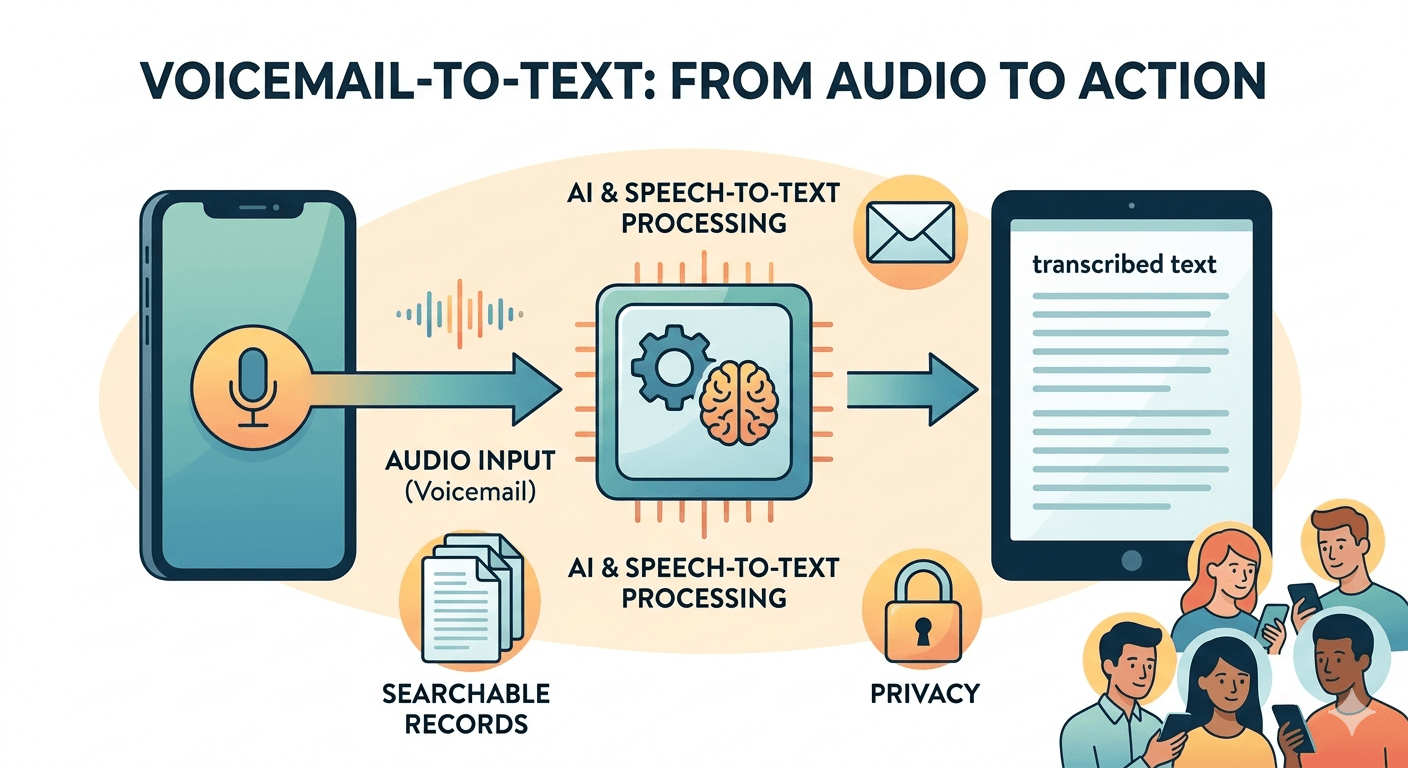
The core of voicemail transcription involves converting audio signals into written characters through a process known as speech-to-text. When a caller leaves a message, the audio file is processed by a voicemail transcription service which analyzes the phonetic sounds and matches them with words in a digital dictionary. This technology is often referred to as automated speech recognition. In many cases, a text voicemail is delivered to the recipient via email or an app notification almost instantly after the caller hangs up. The system attempts to identify the speaker, the context, and the specific words to provide a coherent summary or a full word-for-word transcript.
There are two primary ways this technology operates:
-
Automated transcription uses artificial intelligence and machine learning algorithms to process the audio. This method is incredibly fast and is commonly found in smartphone operating systems and basic voicemail to text service offerings.
-
Human-verified transcription involves a person listening to the audio and typing it out. While this is slower, it provides a much higher level of accuracy, especially for complex technical terms, different accents, or poor audio quality. Many premium voicemail transcription services offer this hybrid approach to ensure that every voicemail converted to text is as accurate as possible for professional use.
The Technology Behind Voicemail to Text Transcription
The underlying technology for a voicemail to text message relies on sophisticated digital signal processing. When the audio is captured, it is broken down into small segments called phonemes, which are the basic units of speech. The voicemail to text transcription software then uses statistical models to determine the most likely sequence of words that correspond to those phonemes. Modern systems also utilize natural language processing to understand the context of the sentence, which helps the software choose the correct spelling for homophones or clarify ambiguous phrases. This is why a voicemail-to-text system becomes more accurate over time as it learns the specific speech patterns and vocabulary of the users.
Research indicates that the efficiency of these systems has improved dramatically over the last decade. A report by the National Institute of Standards and Technology notes that word error rates in automated speech recognition have dropped significantly, allowing many voicemail to text transcription tools to reach an accuracy rate of over 90 percent in quiet environments. This technological leap has made it feasible for businesses to rely on voicemail to txt conversions for official records and quick client updates.

Voicemail to Text Android Setup and Management
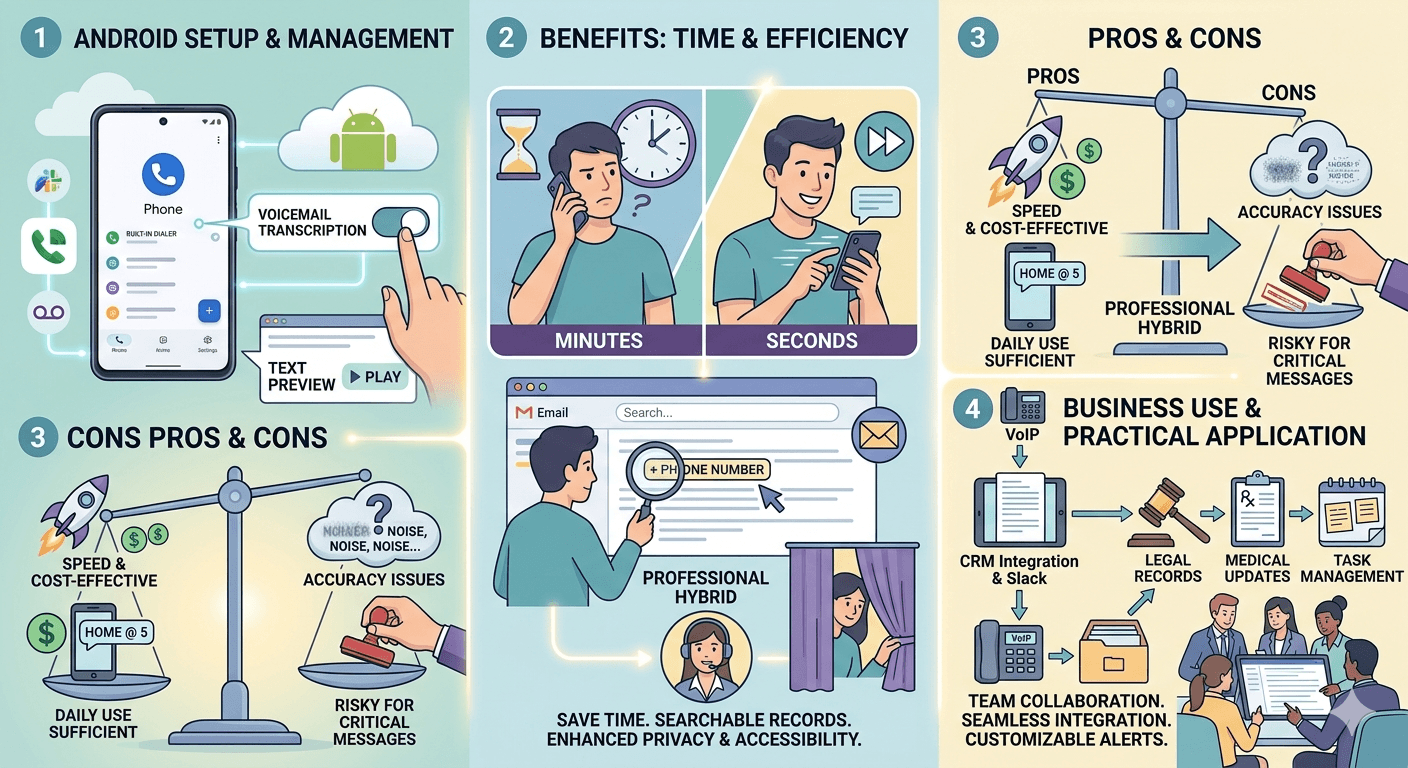
For users on the most popular mobile platform, voicemail to text android features are often integrated directly into the phone dialer or provided through specific carrier applications. Most modern Android devices utilize the Google dialer, which has a built-in ability to transcribe voicemail messages automatically. To access this, users typically navigate to their voicemail settings within the phone app and toggle on the transcription feature. This allow them to see a text preview of the message directly on the screen where they would normally see the play button for the audio.
If the native dialer does not support it, many users turn to an android voicemail transcription app like Google Voice. By porting a number or using a Google Voice number for business, you can get voicemail as text sent directly to your inbox or as a notification. This is particularly useful for those who prefer to keep their personal and professional lives separate while still having the ability to receive voicemail as text for all incoming business inquiries. Some carriers also offer a premium voicemail text service that adds this functionality to the standard visual voicemail app provided with the phone.
The Benefits of Moving Your Voicemail Into Text
One of the most significant advantages of using voicemail into text is the ability to save time. Listening to a long, rambling voicemail can take several minutes, whereas reading a transcribed voicemail takes only a few seconds. This efficiency is vital for individuals working in fast-paced environments where every minute counts. Furthermore, a text message voicemail provides a searchable record of communication. If you need to find a specific phone number or an address mentioned in a message three weeks ago, you can simply search your email or text history rather than re-listening to every saved audio file.
Privacy and accessibility are also major benefits of using a voicemail transcribe feature. In a crowded office or a public space, listening to a voicemail on speakerphone or even holding it to your ear can be indiscreet. Having the voicemail text available to read on your screen ensures that the contents of your messages remain private. For individuals with hearing impairments, these services are not just a convenience but a necessity, providing them with equal access to voice-based communication through visual means.
Pros and Cons of Automated Voicemail Transcription Services
While the technology is advanced, it is important to understand both the strengths and weaknesses of voicemail transcription services. The primary pro is the speed and cost-effectiveness of automated systems. Most modern smartphones include some form of basic speech to text voicemail at no additional charge. However, the cons often involve accuracy issues. Automated systems may struggle with background noise, heavy accents, or industry-specific jargon, leading to a transcript that might be difficult to understand.
When a message is critical, such as a legal or medical update, relying solely on an automated voicemail to text messages system might be risky. This is why many organizations prefer a professional voicemail transcription service that includes a human review step. These services ensure that the voicemail message to text is perfect and ready for professional use. On the other hand, for a quick “I will be home at five” message, the standard automated voicemail to text messages delivered to your phone are usually more than sufficient.
Using VoIP to Text for Business Communication
Voice Over Internet Protocol, or VoIP, has revolutionized how businesses handle phone calls and voicemail. Most modern VoIP systems include a feature known as voicemail to text messages as a standard part of their package. This integration allows for a seamless flow of information between the phone system and other business tools like CRM software or email clients. When a client leaves a message on a VoIP line, the system can automatically convert voicemail to text message format and route it to the appropriate department’s email address or a specific Slack channel.
Who uses this technology? Almost every sector from legal firms to real estate agencies benefits from VoIP-to-text. It allows teams to collaborate on a response more effectively. Instead of one person listening to a message and relaying the info, the entire team can see the text voice mail and understand exactly what the client needs. This transparency reduces errors and ensures that the client’s needs are met quickly. Many VoIP providers allow for the customization of these alerts, ensuring that you only receive a voicemail to text message for high-priority numbers or during specific business hours.
Practical Ways to Use Voicemail to Text Transcripts
There are numerous practical applications for a transcript voicemail in both personal and professional settings. In the legal profession, having a written record of what was said during a call can be used for documentation and evidence. In the healthcare sector, doctors can use these transcripts to quickly update patient files with information left over the phone. For general business use, it allows for better task management. You can copy and paste the details from a voicemail to text transcription directly into a calendar event or a to-do list.
Another practical use is for archival purposes. Audio files take up significant storage space compared to text files. By keeping a text message voicemail archive, businesses can maintain years of records without worrying about server capacity. Additionally, these transcripts can be indexed by search engines, making it possible to find specific customer interactions from months or years ago by simply typing in a keyword. This level of organization is nearly impossible to achieve with traditional audio-only voicemail systems.
Top Transcription Services for Reliable Voicemail to Text
If you are looking for more than what your basic phone carrier provides, there are several high-end voicemail transcription services available. Companies like SpeakWrite provide human-powered transcription that guarantees a high level of accuracy. These services are ideal for users who receive complex messages that automated systems fail to capture correctly. Another popular option is Google Voice, which provides a free and reliable automated service that integrates well with other Google Workspace tools.
For those who want a dedicated app for their phone, YouMail is a strong contender that replaces your standard carrier voicemail. It provides advanced features like scam call blocking alongside its voicemail to text service. These third-party apps often provide better user interfaces and more reliable transcribing voicemail features than the stock apps found on older smartphones. When choosing a service, consider the volume of messages you receive and the level of accuracy you require for your daily operations.
How to Transcribe a Voicemail Manually or Automatically
If you find yourself needing to know how to transcribe a voicemail that didn’t automatically convert, there are a few steps you can take.
-
Use a secondary device or computer with a high-quality microphone to record the playback of your message directly into a transcription software. Programs such as Google Docs Voice Typing or specialized apps like Otter.ai can listen as you play the audio through your phone speaker. While this is considered a manual workaround, it is an effective strategy for capturing long or important messages that your standard phone service failed to process during the initial call.
-
Export the audio file from your visual voicemail application and upload it to a professional voicemail transcription service. Most modern smartphones allow you to save voicemails as digital audio files which can then be transferred to cloud-based platforms for a professional voicemail transcribe. This method is the best choice when the original audio quality is poor or when you require a verbatim transcript for official business documentation or legal records.
-
Share the audio file directly with integrated mobile applications that specialize in speech-to-text conversion. By utilizing the share or send icon found on your voicemail management screen, you can bypass the need for manual recording and send the file straight to an automated service. This provides a more streamlined approach that maintains the digital integrity of the original recording, which usually leads to much higher accuracy in the final text output for the user.
The Future of Voice Mail to Text Technology
As artificial intelligence continues to evolve, the future of voice mail to text looks incredibly promising. We are moving toward a time where transcription will not only be word-for-word but also include sentiment analysis. This means your phone could potentially tell you if a caller sounds frustrated or urgent before you even read the transcript. Furthermore, real-time translation is becoming a reality. A caller could leave a message in Spanish, and the voicemail into text system could automatically translate and transcribe it into English for you.
According to a study by Grand View Research, the global speech-to-text market is expected to grow at a compound annual growth rate of nearly 20% over the next few years.
This growth is driven by the increasing demand for automation in customer service and the widespread adoption of smart devices. As this technology becomes more ubiquitous, the distinction between a voicemail and a text message will continue to blur, leading to a more unified and efficient communication experience for everyone.
Steps to Receive Voicemail as Text on Your Smartphone
To start getting your messages in written form, the first step is to check if your mobile carrier supports this feature. Most major carriers offer a visual voicemail app that includes a basic version of get voicemail as text. You may need to subscribe to a premium tier to unlock this, but it is often worth the small monthly fee for the convenience it provides. Once activated, the messages will appear in a list format, and tapping on one will reveal the text beneath the audio controls.
If your carrier does not offer this, or if you find the quality lacking, downloading a third-party app is the next best step. Apps like Rev or SpeakWrite allow you to receive voicemail as text by forwarding your missed calls to their specialized systems. This setup usually takes only a few minutes and involves entering a few codes into your phone’s dialer to change your conditional call forwarding settings. Once configured, every message left for you will be handled by the third-party voicemail transcription services, ensuring you get the most accurate results possible.
Read More: The Guide to Voicemail: Setting Up Your Voicemail Number and Managing Voicemail Messages
Final Thought
Embracing voicemail to text technology is a simple yet powerful way to modernize your communication habits. Whether you are using a standard voicemail to text android feature or a high-end professional transcription service, the ability to read your messages provides unmatched convenience and organization. By converting your voicemail into text, you ensure that you never miss an important detail and can respond to your contacts with greater speed and accuracy.
Voicemail to Text Transcription FAQs
-
Can you send a voicemail as a text message?
Yes, most modern smartphones and VoIP services allow you to share a voicemail. You can typically find a share icon on the voicemail screen which allows you to send the audio file or the transcribed text through your messaging app to any contact. Some third-party applications can be configured to automatically forward every new voicemail converted to text directly to your SMS inbox as a standard text message.
-
How do I text a voicemail message?
To text a voicemail message, you first need to have it transcribed. Once the voicemail transcription is visible on your screen, you can copy the text. Open your messaging app, start a new conversation, and paste the text into the message box. Alternatively, you can use the share function within your visual voicemail app to send the text directly.
-
How does the voice to text work?
The technology uses a microphone to capture audio and software to convert that audio into a digital signal. This signal is then analyzed by an algorithm that identifies speech patterns and matches them to a linguistic database. The system uses natural language processing to ensure the words make sense in context, and then it outputs the final result as a written transcript on your device.
-
What is voice to text called?
Voice to text is most commonly referred to as speech-to-text or automated speech recognition (ASR). In the context of phone messages, it is specifically called voicemail transcription. In some business circles, it may also be referred to as speech-to-data, especially when the text is being used to populate a database or a customer relationship management system.
-
How much does voice to text cost?
Basic voicemail transcription is often included for free with many smartphone plans and email services like Google Voice. Professional voicemail transcription services that use human editors for 100% accuracy typically charge a per-minute or per-message fee, which can range from a few cents to a couple of dollars depending on the turnaround time and complexity.