Latest News

The Blog

voip blogs
Is VoIP Secure

Is VoIP Secure? 10 Essential VoIP Security Truths

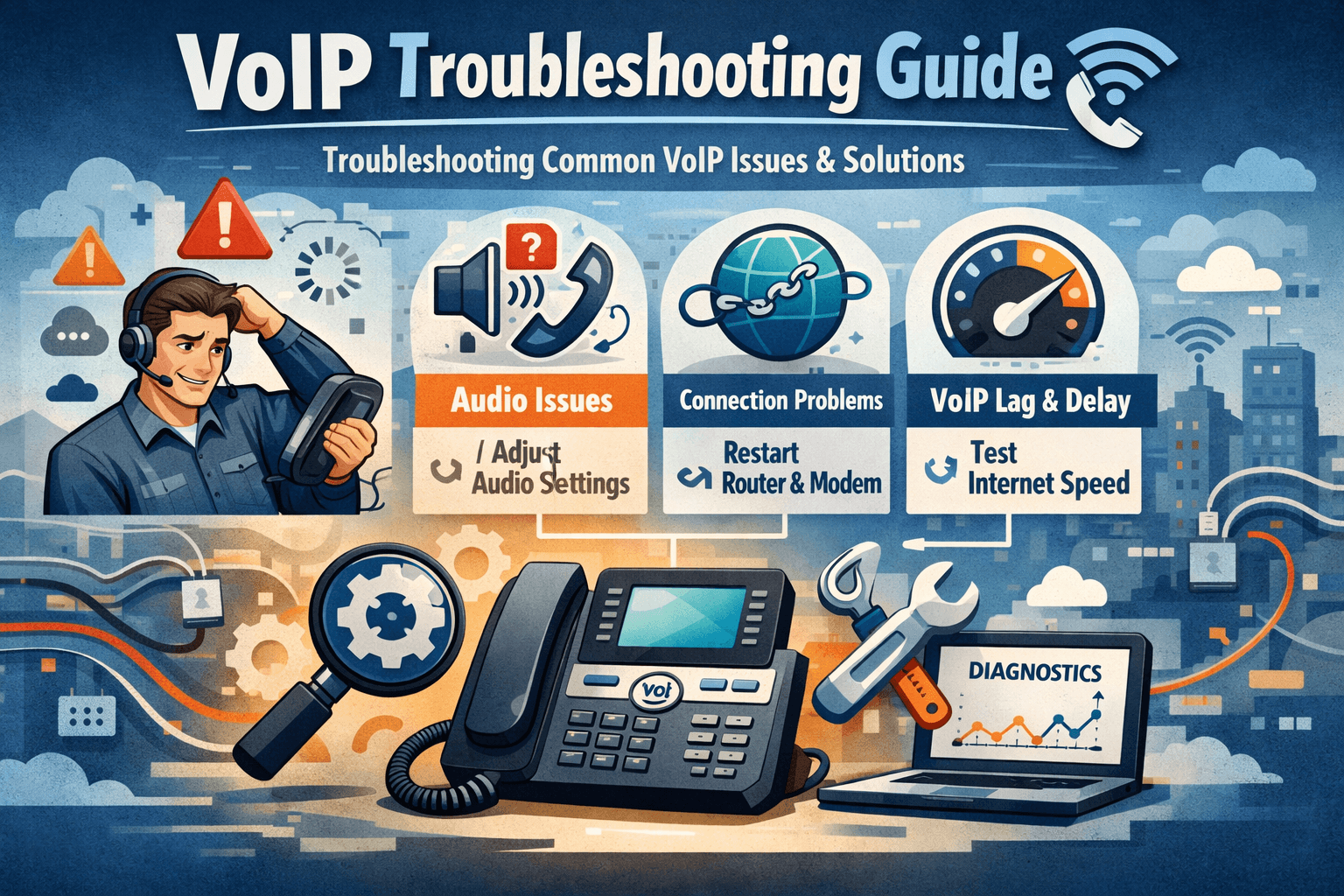
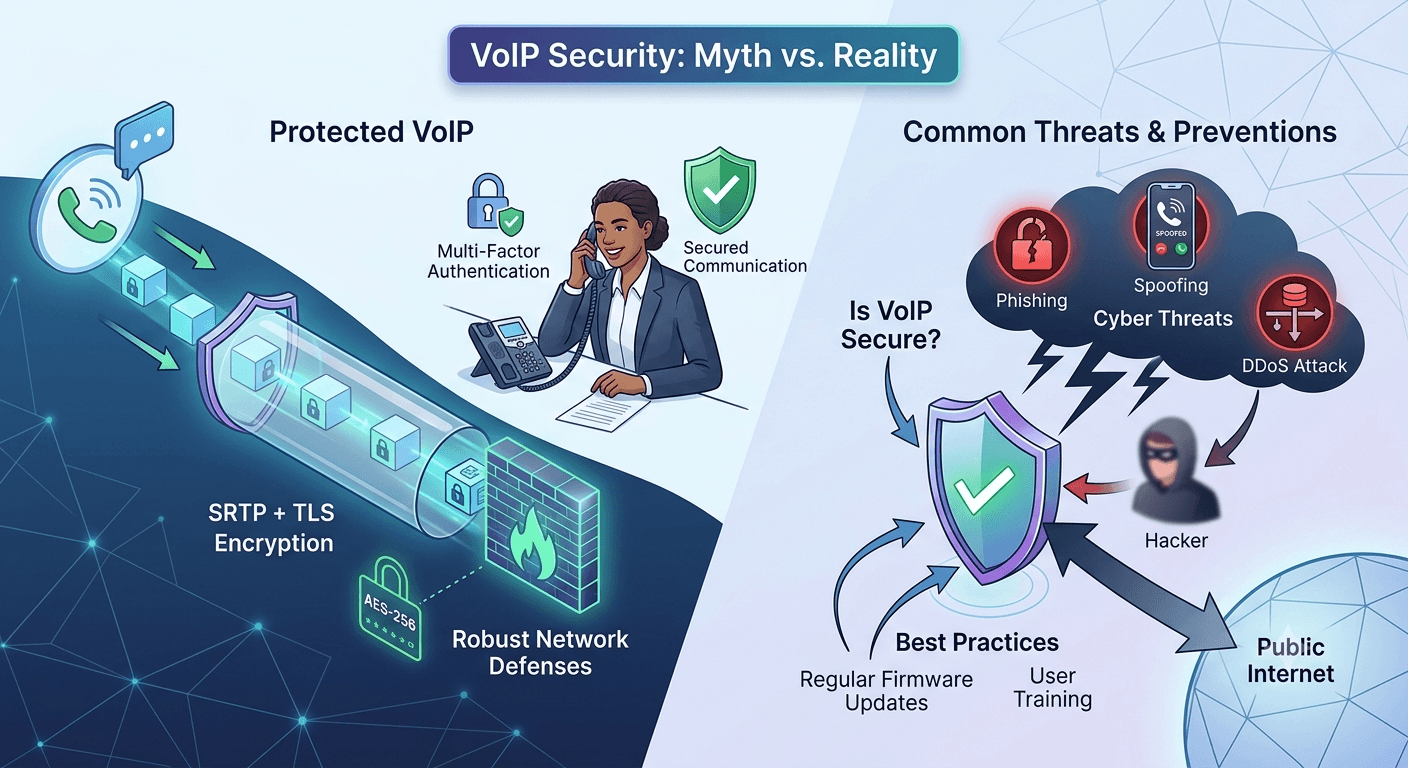
Is VoIP secure is a question that many businesses and residential users ask as they transition away from traditional telephony. The reality is that voice over internet protocol technology is highly secure when implemented with modern encryption protocols and robust network defenses. By using Secure Real-time Transport Protocol and Transport Layer Security, providers can ensure that voice data remains unreadable to unauthorized parties. While vulnerabilities such as phishing and spoofing exist, following industry best practices like multi-factor authentication and regular firmware updates makes a voip security system significantly more resilient than legacy landline systems in the modern digital landscape. Is VoIP Secure? Yes, VoIP (Voice over Internet Protocol) can be very secure when proper security measures are in place. Modern VoIP systems often use encryption protocols such as TLS (Transport Layer Security) and SRTP (Secure Real-Time Transport Protocol) to protect voice calls from interception and unauthorized access. However, like any internet-based technology, VoIP is not completely immune to risks. Common threats include phishing attacks, weak passwords, malware, eavesdropping, and denial-of-service (DoS) attacks. Businesses can significantly improve VoIP security by using strong passwords, enabling multi-factor authentication (MFA), keeping software updated, securing their network with firewalls, and choosing a reputable VoIP provider. For most users and organizations, VoIP is considered secure enough for everyday communication and business operations. The level of security largely depends on how the system is configured and maintained. By following cybersecurity best practices and working with a trusted provider, businesses can enjoy the cost and flexibility benefits of VoIP while keeping their communications protected. The fundamental question of is voip secure often stems from the fact that internet-based communications are vulnerable to the same threats as any other digital data. Unlike traditional phone lines that use a dedicated physical circuit, a voice over ip service breaks audio into packets and sends them across the public internet. This exposure to open networks creates potential entry points for malicious actors. However, when you ask is voip secure, you must consider the advanced protective layers available today. Most reputable providers use end-to-end encryption to shield these packets from interception. To determine if a system is voip secure, one must look at the underlying infrastructure. A secure setup involves more than just a strong password; it requires a holistic approach to network management. This includes using a secure voip phone that is capable of handling complex cryptographic keys and maintaining a firewall that is specifically configured for voice traffic. When these elements are in place, the answer to is voip secure becomes a resounding yes, as the technology provides better auditing and monitoring capabilities than traditional analog systems. Furthermore, the level of security depends heavily on the user’s own network habits. Even the most robust encrypted voip service can be compromised if the local network is left open or if administrative credentials are weak. Consequently, is voip secure is not just a feature of the software but a result of the environment in which it operates. Businesses that invest in professional-grade equipment and follow strict security protocols will find that their internet-based calling is incredibly safe for sensitive conversations. How Secure is VoIP? When evaluating how secure is voip, it is important to look at the protocols that govern how data moves. Modern systems rely on the Session Initiation Protocol for call setup and the Real-time Transport Protocol for the audio stream. In a standard, unencrypted environment, these protocols could be vulnerable to packet sniffing. However, when we analyze how secure is voip in a professional context, we find that protocols like SRTP scramble the audio data, making it impossible for an eavesdropper to reconstruct the conversation without the unique decryption key. The question of how secure is voip also relates to the physical hardware used. Are voip phones secure? Generally, yes, because they function like specialized computers with their own operating systems that can be patched and updated. Modern ip phone security features include certificates that verify the device’s identity to the server, preventing rogue devices from joining the network. This level of hardware-level authentication is something that traditional landlines simply cannot provide, making the modern digital alternative much harder to compromise remotely. According to a 2023 report by the Cybersecurity and Infrastructure Security Agency (CISA), over 90% of successful cyberattacks start with a phishing attempt rather than a technical exploit of the protocol itself. This indicates that how secure is voip is often determined by the humans using the system. If employees are trained to recognize vishing and are forced to use two-factor authentication, the actual technical infrastructure of the voice over internet protocol remains very difficult to breach. Thus, the perceived voip risks are often more about user error than architectural flaws. Is VoIP More Secure than Landlines? Comparing the two technologies reveals that while landlines have fewer “digital” vulnerabilities, they are far more susceptible to physical interference. A traditional landline can be tapped with basic hardware at the junction box or anywhere along the physical wire. There is no encryption on a standard landline; if someone gains physical access to the wire, they can hear everything. In this sense, a secure voip system is superior because it protects the data even if the “wire” (the internet connection) is compromised. Moreover, a voip security system allows for real-time monitoring and logging that landlines lack. If a hacker tries to brute-force a VoIP account, the system can automatically block the IP address and alert the administrator. On a landline, an unauthorized person could make calls for weeks without the owner knowing until the bill arrives. The ability to implement an encrypted voip service means that even if a hacker intercepts the data packets, they are faced with gibberish. This digital shield makes the modern system much more flexible and resilient in a globalized business environment. However, landlines do have the advantage of working during power outages and not being susceptible to Distributed Denial of Service (DDoS) attacks. For organizations that require 100% uptime regardless of internet connectivity, this is a factor to consider. But for the vast majority of businesses, the advanced voip security features such as call tracking, digital authentication, and remote management outweigh the benefits of legacy systems. The transition to an encrypted voip line is widely considered a major step forward in protecting corporate intellectual property. Is VoIP More Secure than VoWiFi? Voice over Wi-Fi (VoWiFi) is a technology that allows cellular devices to make calls over a Wi-Fi network instead of a cell tower. While it shares some similarities with telephony voip, there are distinct differences in their security profiles. VoWiFi often relies on the security of the underlying Wi-Fi network. If a user connects to a public, unencrypted Wi-Fi hotspot to make a call, they are exposing themselves to significant voip security risks. In contrast, a dedicated enterprise voice over ip service usually operates within a managed network with its own dedicated security layers. The question of which is better depends on the encryption used. Most VoWiFi implementations use IPsec tunnels to protect the data, which is quite strong. However, voip security is often more customizable for businesses. A company can mandate that all calls go through a specific VPN or use a specific secure voip phone, whereas VoWiFi is often a consumer-grade feature with less administrative control. For a Toronto based business or any high-stakes operation, the controlled environment of a managed VoIP system is generally preferred over the unpredictability of various Wi-Fi hotspots. Furthermore, voip-associated vulnerabilities in a Wi-Fi environment include the “Evil Twin” attack, where a hacker sets up a fake Wi-Fi network to intercept traffic. Because VoIP phones in an office are usually wired or connected to a secured, hidden SSID, they are less likely to fall victim to such traps. While both technologies are capable of being secure, the professional implementation of voip encryption in a managed office setting provides a more consistent and reliable defense against sophisticated voip attacks. What are VoIP Security Threats and Their Preventions The landscape of voip security issues is diverse, ranging from simple scams to complex technical exploits. One of the most common threats is SPIT (Spam over Internet Telephony), which is the VoIP version of email spam. Automated bots dial thousands of numbers to play recorded advertisements or phishing messages. To prevent this, businesses can implement blacklists and use call filtering tools that require the caller to perform an action, like pressing a number, to prove they are human. Another threat is VOMIT (Voice over IP Misconfigured Internet Telephony), where hackers use packet sniffers to capture unencrypted voice data from misconfigured networks. This is easily prevented by ensuring that is voip encrypted is a standard setting across the entire organization. Vishing and toll fraud represent significant financial voip risks. Vishing involves using voice calls to trick people into giving up personal data, often by spoofing the caller ID to look like a trusted source. Toll fraud, or phreaking, occurs when a hacker breaks into a VoIP system to make expensive international calls on the business’s dime. Preventing these requires a combination of STIR/SHAKEN compliance to verify caller IDs and setting strict call limits on the VoIP server. Additionally, DDoS attacks can flood a VoIP gateway with traffic, causing service outages. This can be mitigated by using a provider with dedicated DDoS mitigation services that can scrub malicious traffic before it reaches your network. Call tampering and Man-in-the-Middle (MitM) attacks involve a hacker intercepting a call to either degrade the quality or inject their own audio. These voip security threats are particularly dangerous for high-level negotiations. The best defense is the use of SRTP and TLS, which ensure that the data packets are both encrypted and authenticated. Malware and viruses can also target the operating systems of VoIP phones. Regular firmware updates and ip phone security audits are essential to ensure that no “backdoors” are left open for attackers. By addressing these voip-associated vulnerabilities through a multi-layered defense strategy, businesses can maintain a secure communication environment. VoIP Security Key Features The modern business environment increasingly depends on digital communication, with VoIP being a key player. One of the major reasons behind VoIP standing out as an ideal business communication solution is its rich features for VoIP security. Let’s check out a few VoIP security key features that every professional organization should look for in a provider. 1- Penetration Test and Risk Assessment A penetration test is a vital proactive measure where ethical hackers attempt to breach your system to find voip-associated vulnerabilities. This simulated attack helps identify weak points in the firewall or misconfigurations in the server before real hackers can exploit them. Complementing this is a regular risk assessment, which evaluates the overall security posture of the IT environment against industry standards. These assessments provide a roadmap for enhancing voip security and ensuring that the system can withstand modern voip attacks. 2- Access Control and Perimeter Security Access control ensures that only authorized personnel can change system settings or access call logs. This is often achieved through Single Sign-On (SSO) and robust Identity Access Management (IAM) protocols. Perimeter security, on the other hand, involves defending the edges of the network. By using advanced firewalls, intrusion detection systems, and Virtual Private Networks, a business can create a “moat” around its voice over ip service. This makes it much harder for external threats to reach the sensitive voip traffic inside the network. 3- DDoS Mitigation and Managed SIEM DDoS mitigation is a specialized service that prevents a flood of malicious traffic from taking down your phone system. For businesses that operate online, this is an essential part of voip security issues management. Additionally, a Managed SIEM (Security Information and Event Management) provides real-time monitoring of all network events. It collects data from various sources to identify patterns that might indicate a sophisticated attack. Having a team of experts monitor these alerts 2024/7 ensures that any voip security risks are dealt with immediately. 4- Incident Response and STIR/SHAKEN Compliance If a breach does occur, an incident response plan is the key to minimizing damage. This involves a set of procedures for investigating, containing, and recovering from a security event. On the regulatory side, STIR/SHAKEN compliance is now a requirement by the FCC to combat caller ID spoofing. This technology uses digital certificates to verify that a call is actually coming from the number displayed. Choosing a provider that is fully compliant with these regulations is a major step in ensuring you have a secure voip phone environment. How to Tell If Your VoIP Provider Is Secure? Choosing a provider is the most critical decision in your journey to secure communication. Not all providers are created equal, and many budget options cut corners on voip security best practices to keep prices low. To ensure your business is protected, you must conduct thorough research and look for specific indicators of a provider’s commitment to safety. A secure provider will be transparent about their protocols and will have the certifications to back up their claims. Accreditations and Compliance The most reliable way to judge a provider’s security is through their accreditations. Look for HIPAA compliance if you handle medical data, as this requires strict encryption and access controls. ISO/IEC 27001 is the international standard for information security management and is a hallmark of a top-tier provider. PCI compliance is necessary if you process credit card information over the phone, while SOC 2 compliance indicates that a third party has audited the provider’s systems for security, availability, and privacy. These certifications are proof that the provider takes voip security risks seriously. Call Encryption and Secure Protocols Ask the provider directly: is voip encrypted by default? A secure provider should use SRTP for all audio traffic and TLS for all signaling. If they treat encryption as an “add-on” or an optional feature, it is a red flag. You should also ask which technology can be used to protect voip against eavesdropping within their specific infrastructure. A provider that uses a secure vonage or similar enterprise-grade backbone will often have better encryption standards than a generic internet-based service. Customer Communications and Research Pay attention to how the provider communicates about security. Do they send regular updates about new threats? Do they provide documentation on how to secure your specific hardware? Conduct your own research by reading reviews from other IT professionals and checking for any history of major data breaches. A provider that has a dedicated security blog and offers 24/7 support for security-related issues is likely to be a safe bet. Your voice security is only as strong as the company you choose to partner with. Security Fact: The Cost of Breaches Research conducted by IBM in their 2023 “Cost of a Data Breach Report” found that the average cost of a data breach has reached $4.45 million globally. For small businesses, even a minor voip hack can lead to thousands of dollars in toll fraud and a significant loss of reputation. This underscores the fact that investing in a secure voip phone system is not an unnecessary expense, but a vital insurance policy against the rising tide of cybercrime. By prioritizing voip security best practices, businesses can avoid these devastating financial impacts. Read More: Troubleshooting Common VoIP Issues and Solutions Final Thought The question is voip secure is not a matter of a simple yes or no, but a reflection of the effort put into its implementation. While the technology is inherently susceptible to certain voip security risks due to its reliance on the internet, the tools available to combat these threats are incredibly powerful. From end-to-end encryption and STIR/SHAKEN compliance to advanced DDoS mitigation and regular penetration testing, a modern VoIP system can be made significantly more secure than any landline. The key lies in choosing a reputable provider, training employees, and maintaining a proactive defense posture. When done correctly, VoIP provides a safe, flexible, and cost-effective communication foundation for any modern organization. Frequently asked questions How Secure Are VoIP Calls? VoIP calls are highly secure provided that they are encrypted using SRTP and TLS protocols. In a managed business environment, these calls are protected from the moment they leave the phone until they reach the service provider’s gateway. This makes them much harder to intercept than traditional analog calls. However, the security level can drop if you are making calls over an unsecured public Wi-Fi network without a VPN. What is Security in VoIP? Security in VoIP refers to the collective technologies, protocols, and policies used to protect voice communication from unauthorized access, interception, and disruption. It encompasses encryption for audio data, authentication for devices and users, and network defenses like firewalls and intrusion prevention systems. The goal is to ensure the confidentiality, integrity, and availability of the voice over ip service. What are the common threats to VoIP systems? The most common threats include toll fraud (phreaking), where hackers make expensive calls on your account, and vishing, which is voice-based phishing. Other significant threats are SPIT (spam), caller ID spoofing, and DDoS attacks that can knock the system offline. Eavesdropping through packet sniffing is also a risk if the voip traffic is not properly encrypted using modern standards. How can I protect my VoIP system from cyber threats? You can protect your system by ensuring all calls are encrypted, using strong passwords, and enabling two-factor authentication for all users. Regularly updating the firmware on your IP phones and using a dedicated firewall for voice traffic are also essential. Training your staff to recognize social engineering and vishing attempts is equally important for maintaining a secure voip phone environment. How can I detect if my VoIP system has been compromised? Signs of a compromise include a sudden spike in your phone bill, strange calls in your history log, or unexplained changes to your account settings. You might also notice poor call quality or phones that reboot randomly. Setting up automated alerts for unusual activity, such as a high volume of international calls after business hours, is one of the best ways to detect a breach early. Are VoIP phones encrypted? Most modern IP phones support encryption, but it is not always enabled by default. To have an encrypted voip experience, you must ensure that the phone’s settings are configured to use SRTP for the voice data and TLS for the signaling. You should check with your provider to see if they support these protocols and if they have been correctly provisioned for your hardware. What are the secure protocols for VoIP? The primary secure protocols are Secure Real-time Transport Protocol (SRTP) for the audio packets and Transport Layer Security (TLS) for the signaling and call setup. Other important protocols include IPsec for creating secure tunnels over the internet and various authentication protocols like OAuth. Together, these technologies work to protect your voip security system from a wide range of digital attacks. Which technology can be used to protect voip against eavesdropping? The most effective technology against eavesdropping is SRTP (Secure Real-time Transport Protocol). It uses advanced encryption algorithms to scramble the voice data, ensuring that even if a hacker intercepts the packets, they cannot listen to the conversation. Additionally, using a VPN can add an extra layer of protection by hiding the voip traffic inside an encrypted tunnel.
Read More
HIPAA Compliance for VoIP in Healthcare

HIPAA Compliance for VoIP in Healthcare : A complete guide

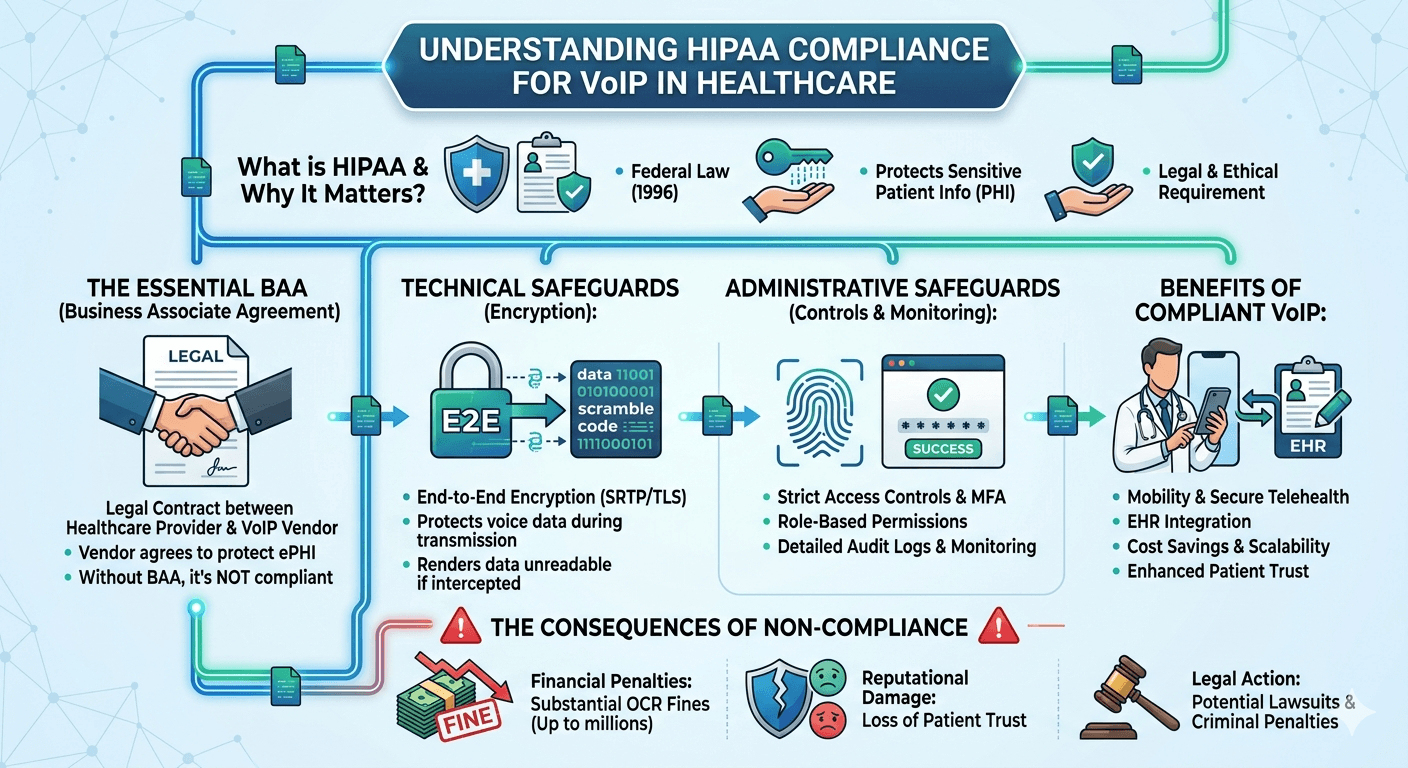
HIPAA Compliance for VoIP in Healthcare involves implementing technical and administrative safeguards to protect patient health information during digital transmission. To be compliant, a voice over internet protocol service must offer end-to-end encryption, strict access controls, and a signed Business Associate Agreement (BAA). These regulations ensure that healthcare providers can securely communicate through voip for healthcare while adhering to the privacy standards of the Health Insurance Portability and Accountability Act. Achieving compliance prevents legal penalties and secures patient trust by safeguarding sensitive medical data within modern telephony voip and integrated computer networks, enabling seamless, protected digital communication for all providers. What is HIPAA and Why it Matters? The Health Insurance Portability and Accountability Act (HIPAA) is a federal law enacted in 1996 that established national standards to protect sensitive patient health information from being disclosed without the patient’s consent or knowledge. In the realm of modern medicine, where digital transformation is the norm, HIPAA has become the cornerstone of patient privacy. For organizations utilizing voip for healthcare, understanding these regulations is not just a legal requirement but a fundamental part of providing ethical care. HIPAA ensures that data remains confidential, available to authorized users, and protected against unauthorized access. HIPAA is divided into several rules, with the Privacy Rule and the Security Rule being the most relevant to digital communications. The Privacy Rule sets the standards for who can access protected health information (PHI), while the Security Rule establishes the technical and physical safeguards that must be in place to protect that data when it is stored or transmitted electronically. As providers move toward voice over internet systems, they must ensure that their telecommunication voip infrastructure meets these rigorous standards. Failure to do so can lead to a complete loss of patient trust and significant institutional damage. Beyond legal obligations, HIPAA serves a vital role in the patient-provider relationship. When patients share their most personal information, they do so with the expectation that it will be guarded with the highest level of care. In an era where cyberattacks on hospitals are increasingly common, a robust HIPAA compliance framework acts as a shield. It allows healthcare organizations to embrace new voip technology without compromising their integrity. By prioritizing these standards, providers can focus on what they do best: delivering high-quality care in a safe and secure environment. The Concept of HIPAA Compliant VoIP Systems What exactly defines a system that meets the standards of HIPAA Compliance for VoIP in Healthcare? It is not merely a software feature but a comprehensive approach to communication security. A hipaa compliant voip provider ensures that every aspect of the voice over ip service—from the initial call setup to the storage of voicemails—is encrypted and monitored. This means that if a third party were to intercept the data packets traveling across the internet, they would be unable to decipher the information. The system must also be designed to prevent unauthorized access at the user level, ensuring that only medical professionals with the correct credentials can listen to recordings or view call logs. A hipaa compliant phone system also differs from standard residential services in how it handles metadata. While a typical voice ip service might store call durations and numbers in an unencrypted database, a healthcare-specific system treats all data associated with a patient interaction as PHI. This includes the content of the conversation as well as any text messages, faxes, or files shared through the platform. Achieving this level of security requires specialized voip network requirements, including dedicated firewalls and secure session border controllers that manage the flow of encrypted traffic without degrading call quality. According to research by IBM in their 2023 Cost of a Data Breach Report, the healthcare industry has the highest average cost of a data breach at $10.93 million per incident. This startling fact highlights why a hipaa compliant phone service is an essential investment. It is not just about the voice calls; it is about the entire ecosystem of the voip in computer networks used by the clinic or hospital. A truly compliant system provides a holistic defense against the vulnerabilities inherent in internet-based communication, ensuring that the digital transition remains a benefit rather than a liability. Where VoIP and HIPAA Intersect The intersection of VoIP technology and HIPAA regulations occurs primarily at the transmission and storage stages of communication. Because voip stands for voice over internet protocol, it relies on the public internet to move data. Standard internet traffic is not inherently secure, which is where the specific voip system requirements for healthcare come into play. When a doctor discusses a diagnosis with a patient via an interconnected voip line, that voice data is converted into digital packets. HIPAA mandates that these packets be encrypted during transit to prevent eavesdropping by hackers or unauthorized service providers. Another critical intersection point is the storage of data. Many voip for healthcare platforms offer features like voicemail-to-email or call recording. Under HIPAA, these recordings and emails are considered electronic protected health information (ePHI). Therefore, the servers where this data is stored must be just as secure as the live call itself. This means using a hipaa compliant voip service that utilizes high-level encryption for at-rest data and implements strict audit logs to track who has accessed the files. The intersection of these two worlds requires a deep understanding of both medical law and network engineering. Furthermore, the intersection involves administrative safeguards. This means that the people using the voip healthcare system must be trained on how to use it securely. For example, a provider might have a hipaa compliant phone system, but if a nurse leaves their softphone application logged in on a public computer, the compliance is broken. The intersection of technology and human behavior is where many breaches occur. Therefore, a complete strategy for HIPAA Compliance for VoIP in Healthcare must include both the technical tools and the policy frameworks that govern their use in daily medical practice. The Critical Role of the Business Associate Agreement (BAA) The most important administrative step in achieving HIPAA Compliance for VoIP in Healthcare is the signing of a Business Associate Agreement (BAA). A BAA is a legal contract between a healthcare provider (the covered entity) and the voip provider (the business associate). In this document, the VoIP provider agrees to take full responsibility for protecting the ePHI that passes through their system. Without a signed BAA, a service cannot be considered HIPAA compliant, even if it uses the strongest encryption in the world. It is the legal foundation upon which all other security measures are built. A BAA outlines the specific responsibilities of the hipaa compliant voip provider. This includes how they will report security breaches, how they will manage data backups, and their commitment to following the HIPAA Security Rule. For a healthcare provider, the BAA is a shield that transfers some of the regulatory risk to the service provider. It ensures that the company providing the voice over internet service understands the gravity of the data they are handling and has the infrastructure in place to protect it. When evaluating a hipaa compliant voip service, the first question should always be whether they are willing and able to sign a BAA. Identifies Responsibilities: Clearly defines what the service provider must do to protect data. Legal Protection: Provides a legal recourse for the covered entity if the business associate fails to protect PHI. Compliance Verification: Acts as documented proof for auditors that the provider has vetted their third-party vendors. Scope of Service: Details which specific features of the telephony voip system are covered by the agreement. It is a common misconception that all major tech companies will sign a BAA. For example, some residential-grade services may offer great features but refuse to enter into a BAA, making them unsuitable for medical use. A dedicated hipaa compliant phone service will have a standard BAA ready for review. This document is not just a formality; it is a critical piece of the compliance puzzle that ensures every link in the communication chain is legally bound to protect patient privacy. Essential Security Features for Compliance To maintain HIPAA Compliance for VoIP in Healthcare, a system must possess several core technical features. These features work together to create a secure environment where medical data can be discussed without fear of interception. While the specific voip technology may vary between providers, these foundational elements are non-negotiable for any organization that takes patient privacy seriously. End-to-End Encryption The primary defense in any hipaa compliant voip provider’s arsenal is end-to-end encryption. This means that the audio data is encrypted the moment it leaves the sender’s device and is only decrypted when it reaches the receiver. For this to work, the system must use secure protocols like Secure Real-time Transport Protocol (SRTP) for the audio stream and Transport Layer Security (TLS) for call signaling. This ensures that even if an attacker intercepts the voice over ip service traffic, they will only find unreadable data packets. Access Control and Authentication Security is only effective if you know who is accessing the system. A hipaa compliant phone system must include robust access controls, such as multi-factor authentication (MFA). This requires users to provide two or more forms of identification before they can log in to the telephony voip platform. Additionally, the system should offer role-based access, ensuring that a receptionist has different permissions than a lead surgeon. This minimizes the risk of accidental or intentional data exposure by limiting access to only what is necessary for each employee’s role. Audit Logs and Monitoring HIPAA requires that providers be able to track who accessed PHI and when. Therefore, a hipaa compliant voip service must maintain detailed audit logs of all activity on the system. This includes a history of every login attempt, every call made, and every time a voicemail was accessed. Regular monitoring of these logs allows a healthcare organization to identify suspicious patterns, such as an unauthorized login from an unfamiliar location. This proactive approach is essential for detecting a breach early and fulfilling the reporting requirements mandated by federal law. Benefits of Secure VoIP for Hospitals and Providers The transition to voip phone systems for healthcare offers benefits that go far beyond simple compliance. When a hospital implements a secure, interconnected voip system, it unlocks new levels of efficiency and patient engagement. Modern voip technology allows for a unified communication experience where voice, video, and text are all integrated into a single, protected platform. This streamlined approach reduces the administrative burden on staff and allows them to focus more on patient outcomes. One of the primary benefits is mobility. With a hipaa compliant voip provider, doctors can use secure mobile applications on their smartphones to communicate with colleagues or patients. This is vital for “on-call” scenarios where a provider needs to be reachable without giving out their personal cell phone number. The system ensures that the call remains within the secure voip healthcare network, maintaining privacy even when the doctor is off-site. This flexibility is a game-changer for modern, distributed medical teams. Moreover, voip for hospitals can integrate with Electronic Health Records (EHR) systems. When a patient calls, the system can automatically pull up their chart, allowing the provider to see their medical history instantly. When this is done through a hipaa compliant phone service, the entire interaction is logged and secured, ensuring that the integration does not create new voip vulnerabilities. This leads to faster response times, more accurate diagnoses, and a better overall experience for the patient. Cost Savings: Reduces the need for expensive traditional phone lines and maintenance. Scalability: Allows healthcare facilities to easily add or remove lines as their staff grows. Advanced Features: Includes tools like auto-attendants, call queuing, and secure conferencing. Reliability: Cloud-based voip for healthcare offers high uptime and disaster recovery options. The Grave Consequences of Non-Compliance Ignoring the requirements for HIPAA Compliance for VoIP in Healthcare can lead to devastating consequences. The Office for Civil Rights (OCR), which enforces HIPAA, does not take violations lightly. Whether a breach is the result of a malicious hack or a simple administrative error, the penalties are designed to be a significant deterrent. For many small to medium-sized clinics, a single major HIPAA violation can be enough to force a permanent closure. 1- Financial Penalties The financial sting of non-compliance is significant. Fines are tiered based on the level of perceived neglect. For a “Tier 1” violation, where the entity was unaware of the breach, fines can range from $137 to over $34,000 per violation. At the other end of the spectrum, “Tier 4” violations involving willful neglect that is not corrected can result in fines of over $68,000 per violation, with an annual cap of nearly $2 million. When you consider that a single data breach can involve thousands of individual records, the cumulative fines can be astronomical. 2- Individual and Criminal Penalties It is not just the organization that is at risk; individuals can also face penalties. Medical professionals who knowingly disclose PHI can face criminal charges, including prison time and personal fines. This highlights why training staff on the proper use of a hipaa compliant phone system is so critical. A nurse or administrator who uses an unencrypted personal app to discuss patient care could find themselves in serious legal trouble. The law treats patient privacy as a fundamental right, and the penalties for violating that right are severe. 3- Additional Consequences Beyond the direct legal and financial hits, there are “hidden” costs to non-compliance. These include the cost of notifying all affected patients, providing credit monitoring services to victims, and the legal fees associated with defending against lawsuits. Perhaps most damaging of all is the loss of reputation. Patients are unlikely to return to a provider that has allowed their private medical history to be leaked. In the competitive world of healthcare, a tarnished brand can be impossible to repair, leading to a long-term decline in patient volume and revenue. Strategies for Choosing the Right Provider Selecting a hipaa compliant voip provider is a strategic decision that requires careful vetting. You cannot simply take a salesperson’s word that a service is “secure.” You must dig into the technical specifications and legal commitments of the company. A truly healthcare-focused provider will be able to speak the language of HIPAA and will have a track record of serving other medical organizations. Start by asking for a copy of their BAA. If they hesitate or try to offer a generic service agreement instead, move on. Next, verify their security certifications. While there is no official “HIPAA Certification” from the government, reputable companies will often undergo third-party audits like SOC 2 Type II to prove their data handling practices are secure. You should also inquire about their voip network requirements and whether they use top-tier data centers with redundant power and internet connections. Finally, consider the user experience. A system can be perfectly compliant, but if it is too difficult for doctors and nurses to use, they will find “workarounds” that compromise security. Look for a hipaa compliant voip service that offers intuitive apps, clear audio quality, and seamless integration with your existing tools. A provider like RingCentral hipaa compliant solutions is often cited for balancing high security with a user-friendly interface. By choosing a partner that understands the unique pressures of the healthcare environment, you can ensure that your move to VoIP is a success. Read More: How to Set Up a VoIP Phone System at Home? 7 Simple Steps Final Thought Achieving HIPAA Compliance for VoIP in Healthcare is an essential milestone for any medical organization looking to thrive in the digital age. By integrating the right technology with strict administrative policies, providers can enjoy the flexibility and cost-savings of VoIP without ever compromising patient privacy. From the technical necessity of end-to-end encryption to the legal safety of a Business Associate Agreement, every component of a compliant system plays a role in safeguarding the sanctity of the patient-provider relationship. As healthcare continues to evolve, those who prioritize secure, HIPAA-compliant communication will lead the way in providing safe, modern, and effective care for all. HIPAA compliant VoIP FAQs Are phone calls HIPAA compliant? Traditional landline phone calls are generally considered HIPAA-compliant for oral communication because they occur over a closed, dedicated circuit. However, once those calls are recorded, stored as digital voicemails, or transmitted over the internet, they must meet the standards for ePHI. For modern practices, using a hipaa compliant phone system is the only way to ensure that the entire communication process—from the live audio to the digital logs—remains within the bounds of federal law. Is VoIP HIPAA compliant? VoIP technology itself is not inherently compliant, but it can be made compliant with the right configurations. For a voice over ip service to meet HIPAA standards, the provider must use end-to-end encryption, maintain strict access controls, and sign a Business Associate Agreement (BAA) with the healthcare entity. When these factors are in place, VoIP becomes one of the most secure and efficient ways for medical professionals to communicate. How do I ensure HIPAA compliant communications? To ensure compliance, start by choosing a hipaa compliant voip provider that specializes in healthcare. Ensure a BAA is signed before any patient data is transmitted. Implement technical safeguards like multi-factor authentication and encryption. Finally, conduct regular training for all staff members on the secure use of the system and establish clear policies for handling patient information over digital channels. What is HIPAA compliant VoIP? This is a specialized version of voice over internet protocol service specifically designed to meet the technical, physical, and administrative standards of the Health Insurance Portability and Accountability Act. It features advanced encryption, secure data storage, and detailed audit logging. It is a system where the service provider legally agrees to share the responsibility of protecting patient data through a BAA. Why is it important for VoIP services to be HIPAA compliant? Compliance is vital to protect patient privacy, maintain the integrity of medical data, and avoid the severe legal and financial penalties associated with data breaches. In the modern healthcare environment, where cyberattacks are frequent, a compliant system acts as a crucial defense mechanism. It also ensures that a provider can use modern tools like telehealth and digital conferencing while remaining fully within the law. How do VoIP services achieve HIPAA compliance? They achieve compliance by building a secure infrastructure that includes SRTP and TLS encryption for all traffic. They also implement physical security at their data centers and administrative policies that govern how their employees interact with the system. Crucially, they undergo third-party audits to verify their security posture and enter into legal contracts (BAAs) with their healthcare clients to guarantee their commitment to data protection. What steps should be taken to ensure the proper use of a HIPAA compliant VoIP system? Steps include setting up unique user IDs and strong passwords, enabling multi-factor authentication, and configuring the system to automatically log out after a period of inactivity. Providers should also disable features that are not HIPAA-compliant, such as sending unencrypted voicemails to a personal email address. Regular audits of call logs and continuous staff education are also essential for maintaining the system’s integrity over time. Are healthcare providers required to use HIPAA compliant VoIP services? Yes, any healthcare provider that qualifies as a “covered entity” under HIPAA is legally required to protect ePHI. If that provider chooses to use a voice over ip service for their communications, that service must be HIPAA-compliant. Using a non-compliant service for discussing patient care or transmitting medical records is a direct violation of federal law and can result in significant fines and legal action from the OCR.

Read More
VoIP Security Best Practices

VoIP Security Best Practices : Risks and Solutions

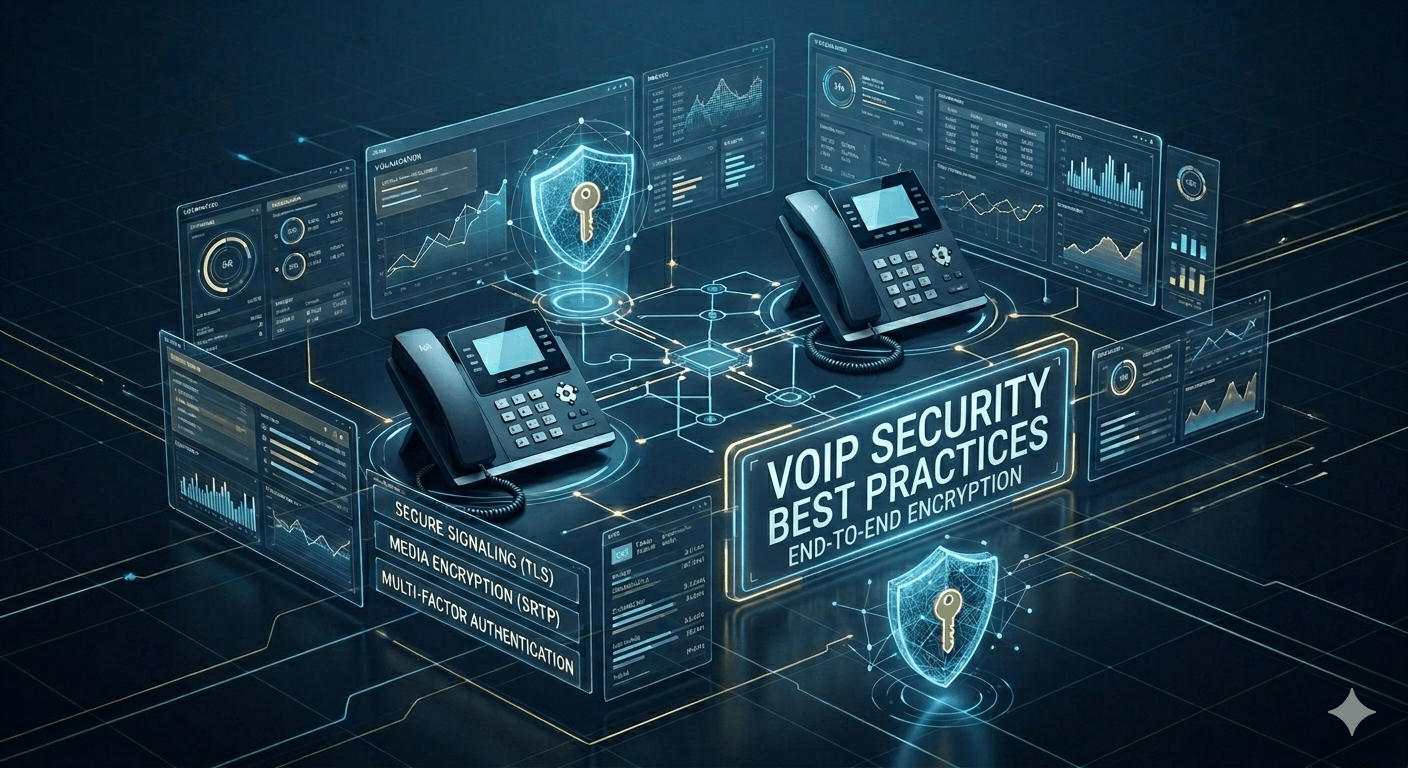
VoIP security best practices involve a comprehensive framework of protocols, encryption methods, and administrative policies designed to protect voice communications from digital threats. As businesses transition from traditional landlines to cloud-based systems, ensuring voice over IP security becomes paramount to preventing eavesdropping, toll fraud, and data breaches. Key measures include implementing Transport Layer Security for signaling, using Secure Real-time Transport Protocol for media encryption, and enforcing multi-factor authentication. By regularly auditing systems and educating employees on vishing risks, organizations can create a robust defense against cyberattacks that specifically target internet-based communication channels and sensitive corporate data. Are VoIP phones secure? The fundamental question of whether a modern communication system is safe often leads to a nuanced answer. When evaluating if are voip phones secure, one must understand that these devices are essentially small computers connected to the internet. Unlike traditional analog phones that used dedicated copper lines, internet-based phones transmit data packets over public or private networks. This connection makes them susceptible to the same types of attacks that plague computers and servers. However, with the right configuration and voip security system, these phones can actually be more secure than traditional telephony because they allow for advanced encryption and monitoring that analog systems simply cannot support. The security of an IP-based system depends heavily on the underlying network architecture. In many cases, users wonder is voip secure when they are using public Wi-Fi or unencrypted connections. Without proper protections, voice data can be intercepted by anyone with the right tools on the same network. This is why ip phone security relies on a multi-layered defense strategy. When a provider uses high-level encryption and secure data centers, the risk of a breach is significantly minimized. Most modern businesses find that the benefits of digital communication far outweigh the voip risks, provided they take the necessary steps to harden their infrastructure against potential intruders. Understanding VoIP vulnerabilities and threats To build a strong defense, it is essential to recognize the common voip-associated vulnerabilities that attackers frequently exploit. These threats range from simple social engineering to complex technical exploits aimed at bringing down entire networks. Understanding these voip security issues is the first step in creating a resilient communication strategy. 1. Denial of Service (DoS) Attacks A Denial of Service attack is designed to overwhelm your voip security system by flooding it with a massive volume of data packets. This creates a “traffic jam” that prevents legitimate calls from going through. For a business, this can mean a total loss of communication with customers, leading to lost revenue and a damaged reputation. These voip attacks often target the Session Initiation Protocol (SIP) by sending a barrage of call requests that the server cannot process. 2. Malware Because VoIP devices run on operating systems and software, they are targets for malware and viruses. Malicious code can be used to steal credentials, listen to private conversations, or turn the phone into a “zombie” device that participates in larger botnet attacks. This is why treating ip phone security with the same level of urgency as computer security is vital for any organization. 3. VoIP Phishing (Vishing) Vishing is a form of social engineering where attackers use voice calls to trick individuals into revealing sensitive information, such as passwords or credit card numbers. Attackers often spoof their caller ID to look like a legitimate organization, such as a bank or a government agency. According to the 2023 Verizon Data Breach Investigations Report, social engineering remains a primary vector for initial access in corporate breaches, highlighting the need for voip security best practices that include employee awareness. 4. Eavesdropping or Call Interception Without voip encryption, voice data packets travel across the internet in a format that can be easily read if intercepted. This is often referred to as a “man-in-the-middle” attack. When users ask which technology can be used to protect voip against eavesdropping, the answer is almost always a combination of SRTP and TLS. These protocols ensure that even if a packet is captured, the content remains unreadable to the interceptor. 5. Toll Fraud Toll fraud is perhaps the most financially damaging of all voip security threats. In this scenario, hackers gain access to a business’s phone system to make expensive international calls or call premium-rate numbers that they own. The Communications Fraud Control Association (CFCA) has estimated that global losses from telecom fraud exceed $27 billion annually. Implementing strict calling permissions is a core part of how to secure voip and prevent these unexpected charges. 6. War Dialing War dialing involves using automated software to call a large range of telephone numbers in an attempt to find open ports or vulnerable systems. Once a vulnerability is found, the attacker can use it to gain unauthorized access to the corporate network. This highlights why a secure voip phone must be configured to reject unrecognized or suspicious automated requests. 7. Spam over Internet Telephony (SPIT) Similar to email spam, SPIT involves sending recorded advertisements or malicious messages to thousands of VoIP accounts simultaneously. While it is often just a nuisance, it can also be used as a delivery mechanism for vishing or other scams. Advanced voip cyber security tools often include filters that can identify and block these automated spam attempts before they reach the user. 8. Voice over Misconfigured Internet Telephones (VoMIT) VoMIT is a specific type of attack where a hacker uses specialized tools to intercept and reassemble voice packets from a misconfigured network. This allows them to listen to calls in real-time or record them for later analysis. This threat underscores the importance of professional installation and regular configuration audits to ensure that no part of the network is left exposed. How to choose a more secure VoIP service Not all providers are created equal when it comes to safeguarding your data. When shopping for an encrypted voip service, you must look beyond the surface-level features and dive deep into their security infrastructure. A truly secure voip provider will be transparent about their protocols and their commitment to protecting client privacy. Security and compliance accreditation The first thing to check is whether the provider holds recognized security certifications. Look for SOC 2 Type II compliance, which indicates that a third-party auditor has verified their security, availability, and privacy controls. If you are in the healthcare or financial sectors, ensure they offer HIPAA or PCI-DSS compliant environments. These certifications are a strong indicator that the provider follows voip security best practices at every level of their operation. Encryption Ask specifically: is voip encrypted by default on your platform? A reputable provider should offer end-to-end voip encryption for both signaling and media. This means using Transport Layer Security (TLS) for the “handshake” between devices and Secure Real-time Transport Protocol (SRTP) for the actual voice data. Without these, your calls are essentially traveling on a postcard that anyone can read. An encrypted voip service should provide these protections without significantly impacting call quality or latency. Help and support in the event of issues Cybersecurity is an ongoing battle, and even the best systems can face challenges. Evaluate the provider’s support structure. Do they have a dedicated security operations center (SOC)? How quickly do they respond to reported voip security risks? A provider like Vonage or Nextiva often provides detailed vonage security documentation or dedicated support teams to help businesses navigate voip security issues. Having a partner who can provide immediate assistance during a suspected breach is a critical component of a secure voip strategy. Other VoIP security best practices While your provider handles the heavy lifting of the network, your internal policies play a massive role in maintaining a secure voip environment. Security is a shared responsibility, and implementing the following steps will significantly reduce your attack surface. 1. Use strong passwords and multi-factor authentication (MFA) One of the simplest yet most effective voip security best practices is the enforcement of strong password policies. Many VoIP attacks succeed because users keep the default manufacturer passwords on their desk phones or use easily guessable passwords for their web portals. Every device and user account should have a unique, complex password that is changed regularly. Multi-factor authentication (MFA) adds a vital second layer of defense. By requiring a code from a mobile app or a physical key in addition to a password, you can stop the vast majority of unauthorized access attempts. Research by Microsoft has shown that MFA can block over 99.9% of account compromise attacks. In the context of voip cyber security, MFA should be mandatory for all administrative accounts and remote user logins. The same account and access controls apply to every cloud tool a young company signs up for; this SaaS security checklist for early-stage startups walks through them in order, from MFA to vendor reviews. 2. Keep all software and systems up-to-date Hackers are constantly looking for software bugs to exploit. Manufacturers and software providers release updates to patch these vulnerabilities as soon as they are discovered. To maintain ip phone security, you must ensure that your desk phone firmware, mobile apps, and desktop clients are always running the latest versions. Neglecting updates is one of the most common ways that businesses fall victim to preventable voip attacks. Many modern systems allow for automatic updates, which is a highly recommended setting. If your organization manages a large fleet of devices, use a centralized management tool to push updates simultaneously across the entire network. This ensures that no single device remains a weak link in your voip security system. 3. Monitor call logs and analytics for suspicious activity Proactive monitoring is a hallmark of a secure voip environment. By regularly reviewing call logs, you can spot the early warning signs of toll fraud or unauthorized access. Look for patterns such as: A high volume of international calls to destinations where you don’t have customers. Calls made outside of normal business hours or during the middle of the night. Repeated failed login attempts on specific user accounts. A sudden spike in short-duration calls, which could indicate war dialing. Many advanced VoIP platforms offer automated alerts that notify you when these thresholds are met. Utilizing these analytics allows you to react to voip security threats in real-time, often stopping an attacker before significant damage is done. 4. Implement sensible security policies A technical solution is only as good as the policy that governs it. Your organization should have a clear set of rules regarding how communication tools are used. For example, you might choose to disable international calling for all employees except those in the sales department. You should also have a policy for offboarding employees, ensuring that their access to the VoIP system is revoked the moment they leave the company. Consider implementing a “Zero Trust” model for your voice network. This means that no device or user is trusted by default, even if they are inside the corporate office. Every connection must be verified and encrypted. This approach is highly effective at mitigating voip security risks that originate from compromised internal devices. 5. Educate and train your staff in security Your employees are often the first line of defense against voip security issues like vishing and social engineering. Regular training sessions can help them identify the red flags of a suspicious call. Teach them never to share passwords over the phone and to be skeptical of any “urgent” requests for sensitive data or wire transfers, even if the caller ID appears to be from an executive within the company. Creating a culture of security awareness is a long-term investment. When employees understand the voip risks associated with their daily tasks, they become active participants in the company’s defense. Provide them with a simple way to report suspicious calls or activity to the IT department, and reward those who help identify potential threats. 6. Invest in technological solutions Beyond the built-in features of your VoIP service, you can add additional layers of protection. A Session Border Controller (SBC) is a specialized device or software that acts as a firewall specifically for voice traffic. It inspects every data packet to ensure it follows the correct protocols and blocks anything that looks like a DoS attack or a malformed request. Using a Virtual Private Network (VPN) is another excellent way to how to secure voip for remote workers. A VPN creates an encrypted tunnel between the employee’s device and the corporate network, ensuring that their voice data is protected even when using unsecure home or coffee shop Wi-Fi. This is an essential component of a modern, secure voip phone setup for distributed teams. 7. Conduct regular VoIP security audits and penetration testing To truly understand if your system is resilient, you must test it. Periodic security audits can help you find misconfigured settings or forgotten accounts that could be exploited. For larger organizations, hiring a third-party firm to conduct penetration testing on your voip security system is a wise move. These experts will attempt to “hack” your system using the same methods as real criminals, providing you with a detailed report on your vulnerabilities. According to a study by IBM, the average cost of a data breach is $4.45 million. Compared to this potential loss, the cost of regular auditing and testing is a small price to pay for peace of mind. These audits should cover everything from the physical security of your server room to the technical configuration of your SIP trunks. 8. Regularly back-up and test restore procedures In the event of a successful attack, such as ransomware or a DoS attack that corrupts your system, having a recent backup is your ultimate safety net. Ensure that your VoIP configuration, call recordings, and user data are backed up to a secure, off-site location. However, simply having a backup is not enough; you must also regularly test your restore procedures to ensure that you can actually bring the system back online quickly. A robust disaster recovery plan should outline exactly who is responsible for each step of the restoration process. In the world of voice over ip security, downtime is measured in lost opportunities and customer frustration. A well-tested backup strategy ensures that even if you face one of the major voip attacks, your business can recover with minimal disruption. Read More: Best VoIP Hardware for Businesses to Boost Productivity in 2026 Final Words Securing your business communications is not a one-time project but an ongoing commitment to excellence. By following the voip security best practices outlined in this guide, you can create a communication environment that is both highly functional and incredibly resilient. The key is to balance the convenience of modern technology with a “security-first” mindset that anticipates and mitigates risks before they can impact your operations. When you take the time to choose a provider that prioritizes encrypted voip and offers robust vonage security or similar protections, you lay the foundation for long-term success. Combined with internal measures like MFA, regular updates, and employee training, your VoIP system can become one of the most secure tools in your digital arsenal. NIST (National Institute of Standards and Technology) provides extensive documentation on the technical standards for these systems, which can serve as a valuable resource for your IT team as they work to harden your network. FAQs What are the biggest threats to VoIP systems? The most significant threats to VoIP systems include toll fraud, where hackers make expensive calls on your tab, and vishing, which uses voice calls for phishing. Additionally, Denial of Service (DoS) attacks can paralyze your communication by overwhelming the network with fake traffic. Eavesdropping is also a concern if your calls are not properly encrypted, allowing unauthorized parties to listen to sensitive business conversations. What security protocols should I use? You should primarily use Transport Layer Security (TLS) for signaling encryption and Secure Real-time Transport Protocol (SRTP) for media encryption. Together, these protocols ensure that the “handshake” between devices and the actual voice data are protected from interception. Additionally, using a VPN for remote connections and an SBC for network edge protection are highly recommended practices for a secure voip phone. How do I prevent Toll Fraud? To prevent toll fraud, you should implement strict calling permissions that disable international or premium-rate calling for users who do not need it. Setting up automated alerts for unusual calling patterns or spikes in usage can also help you catch fraud early. Furthermore, ensuring that all administrative portals are protected by strong passwords and MFA is critical for preventing hackers from gaining the access needed to initiate fraudulent calls. Why is MFA important for VoIP? Multi-factor authentication is important because it prevents attackers from gaining access to your VoIP system using stolen or guessed passwords. Even if a hacker obtains a user’s credentials, they will still be blocked without the second verification factor, such as a code from a mobile device. This is one of the most effective voip security best practices for protecting administrative consoles and user accounts. How do I protect remote workers on VoIP? Protecting remote workers requires a combination of encrypted voip service and secure connection methods. Encourage the use of a VPN to create a secure tunnel to the corporate office, or ensure that the VoIP app itself uses end-to-end encryption. Providing remote staff with security training to identify vishing attempts is also essential, as they are often targeted when working away from the physical protections of the office network. What role does a Session Border Controller (SBC) play? A Session Border Controller acts as a specialized firewall for your voice network. It sits at the edge of your network and monitors all incoming and outgoing SIP traffic. Its primary role is to protect the network from DoS attacks, hide internal network topology from potential attackers, and ensure that all voice packets adhere to security standards, making it a vital part of any comprehensive voip security system. Are VoIP phones secure enough for sensitive data? Yes, VoIP phones are secure enough for sensitive data provided they are configured with end-to-end encryption and the network is properly hardened. Many government agencies and healthcare providers use encrypted voip service to maintain compliance with strict privacy laws. The key is to ensure that both the service provider and the end-user follow all recommended security protocols to prevent data leaks. How often should I audit my VoIP security? You should conduct a basic review of your call logs and user access weekly, while a more comprehensive voip security audit should be performed at least quarterly. Penetration testing and a full review of your security policies should happen annually or whenever there is a major change to your network infrastructure. Regular audits are the best way to catch new voip security risks before they are exploited.

Read More
How to Port Your Number to VoIP

How to Port Your Number to VoIP: 6 Easy Steps

VoIP number porting is the technical process of transferring an existing phone number from one service provider to another, specifically into a Voice over Internet Protocol system. If you are wondering how to port your number to VoIP, this transition allows businesses to maintain their established identity and contact details while upgrading to a cloud-based communication platform. The process is governed by regulatory standards that ensure consumers and businesses can keep their numbers when changing carriers. By following a specific sequence of verification, documentation, and coordination between the old and new providers, users can transition landline or mobile numbers to a VoIP environment without experiencing significant downtime or losing their original digits. What is VoIP number porting? VoIP number porting, also known as Local Number Portability (LNP), is a regulated process that enables you to take your existing telephone number with you when you switch from one provider to another. In the modern business world, your phone number is more than just a string of digits; it is a critical part of your brand identity and a primary point of contact for your customers. When you decide to move to a cloud-based system, you do not have to start over with a new number. Instead, your new provider works with your old carrier to move the “ownership” of that number to their network. The Federal Communications Commission (FCC) has established rules that require most carriers to allow porting. This ensures a competitive market where businesses are not tethered to a poor service provider simply because they fear losing their number. Whether you are moving from a traditional copper-wire landline or a different cloud provider, the mechanism remains similar. It involves a handshake between the losing carrier and the winning carrier. This process ensures that once the transfer is complete, calls intended for your number are routed through the internet via your new VoIP system rather than through old physical switches. Why port your number to VoIP There are numerous reasons why a business would choose to move their existing lines to a digital platform. The most immediate benefit is the retention of brand equity. If you have spent years printing business cards, building a website, and establishing a presence in local directories, changing your number can be a logistical nightmare. Beyond simple convenience, moving to a modern system offers significant technological advantages. VoIP providers typically offer a suite of features that traditional landlines cannot match, such as advanced call routing, auto-attendants, and deep integration with Customer Relationship Management (CRM) software. Efficiency and cost-effectiveness are also major drivers. When you decide to voip keep my number, you are essentially future-proofing your communications. A study by Blueface suggests that businesses can save up to 30% to 50% on their communication costs after transitioning to a VoIP system. These savings come from reduced hardware maintenance, lower international calling rates, and the elimination of expensive physical line installations. Additionally, a VoIP system allows for extreme mobility; employees can take calls on their laptops, mobile phones, or desk phones regardless of their physical location, which is essential for the modern hybrid workforce. Complete VoIP number porting in these 6 steps Successfully moving your number requires a structured approach to avoid common pitfalls that lead to service interruptions. While the new provider does most of the heavy lifting, you must provide the correct documentation to initiate the transfer. 1. Let your current provider know you want to port out The first step in the process of voip port number is communication. While you do not necessarily need their permission to leave, it is helpful to verify that your account is in good standing. You should check if there are any contractual obligations or “port freezes” placed on your account for security reasons. Some providers require you to unlock the number or provide a specific Porting Authorization Code (PAC) or PIN before the transfer can begin. It is vital that you do not tell them to cancel your service immediately. If you cancel your service before the porting process is finalized, you risk losing the number entirely. A number must be active to be ported. Simply inform them that you are planning a transition and ask for a copy of your most recent Customer Service Record (CSR). This document contains the exact legal information required by the new carrier to prove you are the authorized owner of the number. 2. Send the required information to your new provider Once you have chosen a new partner, such as when you decide to port phone number to voip, you will need to submit a formal request. This is typically done through a Letter of Agency (LOA). This legal document authorizes the new provider to act on your behalf and request the transfer from your old carrier. Along with the LOA, you will usually need to provide a recent billing statement that clearly shows your name, address, and the specific numbers you wish to port. Accuracy is the most important factor in this step. If the address on your LOA does not perfectly match the address on file with your current provider, the request will likely be rejected. This is a common security measure to prevent “slamming” or unauthorized number transfers. Ensure that the person signing the document is an authorized user on the account. Most providers now use digital signature platforms to speed up this process, making it easier to submit the necessary paperwork from anywhere. 3. Maintain your current phone service until porting is complete One of the most frequent mistakes businesses make is cutting ties with their old provider too early. To ensure a seamless voip port, you must keep your old service active and the bills paid. The porting process relies on the old carrier releasing the number to the new one. If the account is deactivated or suspended due to non-payment, the release request will be denied. Think of the porting process as a bridge. Both sides of the bridge must be standing until the transfer is finished. During the transition period, you can often set up call forwarding from your old system to a temporary number provided by your new VoIP carrier. This ensures that you do not miss any incoming calls while the technical “handshake” is happening behind the scenes. Only after you receive a formal notification that the port is successful and you have verified that the number is working on the new system should you proceed with cancellation. 4. Keep in mind typical timelines for VoIP number porting Many users wonder about the speed of the transition. The timeline for a voip port number transfer can vary significantly depending on the types of numbers involved and the cooperation of the losing carrier. On average, simple ports of a single mobile or landline number can take between 3 to 7 business days. However, more complex transfers, such as porting multiple lines or toll-free numbers, can take 2 to 4 weeks. According to industry data from the North American Portability Management (NAPM) LLC, the efficiency of porting has improved, but manual intervention is still required for many landline-to-VoIP transfers. Factors that influence the timeline include the responsiveness of the losing carrier and the accuracy of the submitted data. If there is a rejection due to a typo or a mismatched address, the clock essentially restarts. Being patient and providing accurate information from the start is the best way to ensure the fastest possible turnaround. How to check your VoIP porting status Most reputable VoIP providers provide a dashboard or a dedicated porting coordinator to keep you informed. When you initiate a port mobile number to voip, you should receive a Firm Order Commitment (FOC) date. This is the official date and time when the transfer is scheduled to occur. You can check your status by: Logging into your new provider’s administrative portal to look for a “Porting Status” tab. Communicating directly with your assigned onboarding specialist. Monitoring your email for automated updates regarding “Rejections” or “Confirmations.” Checking if your temporary numbers have been replaced by your original business numbers. 5. Complete your A2P 10DLC registration for texting US customers If you plan to use your ported number for business SMS or MMS messaging, you must comply with modern regulatory standards. Application-to-Person (A2P) 10-digit long code (10DLC) registration is now a requirement for sending texts to customers in the United States. This system was implemented by major carriers to reduce spam and ensure that businesses are who they say they are. Failing to register can result in your messages being blocked or your number being flagged by mobile carriers. During or immediately after the transfer phone number to voip process, you should work with your new provider to register your brand and your messaging campaigns. This involves providing your Tax ID (EIN) and explaining the nature of the messages you intend to send. While this adds an extra layer of bureaucracy, it ultimately improves the deliverability and trust of your business communications. 6. Cancel your old service Once your numbers are fully operational on the new platform and you have tested both inbound and outbound calling, as well as features like voicemail and SMS, you can finally close your old account. This is the final step in number porting. Call your previous provider’s billing department and confirm that the service is cancelled to avoid any future recurring charges. Be sure to ask for a final invoice and a confirmation number for the cancellation. Sometimes, carriers might keep the account open if you have other services (like internet) bundled with your phone lines. Clearly state that you only wish to cancel the voice portion of your service if you are keeping other utilities with them. This ensures that you are not paying for “ghost” services that you no longer use. How much does VoIP number porting cost? The cost associated with a voip port can vary based on the provider and the volume of numbers. Many top-tier VoIP companies offer free porting as an incentive for new customers to join their platform. They see it as an investment in a long-term relationship. However, some providers may charge a one-time administrative fee, typically ranging from $10 to $30 per number, to cover the labor costs involved in coordinating with the losing carrier. It is also important to look at the “hidden” costs. Your old provider might charge a “port-out fee” or an early termination fee if you are still under contract. Additionally, if you are moving a large block of numbers, the total cost could add up. Always review the terms of service of both your current and future providers. Despite these potential one-time fees, the long-term savings of using a VoIP system almost always outweigh the initial costs of the transfer. Challenges that can delay VoIP number porting Even with the best planning, certain obstacles can slow down the process. Understanding these challenges can help you mitigate risks and prepare for a smoother transition. 1. Information mismatch The most frequent reason for a port landline to voip delay is a simple data entry error. If the name on the LOA is “John’s Plumbing LLC” but the old carrier has it registered as “John Smith,” the port will be rejected. Every character, including abbreviations and punctuation in the address, must match the Customer Service Record (CSR) exactly. Even a missing suite number can cause a week-long delay. 2. Unauthorized contact If the person requesting the port is not listed as an “Authorized Signer” on the original account, the losing carrier will block the request for security purposes. This is designed to prevent malicious actors from stealing phone numbers. Before you start, verify who is officially listed on the account and ensure they are the ones signing the porting documents. 3. Slow carrier response Sometimes the delay is entirely out of your control. Smaller, rural carriers or older legacy providers may not have automated systems for porting. They may rely on manual processing, which can take much longer than the standard timeframe. In these cases, your new provider must stay persistent in following up with the losing carrier to push the request through. 4. Outstanding account issues If there is a past-due balance on your account, many carriers will refuse to release the number until the debt is settled. Similarly, if there is a pending change order on the account—such as a request to change the billing address or add a new service—the porting request cannot be processed until that order is closed. Ensure your account is “clean” before initiating a transfer. 5. Complex or multi-line numbers Porting a single number is straightforward, but moving a “hunt group” or a block of sequential numbers can be tricky. If you only try to port the main number but not the associated “alias” numbers, the old carrier might reject the whole batch. It is often best to port all numbers in a specific billing account at once to avoid confusion. 6. Porting a landline or international number When you transfer landline to voip, you are moving from a physical switch to a digital network, which involves more complex routing updates in the national number database. Furthermore, international porting is subject to the specific laws of each country. Some countries have very strict regulations that make porting significantly more difficult or time-consuming than in North America. 7. Non-portable numbers While the FCC mandates portability, there are rare instances where a number cannot be moved. This usually happens when a new provider does not have an “interconnection agreement” with the carrier that owns the number’s original rate center. This is more common in very remote or rural areas. You can usually check portability on your new provider’s website by entering your number into a search tool. 8. Skipped steps that can stall your port Skipping the initial step of notifying your provider or failing to provide a recent bill can stall the process indefinitely. Many users think they can just give the number to the new provider and it will work like magic. In reality, the “winning” provider needs the evidence provided by the bill to prove to the “losing” provider that the request is legitimate. How to choose a new VoIP provider Choosing the right partner is just as important as the porting process itself. You should look for a provider that has a dedicated porting team. This indicates that they have the experience and relationships with major carriers to handle disputes and rejections efficiently. Companies like Nextiva porting are known for their hands-on approach to migrating business lines, which can save you significant stress. Consider the following criteria when making your choice: Reliability and Uptime: Look for a provider that guarantees at least 99.99% uptime. Feature Set: Ensure they offer the tools you need, such as video conferencing, mobile apps, and CRM integrations. Customer Support: When things go wrong during a port, you need to be able to reach a human who can help. Scalability: Choose a provider that can grow with your business, allowing you to add more lines easily in the future. Pricing Transparency: Be wary of providers with hidden fees for porting or “activation.” A well-chosen provider will act as your advocate throughout the transition. They will handle the technical communication with your old carrier and keep you updated on the progress. By selecting a reputable company, you ensure that your business remains reachable and professional throughout the migration to a modern communication infrastructure. Read More: How to Set Up a VoIP Phone System at Home? 7 Simple Steps Final Thought Transitioning to a VoIP system is a significant step forward for any business, offering unparalleled flexibility and cost savings. While the process of porting your number might seem daunting due to the technical and regulatory requirements, following the six steps outlined above will ensure a successful move. By maintaining active service, ensuring data accuracy, and choosing a supportive provider, you can protect your business identity while embracing the future of telecommunications. Remember that patience and preparation are the keys to a seamless transfer. FAQs How to port number to VoIP? Porting a number to VoIP involves selecting a new provider, submitting a Letter of Agency (LOA) along with a recent bill, and waiting for the old carrier to release the number. You must keep your current service active during the entire process to prevent losing the number. Once the new provider confirms the transfer, you test the line and then cancel your old service. Can I use my phone number while it’s being ported? Yes, you can continue to use your phone number through your old provider until the moment the port is finalized. Most businesses use call forwarding during the transition. Once the “port date” arrives, the service will flip over to the new VoIP provider, often with little to no noticeable downtime for the callers. Will you lose your voicemails and text messages from my old provider? Yes, typically voicemails and text messages stored on your old provider’s servers do not transfer. Porting only moves the phone number itself, not the data associated with the old account. It is highly recommended to download any important recordings or archive essential text conversations before the porting process is completed. Can you cancel a porting request after you’ve submitted it? Yes, you can usually cancel a porting request, but you must do so quickly. Once the request reaches the “Firm Order Commitment” (FOC) stage, it becomes much harder to stop. You should contact your new provider immediately if you decide to stay with your old carrier or if there was an error in the request. Can I port a VoIP number to a cell phone? Yes, you can transfer a VoIP number to a mobile carrier. This is a common practice for entrepreneurs who want to consolidate their business and personal lines. The process is similar to porting into VoIP; you provide your mobile carrier with the account details and PIN from your VoIP provider to initiate the move. Which phone numbers cannot be ported? While most numbers are portable, some cannot be moved if the new provider does not have a presence in the “rate center” associated with the number. Additionally, numbers that have been disconnected or are part of a legal dispute may be ineligible for porting until those issues are resolved. How long does number porting to VoIP usually take? The timeframe generally ranges from 3 to 15 business days. Simple wireless-to-VoIP ports are often faster, while landline-to-VoIP transfers take longer due to the manual verification required by traditional telecom companies. Complex multi-line accounts may take up to a month. How can I confirm if my number is portable to VoIP? The easiest way to confirm portability is to use the “porting checker” tool found on most VoIP provider websites. By entering your area code and prefix, the tool can instantly tell you if they have the necessary agreements to host your number on their network. Can I port multiple business numbers to VoIP at once? Yes, businesses frequently port entire blocks of numbers simultaneously. This is often managed as a “bulk port.” You will need to provide a complete list of all numbers and ensure they are all associated with the same billing account to avoid rejection and ensure a synchronized transition.

Read More
How to Set Up a VoIP Phone System at Home

How to Set Up a VoIP Phone System at Home? 7 Simple Steps

Learning how to set up a VoIP phone system at home is a transformative step for anyone looking to modernize their communication while reducing monthly costs. VoIP, or Voice over Internet Protocol, allows you to make phone calls using your high-speed internet connection rather than a traditional copper-wire landline. To get started, you will need a reliable internet service provider, a VoIP service subscription, and compatible hardware like an IP phone or an analog telephone adapter. The process involves connecting your device to your router, configuring the software settings provided by your carrier, and performing a quick test call to ensure voice clarity. Understanding VoIP: A Glossary of Key Terms To master the phone system setup, it is helpful to understand the language used by technicians and service providers. Navigating the world of internet-based calling can be confusing without a basic grasp of the terminology. Voice over IP (VoIP): This is the core technology that allows for voice communication and multimedia sessions over Internet Protocol networks. IP Phone: A specialized device that looks like a traditional desk phone but connects directly to your router via Ethernet or Wi-Fi to facilitate voip phone installation. Analog Telephone Adapter (ATA): A small hardware device that allows you to connect a standard landline phone to your internet network. Bandwidth: The amount of data that can be transmitted over your internet connection in a fixed amount of time, which is crucial for voip setup. Latency: The delay between when a voice signal is sent and when it is received; low latency is essential for clear conversations. Jitter: The variation in the time between data packets arriving; high jitter can cause broken or distorted audio during a voip phone connection. PoE (Power over Ethernet): A technology that allows Ethernet cables to carry both data and electrical power, simplifying the ip phone setup by reducing cord clutter. SIP (Session Initiation Protocol): A signaling protocol used for initiating, maintaining, and terminating real-time sessions that include voice, video, and messaging applications. What is VoIP? VoIP stands for Voice over Internet Protocol. It is a technology that takes your analog voice signals and converts them into digital data packets. These packets are then transmitted over the internet, just like an email or a web page. When they reach the recipient, the packets are converted back into sound. When you learn how to set up voip, you are essentially bypassing the traditional public switched telephone network (PSTN) in favor of the more efficient and versatile internet. This technology has evolved significantly since its inception. Today, voip phone system installation is the standard for modern businesses and is increasingly popular for residential use. Unlike traditional landlines, which are tied to a physical location, VoIP is portable. You can use your VoIP account on a desk phone, a laptop, or a smartphone app, making it highly flexible for the modern remote work environment. How VoIP Technology Works for Your Home The mechanics of how to make voip calls are fascinatingly efficient. When you speak into a handset or a headset, your voice is an analog wave. The VoIP software or hardware uses a “codec” to compress this analog signal into a digital format. These digital packets are routed through the internet via the most efficient path available. Once they arrive at the destination IP address, they are reassembled in the correct order and decoded back into an audible voice. A key advantage of this system is that it utilizes your existing internet infrastructure. Research indicates that households switching from traditional landlines to internet-based systems can save an average of 40% to 80% on their monthly bills. This is because internet data is handled much more cheaply by providers than dedicated physical circuits. Furthermore, because it is digital, it can easily be integrated with other services like email, instant messaging, and video conferencing, providing a unified communication experience. Essential Requirements: What You Need to Set Up VoIP Before diving into the voip configuration, you must ensure you have the necessary components. Having these items ready will make the how to setup voip phone process much smoother. A High-Speed Internet Connection: VoIP relies entirely on your internet. You need a stable connection with sufficient upload and download speeds. Most experts recommend at least 100 Kbps of bandwidth per concurrent call. A VoIP Service Provider: You cannot simply plug a phone into the internet and start calling. You need a provider like Nextiva or similar services to route your calls and provide you with a phone number. Hardware Devices: You have three main choices here. You can use an IP phone, a computer with a headset, or your existing analog phone paired with an adapter. Ethernet Cables: Even if your devices support Wi-Fi, a wired connection is always preferred for voip phone setup to ensure the most stable audio quality. A Router and Modem: Your home network needs a router capable of prioritizing voice traffic through a setting called Quality of Service (QoS). 7 Simple Steps to Successfully Set Up a VoIP Phone System at Home Step 1: Choose a VoIP Provider The first step in voip installation is selecting the right company to handle your calls. There are many options ranging from residential-focused services to robust platforms designed for setting up voip for small business. When choosing, consider features such as call forwarding, voicemail-to-email, and whether they offer a mobile app. Check their service level agreements and customer reviews to ensure they have a high uptime percentage. Step 2: Check Your Internet Connection Before you proceed with how to setup voip phone at home, you must verify your network’s health. Use an online speed test to check your ping, jitter, and bandwidth. According to the Federal Communications Commission (FCC), a standard VoIP call requires about 0.5 Mbps of upload speed for a single line to maintain high-definition quality. If your household has multiple people streaming video or gaming, you will need a higher tier of internet service to prevent dropped calls. Step 3: Purchase a VoIP Phone or Adapter Once you have a provider, you need the physical tools to make calls. If you prefer a traditional feel, look into specialized devices like nextiva voip phones which are designed to work seamlessly with digital networks. Alternatively, if you want to save money, buy an Analog Telephone Adapter (ATA). This device acts as a bridge during the voip phone installation, allowing your old hardware to speak the language of the internet. Step 4: Connect the VoIP Phone or Adapter The physical voip phone connection is relatively straightforward. If you are using an IP phone, plug one end of an Ethernet cable into the phone and the other into a LAN port on your router. If you are using an ATA, connect the adapter to the router via Ethernet and then plug your traditional phone into the “Phone” port on the adapter. For those wondering how to connect voip phone to wireless network, many modern IP phones have built-in Wi-Fi menus that allow you to scan for your home network and enter your password. Step 5: Configure the VoIP Phone or Adapter This is where you handle the voip configuration. Most providers use a process called “auto-provisioning.” You will likely need to log into an online portal provided by your service company and enter the MAC address of your device. The device will then automatically download the necessary settings. If auto-provisioning is not available, you will have to manually enter the SIP server address, username, and password into the device’s web interface by typing its IP address into a browser. Step 6: Test Your VoIP Phone After the setting up voip phone process is complete, you must test the line. Make a call to a friend or use an automated echo-test service often provided by the carrier. Listen for any delays, static, or “robotic” sounding voices. This is the time to check if the caller ID is displaying correctly and if the voicemail system is active. Testing is a crucial part of how to install voip phone correctly. Step 7: Set Up Additional Features Now that the basic how to make a voip call functionality is working, explore the extra features. You can set up “Do Not Disturb” schedules, configure call waiting, or link your home system to your smartphone. If you are setting up a voip phone for a home office, this is when you would program your speed dial buttons and set your professional greeting. Setting Up a Home Phone Specifically When focusing on how to set up a voip phone at home, the priority is usually ease of use and reliability for the whole family. Many families choose to keep their existing handsets because they are already distributed throughout the house. In this case, the ATA method is the most popular. You can actually connect the ATA to your home’s existing telephone wiring (after disconnecting the landline from the outside box) to make every wall jack in your house live with VoIP service. Another popular residential option is the use of “softphones.” A softphone is an application you install on your computer or tablet. This allows for how to use voip phone features without needing any extra hardware at all. For families who are always on the go, this ensures that the “home” phone can ring on everyone’s mobile device simultaneously, ensuring no important calls are missed. VoIP Setup Best Practices for High Quality To ensure your voip setup remains crystal clear, follow these industry best practices. First, always try to use a wired Ethernet connection. While Wi-Fi is convenient, it is prone to interference from microwaves and other electronic devices, which can ruin a conversation. Second, enable Quality of Service (QoS) on your router. This setting tells your router to give priority to voice data over other types of traffic, such as large file downloads or Netflix streaming. Additionally, keep your hardware updated. Manufacturers frequently release firmware updates for IP phones and adapters to fix bugs and improve security. Regularly checking the voip settings in your provider’s dashboard can also help you stay informed about new features or security protocols. Lastly, invest in a good headset if you plan on using your computer for calls, as built-in laptop microphones often pick up too much background noise. Troubleshooting Common VoIP Installation Issues Even if you follow all the steps on how to setup a voip phone, you might encounter some hurdles. One common issue is “one-way audio,” where you can hear the caller, but they cannot hear you. This is usually caused by a firewall setting or a protocol called SIP ALG (Application Layer Gateway) being enabled on your router. Disabling SIP ALG in your router’s security settings often fixes this immediately. If you experience dropped calls, it might be due to a lack of bandwidth or an aging router. Ensure that your voip setup requirements are being met by checking if other devices on the network are hogging the connection. If the phone won’t register at all, double-check your voip account credentials. A single typo in the username or password during the voip phone configuration stage will prevent the device from connecting to the server. Choosing a Reliable VoIP Service Provider Selecting the right partner for your phone system setup is the most important decision you will make. You should look for a provider that offers 24/7 customer support, as technical issues don’t always happen during business hours. A reliable provider should have multiple data centers located geographically apart; this ensures that if one center goes down, your calls are automatically rerouted through another, maintaining your service. Furthermore, consider the scalability of the service. Even if you are just learning how to set up a small business voip phone system for a one-person office today, you might need to add more lines in the future. Providers like Nextiva offer tiers that grow with you. Always read the fine print regarding “unlimited” plans to ensure there are no hidden caps on minutes that could result in unexpected charges on your monthly bill. Read More: Voip Setup Requirements: A Complete Guide Final Thought Transitioning to an internet-based calling system is a smart move for any modern household. By following the steps on how to set up a VoIP phone system at home, you unlock a world of high-definition audio, advanced features, and significant cost savings. Whether you choose to use an adapter for your old phones or invest in state-of-the-art IP hardware, the flexibility of VoIP ensures that your home communication stays as connected and efficient as the rest of your digital life. With a little bit of patience during the configuration phase, you will have a professional-grade system running in no time. Frequently Asked Questions How do I set up a VoIP phone system at home? To set up a VoIP system at home, you first need to choose a service provider and ensure your internet speed is at least 0.5 Mbps. You then purchase an IP phone or an adapter, connect it to your router using an Ethernet cable, and follow the provider’s instructions to configure the device via an online portal or web interface. Finally, test the connection by making an outbound call to verify audio quality. Will my VoIP phone work during a power outage? Unlike traditional copper landlines, VoIP phones require both electricity and an active internet connection to function. If your power goes out, your router and phone will shut down. To prevent this, many users connect their modem, router, and VoIP hardware to an Uninterruptible Power Supply (UPS) battery backup, which can provide several hours of use during a blackout. Can I keep my current home phone number? Yes, most VoIP providers support a process called “number porting.” This allows you to transfer your existing landline or mobile number to your new VoIP service. You will need to provide your new provider with a recent bill from your old carrier and fill out a Letter of Authorization (LOA). The process typically takes between 7 to 14 business days to complete. How do I actually activate my system? Activation usually happens automatically once you connect your hardware and link it to your account. For most modern services, you log into your provider’s web dashboard, enter the unique MAC address found on the bottom of your phone, and the system handles the rest. Once the phone reboots and shows your extension or phone number on the screen, it is activated and ready for use. What kind of internet speed do I need for VoIP? For a single high-quality voice call, you need a minimum of 100 Kbps (0.1 Mbps) of dedicated upload and download bandwidth. However, to account for other household activities like streaming or browsing, a general internet plan with at least 5-10 Mbps of upload speed is recommended to ensure that your voice packets aren’t delayed by other web traffic. Do I need a special phone to use VoIP? Not necessarily. While you can buy dedicated IP phones that plug directly into the internet, you can also use an Analog Telephone Adapter (ATA) to connect your existing traditional house phones to the system. Additionally, many people use “softphones,” which are simply apps on their smartphones or computers, eliminating the need for a physical desk phone entirely. What is the difference between an IP phone and a regular phone? A regular phone uses analog technology to send signals over copper wires to a local telephone exchange. An IP phone is a digital device that looks similar but contains a mini-computer that converts your voice into data packets. IP phones connect via Ethernet cables or Wi-Fi and offer more advanced features like on-screen directories, built-in conferencing, and HD audio. How do I connect a VoIP phone to my router? The most reliable way is to use a standard RJ45 Ethernet cable. Plug one end into the LAN port on the back of your VoIP phone and the other end into an open LAN port on your internet router. If your phone supports Power over Ethernet (PoE) and your router does not, you may also need to plug the phone into a power outlet using an AC adapter. Can I use my VoIP phone anywhere? One of the best features of VoIP is portability. As long as you have a stable internet connection, you can take your IP phone or your laptop with a softphone app to any location in the world, and it will function exactly as it does at home. Your phone number remains the same, and callers will not know you are in a different location.

Read More
Best VoIP Hardware for Businesses

Best VoIP Hardware for Businesses to Boost Productivity in 2026

Selecting the best VoIP hardware for businesses is a critical decision for any organization transitioning from traditional landlines to modern internet-based communication. VoIP hardware encompasses the physical devices and infrastructure needed to convert voice signals into digital data packets. This include IP desk phones, headsets, analog telephone adapters, and high-performance routers designed to prioritize voice traffic. Investing in high-quality hardware ensures crystal-clear audio, minimizes dropped calls, and allows employees to leverage advanced features like video conferencing and CRM integration. Whether you are a small startup or a large enterprise, the right hardware forms the backbone of a reliable and scalable telephony system. Understanding VoIP Equipment: Types of Hardware and How to Choose VoIP equipment refers to the array of physical devices used to facilitate voice communication over an internet protocol network. Unlike traditional telephony equipment that relies on physical copper wires, these devices use digital technology to transmit data. The market for this technology is expanding rapidly. According to research by Transparency Market Research, the global VoIP market is expected to reach a valuation of over $183 billion by 2027, driven largely by the corporate sector’s need for flexible and cost-effective communication tools. When choosing the best VoIP hardware for businesses, it is essential to look at your specific operational needs. For example, a call center will prioritize high-end headsets and switches capable of handling hundreds of concurrent sessions, while a remote-first office might focus more on software-based solutions and portable voip devices. Understanding the different categories of hardware—from the core infrastructure to the peripheral tools used by employees—helps in building a system that is both efficient and future-proof. What is VoIP and How Does it Work? Voice over Internet Protocol is a technology that allows you to make voice calls using a broadband internet connection instead of a regular phone line. It works by taking your voice and turning it into digital data. This data is then broken down into small units called packets. These packets travel across the internet to the person you are calling. On the other end, the packets are put back together into sound so the receiver can hear what you are saying. This process happens almost instantaneously, ensuring that conversation flows naturally. Because the data is digital, it can be shared across various platforms. You can use voip twilio integrations to connect your calls with web applications or use specialized voice over ip hardware to maintain a traditional office feel. The efficiency of this system lies in its ability to use existing internet bandwidth, which significantly reduces the costs associated with long-distance and international calling. Can I Make VoIP Calls With a Regular Phone? Many business owners wonder if they must replace every existing handset when switching to a modern system. The short answer is no; you do not necessarily need a specialized device to start. By using a voip device known as an Analog Telephone Adapter (ATA), you can connect your old analog phones to the digital network. The ATA acts as a bridge, converting the analog signals from your old phone into digital packets that the internet can understand. However, while this is a cost-effective way to transition, it may limit your access to advanced features. Standard phones cannot display complex menus, support multiple lines as easily, or integrate directly with cloud-based directories. If you want the full benefits of the best VoIP hardware for businesses, upgrading to native IP phones is generally recommended for better audio quality and a more professional user interface. Essential Equipment Needed for VoIP Systems To build a functional communication network, certain components are non-negotiable. These form the foundation of your voip setup requirements and ensure that the network can handle the demands of real-time voice data. Modem and Router The modem is your gateway to the internet, provided by your service provider. However, the router is where the heavy lifting happens for your voice system. A standard home router might not suffice for a corporate environment. Businesses require routers with Quality of Service (QoS) settings. This feature allows the router to identify voice traffic and give it priority over other data, such as large file downloads or software updates. This prevents audio clipping and lag during important meetings. High-Speed Internet Connection While not a physical piece of hardware you buy in a store, your internet circuit is the most vital part of your voip system requirements. A single voice call typically requires about 100 kbps of bandwidth. For a business with 50 employees who might all be on the phone at once, you need a stable connection that can handle that load without fluctuating. Fiber optic connections are generally the gold standard for voice traffic due to their low latency. Best VoIP Hardware for Businesses: Desktop IP Phones Desktop IP phones are the most visible part of any telephony system. These devices are specifically designed to handle digital voice traffic and offer a range of features that traditional phones lack. Desk Phones: These are the standard units found on most office desks. They connect via Ethernet cables and often feature Power over Ethernet (PoE) support, meaning they get their power and data from a single cable. This simplifies the voip hardware requirements list by reducing the need for numerous power outlets. Executive Phones: Designed for high-level management, these phones often feature large color touchscreens, support for multiple lines (often 12 or more), and built-in Bluetooth for connecting headsets. They represent the premium end of voip phone hardware. Conference Phones: These are the triangular or circular devices placed in the middle of meeting rooms. They feature 360-degree microphones and advanced echo cancellation to ensure everyone in the room is heard clearly by the remote party. The Role of Cordless VoIP Phones in the Office For employees who need to move around—such as warehouse managers, retail staff, or receptionists—cordless IP phones are essential. These typically use Digital Enhanced Cordless Telecommunications (DECT) technology rather than standard Wi-Fi. DECT is preferred because it operates on a different frequency, avoiding interference from the office Wi-Fi network and providing a much larger range. A cordless system usually consists of a base station that connects to the internet and several handsets that pair with that base. This is a key part of call equipment for businesses that prioritize mobility. These handsets often include ruggedized versions that are resistant to drops, dust, and water, making them ideal for industrial environments. Softphones: The Software-Based Hardware Alternative A softphone is a piece of software that allows you to make calls from your computer, tablet, or smartphone. While it is technically software, it functions as a virtual voip device. For many modern businesses, softphones are replacing physical desk phones entirely. This approach is highly scalable; adding a new user is as simple as creating a new login in your system. Using softphones significantly reduces the voip phone equipment costs for a business. Employees can use the same laptop they use for work to handle their calls. However, for a softphone to be effective, you must invest in high-quality peripherals, particularly a professional-grade headset, to ensure that the microphone and speaker quality match that of a dedicated desk phone. Optional but Beneficial VoIP Equipment Beyond the basics, there are several pieces of hardware that can enhance the performance and reliability of your business communication. VoIP Gateway A VoIP gateway is a specialized piece of internet/voice equipment that converts telephony traffic. If your business still uses a traditional PBX (Private Branch Exchange) system but wants to use digital calling, a gateway can connect the two. It acts as a translator between the legacy telephony equipment and the modern internet-based service, allowing for a phased transition to the cloud. Switches for VoIP Networks In an office with many IP phones, a standard router won’t have enough ports. You will need a network switch. For the best VoIP hardware for businesses, you should look for managed PoE switches. Managed switches allow you to create Virtual LANs (VLANs) to separate your voice traffic from your regular data traffic, which improves security and performance. PoE switches are particularly helpful as they provide power to the phones directly through the data cable. Choosing Professional VoIP Headsets and Accessories A common mistake businesses make is using cheap, consumer-grade headphones for professional calls. A proper voip headset is designed for all-day comfort and vocal clarity. These devices usually feature noise-canceling microphones that filter out the sound of colleagues talking or air conditioning units, ensuring the customer only hears the agent. There are several types of headsets to consider: Wired USB/RJ9 Headsets: Reliable and don’t require charging, but they limit movement. Wireless Bluetooth Headsets: Great for mobility within a short range of the computer or phone. DECT Wireless Headsets: Offer the best range (up to 300 feet) and the most secure connection for sensitive conversations. Dual-Ear (Binaural) Headsets: Best for loud environments where the user needs to focus entirely on the call. Single-Ear (Monaural) Headsets: Ideal for staff who need to remain aware of their physical surroundings while on a call. VoIP Hardware Requirements: A Comprehensive List When planning your purchase, having a voip hardware requirements list ensures you don’t overlook critical components. A typical setup for a medium-sized business should include: A high-performance router with QoS capabilities. Managed PoE switches to power and connect desk phones. IP desk phones for stationary staff and executive offices. DECT base stations and handsets for mobile staff. Noise-canceling headsets for every employee using a phone or softphone. An ATA or Gateway if you are integrating legacy equipment. Backup power supplies (UPS) to keep the voice system running during power outages. A study by the International Data Corporation (IDC) suggests that companies that integrate high-quality unified communications hardware see a 30% increase in employee productivity. This is largely because high-quality hardware reduces the time wasted on technical glitches and poor audio quality, allowing for faster and more effective decision-making. Integrating VoIP Equipment with Modern Platforms Modern hardware is designed to be highly compatible with cloud platforms. For example, twilio voip phone setups allow developers to build custom calling experiences that work seamlessly with hardware from manufacturers like Poly, Yealink, and Cisco. Similarly, vonage hardware is often pre-configured to work out of the box with their specific cloud service, making the installation process much faster. This integration allows for “zero-touch provisioning.” When you buy the best VoIP hardware for businesses from a reputable provider, the devices are often associated with your account before they even ship. When your employee plugs the phone into the internet at their desk, the phone automatically reaches out to the cloud, downloads its settings, and is ready to make calls in minutes. This eliminates the need for an on-site IT technician to manually configure every device. Key Considerations When Choosing VoIP Equipment Before finalizing your purchase of call center equipment or office hardware, consider the following factors to ensure you get the best value for your investment. Compatibility: Ensure the hardware is compatible with your chosen service provider (e.g., checking for SIP compatibility). Scalability: Can you easily add more phones or switches as your team grows? User Interface: Is the phone easy to use, or will it require extensive training for your staff? Audio Quality: Does the hardware support “HD Voice” or wideband audio codecs? Warranty and Support: Does the manufacturer offer a solid warranty and accessible technical support? Investing in the best VoIP hardware for businesses also means considering the physical environment. A dusty warehouse requires different voip product choices than a quiet executive suite. Always check the build quality and “Ingress Protection” (IP) ratings for devices going into harsh environments to avoid frequent replacement costs. Integrating VoIP Hardware for a Professional Future The transition to a digital voice system is not just about changing service providers; it is about equipping your team with the right tools. By selecting the best VoIP hardware for businesses, you are investing in the clarity and reliability of every interaction your company has with its clients. From the routers that prioritize your data to the headsets that protect your employees’ hearing and focus, every piece of call equipment plays a role in your professional image. As you move forward, remember that the most expensive hardware isn’t always the best fit. The goal is to find a balance between functionality, ease of use, and cost. A well-planned voip installation, supported by a solid voip hardware requirements list, will serve your business for years to come, providing the flexibility needed to stay competitive in an increasingly digital world. Read More: How to Switch from Landline to VoIP? Final Thought Building a robust communication network requires a strategic approach to selecting the best VoIP hardware for businesses. By focusing on high-quality IP phones, reliable network switches, and professional headsets, you ensure that your team can communicate without barriers. Technology continues to evolve, but the need for clear, reliable voice communication remains a constant in the business world. With the right hardware in place, your organization is well-positioned to handle the demands of today and the innovations of tomorrow. Frequently Asked Questions What is VoIP hardware? VoIP hardware includes the physical devices used to make and receive calls over the internet. This includes IP desk phones, cordless DECT phones, analog telephone adapters (ATAs), and specialized network equipment like PoE switches and VoIP-optimized routers. It also covers peripherals like noise-canceling headsets that are essential for clear communication in a professional setting. What hardware is needed for VoIP? At a minimum, you need a high-speed internet connection, a modem, and a VoIP-compatible router. To actually make calls, you need a “terminal” device, which can be an IP phone, a computer with a softphone app and a headset, or a traditional analog phone connected to a VoIP adapter. For larger offices, a PoE switch is also required to connect and power multiple devices. Is WhatsApp a VoIP? Yes, WhatsApp is a popular example of a “consumer VoIP” application. It uses Voice over Internet Protocol technology to transmit voice and video calls as data packets over the internet, bypassing traditional cellular voice networks. While great for personal use, businesses usually opt for professional VoIP hardware and services that offer higher security, desk phone compatibility, and integration with business software. Do I need a special phone for VoIP? You do not strictly need a special phone, as you can use a regular phone with an adapter or use software on your computer. However, a dedicated IP phone is specifically designed for the best VoIP hardware for businesses. These phones offer better audio quality, dedicated buttons for features like transfer and hold, and the ability to handle multiple lines simultaneously without additional wiring. What is a VoIP headset? A VoIP headset is a pair of headphones with a built-in microphone designed for use with internet calling. Unlike standard headphones, they are optimized for the human voice frequency range and often include noise-canceling technology. They connect via USB, a dedicated headset port on an IP phone, or wirelessly via Bluetooth or DECT technology. What is a VoIP gateway? A VoIP gateway is a piece of hardware that converts traditional telephony traffic (analog or ISDN) into digital packets. This allows businesses to connect their legacy PBX systems to a modern VoIP service. It is an essential tool for companies that want to enjoy the cost savings of VoIP without immediately replacing all of their existing telephony equipment. What is internet voice equipment? Internet voice equipment is a broad term that covers any hardware used to facilitate voice communication over the web. This includes everything from the routers and modems that provide the connection to the IP phones, adapters, and conference units used by employees. It essentially describes the entire physical ecosystem required to replace traditional phone lines with a digital alternative.

Read More
Best Internet Speed for VoIP Calls

Best Internet Speed for VoIP Calls for Crystal Clear Audio

Finding the best internet speed for VoIP calls is essential for ensuring that your voice communications remain clear, stable, and professional. Generally, a single high-quality VoIP call requires approximately 100 Kbps of both upload and download speed to function without interruption. However, for businesses or households with multiple users, the total bandwidth needed increases significantly. To maintain optimal performance, factors such as latency, jitter, and network congestion must be managed. High-speed connections like fiber or cable are preferred over DSL to accommodate the real-time data transfer necessary for voice over internet protocol technology. Understanding VoIP and Internet Speed Voice over Internet Protocol, commonly known as VoIP, is a technology that allows you to make voice calls using a broadband internet connection instead of a traditional phone line. The process involves converting your voice into digital data packets, which are then transmitted over the internet to the receiver. Because this happens in real time, the best internet speed for VoIP calls is not just about how much data you can download, but how quickly and consistently those packets travel. Unlike downloading a file where a slight delay is unnoticeable, a delay in voice packets leads to broken audio or dropped calls. The relationship between your internet connection and call quality is direct. When you have sufficient voip internet speed, the data packets move seamlessly. If the connection is slow or unstable, you experience what many call “choppy” audio. This happens because the internet connection cannot keep up with the stream of data, leading to gaps in the conversation. Understanding that VoIP relies on a constant, two-way stream of information is the first step in ensuring your network is ready for professional-grade communication. Most people focus on download speeds when looking at internet plans, but for VoIP, upload speed is equally critical. When you speak, your device uploads data to the cloud. If your upload speed is lagging, the person on the other end will hear distorted audio, even if you can hear them perfectly. Therefore, a balanced connection with adequate voip internet speed requirements for both directions is the foundation of a reliable system. Key Metrics for VoIP Internet Speed To determine if you have the best internet speed for VoIP calls, you must look beyond the Mbps advertised by your provider. There are several technical metrics that define how well your network handles voice traffic. Latency is perhaps the most significant. Latency refers to the time it takes for a data packet to travel from your device to the destination and back. High latency results in a noticeable delay in the conversation, making it difficult for people to talk without interrupting each other. Jitter is another crucial metric for voip performance. Jitter is the variation in the time it takes for packets to arrive. Since voice data must be heard in a specific order, if packets arrive at irregular intervals, the audio will sound scrambled or robotic. Ideally, your jitter should be below 30 milliseconds. If it exceeds this threshold, the VoIP system struggle to reassemble the voice stream, leading to a poor user experience. Packet loss occurs when data packets fail to reach their destination. In a voice call, even a 1% packet loss can significantly degrade the audio quality. While a web browser can simply request a missing packet again, a real-time voice call cannot wait for retransmission. This is why a stable connection is often more important than a sheer high-speed connection. According to research by the Federal Communications Commission (FCC), a latency of less than 150 milliseconds is required for a high-quality voice experience, highlighting that speed is only one part of the equation. You can learn more about these standards on the FCC Broadband Speed Guide. Understanding VoIP Bandwidth Requirements 1. High-quality internet connection The type of connection you use determines the baseline for your voip bandwidth requirements. Fiber optic is currently the gold standard because it offers symmetrical speeds, meaning your upload speed is just as fast as your download speed. Cable internet is also a strong contender, though it often has lower upload limits. DSL and satellite connections are generally less reliable for VoIP due to higher latency and susceptibility to weather or distance from the central office. Choosing a high-quality provider is the first step toward achieving the best internet speed for VoIP calls. 2. Codec selection VoIP systems use codecs to compress and decompress voice data. The choice of codec directly impacts your voip bandwidth usage. For instance, the G.711 codec provides high-quality audio but uses about 80-100 Kbps per call. In contrast, the G.729 codec compresses the data more aggressively, using only about 30 Kbps, which is useful for networks with limited capacity. However, higher compression can sometimes result in a slight loss of audio fidelity, so it is a trade-off between speed and sound quality. 3. Data consumption rates The voip data rate is the actual amount of data transferred per second during a call. While the raw voice data might be small, each packet includes overhead—extra data used for routing and timing. This means that if your codec uses 64 Kbps, the actual bandwidth needed for voip might be closer to 90 Kbps once you account for the IP overhead. Understanding these rates helps in planning the total capacity required for a call center or a busy office. 4. Mobile plan considerations When using VoIP on mobile devices, you must consider your 4G or 5G data limits. While modern mobile networks offer great voip speed requirements, the voip data usage can add up if you are on a limited plan. A typical hour-long call can use anywhere from 45 MB to 100 MB of data depending on the codec. If you frequently use VoIP while traveling, ensuring you have a robust data plan is essential to avoid throttling, which would immediately ruin call quality. 5. Home office and remote work factors In a home office, the best internet speed for VoIP calls is often contested by other devices. If a family member is streaming 4K video or downloading a large game file, it consumes the available bandwidth needed for voip. This shared environment requires a higher total speed than the bare minimum for a single call. Remote workers should aim for a plan that provides at least 25 Mbps download and 5 Mbps upload to ensure there is enough “headroom” for VoIP to operate smoothly alongside other online activities. 6. Business usage patterns Businesses need to evaluate their peak usage periods to determine their voip network requirements. If an office has 50 employees, but only 10 are on the phone at any given time, the bandwidth calculation should be based on those 10 concurrent calls plus regular web traffic. However, it is always safer to over-provision. Research from industry analysts suggests that businesses should allocate at least 15-20% extra bandwidth as a buffer for unexpected spikes in traffic or large file transfers that occur during calls. 7. Wi-fi calling dynamics While convenient, Wi-Fi can introduce instability into a VoIP call. Interference from other electronic devices or physical obstacles like walls can cause jitter. If you are serious about having the best internet speed for VoIP calls, using a wired Ethernet connection is always the superior choice. If Wi-Fi is necessary, utilizing the 5GHz band is generally better than 2.4GHz because it offers higher speeds and less interference, though it has a shorter range. So What Speed Do You Need for VoIP? To answer the question of what internet speed do i need for voip, you have to look at the number of concurrent users. For a single user, a connection as slow as 0.5 Mbps can technically support a call. However, this leaves no room for anything else. In a modern environment, the best internet speed for VoIP calls should be part of a larger broadband package. Most experts recommend a minimum of 1 Mbps of dedicated upload and download speed for each person who will be on a call simultaneously to ensure no lag or distortion. For a small office with five employees, a 10/10 Mbps symmetrical connection might suffice if they only use the internet for email and voice. However, if they are also using cloud-based software or video conferencing, those requirements jump. The best internet speed for VoIP calls in a professional setting is often found in plans offering 100 Mbps or more, as this provides the necessary stability to handle multiple streams of data without any one service slowing down the others. How Much Bandwidth Does VoIP Need? The total amount of bandwidth voip consumes is the sum of all active calls and the background data used by the phones to stay connected to the server. Even when you are not talking, your VoIP phone sends small “keep-alive” packets to the provider. This is why when calculating how much bandwidth does a voip call use, you must look at the peak potential usage. If we assume a standard high-quality call uses 100 Kbps, then ten simultaneous calls will use 1 Mbps. While 1 Mbps sounds small, you must remember that this is a constant, uninterrupted stream. Unlike a webpage that loads and then stops using data, VoIP is a continuous drain on the connection for the duration of the call. This constant demand is why voip internet speed requirements are often more demanding on network stability than on total volume. Calculating Your VoIP Bandwidth To accurately determine your needs, using a voip bandwidth calculator is the most effective method. You start by identifying the maximum number of concurrent calls your office will handle. Multiply this number by the bandwidth requirement of your chosen codec. For example, if you use the G.711 codec (approx 100 Kbps) and expect 20 concurrent calls, you need 2,000 Kbps, or 2 Mbps, just for the voice traffic. However, a simple sip bandwidth calculator logic dictates that you should also add a 20% margin for network overhead. This accounts for the headers and routing information attached to every packet. Therefore, for 20 calls, you should really reserve 2.4 Mbps of upload and download speed specifically for voice. When you add this to the bandwidth used by your computers, printers, and other IoT devices, you can see how the best internet speed for VoIP calls quickly becomes a matter of calculating the total office load. Factors Affecting VoIP Bandwidth Network congestion Network congestion is the leading cause of poor voip performance. This happens when too much data is being sent over a network simultaneously, causing a “traffic jam.” In a home setting, this might be caused by Netflix; in an office, it might be a scheduled cloud backup. When the network is congested, VoIP packets are delayed or dropped, leading to the “underwater” sound or broken sentences that frustrate callers. Managing congestion is key to maintaining the best internet speed for VoIP calls. Jitter and packet loss As mentioned earlier, the stability of the connection is as vital as the speed. Even if you have a 1 Gigabit connection, if that connection suffers from 5% packet loss, your VoIP calls will be unusable. Jitter and packet loss are often caused by faulty hardware or issues with the Internet Service Provider (ISP). Using a tool like a voip calculator can help you diagnose if these issues are occurring within your local network or if they are a result of your ISP’s performance. Hardware limitations Your router and modem play a massive role in how much bandwidth does voip use efficiently. Older routers may not have the processing power to handle modern voip requirements. Specifically, many modern routers include a feature called Quality of Service (QoS). QoS allows you to tell the router to prioritize VoIP traffic over other types of data. This means that even if someone starts a large download, the router will ensure the VoIP packets are sent first, preserving the call quality. Conducting a Speed Test To find the best internet speed for VoIP calls currently available on your network, you should conduct a specialized speed test. Standard speed tests often only show you the “burst” speed, which is great for downloading files but doesn’t reflect the sustained stability needed for voice. A VoIP-specific speed test will measure latency, jitter, and packet loss over a longer period. When you run these tests, do so at different times of the day. You might find that your voip internet speed is excellent at 10 AM but degrades significantly at 3 PM when neighboring businesses increase their internet usage. This data is invaluable when talking to your ISP or deciding if you need to upgrade your plan to meet the voip speed requirements of your growing team. Ensuring a Smooth VoIP Experience Beyond just having the best internet speed for VoIP calls, you can take several steps to ensure a smooth experience. First, always prefer a wired connection for your desktop phones. Ethernet is far more stable than Wi-Fi and eliminates many of the issues related to signal interference. Second, keep your network hardware up to date. Firmware updates for routers often include patches that improve how the device handles real-time data packets. Another tip for optimizing voip data usage is to isolate your voice traffic. Some businesses set up a Virtual Local Area Network (VLAN) specifically for their phones. This separates the voice data from the regular computer data at the hardware level, preventing local network congestion from affecting calls. This is a common practice for those using internet vonage or other major business providers to ensure high availability and reliability. How To Optimize VoIP Bandwidth Usage Codec selection As discussed, selecting the right codec is a powerful way to manage your bandwith voip consumption. If you find that your network is struggling during peak hours, switching to a more compressed codec like G.729 can reduce the load by more than 60%. While the audio might not be “HD,” it will be much more stable on a constrained connection, ensuring that your customers can still understand you clearly. Advanced compression techniques Some modern VoIP systems offer advanced compression and silence suppression techniques. Silence suppression works by not sending any data packets when no one is speaking. Since most conversations involve one person listening while the other speaks, this can effectively cut the how much data does voip use in half during a call. These technical optimizations allow businesses to squeeze more performance out of their existing internet connection. Bandwidth monitoring You cannot manage what you do not measure. Using network monitoring tools to track your voip call bandwidth in real-time allows you to identify bottlenecks before they become a problem. These tools can alert you if jitter spikes or if your total bandwidth usage is approaching the limit of your plan. This proactive approach is essential for maintaining the best internet speed for VoIP calls in a professional environment. Traffic management Implementing Quality of Service (QoS) rules on your router is the most effective way to manage traffic. By tagging VoIP packets as high priority, you ensure that they are never stuck behind less important data like a Windows update or a YouTube video. This ensures that even if your total voip internet speed is being pushed to the limit, your voice calls remain crisp and clear. Choosing the Right Business VoIP Provider The final piece of the puzzle is selecting a provider that matches your voip internet speed requirements. A great provider will have a geographically distributed network of servers to ensure that your data packets have the shortest path possible, reducing latency. They should also offer tools like a voip call bandwidth calculator to help you plan your deployment. When evaluating providers, ask about their uptime guarantees and how they handle packet loss on their end. A provider like internet vonage or Nextiva often provides detailed documentation on how to configure your firewall and router to work perfectly with their servers. Choosing a provider that understands the nuances of voip data and network requirements will save you countless hours of troubleshooting and ensure you always have the best internet speed for VoIP calls. Read More: Can You Use Google Voice in Costa Rica? 7 Amazing Secrets to Stay Connected Final Thought In conclusion, achieving the best internet speed for VoIP calls is a balance of sufficient bandwidth, low latency, and proper network management. While 100 Kbps per call is the minimum, aiming for a robust connection with high upload speeds and implementing QoS will guarantee professional audio quality. By understanding your specific voip bandwidth requirements and optimizing your hardware, you can turn your internet connection into a powerful tool for seamless communication. Whether you are a solo entrepreneur or managing a large office, prioritizing your network health is the key to VoIP success. FAQs How much bandwidth do you need for VoIP? You typically need about 100 Kbps of upload and download speed for a single high-quality VoIP call. For a multi-user environment, you should calculate the total by multiplying the number of concurrent calls by 100 Kbps and then adding a 20% buffer for network overhead to ensure stability. What is the network requirement for VoIP? The primary network requirements for VoIP include a stable internet connection with latency under 150ms, jitter below 30ms, and packet loss of less than 1%. A wired Ethernet connection and a router with Quality of Service (QoS) capabilities are also highly recommended to prioritize voice traffic. How much bandwidth does a SIP phone call use? A SIP phone call uses between 30 Kbps and 120 Kbps depending on the codec being used. The most common codec, G.711, uses about 87-100 Kbps after accounting for the IP overhead, while compressed codecs like G.729 use significantly less, around 31 Kbps. What frequency does VoIP use? VoIP does not use a traditional radio frequency like a walkie-talkie or mobile phone; instead, it operates over standard internet protocols. However, if you are using VoIP over Wi-Fi, it will typically operate on the 2.4 GHz or 5 GHz wireless bands, with 5 GHz being preferred for less interference. Does internet speed affect VoIP? Yes, internet speed significantly affects VoIP. If your speed is lower than the required bandwidth for your active calls, you will experience audio clipping, delays, and dropped calls. Both upload and download speeds must meet the requirements for a successful two-way conversation. What is the bandwidth of a voice call? The digital bandwidth of a standard VoIP voice call is usually around 80 to 100 kilobits per second (Kbps). This includes the actual voice data and the necessary packet headers required to route the information across the internet. Why is bandwidth necessary for VoIP? Bandwidth is necessary for VoIP because voice data must be transmitted in real-time. Without sufficient bandwidth, the digital packets representing your voice cannot be sent fast enough, leading to gaps in the audio and a loss of communication quality. What is the minimum bandwidth for WIFI calling? The minimum bandwidth for Wi-Fi calling is generally 1 Mbps for a stable experience. While lower speeds might work, 1 Mbps provides the necessary cushion to handle the inherent fluctuations and potential interference of a wireless signal.

Read More
Troubleshooting Common VoIP Issues and Solutions

Troubleshooting Common VoIP Issues and Solutions

Troubleshooting common VoIP issues is a critical skill for maintaining clear and professional communication in any modern business environment. Most VoIP problems, such as choppy audio, dropped calls, or static, often stem from network congestion, insufficient bandwidth, or improper hardware configuration. To resolve these, users should start by checking their internet connection stability, ensuring Quality of Service (QoS) is enabled on their router, and verifying that their VoIP hardware is updated. By systematically identifying whether the issue lies with the network, the service provider, or the device, you can quickly restore high-quality voice services. Understanding VoIP Problems and Solutions Voice over Internet Protocol technology has revolutionized how we communicate, but it is not without its challenges. When you encounter voip issues, it is often because the real-time nature of voice data is much more sensitive to network fluctuations than standard web browsing. If your internet is working for emails but your calls are failing, you are likely dealing with specific voip problems that require a targeted approach. Understanding the underlying infrastructure is the first step in effective voip troubleshooting. Many users wonder, is voip reliable for business? The answer is a resounding yes, provided the network is optimized. Unlike traditional landlines, VoIP relies on data packets. If these packets are delayed or lost, the call quality suffers. Businesses must weigh the advantages disadvantages of voip, noting that while it offers incredible cost savings and flexibility, it does require a more robust internet setup than legacy systems. When troubleshooting voip call quality issues, it is essential to look at the entire path the data takes, from your microphone to the service provider’s server. One common frustration is finding voip phones not working but internet is. This scenario usually points to a configuration issue within the router or a firewall blocking specific voice traffic. Because VoIP uses specific protocols like SIP (Session Initiation Protocol), a standard firewall might mistake voice traffic for a security threat and block it. This is why having a specialized plan for voip phone troubleshooting is necessary for any office manager or remote worker. Common VoIP Problems 1) Poor call quality or choppy audio Choppy audio is perhaps the most frequent complaint in voip reviews. This happens when data packets are dropped or arrive out of order, a phenomenon known as voip jitter. When the stream of data is inconsistent, the receiver hears broken sentences or robotic sounds. This is often a result of high network traffic or insufficient bandwidth. According to research by Cisco, nearly 80% of VoIP performance issues are related to local area network (LAN) configurations rather than the service provider’s cloud infrastructure. How to fix choppy voice To fix choppy voice, start by identifying the source of the voip packet loss. You can do this by: Running a specialized VoIP speed test to check for jitter and packet loss. Plugging your VoIP phone directly into the modem to see if the router is the bottleneck. Reducing the number of devices sharing the connection during high-priority calls. Upgrading your Ethernet cables to Cat6 to ensure maximum data throughput. Enabling Quality of Service (QoS) on your router to prioritize voice data over other types of traffic. 2) Dropped calls Nothing is more disruptive to a business than voip dropped calls. This problem usually occurs when the connection between your device and the VoIP server is interrupted. It could be due to a brief internet outage, an overloaded router, or even a hardware defect. If calls are dropping after exactly 30 seconds or a specific interval, it is almost certainly a signaling issue related to SIP timers or firewall settings. How To Fix Dropped Calls Troubleshooting voip for dropped calls involves several steps to ensure the connection remains stable. Consider these actions: Update the firmware on your VoIP phones and router to the latest versions. Disable SIP ALG (Application Layer Gateway) in your router settings, as this feature often interferes with VoIP traffic. Check your router’s UDP timeout settings and increase them if they are too low. Verify with your ISP that there are no local outages affecting your voip connection status. Ensure that your power supply is stable, as micro-outages can cause devices to reset. 3) Echo/feedback Echo on a VoIP call can be distracting and unprofessional. This issue is typically caused by the acoustic feedback from the speaker to the microphone or by a delay in the digital processing of the voice. In some cases, it can also be a symptom of electromagnetic interference from other electronic devices located too close to the phone. How to fix echo/feedback Fixing echo requires a mix of hardware adjustment and software configuration. You can resolve this by: Lowering the volume on your handset or speakerphone to prevent the microphone from picking up the output. Using a high-quality headset designed for VoIP, which often includes built-in echo cancellation. Moving the VoIP phone away from large electronic devices like monitors or power strips. Checking the latency of your network; high latency often exacerbates echo. Inspecting the physical cables for damage that might cause signal bleeding. 4) Call connects with no sound One of the most confusing voip phone issues is when a call connects, but neither party can hear the other. This “one-way audio” or “no-way audio” is almost always a result of a firewall or NAT (Network Address Translation) problem. The call signaling goes through, but the actual voice data packets are blocked by the security settings of the network. How to fix call audio issues: To fix audio-less calls, you must look at how your network handles incoming and outgoing data. Try the following: Check your firewall settings to ensure that the ports required by your VoIP provider are open. Implement port forwarding for the specific IP addresses of your VoIP phones. Disable any deep packet inspection (DPI) features on your router that might be scanning voice packets. Verify that the microphone and speakers on the device are functional and not muted. Test the phone on a different network, such as a mobile hotspot, to confirm if the issue is local. 5) Unable to make calls When your voip phone not working prevents you from making outbound calls, it is a critical failure. This usually indicates that the phone has lost its registration with the service provider. You might see a “No Service” or “Network Error” message on the display. This is a common part of troubleshooting voip call quality issues and connectivity. How to fix this VoIP issue: Restoring outbound calling capability involves checking the registration status. Follow these steps: Restart your modem, router, and VoIP phone in that specific order. Verify your account standing with your provider to ensure service has not been suspended. Check the voip connection status in the phone’s web interface to see if it is “Registered.” Ensure the DNS settings on your router are set to a reliable provider like Google (8.8.8.8) or Cloudflare (1.1.1.1). Re-enter your SIP credentials to ensure there are no typos in the username or password. 6) Calls go to voicemail unexpectedly If your phone is not ringing and calls are going straight to voicemail, you might be dealing with a “Do Not Disturb” (DND) setting or a registration timeout. This is a common theme in dialpad troubleshooting, where software settings can override hardware behavior. Users often find dialpad not ringing because the application is set to silent or is not running in the background. 7) One VoIP phone works, but another doesn’t When only one device is affected, the problem is likely localized to that specific hardware or its network port. This is where voip phone troubleshooting becomes highly specific. Swap the cables or the network ports between a working phone and the non-working phone to see if the problem moves. If it stays with the phone, the device itself may be faulty. 8) Security breaches VoIP security is a major concern for modern enterprises. Specific voip-associated vulnerabilities can lead to toll fraud, eavesdropping, or even identity theft. If you notice unauthorized calls on your bill or strange behavior in your system, you must act immediately. Security should always be a part of your regular troubleshooting voip routine. VoIP Troubleshooting Tips When you are in the middle of a busy workday and voip not working becomes a reality, you need a quick reference guide. The first rule of troubleshooting common voip issues is to stay calm and follow a logical path. Check the physical connections first. A loose Ethernet cable or a failing power adapter is often the culprit behind intermittent voip phone issues. Next, examine your bandwidth. VoIP requires a stable upload and download speed. If your office is currently running a large cloud backup or if several employees are streaming high-definition video, your voip call quality issues will increase. You can use tools to monitor your network usage and identify bandwidth hogs. For a deeper dive into technical standards, you can visit the Internet Engineering Task Force (IETF)` which handles the protocols that make VoIP possible. Another advanced tip is to check for NAT loopback issues. Some routers struggle to route traffic that originates from inside the network back to another device on the same network. This often happens in larger offices with multiple VoIP sets. Ensuring your router supports NAT hairpinning or loopback can resolve many internal communication problems. Best Practices To Avoid VoIP Problems Prevention is always better than troubleshooting. To avoid voip drawbacks, you should design your network with voice traffic in mind from the start. This means investing in a business-class router that can handle the specific demands of VoIP. Unlike consumer-grade routers, business hardware often includes more granular control over traffic prioritization and security features. Always use a wired connection for stationary VoIP phones to avoid the instability of Wi-Fi. Segment your network by placing VoIP phones on a separate VLAN to isolate voice traffic. Regularly perform a voip troubleshooting audit to check for firmware updates and security patches. Choose a provider with multiple data centers to ensure redundancy and low latency. Train your staff on basic voip phone troubleshooting so they can handle minor issues like accidental DND settings. According to a report by the Federal Communications Commission (FCC), latency under 150 milliseconds is the benchmark for acceptable voice quality. Keeping your network optimized to meet these standards will significantly reduce the frequency of troubleshooting common voip issues. Advantages and Disadvantages of VoIP While we focus on voip problems and solutions, it is important to remember why businesses choose this technology. The advantages are numerous: lower monthly costs, advanced features like auto-attendants, and the ability to work from anywhere. However, the voip drawbacks include a total dependence on a high-quality internet connection and susceptibility to power outages. For businesses that require 100% uptime, having a backup internet connection (like a 5G cellular failover) is a wise investment. This ensures that even if your primary fiber or cable line goes down, your voip connection status remains active. Understanding these trade-offs allows you to build a more resilient communication strategy that leverages the best of what VoIP has to offer while mitigating its inherent risks. Read More: What Is Internet Communication? Meaning, Types, Benefits, and 9 Future Trends Final Thought Mastering the art of troubleshooting common VoIP issues is essential for any business that relies on digital communication. While problems like choppy audio, dropped calls, and security vulnerabilities can be frustrating, most are easily solved with the right knowledge and tools. By prioritizing your network health, selecting a reputable service provider, and following a systematic troubleshooting process, you can ensure your voice calls remain a powerful asset rather than a technical headache. Clear communication is the backbone of success, and with a well-maintained VoIP system, your business will always stay connected. FAQs  How do I fix common VoIP issues? To fix common VoIP issues, start by checking your internet bandwidth and stability. Most problems like choppy audio or dropped calls are solved by enabling Quality of Service (QoS) on your router, disabling SIP ALG, and ensuring your hardware firmware is up to date. Using a wired Ethernet connection instead of Wi-Fi also resolves many intermittent connectivity problems. What are the most frequent VoIP problems? The most frequent VoIP problems include jitter (choppy audio), high latency (delayed conversation), packet loss (missing words), and one-way audio (where one person cannot hear the other). Other common issues include dropped calls after a few seconds and phones failing to register with the service provider. How can I improve my VoIP call quality? Improving VoIP call quality involves optimizing your network for voice traffic. You should ensure you have at least 100 Kbps of dedicated bandwidth per call, use a high-quality headset, and minimize network congestion. Setting up a dedicated VLAN for your phones can also prevent other data-heavy activities from interfering with your voice calls. Why is my VoIP phone not working but my internet is? This usually happens because VoIP uses specific protocols that your router’s firewall might be blocking. While your internet is fine for web browsing, the SIP traffic required for VoIP may be interrupted by a feature called SIP ALG or by closed ports. Troubleshooting this requires checking your router’s security settings and port forwarding rules. What causes dropped VoIP calls? Dropped VoIP calls are typically caused by network interruptions, insufficient bandwidth, or improper firewall configurations. If calls drop consistently at the same time interval, it is likely a signaling issue related to “keep-alive” packets or SIP timers. Ensuring a stable power source and updating router firmware can also help. How do I troubleshoot one-way audio in VoIP? One-way audio is almost always caused by Network Address Translation (NAT) issues or firewall blocks. To troubleshoot, you should check if your router is blocking incoming media packets. Disabling SIP ALG and ensuring the correct RTP (Real-time Transport Protocol) ports are open in your firewall settings will usually fix the problem. Is VoIP reliable enough for a large business? Yes, VoIP is highly reliable for large businesses when implemented with professional-grade networking equipment. By using fiber-optic internet, redundant connections, and enterprise VoIP providers, large organizations can achieve better reliability and features than traditional analog systems could ever offer. What is voip jitter and how do I fix it? Jitter refers to the variation in the time it takes for voice packets to arrive. If they arrive at irregular intervals, the audio sounds distorted. You can fix jitter by using a jitter buffer (often built into modern VoIP phones), upgrading your network cables, or reducing the overall load on your internet connection. Does a power outage affect VoIP? Yes, because VoIP hardware like routers and phones require electricity and an active internet connection, a power outage will typically disable your service. To mitigate this, businesses should use Uninterruptible Power Supplies (UPS) for their critical network gear and have a mobile app backup to take calls on smartphones.

Read More
How to Switch from Landline to VoIP

How to Switch from Landline to VoIP?

To switch from a landline to VoIP, first choose a reliable VoIP provider and plan that fits your calling needs. Next, ensure you have a stable internet connection and compatible equipment like an IP phone or adapter (ATA). Then port your existing landline number to the VoIP service if you want to keep it. Finally, configure your VoIP settings, test calls, and disconnect the traditional landline service once everything works properly. Learning how to switch from landline to VoIP involves transitioning your traditional copper-wire telephone service to a modern system that transmits voice data over the internet. To successfully switch, you must first verify that your internet connection has sufficient bandwidth and low latency to handle high-definition voice traffic. The process continues with selecting a reliable service provider, determining whether you need new hardware like IP phones or can use a telephony adapter for existing devices, and porting your current number to ensure business continuity. This digital migration significantly reduces monthly expenses while introducing advanced features like video conferencing and mobile integration. Transitioning from a Landline to VoIP: A Step-by-Step Guide The decision to modernize your communications infrastructure is a strategic move that aligns your business with the current digital landscape. For decades, the Public Switched Telephone Network served as the backbone of global communication, but it is increasingly becoming obsolete. As traditional providers phase out analog lines, knowing how to switch from landline to VoIP has become essential for survival and growth. This guide explores the entire lifecycle of this transition, ensuring that you can make the move without experiencing significant downtime or technical hurdles. Voice over internet protocal technology has matured to the point where it surpasses traditional telephony in almost every metric. When you go to VoIP, you are essentially moving your voice signals into the same data stream used by your emails and web browsing. This convergence allows for much smarter handling of calls. For instance, a voip switch can route calls based on time of day, caller ID, or even the current availability of your staff members. By understanding the mechanics of how to switch to VoIP, you position your organization to take advantage of these sophisticated capabilities. Key Takeaways Before diving into the technical details of switching to VoIP, it is helpful to understand the core advantages and requirements of the process. Transitioning to a modern system is not just about changing your service provider; it is about upgrading the way your team interacts with clients and each other. VoIP offers substantial cost reductions, often cutting international and long-distance bills by over 70 percent. The transition allows for incredible portability, letting employees use their business numbers on mobile devices or home computers. Transitioning requires a stable and high-speed internet connection to ensure call clarity. Most existing analog phones can be preserved by using a voip adapter for analog phone systems. Number porting is a standard procedure that allows you to keep your established business identity. Cloud-based voip phone system for small business setups eliminates the need for expensive on-site server maintenance. Why Switch from a Landline to VoIP? The shift toward internet-based communication is driven by the limitations of physical infrastructure. Landlines are tied to specific locations, requiring physical wiring for every new line you wish to add. This lack of flexibility is a major bottleneck for growing companies. In contrast, internet voip systems allow you to add new users with a few clicks in a digital dashboard. Furthermore, the maintenance costs for aging copper networks are rising, a cost that is often passed down to the consumer in the form of higher monthly fees. According to research from Global Market Insights, the VoIP market size is projected to grow at a CAGR of over 10 percent through 2032. This growth is largely fueled by the increasing adoption of cloud-based services and the need for unified communication tools in remote work settings. By learning how to switch from landline to VoIP now, you are staying ahead of a global trend that is making traditional telephony a relic of the past. The move provides a future-proof foundation that can adapt as new communication technologies emerge. Key Benefits of VoIP Over Landline When comparing the two technologies, the differences are stark across several categories. Landlines offer consistent quality but are highly susceptible to physical damage and infrastructure decay. VoIP, while dependent on your internet speed, offers high-definition audio that often sounds clearer than a standard telephone call. The monthly cost of landlines remains high due to regulatory fees and line rentals, whereas voip phone lines are generally offered at a flat monthly rate per user. Feature Landline VoIP Call Quality Consistent, but affected by aging infrastructure High-quality, but dependent on internet speed Monthly Cost Typically higher due to line rental fees More affordable with various pricing plans Features Basic calling with voicemail Call forwarding, video conferencing, virtual numbers Portability Fixed to a specific location Can be used anywhere with an internet connection Scalability Limited; requires wiring for multiple lines Easily expandable with cloud-based solutions Where do you start Switching from a Landline to VoIP? Navigating the technical shift requires a structured approach to prevent service interruptions. If you follow a logical sequence, the transition can be completed in a matter of days rather than weeks. The goal is to move your telephony to the cloud with zero dropped calls and no loss of data. The starting point is always internal discovery. You need to know how many employees will use the system, how many concurrent calls you handle at peak times, and what your current hardware inventory looks like. Understanding these factors will dictate the scale of the voip switching project. Once you have a clear picture of your needs, you can begin the practical steps of the migration. Step 1: Assess Your Internet Connection The most critical component of a successful transition is your internet stability. Since VoIP relies entirely on data packets, any fluctuation in your connection can result in jitter or dropped calls. You should perform a stress test on your network to determine its upload and download speeds. Most experts recommend at least 100 Kbps of dedicated bandwidth for every simultaneous call you plan to host. If your office frequently handles large file transfers or video streaming, you may need to upgrade your plan or configure your router to prioritize voice data. Using a voip phone switch with Quality of Service (QoS) settings ensures that even when the network is busy, your voice packets are given the highest priority. This step is the foundation of learning how to switch from landline to VoIP effectively. Step 2: Choose the Right VoIP Provider Selecting a provider involves more than just looking for the lowest price. You need to find a partner that offers the specific business features you require. Evaluate the reliability of their data centers and their track record for uptime. Many companies find that a voip service for small business is ideal because it provides the right balance of enterprise features and affordable entry-level pricing. During your search, look for providers that offer a get voip telecommunications company experience, meaning they handle the backend infrastructure while providing you with an intuitive user interface. Check for integrations with tools you already use, such as Google Workspace or Microsoft 365. A good provider will also guide you through the process of switching to voip with dedicated support staff. Step 3: Select the Necessary VoIP Equipment You have several options when it comes to hardware. If you prefer the feel of a traditional desk phone, you can purchase viop phones that plug directly into your ethernet ports. These devices are designed for internet communication and offer better functionality than older models. However, if you are looking to save money, you can use a voip adapter for landline phones. This device, also known as an ip telefonie adapter or a telephony adapter, converts analog signals into digital data. For those who want to eliminate physical phones entirely, softphones are an excellent choice. These are software applications installed on computers or smartphones that allow you to make calls using your business number. When you transfer landline to voip, you can mix and match these options based on individual employee preferences. Using a voice over ip telephone adapter is a popular bridge for companies that recently invested in expensive analog desk sets. Step 4: Port Your Existing Phone Number (If Needed) One of the biggest concerns for businesses is whether they can keep their current phone number. The answer is almost always yes. The process of moving your number from a landline carrier to a VoIP provider is called “porting.” To start this, you will need to provide your new provider with a copy of your recent phone bill and sign a Letter of Agency (LOA). It is important not to cancel your current landline service until the porting process is complete. If you cancel too early, you might lose your number forever. Once the new provider confirms the port, the old service will typically deactivate automatically. This ensures that when people call your number, it rings on your new voip device without any interruption in service. Step 5: Set Up and Configure Your VoIP System Once your hardware is in place and your number is ready, it is time for configuration. This involves setting up your user extensions, creating an auto-attendant greeting, and defining your call routing rules. For instance, you might want calls to ring on a desk phone first and then forward to a mobile device if there is no answer after three rings. Configuration is also the time to set up your security protocols. Ensure that all users have strong passwords and that multi-factor authentication is enabled where possible. A well-configured voip phone lines system is the key to a professional image. Most modern platforms provide a web-based dashboard that makes this process straightforward, even for those without a deep background in IT. Common Challenges and Solutions When Switching to VoIP Even with careful planning, you might encounter some obstacles. One common issue is network congestion, which can lead to poor audio quality. The solution is usually to implement QoS on your router or to separate your voice and data traffic into different Virtual Local Area Networks (VLANs). Another challenge is power outages; unlike traditional landlines that carry their own power, VoIP goes down if your internet or electricity fails. To solve this, always have a backup power supply (UPS) for your router and configure your calls to automatically failover to a mobile device. Some businesses also worry about the learning curve for their staff. This can be mitigated by choosing a user-friendly interface and providing a short training session. When you replace landline with voip, the physical act of making a call remains the same, but the additional features like “click-to-dial” might take a few days for employees to master. Addressing these challenges proactively is a vital part of knowing how to switch from landline to VoIP. Tips When Transitioning To VoIP To make the transition as smooth as possible, consider these professional tips. They can help you avoid common pitfalls and ensure you get the maximum value from your new system. 1. Change service without giving up your number Many users ask, “can i transfer my landline number to voip?” The answer is a resounding yes. However, you must be meticulous with your paperwork. Any discrepancy in the address or name on your application can delay the porting process by weeks. Keep your current landline account active and in good standing until the very moment your new provider tells you the transfer is successful. 2. Advantages of SIP Trunking If your business already has an on-premise PBX (Private Branch Exchange) system that you aren’t ready to replace, you can use SIP trunking. This technology allows you to use your existing phone system while routing the calls over the internet. It acts as a bridge between your legacy equipment and the modern web. This is an excellent way to switch landline to voip without a total hardware overhaul, providing the benefits of digital transmission while protecting your previous investments. 3. It’s a good time to upgrade your internet connection As you learn how to switch from landline to VoIP, you may realize your current internet plan is the bare minimum. Since your business will now rely on the web for both data and voice, upgrading to a fiber-optic connection or a business-class cable plan is a wise investment. A faster connection not only improves call quality but also boosts overall office productivity. 4. Don’t skimp on quality While you can find very cheap voip adapters and services, quality should be your priority. A low-quality voip adapter for analog phone use might introduce echo or static. Similarly, bargain-basement service providers might have poor routing that leads to international call delays. Invest in reputable hardware like a sip analog telephone adapter from a trusted brand to ensure that your business communication remains professional. 5. Let’s talk about security Security is often overlooked during the switch to voip. Because your calls travel over the internet, they are subject to the same risks as any other data. Ensure your provider uses encryption for all voice traffic. Additionally, change default passwords on all voip phone adapters and devices immediately upon installation. Regularly updating the firmware on your voip devices is also a critical step in preventing unauthorized access. VoIP Features That Enhance Communication The real magic of knowing how to switch from landline to VoIP lies in the features that were previously unavailable or too expensive for small businesses. Virtual Numbers: You can have local numbers in different cities or even countries, regardless of where your office is located. Video Conferencing: Most VoIP platforms include built-in video tools, eliminating the need for a separate Zoom or Teams subscription. Auto-Attendants: Create a professional “press 1 for sales” menu that directs callers without needing a live receptionist. Voicemail-to-Email: Receive your voicemails as audio files or transcripts directly in your inbox. CRM Integration: See a customer’s history and details on your screen the moment they call you. Call Recording: Easily record calls for training, quality assurance, or legal compliance purposes. These features allow a small team to function with the efficiency of a large corporation. By choosing to switch to voip, you are gaining a toolkit that can significantly improve your customer service and internal collaboration. Is Switching to VoIP the Right Choice? For the vast majority of organizations, the answer is yes. The cost savings alone are often enough to justify the transition. A study by Cisco notes that small businesses can reduce local call costs by up to 40 percent and international call costs by up to 90 percent by moving to a VoIP system. Beyond the financial aspect, the flexibility offered by ip telephony voip is unmatched. If your business requires mobility, works with remote teams, or needs to scale quickly, then the limitations of a landline will only hold you back. While there is a small amount of effort involved in learning how to switch from landline to VoIP, the long-term benefits far outweigh the initial setup tasks. The ability to manage your entire phone system from a laptop, wherever you are in the world, provides a level of freedom that traditional telephony simply cannot match. Read More: How To Turn On Automatic Answer? Complete guide Final Thoughts Making the move from a traditional phone system to the cloud is a transformative step for any business. By understanding how to switch from landline to VoIP, you are doing more than just saving money; you are opening the door to a more connected and efficient way of working. The process, from assessing your internet to configuring your final settings, is a manageable journey that leads to a superior communication experience. As the world continues to move toward digital-first solutions, those who embrace VoIP will find themselves better equipped to handle the demands of the modern market. Start your transition today by auditing your current needs and exploring the vast world of internet-based telephony. FAQs Can I switch my landline to VoIP? Yes, you can absolutely switch your landline to VoIP. The process involves signing up with a VoIP service provider, ensuring your internet connection is fast enough, and either purchasing new IP phones or using a voip adapter for analog phone systems. Most businesses find that the transition is seamless and results in immediate cost savings and better feature access. How do I convert my phone line to VoIP? To convert your line, you first need to choose a provider. Once you have a plan, you can “port” your existing number to the new service. For the hardware part, you can use a voip adapter for landline setups, which plugs into your router and allows your old phone to function over the internet. Alternatively, you can use software-based phones on your computer or mobile device. What are the disadvantages of using VoIP? The main disadvantage is that VoIP is entirely dependent on your internet connection and electricity. If your power goes out or your internet service is interrupted, your phone system will go down unless you have backup solutions like a UPS or mobile failover. Additionally, some emergency services (911) may require manual address updates in your VoIP settings to ensure they can locate you correctly during a call. Can you use a normal landline phone for VoIP? Yes, you can use a normal landline phone for VoIP by using a voip home phone adapter or a sip analog telephone adapter. This device acts as a bridge, converting the analog signals from your old phone into digital packets that can travel over the internet. This is a cost-effective way to transition without having to buy all new hardware for your office. How long does it take to transfer a landline number to VoIP? The number porting process usually takes between 7 to 14 business days. During this time, your old landline will continue to work. It is crucial not to cancel your old service until the new provider confirms that the number has successfully moved to their network to avoid losing the number entirely. Do I need a computer to use VoIP? No, you do not necessarily need a computer. While you can use a computer as a “softphone,” you can also use standalone IP phones that look just like regular desk phones and plug directly into your internet router. You can also use a voip adapter for analog phone devices to keep using your current handsets without any computer involvement. How do I make my business phones go digital? Making your business phones go digital involves replacing your traditional copper-wire service with a cloud-based VoIP system. This requires selecting a provider that offers business voip solutions, setting up a digital dashboard to manage your lines, and choosing digital-compatible hardware or adapters to route your calls over the internet. Can I use VoIP without a service provider? While it is technically possible to set up a private VoIP network for internal office calls without a provider, you generally need a service provider to make or receive calls to the outside world (the Public Switched Telephone Network). Most businesses rely on a provider to handle the complex routing and to provide the features that make VoIP so valuable. Will my call quality suffer if I switch to VoIP? If you have a high-quality internet connection and a reputable provider, your call quality should actually improve. VoIP supports “HD Voice,” which offers a wider range of sound frequencies than traditional landlines. However, if your internet is slow or unstable, you may experience issues like lag or “robotic” sounding voices.

Read More
Scroll to Top