
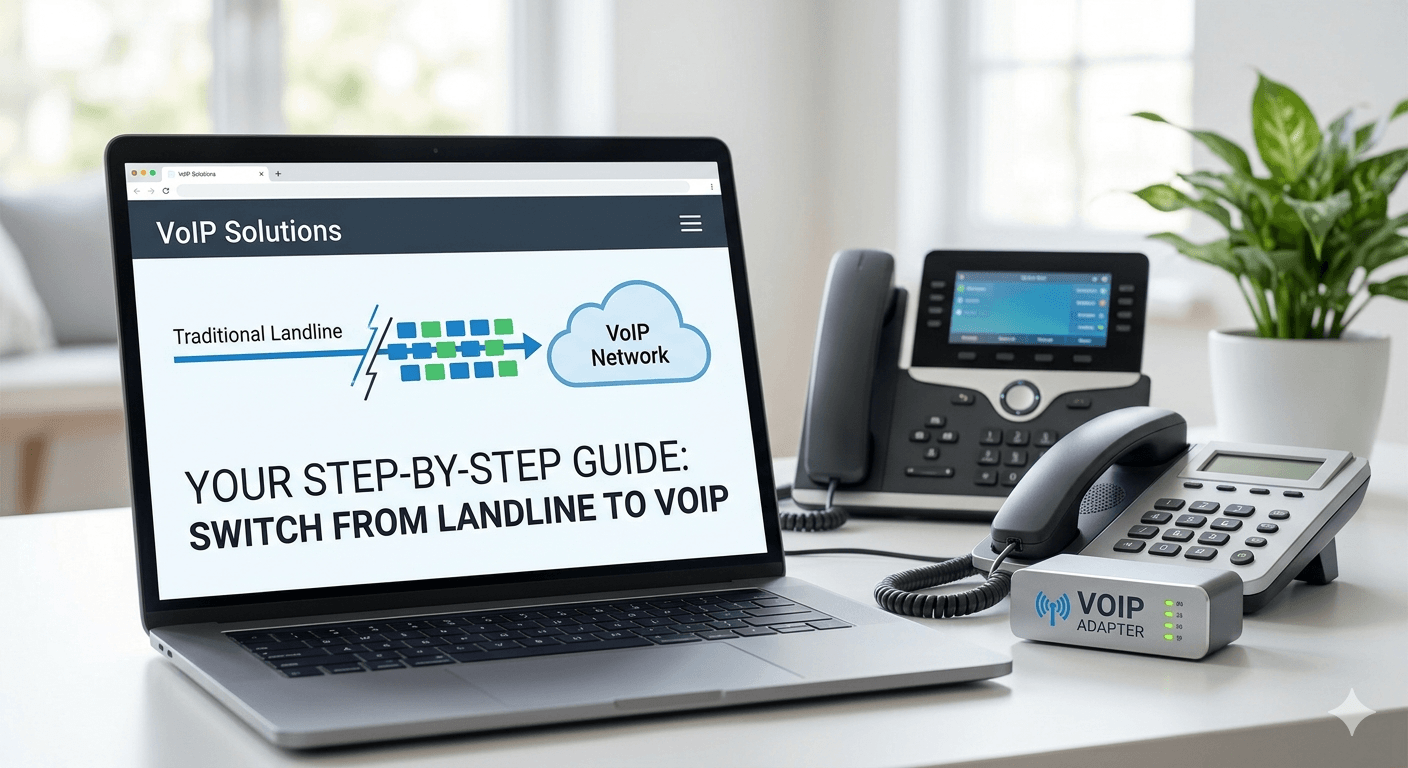
To switch from a landline to VoIP, first choose a reliable VoIP provider and plan that fits your calling needs. Next, ensure you have a stable internet connection and compatible equipment like an IP phone or adapter (ATA). Then port your existing landline number to the VoIP service if you want to keep it. Finally, configure your VoIP settings, test calls, and disconnect the traditional landline service once everything works properly.
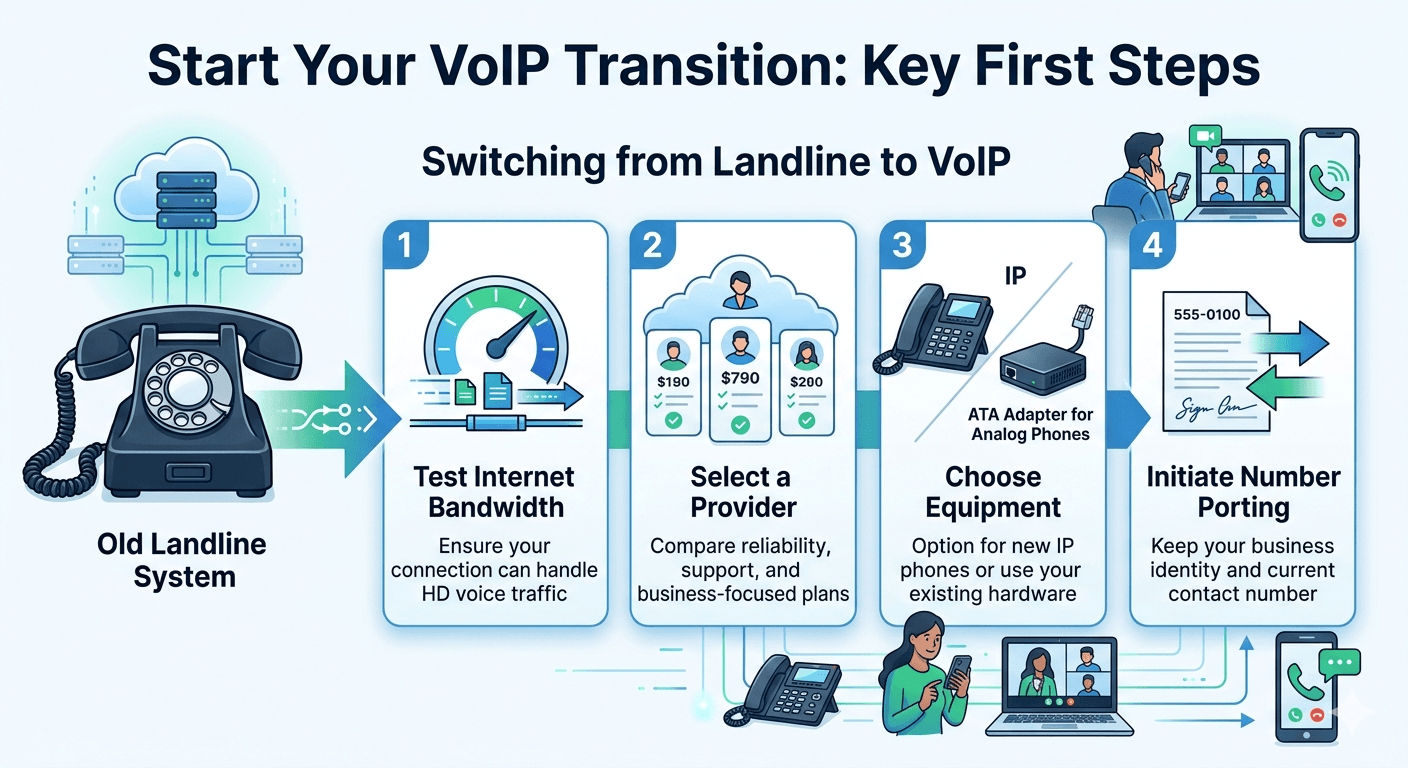
Learning how to switch from landline to VoIP involves transitioning your traditional copper-wire telephone service to a modern system that transmits voice data over the internet. To successfully switch, you must first verify that your internet connection has sufficient bandwidth and low latency to handle high-definition voice traffic. The process continues with selecting a reliable service provider, determining whether you need new hardware like IP phones or can use a telephony adapter for existing devices, and porting your current number to ensure business continuity. This digital migration significantly reduces monthly expenses while introducing advanced features like video conferencing and mobile integration.
Transitioning from a Landline to VoIP: A Step-by-Step Guide
The decision to modernize your communications infrastructure is a strategic move that aligns your business with the current digital landscape. For decades, the Public Switched Telephone Network served as the backbone of global communication, but it is increasingly becoming obsolete. As traditional providers phase out analog lines, knowing how to switch from landline to VoIP has become essential for survival and growth. This guide explores the entire lifecycle of this transition, ensuring that you can make the move without experiencing significant downtime or technical hurdles.
Voice over internet protocal technology has matured to the point where it surpasses traditional telephony in almost every metric. When you go to VoIP, you are essentially moving your voice signals into the same data stream used by your emails and web browsing. This convergence allows for much smarter handling of calls. For instance, a voip switch can route calls based on time of day, caller ID, or even the current availability of your staff members. By understanding the mechanics of how to switch to VoIP, you position your organization to take advantage of these sophisticated capabilities.
Key Takeaways
Before diving into the technical details of switching to VoIP, it is helpful to understand the core advantages and requirements of the process. Transitioning to a modern system is not just about changing your service provider; it is about upgrading the way your team interacts with clients and each other.
VoIP offers substantial cost reductions, often cutting international and long-distance bills by over 70 percent.
The transition allows for incredible portability, letting employees use their business numbers on mobile devices or home computers.
Transitioning requires a stable and high-speed internet connection to ensure call clarity.
Most existing analog phones can be preserved by using a voip adapter for analog phone systems.
Number porting is a standard procedure that allows you to keep your established business identity.
Cloud-based voip phone system for small business setups eliminates the need for expensive on-site server maintenance.
Why Switch from a Landline to VoIP?
The shift toward internet-based communication is driven by the limitations of physical infrastructure. Landlines are tied to specific locations, requiring physical wiring for every new line you wish to add. This lack of flexibility is a major bottleneck for growing companies. In contrast, internet voip systems allow you to add new users with a few clicks in a digital dashboard. Furthermore, the maintenance costs for aging copper networks are rising, a cost that is often passed down to the consumer in the form of higher monthly fees.
According to research from Global Market Insights, the VoIP market size is projected to grow at a CAGR of over 10 percent through 2032.
This growth is largely fueled by the increasing adoption of cloud-based services and the need for unified communication tools in remote work settings. By learning how to switch from landline to VoIP now, you are staying ahead of a global trend that is making traditional telephony a relic of the past. The move provides a future-proof foundation that can adapt as new communication technologies emerge.
Key Benefits of VoIP Over Landline
When comparing the two technologies, the differences are stark across several categories. Landlines offer consistent quality but are highly susceptible to physical damage and infrastructure decay. VoIP, while dependent on your internet speed, offers high-definition audio that often sounds clearer than a standard telephone call. The monthly cost of landlines remains high due to regulatory fees and line rentals, whereas voip phone lines are generally offered at a flat monthly rate per user.
| Feature | Landline | VoIP |
| Call Quality | Consistent, but affected by aging infrastructure | High-quality, but dependent on internet speed |
| Monthly Cost | Typically higher due to line rental fees | More affordable with various pricing plans |
| Features | Basic calling with voicemail | Call forwarding, video conferencing, virtual numbers |
| Portability | Fixed to a specific location | Can be used anywhere with an internet connection |
| Scalability | Limited; requires wiring for multiple lines | Easily expandable with cloud-based solutions |
Where do you start Switching from a Landline to VoIP?
Navigating the technical shift requires a structured approach to prevent service interruptions. If you follow a logical sequence, the transition can be completed in a matter of days rather than weeks. The goal is to move your telephony to the cloud with zero dropped calls and no loss of data.
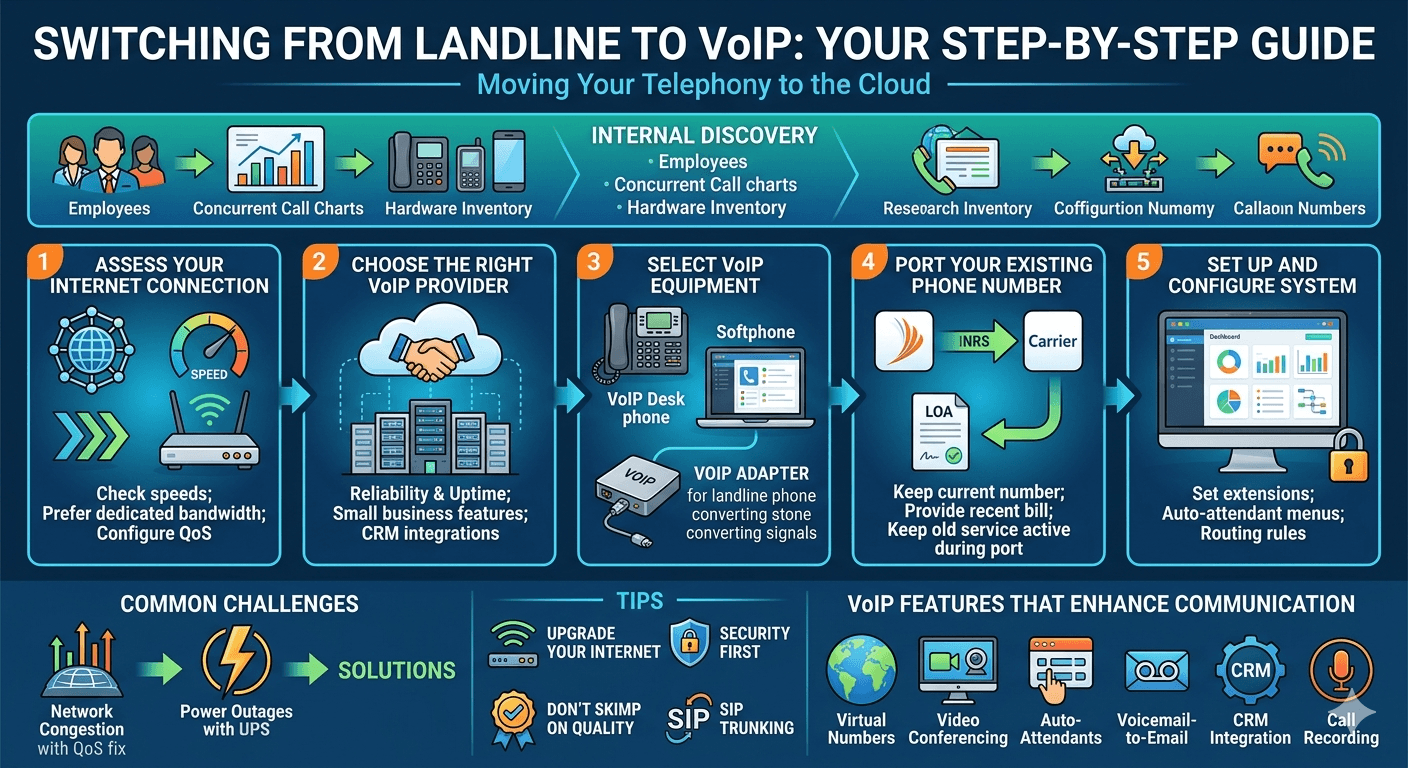
The starting point is always internal discovery. You need to know how many employees will use the system, how many concurrent calls you handle at peak times, and what your current hardware inventory looks like. Understanding these factors will dictate the scale of the voip switching project. Once you have a clear picture of your needs, you can begin the practical steps of the migration.
Step 1: Assess Your Internet Connection
The most critical component of a successful transition is your internet stability. Since VoIP relies entirely on data packets, any fluctuation in your connection can result in jitter or dropped calls. You should perform a stress test on your network to determine its upload and download speeds. Most experts recommend at least 100 Kbps of dedicated bandwidth for every simultaneous call you plan to host.
If your office frequently handles large file transfers or video streaming, you may need to upgrade your plan or configure your router to prioritize voice data. Using a voip phone switch with Quality of Service (QoS) settings ensures that even when the network is busy, your voice packets are given the highest priority. This step is the foundation of learning how to switch from landline to VoIP effectively.
Step 2: Choose the Right VoIP Provider
Selecting a provider involves more than just looking for the lowest price. You need to find a partner that offers the specific business features you require. Evaluate the reliability of their data centers and their track record for uptime. Many companies find that a voip service for small business is ideal because it provides the right balance of enterprise features and affordable entry-level pricing.
During your search, look for providers that offer a get voip telecommunications company experience, meaning they handle the backend infrastructure while providing you with an intuitive user interface. Check for integrations with tools you already use, such as Google Workspace or Microsoft 365. A good provider will also guide you through the process of switching to voip with dedicated support staff.
Step 3: Select the Necessary VoIP Equipment
You have several options when it comes to hardware. If you prefer the feel of a traditional desk phone, you can purchase viop phones that plug directly into your ethernet ports. These devices are designed for internet communication and offer better functionality than older models. However, if you are looking to save money, you can use a voip adapter for landline phones. This device, also known as an ip telefonie adapter or a telephony adapter, converts analog signals into digital data.
For those who want to eliminate physical phones entirely, softphones are an excellent choice. These are software applications installed on computers or smartphones that allow you to make calls using your business number. When you transfer landline to voip, you can mix and match these options based on individual employee preferences. Using a voice over ip telephone adapter is a popular bridge for companies that recently invested in expensive analog desk sets.
Step 4: Port Your Existing Phone Number (If Needed)
One of the biggest concerns for businesses is whether they can keep their current phone number. The answer is almost always yes. The process of moving your number from a landline carrier to a VoIP provider is called “porting.” To start this, you will need to provide your new provider with a copy of your recent phone bill and sign a Letter of Agency (LOA).
It is important not to cancel your current landline service until the porting process is complete. If you cancel too early, you might lose your number forever. Once the new provider confirms the port, the old service will typically deactivate automatically. This ensures that when people call your number, it rings on your new voip device without any interruption in service.
Step 5: Set Up and Configure Your VoIP System
Once your hardware is in place and your number is ready, it is time for configuration. This involves setting up your user extensions, creating an auto-attendant greeting, and defining your call routing rules. For instance, you might want calls to ring on a desk phone first and then forward to a mobile device if there is no answer after three rings.
Configuration is also the time to set up your security protocols. Ensure that all users have strong passwords and that multi-factor authentication is enabled where possible. A well-configured voip phone lines system is the key to a professional image. Most modern platforms provide a web-based dashboard that makes this process straightforward, even for those without a deep background in IT.
Common Challenges and Solutions When Switching to VoIP
Even with careful planning, you might encounter some obstacles. One common issue is network congestion, which can lead to poor audio quality. The solution is usually to implement QoS on your router or to separate your voice and data traffic into different Virtual Local Area Networks (VLANs). Another challenge is power outages; unlike traditional landlines that carry their own power, VoIP goes down if your internet or electricity fails. To solve this, always have a backup power supply (UPS) for your router and configure your calls to automatically failover to a mobile device.
Some businesses also worry about the learning curve for their staff. This can be mitigated by choosing a user-friendly interface and providing a short training session. When you replace landline with voip, the physical act of making a call remains the same, but the additional features like “click-to-dial” might take a few days for employees to master. Addressing these challenges proactively is a vital part of knowing how to switch from landline to VoIP.
Tips When Transitioning To VoIP
To make the transition as smooth as possible, consider these professional tips. They can help you avoid common pitfalls and ensure you get the maximum value from your new system.
1. Change service without giving up your number
Many users ask, “can i transfer my landline number to voip?” The answer is a resounding yes. However, you must be meticulous with your paperwork. Any discrepancy in the address or name on your application can delay the porting process by weeks. Keep your current landline account active and in good standing until the very moment your new provider tells you the transfer is successful.
2. Advantages of SIP Trunking
If your business already has an on-premise PBX (Private Branch Exchange) system that you aren’t ready to replace, you can use SIP trunking. This technology allows you to use your existing phone system while routing the calls over the internet. It acts as a bridge between your legacy equipment and the modern web. This is an excellent way to switch landline to voip without a total hardware overhaul, providing the benefits of digital transmission while protecting your previous investments.
3. It’s a good time to upgrade your internet connection
As you learn how to switch from landline to VoIP, you may realize your current internet plan is the bare minimum. Since your business will now rely on the web for both data and voice, upgrading to a fiber-optic connection or a business-class cable plan is a wise investment. A faster connection not only improves call quality but also boosts overall office productivity.
4. Don’t skimp on quality
While you can find very cheap voip adapters and services, quality should be your priority. A low-quality voip adapter for analog phone use might introduce echo or static. Similarly, bargain-basement service providers might have poor routing that leads to international call delays. Invest in reputable hardware like a sip analog telephone adapter from a trusted brand to ensure that your business communication remains professional.
5. Let’s talk about security
Security is often overlooked during the switch to voip. Because your calls travel over the internet, they are subject to the same risks as any other data. Ensure your provider uses encryption for all voice traffic. Additionally, change default passwords on all voip phone adapters and devices immediately upon installation. Regularly updating the firmware on your voip devices is also a critical step in preventing unauthorized access.
VoIP Features That Enhance Communication
The real magic of knowing how to switch from landline to VoIP lies in the features that were previously unavailable or too expensive for small businesses.
Virtual Numbers: You can have local numbers in different cities or even countries, regardless of where your office is located.
Video Conferencing: Most VoIP platforms include built-in video tools, eliminating the need for a separate Zoom or Teams subscription.
Auto-Attendants: Create a professional “press 1 for sales” menu that directs callers without needing a live receptionist.
Voicemail-to-Email: Receive your voicemails as audio files or transcripts directly in your inbox.
CRM Integration: See a customer’s history and details on your screen the moment they call you.
Call Recording: Easily record calls for training, quality assurance, or legal compliance purposes.
These features allow a small team to function with the efficiency of a large corporation. By choosing to switch to voip, you are gaining a toolkit that can significantly improve your customer service and internal collaboration.
Is Switching to VoIP the Right Choice?
For the vast majority of organizations, the answer is yes. The cost savings alone are often enough to justify the transition. A study by Cisco notes that small businesses can reduce local call costs by up to 40 percent and international call costs by up to 90 percent by moving to a VoIP system. Beyond the financial aspect, the flexibility offered by ip telephony voip is unmatched.
If your business requires mobility, works with remote teams, or needs to scale quickly, then the limitations of a landline will only hold you back. While there is a small amount of effort involved in learning how to switch from landline to VoIP, the long-term benefits far outweigh the initial setup tasks. The ability to manage your entire phone system from a laptop, wherever you are in the world, provides a level of freedom that traditional telephony simply cannot match.
Final Thoughts
Making the move from a traditional phone system to the cloud is a transformative step for any business. By understanding how to switch from landline to VoIP, you are doing more than just saving money; you are opening the door to a more connected and efficient way of working. The process, from assessing your internet to configuring your final settings, is a manageable journey that leads to a superior communication experience. As the world continues to move toward digital-first solutions, those who embrace VoIP will find themselves better equipped to handle the demands of the modern market. Start your transition today by auditing your current needs and exploring the vast world of internet-based telephony.
FAQs
Can I switch my landline to VoIP?
Yes, you can absolutely switch your landline to VoIP. The process involves signing up with a VoIP service provider, ensuring your internet connection is fast enough, and either purchasing new IP phones or using a voip adapter for analog phone systems. Most businesses find that the transition is seamless and results in immediate cost savings and better feature access.
How do I convert my phone line to VoIP?
To convert your line, you first need to choose a provider. Once you have a plan, you can “port” your existing number to the new service. For the hardware part, you can use a voip adapter for landline setups, which plugs into your router and allows your old phone to function over the internet. Alternatively, you can use software-based phones on your computer or mobile device.
What are the disadvantages of using VoIP?
The main disadvantage is that VoIP is entirely dependent on your internet connection and electricity. If your power goes out or your internet service is interrupted, your phone system will go down unless you have backup solutions like a UPS or mobile failover. Additionally, some emergency services (911) may require manual address updates in your VoIP settings to ensure they can locate you correctly during a call.
Can you use a normal landline phone for VoIP?
Yes, you can use a normal landline phone for VoIP by using a voip home phone adapter or a sip analog telephone adapter. This device acts as a bridge, converting the analog signals from your old phone into digital packets that can travel over the internet. This is a cost-effective way to transition without having to buy all new hardware for your office.
How long does it take to transfer a landline number to VoIP?
The number porting process usually takes between 7 to 14 business days. During this time, your old landline will continue to work. It is crucial not to cancel your old service until the new provider confirms that the number has successfully moved to their network to avoid losing the number entirely.
Do I need a computer to use VoIP?
No, you do not necessarily need a computer. While you can use a computer as a “softphone,” you can also use standalone IP phones that look just like regular desk phones and plug directly into your internet router. You can also use a voip adapter for analog phone devices to keep using your current handsets without any computer involvement.
How do I make my business phones go digital?
Making your business phones go digital involves replacing your traditional copper-wire service with a cloud-based VoIP system. This requires selecting a provider that offers business voip solutions, setting up a digital dashboard to manage your lines, and choosing digital-compatible hardware or adapters to route your calls over the internet.
Can I use VoIP without a service provider?
While it is technically possible to set up a private VoIP network for internal office calls without a provider, you generally need a service provider to make or receive calls to the outside world (the Public Switched Telephone Network). Most businesses rely on a provider to handle the complex routing and to provide the features that make VoIP so valuable.
Will my call quality suffer if I switch to VoIP?
If you have a high-quality internet connection and a reputable provider, your call quality should actually improve. VoIP supports “HD Voice,” which offers a wider range of sound frequencies than traditional landlines. However, if your internet is slow or unstable, you may experience issues like lag or “robotic” sounding voices.


