
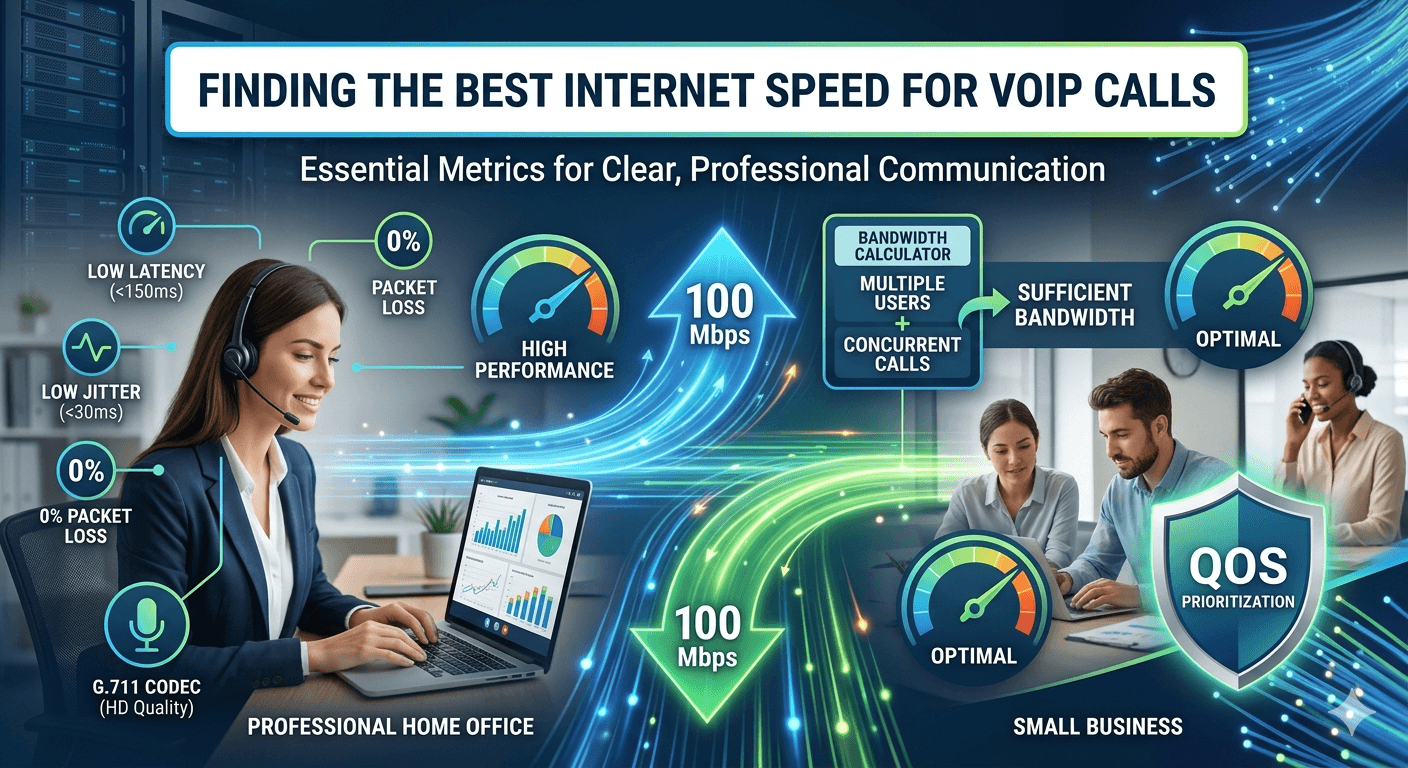
Finding the best internet speed for VoIP calls is essential for ensuring that your voice communications remain clear, stable, and professional. Generally, a single high-quality VoIP call requires approximately 100 Kbps of both upload and download speed to function without interruption. However, for businesses or households with multiple users, the total bandwidth needed increases significantly. To maintain optimal performance, factors such as latency, jitter, and network congestion must be managed. High-speed connections like fiber or cable are preferred over DSL to accommodate the real-time data transfer necessary for voice over internet protocol technology.
Understanding VoIP and Internet Speed
Voice over Internet Protocol, commonly known as VoIP, is a technology that allows you to make voice calls using a broadband internet connection instead of a traditional phone line. The process involves converting your voice into digital data packets, which are then transmitted over the internet to the receiver. Because this happens in real time, the best internet speed for VoIP calls is not just about how much data you can download, but how quickly and consistently those packets travel. Unlike downloading a file where a slight delay is unnoticeable, a delay in voice packets leads to broken audio or dropped calls.
The relationship between your internet connection and call quality is direct. When you have sufficient voip internet speed, the data packets move seamlessly. If the connection is slow or unstable, you experience what many call “choppy” audio. This happens because the internet connection cannot keep up with the stream of data, leading to gaps in the conversation. Understanding that VoIP relies on a constant, two-way stream of information is the first step in ensuring your network is ready for professional-grade communication.
Most people focus on download speeds when looking at internet plans, but for VoIP, upload speed is equally critical. When you speak, your device uploads data to the cloud. If your upload speed is lagging, the person on the other end will hear distorted audio, even if you can hear them perfectly. Therefore, a balanced connection with adequate voip internet speed requirements for both directions is the foundation of a reliable system.
Key Metrics for VoIP Internet Speed
To determine if you have the best internet speed for VoIP calls, you must look beyond the Mbps advertised by your provider. There are several technical metrics that define how well your network handles voice traffic. Latency is perhaps the most significant. Latency refers to the time it takes for a data packet to travel from your device to the destination and back. High latency results in a noticeable delay in the conversation, making it difficult for people to talk without interrupting each other.
Jitter is another crucial metric for voip performance. Jitter is the variation in the time it takes for packets to arrive. Since voice data must be heard in a specific order, if packets arrive at irregular intervals, the audio will sound scrambled or robotic. Ideally, your jitter should be below 30 milliseconds. If it exceeds this threshold, the VoIP system struggle to reassemble the voice stream, leading to a poor user experience.
Packet loss occurs when data packets fail to reach their destination. In a voice call, even a 1% packet loss can significantly degrade the audio quality. While a web browser can simply request a missing packet again, a real-time voice call cannot wait for retransmission. This is why a stable connection is often more important than a sheer high-speed connection.
According to research by the Federal Communications Commission (FCC), a latency of less than 150 milliseconds is required for a high-quality voice experience, highlighting that speed is only one part of the equation. You can learn more about these standards on the FCC Broadband Speed Guide.
Understanding VoIP Bandwidth Requirements
1. High-quality internet connection
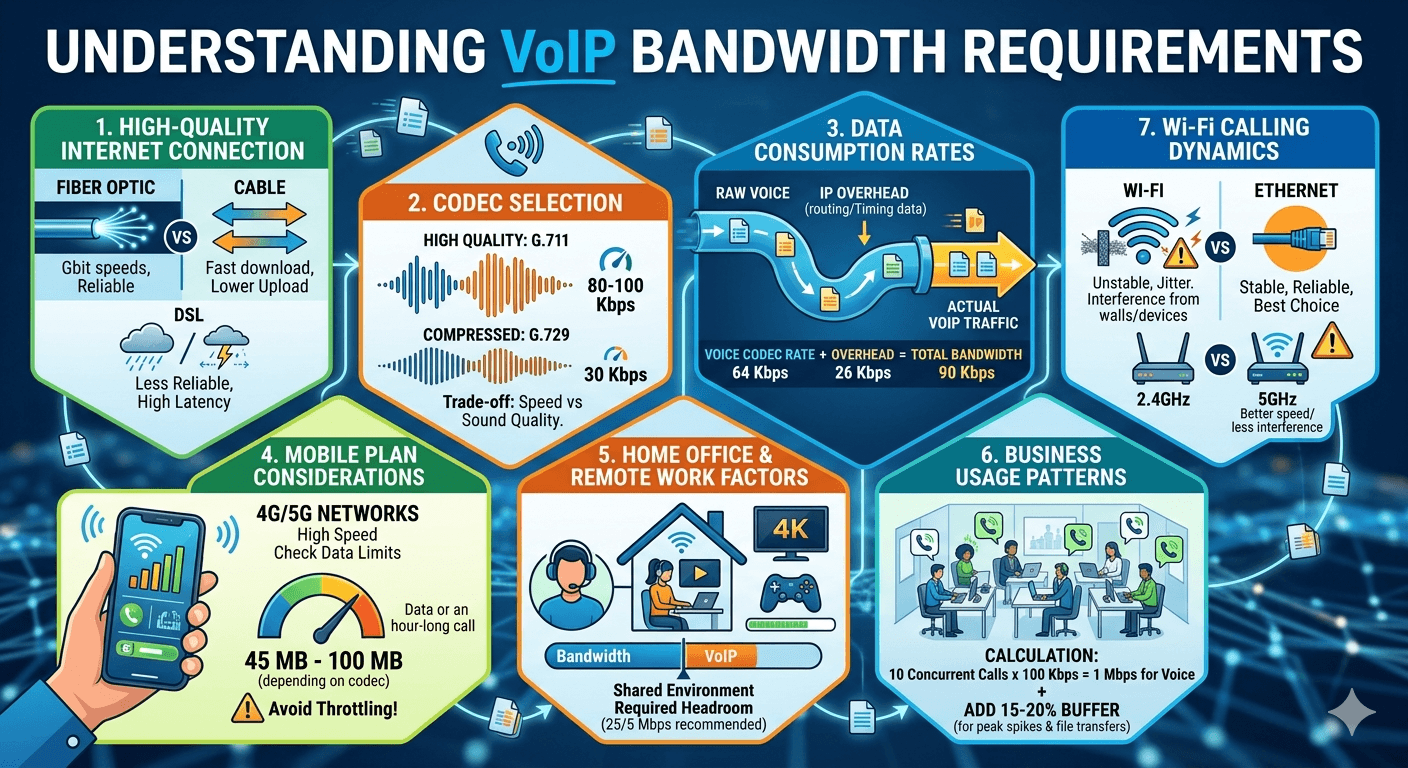
The type of connection you use determines the baseline for your voip bandwidth requirements. Fiber optic is currently the gold standard because it offers symmetrical speeds, meaning your upload speed is just as fast as your download speed. Cable internet is also a strong contender, though it often has lower upload limits. DSL and satellite connections are generally less reliable for VoIP due to higher latency and susceptibility to weather or distance from the central office. Choosing a high-quality provider is the first step toward achieving the best internet speed for VoIP calls.
2. Codec selection
VoIP systems use codecs to compress and decompress voice data. The choice of codec directly impacts your voip bandwidth usage. For instance, the G.711 codec provides high-quality audio but uses about 80-100 Kbps per call. In contrast, the G.729 codec compresses the data more aggressively, using only about 30 Kbps, which is useful for networks with limited capacity. However, higher compression can sometimes result in a slight loss of audio fidelity, so it is a trade-off between speed and sound quality.
3. Data consumption rates
The voip data rate is the actual amount of data transferred per second during a call. While the raw voice data might be small, each packet includes overhead—extra data used for routing and timing. This means that if your codec uses 64 Kbps, the actual bandwidth needed for voip might be closer to 90 Kbps once you account for the IP overhead. Understanding these rates helps in planning the total capacity required for a call center or a busy office.
4. Mobile plan considerations
When using VoIP on mobile devices, you must consider your 4G or 5G data limits. While modern mobile networks offer great voip speed requirements, the voip data usage can add up if you are on a limited plan. A typical hour-long call can use anywhere from 45 MB to 100 MB of data depending on the codec. If you frequently use VoIP while traveling, ensuring you have a robust data plan is essential to avoid throttling, which would immediately ruin call quality.
5. Home office and remote work factors
In a home office, the best internet speed for VoIP calls is often contested by other devices. If a family member is streaming 4K video or downloading a large game file, it consumes the available bandwidth needed for voip. This shared environment requires a higher total speed than the bare minimum for a single call. Remote workers should aim for a plan that provides at least 25 Mbps download and 5 Mbps upload to ensure there is enough “headroom” for VoIP to operate smoothly alongside other online activities.
6. Business usage patterns
Businesses need to evaluate their peak usage periods to determine their voip network requirements. If an office has 50 employees, but only 10 are on the phone at any given time, the bandwidth calculation should be based on those 10 concurrent calls plus regular web traffic. However, it is always safer to over-provision. Research from industry analysts suggests that businesses should allocate at least 15-20% extra bandwidth as a buffer for unexpected spikes in traffic or large file transfers that occur during calls.
7. Wi-fi calling dynamics
While convenient, Wi-Fi can introduce instability into a VoIP call. Interference from other electronic devices or physical obstacles like walls can cause jitter. If you are serious about having the best internet speed for VoIP calls, using a wired Ethernet connection is always the superior choice. If Wi-Fi is necessary, utilizing the 5GHz band is generally better than 2.4GHz because it offers higher speeds and less interference, though it has a shorter range.
So What Speed Do You Need for VoIP?
To answer the question of what internet speed do i need for voip, you have to look at the number of concurrent users. For a single user, a connection as slow as 0.5 Mbps can technically support a call. However, this leaves no room for anything else. In a modern environment, the best internet speed for VoIP calls should be part of a larger broadband package. Most experts recommend a minimum of 1 Mbps of dedicated upload and download speed for each person who will be on a call simultaneously to ensure no lag or distortion.
For a small office with five employees, a 10/10 Mbps symmetrical connection might suffice if they only use the internet for email and voice. However, if they are also using cloud-based software or video conferencing, those requirements jump. The best internet speed for VoIP calls in a professional setting is often found in plans offering 100 Mbps or more, as this provides the necessary stability to handle multiple streams of data without any one service slowing down the others.
How Much Bandwidth Does VoIP Need?
The total amount of bandwidth voip consumes is the sum of all active calls and the background data used by the phones to stay connected to the server. Even when you are not talking, your VoIP phone sends small “keep-alive” packets to the provider. This is why when calculating how much bandwidth does a voip call use, you must look at the peak potential usage.
If we assume a standard high-quality call uses 100 Kbps, then ten simultaneous calls will use 1 Mbps. While 1 Mbps sounds small, you must remember that this is a constant, uninterrupted stream. Unlike a webpage that loads and then stops using data, VoIP is a continuous drain on the connection for the duration of the call. This constant demand is why voip internet speed requirements are often more demanding on network stability than on total volume.
Calculating Your VoIP Bandwidth
To accurately determine your needs, using a voip bandwidth calculator is the most effective method. You start by identifying the maximum number of concurrent calls your office will handle. Multiply this number by the bandwidth requirement of your chosen codec. For example, if you use the G.711 codec (approx 100 Kbps) and expect 20 concurrent calls, you need 2,000 Kbps, or 2 Mbps, just for the voice traffic.
However, a simple sip bandwidth calculator logic dictates that you should also add a 20% margin for network overhead. This accounts for the headers and routing information attached to every packet. Therefore, for 20 calls, you should really reserve 2.4 Mbps of upload and download speed specifically for voice. When you add this to the bandwidth used by your computers, printers, and other IoT devices, you can see how the best internet speed for VoIP calls quickly becomes a matter of calculating the total office load.
Factors Affecting VoIP Bandwidth
Network congestion
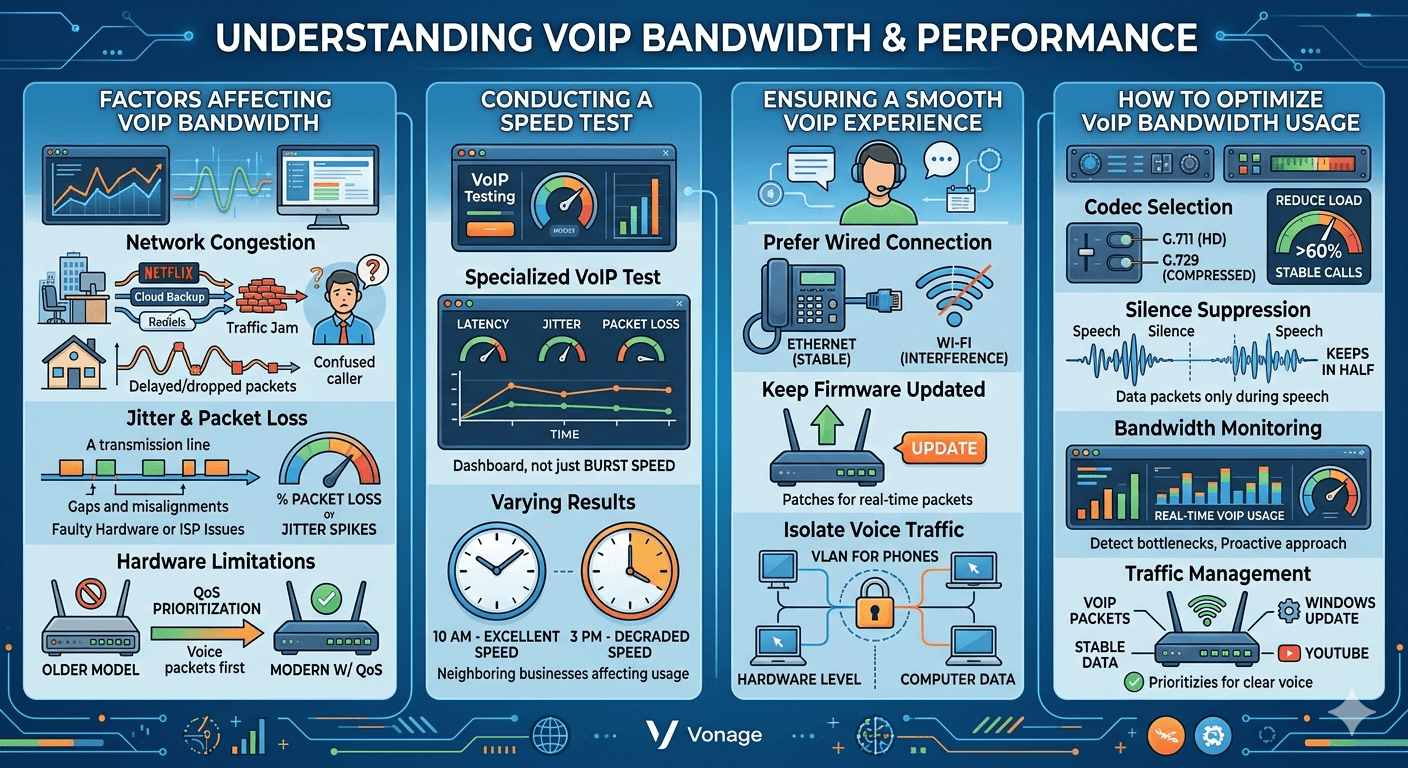
Network congestion is the leading cause of poor voip performance. This happens when too much data is being sent over a network simultaneously, causing a “traffic jam.” In a home setting, this might be caused by Netflix; in an office, it might be a scheduled cloud backup. When the network is congested, VoIP packets are delayed or dropped, leading to the “underwater” sound or broken sentences that frustrate callers. Managing congestion is key to maintaining the best internet speed for VoIP calls.
Jitter and packet loss
As mentioned earlier, the stability of the connection is as vital as the speed. Even if you have a 1 Gigabit connection, if that connection suffers from 5% packet loss, your VoIP calls will be unusable. Jitter and packet loss are often caused by faulty hardware or issues with the Internet Service Provider (ISP). Using a tool like a voip calculator can help you diagnose if these issues are occurring within your local network or if they are a result of your ISP’s performance.
Hardware limitations
Your router and modem play a massive role in how much bandwidth does voip use efficiently. Older routers may not have the processing power to handle modern voip requirements. Specifically, many modern routers include a feature called Quality of Service (QoS). QoS allows you to tell the router to prioritize VoIP traffic over other types of data. This means that even if someone starts a large download, the router will ensure the VoIP packets are sent first, preserving the call quality.
Conducting a Speed Test
To find the best internet speed for VoIP calls currently available on your network, you should conduct a specialized speed test. Standard speed tests often only show you the “burst” speed, which is great for downloading files but doesn’t reflect the sustained stability needed for voice. A VoIP-specific speed test will measure latency, jitter, and packet loss over a longer period.
When you run these tests, do so at different times of the day. You might find that your voip internet speed is excellent at 10 AM but degrades significantly at 3 PM when neighboring businesses increase their internet usage. This data is invaluable when talking to your ISP or deciding if you need to upgrade your plan to meet the voip speed requirements of your growing team.
Ensuring a Smooth VoIP Experience
Beyond just having the best internet speed for VoIP calls, you can take several steps to ensure a smooth experience. First, always prefer a wired connection for your desktop phones. Ethernet is far more stable than Wi-Fi and eliminates many of the issues related to signal interference. Second, keep your network hardware up to date. Firmware updates for routers often include patches that improve how the device handles real-time data packets.
Another tip for optimizing voip data usage is to isolate your voice traffic. Some businesses set up a Virtual Local Area Network (VLAN) specifically for their phones. This separates the voice data from the regular computer data at the hardware level, preventing local network congestion from affecting calls. This is a common practice for those using internet vonage or other major business providers to ensure high availability and reliability.
How To Optimize VoIP Bandwidth Usage
Codec selection
As discussed, selecting the right codec is a powerful way to manage your bandwith voip consumption. If you find that your network is struggling during peak hours, switching to a more compressed codec like G.729 can reduce the load by more than 60%. While the audio might not be “HD,” it will be much more stable on a constrained connection, ensuring that your customers can still understand you clearly.
Advanced compression techniques
Some modern VoIP systems offer advanced compression and silence suppression techniques. Silence suppression works by not sending any data packets when no one is speaking. Since most conversations involve one person listening while the other speaks, this can effectively cut the how much data does voip use in half during a call. These technical optimizations allow businesses to squeeze more performance out of their existing internet connection.
Bandwidth monitoring
You cannot manage what you do not measure. Using network monitoring tools to track your voip call bandwidth in real-time allows you to identify bottlenecks before they become a problem. These tools can alert you if jitter spikes or if your total bandwidth usage is approaching the limit of your plan. This proactive approach is essential for maintaining the best internet speed for VoIP calls in a professional environment.
Traffic management
Implementing Quality of Service (QoS) rules on your router is the most effective way to manage traffic. By tagging VoIP packets as high priority, you ensure that they are never stuck behind less important data like a Windows update or a YouTube video. This ensures that even if your total voip internet speed is being pushed to the limit, your voice calls remain crisp and clear.
Choosing the Right Business VoIP Provider
The final piece of the puzzle is selecting a provider that matches your voip internet speed requirements. A great provider will have a geographically distributed network of servers to ensure that your data packets have the shortest path possible, reducing latency. They should also offer tools like a voip call bandwidth calculator to help you plan your deployment.
When evaluating providers, ask about their uptime guarantees and how they handle packet loss on their end. A provider like internet vonage or Nextiva often provides detailed documentation on how to configure your firewall and router to work perfectly with their servers. Choosing a provider that understands the nuances of voip data and network requirements will save you countless hours of troubleshooting and ensure you always have the best internet speed for VoIP calls.
Read More: Can You Use Google Voice in Costa Rica? 7 Amazing Secrets to Stay Connected
Final Thought
In conclusion, achieving the best internet speed for VoIP calls is a balance of sufficient bandwidth, low latency, and proper network management. While 100 Kbps per call is the minimum, aiming for a robust connection with high upload speeds and implementing QoS will guarantee professional audio quality. By understanding your specific voip bandwidth requirements and optimizing your hardware, you can turn your internet connection into a powerful tool for seamless communication. Whether you are a solo entrepreneur or managing a large office, prioritizing your network health is the key to VoIP success.
FAQs
How much bandwidth do you need for VoIP?
You typically need about 100 Kbps of upload and download speed for a single high-quality VoIP call. For a multi-user environment, you should calculate the total by multiplying the number of concurrent calls by 100 Kbps and then adding a 20% buffer for network overhead to ensure stability.
What is the network requirement for VoIP?
The primary network requirements for VoIP include a stable internet connection with latency under 150ms, jitter below 30ms, and packet loss of less than 1%. A wired Ethernet connection and a router with Quality of Service (QoS) capabilities are also highly recommended to prioritize voice traffic.
How much bandwidth does a SIP phone call use?
A SIP phone call uses between 30 Kbps and 120 Kbps depending on the codec being used. The most common codec, G.711, uses about 87-100 Kbps after accounting for the IP overhead, while compressed codecs like G.729 use significantly less, around 31 Kbps.
What frequency does VoIP use?
VoIP does not use a traditional radio frequency like a walkie-talkie or mobile phone; instead, it operates over standard internet protocols. However, if you are using VoIP over Wi-Fi, it will typically operate on the 2.4 GHz or 5 GHz wireless bands, with 5 GHz being preferred for less interference.
Does internet speed affect VoIP?
Yes, internet speed significantly affects VoIP. If your speed is lower than the required bandwidth for your active calls, you will experience audio clipping, delays, and dropped calls. Both upload and download speeds must meet the requirements for a successful two-way conversation.
What is the bandwidth of a voice call?
The digital bandwidth of a standard VoIP voice call is usually around 80 to 100 kilobits per second (Kbps). This includes the actual voice data and the necessary packet headers required to route the information across the internet.
Why is bandwidth necessary for VoIP?
Bandwidth is necessary for VoIP because voice data must be transmitted in real-time. Without sufficient bandwidth, the digital packets representing your voice cannot be sent fast enough, leading to gaps in the audio and a loss of communication quality.
What is the minimum bandwidth for WIFI calling?
The minimum bandwidth for Wi-Fi calling is generally 1 Mbps for a stable experience. While lower speeds might work, 1 Mbps provides the necessary cushion to handle the inherent fluctuations and potential interference of a wireless signal.


