Latest News

The Blog

voip blogs
HD Video quality

HD Voice Quality: What It Means

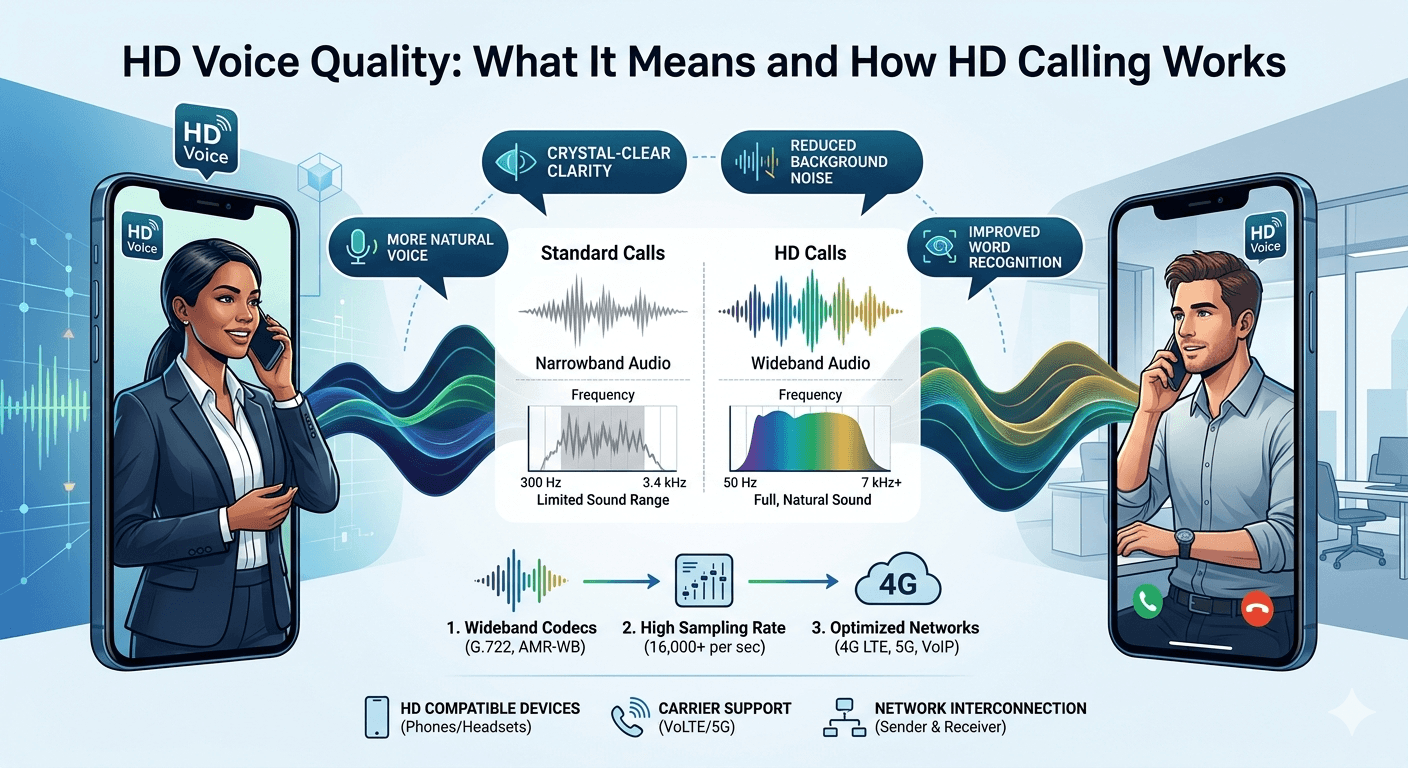
HD voice quality refers to high-definition audio technology that significantly improves the clarity and richness of phone conversations compared to traditional narrowband telephony. While standard phone calls typically operate within a limited frequency range of 300 Hz to 3.4 kHz, high definition voice extends this range to between 50 Hz and 7 kHz or higher. This expansion allows the technology to capture more nuances of the human voice, making callers sound more natural and easier to understand. By doubling the frequency range and increasing the sampling rate, HD calling reduces background noise and minimizes the listener fatigue often associated with muffled or distorted audio over digital networks. Understanding High Definition Voice and HD Calling Technology The transition from traditional landlines to modern digital communication has introduced several advancements in audio fidelity. When people discuss what is hd calling, they are essentially referring to wideband audio technology. Unlike the older public switched telephone network that compressed audio to fit into narrow bandwidths, modern voip virtual receptionist systems and mobile networks utilize wider bands to transmit data. This results in a fuller sound that captures both the lower and higher pitches of a person’s voice. High definition voice is not just about volume; it is about the precision of the audio signal being transmitted across a network. The underlying technology behind an hd call relies on specific audio codecs, most notably the G.722 codec. This codec is designed to handle the increased data required for high fidelity sound without placing an excessive burden on the network. When you initiate an hdcall, the system samples the audio at a much higher frequency than standard calls. Standard calls usually sample at 8,000 times per second, while high definition calling samples at 16,000 times per second or more. This higher sampling rate ensures that the digital representation of the voice is much closer to the original analog sound produced by the speaker. For a business environment, utilizing vonage branded calling or similar high-quality services ensures that every interaction with a client is professional. If a customer cannot hear a representative clearly, it leads to frustration and potential misunderstandings. By implementing hdvoice across a corporate network, companies can ensure that their communication is as clear as an in-person meeting. This is especially important for industries that rely heavily on phone-based consultations, where every detail discussed over the phone carries significant weight and requires absolute clarity. Technical Requirements for Experiencing HD Calling on Your Devices To successfully place an hd call, certain infrastructure requirements must be met by both the sender and the receiver. It is not enough for just one person to have a compatible phone; the entire path of the call must support high definition voice protocols. This means that both the service providers and the hardware on both ends must be capable of processing wideband audio. If you are using a legacy device that does not support hd voice phones, the call will automatically drop back to standard narrowband quality to ensure the connection remains stable, even if the other party has the latest technology. Network compatibility is perhaps the most critical factor in determining what are hd calls in a practical sense. Most modern LTE and 5G networks are designed to support Voice over LTE (VoLTE), which is the standard carrier technology used to deliver high definition calling. When a smartphone displays an hd icon during a conversation, it indicates that the network has successfully negotiated a wideband connection. For those using office systems, a high definition conference call requires a robust internet connection with sufficient bandwidth to handle the increased data packets without jitter or latency. Compatible Hardware: Users must possess hd voice devices such as modern smartphones, IP phones, or certified headsets that contain speakers and microphones capable of handling a wider frequency range. Older handsets often have hardware limitations that prevent them from reproducing the high-frequency sounds associated with high definition audio. Carrier Support: Both the originating and receiving mobile carriers must have an interconnection agreement that supports wideband audio. In many cases, if you call someone on a different network, the call might revert to standard quality unless both carriers have integrated their HD services. Software Settings: On many devices, particularly in the case of android hd calling, users may need to ensure that VoLTE or HD settings are enabled in the cellular network menu. While most modern phones have this turned on by default, some older or specialized enterprise devices might require manual activation. Benefits of Utilizing High Definition Voice for Business Communications The advantages of adopting high definition voice extend far beyond simply hearing someone more clearly. In a professional setting, the quality of a call can directly influence a client’s perception of a company’s competence and attention to detail. When a business uses a voip virtual receptionist that supports HD audio, the initial greeting sounds crisp and welcoming. This reduces the cognitive load on the listener, as they do not have to strain to understand what is being said through static or muffled audio. High definition voice helps in building a more personal connection between parties who may never meet in person. Research conducted by Fraunhofer IIS, the creators of many audio codecs, demonstrates that high definition voice significantly reduces “listener fatigue.” Their studies show that wideband audio (HD Voice) improves word recognition by approximately 20% compared to traditional narrowband calls. This is because the brain has to work less hard to “fill in the gaps” of missing frequencies, leading to clearer communication and less mental strain during long conversations. Another significant benefit is the reduction of background noise interference. The codecs used in hd calling are often paired with advanced noise-cancellation algorithms that can distinguish between the human voice and ambient sounds like traffic, office chatter, or wind. This makes what is an hd call particularly valuable for remote workers or field technicians who may be calling from less-than-ideal environments. By isolating the voice and suppressing unwanted noise, the communication remains focused and productive, preventing the need for repetitive questions or clarifications during the conversation. Enhanced Clarity: The primary benefit is the dramatic improvement in sound quality, making it easier to distinguish between similar-sounding consonants like S and F or M and N. This is vital for accurately recording names, addresses, and technical specifications over the phone. Better Conference Calls: In a high definition conference call, it is much easier to identify who is speaking, even when multiple people are in the same room. The spatial quality of the audio helps the brain process the conversation more naturally, which leads to more effective collaboration. Professional Image: Providing a high-quality audio experience signals that a business invests in its infrastructure and values the time of its clients. It removes the amateur feel of scratchy, low-bitrate calls that often plague older or cheaper communication systems.     Exploring HD Voice Devices and Hardware Compatibility The market for hd voice devices has expanded significantly, moving from high-end executive tools to standard consumer electronics. Most smartphones released in the last several years are inherently hd voice phones, equipped with the necessary hardware and software to support wideband audio. However, the quality of the internal microphone and speaker still plays a role in the final output. For instance, a budget phone might support the hd voice protocol but lack the high-quality acoustic components to truly deliver the full range of sound, leading to a less impressive experience than a flagship device. In an office setting, IP phones have become the standard for businesses seeking the best audio quality. These devices are specifically designed for voip environments where high definition voice is a native feature. Many of these phones come with a dedicated hdvoice logo, indicating they meet specific industry standards for audio fidelity. Furthermore, using a high-quality headset can further enhance the experience. Professional-grade headsets are built with wideband speakers and noise-canceling microphones that complement the capabilities of the phone system, ensuring that both the user and the caller enjoy maximum clarity. According to research by the audio experts at Poly, better audio quality can lead to a 20 percent increase in word recognition and a significant reduction in the listener’s heart rate during long calls. This suggests that high definition audio reduces the physical and mental stress associated with communication. Another study by Frost & Sullivan noted that businesses using high-quality communication tools saw a 15 percent improvement in meeting efficiency because participants spent less time asking for information to be repeated. These findings underscore the tangible business value of investing in high-quality audio solutions. How High Definition Audio Works for Better HD Voice Quality To grasp the full scope of what is hd voice, it is helpful to look at how the audio signal is processed during a transmission. Standard telephony uses a method called Pulse Code Modulation (PCM) which severely limits the amount of data transmitted. When you engage in hd calling, the system uses more advanced compression techniques that preserve more of the original signal. The audio is divided into more frequent and detailed segments during the digital conversion process. This prevents the “tinny” sound that many people associate with traditional phone calls, instead providing a depth of sound that mimics a face-to-face conversation. The concept of what does hd mean on a phone call is similar to the difference between a standard definition television and a 4K display. Just as the 4K display has more pixels to create a sharper image, an HD call has more data points to create a sharper sound. This extra detail is particularly noticeable in the higher frequencies, where the subtle “air” around a voice is captured. For companies utilizing vonage virtual receptionist services, this means that even automated messages sound more human and less like a computer-generated recording. According to an analysis by Frost & Sullivan, businesses that implement high-quality audio solutions, such as HD voice phones and high definition conference calls, see a 15% increase in meeting efficiency. The study found that clear audio reduces the need for participants to repeat information and minimizes misunderstandings, directly impacting the speed of decision-making and overall workplace productivity. The implementation of what is hd calling on android and other platforms often involves the use of Wideband Adaptive Multi-Rate (AMR-WB) technology. This technology allows the network to adjust the bit rate of the call in real-time based on the available signal strength. If the network is congested, the system can slightly reduce the quality to maintain the connection, but when the signal is strong, it pushes the full high definition voice data through. This adaptability ensures that the user gets the best possible audio quality under their current network conditions without risking a dropped call. Comparing Standard Audio and HD Voice Quality Performance When comparing a standard call to an hd call, the difference is most apparent in the frequency response graph. A standard call has a very narrow “hump” where only the middle frequencies of the human voice are transmitted. This is why voices on old phones often sound flat and lacking in character. In contrast, high definition voice covers a much wider spectrum, allowing the rich bass tones and the crisp treble tones to come through. This makes what is a hd call sound “closer” to the listener, as if the person is standing in the same room rather than speaking through a long-distance wire. The shift toward high definition calling has also been driven by the rise of Voice over IP (VoIP) and 5G technology. Older copper-based phone lines were physically limited in the amount of data they could carry, but modern fiber-optic and wireless networks have virtually unlimited capacity for audio data. This has allowed service providers to offer what does hd mean on phone call features as a standard part of their service rather than a premium add-on. As more people move away from traditional landlines, the expectation for crystal-clear audio has become the new industry standard. Frequency Range: Standard calls are limited to 3.4 kHz, whereas HD calls reach up to 7 kHz or 14 kHz in some advanced systems. This extra range captures the sibilance and harmonics that make voices recognizable. Sampling Rate: Standard telephony samples at 8 kHz, while HD systems sample at 16 kHz or higher. This creates a more accurate digital “map” of the sound wave. Noise Suppression: High definition systems are better at filtering out non-voice sounds, which helps in maintaining focus during important business discussions or personal conversations. How to Enable and Use High Definition Calling on Modern Smartphones For many users, the transition to high definition calling happens automatically without any intervention. However, there are times when you might need to check your settings to ensure you are getting the best possible audio. On an iPhone, this is usually managed under the Cellular Data Options menu, where you can enable VoLTE. For those looking for what is hd calling on android, the process is similar. You typically navigate to the Mobile Networks section of your settings and look for a toggle labeled HD Voice, Enhanced Calling, or VoLTE. Ensuring this is active is the first step toward enjoying superior sound quality. If you are using a voip virtual receptionist or a business phone system, the settings are often managed by your IT department or the service provider. In these cases, the system is usually configured to prioritize high definition voice whenever the bandwidth allows. If you find that your calls lack clarity, it could be due to a limitation in your internet connection or a router that is not optimized for VoIP traffic. Many modern routers have a Quality of Service (QoS) setting that allows you to prioritize voice data over other types of internet traffic, ensuring that your hdvoice quality remains consistent even when the network is busy. Another factor to consider is the use of accessories. Even with a perfect network and a high-end phone, using cheap, low-quality headphones can ruin the experience of what is hd voice. To truly appreciate high definition audio, you should use hardware that is specifically rated for wideband frequency response. This includes many Bluetooth headsets that support the HFP 1.6 (Hands-Free Profile) or higher, which is the standard required to transmit HD audio wirelessly between your phone and your ears. Without this compatibility, the audio will be compressed back down to standard quality before it reaches your headset. Common Obstacles to Maintaining HD Voice Quality Despite the widespread availability of this technology, there are still several obstacles that can prevent a user from experiencing high definition voice consistently. The most common issue is the lack of cross-carrier compatibility. If you are on Carrier A and you call someone on Carrier B, the two networks must have a direct HD interconnection to maintain the quality. If they do not, the call will be transcoded into a standard format as it passes between the two networks. While these interconnections are becoming more common, they are still not universal, which explains why some calls sound great while others seem stuck in the past. Signal strength also plays a vital role in what is an hd call experience. High-definition audio requires a stable and relatively strong data connection. If you are in an area with poor LTE or 5G coverage, your phone may switch back to a 3G or older connection, which does not support wideband audio. This results in a noticeable drop in sound quality mid-conversation. Similarly, if your Wi-Fi connection is unstable while using Wi-Fi Calling, the audio may stutter or revert to a lower bitrate to keep the call from dropping entirely. Network Congestion: During peak hours, carriers might limit the bandwidth available for individual calls to ensure that the network remains functional for everyone, which can occasionally impact the richness of the audio. Legacy Equipment: Calling a business that still uses an old analog PBX system will always result in a standard definition call, regardless of how modern your own phone might be. Geographical Limitations: In some rural areas or developing countries, the local infrastructure may not yet support the high-speed data transmission required for reliable high definition calling. Read More: Guide to Advantages and Disadvantages of Whatsapp for business Final Thought High definition voice represents a fundamental shift in how we perceive and conduct voice communication. By breaking free from the narrow frequency limits of the past, hd voice quality brings a level of clarity and emotion to conversations that was previously impossible. For businesses, this technology is a vital tool for improving customer service, increasing productivity, and maintaining a professional image. As 5G networks continue to expand and more devices become compatible, the standard for every phone call will eventually be high definition, making the days of muffled and static-filled conversations a thing of the past. Understanding what is hd voice and ensuring your hardware is ready will help you stay connected in the clearest way possible. FAQs What phones are compatible with HD voice? Most smartphones produced after 2014 are compatible with high definition audio technology. This includes almost all models of the iPhone from the 6 onwards, as well as the majority of Samsung Galaxy, Google Pixel, and other major Android devices. To use this feature, the device must support Voice over LTE (VoLTE) or be used with a compatible VoIP service that provides wideband audio. How do I know if my phone supports HD voice? The easiest way to check is to look for an “HD” icon or logo in the top status bar of your phone during an active call. Additionally, you can check your phone’s cellular settings for options like “VoLTE,” “Enhanced 4G LTE Mode,” or “HD Voice.” If these options are present and can be toggled on, your device supports high definition calling. You can also consult your manufacturer’s specifications for wideband audio support. What is HD Voice? High definition voice is a wideband audio technology that offers at least double the frequency range of a standard phone call. While traditional calls are limited to a frequency of 3.4 kHz, HD voice extends this to 7 kHz or higher. This results in a much clearer, more natural-sounding voice that captures higher and lower pitches, making it easier to understand the caller and reducing background noise. How Does it Work? HD voice works by using advanced audio codecs like G.722 or AMR-WB to sample the human voice more frequently than standard telephony. By increasing the sampling rate from 8,000 to 16,000 times per second, the technology creates a more detailed digital representation of the sound. This extra data allows the speaker’s voice to sound fuller and more lifelike when it is reconstructed on the receiving end. What are the requirements for an HD call? For a call to be in high definition, three things must happen simultaneously: both the caller and the receiver must have HD-compatible devices, both must be on a network that supports wideband audio (like VoLTE or high-speed VoIP), and the service providers must have an agreement that allows HD data to pass between their networks without being downgraded.  
Read More
Top VoIP Features Businesses Should Use

Top VoIP Features Businesses Should Use

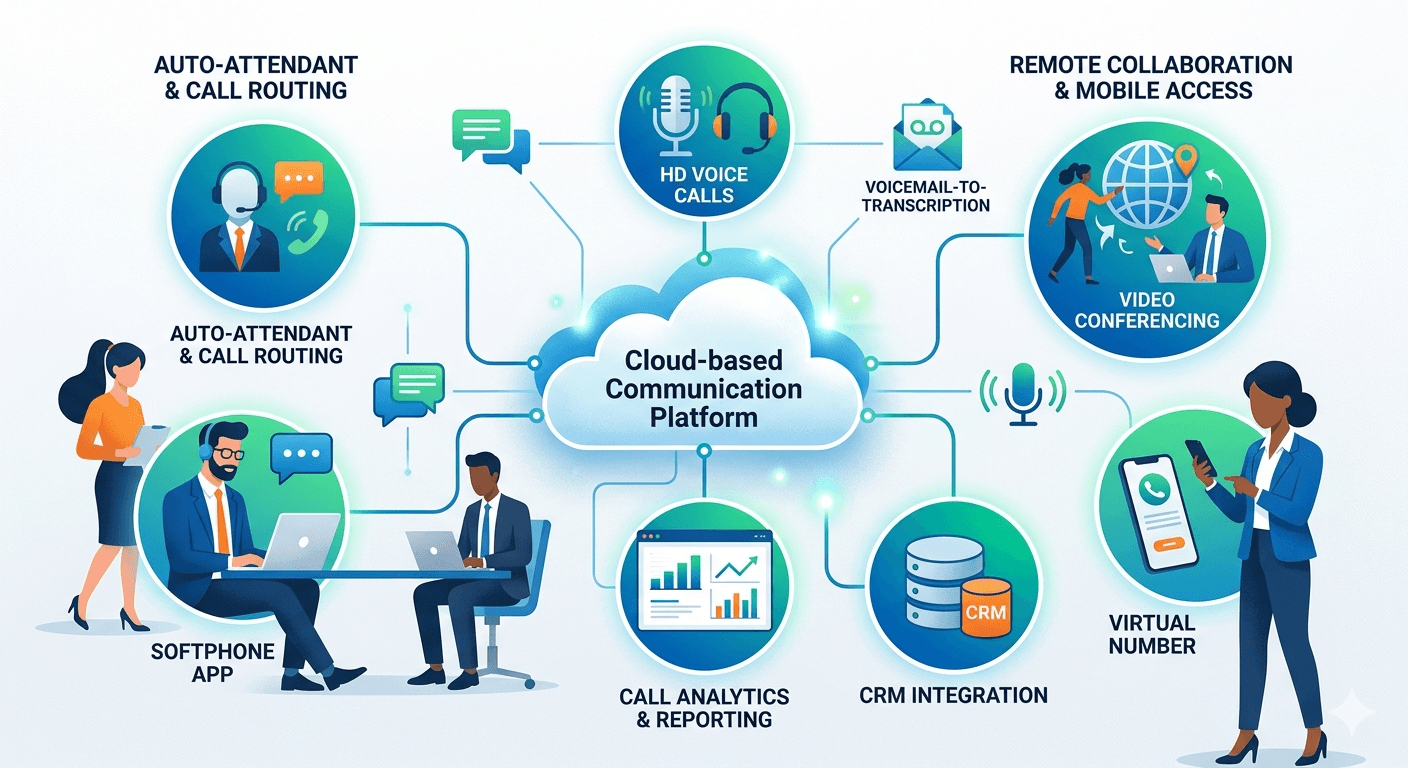
VoIP technology transforms traditional business communications by leveraging high-speed internet connectivity to deliver high-definition voice calls and a suite of advanced digital tools. Unlike legacy copper-wire systems, modern top voip features offer unmatched scalability and flexibility, allowing teams to collaborate effectively from any location with an internet connection. By integrating tools such as auto-attendants, call forwarding, and video conferencing into a single unified platform, a voip phone system features suite eliminates the need for expensive on-site hardware and maintenance. This shift toward cloud-based communication empowers modern businesses to manage high call volumes efficiently while maintaining a professional appearance, ultimately driving growth and enhancing the overall customer experience across various competitive industries. Essential Core Features of VoIP for Daily Operations Every modern organization requires a stable foundation for handling daily interactions, and core call handling represents the bedrock of any successful telecommunications strategy. The following list outlines the fundamental voip phone features that ensure your business stays connected and professional at all times: Interactive Auto-Attendant Systems: This tool acts as a virtual receptionist to greet every caller and provide them with a structured menu of options. This ensures that every individual reaching out to the company is directed to the appropriate department without the need for a human operator to manually transfer the call. The systematic distribution of calls reduces wait times and improves the professional image of the organization, regardless of its physical size or the number of employees currently available to answer the phone. Advanced Call Forwarding and Intelligent Routing: This specific set of voip phone features ensures seamless connectivity between physical offices and remote staff. If a primary line is busy or an employee is working out of the office, the call is automatically redirected to a mobile device or a secondary desk phone based on pre-set rules. According to research conducted by Blueface, businesses that transition to internet-based communication systems typically see a reduction in operational costs ranging from thirty to fifty percent. This financial efficiency stems from the elimination of long-distance charges and the reduced need for physical maintenance of complex on-premise wiring. Professional Call Waiting and Queue Management: These functions play a vital role in maintaining a smooth workflow within a busy office environment. When multiple customers attempt to contact a business simultaneously, the system places them in a virtual queue, providing pleasant music or informative messages while they wait for the next available agent. These core voip phone features are specifically designed to prevent dropped calls and ensure that every lead is captured. By utilizing these tools, companies can maintain high levels of accessibility and responsiveness, which is crucial for building trust with a growing client base. Maximizing Customer Service with Advanced VoIP Communication The primary advantages of voip become most apparent when examining how digital voice features can drastically improve the quality of customer service. When a business chooses a robust provider for voip communication, they gain access to tools that automate and enhance every interaction. Interactive Voice Response (IVR): This is a sophisticated tool that allows callers to interact with the phone system through voice commands or keypad inputs to resolve simple inquiries. This level of automation streamlines the user journey and allows human agents to focus on more complex issues that require personalized attention. By leveraging these specific top voip features, businesses can provide 24/7 assistance without the overhead costs associated with a round-the-clock manual call center. It creates a self-service environment that many modern customers prefer for quick tasks like balance checks or appointment confirmations. Call Queuing and Hunt Groups: These are equally important for managing high-volume service environments where every second counts. These voip functions work by distributing incoming calls across a specific group of extensions, ensuring that the workload is balanced among available team members. If one person is already on a call, the system hunts for the next available person in the sequence or rings all phones simultaneously to guarantee a fast response. This collaborative approach to call management ensures that customer frustration is kept to a minimum and that internal resources are utilized to their maximum potential throughout the working day. Detailed Call Recording and Quality Monitoring: This represents another layer of functionality that supports quality assurance and training initiatives. Managers can listen to live calls or review recorded sessions to provide feedback to staff, ensuring that brand standards are consistently met during every interaction. These features of voip also provide a digital trail for compliance purposes, which is particularly important in industries such as finance, healthcare, and legal services. When integrated correctly, these tools serve as a powerful data source for identifying trends in customer behavior and improving internal training protocols over the long term. Implementing voip phone system features for Remote Collaboration Productivity and collaboration are significantly enhanced when a company adopts a comprehensive voip phone system features package that supports mobile and remote work. As the global workforce shifts toward hybrid models, these tools become indispensable for maintaining team cohesion and operational efficiency. Integrated Softphone Applications: These are software applications that allow employees to use their laptops, tablets, or smartphones as a fully functional business phone extension. This means that your professional voip communication is no longer tethered to a physical desk, allowing staff to remain productive while traveling or working from home. These systems ensure that an employee’s business identity remains consistent, as the recipient of the call sees the company number rather than a personal mobile number on their caller ID, maintaining a boundary between personal and professional life. Video Conferencing and Screen Sharing: These are now standard components of a modern communication suite, bridging the gap between geographically dispersed teams. Instead of relying solely on audio, these voip phone features business tools enable face-to-face interactions that foster better relationships and clearer understanding during complex project discussions. The ability to share a screen in real-time allows for collaborative editing of documents and more effective presentations, mimicking the environment of an in-person meeting. This integrated approach reduces the need for multiple third-party subscriptions, as all collaborative tools are housed within a single platform. Presence Indicators and Internal Instant Messaging: These tools bolster internal efficiency by showing the real-time availability of colleagues. Before attempting to transfer a call or start a meeting, an employee can check if a coworker is busy, away, or available for a quick chat. A study by Frost and Sullivan highlighted that businesses utilizing integrated unified communication tools can save an average of thirty-two minutes per employee every day. This cumulative time saving translates into significant productivity gains over a fiscal year, making the technology a wise investment for growth-oriented firms that value time management. Technical voip functions and Software Integrations Advanced call management requires a deep dive into the technical aspects that handle data and integration with other business software. When voip functions are synced with your existing tech stack, the phone system moves from being a simple utility to a powerful business intelligence tool. Customer Relationship Management (CRM) Integration: This is perhaps one of the most powerful voip system features available, as it connects the phone system directly to the company’s database of client information. When a call comes in, the system allows for a screen pop that displays the caller’s history, previous purchases, and open support tickets. This immediate access to context enables the agent to provide a highly personalized experience, greeting the caller by name and resolving issues without asking for repetitive information. It streamlines the workflow by logging calls automatically into the CRM for future reference. Voicemail-to-Email and Text Transcription: These additional features of voip ensure messages are never overlooked or forgotten in an overflowing inbox. When a caller leaves a message, the system automatically transcribes the audio and sends it to the recipient’s email address as a text file or an audio clip. This allows busy professionals to quickly scan the content of a message during a meeting or while on the go, prioritizing urgent responses over routine inquiries. These digital functions eliminate the tedious process of dialing into a central voicemail system and manually navigating through a series of audio prompts. Call Analytics and Comprehensive Reporting: These provide the high-level insights necessary for making informed business decisions regarding staffing and resource allocation. These voip features and benefits include tracking metrics such as average call duration, peak call times, and abandonment rates, giving managers a clear picture of how the communication department is performing. By analyzing this data, leadership can identify if more staff are needed during certain hours or if specific agents require additional training. This data-driven approach ensures that the business remains agile and responsive to the changing needs of its customer base. Legal Considerations and Call Recording Laws in the USA While utilizing recording features as part of your voip phone features business strategy, it is critical to understand the legal landscape in the United States. Federal and state laws dictate how and when you can record conversations, and failure to comply can lead to significant legal repercussions. Federal law, specifically the Electronic Communications Privacy Act, generally follows a one-party consent rule. This means you can record a call if at least one participant consents to the recording. However, many states have implemented stricter “all-party consent” laws. In states like California, Florida, and Illinois, every person on the line must be aware of and agree to the recording. Therefore, a primary question for many managers is: can you record a phone call without consent? In an all-party state, the answer is no, and doing so could be considered a criminal act or lead to civil litigation. The complexity increases when recording phone calls across state lines. Legal precedents often suggest that the stricter state law applies. If an agent in a one-party state records a customer in a two-party state without notification, they may be violating the laws of the customer’s state. To mitigate this risk, businesses should use their voip system features to play an automated disclosure at the beginning of every call. This ensures that regardless of the location, the caller is notified, and their decision to stay on the line constitutes implied consent. Transparency is the best defense against claims of illegal recording. If you are an individual wondering what to do if someone records you without permission, you should first determine if you were in an all-party consent state at the time. If so, you may have grounds for a legal complaint. For businesses, the goal is to avoid this entirely by being upfront. Using voice features to announce that “this call may be recorded for quality and training purposes” is a standard industry practice that satisfies most legal requirements. It is also important to note that you should never attempt to record private conversations where you are not a participant, as this almost always violates wiretapping laws. Advantages of VoIP for Strategic Business Scalability The primary advantages of voip extend beyond simple cost savings, touching upon the strategic flexibility that modern companies need to survive in a competitive marketplace. Because the system is hosted in the cloud, it is inherently disaster-recovery friendly, ensuring that communication can continue even if a physical office becomes inaccessible. Virtual Local and Toll-Free Numbers: These are excellent examples of how digital systems can help a company establish a presence in new markets. By obtaining a local area code for a city where they do not have a physical office, a business can build trust with local customers who prefer dealing with regional providers. These voip functions allow for global reach while maintaining the intimacy of a local business. It is a significant advantage for companies looking to test the waters in new territories without heavy investment in real estate or local hardware. Business SMS and Multimedia Messaging: This represents a modern evolution of professional communication. Many customers now prefer texting over calling for quick updates, appointment reminders, or simple questions. Modern voip phone system features enable teams to send and receive text messages using their professional business numbers, keeping all client interactions within a secure and monitored environment. This meets the communication preferences of a younger demographic while ensuring that business-related texts are not lost on the personal devices of individual employees. Call Flip and Seamless Call Parking: These specialized features provide flexibility during active conversations. Call flip allows a user to move an ongoing call from one device to another, such as from a desk phone to a mobile phone, without the caller ever knowing a transition took place. Call park allows a user to put a call on a virtual hold that can be picked up by any other person in the organization from a different extension. These voice features ensure that communication remains fluid and that the physical location of staff members does not hinder the ability to handle calls professionally. Selecting the Right Infrastructure for VoIP Communication Choosing the right partner for voip communication involves more than just looking at a list of available features; it requires an assessment of reliability, security, and support. A high-quality provider should offer a guaranteed uptime through a Service Level Agreement, ensuring that the business is never left without a way to contact its clients. Security is equally paramount, as voice data traveling over the internet must be encrypted to prevent unauthorized interception or data breaches. When evaluating your options, look for providers that comply with industry standards such as HIPAA or SOC2, depending on your specific regulatory requirements. The quality of service settings on your local network must also be considered to ensure that voip communication remains clear and free from jitter or latency. This often involves configuring your office router to prioritize voice traffic over other types of data. A reputable service provider will offer guidance on network optimization to ensure that the transition to digital voice is successful and that call quality remains indistinguishable from traditional landlines. Customer support from the service provider is the final piece of the puzzle when establishing a reliable communication setup. Since the phone system is a mission-critical tool, having access to 24/7 technical assistance is vital for resolving any issues that may arise. Many providers offer extensive online documentation, video tutorials, and live chat support to help users get the most out of their system. By choosing a provider that offers both a rich feature set and exceptional support, a business can ensure that its communication infrastructure remains a pillar of strength and a driver of ongoing success. Read More: Voicemail to Text: Guide for perfect Voicemail Transcription Final Thought Embracing the full spectrum of modern communication tools is no longer an optional upgrade but a necessity for businesses aiming to stay competitive in a digital world. From the foundational reliability of core call handling to the strategic depth of CRM integrations and real-time analytics, these systems offer a level of control and insight that traditional telephony simply cannot match. By carefully selecting the top voip features that align with their specific operational goals, organizations can enhance their professional image, improve employee productivity, and deliver a superior customer experience. As technology continues to evolve, the businesses that leverage these advanced features will be best positioned to navigate the complexities of the modern global market with confidence and efficiency. FAQs Regarding Business Phone Systems What are the features of a voip phone system? The primary features include auto-attendants for call routing, voicemail-to-email transcription, and mobile app integration for remote work. Advanced systems also offer video conferencing, call recording, and detailed analytics to track performance and customer interactions. What is the most important VoIP feature for small businesses? For most small businesses, call routing and the auto-attendant are the most valuable tools. These features ensure that calls are handled professionally and directed to the right person immediately, which helps a small team appear more established and organized. Can I use VoIP features without new hardware? Yes, one of the main benefits is that most features work on existing devices like laptops, tablets, and smartphones via softphone applications. While physical desk phones are available, they are not a requirement for using the service effectively. How do I know which VoIP features my business needs? It is best to start with essential tools such as call forwarding, mobile access, and voicemail transcription. As your business grows and your needs become more complex, you can integrate advanced features like CRM connectivity and automated call distribution. Is the quality of internet-based calls reliable for business? Modern internet-based calls are highly reliable, often providing better clarity than traditional lines. As long as you have a stable internet connection and a provider that offers high uptime guarantees, the communication quality will meet professional standards.

Read More
Call Recording Benefits and Laws in USA

What are the Call Recording Benefits and Laws in USA?

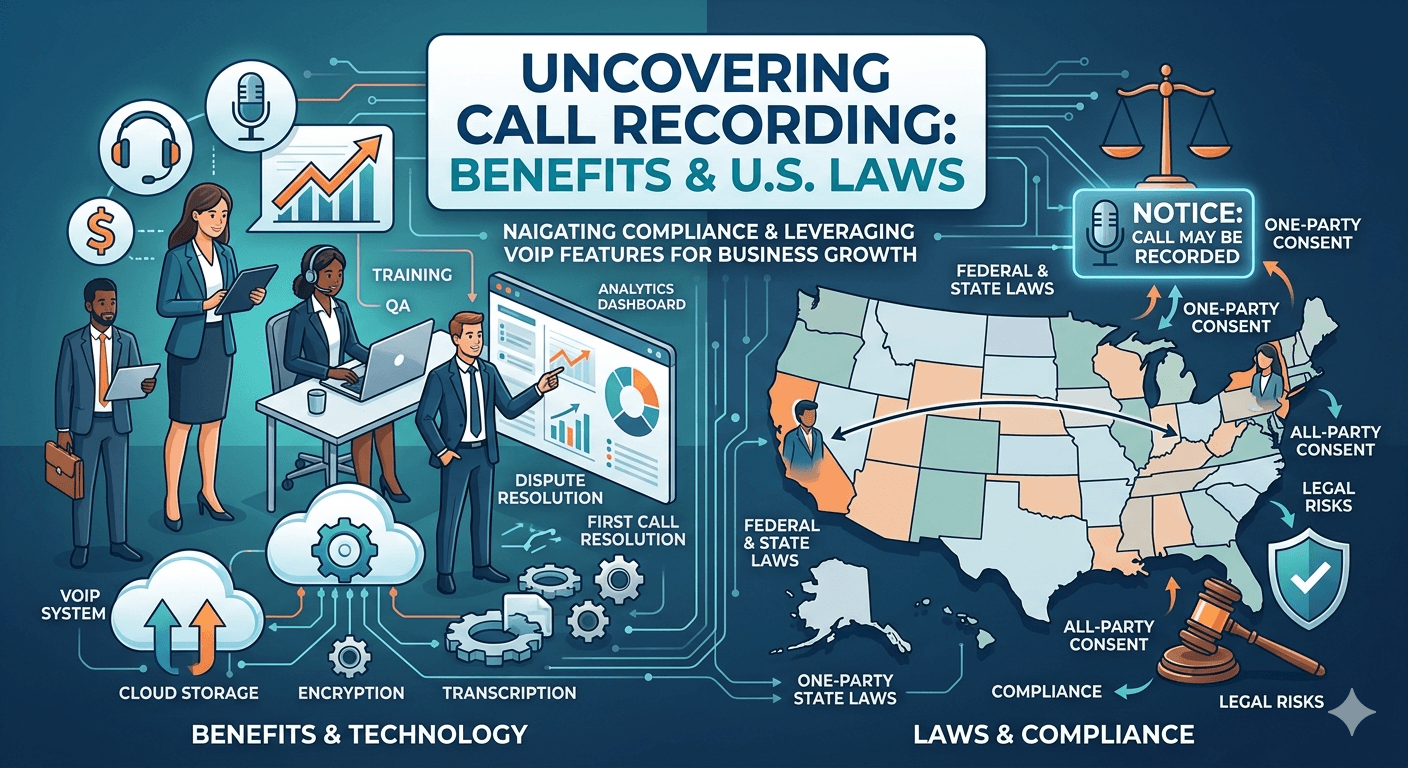
Call recording benefits and laws are a cornerstone of modern business communication, governed by a complex framework of federal and state laws in the United States. While the federal Electronic Communications Privacy Act generally permits recording if one participant consents, several states require the agreement of all parties involved. Understanding these regulations is essential for businesses utilizing advanced voip phone features to ensure they remain compliant while capturing vital customer data. By integrating recording into a broader voip phone system features strategy, organizations can enhance employee training and provide a verifiable record for dispute resolution, provided they navigate the diverse landscape of one-party and two-party consent requirements accurately. Leveraging voip phone features for Quality Assurance and Training The integration of recording tools within a corporate environment provides an unparalleled opportunity for professional development and service refinement. By utilizing modern voip phone features, managers can capture real-time interactions between staff and clients to identify specific strengths and weaknesses in communication styles. This data serves as a foundation for evidence-based training programs, replacing generic instruction with tailored feedback derived from actual customer service scenarios. When teams can listen to their own performances, they gain a better understanding of how to handle objections, clarify complex information, and maintain a professional tone under pressure. Beyond the educational value, these recordings offer a robust layer of protection against liability and misunderstandings. In many industries, verbal agreements and telephonic consultations are common, and having an audio record ensures that both parties are held to the facts of the conversation. These voip phone features allow for the quick resolution of disputes regarding pricing, service promises, or contract terms. Research from the Aberdeen Group indicates that organizations that utilize comprehensive call recording and integrated analytics see a twenty percent improvement in first-call resolution rates, as agents have better access to historical context and management can refine scripts based on successful outcomes. The technical implementation of these features often involves automated cloud storage, which ensures that recordings are indexed and searchable. This level of organization is vital for large-scale operations where thousands of calls may occur daily. Instead of manually sifting through tapes or local files, supervisors can use filters to find specific interactions based on the agent’s name, the date, or even the customer’s account number. This systematic approach to data management not only saves time but also ensures that the business maintains a high standard of accountability and transparency in all its external communications. Understanding State and Federal Mandates for voip features Navigating the legalities of audio capture starts with the fundamental question of whether can you record phone calls within your specific jurisdiction. At the federal level, the United States follows a one-party consent rule under 18 U.S.C. § 2511, which permits the recording of a conversation as long as at least one person participating in the call knows it is happening and agrees to it. This federal baseline allows individuals to record their own conversations without needing further authorization. However, businesses must be cautious because state laws often impose stricter requirements that override the federal standard in many practical scenarios. When determining is it illegal to record a phone call, one must look closely at the specific state statutes that apply to the parties involved. Currently, thirty-eight states and the District of Columbia are recognized as one party recording states, meaning they generally follow the federal model where only one participant’s consent is necessary. These states include places like New York, Texas, and Georgia. In these regions, businesses have more flexibility in how they deploy their recording tools for internal monitoring or record-keeping, though ethical best practices still suggest providing some form of notice to maintain trust and professional standards. The landscape changes significantly when dealing with states that require all-party consent. In these areas, every single person on the line must be made aware that the conversation is being recorded. Failure to provide this notice can lead to severe legal consequences, including the possibility of criminal charges or civil lawsuits. Therefore, any business operating across the country must configure their voip features to provide a clear, audible disclosure at the start of every interaction. This proactive measure ensures that the organization meets the highest legal standard, effectively shielding itself from potential litigation regardless of where the caller is located. Managing the Complexity of Recording Phone Calls Across State Lines One of the most challenging aspects of modern telecommunications is the act of recording phone calls across state lines. In a globalized economy, it is common for a business in a one-party state to communicate with a customer located in a two-party state. Legal precedents, such as the California Supreme Court case Kearney v. Salomon Smith Barney Inc., have established that the stricter law typically applies in these situations. This means that even if your business is based in a one-party state like Ohio, if you record a call with a person in California without their consent, you could be held liable under California’s stringent privacy laws. The risk associated with interstate recording makes it critical for businesses to ask themselves are you allowed to record phone calls without a universal disclosure policy. Given the difficulty of knowing exactly where a caller is physically located at any given moment, especially with the prevalence of mobile numbers, a one-size-fits-all approach is the most secure strategy. By implementing an automated message that states the call is being recorded for quality purposes, a business covers its legal obligations across all jurisdictions. This ensures that no matter where the call originates or terminates, the necessary consent has been established through the participant’s decision to remain on the line. Furthermore, the data generated from these interactions must be stored and handled according to the privacy regulations of the most restrictive state involved. This includes managing how the data is encrypted, who has access to it, and how long it is retained in the company’s archives. Modern voip features often include location-based triggers that can adjust disclosure settings dynamically, but reliance on technology alone is not a substitute for a comprehensive legal policy. Organizations should regularly audit their communication protocols to ensure they are keeping pace with evolving state laws and judicial interpretations regarding digital privacy. Addressing the Risks of Unauthorized Recording and Victim Rights Individuals often find themselves concerned about their privacy and wonder what to do if someone records you without permission in a way that violates local laws. If a person discovers they have been recorded in an all-party consent state without being notified, they may have the right to pursue legal action against the recording party. In such cases, the unauthorized recording is often inadmissible as evidence in court and can lead to statutory damages or fines for the offender. Documentation of the incident, including the time of the call and any evidence of the recording, is essential for anyone looking to protect their rights in these circumstances. For businesses, the question of can you record a phone call without consent is usually met with a firm negative in a professional context. Even if a business is technically within a one-party state, secret recording can lead to a PR nightmare and a total loss of consumer confidence. Ethical communication is built on transparency, and most successful companies choose to lead with honesty by notifying every caller of the recording. This not only satisfies the legal requirements for all-party states but also sets a tone of professionalism and respect for the individual’s privacy, which can actually improve the quality of the interaction. When an unauthorized recording is suspected, the affected party should first consult with a legal professional to determine the specific statutes that apply to their situation. Many states have specific procedures for filing complaints with telecommunications regulators or consumer protection bureaus. On the other side of the coin, businesses must have clear internal guidelines on the use of their voip phone system features to prevent unauthorized or accidental recordings by employees. Proper administrative controls and user permissions are necessary to ensure that recording tools are used only for their intended business purposes and in full compliance with the law. The Technical Architecture of a Secure voip phone system features A robust communication infrastructure relies on well-integrated voip phone system features that prioritize both functionality and security. When a business selects a provider, it must ensure that the call recording module is not just an add-on but a core part of the system’s security framework. This involves the use of end-to-end encryption for both the audio stream and the stored files, preventing unauthorized interception by third parties. Secure access controls, such as multi-factor authentication, should be mandatory for any staff member who needs to review or download recorded conversations for business purposes. The flexibility of a modern voip phone system features suite also allows for selective recording, where certain departments or specific types of calls are targeted for data collection. For example, a sales team might record every call to ensure lead accuracy, while a human resources department might only record specific interviews or disciplinary meetings with prior written consent. This granular control helps an organization manage its data storage costs while also minimizing the amount of sensitive information it holds. By limiting the scope of recording to what is strictly necessary, a business can reduce its overall risk profile and simplify its compliance efforts. Cloud-based storage solutions offer redundant backups to prevent data loss. Automated transcription services turn audio into searchable text for easier auditing. Integration with Customer Relationship Management software allows for seamless data flow. Advanced reporting tools provide insights into call volumes and agent performance metrics. Customizable retention policies ensure that data is deleted automatically after a set period. These technical capabilities ensure that the organization can handle vast amounts of data without becoming overwhelmed or falling out of compliance. When the technology is configured correctly, it acts as a silent partner in the business’s success, providing the tools needed for growth while maintaining the high standards of privacy and security that modern consumers expect. Choosing a provider that understands the nuances of United States recording laws and offers features designed to facilitate compliance is a critical step for any forward-thinking management team. Ethical Standards and Best Practices in voip features Usage While legal compliance is the minimum requirement, high-performing businesses often go beyond the law to establish ethical standards for their voip features. Transparency is the most important element of an ethical recording policy. This means not just providing a legal disclaimer at the start of a call, but also ensuring that customers understand why their data is being collected and how it will be protected. When customers feel that their information is being used responsibly to improve their experience, they are much more likely to provide consent and engage positively with the brand. Internal ethics are equally important when managing how voip features are used for employee monitoring. Staff members should be fully informed about when and why their calls are being recorded, and they should have access to the recordings for self-review. Using these tools for punitive measures without clear communication can lead to low morale and a culture of fear. Instead, the focus should always be on growth, development, and the collective improvement of the team. A positive culture around data and recording encourages employees to use the technology as a tool for their own success rather than seeing it as a form of constant surveillance. Implementing a clear data privacy policy that is accessible to both employees and customers is a hallmark of a responsible organization. This policy should outline the security measures in place, the purpose of the recordings, and the rights of the individuals involved. By being proactive and open about these practices, a business distinguishes itself as a leader in corporate responsibility. In an era where data breaches and privacy scandals are common, a commitment to ethical communication can become a significant competitive advantage that attracts both top talent and loyal customers. Read More: How to Perfect Your Business Voicemail Greeting for Success? Final Thought Successfully navigating the landscape of call recording within the United States requires a balanced approach that considers both the technical power of modern communication systems and the strict requirements of privacy laws. By understanding the differences between federal and state mandates, and by preparing for the complexities of interstate interactions, businesses can leverage their communication tools to drive growth and protect their interests. The key to long-term success lies in transparency and the ethical application of technology. When an organization treats its recording capabilities as a professional asset used for mutual benefit, it creates a secure and productive environment that fosters trust and excellence in every conversation. FAQs Regarding Call Recording and Legalities Is call recording legal in the USA? Yes, call recording is legal in the United States, but it is subject to varying state and federal laws. Federal law requires at least one party to consent to the recording, but many states require all participants to agree. It is essential for businesses to know the laws in the jurisdictions where they and their customers are located to ensure full compliance. What are the benefits of call recording? The primary benefits include improved employee training through the review of real interactions, a clear audio record for resolving customer disputes, and ensuring compliance with industry-specific regulations. Additionally, many voip phone system features allow these recordings to be used for sentiment analysis and transcription, providing valuable data for business intelligence. What are the laws around recording calls? The laws are divided into “one-party consent” and “two-party consent” categories. In one-party states, only one person on the call needs to know it is being recorded. In two-party states, every person on the line must be notified and give their permission. When a call spans across state lines, the stricter of the two laws usually applies to the interaction. Can I record my husband’s cell phone conversations? Recording someone else’s private conversations without their knowledge or consent is generally illegal and could be considered a violation of wiretapping laws. Unless you are a participant in the call in a one-party consent state, recording a third party’s conversation without their permission is a serious legal offense that can lead to criminal charges. How do I ensure my business is recording calls legally? The safest method is to use voip features that play an automated message informing all callers that the interaction may be recorded. This provides transparent disclosure and establishes implied consent for anyone who chooses to stay on the line. Regularly auditing your recording policies and consulting with legal counsel can further protect your organization from liability.

Read More
Interactive Voice Response (IVR) Systems

Interactive Voice Response (IVR) Systems: optimizing Business Communication

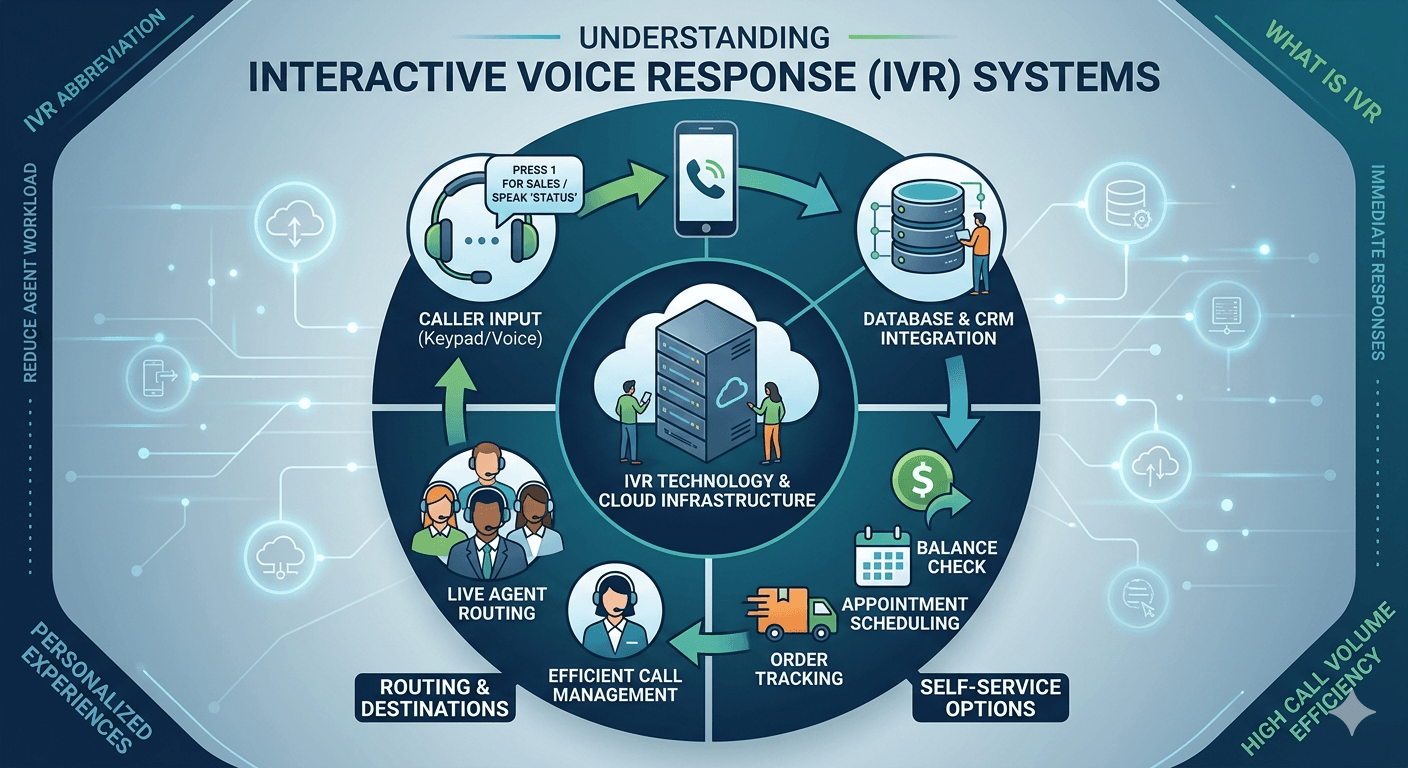
Interactive voice response technology is an automated telephony system that interacts with callers, gathers necessary information, and routes calls to the appropriate destinations. It functions through a combination of pre-recorded voice prompts and touch-tone keypad entry or voice recognition. This system allows businesses to manage high call volumes efficiently by providing self-service options for routine inquiries like balance checks or appointment scheduling. By utilizing this technology, organizations reduce the workload on human agents while ensuring that customers receive immediate responses. Modern versions often integrate with cloud databases to deliver personalized experiences, making them a fundamental component for modern customer service operations. Understanding Interactive Voice Response (IVR) Systems The basic ivr meaning refers to a technology that allows a computer to interact with humans through the use of voice and DTMF tones input via a keypad. When a customer dials a business number, the system answers with a professional greeting and presents a menu of options. This automated voice response system acts as a digital receptionist, ensuring that every caller is greeted instantly regardless of the time of day. The ivr abbreviation is one of the most recognized terms in the telecommunications industry, representing a shift from manual switchboards to sophisticated digital routing. Knowing what is ivr involves looking at it as a bridge between the caller and the information they seek. In a standard ivr call, the system plays a recorded file or uses text-to-speech technology to communicate. If a user wants to check their order status, they might press one, or they might speak the word status if the system supports voice recognition. This interaction provides a streamlined path for the user while gathering data that can be used by the business to improve service delivery. Essentially, ivr means providing a structured interface for voice-based data exchange. The evolution of what is ivr in call center environments has moved from simple “press one for sales” menus to complex conversational interfaces. Modern systems can identify a caller based on their phone number and provide personalized greetings or account-specific information immediately. This level of sophistication transforms the ivr phone meaning from a simple routing tool into a comprehensive customer engagement platform. Whether used for outbound notifications or inbound support, these systems are designed to maximize the efficiency of every connection made over the telephone network. How Interactive Voice Response Technology IVR Systems Work The technical process of an ivr calling system begins when the telephony server receives an incoming signal. The system then executes a script that dictates the interaction flow, starting with an audio prompt. The caller responds either by pressing a key on their telephone or by speaking. If the user uses the keypad, the system detects the specific frequency of the tone, known as Dual-Tone Multi-Frequency signaling. If the user speaks, the ivr service utilizes speech recognition software to convert the audio into data that the computer can understand and process. Once the input is received, the ivr interactive voice response software checks the information against a database or passes it to a routing engine. For instance, if a caller provides an account number, the system can retrieve the associated balance and read it back to the caller without ever involving a human representative. This demonstrates how an ivr phone system serves as a front-end interface for complex back-end data systems. The communication between the telephone network and the internal business database is seamless, allowing for real-time information retrieval and updates. The caller dials the business number and the call is intercepted by the automated server. An audio menu is played, providing various options based on the department or service required. The caller provides input via voice or keypad, which is then processed by the system logic. The system either provides the requested information directly or routes the call to a live agent with the gathered data already displayed on their screen. Research by Grand View Research indicates that the global IVR market size was valued at USD 4.2 billion in 2020 and is expected to grow significantly. This growth is attributed to the increasing demand for self-service options and the integration of artificial intelligence into cloud based ivr solution platforms. Another study by the Aberdeen Group found that companies using advanced automated systems see a 12.1% increase in customer retention rates compared to those that rely solely on manual routing. These facts highlight the critical role that automated voice technology plays in modern business sustainability. The Role of Best Interactive Voice Response IVR Systems in Customer Service Implementing a high-quality ivr solution is essential for businesses that want to maintain high levels of customer satisfaction. When a customer encounters a well-designed menu, they feel that their time is respected and that the business is organized. The ivr customer service experience depends heavily on the clarity of the voice prompts and the simplicity of the menu structure. If a system is too complex, it can lead to caller frustration, but a streamlined system ensures that users reach the right department on the first attempt, reducing the need for multiple transfers. The best ivr system designs prioritize the most common reasons for calling, placing them at the beginning of the menu. This approach minimizes the time a caller spends listening to irrelevant options. Furthermore, an ivr solution often includes features like “callback,” where a customer can hang up and wait for an agent to call them back instead of staying on hold. This feature is particularly valuable during peak hours, as it reduces the perceived wait time and improves the overall perception of the brand’s service quality. Self-service capabilities allow customers to complete transactions, such as paying bills or activating cards, without waiting for a human agent. Data collection features ensure that when a call is eventually routed to an agent, the agent already has the caller’s account details and the reason for the call. Multilingual support enables businesses to serve a diverse customer base by offering menus in different languages based on the caller’s preference or geographic location. Different Types of IVR Systems Businesses can choose from several different types of setups depending on their technical requirements and budget. A traditional on-premise ivr system requires physical hardware located within the company’s office, which offers high levels of control but requires significant maintenance. In contrast, a cloud ivr is hosted by a service provider and accessed over the internet. This model is increasingly popular because it eliminates the need for expensive hardware and allows for rapid scaling as the business grows. Another distinction exists between touch-tone systems and directed-dialogue systems. Touch-tone systems rely strictly on keypad inputs, whereas directed-dialogue setups allow for simple voice commands like “yes” or “billing.” The most advanced version is the natural language ivr, which uses sophisticated AI to understand full sentences. This type of interactive voice response system allows a caller to state their problem in their own words, such as “I am calling because my internet is not working,” and the system intelligently routes the call based on the intent of the statement. Visual IVR is a newer variation that provides a menu on a caller’s smartphone screen instead of an audio-only experience. When a customer calls, they receive a link to a digital menu where they can tap their way to a solution. This hybrid approach combines the familiarity of a phone call with the speed of a mobile app. For companies looking for a cloud based ivr solution, platforms like amazon connect ivr provide highly flexible tools that can be customized with minimal coding, allowing for a more dynamic and responsive customer journey. Industry Use Cases for IVR Technology In the financial sector, what is ivr phone system functionality is used most frequently for account management. Customers can call their bank to check balances, review recent transactions, or report a lost credit card. Because these systems are secure and can be integrated with biometrics, they provide a safe way to handle sensitive data. The banking industry relies on these automated systems to handle the massive volume of daily inquiries that do not require the specialized knowledge of a human bank teller. The healthcare industry also benefits significantly from ivr uses, particularly for appointment reminders and prescription refills. Patients can receive automated calls reminding them of an upcoming doctor’s visit and can confirm or cancel the appointment by pressing a key. This reduces the number of no-shows and allows clinic staff to focus on patient care rather than administrative tasks. Additionally, healthcare providers use these systems to deliver lab results securely, ensuring that patients get their information quickly and privately. Retailers use automated systems for order tracking and providing store hours or location information to callers. Utility companies deploy them for outage reporting, allowing thousands of customers to report a power failure simultaneously without crashing the call center. Travel and hospitality businesses use them for flight status updates, hotel reservations, and automated check-in processes. Challenges of Implementing IVR Systems While the benefits are numerous, there are several challenges associated with an interactive voice response call center setup. One of the most common issues is “ivr jail,” where a caller becomes trapped in a loop of menus without an easy way to speak to a live person. This often happens when a business tries to automate too many processes without providing a clear exit strategy for complex problems. To avoid this, businesses must ensure that the option to speak with an agent is always available and easy to find within the menu structure. Another challenge is the quality of the voice recognition. If an ivr calling system cannot understand a caller’s accent or if there is background noise, the interaction can quickly become frustrating. This requires companies to invest in high-quality speech engines and to regularly test their scripts with diverse groups of users. Furthermore, maintaining the content of the menus is essential; outdated information or broken links within the menu system can damage a company’s reputation and lead to a loss of customer trust. The technical integration of an ivr system with existing CRM software can also be a hurdle. For the system to be truly effective, it needs to be able to read and write data to the company’s central records in real-time. This often requires specialized IT skills or the use of modern APIs. However, once the integration is complete, the benefits of having a unified view of the customer journey far outweigh the initial difficulties of the setup process. Essential Features of Top-Tier IVR Software When looking for the best interactive voice response ivr systems, businesses should prioritize platforms that offer robust reporting and analytics. Understanding how callers navigate the menu, where they drop off, and how long they spend in each section is crucial for continuous improvement. These insights allow managers to refine the menu structure and eliminate bottlenecks that might be causing friction in the customer experience. Analytics can also reveal peak calling times, helping businesses staff their live agent teams more effectively. Dynamic routing is another essential feature of modern ivr services. This allows the system to change the call flow based on external factors, such as the caller’s geographic location or the current wait time in the queue. For example, if the wait time for technical support is over ten minutes, the system could automatically offer the caller a callback or suggest they visit the online help center. This level of responsiveness makes the automated voice response system feel more like an intelligent assistant rather than a static recording. Standardized API access allows for easy connection to third-party tools like Salesforce, Zendesk, or internal proprietary databases. Text-to-speech engines enable the system to read out dynamic information, such as names or specific dollar amounts, in a natural-sounding voice. Advanced security protocols, including voice biometrics and multi-factor authentication, ensure that customer data remains protected during the call. The Future of Interactive Voice Response Technology IVR Systems The future of these systems is closely tied to the advancement of artificial intelligence and machine learning. As natural language processing becomes more accurate, the distinction between talking to a bot and talking to a human will continue to blur. Future ivr interactive voice response software will likely be able to detect the emotional state of a caller through their tone of voice and adjust the interaction accordingly. If a system detects frustration, it could automatically escalate the call to a senior manager to prevent further dissatisfaction. We are also seeing a shift toward omnichannel integration, where the ivr system is just one part of a unified communication strategy. A customer might start a conversation with a chatbot on a website and then transition to an ivr call, with all their previous information being carried over seamlessly. This provides a consistent experience across all touchpoints. As more businesses adopt cloud based ivr solution models, the ability to deploy these advanced features quickly and cost-effectively will become a standard requirement for any competitive organization. The integration of video and screen-sharing into the voice interface is also an emerging trend. In some specialized support scenarios, a caller might start with a voice menu and be prompted to switch to a video call for better troubleshooting. This evolution ensures that interactive voice response technology ivr systems remain a vital part of the business landscape, adapting to the changing preferences of a digital-first consumer base. By staying informed about these trends, companies can ensure their communication infrastructure remains relevant and effective. Read More: What is Visual Voicemail? How to Check Voicemail on Android Final Thought Interactive voice response (IVR) systems have evolved from simple automated menus into sophisticated, AI-driven platforms that are essential for modern business. By choosing the right ivr solution and focusing on the user experience, companies can significantly reduce operational costs while providing faster, more personalized service to their customers. Whether you are looking for a basic ivr call center setup or a complex cloud-based system, the key to success lies in simplicity, integration, and continuous optimization based on real-world caller data. FAQs What does IVR stand for? IVR stands for Interactive Voice Response. It is a technology that allows callers to interact with a computer-operated telephone system through the use of voice or a touch-tone keypad. This system is designed to route calls, provide information, and handle routine tasks without the need for a live human agent. How do you set up an IVR? To set up a system, you first need to choose between an on-premise or cloud-based provider. You then map out your call flow, which is a diagram of the different menu options and where they lead. After that, you record your voice prompts or use text-to-speech tools, and finally, you integrate the system with your existing phone lines and customer database. Are IVR calls recorded? Most modern systems have the capability to record both the automated interaction and the subsequent conversation with a live agent. These recordings are typically used for quality assurance, training purposes, and maintaining a record of customer transactions. Businesses usually notify callers that the call is being recorded at the start of the interaction. How much does IVR cost? The cost varies widely depending on the complexity of the system and whether it is hosted in the cloud or on-premise. Cloud-based solutions often charge a monthly fee per user or per minute of use, which can range from a few dollars to several hundred depending on features. On-premise systems involve higher upfront costs for hardware and installation but may have lower ongoing monthly fees. What’s the difference between IVR and an auto-attendant? An auto-attendant is a basic system that simply routes calls to different extensions or departments (e.g., “Press 1 for Sales”). An IVR is a more advanced system that can interact with databases to provide or collect information, such as checking a bank balance or processing a payment, making it a much more functional tool for customer self-service.

Read More
VoIP vs PBX: Which Should You Choose?

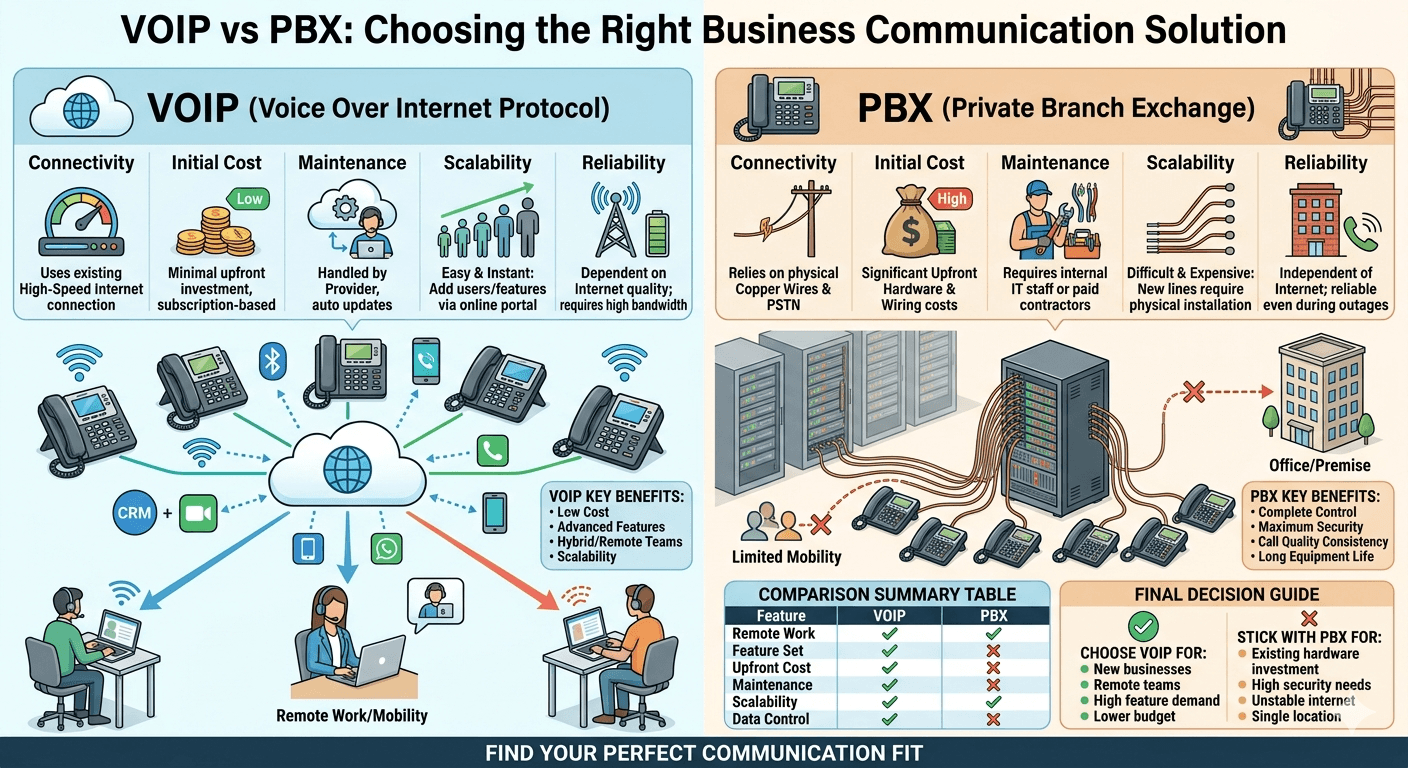
VoIP vs PBX: Which Should You Choose?

The decision between a traditional phone system and a modern internet-based solution depends on your organizational needs for reliability, scalability, and budget. When looking at VoIP vs PBX: Which Should You Choose?, businesses often weigh the physical hardware requirements of a Private Branch Exchange against the flexibility of Voice over Internet Protocol. While a traditional system relies on physical copper wires and local hardware to manage internal and external calls, modern internet-based systems transmit voice data over the web. Choosing the right path involves analyzing your current internet infrastructure, the geographical distribution of your workforce, and your long-term communication goals. VoIP vs. PBX: Why Do People Compare PBX and VoIP? The comparison between these two technologies arises because both serve the fundamental purpose of managing business communications, yet they operate on entirely different architectural foundations. Companies often find themselves at a crossroads when their legacy hardware reaches the end of its life cycle or when they start expanding into remote work environments. The pbx meaning refers to a private telephone network used within a company, allowing users to talk to each other and share a certain number of external phone lines. On the other hand, newer technologies use data packets to send voice signals, making the physical constraints of traditional wires obsolete. Many decision-makers look at pbx vs voip because they want to balance the historical reliability of landlines with the advanced features of digital transformation. A pbx stands for Private Branch Exchange, which historically acted as a central hub for all office desk phones. As internet speeds increased and became more stable, the voip pbx system emerged as a hybrid solution, leading to confusion about which technology is superior for a specific business model. Understanding the evolution of these systems helps in recognizing why a company might prefer one over the other based on their existing investments and future growth projections. The debate is further fueled by the shift toward unified communications where voice is just one part of the package. When comparing pbx phone system vs voip, organizations are often looking for more than just dial tones; they seek video conferencing, instant messaging, and CRM integrations. Because both systems can technically offer these features in various configurations, the comparison remains a hot topic for IT departments globally. The drive for cost efficiency also plays a major role, as the operational expenses associated with maintaining physical copper lines often exceed the subscription costs of cloud-based services. VoIP vs. PBX: What is the Key Difference? The fundamental difference between these two systems lies in how voice traffic is routed and the hardware required to facilitate those connections. A traditional system is a localized network that connects to the Public Switched Telephone Network through physical trunk lines. This means that if you want to understand what does pbx stand for in a practical sense, it is essentially a private switchboard located on the business premises. In contrast, voice over ip pbx utilizes the internet to route calls, bypassing the need for heavy physical infrastructure and allowing for a more virtualized communication environment. Another significant distinction involves the medium of transmission. Traditional setups use analog signals transmitted over copper wiring, which requires a dedicated technician for installation and repairs. However, an ip pbx vs voip comparison shows that modern systems use internet protocol to convert voice into digital packets. These packets travel over the same network as your email and web browsing data. This convergence of voice and data networks is what differentiates a standard pabx voip setup from an older analog one, providing a more streamlined approach to office technology management. Ownership and control also represent a major point of divergence. With an on-site system, the company owns the equipment and is responsible for all upgrades and security. With a voip pbx phone system, especially a hosted version, the service provider manages the servers and software updates in a remote data center. This means the pbx system meaning has evolved from a physical box in a closet to a cloud-resident service. The difference in maintenance requirements is a primary factor when businesses decide to move from a local pbx to voip solutions. Types of PBX Phone Systems Understanding the various types of systems available is crucial for making an informed choice. The most traditional form is the Analog PBX, which connects to the phone company via copper lines. While these are becoming less common, they are still found in areas with poor internet connectivity. The pbx meaning phone in this context refers to a reliable but limited system that lacks modern features like mobile integration or voicemail-to-email. These systems are often characterized by high upfront costs and the need for significant physical space within the office building. As technology advanced, the ip pbx emerged as a bridge between the old and new worlds. This system uses internet protocol to manage internal calls while still potentially connecting to traditional external lines. An ip pbx system is often preferred by companies that want to keep some control over their hardware while benefiting from the flexibility of digital call routing. This setup allows for the use of ip phone pbx hardware, which looks like a standard desk phone but plugs into an ethernet port instead of a traditional telephone jack. The most modern iteration is the cloud or hosted system. In a hosted pbx vs voip scenario, the service provider hosts the entire infrastructure in their own data center, and the business simply connects to it via the internet. This removes the need for any on-site pbx voice hardware other than the phones themselves. There is also the hybrid pbx with voip, which combines the reliability of an on-site system with the cost-saving benefits of internet-based external calling. This variety ensures that no matter the size or location of a business, there is a configuration that fits its specific operational needs. Feature Traditional PBX VoIP IP PBX (Hybrid) Connectivity Copper wires (PSTN) High-speed Internet Both IP and PSTN Initial Cost High (Hardware/Wiring) Low (Setup/Phones) Moderate (Server/IP Phones) Maintenance Requires onsite tech Managed by provider Managed by IT or provider Scalability Difficult/Expensive Instant/Easy Moderate Reliability High (not internet dependent) Depends on ISP High (Redundancy options) Feature Set Standard Calling Advanced (AI, Video, CRM) Advanced Features PBX System Benefits Despite the rise of cloud technologies, traditional and on-premise systems offer specific advantages that keep them relevant in certain industries. One of the primary benefits is the level of control a company has over its own data and security. Because a pbx phone system meaning implies a private network, call data remains within the company’s firewall. For organizations in highly regulated sectors like finance or healthcare, the ability to manage every aspect of the pbx abbreviation hardware and software is a significant security advantage. Another benefit is the consistency of call quality in environments where internet bandwidth might be unstable. Since a traditional pbx stands for a system that uses dedicated lines, it does not compete with other data-heavy applications for bandwidth. This ensures that voice pbx communications remain crystal clear even if the office network is under heavy load from large file transfers or video streaming. Reliability during power outages is also a factor, as traditional landlines often continue to function when local internet services are interrupted. Furthermore, the longevity of the equipment is a notable benefit for many businesses. Once the initial investment in pbx phone system definition hardware is made, the system can last for decades with proper maintenance. This can lead to a lower total cost of ownership over a very long period compared to monthly subscription models. For a company with a massive office building and thousands of existing phone jacks, the cost of re-wiring for a pure voip ip pbx might be higher than simply maintaining their current infrastructure. VoIP vs PBX: Why VoIP Phone System over Analog PBX? The shift toward internet-based communication is driven by the unparalleled flexibility and feature density that modern systems provide. When evaluating voip vs pbx, the ability to support a remote or hybrid workforce is often the deciding factor. A voip pbx allows employees to take their business extension with them anywhere in the world using a laptop or a mobile app. This level of mobility is impossible with a traditional system, which ties an extension to a specific physical desk in a specific office building. Cost is another major driver for choosing a voip pbx phone system over an analog one. Traditional systems require expensive hardware, professional installation, and ongoing maintenance fees for the physical lines. Conversely, internet-based calling typically operates on a per-user, per-month subscription model that includes long-distance and international calling. Businesses can significantly reduce their monthly overhead by switching to a cloud pbx vs voip model, as they no longer need to pay for multiple individual trunk lines from a local carrier. Modern systems offer advanced features like auto-attendants, call recording, and integration with popular business software like Salesforce or Microsoft Teams without needing additional hardware modules. Scalability is simplified because adding a new user only requires a few clicks in an online dashboard and a new handset or software license, rather than a visit from a telephone engineer. The infrastructure requirements are minimal since the system runs on the existing office data network, eliminating the need for separate telephone wiring throughout the building. Choosing Between VoIP And PBX Making the final choice requires a deep dive into the specific circumstances of your business environment. If your company operates from a single location with a stable, existing phone system and limited need for remote work, sticking with a traditional pbx mean approach might be the most cost-effective solution for now. However, if you are starting a new business or planning a major expansion, the agility of pbx voip systems usually makes them the superior choice. You must also consider your IT staff’s capability to manage the system; an on-site server requires hands-on expertise, while a hosted system is largely hands-off. Internet reliability is perhaps the most critical technical factor in this decision. Since voip and pbx systems that rely on the web need consistent bandwidth, you must ensure your local internet service provider can guarantee high uptime and low latency. If your office is in an area with frequent internet outages, a hybrid or traditional ip pbx meaning setup might be safer. On the other hand, if you have a fiber-optic connection with built-in redundancy, a full cloud solution will likely provide the best experience for your team. According to a report by Transparency Market Research, the global VoIP market is expected to reach $145.8 billion by 2024, driven by the increasing adoption of cloud-based services among small and medium-sized enterprises. This statistic highlights a clear trend: businesses are moving away from rigid, expensive hardware toward flexible, software-driven communication tools. Additionally, research from IDC suggests that businesses can save up to 30% on their telecommunications costs by migrating to a hosted environment, making the financial case for internet-based systems very strong. How To Choose The Right VoIP PBX Phone System? Once you have decided to move toward a digital solution, selecting the right provider becomes the next priority. Start by assessing the specific features your team needs to be productive. Do you require advanced analytics for a call center, or just simple call forwarding for a small office? A true what is voip pbx solution should offer a comprehensive suite of tools that go beyond simple voice calls. Look for providers that offer high-definition audio, robust security protocols, and a user-friendly management interface that doesn’t require a computer science degree to navigate. The quality of customer support is another vital consideration when choosing a voip hosted pbx. Since your business communication is the lifeblood of your operations, you need a provider that offers 24/7 support and has a proven track record of uptime. Check for Service Level Agreements (SLAs) that guarantee at least 99.99% uptime. Furthermore, consider the hardware compatibility; some providers lock you into their own expensive handsets, while others allow you to use any standard pbx with voip compatible ip phone. Evaluate the mobile application’s functionality to ensure your remote workers have the same communication power as those sitting in the physical office. Check for integration capabilities with your existing software stack, such as your CRM, email, and helpdesk tools, to create a seamless workflow. Analyze the total cost of ownership, including any hidden fees for international calling, additional extensions, or premium features that might not be in the base price. Setting up a PBX system The setup process varies significantly depending on whether you are installing a physical server or a virtual one. For an on-premise pbx telephone system, the process begins with installing the physical cabinet in a climate-controlled server room. Technicians must then run wires to every desk in the office and connect them to the central unit. This is followed by configuring the software to manage extensions, hunt groups, and external line access. It is a labor-intensive process that usually takes several days or even weeks for larger installations. Setting up a modern pbx voip system is considerably faster and less invasive. Because it uses the existing internet connection, there is no need to tear open walls or run new cables. Once you sign up with a provider, you simply configure your users and call flows in an online portal. The ip pbx system hardware, if you choose to use physical phones, arrives pre-configured. You simply plug them into an internet-connected port, and they automatically download their settings from the cloud. This “plug and play” nature is a hallmark of modern voice pbx solutions. For businesses opting for a hybrid approach, the setup involves connecting the local server to the internet via a SIP trunk. This allows the company to use its existing internal hardware while routing external calls over the internet to save money. Regardless of the type, the setup phase must include a rigorous testing period. You should test call quality under heavy network load and ensure that emergency services like E911 are correctly configured to identify the physical location of the caller, a step that is often overlooked in digital transitions. Tips for choosing the right PBX When finalizing your decision, focus on future-proofing your investment. Technology moves fast, and you don’t want to buy a pbx stands for system today that will be obsolete in three years. Choose a platform that receives regular software updates and has an open architecture for future integrations. If you are looking at pbx means for a long-term strategy, prioritize vendors that have a strong roadmap for incorporating Artificial Intelligence and advanced data analytics into their platforms. Consider the user experience for both your employees and your customers. A system that is difficult for employees to use will lead to frustration and decreased productivity. Similarly, if your what is pbx stand for system has a confusing automated menu, it will negatively impact your customer satisfaction scores. Opt for a system that offers a simple, intuitive interface and provides clear, high-quality audio. Testing the system with a small group of users before a full company-wide rollout is always a wise strategy. Finally, do not ignore the importance of data security and compliance. As voice calls are now digital data, they are subject to the same risks as any other part of your IT infrastructure. Ensure your pbx abbreviation provider uses encryption for all voice traffic and has robust measures in place to prevent toll fraud and unauthorized access. By following these tips and carefully weighing the pros and cons of voip pbx systems, you can choose a communication solution that will serve your business reliably for years to come. Read More: Why Hosted PBX Phone System is the New Standard for Businesses? Final Thought Deciding between VoIP and a traditional PBX is no longer just about choosing a phone system; it is about choosing a foundation for your company’s digital collaboration. While traditional systems offer a sense of permanence and local control, the shift toward global connectivity and remote work makes internet-based solutions increasingly attractive for the modern enterprise. By evaluating your specific infrastructure, budget, and growth plans, you can select a system that not only facilitates clear conversations but also enhances your overall business efficiency. FAQs Can I use VoIP with my existing PBX system? Yes, you can use VoIP with an existing system by using a technology called SIP trunking. This allows your traditional on-site hardware to connect to the internet to make and receive calls, effectively giving you the cost benefits of modern calling while keeping your existing handsets and internal wiring. What’s the difference between SIP trunking and VoIP? While the terms are often used interchangeably, VoIP is a broad term for any voice call made over the internet, whereas SIP trunking is a specific method used to connect a physical PBX system to the internet. Think of VoIP as the technology and SIP trunking as the “pipe” that brings that technology to your on-premise hardware. How does cloud PBX differ from on-premise PBX? A cloud system is hosted and managed by a third-party provider in a remote data center, requiring no hardware on your premises other than the phones. An on-premise system involves a physical server located in your office building that your IT team must maintain and update manually. Can VoIP improve customer experience for support teams? Modern internet-based systems significantly enhance customer experience by offering features like intelligent call routing, CRM integration, and detailed analytics. These tools allow support agents to see customer history instantly and ensure that callers are directed to the right department without long wait times. What does PBX stand for in simple terms? PBX stands for Private Branch Exchange, which is essentially a private telephone network used within a company. It allows users to communicate internally with each other and externally with the rest of the world using different communication channels like analog, ISDN, or the internet.

Read More
voicemail to text

Voicemail to Text: Guide for perfect Voicemail Transcription

Voicemail to text transcription is a modern communication feature that converts audio messages into a written format, allowing users to read their messages rather than listening to them. This technology bridges the gap between traditional voice calling and modern text-based communication. By leveraging speech recognition software or human transcriptionists, users can receive an accurate written version of any spoken message left on their phone. This process has become an essential tool for professionals who manage high call volumes and need a quick way to screen and prioritize their responses without the time-consuming process of dialing into a mailbox. What Is Voicemail Transcription and How Does It Function? The core of voicemail transcription involves converting audio signals into written characters through a process known as speech-to-text. When a caller leaves a message, the audio file is processed by a voicemail transcription service which analyzes the phonetic sounds and matches them with words in a digital dictionary. This technology is often referred to as automated speech recognition. In many cases, a text voicemail is delivered to the recipient via email or an app notification almost instantly after the caller hangs up. The system attempts to identify the speaker, the context, and the specific words to provide a coherent summary or a full word-for-word transcript. There are two primary ways this technology operates: Automated transcription uses artificial intelligence and machine learning algorithms to process the audio. This method is incredibly fast and is commonly found in smartphone operating systems and basic voicemail to text service offerings. Human-verified transcription involves a person listening to the audio and typing it out. While this is slower, it provides a much higher level of accuracy, especially for complex technical terms, different accents, or poor audio quality. Many premium voicemail transcription services offer this hybrid approach to ensure that every voicemail converted to text is as accurate as possible for professional use. The Technology Behind Voicemail to Text Transcription The underlying technology for a voicemail to text message relies on sophisticated digital signal processing. When the audio is captured, it is broken down into small segments called phonemes, which are the basic units of speech. The voicemail to text transcription software then uses statistical models to determine the most likely sequence of words that correspond to those phonemes. Modern systems also utilize natural language processing to understand the context of the sentence, which helps the software choose the correct spelling for homophones or clarify ambiguous phrases. This is why a voicemail-to-text system becomes more accurate over time as it learns the specific speech patterns and vocabulary of the users. Research indicates that the efficiency of these systems has improved dramatically over the last decade. A report by the National Institute of Standards and Technology notes that word error rates in automated speech recognition have dropped significantly, allowing many voicemail to text transcription tools to reach an accuracy rate of over 90 percent in quiet environments. This technological leap has made it feasible for businesses to rely on voicemail to txt conversions for official records and quick client updates. Voicemail to Text Android Setup and Management For users on the most popular mobile platform, voicemail to text android features are often integrated directly into the phone dialer or provided through specific carrier applications. Most modern Android devices utilize the Google dialer, which has a built-in ability to transcribe voicemail messages automatically. To access this, users typically navigate to their voicemail settings within the phone app and toggle on the transcription feature. This allow them to see a text preview of the message directly on the screen where they would normally see the play button for the audio. If the native dialer does not support it, many users turn to an android voicemail transcription app like Google Voice. By porting a number or using a Google Voice number for business, you can get voicemail as text sent directly to your inbox or as a notification. This is particularly useful for those who prefer to keep their personal and professional lives separate while still having the ability to receive voicemail as text for all incoming business inquiries. Some carriers also offer a premium voicemail text service that adds this functionality to the standard visual voicemail app provided with the phone. The Benefits of Moving Your Voicemail Into Text One of the most significant advantages of using voicemail into text is the ability to save time. Listening to a long, rambling voicemail can take several minutes, whereas reading a transcribed voicemail takes only a few seconds. This efficiency is vital for individuals working in fast-paced environments where every minute counts. Furthermore, a text message voicemail provides a searchable record of communication. If you need to find a specific phone number or an address mentioned in a message three weeks ago, you can simply search your email or text history rather than re-listening to every saved audio file. Privacy and accessibility are also major benefits of using a voicemail transcribe feature. In a crowded office or a public space, listening to a voicemail on speakerphone or even holding it to your ear can be indiscreet. Having the voicemail text available to read on your screen ensures that the contents of your messages remain private. For individuals with hearing impairments, these services are not just a convenience but a necessity, providing them with equal access to voice-based communication through visual means. Pros and Cons of Automated Voicemail Transcription Services While the technology is advanced, it is important to understand both the strengths and weaknesses of voicemail transcription services. The primary pro is the speed and cost-effectiveness of automated systems. Most modern smartphones include some form of basic speech to text voicemail at no additional charge. However, the cons often involve accuracy issues. Automated systems may struggle with background noise, heavy accents, or industry-specific jargon, leading to a transcript that might be difficult to understand. When a message is critical, such as a legal or medical update, relying solely on an automated voicemail to text messages system might be risky. This is why many organizations prefer a professional voicemail transcription service that includes a human review step. These services ensure that the voicemail message to text is perfect and ready for professional use. On the other hand, for a quick “I will be home at five” message, the standard automated voicemail to text messages delivered to your phone are usually more than sufficient. Using VoIP to Text for Business Communication Voice Over Internet Protocol, or VoIP, has revolutionized how businesses handle phone calls and voicemail. Most modern VoIP systems include a feature known as voicemail to text messages as a standard part of their package. This integration allows for a seamless flow of information between the phone system and other business tools like CRM software or email clients. When a client leaves a message on a VoIP line, the system can automatically convert voicemail to text message format and route it to the appropriate department’s email address or a specific Slack channel. Who uses this technology? Almost every sector from legal firms to real estate agencies benefits from VoIP-to-text. It allows teams to collaborate on a response more effectively. Instead of one person listening to a message and relaying the info, the entire team can see the text voice mail and understand exactly what the client needs. This transparency reduces errors and ensures that the client’s needs are met quickly. Many VoIP providers allow for the customization of these alerts, ensuring that you only receive a voicemail to text message for high-priority numbers or during specific business hours. Practical Ways to Use Voicemail to Text Transcripts There are numerous practical applications for a transcript voicemail in both personal and professional settings. In the legal profession, having a written record of what was said during a call can be used for documentation and evidence. In the healthcare sector, doctors can use these transcripts to quickly update patient files with information left over the phone. For general business use, it allows for better task management. You can copy and paste the details from a voicemail to text transcription directly into a calendar event or a to-do list. Another practical use is for archival purposes. Audio files take up significant storage space compared to text files. By keeping a text message voicemail archive, businesses can maintain years of records without worrying about server capacity. Additionally, these transcripts can be indexed by search engines, making it possible to find specific customer interactions from months or years ago by simply typing in a keyword. This level of organization is nearly impossible to achieve with traditional audio-only voicemail systems. Top Transcription Services for Reliable Voicemail to Text If you are looking for more than what your basic phone carrier provides, there are several high-end voicemail transcription services available. Companies like SpeakWrite provide human-powered transcription that guarantees a high level of accuracy. These services are ideal for users who receive complex messages that automated systems fail to capture correctly. Another popular option is Google Voice, which provides a free and reliable automated service that integrates well with other Google Workspace tools. For those who want a dedicated app for their phone, YouMail is a strong contender that replaces your standard carrier voicemail. It provides advanced features like scam call blocking alongside its voicemail to text service. These third-party apps often provide better user interfaces and more reliable transcribing voicemail features than the stock apps found on older smartphones. When choosing a service, consider the volume of messages you receive and the level of accuracy you require for your daily operations. How to Transcribe a Voicemail Manually or Automatically If you find yourself needing to know how to transcribe a voicemail that didn’t automatically convert, there are a few steps you can take. Use a secondary device or computer with a high-quality microphone to record the playback of your message directly into a transcription software. Programs such as Google Docs Voice Typing or specialized apps like Otter.ai can listen as you play the audio through your phone speaker. While this is considered a manual workaround, it is an effective strategy for capturing long or important messages that your standard phone service failed to process during the initial call. Export the audio file from your visual voicemail application and upload it to a professional voicemail transcription service. Most modern smartphones allow you to save voicemails as digital audio files which can then be transferred to cloud-based platforms for a professional voicemail transcribe. This method is the best choice when the original audio quality is poor or when you require a verbatim transcript for official business documentation or legal records. Share the audio file directly with integrated mobile applications that specialize in speech-to-text conversion. By utilizing the share or send icon found on your voicemail management screen, you can bypass the need for manual recording and send the file straight to an automated service. This provides a more streamlined approach that maintains the digital integrity of the original recording, which usually leads to much higher accuracy in the final text output for the user. The Future of Voice Mail to Text Technology As artificial intelligence continues to evolve, the future of voice mail to text looks incredibly promising. We are moving toward a time where transcription will not only be word-for-word but also include sentiment analysis. This means your phone could potentially tell you if a caller sounds frustrated or urgent before you even read the transcript. Furthermore, real-time translation is becoming a reality. A caller could leave a message in Spanish, and the voicemail into text system could automatically translate and transcribe it into English for you. According to a study by Grand View Research, the global speech-to-text market is expected to grow at a compound annual growth rate of nearly 20% over the next few years. This growth is driven by the increasing demand for automation in customer service and the widespread adoption of smart devices. As this technology becomes more ubiquitous, the distinction between a voicemail and a text message will continue to blur, leading to a more unified and efficient communication experience for everyone. Steps to Receive Voicemail as Text on Your Smartphone To start getting your messages in written form, the first step is to check if your mobile carrier supports this feature. Most major carriers offer a visual voicemail app that includes a basic version of get voicemail as text. You may need to subscribe to a premium tier to unlock this, but it is often worth the small monthly fee for the convenience it provides. Once activated, the messages will appear in a list format, and tapping on one will reveal the text beneath the audio controls. If your carrier does not offer this, or if you find the quality lacking, downloading a third-party app is the next best step. Apps like Rev or SpeakWrite allow you to receive voicemail as text by forwarding your missed calls to their specialized systems. This setup usually takes only a few minutes and involves entering a few codes into your phone’s dialer to change your conditional call forwarding settings. Once configured, every message left for you will be handled by the third-party voicemail transcription services, ensuring you get the most accurate results possible. Read More: The Guide to Voicemail: Setting Up Your Voicemail Number and Managing Voicemail Messages Final Thought Embracing voicemail to text technology is a simple yet powerful way to modernize your communication habits. Whether you are using a standard voicemail to text android feature or a high-end professional transcription service, the ability to read your messages provides unmatched convenience and organization. By converting your voicemail into text, you ensure that you never miss an important detail and can respond to your contacts with greater speed and accuracy. Voicemail to Text Transcription FAQs Can you send a voicemail as a text message? Yes, most modern smartphones and VoIP services allow you to share a voicemail. You can typically find a share icon on the voicemail screen which allows you to send the audio file or the transcribed text through your messaging app to any contact. Some third-party applications can be configured to automatically forward every new voicemail converted to text directly to your SMS inbox as a standard text message. How do I text a voicemail message? To text a voicemail message, you first need to have it transcribed. Once the voicemail transcription is visible on your screen, you can copy the text. Open your messaging app, start a new conversation, and paste the text into the message box. Alternatively, you can use the share function within your visual voicemail app to send the text directly. How does the voice to text work? The technology uses a microphone to capture audio and software to convert that audio into a digital signal. This signal is then analyzed by an algorithm that identifies speech patterns and matches them to a linguistic database. The system uses natural language processing to ensure the words make sense in context, and then it outputs the final result as a written transcript on your device. What is voice to text called? Voice to text is most commonly referred to as speech-to-text or automated speech recognition (ASR). In the context of phone messages, it is specifically called voicemail transcription. In some business circles, it may also be referred to as speech-to-data, especially when the text is being used to populate a database or a customer relationship management system. How much does voice to text cost? Basic voicemail transcription is often included for free with many smartphone plans and email services like Google Voice. Professional voicemail transcription services that use human editors for 100% accuracy typically charge a per-minute or per-message fee, which can range from a few cents to a couple of dollars depending on the turnaround time and complexity.

Read More
business voicemail greeting

How to Perfect Your Business Voicemail Greeting for Success?

A business voicemail greeting is a recorded message that plays when a caller is unable to reach a person or department directly. It serves as a vital touchpoint in professional communication, acting as a digital receptionist that informs, reassures, and directs callers on what to do next. Unlike personal messages, a company voicemail greeting must strike a balance between being approachable and maintaining a high level of professionalism. It is often the first impression a potential client or partner has of your brand, making it essential to convey competence and reliability through your business voice mail setup even when you are not available to pick up the phone. What is a Business Voicemail and Why It Matters A business voicemail is an automated system designed to handle incoming calls during off-hours, when lines are busy, or when staff members are away from their desks. It is more than just a place to leave a recording; it is a component of a comprehensive business voicemail service that helps manage lead flow and customer service expectations. When a caller hears a clear and professional business phone message greeting, they are more likely to leave their contact details rather than hanging up and calling a competitor. This system ensures that no communication opportunities are lost, providing a reliable way for clients to reach out and for businesses to respond in a timely manner. The importance of this tool cannot be overstated in the modern corporate landscape. Statistics from various customer service studies indicate that approximately 80 percent of callers will not leave a message if they encounter an unprofessional or generic greeting. Furthermore, research from the Harvard Business Review suggests that the speed and quality of a company’s response to an inquiry can significantly impact conversion rates. A well-structured business voicemail script ensures that the information provided is concise, helpful, and reflective of the brand values, which helps in maintaining a professional image even during periods of unavailability. Professional Voicemail Greeting: Simple Ways to Improve Improving your professional voicemail greeting for business does not require expensive equipment or a professional voice actor. The most effective way to enhance your message is to focus on clarity and the information provided. Start by stating your name, the name of your company, and a brief explanation for why you cannot take the call. This immediately validates to the caller that they have reached the right place. Additionally, providing an estimated timeframe for a callback helps manage expectations and reduces caller frustration. A script that is practiced and recorded in a quiet environment will always sound more professional than an impromptu recording made in a noisy office. Another simple improvement is to offer alternative contact methods within the greeting. This might include a website address, an email for general inquiries, or an extension for another department that might be available. By providing these options, you are actively solving the caller’s problem even without speaking to them. Using a business voicemail script that is updated regularly to reflect holiday hours or temporary absences also shows a high level of attention to detail. These small adjustments transform a basic message into a helpful resource that enhances the overall customer experience and reinforces the credibility of your business phone greeting script. Advantages of a Personalized Business Voicemail A personalized business voicemail offers several advantages over the standard, pre-installed recordings provided by phone carriers. Firstly, it builds trust by letting the caller know exactly who they are dealing with and that their message is going to the correct person. This personal touch is particularly important for small businesses where the owner is the primary point of contact. Using small business voicemail greeting examples that include the owner’s name and a warm opening can make a significant difference in how clients perceive the company’s accessibility and friendliness. Secondly, a customized message allows you to control the narrative of your brand. You can use specific language that matches your company culture, whether that is formal and corporate or casual and creative. This consistency across all communication channels, including your business voice mail, strengthens brand identity. Moreover, personalized greetings can be used to filter calls. By asking for specific information in the message, such as an account number or the reason for the call, you can prioritize your responses and be better prepared when you eventually return the call. This level of organization is a hallmark of a professional business voicemail setup. How to Use Your Voicemail Message to Serve Your Customers Using your voicemail message for business as a customer service tool involves anticipating what the caller needs when they reach out to you. If your business receives many calls about office hours or location, including that information directly in the greeting can save the caller time and eliminate the need for them to even leave a message. This proactive approach shows that you value their time and understand their common concerns. For customer service departments, a specific greeting can direct callers to an online FAQ page or a help desk portal for faster resolution of common issues. To effectively serve customers through your voicemail, consider the following strategies: Clearly state your name and organization so the caller knows they have reached the intended destination without any doubt. Mention your standard business hours and any upcoming holiday closures to explain your current unavailability and set clear expectations for a return call. Provide a specific call to action, such as asking the caller to leave their phone number, the best time to call them back, and a brief description of their inquiry. Offer an emergency contact number or an alternative staff member’s extension for urgent matters that cannot wait until the next business day. Keep the entire message under thirty seconds to ensure the caller remains engaged and does not hang up before they reach the tone. A Winning Business Voicemail Greeting for Success Creating a winning business voicemail greeting involves a combination of tone, content, and delivery. The tone should be upbeat and helpful, reflecting a positive attitude that makes the caller feel welcome. Even if you are having a busy day, taking a moment to smile while recording your business voicemail greetings examples can actually be heard in your voice, making the message sound more pleasant. The content should be strictly professional, avoiding any unnecessary fluff or long-winded explanations. A concise message respects the caller’s time and demonstrates that your business is efficient and organized. A successful greeting also needs to be easy to follow. Use simple language and avoid industry jargon that might confuse the caller. If you are providing a phone number or a website URL, speak slowly and repeat the information to ensure the caller has time to write it down. Testing your greeting by calling it from a different phone is a great way to hear exactly what your customers hear and make necessary adjustments to volume or pacing. When you combine these elements, you create an example of business voicemail greeting that not only captures messages but also enhances your professional reputation. Small Business Voicemail Greeting Examples and Scripts Small businesses often need to sound larger or more established than they are, and a professional phone messages for business strategy can help achieve this. Here are a few scripts that can be adapted for various needs: Standard Business Hours Script: Hello, you have reached the office of Company Name. We are currently assisting other clients or are away from the desk. Please leave your name, number, and a brief message after the tone, and a member of our team will return your call within one business day. For more information about our services, please visit our website at Website Address. After-Hours Script: Thank you for calling Company Name. Our office is currently closed. Our standard business hours are Monday through Friday, 9 AM to 5 PM. Please leave your contact details and the reason for your call, and we will get back to you as soon as we return. Thank you for reaching out. Direct Extension Script: You have reached the voicemail of Name at Company Name. I am currently away from my desk or on another line. Your call is very important to me, so please leave a detailed message and your phone number, and I will call you back as soon as possible. If you require immediate assistance, please press zero to speak with our receptionist. These scripts provide a solid foundation for any small business voicemail greeting examples you might need. They are direct, professional, and provide all the necessary information without being overly long. By using these as a template, you can ensure that your voicemail for business remains consistent and helpful. Short and Effective Business Voicemail Greetings In a fast-paced world, many callers prefer a short and direct voicemail message business format. A brief greeting tells the caller that you are a person of action who values efficiency. This type of greeting is especially useful for mobile phones or individual extensions where callers might be reaching out for quick updates or simple questions. A short greeting should still contain the essentials: who you are and when you will call back. It avoids any mention of your website or alternative numbers, focusing purely on the immediate interaction. For those who want to keep it brief, consider these best business voicemail greetings: Hi, you have reached Name at Company Name. I am sorry I missed your call. Please leave your name and number, and I will get back to you shortly. Thank you for calling Company Name. No one is available to take your call right now. Please leave a message after the tone. Hello, this is Name. I am currently in a meeting. Please leave your details and I will call you back by the end of the day. You have reached the general inbox for Company Name. Please leave your name, number, and a brief message so we can route your call to the correct department. Customer Service and Departmental Voicemail Messages When a caller reaches a specific department, such as sales or technical support, the voicemail greeting should reflect that department’s specific function. For example, a sales department greeting might include a mention of current promotions or a link to a product catalog. A technical support greeting, on the other hand, might ask for a ticket number or direct the caller to an online knowledge base. These targeted message greetings for business help streamline the process and ensure that the person returning the call has the right information to help the client. Departmental greetings also help in managing high call volumes. If a specific team is experiencing delays, mentioning this in the voicemail can help reduce customer frustration. A message like “We are currently experiencing a high volume of inquiries and may take longer than usual to return your call” provides context and shows transparency. This is a key part of using voicemail greeting for business examples to improve operational efficiency. By tailoring the message to the department, you provide a more relevant and helpful experience for the caller, which is essential for maintaining high customer satisfaction levels. Industry-Specific Voicemail Greeting for Business Examples Different industries require different approaches to their business phone greeting script. A law firm or medical office will likely need a more formal and serious tone compared to a creative agency or a retail store. In professional services, it is also common to include a disclaimer or specific instructions regarding confidentiality or emergency situations. For instance, a medical office should always include a prompt for callers to dial 911 if they are experiencing a medical emergency. This ensures that the voicemail is not only a communication tool but also a safety measure. In contrast, a retail or hospitality business might use their greeting to highlight an upcoming event or a seasonal sale. This turns the voicemail into a passive marketing tool. A greeting for a boutique could say, “Thanks for calling our shop! We are currently busy helping customers find the perfect outfit, but we would love to talk to you. Please leave a message, and don’t forget to ask about our upcoming spring collection when we call you back.” This approach makes the business feel more dynamic and engaged with its customers, which is a great example of how to use best voicemail greetings for business to drive brand engagement. Tips for Recording the Best Business Voicemail Greetings The quality of the recording is just as important as the script itself. To ensure your business voicemail greetings examples sound professional, you should record in a space that is free from background noise, such as traffic, fans, or other people talking. Using a high-quality microphone can also make a significant difference, although most modern smartphones have excellent built-in microphones that are sufficient if used correctly. Before you record, take a few deep breaths and sit or stand with good posture to ensure your voice sounds clear and confident. When recording, follow these steps for the best results: Write out your business voicemail script beforehand and read it aloud several times to ensure it flows naturally and does not contain any tongue-twisters. Speak at a moderate pace, slightly slower than you would in a normal conversation, to ensure that every word is easily understood by the caller. Inflect your voice to sound warm and welcoming, avoiding a monotone delivery that can make your business sound robotic or uncaring. Listen to your recording immediately after finishing and re-record it if you notice any stumbles, heavy breathing, or distracting background sounds. Check the volume level to ensure it is not too quiet or so loud that it distorts, as this can be jarring for a caller who has their phone held to their ear. The Impact of Professionalism on Company Voicemail Messages Professionalism in your company voicemail message is a reflection of your company’s overall standards. When a caller hears a well-articulated and informative message, they associate that level of quality with your products or services. Conversely, a sloppy or outdated greeting can lead to doubts about your company’s reliability. It is a good practice to audit all company voicemails once a quarter to ensure that the information is still accurate and that the tone remains consistent with any changes in your branding strategy. Research by the industry leader RingCentral suggests that clear communication through automated systems can increase customer retention by providing a sense of stability. When customers feel that they can always get the information they need, even if they can’t talk to a human immediately, they are more likely to remain loyal to that brand. This is why investing time into professional business voicemail management is not just a clerical task, but a strategic move that supports long-term growth and customer satisfaction. Read More: How to Choose the Best Internet Business Phone Service for Reliable Internet Business Phone Systems? Final Thought A well-crafted business voicemail greeting is a fundamental tool for any organization looking to maintain a professional image and provide excellent customer service. By taking the time to write a clear business voicemail script and recording it with care, you turn a simple missed call into a positive brand experience. Whether you are a small startup or a large corporation, your voicemail messages serve as a bridge between you and your clients, ensuring that every interaction is handled with professionalism and respect. Business Voicemail Greeting FAQs What is the best greeting for a voicemail? The best greeting is one that is professional, concise, and informative. It should include your name, company name, a brief explanation of why you are unavailable, and a clear instruction for the caller to leave their contact details and the reason for their call. It should also provide a realistic timeframe for when the caller can expect a response, which helps in managing expectations and building trust with the customer or client. What is a good business greeting? A good business greeting sounds welcoming and helpful while remaining formal enough to represent a corporate environment. It should be free of background noise and spoken with a clear, confident voice that reflects the brand’s personality. Including an alternative way to get help, such as an email address or a website URL, is also a hallmark of a good greeting as it provides the caller with immediate options to resolve their inquiry. What is the basic voicemail greeting? A basic greeting is a short message that identifies the person or company being called and asks the caller to leave a message. For example: “You have reached Company Name. We are sorry we cannot take your call. Please leave a message after the tone.” While basic, these greetings are much better than the default system messages provided by carriers, as they at least confirm to the caller that they have dialed the correct number. What is a creative voicemail greeting? A creative greeting uses humor or a unique brand voice to stand out from the competition. This is often used by marketing agencies, design firms, or fun retail brands to showcase their creativity and make a memorable impression. For example: “You’ve reached the creative minds at Design Co. We’re currently busy turning coffee into cool logos. Leave a message, and we’ll get back to you as soon as the caffeine kicks in!”

Read More
internet business phone

How to Choose the Best Internet Business Phone Service for Reliable Internet Business Phone Systems?

An internet business phone service uses Voice over Internet Protocol (VoIP) to transmit calls via the web instead of traditional copper wires. This modern communication tool allows businesses to manage calls through computers, specialized desk phones, or mobile applications. By utilizing a high-speed connection, companies gain access to advanced features like video conferencing, automated attendants, and voicemail-to-email. It offers a scalable and cost-effective alternative to traditional landlines, enabling team members to stay connected from any location with internet access, which is essential for remote work environments and growing enterprises looking for flexibility. Internet business phone technology has fundamentally changed how modern enterprises interact with clients and internal team members. By converting voice signals into digital data packets, these systems allow for a level of flexibility that traditional analog telephony simply cannot match. This shift is not just about moving from a physical wire to a digital stream; it represents a comprehensive upgrade in communication capabilities. Organizations no longer need to be tethered to a physical desk, as the system follows the user wherever an active web connection exists. This adaptability has become a cornerstone for businesses transitioning to remote or hybrid work models, ensuring that professional presence remains consistent regardless of geographic location. Research into telecommunications trends has shown significant financial benefits for companies making the switch. For example, a report by IT World indicates that small businesses switching to an internet-based system can reduce their local call costs by up to forty percent and their international call costs by as much as ninety percent. This drastic reduction in overhead allows companies to reinvest capital into other growth areas. Furthermore, the Journal of Business Communication has highlighted that unified communication systems, which often accompany these digital services, can save employees up to thirty minutes of search time daily by integrating various communication channels into a single manageable interface. The underlying infrastructure of an internet business phone relies on robust servers and cloud technology rather than local switches. When a call is initiated, the voice data is compressed and sent over the network to the service provider’s gateway. From there, it is routed to the recipient, whether they are on a mobile device, a computer, or a traditional landline. This process happens in milliseconds, providing high-definition audio that often exceeds the clarity of traditional calls. As long as the bandwidth is sufficient, the system can handle multiple simultaneous calls without the need for expensive physical line installations or additional hardware. Essential Components of a Reliable Internet Business Phone Service Implementing an internet business phone service requires a few critical pieces of infrastructure to ensure high-quality communication and reliability. The most important requirement is a stable, high-speed connection that can handle the data load of voice traffic. Since voice data is sensitive to delays, having a router that supports Quality of Service settings is beneficial. These settings allow the network to prioritize voice traffic over other data-heavy activities like large file downloads or video streaming. This prioritization helps prevent issues like jitter or dropped calls, ensuring that client interactions remain professional and uninterrupted. In addition to the network requirements, businesses must decide on the hardware that best fits their operational style. Some organizations prefer physical desk units that resemble traditional phones but connect via ethernet cables. Others opt for a completely softphone-based approach, where employees use headsets paired with software on their laptops or mobile devices. This choice often depends on the specific needs of the workforce. For instance, a call center might benefit from specialized hardware, while a mobile sales team would find more value in a versatile mobile application that keeps them connected on the go. Verify that your current internet bandwidth can support the number of concurrent users expected during peak hours to avoid latency. Select a service provider that offers a comprehensive suite of features, including auto-attendants, call forwarding, and integrated video conferencing tools. Ensure that all hardware, such as headsets and desk phones, is compatible with the selected provider’s software platform to prevent technical glitches. Establish a backup plan, such as automated routing to mobile phones, to maintain communication during unexpected local network outages. Train your staff on the advanced features of the system, such as call transfer protocols and using the digital dashboard for managing personal settings. Evaluating the Best Internet Business Phone Internet Business Phone Service for Growth Choosing the best internet business phone internet business phone service involves looking beyond the monthly subscription price to see the long-term value provided. A system that is easy to scale is vital for growing companies. Traditional systems required a technician to come on-site to add new lines, which was both time-consuming and expensive. With modern digital services, adding a new user is often as simple as clicking a few buttons in an administrative dashboard. This allows businesses to expand their communication capacity instantly as they hire new staff or open new branch locations. Reliability and uptime are also major factors when evaluating different options in the market. The leading providers maintain multiple data centers across different geographic regions to ensure that if one facility experiences an issue, traffic is automatically rerouted to another. This redundancy is what allows modern systems to boast ninety-nine percent uptime. When comparing services, it is helpful to look for those that provide real-time status updates and have a proven track record of maintaining connectivity even during high-traffic periods or maintenance windows. Assess the integration capabilities of the service, specifically how well it connects with existing tools like customer relationship management software and email platforms. Look for a provider that offers twenty-four-hour technical support to resolve any issues quickly and minimize potential downtime for your business operations. Evaluate the mobile application’s performance, ensuring it provides a seamless transition from the desktop environment to a mobile workspace for remote employees. Compare the security protocols offered by different providers, such as end-to-end encryption for calls and multi-factor authentication for account access. Consider the international calling rates and the availability of local numbers in different countries if your business operates on a global scale. Strategies for Implementing Internet Business Phone Service Free Options and Trials Exploring an internet business phone internet business phone service free trial is an excellent way for organizations to test the waters before committing to a long-term contract. Many top-tier providers offer a limited-time period where companies can use the full suite of features without any initial investment. This trial period allows the IT team to assess the voice quality on the existing network and see how well the staff adapts to the new interface. It is a risk-free method to identify any potential hurdles, such as bandwidth limitations or hardware incompatibilities, that might need to be addressed before a full rollout. While some platforms offer completely free tiers, these are often restricted in terms of the number of users or the features available. For a small startup, these free versions might be sufficient for basic communication needs. However, as the company grows, the limitations of free services usually become apparent. These limitations might include a lack of professional greetings, limited call duration, or the absence of advanced analytics. Using the free version as a stepping stone is a strategic move, but businesses should have a clear roadmap for when they will need to upgrade to a paid tier to unlock more robust professional capabilities. Small business owners should be wary of services that are entirely free without a clear business model, as this can sometimes lead to issues with data privacy or poor call quality. It is often better to invest in a low-cost, professional-grade service than to rely on a consumer-grade free app for business-critical communications. High-quality communication builds trust with clients, and a dropped call or poor audio quality can reflect negatively on the brand. Therefore, the goal of using a trial should be to verify the value of the paid service rather than trying to find a permanent zero-cost solution. Managing Large Teams Through the Phone Com Admin Login Portal Efficiently managing a distributed workforce requires a centralized control center, which is where the phone com admin login becomes an essential tool for administrators. This portal provides a high-level overview of the entire communication network, allowing managers to monitor call volumes, manage user permissions, and adjust system-wide settings from any location. Through this interface, an administrator can set up complex call routing rules, such as directing after-hours calls to a specific voicemail box or forwarding urgent inquiries to an on-call technician’s mobile device. The data provided within these administrative portals is invaluable for making informed business decisions. Managers can view detailed reports on call duration, wait times, and peak call hours. This information can be used to optimize staffing levels, ensuring that there are enough representatives available during the busiest times of the day to minimize customer hold times. Furthermore, the ability to record calls for training and quality assurance purposes is often managed directly through this dashboard. This ensures that the team maintains a high standard of service and provides a way to resolve any disputes that may arise from client interactions. Use the administrative dashboard to create specific user roles, ensuring that each employee has access only to the features and data necessary for their job. Monitor real-time call analytics to identify any bottlenecks in customer service and adjust routing rules to improve the caller experience. Set up automated alerts for unusual activity, such as a high volume of international calls, to protect the account from potential toll fraud. Regularly update the system-wide directory through the portal to ensure that callers are always directed to the correct extensions and departments. Manage billing and subscription details in one place, making it easy to track expenses and adjust the service level as the business grows. Finding Top Business Phone Service Providers for Small Business Success The search for business phone service providers for small business needs often leads to a comparison of specialized features designed for efficiency. For small teams, every missed call can represent a lost opportunity. Therefore, features like a professional auto-attendant that can route calls to the right department are highly valued. This gives even a one-person operation the professional appearance of a larger corporation. Many providers now offer tiered plans that allow small businesses to start with a basic set of tools and add more advanced features, like call recording or CRM integration, as their budget and needs expand. In recent years, the market has seen an influx of providers specifically catering to the needs of the small business sector. These companies focus on providing a user-friendly experience that does not require a dedicated IT staff to manage. The setup process is designed to be plug-and-play, with intuitive interfaces that anyone can navigate. This democratization of high-end communication technology has allowed small businesses to compete on a level playing field with much larger competitors, as they now have access to the same professional tools at a fraction of the cost. Identify providers that offer transparent pricing models without hidden fees for setup or hardware maintenance to help manage your monthly budget effectively. Read customer reviews specifically from other small business owners to see how the provider handles support requests and technical issues. Check if the provider allows you to keep your existing business phone number, as porting your number is essential for maintaining brand continuity. Look for flexible contract options that do not lock you into long-term commitments, providing you the freedom to change services if your needs evolve. Assess the quality of the provider’s onboarding materials, such as video tutorials and documentation, to ensure a smooth transition for your team. Exploring the Cheapest Business Landline Phone Service Alternatives Many traditional companies are currently searching for the cheapest business landline phone service alternatives as they realize that physical lines are no longer the most cost-effective option. While a traditional landline might seem reliable, the maintenance costs and the lack of modern features make it an expensive choice in the long run. Digital alternatives provide much more than just a dial tone; they offer a complete suite of communication tools that can replace several different services. By combining voice, video, and messaging into one platform, businesses can often eliminate multiple monthly bills, leading to significant overall savings. The transition from a landline to a digital system is often motivated by the desire to eliminate expensive long-distance charges. In a traditional setup, calling across the country or internationally involves per-minute fees that can quickly add up. With an internet-based system, these calls are often included in a flat monthly rate or offered at drastically reduced prices. For businesses that deal with a global supply chain or have clients in different time zones, this change can result in hundreds or even thousands of dollars in savings every year. When looking for business phone service providers in my area, it is important to remember that digital services are not limited by geography. Unlike traditional phone companies that have a monopoly on a specific local region, digital providers can serve a business regardless of where its physical office is located. This competition in the marketplace is what keeps prices low and drives innovation. It allows a business in a small town to access the same high-end communication infrastructure as a major corporation in a large metropolitan city, further breaking down the barriers to growth for smaller enterprises. Read More: Guide to Business Communication: Definition, Importance, and Modern Strategies Final Thought Transitioning to an internet-based communication system is more than just a technical upgrade; it is a strategic move that prepares a business for the future. By moving away from traditional lines and embracing the flexibility of the web, organizations can reduce costs, improve productivity, and provide a better experience for both employees and clients. Whether you are a small startup looking for a free trial or a large corporation managing a complex network of users, the right digital phone service provides the foundation for clear and reliable communication. As the world becomes increasingly connected, having a robust and scalable phone system is essential for staying competitive in a rapidly changing marketplace. Faqs What do I need to set up a business VoIP system? To successfully set up a professional VoIP communication system over the internet, the most critical requirement is a stable and reliable high-speed internet connection. This foundation ensures that voice data can be transmitted clearly without interruptions or quality degradation. In addition to a strong connection, you will need compatible devices such as specialized desk phones, or you can opt for a software-based approach using computers with headsets and smartphones equipped with a dedicated application. Finally, selecting a reputable service provider and a plan that aligns with your specific operational needs is essential for a smooth and successful implementation. Can I use my existing phone number? Most service providers offer a streamlined process known as number porting, which allows you to transfer your existing business phone number to the new digital system. While the process is generally straightforward, it is highly recommended to keep your current service active until the porting is completely finalized and confirmed by your new provider. This prevents any potential downtime or missed calls during the transition period, allowing you to maintain a professional and consistent presence for your callers throughout the entire setup process. Will my service work during an internet outage? Because these communication systems rely on a web connection, a local internet outage will typically prevent physical desk phones in the office from making or receiving calls.  You can configure the system to automatically forward all incoming calls to your mobile phone or another designated location if the primary network goes offline. This ensures that your customers can still reach a representative or leave a message, maintaining your professional responsiveness even during unexpected local technical issues. These failover systems provide peace of mind and ensure that your business remains accessible at all times. What are the primary differences between VoIP and traditional landlines? The primary difference between these two systems is the method of transmission, with digital systems using an internet connection to send voice data and traditional landlines relying on a physical network of copper wires. This fundamental change in technology makes internet-based systems much more cost-effective, particularly for organizations that frequently make long-distance or international calls. Additionally, These modern tools allow for a more flexible and unified communication experience that can be accessed from any location, whereas landlines are restricted to a single physical address. Are VoIP calls secure? Modern communication providers prioritize security by implementing several layers of protection, including end-to-end encryption for all voice data transmitted across the network. This ensures that your private business conversations are shielded from interception and unauthorized access. Beyond the provider’s measures, businesses can further secure their accounts by using strong, unique passwords and enabling multi-factor authentication for their administrative portals. Regular software updates are also provided by the service company to protect the system against emerging security vulnerabilities.

Read More
HD Voice Quality: What It Means

The Guide to Voicemail: Setting Up Your Voicemail Number and Managing Voicemail Messages

The concept of voicemail has undergone a massive transformation since its inception, evolving from simple tape-recording machines to sophisticated cloud-based systems that integrate seamlessly with our digital lives. At its core, this technology functions as a centralized system for storing and delivering electronic voice messages, acting as a personal digital receptionist that operates twenty-four hours a day. When a caller is unable to reach a recipient, the system intercepts the call and provides a recorded greeting, allowing the caller to leave a verbal message that the recipient can retrieve at their convenience. This asynchronous communication method remains a cornerstone of professional and personal interactions, ensuring that vital information is captured even when a direct conversation is not possible. The technical architecture behind modern voice messaging relies on a combination of telephony hardware and software storage. Originally, these systems were integrated into physical Private Branch Exchange units within offices, but modern iterations typically reside in the cloud or on carrier-level servers. When a call goes unanswered, the network triggers a redirection protocol that routes the audio stream to a storage server. Here, the audio is digitized, compressed, and saved as a data file, often in formats like MP3 or WAV. This transition from analog to digital has enabled features like remote access, message forwarding, and long-term archiving that were previously impossible with traditional answering machines. Understanding the Evolution and Practical Utility of Voicemail The history of automated voice recording for telecommunications is rooted in the late 1970s and early 1980s, primarily credited to the work of Gordon Matthews. Matthews, who held the patent for the first commercialized voice mail system, envisioned a way to eliminate the frustration of back-and-forth missed calls often referred to as telephone tag. His invention, the Voice Storage and Retrieval system, revolutionized the corporate world by allowing employees to communicate across different time zones without requiring both parties to be present simultaneously. Today, this technology has expanded beyond the corporate boardroom to become a standard feature on every personal mobile device, integrated directly into the operating systems we use daily. Research conducted by various telecommunications industry analysts suggests that while text-based communication has surged, voice-based messaging still holds significant weight in professional environments. For instance, studies on business communication trends indicate that approximately 65 percent of customers feel a higher level of trust when they can leave a detailed voice message compared to a generic automated text response. This is because the human voice conveys nuance, tone, and urgency that text often lacks. Furthermore, historical data from the early 2000s shows that the transition from physical answering machines to network-based storage reduced hardware maintenance costs for small businesses by nearly 40 percent, marking a significant shift in how communication infrastructure is managed. Modern systems are now integrated with Artificial Intelligence to provide transcription services and sentiment analysis. These advancements allow users to read their messages as text, which is particularly useful in environments where listening to audio is not feasible. The integration of voice-to-text technology has significantly improved accessibility for the hearing impaired, ensuring that the benefits of voice communication are inclusive. As we move further into the era of Voice over Internet Protocol, the lines between traditional phone calls and data-driven messaging continue to blur, making these systems more flexible and powerful than ever before. Configuration and Management of Voicemail on Android and iPhone Setting up the communication features on a new smartphone is a priority for most users to ensure they never miss an important update. The process of configuring voicemail on android involves navigating to the phone application, which is usually represented by a handset icon on the home screen. Within this app, users typically find a dialer where they can press and hold the number one key, which is a universal shortcut for reaching the automated setup menu. Once the connection is established, the system prompts the user to create a security passcode and record a personalized greeting. This personalized touch is essential for professional contexts, as it confirms to the caller that they have reached the correct person. For those using Apple devices, the integration of voicemail iphone features is handled through a dedicated tab within the native phone application. Unlike older systems that required a phone call to a server, the iOS environment often utilizes a visual interface that allows users to see a list of their messages without dialing any numbers. Setting this up requires the user to tap the set up now button, which initiates a series of prompts for password creation and greeting recording. Apple users have the choice between using a standard system greeting or recording a custom message that reflects their personality or business brand. This deep integration into the operating system ensures that notifications are timely and message management is intuitive. Open the default phone application on your mobile device and locate the keypad or the specific tab labeled for messages. Follow the audio instructions provided by the service provider to establish a unique identification number for security purposes. Record a clear and concise greeting that informs callers of your name and when they might expect a return call from you. Verify that the notification settings are enabled within your device settings to ensure that an icon appears whenever a new message is received. Test the system by calling your own number from a different phone to ensure the recording and storage process is functioning as expected. Procedures to Efficiently Access and Check Voicemail Messages The ability to check voicemail is a fundamental skill for managing one’s digital presence and ensuring timely responses to inquiries. Most carriers provide multiple avenues for accessing these recordings, whether the user is holding their primary device or calling from a remote landline. On a mobile device, the most common method is through the notification shade, where a tape-reel icon usually signifies a pending message. Tapping this notification will either trigger a call to the carrier’s server or open a visual list of recordings. In cases where the notification does not appear, manually dialing the user’s own phone number or a specific access code provided by the service provider will grant entry to the mailbox. When dealing with a high volume of voicemail messages, organization becomes key to maintaining an efficient workflow. Modern interfaces allow users to play, pause, delete, or archive messages with a single tap, which is a significant upgrade from the old system of pressing specific numbers on a keypad to navigate menus. It is considered a best practice to clear out old messages regularly to prevent the mailbox from reaching its storage capacity. When a mailbox is full, new callers are often met with a system error stating that no further recordings can be accepted, which can lead to missed opportunities in a business setting. Access your messages by pressing and holding the number one key on your phone dialer or by clicking the dedicated message icon. Listen carefully to the date and time stamps provided by the system to prioritize which calls require the most immediate attention. Utilize the visual interface if available to skip through less important recordings and focus on critical communications. Save important messages that contain specific instructions or contact details that you may need to reference at a later date. Ensure that you delete any spam or telemarketing messages immediately to keep your storage space available for legitimate callers. Utilizing a Voicemail App for Enhanced Visual Communication The introduction of the voicemail app has revolutionized how we interact with audio recordings on our smartphones. Instead of listening to a long string of messages in the order they were received, these applications provide a graphical user interface that displays a list of all callers, the duration of their messages, and sometimes a text transcription. This visual approach allows for random access, meaning a user can listen to the third message in their list before the first one. This functionality is particularly beneficial for busy professionals who need to skim through their communications to identify urgent matters without wasting time on automated system prompts. Many third-party developers and telecommunications companies offer specialized applications that go beyond the basic features provided by the phone’s operating system. These apps often include advanced features such as auto-reply via text, the ability to forward voice messages to an email address, and even integration with customer relationship management software. By using a dedicated application, users can manage multiple phone lines from a single interface, making it an ideal solution for entrepreneurs who use their personal devices for business purposes. The cloud synchronization offered by these apps ensures that even if a phone is lost or damaged, the valuable audio recordings remain safe and accessible from other devices. Integration with other productivity tools is another significant advantage of using a modern application for voice management. Some apps can automatically sync with digital calendars to set reminders for call-backs based on the content of a message. Others provide advanced filtering options that can automatically route known spam callers to a silent folder, ensuring that the user is only notified of genuine messages. This level of customization transforms a simple recording tool into a comprehensive communication hub that enhances daily efficiency and reduces the cognitive load of managing numerous incoming calls. Clarifying the Meaning of Voicemail Number and System Routing A common point of confusion for many users is the meaning of voicemail number as it relates to their personal phone service. This number is not typically the user’s personal cell phone number, but rather a specific access number assigned by the carrier that routes calls to the message storage server. When a call is forwarded because of a busy signal or no answer, the network sends the caller to this internal number. Understanding this distinction is important because it explains why users sometimes see a different number in their call logs or why they might need to input a specific access code when setting up their service for the first time. The technical routing that occurs behind the scenes is a complex dance of network protocols. When you dial your own number to access your messages, the carrier recognizes the originating device and automatically prompts for your security code. However, if you were to call your voicemail number from a different device, the system would require you to enter your full ten-digit phone number followed by your password. This architecture ensures that messages are kept private and can only be accessed by the authorized owner of the account. It also allows carriers to manage millions of individual mailboxes across a unified server infrastructure, optimizing storage and performance for all subscribers on the network. In some enterprise environments, the concept of a shared mailbox is used, where a single number is designated for an entire department. In this scenario, multiple employees might have access to the same set of recordings, allowing for a collaborative approach to customer service. This setup requires careful management of access permissions and a clear understanding of how the routing affects the caller’s experience. Whether it is a personal line or a corporate department, the underlying logic remains the same: a dedicated destination on the network is reserved for capturing audio when a live human is unavailable to take the call. Strategies for Optimizing the Voicemail on My Phone for Business Ensuring that the voicemail on my phone is optimized for professional use involves more than just turning the feature on. The greeting is often the first impression a potential client or partner has of your business, making it a critical touchpoint. A professional greeting should be clear, concise, and informative, usually including your name, your company name, and an estimated timeframe for a response. It is also helpful to provide alternative contact methods, such as an email address or an assistant’s extension, for those who have an urgent matter that cannot wait for a return call. Regularly updating this greeting to reflect out-of-office status or holiday hours is a hallmark of good professional etiquette. Another aspect of optimization is the use of the voicemail to email feature, which many modern service providers offer. This allows the system to send an audio file or a transcription directly to your inbox, ensuring that you can keep track of messages alongside your other digital correspondence. This creates a unified communication stream and makes it easier to archive important conversations. Furthermore, businesses should consider the security implications of their voice messaging systems. Using a strong, non-sequential passcode and being wary of social engineering attempts where callers try to gain access to the mailbox is essential for protecting sensitive information that might be left in a recording. Maintain a professional tone in your greeting by speaking at a moderate pace and ensuring there is no background noise during the recording process. Update your message frequently to inform callers of your current availability, especially if you are traveling or on extended leave. Enable the transcription feature to quickly scan the contents of a message during meetings where listening to audio would be inappropriate. Organize your messages into folders if your device supports it, separating personal inquiries from business leads for better follow-up. Periodically review your security settings to ensure that your passcode is updated and that unauthorized access is prevented. The Importance of Security and Privacy in Voice Messaging Security is a paramount concern in the digital age, and voice messaging systems are not exempt from potential vulnerabilities. One of the most common threats is unauthorized access through weak passwords or default pins that users fail to change during the initial setup. Hackers can sometimes exploit these weaknesses to listen to private conversations or, in more extreme cases, use the system to make unauthorized long-distance calls. To combat this, it is highly recommended to use a unique identification number that is not easily guessed, such as a birthday or a simple sequence like 1234. Most modern carriers now require a minimum of six to eight digits for a security code to enhance protection. Privacy is another critical factor, particularly regarding how messages are stored and shared. When you use a cloud-based application, your voice data is stored on external servers. It is important to review the privacy policy of your service provider to understand how this data is handled and who has access to it. Encryption is becoming a standard feature for many high-end communication services, ensuring that even if data is intercepted during transmission, it cannot be understood by unauthorized parties. Users should also be mindful of the information they leave in messages for others, as once a recording is sent, the sender no longer has control over how that audio file is stored or if it is forwarded to others. Facts regarding telecommunications security indicate that approximately 20 percent of small businesses have experienced some form of unauthorized access to their communication systems. This highlights the need for robust security protocols. Additionally, research into data privacy shows that consumers are increasingly concerned about how their voice biometrics are used by technology companies. As voice recognition technology improves, the audio recordings stored in these systems become valuable data points for training machine learning models. Therefore, choosing a provider that prioritizes user privacy and provides clear opt-out options for data collection is a vital step in maintaining personal and professional digital security. Read More: What is Cloud Calling? A Complete Guide to Cloud Telephony Final Thought In a world where communication is instantaneous and multifaceted, the humble voice message remains a vital tool for ensuring that no connection is lost. From its early days as a revolutionary corporate tool to its current state as a highly integrated, AI-enhanced feature of our smartphones, this technology has proven its enduring value. By understanding how to effectively set up, manage, and secure your voice messaging system, you can ensure that you remain accessible and professional in every interaction. As technology continues to advance, we can expect even more seamless integrations and features that will continue to bridge the gap between missed calls and meaningful conversations. Faqs What is basic voicemail? Basic voicemail is the standard service provided by telecommunications carriers that allows callers to record an audio message when a user is unavailable. It typically involves a simple greeting and a digital storage space that can be accessed by dialing into a specific server via the phone keypad. This version of the service usually does not include advanced features like text transcription or a visual list of messages, relying instead on audio prompts to guide the user through their inbox. How much does basic voicemail cost? The cost of basic voicemail varies significantly depending on the service provider and the specific mobile or landline plan chosen by the consumer. In many modern cellular contracts, this feature is included as a standard part of the monthly service fee at no additional charge. However, some prepaid plans or international roaming packages may charge a small fee per message or a monthly add-on price ranging from three to five dollars. How do I get basic voicemail? Getting basic voicemail is usually an automatic process when you activate a new phone line with a service provider. Once the SIM card is active, the network assigns a mailbox to your number, and you can initiate the setup by holding the number one key on your phone’s dialer. If the service is not active by default, you may need to contact your carrier’s customer service department or log into your online account portal to add the feature to your plan. How do I know my voicemail is secure? You can ensure your voicemail is secure by creating a complex and unique passcode during the initial setup process. Most providers offer security settings that require this code every time you access your messages, even from your own device. Additionally, checking for any unusual activity in your call logs and avoiding the use of common sequences for your pin will significantly reduce the risk of unauthorized access or spoofing. How is basic voicemail different from Visual Voicemail or Voicemail to Text for iPhone? The primary difference lies in the user interface and the method of message delivery. Basic voicemail requires the user to call a system and listen to messages chronologically, whereas Visual Voicemail provides a graphical list of messages directly on the screen. Voicemail to Text is an even more advanced feature that uses speech recognition technology to transcribe audio into a readable format, allowing users to consume their messages as they would a standard text or email. Who is eligible for basic voicemail? Almost any individual with a standard mobile or landline telephone subscription is eligible for basic voicemail services. It is a nearly universal offering across the telecommunications industry, available to both post-paid and pre-paid customers. Some specialized data-only plans for tablets or hotspots may not include the feature, but for traditional voice-capable lines, it remains a standard service provided to all subscribers regardless of their device type.

Read More
Scroll to Top