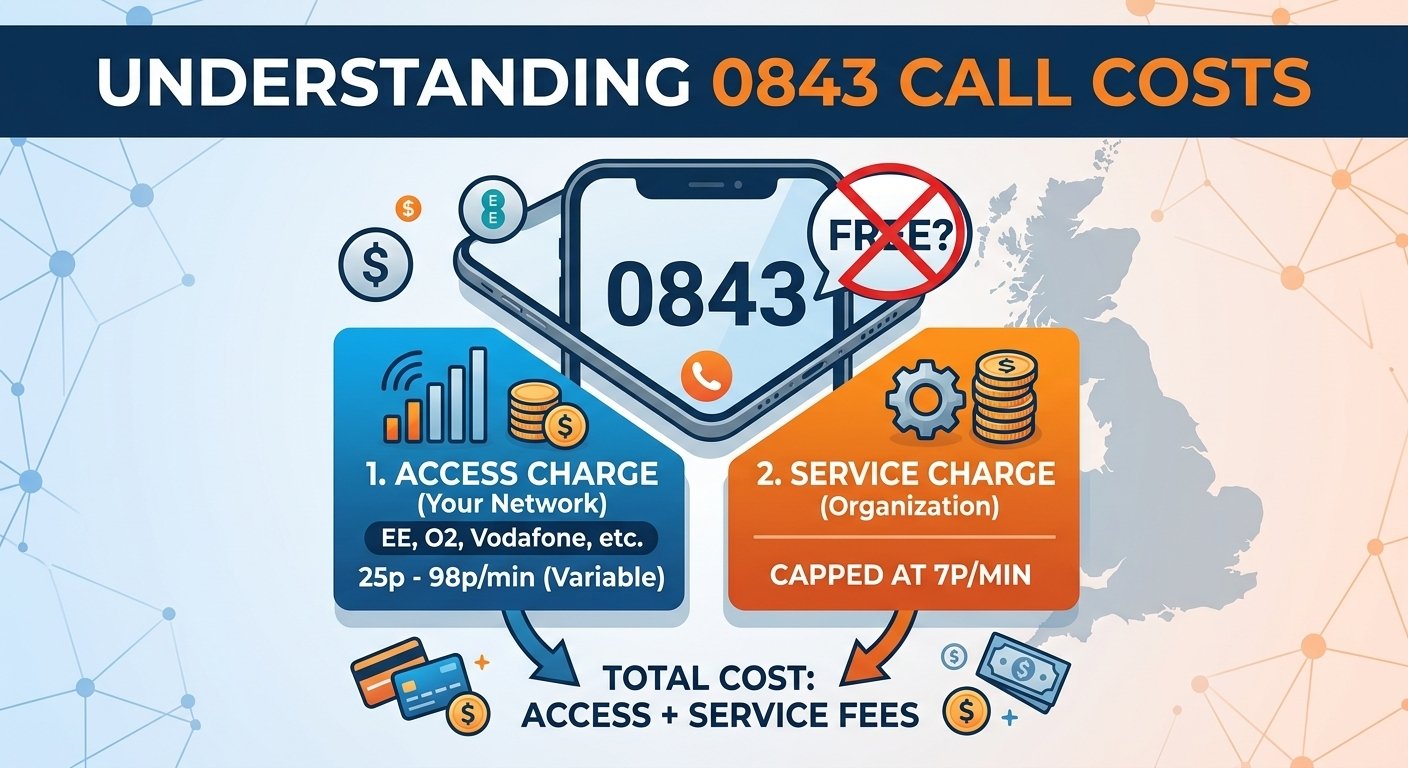
Latest News

The Blog

voip blogs
sip trunking vs pri

Sip Trunking vs Pri: Know the Difference

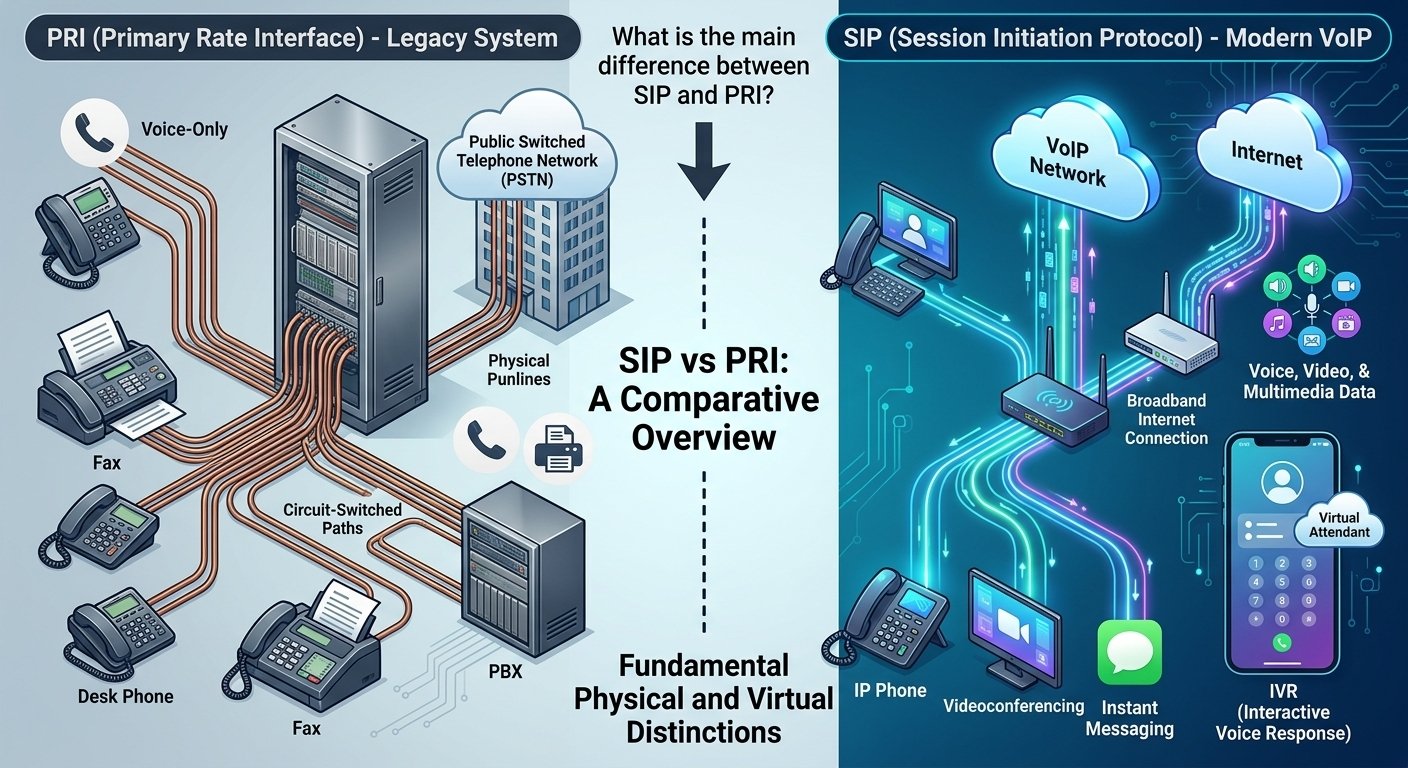
Primary Rate Interface uses standard copper technology to connect a private branch exchange with the public switched telephone network, giving a maximum number of channels which can be selected. By contrast, Session Initiation Protocol (SIP) provides virtual phone lines that become immediate while allowing for seamless (and instant) multimedia routing and scalability within a broadband, active Internet connection. To cut down on operating expenses and boost flexibility, organizations upgrading their telecommunications infrastructure are always going for virtual solutions. Switching from legacy physical networks results in state-of-the-art features such as an interactive voice response system software and an automated digital routing system. What is the main difference between SIP and PRI? The main difference in sip trunking vs pri is the way in which these frameworks are physically and virtually linked to the external networks. Legacy configurations require large copper installations, requiring a lot of physical space and maintenance staff with specializations to maintain. Eliminating all these physical requirements, virtual configurations send all voice data packets securely across existing internet broadband connections. The change is a basic one that revolutionizes the way organizations handle their worldwide interactions. When considering sip trunking vs pri, there are significant differences in how bandwidth is allocated, and overall system flexibility. Legacy systems only allow basic voice transmission over pre-defined physical paths, which is limiting organisations in terms of integration possibilities. New Internet-based protocols enable administrators to send voice, high-definition video and Instant Messaging all in one connection. This flexibility is a natural fit for implementing a full-featured voip ivr system to improve customer interactions effortlessly. What Is PRI? It is a legacy telecommunication standard that uses physical copper wires to send voice and digital data between enterprise networks and users. It digitally integrates commercial facilities directly with the large-scale public switched telephone network, bringing together national and regional telephone operators into a single loop for communication. When external customers call, the call is directed to a centralized on-premises PBX, which then routes the call to the party to whom it is intended. These circuits have traditionally been used by large enterprise organisations to handle the volume of communications they needed on a daily basis in a secure manner. These investments in infrastructure and long-term carrier agreements were important to ensure reliable uptime. The technology still proved to be the lifeline of business telephony for many years, despite these challenging requirements. Until the arrival of digital IVRs, businesses relied on a standard telephone IVR to route their callers with efficiency. PRI features Feature Description Fixed number of voice channels A PRI phone supports 23 bearer voice or data transmission channels, which means 23 communications can happen at the same time. These channels allow multiple calls to be made simultaneously and transmit voice, data, and video on the same line. The data transmission occurs at 64 Kbps per channel. It uplifts speed, makes communication reliable, and increases the security of a business voice communication system. Dedicated lines for voice and data A trunk offers a consistent level of service, and voice and data connection lines don’t traverse over the Internet but rely on the PSTN for connectivity. PRI requirements This legacy architecture has to be deployed with exactly compatible equipment and would have to be a specialized gateway or a branch exchange server with dedicated circuit cards. The technician has to physically put these components into place inside a climate controlled server room and set them up so they communicate with other digital lines. This environment requires ongoing monitoring and hardware replacements every so often to avoid catastrophic system failure. The standard system will allow for up to twenty-three concurrent conversations, but more than that will cause a lot of logistical problems for growing companies. When the call volume is above the threshold, administrators need to purchase and install new physical circuits. This rigid structure does not allow agility and it is hard to easily and seamlessly adopt modern solutions such as an intelligent call queuing system or dynamic routing protocols. What Is SIP? It is a modern protocol that will enable you to link your internal communication server straight to the web, letting you have seamless inbound and outbound digital communications. The trunking is used to merge several separate communications channels into one virtual channel that requires far less resources throughout the corporation. The difference between sip trunking vs pri emphasizes the limitations of conventional telephone telephone technology infrastructure are completely overcome with virtualization. According to a Gartner study, by 2025 more than 75% of all enterprise organizations across the globe will have completely replaced legacy physical network connections with virtualized IP-based technologies. This transition make voice communication just as easily accessible as standard email or web browsing activities. An advanced interactive voice response application and automatic menu systems are easily integrated with modernizing your infrastructure. Key features of SIP Doesn’t need separate phone lines: Direct inward dialing numbers route incoming traffic specifically to designated users rather than funneling everyone through a generic auto-attendant queue. Integrates with other IP-based services: Administrators effortlessly integrate virtual trunks with customer relationship management platforms, collaborative messaging applications, and advanced conferencing solutions. Built on dependable network reliability: Top-tier providers maintain redundant global data centers to guarantee exceptional uptime and superior call clarity during peak traffic hours. Offers more flexibility in virtual connections: Virtual routing mechanisms empower organizations to manage phone numbers, user extensions, and diverse endpoints without worrying about physical geographic limitations. SIP trunking requirements Moving to a virtual communication infrastructure involves a fast and stable internet connection, as well as a compatible IP-based branch exchange server. It should be remembered that organizations that are switching from an older configuration will need to purchase special digital adapters to connect the analog desktop phones to the new digital network. Having enough bandwidth is an important factor to guarantee clean audio when conducting high volume outbound campaigns at the same time. A strong digital platform enables the teams to use more robust additional tools that help streamline daily operations. When the virtual network architecture is fully in place, it is extremely simple to use an IVR system in the call center. These digital tools take into account incoming caller information as soon as it is received and direct it to the most suitable person in the department to handle it immediately. Pros and Cons of PRI The traditional telecoms frameworks offer distinct operational benefits but also growing technical drawbacks. Facility managers can make informed decisions in the long run based on these different parameters. When you do know both sides, you understand why some industries are reluctant to get rid of their legacy systems right now. Traditionally, physical circuits were a choice for organizations in out-of-the-way geographical locations that have unreliable, or no, broadband service. Stability and isolation guaranteed communications during localized widespread internet outages, prioritizing over modern digital feature sets. Those facilities that were heavily dependent on a simple standalone ivr system typically favored the consistent service of dedicated copper pathways. PRI advantages Dedicated bandwidth guarantees: Because the system utilizes hardwired physical connections, voice traffic never competes with internal office internet usage, guaranteeing pristine transmission clarity. Security through network isolation: Operating exclusively within closed public networks inherently isolates internal communications from prevalent internet-based cyber threats and malicious digital spoofing attempts. Direct inward dialing capabilities: A single circuit allows administrators to assign dozens of direct extension lines to individual employees without physically installing separate desktop wiring. PRI disadvantages Lack of disaster recovery: Experiencing a physical wire cut outside the facility instantly deadens all internal communications without any automatic failover rerouting capabilities. Rising operational expenses: As major telecommunications carriers actively retire aging copper infrastructure, securing experienced legacy technicians and replacement components becomes prohibitively expensive. Extremely rigid scalability: Expanding capacity requires purchasing expensive supplementary channel blocks, forcing businesses to pay continuously for unused network capacity. Pros and cons of SIP trunking The choice of a highly scalable and low cost digital communications framework must be made with great care, taking into account all the specific benefits and technical risks. By examining the details of sip trunking vs pri, you’ll see why modern enterprises pretty much universally prefer internet-based communications to legacy, landline services. Virtual platforms systematically break down geographic boundaries which have traditionally hindered global expansion by corporations. Digital telephony signifies a new level of operational efficiency as it brings together the disparate connectivity worldwide under one management window. This huge architectural change helps to quickly deploy a completely autonomous (ivr) system for the routing of complex customer logic. Looking at the good and the bad helps technology leaders make sure they put in place sufficient network protection before completing their move. SIP advantages Instant network scalability: Virtual architectures allow administrators to provision new channels instantly through a centralized software dashboard without scheduling disruptive physical hardware installations. Built-in disaster recovery: Advanced virtual trunks automatically detect localized power failures and instantly reroute essential traffic to secondary branch offices or designated mobile devices. Comprehensive multimedia support: Moving beyond basic voice transmissions enables teams to conduct high-definition video conferencing and secure instant messaging across the exact same unified connection. SIP disadvantages Strict internet dependency: Experiencing unstable or degraded broadband bandwidth directly impacts transmission clarity and overall system reliability during critical business hours. Complex security configurations: Connecting internal servers to the open internet mandates rigorous firewall configurations and robust data encryption protocols to prevent unauthorized access. Hardware compatibility challenges: Utilizing exceptionally old analog desktop hardware requires purchasing secondary conversion adapters to function correctly across a modern digital network. PRI vs. SIP Head-to-Head Comparison Feature PRI SIP trunking Connection Type Physical copper wires (T1/E1) Virtual or internet connection Scalability Low: Must add lines in blocks of 23. High: Add 1 channel at a time instantly. Media Type Voice only Multimedia (voice, video, messaging) Hardware Requires on-premise cards/gateways. Minimal (uses existing internet router). Reliability High (dedicated line), but no failover High (with Fiber/SD-WAN) + auto-failover Setup Time Weeks (physical installation required). Minutes (software configuration). Cost Trend Rising (legacy maintenance fees). Dropping (competitive market). Thinking of Migrating From PRI to SIP? To successfully make the switch from the legacy PRI telecommunications system to SIP, there is a need for careful planning. In today’s digital age, where large-scale telecom companies are actively retiring from their physical copper network and transitioning to a virtual network and embracing latest technologies such as mobile IVR, it is an imperative logistical step to remain competitive. 1. Assess and plan First, analyze past usage data, upgrade edge routers, and deploy quality of service technologies to prioritize internal voice traffic. You should make sure to test bandwidth at peak hours, inventory your hardware, review existing carrier contracts, and make sure your primary branch exchange server is digitally compatible to avoid unexpected obstacles. 2. Choose a SIP service provider When choosing a vendor, consider costs, reliability, scalability, and technical support. Make sure that the service provider guarantees high uptime in their SLA, provides crucial security updates, and provides compatibility with user-friendly IVR software to assist your staff in handling customers. 3. Implement In order to get this right, it’s essential to have a well-trained internal tech team, good internal communication, and a strategy to number port without losing client connections. When using temporary call forwarding and automated IVR status messages during the switchover will help control customer expectations and guarantee 100% uptime when the traffic is redirected. 4. Decide on post-migration support Have an external support contract agreed and signed to ensure instant technical support if any unforeseen configuration problems should occur immediately after deployment. You should always look for a vendor that has a large collection of training materials for your staff as well as ongoing analytical monitoring which will detect and correct minor network glitches before they become big network failures. Read More: 0843 Numbers: Meaning, Cost & Benefits in 2026 Final Words In the end, virtual SIP solutions deliver unparalleled operational agility, enabling businesses to quickly expand their communications, reduce recurring maintenance expenses, and add powerful DR capabilities. Implementing these digital protocols and leveraging tools such as an IVR free trial during the migration process will help organizations future-proof their enterprise connectivity and keep their customers happy for years to come. Frequently Asked Questions How does SIP trunking vs PRI impact growing businesses? Transitioning to virtual trunks provides growing companies with instant scalability and significantly lower costs compared to legacy physical circuits. Virtual infrastructure allows administrators to add single channels dynamically, completely avoiding the rigid twenty-three channel blocks required by traditional copper networks. How much does SIP trunking cost? Virtual communication setups dramatically reduce monthly telecommunications expenses by eliminating physical hardware maintenance fees and standardizing long-distance transmission rates. Most modern providers offer predictable per-channel flat-rate pricing structures that scale seamlessly alongside your actual operational consumption. Is SIP trunking reliable? Digital trunks deliver exceptional reliability when paired with high-speed broadband connections and enterprise-grade network routing hardware. Built-in automatic failover protocols instantly reroute critical incoming calls to designated mobile devices if the primary office experiences a sudden internet outage. What is the difference between SIP trunking and VoIP? Voice over Internet Protocol represents the broad overarching technology enabling digital voice transmissions across the internet. Session Initiation Protocol functions as the highly specific underlying technical ruleset used to establish, manage, and seamlessly terminate those digital multimedia connections. How can I convert SIP to PRI? Converting digital signals back to physical circuits requires installing a specialized premise-based media gateway appliance within your server room. This hardware actively translates incoming virtual data packets into traditional digital signals that older legacy branch exchange servers can successfully process. Can I use an enterprise ivr testing system with virtual lines? Modern digital networks integrate flawlessly with enterprise-grade testing software to simulate high-volume caller traffic and evaluate menu routing efficiency. These robust testing frameworks identify hidden logical bottlenecks before they negatively impact actual external customer experiences. Does this technology support advanced ivr phones? Virtual networks natively support modern IP-based desktop handsets equipped with expansive digital displays and programmable routing directories. Users navigate complex automated menus effortlessly using intuitive touchscreen interfaces rather than relying exclusively on traditional numerical keypads. What is the best practice for configuring a voip ivr system? Administrators should strictly limit automated menu options to five distinct choices per tier to prevent overwhelming callers with unnecessary information. Implementing advanced speech recognition capabilities further streamlines the navigation process by allowing users to bypass traditional keypad inputs entirely. Do I need a completely new phone ivr system after migrating? If your current internal server supports native digital integrations, you can seamlessly retain your existing automated routing configurations without purchasing new software. Facilities utilizing exceptionally outdated analog infrastructure must invest in compatible digital gateways to maintain their automated greeting functionalities.
Read More

9 Types of Call Centers for Your Business

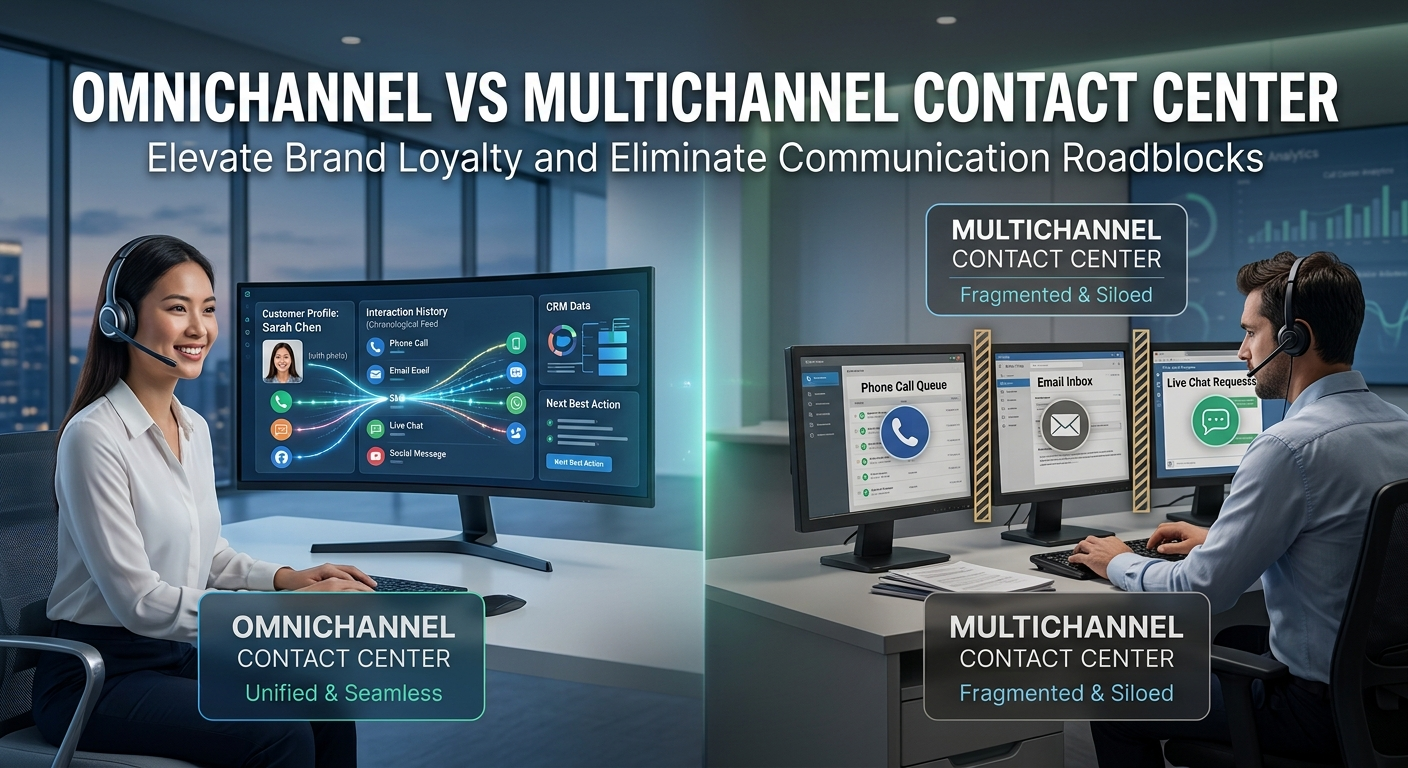
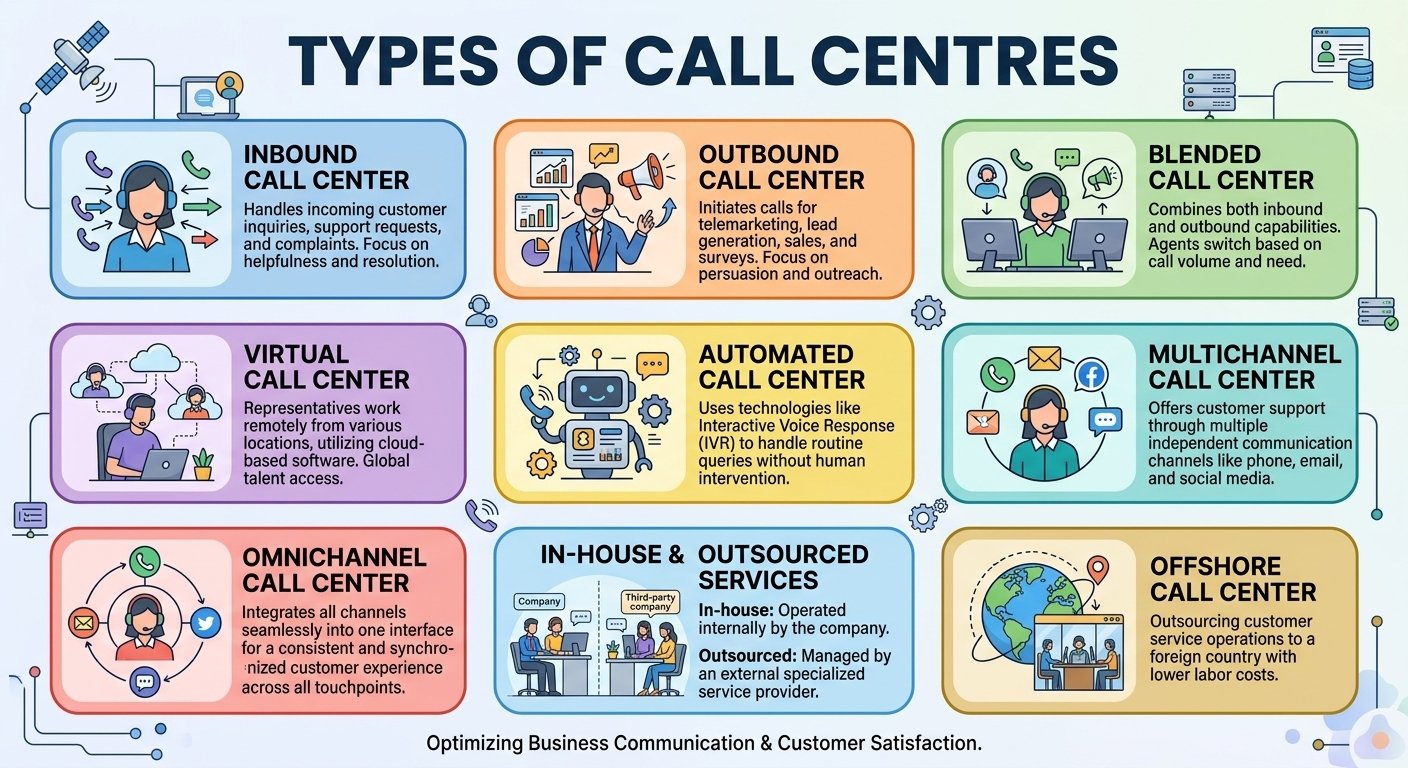
The 9 main types of call centers are inbound, outbound, blended, virtual, automated, omnichannel, multichannel, domestic, and offshore call centers. Each type serves a different purpose, from handling customer support and incoming inquiries to making sales calls, generating leads, sending automated messages, and supporting customers across multiple communication channels. Understanding the various types of call centers is crucial for businesses aiming to optimize their customer service operations and sales strategies. A communication facility acts as the central hub for handling telephone interactions, but modern contact hubs now manage multiple digital channels simultaneously. The primary models include inbound, outbound, blended, virtual, automated, multichannel, omnichannel, in-house, outsourced, and offshore structures. Each category serves specific corporate needs, from dedicated technical support to proactive telemarketing campaigns. Selecting the ideal setup ensures efficient resource allocation, enhanced consumer satisfaction, and improved revenue generation. Let us explore these diverse frameworks to find your perfect match. What Is a Call Center? A standard business communication facility designed to handle a massive volume of telephone inquiries is traditionally recognized as a calling center. These centralized hubs function as the primary touchpoint between companies and their consumers, managing everything from basic product support to complex technical troubleshooting. When looking at standard call center definitions, the focus remains heavily on voice communication, though modern facilities have evolved drastically beyond simple phone lines. Dedicated representatives utilize specialized telephone call center systems to route, track, and resolve interactions efficiently while maintaining high satisfaction metrics. The broader calling industry has transformed significantly due to changing consumer expectations and rapid technological advancements. Today, a centralized operation serves as the heartbeat of consumer relationship management, driving brand loyalty and seamless operational efficiency. According to recent industry statistics, the global contact center software market was valued at over USD 30 billion and continues to grow rapidly, proving that efficient communication frameworks remain vital for corporate success. Organizations globally rely heavily on these specialized environments to bridge the gap between their products and the people who use them daily. 9 Types of Call Centers to Know Navigating the contact center industry requires a solid understanding of the different operational models available today. The table below outlines the core categories, highlighting their primary functions and the technology they utilize to streamline daily tasks. Call Center Type Main Focus Tools Typically Used Best For Inbound Call Center Customer support & service ACD, IVR, Skill-Based Routing Businesses with frequent customer inquiries Outbound Call Center Sales & outreach Click-to-Call, CRM Integration, Call Tagging, Outbound IVR SaaS, banking, real estate, or market research teams Blended Call Center Sales & support combo Mix of inbound/outbound tools Companies handling both inbound queries and outbound sales Virtual Call Center Remote, decentralized teams Cloud-based calling, CRM access, VoIP platforms Global businesses or remote-first companies Automated Call Center Self-service & automation IVR, SMS automation, appointment reminders, auto-responders Companies aiming to reduce manual workload Multichannel Call Center Support across many communication channels Phone, SMS, Email, Social Media, CRM tools Businesses wanting cohesive, seamless experiences Omnichannel Call Center Unified multi-platform support Cloud communication suites, Integrated CRM Brands prioritizing a synchronized customer journey In-house & Outsourced Operational control vs. cost savings Cloud platforms, local or third-party tools Companies choosing between control and convenience Offshore Call Center Cost-effective outsourcing abroad Similar to outsourced—often basic VoIP and CRM tools Small businesses with tight budgets 1) Inbound call center Facilities strictly dedicated to receiving incoming communications from clients form the fundamental backbone of consumer care. Representatives manage product inquiries, complex technical support requests, and billing issues, ensuring callers receive immediate, accurate assistance. The different agents for call center environments must possess immense patience and exceptional problem-solving skills to navigate varying degrees of consumer frustration successfully. Businesses experiencing high volumes of incoming traffic benefit immensely from implementing this specific setup. These business call centers utilize intelligent routing technology to connect callers with appropriate contact center specialists quickly, minimizing hold times. By focusing entirely on resolving incoming requests, organizations can dramatically improve their first-call resolution rates and foster long-term brand loyalty. 2) Outbound call center Organizations aiming to generate fresh leads, conduct comprehensive market research, or execute aggressive telemarketing campaigns utilize facilities focused entirely on proactive outreach. Personnel initiate contact with potential or existing buyers to offer exclusive upgrades, perform detailed satisfaction surveys, or secure direct sales. This proactive approach remains a foundational cornerstone of the modern calling sector for driving consistent revenue generation. Successful sales call centers rely heavily on predictive dialers and robust database integrations to maximize active representative talk time. By automating the tedious dialing process, staff members can focus their entire energy on delivering highly persuasive pitches and closing deals efficiently. The technology utilized here filters out disconnected numbers and voicemails, ensuring human representatives only connect with live prospects. 3) Blended call centers Combining the sophisticated capabilities of receiving inquiries and initiating outreach creates a highly versatile and dynamic operational environment. Employees seamlessly switch between resolving incoming support tickets and executing outgoing sales campaigns based entirely on fluctuating daily traffic volumes. This distinct call center business model maximizes workforce utilization and effectively prevents costly idle time during historically slow operational periods. Companies adopting diverse call centers enjoy superior operational flexibility alongside highly improved overall productivity metrics. The management teams can dynamically allocate their human resources on the fly, ensuring that neither service quality nor revenue-generating activities suffer during unexpected peak business hours. This dual-purpose strategy provides a massive competitive advantage in highly saturated commercial markets. 4) Virtual call center The massive global shift toward remote work has heavily popularized decentralized operational models where representatives fulfill their duties from various geographical locations. Cloud-based software enables this distributed call center framework, allowing personnel to securely connect to the central corporate database via a standard internet connection. Companies utilizing this model save substantially on massive overhead expenses like physical office space, electricity, and hardware maintenance. Employing a remote agent call center allows modern organizations to tap directly into a massive global talent pool without any restrictive geographical boundaries. This incredible flexibility naturally facilitates around-the-clock consumer support capabilities, as staff members can be systematically hired across multiple international time zones. Consequently, businesses can offer uninterrupted service without requiring employees to work exhausting overnight shifts. 5) Multichannel call centers Modern consumers universally expect to interact with their favorite brands through their personally preferred mediums, whether that involves standard voice, email, live chat, or social media platforms. These dynamic facilities offer various communication paths, operating alongside traditional telephone call center systems to precisely accommodate highly diverse client preferences. Organizations deploying these specific setups recognize quickly that relying exclusively on voice interactions is no longer sufficient for modern commercial survival. While offering numerous digital touchpoints is heavily advantageous, the separate channels in this specific framework often operate independently of one another. The types of call center services provided ensure consumers have plenty of communication options, though representatives might utilize completely distinct, separate software platforms to manage emails versus standard phone interactions. This sometimes requires consumers to repeat context if they switch platforms mid-resolution. 6) Omnichannel call centers Elevating the multi-platform approach significantly, this advanced model seamlessly integrates every available communication channel into one highly unified digital interface. A buyer might initiate contact via a social media message, naturally transition to a detailed email thread, and conclude with a voice conversation without ever repeating their original issue. This perfect interaction continuity represents the absolute pinnacle of modern contact center customer care. Representatives operating within these highly sophisticated setups gain immediate, unrestricted access to a comprehensive consumer interaction history regardless of the medium previously used. This shared call center visibility deeply empowers staff members to deliver highly personalized, remarkably efficient resolutions that systematically boost overall consumer satisfaction scores. Organizations utilizing this technology frequently see massive improvements in buyer retention metrics. 7) Automated call centers Leveraging powerful artificial intelligence alongside interactive voice response technology allows forward-thinking organizations to effectively manage routine, repetitive inquiries entirely without human intervention. Callers can independently check banking account balances, securely process digital payments, or easily schedule routine appointments through highly intelligent voice prompts. Utilizing these specific types of call center software drastically reduces the exhausting daily workload placed upon human representatives. Implementing comprehensive self-service systems represents a remarkably cost-effective corporate strategy for handling massive-volume, low-complexity interactions. The advanced telecom services for call centers ensure that buyers consistently receive immediate, accurate answers at any time of day or night. This heavy reliance on automation brilliantly enhances consumer convenience while simultaneously minimizing expensive operational labor costs. 8) In-house & outsourced call center services Maintaining an internal communication facility grants organizations absolute, unconditional control over employee training, strict quality assurance, and critical data security protocols. Brands handling highly sensitive medical or financial information typically prefer keeping their consumer operations strictly within their own secure corporate structure. This internal setup guarantees that every representative embodies the exact cultural values of the parent brand. Conversely, partnering directly with a specialized third party call center allows growing businesses to scale their operations rapidly while significantly reducing labor and infrastructure expenses. These external operational agencies specialize specifically in consumer relationship management, providing immediate access to expertly trained personnel and advanced telecommunications technology. This strategic outsourcing eliminates the urgent need for massive, risky upfront capital investments. 9) Offshore call centers Expanding daily operations to foreign nations featuring substantially lower standard labor costs remains a highly popular strategy for commercial companies seeking massive budget reductions. These international call center organizations comfortably handle substantial volumes of basic, repetitive interactions, allowing the primary enterprise to allocate precious funds toward core product development. The financial savings generated through this international strategy can be genuinely staggering. While the immediate financial benefits are undeniably attractive, commercial organizations must carefully navigate potential linguistic barriers and distinct cultural differences. Many successful global brands perfectly balance their operational approach by utilizing offshore teams exclusively for simple administrative tasks. Meanwhile, they retain premium domestic call center services specifically for handling highly complex, deeply sensitive consumer escalations requiring nuanced cultural understanding. How To Choose the Right Call Center for Your Business Selecting the perfect operational framework requires a highly comprehensive evaluation of your specific organizational goals and broader consumer expectations. Making the wrong choice can be disastrous; research indicates that 68% of consumers will completely abandon a brand after just one poor service interaction. Understanding how to select a bpo for contact center operations or deciding to build an internal team dictates your future commercial viability. Here are the crucial factors you must evaluate when making this incredibly vital business decision: Business needs and goals: You must intimately understand your primary operational purpose, whether it involves aggressive sales generation, complex technical support, or basic administrative service. Analyzing this alongside your expected daily interaction volume heavily guides you toward selecting the most appropriate inbound, outbound, blended, virtual, or automated operational framework. In-house vs. outsourced: Operating entirely internally provides maximum organizational quality control but undeniably demands substantial, ongoing financial investment. Alternatively, external outsourcing seamlessly provides highly cost-effective talent and premium infrastructure access at the unavoidable expense of direct, minute-by-minute operational oversight. Location and language requirements: It is critical to thoughtfully evaluate potential financial savings against strict local presence necessities. You must ensure robust, highly accurate multilingual capabilities exist within your chosen virtual or offshore models to serve your diverse international demographic markets effectively and respectfully. Inbound or outbound customer calls: Facilities managing massive incoming traffic strictly require personnel featuring exceptional active listening and rapid problem-solving skills. Conversely, proactive daily outreach demands extraordinarily high commercial persuasion capabilities, while blended operational environments necessitate a highly versatile, adaptable workforce completely capable of executing both functions effortlessly. Technology and infrastructure: Ensure seamless, completely bug-free integration with your existing CRM platforms and internal database tools. You must heavily prioritize advanced digital functionalities like conversational artificial intelligence, unified omnichannel user experiences, robust internal analytics, and highly intelligent call routing capabilities. Agent skill requirements: Perfectly align your employee proficiencies with your specific operational objectives, deliberately demanding strict technical knowledge for support roles and deep emotional empathy for service positions. Virtual setups brilliantly allow corporate management to tap directly into wider, highly specialized talent pools located globally. Cost and budget considerations: Thoughtfully compare massive upfront capital expenditures against the projected ongoing operational costs across all available models. Always remember to carefully factor in necessary physical equipment expenses while accurately projecting the massive return on investment generated through improved buyer retention and increased revenue generation. Read More: 0843 Numbers: Meaning, Cost & Benefits in 2026 Final Words Navigating the incredibly diverse calling industry landscape strictly requires a crystal-clear understanding of your unique corporate objectives and ever-changing consumer demands. Whether you ultimately opt for a fully automated digital self-service portal or a massive international offshore operation, the core goal remains delivering consistently exceptional interactions. Evaluating the numerous types of call centers empowers dedicated management teams to perfectly align their communication strategies with broader financial and operational targets. By investing confidently in the right digital infrastructure, appropriate personnel, and highly scalable technology, organizations can successfully transform their basic support departments into powerful, unstoppable drivers of long-term brand loyalty. Frequently Asked Questions What are the different types of call centers available? The main operational categories include inbound, outbound, blended, virtual, multichannel, omnichannel, automated, in-house, outsourced, and offshore structures designed for specific commercial needs. What is a BPO or call center? Business Process Outsourcing involves strategically contracting specific operational responsibilities, such as technical customer service or proactive telemarketing, directly to a specialized third-party external service provider. What are the four basic categories of call center services? The fundamental core categories generally consist of inbound support resolution, proactive outbound sales, fully automated self-service, and dynamic blended operations handling both incoming and outgoing interactions simultaneously. What are the 12 different types of customers? Standard consumer profiles widely range from the highly potential, brand new, and intensely impulsive buyer directly to the deeply angry, highly demanding, and fiercely loyal brand advocate. What is the 80/20 rule in call centers? This highly standard global industry metric strictly mandates that exactly eighty percent of all incoming telephone communications must be successfully answered by a human representative within twenty seconds. How does a virtual facility operate differently? It utilizes highly advanced cloud-based telecommunications software, allowing trained representatives to work entirely remotely from any global geographic location rather than physically gathering inside a single central office. Why do modern companies heavily prefer omnichannel frameworks? They naturally provide a perfectly synchronized, highly seamless consumer experience across all digital platforms, absolutely ensuring historical context is perfectly preserved regardless of the chosen communication medium. Where are most massive offshore operations geographically located? Developing nations like India, the Philippines, and Mexico proudly host numerous outsourced communication hubs heavily due to their extraordinarily high English proficiency and significantly lower baseline operational costs.

Read More
AI IVR

How AI IVR Improves Customer Experience and Operational Efficiency

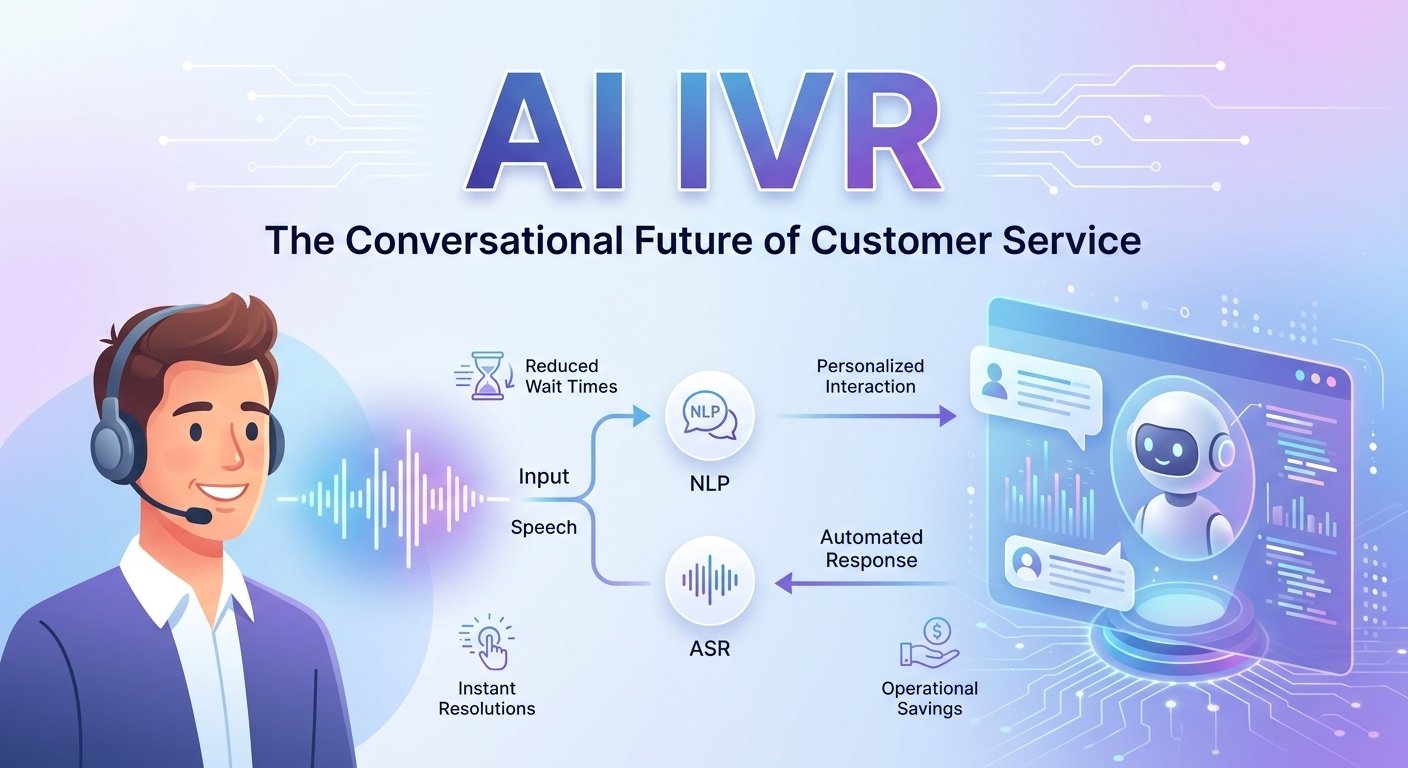
AI IVR (Artificial Intelligence Interactive Voice Response) fundamentally changes how businesses handle customer calls. Instead of forcing users through frustrating, rigid phone menus, an AI IVR uses natural language processing to understand spoken requests and resolve issues instantly. This automated voice response technology eliminates long wait times and routes complex inquiries to the right human agent. By seamlessly integrating with your customer database, AI IVR systems offer personalized, conversational experiences that traditional menus simply cannot match. If you want to reduce operational costs while keeping buyers happy, adopting a smart, speech enabled IVR is the ultimate business solution today. What is AI IVR? An automated ivr system replaces static keypad menus with intelligent, conversational interactions. Rather than pushing buttons, callers use natural speech to request help, schedule appointments, or check balances. This modern technology instantly analyzes caller intent to offer prompt self-service resolutions without human intervention. These conversational ivr software setups feel like interacting with a live assistant. They reduce overall wait times and optimize operations by filtering out repetitive inquiries. Live support teams can then dedicate their energy toward complicated troubleshooting tasks. How it works Captures spoken words and converts them into text using advanced speech recognition. Analyzes the core meaning and intent behind the phrase, ignoring background noise. Formulates a logical response or triggers a specific backend workflow. Delivers the reply using human-sounding voice generation. Core advantages Conversations flow naturally, removing the annoyance of navigating fixed menus. Wait times drop significantly since typical requests get handled instantly. Buyers receive round-the-clock assistance without relying on office hours. Companies experience massive cost reductions by minimizing live agent transfers. Typical use cases Managing reservations and booking schedules automatically. Processing secure payments over the phone. Routing callers to the correct department based on intent. Answering frequently asked questions without delay. Key technologies Automatic speech recognition transforms audio into readable text. Natural language processing evaluates context to determine true intent. Machine learning detects patterns to enhance accuracy continuously. Text-to-speech converts digital responses into friendly, spoken audio. AI IVR vs. Traditional IVR Comparing traditional setups with a modern ivr platform ai reveals a stark contrast in capabilities. Older systems provide a frustrating traditional ivr customer experience, whereas intelligent systems adapt dynamically. This distinction heavily influences brand perception and operational speed. Reviewing an ivr vs ai phone agent comparison features benefits table clarifies these differences. Proper ivr testing services reduce customer friction dramatically before launch. Below is a detailed breakdown of how legacy tools stack up against smart voice assistants. Feature Traditional IVR AI IVR Caller interaction Menu navigation via keypad Conversational speech input Learning capability Fixed, no adaptation Learns from every interaction Speech recognition Limited, keyword-based Natural language, accent-tolerant Call routing Rules-based Contextual, based on intent and history Personalization None Pulls from CRM and past behavior Resolution capability Basic questions only Handles complex, multi-step issues Customer experience Slow and rigid Fast, intuitive, and human-like How Conversational AI IVR Works A functional conversational ai ivr relies on an integrated technology stack functioning in real time. Each component plays a vital role in understanding, processing, and responding to human speech accurately. By combining these backend tools, businesses deliver flawless support experiences. Let us examine the technical pillars that make this possible. Automatic speech recognition (ASR) This layer acts as the digital ear, instantly transcribing spoken language into text format. Advanced systems easily process heavy accents, rapid speech, and ambient noise without losing accuracy. Unlike older keyword-based setups, modern ASR models handle diverse acoustic environments. This guarantees a smooth interaction for users calling from busy streets or driving in cars. Natural language processing (NLP) This tool deciphers what the speaker actually means rather than focusing strictly on literal translations. Moving beyond rigid prompts, NLP uncovers underlying context and emotional tone. If someone says they are locked out, the system understands they require account recovery immediately. This intelligence prevents buyers from getting stuck in endless, irrelevant loops. Decision logic and backend integrations Once the intent is clear, the decision engine figures out the best next step. It seamlessly queries external databases, billing software, or ticketing platforms via secure APIs. For a customized journey, utilizing crm-connected ivr solutions for personalized customer journeys is highly effective. If an automated resolution fails, the engine instantly forwards the call to the most qualified human representative. Text-to-speech (TTS) The final step involves converting the generated digital response into lifelike audio. Current generative models replicate natural human intonation, pausing, and emotional resonance flawlessly. Brands can customize the tone and pacing to perfectly match their corporate identity. This capability ensures that an automated voice response never sounds robotic or detached. Benefits of AI-Powered IVR Switching to an intelligent setup elevates the entire support ecosystem across speed, cost, and quality. An ai powered ivr brings massive operational advantages that legacy systems simply cannot match. Here are the primary business gains you can expect after deploying these modern systems. 1. Immediate contextual understanding Returning callers no longer have to explain their situation from scratch. The system instantly recognizes past interactions, recent purchases, and active support tickets to tailor its greeting. This level of insight eliminates redundant steps and shortens the overall handling duration. Buyers feel valued when the technology anticipates their exact needs upon connection. 2. Precise, intelligent call routing Instead of relying on fixed button presses, dynamic routing evaluates urgency, intent, and customer tier. A VIP client experiencing billing trouble will bypass the standard queue entirely. Precision filtering significantly drops escalation rates and boosts first-contact resolution metrics. Customers reach the exact specialist required without bouncing between multiple departments. 3. Seamless conversations across channels Modern platforms maintain interaction memory across various communication mediums effortlessly. A user starting a request via text message can call later without repeating their details. This omnichannel memory mirrors human multitasking capabilities. It establishes a fluid, connected ecosystem that significantly enhances overall buyer satisfaction. 4. Operational intelligence at scale Every single interaction generates high-fidelity data regarding user behavior and system performance. Managers can easily pinpoint exact friction points and adjust staffing models to meet demand spikes. Unlike basic logs, this analytics layer explains the underlying reasons behind drop-offs. It transforms raw call data into actionable strategic insights for the entire organization. 5. Built-in adaptability and improvement These intelligent platforms constantly refine their understanding of phrasing and emotional context. Machine learning algorithms ensure that the software becomes smarter with every incoming query. A previously unrecognized slang term will eventually trigger the correct resolution path automatically. This self-improving nature requires zero manual reprogramming from internal IT staff. 6. Persistent engagement that builds loyalty Following a successful resolution, the voice assistant can offer helpful follow-up suggestions smoothly. Providing proactive tracking details after handling a refund creates a sense of professional closure. Such value-added moments turn basic administrative tasks into excellent relationship-building opportunities. Consequently, businesses enjoy reduced churn rates and stellar brand loyalty scores. Applications of AI in IVR for Businesses These versatile platforms manage diverse operational duties beyond simple call deflection. Departments across the entire corporate structure utilize an inbound ivr system to realize ai-driven ivr complex knowledge-based support advantages effortlessly. From proactive outreach to secure transactions, the use cases remain virtually limitless. Customer support and help desks Intelligent platforms effortlessly manage account lookups, password resets, and typical billing inquiries autonomously. This early intent identification prevents frustrating misrouting scenarios entirely. According to a recent deployment case study by McKinsey, utilizing agentic intelligence for care workflows drives a 24 percent increase in first-contact resolution. The exact same study notes a 30 percent productivity improvement among human agents globally. Outbound communication and proactive engagement Beyond accepting calls, the platform places outbound dials for appointment reminders or targeted surveys. Integrating CRM records ensures that each proactive message feels incredibly relevant. This automated outreach successfully engages consumers without overburdening internal staff members. It guarantees consistent follow-ups while maintaining excellent service standards. Compliance and security assurance Regulated sectors rely heavily on automated systems to standardize scripts and mask sensitive data. The software logs interactions meticulously and triggers instant alerts during compliance breaches. Financial and healthcare institutions maintain strict regulatory adherence by removing human error from critical verification steps. This guarantees complete peace of mind during external audits. Scheduling and transactional automation High-volume environments like medical clinics and hospitality chains utilize voice bots to manage reservations. Callers book, cancel, or modify appointments without ever speaking to a receptionist. This specific automation drastically cuts administrative workload and reduces costly appointment no-shows. Frontline workers can completely focus on physically present visitors. Business continuity and disaster response During unexpected outages or severe weather events, intelligent routing maintains open communication lines. It instantly broadcasts critical updates and provides alternative contact methods dynamically. These platforms easily absorb massive call surges without crashing or degrading audio quality. Companies sustain their reputation for reliability even under extreme crisis conditions. Examples of AI IVR in Action To fully grasp the impact, examining realistic corporate scenarios proves highly beneficial. These practical illustrations demonstrate how a speech ivr resolves everyday industry challenges. From logistics to banking, automated solutions drive immense tangible value. Scenario 1: Reducing missed deliveries in ecommerce Retailers often deal with complaints regarding delayed or missing packages daily. By implementing ivr workflows for rescheduling deliveries by phone, buyers instantly receive real-time tracking updates. The software offers immediate rerouting options without placing the individual on hold. This drastically reduces the volume of repetitive inquiries hitting the main support floor. Scenario 2: Streamlining appointment scheduling in healthcare A busy regional hospital deploys a voice assistant to handle soaring daily call volumes. Patients simply state their preferred doctor and receive immediate availability options. The system confirms insurance eligibility and processes cancellations flawlessly. This drastically lowers administrative friction and optimizes the daily calendar for practitioners. Scenario 3: Improving outage communication in utilities When a severe storm knocks out regional power, utility call centers become instantly overwhelmed. The intelligent platform detects the surge and proactively informs callers regarding expected restoration timelines. It offers text-based updates, keeping anxious residents informed without clogging the queue. Transparency increases significantly while panic-driven repeat calls plummet. Scenario 4: Verifying identity in financial services When a banking client reports suspicious activity, the software steps in to verify their identity securely. Utilizing voice biometrics and recent transaction history, it authenticates the user instantly. The platform then routes the verified caller directly to the fraud department. This eliminates dangerous delays and protects sensitive financial assets perfectly. Measuring the ROI of AI IVR Validating your technological investment requires tracking precise performance metrics before and after launch. True return on investment encompasses direct financial savings alongside massive operational agility improvements. Reviewing a structured metric table clarifies exactly where these systems generate the most value. Metric What It Tells You Typical AI IVR Impact First-call resolution (FCR) Issue solved on the first try Increases by up to 5% over industry benchmarks. Average handle time (AHT) Time spent per interaction Decreases by up to 38% through task automation. Call containment rate % of calls resolved without agents Achieves up to 60% containment successfully. Customer satisfaction (CSAT) Direct feedback on experience Scores frequently exceed 80% due to contextual replies. Agent utilization rate Human team efficiency levels Automates routine tasks, boosting high-value focus. Operational cost per call Cost to serve via voice channel Drops from $7.00 to under $1.00 per resolution. Beyond immediate financial reductions, these setups deliver incredible compounding advantages. A frictionless phone journey builds immense trust and strengthens overall brand perception. Additionally, this technology scales effortlessly during seasonal spikes without requiring massive hiring drives. It guarantees stellar business continuity regardless of external market disruptions. Common Challenges of AI IVR Implementation While the benefits remain outstanding, deploying this technology presents specific operational hurdles. Recognizing these barriers early ensures a smooth, highly successful launch phase. Navigating these obstacles requires solid planning and strict alignment with internal IT personnel. 1. System integration issues Failing to connect the voice platform with internal billing or CRM software cripples its effectiveness. Without proper data access, the assistant cannot deliver personalized, accurate answers. Prioritizing vendors offering open APIs solves this dilemma instantly. Involving database administrators early prevents frustrating launch delays. 2. Incomplete or low-quality data Machine learning models completely rely on the historical data fed into them during training. If customer records remain outdated or highly fragmented, the assistant will generate incorrect responses. Cleansing and unifying internal databases before activation is absolutely crucial. Training the engine on high-quality transcripts guarantees excellent early accuracy rates. 3. Risk of ‘AI hallucinations’ Occasionally, conversational models confidently generate factually incorrect information. This poses severe risks when discussing sensitive legal, medical, or financial matters. Implementing deterministic logic for critical queries easily mitigates this dangerous flaw. Establishing strict confidence thresholds ensures instant human escalation when uncertainty arises. 4. Maintaining consistency across scenarios Highly dynamic voice setups occasionally suffer from uneven pacing or mismatched conversational tones. Users might enjoy a flawless interaction one day and a confusing one the next. Rigorously testing edge cases and negative inputs stabilizes the overall flow. Creating a strict user experience guide aligns phrasing perfectly. 5. Organizational resistance to change Internal staff frequently view automation as a direct threat to their ongoing employment security. Managers might actively distrust algorithmic decision-making during the initial rollout phase. Positioning the technology as an augmentation tool rather than a replacement eliminates this anxiety. Demonstrating how it handles repetitive chores boosts overall morale dramatically. How to Implement AI in IVR: Practical Tips Launching a conversational ivr software requires a highly structured, strategic approach. It spans technology alignment, data preparation, and careful journey mapping. Following an organized framework guarantees a seamless, highly profitable deployment. 1. Define measurable goals Establish clear, quantifiable objectives before selecting any specific software vendor. Determine whether the priority is lowering costs, boosting containment, or reducing handle times. These distinct targets heavily influence design choices and post-launch optimization strategies. 2. Choose a platform that aligns with your tech stack Evaluate vendors based on their native machine learning capabilities and omnichannel features. Ensure they provide seamless, API-driven connections to your existing support platforms. Selecting a visual flow builder allows marketing teams to iterate designs without touching complex code. Modern platforms offer retailers ivr menus order tracking tools no coding required, ensuring rapid deployment. 3. Map out common customer journeys Avoid building generic, uninspired dialogue paths that frustrate callers. Analyze historical logs to identify the most frequent intents and map their ideal resolution routes. Documenting exact user inputs and fallback escalation points ensures a highly contextual, realistic training environment. 4. Integrate deeply with your existing systems An effective voice assistant must take definitive action, not merely recite information. It needs real-time access to transaction histories, knowledge bases, and inventory databases. This deep integration transforms a reactive answering machine into a highly proactive service channel. 5. Test across edge cases and tones Conduct rigorous role-playing sessions to evaluate how the engine handles frustration and heavy accents. Expose the setup to unexpected phrasing and loud background noises deliberately. According to a conversational intelligence deployments in contact centers are projected to reduce agent labor costs by $80 billion globally by 2026. Testing thoroughly ensures you capture your share of those savings without alienating clients. 6. Monitor performance and iterate Following the official launch, meticulously track containment, abandonment, and escalation metrics. Gather user sentiment feedback to identify confusing dialogue branches. Consistently adjusting scripts and retraining models guarantees that the system improves progressively over time. Trends Shaping the Future of AI IVR The landscape of automated voice response systems continuously evolves as generative models advance. Future platforms will adapt seamlessly to nuanced human emotions and complex business environments. Understanding these impending shifts helps corporations future-proof their technological investments. Emotional context is becoming a core signal: Modern engines actively learn to detect underlying stress, extreme urgency, or rising dissatisfaction. This allows the dialogue flow to shift dynamically based entirely on a caller’s mood. Sentiment analysis will soon dictate routing protocols, bypassing menus entirely for deeply frustrated individuals. Generative AI is reshaping scripted interactions: Rigid, pre-written scripts are rapidly fading out in favor of dynamic, brand-aligned generation. The platform formulates unique replies tailored to the exact context of the current conversation. This allows for incredibly flexible, highly human-sounding dialogues that maintain strict regulatory compliance effortlessly. Voice becomes a true omnichannel participant: The modern consumer journey flows fluidly across text, web chat, and traditional phone calls. Next-generation setups maintain conversational context across every single touchpoint simultaneously. A discussion initiated via a mobile app smoothly transitions to voice without losing any previous progress. IVR is expanding beyond support: Corporations utilize an intelligent ivr chatbot for far more than basic troubleshooting. Sales qualification, proactive dispatching, and automated client onboarding now happen entirely over the phone. Embedding voice intelligence into broader sales strategies scales operations massively without sacrificing personal touches. Transparency and control are becoming non-negotiable: As algorithms handle highly critical decisions, executives demand complete operational visibility. Auditable logic trails and strict escalation thresholds have become standard requirements. Must-Have Features in Modern AI IVR Platforms Evaluating a potential automated ivr system requires focusing on flexibility and long-term scalability. The right software must handle immense volume while delivering pristine audio quality. Ensure your chosen vendor supports these non-negotiable technical features. Strong natural language capabilities: The foundational core remains the ability to process ambiguous phrasing and diverse dialects perfectly. Pretrained models tailored to specific industry vocabularies drastically improve baseline accuracy. Omnichannel support with unified context: Your chosen software must integrate completely with digital messaging applications and web portals. True omnichannel capability eliminates the need for callers to repeat their frustrating issues. Visual flow builder with low-code/no-code design: A drag-and-drop interface empowers non-technical staff to build and tweak conversational paths quickly. This agility prevents your support department from waiting on sluggish IT development cycles. Advanced call analytics and real-time reporting: Meticulous analytics identify hidden friction points and highlight exact abandonment locations. Granular reporting remains entirely essential for justifying the initial software investment. Secure, compliant, and auditable: Handling sensitive payments requires strict adherence to GDPR and PCI-DSS regulatory standards. Encrypted transmissions and detailed access logs protect the corporation against catastrophic data breaches. Customizable escalation logic: The setup must instantly recognize when algorithmic confidence drops below acceptable levels. Sentiment-based routing guarantees that angry clients reach human supervisors before canceling their accounts. Multilingual and global-ready: Global brands require software capable of detecting languages automatically and responding fluently. Native localization ensures that the brand voice remains culturally appropriate and highly inclusive. Choosing the Right AI IVR Solution Selecting the optimal setup requires finding a vendor that balances cutting-edge innovation with absolute stability. The platform must blend seamlessly into your existing unified communications ecosystem. Tools like freshdesk voice assistant advanced ivr features or microsoft teams voice ivr ai features competitive advantage demonstrate how deep integration drives success. Prioritize solutions offering robust API access and dedicated deployment engineers. Implementing an ai based ivr is not just an upgrade; it is a fundamental transformation of your customer service strategy. Read More: What Does DND Mean? A 2026 Guide  Final Thoughts Embracing modern conversational tools elevates your brand reputation while dramatically slashing overhead expenses. An ai voice agent vs. traditional ivr systems comparison clearly proves that automation is the undisputed future of communication. By prioritizing intelligent routing and deep backend integration, your organization will deliver unparalleled support experiences. Invest in these transformative solutions today to secure a decisive competitive advantage. Frequently Asked Questions About AI IVR What is an AI IVR? It is an advanced telephony system that utilizes natural language processing to understand spoken requests. Instead of pressing keypad numbers, callers speak normally to resolve their specific issues. What does IVR stand for? It stands for Interactive Voice Response. It is the underlying framework that allows computers to interact with humans through voice and touch-tone inputs. What is IVR? It is an automated telephony technology that gathers information from callers before routing them to appropriate agents. Traditional versions rely heavily on fixed keypad menus. What is an IVR tool? It is a software application utilized by call centers to manage incoming and outgoing communication flows. It handles greeting messages, menu selections, and skill-based agent routing. How does a natural language ivr differ from a standard menu? A natural language setup comprehends entire spoken sentences and extracts underlying intent. Standard menus only recognize rigid keyword commands or numerical keypad presses. Can an inbound ivr system integrate with CRM platforms? Yes, modern systems integrate flawlessly with leading customer relationship management databases. This allows the bot to greet users by name and reference previous purchases. Is conversational ivr software secure for payments? Absolutely, reputable platforms adhere to strict PCI-DSS compliance protocols. They encrypt sensitive credit card details and instantly mask numerical data during recording. What is the average ROI of an automated ivr system? Companies typically witness a 30 to 40 percent drop in operational costs while improving resolution rates. The software pays for itself by severely reducing live agent workloads.

Read More
what is call routing

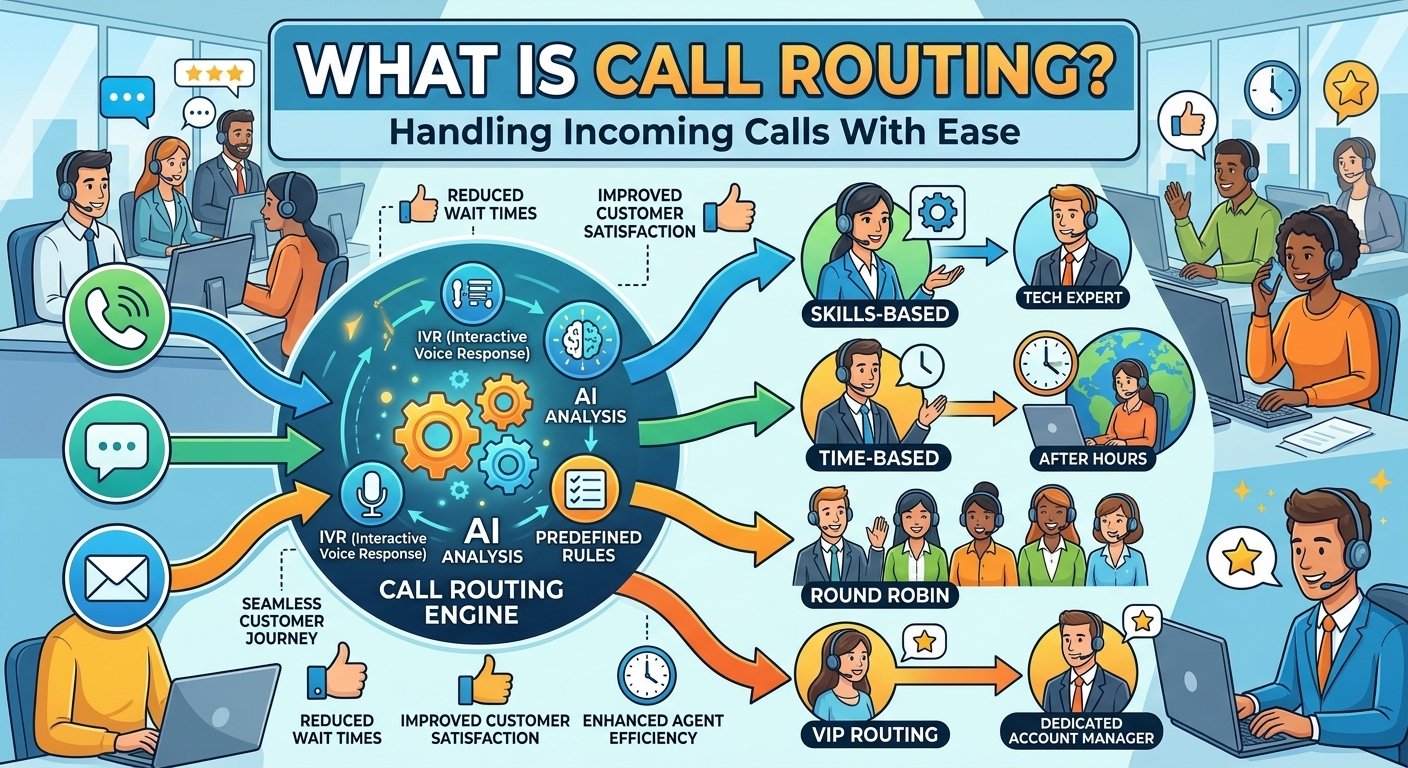
What is Call Routing? Handling Incoming Calls With Ease

Call routing, vital communication solution, determines the direction of incoming business interactions, effortlessly transferring callers to particular departments. A perfect call center routing system will keep frustration at bay, avoid unnecessary transfers, and significantly reduce wait times. Once the proper phone routing software is in place, operations are very efficient. This cloud telephony call routing technology is used by businesses of all sizes to optimize their support channels. In this guide, we’ll uncover how a well-planned telephone routing system can revolutionize your business and boost customer satisfaction with ease. What Is Call Routing? In the context of call routing meaning, it is a more advanced telephone management function that routes incoming calls to a queue and distributes them according to a set of rules. Automatic call routing is a call path that is seamlessly directed by programmed logic, Interactive Voice Response, or auto-attendants instead of a manual receptionist. The main goal is to match the client with the most qualified person as quickly and painlessly as possible. Call routing for small business setups is particularly important for customer support, as it helps ensure that customers are routed to the right agent who can provide them with the necessary support. If they don’t have strong call routing systems in place, businesses can face high call abandonment rates and a loss of consumer confidence. By grasping what is call routing, executives can optimize workflows, making sure that each call is handled with professionalism and competence from the outset. Benefits of Call Routing For any growing business, a modern business call routing framework is essential to stay competitive. Companies with the best telephone call routing enjoy tremendous improvements in their operations. Benefits for Contact Centers By using a call routing platform, you can reduce administrative hurdles and improve efficiency overall. Virtual call routing brings about significant improvements to a contact center in a number of operational areas: Drastically reduced telecom pricing by minimizing hold times and freeing up digital lines. Improved analytics tracking for predictive call volume management and resource allocation. Enhanced first-contact resolution rates, which ultimately curbs customer churn and builds loyalty. According to SQM Group’s research, for each 1% improvement in first call resolution rate, the operating costs for your contact center reduce by 1%, and customer satisfaction simultaneously increases by 1%. This proves that optimizing incoming call routing is a direct pathway to operational profitability. Benefits for call center agents A good call center call routing protocol will actively help to avoid employee burnout by seamlessly managing workload. A dependable phone routing system distributes tasks efficiently, granting agents the following indispensable perks: Fair and uniform dispersion of routed calls across all available personnel. Automated collection of caller data before the conversation even begins, aiding in preparation. More relaxed interactions since callers are not irritated by prolonged delays. Benefits for customers An intelligent call routing mechanism means a better and memorable consumer experience. A seamless support journey for shoppers and clients is achieved via: Immediate connection to specialized agents trained for specific types of calls. Accelerated access to vital self-service information like store hours or account balances. Significantly lowered wait times and fewer frustrating repeat inquiries. How Does Call Routing Work? Behind the scenes, an efficient inbound call routing structure works to manage telecom traffic. The online call routing infrastructure intercepts the signal when a client initiates contact, presents an auto-attendant menu and immediately evaluates the situation to make an immediate routing decision. This real-time processing ensures that there is no delay and the caller is always engaged. Call routing decisions made by the software can be based on time of day, caller ID routing information, and relationship information stored in your database. Advanced call routing integrations use artificial intelligence to match callers with employees based on past interactions, making sure that the telephone routing system always makes the most logical match. Different Types of Call Routing By utilizing effective call center routing strategies, you can provide a better user experience each and every time. These are the most common approaches to effective calls routing. 1) List-based routing This approach, also known as sequential routing, prioritizes a list of routes to process phone calls. When the first person is busy, the software will ring the second person, and so on down the line until the agent is available. This particular telephone routing configuration is very useful when managers wish to have experienced experts to deal with the majority of the inquiries. The call routing service maintains a high level of quality control by maintaining trainees as backups only. 2) Round robin routing A round robin phone system is an equitable distribution model for large collaborative teams. A round robin call routing system provides equal distribution of daily work to everyone in the queue. Agent A handles the first interaction, agent B handles the second interaction, etc. This phone call routing software is a favorite among many growing organizations as it proactively prevents workload imbalances and staff resentment. 3) Least occupied (or most idle) routing This is an active call routing solution that monitors analytics to see who has been waiting the longest for an assignment. It forwards incoming communications to the representative who has the lowest talk time or longest idle time. With this kind of live call routing, supervisors can distribute their workforce evenly among all internal departments. It is proactive in protecting support teams from burnout by distributing time evenly. 4) Time-based routing Time-based telephone routing is based on geographical time zones and business hours. This setup is often used by organizations that have clients around the world, allowing them to offer support around the clock without having to keep a night shift. In the event of local offices being closed, the voip call routing mechanism easily switches consumers to overseas partners or on call representatives. This ensures uninterrupted service, demonstrating the best of flexible call routing systems. 5) Skills-based routing Skills-based routing routes a caller to the representative who has the exact knowledge they need to solve their specific problem. A phone routing service uses IVR inputs to gauge the necessary expertise level before making a transfer. For example, if it’s a billing issue, you need a finance expert, not a technical support engineer. This personalized call routing method can save a lot of time and effort by avoiding unnecessary internal transfers. 6) AI-assisted routing This advanced call center routing is also known as predictive behavior routing and uses machine learning algorithms. AI studies past behaviors and identifies the most suitable match between consumer and agent to ensure a very positive interaction. According to a recent report by IDC, global telecom service provider investments in AI-powered routing will total $1.375 trillion in 2025. This signifies a major industry shift towards automated proficiency and intelligent call routing. 7) Relationship/VIP routing Sometimes, high-tier customers require immediate and specialized attention in order to keep lucrative contracts. With VIP routing calls logic, you can label high-value customers in your CRM and route them straight to support without having to wait on hold. This smart phone routing puts key contacts in touch with their assigned account managers. In the event that that manager is not available, the phone routing systems arrange a quick callback, making VIPs feel extremely valued. So, what’s the best call routing strategy? If you frequently ask, “provide me with routing best practices for growing businesses,” the ultimate answer is a hybrid approach. The most robust call center routing system is one that combines multiple routing methods at once to fill in any gaps in the system. Consider implementing a skill-based auto-attendant to route the inquiry to the appropriate category, then a least-occupied approach within that category. Comprehensive phone routing systems, when layered, ensure optimal efficiency and maximum consumer satisfaction. Deeper Dive Into How Call Routing Works Incoming call routing is a systematic process with multiple stages to ensure accuracy. Let’s dive into how a sip call routing framework handles these critical steps from beginning to end. Step 1: Call qualifying In the first qualification phase, callers are placed in the telecommunications network, and the provider intercepts the analog or digital signal. The software automatically tries to find the person from caller ID databases and CRM systems. The business call routing protocol does the following to determine the exact nature of the inquiry: The software captures the phone number routing data. The system references CRM records for past interaction history. The platform applies basic analytical logic to segment the user. Step 2: Call queuing After qualifying, the user is placed in a particular holding pattern called a queue, waiting for the next available representative. The telephone routing system puts the person in a line that is categorized, whether it is sales, billing or technical support. The automatic call distributor actively checks the availability of agents in this departmental queue by doing the following: Callers listen to customized holding music or promotional messages. The system calculates and announces estimated wait times. The platform prepares to dispatch the connection based on queue priority. Step 3: Call distribution The last step is distribution, where the phone call routing software finally routes the individual to a live representative. The software follows pre-set guidelines to complete the technical connection seamlessly. When all lines are busy above a reasonable threshold, the routecall protocol activates other actions to maintain the customer experience: The system connects the call path to an open agent. If unavailable, it offers a convenient queue callback option. As a last resort, it directs the individual to a digital voicemail box. Read More: 0843 Numbers: Meaning, Cost & Benefits in 2026 Final thought In conclusion, understanding the complexities of contemporary telephony solutions is crucial for success in today’s competitive landscape. You ensure your teams are optimized to handle inbound interactions, ensuring your support is stellar and your operational excellence is uninterrupted. Always make sure to optimize your settings to meet the changing demands of your customers. FAQs What is routing with an example? In telecommunications, routing is the process of directing a connection through a network to its final destination. An example is when a customer dials a support hotline, inputs a digit for billing, and the system automatically forwards them to the finance department. What is audio call routing? Audio routing refers to the specific management and direction of voice-based signals within a communication network. It ensures that vocal interactions are sent to the correct headset, extension, or digital mailbox without dropping the fragile connection. What is IVR call routing? Interactive Voice Response routing relies on spoken commands or keypad inputs from the caller to determine their intended destination. The software analyzes these prompt responses to accurately forward the individual to the most appropriate representative or self-service menu. How do I route calls to another phone? To forward communications, you access your VoIP provider’s dashboard or mobile settings and input the desired destination number. Once activated, any incoming interaction is seamlessly redirected to the newly designated device, ensuring you never miss a vital inquiry. Does a small business need a routing system? Yes, implementing a dedicated call routing platform is vital for maintaining a credible, professional corporate image. It prevents callers from experiencing endless ringing, organizes departmental inquiries logically, and scales effortlessly as the enterprise expands. What is predictive behavior routing? This is an advanced call routing solution utilizing artificial intelligence and machine learning to analyze historical customer profiles. The algorithm attempts to match the caller with a specific agent whose personality and track record suggest a highly successful resolution. How does skill-based distribution differ from round robin? Skill-based distribution prioritizes the agent’s distinct expertise over their current availability, ensuring complex problems reach qualified technicians. In contrast, round robin focuses purely on equal task distribution, sending tasks sequentially regardless of the specific topic. Can call routing reduce business operational costs? Absolutely, because an optimized setup noticeably lowers average handle times and boosts first-contact resolution rates. By minimizing the time clients spend navigating menus and talking to the wrong departments, companies drastically reduce their monthly telecommunication expenses. What happens if all agents are busy during a routed call? When all staff members are completely occupied, the software typically places the individual in a categorized queue with holding music. If the wait exceeds a defined time limit, the platform can offer an automated callback option or redirect them to an answering service.

Read More
iva vs ivr

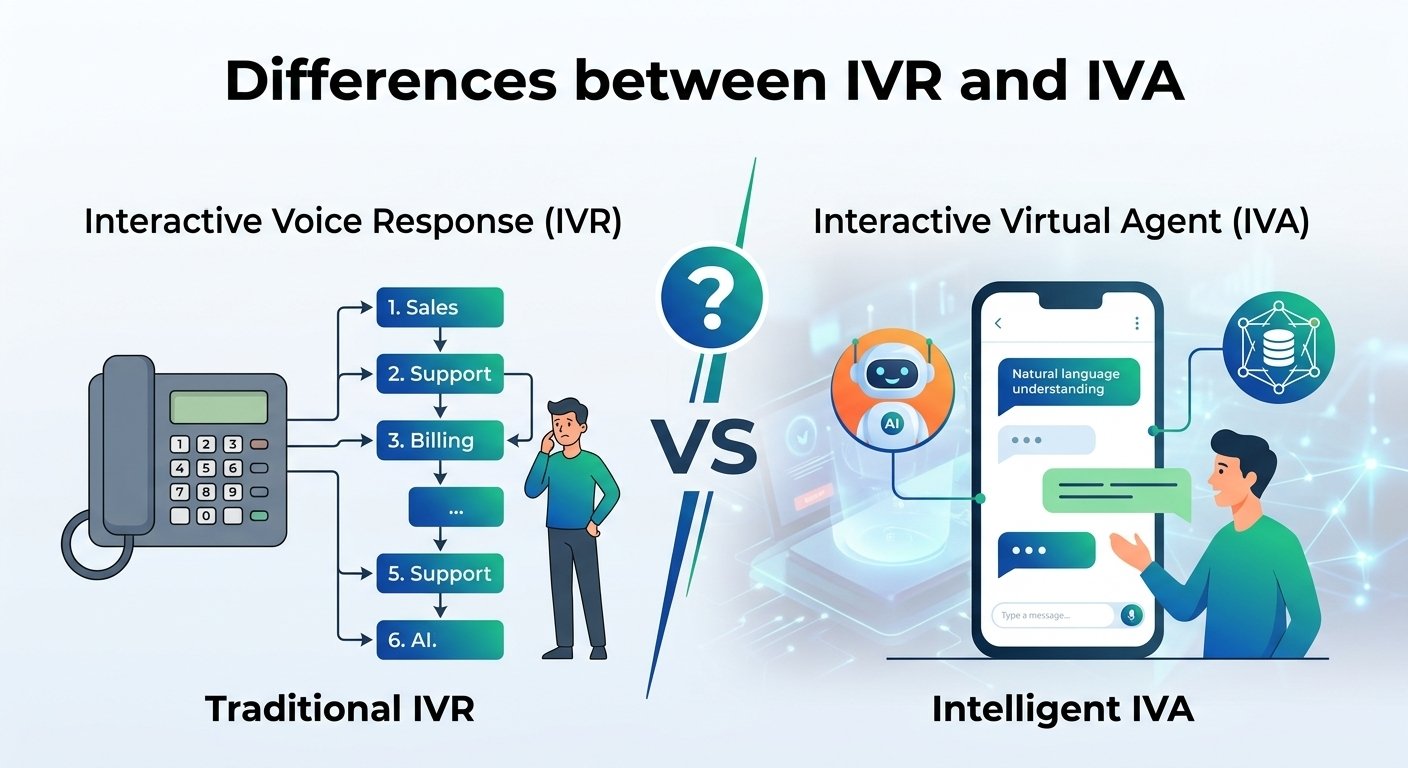
IVA vs IVR: What’s the Difference?

Interactive Voice Response (IVR) directs incoming interactions based on keypad choices, while an Intelligent Virtual Agent (IVA) uses artificial intelligence to enable true conversational experiences. The specific technology that best fits your operational needs will largely depend on the volume of interactions you have daily, your budget, and your expectations for user experience. By knowing the iva vs ivr, organizations can choose the best customer service automation solution for their needs without overspending. This complete guide dissects these two leading systems and provides you with practical tips to help you put the best support system in place for your business. What Is Interactive Voice Response? Interactive Voice Response is an automated communication system that enables callers to interact with a phone menu using either dual-tone multi-frequency keypad inputs or simple speech commands. The main use of this technology is to automate appointment scheduling, bill payments, and department routing, significantly reducing the administrative burden on human employees. The platform ensures that consumers are directed to the right place at the right time by analysing incoming selections properly. This standardized framework revolutionizes the way inbound communications are handled in technical support environments, leading to increased efficiency and smoother day-to-day operations. Key features of IVR The basic skill of this routing technology is to understand the customer’s needs as soon as they are connected and send them on their way. Callers use static menus to choose specific digits that represent different departments, enabling organizations to have organized communication channels. Having pre-programmed keypad options that allow consumers to access sales, technical support or billing departments without the need for a human receptionist. Letting consumers say why they are calling, without having to navigate through a numerical menu. Providing pre-recorded information about business hours and basic account information to alleviate pressure on live support staff. The advantages of IVR In environments with a lot of inbound traffic, deploying standard routing technology is very cost effective as consumers are able to navigate to the appropriate resources very quickly. Basic queries are resolved without human involvement, which significantly reduces metrics such as average handle time and abandonment rates. Moreover, this system is a great tool for after hours and not to leave unhelpful voicemails. This reduces the time that live representatives have to spend manually moving people and allows them to focus more on effectively addressing complex technical issues. The limitations of IVR Rigid technological frameworks are strictly predefined and have a lot of friction if the consumer needs some help outside the menu options. The timing and frequency of prompts is critical, and if not designed well, can lead to overwhelming user dissatisfaction. Another major disadvantage is that it lacks the ability to understand intent and nuanced questions, which leads to unnecessary handoffs between departments. Organizations usually start looking into an iva system as a powerful alternative when standard menus don’t capture the intricacies of complex conversational context. What Is an Intelligent Virtual Agent? An Intelligent Virtual Agent is a sophisticated software solution that uses AI to facilitate seamless and authentic conversations with customers. This advanced digital assistant combines natural language processing with voice biometrics, enabling it to accurately understand human speech and respond dynamically. This contact center iva solution is not just about offering hard-coded numerical options; it’s about handling complex requests efficiently and continuously learning from interactions. Staff then move on to higher value activities, which increases the productivity of the workplace and reduces operational burnout. Key features of IVA The backbone of all these smart virtual assistants can do for modern enterprises is their advanced natural language processing capabilities. The software can fully analyze dialogues, identify speech patterns, understand the context of the dialogue, and provide appropriate responses according to the sentiment analysis results. Seamless integration with external customer relationship management databases to deliver highly personalized support based on real-time account information. Implementing omnichannel capabilities on chat, email, and voice channels to ensure consistent support experiences around the world. Dynamically searching internal knowledge bases to provide consumers with accurate contextual information instead of closed yes/no answers. The advantages of IVA By introducing conversational AI to consumers, companies ensure a high-quality personalized experience that goes beyond simple communication routing. These powerful digital assistants work around the clock, without needing to take breaks, which means there are no hold queues and consumer satisfaction metrics are significantly improved. A 2026 research report by Gartner found that conversational AI in enterprise settings can save agents a lot of time and money, and increase operational efficiency by up to 30%. By keeping historical interaction data, you have a continuous stream of training data, which means that the machine learning algorithms continuously improve future performance. The limitations of IVA Highly developed technological systems require significant capital expenditure, intensive start-up setup and ongoing expert maintenance to operate optimally. Before full deployment, organizations need to have absolute trust that their automated frontline support will act exactly as, or better than, a human representative. Without proper monitoring, platforms can fall victim to serious security threats and potentially provide users with inaccurate information, leading to frustration. If there are no regular reviews to monitor negative sentiment and specific keywords, the whole implementation can have a serious impact on brand reputation. Differences between IVR and IVA When it comes to iva vs ivr, artificial intelligence has more capabilities, but sometimes, it may be too much to deploy. Each enterprise has its own unique demographic characteristics and it is important to understand the operational priorities before undertaking a total overhaul of existing telecommunication infrastructures. The choice of the best framework is largely dependent on the balance between the costs of deployment and the long-term automation goals. Knowing these differences allows leadership teams to maximize service efficiency while staying within budget. Interactive Voice Response (IVR) Interactive Virtual Agent (IVA) Menu-driven Conversational Limited options Wide-range of responses Dependent on agent availability Virtual agents available 24/7 Can’t request same agent as previous call Virtual agents retain interaction history Replicates existing call flows Requirements gathering and customer research Set and forget Launch and monitor Optimize for popular options Examine accuracy and helpfulness Instant changes when needed Major updates need planning 1. User experience When users come to any support portal, they are expecting a super smooth and seamless experience that is exactly what they need at the moment. Standard predefined audio prompts lead people through simple activities in a methodical way, with highly structured but sometimes rigid interactions. On the other hand, AI enables a very conversational approach, allowing people to describe their issues in a natural way and not having to go through a complicated keypad tree. This sophisticated method significantly speeds up the resolution of complex issues, creating a much better brand impression. 2. Flexibility When you’re doing a traditional ivr iva comparison, you’ll see that a rigid menu offers absolute certainty when it comes to destination routing, and that’s ideal for simpler organizational structures. Standardized configurations are still much simpler to update locally, without the need for extensive linguistic training modules. Today’s iva telephony systems are very good at adapting to context; they can anticipate what the consumer needs based on past behaviors. Although more difficult to manage at first, this huge flexibility guarantees high accuracy resolutions on various communication channels at once. 3. Implementation and maintenance The inbound routing configuration is still very simple and cheap, as the logical paths are still very linear and predictable. Administrators just give certain keypad numbers to certain departments, and they don’t really consider the emotional context or nuances of conversations. To understand the need for the rigorous initial investment required for training the linguistic algorithm, it is necessary to analyze an extensive iva case study. Nevertheless, the Harvard Business Review notes that the long-term financial value of continuous machine learning integration is extraordinary, as it can autonomously answer more and more complex questions. How Do Businesses Use IVR and IVA? 1. Large enterprises Basic routing is used extensively by multinational companies for large-scale queries such as checking account balances, order statuses, and secure payments. These large-scale systems can be made to function efficiently with voice recognition enhancements, which will not be swamped by a large volume of inbound traffic. At the same time, an iva contact center solution can help large businesses with highly customized solutions to complex technical helpdesk situations. These advanced integrations actively troubleshoot complex software issues with consumers, making a huge impact on enterprise profitability and operational bottlenecks. 2. Medium-sized businesses Standard routing is often used in growing companies to manage moderate volumes of traffic without any problems, particularly if the majority of the questions are repetitive and appear in the daily communication log. By funneling many customer questions to automated messages, you free up precious human resources to address much more complex customer issues. As the goal becomes to deliver high-end brand experiences, an iva call center solution offers an invaluable digital frontline asset. These intelligent digital agents integrate effortlessly with in-house ticketing systems and resolve hardware connectivity issues automatically, without involving human agents. 3. Small businesses In most cases, running an informal support environment is too costly and too much work for smaller teams to deploy complex artificial intelligence. Traditional cloud services can handle simple day-to-day tasks without the need for specialized cloud administration expertise or high monthly licensing fees. While a sophisticated iva phone system may sound like a great idea when staffing is low, the time it takes to configure the system can make it difficult to see a return on investment. The same routing mechanisms provide the same practical value for localized operations, but without complicated machine learning maintenance cycles. Setting Up a Call Flow or Auto Attendant for SMBs Call flows Configurable directory trees direct callers to specific departments, depending on the specific skill needed and the hours of operation. These streamlined mechanisms ensure that interactions are delivered to the right people at the right time, without the need for complex AI systems. Overflow parameters are easily set up by administrators, and should primary representatives be busy, the system seamlessly routes people to secondary available resources. These are not conversational programs, but rather one-way programs that are strictly controlled by the technology and the consumer chooses the exact path to follow. Auto attendant Acting as a completely digital receptionist, this specialized technology greets incoming traffic professionally using highly polished pre-recorded audio messages. When the professionals are busy, they know that each and every interaction is answered promptly and courteously, no matter how chaotic the workplace is. This is a very cost effective approach that improves first call resolution and gives the impression of a much larger corporate entity. The administrative changes can be made quickly without much technical knowledge, which is an excellent alternative to setting up complicated iva ors parameters. When to consider a call flow or auto attendant These are the fundamental routing mechanisms that should be strongly considered by organizations that want to improve the reliability of communication without investing in large capital projects, rather than advanced conversational tools. These practical solutions are effective in traffic management and are successful in catering for consumers who are totally unwilling to use speech-based navigation. Read More: What is PRI? Guide about Primary Rate Interface Choosing the Solution Right for Your Business To make the final decision between iva vs ivr, you need to take into account the size of your organization, budget constraints, and the desired level of support. Basic routing mechanisms handle large volumes of traffic efficiently, and intelligent virtual agents offer the sophistication needed for highly personalized and autonomous resolutions. The right technology can enable your employees to be very productive and effectively close any service gaps you may have securely. Focus on user experience and strong data security measures to ensure that your selected infrastructure enhances the entire consumer experience seamlessly. FAQs How do I choose between iva vs ivr for my company? Selecting the correct infrastructure depends entirely upon your daily interaction volume, budget limitations, and necessity for complex conversational personalization. What does IVA stand for in call centers? It stands for Intelligent Virtual Agent, which represents an advanced artificial intelligence software application designed to handle complex consumer dialogues autonomously. What is IVR and IVP? Interactive Voice Response handles keypad-based departmental routing, whereas IVP typically refers to Interactive Voice Processing, encompassing broader automated audio functionalities. What does IVA stand for in the context of IVR? Within telecommunications, it signifies an Intelligent Virtual Agent acting as a highly sophisticated, conversational upgrade to traditional rigid keypad menus. What is IVR used for? Organizations utilize this technology to automatically sort incoming traffic, schedule basic appointments, and securely process standardized billing transactions without human intervention. Which iva solutions perform best for limited financial resources? Smaller enterprises should avoid expensive artificial intelligence entirely and instead deploy foundational auto attendants to project professionalism without breaking budgets. Does modern iva ai replace human representatives completely? No, these digital assistants merely handle repetitive, mundane inquiries autonomously, thereby allowing human personnel to dedicate their expertise toward complicated emotional escalations. Are sophisticated iva integrations necessary for basic routing? Connecting external databases remains entirely unnecessary if your sole objective involves transferring individuals to designated extensions utilizing standard numerical keypad presses.

Read More
omnichannel vs multichannel contact center (1)

Omnichannel vs Multichannel Contact Center

The decision between an omnichannel vs multichannel contact center hinges on your business objectives. A traditional setup offers different communication channels such as email and social media, but they are all in their own silos. On the other hand, an integrated strategy brings together all these touchpoints in a single system, which guarantees a seamless buyer journey. Today’s customers demand quick, seamless communication and don’t want to restate their problems. Hence, it is important to be aware of these architectural differences for long-term operational efficiency. This detailed guide covers the world of multi channel customer support, and how to choose the best system to boost brand loyalty and permanently remove communication barriers. What Is an Omnichannel Contact Center? An integrated platform is a modern customer engagement hub that brings together all communication touchpoints. This sophisticated architecture enables businesses to provide hyper-personalized experiences, no matter how buyers engage with the brand. Cloud-based technology allows support teams to have full visibility into past data and behavior. This single view significantly boosts agent productivity and strengthens an airtight omnichannel vs multichannel contact center approach. The main advantage is the ability to make a seamless, connected experience where people feel seen as soon as they arrive. Agents can predict needs in advance, as they have a 360-degree view of past interactions. Another big plus is the capacity to quickly adjust to new communication trends such as in-app messaging and SMS. An omni channel contact center solution ensures your business is available wherever your audience is. What Is a Multichannel Contact Center? A traditional hub is a place where an organization can interact with the audience via various channels like phone, email, and live chat. But this model is a standalone one, where there is no cross-platform integration. Agents in this context handle inquiries effectively, but they don’t have access to the conversations that occur on other platforms. In fact, when you dig into the details of an omnichannel vs multichannel contact center, you’ll find that this legacy system is all about volume, not continuity. This configuration is still very affordable and is a good choice for startups setting up their first support infrastructure. The first configuration is much quicker than complex, highly integrated cloud deployments. Moreover, platforms can be isolated so that teams can concentrate on particular metrics, such as email response time. This ease of use allows smaller teams to efficiently handle their multi channel customer service without the need for extensive technical training. Differences Between Omnichannel & Multichannel Contact Center The difference between an omnichannel vs multichannel contact center is all about the user experience and data integration. One is about the whole ecosystem, the other is about being on multiple platforms. For a detailed comparison of these important differences, check out the detailed comparison table below. By knowing the difference between omni channel and multichannel architectures, you will be able to make future technological investments. Feature Omnichannel Multichannel Integration Fully integrated systems across all channels Silos between different channels Context Complete customer history and journey data across channels Limited cross-channel customer data Experience Consistent experience across channels Can feel disjointed across channels Customer Focus Customer-obsessed, focused on service excellence More operational focus on delivering service Personalization Hyper-personalized service based on customer data/journey Less capacity for personalization Channels Phone, email, chat, SMS, social media, etc. Typically focuses on traditional channels Technology Sophisticated, cloud-based, real-time omnichannel routing Basic call routing, legacy on-premise systems Cost Higher investment but drives long-term value Lower upfront costs but less futureproof Metrics 360-degree customer relationship metrics Channel-specific metrics only Best For Customer-centric teams focused on superior CX Budget-conscious teams with volume focus Advantages of an Omnichannel Call Center A fully-synchronized contact center changes the way that organizations deal with everyday consumer requests. The advantages below explain why modern businesses quickly embrace these advanced customer support solutions. 1. Consistent messaging Salesforce’s 2023 State of the Connected Customer report reveals that 79% of customers expect consistency across departments. Customers are aware that they will get the same great service from a phone agent as they would from a live chat portal. This reliability in your omnichannel call center builds a strong level of trust and enhances your brand’s reputation in a very competitive market. 2. Increased retention and loyalty The 2024 The Omnichannel Difference report by Forrester and Emarsys discovered that 35% of businesses noted enhanced client retention through integrated support systems. In total, 46% of organisations said they had seen an increase in lifetime value with a synchronised omnichannel contact centre compared to a multichannel contact centre. When buyers’ support experiences are connected and seamless across all channels, it becomes much easier to retain them. 3. Unified data analysis Information is passed on smoothly as people move from one support person to another and supervisors can predict behaviour accurately. This comprehensive perspective enables businesses to optimize their live chat capabilities assessment efficiently, using omnichannel contact center metrics. The ability to see a caller’s journey allows leaders to identify unique trends and optimize the entire operational process for good. 4. Improving the customer experience The ultimate goal is to remove friction from the buyer’s journey with an integrated contact center platform. With the addition of tools such as CRM software, all the important caller information is available to all individual support agents at once. When people reach out to the help desk, they only describe their problem once, and that’s how omnichannel software really works to break down sales channel silos. Challenges of an Omnichannel Call Center Although the advantages are many, there are organizational challenges to consider when moving to an interconnected call center. Before embarking on this technological transformation, leaders need to carefully assess their internal support capacity. 1. Cost and resources A full-fledged omnichannel contact center vs multichannel contact center will cost a lot of money for communication software. Businesses need to invest in their current technology and acquire advanced cloud-based routing solutions for their agents. Furthermore, companies need to invest significant time in training their staff to use these sophisticated systems to avoid any short-term loss of productivity. 2. Managing omnichannel data According to a 2024 Forrester report commissioned by Acoustic, 84% of respondents said tracking engagement was critical, but only 68% did. Call center supervisors are often overwhelmed with the sheer volume of behavioral data they collect, and don’t know how to use it to make meaningful decisions. To address this particular challenge, experts suggest using complete cleaning tools that can extract actionable intelligence from the huge support data stream. Advantages of a Multichannel Call Center Although it is not deeply integrated, this traditional contact center model has a lot of benefits for certain business models. Let’s find out why so many businesses are still using these stand-alone communication centres for their day-to-day needs. 1. Each channel operates independently Separate platforms provide full autonomy for different departments to have their own support strategies without the need for a lot of coordination. This multi channel contact center configuration enables quick decision making in separate customer care teams. Managers can adjust their local operational strategies on the fly without fear of affecting the entire corporate communications system. 2. Each channel can adapt Some groups like to use certain platforms, which allows for specific adaptations that are unique to that communication medium. A brand can use the youthful trends on social media and still have professional multichannel customer service through traditional phone lines. By adjusting the tone, you can maximize engagement in that singular support setting, without the agent’s responses sounding too robotic. 3. Data specificity Information isolation enables supervisors to make very specific improvements based on the strengths of an individual support platform. Multi channel call centre metrics such as average email handle time can be analysed by teams, and are only related to the performance of the single platform. This granular focus enables analysts to identify which particular network is providing the best resolution rate during quarterly reviews. 4. Lower barrier to entry Stand-alone support platforms are still very cost-effective when compared to fully interconnected call center networks. This multichannel support approach is commonly used by startups to quickly get a customer service team up and running. You can help buyers without the huge resources of an omnichannel vs multichannel contact center infrastructure. Challenges of a Multichannel Call Center In general, the main disadvantages of this configuration are when considering the overall user experience versus an integrated support center. When customer service platforms don’t talk to each other, there are bound to be friction points. 1. Customer support roadblocks Departments work in isolation, which means that consumers may have to re-enter account information when they switch from live chat to a phone agent. This multi-channel customer experience often causes high levels of frustration and reduced brand loyalty. When an agent receives an email inquiry, he has no idea what the buyer was talking about yesterday on the phone, and that’s a huge problem. 2. Inconsistent messaging When independent call center queues are in operation, it can lead to conflicting information being passed on to the consumer base, which can erode trust over time. If agents are giving different answers to the same issues, then there is a risk of brand confusion with a fragmented multi channel customer support system. Consistency builds familiarity, and if you’re not consistent, buyers may doubt the reliability and competence of your entire support organization. 3. Data is not comprehensive Evaluating isolated ticket statistics means call center leaders completely miss the holistic overview of buyer behavior. Without interconnected analytics, there is no way to gain a deep understanding of the effectiveness of the multichannel contact center solutions as a whole. In the absence of a single view, forecasting future support volume trends is extremely challenging and requires relying on disjointed operational insights. Choosing Between Omnichannel and Multichannel Call Centers Each organization has its own specific operational needs, budget, and audience. You need to thoroughly assess your internal capabilities before choosing between omnichannel and multichannel contact center software. When deciding on your facility layout, take into account the following key considerations: Assess your exact business model: Are you strictly an e-commerce brand or managing physical retail locations requiring synchronized digital support? Evaluate your technical resources: Do you possess the massive budget required to deploy an omni channel contact center solution successfully? Review your managerial capacity: Can your leadership team effectively synchronize multiple support departments into one cohesive unit? For brands that are looking to just get tickets and are budget-conscious, a traditional call center is great. But for businesses that are committed to building high-quality, lasting customer relationships, an integrated facility is still a must. Read More: Tree Phone: How to Design and Use One Effectively Final words Understanding your operational support capabilities is crucial when navigating the complexities of digital communication. The right omnichannel vs multichannel contact center architecture determines whether your agents will be able to keep your audience or not. Isolated call centers may provide low-cost access, but interconnected support facilities virtually ensure higher lifetime value and unparalleled satisfaction. In the end, a single technological ecosystem investment will help your support team stay competitive, resilient, and completely irreplaceable to your modern consumer base. FAQs What is the best choice for an omnichannel vs multichannel contact center? The best choice strictly depends on your financial budget and customer experience goals. Integrated systems provide a flawless, personalized journey, while isolated networks offer a cheaper, faster setup for smaller support teams. How do integrated platforms improve agent productivity? Integrated systems consolidate all historical data and previous interactions into a single, unified dashboard. This eliminates the need for agents to toggle between multiple applications, allowing them to resolve issues much faster. Is a traditional communication hub cheaper to implement? Yes, legacy systems require significantly less upfront financial investment. Companies can launch isolated email and phone support quickly without purchasing expensive, fully synchronized cloud-routing software. Can small businesses benefit from interconnected contact hubs? Absolutely, small businesses can utilize scalable cloud software to synchronize their minimal platforms. Doing so early prevents future data silos and establishes a strong foundation for rapid, organized business expansion. Why do consumers prefer integrated communication environments? Consumers deeply despise repeating their account information to different representatives. Integrated environments ensure their previous interactions are instantly visible, making the resolution process completely frictionless and highly personalized. Do isolated networks cause brand messaging inconsistencies? Yes, because each department operates independently, they often push conflicting promotional materials. This lack of centralized coordination frequently confuses the target audience and degrades overall brand authority. What specific metrics do integrated contact hubs track? These advanced hubs track comprehensive relationship metrics, cross-platform behavioral trends, and overall lifetime value. This provides a holistic narrative rather than isolated, channel-specific statistics like basic response times. How difficult is migrating from an isolated to a synchronized system? Migration requires careful planning, significant financial investment, and extensive employee training. However, utilizing modern, adaptable software makes bridging the gap between an omnichannel vs multichannel contact center highly achievable.

Read More
Benefits of Using Call Center Recording Software

Best Call Recording Software for Call Center in 2026

The right call recording software for call center operations can revolutionize customer interactions, compliance, and agent performance. This vital tool records audio and screen data, enabling managers to analyze conversations, pinpoint training needs, and settle disputes quickly. The best platforms will have powerful AI transcription, easy integration with systems, and secure cloud storage. Advanced call recording solutions help businesses meet industry standards and enhance the quality of their services. For small support teams or large enterprise networks, choosing the right system is essential for maintaining competitive edge and providing outstanding customer support. What Is Call Center Recording Software? Call center recording software is a specialized digital tool that is used to record, store, and analyze customer interactions across different communication channels. These powerful platforms capture audio conversations and screen activity in a secure manner, creating an indelible record of each client interaction. The modern voice recording system for call center is based on cutting-edge artificial intelligence technology, which can transcribe voice data, analyze emotional sentiment, and automatically identify conversations that need to be reviewed by management. These dynamic call recording platforms are essential for organizations to keep a detailed record of all their daily communications for future strategic analysis. Assessing the most suitable call recording software for call center use guarantees that teams can easily access past recordings to handle intricate conflicts. Furthermore, these insights enable administrators to pinpoint common operational challenges, enhance standard operating procedures, and continually improve the consumer experience. Benefits of Using Call Center Recording Software 1. Legal compliance In highly regulated areas, it is essential to have a strong financial voice call logging solution that can safeguard sensitive consumer data. A detailed 2025 compliance study by Forbes found that companies without adequate audio documentation can expect to be fined an average of $4 million per year for compliance violations. By using the best call recording software for call center compliance, businesses can ensure that they automatically comply with strict regulations such as HIPAA, PCI-DSS, and GDPR. 2. Quality monitoring and coaching Assessing agent interactions is still an important part of effective workforce optimization and ongoing professional development. With optimize call recording techniques, managers can pinpoint key moments in the conversation to show good communication practices or identify areas for improvement. This focused strategy translates performance ideas into real-world learning experiences, leading to improved conversion rates and better client satisfaction scores. 3. Improved customer experience and problem resolution Having easy access to conversation archives significantly speeds up dispute resolution and removes the need for tedious misunderstandings. In the event of a conflict, the ability to retrieve the precise business phone recording systems data gives clear and indisputable evidence, helping supervisors to defuse escalating conflicts in a timely manner. This means that clients can benefit from quicker remediation of issues, leading to stronger brand loyalty and positive long-term commercial relationships. What Features to Look for in Call Center Recording Tools Cloud or on-premises infrastructure means the difference between limitless scalability and direct physical control of your proprietary hardware. Real-time and post-call analytics enable supervisors to step in during live escalations, and also provide actionable insights for long-term strategic planning. AI-driven searchable transcripts enable administrators to quickly find key words, analyze caller sentiment and gain insights into overall behavioral trends. Highly sensitive consumer data is protected by secure storage with military-grade encryption and meets strict international compliance standards, while also being protected against malicious cyber threats. Seamless integration with customer relationship management (CRM) platforms allows agents to have a complete and highly contextualized view of the entire buyer journey. Automated capturing mechanisms ensure that no interaction is missed, while manual controls offer the privacy required for certain sensitive conversations. 10 Best Call Center Recording Software Platforms Tool Best for Key features Starting price for call recording Call recording type Nextiva All-in-one business communication VoIP, CRM, analytics, call recording $25/user/month Automatic/on-demand NiCE CXone Enterprise contact centers Workforce optimization, analytics, automation $94/month Automatic (full-time, percentage-based, event-driven) Five9 Cloud contact centers Omnichannel support, predictive dialer, AI $119/month Automatic/on-demand Aircall Sales and support teams Power dialer, CRM integration, call coaching $30/user/month (3-user minimum) Automatic Talkdesk Customer-centric companies AI-powered features, customer journey mapping $105/user/month Automatic/on-demand Rev.ai Developers and enterprises Speech-to-text APIs, real-time transcription Pay-as-you-go Automatic Vonage Businesses of all sizes Unified communications, APIs, contact center $27.99/line/month On-demand call recording (15 hours per month) JustCall Remote teams SMS automation, appointment scheduler, call tracking $89/user/month (2-user minimum) AI-powered and automatic RingCentral Small- to medium-sized businesses Team messaging, video conferencing, phone system $25/user/month Automatic/on-demand Zoom Contact Center Businesses using Zoom Video-first omnichannel, AI companion $69/user/month Ad-hoc and automatic recording 1) Nextiva Key recording features During each client interaction, both voice and screen capturing are enabled, capturing agent audio and desktop activity at the same time. AI transcription services produce full text transcriptions with distinct emojis that visually represent the sentiment of the speaker for each line in the transcription. Administrators can use configurable automation rules to ensure that all logging is enabled or to let individual agents turn logging on or off as necessary. Recording strengths Searchable transcripts, with high accuracy, enable management to quickly find key phrases and gain a broader understanding of the emotional tone of the entire organization. Flexible retention policies allow organizations to easily customize long-term storage parameters to ensure they are in strict compliance with complex industry retention policies. Granular role-based access protocols give system administrators absolute control over who can view, download or permanently delete archives. Pros An integrated communications platform eliminates much of the internal tech stack and saves on administration. The system is incredibly reliable, with industry-leading uptime metrics that ensure no critical data is lost during busy times. Advanced AI features such as sophisticated tone analysis are built in, not as an expensive third-party application add-on. Cons This complete package can sometimes be more expensive than simple, one-use tracking solutions. The large administrative dashboard is initially confusing to newer managers who are not used to advanced enterprise telecommunications configurations. Some of the more advanced analytical reporting options are only available with the highest-priced enterprise subscription level. Pricing Plan Starting price Key recording features included Core $15/user/month On-demand voice and video recording (Add-on) Engage $25/user/month Automatic voice and video recording Power Suite CX $75/user/month Advanced recording, AI transcription & tone analysis 2) NiCE CXone Key recording features NiCE Combined multimedia capturing captures clear voice audio and screen activity on the desktop in a single interaction file that can be easily reviewed. The proprietary Enlighten artificial intelligence suite automatically analyzes conversations recorded to ensure adherence to corporate performance and procedural standards. Proactive compliance flagging automatically detects and flags potential regulatory violations, enabling supervisors to take immediate action on key vulnerabilities. Recording strengths Unparalleled accuracy of deeply searchable transcriptions allows enterprise-scale contact center call recording software analytics and robust quality management. The enterprise-class retention architectures enable unlimited secure long-term archiving that is demanded by heavily regulated financial institutions around the world. Automated redaction tools permanently redact personally identifiable information, guaranteeing that stored files are completely compliant with data privacy laws. Pros The platform offers extraordinarily deep analytical insights that can turn raw conversational data into actionable strategic corporate initiatives. Designed for large enterprises that demand the highest level of compliance features and have extensive workforce optimization needs. Seamless integration with the broader gartner magic quadrant call recording ecosystem ensures unmatched operational scalability and technological longevity. Cons The cost of such an advanced infrastructure is much greater than the cost of the mid-market alternatives. The administrative interface is complex, and it takes a significant amount of dedicated training time for frontline representatives and supervisory staff to master it. The highly complex artificial intelligence scoring parameters require specialized technical skills to customize and ensure accurate performance evaluations. Pricing Plan Starting price Key recording features included CXone Mpower Voice Agent $94/month Voice recording and storage CXone Mpower Omnichannel Agent $110/month Voice and digital capture, storage, search, and playback CXone Mpower Essential Suite $135/month Screen recording for the agent desktop CXone Mpower Core Suite $169/month Advanced AI QM capabilities CXone Mpower Complete Suite $209/month AI-driven omnichannel analytics and Voice of the Customer capture CXone Mpower Ultimate Suite $249/month Full orchestration of human and AI agents 3) Five9 Key recording features Long captured conversations are automatically summarized by generative artificial intelligence engines into easily digestible summaries, removing the need for tedious manual documentation. Live assistance protocols are based on real-time analysis of the dialogue that is taking place, and provide on-screen coaching prompts in real-time to the representative’s dashboard. Advanced topic analysis precisely identifies evolving consumer attitudes and recurring topics throughout the entire communication database in history. Recording strengths The extensive transcription library allows for very specific keyword queries, phrase matching and advanced emotional sentiment score filtering. Administrators can customize retention frameworks to program exact deletion timelines, which are in sync with strict legal compliance obligations. Hierarchical access permissions allow for fine-grained control over user access to playback, export, and secure editing of sensitive audio files. Pros This system brings in extremely powerful automation capabilities that significantly cut down on repetitive post-call administrative tasks. The platform has very strong outbound campaign management features, which are perfect for more aggressive sales environments. Supervisors have access to extremely powerful visual dashboards that constantly monitor changing performance trends based on historical data logged. Cons Some users find the old admin interface is not as intuitive as newer, very streamlined competitor interfaces. For smaller organizations with very limited budgets, these advanced operational capabilities can be cost prohibitive. To fully utilise the real-time assistance tools, the initial configuration and system recalibration must be carried out with great care. Pricing Plan Starting price Key recording features included Core $159/seat/month Standard call and screen recording for all interactions. Plus Contact sales All core recording features, plus AI transcription and summarization. Pro Contact sales All core recording features, plus workforce management tools. Enterprise Contact sales All previous features + advanced analytics and real-time dashboards that use recording data + interaction Analytics for deep recording analysis, automated quality management, and sentiment analysis. 4) Aircall Key recording features Frictionless single-click logging mechanisms automatically append captured audio links directly to corresponding customer profiles within your centralized database. Live listening functionalities grant supervisors the ability to silently monitor active conversations and privately whisper constructive advice to representatives. Collaborative communication inboxes allow entire departments to easily access, review, and sequentially comment on shared training materials simultaneously. Recording strengths Premium subscription tiers unlock sophisticated transcription services and intelligent keyword spotting for vastly accelerated post-call analytical reviews. Default storage parameters retain critical files indefinitely, while granting administrators complete authority to permanently purge outdated records manually. Simplified user hierarchy configurations make assigning viewing permissions and system management responsibilities incredibly straightforward for technical novices. Pros The system executes exceptionally deep, flawless integrations with premier customer relationship management platforms like Salesforce and HubSpot. Frontline personnel consistently praise the highly intuitive user interface, which dramatically accelerates initial onboarding and daily operational adoption. The architecture heavily emphasizes collaborative coaching methodologies, transforming individual interactions into valuable departmental learning resources. Cons Entry-level subscription packages completely lack vital modern functionalities such as automated text transcription and advanced emotional analysis. Calculating expenses based on individual user licenses rapidly escalates overarching operational costs as departmental headcounts continuously expand. Procuring this specific service necessitates a mandatory three-user minimum commitment, potentially alienating solitary independent contractors. Pricing Plan Starting price Key recording features included Essentials $30/user/month Inbound/outbound call recording available up to 1 year (by request, 6 months available in Dashboard) Professional $50/user/month Unlimited inbound/outbound call recording (by request, 6 months available in Dashboard) Custom Contact sales Unlimited inbound/outbound call recording (by request, 6 months available in Dashboard) 5) Talkdesk Key recording features Continuous machine learning integration feeds generated transcripts directly into proprietary algorithms, vastly improving automated virtual assistant accuracy over time. Automated quality management protocols autonomously evaluate randomized conversation samples against highly specific, pre-configured corporate performance scorecards. Instantaneous transcription services project a live, scrolling textual record of the ongoing dialogue directly onto the representative’s active screen. Recording strengths Both live and historical transcriptions undergo rigorous algorithmic analysis, providing supervisors with incredibly deep, actionable behavioral insights continuously. Highly flexible storage policies incorporate military-grade encryption protocols, protecting sensitive information both at rest and during active transmission. Intelligent redaction mechanisms proactively identify and permanently obscure personally identifiable information housed within stored text and audio files. Pros Deploying this software introduces phenomenally powerful automated assistance tools that simultaneously empower human agents and facilitate consumer self-service. The navigational layout features a remarkably modern, aesthetically pleasing design that substantially minimizes daily operational friction and fatigue. Automated evaluative mechanisms salvage countless supervisory hours previously squandered on tedious, manual performance review methodologies. Cons Securing access to this premium infrastructure requires one of the most substantial financial investments currently present within the marketplace. Numerous highly desirable advanced functionalities remain exclusively locked behind the most expensive top-tier enterprise subscription packages. Transitioning historical data from legacy platforms into this modern ecosystem occasionally demands extensive technical support and extended timelines. Pricing Plan Starting price Key recording features included CX Cloud Voice Essentials $105/user/month Unlimited voice engagement, call recording, and quality management CX Cloud Elite $165/user/month Screen recording, proactive notifications, and live custom reporting CX Cloud Experience Clouds $225/user/month Advanced AI, industry-specific, and compliant recordings 6) Rev.ai Key recording features The asynchronous processing interface allows developers to programmatically upload and accurately transcribe massive volumes of previously archived cloud-based audio. Real-time streaming integration facilitates near-instantaneous speech-to-text conversion with remarkably low latency for demanding live application environments. Advanced language identification algorithms autonomously detect dominant spoken dialects, dynamically adjusting analytical parameters to ensure optimal output accuracy. Recording strengths Delivering consistently industry-leading transcription accuracy rates remains the foundational operational pillar of this highly specialized analytical engine. Dedicated privacy endpoints automatically isolate and permanently eradicate sensitive personal details from all generated textual documents seamlessly. The entirely developer-centric architecture provides robust programmatic interfaces rather than relying on restrictive, pre-configured graphical user environments. Pros Organizations benefit from unprecedented textual accuracy, minimizing the necessity for frustrating manual corrections and post-processing editing. The flexible pay-as-you-go financial model ensures companies exclusively purchase exact computing resources consumed, eliminating wasteful subscription overhead. This specific solution perfectly accommodates massive enterprises needing to rapidly process immense backlogs of historical communication archives efficiently. Cons Implementing this sophisticated infrastructure absolutely requires dedicated software engineers and substantial internal technical developmental expertise. Operating strictly as an analytical component, it fundamentally lacks the comprehensive managerial interfaces expected from standalone recording solutions. Processing costs occasionally become highly unpredictable when unexpectedly massive conversational volumes surge during unforeseen seasonal operational peaks. Pricing Service Price per minute Description Asynchronous speech-to-text $0.02 Transcribe pre-recorded audio files Summarization $0.002/minute Transcribe live audio streams Language identification $0.003/minute Identify the dominant language in an audio file 7) Vonage Key recording features Manual pause functionalities allow representatives to temporarily suspend capturing mechanisms, definitively preventing the storage of sensitive payment details. Write-Once-Read-Many cryptographic storage guarantees every archived conversation remains fundamentally immutable and entirely tamper-proof against malicious alterations. Enterprise-grade infrastructure ensures unparalleled system availability, guaranteeing organizations never forfeit critical compliance data due to unforeseen network outages. Recording strengths Highly customizable retention frameworks combined with immutable storage protocols ensure organizations easily satisfy the strictest international evidentiary standards. Granular hierarchical permissions empower compliance officers to meticulously govern exact personnel capable of accessing highly confidential client communications. Accessible manual toggles provide frontline staff immediate control over data privacy, ensuring instantaneous compliance during sensitive financial transactions. Pros The overarching network architecture consistently delivers phenomenal reliability, boasting industry-leading uptime metrics that outpace numerous contemporary competitors. Maintaining a relentless focus on verified security certifications establishes unparalleled trust for organizations operating within heavily regulated sectors. The highly adaptable programmatic interface enables engineering teams to construct deeply customized integrations tailored for incredibly specific corporate workflows. Cons Numerous contemporary administrators consider the visual aesthetic of the primary management console distinctly antiquated compared to newer alternatives. The platform places noticeably less developmental emphasis on integrating cutting-edge generative artificial intelligence features than rival market leaders. Base-level subscription packages enforce restrictive limitations on overall storage capacity, necessitating rapid upgrades for high-volume communication centers. Pricing Plan Starting price Key recording features included Mobile $13.99/line/month NA Premium $20.99/line/month NA Advanced $27.99/line/month On-demand call recording (15 hours per month) 8) JustCall Key recording features Live monitoring tools permit managers to silently audit ongoing client interactions and actively participate in conversations to de-escalate conflicts. Optional algorithmic add-ons introduce automated speech-to-text conversion and emotional sentiment evaluation for substantially deeper post-interaction analytical reviews. Publicly shareable cryptographic links allow representatives to securely distribute specific audio files to external stakeholders without granting system access. Recording strengths Procuring the supplemental intelligence package unlocks highly accurate, deeply searchable transcripts that radically accelerate routine quality assurance methodologies. Tier-based storage configurations ensure archived communications remain immediately accessible for predetermined durations directly corresponding to your subscription level. Standardized administrative permissions simplify overarching system governance, allowing novice managers to effortlessly control fundamental operational security protocols. Pros Highly affordable entry-level pricing structures make this software exceptionally accessible for blossoming startups operating under restrictive financial constraints. Core subscription packages surprisingly include robust SMS automation capabilities, providing multifaceted omnichannel communication tools without additional substantial investments. The remarkably straightforward setup process empowers smaller remote teams to implement comprehensive tracking mechanisms without requiring dedicated technical assistance. Cons Accessing critical modern analytical functionalities, including automated transcription, necessitates purchasing entirely separate, supplementary intelligence application packages. Various independent reviews indicate occasional inconsistencies regarding the promptness and overarching efficacy of direct technical customer support interactions. Unlocking essential supervisory tools within higher-tier subscriptions enforces a mandatory two-user minimum, marginally inflating initial deployment expenditures. Pricing Plan Starting price Key recording features included Essentials $29/user/month Call Recording, Voicemail Drop Team $39/user/month Call Monitoring, Whisper, Barge Pro $69/user/month Bulk SMS Campaigns, Basic Call Analytics Business Contact Sales JustCall iQ (AI features), Full Analytics 9) RingCentral Key recording features Universal automated parameters empower administrators to definitively mandate the continuous capturing of every single inbound and outbound organizational transmission. Comprehensive programmatic interfaces permit developmental teams to meticulously manage, extract, and manipulate archived files within deeply customized corporate applications. Centralized media libraries aggregate all logged communications into one highly organized, easily navigable database accessible to authorized supervisory personnel. Recording strengths Supplemental intelligence packages introduce the capacity to generate highly accurate, searchable transcripts essential for conducting thorough behavioral analysis. Automated deletion protocols allow administrators to program exact chronological parameters for the permanent destruction of outdated conversational archives. Strict role-based governance frameworks ensure executives maintain absolute authority over which specific employees can download or disseminate sensitive materials. Pros Consolidating all communication archives into a singular, unified digital repository substantially streamlines daily administrative oversight and compliance auditing. The architecture facilitates exceptionally smooth integrations with premier business applications, effortlessly syncing data across diverse operational technology stacks. Robust developer tools provide unparalleled flexibility, enabling enterprises to engineer highly unique, automated workflows surrounding their captured communication data. Cons Acquiring comprehensive contact center functionalities mandates purchasing entirely distinct software products, increasing overarching technological complexity and procurement costs. Navigating the incredibly extensive configuration menus occasionally overwhelms novice administrators, necessitating additional dedicated training and onboarding periods. General technical support responsiveness fluctuates significantly depending upon your specific subscription tier, chosen communication channel, and reported issue severity. Pricing Plan Starting price Key recording features included Core $20/user/month On-demand call recording Advanced $25/user/month Automatic call recording Ultra $35/user/month Advanced reporting and device analytics 10) Zoom Contact Center Key recording features Native multimedia capturing infrastructure flawlessly logs traditional telephonic communications alongside high-definition video interactions within one unified digital ecosystem. The integrated algorithmic companion autonomously observes live discussions, subsequently generating highly accurate executive summaries and distinct actionable next steps. Incredibly granular privacy controls allow administrators to precisely dictate notification parameters, participant consent requirements, and definitive geographic storage locations. Recording strengths Automated speech-to-text algorithms instantaneously generate deeply searchable text files for both standard telephonic engagements and highly visual video conferences. Flexible cloud policies grant system administrators the absolute authority to establish precise retention parameters governing all unified multimedia archives. Seamless synchronization with preexisting user management hierarchies dramatically simplifies the assignment of viewing permissions for newly logged conversational materials. Pros Organizations already utilizing this prominent video ecosystem experience an incredibly frictionless transition, maximizing existing internal technological familiarity immediately. Incorporating visual elements provides supervisors with substantially richer contextual data, significantly enhancing the efficacy of subsequent behavioral coaching sessions. The highly sophisticated automated summarization companion comes completely integrated into the foundational package without requiring predatory additional financial investments. Cons Deploying this specific solution fundamentally requires maintaining an active prerequisite foundational subscription, tangibly inflating total overarching operational expenditures. Despite aggressive developmental cycles, this platform remains relatively nascent compared to deeply entrenched, historically proven contact center industry leaders. Organizations relying strictly on traditional telephonic communications may find the heavy emphasis on visual multimedia integration somewhat fundamentally unnecessary. Pricing Plan Starting price Key recording features included Essentials $69/user/month* Omnichannel voice/video recording, AI Companion Elite $149/user/month* AI-powered advanced quality management How to Choose Recording Software for Your Call Center Choosing the right call recording software for call centers requires a thoughtful assessment of your team’s size, communication preferences, and overall budget considerations. A detailed report from Gartner indicates that integrating automated conversation analysis reduces quality assurance administrative time by nearly 40 percent. For those whose main goal is to meet strict legal requirements, look for systems with powerful encryption and automatic redaction features. On the other hand, departments that prioritize ongoing agent development will greatly appreciate solutions that prioritize real-time monitoring of agents, full screen tracking, and smart sentiment analysis. Organizations need to carefully consider the total cost of ownership, which includes hidden costs for implementation and high storage costs. In the end, the best call recording solution will be one that is provided by a trusted vendor with a strong uptime service level agreement and excellent technical support. Read More: What Does DND Mean? A 2026 Guide Final Thoughts The use of the best call recording software for call center operations is still a must-have for any modern organization that wants to provide unparalleled customer satisfaction. These dynamic platforms seamlessly connect regulatory requirements with practical workforce optimization solutions, empowering teams to work at their best. A comprehensive comparison of call recording platforms can help business leaders make informed decisions and ensure that they have a robust infrastructure that meets their specific needs and goals. Call Center Recording FAQs What is the best call recording software for call centers? The best call recording software for call center operations heavily depends on your specific organizational size and unique regulatory compliance requirements. Platforms like Nextiva offer exceptional all-in-one capabilities for small businesses, whereas NiCE CXone provides the extensive analytical depth required by massive global enterprises. What is the best software to record phone calls? Leading platforms currently include Five9, Talkdesk, and Aircall due to their robust automated logging mechanisms and intelligent transcription integrations. These specialized applications ensure high-fidelity audio capturing while simultaneously organizing archived files for effortless retrieval during subsequent managerial reviews. What is the best software for call centers? Top-tier solutions seamlessly blend omnichannel communication routing with sophisticated quality assurance monitoring and comprehensive customer relationship management synchronizations. Modern organizations predominantly favor cloud-based architectures because they offer unparalleled scalability, exceptional reliability, and immediate access to cutting-edge algorithmic advancements. Which software is best for voice recording? Systems prioritizing flawless audio clarity, secure cryptographic storage, and instantaneous programmatic retrieval generally dominate the contemporary commercial marketplace. Tools like Vonage and RingCentral consistently deliver phenomenal reliability, making them highly trusted options for organizations handling incredibly sensitive consumer financial data. Are call recording solutions legally compliant? Reputable commercial platforms are specifically engineered to strictly adhere to complex international privacy frameworks like GDPR and HIPAA protocols. They utilize automated redaction, mandatory consent notifications, and encrypted databases to ensure organizations avoid devastating financial penalties while logging daily communications. Can these platforms analyze customer sentiment? Modern algorithmic engines integrated within top platforms actively scan spoken conversations to accurately detect distinct emotional fluctuations and behavioral trends. Supervisors utilize this invaluable contextual data to immediately identify frustrated clients, evaluate agent empathy, and continuously refine overarching service methodologies. Do recording tools integrate with CRM systems? Leading commercial applications effortlessly synchronize with prominent databases like Salesforce and HubSpot to streamline daily organizational workflows seamlessly. This crucial integration automatically appends captured audio files directly to corresponding client profiles, providing representatives with immediate historical context before answering inquiries. Is cloud storage better than on-premise archiving? Cloud infrastructure provides businesses with virtually limitless scalability, automated security updates, and significantly reduced upfront hardware implementation expenditures. While on-premise configurations grant absolute physical control over data servers, cloud environments remain vastly superior for supporting dynamic, rapidly expanding remote workforces.

Read More
what does dnd mean

What Does DND Mean? A 2026 Guide

DND universally stands for Do Not Disturb. Modern smartphone users rely on this popular abbreviation to inform others about their current digital unavailability. Understanding this internet slang helps you respect personal boundaries while avoiding awkward communication blunders. Discovering exactly what does dnd mean in text ensures you grasp when someone needs complete silence for working, sleeping, or studying. Whether you spot it on a social media caption or receive a direct message, the core message remains perfectly consistent. Keep reading to explore everything surrounding this essential digital boundary. What Does DND Mean In Text The acronym translates directly to a request for silence across all digital communication platforms. Individuals utilize this shorthand when they require absolute focus, uninterrupted rest, or a brief hiatus from constant online connectivity. Modern etiquette dictates that when someone shares this status, you must immediately refrain from calling or sending multiple consecutive messages. Knowing what does dnd mean in text prevents unnecessary panic when a close friend abruptly stops responding to your urgent group chats. Mastering this specific digital terminology allows everyone to navigate the modern virtual landscape without stepping on anyone’s virtual toes. According to a 2023 digital wellness survey published by Asurion, the average American checks their smartphone over 350 times daily. This staggering statistic makes tools like the Apple Focus feature absolutely vital for maintaining workplace productivity and safeguarding mental health. Deciphering this abbreviation effectively allows everyone to enjoy their offline moments peacefully. The Origin And Evolution Of The DND The physical concept of a do not disturb abbreviation existed long before smartphones dominated our daily routines. Hotel staff originally placed physical hanging signs on guest room doors to prevent housekeeping from interrupting resting travelers. As cellular technology rapidly evolved during the early 2000s, mobile operating systems adopted this exact phrasing for their notification silencing features. Dedicated users quickly shortened the entire phrase into a convenient three-letter acronym to save precious typing time on traditional numerical keypads. This seamless transition from physical hospitality to digital software cemented the term in our modern lexicon permanently. Social media platforms dramatically accelerated the mainstream popularity of this texting slang among younger demographics globally. What began strictly as a rigid system setting quickly transformed into a versatile conversational tool indicating personal unavailability. Millennials primarily use it for maintaining a healthy work-life balance, while Gen Z treats it as a broader lifestyle statement prioritizing emotional stability and essential self-care routines. Observing how this terminology shifted across different generations highlights the dynamic nature of internet linguistics. Evaluating what does dnd mean in text exposes how humanity adapts language to manage overwhelming technological advancements. Impact Of Using Do Not Disturb The concept of “DND” (Do Not Disturb) extends beyond simply silencing a phone; it is a crucial tool for establishing personal boundaries and protecting mental wellbeing in a hyper-connected world. Constant digital interruptions contribute to severe burnout and anxiety, whereas intentionally unplugging prevents exhaustion and preserves cognitive energy. A comprehensive 2024 psychological study conducted by the American Psychological Association revealed that constant digital interruptions significantly increase baseline anxiety levels in working adults. Ultimately, using DND empowers individuals to guiltlessly control their technology consumption, allowing for better focus on important tasks, healthier relationships, and improved sleep hygiene. Alternative Meanings Across Different Contexts Context Meaning Description General Digital/Social Do Not Disturb Used to avoid technological interruptions or indicate unavailability. Corporate Do Not Delete Used to mark essential files to prevent accidental deletion by coworkers. Legal/Law Enforcement Drunk and Disorderly Used to describe conduct in official police reports regarding public disturbances. Gaming/Pop Culture Dungeons and Dragons A prominent tabletop role-playing game with over 50 million players. Global internet culture has also spawned several modified versions of the original phrase to thoroughly describe highly specific scenarios of unavailability. According to the legendary publisher Wizards of the Coast, Dungeons and Dragons has amassed over fifty million global tabletop players, making it the absolute most prominent alternative definition. Paying close attention to contextual clues solves this particular linguistic puzzle effortlessly. Steps To Use The Do Not Disturb Feature Properly Implementing this powerful linguistic tool requires understanding different conversational contexts and proper social implementation strategies. Activating the related features on your smart devices automates this boundary-setting process seamlessly without accidentally alienating your close contacts. Notify Close Relatives Prematurely: Send a preemptive digital warning to family members before walking into crucial medical appointments or demanding job interviews to prevent unwarranted worry. Configure Automated Mobile Replies: Utilize the built-in focus modes on your smartphone to instantly dispatch a customized response confirming your current unavailability to unexpected incoming senders. Enhance Vacation Picture Captions: Announce your well-deserved holiday by incorporating this digital abbreviation into your scenic photos alongside relevant tropical internet emojis to broadcast your offline status. Establish Relationship Expectations: Discuss digital availability with your romantic partner to ensure they firmly understand your quiet periods stem from sheer exhaustion rather than emotional withdrawal. Update Professional Status Indicators: Change your corporate messaging status to accurately reflect your complete unavailability during complex coding sessions or sensitive human resources discussions. How To Respond When Someone Is Unavailable Encountering a sudden notification block requires a polite and highly respectful approach to maintain healthy long-term interpersonal relationships. Reacting appropriately to these boundaries demonstrates exceptional emotional intelligence and immense respect for personal privacy. Acknowledge With Casual Brevity: Sending a quick textual confirmation lets the original sender clearly know you successfully received their boundary request without demanding any further immediate attention. Offer Support For Impending Challenges: Wish your contact immense luck when they announce a temporary offline period for a difficult academic examination or vital corporate presentation. Utilize Humorous Digital Comebacks: Reply playfully to close friends by joking about sending carrier pigeons, ensuring the conversational exchange remains lighthearted despite the sudden communication block. Express Mature Emotional Understanding: Reassure the individual to take all the necessary time they require, reinforcing that you will patiently await their eventual return to normal online connectivity. Leave Uplifting Social Comments: Interact joyfully with public vacation announcements by leaving a cheerful remark about their exciting trip, showing immense support while honoring their desire to avoid lengthy online conversations. Comparing DND With Other Texting Expressions To fully comprehend what means dnd, you must compare it directly against similar digital shorthand circulating the internet today. Here is a helpful structured breakdown of modern texting terminologies regarding user availability to clarify any lingering linguistic confusion. Expression Full Form General Meaning Similar to DND? DND Do Not Disturb Seeking uninterrupted privacy and absolute silence Yes BRB Be Right Back Stepping away temporarily for a few short minutes Partially AFK Away From Keyboard Not currently sitting at the primary computer device Similar Offline Disconnected Lacking an active internet connection altogether Related Muted Silent Mode Device makes no physical sound but receives alerts Very Similar Read More: Free Phone Number Lookup: How to Search a Phone Number? 2026 Guide Final Thought Navigating modern messaging platforms gracefully requires understanding essential digital abbreviations like “DND” (Do Not Disturb), which empowers you to respect personal boundaries and foster healthier interpersonal relationships. Whether you are stepping into a demanding board meeting, taking a restorative nap, or simply seeking uninterrupted peace, using DND clearly communicates your unavailability and prevents frustrating interpersonal friction. Ultimately, mastering this powerful linguistic tool not only significantly improves your baseline mental wellbeing but also ensures you remain a considerate, respected, and highly digitally savvy communicator in today’s demanding interconnected world. Faqs What does DND mean in text messages? It universally stands for Do Not Disturb and clearly indicates that the sender is currently busy, deeply asleep, or completely unavailable to chat online. People use this highly specific abbreviation to establish firm digital boundaries and temporarily pause incoming communication from their demanding peers. Does this abbreviation mean someone is permanently ignoring me? No, it typically implies that the specific individual requires a temporary reprieve from digital notifications to handle urgent personal matters or achieve deep cognitive focus. Most individuals will gladly return your digital messages once they successfully finish their currently scheduled offline activities. What is the stark difference between this acronym and silent mode? Silent mode exclusively mutes the audible ringing sounds of your mobile device, whereas activating the full focus feature comprehensively blocks or securely filters incoming visual notifications entirely. The latter ensures your mobile screen remains completely dark and wonderfully distraction-free during critical life moments. Is using this popular slang considered inherently rude in professional settings? Modern professionals widely accept this boundary-setting acronym as a completely healthy and highly productive way to expertly manage corporate attention spans during complex analytical tasks. However, employees should explicitly communicate their expected return time to completely avoid frustrating their collaborative team members. What does DND stand for on social media platforms specifically? Social media content creators place this distinct acronym prominently in their digital profiles or video post captions to boldly announce a temporary psychological break from the application. It firmly alerts their loyal followers that the primary account owner is happily relaxing, extensively traveling, or simply taking a crucial mental health hiatus. Are these digital boundaries completely safe for young kids to use? Implementing these highly specific notification filters proves exceptionally beneficial for students needing to drastically reduce digital distractions during intense evening homework sessions or quiet family dinners. Parents should simply ensure that critical emergency override contact settings remain fully active so they can safely reach their vulnerable children if absolutely necessary. What does DND mean in a text from a guy? When a male contact unexpectedly sends this specific phrase, he is straightforwardly stating that he is temporarily occupied with demanding physical work, intense video gaming, or crucial personal family matters. It serves strictly as a highly convenient communication tool rather than a negative emotional reflection on your ongoing romantic relationship. What does D&D free meaning actually translate to? When written explicitly with a prominent ampersand, it almost exclusively refers to the wildly popular Dungeons and Dragons tabletop fantasy role-playing game. Passionate players use this highly specific visual formatting to excitedly invite their close friends to weekend gaming campaigns rather than rudely requesting absolute digital silence. Can you properly utilize this abbreviation during crucial workplace meetings? Yes, corporate professionals frequently activate this convenient digital status right before stepping into highly sensitive executive board presentations or demanding external client consultation calls. It elegantly signals maximum professional productivity and deep uninterrupted focus rather than general laziness or a complete avoidance of essential daily corporate responsibilities.

Read More
what are 0843 numbers

0843 Numbers: Meaning, Cost & Benefits in 2026

No, 0843 numbers are not free to call in the UK. The cost of calling an 0843 number is made up of two charges: an access charge set by your phone provider and a service charge set by the organization you are calling. Calls to 0843 numbers are generally not included in standard mobile or landline inclusive minutes. When you look at your handset and see who phoned me 0843, it’s usually a commercial company that uses a revenue-sharing communication line. It is important to estimate the exact cost of the 0843 numbers being evaluated before making a decision to call them back, as cellular network operators can charge almost a pound per minute for basic connectivity. Are 0843 Numbers Free Under Standard Telecom Regulations? To find out if are 0843 numbers free, it is important to know how telecommunications billing works in the country today. The pricing is divided into two segments: permanently, the connectivity fee and the corporate service fee are charged from the first second of your conversation. This hard financial separation means that your typical allowances or bundled monthly packages offer no financial protection against these particular commercial dials. Answering the common consumer query regarding are 0843 numbers free is straightforward when thoroughly reviewing official network policies, as no major operator waives these fees. A fundamental aspect of this transparent system ensures the service charge remains displayed prominently wherever the enterprise advertises its contact details. Customers must carefully combine that advertised corporate rate with their own network access rate to calculate the total final expense accurately. What Are 0843 Numbers Exactly? These specific contact lines are not geographic and are used for business purposes, not residential. The 0843 code is used by organisations to handle a large number of incoming calls at the same time, across multiple departments or even nationwide branches. The sophisticated digital system allows inbound communications to be seamlessly distributed across available support agents, regardless of their physical location, across the country. According to official Ofcom regulations established during the major 2015 UK calling modifications, the cost of calling service lines was completely overhauled to ensure total pricing transparency. This crucial historical fact confirms that regulatory bodies forced companies to publicly declare their service fees, effectively ending the previous era of hidden corporate contact expenses. Consequently, when investigating are 0843 numbers free, official government legislation confirms the permanent separation of access and service tariffs across all providers. The Split Charge Pricing Structure The access charge represents a completely variable connectivity fee dictated entirely by your personal network operator based on your specific monthly subscription package. The service charge constitutes a strict secondary tariff mandated directly by the receiving organization, capping at exactly seven pence per minute under current national regulations. How Much Does It Cost To Call 0843 Numbers? The question of whether 0843 numbers are free is a complex issue that requires a thorough understanding of the connectivity tariffs imposed by the major networks. The corporate service part is capped by regulators at up to seven pence per minute, while the access part is a wild card, depending on the network provider you choose and the type of contract you have. Pay-as-you-go users often have vastly different access speeds than premium monthly users on the same cellular network. You can easily verify these specific connectivity rates by checking your current price guide or visiting the official Ofcom website to thoroughly understand modern telecom billing structures. The comprehensive table below highlights the vast differences in access rates across major UK telecommunications providers as of August 2026. Added to the service charge above. Set by your own phone company: Provider Tariff Access charge EE Pay monthly 98p/min EE Pay as you go 44p/min Sky Mobile All plans 95p/min Vodafone Pay monthly 90p/min O2 Pay monthly 87p/min Vodafone Pay as you go 84p/min O2 Pay as you go 65p/min Three Pay monthly 65p/min Tesco Mobile All plans 55p/min Three New pay as you go 45p/min BT Landline (current plans) 31.05p/min giffgaff All members 25p/min Sky Talk Landline 15p/min Is 0843 An Area Code For A Specific City? One of the most common geographical misconceptions is when citizens try to identify the exact location of a 843 area code on a map. These numbers are not a town, village or county boundary, but rather a virtual, non-geographic overlay. Your call goes through cloud-based digital servers that ultimately end up at a specific business address anywhere in the country when you dial the 843 phone code. This special sequence is only used as a routing tool throughout the country and has no traditional regional associations like a standard landline structure. Therefore, the answer to the question are 0843 numbers free is not related to the actual geographical location of the active caller and the receiving organization’s headquarters. True area codes such as 01843 are completely different and are still associated with a local exchange. Geographic Alternatives And Confusing Codes The telephone code 01443 is a direct code for the Pontypridd area, meaning that all calls within the area are fully covered by the standard inclusive mobile minutes and there are no hidden charges. The area code 01503 connects callers to the Looe district securely, utilizing entirely traditional domestic billing structures rather than expensive non-geographic commercial tariffs. The phone code 01843 is a reliable representation for the Thanet area and is a good example of the fact that real regional phone codes never have secondary corporate service charges imposed on unsuspecting everyday consumers. The area code 01443 and the 01843 telephone code are clearly official local exchanges, based on official geographic numbering statistics provided by the UK telecommunications regulatory authority, and have a completely different billing structure to virtual commercial prefixes. Benefits Of 0843 Numbers For Businesses 1. Quick, free and easy to set-up Organizations have a wide range of digital packages to choose from seamlessly. You can proceed with any operational budget that is appropriate for your enterprise and meets your precise technical needs efficiently. Most virtual lines are installed in a 24 hour period without any physical visits from technicians as you can easily complete commercial orders online. These special communication lines will be installed for your firm at no up-front installation fee. The deployment costs of assessing are 0843 numbers are quite different from the active calling costs, and the initial system installation is still very affordable for corporate entities looking for professional upgrades. 2. Portability And National Presence These prefixes are non-geographical, meaning that you won’t have to update your company contact information if you move or expand to other countries. This crucial flexibility adds a lot of consistency to your external communications and can help build long-term trust with your existing consumer base, no matter where you are physically based. These digits in particular make it look like you run a big, established national business. You will attract a very appropriate and varied customer base by presenting a large corporate image, even if you are in the early stages of commerce or have a small agency. 3. Unique Routing And Comprehensive Analytics The simple fact that these sequences operate independently from any particular geographical region makes complex inbound routing exceptionally straightforward for network administrators. There are multiple advanced distribution options available, including simultaneous ring groups, dedicated out-of-hours forwarding rules, and sequential hunt groups to maximize workforce efficiency. The continuous provision of detailed analytical statistics comes in very handy to heavily support your advertising campaigns and overall corporate growth strategies. Whenever a customer dials in, your organization generates fractional revenue during each active conversation minute, successfully offsetting standard operational expenses continuously. Robust disaster recovery protocols also remain active, ensuring communication continuity during severe local infrastructure outages. Read More: Is Google Phone Number Free? How to Get a Free Google Phone Number with Google Voice Final Words Understanding the precise financial implications of non-geographic communication lines remains absolutely essential for modern consumers and business owners alike. Evaluating are 0843 numbers free saves significant frustration, as recognizing the strict separation between network access fees and corporate service fees prevents unexpected monthly billing surprises.  Always verify your specific mobile or traditional landline network provider rates meticulously before engaging in lengthy conversations with businesses utilizing these commercial prefixes. In the end, investigating are 0843 numbers free is a powerful way for consumers to make highly informed communication decisions and for modern corporations to streamline their vital customer service operations efficiently. Frequently Asked Questions Are 0843 numbers free? No. 0843 calls are never included in inclusive minutes: you pay your provider’s access charge and the service charge charged by the organisation you are calling. Service charges are usually between 0 and 7 pence per minute. Why do I get calls from 0843 numbers? Businesses typically utilize these lines for automated marketing campaigns, sales outreach, or customer service follow-ups. Since these prefixes can route multiple outbound dials efficiently, large call centers frequently adopt them for high-volume telemarketing purposes. What type of phone number is 0843? This sequence is a non-geographic corporate service line that is used only by businesses and organizations. It operates completely via cloud-based routing software and not to a particular physical landline within a local regional exchange. How much does it cost to call an 0845 number? Like other non-geographic prefixes, a network access fee and a corporate service fee apply to calls to this prefix. The final 0843 price will vary significantly depending on your telecom provider and your monthly subscription package. How to block 0843 numbers? These inbound dials are easily prevented by going to your smartphone’s recent activity log and choosing the contact information you want to block. Most modern cellular devices have built-in rejection features and landline users can use specialized network barring services from their provider. Do inclusive minutes cover 0843 numbers? No, never. This is the most costly miscommunication in the whole telecom industry about these particular commercial lines. The access fee and service fee is charged from the first second of connection, without any monthly package. How much is a 10 minute call to an 0843 number? FThe cost of a pay-monthly mobile with a premium access rate and top-band service fee easily runs to ten pounds. On the other hand, if you call from a regular domestic landline that offers the same service rates, you could pay much less, which is a perfect example of why your provider is important. Why is an organisation using an 0843 number? The main reasons why companies have these communication channels today are revenue generation and historical legacy. The underlying service fee creates additional revenue or pays for the high cost of maintaining a digital phone system for the enterprise. Are 0843 numbers free on EE? Absolutely not. As detailed clearly in current network provider tariffs, calling these business lines from an EE mobile device incurs a substantial access fee alongside the standard corporate service fee, completely bypassing any standard inclusive allowances.

Read More
Scroll to Top