Latest News

The Blog

voip blogs
What Is a PBX Phone System

VoIP PBX Phone Systems: Difference Between PBX vs VoIP

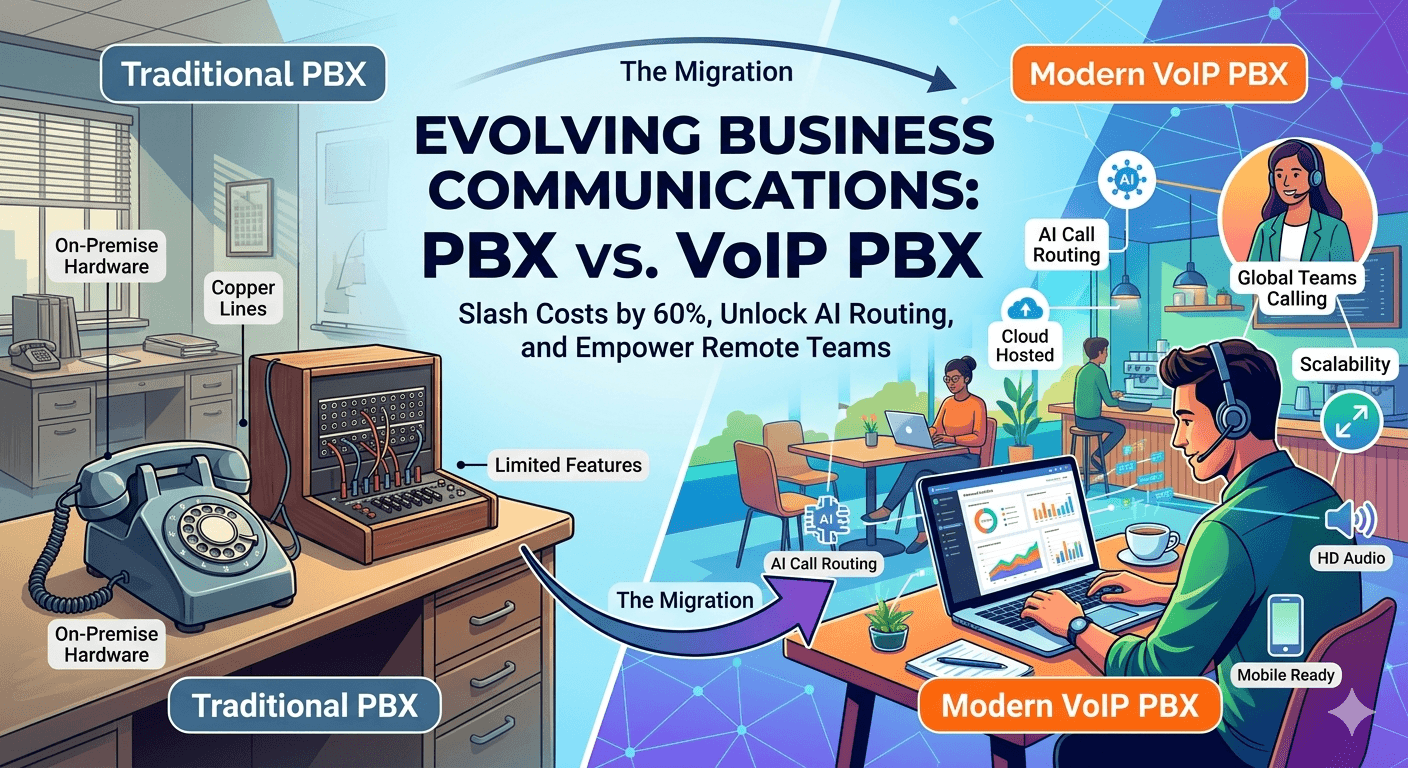
Imagine slashing your phone bills by 60% while unlocking AI-powered call routing and global teams calling from coffee shops. That’s the power of VoIP PBX and modern PBX phone systems—where what is a PBX meets cutting-edge IP PBX tech. This blog dives deep into PBX vs VoIP, VoIP PBX systems, and why PBX telephony is evolving fast. What Is a PBX Phone System? A PBX phone system, short for Private Branch Exchange (what does PBX stand for? Private Branch eXchange), acts as your business’s internal phone switchboard, connecting calls within your office and to the outside world efficiently. Unlike public phone networks, a PBX system routes calls between extensions without tying up external lines, saving costs on PBX telephone systems. Traditional PBX phone systems started as hardware boxes with physical switches, but today’s VoIP PBX phone system blends digital smarts. Whether you’re running a PBX telephone setup or exploring PBX solutions, it handles incoming/outgoing calls, transfers, and conferences. For small businesses, a PBX device like an IP PBX server centralizes PBX communications, making what is PBX in telecom crystal clear: it’s your communication hub. Common PBX Features: Private Branch Exchange (PBX) systems have evolved from simple switchboards into sophisticated communication hubs. These features are considered “indispensable” because they bridge the gap between basic connectivity and professional business management. Here is an explanation of how these specific features function and why they are critical for modern operations. 1. Call Forwarding and Hold These are the foundational elements of call management. The Function: Call Hold allows a user to pause a conversation to consult a colleague or handle a brief interruption, often playing “music on hold” to reassure the caller they haven’t been disconnected. Call Forwarding redirects incoming calls to another extension, a mobile phone, or a home office. Why it’s Indispensable: It ensures mobility and continuity. In a hybrid work environment, employees can remain reachable regardless of their physical location, preventing missed opportunities and “phone tag.” 2. Voicemail-to-Email This feature integrates telecommunications with your digital workflow. The Function: When a caller leaves a voicemail, the PBX system record the audio and automatically sends it as an attachment (usually a .wav or .mp3 file) to the user’s email inbox. Many modern systems also provide a text transcription. Why it’s Indispensable: It centralizes communication. Users can “read” their voicemails during meetings or archive them alongside client emails for better record-keeping and responsiveness. 3. Auto-Attendant (IVR) The Interactive Voice Response (IVR) acts as a virtual receptionist. The Function: When someone calls, they hear a recorded greeting: “Press 1 for Sales, 2 for Support.” The system then routes the call based on the caller’s input. Why it’s Indispensable: It creates a professional image for companies of any size and reduces the need for a live operator to manually transfer every call, significantly lowering operational costs. 4. Call Queuing This is a critical tool for high-volume environments like customer service departments. The Function: Instead of the caller getting a busy signal, they are placed in a “queue.” The PBX manages the wait time and distributes the calls to the next available agent based on specific logic (e.g., the agent who has been idle the longest). Why it’s Indispensable: It improves customer satisfaction by managing expectations and ensures that staff workloads are distributed fairly and efficiently. 5. Conference Bridges This feature facilitates internal and external collaboration. These PBX features make business phone system PBX indispensable. The History of PBX: From Analog to VoIP PBX The evolution of PBX mirrors the broader shift in how we handle information—moving from physical hardware to digital intelligence. In the manual era, human operators literally plugged cables into jacks to complete a circuit, a process that was slow and limited in scale. The shift to electronic systems in the 1960s replaced these manual patches with automated switches, allowing businesses to handle much higher call volumes within the office. The real revolution arrived with the jump to Internet Protocol (IP), which converted voice into data packets. This transition transformed the PBX from an isolated piece of hardware into a software-driven tool. Today’s VoIP PBX systems allow businesses to run global networks over the cloud, removing the need for miles of copper wiring and expensive on-site maintenance while enabling seamless remote work. Read More: VoIP vs PBX: Which Should You Choose for Your Business? What Is VoIP and How Does It Fit with PBX? VoIP, or Voice over Internet Protocol, digitizes voice into data packets sent over the internet, ditching copper lines for broadband. In a VoIP PBX system, this tech powers PBX telephony with crystal-clear IP PBX calls. VoIP PBX is a PBX system enhanced by VoIP, where VoIP IP PBX handles calls via internet protocols like SIP. Unlike analog PBX phone service, VoIP hosted PBX lives in the cloud, offering PBX phone system definition as scalable telephony PBX. What Are the Key Differences Between PBX and VoIP? When businesses compare PBX vs VoIP, they are often contrasting a traditional, hardware-based setup with modern, software-based cloud communications. While the primary difference lies in how they transmit voice signals (traditional PBX via dedicated copper lines/circuits; VoIP PBX via digital internet packets), the real-world impact is felt in costs, flexibility, and features. Traditional PBX is fundamentally a “local” system, requiring extensive physical infrastructure, complex maintenance, and substantial on-site equipment. In contrast, modern VoIP PBX is a “network” system that moves the intelligence to the cloud. This shift eliminates the need for expensive on-site PBX hardware—meaning a business just needs reliable internet connectivity to manage its entire phone system, often through simple software interfaces or mobile apps. VoIP vs PBX Comparison Table Here is a detailed VoIP vs PBX comparison table that illustrates why modern businesses are increasingly choosing the agility of VoIP PBX. Feature / Aspect Traditional PBX System Modern VoIP PBX System Transmission Technology Circuit-switched (PSTN/copper/T1 lines) Packet-switched (Internet/Data networks) Infrastructure & Hardware Extensive: On-site servers, dedicated wiring, physical phones. Minimal: VoIP phones, computers, or mobile apps; no on-site servers. Setup Cost High: Significant upfront capital expenditure (CapEx) for hardware and installation. Low: Minimal upfront cost; primarily monthly operating expense (OpEx). Scalability (Adding Lines) Difficult & Costly: Requires physical hardware installation and purchasing new phone cards/lines. Instant & Easy: Can be done instantly via an online portal; scalable on demand. Mobility & Remote Work Very Limited: Calls are tied to the physical office extension or complex forwarding. Native: Seamlessly works on laptops and smartphones (Softphones), ideal for remote/hybrid teams. Feature Set Standard: Transfer, Hold, basic Voicemail. Adv. features cost extra. Robust & Unified: IVR, CRM integration, video conferencing, Voicemail-to-Email are typically standard. Maintenance & Reliability Business Responsibility: Requires specialized IT staff or service contracts for repairs. Provider Responsibility: Software is managed/updated by the provider. Relies on stable internet. Costs of Calls Variable: Long-distance and international calls are typically charged at high per-minute rates. Often Included: Many plans include unlimited local and domestic long-distance calling; low international rates. What Types of PBX Phone Systems Exist? Types of PBX phone systems evolve with tech, which can be listed as follow: Analog PBX: Legacy PBX telephone systems on copper—reliable but outdated. Digital PBX: TDM-based PBX device for ISDN lines. IP PBX: IP phone PBX using VoIP protocols (IP PBX meaning). Hosted PBX (Cloud PBX): VoIP hosted PBX—no hardware, pure cloud PBX vs VoIP. Virtual PBX: Mobile PBX system for remote teams (mobile PBX system). However, VoIP PABX and IP PBX system dominate as PBX solutions. What Advantages Does VoIP Offer Over PBX? Transitioning from a traditional PBX to a VoIP system offers significant financial relief, primarily by eliminating the heavy capital expenditure associated with on-site hardware and specialized wiring. Businesses typically see a 40% to 70% reduction in total communication costs, as VoIP leverages existing internet infrastructure rather than dedicated copper lines. These savings are further amplified by the inclusion of unlimited domestic calling plans and drastically lower international rates—often 90% cheaper than traditional carriers—transforming telecommunications from a variable, high-cost burden into a predictable, low-cost monthly subscription. Beyond the balance sheet, VoIP provides a level of operational intelligence and flexibility that analog PBX simply cannot match. With features like real-time analytics, managers can monitor call volumes, wait times, and employee performance through live dashboards, enabling data-driven decisions that improve customer service. Furthermore, VoIP removes the physical limitations of the office; through mobile “softphone” apps and cloud-based routing, employees can maintain their professional extensions from any location in the world. This built-in mobility and access to advanced tools like CRM integration ensure that a business remains both agile and highly responsive in a modern, hybrid work environment. Is PBX a VoIP Gateway? and What’s the Difference? A PBX is not a VoIP gateway; while a PBX acts as a complete internal switchboard for a business, a gateway specifically serves as the bridge that converts analog signals to digital data packets. Within a VoIP PBX environment, the gateway plays a crucial role by facilitating PABX VoIP conversions and enabling internal PBX systems to connect to external internet-based networks. This distinction is vital because the gateway provides the necessary interoperability for PBX telephony, while the PBX device or PBX server remains the central hub for managing all sophisticated call routing and PBX features. Is It Worth Switching to VoIP PBX? When considering the future of your communication infrastructure, the ultimate question isn’t just “What is the difference?” but “Is making the change truly beneficial for my organization?” The overwhelming consensus for modern, growing businesses is a definitive “Yes.” While traditional PBX systems were the bedrock of communication for decades, the advantages offered by VoIP—particularly regarding scalability and cost-efficiency—make it the superior choice for forward-thinking companies. The move from an aging analog PBX or an early digital system to a VoIP IP PBX isn’t merely a technological upgrade; it’s a strategic shift. A cloud-based VoIP PBX is uniquely designed to handle the variable demands of modern work, accommodating rapid growth, sudden downscaling, and a decentralized workforce without requiring physical hardware overhauls. This intrinsic flexibility eliminates the inertia often associated with traditional telecommunications, allowing you to react quickly to market changes. When you consider the long-term operational savings and the extensive suite of advanced features included, switching to VoIP becomes not just an option, but an essential step toward future-proofing your business. VoIP Switching Pros Table Here is a summary of why the switch is justified, detailed in this Switching Pros Table. Benefit Category The VoIP Advantage Over Traditional PBX Business Impact Scalability Instant & On-Demand: Add or remove users/lines via an online portal in minutes. Perfect for seasonal businesses or companies anticipating growth; you never pay for more than you need. Operational Costs Substantially Lower: Drastically reduces costs on long-distance, international calls, and maintenance. Significant ongoing savings (40%–70% average) that can be reinvested into other areas of the business. Mobility & Remote Work Native Flexibility: “Softphone” apps turn any smartphone or laptop into an office extension. Enablers a seamless remote or hybrid workforce without complicated forwarding or specialized setups. Advanced Features Robust & Unified (Included): CRM integration, real-time analytics, voicemail-to-email, and video are often standard. boosts employee productivity and provides management with critical data on call volume and service performance. Disaster Recovery Built-in Resilience: Calls can be instantly rerouted to different locations or devices during an outage. Ensures continuous business operations and customer accessibility, even during local emergencies or internet issues. Maintenance Managed Externally: The provider handles all updates, security patches, and upgrades. Frees up IT resources and eliminates the need for expensive service calls for on-site hardware repairs. Global Presence Virtual Numbers: Easily obtain local numbers in different geographic regions, even with no physical presence. Helps a small business establish a global footprint instantly, enhancing trust with customers worldwide. How Do You Set Up a PBX System? Setting up a PBX system is a strategic process that transitions your business from basic calling to professional communication management. The journey begins with a thorough needs assessment, where you determine the required number of extensions and the specific PBX features your team needs to succeed. For those opting for a VoIP PBX, the process often involves partnering with leading providers like Nextiva PBX to configure SIP trunks that connect your system to the internet. Step-by-Step PBX Setup Guide Choose the Type: Decide between the control of an on-premise system or the flexibility of a hosted PBX vs VoIP solution. Procure Hardware: If you choose an IP PBX, you will need to acquire specific PBX equipment, such as servers and IP-compatible handsets. Install Software: For on-premise setups, install a PBX server software like FreePBX to manage your routing. Configure Extensions and Trunks: Map out your internal directory and link your system to external lines. Test Call Flows: Perform rigorous testing of PBX calls to ensure routing, hold music, and transfers work seamlessly. For businesses looking for speed, cloud PBX skips the hardware phase entirely, allowing for nearly instant PBX phone service. What Are Common Features of VoIP PBX Systems? Modern VoIP PBX systems offer a suite of digital tools that traditional analog systems simply cannot match. These features are designed to enhance productivity and provide deep insights into business health. HD Audio: Enjoy crystal-clear PBX telephony that utilizes high-fidelity codecs for professional-grade sound. Call Recording and Analytics: Automatically record calls for training and use real-time data to track team performance. Softphones: Empower your remote workforce by using software-based phone PBX systems that run on laptops or smartphones. How To Choose the Right VoIP PBX Phone System? Selecting the right PBX solution requires balancing your current operational needs with your future growth goals. The decision often hinges on evaluating PBX vs VoIP requirements, specifically looking at your total user count and long-term budget. However, following are some indicators which can help in choosing the right VoIP PBX phone system: Check Scalability: Ensure the PBX system can grow with your business without requiring massive hardware overhauls. Review Advanced Features: Look for modern additions like AI-driven call routing or CRM integrations. Test Uptime and Support: Reliable PBX communications require a provider with a proven track record of 99.99% uptime. Compare Costs: Analyze the total cost of ownership, including initial PBX equipment and monthly PBX services. Ensure Compliance: Confirm the system meets PBX telecom security and regulatory standards. VoIP vs PBX: Why Do People Compare Them? The comparison between VoIP and PBX exists because they represent two different philosophies of business communication. While both handle essential business calls, the key difference lies in the infrastructure: VoIP PBX leverages the internet (packet-switching), while traditional PBX relies on physical copper lines (circuit-switching). Many modern businesses find that PBX VoIP hybrids offer the best of both worlds, providing the reliability of local hardware with the features of the cloud. How Does Cloud PBX Differ from On-Premise PBX? Understanding the difference between cloud PBX and on-premise PBX is vital for determining your IT workload and capital expenditure. 1. Cloud PBX (Hosted PBX) In a hosted PBX vs VoIP scenario, the service provider owns and maintains the PBX server in a secure, off-site data center. Businesses access the features via the internet. This model is highly scalable, requires zero maintenance from your internal team, and replaces large upfront hardware costs with a predictable monthly subscription. 2. On-Premise PBX An on-premise IP PBX system involves keeping the PBX device and servers physically within your office building. While this requires a higher initial investment in PBX equipment and a dedicated IT staff for maintenance, it offers the ultimate level of control over security and internal data routing. Final Words The evolution from a traditional PBX phone system to a modern VoIP PBX represents a fundamental shift in business connectivity, moving from rigid copper-wire infrastructure to flexible, internet-based PBX telephony. By adopting a VoIP PBX phone system, businesses can slash communication costs by up to 70% while gaining access to advanced PBX features like AI-powered routing, CRM integration, and high-definition audio. Whether a company chooses an on-premise IP PBX for total hardware control or a hosted PBX vs VoIP cloud solution for instant scalability and zero maintenance, the transition ensures a mobile-ready workforce that can operate from anywhere with 99.99% uptime. Ultimately, modern PBX communications bridge the gap between legacy reliability and cutting-edge digital intelligence, making the switch to a PBX VoIP system a vital strategic move for any growth-oriented enterprise. FAQs What is the main purpose of a PBX system? A PBX system routes internal/external calls efficiently, reducing line costs for businesses. It acts as a central hub, allowing multiple users to share a limited number of external phone lines. Can I keep my current phone numbers if I switch to VoIP? Yes, number porting to VoIP PBX is standard and quick. Most providers handle the legal transfer process so your business identity remains unchanged. Is VoIP secure enough for business use? Yes, with SRTP/TLS encryption, VoIP PBX matches or exceeds PBX security. Modern systems include multi-layer authentication and firewalls to protect sensitive voice data. Do I need special equipment to use VoIP? Minimal—IP phones or softphones; ATAs for legacy. A stable high-speed internet connection and a router with Quality of Service (QoS) are also recommended. How reliable is VoIP during an internet outage? Failover to mobile/cell boosts reliability in VoIP PBX systems. Cloud-based systems can automatically reroute incoming calls to external numbers or voicemail if your local office goes offline. Can I use VoIP with my existing PBX system? Yes, via SIP trunks or gateways. This hybrid approach allows you to enjoy digital cost savings without replacing your current hardware. What’s the difference between SIP trunking and VoIP? SIP trunking connects PBX to VoIP networks; VoIP is the tech. Essentially, VoIP is the general method of sending voice over the web, while SIP trunking is the specific service that replaces physical phone lines.
Read More
what is a SIP Phone

What is SIP Phone: How Does SIP Telephone System Work?

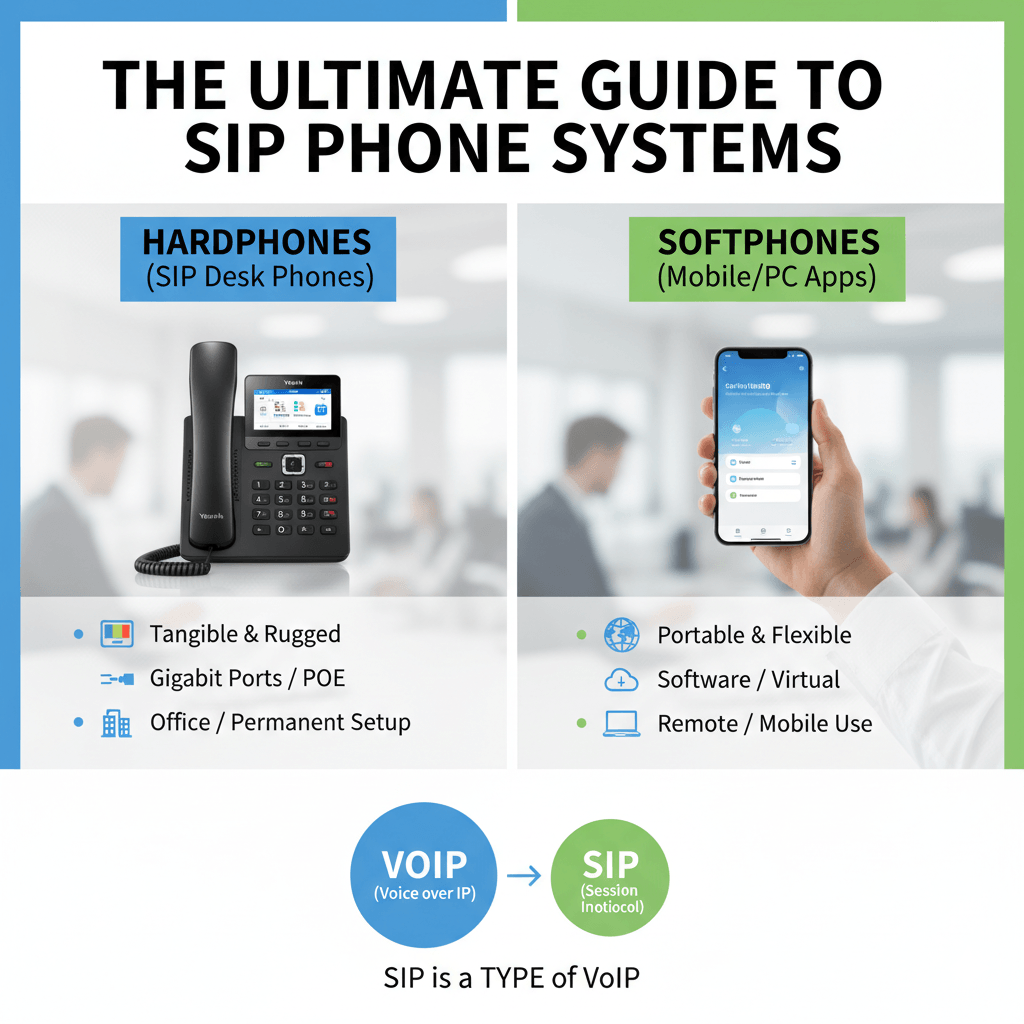
Imagine ditching glitchy landlines for desk phones that ring crystal-clear across continents, all powered by SIP phones—the backbone of modern SIP phone systems. Whether you’re hunting what is a SIP technology, exploring SIP telephone setups, or debating SIP vs IP phone, this guide delivers. SIP devices like SIP desk phones and SIP softphones transform SIP telephony into a business superpower, slashing costs while packing SIP telephone features like HD video and AI transcription. What Does SIP Stand For and What Is a SIP Phone? SIP stands for Session Initiation Protocol, the open-standard signaling wizard that kickstarts, manages, and ends real-time calls, video, and chats over IP networks. A SIP IP phone, is any device—hardware or software—that speaks this protocol to enable VoIP SIP phones for internet-based communication. What Is a SIP Phone? A SIP phone is a device that uses the internet to make and receive phone calls. Forget clunky analog lines; what is a SIP phone technology? It’s your gateway to systems where voice morphs into packets zipping via broadband. SIP phone meaning boils down to interoperability: pair a SIP desk phone from Yealink with a VoIP calling system from any provider. What is a SIP device? Anything from SIP telephones to apps handling calls, making phones SIP-ready universally. This tech powers SIP telephony, letting SIP devices like SIP cell phones or SIP hardware deliver phone service without proprietary lock-ins. What Are SIP Phones Features? SIP phones blend desk warriors and mobile ninjas, supporting voice, video, and messaging via SIP protocol. Typical features include HD wideband audio, call transfer, conferencing, voicemail, and presence indicators showing if colleagues are available. Top Features: HD Voice (Opus Codec): Crystal-clear audio beyond PSTN. Video Calling: Built-in cameras on SIP IP phones. Intercom/BLF: Monitor extensions in real-time. Auto-Provisioning: Zero-touch setup for fleets. PoE Support: Single-cable power/data for SIP desk phones. These make this systems ideal for SIP telephone service, outshining basic telephone SIP setups. How Can SIP telephone Be Classified—Hardphones vs Softphones? SIP telephones split into two powerhouse categories: hardphones (deskphones or hardware) and softphones (software), each excelling in SIP phone systems. Hardphones are tangible SIP desk phones like Poly or Cisco models—rugged, with color screens, gigabit ports, and programmable keys. Perfect for offices, SIP hardware offers tactile bliss and SIP phone line reliability. Softphones, or SIP soft phone apps (e.g., Zoiper, MicroSIP), run on PCs, laptops, or mobiles as software. Soft phone meaning? Virtual telephony via SIP VoIP phone, ideal for remote warriors needing SIP on phone flexibility without buying gear. SIP desk phone hardphones win for permanence; SIP softphones rule mobility in SIP based phone systems. What Are the Differences Between VoIP and SIP Phones? VoIP (Voice over Internet Protocol) is a broad, “umbrella” term referring to any technology that transmits voice calls over the internet rather than traditional copper wires. It is the foundation that allows digital voice data to travel across IP networks. SIP (Session Initiation Protocol), on the other hand, is one specific “language” or signaling protocol used within the VoIP framework to initiate, manage, and tear down those communication sessions. While all SIP phones are essentially VoIP phones because they send voice over the internet, not all VoIP systems use SIP; some utilize older or proprietary protocols like H.323. Furthermore, IP phones are the physical hardware designed for IP networks, but a SIP IP phone specifically uses the open-standard SIP protocol to ensure it can communicate with various providers. The primary difference lies in versatility: while basic VoIP focuses mainly on voice, SIP-based telephony is designed for multimedia. It can handle video conferencing, instant messaging, and “presence” indicators (showing if a user is online) all within a single session. Combining these creates a SIP-based VoIP system, which offers the best of both worlds by providing high-quality voice calls alongside advanced modern communication features. How Does SIP-Based Telephony Work? SIP-based telephony functions through a series of client-server “handshakes” that manage the lifecycle of a SIP call. The process begins when a SIP device (like a SIP IP phone or SIP soft phone) registers its location with a central registrar server. To initiate a call, the sip based phone system sends an “INVITE” request to negotiate technical details, such as audio codecs, before streaming the actual voice data via Real-time Transport Protocol (RTP). A key technical hurdle in SIP telephony is NAT traversal; systems use protocols like STUN or TURN to ensure lines can communicate through firewalls. Once the SIP proxy locates the recipient’s SIP number and authenticates the user, the SIP telephone rings. For maximum efficiency, the media flows peer-to-peer between SIP devices once the connection is established, bypassing the server. How Do SIP Calls Work Step-by-Step? Understanding the SIP call meaning requires looking at the “digital dance” of the call flow. SIP devices can be used for calls by following these standardized steps: Registration: The telephone sip or voip sip phone authenticates with a registrar to let the network know it is online. INVITE: The caller’s SIP device sends a session invitation containing a Session Description Protocol (SDP) to offer specific codecs. Ringing/OK: The callee’s SIP phone accepts the invite, and an “ACK” (acknowledgment) confirms the setup. Media Exchange: Voice sip data is carried by RTP/RTCP protocols. BYE: When a user hangs up, the SIP telephone service sends a BYE request to tear down the session. What Are the Benefits of a Softphone? A softphone is a software application that allows you to run a service on any computing device, such as a laptop or a sip cell phone. The soft phone meaning essentially refers to “hardware-free” communication. Portability: You can use a single SIP account across multiple SIP devices. Cost: Soft phone applications are often free or low-cost compared to purchasing physical SIP hardware. Features: These apps often include advanced SIP features like screen sharing and recording. Integration: SIP phone software often features plugins for tools like Slack or Microsoft Teams. For mobile users, apps like Groundwire can turn a standard smartphone into a fully integrated SIP VoIP phone. What Is a SIP telephone Line and SIP Account? SIP telephone line is a virtual channel provided via a SIP trunk, which is significantly more scalable than traditional PRI lines. Practically, it refers to the boundless extensions possible in a SIP VoIP phone system. While the SIP phone line provides the path for the call, the SIP account provides the identity and permission for the SIP device to use that path. What Are Top-Rated Business SIP Phones? To help you choose the best hardware for your SIP systems, here is a detailed breakdown of the top-rated SIP devices currently dominating the business market: Yealink T54W The Yealink T54W is widely considered a “king” among SIP desk phones due to its versatility and user-friendly interface. It features a 4.3-inch color display and supports up to 16 SIP phone lines, making it ideal for busy professionals who handle multiple calls simultaneously. This SIP IP phone is built for the modern office, offering built-in Bluetooth and dual-band Wi-Fi to reduce cable clutter. With an estimated price of $180 and a 4.8/5 rating, it balances high-end features with affordability. Poly VVX 450 The Poly VVX 450 is a powerhouse SIP telephone known for its exceptional “HD Voice” technology, which provides professional-grade audio clarity. This SIP device supports 12 lines and includes dual USB ports for media and storage applications, enhancing the functionality of your system. At a price point of $220 and a 4.7/5 rating, it is a reliable choice for executives who require a robust, high-performance phone sip solution. Cisco 8841 For enterprises that prioritize security and mission-critical reliability, the Cisco 8841 is a premier SIP ip phone. It offers 10 lines and features a high-resolution widescreen VGA display with wide-band audio for superior communication quality. As a staple in large-scale SIP based phone systems, this model includes a built-in Gigabit Ethernet switch to ensure high-speed data transfer alongside voice sip traffic. It maintains a top-tier 4.9/5 rating with an estimated cost of $250. Grandstream GXP2130 The Grandstream GXP2130 is an excellent entry-level voip phone that doesn’t compromise on modern essentials. It is often praised for its Android-based operating system, which allows for a more flexible user experience compared to traditional phones sip. This SIP telephone service hardware includes built-in Wi-Fi and even a camera for basic video needs, offering a high value-to-cost ratio at $140 with a 4.6/5 rating. How Do You Get a Business Phone Number for SIP? To activate a SIP telephone, you must secure a SIP phone number (also known as a SIP number) from a SIP phone service provider like Twilio or RingCentral. What is a SIP phone number? It is a virtual line tied to your SIP account rather than a physical copper wire. What is a SIP account? It consists of the credentials (username, domain, and password) that authenticate your SIP device. These SIP numbers can be local or international DIDs, and bundling them with SIP trunking allows for multi-line SIP phone service. How To Choose a SIP Service Provider? When selecting the ideal SIP phone service provider, it is essential to look beyond basic connectivity and focus on long-term operational stability and global reach. Below is an expanded evaluation guide for your SIP phone system: 1. Uptime and Reliability Prioritize 99.999% “Five Nines”: While 99.99% is standard, top-tier SIP services often strive for “five nines” (99.999%) to ensure that SIP telephony remains active even during major network maintenance. Geographic Redundancy: Confirm the provider utilizes multiple data centers globally so that if one server fails, your SIP phone lines automatically failover to another node without dropping calls. 2. NAT Traversal and Firewall Compatibility Reliable Firewall Handling: Ensure the phone system utilizes advanced protocols like STUN, TURN, or ICE to reliably navigate complex corporate firewalls. Deep Packet Inspection (DPI) Support: Look for providers that offer troubleshooting tools to identify if your network router is incorrectly dropping voice sip packets, which can lead to one-way audio issues. 3. 24/7 Technical Support Omnichannel Assistance: Beyond just phone support, your provider should offer 24/7 live chat and a comprehensive knowledge base specifically for configuring various SIP devices. Dedicated Account Management: For larger SIP phone systems, check if the provider assigns a technical account manager to help optimize your SIP hardware settings and network architecture. 4. Mobile Apps and Softphone Integration High-Quality Softphones: The provider must offer a native SIP soft phone app that maintains high-fidelity audio on both iOS and Android, ensuring your sip cell phone stays connected. Unified Communications (UCaaS) Features: Ensure the software integrates seamlessly with your business’s presence settings, allowing you to see if colleagues are on a SIP desk phone before transferring calls. 5. Leading Providers and Infrastructure Industry Leaders: Companies like Nextiva, 8×8, and Vonage are celebrated for their robust SIP telephone service and massive global infrastructure. Security and Compliance: These top providers also ensure that your SIP telephony meets strict regulatory standards, such as HIPAA or PCI-DSS, protecting your SIP numbers and data from unauthorized access. Read More: Is VoIP Reliable? Pros, Cons, and What You Really Need to Know Final Words: The transition from traditional landlines to SIP phone systems represents a fundamental shift in how businesses communicate. By leveraging the Session Initiation Protocol, organizations can move beyond the limitations of physical hardware and geographic boundaries. Whether you choose the tactile reliability of a SIP desk phone like a Yealink or Poly, or the agile flexibility of a SIP softphone for remote work, the result is the same: a scalable, cost-effective, and feature-rich communication environment. As SIP telephony continues to integrate with AI transcription, HD video, and unified communications, it remains the most robust choice for modern enterprises. By understanding the nuances of SIP devices, accounts, and service providers, you can build a communication backbone that not only slashes costs but also empowers your team with crystal-clear, global connectivity. Investing in a SIP-based system today ensures your business is ready for the innovations of tomorrow. FAQs Is a SIP Phone the Same as a VoIP Phone? No—SIP phones use the SIP protocol within broader VoIP technology. Think of VoIP as the entire industry of “calling over the internet,” while SIP is the specific “language” used to signal and control those calls; therefore, all SIP phones are VoIP, but not all VoIP systems use SIP. How Do You Use a SIP Phone System? To use the system, you simply connect your SIP-ready device to the internet and register it using credentials (username and password) provided by your service provider. Once authenticated, you dial numbers just like a traditional phone, and the system handles the digital conversion to route your voice across the web. How Does a SIP Telephone Differ from SIP Trunking? A SIP telephone is the physical or virtual endpoint (the handset or app) that a person actually uses to talk. In contrast, SIP trunking is the digital “pipe” or virtual phone line that connects an entire office’s internal phone system to the global telephone network. SIP Phone vs. IP Phone? An IP phone is a broad term for any hardware that plugs into a network jack to transmit data, regardless of the software it uses. A SIP phone is a specific type of IP phone that follows the open-standard SIP protocol, ensuring it can work with almost any service provider rather than being locked to one brand.

Read More
What is IP Telephony

What is IP Telephony: How IP Phone Works?

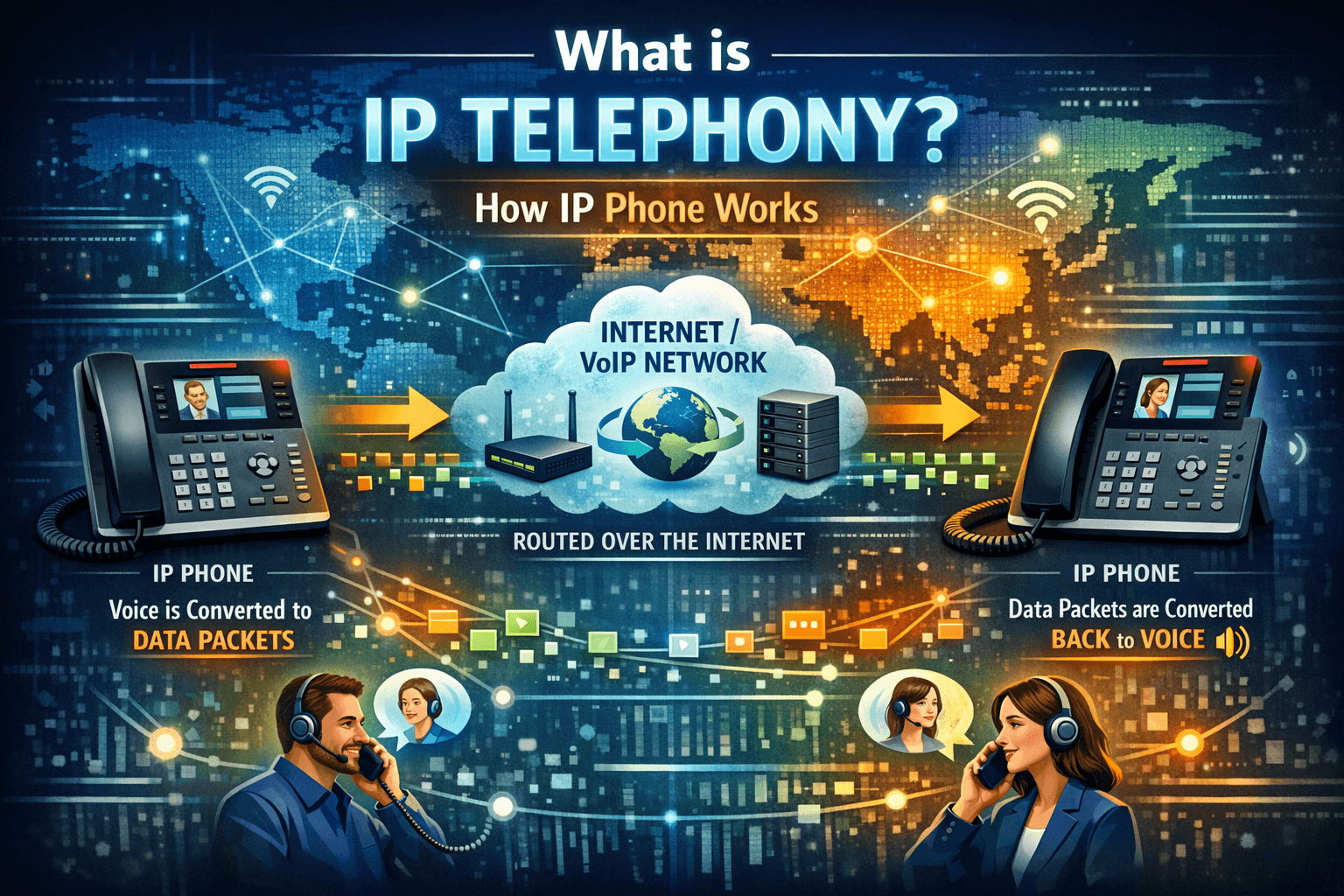
The traditional dial tone is fading into history. As we move through 2026, the global transition to “All-IP” networks has reached a critical tipping point. Businesses are no longer debating whether to switch; they are focused on optimizing their ip telephony system to handle a hybrid workforce and AI-driven customer service. Research from Archive Market Research (2026) indicates that the ip telephone market is now a $98.6 billion powerhouse, driven by the decommissioning of legacy copper lines worldwide. Whether you are exploring ip telephony solutions for the first time or looking to upgrade an existing ip based telephone system, understanding the nuances of this technology is vital. This guide provides a deep dive into the ip phone meaning, technical mechanics, and strategic benefits of modern internet protocol telephony. What is IP Telephony? To understand the landscape, we must first define what is ip telephony. It is a general term for the technologies that use the Internet Protocol’s packet-switched connections to exchange voice, fax, and other forms of information. The ip phone full form—Internet Protocol phone—highlights its departure from the old Public Switched Telephone Network (PSTN). In 2026, ip telephone has evolved beyond simple voice calls. It now serves as the foundation for Unified Communications as a Service (UCaaS), integrating video, instant messaging, and AI-driven analytics into a single ip telephony service. IP Phone Meaning and Evolution When we ask what is ip phone, we are referring to a device that looks like a traditional telephone but functions like a high-end computer. An ip phone means your voice is no longer an electrical signal traveling over copper; it is digital data traveling across the same high-speed network as your email and cloud applications. This convergence allows for a telephone ip setup that is more flexible and data-rich than any analog predecessor. How IP Telephony Works If you’ve ever wondered how do ip phones work or how does an ip phone work, the answer lies in a process called packet switching. Unlike the traditional “circuit-switched” calls that required a dedicated physical line, ip telephony breaks your voice into small digital packets. The Technical Journey of an IP Phone Call The process of an ip phone call involves several critical steps: Sampling and Digitization: Your voice is captured by the microphone and converted from an analog wave into a digital bitstream. Compression via Codecs: In 2026, advanced codecs like G.711 and G.729 use AI to compress this data while maintaining “HD Voice” quality. Packetization: The digital data is chopped into small packets. Each packet is stamped with a header containing the destination ip phone number. Transmission: These packets travel across the network via routers and switches. Reassembly and Playback: At the destination, the packets are reordered and converted back into audio for the listener. Key IP Telephony Components A robust ip telephony solution is composed of several architectural layers: IP Phones: These are the physical endpoints, ranging from basic desktop models to executive video phones. IP PBX (Private Branch Exchange): This is the ip phone server that acts as the “brain” of the system, managing internal extensions and call routing. IP Gateway: A bridge that connects the ip telephone systems to the legacy PSTN, allowing you to call traditional landlines. VoIP Service Provider: The entity that provides the connection to the global telephone network via the internet. Benefits of IP Telephony The move to ip telephony services offers transformative advantages for organizations of all sizes. Drastic Cost Savings One of the most immediate impacts of ip telephone is the reduction in operational expenses. Businesses report saving up to 75% on communication costs by eliminating long-distance charges and reducing hardware maintenance (ZipDo, 2025). With an ip phone system, the only recurring cost is often your data plan. Scalability and Flexibility An ip phone system small business owners deploy today can scale to thousands of users in minutes. Because the system is software-defined, adding a new line is as simple as plugging in a new ip telephone and configuring it through a web dashboard. Enhanced Mobility Because ip telephony is location-independent, employees can use their office extension from home, a café, or a different city. This has made ip-telefonie the primary enabler of the hybrid work model that 64% of workplaces now implement (Zoom, 2026). Challenges with IP Telephony and Solutions While the technology is advanced, ip telephony systems face specific hurdles in 2026. Reliability and Network Jitter Since calls travel over the internet, a slow connection can lead to “jitter” or dropped packets. Solution: Implement Quality of Service (QoS) settings on your network to prioritize ip telephone traffic over standard data like email or web browsing. Security and Deepfakes As AI evolves, “vishing” (voice phishing) and deepfake audio have become real threats to ip telephony solutions. Solution: Adopt Zero Trust Telephony (ZTT) principles. Use Secure Real-time Transport Protocol (SRTP) for encryption and implement voice bio-authentication to verify caller identity. What are VoIP Protocols? For ip telephony to work, devices must use a common “language” or protocol. SIP (Session Initiation Protocol): The global standard for signaling and controlling sessions in ip telephone systems. RTP (Real-time Transport Protocol): The protocol responsible for the actual delivery of audio and video data. H.323: An older, more complex protocol still used in some legacy video conferencing environments. IP Telephony in Business Managing ip telephony has become a specialized IT function. Who manages ip telephone? In most firms, it is the IT department or a Managed Service Provider (MSP). They monitor the ip phone server to ensure 99.999% uptime and manage the integration of the phone system with other business tools. CRM and AI Integration In 2026, 40% of businesses using CRMs have integrated their ip telephony solutions to automate data entry and provide real-time call transcriptions. This allows a salesperson to see a customer’s entire history as soon as an ip phone call is received. What is an IP Phone System? An ip phone system is the entire digital infrastructure used to manage a company’s communications. This includes the hardware, the cloud-based ip telephony service, and the management software. Unlike a traditional system, an ip phone system business unit today is almost entirely virtual. IP Phone vs. Traditional Phone The differences between these two technologies are stark: Feature Traditional Phone (PSTN) IP Telephony (VoIP) Transmission Analog over copper wires Digital over IP networks Wiring Separate phone lines (RJ-11) Shared Ethernet/Wi-Fi (RJ-45) Cost High per-minute rates Low monthly subscription Features Basic (Hold, Transfer) Advanced (AI, CRM, Video) Mobility Tied to a physical outlet Work from anywhere globally Types of IP Business Phones Businesses have several options when selecting their ip telephony hardware: Desk IP Phones: High-quality hardware like the Yealink T-series or Cisco 8800 series, designed for heavy daily use. Wireless IP Phones: Devices that use Wi-Fi or DECT to provide mobility within a warehouse or large office. Softphones: Software-based ip telephones that run on computers or mobile devices, represented by an ip phone icon on your screen. VoIP vs. IP Telephony: The Distinction While often used interchangeably, there is a technical difference. VoIP refers specifically to the method of sending voice over the internet. IP Telephony is the broader system—including the hardware, the ip phone systems, and the overarching communication strategy of the enterprise. Which is Best: On-Premises vs. Hosted VoIP? This is a critical decision for any ip telephony solution. Hosted IP Telephony (Cloud): The provider manages the ip phone server in their data center. This is ideal for ip phone systems for small business because it requires no on-site maintenance. On-Premises IP PBX: You keep the hardware in your own server room. This is preferred by large enterprises that require absolute control over their security and data. Read More: VoIP vs PBX: Which Should You Choose for Your Business? VoIP Business Phone System Essential Features A modern standard téléphonique ip should include: Auto-Attendant: A virtual receptionist to route calls. Omnichannel Support: Integrating SMS, WhatsApp, and Video. AI Transcription: Automated summaries of every ip phone call. Voicemail-to-Email: Sending your messages directly to your inbox. How do I set up a VoIP System? The migration to telephony ip follows a simple roadmap: Network Audit: Ensure your internet has enough bandwidth (at least 100Kbps per call). Provider Selection: Choose a carrier with a proven 99.999% uptime record. Endpoint Deployment: Install your ip phones or softphone apps. Number Porting: Move your existing traditional numbers to the new ip telephony service. Can IP Phones be used at Home? Absolutely. One of the greatest perks of ip telephone technology is its portability. Since your extension is tied to an account, not a wire, you can plug your ip telephone into any home router and receive calls just as you would at your office desk. Price of IP Phones In 2026, the prize of ip phone hardware has stabilized: Basic Models: $60 – $120. Executive Models (Video/Touch): $300 – $700. Softphone Apps: Frequently included for free with your ip telephony solution subscription. Final Thoughts: The 2026 Outlook As we look toward the end of the decade, the concept of a “phone” is disappearing. It is being replaced by an ip telephony system that is invisible, ubiquitous, and intelligent. Research from Gartner (2026) and Nextiva highlights that 90% of organizations will have adopted cloud-based ip telephone systems by 2027. The integration of 5G has further improved the reliability of mobile telephony, allowing users to maintain high-definition calls even while traveling. Therefore, In 2026, embracing an ip telephone system is no longer just a technical upgrade—it is a strategic leap into a future where your business communication is as mobile, intelligent, and scalable as the digital world itself. Frequently Asked Questions (FAQs)   What is the ip phone full form? IP phone stands for Internet Protocol phone, which uses digital networks instead of traditional lines. What is an ip phone system? IP phone system is a communication network that manages calls using internet data packets rather than analog signals. How do ip phones work? IP Phones convert sound into data, send it over the internet, and turn it back into sound at the destination. Can I use my current number with ip telephone? Yes, most ip telephone services allow you to port your existing number to the new system. Is ip telephone safe? Yes, IP telephone system is safe and provided you use encryption (SRTP) and Zero Trust security protocols. What is the difference between VoIP and IP telephony? VoIP is the technology that carries the voice, while ip telephony is the complete communication system.

Read More
VoIP vs PBX

VoIP vs PBX: Which Should You Choose for Your Business?

When it comes to business communication, two terms often come up: VoIP and PBX. Both are powerful tools, but which one is right for your business? If you’ve ever wondered about the differences, the costs, or which system will make your team more productive, you’re in the right place. In this guide, we’ll explore everything from the basics to advanced features, real-world examples, cost considerations, and even how to decide between VoIP and PBX based on your unique business needs. By the end, you’ll have a clear picture of what fits your business best. Understanding the Basics: What is PBX? PBX stands for Private Branch Exchange. It is essentially a private phone network that a company uses to manage internal and external communication. Think of it like a central hub for all calls in your business. Instead of giving every employee a separate public phone line, PBX routes calls efficiently, whether they are internal calls between employees or external calls from clients. How PBX Works Here’s how a PBX system handles calls: Connects employees through internal extensions Routes incoming calls to the right department or person Provides features like voicemail, call forwarding, call recording, and automated menus Can integrate with other business tools for enhanced communication Example: A customer calls a company’s main line. The PBX system automatically directs the call to the sales department, or if no one is available, it sends it to voicemail or another available employee. Types of PBX Systems PBX systems have evolved over the years. Let’s look at the main types: Traditional PBX On-site hardware, connected via physical phone lines Reliable and works without the internet Requires maintenance and has higher upfront costs IP PBX Uses internet (VoIP) for call transmission Scalable and integrates with software tools Requires stable internet connection Cloud / Hosted PBX Fully managed by a provider, no hardware required Accessible anywhere, ideal for remote teams Flexible subscription-based pricing Understanding the Basics: What is VoIP? VoIP stands for Voice over Internet Protocol. Simply put, it’s a technology that lets you make phone calls over the internet instead of traditional phone lines. VoIP can work with PBX systems or standalone as a communication solution. With VoIP, your calls, video conferences, and messages are all digital and internet-based. How VoIP Works VoIP converts your voice into digital data packets and transmits them over the internet. This allows: Low-cost domestic and international calls Integration with computers, mobile devices, and software tools Advanced features like video calls, conferencing, and call analytics Example: Your remote sales team can take calls from anywhere in the world using a laptop or mobile app without paying for expensive international phone lines. Types of VoIP Systems Stand-Alone VoIP Provides basic calling features Ideal for small teams with limited needs VoIP with PBX (IP PBX) Combines internet-based calling with PBX features Offers call routing, extensions, and voicemail Integrates with business tools for productivity Cloud VoIP Hosted entirely online Requires no hardware installation Supports remote work and scalability VoIP vs PBX: Key Differences Now that we understand PBX and VoIP, let’s compare them directly. Feature PBX VoIP Definition Private phone system managing internal and external calls Technology to make calls over the internet Infrastructure Can be on-site or cloud-based Cloud-based or internet-enabled Internet Requirement Not always (traditional PBX works offline) Required Cost Higher upfront costs for hardware, maintenance required Lower call costs, subscription or pay-as-you-go models Scalability Limited in traditional PBX, moderate in IP PBX Very flexible, especially cloud VoIP Features Call routing, voicemail, auto-attendant, conferencing Video calls, messaging, mobile apps, integration with tools Remote Work Support Limited in traditional PBX, possible with cloud PBX Excellent, accessible from anywhere Maintenance On-site for traditional PBX Managed by provider for cloud VoIP Why Businesses Choose PBX PBX has been around for decades because it works reliably for companies with high call volumes. Benefits of PBX: Professional call management with automated menus Direct extensions for employees Reliable call quality with minimal internet dependency Integration with CRM and business systems Good for businesses needing on-site control Example: A law firm with multiple offices may prefer a traditional PBX to ensure stable call quality and full control over internal communication. Why Businesses Choose VoIP VoIP has become popular because it reduces costs, increases flexibility, and supports modern work styles. Benefits of VoIP: Lower costs for local and international calls Works anywhere with internet access Integrates with business tools like CRM, email, and collaboration platforms Offers advanced features like video conferencing, call analytics, and mobile apps Example: A startup with remote employees worldwide can use cloud VoIP to connect the team without expensive hardware. VoIP and PBX: Can They Work Together? Absolutely. VoIP can power PBX systems, creating a hybrid solution known as IP PBX. Advantages of combining VoIP with PBX: Best of both worlds: professional call management plus internet-based flexibility Lower call costs and advanced features Scalable for growing teams Can be on-premises or cloud-based Example: A mid-size company might use a cloud IP PBX with VoIP to connect in-office and remote employees while routing calls efficiently. Key Features to Consider in Both Systems When deciding between VoIP and PBX, look for these essential features: Call forwarding and routing Voicemail and voicemail-to-email Auto-attendant menus for callers Call recording for training or legal needs Conference calling Integration with CRM, email, and messaging tools Mobile access for remote employees Cost Comparison: VoIP vs PBX Understanding cost differences helps you make an informed decision. Here’s a typical comparison: System Initial Cost Monthly Cost Call Costs Maintenance Traditional PBX $2,000 – $15,000 Minimal Standard phone rates High, on-site IP PBX $500 – $7,000 $20 – $100 Lower, especially VoIP calls Moderate Cloud PBX / VoIP Minimal hardware $20 – $50 per user Very low, internet-based Low, provider-managed Example: A 20-person team could save thousands annually by switching from traditional PBX to cloud VoIP. Pros and Cons PBX Pros Reliable call quality Professional call management Works offline for traditional PBX Control over hardware and security PBX Cons High upfront costs Maintenance required for hardware Limited flexibility for remote work VoIP Pros Cost-effective for domestic and international calls Accessible anywhere with internet Scalable and flexible Advanced features like video and messaging VoIP Cons Dependent on internet quality Security concerns if not properly managed May require training for employees unfamiliar with digital tools Real-Life Examples Example 1: Small Business A boutique marketing agency with 10 employees switched to cloud VoIP. Now they can make unlimited calls to clients worldwide, route calls to different departments, and have voicemail notifications sent to email. Example 2: Medium Business A logistics company with 50 employees uses an IP PBX system. Calls from customers are routed to the right department, managers can monitor call performance, and remote drivers can use mobile apps to stay connected. How to Decide: VoIP or PBX? Here’s a simple guide to help you choose: Small business, low budget, remote team: Go for cloud VoIP Medium business, mix of office and remote employees: IP PBX with VoIP Large enterprise, high call volumes, need on-site control: Traditional PBX or hybrid solution Frequently Asked Questions Is VoIP better than PBX? VoIP is not “better” in every case. It depends on your business needs. For cost savings and flexibility, VoIP shines. For reliability and on-site control, PBX is strong. Can I use VoIP without PBX? Yes, VoIP can work as a standalone system for making and receiving calls. Does PBX work with remote teams? Traditional PBX has limitations, but IP PBX and cloud PBX can easily support remote employees. How secure is VoIP? With proper encryption, secure passwords, and updated software, VoIP can be very secure. Which is cheaper long-term? Cloud VoIP is generally cheaper due to lower call costs and minimal maintenance. Traditional PBX has higher upfront costs. Can I integrate VoIP with my CRM? Yes. Most modern VoIP and IP PBX systems integrate with CRM, email, and other business tools. Conclusion Choosing between VoIP and PBX is not about which is better overall. It’s about which fits your business needs, budget, and team structure. VoIP offers cost savings, flexibility, and modern features PBX offers professional call management, reliability, and control Hybrid solutions like IP PBX combine the best of both worlds If you want a future-proof system for remote and office teams, cloud VoIP or IP PBX is the way to go. If you value stability and control, traditional PBX may still be your best option.

Read More
PBX Meaning

PBX Meaning: What is PBX Systems

If you have ever wondered how large organizations manage their phone calls, or how small businesses can make internal and external communication seamless, you’re in the right place. Today, we’re going to dive deep into PBX systems, what they are, how they work, and why they can be a game-changer for your business. By the end of this guide, you’ll know everything from the basics to advanced features, and you’ll even have a clear understanding of how to choose the right PBX system for your needs. What is PBX? PBX stands for Private Branch Exchange. In simple words, it’s a private telephone network used within a company or organization. It allows you to make internal calls between employees, manage external calls, and handle complex communication tasks without needing separate phone lines for every person. Think of it as the hub of all your business calls. Instead of every employee having a direct line to the outside world, a PBX system routes calls efficiently, saving you money and giving you control over your communication. How Does a PBX Work? A PBX system works like a traffic manager for phone calls. Here’s what it does: Connects your internal phone extensions so employees can call each other directly Manages incoming calls from clients, customers, or partners Routes calls to the right department or person automatically Offers features like voicemail, call forwarding, call recording, and automated menus For example, if you run a business with a sales team, support team, and finance team, a PBX can ensure that when a customer calls, they are automatically directed to the right department without waiting or being transferred manually. Types of PBX Systems PBX systems have evolved over the years. Today, you have several types to choose from depending on your business needs and budget. Traditional PBX This is the classic phone system. It uses physical phone lines and hardware installed in your office. Key Features: Works without internet Requires on-site hardware and maintenance Good for businesses with stable, local communication needs Example: A small law firm using a traditional PBX to connect all office phones internally. IP PBX An IP PBX uses the internet instead of traditional phone lines. Calls are transmitted using Voice over IP (VoIP) technology. Advantages: Cheaper calls, especially for long-distance Easier to scale as your team grows Can integrate with computers, CRM systems, and mobile devices Example: A remote-first company using IP PBX so employees worldwide can connect easily. Hosted or Cloud PBX A Hosted PBX is managed by a third-party provider. You don’t need on-site hardware; everything runs in the cloud. Benefits: Quick setup and maintenance-free Accessible from anywhere, perfect for remote teams Flexible pricing plans Example: A startup using cloud PBX to provide seamless customer support without buying expensive hardware. Key Differences Between PBX Types Feature Traditional PBX IP PBX Hosted/Cloud PBX Internet Required No Yes Yes On-Site Hardware Yes Optional No Scalability Limited Moderate High Maintenance On-Site On-Site/Remote Provider Call Cost Savings Low High High Why Your Business Needs a PBX You might be thinking, “Do I really need a PBX system?” Here’s why it can be a game-changer: 1. Efficient Call Management With a PBX, every call finds its way to the right person without confusion. This ensures customers don’t get frustrated, and your team can focus on what they do best. 2. Cost Savings Instead of paying for multiple phone lines, a PBX allows you to share a few lines across all employees. If you use IP or cloud PBX, international and long-distance calls become much cheaper. 3. Professional Image A PBX system can create automated greetings, hold music, and call routing, making your company appear organized and professional, even if you’re a small business. 4. Flexibility for Remote Work Modern PBX systems, especially cloud PBX, allow employees to make and receive calls from anywhere using mobile apps or computers. Remote teams can stay fully connected. 5. Advanced Features PBX systems offer powerful features that traditional phone systems can’t: Call forwarding: Redirect calls to another extension or mobile number Voicemail to email: Receive voice messages in your inbox Auto-attendant: Automated menus for caller navigation Call recording: Track conversations for training or legal purposes Conference calling: Bring multiple participants together easily How to Choose the Right PBX System Choosing a PBX system can feel overwhelming, but here’s a step-by-step approach: Step 1: Identify Your Needs Ask yourself: How many employees will use the system? Do we need remote access for employees? How many calls do we receive daily? Which features are essential for our workflow? Step 2: Decide on the Type Traditional PBX: Great if you prefer hardware control and minimal internet reliance IP PBX: Ideal for growing companies with internet access Cloud PBX: Best for remote teams or businesses looking for easy setup and low maintenance Step 3: Consider Scalability You want a system that can grow with your business. Cloud PBX often offers the easiest scalability. Step 4: Budget Factor in setup costs, monthly fees, and maintenance. Traditional PBX may have higher upfront costs, while cloud PBX often uses a subscription model. Step 5: Evaluate Features Look for features that align with your workflow: Voicemail and call forwarding Automated menus and IVR Integration with CRM or other business tools Analytics for call tracking Real-Life Example: Small Business PBX Imagine you run a small e-commerce company: 20 employees 3 departments: sales, support, logistics Customers frequently call for order status, complaints, or product questions With a cloud PBX: Customers can select a department from an automated menu Calls are routed to available agents efficiently Employees can answer calls from home or office Voicemail messages are sent directly to email for quick response The result? Improved customer satisfaction and fewer missed calls. Common PBX Terms You Should Know Extension: The individual number assigned to each employee SIP Trunking: A method to connect a PBX to the internet for VoIP calls IVR (Interactive Voice Response): Automated system that interacts with callers Auto-attendant: Menu system that guides callers Call Queue: A waiting line for incoming calls Unified Communications: Integration of calls, messaging, video, and email in one system Benefits of Modern Cloud PBX vs Traditional PBX Cloud PBX Advantages: Easy setup Accessible from anywhere Minimal hardware Automatic updates Flexible subscription plans Traditional PBX Advantages: Full control of hardware Works without internet One-time investment PBX and VoIP Integration Modern PBX systems often use VoIP (Voice over Internet Protocol). Here’s why that matters: Cheaper calls: Internet-based calling reduces costs Remote access: Employees can take calls anywhere Integration: VoIP allows connecting your PBX to CRM, email, and collaboration tools Security Considerations When using PBX, especially cloud-based or IP systems, you need to protect your business: Use strong passwords for PBX accounts Enable encryption for calls Limit access to authorized users Keep software updated to prevent vulnerabilities PBX System Comparison Table PBX Type Description Key Features Pros Cons Approximate Cost* Traditional PBX Classic on-site phone system using physical phone lines Internal extensions, call transfer, voicemail, call forwarding Reliable without internet, full control, one-time investment High upfront cost, hardware maintenance, limited scalability $1,000 – $10,000+ depending on size IP PBX Uses VoIP for calls via the internet, can be on-site or hybrid VoIP calls, internal extensions, call recording, IVR, CRM integration Lower call costs, scalable, integrates with software Requires stable internet, moderate setup cost $500 – $7,000+ depending on users and features Hosted / Cloud PBX Fully cloud-based, managed by a provider VoIP calls, auto-attendant, call forwarding, voicemail to email, mobile apps Easy setup, remote access, low maintenance, scalable Recurring subscription fees, dependent on internet $20 – $50 per user/month (small businesses), enterprise plans vary FAQs About PBX Systems What is the difference between PBX and VoIP? PBX is the phone system itself, while VoIP is a technology that allows you to make calls over the internet. Many modern PBX systems use VoIP. How many extensions can a PBX handle? It depends on the system. Traditional PBX may handle a few dozen, while cloud PBX can support hundreds or even thousands. Is PBX suitable for small businesses? Absolutely. Cloud PBX systems are cost-effective and scalable, making them perfect for small teams. Can I use PBX with remote employees? Yes. Cloud and IP PBX allow employees to take calls from mobile phones, laptops, or desktop apps anywhere. Do I need technical knowledge to use PBX? Cloud PBX systems are easy to manage, even without technical expertise. Traditional PBX may require IT support. What is an auto-attendant? It’s an automated menu that directs callers to the right department or employee without human intervention. Conclusion A PBX system is more than just a phone system; it’s the backbone of your business communication. Whether you’re a small startup or a growing enterprise, choosing the right PBX can save money, improve efficiency, and make your business appear professional and organized. If you haven’t yet considered a PBX system, now is the perfect time. With options like cloud PBX, you can enjoy the benefits without heavy upfront costs and enjoy flexibility for your team wherever they are.

Read More
Hosted vs Cloud VoIP vs On Premises

Types of VoIP Systems Explained: Hosted vs Cloud VoIP vs On Premises

If you are exploring VoIP phone systems for your business, you have probably come across three main options hosted VoIP, on premises VoIP, and cloud VoIP. At first glance, they may sound similar. They all let you make calls over the internet. But once you dig deeper, the differences matter a lot. Choosing the wrong VoIP system can lead to higher costs, technical headaches, security concerns, or a setup that simply does not fit how you work. Choosing the right one can improve productivity, support remote teams, and scale as your business grows. Let’s break everything down in simple way. No sales fluff. Just clear guidance to help you decide which VoIP system makes sense for you. What Is a VoIP Phone System VoIP stands for Voice over Internet Protocol. Instead of using traditional phone lines, VoIP sends voice calls over the internet. This means you can make and receive calls using: Desk phones Computers Mobile phones Tablets As long as you have an internet connection, your phone system works. But how that system is hosted, managed, and maintained depends on the type of VoIP you choose. That brings us to the three main types of VoIP systems. The Three Main Types of VoIP Systems Before we go deep into each option, here is a quick overview. Hosted VoIP Your VoIP system is hosted and managed by a service provider. You do not manage servers or hardware. On Premises VoIP Your VoIP system is installed at your physical office. You own and manage the hardware and software. Cloud VoIP A fully cloud based VoIP phone system accessed through the internet. Highly scalable and ideal for remote teams. Now let’s explore each one in detail. What Is Hosted VoIP Hosted VoIP is one of the most popular choices for small and medium sized businesses. With hosted VoIP, your phone system lives on your provider’s servers. You access it through the internet. The provider takes care of setup, updates, security, and maintenance. You simply plug in your phones or log into an app and start calling. How Hosted VoIP Works Here is what typically happens: Your VoIP provider hosts the PBX system Calls are routed through their data centers You manage users and features through an online dashboard Updates and security patches are handled automatically You focus on your business. The provider handles the tech. Key Benefits of Hosted VoIP Hosted VoIP is popular for good reasons. Low upfront cost No servers to maintain Fast setup Ideal for small businesses Predictable monthly pricing If you do not want an IT heavy solution, hosted VoIP makes life easier. Limitations of Hosted VoIP Hosted VoIP is not perfect for everyone. Less control over system customization Monthly costs add up over time Dependent on provider uptime Limited advanced integrations compared to on premises systems For many businesses, these trade offs are acceptable. Who Should Choose Hosted VoIP Hosted VoIP is a great fit if: You run a small or growing business You do not have in house IT staff You want a simple and reliable phone system You want fast deployment If that sounds like you, hosted VoIP is worth serious consideration. What Is On Premises VoIP On premises VoIP is the traditional business VoIP setup. The PBX system is installed physically at your office location. You own the hardware. You manage the software. You control everything. This option is often chosen by large enterprises or organizations with strict security and compliance needs. How On Premises VoIP Works Here is how it usually looks: You install VoIP servers at your office Phones connect to your internal network Calls are routed through your own infrastructure Your IT team handles updates and maintenance You are fully in charge. Advantages of On Premises VoIP On premises VoIP offers a level of control that cloud systems cannot always match. Full ownership of the system High customization Greater control over security No recurring hosting fees Works well for large call volumes If you have complex call routing or custom workflows, this setup can be powerful. Disadvantages of On Premises VoIP This control comes at a cost. High upfront investment Hardware and server costs Ongoing maintenance Requires skilled IT staff Scaling can be slow and expensive For many modern businesses, these drawbacks are significant. Who Should Choose On Premises VoIP On premises VoIP makes sense if: You are a large enterprise You have dedicated IT resources You need strict data control You want deep customization If flexibility and mobility matter more, cloud options are often better. What Is Cloud VoIP Cloud VoIP is often confused with hosted VoIP. While they are similar, cloud VoIP is usually more flexible and modern. A cloud VoIP phone system is built specifically for the cloud. It is accessed through web and mobile apps and supports remote work by design. How Cloud VoIP Works Here is the simple version: The entire system runs in the cloud You log in from anywhere Phones, apps, and browsers all connect to the same system Scaling is instant There is no physical location dependency. Key Benefits of Cloud VoIP Cloud VoIP is one of the fastest growing VoIP solutions today. Perfect for remote teams Easy scalability No hardware required Automatic updates High availability and redundancy If your team works from multiple locations, cloud VoIP shines. Potential Downsides of Cloud VoIP Cloud VoIP is powerful but not for every scenario. Fully dependent on internet quality Less control than on premises systems Monthly subscription model Some advanced features may cost extra Still, for most modern businesses, the pros outweigh the cons. Who Should Choose Cloud VoIP Cloud VoIP is ideal if: You have remote or hybrid teams You want flexibility You plan to scale quickly You want minimal technical overhead This is why many startups and global companies choose cloud VoIP. Hosted VoIP vs On Premises vs Cloud VoIP Comparison Let’s put everything side by side so you can see the differences clearly. VoIP System Comparison Table Feature Hosted VoIP On Premises VoIP Cloud VoIP Setup Cost Low High Very Low Monthly Cost Medium Low to Medium Medium Scalability Moderate Limited High IT Management Provider Managed Self Managed Provider Managed Remote Work Support Limited Low Excellent Customization Moderate High Moderate Security Control Medium High High Best For Small businesses Large enterprises Remote teams Which VoIP System Is Best for Small Businesses If you are running a small business, simplicity matters. Hosted VoIP and cloud VoIP are usually the best options. Hosted VoIP works well if you have a fixed office location and want something reliable and easy. Cloud VoIP is better if you have remote employees or plan to grow quickly. On premises VoIP is rarely the best choice for small businesses due to cost and complexity. Which VoIP System Is Best for Large Enterprises Large enterprises often need: Custom call flows High call volumes Advanced integrations Strict security control On premises VoIP can still make sense here. However, many enterprises are now moving to hybrid or cloud VoIP systems to support remote teams. Cost Breakdown of VoIP Systems Let’s talk money because cost is always a big factor. Hosted VoIP Costs Monthly per user fee Minimal setup cost Hardware optional On Premises VoIP Costs Server hardware Installation IT staff Ongoing maintenance Cloud VoIP Costs Monthly subscription Optional premium features No hardware costs Over time, cloud and hosted VoIP are usually more predictable and budget friendly. Security Considerations for VoIP Systems Security is a common concern and rightly so. Hosted and Cloud VoIP Security Most reputable providers offer: Encryption Secure data centers Redundant infrastructure Compliance certifications On Premises VoIP Security You control everything, which is good and risky. Security depends entirely on your team’s expertise. For most businesses, a trusted cloud or hosted VoIP provider is actually more secure than self managed systems. Real World Examples Example 1 Small Business A local marketing agency with 10 employees chooses hosted VoIP. Why it works: Easy setup No IT staff needed Professional call features Example 2 Remote Startup A tech startup with team members in three countries uses cloud VoIP. Why it works: Everyone connects from anywhere Mobile and desktop apps Easy scaling as the team grows Example 3 Enterprise Call Center A large call center uses on premises VoIP. Why it works: Full customization High call volume handling Dedicated IT support Frequently Asked Questions About VoIP Systems What are the types of VoIP systems The main types of VoIP systems are hosted VoIP, on premises VoIP, and cloud VoIP. What is the difference between hosted VoIP and cloud VoIP Hosted VoIP is typically designed for small businesses with limited customization. Cloud VoIP is more flexible and built for scalability and remote work. Is cloud VoIP better than on premises VoIP For most modern businesses, yes. Cloud VoIP offers flexibility, scalability, and lower maintenance. On premises VoIP may still be better for organizations needing full control. How much does a VoIP system cost Costs vary depending on the type and provider. Hosted and cloud VoIP usually charge per user per month. On premises VoIP requires higher upfront investment. Is VoIP secure for business use Yes, when provided by a reputable provider. Encryption, secure data centers, and redundancy make modern VoIP systems very secure. Which VoIP system is best for remote teams Cloud VoIP is the best choice for remote and hybrid teams. Final Thoughts Choosing between hosted VoIP, on premises VoIP, and cloud VoIP is not about which one is better overall. It is about which one fits your business today and where you want to go tomorrow. If you want simplicity and low cost, hosted VoIP works well. If you want full control and customization, on premises VoIP may be right. If you want flexibility, scalability, and remote support, cloud VoIP is hard to beat. Think about your team size, growth plans, technical resources, and work style. Once you do, the right choice becomes much clearer.

Read More
Why Choose VoIPCalling for Small Business

Why Choose VoIPCalling for Small Business?

Running a small business is already hard enough. You juggle customers, staff, costs, and growth plans every single day. The last thing you want is a phone system that is expensive, confusing, or unreliable. That is exactly why more small businesses are choosing VoIPCalling. If you are looking for a modern, cost effective, and flexible phone solution that actually fits the way small businesses work today, you are in the right place. Let’s walk through why VoIPCalling makes sense, how it helps you save money, and how it supports your growth without adding complexity. What Small Businesses Really Need From a Phone System Before talking about features or pricing, let’s be honest about what you actually need. Most small businesses want: Clear and reliable calls Predictable monthly costs Easy setup without technical headaches The ability to work remotely or on the go A professional image when customers call Room to grow without rebuilding everything VoIPCalling is designed with these exact needs in mind. What Is VoIPCalling? VoIPCalling is a cloud based VoIP phone solution built for modern businesses, especially small and growing teams. Instead of relying on old phone lines and expensive hardware, VoIPCalling uses your internet connection to handle business calls. This means more flexibility, lower costs, and smarter features right out of the box. You do not need to be a tech expert to use it. If you can use a smartphone or email, you can use VoIPCalling. Why Small Businesses Choose VoIPCalling Built Specifically for Small Business Needs Many phone systems are designed for large enterprises and then scaled down. That often makes them complicated and overpriced for small teams. VoIPCalling takes the opposite approach. It focuses on what small businesses actually use and removes unnecessary complexity. You get what you need, without paying for what you do not. Affordable Pricing That Makes Sense Lower Monthly Costs Compared to Traditional Phones One of the biggest reasons small businesses switch to VoIPCalling is cost. Traditional phone systems often include: Line rental fees Per minute call charges Extra costs for basic features Maintenance and hardware expenses VoIPCalling simplifies this with clear and predictable pricing. You benefit from: Flat monthly plans Lower call costs Fewer hidden charges No expensive PBX hardware For many small businesses, this results in significant savings over time. Easy Setup With No Technical Headaches Get Started Without Complex Installation Small businesses cannot afford downtime or long setup processes. With VoIPCalling: There is no complex wiring No on site PBX installation No long waiting periods You can set up quickly and start making calls without disrupting your work. This is especially helpful if you: Are starting a new business Are moving offices Want to upgrade without stress Professional Image From Day One First impressions matter. When customers call your business, they expect a professional experience. VoIPCalling helps you deliver that, even if you are a small team. Features That Make You Sound Bigger Than You Are You can use tools like: Auto attendants Call routing Business voicemail Call forwarding These features help your business sound organized and professional, not small or improvised. Work From Anywhere Without Missing Calls Built for Remote and Hybrid Teams Small businesses today are no longer tied to one location. With VoIPCalling, you can: Take business calls from home Use your number on a mobile phone Let your team work remotely Stay connected while traveling Your customers never know where you are. They just know you answer professionally. Clear and Reliable Call Quality Is VoIPCalling Reliable for Daily Business Calls? Yes, when paired with a stable internet connection, VoIPCalling delivers clear and consistent call quality suitable for daily business use. Modern VoIP technology prioritizes voice traffic, which helps reduce common issues like delays or distortion. For small businesses, this means: Clear conversations Fewer dropped calls Better customer experience Smart Features That Save Time and Money VoIPCalling is not just about making calls. It is about working smarter. Built In Business Features You typically get access to features such as: Call forwarding Voicemail to email Call logs and history Multiple extensions Call routing rules These features reduce manual work and help you respond faster to customers. Scales Easily as Your Business Grows Add or Remove Users Without Stress Growth should not create technical problems. With VoIPCalling: You can add new users easily Remove users when needed Adjust plans as your business changes There is no need to buy new hardware or rebuild your phone system every time you grow. VoIPCalling vs Traditional Phone Systems Traditional Phone Systems Common drawbacks include: High installation costs Expensive maintenance Limited features Poor flexibility for remote work VoIPCalling Advantages You get: Lower overall costs Modern features included Remote friendly setup Easy scalability For most small businesses, VoIPCalling offers far better value. Ideal for Many Types of Small Businesses VoIPCalling works well for: Startups Small offices Online businesses Service providers Consultants Agencies Retail and support teams If your business relies on calls to serve customers, this solution fits naturally into your workflow. Security and Trust Matter Built With Modern Standards in Mind Trust is important when handling business communications. VoIPCalling operates on modern cloud infrastructure and follows best practices to keep your calls and data protected. This helps ensure: Stable service Secure communication Professional reliability Transparent and Honest Value Small business owners appreciate clarity. VoIPCalling focuses on: Clear plans Practical features Honest value You are not locked into unnecessary extras or confusing contracts. Real World Example Imagine a small digital agency with five team members. Before VoIPCalling: Each person used a separate mobile number Customers were confused Missed calls were common Phone costs were unpredictable After switching: One business number Calls routed to the right person Voicemail delivered to email Lower monthly costs Better customer experience That is the kind of practical improvement VoIPCalling delivers. Frequently Asked Questions Why should a small business choose VoIPCalling? VoIPCalling offers affordable pricing, easy setup, modern features, and flexibility that fits the way small businesses operate today. Is VoIPCalling suitable for small teams? Yes. It is designed specifically to support small teams and growing businesses without unnecessary complexity. Does VoIPCalling help reduce phone costs? Yes. By removing traditional line fees and offering efficient pricing, VoIPCalling helps reduce overall communication expenses. Can I use VoIPCalling for remote work? Absolutely. You can make and receive business calls from anywhere using supported devices and apps. Is VoIPCalling reliable for customer calls? With a stable internet connection, VoIPCalling provides reliable call quality suitable for daily business communication. Final Thoughts: Is VoIPCalling Right for You? If you are a small business owner looking for a phone system that is: Affordable Easy to use Professional Flexible Ready to grow with you Then VoIPCalling is worth serious consideration. It removes the complexity of traditional phone systems and replaces it with a solution that works the way modern businesses do. You focus on running your business. VoIPCalling takes care of your calls.

Read More
Is VoIP Reliable

How VoIP Saves Businesses Money? (Real Examples, Costs, and Smart Savings)

If you are running a business, one thing is always on your mind whether you say it out loud or not. How can I reduce costs without hurting VOIP quality? That is where VoIP comes into the picture. Many businesses switch to VoIP because they hear it is cheaper. But cheaper alone is not a good enough reason. You want to know why it saves money, where the savings actually come from, and whether it makes sense for your business. Let’s walk through this together in a practical, no jargon way. What Is VoIP and Why Is It More Cost Efficient? VoIP stands for Voice over Internet Protocol. Instead of using traditional phone lines, VoIP uses your existing internet connection to make and receive calls. That single change removes many of the hidden and ongoing costs that traditional phone systems rely on. Here is the simple idea. Traditional phones charge you for infrastructure. VoIP uses infrastructure you already pay for. How Does VoIP Save Businesses Money? This is one of the most common questions business owners ask. Lower Monthly Phone Bills Traditional phone systems charge per line, per feature, and often per minute. VoIP usually offers: Flat monthly pricing Unlimited local and long distance calls No separate line rental costs For many businesses, this alone reduces phone bills by 30 to 60 percent. Reduced International Calling Costs International calling is where VoIP really shines. With traditional phone systems, international calls are expensive and unpredictable. With VoIP, international calls are either very low cost or included in your plan. If your business deals with: Overseas clients Remote teams International suppliers VoIP can save you thousands every year. VoIP vs Traditional Phone Systems Cost Comparison Let’s look at this in a simple way. Traditional Phone System Costs Typical expenses include: Per line monthly charges Installation fees Hardware and PBX systems Maintenance contracts Long distance charges International call fees These costs add up quickly and scale poorly as your business grows. VoIP Cost Structure With VoIP, you usually pay: A monthly subscription per user Sometimes a small setup fee Optional hardware if you choose desk phones That is it. No expensive PBX. No complex wiring. No surprise bills. How Much Money Can a Business Save by Switching to VoIP? This depends on your business size and call volume, but let’s look at realistic examples. Small Business Example A small office with 5 employees using traditional phones might pay: Line rental and call charges Maintenance costs After switching to VoIP: Flat monthly pricing Free internal calls Reduced international costs Savings often range from 40 to 50 percent. Medium Business Example A company with 30 employees and frequent client calls can save: Thousands per year on international calls Hardware upgrade costs Office relocation expenses VoIP scales without expensive changes. Call Center Example Call centers benefit from: Per agent pricing Included features like call recording and analytics Reduced telecom infrastructure Savings can be massive over time. Why Is VoIP More Affordable Than Traditional Phone Systems? The main reason is infrastructure. Traditional systems rely on physical phone lines and hardware. VoIP uses cloud based systems and shared networks. This results in: Lower provider costs Fewer maintenance requirements Easier upgrades Those savings are passed on to you. VoIP Cost Savings for Small Businesses Small businesses often feel the biggest impact. No Expensive Hardware You do not need: Large PBX systems Specialized phone wiring On site technicians You can even use: Existing computers Mobile phones Softphone apps Pay Only for What You Use Most VoIP providers let you: Add or remove users instantly Change plans easily Avoid long term contracts This flexibility keeps costs under control. How VoIP Reduces Operational Costs VoIP does more than cut phone bills. Less IT and Maintenance Expense Traditional systems require: Regular maintenance On site support Hardware replacements VoIP systems are cloud managed. Updates, security patches, and improvements happen automatically. Easier Office Moves and Expansion Moving offices with traditional phones can be expensive. With VoIP: You keep the same numbers Plug in and continue working No rewiring or reinstalling lines That alone saves time and money. Does VoIP Reduce International Calling Costs? Yes, significantly. This is one of the biggest cost saving areas. VoIP routes calls over the internet rather than international telecom networks. That dramatically lowers costs. For businesses with global communication, VoIP is often the most cost effective solution available. Is VoIP Cost Effective for Remote and Hybrid Teams? Absolutely. VoIP is built for modern work environments. Remote employees can: Use the same business number Make and receive calls from anywhere Avoid separate mobile phone allowances This reduces: Mobile reimbursement costs Office space needs Communication fragmentation Hidden Costs of Traditional Phone Systems Many businesses underestimate these. Installation and Setup Fees Traditional phone systems often require: Technician visits Complex setup Long installation timelines VoIP setup is usually quick and affordable. Feature Add Ons Want voicemail, call forwarding, or conferencing? Traditional systems often charge extra. VoIP includes these features by default. VoIP Features That Save Time and Money Time is money. VoIP helps you save both. Built In Productivity Tools Most VoIP systems include: Voicemail to email Call forwarding Auto attendants Call analytics CRM integration These tools reduce manual work and improve customer handling. Fewer Missed Calls Smart call routing and forwarding mean: Fewer missed opportunities Better customer experience Higher conversion rates That directly impacts revenue. Is VoIP Cheaper Than Traditional Phone Systems? In most cases, yes. VoIP consistently costs less over time because: There are fewer fixed costs Pricing is predictable Scaling is easy Even businesses that spend slightly more upfront often recover those costs quickly. VoIP ROI for Businesses Return on investment is not just about saving money. VoIP improves: Efficiency Customer communication Team flexibility When you combine cost savings with productivity gains, VoIP delivers strong ROI. When VoIP Might Not Save You Money It is important to be honest. VoIP may not deliver maximum savings if: Your internet connection is unreliable You choose a low quality provider You ignore proper setup However, most of these issues are fixable with basic planning. How to Maximize Cost Savings with VoIP Here’s how you get the most value. Choose the Right Plan Do not overpay for features you do not need. Start small and scale as required. Use Existing Devices Softphones and mobile apps can reduce hardware costs. Monitor Usage VoIP analytics help you identify: Unused lines Inefficient call patterns Opportunities for further savings FAQs: How VoIP Saves Businesses Money How does VoIP save businesses money? VoIP saves money by reducing line rental costs, lowering international call charges, eliminating expensive hardware, and offering flat monthly pricing with built in features. Is VoIP cheaper than traditional phone systems? Yes, VoIP is usually cheaper over time due to lower infrastructure costs, fewer maintenance expenses, and flexible pricing models. How much can a business save by switching to VoIP? Many businesses save between 30 and 60 percent on communication costs, depending on size, call volume, and international usage. Does VoIP reduce international calling costs? Yes, VoIP significantly lowers international calling costs by routing calls over the internet instead of traditional telecom networks. Is VoIP cost effective for small businesses? VoIP is highly cost effective for small businesses because it avoids expensive hardware, scales easily, and includes advanced features at low monthly rates. Can VoIP reduce overall communication expenses? Yes. VoIP reduces phone bills, IT maintenance costs, remote work expenses, and operational overhead. Are there hidden costs with VoIP? Most VoIP providers are transparent with pricing. Potential costs may include optional hardware or premium features, but these are usually far lower than traditional systems. Final Thoughts: Is VoIP Worth It for Your Business? If your goal is to reduce costs while improving communication, VoIP is one of the smartest moves you can make. It is not just about cheaper calls. It is about flexibility, scalability, and efficiency. For startups, small businesses, remote teams, and even large enterprises, VoIP offers real, measurable savings. If you want a modern phone system that grows with your business and keeps costs under control, VoIP is worth serious consideration.

Read More
Is VoIP Reliable

Is VoIP Reliable? Pros, Cons, and What You Really Need to Know

If you are thinking about switching to VoIP or already using it and wondering whether you can truly rely on it, you are not alone. One of the most common questions people ask is simple but important. Is VoIP reliable? You may have heard mixed opinions. Some say VoIP is the future of business communication. Others complain about dropped calls, poor call quality, or internet dependency. The truth sits somewhere in between. Let’s break it all down in plain language so you can decide if VoIP is the right choice for you, your business, or your team. What Is VoIP and Why Do So Many People Use It? VoIP stands for Voice over Internet Protocol. In simple terms, it allows you to make phone calls using the internet instead of traditional phone lines. Instead of voice traveling through copper wires, it is converted into digital data and sent over your internet connection. People use VoIP because it is: More flexible Often cheaper than landlines Packed with modern features Ideal for remote and global teams But none of that matters if the service is not reliable. So let’s answer the big question properly. Is VoIP Reliable in Real Life? Yes, VoIP is reliable for most people and businesses today. But reliability depends on a few key factors. VoIP itself is not unreliable by design. In fact, many enterprise level VoIP systems are more stable than traditional phone lines. The main difference is that VoIP relies on the internet. If your internet connection is strong and stable, VoIP call quality can be excellent. If your internet is weak or unstable, problems can appear. Think of VoIP like streaming a video. With good internet, everything runs smoothly. With poor internet, you see buffering and interruptions. What Makes VoIP Reliable or Unreliable? Internet Quality Matters More Than Anything Your internet connection is the backbone of VoIP reliability. Here is what affects VoIP call quality the most: Internet speed Network stability Latency and jitter Packet loss You do not need extremely fast internet, but you do need consistent and stable connectivity. For example, a small business with fiber internet will usually experience crystal clear VoIP calls. A home user on congested WiFi may face occasional call drops. VoIP Provider Quality Not all VoIP providers are the same. Reliable VoIP providers invest in: Redundant servers Global data centers Advanced call routing 24/7 monitoring If you choose a cheap or poorly managed provider, reliability will suffer regardless of your internet quality. Hardware and Network Setup Your devices also play a role: Quality IP phones or headsets Proper router configuration QoS settings enabled Wired connections instead of WiFi where possible Small adjustments in setup can dramatically improve VoIP reliability. VoIP Pros: Why So Many Businesses Trust It Let’s talk about the advantages first. Cost Savings That Actually Add Up One of the biggest reasons people move to VoIP is cost. You typically save money on: Monthly phone bills International calls Maintenance and hardware Scalability costs For startups and small businesses, this alone can be a game changer. Excellent Call Quality With the Right Setup Many people ask, “Is VoIP call quality good enough for business?” The answer is yes. With a stable internet connection, VoIP often delivers HD voice quality that is clearer than traditional landlines. You hear fewer distortions, better clarity, and more natural sound. Flexibility for Remote and Hybrid Work VoIP is built for modern work environments. You can: Take calls from anywhere Use the same number on multiple devices Move offices without changing phone lines Support remote teams easily If your team works from home or across different locations, VoIP is hard to beat. Advanced Features That Improve Productivity VoIP is not just about making calls. Most services include features like: Call forwarding Voicemail to email Call recording Auto attendants CRM integration Video calling Call analytics Traditional phone systems cannot compete here. Easy Scalability Need to add a new employee or department? With VoIP, you can usually do it in minutes without installing new physical lines. This is especially valuable for growing businesses and call centers. VoIP Cons: Where Problems Can Appear Now let’s be honest about the downsides. Internet Dependency The most common concern is this. If your internet goes down, your VoIP service goes down too. This is why many businesses use: Backup internet connections Mobile failover Cloud based VoIP providers with redundancy With proper planning, this risk can be minimized. Power Outages Can Affect VoIP Traditional landlines often work during power outages. VoIP usually does not unless you have: Battery backups UPS systems Mobile VoIP apps as fallback Again, this is manageable but important to plan for. Call Quality Issues on Poor Networks On slow or unstable networks, you may experience: Choppy audio Delayed voice Dropped calls Echo issues These problems are not VoIP flaws. They are network problems showing up in voice calls. Is VoIP Reliable for Business Use? This is one of the most searched questions and for good reason. Yes, VoIP is reliable for business when implemented correctly. In fact, many large enterprises, call centers, and global companies rely entirely on VoIP systems. VoIP Reliability for Small Businesses Small businesses benefit greatly from VoIP because: It is affordable It scales easily It supports remote work It looks professional With a decent internet connection, small businesses rarely face serious reliability issues. VoIP Reliability for Call Centers Call centers demand high reliability. Modern VoIP call center platforms offer: Load balancing Failover routing Call quality monitoring Real time analytics These features often make VoIP more reliable than old PBX systems. VoIP vs Landline Reliability: Which Is Better? This comparison comes up a lot. Traditional Landlines Pros: Independent of internet Often work during power outages Cons: Limited features Higher costs Less flexible Aging infrastructure VoIP Systems Pros: Modern features Lower costs Remote ready Easy scalability Cons: Depends on internet Needs proper setup In most modern environments, VoIP is just as reliable and often more practical than landlines. Common VoIP Reliability Issues and How to Fix Them Why Does VoIP Drop Calls Sometimes? Common reasons include: Network congestion WiFi interference Poor router configuration ISP issues Fixes: Use wired Ethernet Enable QoS on your router Upgrade your internet plan if needed Choose a reliable VoIP provider Does VoIP Work With Slow Internet? Yes, but with limits. Voice calls do not need huge bandwidth, but they need stability. If your internet constantly fluctuates, call quality will suffer. How Can You Improve VoIP Reliability? Here’s a simple checklist: Use a wired connection Avoid heavy downloads during calls Invest in quality headsets or IP phones Enable QoS Keep firmware updated Choose a provider with high uptime guarantees Is VoIP Reliable for International Calls? Yes, and this is one of its strongest advantages. VoIP international calls are often: Cheaper Clearer More flexible than traditional international calling Call quality depends more on provider routing and network optimization than distance. Is VoIP Secure and Reliable at the Same Time? Security affects reliability more than people realize. Modern VoIP providers use: Encryption Secure SIP protocols Firewalls Fraud detection A secure VoIP system is less likely to face service disruptions caused by attacks or misuse. When VoIP Might Not Be the Best Choice VoIP may not be ideal if: You have extremely unstable internet Power outages are frequent and unmanaged You refuse to invest in minimal setup improvements Even then, hybrid solutions often solve these problems. Is VoIP reliable for daily business calls? Yes, VoIP is reliable for daily business calls when you have a stable internet connection and a quality VoIP provider. Most businesses use VoIP every day for sales calls, customer support, internal meetings, and even call centers. With proper setup, call quality is clear and consistent, often matching or exceeding traditional landlines. What affects VoIP call reliability? Several factors influence VoIP reliability, including: Internet stability and latency Network congestion Quality of the VoIP provider Router and firewall configuration Use of WiFi instead of Ethernet When these elements are optimized, VoIP calls remain clear and dependable. Why does VoIP drop calls sometimes? VoIP calls usually drop due to network issues, not VoIP itself. Common causes include unstable internet, WiFi interference, overloaded routers, or ISP interruptions. Misconfigured firewalls and outdated hardware can also cause call drops. Fixing the network setup often resolves the issue completely. Is VoIP more reliable than landline? In many modern environments, VoIP is just as reliable and often more flexible than landlines. Traditional landlines rely on aging infrastructure, while VoIP uses modern cloud networks with redundancy. VoIP may depend on the internet, but it offers better features, easier scalability, and strong uptime when properly managed. How can I improve VoIP reliability? You can improve VoIP reliability by: Using a wired Ethernet connection Enabling QoS on your router Choosing a reputable VoIP provider Avoiding heavy internet usage during calls Using quality headsets or IP phones Keeping network devices updated These steps can significantly reduce call issues. What are the biggest VoIP problems? The most common VoIP problems include: Poor call quality on weak networks Call drops due to internet instability Power outage dependency Misconfigured routers or firewalls Most of these issues are preventable with the right setup and backup planning. Can VoIP work during internet outages? VoIP does not work without internet, but many providers offer solutions like call forwarding to mobile phones, mobile VoIP apps, or automatic failover to backup connections. Businesses often use secondary internet lines or mobile data to stay connected during outages. Final Verdict: Should You Trust VoIP? So, is VoIP reliable? For most people and businesses today, the answer is yes. VoIP is reliable when: You have stable internet You choose a quality provider You set it up properly You plan for basic backups It is not a risky technology. It is a mature, widely used communication solution trusted by millions of businesses worldwide. If you are still using traditional phone lines, VoIP is not something to fear. It is something to understand and use wisely. Quick Takeaway for You If you want: Lower costs Better features Remote flexibility Scalable communication Then VoIP is worth it. And if reliability is your main concern, focus on internet quality and provider choice. Do that, and VoIP will serve you well.

Read More
Scroll to Top