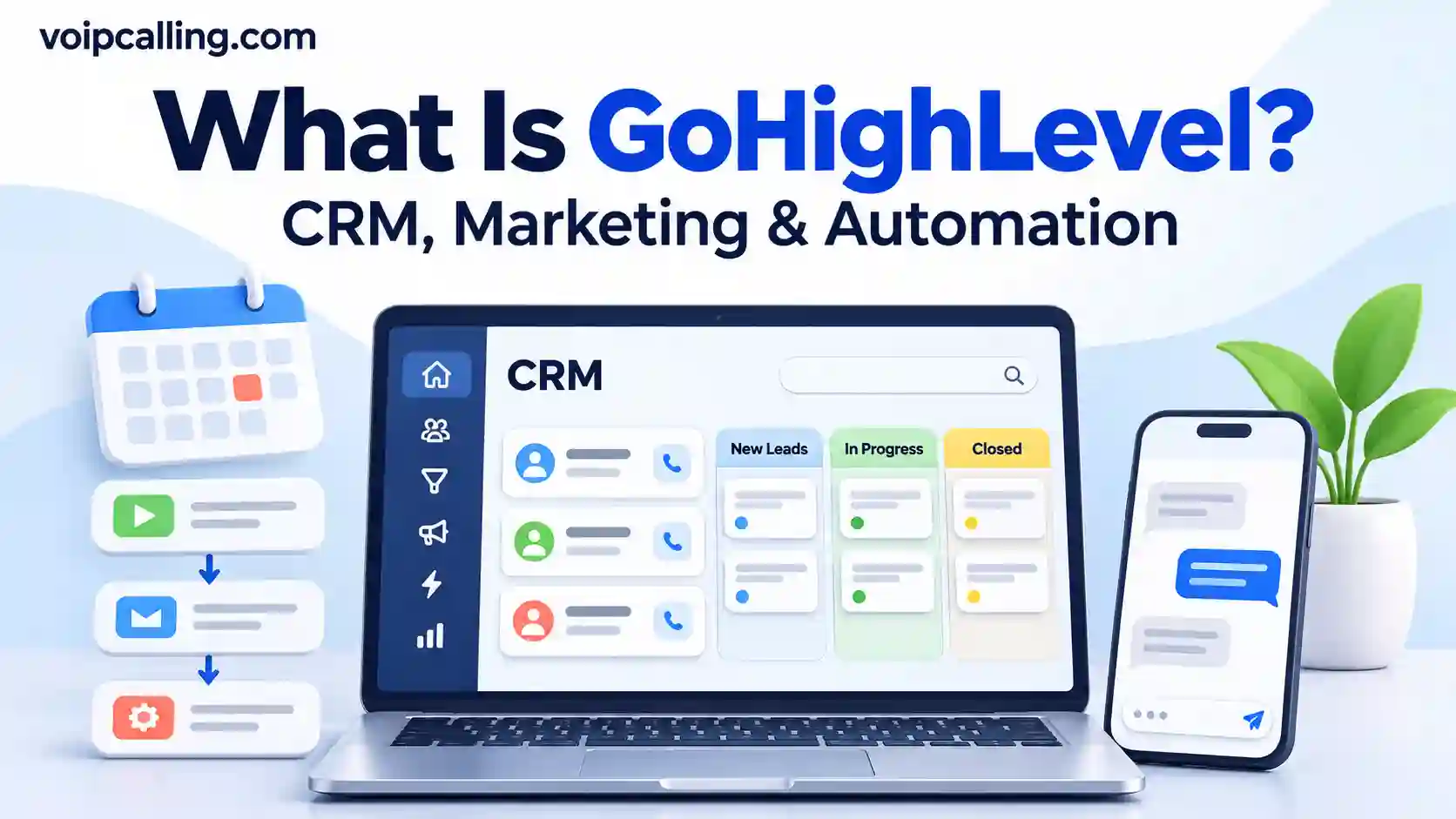
GoHighLevel, officially branded HighLevel, is a business software platform that combines a CRM, marketing automation, websites, sales funnels, appointment booking and customer communication. Businesses use it to capture leads and manage follow-up, while agencies can manage client workspaces and offer branded services on eligible plans. Usage-based services and optional products can cost extra.
In simple terms, GoHighLevel helps connect what happens before and after an enquiry. A visitor submits a form, the business records the CRM lead, an automation workflow assigns follow-up, and a calendar can turn the conversation into an appointment. The value comes from connecting those steps, rather than simply collecting more software features.
This guide explains the platform, its main tools, account structure and pricing in plain language. It also covers the difference between a monthly subscription and communication or AI usage. That distinction matters whether you are a small business choosing your first system or an agency planning to manage several clients.
 4.6/5
 Rating uses the named HighLevel product profile. It summarizes customer feedback, not independent measurement of every feature or workflow.
What Is GoHighLevel In Simple Terms?
HighLevel is an online CRM workspace for customer acquisition and follow-up. Its CRM stores customer information, its pipeline tools track potential CRM sales, and its marketing features help a business respond and stay organized. Instead of moving each enquiry manually between several disconnected applications, a company can build a connected CRM process inside the platform.
The product is branded HighLevel, although GoHighLevel and GHL are commonly used names. An agency may also provide a branded version of the experience to its clients where the plan supports it. When evaluating a proposal, identify who supplies the account, who manages it and which features and usage are included in the offer.
| Topic | Plain-Language Answer | What To Check |
|---|---|---|
| Product category | Customer management and business marketing platform | Required CRM process and staff ownership |
| Main tools | CRM, funnels, websites, calendars, conversations and workflows | Actual feature, plan and connected service |
| Typical buyers | Businesses, marketing agencies and service providers | Configuration time and complete operating budget |
| Account structure | Agency administration plus business/location sub-accounts | Client separation, permissions and account limits |
| Agency products | Branding, reusable configuration and eligible SaaS tools | Plan boundary; mobile branding can be separate |
| Pricing model | Platform subscription plus applicable usage and add-ons | Unlimited contacts/users does not mean unlimited consumption |
| Evaluation | Standard 14-day free trial advertised | Signup terms, usage charges and a representative pilot |
Is GoHighLevel A CRM Or A Marketing Platform?
HighLevel is both: the CRM provides contact and sales information, while the marketing and automation workflow tools use that information to coordinate activity. A form submission can create a CRM contact, an opportunity can represent a potential deal, and an automation workflow can assign a task or send an appropriate notification.
Those functions should work toward a defined business process. A contact record does not tell an employee what to do unless the team agrees on ownership and the next step. A pipeline board does not create sales simply because it has stages. The platform is useful when the business gives those tools accurate CRM information and a repeatable operating method.
What Does All-In-One Mean With GoHighLevel?
All-in-one describes the breadth of tools available in the platform. It does not mean every service is unlimited, every optional product is included or every specialist application can be replaced. GoHighLevel combines several common business functions, but the exact fit depends on the chosen plan, connected services and required automation workflow.
For example, a business may use its website builder and booking tools while retaining another system for specialist operations. An agency may use the client workspaces but need additional software for a particular integration. Evaluate the functions you actually need instead of assuming that the longest feature list produces the simplest or cheapest setup.
How Does GoHighLevel Work?
HighLevel connects customer information with actions. A lead enters through a supported source, the CRM holds the record, and staff or an automation workflow decide what happens next. Conversations, appointments, opportunities and payments can then provide further events. The business needs to configure those steps so they reflect its actual service and customer permissions.
1. Capture A Lead Or Customer Request
A website form, landing page, booking page or supported communication channel can begin the journey. GoHighLevel provides tools for collecting the relevant CRM information and bringing it into the workspace. Keep the initial form focused on what employees need to respond, rather than asking for data that nobody will use.
For example, a home-service company might collect a name, preferred contact method and short description of the job. That is an automation workflow example, not a promise that every industry template already contains the right fields. Check how the form identifies the business, records the request and explains any proposed follow-up.
2. Store The Information In The CRM
The CRM contact record becomes the reference point for future activity. GoHighLevel can hold details and related communication inside the customer workspace. The team should decide which CRM fields are required, how CRM duplicates are handled and who is responsible for correcting incomplete information.
A useful record distinguishes the person from the particular CRM sales opportunity. The same customer may enquire about more than 1 service or return later for another job. Treating every new CRM enquiry as an unrelated person can create duplicates, while treating every interaction as the same deal can make follow-up confusing.
3. Assign And Automate The Next Step
An automation workflow connects a trigger with actions and conditions. GoHighLevel can use business events to coordinate follow-up, such as creating a task or sending a configured message. The important design question is what should happen when the person replies, cancels or becomes unsuitable for the original sequence.
Begin with a short process that employees can explain. For instance, acknowledge an eligible enquiry, assign an owner and create a reminder if it remains unresolved. Add complexity only when it solves a real requirement. A long visual automation workflow can still produce poor customer service if nobody understands who owns the next action.
4. Track The Outcome And Continue The Relationship
Appointments and pipeline stages can help GoHighLevel users see progress. A booked appointment, an accepted proposal and a payment are different outcomes. Define which event should move a CRM opportunity and which events require staff review, so reporting reflects what actually happened.
After the first transaction, a business may use permitted reminders, review requests or customer updates. Keep these relevant to the customer relationship. Completing a purchase does not mean every future promotional contact is automatically appropriate. The operating process should respect preferences and stop activity that is no longer useful.
What Are The Main GoHighLevel Features?
HighLevel groups customer management, marketing, communication and agency tools into 1 platform. The table below explains the main functions in practical terms. Availability and pricing still depend on the account and service, particularly for communication usage, AI agents and optional add-ons.
| Tool | Practical Use | Evaluation Question |
|---|---|---|
| CRM and contact records | Keep customer information and related activity together | Can staff find the right record and correct duplicates? |
| Pipelines and opportunities | Track a potential sale or service outcome | Do stages reflect evidence rather than assumed revenue? |
| Websites, funnels and forms | Capture information and direct a next step | Does the complete mobile journey work? |
| Calendars | Provide a route from enquiry to booking | Do availability, changes and reminders stay consistent? |
| Conversations | Handle supported communication in the customer workspace | Which employee owns a new reply? |
| Workflow automation | Connect triggers, conditions and actions | What happens after a reply, cancellation or missing field? |
| Payments and customer content | Support eligible invoices, courses and communities | Does the intended country/provider workflow fit? |
| Agency tools | Manage client workspaces and reusable configuration | Which branding, SaaS and billing rights apply? |
GoHighLevel CRM And Contact Management
The CRM helps a business maintain customer information and understand related activity. Employees can use records and lists to organize follow-up instead of relying only on personal inboxes or spreadsheets. Configure fields around the information the team genuinely needs, such as service interest, location or assigned employee.
Good contact management also needs a data policy. Decide which system is authoritative when an integration updates a record, and establish how staff correct mistakes. GoHighLevel can centralize information, but it cannot infer the correct value when 2 connected applications disagree. Clear ownership keeps the CRM useful as the CRM customer base grows.
GoHighLevel CRM Pipelines And Opportunities
A pipeline represents stages in a sales or service process, while an opportunity represents a particular potential CRM outcome. GoHighLevel users can use those stages to see what needs attention. Choose names that reflect the business's real process, rather than importing a complex sales model employees do not recognize.
For a small service team, stages might distinguish a new enquiry, a scheduled consultation and an accepted quotation. Decide what evidence is required to move each record. A message being sent should not automatically be reported as a won sale. Reporting becomes more useful when stages have consistent operational meanings.
GoHighLevel Websites, Funnels And Forms
HighLevel includes tools for websites, landing pages, funnels and information collection. A website supports broader browsing, while a funnel usually guides a visitor toward a particular next step. Forms can connect that action with the CRM so the enquiry does not remain isolated from follow-up.
Check the pages on a real mobile device before launch. Confirm that the form submits, the next page makes sense and employees receive the correct CRM information. A visually attractive page is only 1 part of the journey. The business also needs an accurate offer, usable content and a reliable response process.
GoHighLevel Calendars And Appointment Booking
The booking tools can provide a route from enquiry to appointment. GoHighLevel lists calendars and reminders among its core functions, but the company still needs to configure staff availability, appointment type and the connected calendar arrangement. Test the actual booking rules rather than assuming a template matches the business.
Include rescheduling and cancellation in the evaluation. A customer changing the appointment should not keep receiving outdated reminders. Employees should know which calendar holds the authoritative booking and how changes appear in their workspace. These ordinary exceptions are often more useful to test than another successful first booking.
GoHighLevel Conversations And Communication
The Conversations area brings supported interactions into a customer-facing workspace. GoHighLevel lists email, messaging and calling capabilities, with particular channels dependent on configuration and charges. Confirm which channels your account connects, where replies appear and how employees identify work that still needs a response.
A shared conversation stream is valuable when it reduces missed follow-up. It still needs staff ownership. Decide who handles a new response, what happens outside business hours and how duplicate replies are avoided. Access to a contact history does not automatically tell 2 employees which one should act.
GoHighLevel Reputation, Payments And Client Content
HighLevel also lists review-management tools, payments, invoicing, courses and communities. These can support different stages of the customer relationship. A service company might prioritize invoices and appointment follow-up, while an educator may care more about member access. Confirm the payment provider, country and exact content-access workflow required.
Do not enable every tool simply because it appears in the account. Each additional function creates configuration and support work. Start with the part that solves the clearest problem, then extend the automation workflow when staff can operate it confidently. A focused implementation can be more useful than a partially configured collection of features.
GoHighLevel Automation: How Workflows Use CRM Data
HighLevel automation workflows connect events with actions, conditions and timing rules. They can reduce repetitive work when they reflect the CRM business process accurately. They can also repeat mistakes at scale when a trigger, sender or audience is wrong. Treat the automation workflow as an operating procedure that needs an owner, rather than a sequence that can be forgotten after publication.
Triggers, Actions And Conditions
A trigger starts the process, an action performs a task and a condition decides which route to follow. GoHighLevel uses these concepts to connect CRM activity with the next step. An enquiry from 1 service area might go to a different employee from an enquiry about another service.
Keep conditions observable. Instead of an unclear rule such as a lead being interested, identify the actual field or event that establishes the route. Then test what happens if that information is missing. An automation workflow should have a sensible fallback rather than silently leaving a customer without a response.
Re-Entry, Timing And Stop-On-Response
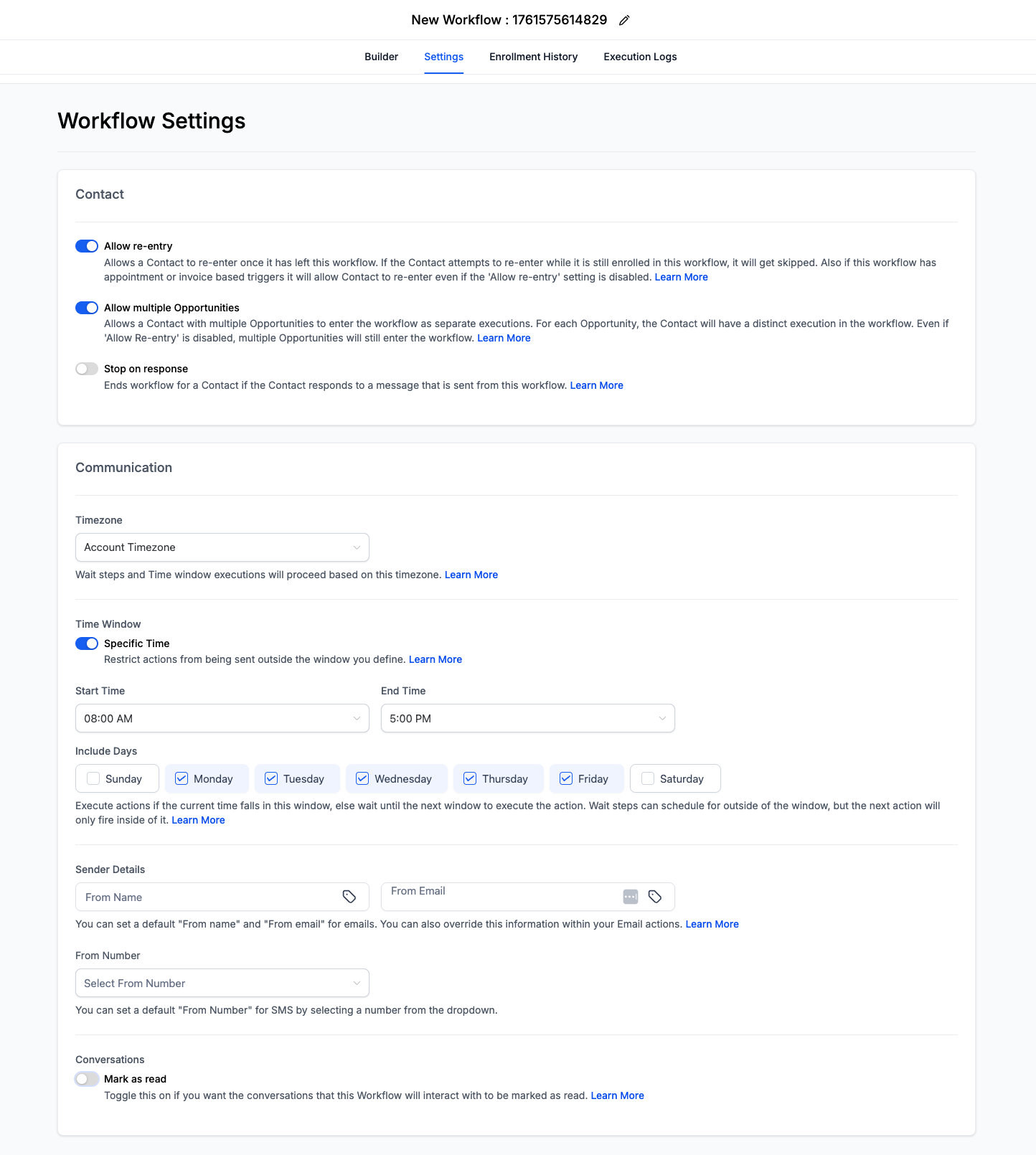
HighLevel's automation workflow settings control entry behavior, communication timing and response handling. The documented Stop on Response setting applies to a response to a message from that automation workflow; it should not be treated as a universal switch ending every unrelated sequence. Review the actual customer journey when several automation workflows can contact the same person.
Appointment- and invoice-based triggers also have documented entry exceptions. Turning off ordinary re-entry does not establish that a new appointment can never start another instance. Test the trigger you use, including a second booking or invoice. Settings that sound similar can have different effects depending on the event.
Measure The Result Of An Automation Workflow
HighLevel provides execution information that can help explain why an action ran or remained pending. Use it alongside the customer record and staff outcome. An automation workflow finishing without an error does not prove that a customer read the message or that an employee completed the promised action.
Define a small set of useful measures: unresolved enquiries, booked appointments or opportunities waiting for a quotation. Avoid rewarding message volume alone. Sending more follow-ups can increase usage costs while making the customer experience worse if the person has already replied or the request has changed.
GoHighLevel Agency Accounts And Sub-Accounts Explained
HighLevel separates agency-level administration from the workspaces used for individual businesses or locations. This is a central reason agencies evaluate it. The structure can keep client operations distinct, but staff access, commercial settings and responsibility still need careful configuration.
What Is A GoHighLevel Sub-Account?
A sub-account is a workspace for a business or location, containing its CRM activity and related tools. A client sub-account represents a customer's business. HighLevel also supports designating an agency's own internal workspace as an Agency Sub-Account, which has a different administrative purpose from a client account.
Keep the distinction clear when configuring subscriptions and rebilling. The official account guide describes how agency-owned workspaces can hold the relevant setup on supported plans. Selecting the wrong workspace can connect commercial settings to the wrong business. A separate name and access policy helps employees avoid ordinary administrative mistakes.
What Is GoHighLevel White Labeling?
White labeling means providing supported parts of the platform under an agency's branding. GoHighLevel's plan structure distinguishes the branded desktop experience from other products and add-ons. It does not mean every plan includes a custom mobile application or that the agency owns the underlying software.
An agency should define what it is selling: software access, setup, support or a broader managed service. Clients need to know who handles ordinary questions and who controls their data and connected resources. A branded login is only part of that relationship; it does not replace a clear service agreement and operating responsibility.
What Is GoHighLevel SaaS Mode?
SaaS Mode provides an eligible agency with tools for packaging and selling supported software access. The current Founder plan includes this capability. GoHighLevel's SaaS configuration and billing features are different from merely creating client accounts manually, so confirm the exact offer and account settings before planning a subscription business.
Selling access does not make revenue automatic. The agency still needs a useful customer offer, onboarding, support, pricing and a process for nonpayment or cancellation. Model the cost of communication and add-ons as well as the platform subscription. A client-facing monthly price should not promise unlimited chargeable services unless the arrangement genuinely supports it.
What Are GoHighLevel Snapshots?
A snapshot is a reusable collection of supported account configuration, such as funnels, automation workflows, forms and fields. GoHighLevel uses snapshots to help deploy a working setup into other client workspaces. Build and test the source account first, then choose which assets belong in the reusable configuration.
A snapshot is not a full customer-data backup. The official guide excludes contacts, appointments, conversations, reputation data, payment-provider connections and integrations from the stated snapshot contents. A new client still needs its own information and connected services. Treating a template as a complete migration can leave important requirements unfinished.
How Much Does GoHighLevel Cost?
HighLevel's standard published monthly subscriptions start at $97, with higher tiers at $297 and $497. Enterprise arrangements require a quote. These are platform subscription prices in USD, not per-user rates and not complete invoices for every communication or AI service. Confirm the current account offer before purchase.
| Plan | Monthly Subscription | Typical Starting Fit | Important Boundary |
|---|---|---|---|
| Starter | $97/month | One business or a limited client setup | 3 sub-accounts; verify required features and actual package |
| Unlimited | $297/month | Agencies managing more client workspaces | Unlimited sub-accounts, basic API and supported pass-through billing |
| Founder | $497/month | Eligible SaaS resale and broader agency configuration | SaaS Mode and supported markup functions; product rules still apply |
| Enterprise | Request a quote | Organizations needing a tailored agreement | Scope, pricing and service entitlements require confirmation |
What Is Included In The GoHighLevel Subscription?
The core subscription provides access to the plan's software and account entitlements. GoHighLevel's public plan information includes unlimited contacts and users, while the Starter plan has a limited number of sub-accounts. Higher tiers expand agency functions. A client buying through an agency should also check the actual package, access and service terms it receives.
Access to a tool is different from paying for its consumption. A communication interface can be available while messages, calls and numbers generate separate usage charges. The same distinction applies to optional products. Evaluate what the business needs to operate, then budget the software subscription and the chargeable activity separately.
GoHighLevel Communication And Wallet Charges
The official pricing and billing guide explains the agency wallet used for supported usage-based services. Funds are deducted as activity occurs, and configured recharge settings can charge the agency's card when the balance falls below its threshold. A wallet top-up is funding, rather than automatically a second expense on top of the same consumed usage.
For a company using the CRM, the important question is which activity draws from that wallet. Phone numbers, email, messaging, calls and certain other features can add costs. Review the account's transaction records and recharge settings before increasing volume. A quiet month and a large campaign can produce different bills under the same platform subscription.
A Simple GoHighLevel Budget Example
For an illustrative account using the $97 monthly subscription and 10,000 LC Email emails at the published $0.675 per 1,000, the selected email component is $6.75. Those 2 components total $103.75. This is a partial budget: it excludes phone services, other usage, optional products, implementation, taxes and any additional charges.
If that account also enables an eligible $50 AI Employee Growth subscription for 1 location, the selected subtotal becomes $153.75. AI allowances and restrictions still apply, and phone charges remain separate. The example shows why the monthly platform price should not be described as the final cost of every CRM automation workflow.
For a different illustration, a $297 platform subscription plus 5 eligible locations each using that $50 add-on creates $547 in selected subscriptions. Add 50,000 emails at the same stated email component and the subtotal becomes $580.75 before the remaining exclusions. Per-location products can change the budget even when the agency's main subscription stays the same.
GoHighLevel AI Pricing Needs Product-Specific Checks
HighLevel distinguishes AI assistants that help a user create or manage work from paid AI agents that perform ongoing customer tasks. Some assistant access is included for agency users under fair-use terms. Client sub-account entitlements can differ, and ongoing conversation or call-handling products are not automatically free because the main platform contains AI tools.
The current AI Employee offerings include Growth at $50 and Unlimited at $97 per enabled location, subject to the applicable allowances and fair-use terms. A $20 Starter AI offer has narrower eligibility tied to the Founder agency plan. Phone-system charges still apply to calls. Check the exact product and account rather than treating all AI features as a single unlimited allowance.
What Does GoHighLevel Rebilling Mean?
Rebilling means passing supported service charges to a client, with the available options depending on the plan and product. The current Unlimited and Founder tiers support specified rebilling functions, while broader markup capabilities belong to eligible Founder arrangements. Product-specific rules and pass-through fees still need to be checked.
An agency should reconcile its supplier charges with the client invoice. A higher client-facing rate is not the same as profit after support, software, payment and unrecovered usage costs. Explain the commercial terms clearly and decide what happens if a client consumes services without sufficient funding. The CRM subscription alone does not resolve that accounting responsibility.
GoHighLevel SMS, Calling And External Integrations
HighLevel includes a native phone-system path for standard communication activity, so a separate external telephony supplier is not automatically required. The proposed account still needs suitable numbers, configuration and applicable registration. If a business evaluates another connection, compare the exact supported workflow rather than assuming every channel or feature transfers.
Does GoHighLevel Need A Separate Phone Provider?
Not for every setup. Its official billing guide describes native phone services for buying numbers, messaging and calls inside the platform. A business should begin by identifying what the native arrangement provides and what it costs. An external integration is relevant when it resolves a defined requirement, rather than simply adding another supplier.
For employee-phone requirements, compare the actual interface and call handling with the company's needs. Our guide to business VoIP phone services provides a separate shortlist for that purchase. A marketing platform and a dedicated office phone subscription should not be assumed to have identical user experiences or included services.
How Does Signal House Connect With GoHighLevel?
Signal House markets a HighLevel messaging integration with client-pricing and account-management functions. It is an option to evaluate for eligible messaging automation workflows, not a replacement for the whole CRM. Demonstrate sending, incoming replies and staff follow-up in the intended account before changing a working arrangement.
Check the integration's own commercial offer and traffic eligibility. A provider's general API rate does not establish the price inside every connected app. Likewise, a messaging connection does not prove every native call or AI function moves with it. For broader communications infrastructure research, our Twilio alternatives guide explains a different purchasing category.
Who Should Use GoHighLevel?
HighLevel can suit businesses that need a connected process for enquiries, follow-up and customer administration. Agencies may also value separate client workspaces and eligible resale functions. The platform is most useful when the business has the time and ownership to configure its process, rather than expecting a subscription to create demand automatically.
| Intended User | Useful Starting Scenario | Main Consideration |
|---|---|---|
| Small service team | Capture an enquiry and coordinate a booking | Staff ownership, training and communication costs |
| Marketing agency | Repeat a defined client lead-management service | Sub-accounts, permissions and client economics |
| Consultant | Connect enquiries, appointments and proposals | Actual calendar and payment workflow |
| Course or community business | Coordinate customer access and communication | Member experience and exception handling |
| Very simple operation | Evaluate whether a shared contact tool is sufficient | Broad platform capability may exceed the real requirement |
GoHighLevel For Marketing Agencies
An agency can use GoHighLevel to manage repeatable client setups and ongoing customer automation workflows. The value may include consistent lead capture, reporting and staff follow-up. Start with a narrow service the agency can deliver well, then decide which tools and account entitlements support it.
Client administration also needs an exit plan. Establish who controls domains, numbers, customer records and subscriptions. An agency-branded workspace should not make ownership unclear. The commercial offer should explain setup, support and data handling so clients understand what is included and how a future change would be managed.
GoHighLevel For Small Businesses And Service Teams
A small business can evaluate GoHighLevel when enquiries are scattered across forms, inboxes and calendars. A shared CRM and defined follow-up process may reduce that fragmentation. Use a representative enquiry to test whether employees can identify the customer, see the request and complete the next action.
A simpler system may be appropriate when the company only needs a CRM contact list or basic appointment link. Compare the operating work as well as the feature list. If nobody has time to configure and maintain the platform, additional capability can become a burden instead of an improvement.
GoHighLevel For Consultants And Content Businesses
A consultant may prioritize enquiries, bookings, proposals and payments. A course or community business may care more about member access and communication. GoHighLevel lists tools for these functions, but the actual evaluation should focus on the transaction and customer experience the company will use.
Test ordinary exceptions: a canceled booking, a failed payment or a customer who needs access restored. A platform tour may show the successful path without revealing how employees handle those situations. The best fit is the arrangement that supports the real service, not only the first sale.
How To Get Started With GoHighLevel
Start with a business process, then choose the account and plan that support it. GoHighLevel's published standard offer includes a 14-day free trial, which can be used to evaluate the software under the relevant signup terms. Do not assume an extended promotion or that every usage-based service becomes unlimited during evaluation.
1. Choose A Defined First Automation Workflow
Write down where the enquiry starts, which CRM fields matter and who handles the response. Select 1 outcome, such as booking an appointment or preparing a quotation. This makes it easier to judge the setup than attempting to enable every tool at once.
Identify the systems that will remain in use. The company might retain its existing website or specialist operating software while testing a new CRM lead-management process. Avoid an unnecessary full migration if the actual problem can be evaluated with a smaller connected automation workflow.
2. Configure The CRM Workspace And Staff Access
Create or select the appropriate GoHighLevel workspace and use clear business details. Give employees access at the level they need. Agency-level permissions and client-workspace permissions have different scope, so adding someone to a wider role can grant more access than a routine CRM follow-up task requires.
Assign responsibility for the CRM, billing, domains and communication settings. These can be different people, but the boundaries should be clear. Record who can approve changes and who should investigate an issue when a connection stops working or a charge looks unfamiliar.
3. Import Carefully And Connect The Required Services
Prepare a small sample before importing an entire customer list into the CRM. Map the CRM fields, check duplicates and preserve relevant communication preferences. GoHighLevel can organize records, but importing a phone number does not itself establish permission to send promotional messages.
Connect only the services needed for the CRM pilot, such as a calendar, sending domain or approved phone number. Confirm the country and provider requirements for those services. Keep old automations from contacting the same person at the same time while the new automation workflow is being tested.
4. Test The Customer Journey And Review Costs
Run an ordinary enquiry through the complete GoHighLevel process, then test a reply, cancellation or incomplete record. Ask the employee to find the correct information and complete the promised action. Review both the visible customer experience and the execution history.
Reconcile the pilot's usage and optional products with the expected budget. Correct a missing step before increasing volume. A useful evaluation leaves the team with a repeatable process and an owner for routine maintenance, rather than a collection of enabled features nobody can confidently operate.
GoHighLevel Benefits, Limitations And Data Portability
HighLevel's potential benefits include a connected CRM, broader marketing tools and agency account management. The main purchasing considerations are configuration effort, exact service entitlement and complete operating cost. Evaluate these together instead of assuming that either a large feature list or a low entry price determines the best choice.
GoHighLevel Benefits For An Organized Team
A connected workspace can reduce repeated data entry and make the CRM customer history easier to follow. Reusable configurations can also help an agency deliver a consistent service. Those benefits depend on accurate setup and staff adoption, rather than appearing automatically when an account is opened.
Measure a practical result, such as fewer unassigned enquiries or better visibility of appointments waiting for action. Avoid promising guaranteed sales, revenue or software savings. A company may replace several tools, but it may also retain specialist applications or add paid services to complete the workflow.
GoHighLevel Limitations To Evaluate
The breadth of GoHighLevel can create a learning curve. Workflows, account structure and billing deserve time during onboarding. Verify the particular feature that matters to the business, including its plan boundary and integration behavior, rather than relying on an older tutorial or an unrelated account's configuration.
Also confirm the support arrangement. If an agency supplies the workspace, it may provide the first line of support. If the business manages the platform directly, someone needs to own configuration and escalation. Product support and a done-for-you business implementation are different services.
Can You Export Data From GoHighLevel?
HighLevel documents contact exports to CSV, with account and role requirements. The export guide notes that a CRM contact file does not include automation history such as previous email and message logs. A contact export is therefore useful, but it should not be described as a complete backup of every account object and customer interaction.
Check the data your business must retain before committing to a migration. A snapshot, contact export and eligible sub-account transfer serve different purposes. Test the relevant export and inspect the actual fields. The business should understand how it would leave as well as how it would join.
Frequently Asked Questions About GoHighLevel
What Is GoHighLevel Used For?
HighLevel is used for customer management, lead capture, marketing automation workflows, appointment booking and related communication. Agencies can also manage client workspaces and use eligible branding or resale functions. The actual setup should match the business process, account plan and connected services.
Is GoHighLevel The Same As HighLevel?
Yes. HighLevel is the product's official branding, while GoHighLevel and GHL are commonly used names. An agency may provide a branded client experience where supported. Confirm who supplies the account and what service, usage and support are included in the offer.
Is GoHighLevel A CRM?
Yes. GoHighLevel includes a CRM for contacts and sales activity alongside broader marketing and business tools. It is more than a contact list, but the business still needs clear CRM record ownership, pipeline definitions and follow-up procedures to use those features effectively.
Can A Small Business Use GoHighLevel?
Yes. GoHighLevel can support a small business that needs connected lead management and follow-up. Its agency functions are not required for every buyer. Compare the configuration work and complete budget with the actual needs; a simpler application may fit a narrower requirement better.
How Much Is GoHighLevel Per Month?
HighLevel's standard published platform tiers are $97 Starter, $297 Unlimited and $497 Founder per month in USD, with quoted Enterprise arrangements. These are subscription figures, not per-user charges. Communication usage, optional products, implementation and other charges can add to the bill.
Does GoHighLevel Offer A Free Trial?
Yes. GoHighLevel's published standard pricing offer includes a 14-day free trial. Confirm the signup, payment and cancellation terms before enrolling. An evaluation period does not establish unlimited communication usage or prove that a longer promotion from another source applies.
Are SMS, Calls And AI Free With GoHighLevel?
No. GoHighLevel distinguishes software access from usage-based communication and paid AI products. Some agency-user assistant features have included access under fair-use terms, while sub-account access and AI agents can differ. Phone charges remain separate even when a particular AI allowance covers call-handling activity.
What Is A GoHighLevel Snapshot?
A GoHighLevel snapshot is a reusable set of supported workspace configuration, such as funnels and workflows. It is not a complete customer-data backup. The official guide excludes items including contacts, conversations, appointments and connected payment or integration settings from its stated contents.
Can GoHighLevel Replace A Website?
GoHighLevel includes website and funnel-building tools, so it can serve that role when they meet the business's requirements. It does not follow that every existing site should be replaced. Evaluate content, design, integrations, migration work and the customer journey before changing a working website.
Does GoHighLevel Guarantee More Sales?
No sales guarantee is established by this guide. GoHighLevel provides tools for managing acquisition and follow-up, but outcomes also depend on demand, the offer, staff work and implementation. Evaluate a defined customer process rather than buying on an unsupported revenue promise.
Is GoHighLevel Right For Your Business?
GoHighLevel is worth evaluating when a connected CRM and marketing workspace can solve a clear operating problem. Agencies may also value its client-account and eligible resale tools. The best starting point is a representative customer journey, a plan that fits the CRM account needs and a complete budget.
Begin with a focused pilot and confirm the ordinary exceptions, staff ownership and usage charges. Keep data portability and support in the decision. That approach makes the choice about a system the business can operate, rather than a long list of features it may never configure.
What Do Customers Say About GoHighLevel?
The named HighLevel product profile on G2 shows 4.6/5. Reviewed feedback includes Christian K.'s positive description of managing campaigns and client communication, while Holly D. values consolidation but describes learning the platform as overwhelming. Those are individual experiences, not a universal result for every account.
Use feedback to plan an evaluation: can employees complete ordinary tasks, understand the CRM and get the help they need? The aggregate rating does not independently establish call quality, guaranteed support or a return on investment. No hands-on performance test was conducted for this guide.
Affiliate Disclosure: VoIPCalling may earn a commission from selected recommendation links, at no additional cost to you. The Signal House recommendation link is an affiliate link; the HighLevel trial link is an official non-affiliate destination. Offers, eligibility and account terms may change.