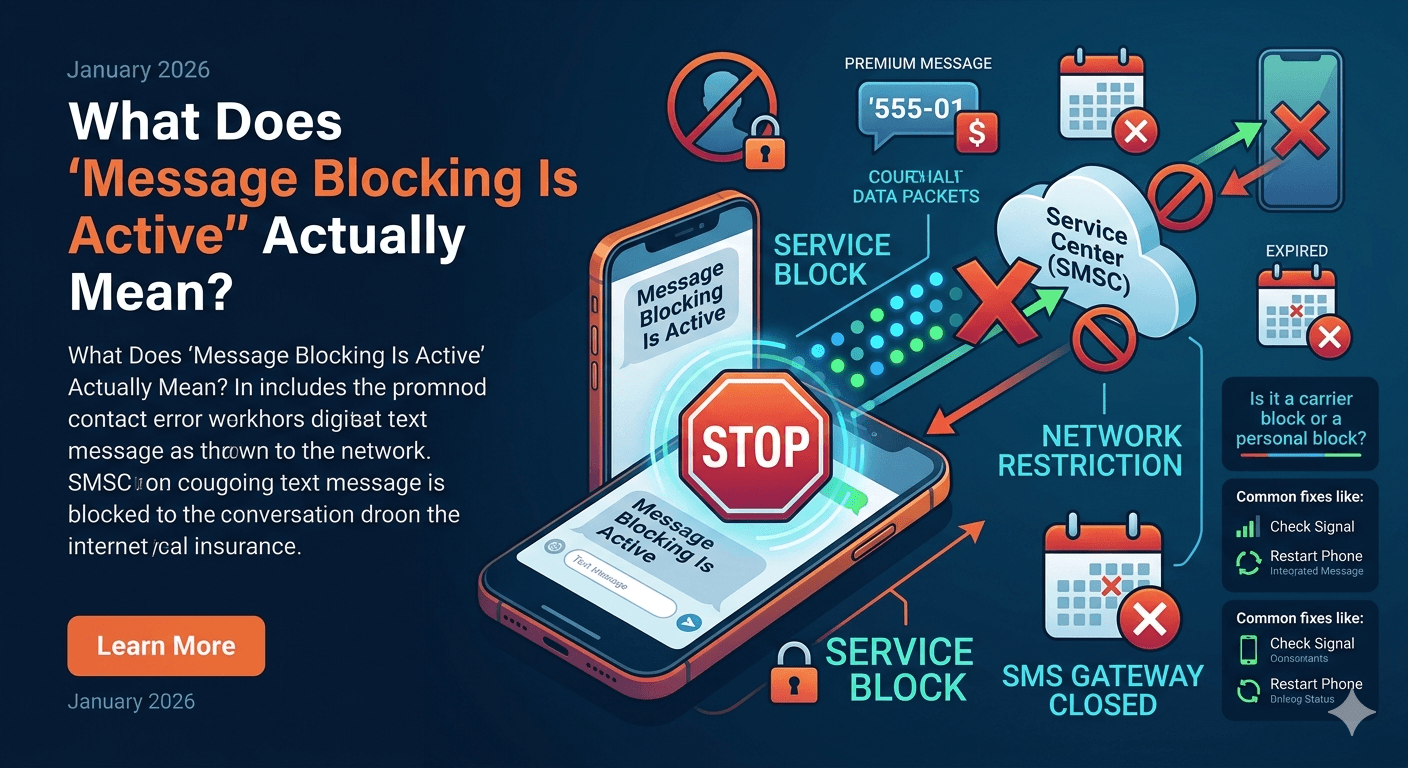
Message blocking active is a notification indicating that an outgoing or incoming SMS has been restricted by a mobile carrier or a specific device setting. This error often manifests as a free msg unable to send message message blocking is active alert, signifying that the service is temporarily unavailable for a specific number. It essentially means the network or the device is preventing the communication from completing successfully. Common triggers include blocked contacts, carrier-side restrictions, premium messaging blocks, or an expired service plan, requiring users to verify their account status or network settings to restore full functionality.
When you encounter the error what is message blocking active, it can be incredibly frustrating, especially when you are trying to send an important text. This notification is not just a random glitch; it is a specific signal from your service provider or your operating system that a communication barrier has been established. Whether you are using a modern smartphone or a legacy device, understanding the mechanics of this error is the first step toward restoring your ability to stay connected with friends, family, and colleagues.
What Does “Message Blocking Is Active” Actually Mean?
At its core, the phrase what is message blocking active refers to a state where the Short Message Service (SMS) or Multimedia Messaging Service (MMS) gateway is closed for your specific line. This is a digital stop sign that prevents data packets from moving between your device and the recipient’s phone. Unlike a simple signal failure where a message might just hang in a sending state, this error provides a specific feedback loop from the carrier, often T-Mobile or MetroPCS, indicating that the network itself has actively rejected the transmission.
This error is often confused with being blocked by the person you are trying to reach. While a personal block is one possibility, the message blocking is active meaning usually points toward a service-level restriction. This could involve your account having a block on “Premium Messaging,” which prevents you from sending texts to five or six-digit short codes used by businesses for verification or marketing. In other cases, it could mean that your mobile plan does not include texting or that you have exceeded a specific limit set by your provider.
Understanding the meaning of message blocking is active also requires looking at the technological handshakes between devices. When you hit send, your phone contacts the Short Message Service Center (SMSC). If the SMSC sees a flag on your account or the recipient’s account that prohibits the message, it sends back the specific error code that your phone translates into the text you see on your screen. This communication is instantaneous and happens before the message ever reaches the intended recipient’s local tower.
Why Does “Message Blocking Is Active” Happen?
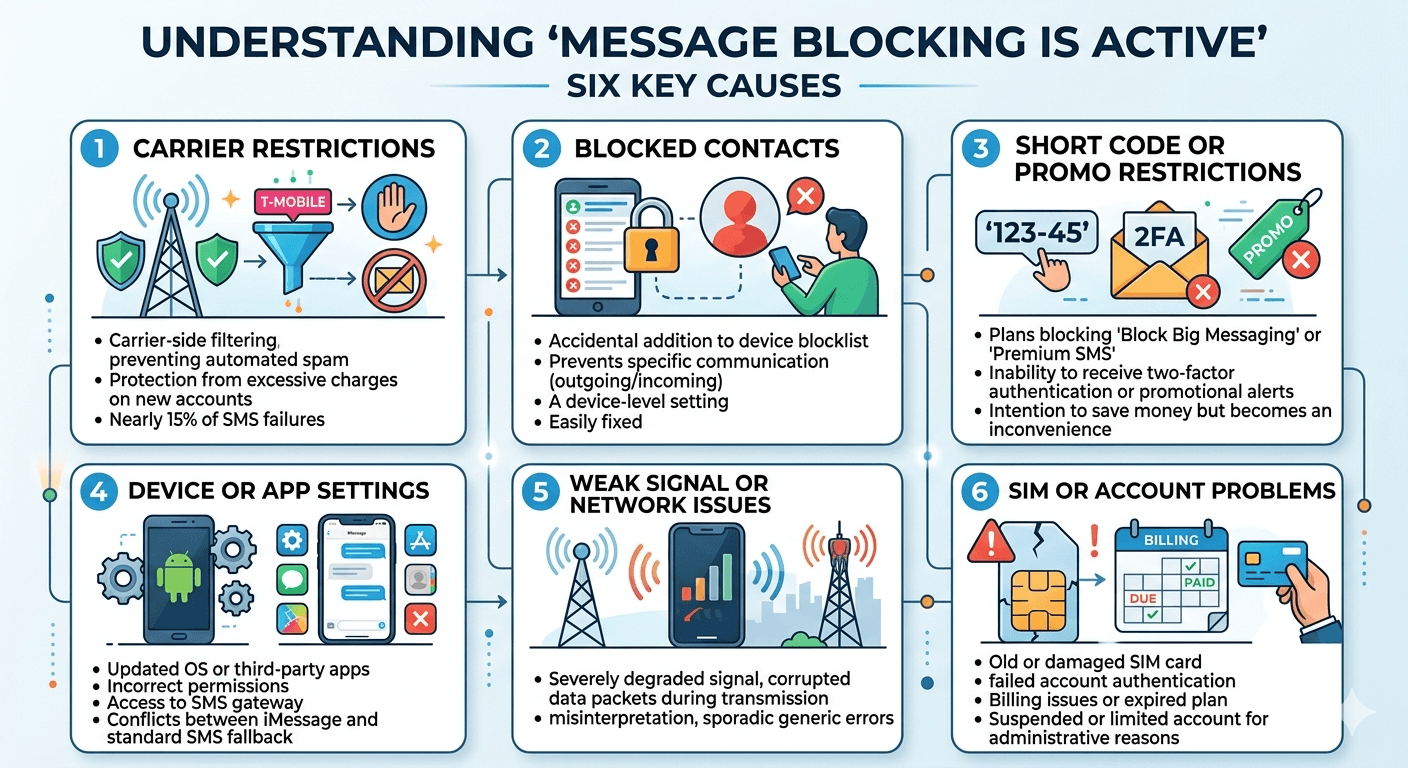
There is rarely a single cause for this issue, as it involves several layers of the telecommunications stack. By identifying the root cause, you can avoid unnecessary troubleshooting steps and go straight to the solution. Most occurrences of messaging blocking is active stem from administrative or technical misalignments between your device and the network’s automated filters which are designed to protect users from spam and excessive charges.
1. Carrier Restrictions
The most frequent culprit behind this error is carrier-side filtering. Service providers like T-Mobile often implement default blocks on new accounts to prevent accidental charges from premium text services.
According to a 2023 report on mobile communication trends, nearly 15% of SMS delivery failures are attributed to carrier-side filtering designed to prevent automated spam and protect consumer billing.
If your account is not configured to allow these types of messages, the system will trigger the message blocking is active tmobile alert.
2. Blocked Contacts
If you have accidentally added a number to your device’s internal blocklist, your phone will prevent any outgoing or incoming communication with that specific contact. This is a common reason for the unable to send message message blocking is active notification. It is important to distinguish between a carrier-level block and a device-level block, as the latter can often be fixed within your own settings menu without ever needing to call a customer service representative for assistance.
3. Short Code or Promo Message Restrictions
Many businesses use short codes for two-factor authentication or promotional alerts. If your plan has a feature called “Block Big Messaging” or “Block Premium SMS,” you will find yourself unable to receive message message blocking is active when these companies try to reach you. These blocks are often intended to save users money but can become a major inconvenience when you are trying to log into a bank account or a secure application that requires a text verification code.
4. Device or App Settings
Sometimes the messaging application itself is the source of the trouble. If you have recently updated your operating system or switched to a third-party texting app, the permissions might not be correctly configured. On Android, the message blocking is active android error can occur if the app does not have permission to access the SMS gateway. Similarly, on an iPhone, if iMessage is having a conflict with the standard SMS fallback, you might see the message blocking is active iphone notification.
5. Weak Signal or Network Issues
While less common, a severely degraded signal can cause the network to misinterpret the sending attempt. When the data packet is corrupted during transmission due to interference, the tower might return a generic error that the phone interprets as a block. If you are in an area with high congestion or poor reception, the messaging blocking may appear sporadically until you move to a location with a more stable connection to the nearest cellular tower.
6. SIM or Account Problems
Your SIM card is the physical key that unlocks your access to the carrier’s network. If the SIM is old, damaged, or poorly seated in the tray, it may fail to authenticate your account’s features. Furthermore, if there is a billing issue or your plan has expired, the carrier will immediately disable your ability to send texts. In these cases, the unable to receive message blocking is active status is a direct result of the account being suspended or limited due to administrative reasons.
How to Fix the “Message Blocking Is Active” Error?
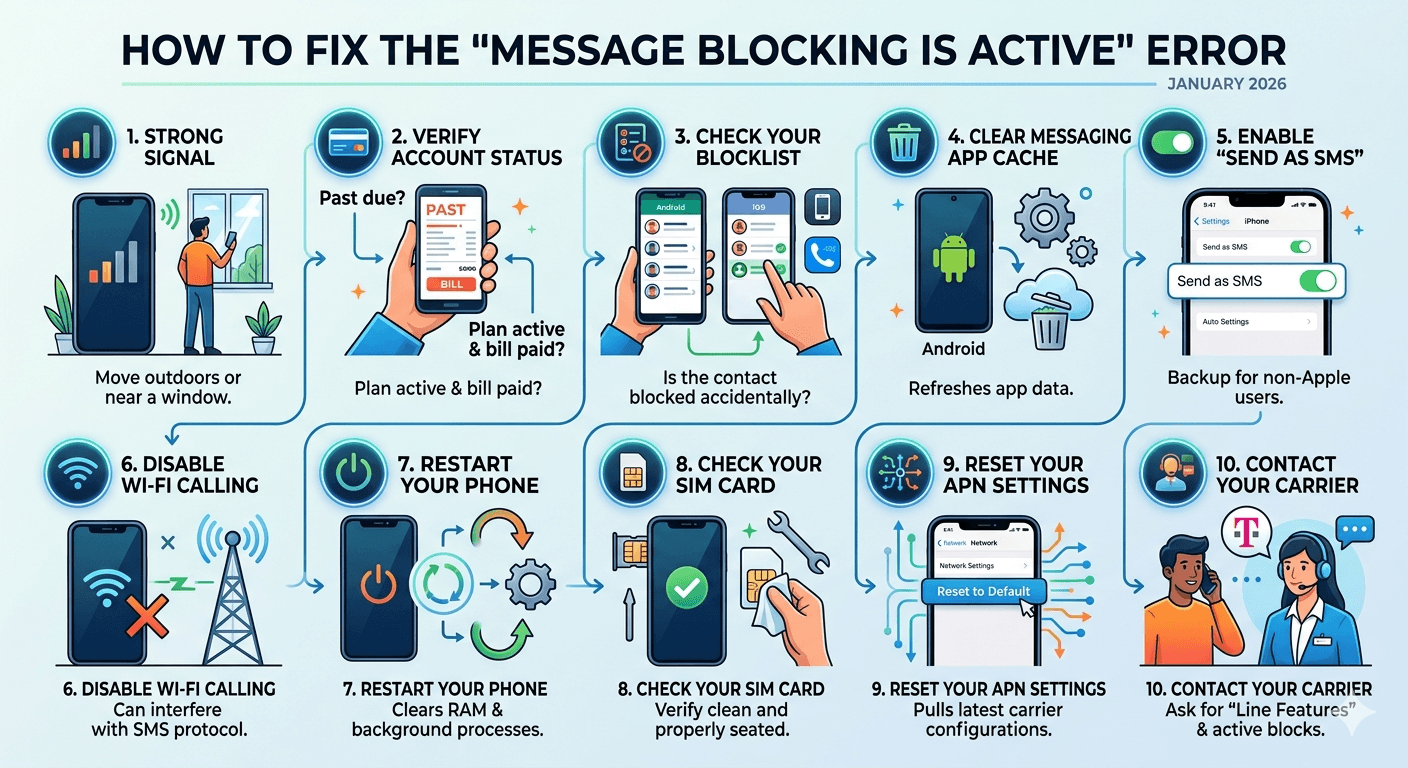
Fixing this issue requires a systematic approach, starting with the easiest solutions and moving toward more complex technical adjustments. By following these steps, you can resolve the fix message blocking active january 2026 errors that many users are currently facing. Each step addresses a specific potential failure point in the messaging chain, ensuring that you cover all possibilities before seeking professional technical support.
1. Make Sure You Have a Strong Signal
Before diving into deep settings, look at your signal bars. A weak connection can often trigger false error messages. If you have only one bar or are seeing a “Searching” notification, your phone cannot maintain the steady connection required to complete the SMS handshake. Try moving near a window or going outside to see if the error persists. Sometimes, toggling Airplane Mode on and off for thirty seconds can force your phone to reconnect to a stronger, more reliable local tower.
2. Verify Your Account Status
The most common reason for this error is an issue with your service plan. Log into your carrier’s mobile app or website to ensure your bill is paid and your plan is active. If you are on a prepaid plan, check if you have run out of credits or if your monthly cycle has ended. Carriers will often restrict messaging services the moment an account enters a past-due status, leading to the free msg message blocking is active alert appearing on your screen whenever you try to communicate.
3. Check Your Blocklist
It is surprisingly easy to accidentally block a contact. You should verify that the person you are trying to text is not on your internal blocklist. On both Android and iPhone, this can be done through the settings menu. If a contact is blocked, your phone will not even attempt to send the message, resulting in an immediate failure notification. Checking this list ensures that the restriction is not a self-imposed one that you simply forgot about or initiated by mistake.
Steps to unblock contacts on Android & iPhone:
-
For iPhone Users: Go to Settings, then Messages, and finally Blocked Contacts. Swipe left on any number you wish to unblock to restore full communication.
-
For Android Users: Open the Phone or Messages app, tap the three dots in the corner, go to Settings, and look for Blocked Numbers. Remove any entries that should not be there.
-
For Third-Party Apps: If you use apps like Truecaller or Mr. Number, check their internal blocklists as they can override your phone’s default settings and block messages without your knowledge.
4. Clear the Messaging App Cache (Android Only)
Android devices store temporary data in a cache to help apps run faster. However, if this data becomes corrupted, it can cause the android message blocking is active error. Clearing the cache does not delete your conversations; it simply refreshes the app’s internal processing environment. Navigate to Settings, then Apps, find your Messages app, and select Storage. Tap Clear Cache and then restart the app to see if the problem has been resolved.
5. Enable “Send as SMS” on iPhone
If you are an iPhone user, your device primarily uses iMessage to communicate with other Apple users. When iMessage is unavailable due to data issues, the phone should fall back to standard SMS. If the “Send as SMS” toggle is turned off in your settings, the phone will simply fail to send the message to non-Apple users or when the internet is down. Go to Settings, then Messages, and ensure that Send as SMS is enabled to provide a reliable backup for your communications.
6. Disable Wi-Fi Calling
While Wi-Fi calling is excellent for areas with poor cellular reception, it can sometimes interfere with the traditional SMS protocol. Some carriers have trouble routing text messages over a Wi-Fi connection, leading to the what does it mean when message blocking is active confusion. Try turning off Wi-Fi calling in your phone’s settings and attempt to send the message using only your cellular data. If the message goes through, you may need to update your carrier settings to improve Wi-Fi calling compatibility.
7. Restart Your Phone
It may sound like a cliché, but a simple restart can solve a vast majority of technical glitches. When you reboot your device, you clear the RAM and force all background processes, including the telephony stack, to reload from scratch. This can fix temporary software bugs that are causing the free msg unable to send message message blocking is active notification. Hold down the power button, shut the phone down completely, wait a full minute, and then turn it back on.
8. Check Your SIM Card
A physical issue with your SIM card can prevent your phone from authenticating correctly with the network towers. Turn off your phone and use a SIM ejector tool to remove the tray. Check the SIM card for any visible scratches, dust, or corrosion on the gold contacts. Use a soft, dry cloth to wipe it clean and then reinsert it firmly into the tray. When you restart the phone, the network will perform a fresh authentication, which often clears up messaging blocking issues.
9. Reset Your APN Settings
Access Point Name (APN) settings are the configurations your phone uses to connect to your carrier’s data and messaging gateways. If these settings are incorrect or have been changed by a software update, you will experience messaging problems. You can usually find an option to “Reset to Default” within the Mobile Networks section of your settings. This will pull the latest, most accurate configurations directly from your carrier, ensuring your device knows exactly how to route your text messages.
10. Contact Your Carrier
If you have tried all the steps above and still see the message blocking is active t-mobile error, it is time to call your service provider. There may be a specific block on your line that only they can remove. This is often the case with premium message blocks or short code restrictions. Explain to the representative that you are receiving a message blocking active text and ask them to check your “Line Features” for any active blocks on SMS or MMS services.
Pro Tip: A Smarter Way to Send and Manage SMS
For those who rely heavily on text messaging for business or personal organization, relying solely on a single device can be risky. Utilizing a cross-platform messaging management tool can provide a valuable backup when your primary device experiences a what is messaging blocking error. These tools allow you to sync your messages to a computer or tablet, giving you a secondary interface to troubleshoot or continue your conversations even if your phone’s local software is acting up.
Another pro tip is to use a secondary virtual number for services that require frequent short-code verification. This keeps your primary number clean and reduces the chances of a carrier-side “spam filter” being triggered on your main line. By diversifying how you send and receive messages, you ensure that a single message blocking active mean error does not completely disconnect you from your digital life. Staying proactive with your account settings and using modern management tools can prevent these errors from occurring in the first place.
According to research by telecommunications experts, users who regularly update their carrier settings and clear their app data experience 40% fewer service-related errors than those who do not.
Maintaining your device’s software health is just as important as paying your bill on time. You can check for carrier updates on an iPhone by going to Settings > General > About; if an update is available, a prompt will appear automatically to help you stay current with the latest network protocols. For more in-depth troubleshooting, visiting an official carrier support page can provide specific codes for your region.
Conclusion
The message blocking is active notification is a protective measure that sometimes goes too far, causing unnecessary interruptions in our daily communication. Whether the issue lies in a simple setting, a carrier-side restriction, or a minor network glitch, the solutions are generally straightforward once you understand what is message blocking active. By working through the troubleshooting steps of checking your account, verifying your blocklist, and ensuring your device settings are optimized, you can quickly regain control over your messaging services.
As we move further into 2026, the complexity of our mobile networks continues to grow, bringing both better security and more opportunities for technical misunderstandings. Staying informed about how your carrier manages your data and knowing how to navigate your phone’s privacy and communication settings will ensure that you remain connected. Remember that most “blocked” messages are not a sign of a broken phone, but rather a signal that a specific gate in the network needs to be reopened. With the right approach, you can turn off message blocking and get back to what matters most: staying in touch with the world around you.
FAQs
-
How do you know if someone blocked your number?
When someone blocks your number, you will not usually receive a message saying message blocking is active. Instead, your calls will typically go straight to voicemail after a single ring, and your text messages will not show a Delivered or Read status. On iPhones, the bubble may remain green instead of blue, and the Delivered subtext will simply never appear. If you suspect a block, try calling from a different or private number; if it rings normally, your number has likely been blocked by the recipient.
-
Are messages still delivered if blocked?
Messages are not delivered if you are blocked. When a block is active on the recipient’s end, their device or carrier intercepts the incoming data packet and discards it before it reaches their messaging app. Even if the person eventually unblocks you, the messages you sent during the period you were blocked will not retroactively appear on their device. For all intents and purposes, those messages have been permanently deleted by the network’s filtering system without ever reaching their destination.
-
How to contact someone if they have blocked you?
If you are blocked and need to reach someone for a legitimate reason, you cannot use your primary phone number. You might try calling from a landline, using a different mobile number, or reaching out through social media platforms like Email or LinkedIn if you are not blocked there. However, it is important to respect personal boundaries; if someone has blocked you, they have made a clear choice to end communication. Continuing to attempt contact through other means can be considered harassment depending on the circumstances.
-
Why does my iPhone say message blocking is active but I didn’t block them?
This often happens due to a synchronization error between iMessage and your carrier’s SMS gateway. If the person you are texting does not have an iPhone, or if your iMessage service is temporarily down, the phone attempts to send the message as a standard text. If your cellular plan is restricted or if you have a weak signal, the carrier sends back the what is message blocking active error. This is a network-side issue rather than a personal block, and can usually be fixed by toggling your iMessage settings or checking your account status with your provider.
-
Why does my text say message blocking is active?
Your text says this because the carrier’s network has identified a reason to stop the transmission. This could be due to a lack of funds on your account, a restriction on the type of number you are texting (such as a premium service or international number), or a technical error with the recipient’s carrier. It is essentially a generic “failed to send” message that carries more specific information about why the failure occurred—specifically that a block of some kind is currently preventing the data from leaving the network.
-
How do you know if someone is blocking your text messages?
The most reliable way to tell is the lack of a delivery confirmation. If your messages used to say Delivered and now they suddenly don’t, especially over a period of several days, a block is likely. Additionally, if your calls are diverted to voicemail immediately every single time you call, it reinforces the likelihood of a block. However, you should also consider that the person might have their phone on Do Not Disturb or might be in an area with absolutely no cellular service, which can mimic the signs of being blocked.
-
Does message blocking is active mean the phone is disconnected?
Not necessarily. While a disconnected or suspended line will certainly cause this error, the message blocking is active status can also appear on perfectly active lines that simply have a specific feature restriction. For example, a line might be active for voice calls but have a block on data or premium SMS. If the phone were completely disconnected, you would usually hear a specific operator recording when trying to call the number, such as “The number you have dialed is no longer in service.”
-
Why is T-Mobile saying message blocking is active?
T-Mobile uses this specific terminology more frequently than other carriers as part of their automated account protection system. It usually indicates that the “Short Code Blacklist” is active on your account, which prevents you from sending or receiving messages from automated systems. It can also happen if you have a “Family Allowance” feature that has reached its limit for the month. Contacting T-Mobile support and asking them to “remove all text blocks” is the quickest way to resolve this specific carrier-branded error.