
The best BaronTEL alternatives for Canadian businesses are net2phone Canada for a locally supported rollout, Ooma Office for a small office with desk phones, and RingCentral RingEX for multi-site administration. Start with KrispCall if a small team wants to handle calls and messages in a shared app. Compare Calilio if business hours, menus, and live call coaching matter. Zoom Phone, GoTo Connect, and VoIP.ms round out the shortlist for different types of phone setup.
BaronTEL is a Canadian hosted business phone provider. Its published Essential plan starts at CA$20.95 per extension per month before HST, with Canada and U.S. calling and a main number included on the advertised offer. When comparing BaronTEL competitors, start with the same Canadian phone numbers, support expectations, and device and calling requirements. Those can make a bigger difference to the final bill than the entry subscription.
Compare the Best BaronTEL Alternatives
The comparison uses the relevant product for each job. A cloud PBX can replace the employee phone system. A service such as VoIP.ms can connect or supply numbers to a PBX you run. Ask BaronTEL competitors to price the configuration your team actually needs. The table identifies prices published in Canadian dollars and U.S. dollars so you can compare them on the same basis.
| Provider | Best For | What to Verify | Pricing & Evaluation |
|---|---|---|---|
KrispCall  | Shared small-team calling and messaging | Starter is capped at five users. Check Canadian number porting, calling allowances, and required routing features. | US$12/user/monthStarter billed annually. Advance is US$32/user/month on annual billing.7-Day Free Trial for VoIPCalling CustomersStart a 7-Day KrispCall Free Trial |
Calilio  | Business hours, phone menus, and call supervision | Evaluate Premium for the proposed routing and supervision. Confirm port and usage terms. | US$28/user/monthPremium billed annually. Standard starts at US$12/user/month billed annually.Demo AvailableRequest a Calilio Demo |
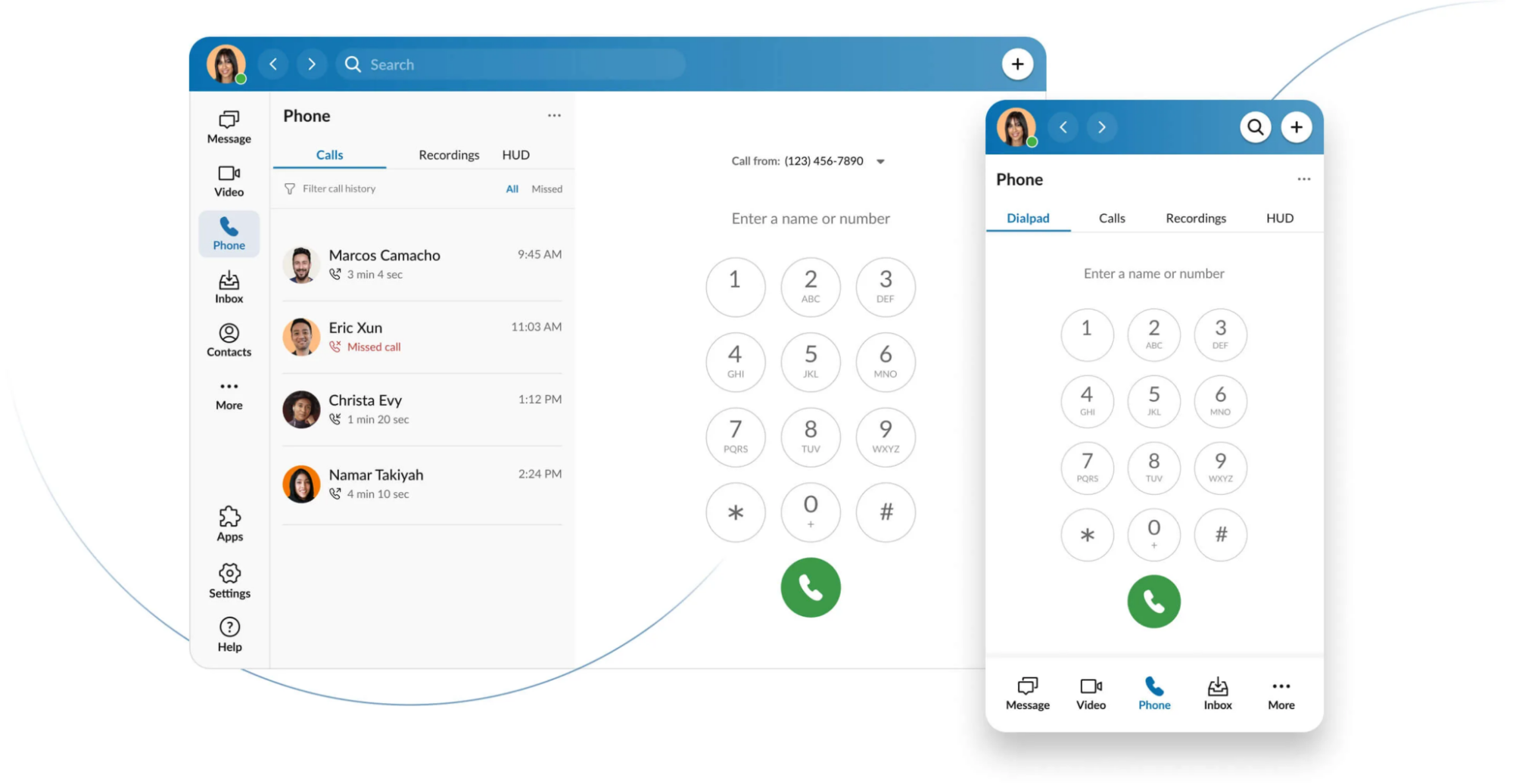
net2phone Canada  | Canadian rollout and implementation support | Match the Sync plan to your sites, reception flows, desk phones, and implementation scope. | CA$33.33/user/monthPublished Sync Essentials reference. Check user count, contract, equipment, and porting.Compare net2phone Canada Plans |
Ooma Office  | Canadian office phones and reception | Price desk phones, extra numbers, and the tier with the required routing and reporting. | CA$24.95/user/monthOffice Essentials. Pro is CA$29.95 and Pro Plus is CA$34.95 per user per month.See Ooma Office Canada Plans |
RingCentral RingEX  | Multi-site employee communications | Scope Canadian numbers, branch administration, integrations, and the exact RingEX tier. | Request Canadian PricingConfirm RingEX tier, currency, seat count, billing term, and additional numbers.Explore RingEX |
Zoom Phone  | Calling in an existing Zoom environment | Qualify Canadian number type, licence, device, porting, and shared-line requirements. | Confirm Canadian PricingCompare the phone plan and any Workplace package in the actual checkout currency.Explore Zoom Phone for 1–50 Users |
GoTo Connect  | Visual branch dial plans | Confirm Canadian port scope, device support, plan, and call-flow requirements. | Request a Canadian QuotePrice the sites, users, numbers, routing features, and onboarding together.Demo AvailableExplore GoTo Connect |
VoIP.ms  | Usage-based SIP for a retained PBX | Confirm Canadian number eligibility, route class, and who operates and supports the PBX. | US$0.0052/min Canadian Value RoutePublished outbound reference for most Canadian destinations. Price inbound and DID rental separately.Compare VoIP.ms Rates |
What Do You Need to Replace in BaronTEL?
Start by writing down how customers reach you today. Include the main number, local branch numbers, queue or hunt group, voicemail, and what happens after closing. BaronTEL says it runs its own Canadian VoIP infrastructure and markets business phone systems with softphone support and multi-location service. A company that buys it for Canadian operational support may need a different shortlist from one that only uses its main number and a few extensions.
| Current Requirement | What to Ask BaronTEL Competitors | What to Test Before Switching |
|---|---|---|
| Main Number and Branch Numbers | Confirm exact portability, number type, and coverage for each location. | Test routing on a temporary Canadian number, then verify each ported number. |
| Reception and Call Handling | Identify the plan, menu or queue feature, and after-hours controls. | Route a call through an open branch, a closed branch, and an overflow destination. |
| Calling and Devices | Quote domestic calling, desk phone support, apps, and multiple devices. | Use the phones, headsets, and app devices your staff will actually keep. |
| Support and Administration | Clarify who configures the system and how urgent cases escalate. | Have a backup admin update hours and have the service desk trace a failed call. |
| Data and Emergency Calling | Confirm where each data category is handled and how Canadian emergency calling works. | Record contractual answers and coordinate approved tests with the responsible parties. |
Check whether your BaronTEL invoice is per extension, per number, or includes charges for extra devices. The provider’s current Essential reference lists a main number in the plan and separately identifies costs for extra numbers and multi-device use. Put these on separate lines when comparing BaronTEL alternatives. For example, one receptionist with a desk phone and a computer app needs one user but two endpoints. A business with two storefronts may need more local numbers than people simultaneously on the phone.
Ask your office manager to name two things that would actually cause a disruption. A clinic might lose calls if its main number fails to reach reception during lunch. A contractor could lose leads when calls stop forwarding to the on-call technician. Put those scenarios ahead of feature counts and use the same scenarios for all shortlisted BaronTEL competitors.
1. KrispCall — Best for Small Teams Sharing Calls and Messages
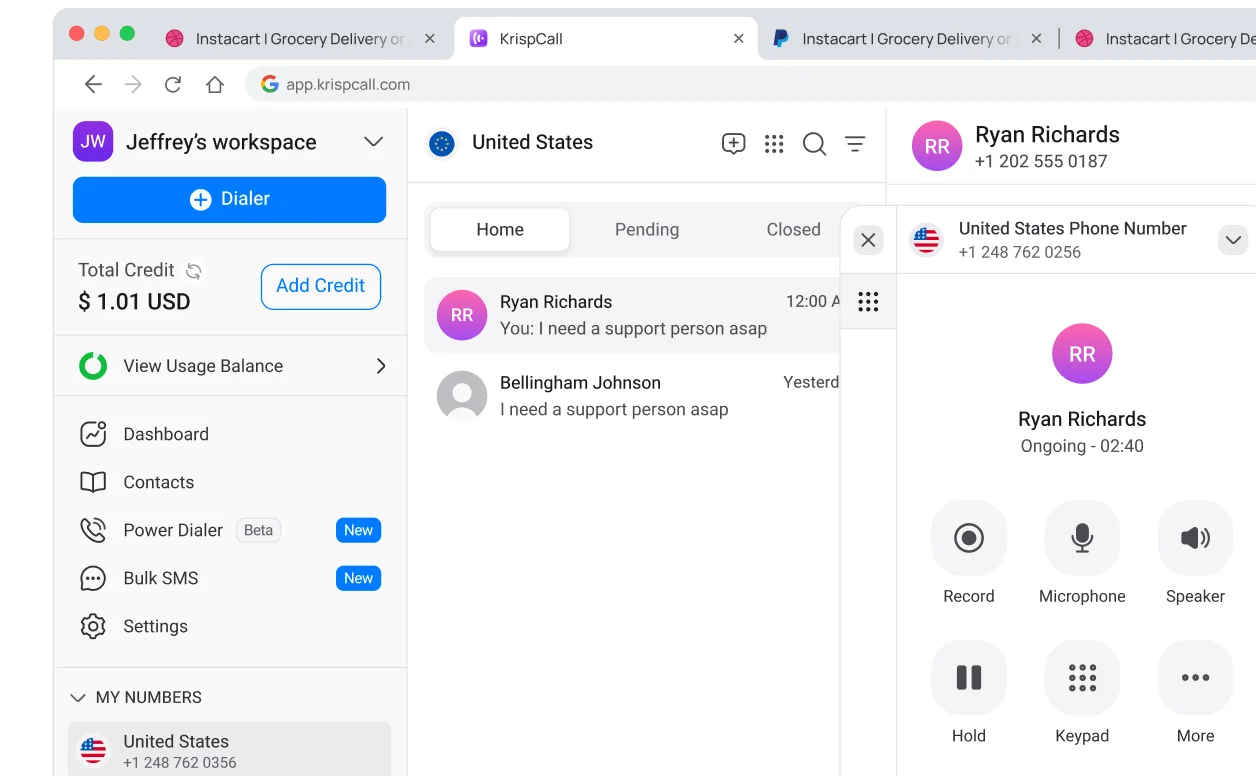
KrispCall is among the BaronTEL alternatives for a small team that prefers a shared calling workspace and Canadian number options. Its Unified Callbox brings calls and messages together. Starter is advertised at US$12 per user per month on annual billing and supports up to five users. Advance is US$32 per user per month annually. Eligible usage, numbers, plan limits, and integrations affect what your team can do with either subscription.
Who should shortlist it. A small sales or office team using a shared number can compare KrispCall with other BaronTEL competitors. It fits a business where staff use browser or mobile calling and want to see who last spoke with a customer. A remote three-person company can start by assigning ownership of missed calls and deciding which staff can reply from the main number.
What to test. Place a call to the intended Canadian number, have one colleague answer it, then let another follow up from the same number. Use approved examples for an unanswered call, an inbound message, and a transfer. Confirm what is supported in the exact plan. KrispCall’s published matrix has shown call queuing and ring strategy as coming soon, so ask it and other BaronTEL alternatives to demonstrate those controls if queues are essential.
What changes the quote. Ask BaronTEL competitors to validate existing number portability, eligibility for included local numbers and minutes, and call, SMS, and recording charges. For a desk-phone deployment or where Canadian emergency-calling support is essential, confirm the exact handset and service configuration before moving the main line. The seven-day KrispCall trial shown below is a VoIPCalling partner offer.
2. Calilio — Best for Business Hours, Menus, and Call Supervision
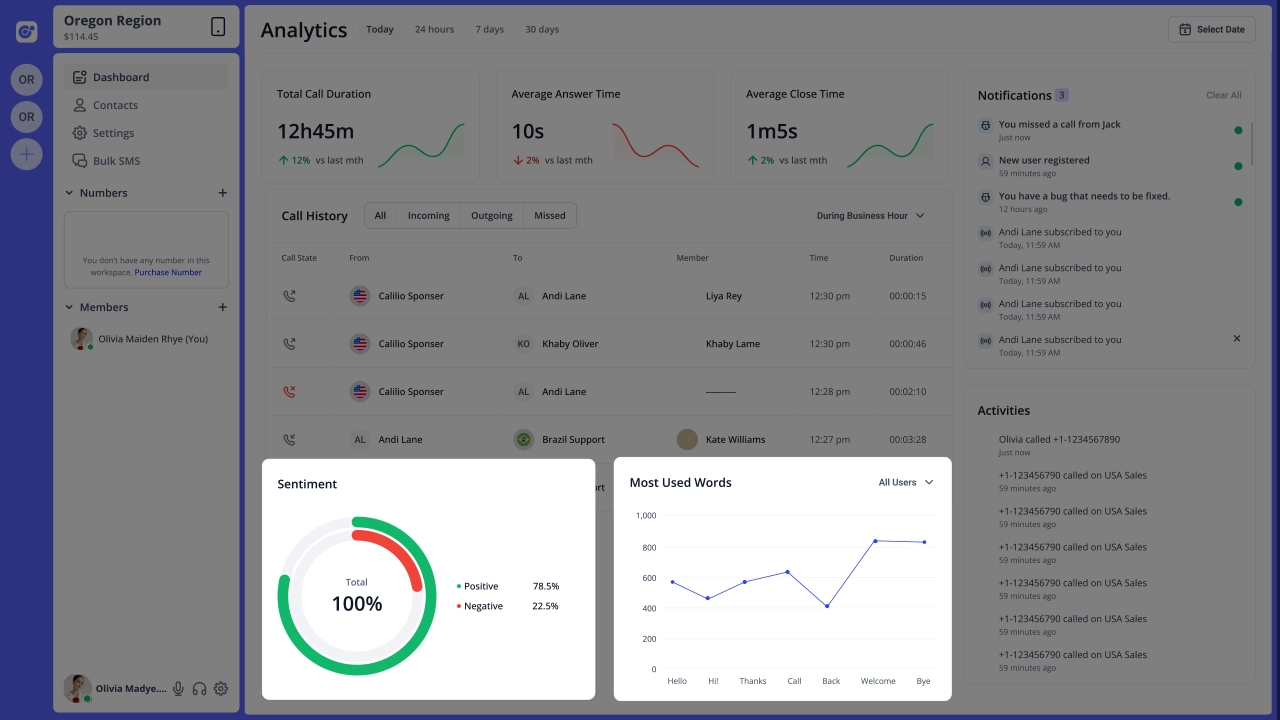
Calilio is one of the BaronTEL alternatives for a team that needs a hosted phone system with routing and supervision tools. Standard is US$12 per user per month on annual billing. Premium is US$28 on annual billing and is the plan to evaluate for the more involved routing and live monitoring described here. Calilio advertises Canadian virtual numbers and publishes separate terms for usage and bundled options.
Who should shortlist it. Consider Calilio among BaronTEL competitors if employees share customer calls and a manager wants to help during a call. A small service desk might need different opening hours for the service and billing teams, with a common overflow number. Give the vendor an actual call-flow diagram and ask whether those rules are included in the proposed plan.
What to test. Ask app-first BaronTEL alternatives to demonstrate a menu choice, an after-hours call, and a warm transfer to a second employee. Have a supervisor and agent sign in with different privileges, and ask the supervisor to show what they can see or change. Verify how logging works if a customer calls twice about the same issue and whether your helpdesk or CRM receives the right activity.
What changes the quote. Ask BaronTEL competitors to confirm plan user caps. With Calilio, compare the Standard cap and Premium feature limits, recording storage, usage allowances, and local numbers. Confirm whether the carrier can port your exact number and preserve the services you need. For offices with legacy endpoints or a strict data-location requirement, put the details in the quote instead of assuming a cloud-phone product has the same scope as BaronTEL.
3. net2phone Canada — Best for a Canadian Business Phone Rollout
net2phone Canada is one of the BaronTEL alternatives to shortlist if Canadian support and implementation are a priority. It markets its service and support as based in Canada. Its Sync onboarding documents describe a proposal with the services, devices, and setup work included. Its Canadian plans page lists Sync Essentials at CA$33.33 per user per month as a reference. Request a written quote that names the users, sites, devices, workflows, and support needs it covers.
Who should shortlist it. Compare net2phone Canada with other BaronTEL competitors if you have several offices, want assistance onboarding users, or need to coordinate a port with an implementation team. A firm with a receptionist, branch administrators, and hybrid staff should include those roles in the requirements sheet. Ask which work the vendor takes on and which work your employees need to complete.
What to test. Give the shortlisted BaronTEL alternatives the same reception flow. One call should reach a shared queue, one should go to a branch, and one should go to voicemail after a holiday closure. Have the branch admin make a permitted update from the portal. Then ask support to trace a missed call and explain which account information will be available during a real incident.
What changes the quote. Ask BaronTEL competitors to itemize their licenses. For net2phone, ask for the Sync licenses, included voice use, porting work, desk phone purchases or rentals, and any additional features in writing. Scope support and hardware replacements separately. For privacy-sensitive work, request confirmation about how recordings, transcripts, logs, backups, and support access are handled, in addition to where the main calling infrastructure runs.

4. Ooma Office — Best for a Small Canadian Office With Desk Phones
Ooma Office is one of the BaronTEL alternatives for businesses that want a conventional office-phone experience with cloud calling and support for office equipment. Ooma’s current Canadian product and rates pages list Office Essentials at CA$24.95 per user monthly, Pro at CA$29.95, and Pro Plus at CA$34.95. Compare the tier that includes the receptionist, device, recording, and routing features required for your office.
Who should shortlist it. An established small office can compare Ooma with other BaronTEL competitors if staff spend most of the day in one location and expect a desk phone at reception. A shop, professional office, or service business may need a published Canadian monthly price, an automatic menu, and access from mobile devices when staff step away.
What to test. Ask desk-phone-focused BaronTEL alternatives to reproduce the front desk’s actual steps. Answer a call, put it on hold, transfer it to someone who is busy, and retrieve the caller if the transfer fails. Verify paging, cordless coverage, or an analogue device separately where required. Bring model numbers and confirm whether your existing equipment can be configured and supported.
What changes the quote. When comparing BaronTEL competitors, include user count, physical phones, optional adapters, support, additional numbers, taxes, and the exact tier for each required feature. If one feature moves most seats into a higher plan, compare the higher-tier total. Ask who will stage handsets and what happens when a device fails at a location without technical staff.

5. RingCentral RingEX — Best for Multi-Site Administration
RingEX is among the BaronTEL alternatives for Canadian businesses that want calling, messaging, and administration across multiple locations. RingCentral publishes Canadian RingEX tiers, including Core and Advanced. Request the Canadian price for your seat count and billing term and check which workflow or integration drives the tier. RingEX is the employee phone product, while RingCX is a separate contact-center product.
Who should shortlist it. Put RingEX alongside other BaronTEL competitors if you have more than one branch, centralized IT, or a mix of office phones and remote apps. It is useful when a standard operating model needs to span several locations while allowing each location to keep its own hours, number identity, and staff. Have a branch manager and a platform administrator attend the demo.
What to test. Ask multi-site BaronTEL alternatives to build two branches that share a central directory but have different hours. Test a transfer between them, the caller ID each branch presents, and who can change a branch menu. If a call needs customer context from your CRM, test the exact connector and whether records are logged in the correct place after a transfer.
What changes the quote. Ask BaronTEL competitors to price the Canadian plan, contract term, number and device requirements, recording, and integrations. Confirm how permissions are licensed and whether separate products are required for agent operations. Ask for the location and retention of any recordings or transcripts you intend to enable, even if the core phone account has a Canadian billing address.
6. Zoom Phone — Best for Teams Already Using Zoom
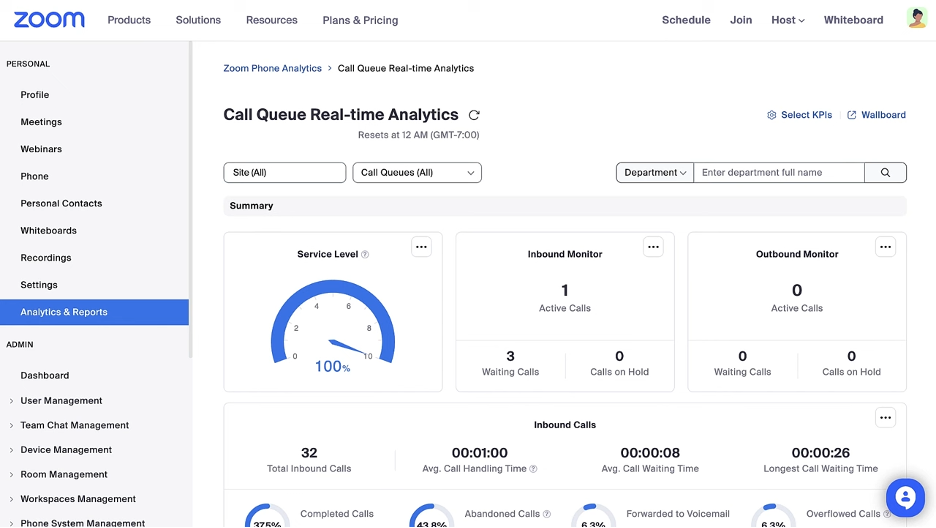
Zoom Phone is one of the BaronTEL alternatives for teams that want telephony inside an existing Zoom environment. Zoom advertises U.S. and Canada calling plans and publishes requirements for Canadian phone numbers. Check whether the best fit is a standalone phone plan, a package with Workplace, or a different deployment with its own carrier and commercial terms.
Who should shortlist it. Compare Zoom Phone with other BaronTEL competitors if your staff already use Zoom and would benefit from a familiar app for business calls. An organization may still have a reception desk with a physical handset, shared numbers, and branches that need dedicated routing. Test those jobs separately from ordinary calling inside the app.
What to test. Ask the shortlisted BaronTEL alternatives to onboard a remote employee and a receptionist in the same pilot. Transfer a call from the front desk to a remote user, ring a shared group, and apply a holiday schedule. Have a site administrator review the account’s configured locations and verify how caller ID, devices, and emergency-service responsibilities are assigned.
What changes the quote. Ask BaronTEL competitors to confirm the Canadian checkout currency, licensing for each user or shared device, additional numbers, toll-free use, and how your Workplace subscription interacts with phone service. If you need dedicated contact-center capabilities, scope those features separately. Use the quoted phone plan with actual number requirements as the comparison baseline.
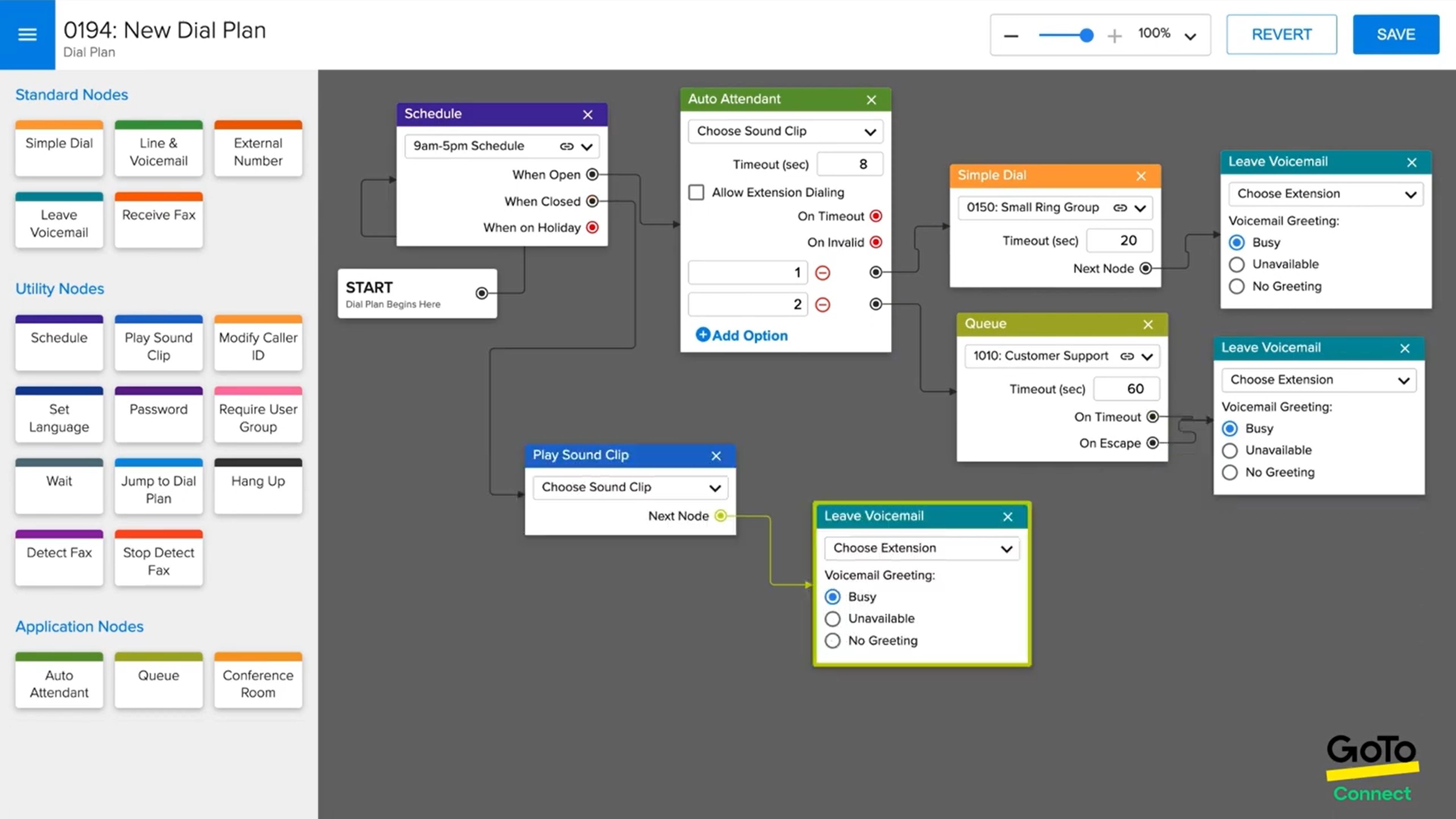
7. GoTo Connect — Best for Visual Dial Plans and Branch Routing
GoTo Connect is among the BaronTEL alternatives for a business that wants to manage phone menus and routing across Canadian offices. It markets Canadian number portability and offers a visual way to build call flows. Its pricing page routes businesses to sales for a plan quote. Give the sales team your complete site, endpoint, and number counts.
Who should shortlist it. Compare GoTo Connect with other BaronTEL competitors if one person needs to adjust menus and schedules for several sites. A regional service business might want different branch hours and one emergency closure process. Invite the administrator who will maintain those flows once the installation team leaves.
What to test. Have a branch admin modify the route for one day and restore it the next. Ask BaronTEL alternatives to show the current route, evidence of the change, and a way to validate it from the caller’s side. Confirm how a shift or branch schedule flows into the next menu and where voicemail and unanswered calls go.
What changes the quote. Ask BaronTEL competitors to confirm the regional package, device strategy, Canadian number and porting scope, and add-ons for customer service or reporting. Ask which users need the same plan and what work is included in onboarding. If you retain physical phones, verify supported model and firmware versions before including any savings from reuse.
8. VoIP.ms — Best for a Technical Team Keeping Its PBX
VoIP.ms is one of the BaronTEL alternatives for buyers that already run a PBX or want to administer their own SIP configuration. It publishes usage-based calling and has a portal for numbers and routing. Its public site lists starting rates for calling in both directions. Its documentation lists US$0.0052 per minute on the Value outbound route for most Canadian destinations. Verify the exact DID, billing plan, and calling destination in the rate table or quote.
Who should shortlist it. Put VoIP.ms among BaronTEL competitors if an IT team or MSP can configure trunks, support the PBX, and investigate calls. It can make sense when a business likes the current phones and call flows but wants a different source of local numbers and connectivity. Budget separately for the infrastructure and the people who look after it.
What to test. Compare technical BaronTEL alternatives using one Canadian number linked to the real PBX or a matching test environment. Try inbound and outbound calls, an unanswered call, and a call from a second approved site. Verify compatibility, fallback, and records. Have the operator who will handle billing find the sample charges and explain what the account owner will see.
What changes the quote. When pricing technical BaronTEL competitors, model numbers, calling, additional features, and support from the person or company managing your PBX. A low usage price is only one line in the total. If staff depend on a desk phone after an internet interruption, build a separate continuity plan with tests that reflect your network and the carrier options.

How to Compare BaronTEL Competitors on Canadian Pricing
Start with your current invoice, then ask each bidder to price the same number of users, locations, endpoints, and numbers. Break out non-recurring costs. A provider that quotes one subscription per person may include a mobile app but charge separately for another shared line. Another plan can include the main number while charging for each branch number. Ask BaronTEL alternatives to identify which charges would appear immediately and which would recur.
| Cost Element | What to Count | What to Ask the Vendor |
|---|---|---|
| User and Extension Charges | Users, shared devices, reception points, and remote staff. | Which account types need paid licences and which devices share one licence? |
| Numbers and Usage | Main, branch, toll-free, and text-enabled numbers with a normal month of traffic. | Which calls, messages, number types, and usage limits apply? |
| Equipment and Installation | Desk phones, headsets, adapters, network work, setup, and training. | What can be reused, who configures it, and who pays for replacements? |
| Commercial Terms | Currency, applicable taxes, commitments, annual billing, and minimum seats. | What is due today and what rate applies at renewal or when adding users? |
| Migration and Support | Porting, dual service, operating support, and contingency work. | Who owns the port order, the escalation, and the handoff to your current team? |
Work a Five-User Example
For five employees, BaronTEL Essential at CA$20.95 comes to CA$104.75 per month before HST, with the advertised main number and eligible calling. Ooma Office Essentials at CA$24.95 comes to CA$124.75 per month before extras. KrispCall Starter and Calilio Standard each produce a US$60 monthly subscription equivalent for five users on the published annual references. The currency and included usage differ, and some teams need an upgraded plan. These figures show the starting arithmetic for the products in the comparison.
For illustration, at a hypothetical exchange rate of CA$1.40 per US$1, US$60 is CA$84 before any foreign exchange spread, taxes, and add-ons. Treat the rate as a scenario input and use the actual payment rate when comparing BaronTEL alternatives. Five Advance licences for KrispCall come to US$160 at its annual reference. Five Calilio Premium licences come to US$140 at its annual reference. A shop that needs a specific queue, recording policy, or support arrangement should compare those tiers only after verifying features and usage.
Compare Peaks as Well as Averages
One month of ordinary calling can hide the cost of peak usage or holiday staffing. Pull a busy billing period, count charges by number and call type, and model that period separately. Ask BaronTEL competitors to price a short-term staffing increase and describe how accounts are billed while inactive. Make the same comparison for seasonal branch closures, especially if the system must retain each number and voicemail.
Look at hourly operations as well as subscriptions. Someone may need to update call scripts, train a receptionist, approve a new device, or handle delayed ports. Ask for one estimate covering the first year and another for ongoing operations. A plan with a lower licence fee may still require more internal support. Compare the weekly work your staff will own once the installer leaves.
How to Evaluate Canadian Number Coverage and Support
Match the Exact Number and Location
A provider can offer numbers in Canada while having different availability and porting options by rate centre, number type, and account. List every local and toll-free number you want to keep. Ask the shortlisted BaronTEL alternatives for eligibility by number in writing. Identify which numbers also handle SMS or fax, and verify those services separately. The ability to supply a new number in a city does not establish that an existing number can port.
Check how a caller reaches your business when one branch is closed. The number may be local to a branch but route to a shared receptionist in another location. Ask BaronTEL competitors how they store the association between numbers, sites, caller ID, and assigned users. This matters when an employee moves from a Vancouver location to a Toronto location or works remotely for part of the week.
Ask Where Specific Data Is Handled
Compare telephony service locations separately from the locations used for call recordings, transcripts, backups, and technical support. If your business has a Canadian data-residency requirement, describe which information it applies to. Ask BaronTEL alternatives to identify where that information is processed, stored, and accessible, and whether any subcontractors support the service. The Office of the Privacy Commissioner of Canada’s guidance on outsourcing and cross-border processing is a useful reference for organizations assessing their obligations.
Have the person responsible for privacy or procurement review the answer. For example, a professional office might make calls through Canadian numbers while choosing a separate storage or AI transcription option. Turning that option on could change which data is handled and by whom. Ask for the scope in the contract and inspect a sample export before choosing a provider for sensitive operations.
Check How Support Works During an Outage
Give BaronTEL competitors a plausible support case and ask who handles it. For example, a customer’s call reached the receptionist but lost audio after a transfer to a remote employee. The support team needs timestamps, call details, and a way to review what happened. Ask which evidence your team can access directly and when the vendor needs to take over. Compare support hours, language options, and written response commitments across BaronTEL competitors.
Check Canadian Support in the Workflows That Matter
Ask each finalist to show how a branch manager would get help if reception failed just before opening. A central IT team may have the access and technical background to examine a call record, while a shop manager may only know the phone rang and the caller could not be heard. Give both people a path to get assistance. Compare BaronTEL alternatives on who receives the initial report, what they request, how they keep staff updated, and which matters can be handled outside regular hours. If a bilingual customer service workflow is important, test both the vendor’s support arrangements and your own greetings and menus.
Include the installation handoff in the support assessment. Ask shortlisted BaronTEL competitors whether they leave a record of the phone models, ported numbers, routes, and expiry or renewal dates. Have an employee who did not configure the system use that record to add a holiday greeting or find the owner of a number. If your company depends on an MSP, agree on whether the MSP or the phone provider takes the first ticket. A named owner and a sample escalation are more useful than a generic promise to provide help.
Design a Power and Internet Fallback
List what stops working when a branch loses power or internet access. A cloud service can still receive calls even when local desk phones are unreachable, provided the plan and account are configured to send calls to a working destination. Ask BaronTEL alternatives to show how callers reach a staffed location or approved mobile destination in that scenario. Confirm how callers are told about an interruption and what happens to voicemails and callback records while the office is offline.
Have someone at the branch test the plan during an approved window. Check how staff learn the backup is active and how normal service is restored. This exercise can expose a dependency on a local network, a device without battery backup, or a staff member who cannot sign in remotely. Put those dependencies on the same checklist as carrier availability.
How to Switch From BaronTEL
Map Numbers, Features, and Device Dependencies
Export or document the numbers, extensions, greeting files, call routes, devices, and user permissions you are authorized to access. Identify which endpoints are shared and who can edit a location’s rules. Bring this inventory to the shortlisted BaronTEL alternatives rather than relying on an estimate built from the employee count. A receptionist, analog adapter, and shared conference phone can have different provisioning steps.
Check legacy devices individually. A fax machine, door entry system, paging system, or alarm-related line may need an arrangement that is different from ordinary office calls. Ask the responsible service provider and equipment company how they support it. Record the authorized test and the person who can sign off on each device so a forgotten line does not become an urgent cutover issue.
Run a Pilot With the People Who Answer Calls
Use a temporary number or an agreed test route. Ask the shortlisted BaronTEL competitors to reproduce the main number’s routing, the busiest branch, and one after-hours rule. Have the people who answer customers test the same workflows they use today. An administrator can confirm that a feature is enabled while a receptionist finds that a hold, transfer, or callback takes extra steps.
| Test | What to Do | Evidence to Keep |
|---|---|---|
| Reception and Overflow | Answer, hold, transfer, and redirect a call if the first employee is unavailable. | The caller’s experience, routing result, and staff feedback. |
| Remote and Desk Phones | Call the same extension on a desk phone and supported app as configured. | Which devices ring and whether the account presents the right caller ID. |
| Closing Time and Holidays | Set a temporary schedule and listen to the caller’s message. | Who made the change, how to undo it, and where voicemail arrives. |
| Reporting and Support | Ask an administrator to investigate a missed or failed call. | Records, access permissions, and escalation details. |
| Number-Linked Services | Validate authorized messaging or device workflows as applicable. | Feature availability, support ownership, and final acceptance record. |
Coordinate the Port and Emergency-Calling Setup
The CRTC’s number-porting guidance advises customers who want to keep their numbers to have the new provider handle the transfer and keep the old service active until switching. Confirm the process for your business lines, the authorized owner, and anything that must be removed before a port can proceed. Ask BaronTEL alternatives to confirm the port window, which numbers are moving, and what happens if only part of the order completes.
Canadian VoIP emergency calling can work differently from traditional wireline service. Check how the chosen provider handles location updates and calling from remote or nomadic devices. Use only the provider’s approved validation process and coordinate with the responsible parties. Record the accepted setup and what staff should do if they change where they use an app or phone.
Verify Billing and Handover
After the cutover, confirm inbound and outbound calls on every affected number and check the voicemail, messages, and any other linked services you migrated. Keep records from the first billing period. Ask the chosen provider to reconcile licences, number counts, any usage fees, and equipment line items. Close out the old service only after confirming all needed transfers and remaining account obligations.
Train Staff With the Calls They Handle Every Day
Show employees how to answer from the right number, transfer a caller, and find voicemail in the new setup. Give reception and branch managers a one-page list of the functions they can change and who can help after hours. Include a backup contact for the first week, when an unfamiliar workflow can look like a service issue. Record what changed in the new plan so support can reproduce the call without relying on a single installer’s knowledge.
Frequently Asked Questions
Which BaronTEL Alternatives Are Best for a Canadian Business?
Start with net2phone Canada if rollout support is a priority, Ooma Office for a small office with desk phones, and RingEX for multi-site administration. KrispCall and Calilio are good starting points if your staff prefer an app-based shared calling system.
Which BaronTEL Competitors Are Best for a Small Team?
KrispCall suits a small team that wants shared calls and messages. Calilio Premium is worth evaluating for more involved routing and supervision. Ooma Office is the stronger initial comparison when support for a conventional office phone setup matters. Confirm the tier, rates, and Canadian number eligibility for the specific use case.
Can I Keep My BaronTEL Phone Numbers?
Often, yes. Ask the receiving provider to confirm the exact numbers and country-specific port requirements. Keep the existing service active through the confirmed transition, and check related services such as messaging separately. Validate voice in both directions before closing the old account.
What If I Want to Keep My Existing PBX?
VoIP.ms is a candidate for a technical team that can connect and manage its own PBX. A hosted business phone service can be simpler if the vendor is expected to operate the calling platform. Read our SIP trunking guide for the role a carrier connection plays.
Which BaronTEL Alternatives Include Canada and U.S. Calling?
BaronTEL’s advertised Essential plan includes Canada and U.S. calling. Ooma Office and Zoom Phone advertise applicable plans with calling in those markets. Check the terms, destinations, and plan inclusions, and ask the vendor to distinguish domestic calling from toll-free, international, or additional number charges.
Does a Canadian Phone Number Guarantee Canadian Data Residency?
No. Number availability and data handling are separate. Ask BaronTEL competitors where account data, media, recordings, transcripts, and backups are processed and stored, and which third parties can access them. Have the responsible person review the contractual answer against your organization’s requirements.
How to Use Customer Reviews in the Shortlist
The comparison labels the G2 listing that supplies each score. The net2phone rating applies to the broader net2phone product listing. Ask for a Canadian customer reference with comparable locations, hardware, and support needs. Use reviews of BaronTEL competitors to identify questions about everyday use, then have the provider demonstrate those workflows with your own tests.
Ask your shortlisted BaronTEL alternatives to explain a real onboarding or escalation example. A remote app-first team may mainly care about call history and mobile access. An office manager might want to know how busy reception runs during a power or internet outage. Put the relevant evidence beside the commercial quote and decide whether the proposed setup meets your requirements.
Affiliate Disclosure. VoIPCalling may earn a commission through qualifying partner links. The seven-day KrispCall trial is a VoIPCalling partner offer.