
Choose Zoom Phone when your practice needs department call queues, reception coverage and a phone service that fits its Zoom environment. Choose iPlum when a separate mobile business number and a defined secure patient-texting channel are the priority. For healthcare, compare eligible plans, the applicable BAA and the complete workflow before moving patient communication.
Zoom Phone vs iPlum is a comparison between two useful approaches to business calling. A clinic may want one reception number across several staff members. A therapist may want professional boundaries on an existing smartphone. Both buyers need dependable communication, but they may not need the same administration or patient messaging experience.
This review focuses on US healthcare practices in 2026, while also explaining the general business differences. Recommendations are based on published documentation and editorial purchasing analysis, not a hands-on clinical deployment or independent security audit. Suggested user counts describe buying fit rather than provider limits.
Zoom Phone Vs iPlum: Which Is Better?
Zoom Phone is the stronger starting point for a practice prioritizing structured reception calling. iPlum is the stronger starting point for a mobile-led practice prioritizing business identity and secure client messaging. Neither choice removes the need to approve account coverage, staff access and the destination of patient information.
| Provider | Best Fit | Buying Considerations | Pricing & Trial |
|---|---|---|---|
 Zoom Phone Zoom Phone |
|
| US/CA Unlimited Reference$15/User/MonthMonthly billing. Confirm eligible healthcare arrangement and required options. Start Free Trial |
 iPlum iPlum |
|
| Professional: Healthcare Reference$14.99/User/MonthAnnual billing; $20.99 monthly. Confirm required services and complete quote. View Eligible iPlum Plans |
Expert ratings are our original editorial buying-fit assessments, not compliance certifications or customer review averages. The rubric weights BAA/coverage clarity at 30%, healthcare workflow fit at 30%, administration at 20% and price/accessibility at 20%. Zoom Phone scores 4, 5, 4 and 4; iPlum scores 5, 4, 4 and 5 respectively.
Compare Pricing On The Same Billing Term
The table uses Zoom’s published monthly US/Canada unlimited reference and iPlum’s annual Professional reference. These are different commitments. On monthly billing, iPlum Professional’s base reference is $5.99 higher per user. That difference does not establish which complete practice workflow costs less.
Which iPlum Plan Should You Compare?
Professional and Enterprise are the plans specified in iPlum’s BAA instructions. Standard should not be used as the healthcare benchmark. Enterprise lists $25.99/user/month annually or $30.99 monthly and is the recording-oriented option. Choose the tier required by the practice rather than paying for capture solely because a higher plan sounds safer.
Base Subscription Examples For Small Practices
| Users | Zoom Phone Reference | iPlum Professional | iPlum Enterprise |
|---|---|---|---|
| 1 | $15/month | $20.99/month | $30.99/month |
| 5 | $75/month | $104.95/month | $154.95/month |
| 10 | $150/month | $209.90/month | $309.90/month |
These are our arithmetic examples using published base rates, not equivalent-feature quotes. For five users, the monthly Professional difference is $29.95, or $359.40 across twelve monthly payments. Add the required recording, fax, integrations, messaging charges and setup before calling that a saving.
Five annual Professional subscriptions equal $74.95 per month in subscription equivalents. Their near match to the $75 monthly Zoom example should not be presented as identical purchasing terms. Confirm the annual payment, renewal conditions and cancellation rules on the actual order.
Free Trial And Additional Costs
Zoom publishes a Phone trial entry point. Confirm duration, included functions and healthcare eligibility for the offer presented at checkout. This review does not establish a general iPlum provider phone-service trial. Free secure-client accounts and a provider subscription are different arrangements.
iPlum publishes a one-time $20 business registration charge for US outbound SMS. Request both providers’ complete messaging, international usage, number and optional-service charges. Do not infer that a trial demonstrates an approved patient communication workflow; use fictional information until the practice has completed its review.
Zoom Phone Vs iPlum Features Compared
Zoom Phone deserves evaluation as an organizational phone system. iPlum deserves evaluation as a mobile business service with current web, team and secure-channel functions. Describing either only by its familiar brand image can lead to the wrong shortlist.
| Requirement | Zoom Phone | iPlum |
|---|---|---|
| Business Calling | Cloud phone service within the Zoom environment | Business number on existing mobile devices |
| Reception Coverage | Documented call queues and distribution options | Phone tree and supported shared-line functions |
| Computer Use | Demonstrate proposed desktop or browser workflow | Eligible web calling and texting |
| Patient Texting | Review exact channel, endpoints and agreement | Documented secure client account channel |
| Call Recording | Verify required license, controls and coverage | Evaluate Enterprise and capture settings |
| Fax | Current native fax offering; verify covered service | Separate eligible fax subscription |
| Analytics | Advanced queue analytics require an add-on | Demonstrate reports required by the practice |
| AI And Integrations | Evaluate feature availability and data destination | Do not assume a complete EHR connector |
Three Buying Considerations That Matter Most
- Call ownership: Who receives an unanswered call, and who completes the callback?
- Patient access: Which channel will patients use for sensitive messages, and how do they enter it?
- Records and cost: What is captured, who can retrieve it, and which paid services are required?
Write those answers before comparing optional features. A practice may need a dependable business number and secure inbox more than an elaborate menu. Another may already have an approved patient portal and need better reception coverage instead.
Zoom Phone: Best Fit For Reception And Team Calling
Start with Zoom Phone when the main problem is organizing incoming calls across staff, departments or locations. Its documented queue controls give reception managers a concrete workflow to demonstrate.
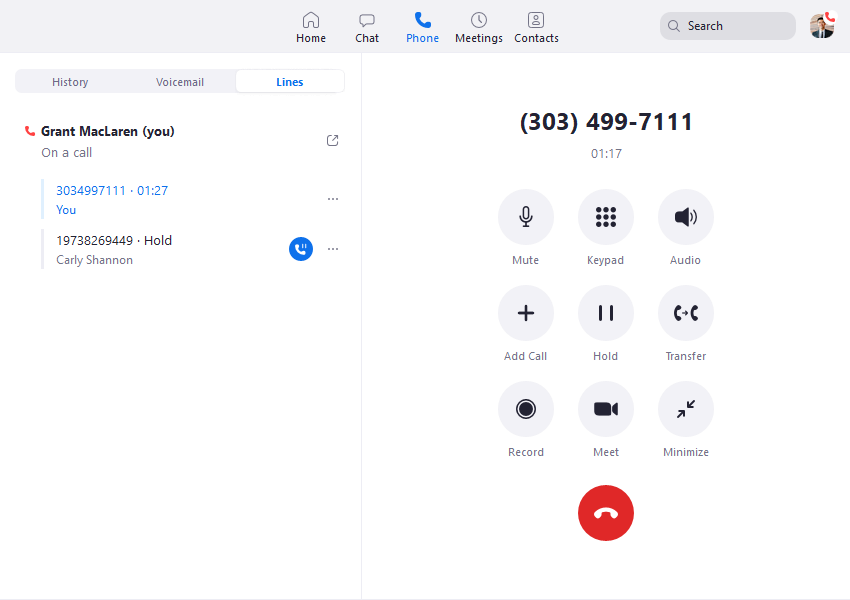
An existing Zoom environment can make staff evaluation easier, but familiarity with video meetings does not establish Phone entitlement. Ask the vendor to identify the phone license, eligible account and services included in the practice’s proposal.
A Reception Team With Several Responsibilities
Imagine a front desk covering appointments, billing enquiries and general calls. A useful pilot should show which team receives each route, what happens during lunch and how unanswered work is recovered. Test callers who choose the wrong option as well as callers who follow the menu correctly.
Keep caller decisions simple. A sophisticated administrative system can still create a frustrating phone journey if the practice puts too many departments in the greeting. Measure whether a caller reaches an appropriate person rather than how many settings an administrator can configure.
Zoom Phone As An iPlum Alternative
Zoom Phone is a relevant iPlum alternative when the practice’s next requirement is coordinated reception calling. Include the existing secure-texting workflow in the replacement plan. A phone-system upgrade does not automatically replace patient invitations, secure inbox access or historical conversations.
Zoom Phone US/Canada Unlimited: See The Monthly Reference In The Comparison Table
Start Free TrialiPlum: Best Fit For Mobile Business Identity And Secure Texting
Start with iPlum when clinicians want a professional number on an existing handset and a defined secure-client communication route. Evaluate its current computer and team functions alongside the mobile app.
A solo therapist may need a business identity without another physical phone. A small group practice may also need an assistant to cover administrative communication. Demonstrate how the proposed accounts handle that division of responsibilities rather than assuming one shared credential is sufficient.
An iPlum Competitor To A Larger Phone Platform
iPlum is a meaningful Zoom Phone competitor for a compact practice whose needs are specific. The larger platform’s feature breadth may add little value when staff mainly need calls, business voicemail and a secure message destination. Conversely, a compact service should still prove it can support the reception process the practice actually uses.
Shared Number And Staff Coverage
iPlum documents shared numbers and administrator-managed staff access. In the pilot, identify who owns a callback and how an absent clinician is covered. Shared visibility should help staff complete work rather than leave everyone assuming someone else responded.
Ask a new employee to perform three tasks without coaching: return a business call, find an unanswered enquiry and send a message through the correct channel. Difficulty in any of those tasks is useful purchasing evidence.
iPlum Professional: Compare Annual And Monthly Terms Above
View Eligible iPlum PlansZoom Phone Vs iPlum HIPAA Compliance And BAA Coverage
Both publish support for healthcare arrangements involving a Business Associate Agreement. The relevant comparison is the eligible account, covered service and practice configuration, not a blanket claim that every feature or connected system is compliant.
Zoom Phone BAA Eligibility
Zoom’s current BAA guidance identifies eligible paid accounts and sales-assisted arrangements. Eligible US self-service accounts can find the BAA through Plan Management and the additional-products area; other account types should follow the sales process. Confirm the practice’s Phone service is included rather than assuming a Meetings purchase creates the required Phone arrangement.
iPlum BAA Eligibility
iPlum’s instructions specify Professional or Enterprise. The administrator selects the relevant line under Users, opens Compliance and HIPAA Compliance, and obtains the BAA. Verify that each intended service is covered; adding a fax subscription should prompt a service-specific review.
The Practice Still Owns Its Safeguards
HHS describes HIPAA security responsibilities in terms of administrative, physical and technical safeguards. A vendor agreement is part of the purchasing process, not a substitute for assessing the practice’s use, access and handling of electronic protected health information.
Create a simple service inventory: calls, voicemail, ordinary SMS, secure messages, fax, recordings, AI output and integrations. Record the approved destination and responsible staff role for each. This makes it easier to spot a workflow that sends information outside the reviewed arrangement.
For background, see our HIPAA compliance guide for VoIP in healthcare. Apply that framework to the specific vendor account and practice policy rather than treating a brand recommendation as a certification.
Call Routing, Auto Attendant And Reception Coverage
Zoom Phone has documented group call distribution; iPlum has documented phone-tree and shared-line functions. Test the required reception journey instead of assuming those functions are identical.
Zoom Phone Call Queues
Zoom documents simultaneous, sequential, rotating, group-rotating and longest-idle distribution. Its queue instructions require appropriate account and Phone licensing, administrator access and initial setup. An administrator can assign queue administration roles. Match the proposed route to staff availability.
For example, a simultaneous route may help a small reception team answer quickly, but it can interrupt every available person. A sequential route can follow an escalation order, but the practice should inspect caller waiting time. The useful choice depends on staffing and coverage.
iPlum Phone Tree And Shared Access
iPlum’s examples describe greetings, menu choices and extensions. Keep the setup focused on the caller’s next action. Test business hours, staff absence and the fallback destination, including a caller who makes no selection.
Advanced Reporting Is A Separate Buying Question
Zoom’s real-time queue analytics and related historical reporting require its Customer Engagement Pack add-on and the documented roles. Do not include that dashboard in a base-price comparison without accounting for the required license.
For either provider, start with the decision the report should support: whether more reception coverage is needed, whether calls are abandoned or whether callbacks remain unfinished. A dashboard has value only when staff can act on the information.
Mobile Calling, Computer Use And Personal Number Privacy
Both deserve testing on the devices staff already use. iPlum additionally documents a mobile voice-network calling option, while computer calling still needs an internet connection.
Business Identity On A Personal Handset
A separate business number can support professional boundaries, but the device still needs appropriate access and notification settings. Test outgoing caller identity, voicemail retrieval and the way incoming business calls appear while a personal call is in progress.
For Zoom Phone, verify the proposed application and endpoint permissions. For iPlum, compare the available mobile calling modes in the location where staff work. A product demonstration on office Wi-Fi does not establish the experience in a clinician’s home or travel environment.
Test The Actual Voicemail Destination
iPlum’s incoming voice-network guidance recommends its press-to-accept control to help prevent calls reaching a personal carrier mailbox. It also describes cases involving rejected calls or device Do Not Disturb. Include those conditions in the pilot before relying on personal/business separation.
Check a call that is ignored, deliberately rejected, interrupted or received while the device is unavailable. The greeting and final mailbox should match the approved business workflow. A separate number is not enough if an unanswered call ends up in the wrong mailbox.
Reliable Communication For Remote Staff
Use fictional calls to compare understandable audio, notification timing and recovery after an interrupted connection. Define a fallback route and a staff contact process. Keep the test close to the actual work: reception transfers, clinician callbacks and voicemail responses rather than a single short demo call.
Secure Patient Texting Vs Ordinary SMS
iPlum documents a secure client channel with app or browser access. Ordinary SMS should be evaluated separately for both providers. A business texting feature does not by itself establish an approved channel for clinical detail.
The iPlum Secure-Client Journey
The documented process invites a client to a free account that can use the mobile app or browser portal. The secure-channel control is distinct from ordinary texting. The patient still needs to complete access and account steps; browser access does not turn a regular SMS thread into the secure channel.
Test onboarding with a fictional patient who is unfamiliar with the service. Ask the person to open the invitation, reply, leave and return later. Review what appears in notifications and what staff should do if the patient replies through another channel.
The Zoom Phone Messaging Question
Ask Zoom to demonstrate the exact patient messaging proposal, its endpoints and its agreement coverage. Do not describe ordinary carrier SMS as equivalent to iPlum’s client-account channel. A practice already using an approved patient portal may prefer to keep that portal and use Zoom Phone primarily for calling.
Carrier Registration And Patient Privacy
Messaging registration and privacy approval answer different questions. The first concerns the service’s ability to send business messages through carriers; the second concerns the organization’s permitted use and handling of information. Ask for registration status and approved message content separately.
Write a short staff rule explaining where administrative messages belong and where sensitive detail should move. The rule should also cover a patient who sends unexpected clinical information through an ordinary message. Staff need a usable response process, not merely an instruction to avoid mistakes.
Voicemail, Call Recording, Fax And Record Retention
Compare how information is captured, retrieved, exported and removed. The subscription that provides a business number may differ from the subscription needed for recording or fax.
Voicemail And Transcription
Have an authorized employee receive a test message, locate it and complete the callback. Inspect email notifications, forwarded messages and any transcript destination. Do not approve the workflow solely because the mailbox itself is covered; copied information also needs an approved location.
Call Recording And Access
Compare iPlum Enterprise with the recording configuration proposed by Zoom. Verify eligibility, announcement behavior, permissions, retrieval and exports. Establish the purpose of recording before enabling it, and address applicable recording-consent requirements for the calls the practice handles.
A recording should have an owner and a defined use. Capturing every conversation can add review and storage work without improving patient communication. Demonstrate who can listen, download and share before the practice enables live capture.
Fax Is Available Through Both Buying Paths
Zoom now publishes native Phone fax, including a US/Canada unlimited reference with 50 inbound/outbound pages per user pooled across the account. Confirm availability, usage charges and BAA coverage for the specific fax service. Do not describe Zoom Phone as having no fax.
iPlum publishes a separate eligible fax plan: Professional at $12.99/month annually or $15.99 monthly. Confirm its agreement and workflow independently of the phone subscription.
Fax testing should include a wrong destination, a failed transmission and retrieval by the intended staff member. Assign responsibility for exceptions. A sent status alone does not establish that the right person received and processed the document.
Archives Are A Plan Feature, Not A Universal Requirement
iPlum’s backup guidance distinguishes Professional text archiving from Enterprise’s longer text and recording archive. It also distinguishes recent mobile restoration from older portal access. Test the age and format of records the practice actually needs to retrieve.
Do not treat a vendor’s archive period as a universal HIPAA retention requirement. Determine the practice’s applicable obligations and policy, then configure retention and access accordingly. Ask what remains accessible after a plan change, number transfer or cancellation.
AI, Analytics And Clinical-System Integrations
Evaluate each proposed automation and connector separately. Availability on a healthcare account does not establish that every output or destination is appropriate for the practice.
Zoom AI On Eligible Healthcare Accounts
Zoom’s current guidance permits available AI features for BAA customers with administrator controls, while noting that some features remain unavailable. Avoid a blanket claim that every healthcare account must disable all AI. Confirm the specific Phone function and its permitted data use.
A call summary can help staff review work, but names, dates and instructions still need checking. Define who reviews generated output before it enters a patient record or triggers follow-up. A fluent summary may omit an important qualification.
Encryption Has A Defined Scope
Zoom’s healthcare guide describes optional Phone end-to-end encryption for eligible one-to-one calls between users on the same account in supported clients. It excludes PSTN calls from that mode. Do not extend the claim to every ordinary patient call.
Contact Sync Is Different From An EHR Workflow
iPlum documents contact-related functions and a usage-data API. Those capabilities should not be described as a complete native EHR integration without evidence of the required clinical task. For Zoom, verify the exact connector, licensed service and receiving-system arrangement.
A meaningful integration test follows a fictional record from source to destination. Inspect identity matching, transferred fields, failure handling and staff permissions. Successful authentication is only the beginning of the test.
Which Provider Fits Your Practice?
Solo Therapists And Private Practice
Prioritize iPlum when the business line and secure-client channel are the main unmet needs. Test patient onboarding and voicemail separation. Compare Zoom Phone if an approved portal already handles messaging and the practice primarily wants a calling service in its Zoom environment.
Small Medical Practices With Reception Staff
Pilot both against the same absence and callback scenarios. Zoom Phone merits a queue demonstration. iPlum merits a shared-number and phone-tree demonstration. Count the employees who need individual access rather than assuming every person needs the same subscription.
Multi-Location Clinics
Start with a Zoom Phone organizational-calling evaluation. Test location selection, reception coverage and responsibility for unanswered work. Keep the approved patient communication destination in the design, and include required administration or analytics options in the quote.
Mobile Clinicians And Remote Teams
Prioritize the actual handset and connection test. iPlum’s mobile calling options are relevant, while Zoom Phone may suit staff already using the platform. Evaluate incoming interruptions, caller identity, privacy and recovery rather than treating mobility as a feature-list checkbox.
Practices That Need Recorded Calls
Compare the proposed Zoom recording arrangement with iPlum Enterprise. Evaluate capture controls and record handling before comparing the total. The lower entry price is not the relevant benchmark when the task requires a different tier.
General Businesses Without Healthcare Workflows
Zoom Phone deserves consideration for organized team calling; iPlum deserves consideration for compact business-number use. A non-healthcare buyer can compare different tiers, but should not transfer those cheaper references into a healthcare price claim.
Zoom Phone And iPlum Pros And Cons
Zoom Phone Pros
- Documented group call distribution for reception teams.
- Natural candidate for practices already evaluating Zoom tools.
- Competitive monthly base reference for US/Canada calling.
- Current native fax offering worth evaluating.
- Advanced queue reporting available through a defined add-on.
Zoom Phone Cons And Buying Limits
- Existing video use does not establish the required Phone license or BAA.
- Secure patient messaging needs a channel-specific review.
- Advanced analytics can increase the total quote.
- Routing and permissions require deliberate setup.
- Optional encryption modes have defined endpoint limits.
iPlum Pros
- Business identity on an existing mobile handset.
- Documented secure-client account access through app or browser.
- Eligible web and team functions broaden its usefulness.
- Mobile voice-network option worth testing.
- Clear eligible-plan starting point in BAA instructions.
iPlum Cons And Buying Limits
- Professional monthly reference exceeds the Zoom reference here.
- Recording and separate fax can change the complete cost.
- Secure-client access requires patient onboarding.
- Personal carrier voicemail behavior needs careful testing.
- A general provider phone-service trial is not established in this review.
These are editorial buying considerations, not measured reliability results. Turn each material limitation into a question for the vendor or a task in the pilot.
How To Switch Between Zoom Phone And iPlum
Moving a number, preserving records and changing patient access are separate tasks. Complete the replacement pilot before ending the old service.
- Inventory numbers, staff accounts, message channels and stored records.
- Confirm the eligible services, agreements and complete order.
- Configure access, greetings, absence coverage and approved destinations.
- Test fictional calls and messages on the actual devices.
- Arrange historical-record access or supported exports.
- Confirm porting eligibility and keep the old service active until transfer passes.
- Train staff and explain any new patient access steps.
- Review missed calls and unresolved messages after launch.
Acceptance Tests Before Going Live
| Scenario | Inspect | Passing Result |
|---|---|---|
| Incoming Call | Route and staff availability | Correct person can answer |
| Unanswered Call | Mailbox and callback owner | Approved destination receives it |
| Secure Message | Patient access and channel | Intended secure path used |
| Staff Absence | Coverage and work ownership | Follow-up remains assigned |
| Recording | Announcement and permissions | Approved capture process |
| Fax | Destination and failure handling | Exception reviewer identified |
| Offboarding | User and connected access | Former employee access removed |
Do not assume texts, voicemail or recordings automatically follow a ported number. Confirm available export formats and what access remains after cancellation. If a patient channel changes, deliberately close or transfer unfinished conversations rather than leaving two inboxes without clear ownership.
Frequently Asked Questions
Is Zoom Phone Better Than iPlum?
Zoom Phone merits priority for coordinated reception calling. iPlum merits priority for a compact mobile business line and secure-client channel. The best choice depends on the practice workflow.
Is iPlum Cheaper Than Zoom Phone?
Not on the monthly entry references compared here. Its annual Professional rate is close to Zoom’s monthly reference, but the commitments differ. Compare the complete eligible workflow.
Is Zoom Phone HIPAA Compliant?
Zoom publishes healthcare BAA guidance and Phone safeguards. Confirm the eligible account, covered Phone service and practice configuration before using it for patient communication.
Which iPlum Plans Support A BAA?
The vendor’s BAA instructions specify Professional and Enterprise. Standard should not be substituted into this healthcare comparison.
Does A Free Zoom Meeting Account Include The Required Phone Service?
Do not assume it does. Phone licensing and the healthcare agreement are separate purchasing checks.
Can iPlum Patients Use Secure Texting Without Installing The App?
The documented client journey includes browser-account access. Patients still need to complete the secure-channel process.
Is Ordinary SMS The Same As Secure Patient Messaging?
No. Review the actual channel, endpoints, information and policy separately from the ability to send a business text.
Does Zoom Phone Have Fax?
Zoom publishes native Phone fax. Confirm the current plan, usage allowance and healthcare coverage rather than relying on an older feature comparison.
Is iPlum Fax Included With The Phone Plan?
The vendor publishes separate fax subscriptions. Include the required fax service in the practice quote.
Does iPlum Only Work On A Mobile Phone?
Its current eligible functions include web calling and texting. Demonstrate the computer workflow and staff permissions needed by the practice.
Does Zoom Include Advanced Call Queue Analytics In The Base Price?
The documented advanced queue analytics require Customer Engagement Pack and the relevant licensing and roles. Include the add-on in the comparison.
Can I Keep My Existing Business Number?
Confirm eligibility with the receiving provider. Keep the old service active until porting and external calling tests succeed.
What Should A Therapist Test First?
Test outgoing identity, unanswered-call routing, business voicemail and patient secure-channel access before adding automation or recording.
Customer Feedback And Final Recommendation
Zoom Phone — Nitin V., G2, June 5, 2026: The reviewer valued keeping calls, forwarding, voicemail and messaging together. He also found initial auto-attendant setup confusing and reported occasional quality drops. The account supports testing both usability and routing, not assuming a universal experience.
iPlum — Christina W., G2, January 26, 2026: The clinical psychologist praised straightforward daily calling and texting and responsive support. She also described a short outage resolved with clear communication. One practice experience does not guarantee uninterrupted service.
Final Recommendation: Choose Zoom Phone when reception organization and the existing Zoom environment are central. Choose iPlum when mobile business identity and its secure-client channel meet the main need. Compare eligible agreements, real patient access, unanswered-call behavior and the complete quote before moving live communication.
Affiliate Disclosure: VoIPCalling.com may earn a commission when you sign up through qualifying links in this article at no cost to you. This comparison considers published documentation, limitations and practice fit. Confirm current pricing, covered services and the required configuration with the selected provider.