
Choose Nextiva when a medical practice needs organized reception calling and coordinated staff communication. Choose iPlum when a mobile business number and a defined secure-client messaging channel are the main requirements. For healthcare, compare Nextiva’s proposed healthcare service and BAA with iPlum Professional or Enterprise, then test the actual calling, voicemail and messaging workflows.
Nextiva vs iPlum is a practical decision about how a business handles its conversations. A growing clinic may need reception coverage across several locations. A therapist may want a separate professional number on an existing handset. Both need clear follow-up ownership, but the useful features and complete costs can differ.
This comparison focuses on US healthcare practices in 2026 and includes relevant general business considerations. It uses published documentation and editorial purchasing analysis. It does not claim a hands-on clinical deployment, measured service performance or independent security audit. Suggested user counts describe buying fit, not provider limits.
Nextiva Vs iPlum: Which Is Better For Healthcare?
Nextiva deserves priority for voice-first office operations; iPlum deserves priority for compact mobile calling and its secure-client channel. The deciding question is which service completes the practice’s required work with approved access and a clear total cost.
| Provider | Best Fit | Buying Considerations | Pricing & Trial |
|---|---|---|---|
 Nextiva Nextiva |
|
| Healthcare: Request A QuoteCore Reference: From $15/User/MonthAnnual SMB offer; $23 monthly reference. General business price, not a verified healthcare quote. Start 14-Day Free Trial |
 iPlum iPlum |
|
| Professional: Healthcare ReferenceFrom $14.99/User/MonthAnnual billing; $20.99 monthly. Confirm recording, fax and required services. View Eligible iPlum Plans |
Expert ratings are original editorial buying-fit assessments, not security certifications or customer averages. Our rubric weights BAA/coverage clarity at 30%, healthcare workflow fit at 30%, administration at 20% and price/accessibility at 20%. Nextiva scores 4 in each dimension; iPlum scores 5, 4, 4 and 5 respectively.
Compare The Eligible Plans And Billing Terms
Nextiva’s annual small-business offer is limited to new customers with 1–100 employees on a paid agreement of at least twelve months. Treat its Core reference as a general business starting point. Obtain the healthcare proposal before advertising an equivalent eligible practice price.
Which iPlum Plan Should A Practice Compare?
Use Professional or Enterprise for the healthcare shortlist. The vendor’s BAA instructions name those plans. Enterprise lists $25.99/user/month annually or $30.99 monthly and is the recording-oriented option. Standard’s lower price is not the eligible benchmark used here.
Base iPlum Subscription Examples
| Users | Professional: Annual Rate | Professional: Monthly Billing | Enterprise: Monthly Billing |
|---|---|---|---|
| 1 | $14.99/month equivalent | $20.99/month | $30.99/month |
| 5 | $74.95/month equivalent | $104.95/month | $154.95/month |
| 10 | $149.90/month equivalent | $209.90/month | $309.90/month |
These are our calculations, not complete practice quotes. For five people, moving from the Professional monthly reference to Enterprise adds $50 per month in base subscriptions. A requirement such as recorded calls can therefore matter more than a small entry-rate difference.
Put the approved Nextiva quote beside the iPlum total using the same number of staff and the same required tasks. Include implementation, fax, recording, number charges, integrations and international usage. A general business promotion and a healthcare-ready proposal are not automatically equivalent packages.
Trial Availability And Additional Charges
Nextiva advertises a 14-day trial for eligible packages. Confirm the selected product and functions with the vendor; the offer does not establish that a trial is approved for patient information. Use fictional data until the required agreement and configuration are complete.
This review does not establish a general iPlum provider phone-service free trial. Its free secure-client accounts are a different arrangement. iPlum publishes a one-time $20 business registration charge for US outbound SMS. Ask both vendors for renewal, cancellation and optional-service terms before committing.
Nextiva Vs iPlum Features Compared
Compare the daily work each service supports. Nextiva is a candidate for office calling and broader customer communication; iPlum combines business-number use with current web, staff and secure-message functions.
| Requirement | Nextiva Evaluation | iPlum Evaluation |
|---|---|---|
| Business Identity | Practice numbers and approved calling endpoints | Business number on an existing mobile device |
| Reception Coverage | Required routing and staff handoff arrangement | Phone tree and supported shared-number functions |
| Computer Use | Proposed desktop or browser workflow | Eligible web calling and texting |
| Patient Messaging | Permitted channel under the product guidelines | Secure client account through app or browser |
| Voicemail Email | Applicable product and encrypted delivery path | Approved notification and message destination |
| Recording | Required service, controls and BAA scope | Evaluate Enterprise and capture settings |
| Fax | Healthcare service, retrieval and restrictions | Separate eligible fax plan |
| AI Reception | Specific XBert healthcare proposal | Do not assume an equivalent AI receptionist |
| Clinical Integration | Exact connector, product and receiving system | Do not equate contact sync or API with an EHR |
Three Buying Considerations That Matter Most
- Reception coverage: Can staff recover an unanswered call without losing ownership?
- Patient access: Can the patient reliably enter the intended approved message channel?
- Records and cost: Can authorized staff retrieve the required information on the quoted services?
Begin with a short list of essential tasks. A practice with an effective patient portal may only need better calling. A practice struggling with clinician messages may need a secure patient inbox more urgently than a sophisticated reception menu.
Nextiva: Best Fit For Voice-First Practice Operations
Shortlist Nextiva when reception, appointment enquiries and staff handoffs are the central problem. Ask for a demonstration using the proposed healthcare account rather than relying on a general business sales tour.
A Medical Office With Reception And Billing
Consider an office whose front desk covers appointment requests, billing questions and general enquiries. The pilot should show which person receives each call, how a transfer works and what happens when the intended employee is unavailable. Test a caller who selects the wrong department.
Keep the caller’s decisions simple. An organization can have many internal responsibilities without exposing all of them in its greeting. A short menu and clear fallback can be more useful than a complicated set of branches.
Coordinated Calling Across Locations
A multi-location practice should demonstrate how reception identifies the intended site, who covers an absent employee and which number appears on a callback. Staff should understand the work without keeping their own competing lists of missed calls.
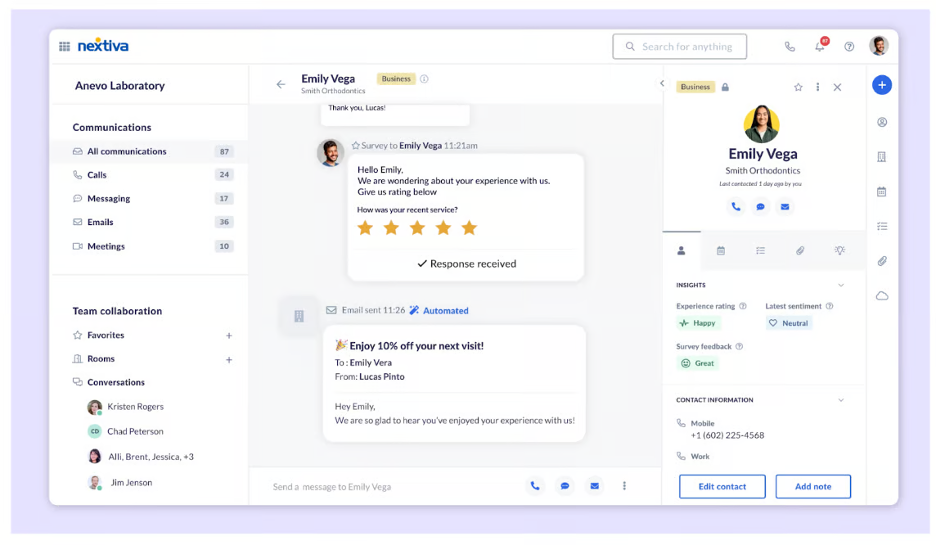
Request the required reporting on the quoted product. A manager needs to know where coverage failed and who should act. A dashboard screenshot is less useful than a demonstration of an unresolved call becoming a completed task.
Nextiva As An iPlum Alternative
Nextiva is a relevant iPlum alternative when the next purchasing need is broader office calling or patient-access operations. Include a replacement or retained destination for secure patient conversations. Changing the telephone service alone does not reproduce every existing communication journey.
Nextiva Healthcare: Confirm The Complete Quote; General Core Reference Shown Above
Start 14-Day Free TrialiPlum: Best Fit For Mobile Business Numbers And Secure Messages
Shortlist iPlum when clinicians need a professional line on existing handsets and a defined secure client channel. Evaluate its computer and staff functions as well as mobile use.
A Solo Therapist With Administrative Support
A therapist may want to return client calls without revealing a personal number, while an assistant handles scheduling enquiries. Test the division of access and responsibility. A business number can support boundaries, but staff still need an approved workspace and device practices.
Small Group Practice Use
iPlum publishes business numbers, shared-number functions and central staff administration. Demonstrate the actual permissions and callback process for the proposed team. Avoid shared credentials merely because multiple people cover one line.
Ask a newly trained employee to locate an unanswered enquiry, return a call and send a secure message. A compact service should make those tasks clear. If staff struggle, treat that as a purchasing finding rather than assuming they will solve it after migration.
iPlum As A Nextiva Competitor
iPlum is a meaningful Nextiva competitor for a small practice that does not need broad customer-experience operations. It should still prove its ability to support the required reception and record workflow. Smaller scope is valuable only when it covers the essential work.
iPlum Professional: Compare Eligible Billing Terms In The Table Above
View Eligible iPlum PlansNextiva Vs iPlum HIPAA Compliance And BAA Requirements
Both publish healthcare BAA support. Approval should follow the exact product, agreement and workflow rather than a blanket statement about the brand.
Nextiva Healthcare Service Eligibility
Nextiva’s current legal guidelines require an eligible healthcare service, identified as healthcare or HC on the quote, and a BAA for specified products. Ask the vendor to name the phone, fax, AI and contact-center services included in the proposal.
iPlum Professional And Enterprise
iPlum’s BAA instructions specify Professional or Enterprise. An administrator selects the relevant line under Users, opens Compliance and HIPAA Compliance, and obtains the agreement. Confirm coverage for every intended service rather than treating a phone subscription as the approval for a separate product.
Create A Practical Coverage Inventory
List calls, voicemail, ordinary messages, secure-client messages, recordings, fax and outside systems. For each, identify the intended destination, authorized staff and responsible reviewer. The inventory should reveal where information leaves the account or enters another application.
A signed vendor agreement supports the purchasing process, but the practice still needs appropriate access, devices, procedures and handling of records. Keep the assessment tied to the work staff perform. A brand-level assurance is less useful than a clear answer about a particular mailbox or message channel.
For context, see our guide to VoIP and HIPAA compliance in healthcare. Apply the framework to the proposed account and practice policy before moving live patient communication.
Secure Patient Texting And Ordinary SMS
iPlum documents a secure client-account channel. Nextiva’s ordinary SMS should not be described as an equivalent secure patient inbox. Match the message to the approved channel.
Nextiva Messaging Restrictions
NextivaONE’s guidelines prohibit sending PHI through its SMS/MMS function. XBert’s guidelines also prohibit configuring PHI delivery through ordinary SMS/MMS and unencrypted email. Channel availability on a healthcare account is therefore not permission to send every kind of patient information.
iPlum Secure Client Access
iPlum documents invitations to a free client account with mobile-app or browser access. Its secure-channel control differs from ordinary texting. Browser access still requires the client account process; it does not convert a standard SMS conversation into the secure channel.
Use a fictional client to test the invitation, first reply and return visit. Include a person who is unfamiliar with the service. The practice needs a workable explanation and a fallback if the client cannot complete access.
Prevent Messages Going To The Wrong Destination
Write a short staff rule explaining which communication belongs in the patient portal or secure inbox and what to do with unexpected sensitive detail. Inspect previews on lock screens and email notifications. A message workflow includes the destination copies and notifications, not only the screen where staff typed it.
Carrier registration and privacy approval are separate checks. Registration concerns business-message delivery requirements. Privacy approval concerns the permitted content, access and handling. Do not use registration status as evidence that a channel is appropriate for clinical conversations.
Voicemail, Transcription And Email Delivery
Nextiva’s current help documentation describes encrypted voicemail-email delivery through Paubox. Do not assume every healthcare account has voicemail email disabled; confirm the available path for the proposed product.
The Nextiva Paubox Option
Its help article distinguishes a recipient email service that supports encryption from delivery through the Paubox Secure Message Center when that support is absent. Request the account-specific setup and demonstrate how the authorized recipient accesses the voicemail.
An older Nextiva support page describes restrictions on voicemail attachments and transcription. Read those limits alongside the current product-specific help rather than treating every historical list as universal. Ask Nextiva to resolve the exact behavior on the quoted account.
iPlum Voicemail And Callback Handling
Have an authorized employee receive a fictional voicemail, locate it and complete the callback. Inspect any transcription or notification destination. The business mailbox is only one part of the journey if audio or text is copied elsewhere.
Make Follow-Up Ownership Visible
The most important operational question is who acts after a message arrives. Test coverage during a clinician’s absence, a message received after hours and a patient who calls again before anyone responds. A useful system helps staff distinguish new work from completed work.
Compare retrieval on the actual devices. A process that works in an administrator’s demonstration may be inconvenient for a clinician between appointments. Agree on the acceptable steps before choosing the provider.
Mobile Calling, Personal Number Privacy And Remote Work
Both services deserve evaluation on the devices staff already use. iPlum additionally documents a mobile voice-network calling option; its computer workflow still depends on internet access.
Separate Business Identity From The Device
A professional number can help protect personal boundaries without requiring another handset. Test outgoing identity and the incoming business-call experience. Check interruption by a personal call, notification behavior and access after the app has been closed.
iPlum Voice-Network Voicemail Behavior
Its incoming voice-network guidance recommends a press-to-accept control to help prevent calls entering personal carrier voicemail. It also describes rejected-call and device Do Not Disturb conditions. Include ignored, rejected and unavailable-device calls in the pilot.
The final mailbox should use the intended business greeting and support an approved callback. A separate number does not prove that every unanswered call reaches the right destination. Verify this on each representative handset.
Nextiva Mobile And Desktop Handoffs
Ask staff to demonstrate the proposed app, receiving a call remotely and recovering unfinished work when returning to the office. Verify endpoint permissions and the actual number used for the callback. Do not make the workflow depend on staff remembering private workarounds.
Evaluate Reliability Where People Work
Use fictional calls at the office and in representative home workspaces. Inspect understandable audio, delayed notifications and recovery after interruption. Define a fallback number and a staff procedure for an outage. Product availability on a mobile device is only the beginning of a mobility evaluation.
Auto Attendant, Call Routing And Shared Reception
Compare the caller’s route and staff ownership using the same scenarios. Do not assume a phone tree, a shared line and a contact-center queue perform identical tasks.
Nextiva Office Routing
Ask for the menu, group coverage and handoff arrangement on the quoted tier. Show how the organization handles a lunch break, a busy department and an unanswered transfer. Add the necessary options to the proposal before treating the general entry plan as the complete solution.
iPlum Phone Tree And Team Coverage
Demonstrate supported shared-number access and the intended menu. A small practice may only need a short greeting and a dependable fallback. Verify who receives unresolved work rather than focusing on the number of available branches.
A Common Pilot For Both Providers
| Situation | Question To Answer | Expected Result |
|---|---|---|
| Staff At Lunch | Who receives the overflow? | A defined backup can answer |
| Wrong Menu Selection | Can reception recover the call? | Caller reaches an appropriate person |
| Clinician Unavailable | Where does the enquiry go? | Approved message path and owner |
| Caller Rings Twice | Can staff see unfinished work? | Duplicate effort is avoided |
| After Hours | What does the caller hear? | Clear business guidance and destination |
Include the busiest period of a representative day in the design. An empty-office demonstration cannot show how coverage works when several staff members are already occupied. Choose a routing arrangement people can operate consistently.
Call Recording, Fax And Historical Records
Price the capture and retrieval workflow you need. Recording, fax and archive access may change the required services and complete cost.
Recording And Consent
Compare the Nextiva recording proposal with iPlum Enterprise. Confirm eligible service, announcements, access, downloads and the purpose of capture. Address the applicable recording-consent requirements for the practice’s actual calls before enabling live recording.
Demonstrate retrieval by an authorized employee and denial of access to a person who should not listen. Define how a recording is used and who reviews it. Capturing more conversations does not automatically improve patient service.
Fax Plan And Retrieval
Ask Nextiva to identify its proposed healthcare fax product and permitted delivery and retrieval paths. Its published support guidance documents restrictions on some email-based fax actions. Demonstrate the actual account rather than borrowing steps from an unrestricted general-business tutorial.
iPlum publishes separate fax subscriptions. Its Professional fax reference is $12.99/month annually or $15.99 monthly. Include the eligible fax service and agreement in the order rather than assuming the phone plan includes it.
Test a failed transmission and a document received while the intended employee is absent. Assign an exception reviewer. A delivery status has limited value if nobody retrieves the fax or verifies the intended destination.
Archives And Exports
iPlum’s backup guidance distinguishes Professional text archiving from Enterprise’s longer text and recording archive, and recent mobile restoration from older portal access. Test the age and format of records the practice expects to retrieve.
Establish applicable retention obligations and practice policy rather than equating a vendor archive duration with a universal HIPAA requirement. Ask both providers what remains accessible after a downgrade, number transfer or cancellation. Moving a number and preserving records are separate tasks.
AI Receptionists, Contact Centers And EHR Integrations
Nextiva’s broader offerings deserve a product-specific review. Do not assume every AI or contact-center feature is included in the basic phone proposal.
XBert Healthcare Eligibility
Nextiva’s current legal guidelines expressly address XBert healthcare use with the required service and BAA. A blanket statement that all Nextiva AI is unavailable for healthcare would be inaccurate. Confirm the proposed functions, data handling and connected destinations.
Pilot appointment enquiries with fictional information, including a request the automation should hand to a person. Inspect what happens when the caller changes direction, gives an unclear answer or asks something outside the configured task. Define the allowed purpose and escalation route before enabling automation.
A Shared Business Number Is Not A Contact Center
A dedicated patient-access operation may require agent roles, supervisory visibility and reporting beyond ordinary staff coverage. Request a separate Nextiva Contact Center demonstration when that is the actual requirement. Do not compare its complete agent workflow with iPlum’s entry phone price as if they were identical products.
Verify The Exact EHR Connection
Nextiva’s current communications page lists healthcare integrations including Epic, ModMed and eClinicalWorks, with product-specific descriptions. Confirm the connector, licensed service, implementation and supported task. A logo in an integration catalogue does not establish an included deployment.
For iPlum, do not treat contact functions or usage-data access as a complete clinical integration without proof of the required task. Follow a fictional record through the proposed connection and inspect matching, transferred fields, failure handling and receiving-system access.
Review Generated Output
Whether information is a voicemail transcript or an AI summary, names, dates and instructions need review. Specify who checks output before it becomes part of a clinical record or triggers follow-up. A readable result can still omit an important qualification.
Which Provider Fits Your Practice?
Solo Therapists And Private Practice
Start with iPlum when the main needs are a business line and secure-client access. Test voicemail behavior and patient onboarding. Compare Nextiva if the practice already has an approved portal and needs a different reception arrangement.
Small Medical And Dental Offices
Pilot both against reception coverage and unresolved callbacks. Nextiva merits an office-calling demonstration; iPlum merits a compact shared-number demonstration. Count the staff who need individual access and price the actual required tasks.
Multi-Location Practices
Prioritize a Nextiva organizational-calling evaluation. Verify location selection, coverage, staff roles and reporting on the quoted service. Retain or replace the approved patient messaging destination deliberately.
Mobile Clinicians And Remote Teams
Compare the representative handset and workspace experience. iPlum’s calling options are relevant, while Nextiva may suit staff moving between office and remote work. Test personal/business separation, access and interruption recovery.
Practices Requiring Recorded Calls
Compare the Nextiva capture proposal with iPlum Enterprise. Include controls, retrieval and exports in the total. A lower entry rate is not the relevant comparison when required capture changes the service.
Dedicated Patient-Access Teams
Define the agent operation before shortlisting a package. Nextiva’s broader product range can be relevant, but a basic quote should not stand in for the required contact-center arrangement. Evaluate escalation and reporting using a realistic workload.
Nextiva And iPlum Pros And Cons
Nextiva Pros
- Strong candidate for office calling and staff coverage.
- Broader healthcare and patient-access offerings to evaluate.
- Current encrypted voicemail-email option documented.
- AI healthcare use addressed in product-specific guidelines.
- Published clinical-system integrations worth investigating.
Nextiva Cons And Buying Limits
- General public price is not a verified complete healthcare quote.
- Product-specific restrictions affect permitted channels.
- Historical support lists and newer help need account-specific reconciliation.
- Required options, connectors and implementation can add cost.
- A general business demonstration may differ from the approved account.
iPlum Pros
- Business identity on an existing handset.
- Documented secure-client account channel.
- Current computer and team functions broaden its use.
- Mobile voice-network option worth testing.
- Defined BAA-eligible starting point.
iPlum Cons And Buying Limits
- Standard is not the eligible healthcare benchmark.
- Recording and separate fax can change the total.
- Secure access requires patient onboarding.
- Personal carrier voicemail behavior needs testing.
- A general provider phone-service free trial is not established here.
These are editorial purchasing considerations, not performance guarantees. Use the material limits to define vendor questions and acceptance tests.
How To Switch Between Nextiva And iPlum
Complete the replacement pilot before ending the previous service. Preserve records, transfer the number and explain any new patient access steps as separate parts of the change.
- Inventory numbers, staff, message destinations and stored records.
- Confirm eligible services, agreements and the complete order.
- Configure permissions, greetings and absence coverage.
- Test fictional calls and patient-channel access on representative devices.
- Arrange supported exports or historical-record access.
- Verify porting eligibility and keep the old line active until transfer passes.
- Train staff and explain changed patient access routes.
- Review unanswered calls and unresolved conversations after launch.
Keep a named owner for the transition. If staff must temporarily monitor two systems, define which one receives new work and how unfinished conversations are closed. An indefinite split between competing inboxes can undo the benefit of a new phone service.
Checks Before Launch
- Correct business identity appears on external callbacks.
- Ignored and rejected calls reach the approved destination.
- Authorized staff can cover an absent colleague.
- Patients can access the selected secure channel.
- Recorded or faxed information is retrievable by the intended role.
- Historical-record access is arranged before cancellation.
- Former employees cannot access the new account.
Frequently Asked Questions
Is Nextiva Better Than iPlum?
Nextiva merits priority for coordinated office calling. iPlum merits priority for a compact mobile line and secure-client channel. Choose around the required practice workflow.
Is iPlum Cheaper Than Nextiva For Healthcare?
Compare the approved Nextiva healthcare quote with the required iPlum plan. The general Core promotion does not establish an equivalent healthcare package.
Is Nextiva HIPAA Compliant?
It publishes healthcare services and BAA requirements. Confirm the specific proposal, permitted channels and practice configuration before handling patient information.
Which iPlum Plans Support A BAA?
Its instructions name Professional and Enterprise. Use the eligible arrangement rather than Standard’s lower price.
Does Nextiva Disable All Voicemail Email For Healthcare?
No universal claim is appropriate. Its current help describes a Paubox delivery path, while other documentation lists restrictions. Confirm the behavior for the proposed account.
Can iPlum Patients Use Secure Messages Without Installing The App?
The documented client process includes browser-account access. Patients still need to complete the invitation and secure-channel steps.
Can I Treat Ordinary SMS As The Secure Client Channel?
No. Evaluate the intended channel and permitted information separately from business-message delivery registration.
Does iPlum Work On A Computer?
Current eligible functions include web calling and texting. Demonstrate the required browser tasks and staff permissions.
Does Nextiva Offer A Free Trial?
It advertises a 14-day trial for eligible packages. Confirm the selected offer and do not assume patient-use approval.
Does iPlum Offer A Free Provider Phone Trial?
This review does not establish a general phone-service trial. Free secure-client accounts are a different arrangement.
Is iPlum Fax Included With Its Phone Subscription?
The vendor publishes separate fax plans. Include the eligible service and its agreement in the order.
Can I Keep My Existing Practice Number?
Confirm eligibility with the receiving provider and keep the previous service active until transfer and external calling checks pass.
What Should A Therapist Test First?
Test business identity, unanswered-call routing, voicemail retrieval and secure client access before adding capture or automation.
Customer Feedback And Final Recommendation
Nextiva — Taryn N., G2, September 15, 2026: The reviewer valued dashboard visibility into call activity and missed calls across offices, while wanting more polished AI tools and a better desktop experience. This supports testing reporting and daily usability; it does not establish the account’s healthcare coverage.
iPlum — Christina W., G2, January 26, 2026: The clinical psychologist praised straightforward calling and texting and responsive support. She also described a brief outage resolved with clear communication. This is one practice experience, not a guarantee of uninterrupted service.
Final Recommendation: Choose Nextiva when the main improvement is organized office calling and staff coverage. Choose iPlum when a compact professional line and its secure-client channel meet the need. Obtain the eligible agreements, test the complete workflow and compare the actual practice quote before moving live communication.
Affiliate Disclosure: VoIPCalling.com may earn a commission when you sign up through qualifying links in this article at no cost to you. This comparison considers published documentation, limitations and practice fit. Confirm current pricing, covered services and the required configuration with the selected provider.