
Choose Doxy.me for a healthcare-focused, browser-based patient visit workflow. Choose Zoom for broader video collaboration, larger meetings and an existing organization-wide platform. Doxy.me includes a free individual-provider BAA option; Zoom healthcare use requires an eligible paid account and an executed BAA. Compare patient access and the complete workflow alongside price.
Doxy.me vs Zoom is most useful when the question is specific: which platform helps patients enter a visit, lets clinicians work without interruption and fits the practice’s administration? A solo therapist and a health system may need different answers, even when both primarily deliver video appointments.
This 2026 comparison focuses on Doxy.me telehealth and Zoom Meetings within Zoom Workplace. Zoom Phone is a separate service and is not the pricing benchmark here. The review uses published documentation and editorial purchasing analysis, not a hands-on clinical deployment or independent security audit. Information was checked October 12, 2026 in Asia–Karachi.
Doxy.me Vs Zoom: Which Is Better For Telehealth?
Doxy.me is our first shortlist for a patient-first telehealth workflow, especially an individual clinician seeking a free starting option. Zoom is our first shortlist when telehealth must fit wider organizational meetings and administration. For either service, verify agreement scope, patient entry, staff permissions and record handling before using protected health information.
| Provider | Best Fit | Buying Considerations | Pricing & Access |
|---|---|---|---|
 Doxy.me Doxy.me |
|
| Free Individual-Provider Option$0/MonthPremium reference: $29/user/month annually. Confirm current quote and seat needs. Free Plan & Trial Details |
 Zoom Zoom |
|
| Workplace Pro Reference$14.16/User/MonthAnnual billing; $16.99 monthly. Confirm eligible healthcare account and services. View Eligible Zoom Plans |
Expert ratings are original editorial buying-fit assessments, not customer averages or compliance certifications. The rubric weights BAA/coverage clarity at 30%, telehealth workflow fit at 30%, administration at 20% and price/accessibility at 20%. Doxy.me scores 5, 5, 4 and 4, yielding 4.6/5. Zoom scores 4, 4, 5 and 4.5, yielding 4.3/5. These scores reflect this healthcare buying scenario.
Compare The Current Plans
Doxy.me’s current offering uses Free and Premium. Its public pricing search reference lists Premium at $29/user/month billed annually. Confirm the monthly quote and exact seat structure at purchase. Older Professional and Clinic references should not be substituted into a current new-account comparison.
Zoom Plans For A Healthcare Comparison
Zoom Workplace Pro lists $14.16/user/month annually or $16.99 monthly. Business lists $18.33 annually or $21.99 monthly. These are published subscription references, not a guarantee of every healthcare configuration or optional service. Verify the eligible account and executed BAA.
Annual-Plan Subscription Examples
| Paid Users Or Hosts | Doxy.me Premium Reference | Zoom Pro Reference | Difference |
|---|---|---|---|
| 1 | $29/month | $14.16/month | $14.84/month |
| 5 | $145/month | $70.80/month | $74.20/month |
| 10 | $290/month | $141.60/month | $148.40/month |
These are our arithmetic examples using the published annual references, not equivalent-feature quotes. Five licenses differ by $890.40 across twelve monthly equivalents. Check whether the same clinical and administrative tasks are included before treating that difference as a complete-workflow saving.
Count the users the proposed order actually needs. A clinician hosting a visit, a staff member helping with check-in and a patient joining the appointment do not necessarily require the same license. Ask each vendor to identify billable roles and simultaneous-use requirements in writing.
Free Plans, Premium Trials And Day Passes
Doxy.me offers a continuing Free option and a Premium trial entry point without a credit card. This review does not assign an unverified duration to that trial. Its separate Day Pass guidance describes $10 for 24 hours of Premium access; that paid offer is different from a free trial.
Zoom Basic is a free meeting option with a 40-minute meeting limit, but it is not the eligible paid-account BAA benchmark. Evaluate patient visits against the reviewed healthcare arrangement instead of assuming that a familiar free meeting account supplies the required agreement.
Compare taxes, additional apps or usage charges, organizational support, integrations and staff onboarding. A subscription that saves money but repeatedly requires staff to help patients join may not be the lower-cost operating choice.
Doxy.me Vs Zoom Features Compared
Doxy.me organizes communication around a virtual care visit. Zoom offers a broader meeting and collaboration environment. Compare each required patient task rather than treating similar feature names as proof of the same workflow.
| Requirement | Doxy.me | Zoom Meetings |
|---|---|---|
| Patient Entry | Provider link and browser check-in | Meeting invitation; guest and browser settings matter |
| Free Healthcare Starting Point | Individual-provider BAA option | Paid-account healthcare arrangement needed |
| Waiting Experience | Healthcare waiting room and patient queue | Meeting waiting-room controls |
| Team Workflow | Premium shared rooms and patient transfer | Demonstrate hosts, scheduling and account roles |
| Group Visits | Premium advertises up to 25 participants | Pro reference: 100; Business: 300 |
| Recording | Current Record app captures session audio | Local/cloud meeting capture; approve settings |
| AI Documentation | Current Scribe and Transcript apps | Available healthcare AI; feature-specific review |
| Clinical Tools | Assessments, consent and other telehealth apps | Demonstrate the specific clinical workflow |
| Broader Collaboration | Evaluate visit-focused needs | Wider organizational meetings and collaboration |
| Business Phone Service | Do not assume a general PBX replacement | Zoom Phone is separate from this Meetings benchmark |
Three Buying Considerations That Matter Most
- Patient entry: Can a first-time patient join on the actual device with minimal help?
- Visit continuity: Can staff handle waiting, interruptions, a late clinician and a participant change?
- Records and access: What is captured, who receives it and which paid tools are required?
Start with the patient journey and the staff job. An impressive feature demonstration is less useful than a realistic appointment test with someone who has never used the platform.
Doxy.me: Best Fit For A Patient-Focused Telehealth Workflow
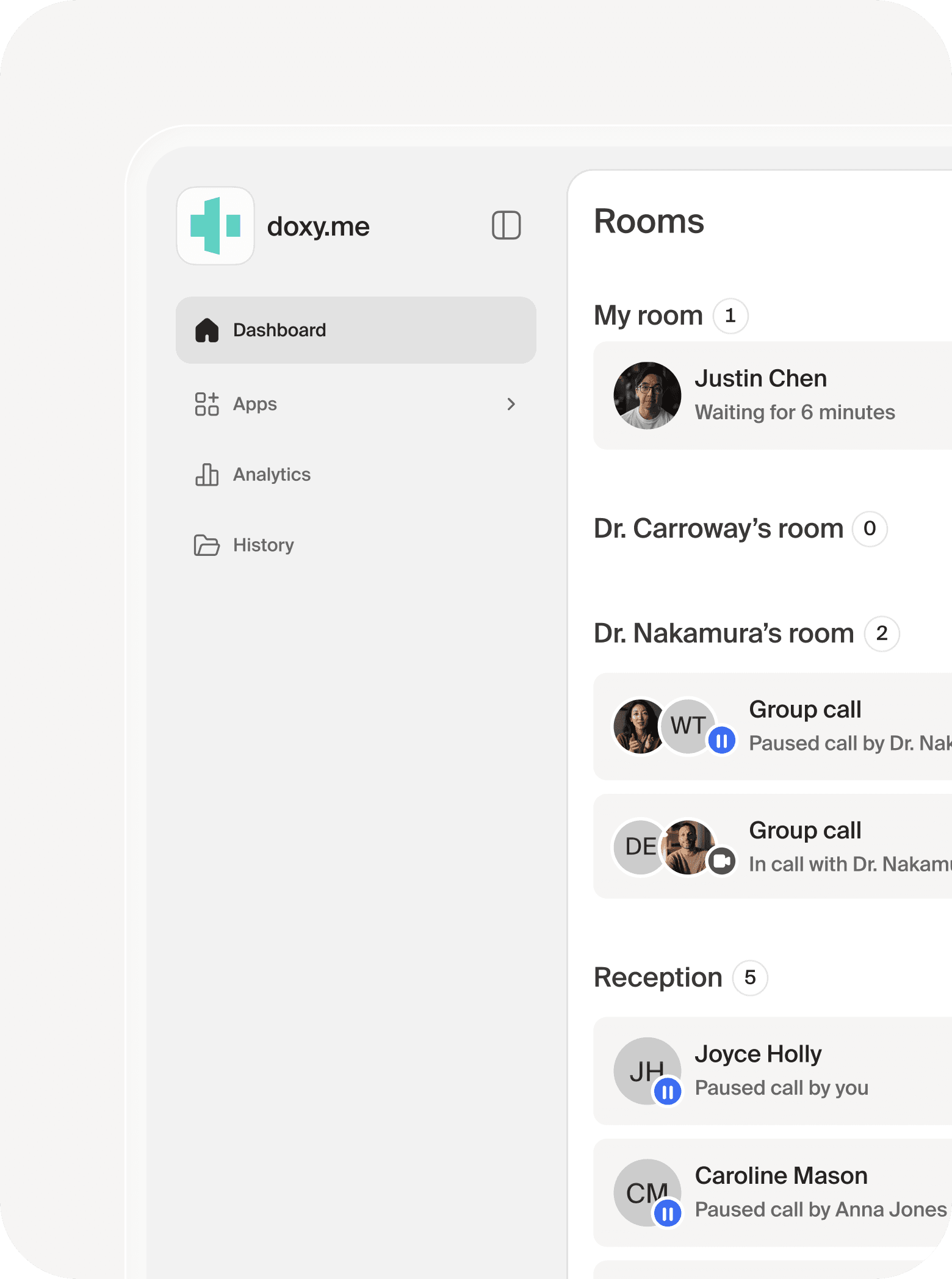
Start with Doxy.me when the main requirement is a straightforward virtual visit built around healthcare check-in. Include its current Premium team and clinical tools in the evaluation rather than describing it as only a basic one-to-one video link.
An Individual Clinician Starting Telehealth
A therapist offering occasional remote appointments may first need a link patients can understand and a clear place to wait. Evaluate the free individual-provider arrangement against those tasks. Upgrade because a required clinical or team function is missing, not solely because a paid plan sounds more professional.
Doxy.me As A Zoom Alternative
Doxy.me is a relevant Zoom alternative for healthcare buyers prioritizing the clinical visit over general collaboration. Its current Premium documentation includes shared rooms, provider transfer and permissions. Demonstrate how those functions support the practice’s appointment flow.
For a group practice, test a receptionist checking in a fictional patient and a clinician taking over. The successful outcome is that the patient reaches the right person without receiving conflicting links or waiting instructions.
Clinical Apps Need A Separate Task Review
The current app collection includes tools such as assessments, consent, payments, Scribe and audio recording. Ask which tools are included for the proposed seat and whether any usage charges apply. Availability in the catalogue does not establish the final cost or suitability of a clinical task.
Doxy.me: Free Individual-Provider Option; Premium Annual Reference Shown Above
Free Plan & Trial DetailsZoom: Best Fit For Telehealth Within A Wider Organization
Start with Zoom when the practice already uses a managed Zoom environment or needs broader meetings alongside telehealth. Familiarity can reduce evaluation effort, but the clinical account and patient joining process still need review.
One Platform Across Several Meeting Types
An organization may use video for staff training, case discussions and patient visits. Identify which settings and users belong to each purpose. A broad platform can help administration, but staff should not carry informal meeting habits into a private consultation.
Zoom As A Doxy.me Competitor
Zoom is a meaningful Doxy.me competitor when larger meetings and organization-wide collaboration are important. Its participant capacity can matter for training or appropriately designed groups. Capacity alone does not determine whether a sensitive group visit is well managed.
Manage Hosts And Invitations Deliberately
Demonstrate how a clinician starts the correct meeting, how support staff help patients and what happens if the clinician is absent. Test the proposed account rather than using an unrelated personal Zoom login for the evaluation.
Ask a new employee to locate the next appointment and admit the intended participant without coaching. If the process is confusing, decide whether training or a different configuration can resolve it before committing.
Zoom Workplace Pro: $14.16/User/Month Annually Or $16.99 Monthly
View Eligible Zoom PlansDoxy.me Vs Zoom HIPAA Compliance And BAA Requirements
Both can support healthcare communication with an appropriate agreement and workflow. The important difference is eligibility: Doxy.me publishes a free individual-provider BAA option, while Zoom’s healthcare BAA guidance identifies paid-account arrangements.
Doxy.me Individual And Organization Agreements
Doxy.me’s current settings guide says all users can obtain a BAA, but the Free-account agreement is intended for individual providers. It directs multi-provider organizations toward Premium’s custom agreement. Confirm the covered entity and team structure rather than treating several personal accounts as one approved organization.
Zoom BAA Eligibility And Setup
Zoom’s current help identifies paid plans and a US Pro checkout agreement option. Eligible existing accounts can locate the BAA through Plan Management; Business and larger healthcare buyers should follow the sales process. Paying for the subscription alone should not be described as executing the agreement.
A Practice Still Needs An Approved Process
Document the intended visit, account, staff access and record destination. Include generated notes, downloaded files and connected systems. A meeting platform may provide safeguards while the practice introduces an unreviewed destination by exporting a transcript.
Define who can admit patients, start capture and retrieve records. Staff also need a private physical workspace and appropriate devices. The review should follow the actual appointment rather than stop at a provider’s healthcare badge.
For background, see our HIPAA compliance guide for healthcare communications. Apply the framework to the service and account your practice will use.
Patient Access: Browser Links, Accounts And Downloads
Doxy.me’s patient journey is browser-based and does not require a patient account. Zoom can also support guest entry and desktop browser participation, subject to host settings. Avoid the inaccurate claim that every Zoom patient must create an account.
The Doxy.me Check-In Journey
The provider sends the patient a room link. Doxy.me’s patient guidance describes joining without a sign-in or download. Test camera and microphone permissions, the waiting experience and re-entry after a connection interruption on the patient’s device.
The Zoom Guest Journey
Zoom’s guest instructions say an account is not ordinarily required, but authentication restrictions can change that. Desktop browser access depends on the host enabling the relevant entry route. Review mobile participation separately rather than assuming a desktop browser test covers every patient device.
A Useful Patient Test
Send a fictional appointment invitation to someone unfamiliar with the service. Ask them to enter from a phone and from the computer they would normally use. Record how often they need help and whether they understand that they are waiting rather than already in the session.
Include a patient who clicks an older invitation by mistake. The practice should have a clear response without revealing another appointment or encouraging staff to bypass approved admission controls.
Keep Instructions Short
Explain the link, permission prompt and expected waiting behavior in plain language. State how the practice will contact the patient if entry fails. Clear instructions and a prepared fallback can matter more than a small difference in subscription price.
Waiting Rooms, Shared Rooms And Staff Handoffs
Both services can control entry, but their workflows need separate demonstrations. Doxy.me’s clinic-oriented rooms and transfers are relevant to patient flow. Zoom’s host and waiting-room controls are relevant to a managed meeting environment.
Doxy.me Clinic Flow
Premium documentation describes shared rooms and patient transfer between providers. Ask who can access the room, who sees the waiting patient and how the receiving clinician is notified. Test an absent clinician and a delayed appointment.
Zoom Meeting Admission
Zoom’s healthcare guide describes waiting rooms, passcodes, attendee removal and locking meetings. Configure the patient entry route together with those controls. A setting that protects entry can still require careful patient instructions.
Separate Patients And Assign Responsibility
Test back-to-back fictional appointments. Confirm that the first participant has left before admitting the next, and that support staff know which room or meeting they are handling. Avoid relying solely on a display name as the practice’s identity process.
Give delayed and unanswered work an owner. A visible waiting list does not solve a missed appointment if everybody assumes someone else is monitoring it. Define who contacts a patient who cannot join and who updates the clinician.
Group Therapy, Family Visits And Larger Meetings
Doxy.me Premium currently advertises group calls with up to 25 participants. Zoom Pro’s reference supports 100 and Business 300. Choose around the actual session type, staff controls and patient privacy, not the largest advertised room.
Small Clinical Groups
For a family consultation or therapy group, test how an interpreter or caregiver enters, how the clinician recognizes participants and how an unexpected attendee is handled. The service should support the agreed group process without distracting from the session.
Large Training And Organization Meetings
Zoom is a relevant evaluation when the same organization needs larger staff sessions or broader collaboration. Separate those uses from patient groups when assigning permissions, invitations and capture settings.
Plan For Disconnection
A group pilot should include one participant leaving and rejoining while others remain. Verify who notices the interruption and whether sensitive conversation continues appropriately. A technically successful reconnection does not by itself establish a well-managed clinical session.
Use the proposed device mix, not only staff laptops on the office network. Group audio and video depend on participant conditions as well as the host platform.
Recording, AI Notes And Clinical Documentation
Current Doxy.me documentation includes an audio-recording app and clinical documentation tools. Zoom also supports meeting capture and available healthcare AI. Compare the exact function, consent process and record destination instead of repeating an outdated “recording versus no recording” distinction.
Doxy.me Record Captures Session Audio
Doxy.me’s Record guide describes starting audio capture through the in-call app, reviewing consent and showing participants an active indicator. Audio and optional transcripts can be downloaded after the session. This is audio capture, not a claim that the app records the whole video visit.
Its guide also says active apps close when a patient is transferred and session data is not shared with the receiving provider. If the practice combines transfer and documentation tools, demonstrate the complete handoff rather than assuming an app continues across rooms.
Zoom Recording Needs A Defined Configuration
Zoom’s published plans distinguish local recording from paid cloud storage. On the healthcare account, demonstrate the intended capture, access, sharing and retention controls. Review both the recording location and any copy downloaded to a staff device.
Healthcare AI Is Feature-Specific
Zoom’s current BAA help permits available AI features with account controls and notes that some remain unavailable. Its guidance says communication content is not used to train Zoom or third-party AI models. Avoid claiming that every healthcare account must disable all AI or that every listed AI function is available.
Doxy.me’s current app documentation includes Scribe and Transcript. Test the required note format, who can access the output and where it is placed. Ask the vendor to identify availability and charges on the proposed account.
Scribe Availability And The Download Window
Doxy.me’s current Scribe guide identifies US paid-plan early access. It supports structured note formats and specifies a 90-minute download window before the generated note is deleted. The practice needs a reliable review-and-save process; the tool should not be treated as a permanent patient-record archive.
The same guide describes a 40-note daily limit per user during early access and advises against combining Scribe with Interpreter. If those functions matter, test the intended session and confirm current availability before selecting the plan.
Review Generated Output Before Using It
A fictional appointment should include a corrected name, a changed instruction and an uncertain statement. Compare the generated output with the source. Fluent text can still omit a qualification or turn uncertainty into a definite claim.
Assign a clinician or appropriate staff reviewer before output enters the patient record. Define what happens if capture fails or output is missing. A useful automation should support the practice’s work without becoming the only way to recover important information.
Recording Is Not A Default Clinical Need
Enable capture only for an approved purpose with applicable consent and record-handling requirements. Routine storage can create additional access and retention responsibilities. Availability alone is not a reason to record every appointment.
Privacy, Encryption And Session Controls
Assess the entire information path: participant access, live media, stored records and exports. An encryption statement should be read within its actual scope rather than treated as a guarantee about every feature or endpoint.
Zoom Optional End-To-End Encryption
Zoom’s healthcare guide describes optional Meetings end-to-end encryption when all participants use supported apps or Zoom Rooms. That is a different path from a browser-based patient visit. Demonstrate the selected mode and required functions together before adopting it.
Doxy.me Visit And App Review
Doxy.me publicly describes its healthcare security approach. Confirm the current account and the handling of any enabled app, download or document. A live-session security statement should not be extended without review to a file later placed on another system.
Use Individual Staff Access
Give staff permissions appropriate to their job, then test removal when employment or duties change. A shared room can support coverage without requiring a shared password. The administrator should be able to explain who can admit patients and retrieve records.
Physical Privacy Still Matters
Test notifications, visible screens, microphone pickup and nearby conversations in the actual work area. Staff should know how to handle a patient joining from a shared location. A private account does not make every physical environment private.
Keep the approved contact and exception process easy to follow. Employees should not have to improvise a new personal messaging channel when a patient cannot enter a visit.
Scheduling, Consent, Payments And Integrations
Neither a visit link nor a broad collaboration suite should be assumed to replace the complete practice system. Identify the administrative or clinical task and demonstrate it on the proposed account.
Doxy.me Clinical Apps
Doxy.me’s current catalogue includes Teleconsent, assessments and a Stripe-connected Payment app. Verify the supported form, transaction process and receiving system. Ask whether the practice’s proposed use incurs additional charges or needs another account.
Use a fictional document to test who completes it, who reviews it and where it is saved. A digital signature feature is useful only when it fits the approved consent process and staff can retrieve the correct version.
Zoom Scheduling And Practice Connections
An existing Zoom environment may fit the organization’s calendars and broader meetings. Demonstrate the actual appointment creation, staff permissions and patient invitation. Do not equate a working calendar link with a fully integrated clinical workflow.
Follow Information Into The Destination
For either platform, trace a fictional appointment and document into the receiving system. Inspect identity matching, transferred fields, failed synchronization and access. Successful sign-in is the beginning of the test, not proof that the connector meets the practice’s needs.
Include the EHR, payment provider or other destination in the agreement and safeguards review. A telehealth vendor’s BAA does not automatically establish the arrangement for every service connected to it.
Reliability, Devices And Failed-Visit Recovery
There is no defensible universal quality winner from a feature list. Compare both platforms under representative patient and clinician conditions, then test recovery when those conditions fail.
Test The Same Conditions
Use the same clinician device, patient device and network when comparing basic visit quality. Repeat on weaker connections and older devices representative of the practice’s patients. Observe audio clarity, entry problems and recovery rather than only the picture at the start of the call.
A Prepared Fallback
Define how staff contact a patient who drops out and which approved alternative is used. Ask what the clinician should do while the connection is being restored. A fallback should preserve the practice’s communication process rather than send staff into an improvised personal account.
Device Permissions And Updates
Include camera and microphone denial in the pilot. Test how staff guide a first-time patient through the approved fix. For app-based participation, check whether an update interrupts entry on the patient’s actual device.
Record the time spent helping patients and the number of appointments completed successfully. Those outcomes can reveal a more practical value difference than a small subscription saving.
Which Platform Fits Your Practice?
Solo Therapists And Occasional Telehealth
Start with Doxy.me’s individual-provider arrangement. Test the actual patient entry and essential visit functions. Compare paid Zoom when an existing managed account or broader meeting needs make it useful.
Small Group Practices
Compare Doxy.me Premium’s clinic workflow with the proposed Zoom account. Test staff check-in, clinician absence and privacy between providers. Price the required roles rather than assuming every employee needs an identical host license.
Group Therapy And Family Consultations
Compare the actual participant journey and host controls. Doxy.me’s current paid group capacity may suit smaller sessions. Zoom merits evaluation where larger meetings or broader group tools are required.
Multi-Location Organizations
Evaluate administration and clinic structure together. Doxy.me Premium should demonstrate shared-room and transfer functions. Zoom should demonstrate the organization’s host, identity and account requirements.
Organizations Already Using Zoom
Confirm the healthcare account before replacing a familiar platform. If patient entry and staff process work well, existing administration can be an advantage. If visits repeatedly require help, Doxy.me deserves a direct patient-flow pilot.
Practices Prioritizing Clinical Apps
Demonstrate Doxy.me’s current app workflow. Include consent, assessments or documentation only where they solve a defined task. For Zoom, compare the exact proposed clinical connector or other approved system.
Buyers Seeking A General Business Phone System
Make a separate phone-service comparison. Telehealth video, appointment dial-in and a full reception phone system are different purchases. This article’s Zoom Meetings price should not be reused as a complete Zoom Phone quote.
Doxy.me And Zoom Pros And Cons
Doxy.me Pros
- Browser-focused patient entry without a patient account.
- Free individual-provider BAA option.
- Current Premium clinic rooms, transfer and administration tools.
- Telehealth apps for defined clinical tasks.
Doxy.me Cons And Buying Limits
- Free individual eligibility does not establish organization-wide coverage.
- Premium costs more than the annual Zoom Pro reference.
- App availability, seat permissions and usage charges need review.
- Current audio capture should not be described as full video recording.
Zoom Pros
- Relevant to an existing managed Zoom organization.
- Broader meeting and collaboration capabilities.
- Higher meeting capacity references for larger sessions.
- Published paid-account BAA process and healthcare controls.
Zoom Cons And Buying Limits
- The free meeting account is not the BAA benchmark.
- Patient browser entry depends on the proposed settings and device.
- Clinical apps and workflows require an exact comparison.
- Capture, AI outputs and connected destinations need deliberate handling.
These are editorial buying considerations rather than measured performance guarantees. Use important limits to define vendor questions and acceptance tests.
How To Compare Or Switch Telehealth Platforms
Prove patient entry and staff work before replacing the current visit process. Changing an invitation link, preserving records and adjusting clinical documentation are separate transition tasks.
- List current appointment types, devices, staff and records.
- Confirm the eligible account, agreement and complete order.
- Configure individual access and the approved patient entry route.
- Pilot fictional visits with first-time users and failed scenarios.
- Review capture, AI, downloads and connected destinations.
- Arrange historical access or supported exports before cancellation.
- Train staff and update patient instructions.
- Review joining problems and unfinished follow-up after launch.
A Simple Acceptance Checklist
- The intended patient can join on a representative device.
- Staff can recognize and admit the correct participant.
- An absent clinician can be covered using approved access.
- Back-to-back appointments remain separate.
- An interrupted visit has an approved recovery route.
- Authorized staff can retrieve required records.
- Former staff lose access to the account.
Keep a short log of failed scenarios and the proposed fix. Retest essential work after changing settings. The evaluation is complete when the required appointment process works predictably, not when every optional tool has been shown.
Frequently Asked Questions
Is Doxy.me Better Than Zoom For Therapy?
Doxy.me is a strong starting point for a patient-focused telehealth workflow. Zoom may fit an existing managed organization or broader meetings. Test the visit, account and staff process.
Is Doxy.me Free?
It offers a continuing Free option. The Free-account BAA is intended for individual providers; confirm the arrangement for a multi-provider organization.
Is Zoom Free For HIPAA-Covered Patient Visits?
Do not use the free meeting price as the healthcare benchmark. Zoom’s published BAA process identifies eligible paid-account arrangements.
Do Patients Need A Doxy.me Account?
Its patient guidance describes joining through the provider link without a patient sign-in or download.
Do Patients Always Need A Zoom Account?
No. Guest participation is supported, but the host’s authentication settings can require an account. Test the proposed entry route.
Can Zoom Work In A Browser?
It supports desktop browser participation subject to settings. Review the exact device and entry route rather than assuming every mobile patient uses the same path.
Can Doxy.me Record Sessions?
Current documentation includes a Record app for session audio, with consent and indicators. Do not describe this as full video recording.
Does Doxy.me Have AI Notes?
Current documentation includes Scribe and Transcript apps. Confirm the proposed account, charges and approved output handling.
Must All Zoom Healthcare AI Be Disabled?
Current BAA guidance permits available AI with controls and notes that certain functions may be unavailable. Review the exact feature.
Does Doxy.me Offer Group Calls?
Current Premium documentation advertises up to 25 participants. Confirm the selected account and session requirements.
Is A Doxy.me Day Pass A Free Trial?
No. The documented Day Pass is a paid 24-hour Premium option. It is separate from the public free-trial entry point.
Does Zoom Meetings Include The Business Phone System Compared Elsewhere?
Do not assume it does. This article uses Meetings within Workplace; Zoom Phone is a separate service review.
Which Platform Should A Solo Clinician Test First?
Begin with the eligible service matching the patient journey and essential visit functions. Doxy.me’s individual free option is a useful starting evaluation.
Customer Feedback And Final Recommendation
Doxy.me — Khazana M., G2, December 5, 2025: The program coordinator valued ease of use and a straightforward intake journey, but wanted group participation on the free version. This is a useful reminder to separate entry-level visit needs from paid group requirements; older feedback does not establish every current feature.
Zoom Workplace — Uplakshya S., G2, October 2, 2026: The reviewer valued clear calling, screen sharing and collaboration. They also found client updates inconvenient and noted that some administration required switching to the browser. Their general-workplace account supports testing device readiness, not treating it as clinical compliance evidence.
Final Recommendation: Choose Doxy.me when straightforward patient entry and a healthcare-oriented visit workflow are central. Choose Zoom when telehealth belongs within a broader managed meetings environment. Compare the eligible agreement, actual patient joining process, required staff roles and record destinations before using live patient information.
Affiliate Disclosure: VoIPCalling.com may earn a commission through qualifying partner links on the site, at no cost to you. This comparison considers published documentation, limitations and practice fit. Confirm current pricing, covered services and the required configuration with the selected provider.