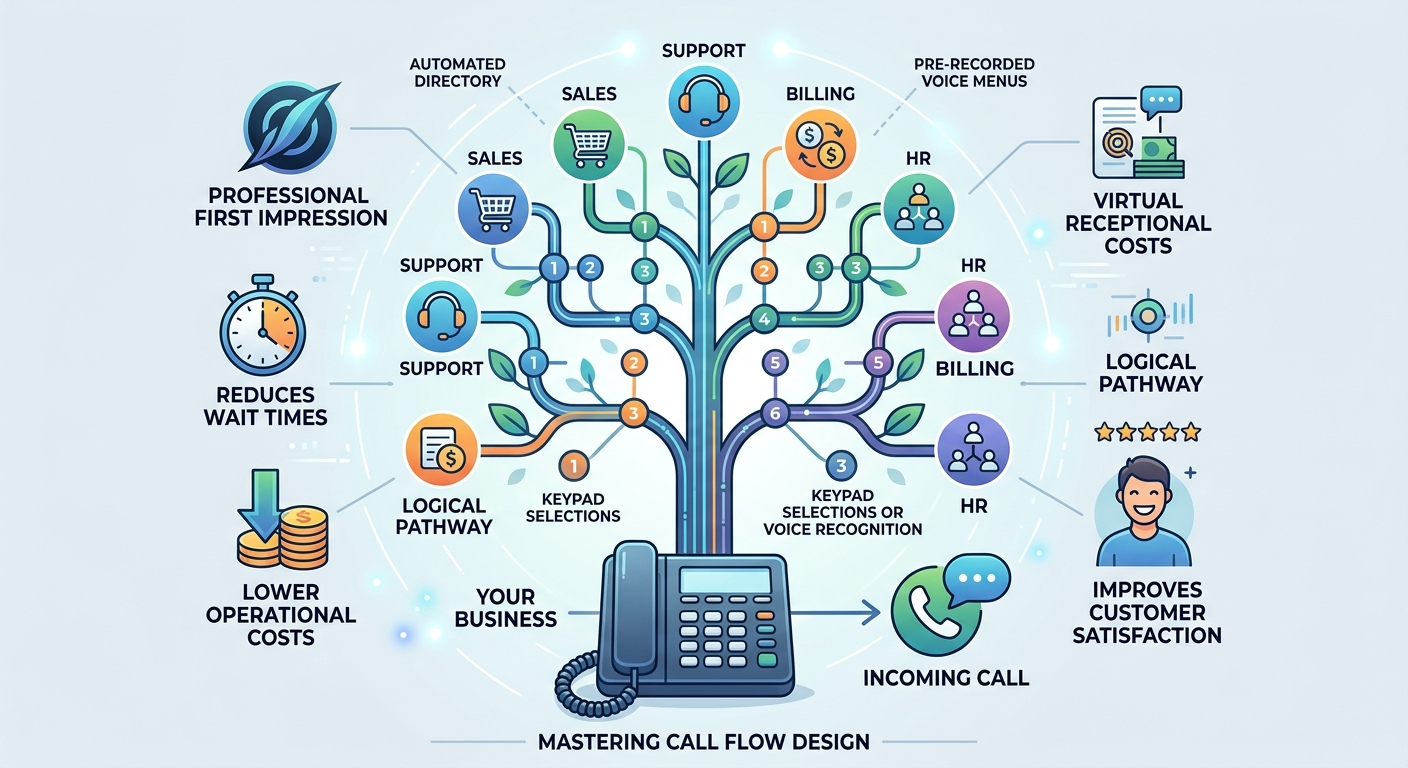
A tree phone system is an automated directory that guides callers through pre-recorded voice menus to reach the right department or information. Instead of relying on manual switchboard operators, this virtual receptionist uses keypad selections or voice recognition to route calls efficiently. When someone dials your business, the tree phone answers immediately, presents clear choices, and transfers the user based on their selection.
Implementing this technology ensures a professional first impression, reduces wait times, and lowers operational costs. Mastering call flow design helps businesses handle high inbound volumes while significantly improving overall customer satisfaction and agent productivity.
What Is a Tree Phone?
A traditional tree phone is an automated menu system designed to direct inbound callers through a series of pre-recorded voice prompts. Instead of a human operator answering every single call, this technology allows consumers to navigate toward the correct department by selecting keypad numbers. Modern corporate communication heavily relies on this routing framework to manage high inquiry volumes efficiently without overwhelming staff members. By establishing a logical pathway for consumer interactions, companies can maintain a professional image while handling simultaneous connections effortlessly.
Implementing this virtual assistant eliminates the need for expensive hardware or large teams of receptionists. Today’s cloud-based software platforms make configuring a tree phone incredibly simple for administrators of any technical skill level. The setup acts as the primary touchpoint for consumers, meaning getting the design right is crucial for brand reputation. Every second counts during customer interactions, and providing a seamless navigation experience prevents potential buyers from abandoning the line.
Phone tree vs. IVR vs. auto-attendant
| Term | Scope & Definition | Key Capabilities / Limitations | Role in Practice |
| Phone tree | The broadest term; refers to the overall menu structure and branching logic. | Routes callers through a series of options based on their selections (typically button presses). | Determines where the call goes. |
| IVR (Interactive Voice Response) | A more advanced, highly capable routing and interaction system. | Understands natural spoken language (e.g., saying “billing” instead of pressing 2); connects to back-end databases to enable self-service (payments, lookups, tracking). | Handles self-service operations. |
| Auto-attendant | The front-facing layer; the recorded voice, greeting, and initial menu prompt. | Answers the call, presents options, and initiates routing. Limitation: Does not process spoken language or interact with external data. | Answers the call and greets the caller. |
How Tree Phones Work?
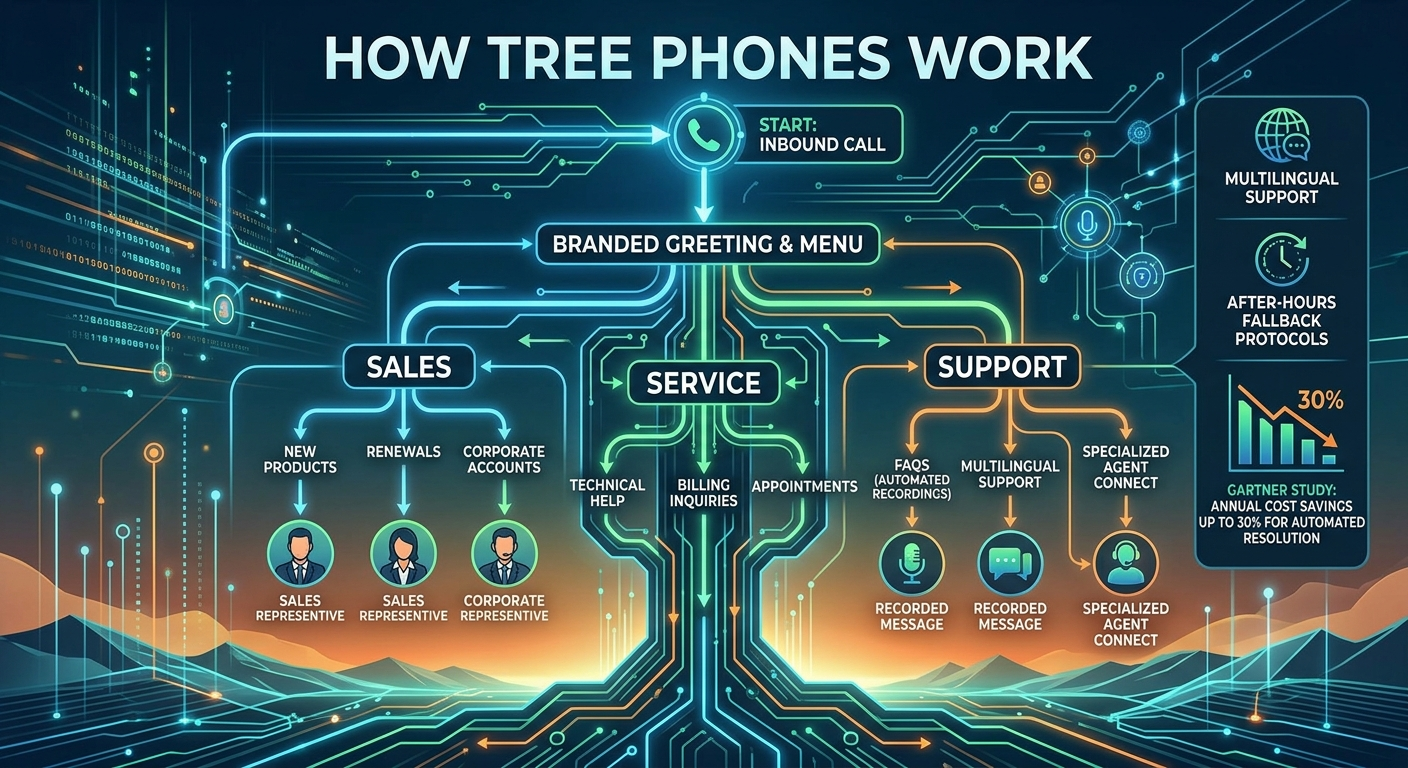
Operating much like a digital flowchart, a tree phone utilizes branching logic to filter inbound traffic toward the most relevant destination. Upon dialing, the user immediately hears a branded greeting followed by highly specific choices based on departmental functions or common service requests. Choosing a number pushes the individual down a specific branch, where the choices become progressively narrower until the final connection occurs. This structured methodology guarantees that complex inquiries reach specialized representatives while basic questions get answered through automated recordings.
Many advanced configurations incorporate multilingual support or after-hours fallback protocols so that individuals always receive assistance regardless of the clock. Relying on intelligent routing mechanics ensures that the workload gets distributed evenly across available personnel. According to a comprehensive study by Gartner, organizations leveraging automated resolution frameworks reduce operational contact center costs by up to 30 percent annually. This impressive statistic highlights exactly why mapping out an effective architecture remains a priority for modern enterprise leaders.
Examples of tree phones:
-
Simple configuration: A two-level setup offering basic choices like sales or support before directly transferring the individual to those respective teams.
-
Multi-level configuration: A complex three-tier architecture guiding individuals first to a broad category, then to sub-departments, and finally to a specialized technician.
-
Self-service configuration: A highly interactive setup letting users input their secure account digits using the keypad to check billing statuses automatically.
Benefits of Implementing a Tree Phone
-
Fewer staff interruptions: Automatically filtering inquiries prevents irrelevant transfers and keeps agents focused on complex problem-solving tasks.
-
Faster information delivery: Pre-recorded informational messages provide critical details around the clock, even when the primary office remains closed.
-
Enhanced consumer experience: Providing a streamlined self-service pathway helps people reach appropriate solutions instantly, boosting overall satisfaction rates.
-
Professional brand image: A properly structured tree phone makes small startups appear as large, established enterprises with dedicated support divisions.
-
Nuisance call deflection: Automated prompts successfully block robocalls and spammers, keeping the internal communication lines entirely clear.
-
Optimized voicemail management: Directing users to specific digital inboxes based on their selections makes transcription and follow-up much more organized.
How to Build a Tree Phone (4 Simple Steps)
Following a systematic approach ensures that every single variable gets accounted for before the system goes live to the public. By adhering to industry standards during the creation phase, developers can build an intuitive architecture that scales smoothly as the organization expands.
1. Identify your needs
Identifying exact consumer requirements serves as the foundational element of any successful communication strategy. Analyzing historical data helps pinpoint the most frequent inquiries, such as billing discrepancies, technical glitches, or general product information requests.
Understanding these primary drivers allows designers to prioritize the most important menu choices right at the beginning of the sequence. Anticipating caller intent ultimately reduces confusion and accelerates the overall resolution timeline significantly.
2. Define call flow
Mapping out the actual pathway visually prevents structural errors from complicating the final user experience. Administrators should draft a logical diagram illustrating exactly how a person moves from the initial greeting down to the final resolution endpoint.
This visual representation exposes potential bottlenecks or unnecessarily long pathways that might annoy the user. The primary objective remains delivering a frictionless journey that minimizes transfer rates and maximizes first-contact resolution metrics.
3. Record messages
Producing high-quality audio files dictates how professionally your brand comes across to the external world. Studios should utilize clear, friendly voiceover talent while actively avoiding confusing technical jargon that might alienate everyday consumers.
Since this audio serves as the definitive front door to the enterprise, the tone must perfectly reflect the underlying corporate values. Concise phrasing ensures that listeners absorb the instructions rapidly without needing to replay the entire sequence multiple times.
4. Test and refine
Deploying the architecture internally before a public launch remains absolutely critical for catching hidden navigational flaws. Asking internal team members to dial in and navigate various scenarios provides invaluable feedback regarding audio clarity and logical flow.
Based entirely on this internal audit, developers can tweak the tree phone settings to optimize performance further. Continuous refinement based on real-world testing ensures the ultimate deployment meets the highest possible quality standards.
Best Practices for Using Call Trees Effectively
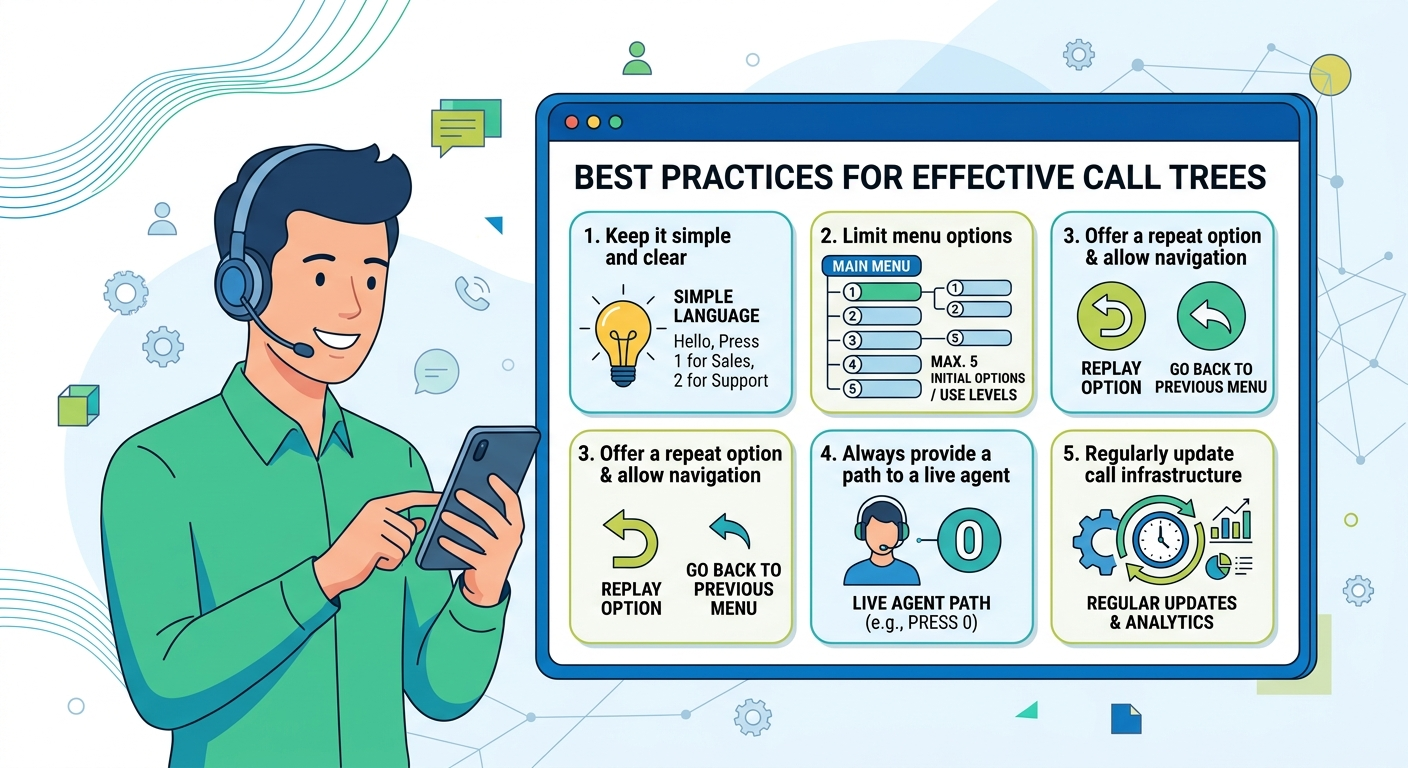
Research published by Zendesk indicates that nearly 69 percent of modern consumers actually prefer utilizing automated self-service tools over speaking with live agents initially. Capitalizing on this preference requires businesses to deploy structures that are both highly intuitive and consistently reliable.
1) Keep it simple and clear
Utilizing plain language throughout the recorded prompts prevents listeners from misunderstanding their available selections. Complex vocabulary or convoluted sentences drastically increase the likelihood of someone pressing the wrong digit by accident.
Straightforward descriptions empower individuals to make immediate decisions without second-guessing their actions. The faster someone comprehends the menu, the faster they connect with the precise department capable of solving their exact dilemma.
2) Limit menu options and use multiple levels
Restricting the primary menu to a maximum of five choices prevents cognitive overload and subsequent abandonment. When enterprises possess numerous departments, utilizing nested sub-menus proves much more effective than listing ten consecutive options aloud.
Broad categories should always introduce the interaction, followed gradually by more granular selections as the individual progresses deeper. This layered methodology keeps the audio brief while effectively narrowing down the specific nature of the inquiry.
3) Offer a repeat option and allow for navigation
Always providing a dedicated button to replay the audio acts as a vital safety net for distracted listeners. Ambient background noise frequently causes individuals to miss critical instructions, making a replay function absolutely indispensable.
Additionally, allowing users to navigate backward to the previous menu prevents them from having to hang up and redial entirely. Flexible navigation mechanics demonstrate immense respect for the consumer while heavily reducing accidental misroutes.
4) Always provide a path to a live agent
Forcing individuals entirely into automated loops without an escape hatch generates extreme frustration and negative brand perception. Certain complex scenarios simply require human intervention, meaning a direct line to an operator must exist within the primary menu.
Offering a clear escape route, typically by pressing zero, reassures the caller that genuine assistance remains available if needed. If queues are exceptionally long, offering a scheduled callback alternative keeps satisfaction high while managing heavy traffic properly.
5) Regularly update your call infrastructure
Reviewing the operational analytics of your tree phone quarterly highlights exactly where individuals experience difficulties or hang up prematurely. Seasonal volume shifts often require temporary adjustments to the routing logic to accommodate sudden spikes in specific departmental inquiries.
Gathering qualitative feedback directly from the support staff reveals if misdirected connections are occurring frequently. Actively modifying the software based on this concrete data guarantees the infrastructure evolves alongside the shifting demands of the marketplace.
Common tree phone mistakes (a quick diagnostic)
-
Excessive choices: Presenting more than five initial selections transforms the interaction into a confusing memory test for the listener.
-
Trapping callers: Failing to offer an immediate transfer to a human representative creates severe anxiety and immediate dissatisfaction.
-
Outdated routing: Leaving inactive extensions or incorrect operational hours in the active system completely shatters brand credibility.
-
Lengthy introductions: Forcing users to endure a massive corporate speech before revealing the keypad choices wastes valuable time.
-
Buried selections: Hiding the absolute most popular inquiry reasons deep inside a complex sub-menu irritates frequent callers endlessly.
Helpful Tree Phone Templates for Small Businesses
Whether establishing a central directory, a dedicated technical queue, or a revenue-generating pipeline, starting with a template eliminates guesswork. Below are highly effective blueprints designed specifically to handle various corporate communication scenarios with maximum efficiency.
1. Standard tree phone template (script)
-
Greeting during hours: “Thanks for dialing our enterprise. To assist you properly: Press 1 for Sales. Press 2 for Support. Press 3 for Billing. Press 0 for an operator. Press 9 to replay.”
-
Unavailable protocol: “Unfortunately, nobody is available currently. Kindly leave your contact details, and we will return your inquiry shortly.”
-
After-hours protocol: “You have reached us outside operating times. We are active Monday through Friday. Please leave a message.”
-
Operator fallback: Pressing zero instantly connects the individual to the main reception desk.
2. Customer Support Tree Phone Template (script)
-
Bilingual greeting: “Thanks for dialing our specialized assistance center. For English, press 1. Para español, oprima 2.”
-
Core menu: “Press 1 for Technical Assistance. Press 2 for Order Tracking. Press 3 for Account Help. Press 0 for an agent.”
-
Technical sub-menu: “For Hardware, press 1. For Software, press 2. To speak with a technician directly, press 0.”
-
Queue management: “Current wait time is five minutes. To receive a callback, press 1. To continue holding, press 2.”
3. Sales Tree Phone Template (script)
-
Promotional greeting: “Thank you for dialing our revenue team. We have a new promotion—press 9 to hear more. Otherwise, choose an option.”
-
Sales menu: “Press 1 for New Purchases. Press 2 for Existing Orders. Press 3 for Product Details. Press 0 for a representative.”
-
Routing logic: The system automatically matches the inquiry to the most qualified agent available on the floor.
-
Fallback message: “All representatives are busy. To request a callback, press 1. To leave a voicemail, press 2.”
Read More: How To Silence Unknown Caller iPhone: A Complete Guide
Final Words
Deploying a highly optimized tree phone entirely transforms how an enterprise handles incoming communication traffic daily. By thoroughly mapping out the logical pathways and recording crystal-clear audio prompts, businesses can eliminate bottlenecks and elevate satisfaction levels. The careful integration of this technology ensures that every single individual receives prompt, accurate assistance regardless of the time they dial.
Continuously refining the architecture based on concrete analytics and staff feedback guarantees long-term operational success. Ultimately, investing the required effort into designing a flawless automated framework yields massive returns through increased staff productivity and happier consumers.
Tree Phone FAQs
-
What is a tree phone and how do I design one effectively?
A tree phone is an automated voice directory that routes callers to specific departments using keypad inputs. You design one effectively by identifying core caller needs, mapping out a logical menu flow, recording concise prompts, and rigorously testing the setup before public deployment.
-
What are mobile phone trees?
These refer to automated routing systems specifically optimized for individuals dialing in from cellular devices. They feature exceptionally brief menus and SMS-fallback capabilities to accommodate the unique behaviors of mobile consumers.
-
Can a 3 SIM be used in any phone?
Yes, provided the mobile device is entirely unlocked and compatible with the specific network frequencies utilized by the carrier. Inserting the card into an unlocked handset immediately grants access to the provided cellular services.
-
What do you call a digital routing menu?
Industry professionals frequently refer to this technology as an automated attendant, an interactive voice response system, or simply a virtual receptionist. The terminology varies based on the exact complexity and digital capabilities of the software deployed.
-
How do I create an automated directory?
You create this digital architecture by purchasing a modern VoIP subscription, navigating to the administrator dashboard, and utilizing visual mapping tools. From there, you type or record your desired greetings and link each keypad digit to a specific user extension.
-
Why is limiting menu choices important?
Restricting selections prevents cognitive fatigue, ensuring the listener does not forget the earlier options presented. A concise list directly reduces accidental misroutes and vastly improves the overall speed of the resolution process.
-
How often should an automated infrastructure be updated?
Administrators should thoroughly audit and refresh their routing logic at least every quarter. Regular updates ensure the system properly reflects changing operational hours, new departmental structures, and seasonal volume fluctuations.
-
Does this technology completely replace human operators?
No, automated routing exists specifically to complement human workers by handling repetitive filtering tasks. Complex problem-solving and nuanced consumer interactions still require the empathy and critical thinking skills of a live representative.
-
What happens if a caller presses the wrong button?
A properly configured system always includes a designated button, typically the nine or star key, to replay the audio instructions. Furthermore, providing a zero-key fallback allows the individual to reset the interaction by speaking with a general receptionist.