
Yes, Nextiva offers healthcare communications that can support HIPAA-compliant use with the appropriate service, a signed Business Associate Agreement (BAA) and practice safeguards. Coverage and restrictions depend on the product and configuration. Confirm calling, voicemail, email, fax, messaging, AI and integrations before handling protected health information.
For a practice considering a Nextiva HIPAA compliant phone system, the priority is organized reception calling and clear follow-up ownership. The healthcare configuration may differ from the general business demonstration. Evaluate the functions staff can actually use on the proposed account.
This in-depth review follows Nextiva’s public legal, healthcare, help and pricing documentation for US buyers in 2026. It separates current product requirements from older feature lists and explains a practical pilot. It is a documentation-based review, not an independent security audit or a claim of testing a live clinical deployment.
For background, read our guide to VoIP and HIPAA compliance in healthcare.
Is Nextiva HIPAA Compliant In 2026? Our Verdict
Shortlist Nextiva for a practice that prioritizes reception calls, departmental routing and dependable callbacks. Its healthcare offering deserves evaluation, but the buying decision should turn on the actual account’s feature matrix and delivery paths. Do not equate every general business feature with an approved patient-data workflow.
| Provider | Best Fit | Review Focus | Pricing & Trial |
|---|---|---|---|
 Nextiva Nextiva |
|
| Core General Plan ReferenceFrom $15/User/MonthAnnual offer eligibility applies; $23 monthly reference. Healthcare configuration: confirm quote. Start 14-Day Free Trial |
Expert Rating: 4.0/5. This original editorial buying-fit score weights published BAA/coverage clarity (30%), healthcare workflow fit (30%), administration (20%) and price/accessibility (20%). Each dimension is assessed at 4/5. It is not a compliance grade, customer average or certification.
Nextiva HIPAA Plans And Pricing
The general US pricing page lists Core at $15/user/month with annual offer eligibility and a $23 monthly reference; Engage is $25 annually with a $50 monthly reference. The annual small-business offer is for new customers with 1–100 employees signing a paid minimum term of 12 months or longer. Obtain a healthcare proposal before treating those figures as your practice’s final cost.
Ask the quote to identify the required users, numbers, eligible services, fax, implementation, usage and optional AI. A Nextiva HIPAA compliant phone service cost comparison should include the complete workflow. Confirm any BAA-related charge directly; this review does not establish a separate agreement fee.
Nextiva advertises a 14-day trial on its customer-communications page. Confirm the offer for the selected product. Trial length does not establish healthcare-account eligibility or permission to use patient information; begin with fictional scenarios.
Does Nextiva Sign A Business Associate Agreement?
Nextiva publishes BAA support for its covered healthcare services. Request the applicable agreement from the sales or account team and verify that it belongs to the organization account being purchased. Payment for a general subscription is not evidence of an executed BAA.
Its current HIPAA Use Guidelines require the relevant offering to be designated HIPAA-compliant or “HC” on the quote, alongside a BAA. Check that designation for the actual products in the proposal. The agreement and use guidelines address different parts of the arrangement.
How To Get A BAA With Nextiva: Agreement And Account Checks
- Describe the practice’s intended calling, fax, messaging and capture workflows.
- Request the eligible service proposal and applicable agreement.
- Identify the account owner and authorized signing party.
- Resolve the products, configuration and destinations before launch.
- Retain the executed agreement and the approved order details.
If the practice already uses Nextiva, ask how the existing account is handled. Do not assume that changing a billing label automatically changes features or approvals. Ask which settings, licenses and delivery routes will be reviewed and whether any migration affects staff access.
What To Keep In The Practice’s Vendor File
- The signed agreement and effective date.
- The purchased services and applicable terms.
- The responsible account administrator and support contact.
- The approved data destinations and staff roles.
- The dated configuration review and pilot results.
The goal is an arrangement the practice can explain and operate. An agreement kept in a procurement folder does not tell a receptionist whether a voicemail copy may be forwarded or which inbox owns a callback. Translate the approved design into staff instructions.
Nextiva BAA Requirements And Compliance Documentation
The Nextiva Business Associate Agreement belongs in the vendor review alongside the quote, current use guidelines and implementation decisions. Ask the account team to identify the relevant documents for your order. A complete Nextiva HIPAA compliance documentation file should explain both the contractual arrangement and the approved operating process.
A useful Nextiva HIPAA BAA review follows one fictional message from receipt to its final destination. Record who receives it, whether a copy is created and who manages the next action. This makes the agreement meaningful to the people handling communications.
Which Nextiva Services Support HIPAA Compliance?
Review the actual product and interface, not a single brand-wide feature list. Nextiva’s public materials discuss NextivaONE, NEXT, Contact Center, general business calling and XBert AI. Ask for the current healthcare configuration and terms for each service you intend to use.
The current legal guidelines impose product-specific limits. NEXT and NextivaONE restrict PHI in SMS/MMS and ordinary email. NEXT also limits social messaging, surveys, emailed reports and calendar details. NextivaONE additionally restricts PHI in specified contact fields, Conversations/Rooms, calendar data and SmartTopics. Connected applications need their own review.
| Service Or Workflow | Ask Nextiva | What To Test |
|---|---|---|
| Business Calling | Which healthcare order and endpoints apply? | Reception, transfers and fallback |
| NextivaONE | Which functions and fields are approved? | Notifications, contacts and destinations |
| NEXT | Which channels are suitable for the intended content? | Messages and copied outputs |
| Contact Center | Which agent and capture functions are proposed? | Permissions and department handoffs |
| XBert AI | Which tasks, outputs and delivery routes are included? | Escalation and artifact handling |
| Fax And Email | Which product and delivery configuration will we receive? | Recipient, access and downloads |
Why Older Nextiva HIPAA Articles Can Be Misleading
Nextiva’s March 2025 HIPAA blog describes disabled visual voicemail, app voicemail listening and voicemail-to-email/text, with restrictions on sending vFAX from email. Its October 2025 voicemail help article separately describes encrypted delivery through Paubox for HIPAA customers. Both are published vendor materials, but they do not establish one universal behavior across every account.
Ask the implementation team to resolve which documentation applies to your product version and order. Retain that answer with the proposal. This review does not assume that newer help instructions silently remove every restriction in a different product or agreement.
Nextiva HIPAA Compliant VoIP: Match The Proposal To The Workflow
Compare Nextiva healthcare VoIP solutions by the patient-contact task they must perform. A Nextiva HIPAA compliant business phone proposal should identify the reception route, supported endpoints and approved records. A separate digital-channel or AI proposal should explain its own inputs, recipients and limits.
The Nextiva healthcare communications platform can bring several staff tasks into one procurement, but the practice should approve each information path deliberately. Keep the current service matrix with the order so new staff can distinguish an available function from a permitted use.
Nextiva Healthcare Phone System: Reception, Routing And Mobility
Start with the patient’s calling journey. A useful Nextiva healthcare phone system should deliver the call to the intended person, provide a clear route when staff are unavailable and assign ownership of the callback. Assess these outcomes before adding more channels.
Nextiva Healthcare Call Routing, Auto Attendant And IVR
Use a short greeting and a limited set of choices that reception can explain. Avoid asking for unnecessary clinical information before a staff member answers. Test the wrong menu selection and provide a workable route to help. A detailed menu is useful only if patients can navigate it.
Test routing with the department open, closed and unexpectedly unstaffed. A timetable for the main office may not match a therapist’s or specialist’s hours. Define who receives the unresolved call and how staff know a response is still needed.
Call Groups And Shared Reception
A shared phone workflow needs a named owner, not just several ringing devices. Determine who handles a missed call when two receptionists assume the other answered it. During the pilot, deliberately leave one staff member unavailable and inspect the resulting task.
For a multi-location practice, include an outside caller and a real transfer between sites using fictional details. Verify the intended clinic and staff identity before passing information. A directory entry should not force reception to guess which location owns the patient’s request.
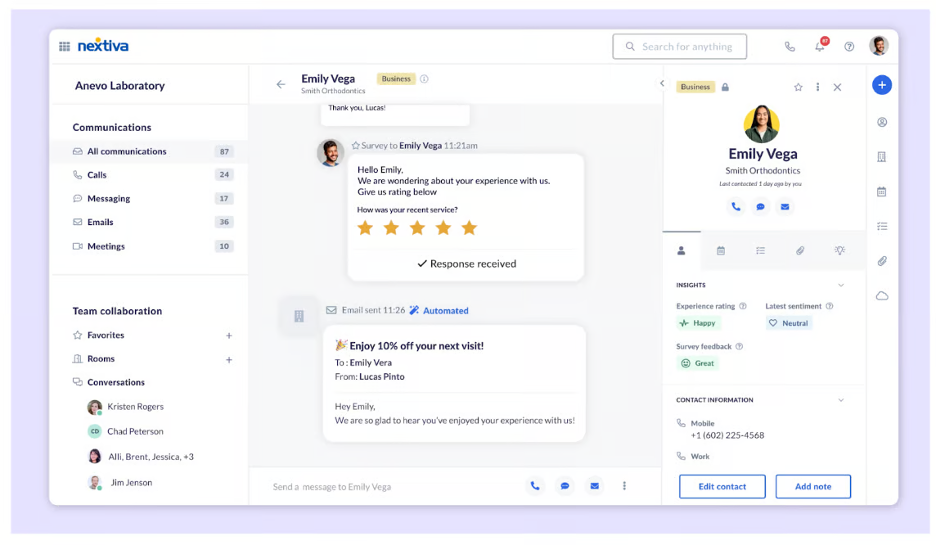
Nextiva Mobile App And Remote Clinicians
Evaluate the supported app on the actual devices staff will use. Check caller identity, lock-screen notifications, headset behavior and what happens when a connection drops. A business app can help organize work, but privacy also depends on the surrounding device and workspace.
Call forwarding needs a complete destination test. If the call is unanswered, confirm which mailbox receives it. A personal mobile voicemail should not become an unintended repository for practice messages. Document the approved outage route and train staff to use it.
Nextiva HIPAA Compliant Call Forwarding And Virtual Numbers
When evaluating a Nextiva HIPAA compliant calling workflow, test the entire route to its destination. For call forwarding, include an unanswered call and the receiving mailbox. For virtual numbers, assign an owner and confirm the caller identity shown to patients. A new business number does not itself protect notifications or stored messages.
Nextiva HIPAA Compliant Video Meetings And Team Messaging
If video meetings are part of the proposal, confirm the actual service and joining process. Test participant admission, screen sharing, recordings and invitations. Approval of the administrative phone line does not by itself establish approval of a telehealth session.
For team messaging, show staff which workspace and channel they are using before they enter information. Follow the product restrictions already summarized above. A shared interface can include different recipients and delivery paths, so do not assume every conversation stays inside an approved staff environment.
Is Nextiva Voicemail HIPAA Compliant?
Nextiva voicemail handling must be reviewed for the proposed account. In particular, distinguish a notification, an audio attachment and an encrypted message-center link. They create different staff experiences and information copies.
The October 7, 2025 NextOS 3.0 help article describes a Paubox arrangement for HIPAA voicemail email. It says recipients using an email service that supports encryption can receive an attached .wav file; otherwise delivery uses a recipient-specific link to the Paubox Secure Message Center. Confirm that this arrangement applies to your order before relying on it.
Notifications Are Not The Same As Attachments
A notification can alert staff without carrying the message audio. An attachment creates another copy in a mailbox or device. Ask to see the exact notification on desktop and mobile, and test the receiving environment. Avoid using “voicemail to email” as shorthand for all three delivery methods.
Encrypted transport does not decide who has mailbox access, whether forwarding is enabled or how a downloaded file is retained. Include those decisions in the practice’s approval. The destination needs an owner who understands the message’s purpose and access rules.
Voicemail Transcription And App Playback
Ask for a demonstration on the healthcare account rather than a standard demo. Confirm the approved playback route and whether transcription is available in the exact service. If the current setup limits a familiar function, train staff on the replacement before number porting.
Run a fictional after-hours message through the entire process: receipt, notification, playback, callback and record entry where needed. Repeat with the normal receptionist absent. Staff should know which inbox or task list represents unfinished work.
Shared Mailboxes And Exported Copies
Check whether multiple people can see the message and whether access is appropriate for each role. Removing the original voicemail may not remove an emailed file or download. Document which copies staff may create and who is responsible for their handling.
Is Nextiva Fax HIPAA Compliant?
Nextiva publishes healthcare fax support, but the fax product and delivery configuration matter. Confirm the service on the order, the agreement and how staff send, retrieve and store documents. General fax availability is not approval for every email or export route.
The vendor’s healthcare blog describes receiving faxes through a secure link or portal rather than attaching the fax to email, and limits sending vFAX from email. Treat that as a configuration question for your actual fax service, particularly if staff currently rely on a different workflow.
Fax Pilot Before Porting
- Verify the test destination number and the service being purchased.
- Send and receive a fictional document.
- Check the portal, notification and permissions.
- Test the approved download or record-entry route.
- Record what staff do with a failed or misaddressed transmission.
A transmission receipt does not establish that the document reached the intended patient record. If fax is connected to another system, test identity matching and the exception queue. Assign a staff member to review failures rather than assuming an integration can resolve every ambiguous document.
Also check physical destinations. A correctly received fax can still be exposed on a public printer or shared workstation. Include receiving-site behavior and the handling of paper copies in the practice’s procedures.
Is Nextiva SMS, Chat And Email HIPAA Compliant?
Use the product-specific restrictions summarized above as the starting point. A channel can appear in the general feature list while being unsuitable for the intended patient information. An SMS campaign registration does not establish PHI protection.
Nextiva For Patient Appointment Reminders And Replies
Define the permitted content and how staff respond when a patient sends sensitive details into a limited-purpose channel. Even a short appointment reminder can reveal a care relationship. Have the privacy lead approve the content and contact-verification process before launch.
Test a reply as well as an outgoing message. Determine who sees the response, whether it appears in another inbox and how staff move a conversation into the approved process. A well-designed template does not control what a patient types back.
WhatsApp And Social Messaging
Do not infer healthcare suitability from the ability to connect a messaging application. Review the external service, recipients, retained messages and current product terms. A unified staff interface can contain channels with different delivery protections.
Ordinary Email Vs The Paubox Voicemail Workflow
The encrypted voicemail arrangement described earlier is a specific delivery workflow. It is not a blanket approval for composing patient emails in any Nextiva interface. Confirm the intended function and destination separately, and make the distinction clear in staff training.
For chat, include both the conversation and the environment that hosts it in the review. Decide the approved content, who can access it and where any transcript goes. Avoid adding a patient-facing widget until its complete data path is understood.
Are Nextiva SMS, Fax And Call Recording HIPAA Compliant?
These functions need separate decisions. Use the SMS restrictions explained above, confirm the fax configuration and approve the specific recording purpose and controls. The dedicated sections describe different information paths; a common provider name does not make their handling interchangeable.
A search for “Nextiva HIPAA compliant SMS” should lead to the channel limits, not a blanket claim of secure patient texting. If two-way patient messaging is essential, compare the proposed channel with the practice’s actual content and response requirements before purchase.
Is Nextiva Call Recording And Transcription HIPAA Compliant?
Approve capture for a defined task, then verify that the purchased healthcare service supports the intended controls. Recording, transcription and analysis can create separate artifacts. Review their access, purpose, recipients and retention individually.
Nextiva’s HIPAA blog lists call recording among healthcare functions but distinguishes advanced recording in its feature table. Obtain the current feature matrix for the order rather than equating a generic recording option with every available monitoring mode.
Do You Need To Record This Call?
A reception transfer, a billing enquiry and a clinical discussion can have different purposes. Decide where recording is justified and review applicable notice or consent requirements. Do not retain every conversation simply because storage is available.
A summary or transcript may contain information not intended for broad staff visibility. If a practice uses capture to support a callback, define who reviews it and whether the result enters another system. Treat the destination as part of the original decision.
Analytics And Call Logs
A staffing report and a patient-level activity log answer different questions. Ask which information supervisors need for their work and restrict visibility accordingly. A caller name, time and destination can reveal a sensitive relationship even without call audio.
For a pilot, test capture disabled and capture approved. Inspect audio, transcripts, summaries, notifications and exports. An “off” setting for one form of capture does not establish that all other outputs are off.
Is Nextiva AI Receptionist HIPAA Compliant?
Nextiva markets XBert on its HIPAA-ready healthcare platform and describes BAAs for covered services. Evaluate the actual AI proposal, use limits and receiving systems. Healthcare positioning does not approve every automated task or outgoing message.
The healthcare page describes routine answering, scheduling and human handoff, and says conversations are recorded and transcribed. It also describes deeper practice-management or EMR workflows as services-led custom integrations. Do not assume those integrations are included in a basic subscription.
The current use guidelines limit PHI in XBert SMS/MMS and email; website chat requires a secured hosting site with HTTPS/TLS 1.2 or higher. Resolve these requirements before configuring outputs.
Keep The AI Task Narrow
Start with approved administrative questions such as public office hours and a route to human reception. Define when the AI should stop and transfer. Do not design the pilot around autonomous diagnosis or an assumed ability to recognize every urgent clinical concern.
Test ambiguous requests, interruptions, a scheduling-system failure and an unavailable staff destination. Staff should know how to handle the fallback. An automated answer is useful only when it leads to the correct next action.
Review Outputs Before Automating More
- Identify the information captured and the purpose for keeping it.
- Verify the people and systems receiving outputs.
- Check the available controls and exception handling.
- Have the responsible staff member review accuracy.
- Expand tasks only after the initial workflow passes.
A convenient email summary may create a new information path. Inspect the actual delivered content and applicable conditions instead of approving it from a screenshot. Keep the distinction between administrative assistance and clinical documentation clear.
Is Nextiva Contact Center HIPAA Compliant?
A dedicated patient-contact team should evaluate the contact-center product separately from a basic business-phone order. Include agent permissions, supervisor access, capture, forms and connected records in the proposal and pilot.
Use a realistic scenario in which centralized reception handles a request for a local clinic. Follow the handoff and determine who owns the unresolved task. Test an unavailable clinician, wrong department and failed destination system with fictional details.
Nextiva For Medical Appointment Scheduling And Billing
Different staff groups should receive the information needed for their roles. A person reviewing queue performance may not need detailed clinical conversation access. Ask the implementation team to demonstrate that separation in the proposed account.
If the contact center connects to a CRM or EHR, test the fields, identifiers and duplicate-record behavior. A successful connection does not prove that information is suitable for every field or recipient. Resolve approved destinations before agents begin work.
Avoid Channel Expansion Without Ownership
Adding chat, messaging and automation can increase the number of places reception must monitor. Decide which inbox owns each request and what happens if the first agent is absent. More channels improve access only when someone remains responsible for the response.
Nextiva Healthcare Contact Center And CRM Integration
A practice comparing Nextiva healthcare call center software should identify the actual agent workflow and receiving systems. For a Nextiva healthcare CRM integration, request a demonstration using a fictional identity and inspect the fields receiving call details. Resolve duplicate contacts, matching failures and records that need manual review.
Nextiva contact center HIPAA compliance should be assessed through the proposed order and its operating design. A Nextiva HIPAA compliant call center needs clearly assigned queue and callback responsibility as well as the applicable arrangement. Evaluate supervisor visibility and the destination of exports before adding more agents.
Nextiva For Healthcare Receptionists And Multi-Location Medical Practices
Healthcare receptionists should know which team owns each request when it moves between locations. Test a closed office, a wrong department and an unavailable clinician. For healthcare customer support, define the information needed to resolve the administrative enquiry and the route to clinical staff when it falls outside that task.
Nextiva HIPAA Security Features And Safeguards
Assess security evidence alongside the practice’s actual devices, access and data destinations. Network protections and a healthcare agreement address different parts of the deployment; neither defines the entire staff workflow.
Nextiva’s current network page describes TLS/SRTP call protections, access controls, audited data centers, redundancy and continuous monitoring. Request the current security and reliability report for the proposal. Confirm which protections apply to the exact endpoints and connected services; avoid describing every outside telephone path as end-to-end encrypted.
Nextiva HIPAA Access Controls And Staff Changes
Give staff the access their duties require and identify who can change settings. Use individual accounts where supported, assign shared-inbox responsibility and define the staff removal process. Ask to see role restrictions on the purchased product rather than assuming all tiers provide identical administration.
Test removal of a fictional user, including app sessions and connected tools. Reassign necessary work before access is withdrawn. Avoid leaving a shared credential active simply because reception still needs the phone line.
Nextiva HIPAA Audit Logs And Incident Handling
Ask what account activity is logged, which events are visible, who can review them and how long evidence remains available. A call history is not the same as a record of administrator changes. Establish who investigates a suspicious event and how the practice contacts support.
Reliability At Your Clinic
Cloud-phone reliability also depends on the clinic’s internet, network, devices and working procedures. Test peak reception activity, Wi-Fi coverage, headset quality and mobile connectivity. A provider’s uptime claim does not guarantee uninterrupted service on every local setup.
Verify the approved outage route and emergency-calling arrangements for the deployment. Reception should know which steps to follow during a failed connection without improvising new information destinations.
Nextiva HIPAA Encryption And Data Protection
Ask the security review to map protections to the actual endpoints, storage and receiving systems. Nextiva HIPAA data protection should be evaluated for the complete approved path, including downloads and external destinations. Do not describe encryption as a substitute for recipient verification or staff access control.
Nextiva HIPAA Security Settings And Privacy Settings
Record who can change a forwarding destination, enable capture, add staff or connect another service. Evaluate the available Nextiva HIPAA security settings against that responsibility map. A control is useful when the practice knows who maintains it and how relevant changes are reviewed.
For Nextiva HIPAA privacy settings, include lock-screen previews, shared devices and notification recipients in the acceptance test. Review call-log visibility separately from recordings and administrator activity. This approach does not assume that every plan exposes the same audit events or retention controls.
Is Nextiva HIPAA Compliant For Therapists?
Therapists can evaluate Nextiva through the eligible service, applicable agreement and approved client-communication workflow. The right fit depends on manageable callbacks, privacy and the ability to operate the actual account consistently.
Nextiva For Private Practice Therapists
For one clinician, prioritize a separate business identity, a usable voicemail process and clear office hours. A virtual number alone does not decide whether the associated app, forwarding destination and stored messages are appropriate. Test the complete sequence on the devices you will use.
A Nextiva HIPAA compliant plan for therapists should be chosen around the required functions. If a feature is unavailable in the approved configuration, assess the replacement workflow before committing. A low general-plan price is less useful if daily message handling becomes difficult.
Counseling And Behavioral Health Practices
A shared reception team should understand who can receive each client message and what detail belongs in administrative tasks. Test staff absence and confidential callbacks using fictional clients. Avoid exposing the reason for care in a shared greeting or broad contact label.
Group And Multi-Location Practices
Include local reception and the responsible clinician in the pilot. A centralized main number should not obscure which location owns a request. For group sessions or telehealth, review the video service and participant process separately from the administrative phone line.
Privacy needs also include the workspace. Remote staff should consider audible calls, shared devices and notification previews. Train the practice around the approved configuration instead of expecting software alone to protect every conversation.
Nextiva HIPAA Compliance For Psychologists, Counselors And Social Workers
Nextiva HIPAA compliance for therapists should be assessed through confidential callbacks and clear responsibility for client messages. Psychologists and counselors should test the handoff from reception to the intended professional. Social workers coordinating with other organizations should verify recipients and the approved disclosure process before discussing a client.
When comparing a Nextiva HIPAA compliant counseling phone system, ask who can hear a stored message, see an administrative task and respond during staff absence. Do not make a shared phone system the default place for detailed clinical notes simply because a text field is available.
Nextiva For Behavioral Health Clinics And Psychiatric Practices
For behavioral health clinics, psychiatric practices and mental health clinics, include the staff who handle sensitive intake and callback requests in the pilot. Define human escalation and the person responsible for unfinished work. Test the practice’s approved procedures rather than assuming an automated greeting or AI function can manage every situation.
Nextiva HIPAA Compliant Virtual Phone Number For Therapists
Evaluate a virtual number together with its app, forwarding destination, voicemail and device access. A therapist using a business number on a personal phone should test missed calls and notifications as carefully as live calling. Separating the number is only one part of separating work from personal communication.
Nextiva For Group Therapy Practices And Telehealth Providers
Group therapy practices should distinguish shared scheduling from the group session itself. Avoid exposing participant details in broad administrative lists or invitations. Telehealth providers should review the actual video product and session process separately, including joining, sharing and capture.
Nextiva Healthcare Pros, Cons And Buying Considerations
Pros
- Documented healthcare agreement support and product use guidance.
- A useful candidate for reception and departmental calling.
- Published help for evaluating specific voicemail delivery arrangements.
- A platform that can be assessed for larger patient-access workflows.
Cons
- Public documents describe different product versions and need account-specific clarification.
- General business features cannot be treated as universally approved healthcare functions.
- Additional outputs, integrations and AI create more paths to manage.
- Advertised entry pricing does not establish the complete healthcare total.
Three Buying Considerations That Matter Most
- Reception reliability: Test routing, transfers, absence handling and the callback owner.
- Message delivery: Verify voicemail, fax, notifications and destinations on the proposed account.
- Administration: Confirm staff access, changes, capture and ongoing ownership.
Shortlist Nextiva when the approved workflow fits the staff and the complete quote is reasonable. If the practice depends on one specific message-delivery or integration feature, make its demonstration an acceptance condition before signing.
How To Configure Nextiva For HIPAA Compliance
Establish the account and agreement, approve the workflows and test with fictional information before going live. Keep the implementation decisions understandable to the reception team and the next administrator.
Nextiva HIPAA Compliance Checklist
- Document the required services and patient-contact scenarios.
- Verify the healthcare proposal, legal account owner and agreement.
- Resolve the current product-specific feature matrix.
- Assign staff roles, inbox owners and administrator responsibility.
- Configure office hours, reception routing and fallbacks.
- Review voicemail, fax, notifications and approved destinations.
- Approve capture, AI and integrations as separate tasks.
- Test actual staff devices and external delivery experiences.
- Train staff on the approved account and restricted channels.
- Complete porting checks before ending the old phone service.
- Retain decisions and repeat relevant checks after changes.
| Test | What To Observe | Desired Result |
|---|---|---|
| Reception Call | Menu and transfer | The correct team receives the call |
| Staff Absence | Queue and callback handling | An identified staff member owns follow-up |
| Voicemail | Playback, notification and copies | The approved path works on the actual account |
| Fax | Verified recipient and portal access | The test document reaches the intended destination |
| Messaging | Actual channel and response | Staff follow the approved content process |
| AI | Captured outputs and escalation | The defined task stays within approved limits |
| Outage | Devices and fallback | Reception can follow the documented procedure |
| Staff Removal | Sessions and connected tools | The removed test user loses access |
A fictional pilot can reveal confusing notifications or an unowned callback without introducing real patient information. Retain the results and resolve failures before launch. A single screenshot of a setting does not demonstrate that the complete workflow works.
Keep a simple change process. A new receptionist, connected app or notification destination should trigger the relevant checks. The aim is a maintained operating design, not a one-time label attached to the account.
Nextiva Healthcare Account Setup And Ongoing Ownership
If your goal is how to make Nextiva HIPAA compliant for a small medical practice, start with the agreement and a workable operating design. Name the person who approves destinations, maintains staff access and reviews new features. Repeat relevant checks when the account or workflow changes.
For a Nextiva HIPAA compliant subscription, retain the final service matrix and staff instructions together. The practice should be able to explain how Nextiva protected health information handling fits its approved records process without depending on the administrator who originally configured the service.
Best Nextiva Alternatives For Healthcare
Compare alternatives against the same required workflow and complete cost. RingCentral is a relevant competitor for broad calling administration, Zoom Phone for practices already using Zoom and Spruce Health for a patient-communication focus. Verify each proposed arrangement separately.
RingCentral: Broad Calling And Administration
Evaluate departmental routing, staff roles and the particular functions the practice needs. Compare the complete account and agreement rather than assuming the provider with the longer feature list is the better healthcare fit.
Zoom Phone: Existing Zoom Teams
Ask how the licensed calling product fits the existing environment. Test reception, voicemail and notifications as distinct tasks. Familiarity with video meetings does not establish the suitability of a separate phone workflow.
Spruce Health: Patient Communication
Compare the actual patient and staff experience, including onboarding and shared message responsibility. Distinguish secure app communication from ordinary SMS. A healthcare-focused interface should still be tested against the practice’s record and callback procedures.
Use the same fictional caller, staff absence and message-delivery tests for each competitor. This makes the comparison practical and prevents a low entry price from masking a missing requirement.
Frequently Asked Questions
Is Nextiva HIPAA Compliant?
It offers healthcare communication arrangements that can support compliant use. Confirm the service, applicable agreement, current restrictions and approved practice workflow.
Does Nextiva Sign A BAA?
Its published materials describe BAA support for covered services. Request and retain the applicable executed agreement for the organization account.
Is A Standard Nextiva Subscription Enough?
Do not assume that buying a general plan establishes the healthcare arrangement. Verify the quote and agreement as explained above.
Can We Use Patient Information In The Trial?
Begin with fictional information. Trial access does not establish the agreement, eligible configuration or practice approval for patient-data use.
Is Nextiva Voicemail To Email Always Disabled?
No universal statement is appropriate. Older healthcare material describes restrictions, while a later product help article describes a Paubox arrangement. Resolve which applies to your actual order.
Does Paubox Voicemail Email Approve All Nextiva Email?
No. The help article describes a particular voicemail-delivery arrangement. Review ordinary email and other product channels separately.
Can We Forward A Voicemail Attachment To Another Mailbox?
Follow the approved destination and record-handling process. Review recipients, mailbox access and additional copies before allowing forwarding.
Is SMS A Substitute For Secure Patient Messaging?
Do not treat it that way. Follow the current product restrictions and approved content process. Review replies and unexpected sensitive information as well as outgoing templates.
Is Nextiva Fax Available For Healthcare?
Nextiva publishes healthcare fax support. Confirm the exact fax service, agreement and delivery configuration, including portals and any external destination.
Can We Record Every Patient Call?
Define the purpose and approve the actual capture workflow first. Review access, retention and applicable notice or consent rather than recording by default.
Is XBert A Replacement For Clinical Judgment?
No. Evaluate it for a defined approved task, with human escalation and output review. Do not assume it can make clinical decisions or identify every urgent concern.
Are EHR Connections Included With Every Plan?
Do not assume so. Obtain the integration proposal, scope and cost, then test receiving fields, identity matching and exception handling.
Can Therapists Use Nextiva On Mobile Devices?
Evaluate the actual supported app and approved account together with device access, notification privacy, workspace conditions and the loss process.
Can I Keep My Existing Practice Number?
Confirm porting eligibility and the required paperwork with Nextiva. Keep the previous service until the transfer completes and external calling passes the practice’s checks.
How Much Does Nextiva HIPAA Phone Service Cost?
Use the general pricing references above as a starting point, then obtain a complete healthcare proposal. Include required services, options, usage and implementation.
Does A Signed BAA Make The Entire Practice Compliant?
No. The practice still needs appropriate procedures, staff access and oversight of its actual information flows.
What Should We Test Before Launch?
Test reception, staff absence, voicemail, fax, permitted messaging, approved capture, integrations, connection failure and staff removal using fictional information.
Is Nextiva HIPAA Compliant For Healthcare?
Nextiva publishes healthcare support, but the actual account must match the applicable arrangement and approved workflow. Review the product, agreement, current use limits and destinations before use.
Can Doctors Use Nextiva For Patient Calls?
Doctors can evaluate an eligible calling arrangement for an approved workflow. Include staff access, messages, transfers and connection failure in the pilot before patient use.
Can Therapists Use Nextiva For Client Communication?
Evaluate the applicable arrangement and each proposed channel separately. Test confidential callbacks, voicemail responsibility, mobile notifications and any telehealth service against the practice’s procedures.
Does Nextiva Meet HIPAA Requirements?
Its materials describe healthcare support and controls. They do not establish that every customer configuration meets all applicable requirements. Verify the specific products, agreement and practice implementation.
Is Nextiva Safe For Healthcare Communications?
Assess the precise workflow, access, recipients, retained artifacts and connected systems. Safety should describe an evaluated operating process rather than every possible use of the platform.
What Nextiva Features Are Covered By A BAA?
Check the current covered services and the order with Nextiva. Use the product distinctions above to ask specific questions; do not infer blanket coverage for all channels, integrations or outputs.
How Much Does HIPAA Compliant Nextiva Cost?
Obtain the complete healthcare quote using the general pricing references above as a starting point. Include staff licenses, required services, usage and implementation. Confirm any Nextiva BAA cost directly instead of assuming a separate fee.
Customer Feedback And Final Assessment
Nextiva — Terri M., G2, updated September 15, 2026: The reviewer described a growing practice that added a line without disrupting operations and valued organized communication across office and remote teams. She reported no negative business impact over the previous year. This is one customer experience, not a guarantee for every clinic.
Customer feedback can identify useful usability tests but does not establish contract scope or compliance. In particular, a reviewer’s mention of a feature does not show that the same configuration applies to your healthcare account.
Final Assessment: Nextiva deserves a shortlist when its approved reception and follow-up workflow suits the practice. Resolve product-specific restrictions, delivery behavior and the complete quote before committing. Introduce AI or integrations only after their purpose and information paths are understood.
Affiliate Disclosure: VoIPCalling.com may earn a commission when you sign up through links in this article at no additional cost. This review considers published documentation, limitations and practice fit. Confirm current pricing, covered services and required configuration with Nextiva.