To set up Signal House, choose the standalone platform or GoHighLevel integration, create the appropriate account, confirm billing, register your business and messaging campaign, then configure a purchased or eligible transferred number. After carrier approval, test sending, replies, opt-outs and usage records. GoHighLevel users must also select Signal House as the messaging provider in the intended subaccount.
The most useful setup starts with a defined customer task: an appointment reminder, an order update or an approved SMS service conversation. Opening an account is only the beginning. This guide explains how to move from signup to a tested SMS workflow using Signal House, while keeping standalone instructions, agency onboarding and optional developer work distinct.
The main walkthrough concerns US local-number business messaging using 10DLC. Toll-free messaging, short codes, international senders and calling can have different requirements. Follow the account's applicable instructions rather than treating local messaging registration as a universal activation process. Menu labels below come from the Signal House's documentation; your interface and permissions may differ.
 4.8/5
Evaluate the integration and sending requirements before purchase. A completed onboarding form does not establish that a number is approved for production traffic.
Explore Signal House SetupChoose The Right Signal House Setup Path
Decide where employees will actually work. If they use GoHighLevel conversations and workflows, begin with the integration path. If you are managing messaging through the Signal House's portal, use the standalone setup steps. A developer connecting another application needs the API path in addition to the relevant account and registration work.
| Setup Method | Best Fit | Main Requirement | Completion Check |
|---|---|---|---|
| Standalone Portal | Owners and administrators managing messaging directly. | Verified business, approved campaign and configured number. | A controlled send, reply and usage record work as intended. |
| GoHighLevel | Agencies and client teams using CRM conversations. | Agency installation, location onboarding and provider selection. | Manual and automated messages use the correct sender and account. |
| Custom Application | Developers connecting their own application. | Account credentials, supported requests and callback handling. | The application reconciles requests, replies, status and errors. |
These paths can share the same business requirements without sharing every screen or price. Do not assume a standalone account automatically links to an existing agency installation. Confirm the intended account relationship before buying numbers or creating duplicate registration records.
What You Need Before Setting Up Signal House
Prepare The Business Identity For Signal House Setup
Gather the legal business name, address, entity type, applicable tax identification, website and an authorized contact. For an agency client, use that client's genuine business details rather than substituting the agency's identity simply because it manages the technology. Keep the information consistent with the records used for verification.
Write a short description of what customers will receive and how they request it. Identify the expected sending volume, the application used by staff and the person who handles replies. A clear description makes the registration and later troubleshooting easier because everyone is working toward the same outcome.
Confirm That The Intended Signal House Use Is Eligible
Signal House's terms prohibit specified traffic, including third-party lead-generation services involving bought, sold or shared consumer information and affiliate marketing. Its approval guide also identifies prohibited use cases. Ask Signal House to assess your exact activity before funding an unsuitable campaign; an available account or number is not confirmation of eligibility.
Describe your actual customer relationship and permission process honestly. Do not relabel a prohibited activity as customer care to obtain approval. If the business structure or country does not fit the available registration fields, ask which route is supported instead of entering a borrowed tax identifier or an inaccurate address.
Prepare The Website For Signal House Setup
Have the relevant SMS form, business identity, privacy information and messaging disclosures ready for review. The description should explain where the person gives permission and what they agree to receive. Keep the wording aligned with the real process rather than copying a sample that describes a different business.
Signal House provides a landing-page builder in its documented onboarding flows. Review any generated page before relying on it. The company's terms place responsibility on the customer to ensure the privacy policy and messaging terms reflect actual practices. A generated page does not automatically establish approval or complete legal compliance.
How To Set Up Signal House In The Standalone Portal
Step 1: Create The Signal House Account And Complete Verification
Start through the Signal House's signup route and complete the account prompts using an email controlled by the business. Record who owns the account and who can recover access. If you already have an agency-connected account, clarify whether a separate standalone signup is needed before completing another account setup.
Signal House's approval guide describes a KYC call and a portal banner for booking it. Complete the requested verification and ask what remains outstanding. Treat a welcome screen as confirmation of account access, not evidence that the business, campaign and sender have all passed review.
Assign an operational owner at this stage. Someone should receive account notifications, understand the initial workflow and be able to contact support. A setup that depends entirely on a departing contractor creates avoidable difficulty when a billing question or registration correction appears later.
Step 2: Confirm Signal House Billing And Fund The Intended Workload
In the standalone documentation, billing controls sit under Settings → Billing. Review payment methods, account funding, invoices and available usage reporting. Ask which initial, recurring and conditional charges apply to the chosen account before adding funds.
The main pricing page lists local outbound SMS from $0.0065 per segment, with other components separate. GoHighLevel offers are different, and some help-guide rates conflict with the main card. Obtain the applicable account breakdown rather than building the setup budget from a headline alone.
Signal House advertises $25 new-account credit. Confirm eligibility and eligible services; do not assume unlimited free testing or a fixed trial duration. If you enable automatic funding, understand its threshold and amount. A recharge setting controls wallet funding rather than setting a universal subscription price.
Step 3: Register Your Business Brand In Signal House
The brand-verification guide directs portal users to Brands → Add New Brand. Enter the legal identity, applicable DBA, business category, website, opt-in link and contact information requested by the form. Check the submitted information against the business's actual records before sending it for verification.
Read the brand status afterward. Verified, pending and rejected are different outcomes. If verification fails, review the stated mismatch and use the Signal House's secure support process for any requested documentation. Avoid making duplicate submissions with inconsistent details while trying to force a different result.
For a client account, keep a record of who authorized the registration and which company it represents. A brand is an identity used in the messaging process, not merely a folder label. Clear ownership helps when a client changes agency or updates its business information.
Step 4: Create A Matching Signal House 10DLC Campaign
Signal House's campaign guide uses Messaging Registration → US → 10DLC → Campaigns → Add New Campaign. Select the appropriate verified brand and the campaign type that matches the real activity. Review the displayed terms before submitting.
Describe what you send, how permission is obtained and which sample messages represent normal traffic. Declare links, phone numbers, media or other attributes when requested. The description, opt-in process and examples should tell the same story; a campaign label alone does not explain the actual customer journey.
For example, a fictional repair business could describe appointment confirmations requested through its booking form. Its sample should identify that business and show the expected reminder, including the applicable opt-out and help instructions. This is an illustration of consistency, not a preapproved template or permission to contact an unrelated list.
Check the review status after submission. Internal provider approval and carrier approval are separate stages in Signal House's guidance. If a correction is requested, address the stated reason and resubmit through the relevant workflow. Do not promise a launch date based only on completing the form.
Step 5: Purchase Or Transfer A Signal House SMS Number
Choose a number capable of the intended messaging. A new number is useful for a controlled pilot; an existing published number may require a transfer. Confirm which capabilities and services will move before submitting a request.
Signal House distinguishes messaging-only soft ports from full ports that move voice and messaging. Keep the existing arrangement active until the agreed transfer and required tests are complete. If calling stays elsewhere, record that explicitly so an employee does not later change voice routing by mistake.
For a transfer, prepare the ownership and current-provider information requested by the appropriate workflow. Check the exact number type and eligibility with support. A number familiar to your customers can still require a different process from a newly purchased local sender.
Step 6: Complete The Signal House Number Setup
Open Numbers → Your Numbers and choose Configure for the intended number. The documented messaging panel assigns the subgroup, brand and campaign. Confirm that these references belong together; the first-number guide warns that mismatched subgroup assignments can cause a setup error.
Use a clear friendly name so administrators can distinguish locations and purposes. Confirm the sender's capabilities and messaging status. A purchased number is not automatically ready simply because it appears in inventory. Complete its assignments and check the approved campaign relationship.
For an application receiving incoming Signal House messages, add the appropriate inbound and fallback webhook URLs using the documented configuration. The reply destination and an outgoing message's status callback serve different purposes. Keep them distinct so a delivery event is not mistaken for a customer response.
Step 7: Send A Controlled SMS Setup Test Message
The testing guide uses Send Message → Send SMS. Select an active, correctly assigned sender and enter a consenting test recipient in E.164 format. Use 1 recipient initially, keep group messaging off for this individual test and review the final message before selecting Send Test Message.
Use representative content for the Signal House test rather than an arbitrary greeting. Check the business identity, personalization, link destination and intended next step. Save the resulting record and inspect Message Logs. A successful request or an initial sent state does not necessarily establish final delivery.
Signal House's log guidance distinguishes queued, sent, delivered and failed states. It also notes that delivery receipts are not guaranteed for every message, particularly some media traffic. Observe the receiving device and the available event record together rather than turning an absent final receipt into an automatic resend.
Step 8: Test SMS Setup, Replies And Usage
Reply from the test device and confirm that the response reaches the intended inbox or application record. Assign someone to handle it. A working outbound connection is not a complete setup if customers can respond but no employee sees the conversation.
Test the configured opt-out behavior and confirm that future automation respects the preference. Review pending follow-ups as well as new requests. Then inspect the billable segment count and usage entry. Keep the Signal House test identifiers so a discrepancy can be investigated without repeating customer contact unnecessarily.
If media is part of the real workflow, test it separately with a suitable file and recipient. Verify account capability, media access and the resulting charge. A working plain-text test does not validate every attachment, encoding choice or downstream application action.
How To Set Up Signal House In GoHighLevel
The integration has agency-level and subaccount-level work. An agency can complete its own onboarding while a client's brand, campaign or number remains unfinished. Keep those stages separate so the team does not confuse an installed application with an approved client sender.
Step 1: Install The App In The Agency
Use the GoHighLevel agency's App Marketplace to locate the official integration and follow its installation prompts. Review the requested access and select the intended agency. Ensure the administrator completing the setup is authorized to manage the relevant locations and billing.
The agency-onboarding guide describes entering estimated messaging volume, payment information and whether clients will be rebilled. If rebilling is selected, the documented flow continues to Stripe and plan details. Configure the arrangement you actually intend to offer; an agency's client-facing price can differ from its own provider cost.
Step 2: Make The App Available In The Correct Subaccount
For an existing agency installation, the Signal House's guide uses App Marketplace → Installed Apps → SignalHouse. Open the subaccount installation controls, search for the intended location and follow Install prompts. Check the location identity before continuing.
Signal House says its guided client onboarding launches when the subaccount user first accesses the app. If the app is missing, verify app setup and permissions rather than creating a duplicate client location. Keep a record of which administrator owns the integration.
Step 3: Complete The Client's Guided Setup
The documented subaccount flow collects the client's business identity, number choice, campaign information and messaging settings. It also allows a hosted landing-page option. Use accurate client details and review the page and examples before submitting.
In this guided flow, a number may be chosen while brand verification is pending. That ordering does not establish permission to send before approval. Follow the status checkpoints, and confirm that the intended number is attached to the correct campaign.
Review settings for appended SMS opt-out text in both manual and automated messages. Inspect the final output because appended wording can change content and segment counts. Ask the provider to resolve an unclear setting instead of assuming a frequency option automatically satisfies every obligation.
Step 4: Select The Messaging Provider After Approval
The subaccount-onboarding guide gives this route: Settings → Phone System → Additional Settings → Telephony Provider. Once the campaign is fully approved, select Signal House for the intended messaging arrangement. If the option is unavailable, ask the agency administrator to complete the change.
Other Signal House guides show Phone Numbers → Advanced Options or Advanced Settings → SMS Provider. These are documented alternate labels, not a guarantee that every account displays every route. Match the setting's purpose and your current interface. If SMS and voice appear together, confirm the scope before saving.
This distinction matters during a transfer. Selecting a messaging provider should not become an accidental decision to move an unfinished calling configuration. Preserve the agreed voice route and confirm any uncertainty with the integration owner.
Step 5: Verify A Manual SMS Conversation During Setup
Open a controlled test contact and send a representative message from the intended number. Confirm receipt through Signal House and reply from the test device. Check that the response appears against the correct contact and that staff can find the conversation.
Look for the corresponding entry in the integration's messaging logs. Confirm the selected account and sender rather than assuming the CRM screen proves which transport was used. If the old route still handles the message, investigate provider selection before publishing SMS automation.
Step 6: Add And Test An SMS Workflow During Setup
Signal House's automation guide uses Automation → Workflows and the standard Send SMS action after default-provider selection. Create a controlled appointment-triggered workflow, review personalization and any delay, then enable it for a test contact before broader use.
Test the exception path as well. A canceled appointment, customer reply or opt-out should change the expected follow-up. Ensure the automation does not send a reminder for an event that no longer exists. Check that manual and automated activity produce understandable records.
Use the subaccount onboarding guide to compare the documented sequence with your account. The walkthrough establishes the Signal House's instructions; this article does not claim to have tested a signed-in installation.
Signal House API Setup And Webhook Configuration
Use this path when a developer is connecting a custom application. API access does not remove business verification, campaign review or sender configuration. Start with a working Signal House account and an approved test sender so application errors are easier to distinguish from unfinished setup.
Find The Developer Tools For API Setup
The API-access guide places keys under Developer Tools → API Keys and documentation under Developer Tools → API Documentation. It describes an API Key and Public Key. Use the Signal House authentication instructions shown for the selected endpoint; do not borrow another Signal House's credentials or assume a familiar request shape means identical authentication.
Keep secrets on the server and out of screenshots, public repositories and browser code. Record which application uses each credential and who can replace it. A key rotation should include updating every dependent service and confirming that the intended requests still work.
Map SMS Requests And Callbacks Before Building
List the required operations: sender configuration, outgoing messages, incoming replies and status events. For each, identify the corresponding documented request or callback. The first-number guide describes a configuration endpoint, but copy the current schema from the authenticated documentation rather than inventing a request body.
Use the API access guide as the documentation entry point. Confirm account scope and callback-verification requirements with the setup owner. A publicly reachable URL should not be the only reason an application trusts an incoming event.
Keep a Signal House message identifier alongside the business event that created it. This lets the application investigate an uncertain outcome before sending again. Plan how delayed or duplicate callbacks are handled so a repeated event does not create duplicate appointments, notifications or employee tasks.
Validate The Full SMS Application Journey
Submit a representative Signal House request, observe the received message, reply and reconcile the resulting records. Include a deliberately invalid test input in a controlled environment to check error handling. Avoid experimenting against an unrelated customer's number.
If the application cannot determine whether a request succeeded, investigate its saved record before retrying. Separate transport errors, validation problems and downstream delivery outcomes. The useful goal is an application that can explain what happened, not merely display a generic success banner.
Optional Signal House Voice Setup
Messaging setup and calling setup are separate tasks. Signal House documents SIP trunks, registered endpoints, browser calling and programmable voice profiles. Decide which connection matches your application, then confirm number capabilities, routing and the appropriate account pricing.
A PBX connection needs the supported authentication and transport configuration. A registered device needs the generated endpoint credentials. A webhook-controlled application needs the documented call instructions and response format. Do not infer that another Signal House's calling code works unchanged because the concepts look similar.
Preserve Existing Calling During A Transfer
The GoHighLevel settings guide advises waiting until a port finishes before enabling the integration's voice option for transferred numbers. Confirm the transfer scope with support and test both incoming and outgoing calls. Check the displayed caller identification and the intended destination.
For an office deployment, assign responsibility for emergency calling configuration and staff instructions. If recording is required, establish the appropriate consent, access and retention arrangements before enabling it. Adding calling is not simply a checkbox to select while completing a messaging form.
If the business needs a ready-made AI receptionist rather than transport infrastructure, evaluate the application layer separately. Our AI receptionist software guide can help distinguish those purchases. A programmable connection alone does not establish a finished appointment-booking assistant.
Example: Signal House Setup For Appointment Reminders
Consider a fictional home-service business that wants to confirm appointments customers have requested. Its proposed Signal House setup uses an approved sender, a booking event and an employee who handles replies. The following is a test plan, not a claim that the platform supplies every booking function automatically.
- Define the starting event. A confirmed booking creates the notification. Document where the customer agreed to receive the relevant messages.
- Choose the sender. Use the business's assigned number and approved campaign. Keep the sender consistent with the identity shown to the customer.
- Prepare the content. Include the business name, the relevant appointment details and the intended response. Inspect personalized and appended wording.
- Route the reply. A reschedule request should reach an employee or the supported booking workflow. It should not disappear into a log nobody monitors.
- Handle a changed appointment. Cancel or update the pending reminder when the booking changes. Test this branch before assuming the automation handles it.
- Reconcile the activity. Match the booking event, outgoing SMS, customer reply and usage record. Investigate an unexplained duplicate before expanding the workload.
This example defines the business behavior the setup must achieve. In GoHighLevel, the CRM workflow supplies application logic; in a custom implementation, the developer owns it. Signal House provides the selected SMS communications connection, while the business still needs a reliable process for acting on the conversation.
Signal House Setup Problems And Practical Checks
Start with the stage that failed. Account access, brand verification, campaign review, sender configuration and application routing are different checkpoints. A precise description makes support more useful than repeatedly reinstalling the app or resubmitting the same information.
| Symptom | First Check | Next Action |
|---|---|---|
| Brand Stays Pending Or Is Rejected | Identity details and recorded feedback. | Resolve the stated mismatch with the authorized business contact. |
| Campaign Is Not Ready | Review stage, assigned number and rejection reason. | Complete the outstanding stage rather than assuming internal approval is final. |
| Number Cannot Send | Capabilities, campaign and subgroup assignments. | Correct the relevant mapping and verify the sender status. |
| GHL Uses The Previous Provider | Location, installation and messaging-provider selection. | Have the agency administrator confirm the intended setting. |
| SMS Replies Do Not Reach Staff | Incoming route and application/contact assignment. | Trace a controlled reply through logs and the receiving workflow. |
| Usage Exceeds The Forecast | Segments, appended wording, duplicates and plan scope. | Reconcile the records with the account quote before changing providers. |
Prepare A Useful SMS Setup Support Request
Provide the affected account or location, sender, message identifier, approximate time and expected result. Include the displayed error and explain what you already checked. Remove credentials and unnecessary customer information from attachments.
Ask Signal House which team owns the next action and how you will know it is complete. If a carrier review is pending, identify the actual outstanding requirement. A friendly acknowledgement should not be confused with confirmed approval or a restored workflow.
Signal House Dashboard And Setup Handover
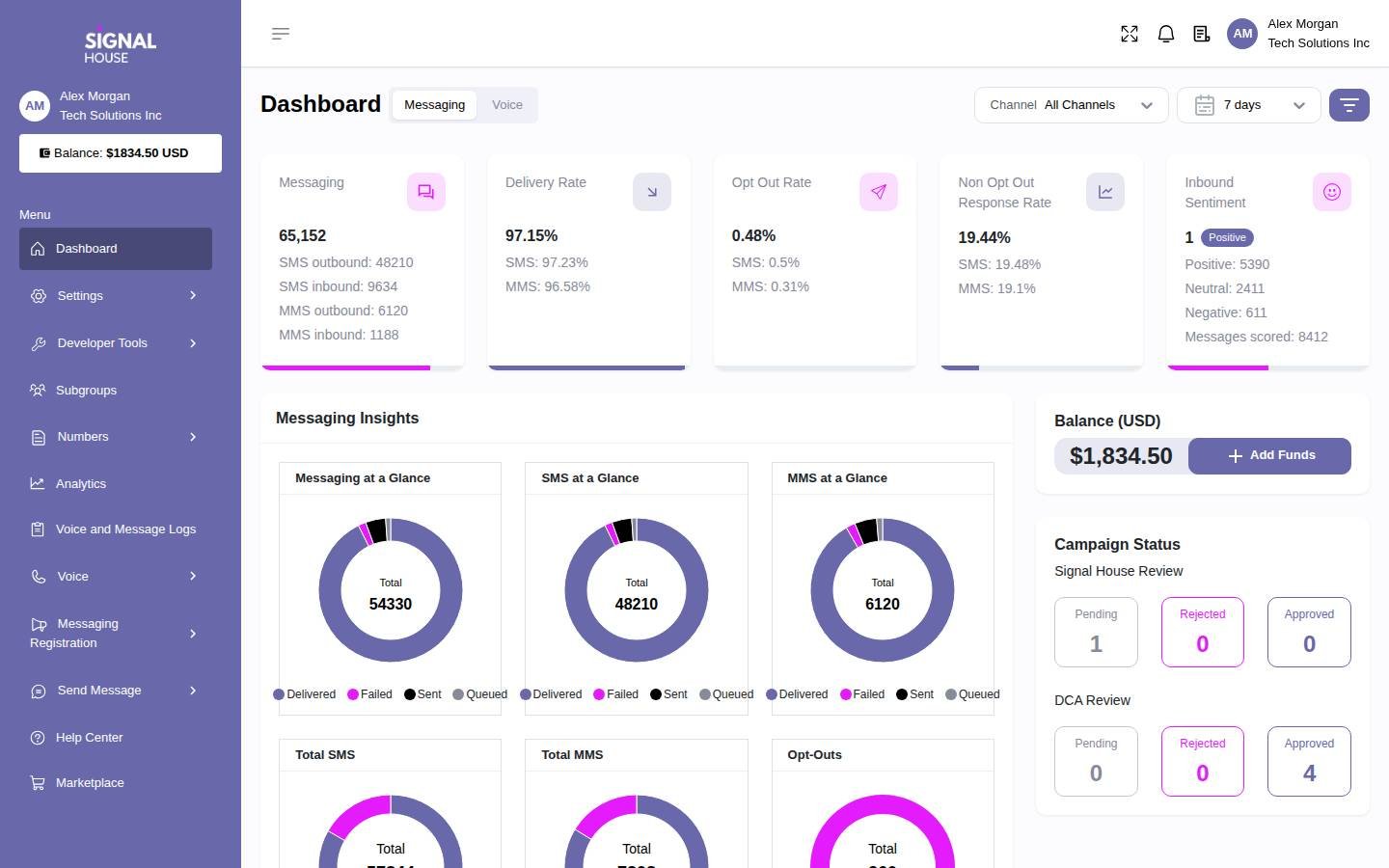
Use the dashboard to orient the team, then verify tasks in the actual account. A screenshot does not establish that a particular client has passed registration or that the interface exposes identical options to every user. Confirm what the administrator and ordinary employee can each access.
Keep A Short Setup Record
Record the Signal House account owner, number purpose, brand and campaign references, application destination and billing contact. Include the completed test cases and the person who approved launch. Keep secret credentials in the appropriate secure system rather than copying them into a general handover document.
For an agency, document client ownership and the agreed offboarding process. This makes future changes more manageable and helps prevent a client number being treated as disposable inventory. An implementation should remain understandable when an employee changes role.
Define The SMS Setup Launch Checkpoint
Launch when the relevant approval and sender configuration are complete, the intended application handles replies and the controlled tests meet the business's requirements. Keep a way to pause Signal House automation while investigating a problem. Assign the decision to someone who understands both the customer workflow and the account settings.
These are proposed acceptance checks, not tests performed for this article. Begin with a limited workload and review the resulting records before expanding. A careful setup is easier to maintain when its expected behavior and ownership are documented from the start.
Review The First 7 Days After Setup
After launch, compare normal traffic with the small Signal House pilot. Review the sender, segment counts, incoming replies and exceptions each day initially. Ask staff whether customers received understandable messages and whether anyone waited for a response without an assigned owner.
Investigate changes in volume rather than assuming they prove a rate change. A newly enabled workflow, longer personalization or repeated trigger can increase billable activity. Keep the original setup record so the team can identify what changed and decide whether the behavior is intended.
For an agency, perform the review per client. A successful location does not validate another location's permissions, campaign or contact mapping. Keep a short issue log with the affected account, observed result, action owner and resolution. This gives the next administrator a useful operating history without exposing secret credentials.
At the end of the review, confirm who handles routine Signal House SMS maintenance, billing questions and customer replies. Adjust the monitoring schedule to the workload, but keep a defined owner. The handover is complete when the team can explain both the expected behavior and the response to a failure.
Frequently Asked Questions About Signal House Setup
How Long Does It Take To Set Up Signal House?
Entering account details and completing an installation can be quick, but full readiness also depends on verification, carrier review, number assignment and testing. The Signal House's short onboarding estimates should not be treated as a guaranteed time to approved production sending.
Do I Need A Website To Use Signal House?
The documented onboarding offers a hosted landing-page builder. Review the resulting identity, permission process and policy wording before submission. A generated page is a tool for preparing the application, not automatic approval or a substitute for accurate business practices.
Can I Keep My Existing Business Number?
Potentially, subject to eligibility and transfer scope. Ask Signal House whether the proposed route transfers messaging only or also calling. Keep the existing arrangement active until the required transition and tests are complete.
Why Is My Purchased Number Not Ready?
Purchase and configuration are separate. Check the sender capability, subgroup, brand, campaign and relevant approval state. Resolve the specific incomplete assignment rather than buying another number and repeating the same unfinished setup.
Can I Use Signal House Without Coding?
The portal provides registration, configuration and test-message tools, and GoHighLevel provides a documented integration path. A custom application may still need development. Confirm which ready-made interface will handle daily conversations instead of assuming the test tool is a complete team inbox.
Where Do I Select Signal House In GoHighLevel?
The subaccount-onboarding guide lists Settings → Phone System → Additional Settings → Telephony Provider after approval. Other guides show Phone Numbers and Advanced Settings labels. Use the relevant messaging setting in your interface, with agency-admin help when permissions prevent access.
Does The New-Account Credit Cover Every Setup Cost?
No universal coverage is established. Confirm eligible charges, allocation and the amount required after the initial credit is consumed. Review recurring rental, campaign and usage components separately from the introductory offer.
Can I Start Sending While A Campaign Is Pending?
Do not treat a submitted or internally reviewed campaign as a fully approved sender. Complete the relevant carrier stage and number assignments, then run the controlled tests. Ask support to clarify an ambiguous status before using production traffic.
Signal House Customer Reviews About Setup
The exact Signal House G2 profile shows 4.8/5. Ismail A. praised onboarding explanations and assistance. The T. valued a straightforward setup and responsive team but wanted clearer voice guidance. Those are individual customer opinions rather than timed setup tests.
Denise B. found the administration manageable while noting that some configuration instructions could be clearer. Use that feedback to ask who will guide your specific implementation. Customer experiences can inform questions, but they do not establish a guaranteed approval time or identical outcome for every account.
Affiliate Disclosure: We may earn a commission through recommendation links, at no additional cost to you. Instructions follow published documentation. No signed-in account setup, delivery test or approval outcome is claimed.