Are Free Conference Call Services Really Free?
Yes, some conference call services offer genuinely free plans, particularly for internet-based meetings. However, “free” doesn’t always mean every feature or connection method costs nothing. Telephone dial-in numbers may be subject to normal carrier charges, while toll-free numbers, recording, longer meetings, larger participant limits and advanced administration features may require a paid plan.
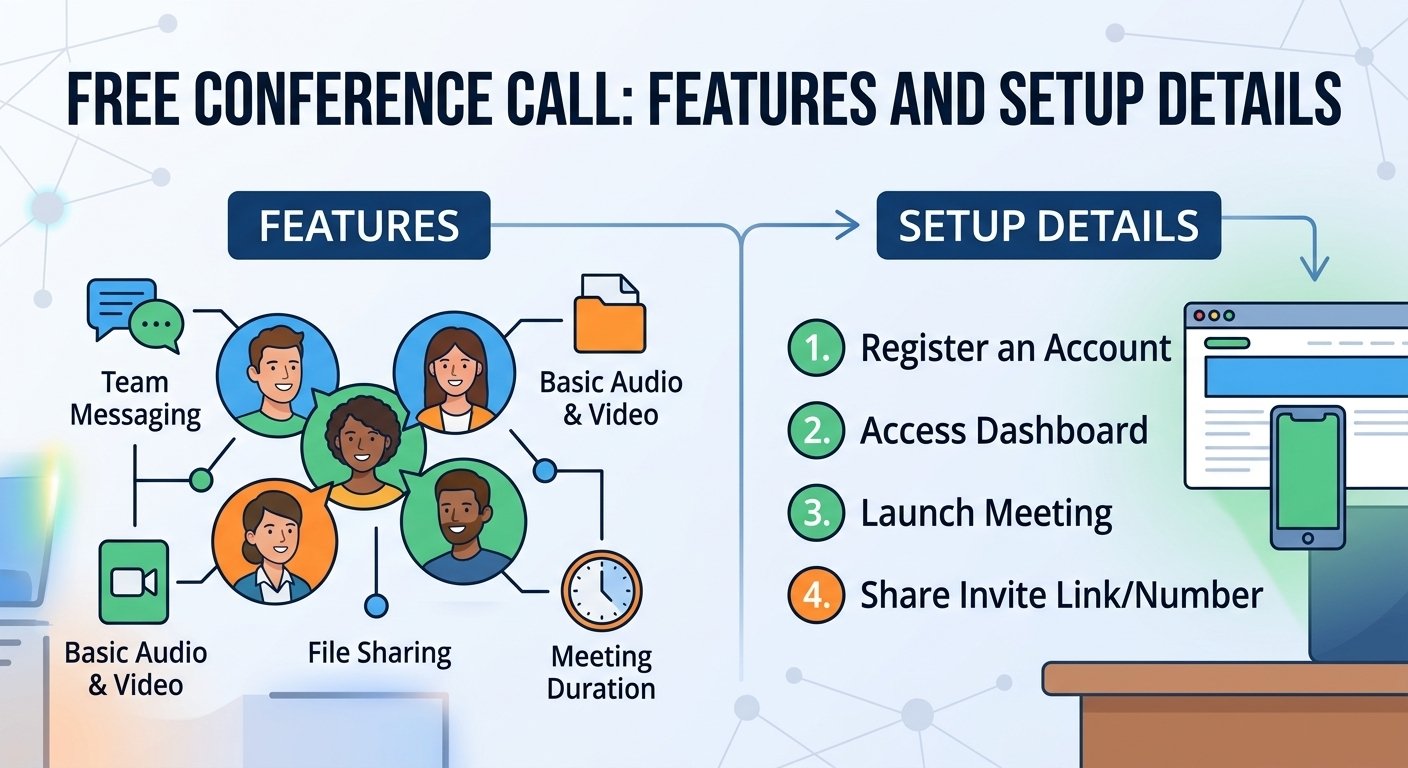
Also, these services are frequently freemium. This includes access to essential features like team messaging, file sharing, and interactive whiteboards, but also may have limitations on:
-
Meeting duration: Many platforms impose time limits on calls.
-
Participant limits: There is often a cap on how many individuals can join simultaneously.
-
Bandwidth and connectivity: Heavy usage might lead to throttled connection quality.
-
Data privacy: Some free tools may collect user metadata or browsing history to offset operational costs.
What Features Are Often Limited on Free Conference Call Plans?
While a free conference call app is a great way to get started with a small team, it may not have the depth of structure needed for a more advanced business operation. With a free tier, you often have to sacrifice the advanced infrastructure that eliminates information silos.
For example, enterprise-grade analytics are essential for monitoring meeting performance or ROI, and are not typically available in free versions. You may also miss out on automated AI transcription services, which are vital for maintaining accurate meeting minutes. In addition, weak security measures like no end-to-end encryption or administrative access controls can be problematic when discussing proprietary information.
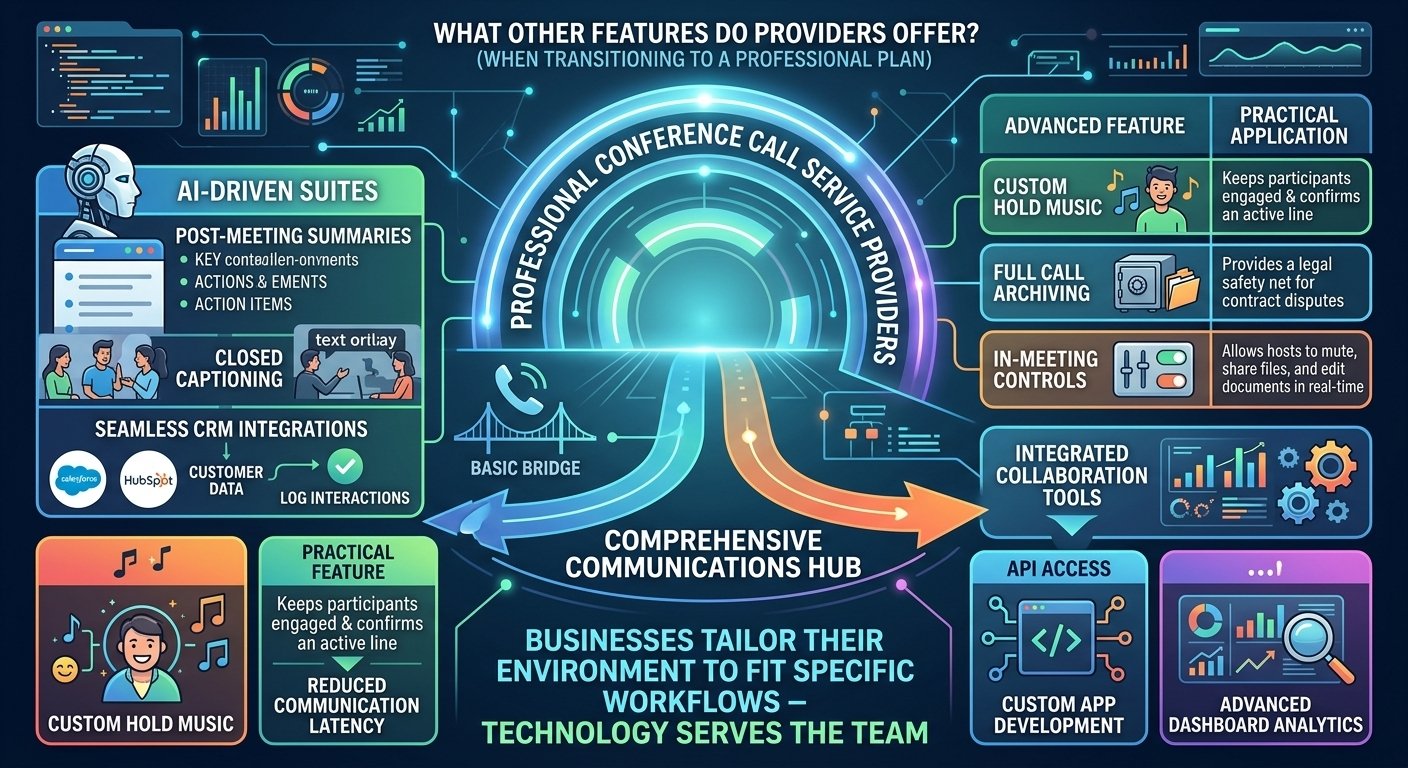
The feature set grows considerably when moving to a professional plan, and a simple bridge becomes a full communications center. New AI-powered suites provide post-meeting summaries, closed captioning, and effortless CRM integration, which automatically records interactions.
| Feature | Why It Can Be Useful |
|---|---|
| Call Recording | Lets authorized users review meetings later |
| AI Transcription | Creates searchable meeting transcripts |
| Meeting Summaries | Highlights key points and action items |
| Screen Sharing | Helps with presentations and demonstrations |
| Host Controls | Lets hosts mute or manage participants |
| CRM Integration | Connects meeting activity with customer records |
| Calendar Integration | Simplifies scheduling and invitations |
Research indicates that teams utilizing integrated collaboration tools experience a notable reduction in communication latency. With custom app development options through API integration or enhanced dashboard analytics, businesses can shape their environment to align with their workflows, allowing technology to support the team, not dictate it.
How To Set up and Host A Free Conference Call?
Starting a meeting is now very easy. The majority of modern providers enable users to run sessions straight from a web browser without any software downloads. This is important for making sure that external guests or clients can attend your conference calls online without any technical difficulties.
To start a free conference call, choose a conferencing service, create a meeting, copy the meeting link or dial-in details, and send the invitation to participants. At the scheduled time, open the meeting and admit participants if required. Some services also let guests join from a browser without installing an app.
- Choose a service – Select a platform based on meeting size and features.
- Create a meeting – Start an instant meeting or schedule one.
- Copy the invitation – Get the meeting URL, ID or dial-in information.
- Invite participants – Send the details by email, calendar or messaging app.
- Test your equipment – Check your microphone, speakers and camera.
- Start the conference – Join as host and manage participants.
Best Free Conference Call Services in 2026
The best free conference call service depends on your needs. Google Meet is a strong choice for simple browser meetings, Zoom is widely used for video conferencing, Microsoft Teams Free works well for team collaboration, Webex Free offers business-focused meeting tools, while FreeConferenceCall.com is particularly suitable for traditional conference calling and large free meetings. Always check current limits before hosting an important meeting, as free-plan features can change.
What constitutes the best service depends on your specific business needs. For some businesses, a basic interface for ad hoc calls is the most important feature, while others may need high-definition audio and uptime for regular client presentations. To gauge user satisfaction with connection reliability and technical support responsiveness, experts recommend reviewing independent software review sites. A good provider should provide consistent service, no matter where the user is located, which can disrupt the professional flow of events.
Quick Review: Summary
- Google Meet – best for easy browser meetings
- Zoom – best for familiar business video conferencing
- Microsoft Teams Free – best for Microsoft users/team collaboration
- FreeConferenceCall.com – best for traditional conference-call functionality
- Cisco Webex – strong business meeting option
- Jitsi Meet – useful for simple open-source/browser-based meetings
1. Google Meet:
Personal/free accounts support up to 100 participants. Group meetings with three or more people are limited to 60 minutes, while one-to-one meetings can last up to 24 hours. Browser joining is supported. Telephone dial-in is associated with meetings organized through eligible Google Workspace setups, and Google’s native meeting recording requires eligible Workspace/Google One plans rather than the standard free personal tier.
2. Microsoft Teams Free:
Microsoft currently specifies 100 participants and 60-minute group meetings. Participants can join through a supported browser without installing Teams. Microsoft’s own plan comparison says meeting recording is not included in Teams Free.
3. Webex Free:
Cisco currently lists up to 100 attendees, 40-minute meetings and local recording on its free plan.
4. FreeConferenceCall.com:
This one is particularly relevant to your article because it’s actually centered on conference calling rather than just video meetings. Its current site advertises up to 1,000 participants, no group-meeting time restriction, browser-based conferencing, dial-in access and recording.
Comparison Table for Free Conference Call Services
| Service | Best For | Free Meeting Limit | Participants | Browser Join | Dial-In | Recording |
|---|---|---|---|---|---|---|
| Google Meet | Simple browser meetings | 60 min for 3+ people; up to 24 hrs 1-to-1 | 100 | ✅ Yes | ⚠️ Workspace-hosted meetings | ❌ Not on standard personal free plan |
| Zoom Basic | General business/video meetings | 40 min | 100 | ✅ Yes* | ⚠️ Availability varies | ✅ Local recording on supported desktop setup |
| Microsoft Teams Free | Team collaboration | 60 min group meetings | 100 | ✅ Yes | ⚠️ Depends on meeting/plan | ❌ No |
| Webex Free | Business meetings | 40 min | 100 | ✅ Yes | ⚠️ Plan/region dependent | ✅ Local recording |
| FreeConferenceCall.com | Large free audio/video conferences | No stated group-meeting time limit | Up to 1,000 | ✅ Yes | ✅ Yes | ✅ Yes, including recording features |
| Jitsi Meet | Quick, no-account browser meetings | No standard fixed meeting limit | Varies by deployment/server capacity | ✅ Yes | ⚠️ Deployment dependent | ⚠️ Deployment dependent |
How Does International Conference Calling Work?
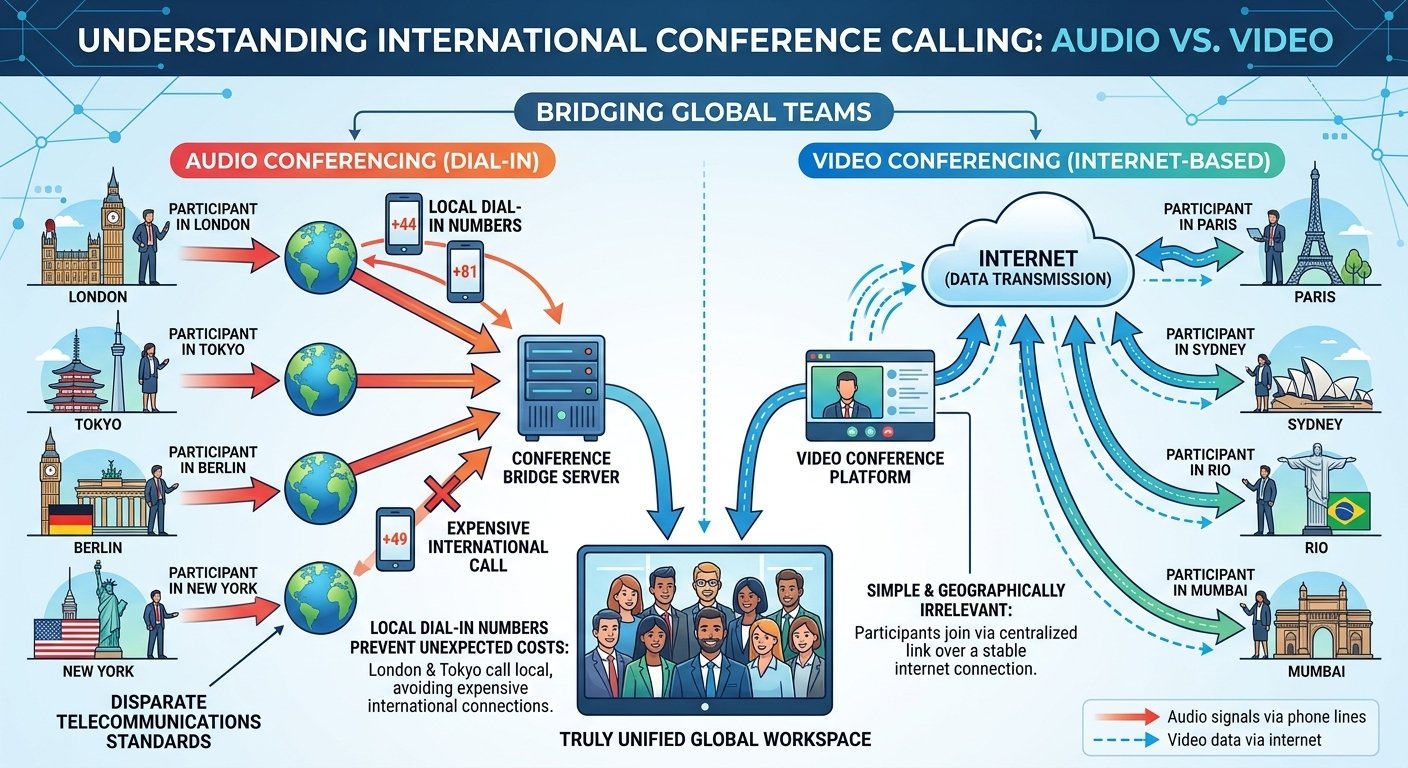
When working with teams around the world, you’ll face the problem of different telecommunication standards. It’s important to have a service that offers local dial-in numbers in various countries to avoid any unforeseen expenses for your remote participants. This will allow a person in London or Tokyo to join by conference call line, either local or toll-free, instead of an international connection.
When communicating via video, the process is easier. Video data is sent via the internet, so any participant in any country can join via a central link. The geographical distance is not a problem as long as they have a stable internet connection, and a truly unified global workspace can be achieved.
How to Choose An Online Conference Call Service for Your Business
Partner selection is a strategic investment. While a conference call free number is essential, you also need to think about the platform’s scalability in the long run. Consider whether the provider can accommodate your expanding team and whether they can provide any particular modules for webinars and virtual events.
-
Security protocols: Prioritize platforms that utilize TLS encryption and SRTP to safeguard your data.
-
Integration ecosystem: Ensure the tool syncs with your existing calendar, email, and CRM software.
-
Ease of use: Avoid platforms that force guests to download heavy, complex software.
-
Support availability: Look for 24/7 customer support options to address technical issues before they affect your business continuity.
Read More: 0371 Numbers: Cost, Benefits & Usage
Final words
A dependable conference call service is not just a convenience, but a must-have for effective collaboration in today’s business world. Free tiers are great for smaller teams, but knowing when to upgrade to more professional features can significantly boost your productivity and security. When selecting a solution, consider features, security, and usability to ensure your team remains connected, efficient, and professional, regardless of their location.
Conference call services FAQs
-
How many people can join a conference call?
There are a number of free services that will accommodate between 10 and 100 people for your conference call, depending on the provider and the plan you select.
-
How much do conference call services cost?
There are many basic options available, but professional services can cost anywhere from $15 to $50 per user per month, depending on the advanced features.
-
What are the benefits of a conference call service?
The main advantages are that it saves on travel costs, enhances team communication, and allows for the capture of conversations for later review.
-
What is the best free conference call app?
While the best app is always subjective, many industry leaders consistently rate RingCentral and other dedicated providers as being stable and of good quality.
-
Conference Call vs Video Conference: What’s the Difference?
A conference call traditionally refers to an audio conversation involving three or more participants, often using telephone dial-in numbers. A video conference adds live video and usually operates through an internet-based app or browser. Modern platforms often combine audio calling, video meetings, screen sharing and messaging in a single service.
-
Do You Need Internet for a Conference Call?
Not always. Traditional audio conference calls can be joined by dialing a telephone number and entering a meeting code, so an internet connection may not be required. However, browser-based audio, video conferencing, screen sharing and online meeting features require an internet connection. Whether telephone dial-in is available depends on the conference call provider and plan.
-
Can I Join a Conference Call Without Downloading an App?
Yes, many modern conference services allow participants to join through a web browser without installing desktop software. Traditional audio conferences may also allow participants to dial a phone number and enter an access code. Browser and dial-in availability varies by provider, so check the meeting invitation before joining.
-
Can I Host a Free Conference Call Without a Phone Number?
Explain that internet-based meetings can often be created/joined using accounts or meeting links, whereas traditional PSTN conference calling uses telephone numbers.
-
What is the difference between teleconferencing and video conferencing?
Teleconferencing is mainly audio based, using telephone lines, while video conferencing adds visual elements with the use of cameras.
-
How do participants join an audio-only teleconference call?
The participants are usually called up by calling a designated phone number and entering an access code given by the meeting host.
-
What are the rules for virtual meeting etiquette?
Some important rules to follow are to keep your microphone muted when not speaking, to be on time, and to be in a quiet, distraction-free environment.
-
Are Free Conference Calls Secure?
Free conference calls can be secure, but protection varies by platform and meeting configuration. Look for encrypted connections, meeting passcodes, waiting rooms, host controls and the ability to remove unwanted participants. For confidential business meetings, also review the provider’s privacy policy, recording controls and data-retention practices. Avoid sharing private meeting links publicly and keep your conferencing software updated.