How Startups Can Integrate Odoo with VoIP Systems
The implementation process depends on whether you select Odoo’s verified providers, a third-party cloud phone system, or a custom SIP connection.
-
Technical requirements before setup
Prepare the following items:
-
-
An Odoo database with the required applications and user permissions.
-
An active telephony account with supported numbers and calling services.
-
SIP credentials or API credentials, depending on the integration method.
-
A stable internet connection, a compatible browser, and microphone permissions.
-
Administrative access to configure the connection, user accounts, and call settings.
-
Odoo’s documentation specifies that alternative VoIP providers must offer a SIP server accessible through WebSocket and support WebRTC. Meeting these requirements makes a connection possible, but does not guarantee full compatibility.
-
Step-by-step implementation
-
-
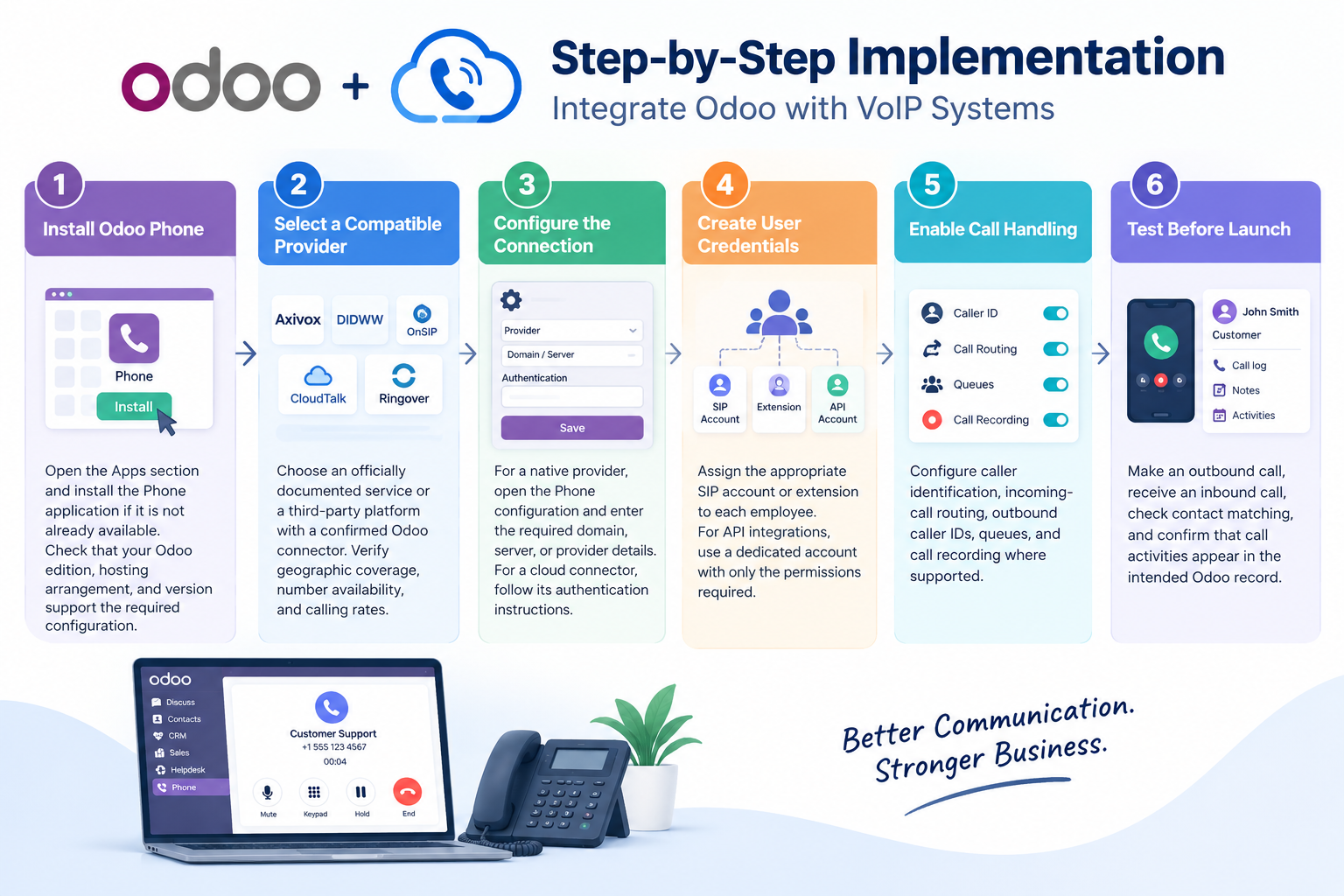
Install Odoo Phone. Open the Apps section and install the Phone application if it is not already available. Check that your Odoo edition, hosting arrangement, and version support the required configuration.
-
Select a compatible provider. Choose an officially documented service or a third-party platform with a confirmed Odoo connector. Verify geographic coverage, number availability, and calling rates.
-
Configure the connection. For a native provider, open the Phone configuration and enter the required domain, server, or provider details. For a cloud connector, follow its authentication instructions.
-
Create user credentials. Assign the appropriate SIP account or extension to each employee. For API integrations, use a dedicated account with only the permissions required.
-
Enable call handling. Configure caller identification, incoming-call routing, outbound caller IDs, queues, and call recording where supported.
-
Test before launch. Make an outbound call, receive an inbound call, check contact matching, and confirm that call activities appear in the intended Odoo record.
-
-
Important API and network considerations
CloudTalk’s published setup instructions require an Odoo API key, database URL, username, and database name. Its administrator must also activate the integration after entering the credentials. These steps are specific to CloudTalk’s connector rather than universal instructions for every provider.
What Is Odoo VoIP Integration?
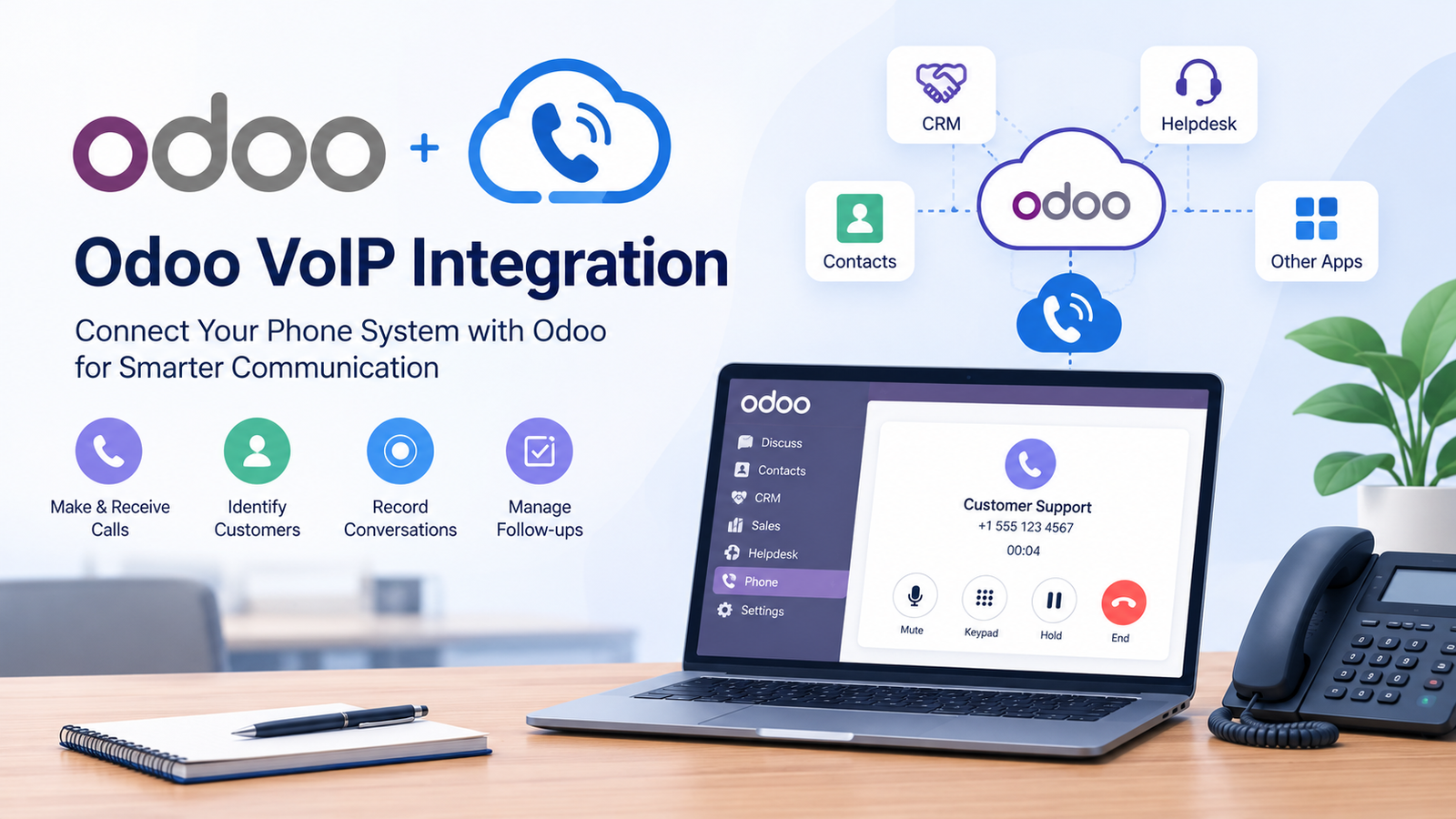
Odoo VoIP integration connects internet-based telephony with your Odoo business database. VoIP stands for Voice over Internet Protocol, a technology that carries voice calls over an internet connection instead of relying exclusively on traditional telephone lines.
Odoo’s Phone app, previously called the VoIP module in earlier versions, works with compatible telephony services. It can connect calls to customer records, support click-to-call, and help employees manage communication activities without repeatedly switching applications. In Odoo 19 and later, the application is named Odoo Phone. A typical setup includes three components:
-
Odoo: Stores contacts, leads, opportunities, support tickets, and call-related activities.
-
VoIP provider: Supplies telephone numbers, call routing, SIP credentials, and connectivity.
-
Integration layer: Connects both systems through native configuration, a provider’s application, an API, or custom development.
The exact features depend on the chosen service. A basic configuration may support browser-based calls, while an advanced integration can synchronize contact information, call notes, recordings, and other communication details.
Why Tech Startups Need Odoo VoIP Integration
Startups often manage sales, customer service, and internal operations with small teams. Keeping telephone conversations separate from customer records can lead to missed follow-ups, incomplete information, and duplicated work.
Connecting telephony with Odoo helps growing companies establish a consistent communication process without introducing a separate, disconnected workflow. For example, a sales representative can open a lead, call the prospect, and document the outcome against the relevant record. A support agent can review customer information before responding to a service request.
The business case becomes stronger when teams need shared contact records, repeatable call handling, or visibility into customer interactions. However, startups should compare subscription costs and integration requirements before selecting a provider.
Key Benefits of Integrating Odoo and VoIP
A well-configured connection can improve daily communication while keeping important customer information accessible to the relevant employees.
-
Faster outbound calls: Click-to-call lets staff dial numbers directly from supported Odoo records.
-
Better customer context: Incoming caller identification can help agents find matching contact information before responding.
-
Consistent activity records: Compatible integrations save call details, notes, and outcomes against relevant leads or contacts.
-
Improved team coordination: Shared records make it easier for sales and support employees to review previous interactions.
-
Simpler performance monitoring: Provider dashboards can display call duration, missed calls, agent activity, and other operational measures.
-
More flexible remote work: Browser-based softphones allow employees to call from supported computers without relying on a physical desk phone.
Odoo’s official product page also advertises call logging, custom routing workflows, automated transcripts, and a starting Phone price of $2 per month. Availability and the total bill depend on the selected service and applicable subscription terms.
Top VoIP Providers That Integrate with Odoo
The following seven options cover officially documented providers, established third-party integrations, and customizable telephony infrastructure. They do not all offer the same integration method or level of support.
| Provider | Integration method and capabilities | Pricing information |
|---|---|---|
| Axivox | Odoo-documented provider supporting SIP credentials, call queues, and routing. | Request a quote; confirm regional coverage. |
| DIDWW | Odoo-documented SIP telephony option with number provisioning and voice connectivity. | Usage and number charges vary; a $30 minimum account balance is required to start its SIP trunking service. |
| OnSIP | Odoo-documented service with browser calling and compatible business phone features. | Unlimited plan: $18.95 per user/month, with a five-user minimum; Basic: $49.95 per account/month, excluding calling minutes. |
| CloudTalk | Published Odoo connector for contact synchronization, click-to-call, call logs, notes, tags, and recording links. | Essential: €29 per user/month billed annually on its published euro pricing page. |
| Ringover | Published Odoo integration with calling, communication logging, contact synchronization, and supported recording links. | TALK starts at $15 per user/month on annual billing; three-user minimum. Confirm the plan required for the Odoo connector. |
| 3CX | PBX option for businesses investigating a custom or community-module connection. Confirm the exact Odoo module and supported version before purchase. | Depends on licensing, hosting, and simultaneous-call requirements. |
| Twilio | Programmable voice infrastructure for custom integrations or compatible third-party modules. This is not a verified native Odoo connector. | Usage-based pricing depends on destination, number type, and call direction. |
Provider documentation supports the native options and the published CloudTalk and Ringover integrations. Which provider should you choose? For a straightforward Odoo configuration, begin with Axivox, DIDWW, or OnSIP. If your team needs CRM-focused calling and automated activity synchronization, evaluate CloudTalk or Ringover. Choose 3CX or Twilio only after confirming the technical integration path, support arrangements, and complete implementation cost.
How Much Does Odoo VoIP Integration Cost in 2026?
The total expense depends on Odoo licensing, telephone subscriptions, call usage, number rental, and any custom development.
| Cost component | What to check |
|---|---|
| Odoo subscription | Confirm the edition and hosting plan required for your applications and integration method. |
| Phone service | Compare per-user, per-account, or usage-based billing. |
| Telephone numbers | Check monthly rental, number porting, and setup charges. |
| Integration | Establish whether the connector is included or requires an additional subscription or developer. |
| Optional features | Check recording, transcription, AI summaries, messaging, and advanced analytics charges. |
Odoo’s published US pricing page lists Standard at $24.90 per user/month and Custom at $49 per user/month on annual billing for the stated promotional pricing period. Its Phone product page separately advertises a starting price of $2 per month. These figures describe different offerings and should not be combined as though they were a single mandatory fee. CloudTalk’s published pricing lists Essential at €29 per user/month annually, while Ringover’s TALK plan starts at $15 per user/month with a three-user minimum and annual commitment. Neither figure alone establishes the full cost of an Odoo deployment. Before committing, request a written quotation covering all users, expected call volume, required features, regional number availability, taxes, and implementation work.
Best Practices for Utilizing Odoo and VoIP
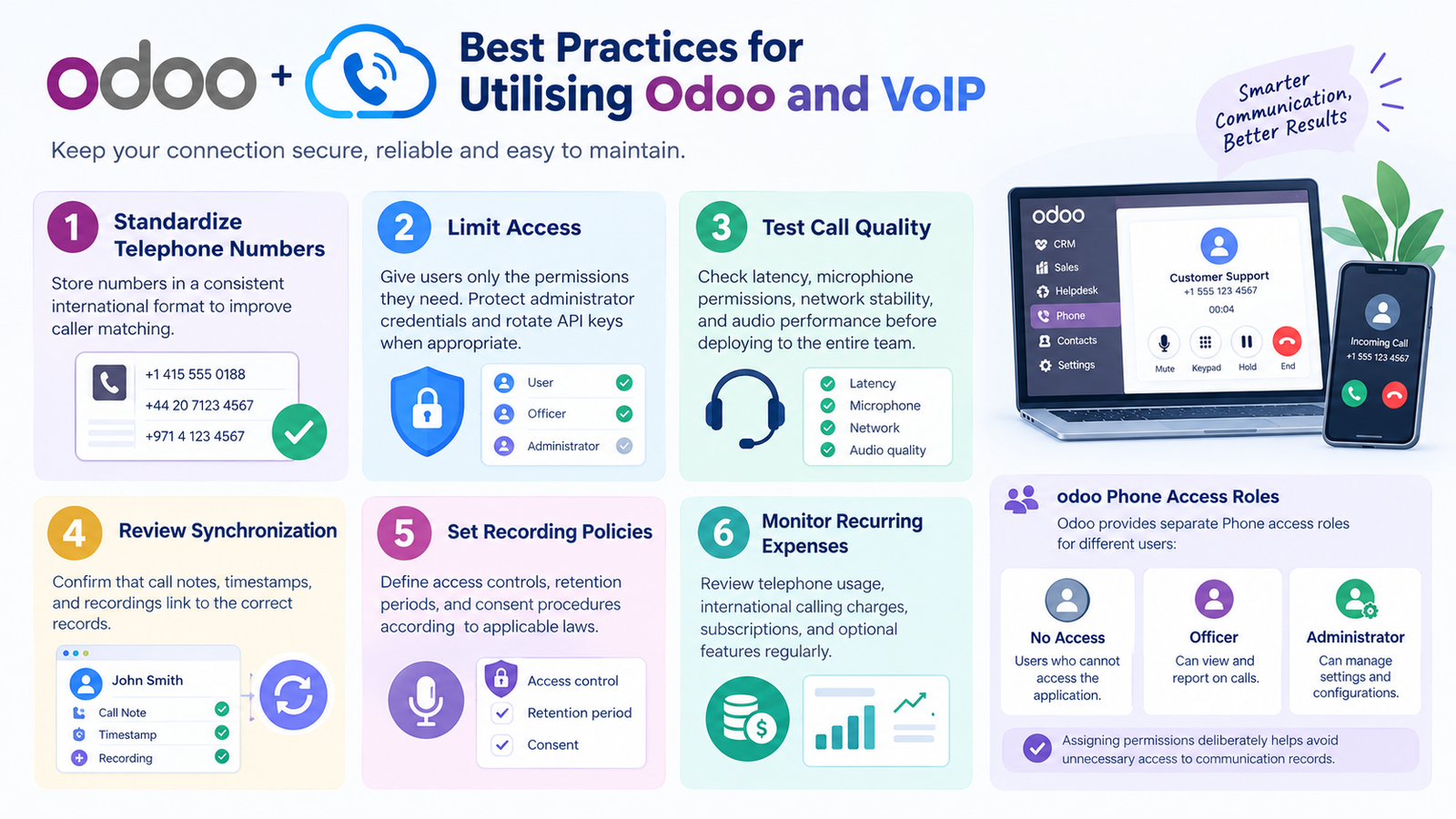
Follow these practices to keep the connection secure, reliable, and easy to maintain.
-
Standardize telephone numbers: Store numbers in a consistent international format to improve caller matching.
-
Limit access: Give users only the permissions they need. Protect administrator credentials and rotate API keys when appropriate.
-
Test call quality: Check latency, microphone permissions, network stability, and audio performance before deploying to the entire team.
-
Review synchronization: Confirm that call notes, timestamps, and recordings link to the correct records.
-
Set recording policies: Define access controls, retention periods, and consent procedures according to applicable laws.
-
Monitor recurring expenses: Review telephone usage, international calling charges, subscriptions, and optional features regularly.
Odoo provides separate Phone access roles for users who cannot access the application, officers who can view and report on calls, and administrators who can manage its settings. Assigning permissions deliberately helps avoid unnecessary access to communication records.
Pros and Cons of Odoo VoIP Integration
| Advantages | Limitations |
|---|---|
| Calls can be linked to customer records. | Some integrations require separate paid subscriptions. |
| Click-to-call reduces manual dialing. | Provider compatibility varies by Odoo version and hosting type. |
| Call activities can improve follow-up management. | Custom connectors may require development and maintenance. |
| Compatible services can provide routing and recordings. | Call quality depends on the network and telephony service. |
| Centralized records can improve team visibility. | Recording and data-retention rules require careful management. |
The main advantage is having telephone interactions closer to the records employees already use. The main drawback is that advanced functionality may require additional software, configuration, and ongoing support.
Which Businesses and Industries Suit Odoo VoIP Integration?
This approach is useful for organizations that rely on frequent calls and already manage their operations in Odoo.
-
Technology startups: Handle product inquiries, sales leads, and customer onboarding.
-
E-commerce companies: Respond to delivery questions, returns, and order-related requests.
-
Professional services: Manage client calls, appointments, and follow-up activities.
-
Wholesale and distribution: Coordinate orders, suppliers, and delivery schedules.
-
Customer support teams: Link calls with service records and direct inquiries to the appropriate department.
-
Recruitment agencies: Coordinate candidate screening, interviews, and employer communication.
The most suitable configuration depends on the complexity of the workflow. A small team may need only browser calling and activity logs, while a larger contact center may require advanced queues, supervision, analytics, and custom integrations.
How Many Users Can Use Odoo VoIP Integration?
There is no single user limit that applies to every configuration. Capacity depends on the Odoo subscription, telephone provider, concurrent-call allowance, and the integration’s technical design. For small startups, begin with a few users and test the complete calling process. Growing teams should evaluate concurrent calls, number allocation, queue capacity, and support requirements before expansion. For example, OnSIP’s published Unlimited plan requires at least five users, while Ringover’s TALK plan requires at least three. These are provider-specific minimums, not general Odoo restrictions.
Final Thoughts
Odoo VoIP integration can make customer communication more organized by connecting calls with the records employees already use. Start by identifying your calling requirements, checking provider compatibility, and comparing the complete cost rather than the advertised starting price alone. Test the chosen solution with a small group before expanding it across your organization.
FAQs
-
What is Odoo VoIP integration used for?
Odoo VoIP integration connects business calling with Odoo records and workflows. Depending on the provider, it supports click-to-call, caller identification, call logging, and contact synchronization.
-
Does Odoo have a built-in VoIP module?
Yes. Odoo provides a Phone application, called the VoIP module in earlier versions. A compatible telephony provider is still required to make and receive calls.
-
Which VoIP provider is best for Odoo?
The best choice depends on your needs. Consider Axivox, DIDWW, or OnSIP for documented native configurations, and CloudTalk or Ringover for their published Odoo connectors.
-
How much does Odoo VoIP integration cost in 2026?
Costs vary by Odoo edition, phone subscription, usage, and integration method. Check current provider pricing and request a complete quote before calculating your monthly budget.
-
Can I use Odoo VoIP without Odoo Enterprise?
It depends on your Odoo version, hosting arrangement, and the selected integration. Confirm whether the required Phone features and third-party modules are supported in your particular environment.
-
Does Odoo VoIP support call recording and TCPA compliance?
Compatible configurations may support recording, but availability depends on the provider and version. US businesses should review applicable TCPA requirements, consent rules, and state recording laws with qualified legal counsel.
-
Can Odoo VoIP work with an existing business phone system?
Yes, if the existing system provides a compatible SIP/WebSocket connection or supports a suitable connector. Technical compatibility should be tested before deployment.
-
What is the difference between Odoo VoIP and an AI calling agent?
VoIP enables people to make and receive calls through a compatible phone system. An AI calling agent can conduct automated conversations and may update Odoo records, but it requires additional software and configuration.
-
Does Odoo VoIP work on mobile devices?
Some configurations support mobile calling through compatible softphones or provider applications. Confirm incoming-call support, device compatibility, and the features available in your selected setup.