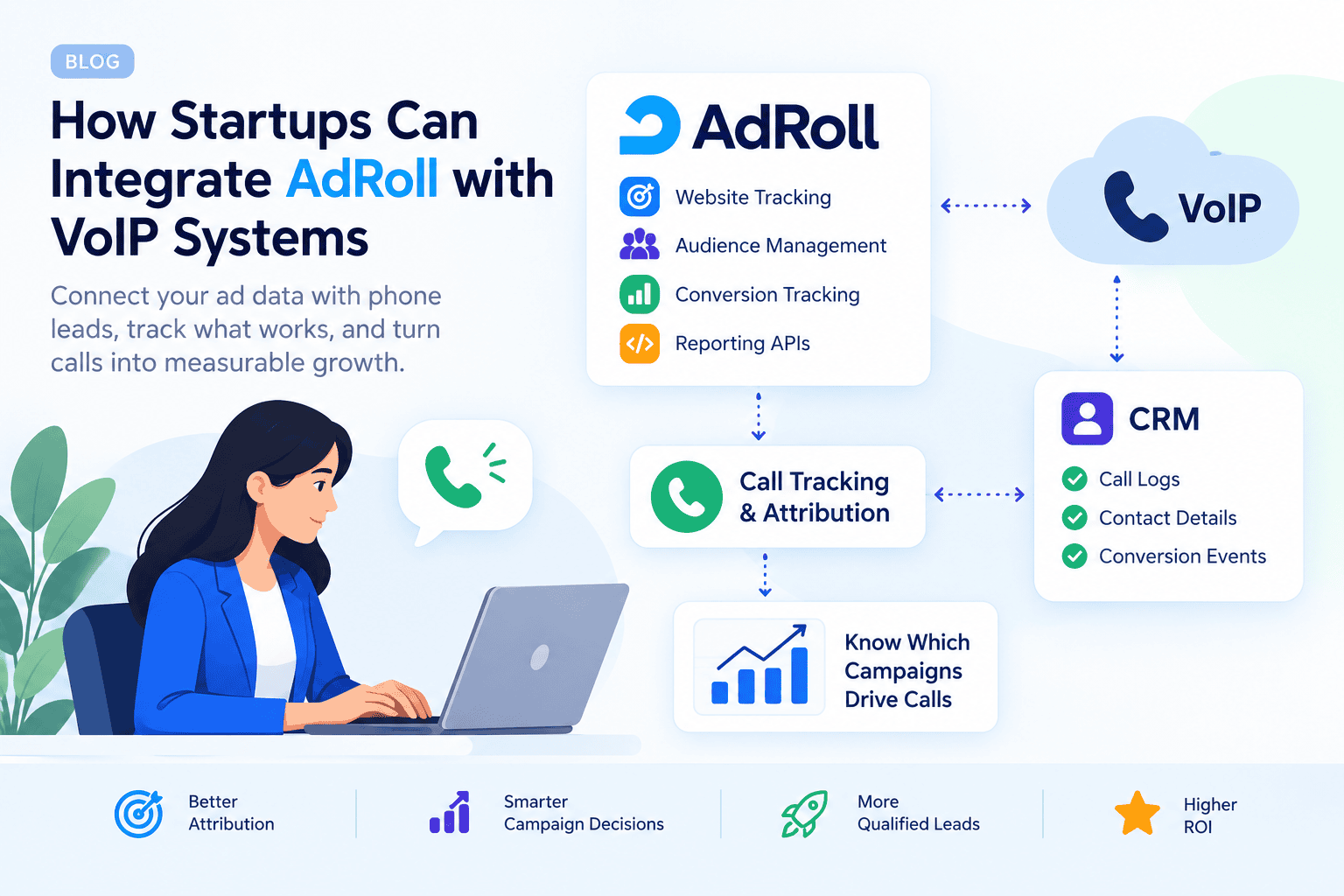
AdRoll VoIP integration connects digital advertising data with business phone activity, helping startups understand which marketing campaigns generate phone inquiries. AdRoll provides website tracking, audience management, conversion tracking, and reporting APIs, but a complete phone-call attribution workflow may require a call-tracking provider, automation platform, or custom development. Nuacom advertises a dedicated AdRoll integration, while other setups need individual compatibility checks. This guide explains how to connect the systems, what to verify before choosing a provider, and how to measure results without overstating what the integration can do.
How Startups Can Integrate AdRoll with VoIP Systems
Startups can connect campaign data with phone-lead information through a dedicated provider integration, a compatible automation workflow, or custom development. The selected method must preserve campaign identifiers and support the intended reporting or conversion events.
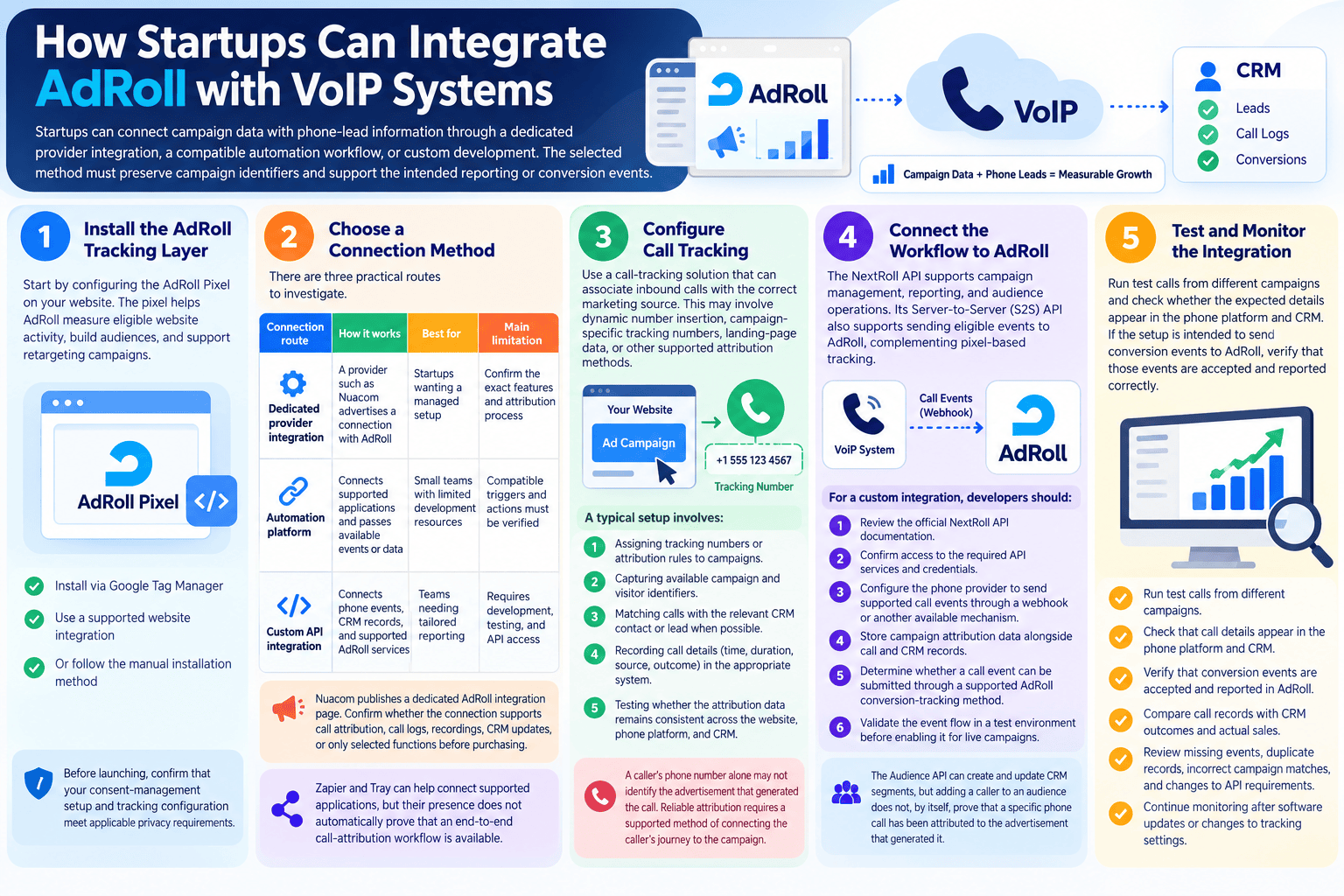
Step 1: Install the AdRoll Tracking Layer
Start by configuring the AdRoll Pixel on your website. The pixel helps AdRoll measure eligible website activity, build audiences, and support retargeting campaigns. You can install it through Google Tag Manager, a supported website integration, or the manual installation method described in AdRoll’s documentation.
Before launching, confirm that your consent-management setup and tracking configuration meet applicable privacy requirements. Do not assume every visitor can be tracked or that every browser will retain the same identifiers.
Step 2: Choose a Connection Method
There are three practical routes to investigate.
| Connection route | How it works | Best for | Main limitation |
|---|---|---|---|
| Dedicated provider integration | A provider such as Nuacom advertises a connection with AdRoll | Startups wanting a managed setup | Confirm the exact features and attribution process |
| Automation platform | Connects supported applications and passes available events or data | Small teams with limited development resources | Compatible triggers and actions must be verified |
| Custom API integration | Connects phone events, CRM records, and supported AdRoll services | Teams needing tailored reporting | Requires development, testing, and API access |
Nuacom publishes a dedicated AdRoll integration page. However, businesses should confirm whether the connection supports call attribution, call logs, recordings, CRM updates, or only selected functions before purchasing.
Zapier and Tray can help connect supported applications, but the presence of AdRoll and a phone-related app on a platform does not automatically prove that an end-to-end call-attribution workflow is available.
Step 3: Configure Call Tracking
Use a call-tracking solution that can associate inbound calls with the correct marketing source. Depending on the provider, this may involve dynamic number insertion, campaign-specific tracking numbers, landing-page data, or other supported attribution methods. A typical setup involves:
- Assigning tracking numbers or attribution rules to campaigns.
- Capturing available campaign and visitor identifiers.
- Matching calls with the relevant CRM contact or lead when possible.
- Recording call details, such as the time, duration, source, and outcome, in the appropriate system.
- Testing whether the attribution data remains consistent across the website, phone platform, and CRM.
A caller’s phone number alone may not identify the advertisement that generated the call. Reliable attribution requires a supported method of connecting the caller’s journey to the campaign.
Step 4: Connect the Workflow to AdRoll
The NextRoll API supports campaign management, reporting, and audience operations. Its Server-to-Server (S2S) API also supports sending eligible events to AdRoll, complementing pixel-based tracking.
However, this does not mean every VoIP call can automatically be imported and attributed to an advertisement. The event format, identifiers, authentication requirements, account access, and supported conversion workflow must be checked before implementation. For a custom integration, developers should:
- Review the official NextRoll API documentation.
- Confirm access to the required API services and credentials.
- Configure the phone provider to send supported call events through a webhook or another available mechanism.
- Store campaign attribution data alongside call and CRM records.
- Determine whether a call event can be submitted through a supported AdRoll conversion-tracking method.
- Validate the event flow in a test environment before enabling it for live campaigns.
The Audience API can create and update CRM segments, but adding a caller to an audience does not, by itself, prove that a specific phone call has been attributed to the advertisement that generated it.
Step 5: Test and Monitor the Integration
Run test calls from different campaigns and check whether the expected details appear in the phone platform and CRM. If the setup is intended to send conversion events to AdRoll, verify that those events are accepted and reported correctly.
Compare call records with CRM outcomes and actual sales. Review missing events, duplicate records, incorrect campaign matches, and changes to API requirements. Continue monitoring after software updates or changes to tracking settings.
Understanding AdRoll VoIP Integration
AdRoll is a digital advertising platform that supports retargeting, audience creation, conversion tracking, and campaign reporting. Businesses can use it to reach eligible audiences based on website activity and other supported data sources.
VoIP, or Voice over Internet Protocol, allows businesses to make and receive calls over internet connections. A business phone system may also offer call logs, recordings, routing, analytics, and CRM integrations, depending on the provider and plan.
AdRoll VoIP integration brings these activities into a connected measurement workflow. For example, a startup may use a tracking number to identify calls associated with a campaign, store the resulting records in its CRM, and compare the leads with advertising performance.
The exact capabilities depend on the chosen implementation. A reporting connection, an audience-sync workflow, and a genuine call-conversion attribution setup are different things and should not be treated as interchangeable.
Why Tech Startups Need AdRoll VoIP Integration
For startups that generate leads through phone calls, connecting marketing and phone data can make campaign evaluation more useful. Website clicks show that people interacted with an advertisement, but call records can reveal whether those interactions led to sales conversations.
Timely follow-up also matters. Harvard Business Review reported research involving 1.25 million sales leads that found a strong association between contacting leads quickly and qualifying them. This supports the importance of prompt lead response, although it does not establish that an AdRoll–VoIP integration automatically improves conversion rates.
A connected workflow can help startups identify promising inquiries, review lead sources, and direct sales teams towards calls that deserve attention. The value depends on accurate tracking, a consistent follow-up process, and reliable reporting.
Key Benefits of Integrating AdRoll and VoIP
- Better campaign visibility: Compare advertising performance with calls and qualified leads when attribution data is available.
- More informed audience management: Use supported CRM data and audience tools to organize marketing segments.
- Faster follow-up: Send call notifications through supported phone or automation workflows so teams can respond promptly.
- More useful reporting: Compare ad spend, call volume, qualified leads, and revenue in a consistent reporting process.
- Improved budget decisions: Identify campaigns that generate relevant leads rather than relying only on clicks.
- Richer customer records: Store call logs, notes, and recordings in a CRM when the phone provider supports these features.
These benefits are possible outcomes, not guaranteed results. They depend on the provider, integration method, data quality, and team’s operating procedures.
Best Practices for Using AdRoll and VoIP Together
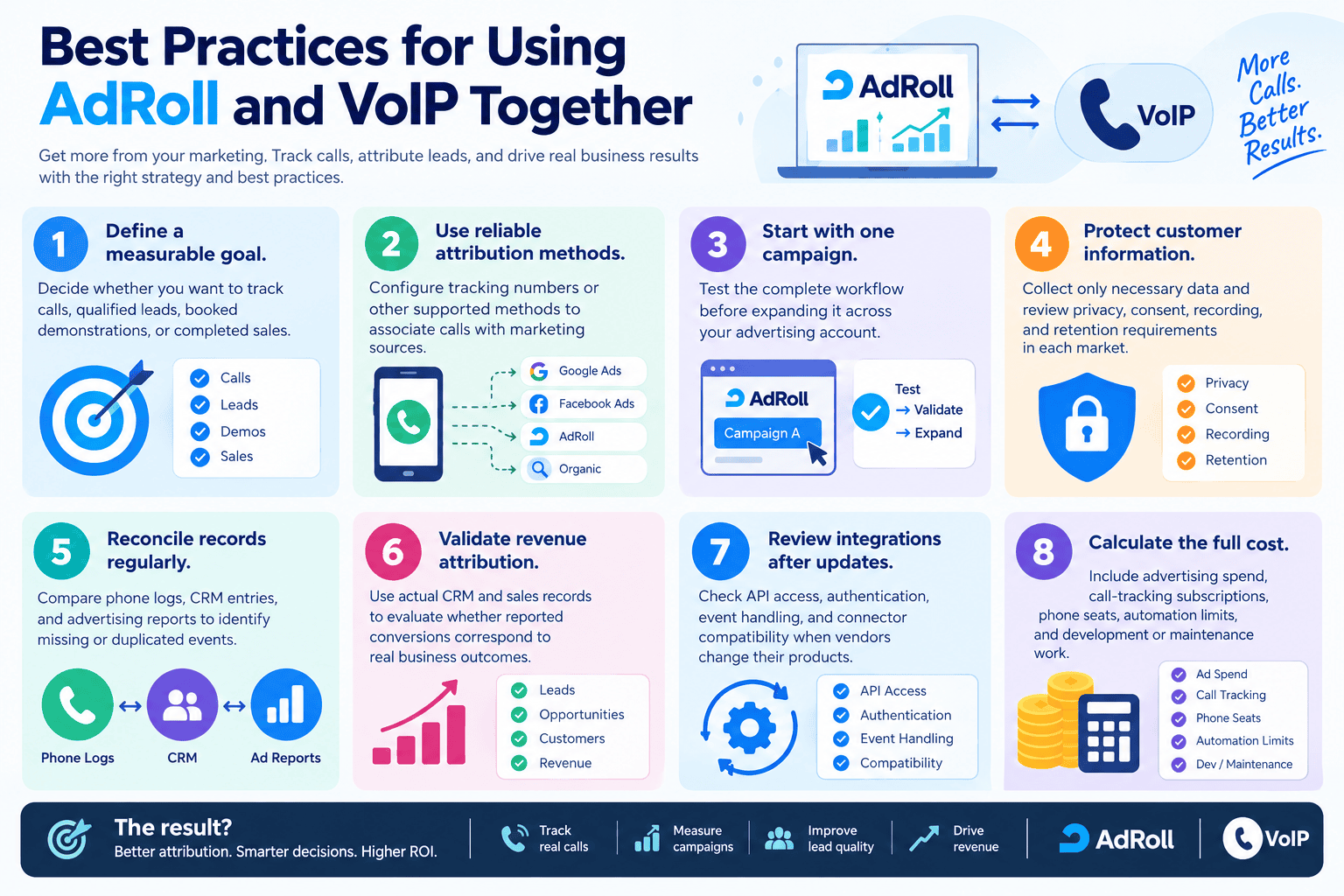
- Define a measurable goal. Decide whether you want to track calls, qualified leads, booked demonstrations, or completed sales.
- Use reliable attribution methods. Configure tracking numbers or other supported methods to associate calls with marketing sources.
- Start with one campaign. Test the complete workflow before expanding it across your advertising account.
- Protect customer information. Collect only necessary data and review privacy, consent, recording, and retention requirements in each market.
- Reconcile records regularly. Compare phone logs, CRM entries, and advertising reports to identify missing or duplicated events.
- Validate revenue attribution. Use actual CRM and sales records to evaluate whether reported conversions correspond to real business outcomes.
- Review integrations after updates. Check API access, authentication, event handling, and connector compatibility when vendors change their products.
- Calculate the full cost. Include advertising spend, call-tracking subscriptions, phone seats, automation limits, and development or maintenance work.
Top VoIP Providers and Tools to Evaluate for AdRoll
Nuacom is the clearest starting point among the providers considered here because it advertises a dedicated AdRoll phone integration. CallRail and RingCentral may also be relevant to a call-tracking workflow, but their availability does not automatically establish a direct AdRoll connection.
| Provider or tool | Category | Potential role | What to verify |
|---|---|---|---|
| Nuacom | Cloud phone system | Advertises a dedicated AdRoll integration | Supported events, campaign attribution, CRM syncing, and recording features |
| CallRail | Call tracking and lead analytics | Connects calls with marketing sources and supports integrations | Whether a supported route sends the required data to AdRoll |
| RingCentral | Business communications and VoIP | Provides business calling and an integration with CallRail | Whether the combined workflow supports your intended AdRoll reporting |
| Other compatible VoIP providers | Cloud phone systems | May supply call events through APIs, webhooks, or automation tools | Availability of the necessary triggers, identifiers, and destinations |
CallRail announced an integration with RingCentral in May 2025, describing combined communication and marketing attribution capabilities. This supports considering the two products together, but it does not independently verify an end-to-end RingCentral–CallRail–AdRoll workflow.
Before choosing a provider, request a demonstration using a real test campaign. Ask the vendor to show how a call is matched to its source, where the event is stored, and whether AdRoll receives a supported conversion event or the connection only provides reporting and CRM synchronization.
Pros and Cons of AdRoll VoIP Integration
| Pros | Cons |
|---|---|
| Can connect advertising data with phone leads | May require a third-party service or custom development |
| Helps teams evaluate call-generating campaigns | Attribution can be incomplete or inaccurate |
| Supports more informed audience and reporting workflows | Not every audience or reporting connection tracks phone conversions |
| Can help sales teams respond to promising leads | Provider subscriptions and development may add costs |
| Can connect call records with CRM workflows | Privacy, consent, and data-retention obligations need attention |
| Can be expanded after a successful pilot | API access, compatibility, and maintenance requirements may change |
For a small startup, the most suitable option is usually the simplest setup that reliably measures its target outcome. A complex custom integration may not be worthwhile if the business receives very few phone leads.
Which Businesses and Industries Suit AdRoll VoIP Integration?
AdRoll VoIP integration is most useful for businesses that invest in digital advertising and regularly receive meaningful sales inquiries by phone.
| Business type or industry | Why it may benefit |
|---|---|
| SaaS and technology startups | Track calls associated with product demonstrations, consultations, and sales campaigns |
| Home services | Connect advertising sources with calls requesting estimates or appointments |
| Legal and professional services | Evaluate which campaigns generate consultation inquiries |
| Automotive businesses | Compare advertising activity with calls about vehicles, services, or bookings |
| High-value ecommerce | Understand whether shoppers call before placing larger orders |
| B2B service providers | Compare campaign activity with sales inquiries and qualified opportunities |
Businesses in healthcare, financial services, and other regulated sectors should also assess vendor security, access controls, recording policies, and applicable privacy requirements before transmitting customer data.
This integration may offer limited value to businesses that receive few phone inquiries or rely entirely on online purchases. In those cases, AdRoll’s existing conversion-tracking tools may be sufficient.
How Many Users Can AdRoll VoIP Integration Support?
AdRoll does not specify a universal seat limit for this type of integration in the documentation reviewed. The number of employees who can use the connected phone system depends primarily on the selected VoIP provider, subscription, and configuration.
A startup with a few sales representatives may need only a basic call-tracking setup and CRM synchronization. A larger sales or support team may require multiple phone numbers, call routing, role-based permissions, centralized reporting, and more extensive integration monitoring.
Before deployment, confirm the provider’s user limits, phone-number allowances, automation quotas, API rate limits, and any additional costs.
How Much Does AdRoll VoIP Integration Cost?
There is no single verified price for AdRoll VoIP integration. Total costs depend on the advertising budget, phone subscription, call-tracking service, automation platform, and any custom development.
AdRoll’s official pricing page describes self-service advertising on a pay-as-you-go basis, with other packages and optional features available. Its documented dynamic CPM model means advertising costs vary with inventory and demand. These advertising charges should be distinguished from the cost of connecting a phone system.
Before budgeting, request current quotes from the relevant vendors and identify any separate charges for phone seats, tracking numbers, API access, recording storage, or professional implementation.
Read More: 6 Best 2-Line Phone Systems for Small Business (2026)
Final Thoughts
AdRoll VoIP integration can help startups connect advertising performance with phone-generated leads, but the right setup depends on the data they need and the tools they already use. Start by configuring AdRoll tracking, choose a compatible call-tracking or phone solution, and test whether campaign attribution works from the first website visit through the resulting call. Verify vendor claims, account for ongoing costs, and reconcile reported results with CRM and sales records. A carefully tested workflow is more valuable than a complicated integration that cannot reliably show where leads came from.
FAQs
-
What is AdRoll VoIP integration?
AdRoll VoIP integration connects advertising data with business phone activity so teams can evaluate which campaigns generate calls and leads. Depending on the setup, it may use a dedicated provider integration, call-tracking software, automation, or custom API development.
-
Does AdRoll offer a native VoIP integration?
AdRoll’s general API and integration documentation describes marketing, audience, pixel, and reporting capabilities rather than a universal native VoIP connector. Nuacom advertises a dedicated AdRoll phone integration, so businesses should check its exact functionality before choosing a setup.
-
What is the best phone integration for AdRoll?
Nuacom is a reasonable starting point to investigate because it publishes a dedicated AdRoll integration page. CallRail and RingCentral may be useful in a broader call-attribution workflow, but confirm the complete data flow and required features before committing.
-
What is AdRoll used for?
AdRoll is a digital advertising platform used for retargeting, audience management, conversion tracking, and campaign reporting. It helps businesses reach relevant audiences and evaluate advertising performance through supported tracking and reporting tools.
-
How can Nuacom help with AdRoll campaigns?
Nuacom advertises a connection between its phone system and AdRoll. Confirm directly with the vendor which call details, campaign information, CRM updates, and reporting functions are included, as advertised capabilities should not be assumed to cover every use case.
-
Can Zapier connect AdRoll to a VoIP system?
Potentially, if the required applications, triggers, and actions are supported. An AdRoll app listing alone does not prove that a particular phone system can send call events to AdRoll. Check connector availability and test the workflow before relying on it.
-
Does AdRoll have an API?
Yes. The NextRoll API includes campaign management, reporting, and audience-related services. A separate Server-to-Server API supports sending eligible events, but developers must verify the authentication requirements, event schema, account access, and conversion-attribution workflow.
-
Can AdRoll track phone calls automatically?
Not necessarily. Automatic tracking requires a compatible call-tracking or phone-system workflow that captures call information and associates it with an advertising source. Confirm that the chosen setup supports the required attribution rather than assuming that call logs alone identify the original campaign.
-
Is it safe to use call data for advertising?
It can be appropriate when implemented with suitable privacy controls and in accordance with applicable laws. Review consent requirements, call-recording rules, data minimization, access permissions, retention periods, and the terms of each provider before sharing caller information.