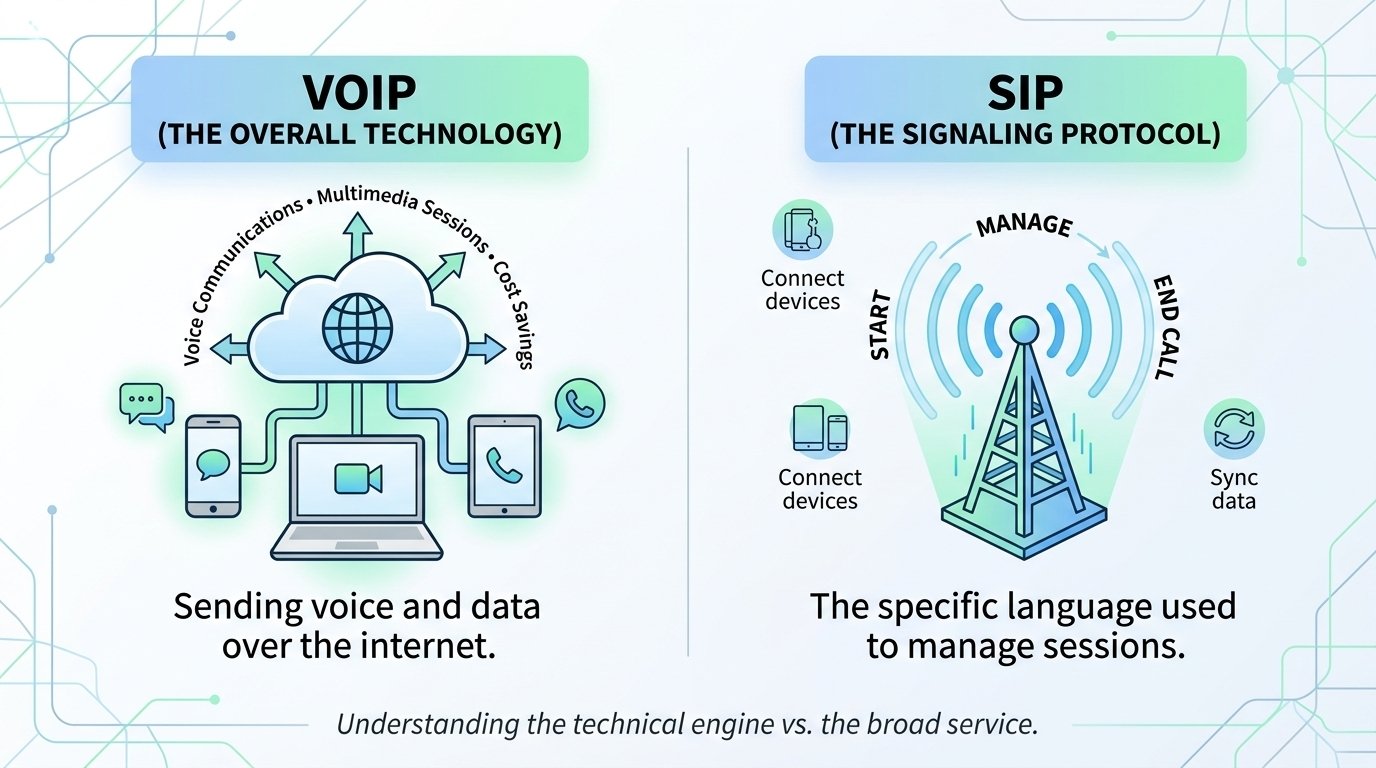
The primary difference between SIP and VoIP lies in their scope; VoIP (Voice over Internet Protocol) refers to the broad technology of sending voice signals over the internet, while SIP (Session Initiation Protocol) is a specific signaling protocol used to initiate and manage those multimedia sessions. Essentially, you can have VoIP without SIP by using other protocols, but most modern business communication systems rely on SIP to manage voice, video, and messaging. While VoIP describes the type of service, SIP is the technical engine that allows diverse digital devices to connect and communicate seamlessly within that service.
SIP Overview
Session Initiation Protocol is a foundational set of rules that computers use to establish, maintain, and terminate multimedia communication sessions. It is not a service in itself but a language that devices speak to ensure they are synchronized. While many people associate it only with voice calls, this protocol is much more versatile. It handles various data types, including video conferencing, instant messaging, and media distribution. It acts as the digital signaling system that tells the network how to handle a specific request between two endpoints.
This protocol has become the industry standard because of its ability to bridge different communication mediums. It identifies user locations, determines user availability, and manages the setup and teardown of the connection. For instance, when you start a video call, the protocol ensures that both devices agree on the video quality and audio codecs before the data begins to flow. This flexibility makes it indispensable for unified communications, where businesses need more than just a simple phone line to stay productive.
VoIP Overview
Voice over Internet Protocol is an umbrella term that describes the technology used to deliver voice communications and multimedia sessions over the internet. Instead of using traditional circuit-switched landlines, it converts your voice into digital packets that travel across the web. These packets are reassembled at the destination to recreate the sound for the listener. This technology allows for calls to be made from anywhere with a stable internet connection, using devices like laptops, tablets, or specialized IP desk phones.
The adoption of this technology has transformed the corporate landscape by reducing costs and increasing mobility. A report from Transparency Market Research indicates that the global market for these services is projected to reach over $100 billion by the end of the decade. This growth is driven by the shift toward remote work and the need for scalable communication tools. By removing the need for physical hardware and long-distance charges, businesses can allocate their resources toward more strategic growth initiatives while maintaining high-quality voice connectivity.
Key differences between VoIP and SIP
| Feature | VoIP | SIP Trunking |
| Primary Goal | Voice communication over the internet | Connecting a PBX to the internet |
| Communication Type | Voice only (primarily) | Voice, Video, and Multimedia |
| Hardware Needed | Internet connection and a calling device | On-premise PBX and SIP provider |
| Setup Speed | Nearly instantaneous | Requires configuration of local PBX |
| Scalability | Scale per user | Scale per channel |
| Management | Managed by the service provider | Managed by internal IT or engineers |
How does VoIP work?
This technology functions by transforming analog sound waves into digital data packets. When you speak into a microphone, the system slices your voice into tiny pieces of data. Each packet is assigned a destination address and sent over the internet using the most efficient path available. At the other end, the system gathers these packets and puts them back in the correct order so the person you are calling hears your voice clearly. This entire process happens in a fraction of a second.
Because it relies on the internet, this system is not tied to a specific physical location. This allows employees to use the same business phone number whether they are in the office or working from a cafe. The service provider handles the complex task of routing these packets through the global telephone network. As long as you have a reliable broadband connection, the system ensures that the communication is stable and the audio quality remains high.
How does SIP trunking work?
Trunking is a method used to connect a business’s existing Private Branch Exchange (PBX) to the internet. Instead of using physical analog lines from a traditional phone company, a digital trunk is established to carry calls. This allows a company to keep its physical desk phones and internal wiring while gaining the cost benefits of internet-based calling. The trunk acts as a virtual link between the office’s internal phone system and the Public Switched Telephone Network (PSTN).
This technology uses the internet or a dedicated circuit to transfer multimedia data. Unlike traditional circuits that have a fixed capacity, digital trunks can be adjusted to handle more or fewer concurrent calls. If an office grows, the IT department can simply add more channels to the existing trunk without waiting for a technician to install new wires. This makes it a highly efficient solution for large organizations that want to modernize their communications without discarding their current hardware investment.
What are the pros and cons of using SIP trunking vs. VoIP?
Choosing between these two options involves weighing the benefits of managed simplicity against the advantages of granular control. A hosted service is often the best fit for smaller businesses or those that prioritize ease of use. It provides a complete package with minimal setup required. On the other hand, trunking is often preferred by larger enterprises with established IT teams who want to maintain their own on-site equipment. Both paths offer significant improvements over traditional landlines.
It is vital to consider your current technical expertise before making a decision. Hosted services take the burden of maintenance off your shoulders, as the provider handles all updates and security patches. Trunking requires more hands-on management but offers the ability to customize every aspect of the communication environment. Research suggests that companies can save between 50% and 70% on their communication costs by moving away from legacy circuits and adopting these digital alternatives.
Pros of VoIP
1. Cost-efficiency
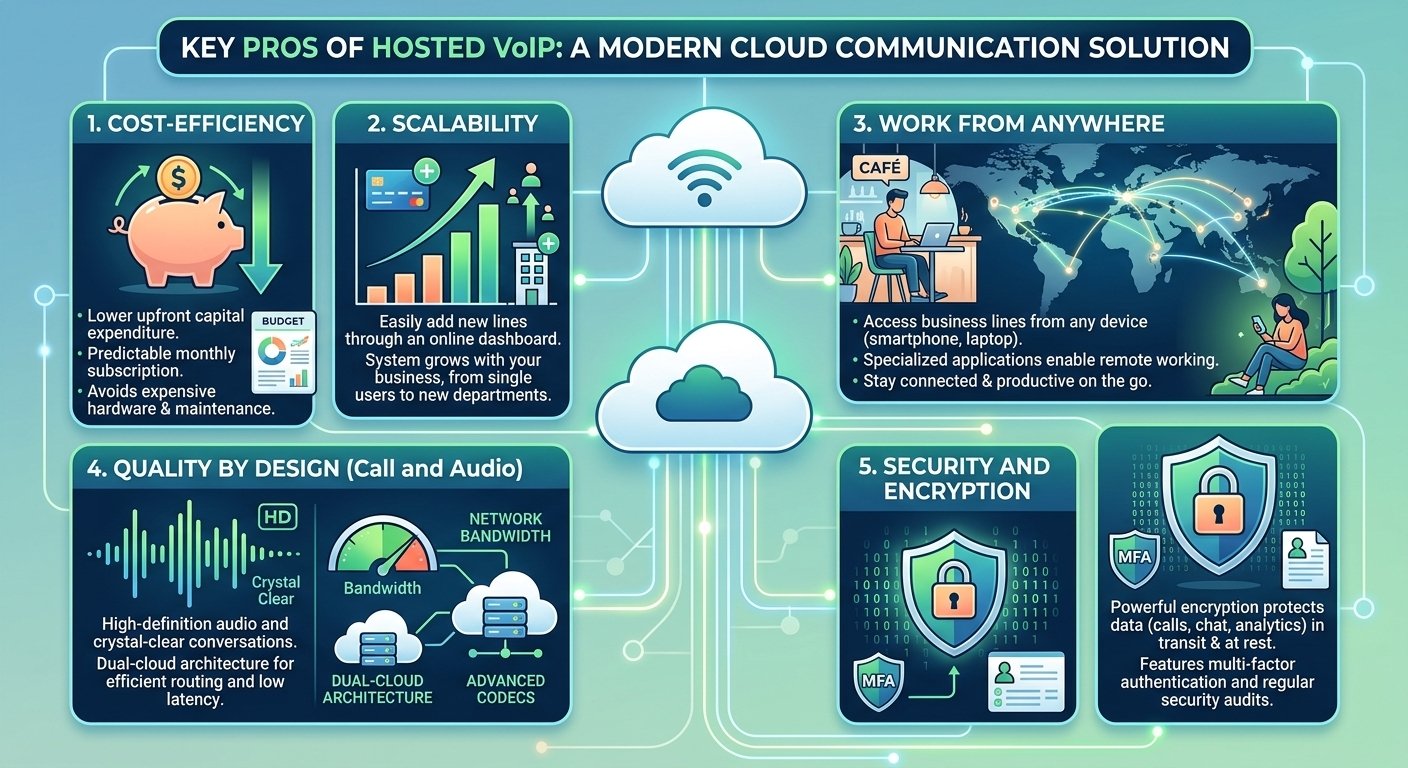
One of the biggest advantages is the reduction in upfront capital expenditure. Since there is no need to purchase expensive servers or PBX hardware, the initial investment is very low. You simply pay a monthly subscription fee per user, which often includes local and long-distance calling. This predictable pricing model helps businesses manage their budgets more effectively without worrying about unexpected repair costs for on-site equipment.
2. Scalability
As your business grows, adding new team members is incredibly simple. With a hosted system, you can add new lines through an online dashboard in a matter of minutes. There is no need to wait for a service technician or install new physical ports in the wall. This flexibility allows your communication system to grow alongside your business, whether you are adding one employee or opening an entire new department.
3. Work from anywhere
Mobility is a core feature of internet-based calling. Since your phone system is hosted in the cloud, employees can access their business lines from any device. By downloading a specialized application, they can make and receive calls on their smartphones or laptops as if they were sitting at their desks. This ensures that your team stays connected and productive, regardless of their physical location.
4. Quality by design (call and audio)
Modern digital systems are engineered to provide high-definition audio that often surpasses the quality of traditional landlines. As long as your network has sufficient bandwidth, the system uses advanced codecs to ensure that every conversation is crystal clear. Many top-tier providers use a dual-cloud architecture, which leverages multiple data centers to ensure that calls are always routed through the most efficient path with minimal latency.
5. Security and encryption
Contrary to some misconceptions, digital communication can be more secure than analog systems. Leading providers use powerful encryption tools to protect data both in transit and at rest. This includes not just your voice calls, but also your chat logs, user data, and analytics. Advanced security features like multi-factor authentication and regular security audits ensure that your business communications remain private and protected from unauthorized access.
Cons of VoIP
While the benefits are numerous, there are certain drawbacks that businesses should keep in mind. Because these systems are managed by a third party, you have less control over the underlying infrastructure. This means that if the provider experiences an issue, your service may be affected. Understanding these limitations is important for creating a comprehensive communication strategy that includes backup plans for potential outages.
1. Recurring costs
A hosted model relies on a subscription-based pricing structure. While this lowers upfront costs, the monthly fees can add up as your team grows. Some features that you might consider essential could be locked behind higher-priced tiers. It is important to carefully review what is included in your plan to ensure there are no hidden fees for things like toll-free numbers or additional local lines that your business might need.
2. Dependence on “network”
The quality of your service is entirely dependent on the strength of your internet connection. Factors like latency and jitter can negatively impact audio quality if your network is congested. While high-speed internet is common today, businesses must ensure they have enough bandwidth to handle voice traffic alongside their regular data needs. Some companies choose to dedicate a specific internet channel solely to their phone system to avoid these issues.
Pros of SIP trunking
1. Flexibility
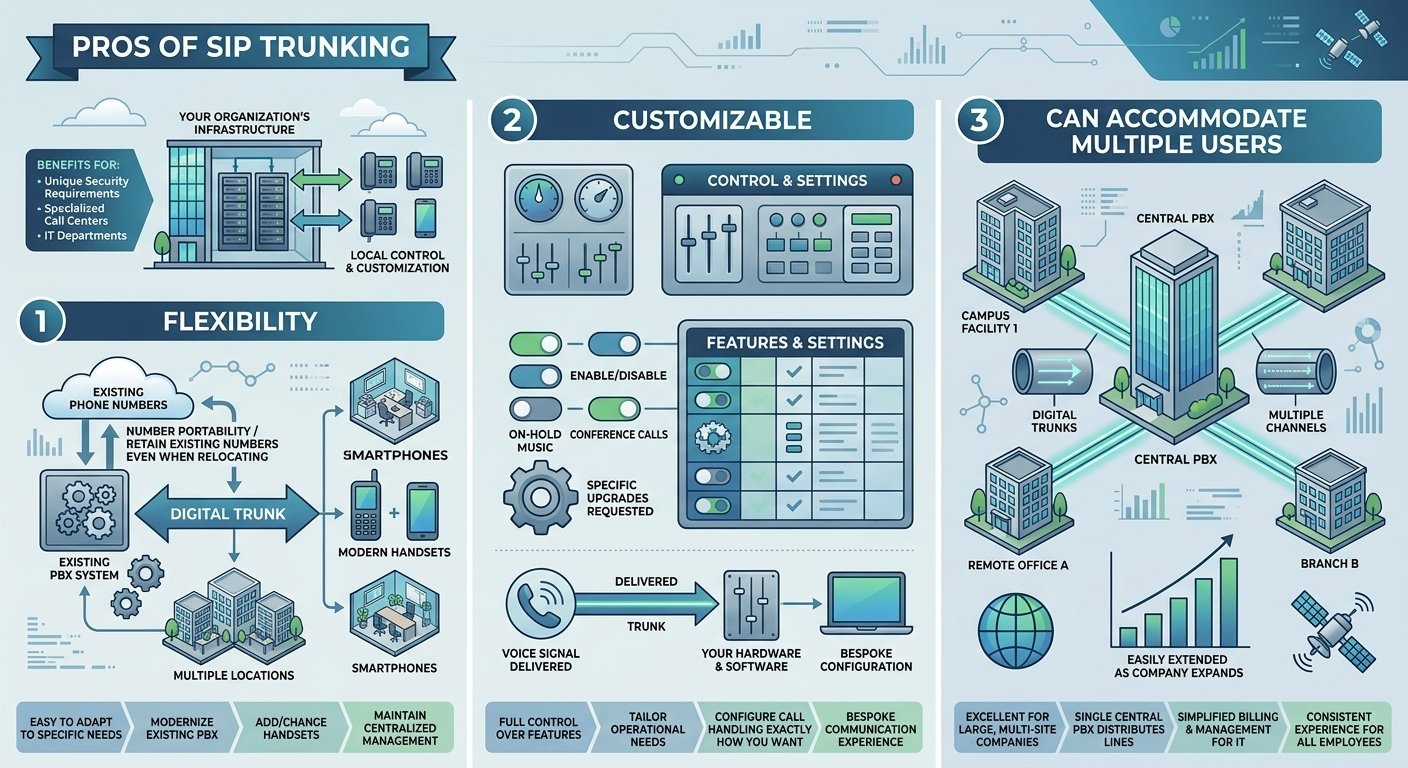
Trunks are incredibly easy to adapt to your specific needs. If you already have a functioning PBX system, adding a digital trunk allows you to modernize your setup without starting from scratch. You can easily add or change handsets across multiple locations while maintaining a centralized management system. This flexibility also makes it easier to keep your existing phone numbers even if your business relocates to a new city.
2. Customizable
With a trunking solution, you have full control over the features and settings of your phone system. You can disable features that your team doesn’t use and request specific upgrades that fit your immediate operational needs. Since the trunk essentially delivers the voice signal to your hardware, the software on your end can be configured to handle calls exactly how you want, providing a truly bespoke communication experience.
3. Can accommodate multiple users
This technology is excellent for large companies that operate across different sites. A single central PBX can use digital trunks to distribute phone lines across an entire campus or multiple facilities. Each trunk can contain several channels, which are easily extended as the company expands. This centralization simplifies the billing and management process for the IT department while providing a consistent experience for all employees.
Cons of SIP trunking
Despite its power, trunking comes with significant management responsibilities. It is not a “set it and forget it” solution and requires a certain level of technical proficiency to maintain. For many small businesses, the complexity of managing an on-site system may outweigh the benefits of customization. It is important to evaluate whether your team has the resources to handle the technical demands of this setup.
1. Requires dedicated PBX and telecom engineers
The most significant drawback is the need for specialized personnel. Setting up and maintaining a PBX system requires experienced telecom engineers who understand the nuances of the hardware and software. This adds to the ongoing costs of the business, as you will need to account for both the salaries of these experts and the costs associated with maintaining and upgrading the physical equipment.
2. Harder to use
A system based on trunking can be more complex for the average employee to navigate. Since it often involves proprietary hardware and older interfaces, there may be a steeper learning curve compared to modern, intuitive apps. Training employees on new processes and hardware can be time-consuming and may lead to frustration if the system is not as user-friendly as the consumer apps they use daily.
3. Not call recording and transcription-friendly
Older on-premise systems often lack the advanced features that come standard with cloud-based solutions. Features like automatic call recording and real-time voice transcription usually require additional hardware or expensive third-party licensing. This can make it difficult for businesses to gain valuable insights from their customer interactions without making a significant additional investment in their local infrastructure.
4. Troublesome troubleshooting
When an issue occurs with a trunking system, identifying the root cause can be difficult. The problem could lie with the internal hardware, the local network, the trunk provider, or the internet service provider. This often leads to a complex troubleshooting process where different vendors may blame each other, potentially extending the time your phone system is down and disrupting your business operations.
5. Not always efficient for SMS
While this protocol supports multimedia, traditional trunks are not always optimized for text messaging. Setting up SMS functionality can be complicated and may require additional integrations or third-party services. If your business relies heavily on text-based communication with customers, you may find that a hosted service offers a much more integrated and efficient solution for handling these interactions.
6. Limited integrations
On-premise systems often struggle to integrate with modern business software like CRM platforms or helpdesk tools. While it is sometimes possible to build these connections, it usually requires custom development work and ongoing maintenance. This can leave your communication data siloed, making it harder for your sales and support teams to access the information they need to provide a personalized customer experience.
Time to implement a VoIP system for your business?
Deciding when to switch to a digital system is a critical choice for any growing company. If you are still using traditional landlines, you are likely paying more for fewer features. The move to an internet-based system can immediately improve your team’s productivity by providing them with better tools for collaboration. Whether you are a small startup or a large enterprise, the advantages of modernizing your voice communication are clear.
-
Start by auditing your current phone bill to identify potential savings from moving to the internet.
-
Evaluate your internal IT capacity to decide between a hosted service or a trunking solution.
-
Test your current internet bandwidth to ensure it can support high-quality voice sessions.
-
Identify the key features, such as video calling or CRM integration, that your team needs to succeed.
SIP vs VoIP: Put the debate to rest
The debate between these two technologies often stems from a misunderstanding of how they relate to each other. Instead of seeing them as competing options, it is more accurate to see them as different ways to achieve the same goal of digital communication. For most businesses today, the question isn’t whether to use these technologies, but rather how to deploy them most effectively. By choosing a solution that fits your specific infrastructure, you can enjoy clear, reliable, and cost-effective communications.
Modern systems have matured to the point where they are more reliable and feature-rich than the analog systems they replaced. With the right provider and a solid network foundation, your business phone system can become a powerful asset rather than a simple utility. Embracing the difference between SIP and VoIP allows you to build a future-proof communication strategy that will grow with your organization for years to come.
SIP Trunking vs VoIP FAQs
-
Is there a difference between SIP and VoIP?
The primary difference between SIP and VoIP is that VoIP is an umbrella term for making calls over the internet, while SIP is a specific protocol used to set up and manage those calls. You can have a VoIP service that uses a different protocol, but you cannot have a SIP call that isn’t also a form of VoIP.
-
Is WhatsApp a VoIP call?
Yes, WhatsApp utilizes this technology to transmit voice and video data over the internet. When you make a call through the app, your voice is converted into digital packets and sent through your data connection, allowing you to bypass traditional cellular voice minutes.
-
What is the difference between SIP and IP phones?
An IP phone is a device that connects to the internet to make calls. A SIP phone is a specific type of IP phone that follows the Session Initiation Protocol standards, making it compatible with most modern business phone systems and service providers.
-
What is the difference between SIP and RTP in VoIP communication?
SIP is responsible for the signaling part of the call, such as finding the other person and starting the session. RTP (Real-time Transport Protocol) is the protocol that actually carries the audio or video data once the connection has been established by the signaling protocol.
-
Is SIP calling free?
While the protocol itself is an open standard and free to use, the service of connecting your calls to the global telephone network usually involves a monthly fee. Most businesses pay a provider for the ability to reach landlines and mobile phones outside of their internal network.
-
Can I use my existing internet for VoIP?
Yes, you can use your existing broadband connection to support your phone system. However, it is vital to ensure you have enough bandwidth to handle your voice calls alongside your regular data usage to maintain high audio quality.
-
What happens to my calls if the power goes out?
In a hosted system, calls can usually be automatically rerouted to mobile apps or other locations. With a trunking system, you may need a backup power supply for your on-site PBX or a pre-configured failover plan with your service provider to ensure continuity.
-
Do I need a special router for these services?
While many standard business routers will work, it is often beneficial to have a router that supports Quality of Service (QoS) settings. This allows you to prioritize voice traffic over other types of data, ensuring that your calls remain clear even when the network is busy.
-
Can I keep my current phone numbers?
Yes, you can usually port your existing phone numbers to a new digital provider. This process is common and allows your business to maintain its established contact information while upgrading the underlying technology and features of your system.