
Video Conferencing with VoIP integrates voice and video data over the internet, allowing users to conduct face-to-face meetings remotely. By using Voice over Internet Protocol technology, these systems convert analog signals into digital packets, facilitating real-time communication across global networks. This approach eliminates the need for traditional phone lines, offering high-definition video and crystal-clear audio. Businesses utilize this technology to bridge geographical gaps, reduce travel expenses, and enhance team collaboration. With features like screen sharing and file transfers, it serves as a comprehensive tool for modern digital workplaces seeking efficiency, high-quality interaction, and long-term scalability.
What is VoIP Video Conferencing?
Voice over Internet Protocol is a technology that allows you to make voice calls using a broadband internet connection instead of a regular phone line. When combined with video conferencing, it creates a visual communication platform where users can interact through video and audio streams simultaneously. This setup utilizes a voice conference call structure but adds a visual layer, allowing participants to see facial expressions and body language, which are often lost in standard voice-only interactions. It essentially turns any digital device into a sophisticated communication portal.
Modern video conferencing with VoIP relies on the same underlying architecture that powers digital telephony. Instead of sending electrical signals through copper wires, the system breaks down audio and video data into small digital packets. These packets are sent across the internet and reassembled at the destination in a matter of milliseconds. This process supports various formats, from a simple conference call by cell phone to high-level enterprise meetings involving hundreds of participants across different continents and time zones.
How VoIP and video conferencing work together
The integration of these two technologies relies on the synchronization of audio and video packets to ensure a seamless user experience. The VoIP component handles the voice conference call aspect, focusing on audio clarity and noise reduction. Meanwhile, the video component manages the high-bandwidth data required for visual transmission. Together, they function as a unified communication system that allows for a telephone conference call experience that includes real-time visual aids, presentations, and collaborative document editing.
According to a report by Global Market Insights, the VoIP market size exceeded USD 30 billion in 2020 and is anticipated to grow at a CAGR of over 15% between 2021 and 2027.
This growth is largely driven by the seamless merging of video and voice capabilities. When you initiate a voip conference, the software coordinates the bitrate of both the video and audio to prevent lag. If the internet speed fluctuates, the system often prioritizes the audio packet to ensure the voice over ip conference calling remains stable even if the video quality temporarily dips.
Why it matters in today’s communication
In the current professional landscape, the ability to connect instantly is no longer a luxury but a requirement for survival. Video conferencing with VoIP has become the backbone of remote work, allowing teams to maintain a sense of presence and culture despite physical distances. It simplifies the process of how to make mobile conference call sessions, making it possible for employees to join meetings from their homes, coffee shops, or while traveling. This flexibility is what defines the modern agile business model.
Understanding what is a phone conference in the digital age requires looking beyond just the audio. It is about creating an environment where information is shared transparently and efficiently. Businesses that utilize a conference call phone system integrated with video often report higher levels of engagement and faster decision-making processes. By removing the barriers of traditional telephony, organizations can foster a more inclusive environment where every participant, regardless of location, has a seat at the virtual table.
How VoIP Video Conferencing Works
1. Voice data conversion and transmission
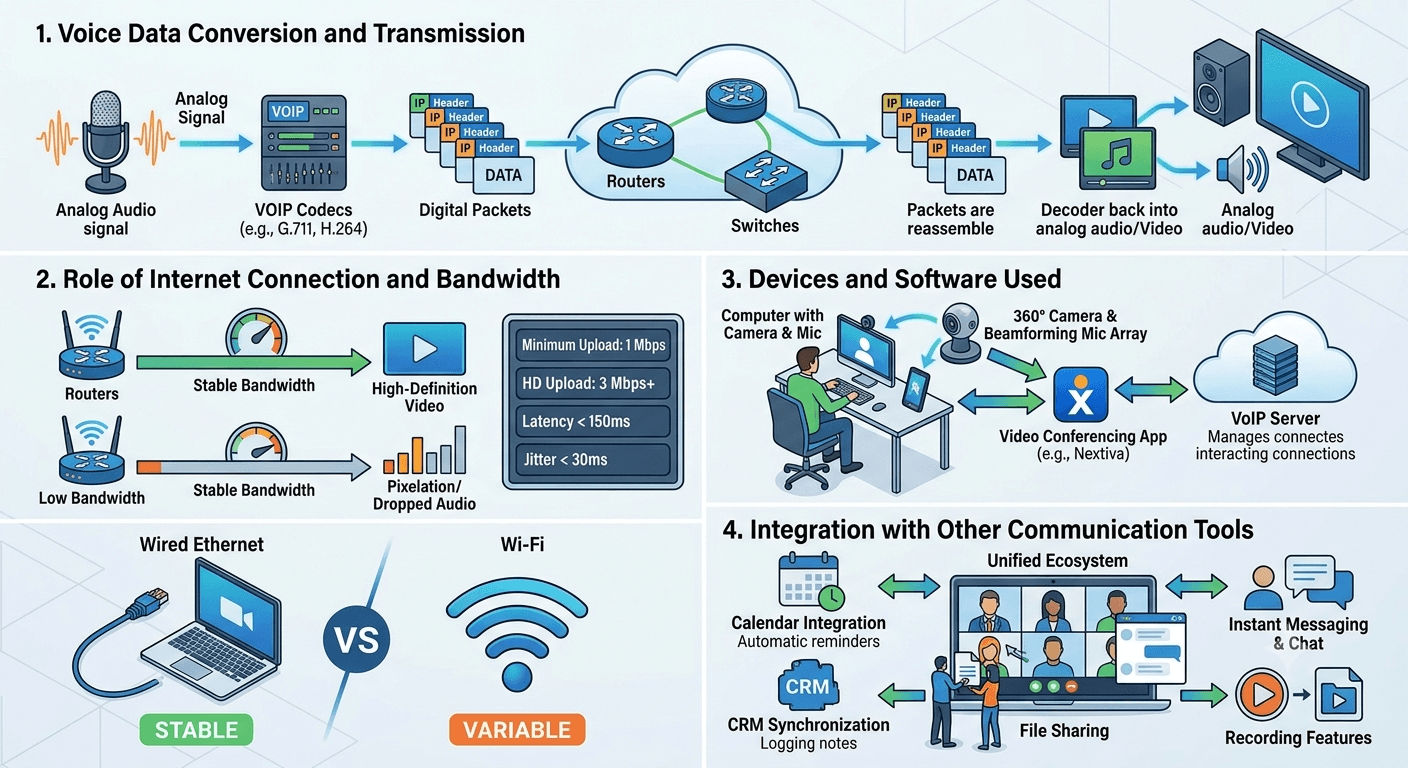
The technical process begins with the conversion of analog signals into digital data using specialized codecs. When you speak during a voice conference call, your microphone captures the sound waves, which are then encoded into binary data. This data is organized into packets that contain the destination address and the sequence information needed for reassembly. This digital transformation is what allows a skype phone conference or a professional business meeting to take place over a standard internet connection.
Once the packets are created, they travel through various routers and switches across the internet to reach the recipient. At the receiving end, the software decodes the packets and converts them back into analog audio and video signals. This entire cycle happens almost instantaneously, ensuring that a conference call from cell phone users feels as natural as a face-to-face conversation. The efficiency of this transmission is the reason why many companies are moving away from traditional hardware to software-based voip conferences.
2. Role of internet connection and bandwidth
A stable internet connection is the most critical requirement for maintaining high-quality video conferencing with VoIP. Bandwidth determines how much data can be transmitted at once, impacting both the resolution of the video and the stability of the audio. Higher bandwidth allows for high-definition video, whereas limited bandwidth might result in pixelation or dropped audio during a telephone conference. It is generally recommended to have a dedicated high-speed connection to avoid interruptions during critical phone conference meetings.
-
Minimum upload speed for standard video: 1 Mbps.
-
Recommended upload speed for HD video: 3 Mbps or higher.
-
Latency should ideally be below 150ms to prevent noticeable delays.
-
Jitter should be kept under 30ms to maintain audio consistency.
-
Wired Ethernet connections are often more stable than Wi-Fi for long meetings.
3. Devices and software used
To participate in these digital meetings, users need a combination of hardware and software. The hardware typically includes a computer, smartphone, or tablet equipped with a camera and a microphone. For more professional settings, dedicated conference call phone system hardware like 360-degree cameras and beamforming microphones can be used. On the software side, applications like the nextiva voip service provide the interface through which users manage their calls and video streams.
The software acts as the conductor, managing the connection between different devices. For instance, knowing how to do a conference call on android involves using a specific app that interfaces with the VoIP provider’s servers. These applications are designed to be user-friendly, often offering one-click joining options. Whether it is a conference call for cell phone users or a desktop-based executive session, the software ensures that the technical complexities of data transmission are hidden behind a simple and intuitive interface.
4. Integration with other communication tools
One of the greatest strengths of video conferencing with VoIP is its ability to integrate with other business applications. This creates a unified ecosystem where your calendar, email, and project management tools work in harmony. For example, a scheduled phone conference can automatically generate a link in your calendar and send notifications to all participants. This level of automation reduces administrative overhead and ensures that everyone stays informed about upcoming meetings.
-
Calendar integration for automated scheduling and reminders.
-
CRM synchronization to log meeting notes directly to client profiles.
-
File sharing capabilities during live sessions for real-time collaboration.
-
Instant messaging and chat functions to supplement the video feed.
-
Recording features to archive meetings for future reference or training.
Key Benefits of VoIP Video Conferencing
1. Lower communication costs
Switching to video conferencing with VoIP can lead to significant financial savings for businesses of all sizes. Traditional long-distance and international calling rates can be prohibitively expensive, especially for companies with global operations. By using the internet for voice over ip conference calling, these costs are virtually eliminated.
Research by Nemertes Research indicates that companies using unified communications like voip conferences can save up to 30% on total communication costs.
Beyond direct calling costs, businesses save money on travel and infrastructure. Instead of flying employees across the country for a brief meeting, a conference call from cell phone or a desktop setup can achieve the same results. This reduces the need for expensive office space and physical telephone hardware. Most modern systems are subscription-based, allowing companies to pay only for the features and number of users they actually need, which makes the conference cal budget much easier to manage.
2. Easy remote collaboration
The ability to collaborate in real-time is a hallmark of successful remote teams. Video conferencing with VoIP provides the tools necessary for brainstorming, project planning, and problem-solving without needing to be in the same room. With features like screen sharing, multiple users can view and edit a document simultaneously. This transforms a simple confrence call into a dynamic workspace where ideas can be visualized and refined on the fly.
Furthermore, these platforms support a variety of interaction methods, making it easy to accommodate different learning and communication styles. A voice conference call might be sufficient for a quick update, but the video element is essential for building trust and rapport. When team members can see each other, it reduces feelings of isolation and fosters a more cohesive company culture. This ease of connection is why understanding how to make mobile conference call steps is essential for every modern professional.
3. Scalability for growing teams
As a business grows, its communication needs become more complex. Video conferencing with VoIP is inherently scalable, allowing you to add new users or features with just a few clicks. Unlike traditional phone systems that require physical wiring and hardware upgrades, a cloud-based voip conference system can expand alongside your team. This flexibility ensures that your communication infrastructure never becomes a bottleneck for company growth.
-
Add or remove user licenses instantly through a web-based dashboard.
-
Upgrade to higher-tier plans for advanced features like webinars or large-scale meetings.
-
Integrate new branch offices into the existing network without local hardware installation.
-
Support for unlimited participants in certain enterprise-level configurations.
-
Access to global phone numbers to establish a local presence in new markets.
4. Unified communication features
The concept of unified communications refers to the integration of various communication methods into a single, cohesive platform. Video conferencing with VoIP is a central piece of this puzzle, bringing together voice, video, chat, and file sharing. This means users don’t have to switch between different apps to get their work done. Having everything in one place, like the nextiva voip service, improves focus and productivity by reducing the “app fatigue” that often plagues digital workers.
A unified platform also ensures that data is consistent across all channels. If a participant joins a conference call by cell phone, they can still access the chat history and shared files from the session later on their desktop. This continuity is vital for maintaining a clear record of decisions and action items. By centralizing communication, businesses can also better monitor usage patterns and identify areas where they can improve their internal processes or client interactions.
5. Enhanced mobility and flexibility
The modern workforce is increasingly mobile, and video conferencing with VoIP is designed to support this lifestyle. Whether an employee is working from a home office, a hotel, or a client site, they can access the full suite of communication tools from any device. The ability to join a conference call for cell phone users means that being away from the desk does not mean being out of the loop. This mobility is a key driver of employee satisfaction and retention.
This flexibility also extends to the time and manner in which meetings are conducted. With the right telephone conference call providers, setting up a meeting is instantaneous. There is no need to book a physical room or wait for IT to set up the equipment. This “on-demand” nature of communication allows for faster response times to market changes and client needs. It empowers employees to take control of their schedules, leading to a better work-life balance while maintaining high levels of professional performance.
Choosing the Right VoIP Video Conferencing Software
1. Features to look for
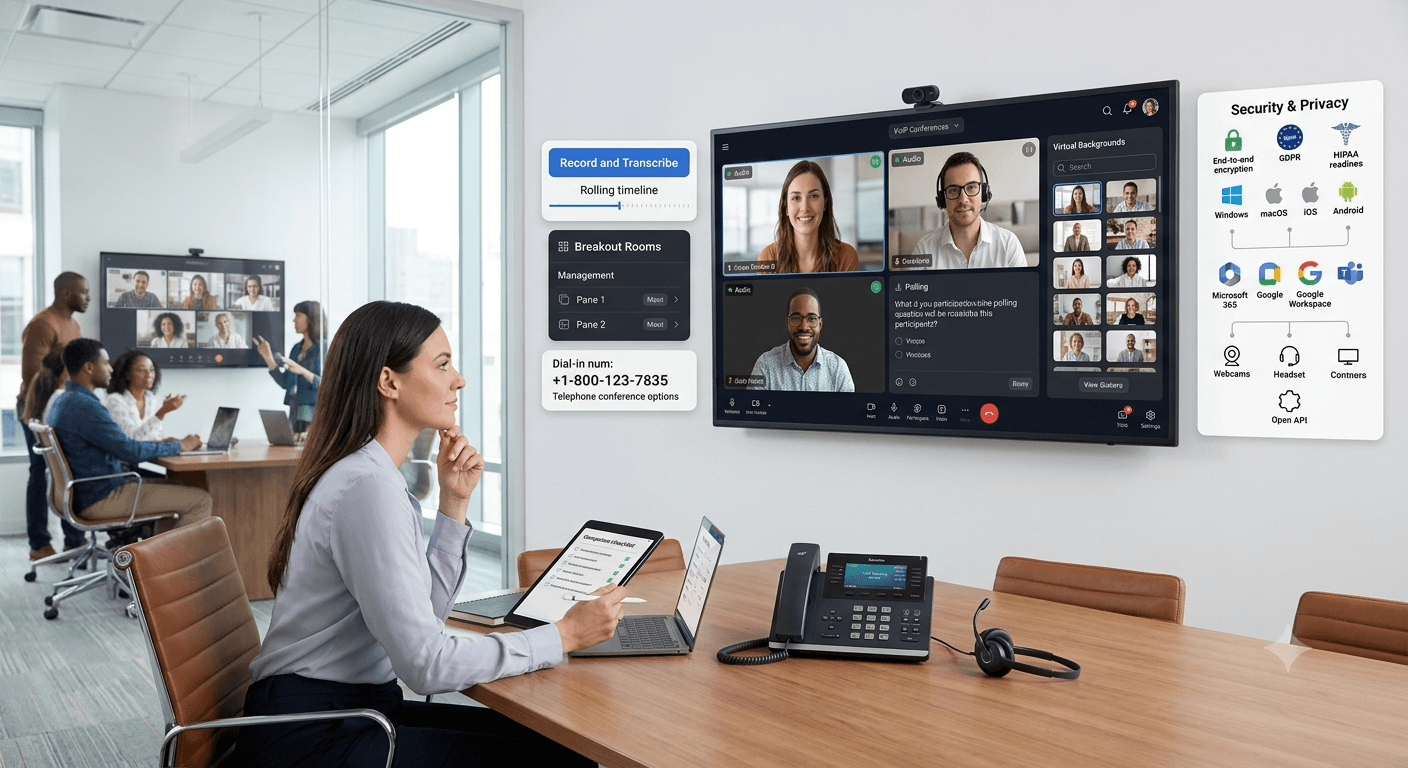
When selecting a provider for video conferencing with VoIP, it is important to evaluate the specific features that will benefit your team. High-definition video and audio are non-negotiable, but you should also look for advanced tools like breakout rooms, polling, and virtual backgrounds. A robust system should offer a seamless experience for both the host and the participants. Consider whether the platform supports a telephone conference call dial-in option for those who may have limited internet access.
Another critical feature is the ability to record and transcribe meetings automatically. This is incredibly useful for training purposes and for those who were unable to attend the live session. User management controls are also important, allowing hosts to mute participants, manage waiting rooms, and control who can share their screen. By focusing on these functional requirements, you can ensure that your chosen conference call phone system meets the diverse needs of your organization.
2. Popular VoIP video conferencing tools
There are numerous tools available in the market, each with its own set of strengths. The nextiva voip service is well-known for its reliability and comprehensive suite of business communication tools. Other options like Zoom and Microsoft Teams have become household names due to their ease of use and deep integration with productivity software. When comparing different telephone conference call providers, it is helpful to read reviews and perhaps test a few platforms with a small group of users before making a final decision.
Each tool caters to different segments of the market. Some are designed for small businesses that need a simple and affordable solution, while others are built for large enterprises that require advanced security and compliance features. Looking into skype phone conference options might be suitable for smaller, less formal teams. However, for a professional brand image, most companies opt for a dedicated voip conference platform that offers custom branding and a more polished user interface for client-facing meetings.
3. Security and privacy considerations
In an era where data breaches are common, the security of your video conferencing with VoIP cannot be overlooked. You should look for providers that offer end-to-end encryption for both audio and video streams. This ensures that only the intended participants can access the information being shared. Additionally, features like password-protected meetings and the ability to “lock” a meeting once all participants have arrived add an extra layer of protection against unauthorized access.
Privacy is also a major concern, particularly for industries that handle sensitive information, such as healthcare or finance. Ensure that your provider complies with relevant regulations like HIPAA or GDPR. It is important to understand where your data is stored and how it is used by the service provider. A transparent privacy policy and a strong track record of security are essential criteria when choosing who will handle your voice over ip conference calling needs.
4. Compatibility with existing systems
Before committing to a new platform, you must ensure that it is compatible with your current hardware and software. A good video conferencing with VoIP solution should work seamlessly across different operating systems, including Windows, macOS, iOS, and Android. It should also integrate with the hardware you already own, such as existing webcams and headsets. This prevents the need for a total overhaul of your IT infrastructure, saving time and money during the transition.
Check if the software can interface with your existing PBX or other telephone conference setups. Many businesses use a hybrid approach where they keep some traditional phone lines while migrating most of their communication to the cloud. The ability to connect these different systems is a significant advantage. Finally, ensure that the platform has an open API if you plan to build custom integrations with your own internal software or specialized business tools.
Read More: 5g Network Slicing: Types, Benefits, Working and Examples
Final Thought
Video conferencing with VoIP has fundamentally changed how we perceive professional communication. It bridges the gap between simple audio calls and physical meetings, providing a versatile, cost-effective, and scalable solution for businesses of all sizes. By understanding the underlying technology and the vast array of benefits it offers, organizations can better position themselves in a competitive, digital-first world. Whether you are conducting a quick check-in or a major corporate presentation, the right VoIP tools ensure that your message is delivered clearly and professionally. As technology continues to evolve, we can expect even more innovative features that will further enhance our ability to connect and collaborate across the globe.
Frequently Asked Questions
-
Is VoIP used in video conferencing?
Yes, VoIP is a foundational technology used in modern video conferencing to transmit audio data over the internet. While the video portion handles the visual stream, the VoIP component manages the voice data packets, ensuring that the audio is synchronized with the visual performance. This allows for a complete multi-media communication experience without the need for traditional phone lines.
-
Which is better, VoIP or VoLTE?
The choice between VoIP and VoLTE depends on your specific needs, as VoIP is better for data-rich environments like offices while VoLTE is optimized for mobile network efficiency. VoIP works over any internet connection, including Wi-Fi and satellite, making it highly versatile for video conferencing. VoLTE is specifically designed for high-quality voice calls over cellular LTE networks and typically does not support integrated video conferencing in the same way.
-
Can VoIP be used for video?
VoIP technology itself is primarily for voice, but it serves as the audio backbone for platforms that provide video conferencing services. When we talk about video conferencing with VoIP, we are referring to the integration of voice packets and video packets being sent over the same IP network. Most modern VoIP service providers include video capabilities as a standard feature in their communication suites.
-
What is the main disadvantage of VoIP?
The main disadvantage of VoIP is its total dependence on a stable internet connection and a reliable power source. If your internet goes down or if there is a power outage without a backup, your entire communication system will be offline. Additionally, poor internet bandwidth can lead to latency, jitter, and dropped calls, which can disrupt the flow of important professional meetings.
-
What is a telephone conference call provider?
A telephone conference call provider is a company that offers the infrastructure and software necessary to host meetings with multiple participants over the phone or internet. These providers range from traditional telecommunications companies to modern cloud-based software firms. They provide the “bridge” that connects different callers into a single, synchronized conversation, often including features like recording and moderator controls.
-
How do I start a conference call from cell phone?
To start a conference call from a cell phone, you can either use the native “add call” and “merge” features on your device or use a dedicated VoIP app. If using a VoIP app, you simply open the application, select the contacts you wish to invite, and press the meeting start button. This method is often preferred for business as it provides better audio quality and allows for the inclusion of video.
-
Are voip conferences secure?
VoIP conferences are generally very secure, provided you use a reputable service that implements end-to-end encryption and strong access controls. Most professional-grade providers use advanced security protocols to protect data in transit and at rest. To maintain security, users should also follow best practices such as using strong passwords and not sharing meeting links publicly.
-
What equipment is needed for voice over ip conference calling?
The basic equipment needed for voice over ip conference calling includes an internet-connected device, a microphone, and speakers or a headset. For video conferencing, you will also need a webcam. While built-in laptop hardware is often sufficient for casual meetings, high-quality external peripherals are recommended for professional settings to ensure the best possible audio and visual clarity.


