
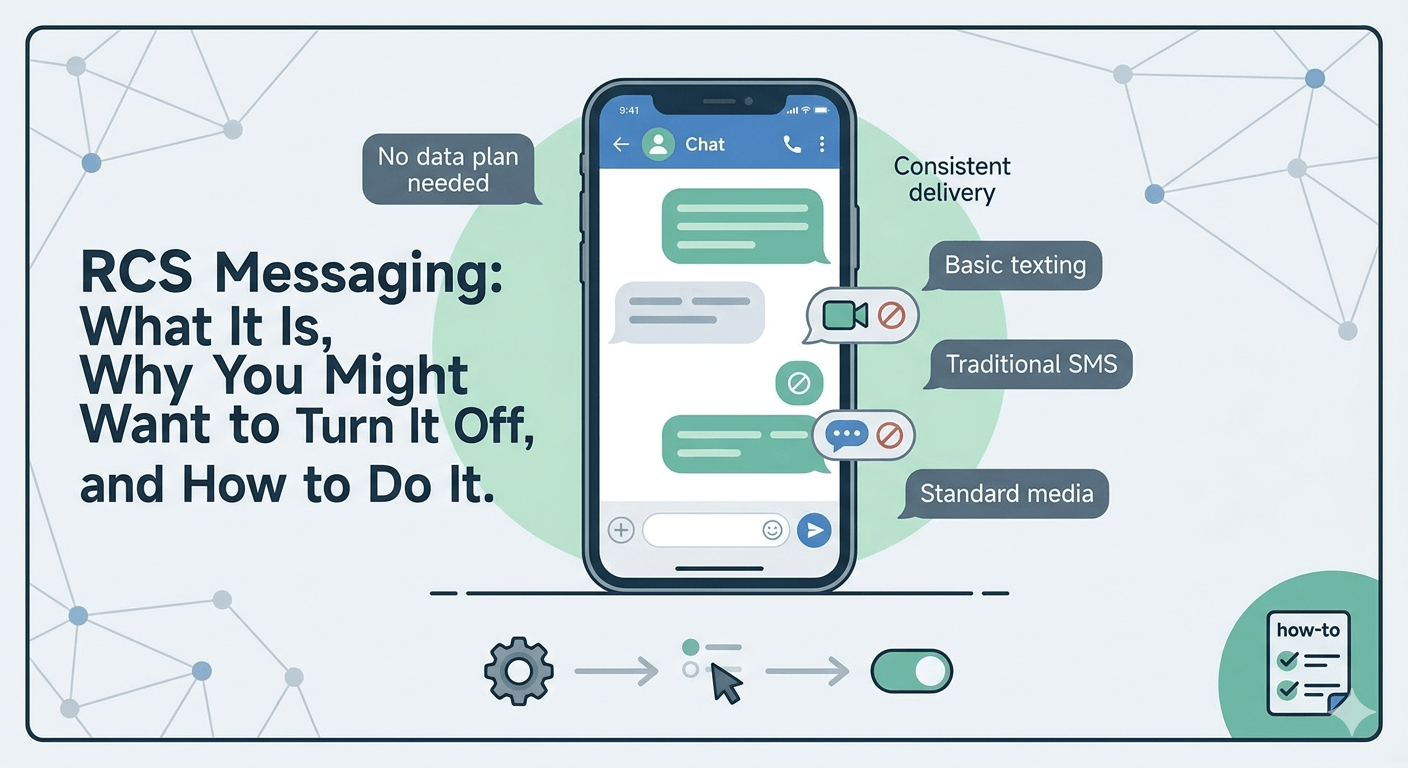
To turn off RCS messages, open your messaging app settings, go to “Chat features” or “RCS chats,” and disable the toggle. On Android devices using Google Messages, you can find this under Settings → RCS Chats. Disabling RCS switches your messages back to standard SMS/MMS for better compatibility and privacy control.
Learning how to turn off RCS messages is a critical step for users who want to revert to traditional SMS or ensure their messages are delivered correctly after switching from an Android device to an iPhone. To disable this feature on an Android phone, you must open the Google Messages app, navigate to the settings menu, select RCS Chats, and toggle the switch to the off position. If you no longer have access to the physical device, you can use Google’s web-based deactivation portal to deregister rcs by entering your phone number and receiving a verification code to complete the process.
What Is RCS Messaging and What Happens When You Disable It?
Rich Communication Services, commonly known as RCS, is a modern communication protocol intended to replace the aging SMS and MMS standards. It allows for high-resolution photo sharing, typing indicators, read receipts, and better group chat functionality over Wi-Fi or mobile data. While it offers a more “iMessage-like” experience for Android users, many find the need to learn how to turn off rcs messaging due to inconsistent delivery or privacy concerns. When you decide to disable this feature, your messaging experience reverts to the standard Short Message Service (SMS) and Multimedia Messaging Service (MMS).
What happens if i turn rcs off? Once the feature is disabled, your messages will no longer be sent over data or Wi-Fi. Instead, they will go through your mobile carrier’s cellular network. You will lose access to features like high-quality video sharing and the ability to see when someone is typing.
According to data from GSMA, the organization representing mobile operators worldwide, RCS has seen massive adoption with over one billion monthly active users as of late 2023.
However, the transition isn’t always seamless, especially when moving between different operating systems or carriers, which is why many users search for ways to remove rcs from their active settings.
Should You Turn Off RCS? Pick the Right Solution First
Before you proceed with instructions on how to turn off rcs chat, it is important to evaluate if the issues you are facing can be fixed without a full deactivation. Many users encounter “Connecting” or “Setting Up” loops within their messaging apps. In these cases, clearing the cache of the Messages app or the Carrier Services app can often resolve the glitch. However, if you are experiencing delayed messages or if your contacts report that your messages are not being delivered at all, learning how to turn off rcs message settings might be the only permanent fix.
A primary reason to turn off rcs is when you are transitioning to a device that does not support the protocol effectively or if you are moving to an area with very poor data connectivity but stable cellular signal. Some users also prefer the simplicity of SMS because it does not require a data plan to function. If your goal is to ensure 100% reachability regardless of internet status, switching from rcs messaging android to standard texting is a logical choice. Understanding what is rcs chat helps in making this decision; if you don’t use group features or high-res media, the benefits might not outweigh the potential for technical friction.
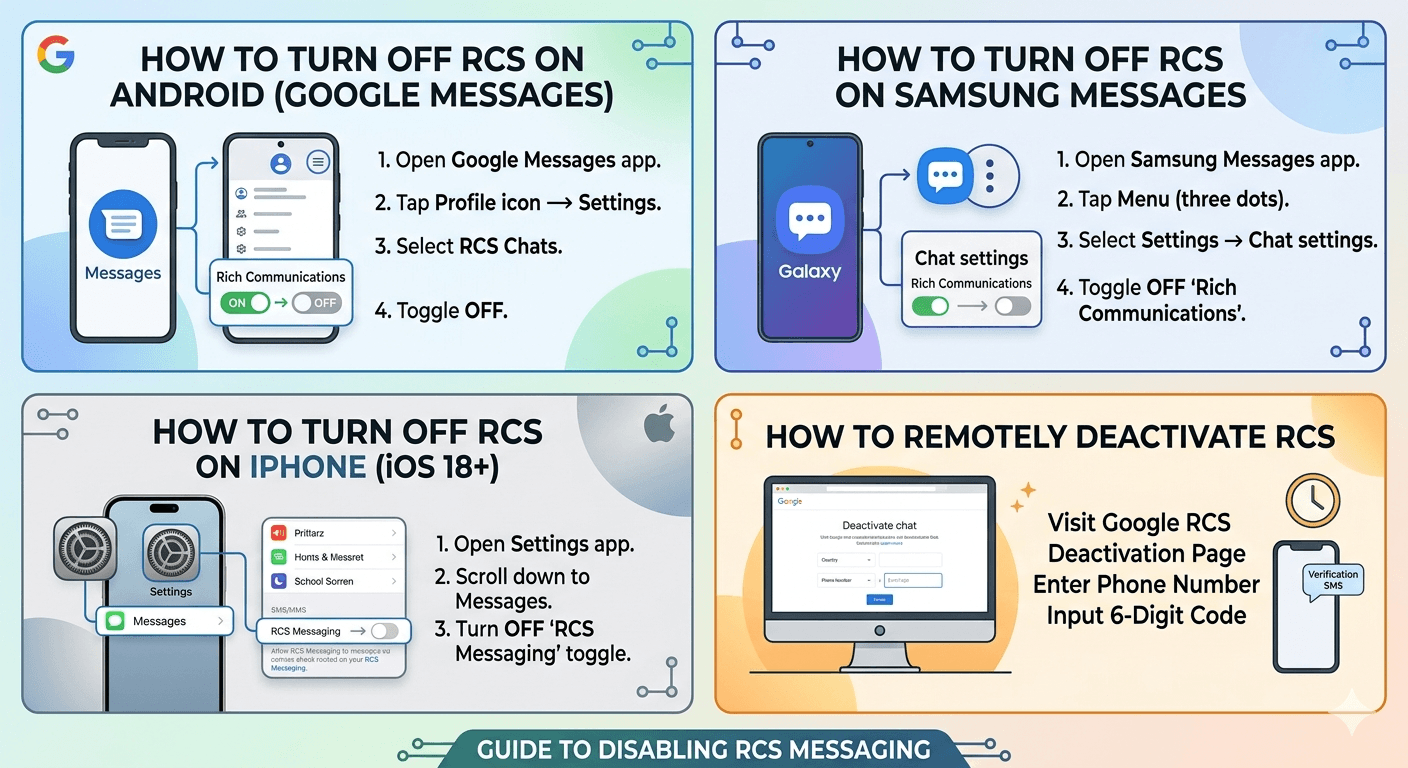
How to Turn Off RCS on Android (Google Messages)
Google Messages is the primary hub for rcs chat on most modern Android devices. If you are using a Pixel, Motorola, or a newer Nokia phone, this is likely your default app. To turn off rcs, follow these detailed steps:
Open the Google Messages app on your smartphone.
Tap on your profile icon or the three-dot menu in the top right corner.
Select “Messages settings” from the dropdown menu.
Tap on the first option, which is usually “RCS chats.”
Find the toggle labeled “Turn on RCS chats” and switch it to the off position.
A confirmation prompt may appear; confirm your choice to finish the process.
Once you turn off rcs messaging on android, your phone will immediately stop trying to connect to the Google Jibe servers. This ensures that any incoming messages are forced through the SMS protocol. This is particularly useful for those wondering how do i turn off rcs messaging to save on data usage. It is worth noting that you can turn on rcs chats again at any time by following the same path and toggling the switch back to on, though it may take a few minutes for the system to verify your phone number again.
How to Turn Off RCS on Samsung Messages
Samsung users often have a choice between Google Messages and the native Samsung Messages app. While Samsung has recently started pushing Google Messages as the default, millions of devices still rely on the Samsung version. The process to turn off advanced messaging android features on a Galaxy device is slightly different:
Launch the Samsung Messages app.
Tap the three dots (menu) located next to the search icon.
Select “Settings” and then navigate to “Chat settings.”
Look for “Rich Communications” or “Advanced Messaging.”
Toggle the switch to off.
If you cannot find these specific headings, it may be because your carrier has hidden these settings or integrated them directly into the “More settings” submenu. On some older models, you might need to look under “Text messages” or “Multimedia messages” to find the master switch. Disabling it here will ensure your Galaxy phone uses standard SMS/MMS, which is often the first step in troubleshooting how to turn off rcs message issues on Samsung hardware.
How to Turn Off RCS on iPhone (iOS 18 and Later)
With the release of iOS 18, Apple finally integrated RCS to improve communication with Android users. This brought features like read receipts and high-quality media to the “green bubble” experience. However, if you prefer the classic SMS experience or if the RCS implementation is causing battery drain on your iPhone, you might want to know how to turn off rcs on iphone.
To disable it:
Open the “Settings” app on your iPhone.
Scroll down until you find “Messages” and tap it.
Under the “Text Messaging” or “Service Providers” section, look for the RCS Messaging toggle.
Tap the switch to turn off rcs chat functionality.
By doing this, your iPhone will revert to using SMS/MMS whenever you text someone who does not have an iPhone. This is a significant change for the Apple ecosystem, as it marks the first time users have had to manage three different protocols: iMessage (blue), RCS (green with features), and SMS (green without features). For many, the choice to turn off rcs message on iPhone is about maintaining a consistent experience across all non-Apple contacts.
How to Remotely Deactivate RCS When You Don’t Have Your Old Phone
One of the most frustrating scenarios occurs when you switch from Android to iPhone but forget to turn off rcs chat on your old device. In this situation, Google’s servers might still think you are using an RCS-capable phone, leading to “lost” messages that are sent to your old device’s ghost profile instead of your new iPhone. To solve this, you need to deregister rcs remotely.
Google provides a dedicated web portal for this exact purpose. You will need to navigate to the Google Messages deactivation page and scroll to the bottom. There, you will find a section to “Disable chat without your previous device.” You must select your country, enter your phone number, and wait for a six-digit verification code to be sent to your new phone as an SMS. Once you enter that code on the website, Google will remove rcs from your number across all their servers. This is the most effective way to delete rcs presence and ensure that friends sending messages from Android devices are forced to use SMS to reach you.
Dual SIM Users: How to Disable RCS on the Correct Number
Managing RCS on a dual SIM device adds a layer of complexity. Modern Android phones allow you to enable or disable rcs chat independently for each SIM card. This is particularly useful if you have a work number that requires standard SMS for logging purposes and a personal number where you want the full features of rcs messaging android.
To manage this, go to your RCS settings in the Google Messages app. You will see a list of your active SIM cards. You can tap on each one to see the connection status. If you want to turn off rcs for only one number, make sure that specific SIM is selected before toggling the switch. If you are experiencing issues with “stuck” messages on a secondary SIM, it is often best to turn off rcs for both, restart the device, and then only re-enable it for the primary number you intend to use with rich features.
RCS Won’t Turn Off? Common Troubleshooting Solutions
Sometimes, toggling the switch isn’t enough. You might find that the status stays on “Disconnecting” indefinitely or that the toggle flips back to “On” by itself. If you are struggling with how to turn off rcs messaging because the app is being stubborn, try these steps:
Force Stop the App: Go to Settings > Apps > Messages > Force Stop. This kills the process and allows for a clean restart of the settings.
Clear Storage: In the same menu, tap on “Storage & Cache” and clear both. Warning: This might delete your settings, but your actual texts are usually safe if backed up.
Carrier Services: Many RCS functions are handled by an app called “Carrier Services.” Find this in your app list, clear its cache, and restart your phone.
Airplane Mode: Toggle Airplane mode on for 30 seconds to reset your network handshake, then try turning off the feature again.
These troubleshooting steps are vital because a “stuck” RCS profile can prevent you from receiving any messages at all. Research into Android connectivity issues suggests that a significant percentage of messaging failures are due to server-side synchronization errors rather than hardware faults. This is why learning how to turn off rcs messaging properly is often more about managing the server connection than just clicking a button.
How to Block RCS Business Spam Without Disabling Everything
A growing complaint among users is the rise of RCS-based business spam. Because RCS allows businesses to send verified messages with logos and interactive buttons, some companies have used this as a new channel for aggressive marketing. If this is your reason for wanting to turn off rcs chat, you might be able to find a middle ground.
Google Messages has built-in spam protection specifically for RCS. Instead of a full deactivation, you can go to Settings > Spam protection and ensure “Enable spam protection” is turned on. Furthermore, you can block individual business accounts just like you would a regular contact. This allows you to keep the high-quality photo sharing with your family while avoiding the clutter of uninvited advertisements. However, if the volume of business messages is too high, many users find that the only way to get peace is to turn off rcs message settings entirely.
Is RCS Encrypted? Privacy and Security Reality Check
Privacy is a major factor when deciding whether to enable rcs android messages or stick to SMS. Standard SMS is famously insecure; it is not encrypted and can be intercepted by sophisticated attackers or seen by mobile carriers. In contrast, Google has implemented end-to-end encryption (E2EE) for one-on-one RCS chats between users of the Google Messages app.
According to a security report by Google, this encryption uses the Signal Protocol, which is the same gold standard used by apps like Signal and WhatsApp.
However, there is a catch: E2EE only works if both people in the conversation are using a supported RCS client (like Google Messages) and have their chat features active. If you are in a group chat with someone whose carrier doesn’t support the latest standards, or if you are texting an iPhone user (pre-iOS 18), the encryption may not be active. This lack of universal, cross-platform encryption leads some privacy-conscious individuals to turn off rcs and use dedicated encrypted apps instead.
What Happens After Disabling RCS? Complete Breakdown
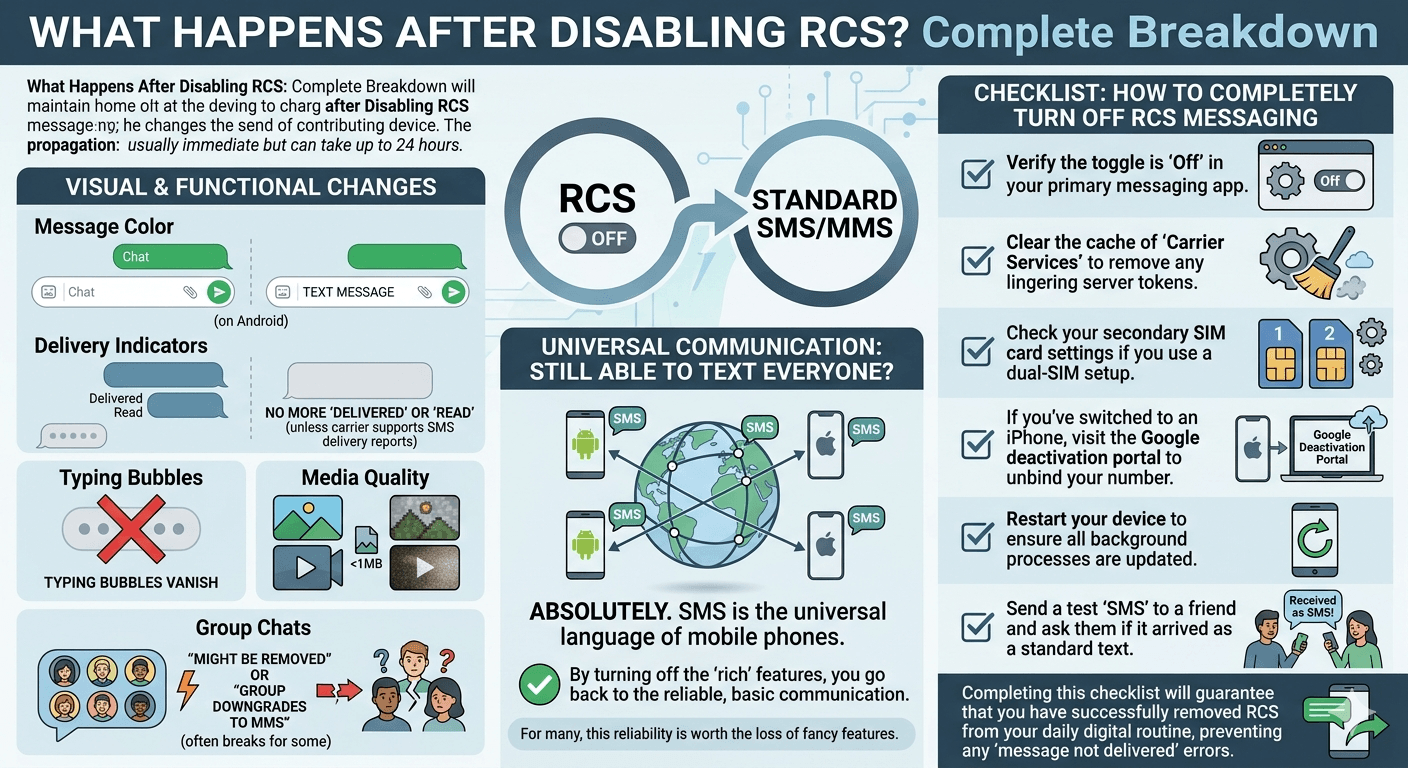
Once you successfully complete the steps for how to turn off rcs messaging, the change is usually immediate but can take up to 24 hours to propagate through all carrier networks. Here is what you can expect:
Message Color: Your message bubbles will remain green (on Android), but the “Chat” label in the text box will change to “Text message.”
Delivery Indicators: You will no longer see “Delivered” or “Read” labels unless your carrier specifically supports SMS delivery reports.
Typing Bubbles: The three dots indicating the other person is typing will vanish.
Media Quality: Photos will be compressed more heavily, and videos will likely appear pixelated as they revert to the MMS size limits (often under 1MB).
Group Chats: If you were in an RCS group chat, you might be removed, or the group may “downgrade” to an MMS group, which often breaks for some participants.
Will i still be able to text everyone if rcs is off? Absolutely. SMS is the universal language of mobile phones. By turning off the “rich” features, you are essentially going back to the most reliable, if basic, form of communication. For many, this reliability is worth the loss of fancy features.
Checklist: How to Completely Turn Off RCS Messaging
To ensure you haven’t missed anything while trying to deregister rcs, follow this final checklist:
Verify the toggle is “Off” in your primary messaging app.
Clear the cache of “Carrier Services” to remove any lingering server tokens.
Check your secondary SIM card settings if you use a dual-SIM setup.
If you’ve switched to an iPhone, visit the Google deactivation portal to unbind your number.
Restart your device to ensure all background processes are updated.
Send a test “SMS” to a friend and ask them if it arrived as a standard text.
Completing this checklist will guarantee that you have successfully removed rcs from your daily digital routine, preventing any “message not delivered” errors that plague users who perform an incomplete deactivation.
For Businesses: Why RCS Matters for Customer Messaging Strategy
While an individual might want to know how to turn off rcs chat, businesses are moving in the opposite direction. RCS Business Messaging (RBM) allows companies to provide a branded experience within the default messaging app. Instead of a random short-code number, customers see the company’s logo, a verified checkmark, and action buttons like “Track Package” or “Check In.”
From a strategic standpoint, businesses should be aware that if a customer chooses to turn off rcs messaging, the business message will often fail to deliver or revert to a plain text link that looks much less trustworthy. Companies must balance the high-engagement features of RCS with the realization that a segment of their audience will always prefer standard SMS for its perceived simplicity and security. Understanding how to switch from sms to rcs on android is a journey many customers take, and businesses need to be ready for both ends of that spectrum.
Read More: Best Free Messaging Apps Without Phone Number for Ultimate Privacy
Final Thought
Deciding to turn off rcs chat is a personal choice that often balances the desire for modern features with the need for reliable, universal communication. Whether you are troubleshooting a new phone, trying to avoid business spam, or simply prefer the privacy of standard SMS, knowing how to turn off rcs messaging gives you back control over your digital reachability. As the protocol continues to evolve and gain wider support—including on Apple devices—the friction associated with these services will likely decrease, but for now, the “off” switch remains a vital tool for many.
Frequently Asked Questions
How to turn off RCS instead of SMS?
To use SMS instead of RCS, you must disable the “Chat features” or “RCS chats” in your messaging app’s settings. Once disabled, the app will no longer attempt to send messages via data/Wi-Fi and will default to the carrier’s SMS network. This is the standard procedure for anyone looking for how to turn off rcs chat on any mobile platform.
How to turn RCS chat on and off?
You can toggle RCS on and off by going to the Settings within your Messages app. Look for “RCS chats” or “Chat features.” There, you will find a main toggle switch. Turning it off will deactivate the service, while turning it on will initiate a verification process with your carrier and Google’s servers to enable rich features.
What if I turn off RCS messages?
When you turn off RCS, your messaging experience reverts to standard SMS and MMS. You will lose typing indicators, read receipts, and high-quality media sharing. However, your messages will likely be more reliably delivered in areas with poor data connection, and you will avoid issues when switching between Android and iOS devices.
How to change from RCS to SMS?
The change from RCS to SMS is handled by disabling the RCS toggle in your settings. There is no way to “choose” per message unless the RCS message fails to send; in that case, the app may offer a “Send as SMS/MMS instead” option. For a permanent change, you must turn off the feature entirely in the settings menu.
Will I still be able to text everyone if RCS is off?
Yes, you will still be able to text everyone. SMS is a universal standard supported by every mobile phone in the world. Even if you turn off rcs, you can still send and receive texts from both Android and iPhone users, though you will lose the “rich” features like high-res photos and group management.
Will it cost money to use RCS?
RCS uses your mobile data or Wi-Fi connection. If you have an unlimited data plan or are on Wi-Fi, it typically does not cost extra. However, if you have a limited data cap, sending large videos via RCS will consume your data. Standard SMS/MMS may be charged per message depending on your carrier plan, so check with your provider.
How do I tell if I’m sending RCS or SMS on Android?
In the Google Messages app, look at the text entry box. If it says “Chat message,” you are using RCS. If it says “Text message,” you are using SMS. Additionally, RCS messages are usually a darker shade of blue/green, while SMS messages might be a lighter shade, depending on your phone’s theme.
Will turning off RCS fix missing texts after I switched phones?
Yes, this is one of the most common fixes for missing texts. If you moved from Android to iPhone and aren’t getting texts from Android friends, it’s because Google’s servers still think you have an RCS-active device. Using the remote deactivation portal to deregister rcs will force those messages to be sent as SMS to your new phone.
What’s the difference between RCS and SMS?
SMS is a 160-character text-only format that runs over the cellular voice network. RCS is a data-based protocol that supports long messages, high-resolution images, videos, read receipts, and typing indicators. Think of SMS as a basic telegram and RCS as a modern chat app like WhatsApp, but built directly into your phone’s texting app.
Can I use RCS with iPhone users?
As of iOS 18, yes, you can use RCS with iPhone users provided their carrier supports it. This allows for better group chats and media sharing between Android and iOS. If the iPhone user has not updated to iOS 18 or has disabled the feature, the conversation will revert to the standard, basic SMS/MMS.


