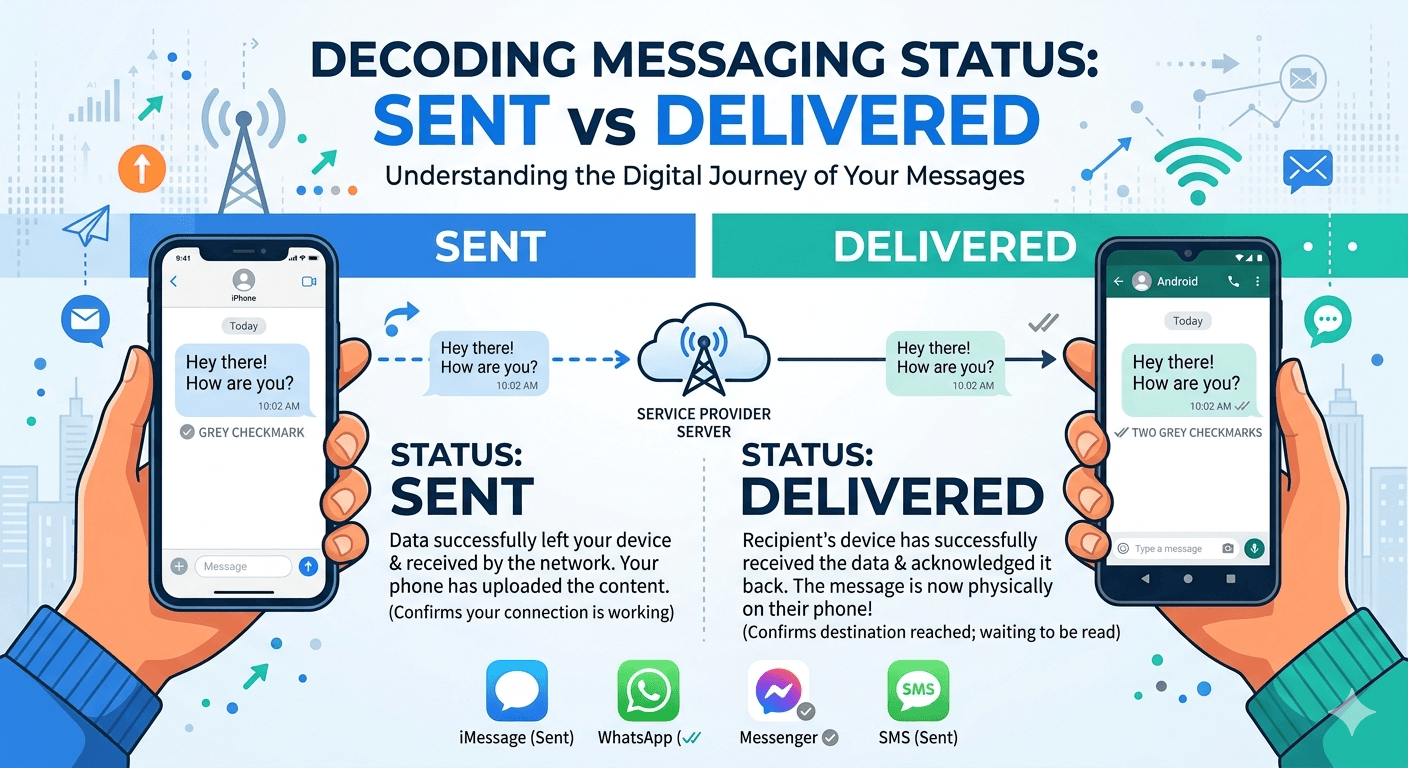
The primary distinction regarding sent vs delivered lies in the location of the message during its digital journey. When a message is marked as sent, it means the data has successfully left your device and has been received by your service provider’s server or the app’s central infrastructure. However, when a message is marked as delivered, it indicates that the recipient’s device has successfully received the data and acknowledged it back to the network. While a sent status confirms your device and connection are working, the delivered status is the only way to verify that the information has actually reached the intended destination and is waiting to be read.
Introduction to Sent vs Delivered Messaging
“Sent” means your message has successfully left your device and been submitted to the messaging server or carrier. “Delivered” means the message has reached the recipient’s phone or messaging app successfully. A message can show as sent but not delivered if the recipient’s phone is off, has no internet/network connection, or if you’ve been blocked.
In our hyper-connected era, the nuance between a message leaving your hand and arriving in someone else’s is more than just technical jargon; it is a fundamental part of how we manage our digital relationships. Whether you are using traditional text messaging or modern instant messaging apps like WhatsApp and Telegram, these status indicators serve as the heartbeat of our conversations. For many, seeing a message move from sent to delivered provides a sense of relief, while a message stuck on sent can trigger a variety of anxieties.
Interestingly, many people assume that the age of SMS is over, especially among younger generations. However, statistics tell a different story.
Recent market research indicates that SMS remains a powerhouse in the communication world, with millennials and Gen Z still heavily utilizing it for two-factor authentication, appointment reminders, and professional interactions. In fact, studies show that SMS open rates are as high as 98 percent, with 90 percent of messages being read within the first three minutes of delivery.
This high engagement rate makes understanding the mechanics of sent as sms vs delivered status incredibly important for both personal users and businesses trying to reach their audience effectively.
What Does ‘Sent’ Mean in Modern Communication?
When you tap the arrow icon to fire off a message, your device begins a complex process of packetizing your text, image, or video. The sent message status is the confirmation that this initial phase is complete. At this point, your phone has successfully uploaded the content to the Short Message Service Center or the application’s cloud server. It is essentially the digital equivalent of dropping a letter into a mailbox; you have fulfilled your part of the interaction, but the journey has only just begun.
A sent status does not guarantee that the recipient will ever see the message. It only confirms that there were no errors on your end, such as a lack of data or a service outage from your carrier. In the world of cellular networks, this status is often represented by a single checkmark or a specific text label depending on the operating system you use. For those wondering what does sent mean, it is the verification of a successful departure from the source. It signifies that your message is now in the hands of the intermediary, waiting for the path to the recipient to clear.
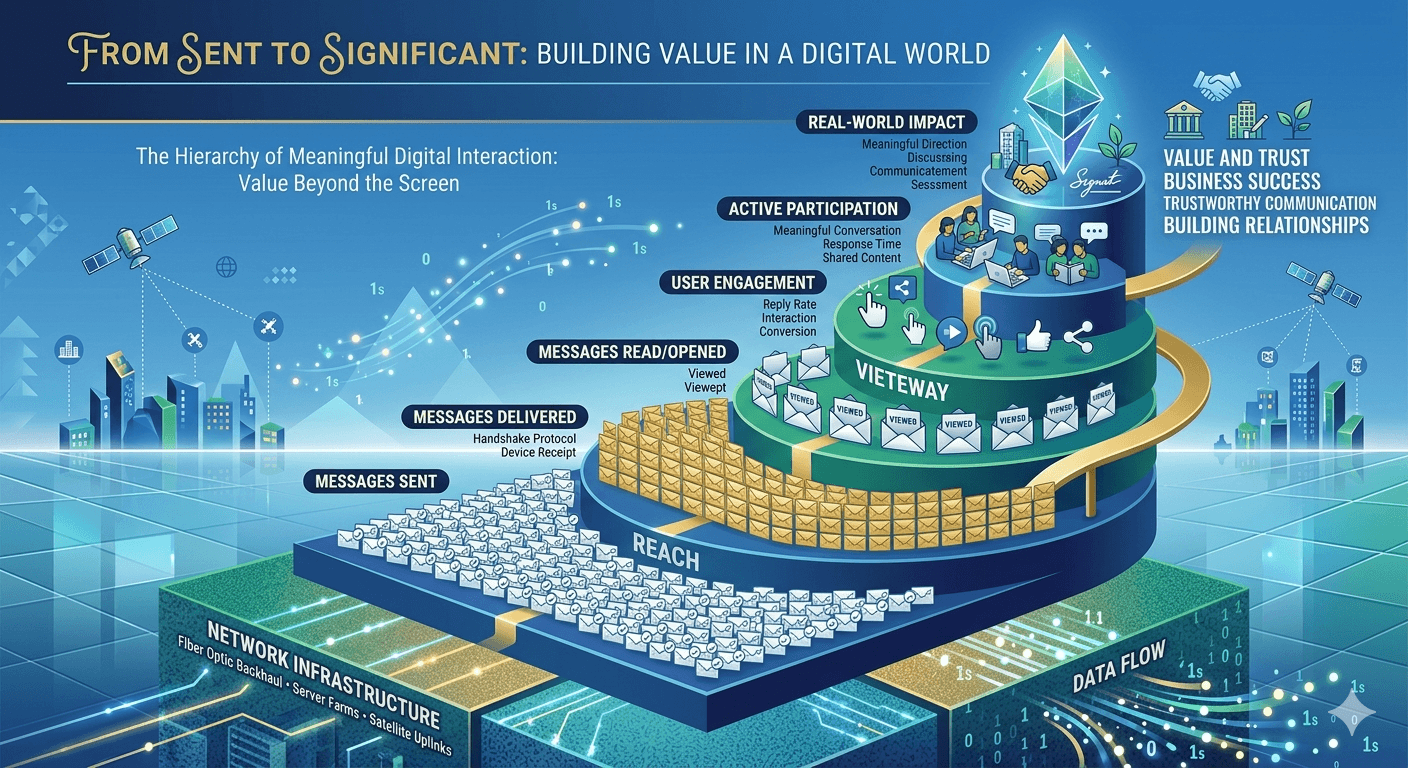
Why Do Some Messages Get Stuck on ‘Sent’?
One of the most common frustrations in digital communication is watching a message remain in the sent state without transitioning to delivered. This limbo state can occur for several reasons, and it often has nothing to do with the sender’s device. Understanding why this happens can save a lot of unnecessary stress and repeated attempts to send the same information.
The recipient’s phone is currently powered off or has a dead battery, preventing it from acknowledging the incoming data.
The recipient is in a location with no cellular or internet coverage, such as an airplane, a remote rural area, or a shielded building.
The recipient has enabled Airplane Mode, which severs all incoming and outgoing wireless connections.
The network is experiencing high levels of congestion, causing delays in the delivery of non-essential data packets.
The recipient’s phone storage is full, which occasionally prevents certain apps from downloading new incoming messages.
In some cases, a message remaining on sent could suggest that your number has been blocked, although most modern apps try to hide this by continuing to show a sent status to the blocked party to maintain privacy. If a message is stuck for more than twenty-four hours, it is usually safe to assume the device on the other end is unavailable for one of the technical reasons listed above.
What Does ‘Delivered’ Mean?
When you see the delivered message meaning on your screen, it indicates a successful “handshake” between the messaging server and the recipient’s device. This is a critical milestone because it confirms that the message is now physically present on the other person’s phone. It has passed through the airwaves, navigated the various carrier switches, and landed in the recipient’s local database.
It is vital to clarify a major point of confusion: delivered does not mean the message has been seen or read. It simply means the notification is likely sitting on their lock screen or waiting in their inbox. For instance, what does delivered mean on a text message? It means the recipient’s phone was on and had enough signal to receive the packet. The recipient might be sleeping, in a meeting, or simply ignoring their phone, but the delivery itself was a technical success. For businesses, this is the most important metric because it proves the reach of their marketing or notification efforts, regardless of whether the user chooses to engage with the content immediately.
Sent vs Delivered: The Technical Journey of a Message
To truly understand the difference between sent and delivered, we must look at the infrastructure involved in the process. When you send an SMS, it travels to a local cell tower, then to a mobile switching center, and finally to the SMSC. The SMSC acts as a “store and forward” system. If the recipient is not immediately available, the SMSC will hold the message and keep trying to deliver it for a set period, often up to seventy-two hours.
During the time the message is held by the SMSC, your phone will show it as sent. Only when the SMSC receives a confirmation signal from the recipient’s handset does it update the status to delivered. This architecture ensures that messages are not lost just because someone is temporarily out of service. For internet-based apps like Messenger or WhatsApp, the process is faster but follows the same logic: Client A to Server, Server to Client B. The transition between these states is the definitive way to track the message through its lifecycle.
Sent as SMS vs Delivered: Understanding Carrier Differences
The experience of sending a message can change significantly based on whether you are using a proprietary data service or traditional cellular channels. Many iPhone users often see the phrase sent as sms vs delivered when communicating with Android users. This occurs because the iPhone first attempts to send the message via iMessage (Apple’s data-based service). If the data connection fails or the recipient is not on an Apple device, the phone falls back to the older SMS protocol.
When a message is sent as sms, the delivery tracking capabilities can vary. Unlike iMessage or WhatsApp, which provide real-time updates, traditional SMS requires specific carrier support for delivery reports. If your carrier doesn’t support it or if the recipient has blocked such reports, you might only see that the message was sent without ever receiving a delivered confirmation. This is why many people prefer data-based messaging apps; they provide a more transparent view of the message’s status. For those asking do sms messages say delivered, the answer depends entirely on your phone settings and your mobile network provider’s specific features.
Differences Between Sent, Delivered, Failed, and Not Delivered
Understanding the hierarchy of message statuses is essential for troubleshooting communication issues. Each label represents a specific point of failure or success in the digital chain.
Sent: The message reached the server successfully. Your internet or cellular connection is fine.
Delivered: The message reached the recipient’s hardware. The server has finished its job.
Read: The recipient opened the app and viewed the message. This requires read receipts to be enabled.
Failed: The message could not leave your phone. This usually points to a lack of signal, no data, or a billing issue with your carrier.
Not Delivered: The server tried to reach the recipient but failed repeatedly, or the recipient’s carrier rejected the message (often due to spam filters).
Distinguishing between these is particularly important for safety and privacy when sending text messages. For example, a failed status requires immediate action from you, whereas a sent status requires patience for the recipient to come back online. If you are sending time-sensitive information, knowing these differences allows you to decide whether to switch to a phone call or a different app to ensure your message is received.
Status and Read Receipts on Different Social Media Apps
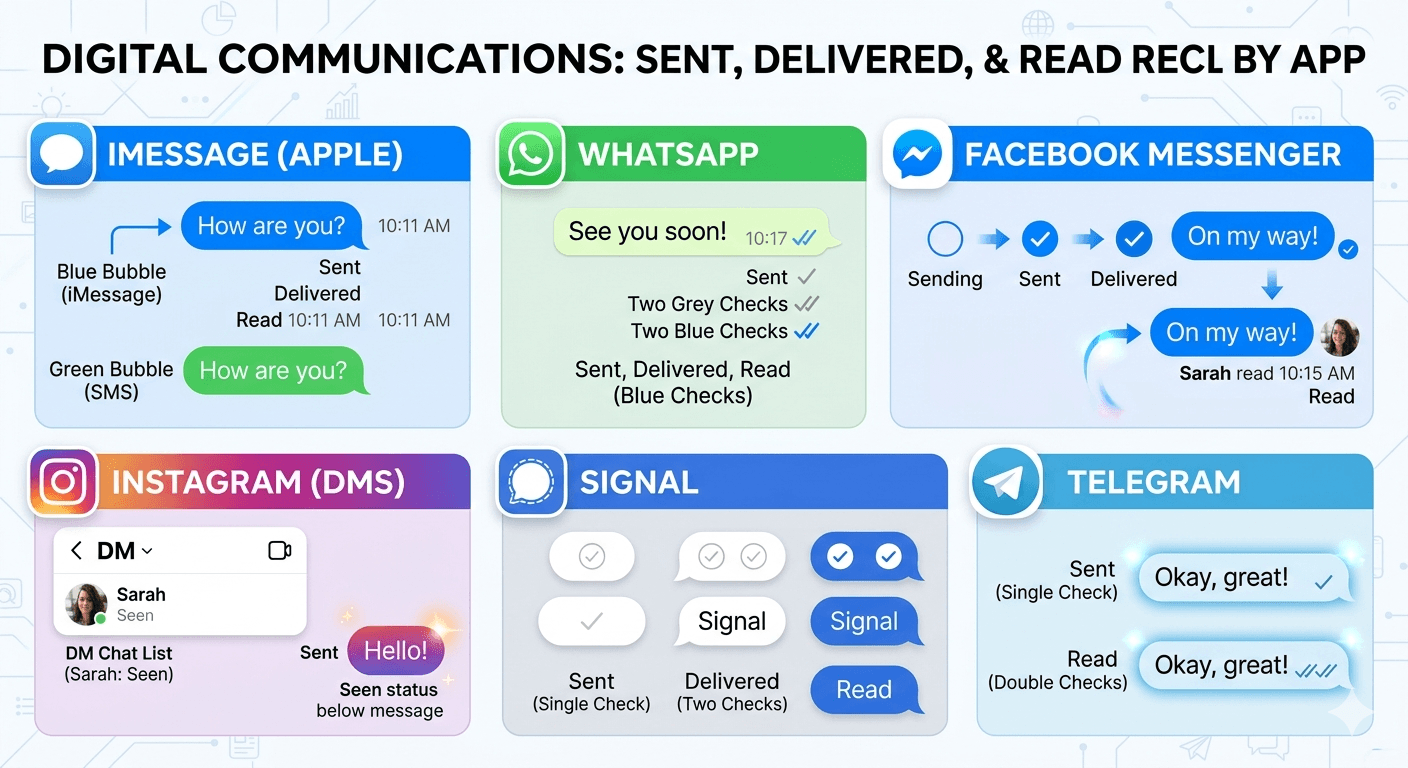
Every platform has its own visual language for communicating the sent vs delivered vs read statuses. Familiarizing yourself with these can prevent social misunderstandings and help you navigate your digital interactions with more confidence.
iMessage (Apple)
Apple uses text-based labels. Beneath your blue bubble, you will see “Sent” immediately after the message leaves your phone. Once it reaches the other person, it changes to “Delivered.” If the recipient has read receipts turned on, it will eventually change to “Read” followed by the time they opened it. If the bubble is green, it is being sent as a traditional SMS, and delivery reports may be unavailable.
WhatsApp uses a system of checkmarks. A single grey checkmark means the message has been sent to the WhatsApp server. Two grey checkmarks signify that the message has been delivered to the recipient’s phone. When those two checkmarks turn blue, it indicates that the message has been read. This is one of the most intuitive systems available today.
Facebook Messenger
Messenger uses circles to indicate status. An open blue circle means the message is sending. A blue circle with a checkmark inside means it has been sent. A filled-in blue circle with a checkmark means it has been delivered. Finally, when the recipient reads the message, the circle is replaced by a small version of their profile picture.
On Instagram, the status is usually displayed in the direct message thread. It will say “Sent” and then change to “Seen” once the recipient has viewed the message. Unlike other apps, Instagram often skips a specific “Delivered” text label in the main list view, focusing instead on whether the message has been seen.
Signal and Telegram
Signal uses circles with checkmarks similar to WhatsApp but with its own aesthetic. Telegram uses a single check for sent and a double check for read, often omitting a specific “delivered but not yet read” icon to keep the interface clean.
Why the Difference Between ‘Sent’ and ‘Delivered’ is Important for Businesses
For companies utilizing SMS marketing or transactional alerts, the distinction between sent and delivered is a key performance indicator. A “sent” message costs money, but only a “delivered” message has the potential to generate a return on investment. If a business sees a large gap between sent and delivered numbers, it suggests a problem with their contact list, such as old, inactive, or fake phone numbers.
Research into business communication shows that companies that monitor delivery rates closely can improve their customer engagement by up to 30 percent. By filtering out non-delivered numbers, businesses save money and ensure that their sensitive data, like password resets or shipping updates, is actually reaching the client. This is where the value of delivery reports becomes clear; they provide the data necessary to prune lists and maintain a high-quality communication channel. You can find more about high-level SMS protocols and business standards at The SMS Works, which provides detailed insights into carrier behavior.
The Value of Delivery Reports and Data
A delivery report is a digital receipt generated by the recipient’s mobile network. For personal users, it provides peace of mind. For developers and systems administrators, it is a diagnostic tool. In a professional setting, having a record that a message was delivered can be legally significant. For instance, in real estate or legal services, proving that a notice was delivered to a client’s device can be a critical part of a paper trail.
Modern CRM systems often integrate these delivery reports to give sales teams a better understanding of their leads. If a salesperson sees that a message was delivered but not read, they might wait before following up. If it wasn’t even delivered, they know the contact information might be wrong and can try reaching out via a different method. This data-driven approach to communication reduces friction and improves the overall efficiency of the interaction.
What to Do if Text Messages Are Not Being Delivered
If you find that your messages are consistently failing to reach the delivered state, there are several troubleshooting steps you can take to resolve the issue. Most delivery problems are temporary and can be fixed with a few simple adjustments.
Check Your Signal: Ensure you have at least two bars of service or a stable Wi-Fi connection if you are using data-based apps.
Restart Your Device: This clears the temporary cache and forces the phone to re-establish its connection with the local cell tower or router.
Verify the Recipient’s Number: A single wrong digit will prevent delivery. Ensure the country code is included if you are messaging someone internationally.
Update Your App: Outdated versions of WhatsApp or Messenger can have bugs that interfere with the delivery acknowledgment process.
Contact Your Carrier: If all messages to all people are failing, there may be a service outage or a restriction on your account.
In many cases, the issue lies with the recipient. If their service has been disconnected or if they are in a dead zone, there is nothing you can do on your end except wait for them to return to a covered area.
Safety and Privacy: Turning Off Read Receipts
While the journey from sent to delivered is mostly about technology, the transition from delivered to read is about human behavior. Many people feel a sense of “digital obligation” to reply immediately once a message is marked as read. To combat this pressure, most messaging platforms allow you to turn off read receipts.
By disabling read receipts, the sender will see that the message was delivered, but they will never receive the “Read” or “Seen” confirmation. This provides a layer of privacy, allowing you to view messages without the immediate pressure to respond. However, it is a two-way street; in most apps, if you turn off your read receipts, you will also be unable to see when others have read your messages. This balance is a key part of modern digital etiquette, allowing users to control their availability and manage their mental energy in an always-on world.
Read More: HD Voice Quality: What It Means
Conclusion
Understanding the intricate dance between sent vs delivered is essential for navigating the modern communication landscape. The “sent” status confirms your intent and the functionality of your device, while the “delivered” status confirms the successful arrival of your words at their destination. Recognizing that delivery does not equate to being read can help prevent misunderstandings and foster more patient interactions. Whether you are a business tracking customer engagement or an individual checking in on a friend, these status indicators provide the transparency needed to communicate effectively. Ultimately, while the technology behind our messages continues to evolve, the fundamental goal remains the same: ensuring our voices are heard and our connections remain strong across the digital divide.
Frequently Asked Questions
What is the difference between sent and delivered?
The difference lies in the stage of the journey. Sent means the message has successfully left your phone and reached the service provider’s server. Delivered means the server has successfully passed that message onto the recipient’s device. One confirms your connection, while the other confirms the recipient’s device is active and has received the data.
Why does it say sent but not delivered?
This usually happens because the recipient’s phone is currently unavailable. Common reasons include the phone being turned off, the battery being dead, the device being in Airplane Mode, or the person being in an area with no cellular or internet service. It could also mean the network is congested and hasn’t yet finished the final leg of the delivery.
Am I blocked if it says sent?
Not necessarily, but it is a possibility. Most messaging apps like iMessage and WhatsApp will still show a “Sent” status even if you are blocked, as a privacy measure for the person who blocked you. However, a message staying on “Sent” for many days, combined with other signs like your calls going straight to voicemail, could indicate a block.
How do you know if someone ignored your message?
If the status shows “Delivered” but has not changed to “Read” for a long time, the person may be busy or choosing not to open the app. If read receipts are turned off, you will never know for sure if they read it. If the status is “Read” and they haven’t replied, they are likely ignoring the message or waiting for a better time to respond.
Does delivered mean read on a text message?
No, delivered only means the message has arrived on the device. The recipient might have their phone in their pocket, or it could be sitting on a table across the room. They have not necessarily looked at the screen or opened the messaging app to view the content.
What does sent as sms mean on my phone?
This indicates that your phone was unable to use a data-based messaging service (like iMessage or RCS) and instead used the traditional cellular network to send the message. This often happens when you message someone with a different type of phone or when you have a poor internet connection.
How do messaging systems function in the context of delivery reports?
Messaging systems use a “handshake” protocol. When a message arrives, the recipient’s device sends a small packet of data back to the server saying, “I have received this.” The server then updates the status on the sender’s device to “Delivered.” This ensures that both the sender and the server have a record of the successful transfer.
Is it possible for a message to be delivered but not sent?
No, this is technically impossible. A message must always be “Sent” from the source and received by the server before it can ever be “Delivered” to the destination. The sent status is the prerequisite for the delivery phase.
Why is understanding sent vs delivered important for businesses?
Businesses need this distinction to track the effectiveness of their communication. If messages are sent but not delivered, it indicates a wasted expense on an inactive number. High delivery rates are essential for ensuring that critical information, like security codes and appointment times, actually reaches the customer.