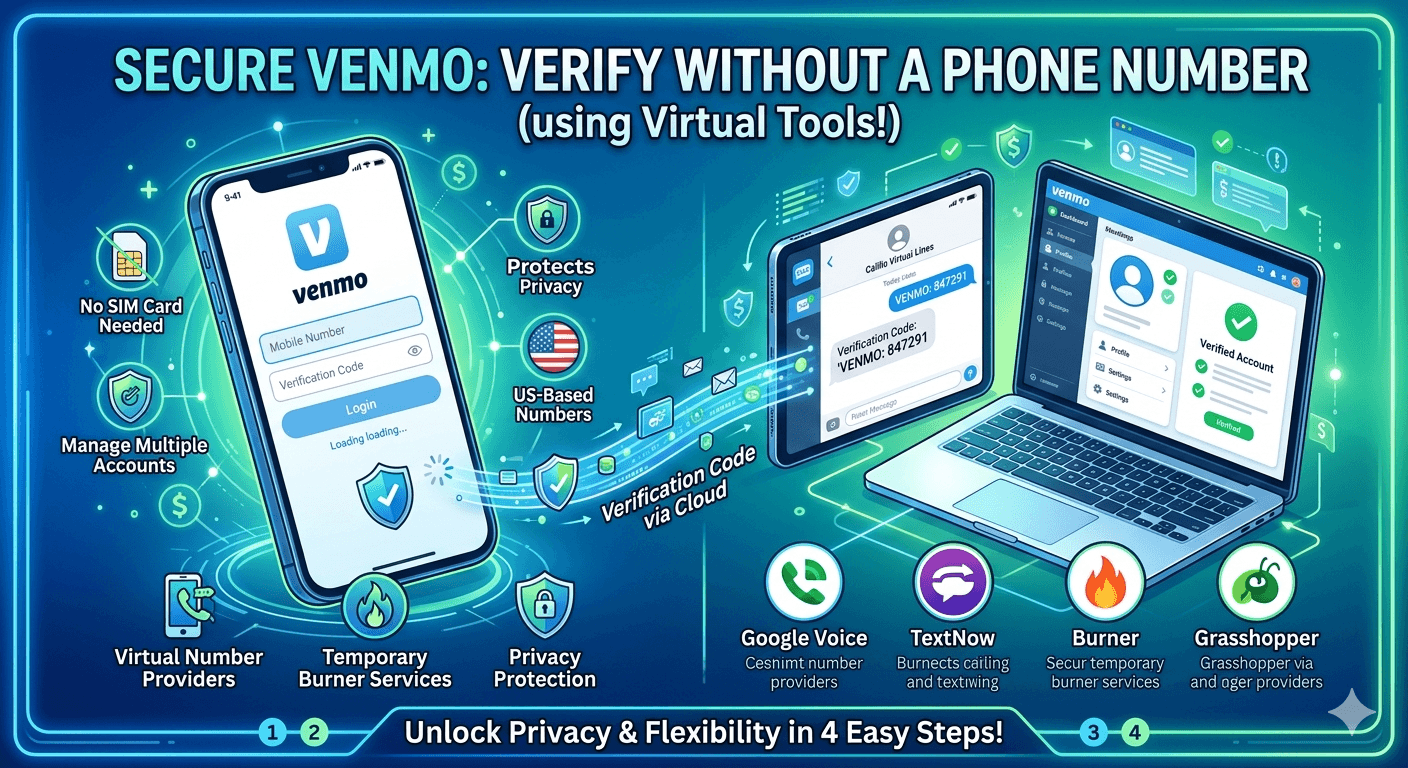
To learn how to verify Venmo without phone number, you must understand that while Venmo requires a mobile number for SMS verification, you can use alternative solutions like virtual phone numbers or temporary burner services. Users often seek to sign up for Venmo without a phone number to protect their personal privacy or manage multiple accounts. By using a reputable US-based virtual number provider such as Calilio or Google Voice, you can successfully receive the necessary Venmo verification code and complete your registration. This method bypasses the need for a physical SIM card while keeping your primary contact details secure and private.
Venmo has transformed the way people handle peer-to-peer transactions, making it effortless to split dinner bills or pay rent. However, the platform is built on a foundation of security that strictly requires a valid mobile connection to prevent fraudulent activity. If you find yourself in a situation where you cannot use your own mobile line, knowing how to verify Venmo without phone number becomes essential. This process involves using specialized communication tools that can mimic a standard mobile line, allowing you to satisfy the platform’s security checks without compromising your digital footprint or personal data.
Understanding What Venmo Is and Its Security Features
Venmo is a mobile payment service owned by PayPal that allows users to transfer funds to others through a mobile phone app. It has become a cultural staple in the United States, particularly among younger demographics who appreciate its social feed and ease of use. However, because Venmo handles sensitive financial data, it employs a rigorous verification process. This system is designed to ensure that every account is linked to a unique individual, which is why the platform usually insists on a mobile phone number for Venmo verification during the initial setup phase.
The security infrastructure of the app is quite robust, utilizing data encryption and multi-factor authentication to protect user balances. When you initiate the signup process, the app sends a unique code to the number provided to confirm that the user has physical access to that line. This is the primary hurdle for those asking does Venmo require a phone number. For many, the requirement is an obstacle due to privacy concerns or lack of a traditional mobile plan, leading to the search for alternative ways to establish a verified presence on the platform.
Is it Possible to Verify Venmo Without a Phone Number?
The short answer is that while you cannot completely skip the requirement for a numeric identifier, you can certainly find ways to use Venmo without a phone number that is personally tied to your SIM card. The system is programmed to look for a valid SMS-capable destination to send a one-time password. If you can provide a destination that the system recognizes as legitimate, you can bypass the traditional mobile requirement. This flexibility allows users who prefer digital-only solutions to maintain their financial autonomy without needing a traditional cellular contract.
Leveraging a Reliable Virtual Phone Number for Venmo
Using a virtual phone number for Venmo is perhaps the most reliable method available today. These numbers are hosted in the cloud rather than being tied to a physical device or a specific location. When you use a high-quality virtual service, the number appears to Venmo’s servers as a standard mobile line. This allows the verification SMS to be delivered to an online dashboard or a secondary app on your smartphone, enabling you to enter the code into Venmo and proceed with your account creation smoothly.
Utilizing Contact Information from Friends or Family
If you do not want to use your own line and do not wish to pay for a virtual service, you might consider using a number belonging to a trusted friend or family member. This person must not already have a Venmo account linked to that specific number, as the platform generally enforces a one-number-per-account policy. While this method is effective, it can be inconvenient because you will need that person to be available to relay the verification code to you whenever the app requires a security check or a new login.
Implementing a Temporary Phone Number for Venmo
A temporary phone number for Venmo, often referred to as a burner number, is a short-term solution for those who only need to pass the initial signup phase. These numbers are typically available through various websites or apps for a small fee or even for free. However, users should be cautious with this approach because if Venmo ever requires you to re-verify your identity or your device, you might lose access to that temporary number, which could lead to you being locked out of your financial account and losing access to your funds.
Major Benefits of Using Virtual Numbers for Verification
Opting for a virtual solution offers several advantages that go beyond just bypassing a simple signup requirement. For individuals who are conscious of their digital privacy, a virtual line acts as a buffer between their personal life and their financial applications. By choosing this route, you ensure that your primary mobile number is not stored in yet another database that could potentially be targeted by hackers or sold to third-party advertisers for telemarketing purposes.
Enhanced Privacy Protection: Using a virtual number keeps your real contact information hidden from the public eye and reduces the risk of SIM-swapping attacks.
Accessibility from Multiple Devices: Because virtual numbers are cloud-based, you can access your verification messages from a laptop, tablet, or secondary phone.
Geographic Flexibility: You can obtain a US-based number even if you are currently traveling abroad, which is essential since Venmo is restricted to US users.
Organizational Clarity: Maintaining a separate line for financial apps helps you keep your business and personal communications strictly segregated.
According to a 2023 report by the Identity Theft Resource Center, the number of data breaches in the financial sector has seen a steady increase, making the use of secondary identifiers a smart move for the security-conscious consumer.
By not linking your primary mobile line to every app you download, you effectively reduce your surface area for potential identity theft. This strategy is becoming increasingly popular among tech-savvy users who want to learn how to verify Venmo without phone number while maintaining a high level of operational security.
Step-by-Step Guide on How to Verify Venmo Account Using Virtual Tools
If you have decided that a virtual service is the best path forward, the process is relatively straightforward. You do not need advanced technical skills to complete this, but you do need to be methodical to ensure the app does not flag your attempt as suspicious. Following a structured guide will help you navigate the nuances of the Venmo phone verification system.
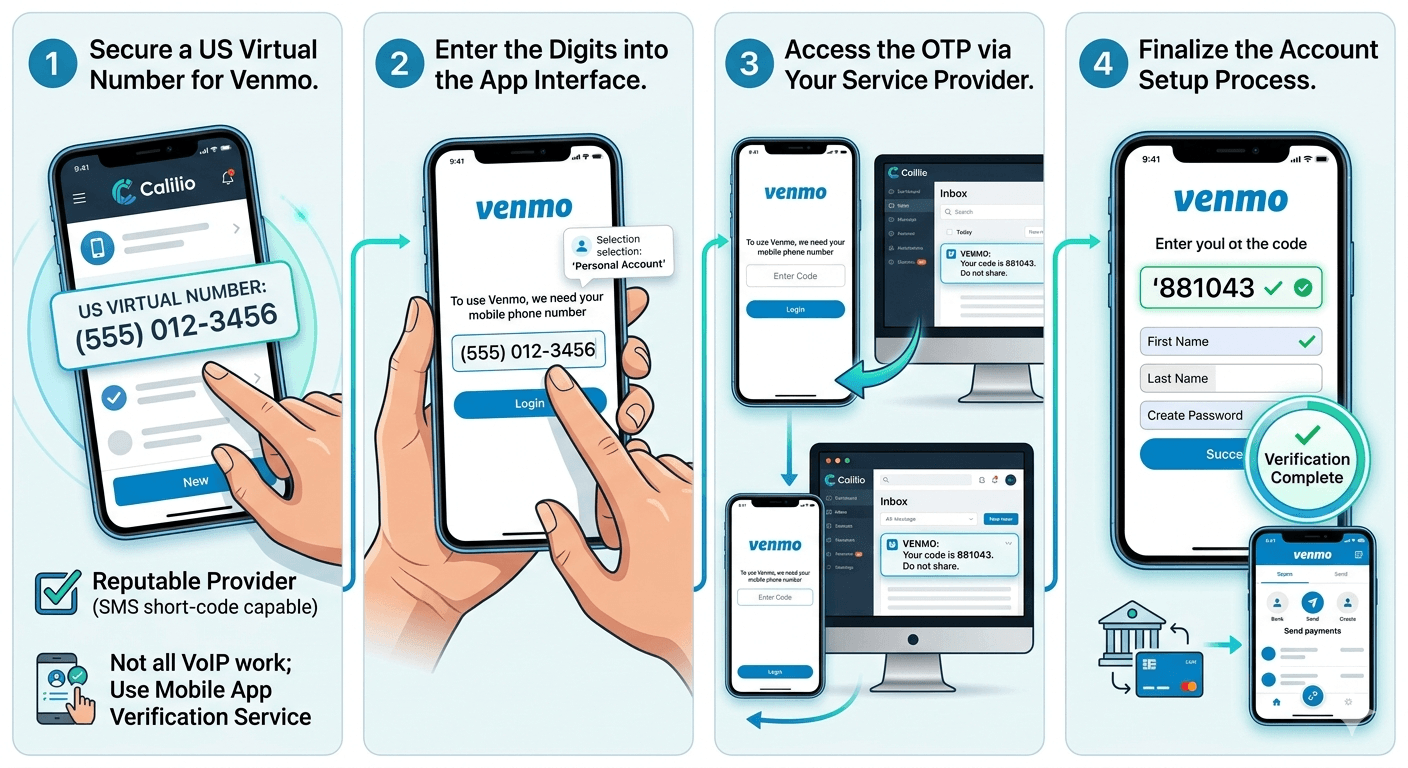
Step 1: Secure a US Virtual Number for Venmo
The first step is to choose a reputable provider that offers numbers capable of receiving short-code SMS. Not all virtual numbers are created equal; some are flagged by Venmo as VoIP (Voice over Internet Protocol) and may be rejected. You should look for providers that specifically state their numbers work for mobile app verification. Once you sign up for a service like Calilio or a similar professional platform, you will be assigned a 10-digit US number that you can use for your registration.
Step 2: Enter the Digits into the App Interface
After securing your number, open the Venmo app and begin the signup process. When the app prompts you with the message “to use Venmo, we need your mobile phone number,” simply type in the virtual digits you just acquired. Ensure that you have selected the personal account type if that is your intention. The app will then attempt to send a verification code to that number to confirm its validity and your access to it.
Step 3: Access the OTP via Your Service Provider
Navigate to the dashboard of your virtual number provider. You should see an incoming message almost immediately. This message will contain the Venmo verification code, which is typically a six-digit number. If the code does not appear, check to see if your virtual service has an SMS logs section or if there is a delay in the network. It is important to act quickly, as these codes often expire within a few minutes for security reasons.
Step 4: Finalize the Account Setup Process
Enter the code into the Venmo app to verify your identity. Once the code is accepted, you will be asked to provide further details, such as your name, email address, and a secure password. At this stage, you have successfully learned how to verify Venmo without phone number from a traditional carrier. You can now proceed to link your bank account or debit card to start sending and receiving payments through the platform.
Why You Might Want to Sign Up for Venmo Without a Phone Number
The motivation to can you create a Venmo account without a phone number often stems from a desire to maintain anonymity in an increasingly transparent digital world. Some users may be managing a small business and want to keep their professional transactions separate from their personal mobile plans. Others might be individuals who do not own a smartphone with a traditional data plan but still want to participate in the digital economy using a tablet or a computer.
Furthermore, some users have reported that their primary numbers were incorrectly flagged or blocked by the platform’s automated systems. In such cases, knowing how to verify Venmo without phone number is the only way to regain access to the service. There is also the issue of “phone number recycling,” where a new user might be assigned a mobile number that was previously linked to someone else’s Venmo account, causing significant login conflicts that can only be resolved by using a fresh, virtual alternative.
Best Providers for Virtual Numbers to Enable Successful Verification
Choosing the right provider is critical because Venmo’s security algorithms are constantly updated to detect and block low-quality “fake” numbers. If you use a provider that is frequently associated with spam, your account might be flagged before you even finish the setup. Here are some of the most reliable options for those looking for a virtual phone number for Venmo.
Calilio for Advanced Business Features
Calilio is a premium provider that offers highly reliable virtual numbers specifically designed for business and verification purposes. Their numbers are less likely to be flagged as VoIP, making them an excellent choice for bypassing Venmo phone verification. While it is a paid service, the reliability and additional features like call recording and team collaboration make it a top-tier choice for those who need a long-term solution for their financial accounts.
Google Voice for Personal Use
Google Voice is a popular choice because it is free for personal use within the United States. It provides a real US number that can send and receive texts. However, it is important to note that many users have asked can I use Google Voice number for Venmo, and the answer is mixed. While it works for some, Venmo has increasingly blocked Google Voice numbers because they are categorized as VoIP. If you already have a Google Voice account, it is worth a try, but have a backup plan ready.
Burner for Privacy-Focused Users
The Burner app is designed for short-term use, allowing you to create a secondary number and “burn” it when you are finished. This is perfect for those who want to create a Venmo account without a phone number that stays active forever. It offers a layer of separation that is highly valued by privacy advocates. Burner provides real mobile numbers rather than VoIP lines in many cases, which increases the likelihood of a successful Venmo verification.
TextNow for Cost-Effective Solutions
If you are looking for a free phone number for Venmo verification, TextNow is a frequently mentioned option. It allows users to get a free number by watching ads or subscribing to a small monthly plan. While it is a great budget option, it suffers from the same issues as Google Voice; many of its numbers are flagged as non-mobile. To increase your chances of success with TextNow, you may need to purchase their “lock-in number” feature which often provides a more stable line for SMS short codes.
Grasshopper for Small Business Management
Grasshopper is primarily aimed at entrepreneurs and small businesses. It allows you to add a professional-sounding line to your existing personal phone. This is an excellent way to set up Venmo without phone number confusion between your work and private life. Because Grasshopper is a paid, professional service, its numbers are generally held in higher regard by financial institutions and are less likely to be rejected by Venmo’s security filters.
Exploring Venmo Identity Verification and Personal Data Requirements
After you successfully navigate the phone verification phase, you will eventually encounter Venmo identity verification. This is a separate process required by federal law for anyone who wants to hold a balance in their Venmo account or send more than a small amount of money. The platform must comply with “Know Your Customer” (KYC) regulations, which are designed to prevent money laundering and terrorism financing. This means that even if you bypass the phone requirement, you will still need to provide other forms of identification.
The Purpose of Requesting Personal Information
Venmo asks for your Social Security Number (SSN) or Individual Taxpayer Identification Number (ITIN), along with your legal name and date of birth. This information is used to confirm that you are a real person and to report certain transactions to the IRS if they exceed specific thresholds. If you are wondering how to verify identity on Venmo, you should be prepared to provide these details through the secure “Identity Verification” section in the app’s settings menu.
Timeframe for Completing Identity Verification
Once you submit your documents, the verification process is usually quite fast. Most users are verified within a few minutes if the information matches public records. However, if there is a discrepancy, it can take up to three business days for a manual review. During this time, you can still receive money, but you might not be able to “pay out” or use your Venmo balance to make purchases until the process is fully completed and your status is updated to a verified Venmo account.
Managing Typos and Document Errors During Setup
It is remarkably easy to make a mistake when typing in a Social Security Number or a legal name. If you realize you have made a typo, you should contact Venmo support immediately. Do not attempt to create a second account to fix the error, as this can lead to both accounts being permanently banned for suspicious activity. If the app’s automated system cannot verify you due to an error, you may be asked to upload a clear photo of your government-issued ID, such as a driver’s license or a passport.
Research from the Federal Trade Commission indicates that digital payment apps are a major target for various scams, which is why these identity checks are so stringent. While it may feel intrusive, providing this data is a necessary step to ensure that the platform remains a safe environment for financial exchange. Users who are reluctant to share their SSN should know that they can still use Venmo for basic transactions by linking a bank account, although their account limits will remain significantly lower than those with a verified identity.
Troubleshooting Common Issues with Verification Codes
One of the most frequent complaints from users is that the Venmo verification code not received error occurs even when they have a working number. This can happen for several reasons, ranging from network delays to the carrier blocking “short-code” messages. If you are using a virtual service and the code hasn’t arrived after a few minutes, try restarting the app and requesting a new code. Sometimes, the first request gets lost in the digital ether.
Another common issue is when the app displays a message saying “this number cannot be used for verification.” This usually means that the number you provided has been flagged as a VoIP line or has already been associated with a banned account. In this case, your only option is to try a different provider or a different number from your current service. This is why it is often better to use a paid provider like Calilio, as they tend to have cleaner pools of numbers that have not been abused by previous users.
Safety and Security When Using Alternative Numbers
When you explore how to verify Venmo without phone number, you must consider the safety implications of the tools you use. Using a free, public SMS website is highly discouraged. These sites display incoming messages to everyone on the internet, meaning anyone could see your verification code and potentially gain access to your account. Always use a private, password-protected virtual number service to ensure that your financial security is never compromised.
Furthermore, ensure that the service you choose has a clear privacy policy and uses encryption for its data storage. If you are using a temporary number, remember that it is only temporary. For an account as important as Venmo, which may hold your hard-earned money, using a permanent virtual number that you own and control is the only responsible way to bypass the standard phone requirement. This long-term approach protects you from being locked out of your account if Venmo decides to perform a random security check in the future.
Read More: Weird Phone Numbers to Call: A Comprehensive Guide
Final Thoughts
Mastering how to verify Venmo without phone number is a valuable skill for anyone looking to optimize their digital privacy and flexibility. Whether you choose to use a professional virtual line from a provider like Calilio or a temporary burner number for a quick setup, the key is to prioritize security and reliability. While Venmo’s security measures are designed to be strict, they are not insurmountable for those who know which tools to use. By taking control of your verification process, you can enjoy the convenience of modern peer-to-peer payments without feeling like you have sacrificed your personal contact information to a giant corporate database. Always stay informed about the latest platform updates and security best practices to ensure your financial transactions remain smooth, safe, and private.
Frequently Asked Questions
How to verify Venmo account without phone number?
To verify your account without a traditional mobile line, you can use a virtual phone number for Venmo. These numbers are available through online services and can receive the SMS code required by the app. Once you obtain the virtual number, enter it into the Venmo signup screen and retrieve the code from your service provider’s dashboard. This allows you to complete the setup without ever linking your personal SIM card to the platform.
How to skip phone number verification on Venmo?
Currently, there is no official way to skip the phone number verification step entirely. Venmo’s security protocol requires an SMS-capable number to prevent bot accounts and fraud. However, you can bypass the need for your personal number by using a temporary phone number for Venmo or a virtual line. These alternatives satisfy the app’s requirement while keeping your primary contact details private.
Can I make a Venmo with just an email?
No, you cannot create a functional Venmo account using only an email address. While an email is required for account communication and password resets, the platform mandates a mobile number for the initial identity verification and SMS security checks. If you try to sign up with just an email, the app will eventually block your progress with a prompt stating that a mobile number is required to continue.
How can I verify my phone for Venmo when I can’t receive SMS messages?
If you are in an area with poor cellular service or your carrier blocks short-code SMS, you should try using a virtual number service that operates over the internet. Services like Calilio or Google Voice allow you to receive SMS messages through a web browser or a Wi-Fi-connected app. This bypasses the limitations of your physical SIM card and ensures you can receive the Venmo verification code regardless of your cellular signal.
Is it possible to bypass Venmo’s verified phone number request?
You cannot bypass the request itself, but you can change the way you fulfill it. By using a burner number for Venmo or a reputable virtual number provider, you can provide the system with the numeric identifier it needs without using your real phone. This effectively bypasses the personal privacy intrusion while technically complying with Venmo’s requirement for a verified numeric contact.
How do I log in to Venmo without my old phone number?
If you no longer have access to the number associated with your account, you will need to contact Venmo customer support for assistance. They may ask you to verify your identity through other means, such as providing your SSN, a government-issued ID, or confirming your linked bank account details. To avoid this in the future, it is best to use a permanent virtual number that you can access from any device.
Can I make another Venmo account with the same number?
No, Venmo generally restricts users to one account per phone number. If you attempt to create a second account using a number that is already in their system, you will receive an error message. If you need a second account for business or personal reasons, you will need to learn how to verify Venmo without phone number duplication by using a unique virtual line for the new account.