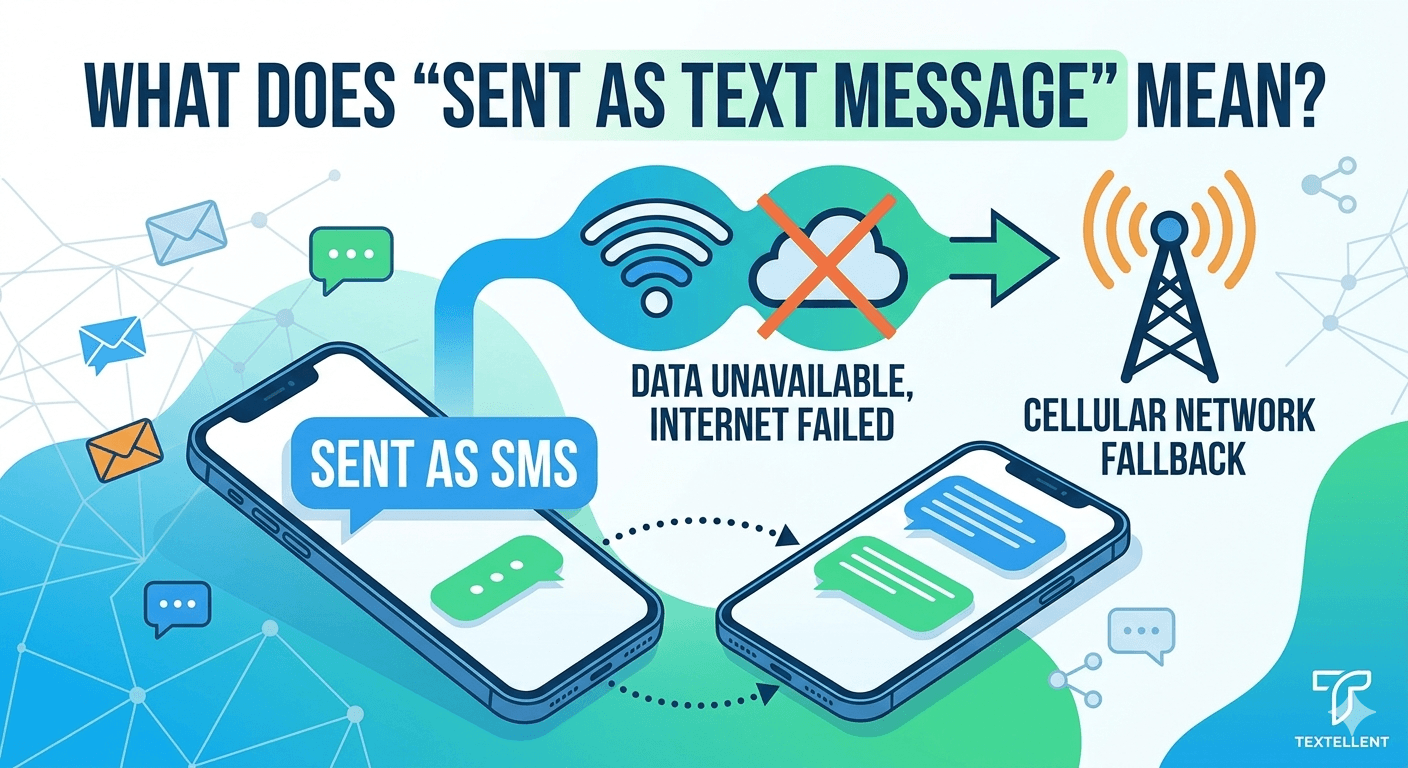
Understanding what does send as text message mean is vital for anyone using a modern smartphone to communicate across different networks. Essentially, when a device prompts you to send a message this way, it indicates that the primary internet-based messaging service, such as iMessage or RCS, is currently unavailable or failed to deliver. The phone then offers to revert to the traditional Short Message Service (SMS) protocol provided by your cellular carrier. This fallback ensures your communication reaches the recipient via cellular signal rather than a data connection, though it may lack features like read receipts or high-quality media.
What Does “Sent as SMS” Mean?
The phrase sent as sms refers to the transmission of a text message through the standard cellular network rather than over an internet data connection. In the early days of mobile phones, all text message text was sent this way. Today, most smartphones prefer internet-based protocols because they are faster and offer more features. When a notification appears stating a message was sent as an sms mean, it usually implies that the data-rich alternative failed for some reason. This could be due to a poor internet connection, the recipient’s phone being offline, or a mismatch in device types.
SMS uses a specific part of the cellular network that was originally designed for signaling rather than data. Because of this, it is highly reliable even in areas with very weak signal. When you encounter what does send as text message mean, you are essentially seeing the phone’s backup plan in action. While modern apps like WhatsApp or Telegram handle their own delivery, native apps on iPhone and Android are designed to switch between internet and cellular protocols seamlessly. This ensures that the message sent as sms reaches its destination even if the internet fails.
A significant distinction exists between internet messaging and cellular messaging regarding costs and limits. Many cellular plans offer unlimited sms messages text messages, but some may still charge per message, especially for international communication. Understanding what is sent as sms helps users avoid unexpected charges on their monthly bill. Furthermore, sms or text message delivery lacks the end-to-end encryption found in modern data protocols, meaning it is technically less secure than an encrypted iMessage or RCS thread.
What “Sent as SMS” Mean on iPhone
For iPhone users, the distinction between blue and green bubbles is a constant topic of conversation. When an imessage sending as text occurs, the bubble color changes from blue to green. This shift happens because iMessage requires both the sender and the receiver to have an active internet connection and a registered Apple device. If these conditions aren’t met, the device will ask what does send as text message mean or simply perform the fallback automatically. This transition ensures the text message text message is delivered regardless of the recipient’s device type.
There are several technical reasons why an iphone to iphone sent as text message might happen. If the recipient has their phone turned off or is in an area with no data coverage, the Apple servers cannot route the message through iMessage. In this scenario, the sender’s phone will wait for a short period before deciding to resend the content. If the setting for “Send as SMS” is enabled in the iOS settings, the phone will push the message through the carrier’s network, resulting in the green bubble. This is what is meant by sent as sms on iphone.
-
The recipient does not have an Apple device.
-
The sender or receiver has a weak or non-existent data connection.
-
The iMessage server is experiencing a temporary outage.
-
The recipient has disabled iMessage in their device settings.
Research from organizations like Juniper Research indicates that despite the rise of over-the-top (OTT) messaging apps like WhatsApp, the volume of carrier-based SMS remains massive, partly due to these automated fallback mechanisms. When an imessage sent as text message occurs, it demonstrates the resilience of the SMS protocol. Even if the sophisticated Apple infrastructure fails, the 30-year-old SMS system remains as a reliable backbone for global communication. This explains why does my text message say sms even when both parties are using high-end smartphones.
What “Sent as SMS” Mean on Android
Android devices have recently moved toward a standard called Rich Communication Services (RCS). Similar to iMessage, RCS allows for typing indicators, high-resolution photos, and read receipts. However, when an android user sees what does send as text message mean, it often points to a breakdown in the RCS connection. This could happen if the person they are texting is using a legacy device or if the carrier does not fully support the RCS standard yet. The message then reverts to a standard text send text format.
On Android, the status might appear as sms via server or simply show a small icon indicating the message was delivered via the carrier. This often happens in group chats where one member might not have RCS enabled, forcing the entire conversation to downgrade to the lowest common denominator. Understanding what is send as sms on Android is important for troubleshooting why certain features, like reacting to messages with emojis, might suddenly stop working. When the protocol switches, the level of interaction allowed by the software changes significantly.
-
Check the “Chat features” or “RCS” settings in the Google Messages app.
-
Observe the status icon next to the message timestamp.
-
Verify if the recipient is using a device that supports modern messaging standards.
-
Ensure that cellular data or Wi-Fi is active and stable.
The transition to sms text messaging texting on Android is a frequent occurrence in regions with inconsistent 4G or 5G coverage.
According to a report by the GSMA, while RCS adoption is growing, billions of people still rely on standard SMS for daily tasks.
When a user wonders what does it mean sent as sms, they are often experiencing the device’s attempt to prioritize delivery over rich features. This ensures that a critical text sent as sms meaning is not lost just because the data signal dipped for a moment.
How to Manage SMS Fallback on Your Phone
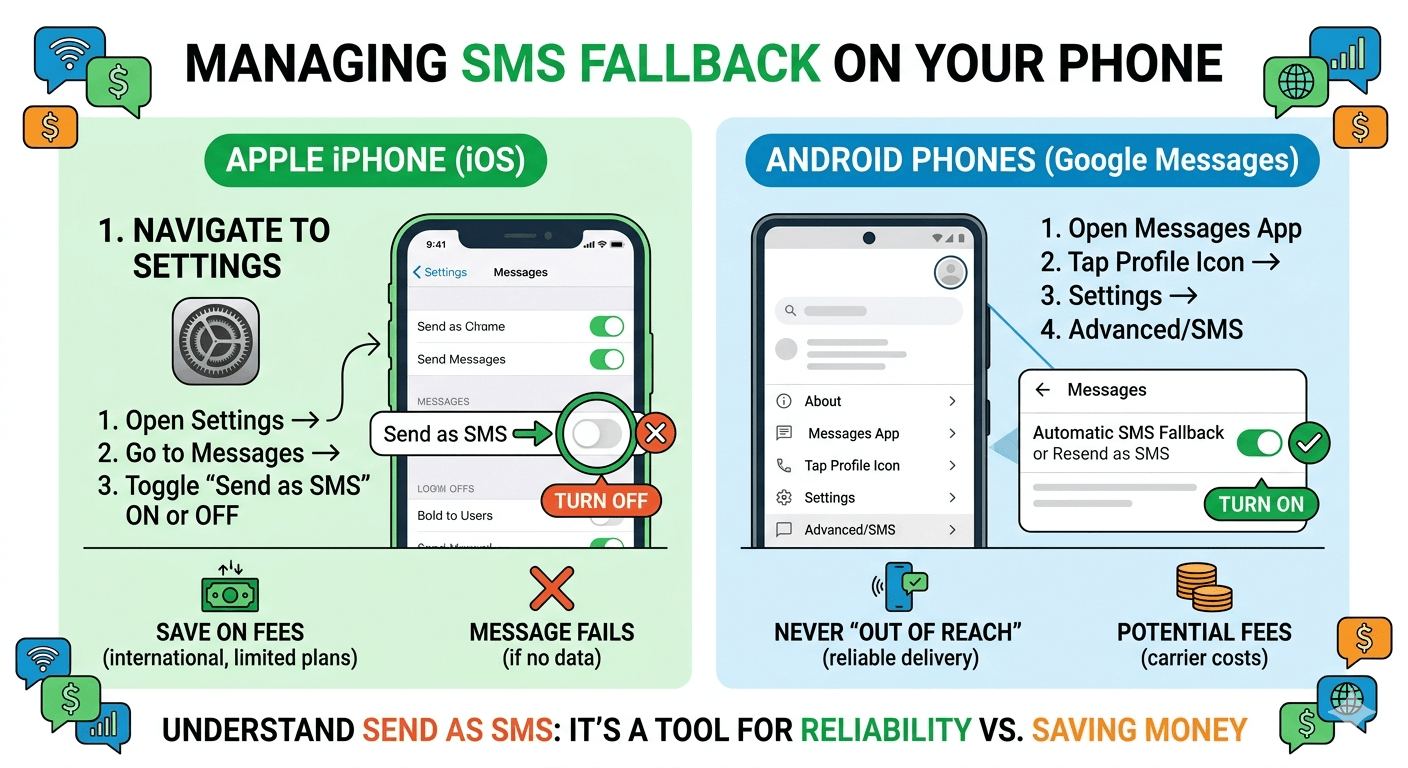
Most users prefer to have control over how their messages are delivered. If you find yourself asking what does send as text message mean and wanting to prevent it, you can adjust your settings. On an iPhone, navigating to Settings, then Messages, allows you to toggle the “Send as SMS” switch. If you turn off sms messaging fallback, your phone will only attempt to send iMessages. If the internet is down, the message will simply fail to send rather than switching to the cellular carrier.
Managing this setting is crucial for users who have limited text messaging plans or those who frequently communicate with people in different countries. An accidental resent as sms meaning could lead to international texting fees if not handled correctly. By knowing what does send as sms mean on iphone, users can make informed decisions about whether the cost of the message is worth the convenience of instant delivery. Some users prefer to leave it on so that they are never “out of reach,” while others turn it off to save money.
-
Navigate to the settings menu of your native messaging app.
-
Look for “Fallback” or “SMS” options within the advanced settings.
-
Decide if you want the phone to automatically resend failed data messages.
-
Monitor your message history to see how often the protocol switches.
When you understand what is send as sms, you realize it is a tool for reliability. However, it can also lead to fragmented conversations. For instance, if you send a message that was sent as a text message on iphone, it won’t sync with your other Apple devices like an iPad or Mac as seamlessly as an iMessage would. This is because standard SMS is tied to the phone’s SIM card rather than a cloud-based account. Keeping these settings optimized ensures a smoother user experience across all your digital touchpoints.
High-Volume Texting Calls for a Purpose-Built Messaging Platform
While personal phones handle what does send as text message mean on an individual basis, businesses face a different set of challenges. Sending thousands of messages to customers requires a more robust system than a standard smartphone. Personal phones are not designed for high-volume text sent as sms meaning, and carriers often flag high-frequency messaging from personal numbers as spam. This can lead to your number being blocked or messages never reaching their intended audience.
A purpose-built messaging platform handles the complexities of sms was sent statuses and delivery reports on a massive scale. For a business, understanding what does it mean sent as text message is the difference between a successful marketing campaign and a total failure. These platforms use short codes or verified long codes to ensure that messages bypass the standard spam filters that individual phones are subject to. This ensures a much higher delivery rate for critical alerts, appointments, and promotional offers.
Furthermore, these platforms provide analytics that personal phones simply cannot offer. Instead of wondering what is sent as sms, a business owner can see exactly how many people opened the message, clicked a link, or opted out. This level of data is essential for modern commerce. As consumer behavior shifts toward mobile-first interactions, the reliance on professional SMS infrastructure has grown. Businesses that try to run operations through a standard “text message text” approach often find themselves overwhelmed by technical limitations and compliance issues.
Switch From Phone-Based Texting to Better SMS Delivery With Textellent
For those who have outgrown the limitations of their personal device and are tired of questioning why does text say sent as sms, professional services offer a streamlined solution. Platforms like Textellent allow users to manage their messaging from a desktop interface, providing much better visibility into the communication chain. This transition removes the guesswork of what is sms in text messages and replaces it with a reliable, searchable, and professional communication hub.
By moving away from phone-based limitations, you gain access to features like automation, templates, and integration with customer relationship management (CRM) systems. When a message sent as text message leaves a professional platform, it is tracked through every step of the process. You no longer have to worry about why does my text send as sms; instead, you focus on the content and the timing of your outreach. This professionalization of texting is a trend that continues to gain momentum as businesses prioritize mobile engagement.
-
Consolidate all customer communications into a single, organized dashboard.
-
Use automated triggers to send messages based on customer actions.
-
Maintain a history of every sms text messaging texting interaction for better service.
-
Scale your messaging efforts without risking carrier blocks or spam filters.
The shift to these platforms also addresses security and compliance. Unlike a standard text send text, business platforms often include built-in tools for managing opt-ins and opt-outs, ensuring that the company remains compliant with laws like the TCPA. When you stop asking what does ‘sent as sms’ mean and start using a dedicated tool, you take a significant step toward professionalizing your brand’s digital presence.
Technical Reasons for SMS Protocol Dominance
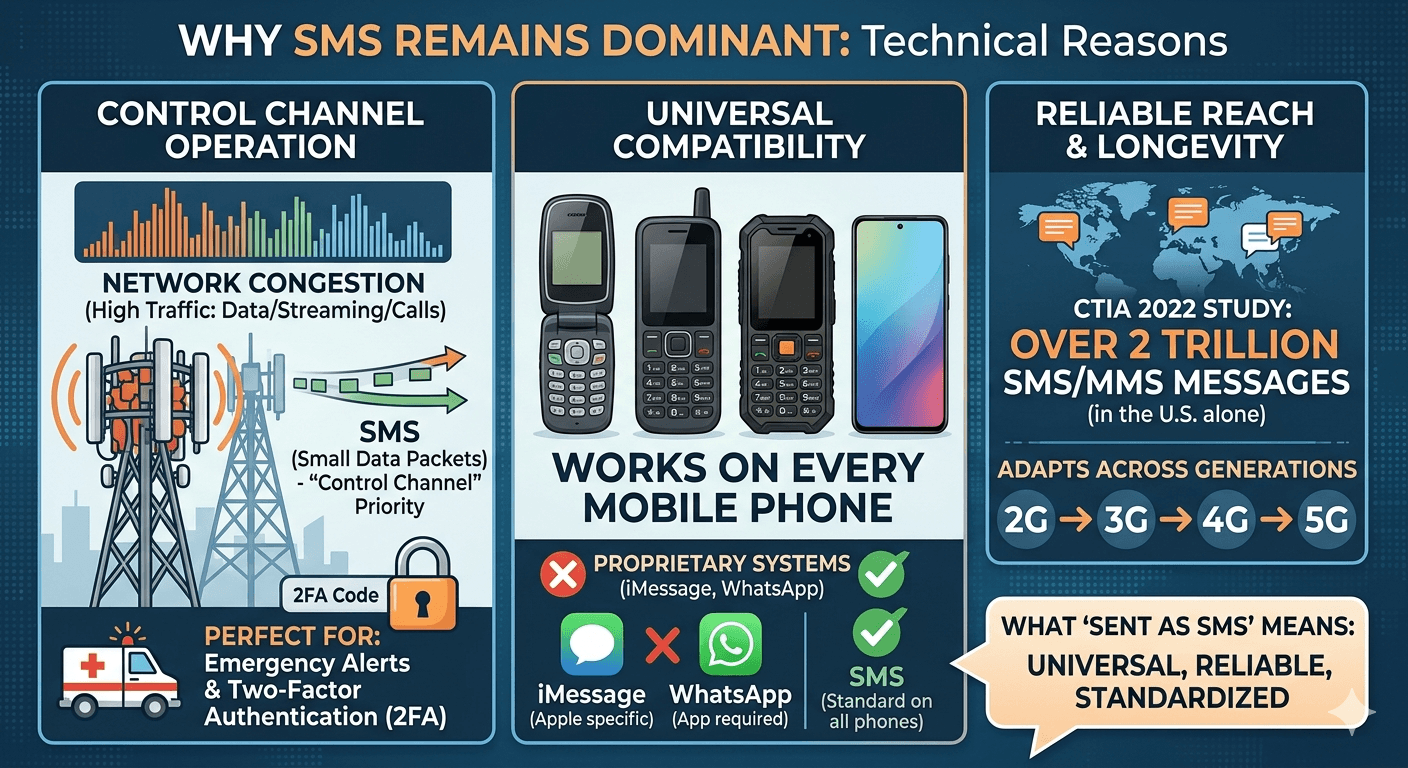
Despite the ubiquity of high-speed internet, the SMS protocol remains dominant for several technical reasons. One primary factor is its ability to operate on the “control channel” of cellular networks. This means that even if a cell tower is congested with thousands of users trying to stream video, a small text message text message can still slip through the signal noise. This inherent priority makes it the perfect choice for emergency alerts and two-factor authentication (2FA) codes.
Another reason for the longevity of the sent as sms means status is its universal compatibility. Unlike proprietary systems like iMessage, which only work on Apple hardware, or WhatsApp, which requires a specific app installation, SMS works on every single mobile phone ever manufactured. Whether you are using a $1,500 smartphone or a $20 “burner” phone, you can receive an SMS. This universal reach is why most organizations still use it for their most important notifications.
A 2022 study by the CTIA found that wireless providers in the United States alone handled over 2 trillion SMS and MMS messages. This staggering number highlights that while the internet is the future, the SMS protocol is the present. When someone asks what does it mean sent as sms, the answer is often a testament to a technology that has stood the test of time, adapting to every new generation of mobile connectivity from 2G to 5G.
The Security Implications of SMS vs. Data Messaging
When a message is sent as a text message, it travels across the cellular network in a way that is not end-to-end encrypted. This means that while it is difficult for a random person to intercept your text, the carrier and potentially government agencies have the technical ability to read the message content. This is a major point of contrast with services like iMessage or Signal, where the messages are scrambled in a way that only the sender and receiver can decode.
For this reason, experts often suggest that sensitive information should not be shared via a standard sms mean connection. If you see your conversation has turned green on an iPhone, it is a visual indicator that your level of privacy has shifted. While it is perfectly fine for casual conversations about dinner plans, it is not the ideal medium for sharing passwords or financial details. Understanding what does send as text message mean from a security perspective is a key component of modern digital literacy.
-
Standard SMS lacks end-to-end encryption.
-
Messages can be stored on carrier servers for a period of time.
-
SMS can be susceptible to “SIM swapping” attacks.
-
Internet-based apps offer more robust privacy settings.
Despite these concerns, the convenience of the sent sms remains unmatched. For the average user, the trade-off between absolute security and the guarantee of delivery is usually worth it. However, as cyber threats become more sophisticated, the industry is pushing for wider adoption of RCS, which aims to bring iMessage-like security to the Android world. This would eventually eliminate many of the privacy concerns currently associated with what is sent as sms.
Read More: How to See Blocked Messages on iPhone? 7 Simple Steps
Final Thought
Understanding the mechanics behind what does send as text message mean empowers you to navigate your digital social life with greater clarity. Whether you are dealing with a green bubble on an iPhone, a protocol switch on an Android, or a high-volume business campaign, the transition to SMS is a sign of a system trying to stay connected. While it may lack the bells and whistles of modern data-based apps, the humble text message remains the most reliable and universal way to reach someone across the globe. By keeping an eye on your settings and recognizing when a message has been sent as a text message, you can ensure that your communication is as secure, cost-effective, and successful as possible.
FAQs
-
Does “sent as SMS” mean I’m blocked?
Generally, no. If a message is sent as an SMS, it usually means the internet-based service is unavailable. However, if your messages were always blue (iMessage) and suddenly they always go green and stay that way, it could be a sign of being blocked, but it is not a definitive proof. Usually, it is just a network issue or the other person has changed their device.
-
Does “sent as SMS” mean their phone is off?
Yes, this is a very common reason. When an iPhone cannot reach another iPhone via Apple’s servers because the recipient’s phone is powered down or has no data, it will often attempt to send as text message to ensure delivery once the phone is turned back on or enters a cell-service area.
-
Does “sent as SMS” mean it’s been delivered?
Not necessarily. “Sent” means the message has left your device and reached the carrier’s network. It does not confirm that the recipient has received it on their handset. Unlike iMessage or RCS, standard SMS does not always provide a “Delivered” or “Read” receipt unless specifically supported and enabled by both carriers.
-
Why are my messages being sent as SMS?
This happens when your phone cannot establish a data connection with the messaging server or the recipient. Common causes include poor Wi-Fi, disabled cellular data, the recipient using a non-Apple/non-RCS device, or temporary outages in the messaging service’s infrastructure.
-
What does it mean when a text says “send as text message”?
It means your phone tried to send the message using a data-based service (like iMessage or RCS) and failed. It is now asking for your permission—or informing you—that it will use the traditional cellular SMS protocol to get the message through instead.
-
Should I turn on send as text message?
For most people, yes. Keeping this setting on ensures that your messages are delivered even when you or your recipient have poor internet. However, if you have an expensive per-text plan or are texting someone internationally, you might want to keep it off to avoid unexpected charges.
-
Am I blocked if it goes green?
Going from blue to green does not automatically mean you are blocked. It more frequently indicates that the recipient has no internet connection, has turned off iMessage, or has switched to an Android device. If you are blocked, the message might go green, but it will never show a “Delivered” status.
-
Does a text go through if it says sent as SMS?
Yes, the purpose of sending as an SMS is to ensure the text actually goes through. It is the backup method designed to be more reliable than internet messaging in low-signal areas. As long as you have at least one bar of cellular service, the message should eventually reach the recipient.