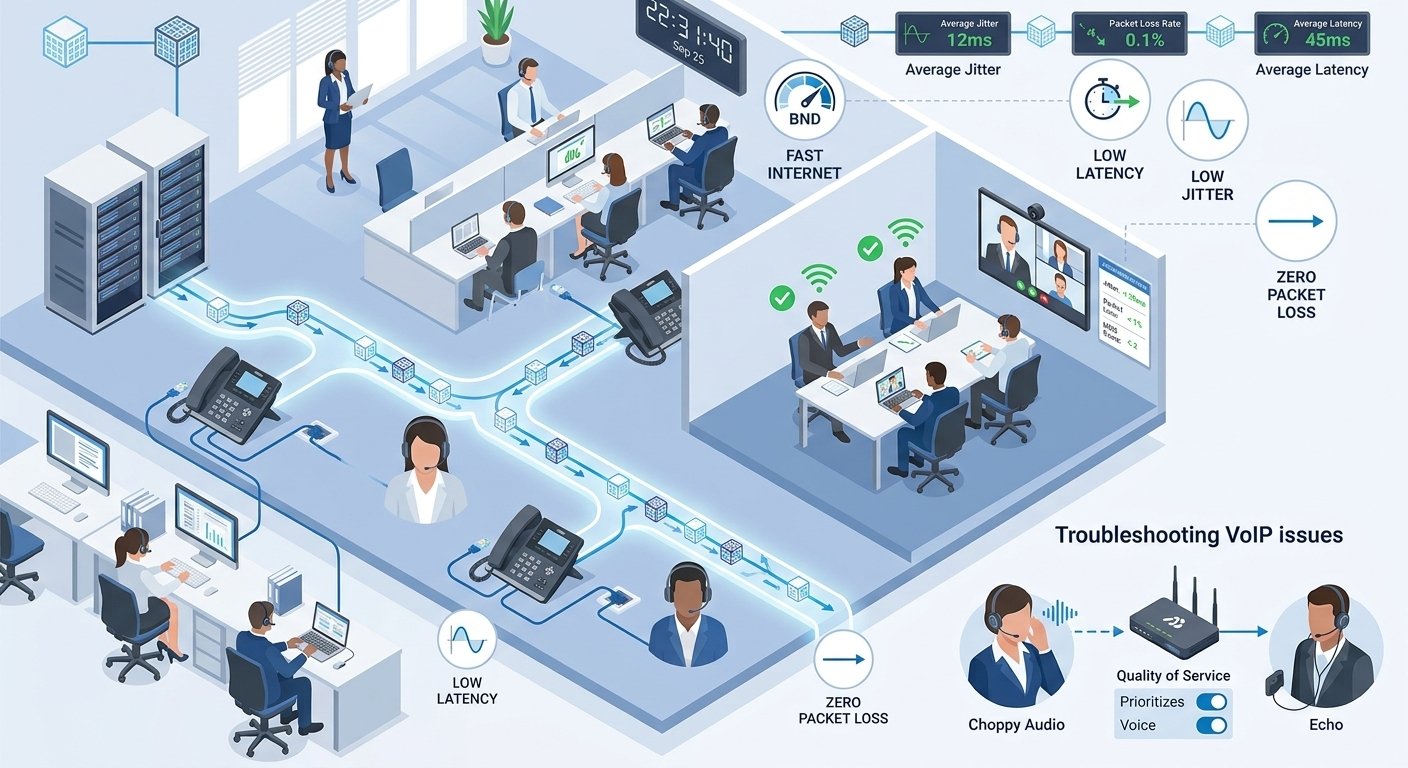
Tired of awful audio during important business meetings? To ensure professional communication and customer satisfaction, managing your voip call quality is crucial. Whether it’s a choppy voice, static, or dropped calls, the first step to clear, uninterrupted calls is determining the root causes. In this detailed guide, we’ll dive into the key factors influencing voip call quality, including internet speed, jitter, and packet loss. We’ll also explore effective troubleshooting techniques and best practices for monitoring and improving your voice network. Learn these critical voip call quality tips to facilitate top-notch communication throughout your company.
What Is VoIP?
Voice over Internet Protocol (VoIP) is a new technology that enables voice communications over a broadband Internet connection rather than a traditional analog phone line. Analog audio signals are converted to digital data packets as soon as they are received and then sent securely over your IP networks. This digital transformation provides exceptional flexibility, allowing professionals to take their dedicated business numbers anywhere a solid internet connection is available, ensuring your business telephone systems voiphealth remains robust.
What Impacts VoIP Call Quality
Call quality voip heavily relies on a continuously fast and stable digital environment to function correctly. There are many technical aspects that can have a huge impact on the quality of your conversations. Limited bandwidth, network jitter, and dropped data packets can lead to annoying echoes or even complete voip call failures, which directly affect your voip call quality.

1. Internet connection speed and stability
The speed and reliability of your broadband connection is of utmost importance to having the best quality voip. While the bandwidth per person is relatively low for cloud communications, any significant drops, congestion or routing delays will result in immediate audio distortion.
To ensure optimal voip performance, administrators should make sure there is high-speed internet available with at least 5 megabits per second. Regular testing will ensure that there is enough bandwidth available at all times during busy hours.
2. Latency/delay
Latency is the direct measurement of the time it takes data packets to move from a certain network location to another. When latency is extremely high, there will be a delay in the conversation, which will make people speak on top of each other and completely mess up the flow of the conversation.
Ideally, for high grade low latency voip, the transmission time should be less than 150 milliseconds. This aggravating delay is caused mainly by geographic separation between servers and very busy Web traffic.
3. Jitter
Jitter is the variation in the expected delay between packet delivery and not a constant rhythm. The different arrival times severely affect the smooth audio flow, resulting in a robotic or even garbled voice.
Built-in jitter buffers will help you to cope with minor network fluctuations for a short period of time, but if your network fluctuates too much, your overall voip call quality will be severely affected. The right settings can make all the difference in achieving reliable packet delivery and clear audio communication.
4. Packet loss
Packet loss occurs when a data packet is sent but fails to arrive at its destination and is discarded along the way. This unfortunate situation often results in missing syllables, missing words or even silent spaces in a conversation.
Industry studies have shown that a packet loss rate of more than five percent will greatly affect the quality of calls and the user experience. The key to ensuring that these critical data points don’t get lost in transit is to have a solid infrastructure.
5. Codecs used
Digital codecs seamlessly compress and encode your voice data so it can travel swiftly across various online pathways. Low bandwidth options typically save network bandwidth, but can result in much lower acoustic quality.
On the other hand, wideband codecs offer a more full and rich sound, similar to that of traditional hardware, but require a significant amount of bandwidth. Choosing the right codec involves a balance between maximum audio fidelity and the bandwidth available on your network.
6. Quality of Service (QoS) policies
With the correct quality of service for voice over ip, your critical voice information does not need to compete with typical web surfing or video streaming. If you don’t have priority rules, your critical communications are bound to be congested during peak office hours.
By thoroughly configuring your internal routing hardware to favor communication protocols, you greatly enhance reliability and acoustic consistency. This strategic prioritization remains one of the most effective ways to stabilize daily communications.
7. Distance
Long-distance communications, especially international ones, come with increased cases of transmission delay as a result of the time it takes the signal to travel. The further the data physically moves, the more likely it is to be degraded.
Working with a provider that has servers all over the world can help to effectively overcome these geographical restrictions. Optimized routing paths guarantee that even international collaborations do not suffer from any quality loss of the voip calls.
How To Identify & Monitor VoIP Call Issues
The basic rule for any successful digital communication implementation is to monitor daily communications. You need to proactively implement strong software tools that offer visibility into key metrics such as jitter rates, packet loss and mean opinion scores for each and every user session. The ability to log specific events for each endpoint device also helps IT departments identify particular errors and speed up the overall troubleshooting process.
Furthermore, attentively listening to user complaints regarding garbled voices, frustrating echoes, or unexpected drops provides invaluable subjective assessments. When staff members consistently experience poor voip, you can quickly cross-reference their exact feedback against your objective hardware metrics to pinpoint the hidden business voip phone system poor call quality causes.
Troubleshooting VoIP Call Quality Issues
| VoIP Issue | Primary Cause | Troubleshooting Steps & Solutions |
| Choppy audio or robotic voice | Severe network jitter: Delayed or out-of-sequence data packets that disrupt the sound stream. | • Run a diagnostic speed test to ensure at least 150 kbps upload capacity.
• Switch from a wireless Wi-Fi connection to a hardwired Ethernet cable. • Pause large background file downloads or bandwidth-heavy apps. • Increase your VoIP software’s jitter buffer to compensate for unpredictable packet delivery. |
| Echo / Feedback | Acoustic loops: A sensitive microphone picking up the output from an active speaker, causing repeating sound. | • Use a professional-grade headset instead of external computer speakers
• Lower the microphone gain settings so it only captures your voice. • Enable advanced echo cancellation features in your communication app’s settings. |
| Dropped calls | Connectivity failures: Localized internet drops or hardware timeouts abruptly ending the session. | • Move physically closer to your wireless router or plug directly into a dedicated wall port
• Restart routing hardware to clear internal memory and glitches • Contact your Internet Service Provider (ISP) regarding persistent limitations • Use an advanced VoIP platform with dynamic recovery algorithms to maintain sessions during minor interruptions. |
Best Practices To Improve VoIP Sound Quality
As the digital landscape becomes more complex, it’s more important than ever to stay vigilant and stick to the rules, which will keep your whole team at peak productivity. When you know exactly what you can control, you can always enable employees to use highly reliable voice tools.
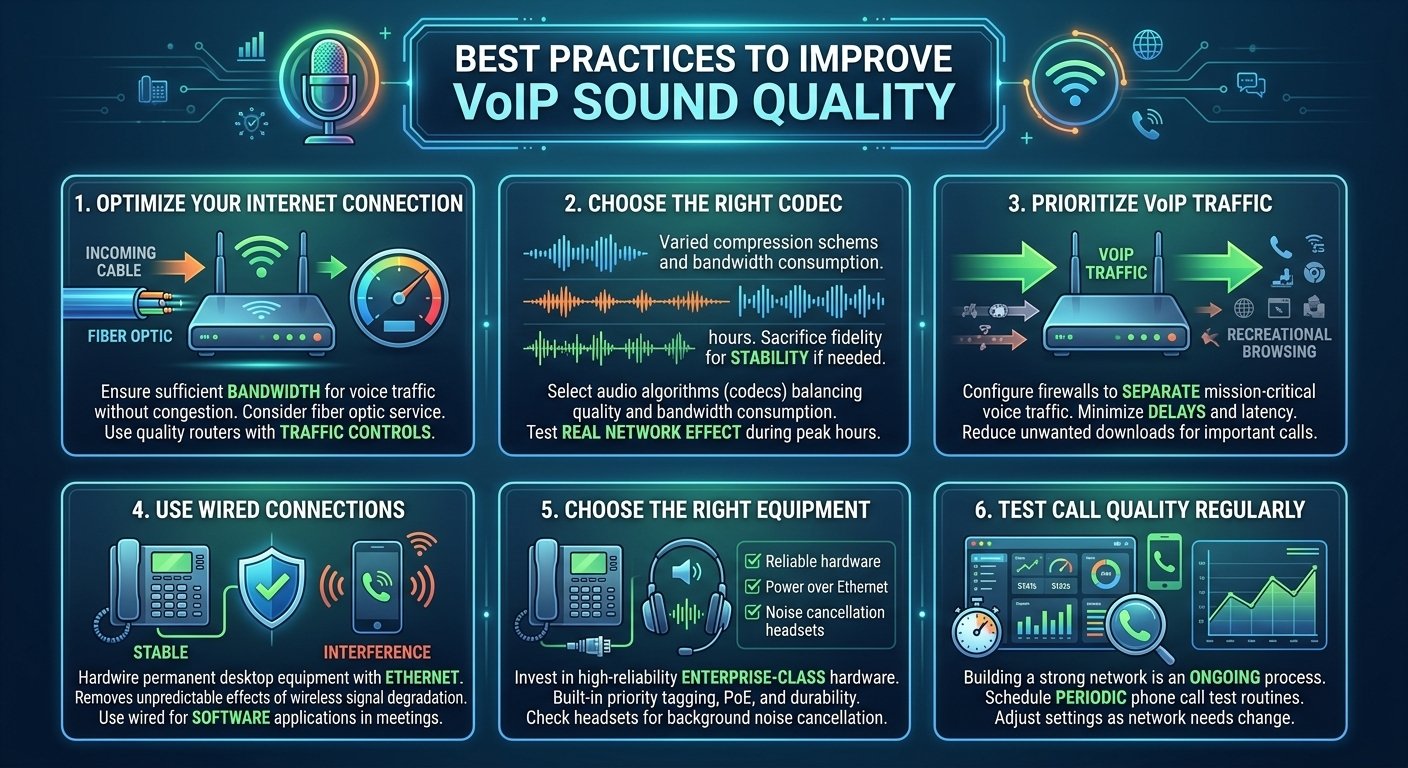
The following are the best practices to optimize your infrastructure and to be successful in optimizing ucaas calls across the organization.
1. Optimize your internet connection
It is extremely critical to ensure that the bandwidth you have will be able to accommodate dedicated voice traffic without causing congestion in the network. Business-class fiber optic service is available and can easily deliver the bandwidth needed for upload and download during peak business hours.
Also, administrators should install a good enterprise router with advanced traffic controls securely. With proper wireless bands management and correct hardware devices allocation, you can easily prevent unwanted interference and significantly enhance voip quality.
2. Choose the right codec
The particular audio compression schemes used by your desktop hardware are of utmost importance to system stability. Some algorithms deliver amazing audio quality but can quickly eat up a large chunk of your bandwidth.
It is still important to thoroughly test their real network effect during your peak business hours. Sometimes it is a very sensible administrative decision to sacrifice a little bit of acoustic fidelity in order to avoid overwhelming system congestion.
3. Prioritize VoIP traffic on your network
In an enterprise setting, the functional priorities of standard web surfing and critical business discussions are totally different. With sophisticated firewall configurations that separate mission-critical voice traffic from recreational Web browsing, unwanted delays are significantly minimized.
You can achieve a substantial decrease in overall transmission latency, which improves the acoustic reliability of the whole company network. Say goodbye to unneeded downloads and make more digital space available for your most important daily tasks.
4. Use wired connections for VoIP phones
If possible, require that all permanent desktop equipment be hardwired Ethernet and not wireless. This direct physical method completely removes the unpredictable effect of wireless signal degradation as a possible source of interference.
If the employee is using software based applications on a portable laptop, it is strongly recommended that a wired connection be used during critical meetings. If wireless is required, it is essential that they are very close to the main access point to maintain voip call quality.
5. Choose the right equipment and software
By investing in enterprise-class hardware throughout your organization with high reliability, you can achieve maximum acoustic performance. Ideally, dedicated hardware should have built-in priority tagging, power over ethernet, and physical durability.
Moreover, it is crucial to carefully consider the background noise cancellation capabilities of every headset you buy. We strongly suggest checking out some outside materials on VoIP system implementations so you can get a good feel for how to check call quality and support from voip vendors.
6. Test call quality regularly
Building a strong communication network is no easy install and forget process, it’s a continuous maintenance process. Having a full monitoring software program and scheduling periodic phone call test routines ensures that your stats stay within acceptable ranges of operation and safeguard your voip call quality.
This steady evaluation process makes it extremely simple to readjust concerns whenever system needs inevitably change. This ensures that your internal network is absolutely top-notch before your hardware fails.
Read More: Sip Trunking vs Pri: Know the Difference
Final Thought
Clean voip call quality is an administrative task that must be achieved and maintained and that takes careful network monitoring, proper hardware selection and proactive troubleshooting to achieve and maintain. When you know precisely how latency, jitter and bandwidth affect your digital packets, you can easily put in place the correct safeguards to ensure your communications are safe. These are thoughtful moves, whether you’re upgrading to enterprise-class routers, enforcing strict hardwired connections, or tuning your service policies, to ensure your business interactions are as professional as possible. Don’t underestimate the huge difference a reliable network can make in client satisfaction and overall team productivity; invest in your voice infrastructure today for a more connected tomorrow.
VoIP Call Quality FAQs
-
How do you monitor and improve voip call quality?
Monitoring involves utilizing specific software to monitor metrics such as jitter, packet loss, and latency in real time. To increase the overall audio clarity, prioritize voice traffic on your router, improve your internet bandwidth, use hardwired connections and set up the right compression codecs.
-
How do you check voip quality before a major meeting?
An online speed test is available, specifically for cloud communications, to test your current upload and download speed. Also, make a test call to a co-worker to subjectively evaluate clarity, test voip quality, and see if there are any disruptive echoes.
-
What exactly causes poor voip call quality?
The most common reasons are a flaky broadband connection, network congestion due to heavy downloads, outdated routing equipment, and too much wireless interference. High latency and jitter can cause your audio packets to be delivered in a way that is not smooth, causing conversations to be scrambled or dropped altogether.
-
How does packet loss affect my ongoing conversations?
If the data chunks do not arrive at their destination, then gaps in the audio stream are noticeable. This can cause you to miss out on syllables, have choppy sentences and not be able to fully understand the person on the other end of the line, which is very frustrating for both parties.
-
Why is there a strange echo on my line?
Echos usually happen when your microphone is on and the audio from your external computer speakers is picked up by your microphone. This annoying loop can be fixed immediately by using a good quality wired headset and using the advanced acoustic cancellation functionality in your application.
-
Does internet speed really matter for cloud telephony?
Yes, voice data is relatively low bandwidth, but is extremely dependent on consistency when compared to high definition video streaming. You can enjoy a stable and uninterrupted connection, which helps to avoid robotic sound and ensures that your significant conversations are crystal clear.
-
What are the best methods for volte audio quality testing?
Testing involves the use of special network diagnostic platforms to measure the real signaling and media stream performance in different load conditions. These enhanced volte audio quality testing techniques enable administrators to detect cellular handoff problems and ensure that high-definition voice capabilities are working properly throughout the network.
-
Can upgrading my router fix my communication issues?
Yes, an upgraded business class router will offer you the ability to have priority settings that will allow your important communications to take priority over regular web traffic. Newer equipment also has much better processors that can process large amounts of data without causing delays.
-
How frequently should I evaluate my voice network?
Administrators should always be on the lookout for problems on their network, and automated software can provide a real-time alert when problems are identified in real time via a dedicated phone call quality test. But quarterly manual review of your infrastructure and hardware means you are always in-line with your growing organizational demands.