How Startups Can Integrate Smarsh with VoIP Systems
Setting up Smarsh with a Voice over Internet Protocol (VoIP) system begins with identifying the communication records your business needs to preserve and selecting a compatible integration. RingCentral offers a documented connection for archiving supported communications, while Intulse provides an integration for SMS archiving. Smarsh also offers Voice Call Capture for supported mobile calls. Each solution has different technical requirements, so confirm compatibility, licensing, and capture capabilities before installation.
-
Step-by-step setup process
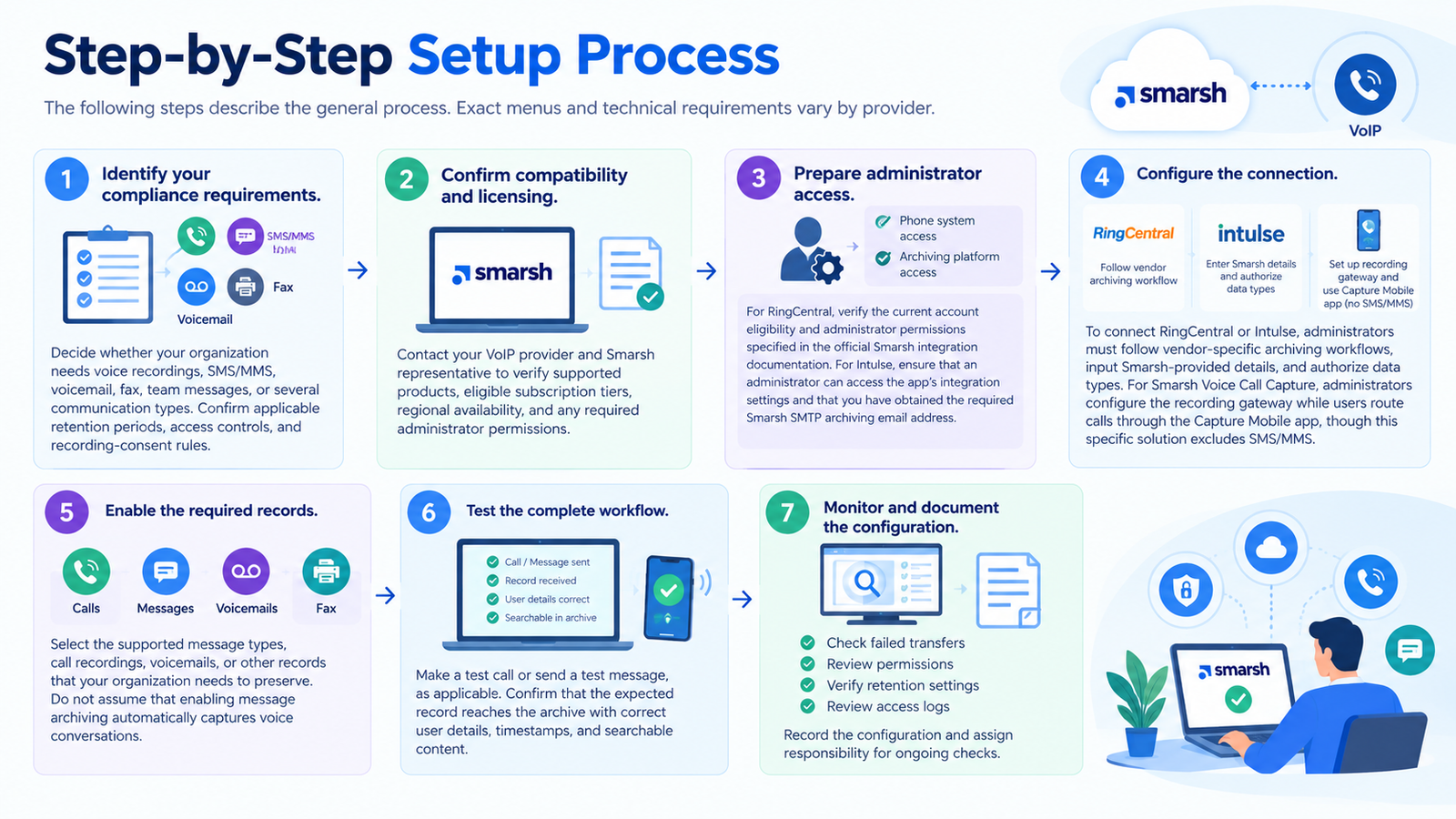
The following steps describe the general process. Exact menus and technical requirements vary by provider.
- Identify your compliance requirements. Decide whether your organization needs voice recordings, SMS/MMS, voicemail, fax, team messages, or several communication types. Confirm applicable retention periods, access controls, and recording-consent rules.
- Confirm compatibility and licensing. Contact your VoIP provider and Smarsh representative to verify supported products, eligible subscription tiers, regional availability, and any required administrator permissions.
- Prepare administrator access. Obtain the necessary permissions for the phone system and archiving platform.
- For RingCentral, verify the current account eligibility and administrator permissions specified in the official Smarsh integration documentation. For Intulse, ensure that an administrator can access the app’s integration settings and that you have obtained the required Smarsh SMTP archiving email address.
- Configure the connection. To connect RingCentral or Intulse, administrators must follow vendor-specific archiving workflows, input Smarsh-provided details, and authorize data types. For Smarsh Voice Call Capture, administrators configure the recording gateway while users route calls through the Capture Mobile app, though this specific solution excludes SMS/MMS.
- Enable the required records. Select the supported message types, call recordings, voicemails, or other records that your organization needs to preserve. Do not assume that enabling message archiving automatically captures voice conversations.
- Test the complete workflow. Make a test call or send a test message, as applicable. Confirm that the expected record reaches the archive with correct user details, timestamps, and searchable content.
- Monitor and document the configuration. Review failed transfers, permissions, retention settings, and access logs. Record the configuration and assign responsibility for ongoing checks.
RingCentral and Intulse use different integration workflows, while Smarsh Voice Call Capture follows a separate mobile recording process. Before deployment, test the exact communication types your business needs to preserve and confirm that each expected record reaches the archive. Successful setup of one connector does not establish that other communication channels are being captured.
What Is Smarsh VoIP Integration?
Smarsh VoIP integration links a business telephone or communication platform with tools that capture, archive, govern, or analyze digital communications. Instead of relying only on employees to save records manually, organizations can use supported integrations to preserve selected communication data for future review.
Smarsh is a communications compliance and archiving provider rather than a conventional business phone service. Its offerings include communication archiving, mobile voice capture, and voice-recording and analytics solutions. The available features depend on the specific product, connected platform, subscription, and configuration. Businesses should verify whether their chosen solution captures live calls, recordings, text messages, or other records before relying on it for compliance purposes.
How the connection works
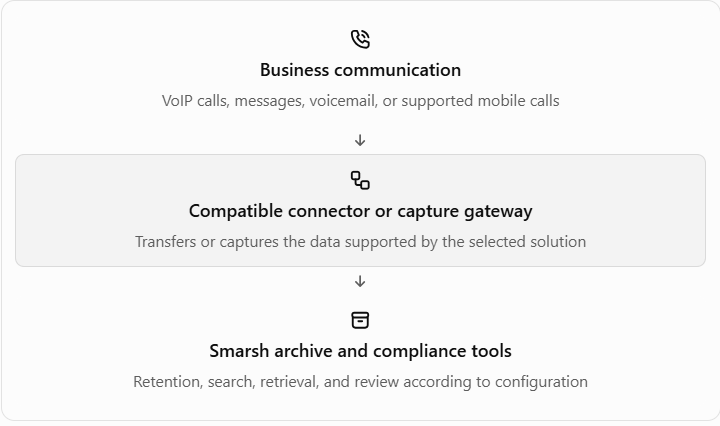
This workflow is conceptual rather than a universal technical architecture. For example, Intulse sends supported SMS messages to Smarsh through an archiving email address, whereas RingCentral for Smarsh uses RingCentral Archiver. Smarsh Voice Call Capture follows a different process for supported mobile voice calls.
Why Tech Startups Need Smarsh VoIP Integration
Startups often introduce several communication channels as their teams grow. Sales representatives, customer support agents, and executives may use business numbers, messaging applications, and mobile devices. Keeping relevant records accessible becomes more difficult when information is scattered across different systems.
A suitable archiving setup can help organizations establish consistent recordkeeping before communication volumes increase. This is particularly useful for startups entering regulated industries, serving institutional clients, or preparing for audits and internal investigations. However, using an archiving product does not automatically make a business compliant; policies, staff training, appropriate configuration, and applicable legal requirements remain essential.
Smarsh reports that it serves more than 6,500 customers and is trusted by 18 of the world’s 20 largest financial institutions. These are company-reported figures, but they illustrate the platform’s focus on organizations with significant communication-governance requirements.
Key Benefits of Integrating Smarsh and VoIP
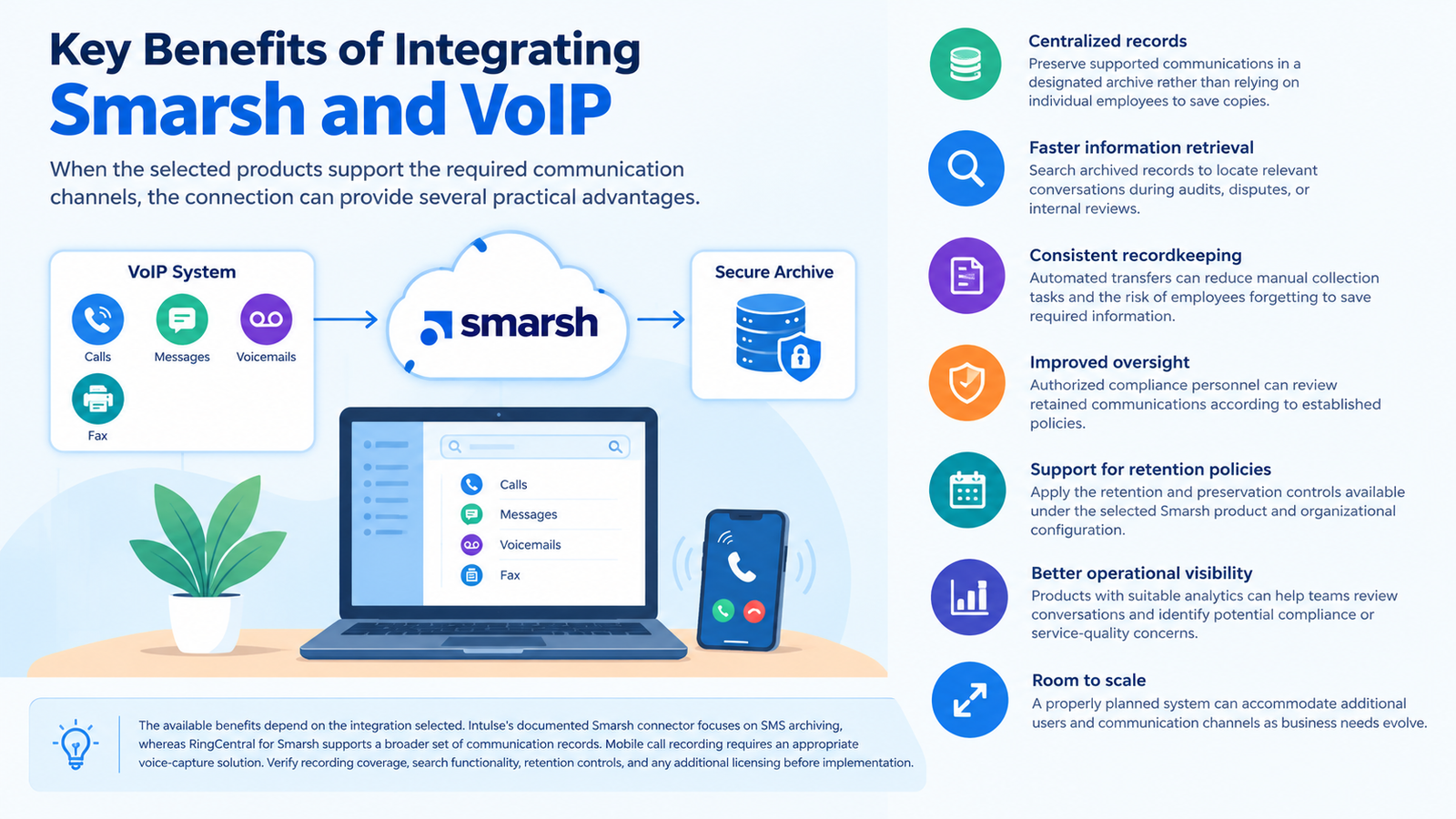
When the selected products support the required communication channels, the connection can provide several practical advantages.
-
Centralized records: Preserve supported communications in a designated archive rather than relying entirely on individual employees to save copies.
-
Faster information retrieval: Search archived records to locate relevant conversations during audits, disputes, or internal reviews.
-
Consistent recordkeeping: Automated transfers can reduce manual collection tasks and the risk of employees forgetting to save required information.
-
Improved oversight: Authorized compliance personnel can review retained communications according to established policies.
-
Support for retention policies: Apply the retention and preservation controls available under the selected Smarsh product and organizational configuration.
-
Better operational visibility: Products with suitable analytics can help teams review conversations and identify potential compliance or service-quality concerns.
-
Room to scale: A properly planned system can accommodate additional users and communication channels as business needs evolve.
The available benefits depend on the integration selected. Intulse’s documented Smarsh connector focuses on SMS archiving, whereas RingCentral for Smarsh supports a broader set of communication records. Mobile call recording requires an appropriate voice-capture solution. Verify recording coverage, search functionality, retention controls, and any additional licensing before implementation.
Best Practices for Utilising Smarsh and VoIP
A successful deployment requires more than connecting two applications. Technical settings, user permissions, and recordkeeping policies must work together.
-
Define capture requirements: Specify which channels, users, and record types must be preserved before configuring the connector.
-
Apply least-privilege access: Give administrators and reviewers only the permissions needed for their roles. Protect credentials and any integration keys.
-
Test record delivery: Check timestamps, user identification, content, attachments, and recording playback where supported.
-
Set appropriate retention rules: Align archive settings with applicable laws, contractual duties, and internal policies. Avoid keeping sensitive records indefinitely without a valid reason.
-
Review failed transfers: Establish a routine for checking delivery errors and resolving missing or incomplete records.
-
Protect sensitive information: Review encryption, authentication, access logs, and any available redaction features against your security requirements.
-
Check recording consent: Confirm the laws that apply to every relevant jurisdiction and inform participants when required.
-
Train employees: Explain which applications they must use and what to do if a call or message fails to appear in the archive.
Smarsh’s voice-recording and archiving offerings provide different controls depending on the product and subscription. Before deployment, verify the availability of retention management, legal holds, secure sharing, transcription, and other required features in your specific package. Do not assume that all these capabilities are included with a basic integration.
Top VoIP Providers That Integrate with Smarsh
The following table distinguishes documented integration options from broader voice-capture compatibility. These solutions do not all offer the same features, and their presence here does not imply that every phone feature is archived automatically.
| Provider or solution | Documented capabilities | Important consideration |
|---|---|---|
| RingCentral | RingCentral for Smarsh supports archiving selected app messages, SMS/MMS, call recordings, voicemail, fax, and related communication data. | Confirm the current eligible RingCentral plan, administrator requirements, and enabled data types. |
| Intulse | Archives SMS messages sent or received through the Intulse app to an organization’s Smarsh account. | Requires the Intulse app, an SMTP archiving address, and administrator configuration. The documented connector focuses on text messages. |
| Smarsh Voice Call Capture | Captures supported mobile voice calls through the Capture Mobile application and Smarsh recording gateway. | This is a Smarsh capture solution rather than a separate VoIP provider. Confirm device, carrier, and regional suitability. |
| Smarsh Call Recording and Analytics | Supports voice-recording and analytics capabilities across compatible communication platforms, including enterprise calling environments. | Product licensing, platform compatibility, recording configuration, and analytics features must be verified. |
Before choosing a solution, confirm the communication channels covered, account eligibility, recording and archiving requirements, and any additional fees. Public documentation does not establish one universal price for all Smarsh integrations. Request a quote and written confirmation of the required features for your specific deployment.
Pros and Cons of Smarsh VoIP Integration
Smarsh integration can strengthen recordkeeping, but its value depends on how well the chosen solution matches business requirements.
| Pros | Cons |
|---|---|
| Automates archiving for supported communication types. | Initial setup may require administrator involvement and vendor support. |
| Helps authorized teams search and retrieve historical records. | Additional licenses or service costs may apply. |
| Supports retention and compliance workflows. | Features vary between connectors and product tiers. |
| Reduces dependence on manual record collection. | Failed transfers or incorrect settings can leave gaps in the archive. |
| Can support audit reviews and internal investigations. | Staff training and ongoing monitoring are still necessary. |
| Offers options for mobile voice capture and enterprise recording. | Recording consent, privacy, and data-residency obligations need careful review. |
The main limitation is that connecting a phone system to Smarsh does not guarantee that every communication will be captured. Coverage depends on the connector, enabled channels, recording settings, and supported devices. Businesses should test each required communication type and establish a process for investigating missing or incomplete records.
Which Businesses or Industries Suit Smarsh VoIP Integration?
This setup is most relevant to organizations that must preserve communications for regulatory, contractual, supervisory, or internal governance purposes.
-
Financial services: Investment firms, wealth managers, and financial advisers may need to retain business communications under applicable recordkeeping rules.
-
Insurance companies: Teams can use supported archiving workflows to preserve relevant client communications.
-
Legal services: Authorized staff may benefit from searchable communication records when handling internal reviews or disputes, subject to confidentiality requirements.
-
Healthcare organizations:Compatible archiving solutions may help manage communication records, provided the configuration meets applicable privacy, security, retention, and access requirements.
-
Technology startups: Companies entering regulated markets can establish consistent communication policies as they expand.
-
Customer support operations: Teams handling high volumes of calls may benefit from recording, retrieval, and quality-review capabilities when these features are supported.
The appropriate configuration depends on the applicable regulations, communication channels, and the organization’s recordkeeping obligations. Smarsh can support relevant compliance processes, but installing an integration does not automatically establish compliance with FINRA rules, HIPAA, GDPR, or other requirements. Organizations should confirm their obligations with qualified compliance or legal professionals.
Smarsh VoIP Integration Is for How Many Users?
Smarsh VoIP integration does not have one universal user limit. Capacity and pricing depend on the chosen Smarsh product, the connected communications platform, subscription terms, and the number of employees or devices covered.
| Business size | Typical implementation considerations |
|---|---|
| 1–10 users | Basic setup, a small number of accounts, and clearly defined archiving requirements. |
| 11–50 users | Role-based permissions, user provisioning, and regular delivery checks. |
| 51–200 users | Centralized administration, documented policies, and structured compliance reviews. |
| 200+ users | Enterprise integration planning, broader capture requirements, and scalable governance processes. |
Actual capacity and pricing must be confirmed with Smarsh and the connected phone provider. Ask whether licenses are assigned per user, device, or service, and confirm any storage, retention, implementation, or support charges before finalizing the deployment.
Read More: Adroll VoIP Integration: Setup Guide and Best Practices
Final Thoughts
Smarsh VoIP integration can help startups and established businesses manage communication records more consistently, improve retrieval, and support compliance reviews. The best approach is to select a verified connector, confirm exactly which data it captures, and test its operation before rollout. By combining appropriate technical controls with clear internal policies, organizations can build a more reliable communication-recordkeeping process without assuming that every integration provides identical capabilities.
FAQs
-
What is Smarsh VoIP integration?
Smarsh VoIP integration connects compatible calling or messaging systems with communication archiving and compliance tools. Depending on the selected solution, it can preserve voice recordings, text messages, voicemail, or other supported records for authorized review.
-
Does Smarsh integrate directly with RingCentral?
Yes. RingCentral offers a documented Smarsh integration through RingCentral Archiver. Supported data types include messages and certain voice-related records, depending on configuration.
-
Can Smarsh record calls made through a mobile phone?
Yes, Smarsh Voice Call Capture supports mobile voice-call capture through its Capture Mobile application and recording gateway. Device compatibility, carrier support, and regional restrictions should be checked before deployment.
-
Does Intulse archive VoIP calls through Smarsh?
The documented Intulse connector specifically archives SMS messages sent or received through its application. Do not assume it captures call recordings; contact Intulse to confirm whether another supported option meets your voice-recording requirements.
-
How much does Smarsh VoIP integration cost?
There is no single verified price covering all providers and Smarsh products. Costs can depend on licenses, user counts, capture requirements, storage arrangements, and implementation services. Request a quote based on your required features.
-
Is Smarsh VoIP integration suitable for small businesses?
Yes, it can suit smaller organizations that need structured communication records, especially in regulated sectors. However, the selected product should match the business’s budget, compliance duties, and technical resources.
-
Does Smarsh automatically archive every business call?
No, not automatically across every phone system. Capture depends on the connected platform, supported channels, permissions, and configured recording or archiving policies. Test the complete workflow before relying on it for compliance.
-
Can archived Smarsh communications be searched later?
Yes, supported Smarsh archiving and recording products provide search or retrieval capabilities. The available filters, playback options, and access permissions depend on the product and subscription.
-
Is Smarsh VoIP integration enough to meet compliance requirements?
No. It can support recordkeeping, but organizations must also apply appropriate retention policies, access controls, recording-consent procedures, and monitoring. Compliance depends on the applicable regulations and the effectiveness of the complete process.