Nextiva is a strong starting point for businesses that want affordable calling and a path into customer communications. RingCentral deserves a close look when employee collaboration, integrations and administration across multiple locations drive the purchase. The better choice depends on the package that covers your actual work, rather than the lowest advertised seat price.
This Nextiva vs RingCentral comparison explains pricing, calling features, AI, apps, international calling and the practical advantages and limitations of both providers in 2026. It compares Nextiva’s business communications plans with RingCentral RingEX, while identifying where a separate contact-centre product or add-on needs its own budget.
Customer Ratings at a Glance

Nextiva Unified Customer Experience Management Platform: 4.6/5 from 681 reviews in Gartner Peer Insights’ Unified Communications as a Service category.

RingCentral RingEX: 8.8/10 from 543 reviews and ratings on TrustRadius.
These are separate review sources and rating scales, covering the named product listings. They provide customer sentiment context; their scores should not be treated as a direct numerical ranking of the two providers.
Nextiva vs RingCentral: Quick Overview
| Buying question | Nextiva | RingCentral RingEX |
|---|---|---|
| Annual entry price | Core: $15/user/month, subject to eligibility | Core: from $20/user/month |
| Best reason to shortlist | Calling value and customer communication workflows | Employee communications, app workflows and administration |
| AI products | XBert; advanced capabilities depend on package or add-on | AI Assistant plus separately priced specialist AI products |
| International calling | Destination-based charges outside included calling | International rates or eligible bundles |
| Contact-centre needs | Assess Scale and enterprise Contact Center separately | Assess RingCX separately from RingEX |
| Evaluation option | Explore plans and request a demo | Explore the 14-day free trial |
Pricing: Nextiva Starts Lower, but Compare the Complete Package

Nextiva business plans
Nextiva’s current advertised annual references are Core $15, Engage $25 and Scale $75 per user/month. Annual small-business eligibility is for new customers with 1–100 employees taking a paid minimum term of 12 months or longer. Obtain the applicable quote if your size, billing preference or contract differs.
Core covers everyday communications. Engage adds customer engagement capabilities, while Scale moves further into routing and customer experience. This makes Scale a different buying decision from a basic employee phone subscription.

RingCentral RingEX pricing
RingCentral’s published Core starting reference is $20 per user/month when paid annually. Ask for the current price and specification of the higher RingEX package or Customer Engagement Bundle that meets your requirements. Specialist AI, customer texting and queue tools can introduce separate costs.
| Cost illustration | Nextiva Core | RingCentral Core |
|---|---|---|
| Monthly equivalent at annual entry reference | $150 | $200 |
| Twelve-month base-seat illustration | $1,800 | $2,400 |
| What this excludes | Taxes, extra services, usage and equipment | Taxes, extra services, usage and equipment |
The $600 annual difference is arithmetic based on ten eligible seats at the entry references, rather than a guaranteed quote. If one option requires a higher tier for your CRM, reporting or routing, that upgrade can outweigh the entry-price saving.
Build a realistic budget
List licences, additional numbers, toll-free usage, international minutes, texting, hardware and implementation. Then price AI and integrations. Ask whether charges are per user, account, agent or usage unit; multiplying an account-level add-on by every employee can distort the comparison.
Read the order form for renewal, cancellation and minimum commitments. A marketing statement about cancellation does not establish that the remaining charges under a signed term disappear.
Nextiva vs RingCentral Calling Features: Design the Call Flow Before Choosing
Nextiva’s voice offering includes business calling, voicemail and call forwarding, with app access for staff away from a desk. RingCentral provides phone-system tools such as auto attendants, call queues and ring groups. Both deserve evaluation for a professional business number and organised inbound handling.
The useful comparison is a complete customer journey. A caller reaches your main number, selects a department, waits for an available employee and either receives an answer or reaches the correct voicemail. Ask each provider to demonstrate that flow on the quoted package.
What to test
- Opening hours: different treatment for lunch breaks, evenings and holidays.
- Transfers: a receptionist introduces the caller before transferring, and has a recovery route if the recipient does not answer.
- Overflow: unanswered calls move to another team without losing the caller.
- Shared responsibility: staff can identify who should return a missed call.
- Recording: the required recording method, storage and permissions are available on the chosen plan.
A small service business might only need a greeting and two destinations. A busy support team may need queue supervision and more advanced routing. Avoid paying for contact-centre functions simply because they appear in a provider’s broader feature catalogue.
Integrations: RingCentral Is a Strong Candidate for Connected Teams
Nextiva lists integrations including Salesforce, HubSpot, Microsoft Outlook and Microsoft Dynamics. RingCentral offers an app gallery, APIs and connections to CRM and productivity platforms, including Microsoft Teams. Availability alone does not prove that an integration works on the entry plan or supports every required action.
Our recommendation: put RingCentral high on the shortlist when several departments need connected calling and centrally managed workflows. Give Nextiva equal consideration when its specific CRM connection and customer communication tools match the work you need to automate.
Ask for a live demonstration of click-to-call, incoming customer identification and automatic call logging. Check which record receives a missed call and whether notes or summaries reach the right CRM field. A connector that only opens a contact screen may not replace manual administration.
For Microsoft Teams, establish whether users make calls within Teams, use a separate app or require additional licences. Your Microsoft subscription and telephony configuration form part of the complete cost.
AI: Separate Employee Assistance from Customer Automation
Nextiva and XBert
Nextiva positions XBert as an AI assistant that can answer calls, handle chats and book appointments. Its capabilities go beyond producing a written call summary. Nextiva’s pricing cards identify XBert AI Receptionist as an add-on; do not assume the Core price includes a fully configured AI receptionist.
RingCentral AI tools
RingCentral’s AI Assistant supports work such as transcription, summaries and action items, with skills depending on the tier. AI Receptionist and conversation intelligence are separate product choices with their own pricing.
Choose by the job: reducing manual notes is different from letting AI answer a customer’s call. Ask both providers to demonstrate the relevant task using your vocabulary, appointment rules and escalation process.
Use a difficult example: a customer changes an appointment and then requests a human. Check the calendar result, handover and saved history. For summaries, test names, dates and commitments. Review who can access transcripts, how long they are retained and whether you can correct an inaccurate result.
Mobile and Desktop Apps: Check Everyday Work on Real Devices
Nextiva offers mobile and desktop app access, including NextivaONE; the interface depends on the platform supplied with your package. RingCentral supports Windows, macOS, Android and iOS apps. Ask to see the exact product you will receive, particularly when comparing phone service with a broader customer experience platform.
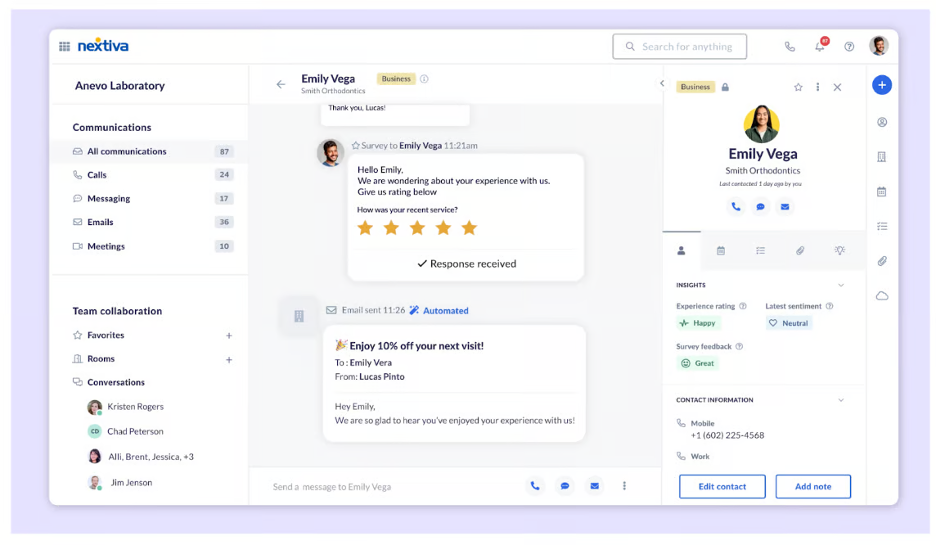
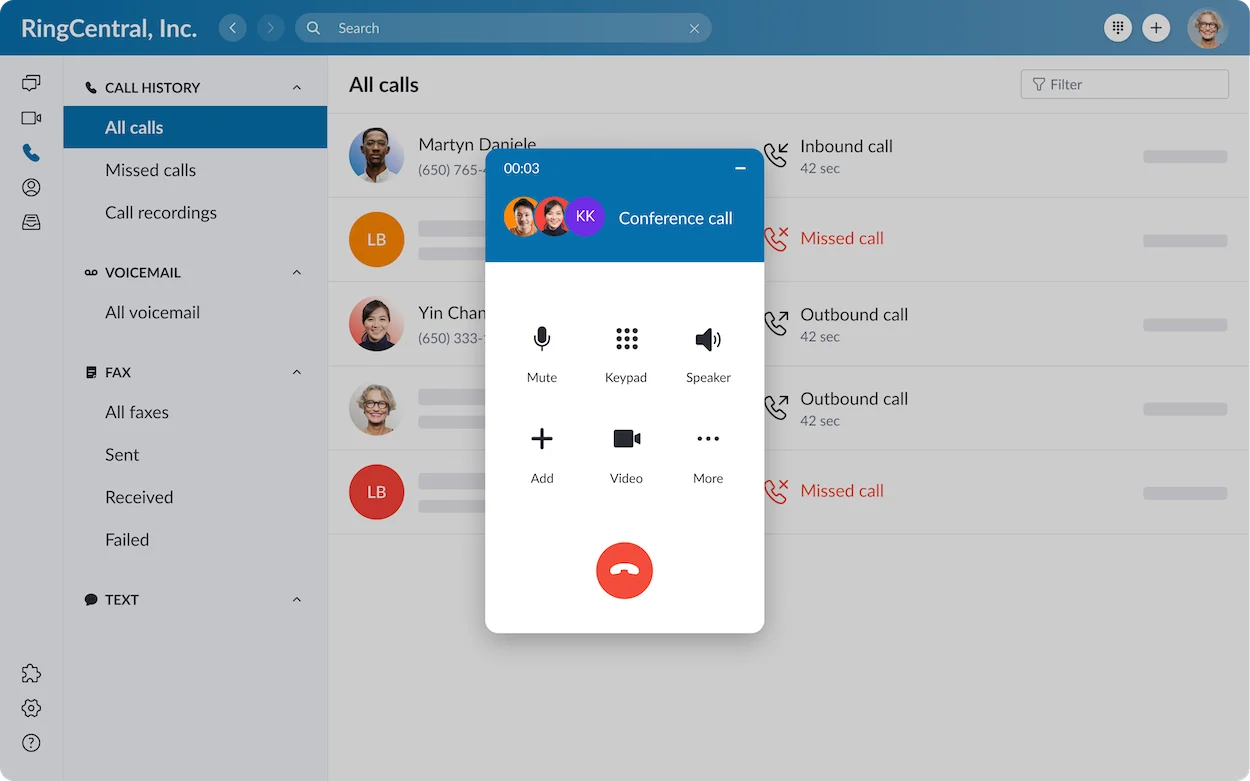
Test an incoming call with the phone locked, a warm transfer from mobile and an outbound call showing the business number. Then check notifications when moving between office Wi-Fi and mobile data.
For staff working in shared spaces, check headsets, audio selection and missed-call visibility. The best app is the one employees can use reliably during normal work without repeatedly asking an administrator for help.
Nextiva vs RingCentral International Calling: Both Can Reach Overseas Destinations
Neither provider should be described as limited to calling only the USA and Canada. Nextiva includes US and Canada calling in its business voice offering and charges destination-based rates for international calls. RingCentral also includes US and Canada external calling on its US offering, with international rates or bundles for other destinations.
Included domestic calls, outbound international calling and obtaining a local number overseas are three different requirements. Overseas employees may also need country-specific service, emergency calling and number portability.
Make a list of countries, mobile versus landline destinations and expected minutes. Ask for a written rate comparison, including bundle exclusions and overages. If you need a local number abroad, verify the country, documentation and service arrangement independently of the ability to dial that country.
A business that calls a few overseas suppliers has a different requirement from a company operating offices in several countries. Choose using the actual geographic footprint and usage pattern.
Nextiva vs RingCentral Reliability: Similar Uptime Claims, Different Deployment Needs
Both providers advertise 99.999% reliability or uptime for their communications infrastructure. Nextiva describes redundant infrastructure and continuous monitoring. RingCentral likewise markets high availability for its phone service.
Those provider claims do not measure every call over your office Wi-Fi or home broadband. Poor local connectivity, overloaded networks and unsuitable headsets can still affect conversations.
Ask for the applicable service-level agreement, covered services and credit process. Test calling at busy times, configure network priorities where appropriate and prepare a mobile fallback. For multiple sites, document who reports an outage and how callers are redirected.
Security also needs a product-specific review. Obtain the relevant documents, permissions and agreement for your requirements rather than treating a certification logo as proof that every configuration is suitable.
Customer Support: Compare the Escalation Route
Nextiva’s current pricing page states that all plans include 24/7 customer support. RingCentral supplies support during its RingEX trial and provides help resources for deployment and administration. Confirm the support entitlement in each final quote, especially if you need specialist integration assistance or a managed rollout.
Ask how a critical voice incident is escalated, whether implementation is included and who handles porting problems. A named contact may matter more to a small business than an extensive online knowledge base; a larger organisation may need defined response targets and an internal incident process.
During evaluation, submit a realistic question about the call flow or integration. Assess whether the answer explains the next action and identifies the responsible team. Customer reviews below provide useful context, but individual experiences vary.
Nextiva vs RingCentral For Small Businesses: Start with the Simplest Complete Package
Nextiva is our first option to evaluate for a price-conscious small business when Core meets its needs. The lower eligible annual entry reference gives it a meaningful starting advantage. It also deserves attention when the business plans to bring customer conversations into a wider workflow.
RingCentral is a strong small-business choice when integrations and employee collaboration justify the complete price. A small team can still have complicated workflows, especially when staff work remotely or handle different departments.
For example, a five-person local office might prioritise a main number, a greeting and mobile answering. A fifteen-person consultancy might care more about CRM activity and calls within its existing productivity tools. Headcount alone does not decide which provider is better.
Have two ordinary employees try the same tasks, rather than relying only on a salesperson’s demonstration. Their experience can reveal whether the administrative complexity is reasonable for your team.
Nextiva vs RingCentral For Larger Businesses: Separate Employee Calling from Contact-Centre Work
RingCentral merits a close evaluation for employee communications across departments and locations. Its higher packages include administrative and analytics capabilities intended for more complex deployments. Ask the vendor to map your required permissions, reporting and locations to the current package.
Nextiva offers business communications and a broader customer experience portfolio. Its enterprise Contact Center pricing starts at $75 per agent/month for Essential, with higher packages quoted. This is separate from the $75 per user/month Scale reference; equal prices do not make the products interchangeable.
Similarly, RingCentral RingEX and RingCX address different needs. If you require agent scheduling, quality management, sophisticated routing or an omnichannel service operation, request a contact-centre demonstration and quote.
A sensible rollout distinguishes employees who need a telephone from agents who need specialised customer-service tools. Ask how the products connect, how calls transfer between them and whether reporting remains consistent.
Nextiva vs RingCentral: Pros and Cons
| Assessment | Nextiva | RingCentral |
|---|---|---|
| Main advantages | Lower eligible annual entry reference; business voice tools; customer communication and AI expansion options | Calling, messaging and meeting workflows; app ecosystem; administration options for distributed teams |
| Cost limitations | Higher-tier customer experience and AI requirements can change the entry-price comparison | Higher entry reference; specialist tools and upgrades can increase the complete bill |
| Implementation limitations | Verify the exact platform, integration and entitlement before buying | More capabilities can require additional configuration and administrator time |
| Best evaluation focus | Is Core sufficient, or does the workflow require Engage, Scale or Contact Center? | Does the quoted RingEX package cover the required integrations, reporting and administration? |
These limitations describe buying considerations rather than claiming that every customer experiences a problem. Both products can provide a good fit when the deployment and contract match the business.
Frequently Asked Questions
Is Nextiva cheaper than RingCentral?
At the eligible annual entry references, Nextiva Core starts at $15 per user/month versus RingCentral Core at $20. Compare the complete required package, usage and contract before deciding which costs less.
Which provider is better for customer service teams?
Evaluate Nextiva’s customer experience options and RingCentral’s customer engagement or RingCX offerings using the same routing and reporting requirements. An employee phone plan is not automatically a complete contact-centre solution.
Do both providers support international calls?
Yes. Rates or bundles apply outside included calling. Overseas local numbers and service for international offices require separate confirmation.
Does Nextiva have the same 14-day trial as RingCentral?
Do not assume that it does. Nextiva promotes demos for its current packages; confirm any trial offered for your specific product. RingCentral advertises a 14-day RingEX trial for new subscribers, with up to 20 lines and two desktop phones. SMS is excluded from trial use.
Can I keep my existing business number?
Ask the selected provider to confirm that the number is eligible for porting and provide the required documentation. Keep the old service active until the transfer is confirmed, and arrange a temporary routing plan for the transition.
Final Recommendation: Nextiva for Entry Value, RingCentral for Connected Workflows
Choose Nextiva when its quoted plan meets your calling and customer communication requirements at the better complete cost. Start with Core and only move upward for capabilities that solve a specific problem. Read our Nextiva review for a broader overview.
Choose RingCentral when its integrations, employee communications and administrative tools make daily work easier. Use its trial to validate that benefit on the package you would actually purchase. Our RingCentral review covers the wider platform.
Before committing, have both providers demonstrate your main call flow, your most important integration and your mobile workflow. Compare written quotes with the same requirements and term. If neither fits, compare other business VoIP providers.
Customer Reviews: What Buyers Can Learn
Nextiva customer experiences
TrustRadius’ Nextiva buyer guide includes a telecommunications employee who valued receiving customer texts at the business number without sharing a personal mobile number. An insurance manager liked changing voicemail and routing. These examples illustrate practical flexibility for small teams.
The same guide includes a legal professional who found the mobile app difficult to use and a nonprofit administrative assistant who reported transcription accuracy issues and occasional delayed messages. Test the current app and message workflow on your own devices; these are individual experiences from the guide, rather than guaranteed current behaviour.
RingCentral RingEX customer experience
A TrustRadius 10/10 review dated September 24, 2026, marked incentivized, described deployment across 180 dental-support sites and good voice quality with a correctly configured network. It also criticised first-line support and built-in analytics, and mentioned using advanced support.
These paraphrased examples suggest useful questions about mobile usability, message handling, reporting and escalation. Review sentiment can help shape an evaluation, but your contract, configuration and working environment determine the practical fit.
Affiliate disclosure: VoIPCalling.com may earn a commission if you purchase through an affiliate link in this article, at no additional cost to you. Recommendations reflect the business requirements and product differences discussed above.