
This Dialpad vs RingCentral guide compares Dialpad Connect with RingCentral RingEX. Dialpad Support and Sell serve specialist customer-service and sales requirements; RingCX is a separate contact-centre offering. Their capabilities and prices should not be confused with an entry-level employee phone plan.
Dialpad is a strong option for teams that want a lower entry price and built-in conversation tools such as transcription and AI recaps. RingCentral deserves a close look when employee calling, app integrations and communications administration across a growing organisation are the main priorities. For readers comparing RingCentral vs Dialpad, the decision comes down to everyday calling, AI usefulness, integrations and total team cost. Both offer a 14-day trial, so you can compare the actual workflows before choosing.
Customer Ratings at a Glance

TrustRadius: Dialpad Connect 8.3/10 from 577 reviews and ratings · RingCentral RingEX 8.8/10 from 543 reviews and ratings.
Dialpad vs RingCentral: Quick Overview
| Buying question | ||
|---|---|---|
| Starting reference | Standard: $15/user/month billed annually | Core: $20/user/month billed annually |
| Main reason to shortlist | Entry pricing plus transcription and recap workflows | Employee communications plus business-app workflows |
| AI evaluation | Test real-time transcription and AI Recaps | Test assistant, summary and specialist AI requirements |
| Specialist teams | Evaluate Support or Sell separately | Evaluate RingCX separately |
| International calls | Destination rates; optional Global Unlimited add-on with defined limits | Destination rates or international bundles |
| Free trial | Explore Dialpad’s 14-day trial | Explore RingCentral’s 14-day trial |
Dialpad vs RingCentral Pricing: Plans and Total Team Cost
Dialpad Connect pricing

Dialpad's published US-dollar references are $15 per user/month annually or $27 monthly for Standard, and $25 annually or $35 monthly for Pro. Enterprise uses custom pricing. Confirm the offer, seat requirements and included capabilities before ordering.
Pro adds key CRM integrations and 24/7 customer support to the entry offering. A team needing these capabilities should budget against Pro rather than assuming Standard includes every feature in the wider Dialpad portfolio.
RingCentral pricing

RingCentral publishes a Core starting reference of $20 per user/month billed annually, with one number per user. Higher-level requirements and bundles can change the price. Ask for the current package covering your recording, CRM, reporting and queue needs.
| Reference | Dialpad | RingCentral |
|---|---|---|
| Entry annual-billing reference | Standard: $15/user/month | Core: $20/user/month |
| 5 users at those references | $75 monthly equivalent; $900/year | $100 monthly equivalent; $1,200/year |
| 10 users at those references | $150 monthly equivalent; $1,800/year | $200 monthly equivalent; $2,400/year |
| Important qualification | Pro, specialist products and extras change the calculation | Higher packages and extras change the calculation |
Dialpad Pro at the $25 annual reference costs $125 per month equivalent for five users or $250 for ten. Use that figure when the required CRM or recording functionality needs Pro. These are licence-only calculations, not equivalent-feature quotations.
The ten-user example shows a $600 annual base-price difference, assuming those entry packages meet the requirements. It excludes taxes, fees, international usage, hardware and additional services. It does not establish an equivalent feature set.
Compare the full committed cost: subscriptions, expected calling and SMS usage, extra numbers, implementation, support and any AI upgrades. Also check renewal pricing and cancellation terms. A saving on the first invoice can disappear if a required integration forces an upgrade.
Calling Features: Routing, Recording and Shared Lines
Both providers are more than a second phone number. Their cloud phone systems help employees answer business calls, transfer callers and organise team communications. The useful distinction is whether the purchased plan supports your complete call flow.
Dialpad's phone-system offering includes routing capabilities and conversation tools that help staff revisit what was said. RingEX offers auto-attendants, ring groups and call queues for directing customers to employees or departments.
For either provider, request a demonstration of the same scenarios: a main-line call during opening hours, an unanswered call, an after-hours enquiry and a warm transfer. Confirm who can record calls and how recordings are accessed or deleted.
When basic queues are not enough
Evaluate Dialpad Support against RingCX when agents need specialised customer-service channels, routing and supervision. Evaluate Dialpad Sell separately for sales outreach and coaching. A feature in one of those products should not be treated as included in a Standard Connect subscription.
Define the intended agent workflow before comparing costs. A small office sharing inbound calls has different requirements from a service desk tracking queues and reviewing agent performance all day.
Dialpad vs RingCentral Integrations: CRM, Microsoft Teams and Business Apps
Dialpad lists integrations with Salesforce, Zendesk, Microsoft Teams and Google Workspace, among others. RingCentral provides an app ecosystem and APIs for connected business workflows. Either can be suitable if its connector performs the tasks your staff need.
Dialpad's Salesforce capabilities are a reason to check Pro or Enterprise eligibility. Do not price a CRM-led deployment against Standard without verifying the required connector. For RingCentral, identify the exact integration and the package or configuration it requires.
Ask both providers to demonstrate an incoming caller match, outbound click-to-call and a completed activity record. If your team depends on notes or summaries appearing in the CRM, test that entire sequence, including error handling.
For Microsoft Teams, clarify whether employees use a connected app or a Teams calling configuration, which Microsoft licences are necessary, and who investigates a failed call. A marketplace listing does not prove the complete workflow is available in your chosen plan.
Dialpad vs RingCentral AI Features: Real-Time Transcription and Call Summaries
Dialpad Connect highlights real-time transcription, voicemail transcription and AI Recaps with summaries and action items. That makes it worth trying when staff spend time taking notes and writing follow-ups after routine calls.
RingCentral's AI portfolio includes employee assistance, conversation analysis and an AI Receptionist for answering and routing customer enquiries. These tools serve different tasks; confirm what your specific subscription includes and what requires an additional purchase.
Dialpad is a useful starting point for everyday transcript and recap workflows. RingCentral is a useful shortlist when you want to combine employee communications with particular assistant, analysis or reception requirements. The winner depends on whether the output is accurate and useful in your working process.
During the trial, compare how both systems handle an interrupted conversation, a changed appointment and a technical term. Check whether the recap captures the final agreement rather than an earlier suggestion. Ask about supported languages, retention and administrative access.
Specialist coaching, scoring or autonomous AI agents should be priced separately where necessary. Do not assume every AI feature shown on a provider's website is part of the entry phone plan.
Dialpad vs RingCentral Mobile and Desktop Apps for Remote Teams
Dialpad supports computers, smartphones, tablets and compatible desk phones. RingCentral also supports desktop and mobile calling, with web access for browser workflows. Both let employees use business communications across devices.
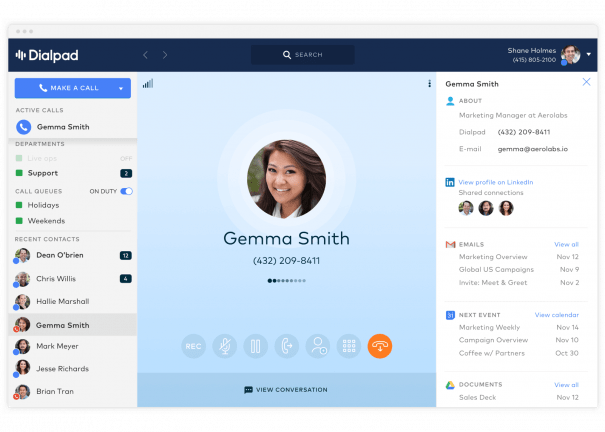

Include a receptionist, a mobile worker and a typical desktop user in the evaluation. Check alerts while a phone is locked, headset reconnection, transfers and voicemail playback. An administrator's successful desktop call is not enough to validate every employee's setup.
Check supported handset models before reusing existing equipment. For staff on mobile data, confirm audio quality and how calling behaves when the network changes.
Dialpad vs RingCentral International Calling: Both Can Call Beyond the US and Canada
Dialpad Connect's calling documentation describes included local calling within the account's country, the US and Canada, with international rates for other destinations. RingCentral's eligible US plans include US/Canada calling, with rates or bundles for other destinations. Neither is limited to calling North America.
Dialpad Global Unlimited has defined usage limits
Dialpad offers a Global Unlimited calling add-on with documented coverage across 65 countries. Despite the name, it supplies 8,000 international minutes per month per licence. Further usage is charged to calling credits, and unused minutes do not roll over.
Its purchase instructions also say licences are added to all Connect, Support and Sell users within the selected office. Check the office-wide cost and destination/number-type coverage before treating it as a cheap upgrade for just one overseas caller.
For RingCentral, request rates or bundles based on your real destinations. Number availability and international calling are separate questions: being able to call a country does not guarantee you can buy or port a local number there.
Use recent call records to compare landline and mobile traffic. Also confirm employee access, emergency-calling arrangements and local service requirements in each location. The best international option is the one that covers actual traffic at the lowest acceptable complete cost.
Dialpad vs RingCentral: Reliability and Business Continuity
Both suppliers promote resilient cloud infrastructure, but published uptime language should be checked against the applicable service agreement. Dialpad's pages present differing reliability claims, so obtain the SLA for the exact plan rather than applying an enterprise claim to every account.
RingCentral advertises a 99.999% uptime baseline. That does not guarantee uninterrupted service on your own Wi-Fi, broadband or mobile network. Contract coverage, exclusions and remedies matter more than choosing a provider by a headline alone.
Test typical busy periods and at least one remote worker. Agree on backup connectivity, forwarding arrangements and an incident contact. Include permissions, recording retention and required security documentation in the deployment review.
Customer Support: Compare the Purchased Service
Dialpad advertises 24/7 support with Pro. Verify the channels and escalation arrangements for Standard or any specialist subscription. RingCentral also provides support resources and service options; confirm what the proposal includes.
Ask who owns onboarding, porting and urgent call failures. A named contact, premium escalation or migration assistance may affect cost. Clarify whether the provider or a reseller handles the first support request.
During evaluation, submit a realistic configuration question and inspect the answer. A useful response should explain what to check and who handles the next step. It is more informative than comparing sales responsiveness alone.
Which Is Better for Small Businesses? Dialpad or RingCentral
Dialpad is attractive for a small team that wants a lower entry reference and everyday AI transcription and recaps. It may be a good fit for an app-based office that needs to keep useful records of customer conversations.
RingCentral is worth shortlisting for a growing office whose priority is connected employee communications and its chosen business applications. Confirm the complete package before accepting a higher starting price.
A five-person office can use both trials to answer three questions: do calls reach the right person, can staff follow up without extra manual work, and can the business administer the system comfortably? If an essential CRM connector requires an upgrade, repeat the cost comparison with that plan.
Which Is Better for Larger Businesses? Dialpad or RingCentral
For larger organisations, compare role groups and country requirements before picking a platform. Separate office employees, receptionists, supervisors and specialist agents. Not everyone necessarily needs the same licence.
Dialpad deserves consideration when its conversation tools and Support/Sell workflows match the organisation's needs. RingCentral deserves consideration when its employee platform, integrations and RingCX configuration fit the wider deployment.
Evaluate delegated administration, access controls, reporting, retention and migration support. Require a clear owner for each integration and a documented escalation process. Run a staged pilot before porting critical numbers, and keep existing service active until transfers are confirmed.
Dialpad vs RingCentral SMS, Call Recording and Meetings
Compare business texting allowances separately from internal team messaging. Ask whether SMS limits apply per user or account, how long texts are counted as segments, and which registration, carrier or overage charges apply. Confirm the eligible numbers and destinations; unlimited voice calling does not establish unlimited SMS.
Dialpad Connect Standard supports manual call recording; automatic recording requires Pro or Enterprise with the appropriate settings. For RingEX, check manual and automatic recording against the quoted tier. Compare recording storage, retention, exports and access permissions, rather than simply marking both providers as having recording.
For video conferencing, test guest access, meeting duration, participant capacity and meeting transcription. A phone-call summary and a meeting transcript may have different entitlements. Keep specialist Dialpad Support, Dialpad Sell and RingCX supervision features outside the base employee-phone comparison.
Setup, Administration and Call Reporting
To compare Dialpad vs RingCentral ease of use, ask the future administrator to add a user, assign a number, change business hours and redirect an unanswered call. Repeat the same tasks in each admin dashboard and note the training required.
For analytics, request the reports your team needs: missed calls, call volumes, queue activity and user performance. Verify the reporting period, export options and permissions. Call monitoring and detailed agent reporting can require a different product from ordinary business calling.
Test your Salesforce or HubSpot workflow end to end, including caller matching, notes and a follow-up task. Evaluate Google Workspace and Microsoft 365 contact or calendar access separately from Microsoft Teams calling integration; these connections do not necessarily have the same licence requirements.
Switching Between Dialpad and RingCentral
When switching from Dialpad to RingCentral or switching from RingCentral to Dialpad, ask the receiving provider to confirm portability for each number. Check local, international and toll-free numbers individually. Keep the old account active until the transfer completes and calls have been tested.
Review contract length, renewal dates, cancellation notice, equipment obligations and remaining-term charges. Plan contact and recording exports, user training, routing changes and a fallback for the cutover. Monthly billing does not automatically mean a contract can be cancelled without further charges.
Dialpad as an alternative to RingCentral is most attractive when its entry pricing and conversation tools cover the required workflow. RingCentral as an alternative to Dialpad is worth evaluating when wider administration or business-app requirements drive the purchase. Compare other Dialpad and RingCentral competitors using that same specification.
Dialpad vs RingCentral: Pros and Cons
| Provider | Strengths | Buying cautions |
|---|---|---|
| Dialpad | Lower published entry reference; built-in transcription and recap workflows | CRM/support upgrades and office-wide international add-ons can change costs. |
| RingCentral | Employee communications, app workflows and room to expand requirements | Additional AI, queue or specialist requirements may need higher packages or extras. |
Free Trials: Keep Both Options Open
Both providers advertise a 14-day trial. Run the same evaluation on each, rather than treating a trial as a guarantee that every paid capability is included.
Dialpad's signup guidance says a payment method is entered. Additional toll-free or local numbers cannot be added until the account is paid and confirmed. It also identifies a trial restriction for assistants physically outside the account's country.
RingCentral's new-subscriber trial supports up to 20 phone lines and two desk phones; SMS is unavailable during the trial. Trial hardware must be returned within the stated period to avoid charges. Check current billing and cancellation conditions for either offer.
- Test inbound routing, unanswered calls and warm transfers.
- Compare transcripts, recaps and the required CRM activity.
- Use mobile and desktop devices on normal working connections.
- Confirm the paid plan that preserves the required trial features.
Dialpad vs RingCentral: Frequently Asked Questions
What is the difference between Dialpad and RingCentral?
This comparison evaluates Dialpad Connect against RingCentral RingEX. Dialpad is a strong candidate for lower entry pricing and conversation tools; RingCentral merits evaluation for connected employee communications and administration. Dialpad Support, Sell and RingCX are separate specialist products.
Is Dialpad or RingCentral better for small businesses?
Evaluate Dialpad when entry cost and AI-assisted call notes are priorities. Evaluate RingCentral when integrations and administration across a growing team matter more. Choose the exact package that covers your call flows and software requirements.
Is Dialpad cheaper than RingCentral?
At the annual entry references, Dialpad Connect Standard is $15 per user/month and RingEX Core starts at $20. Dialpad Pro is $25 annually, so a required upgrade can change the comparison. Include usage, taxes and add-ons.
How much does each provider cost for 5 or 10 users?
With annual entry pricing, five users cost $75 per month equivalent on Dialpad Standard or $100 on RingEX Core. Ten cost $150 or $200. Dialpad Pro costs $125 for five or $250 for ten. These are base licences before extras.
How do their AI features and call transcription compare?
Test Dialpad’s real-time transcription and recaps alongside RingCentral’s assistant and summary tools on the same sample call. Check names, amounts, action items and where the output is stored. Advanced coaching and autonomous reception require separate entitlement checks.
Which plans include call recording and AI summaries?
Dialpad Connect Standard supports manual recording; automatic recording requires Pro or Enterprise and the appropriate configuration. Confirm AI-summary entitlements separately. Ask RingCentral to identify recording modes, summaries and storage included in the exact RingEX tier being quoted.
How do their SMS limits and fees compare?
Check plan-specific SMS allowances, segment counting, eligible numbers, registration and overage charges. Confirm whether limits are pooled or assigned to each user. Internal team messaging and unlimited calling are separate from customer texting allowances.
Which provider works better with Salesforce or HubSpot?
Compare the connector and tier required for your workflow. Dialpad Pro adds key CRM integrations; RingCentral connector availability also depends on the subscription and integration. Demonstrate caller matching, logging and follow-up inside your own CRM before choosing.
Which is easier to set up and manage?
Have your administrator configure users, business hours, an auto attendant and overflow in both platforms. Judge the steps, permissions and training required. A successful sales demonstration does not establish how easy ongoing changes will be for your team.
Which is better for remote teams?
Both merit a pilot with remote employees. Test mobile and desktop calls, notifications, headset behaviour, transfers and team collaboration on normal work networks. Compare administrator access and fallback handling alongside app usability.
How do their international calling options compare?
Compare destination rates, included bundles and landline/mobile exclusions using your actual traffic. Dialpad’s Global Unlimited option has defined conditions. Check international number availability separately: calling a country does not guarantee that a local number can be purchased there.
Can I keep my phone number when switching between them?
Portability depends on number type, country and eligibility. Ask the receiving provider to validate the number and required documents. Keep the old service active until the port completes and incoming and outgoing calls work.
Final Recommendation: Choose by Workflow, Then Total Cost
Choose Dialpad when Standard or Pro meets the requirements and its conversation tools save useful work at a competitive complete price. Read our Dialpad review for more background.
Choose RingCentral when its verified integrations, employee communications and administration provide the better fit. Our RingCentral review explains the broader platform.
Both are credible candidates. Test the same must-have workflows and obtain the paid-plan specification before committing. For other options, compare business VoIP providers.
Dialpad vs RingCentral Customer Reviews: Practical Lessons for Buyers
Dialpad Connect — TrustRadius
A 10/10 review dated June 26, 2026 praised coordinating phone coverage between two offices, transfers and transcription. It also reported occasional call-quality problems and voicemail playback interruptions requiring an app restart.
A 10/10 review dated March 31, 2026 liked recordings, AI summaries, the interface and support, while finding overlapping administrative rules confusing and asking for clearer SMS pricing. These observations support testing both everyday use and administration.
RingCentral RingEX — TrustRadius
A 10/10 review dated September 24, 2026, marked incentivized, described successful deployment across 180 dental-support sites and good voice quality with a correctly configured network. It criticised first-line support and built-in analytics, and noted using advanced support.
These examples are paraphrased customer experiences. They suggest useful buying questions about app behaviour, reporting and escalation, rather than establishing that every customer will have the same experience.
Affiliate disclosure: VoIPCalling.com may earn a commission if you purchase through an affiliate link in this article, at no additional cost to you. Recommendations reflect the business requirements and product differences discussed above.