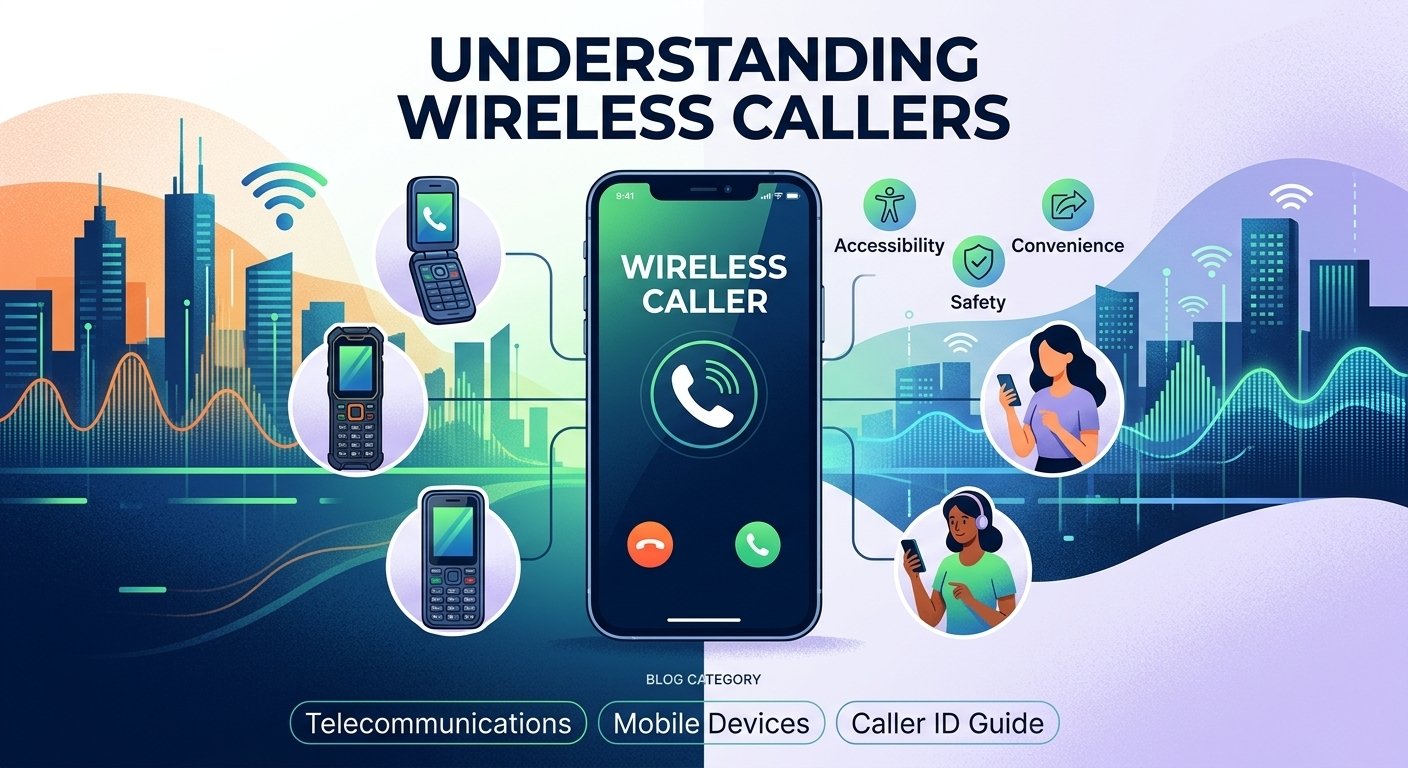
No. “Wireless Caller” is a caller-ID label, not a spam warning. A legitimate personal or business call may appear this way when a specific caller name isn’t available. However, scammers and telemarketers can also call from mobile or spoofed numbers, so the label alone cannot tell you whether a call is trustworthy
A wireless caller refers to an incoming call originating from a mobile or cellular network rather than a traditional landline. When your phone displays the text wireless caller, it indicates that the service provider has identified the call as coming from a mobile device but does not have a specific name associated with the number in its Caller ID Name (CNAM) database. This generic label serves as a placeholder to let you know the category of the device being used. Understanding this term helps in identifying the source of communication in an era where mobile connectivity dominates global telecommunications and personal interaction.
What Is a Wireless Caller?
The wireless caller definition describes a situation where a telecommunications carrier transmits a call from a mobile network but fails to provide a specific individual or business name. In many cases, the Caller ID system relies on a central database called the CNAM. If the caller has not registered their name with their service provider or if the receiving carrier cannot access that specific entry, it defaults to a general category. This explains what does wireless caller mean in the context of modern telephony, acting as a broad identifier for mobile users.
When you see this label, it simply means the person calling you is using a cellular device. It does not necessarily indicate that the call is spam, although many telemarketing companies use mobile lines to bypass landline filters. For many users, knowing whats a wireless caller helps differentiate between local residential calls and mobile-based communications. Understanding wireless caller meaning is essential for managing your privacy and deciding which calls to prioritize during a busy day. In some regions, you might even see the label wireless caller en español as “llamada inalámbrica” on localized device interfaces.
How Does Wireless Caller Work?
The “Wireless Caller” display occurs when a carrier verifies an incoming number via STIR/SHAKEN protocols but cannot find a specific name in the CNAM database, resulting in a generic placeholder. This system fills information gaps caused by missing data or private listings to ensure the recipient still receives a basic identification tag. The Caller ID Identification Process is mentioned in this table.
| Stage | Action / Component | Technical Detail |
| 1. Initiation | Call Origination | A mobile user initiates a call through their cellular network provider. |
| 2. Transmission | Routing | The network identifies the originating number and sends it through switches and gateways. |
| 3. Identification | CNAM Database Lookup | The receiving carrier attempts to match the incoming number with a name in a Caller Name (CNAM) database. |
| 4. Verification | STIR/SHAKEN Protocols | Systems verify that the caller ID information matches the actual originating number to reduce fraud. |
| 5. Information Gap | Data Absence | Occurs if the database lacks a specific name or if the subscriber has a private listing. |
| 6. Generation | Generic Tagging | The system generates a generic label when a valid mobile prefix is identified but no specific name is available. |
| 7. Final Display | “Wireless Caller” | The default text displayed on the recipient’s screen to fill the information gap. |
Types Of Wireless Callers
1. Smartphones
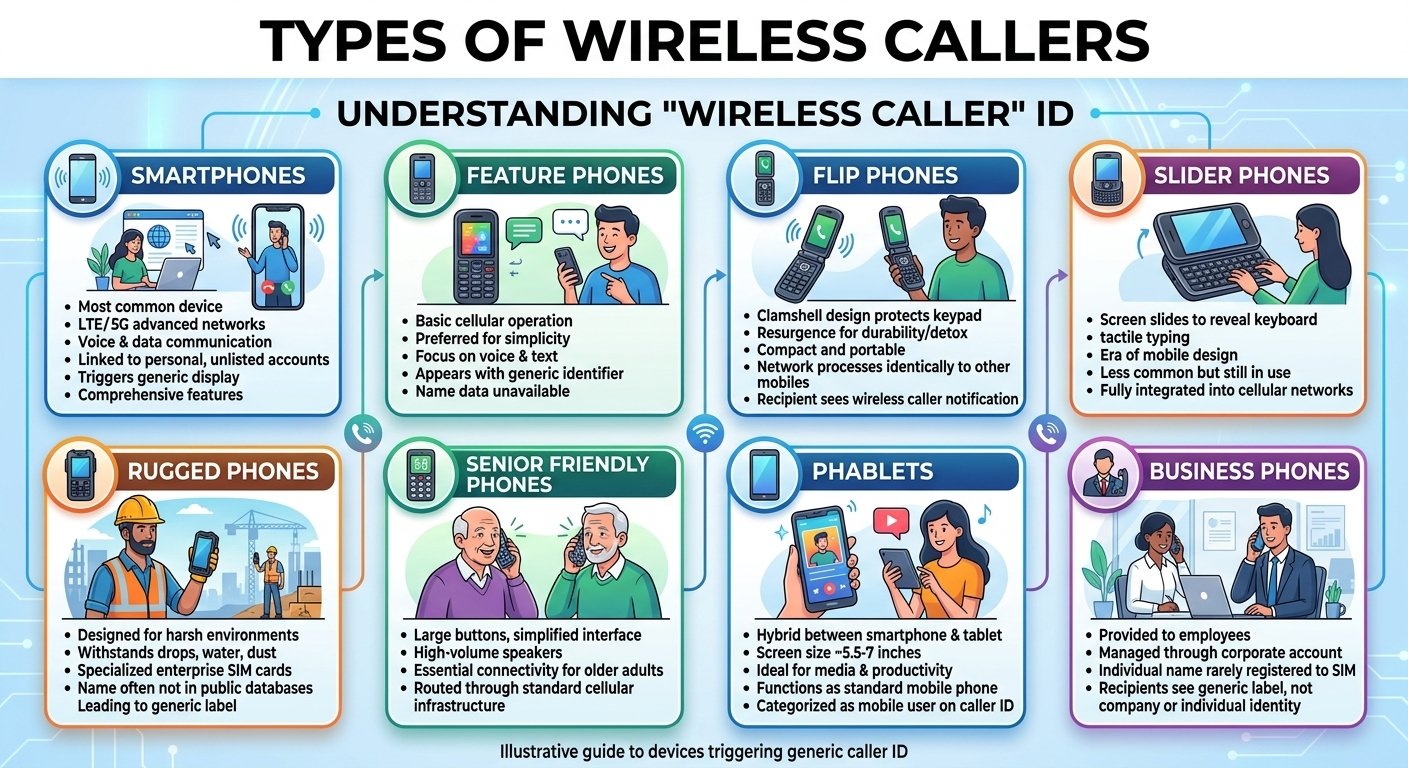
These are the most common devices associated with this caller ID label. High-end devices from various manufacturers utilize advanced LTE and 5G networks to facilitate voice and data communication. Because these devices are often tied to personal accounts that may not be publicly listed, they frequently trigger the generic display on receiving handsets. They offer the most comprehensive range of features for modern communication.
2. Feature Phones
Feature phones are more basic than smartphones but still operate on cellular networks. They are often used by individuals who prefer simplicity or need a device primarily for voice calls and text messaging. Despite their simpler nature, they still function as a wireless call source, appearing on your screen with the same generic identifier as more expensive devices if the name data is unavailable.
3. Flip Phones
Once the standard for mobile communication, flip phones have seen a resurgence among users looking for durability and a “digital detox.” These devices are compact and protect the keypad when closed. When someone calls from a flip phone, the network processes it identically to any other mobile device, often resulting in the recipient seeing a wireless caller notification.
4. Slider Phones
Slider phones feature a screen that slides up or to the side to reveal a physical keyboard. While less common today, they are still in use in various parts of the world. They represent a specific era of mobile design that combines tactile typing with a portable form factor. These devices are fully integrated into cellular networks and contribute to mobile traffic statistics.
5. Rugged Phones
Designed for harsh environments, rugged phones are built to withstand drops, water, and dust. They are popular among construction workers, hikers, and outdoor enthusiasts. Because these phones often use specialized enterprise SIM cards, the name associated with the number might not be shared with public databases, leading to the wireless caller meaning being applied to their outgoing signals.
6. Senior Friendly Phones
These devices feature large buttons, high-volume speakers, and simplified interfaces to help older adults stay connected. They provide essential connectivity for a demographic that may not require complex apps. When a senior citizen uses such a device, their call is routed through the same cellular infrastructure as any other mobile user.
7. Phablets
A phablet is a hybrid between a smartphone and a tablet, featuring a screen size typically between 5.5 and 7 inches. These devices are ideal for media consumption and productivity. Despite their large size, they function as standard mobile phones. If you receive a call from someone using a phablet, your caller ID will likely categorize them as a mobile user.
8. Business Phones
Many companies provide mobile handsets to their employees for professional use. These business lines are often managed through a corporate account. Because the individual employee’s name is rarely registered to the specific SIM card in a public database, the recipient of the call often sees the generic label instead of the company name or the individual’s identity.
Benefits Of Wireless Callers
1. Accessibility And Mobility
One of the primary advantages of cellular communication is the ability to stay connected regardless of location. Unlike landlines that tether a user to a specific physical address, mobile devices allow for constant reachability. This mobility has revolutionized how we conduct business and maintain personal relationships, ensuring that distance is no longer a barrier to voice communication.
2. Multifunctionality
Modern mobile devices are far more than just tools for voice calls. They serve as cameras, GPS navigators, and personal assistants. This consolidation of technology means that a single device can handle almost every digital need a person has throughout the day. The multifunctionality of these devices makes them indispensable in the modern world.
3. Convenience
The ease of use associated with mobile devices cannot be overstated. With features like voice commands and one-touch dialing, connecting with others is faster than ever. Furthermore, the ability to receive a wireless call anywhere means that important information can be relayed instantly without waiting for the recipient to return home or to an office.
4. Improved Productivity
For professionals, mobile devices are vital tools for maintaining workflow. They allow for the quick resolution of issues through voice calls or text while on the move.
According to a study by the Pew Research Center, approximately 97% of Americans now own a cellular device, which has significantly altered the landscape of workplace productivity and remote collaboration.
5. Global Connectivity
Mobile networks span the entire globe, allowing for seamless communication across international borders. Roaming agreements and international SIM cards make it possible for a traveler to remain reachable. This global reach is a fundamental component of the modern economy and international diplomacy.
6. Personal Safety
Having a mobile device provides a significant safety net. In dangerous situations, the ability to call for help immediately can be life-saving. Many devices now include built-in SOS features and location-sharing capabilities that can be activated in seconds to alert authorities or family members.
7. Continuous Improvement
The technology behind cellular communication is constantly evolving. From the transition to 5G to the development of clearer voice-over-LTE (VoLTE) technology, the quality of mobile calls continues to improve. This ensures that users experience fewer dropped calls and better audio clarity as infrastructure is upgraded.
How To Choose The Right Wireless Caller?
-
Operating System
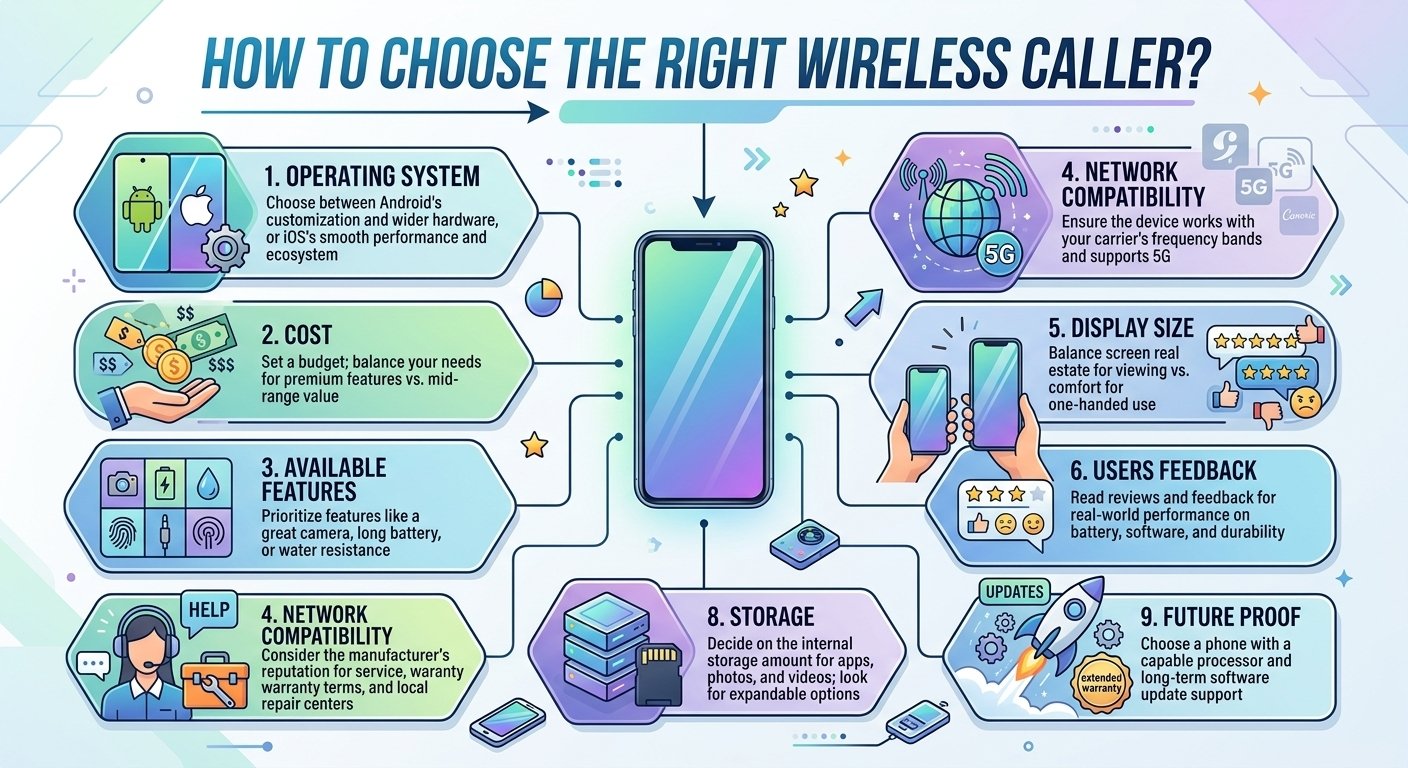
Choosing the right operating system is the first step in selecting a mobile device. Most users choose between Android and iOS. Android offers a high degree of customization and a wide range of hardware options at various price points. iOS is known for its smooth performance, regular updates, and deep integration with other products in the same ecosystem. Your choice will dictate the user interface and the apps available to you.
-
Cost
Price is a major factor for most consumers. Devices range from budget-friendly options to premium flagship models that can cost well over a thousand dollars. It is important to balance your needs with your budget. Consider whether you need the latest features or if a mid-range device will suffice for your daily communication requirements.
-
Available Features
Consider what features are most important for your lifestyle. If you take a lot of photos, look for a device with a high-quality camera system. If you spend a lot of time away from charging ports, prioritize battery life. Other features to consider include water resistance, facial recognition, and the presence of a headphone jack or expandable storage.
-
Network Compatibility
Not all phones work on every carrier. Before purchasing, ensure the device is compatible with your preferred network provider’s frequency bands. This is especially important if you are buying an unlocked phone or a device from another country. Check if the device supports 5G for the fastest possible data speeds.
-
Display Size
The screen size affects both the portability and the usability of the phone. A larger screen is better for watching videos and reading, but it can make the device harder to use with one hand. Smaller screens are more pocketable and easier to handle but might feel cramped for productivity tasks.
-
Users Feedback
Before making a final decision, read reviews and feedback from other users. This can provide insight into the real-world performance of the device, including battery life, software stability, and durability. Look for common complaints or praise to get an accurate picture of what it is like to own the phone.
-
Customer Support
A manufacturer’s reputation for customer support is crucial if you encounter issues with your device. Check the warranty terms and the availability of repair centers in your area. Brands with a large physical presence often provide faster service for screen repairs or battery replacements.
-
Storage
Consider how much internal storage you will need for your apps, photos, and videos. While many services offer cloud storage, having enough physical space on the device is essential for a smooth experience. Some devices offer microSD card slots for expandable storage, which can be a significant advantage.
-
Future Proof
Look for a device that will remain functional for several years. This means choosing a phone with a capable processor and a manufacturer that provides software updates for an extended period. A future-proof device will save you money in the long run by reducing the frequency of upgrades.
Read More: 0370 Numbers: Cost, Area Code & Benefits
Conclusion
Understanding the mechanics behind the wireless caller label empowers users to navigate their daily communications with greater clarity. While the term may seem vague at first, it simply reflects the technical limitations and privacy settings of the modern cellular network. Whether you are receiving a call from a high-end smartphone or a basic feature phone, the label serves as a reminder of how far our communication technology has come. By recognizing the benefits of mobile connectivity and knowing how to choose the right device, you can stay connected effectively and safely. As network databases become more integrated and verification protocols improve, we may see more specific information in the future, but for now, the mobile identifier remains a standard part of our digital lives.
FAQs
-
What is a wireless caller and why does it appear on my screen?
A wireless caller is a generic label that appears when someone calls you from a mobile phone and the service provider does not have a specific name to display. It occurs because the Caller ID Name database lacks the caller’s registration info or the caller has a private number.
-
What Does Incoming Call Mean?
An incoming call is simply any telephonic communication that is being directed toward your device from an outside source. It indicates that someone is currently attempting to reach you and your phone is alerting you to their presence.
-
What Does Cancelled Call Mean?
A cancelled call refers to a situation where the person initiating the communication hangs up before the recipient answers. This can happen if the caller dialed the wrong number or if they decided not to leave a message or wait any longer for a response.
-
Should I answer wireless callers?
Answering these calls is a personal choice, but you should exercise caution if you do not recognize the number. While many legitimate personal calls show up this way, it is also a common label for unsolicited telemarketing or potential scam attempts.
-
What does it mean when you get a wireless caller?
When you see this label, it means the incoming transmission is originating from a cellular network rather than a traditional landline. It is the system’s default way of telling you the type of network being used when a specific caller name is unavailable.
-
How to find out who a wireless caller is?
You can try using a reverse phone lookup service by entering the number into a specialized search engine. Additionally, some smartphone apps are designed to identify unknown callers by cross-referencing their own community-sourced databases.
-
Why is my phone saying wireless caller?
Your phone displays this message because your service provider’s caller ID system has identified the call as coming from a mobile device but cannot find a specific name in the CNAM database to associate with that phone number.
-
Is a wireless caller always a cell phone?
Yes, in the vast majority of cases, this label is specifically reserved for devices operating on cellular frequencies. Landlines or Voice over IP (VoIP) lines typically have different default labels or will display the geographic location of the caller instead.
-
Can I block a wireless caller?
You can block any number that appears on your screen using your phone’s built-in blocking features. If you receive frequent unwanted calls with this label, adding the specific number to your block list will prevent that individual from reaching you again.