You can make free video calls using internet-based apps such as WhatsApp, Google Meet, FaceTime, Signal, Zoom or Microsoft Teams. Choose an app, install it or open its web version, sign in, select a contact or create a meeting link, and tap the video-call button. The call itself can be free, although mobile data charges may apply.
An online video call free platform allows people and businesses to communicate over long distances without having to pay anything, simply by using an internet connection. These tools have transformed the way people communicate today, enabling them to interact with each other face-to-face from anywhere in the world.
From catching up with family to coordinating a remote team or hosting a virtual webinar, the right application will ensure seamless connectivity. With the advancement of technology, numerous solutions offer high-definition visuals, group calling capabilities, and cross-platform compatibility, ensuring that users can stay connected with their peers on smartphones, tablets, and desktop computers.
Quick Steps to Make a Free Video Call
- Choose a video calling app.
- Connect to Wi-Fi or mobile data.
- Create or sign into your account.
- Select the person you want to call.
- Tap the video-camera icon.
- Allow camera and microphone access.
- End the call when finished.
Quick Apps Summary For Free Video Calls
- Best free video calling app for personal calls: WhatsApp
- Best for Apple users: FaceTime
- Best for privacy: Signal
- Best for browser-based meetings: Google Meet
- Best for business meetings: Zoom or Teams
- Best for communities: Discord
What is Free Video Call App?

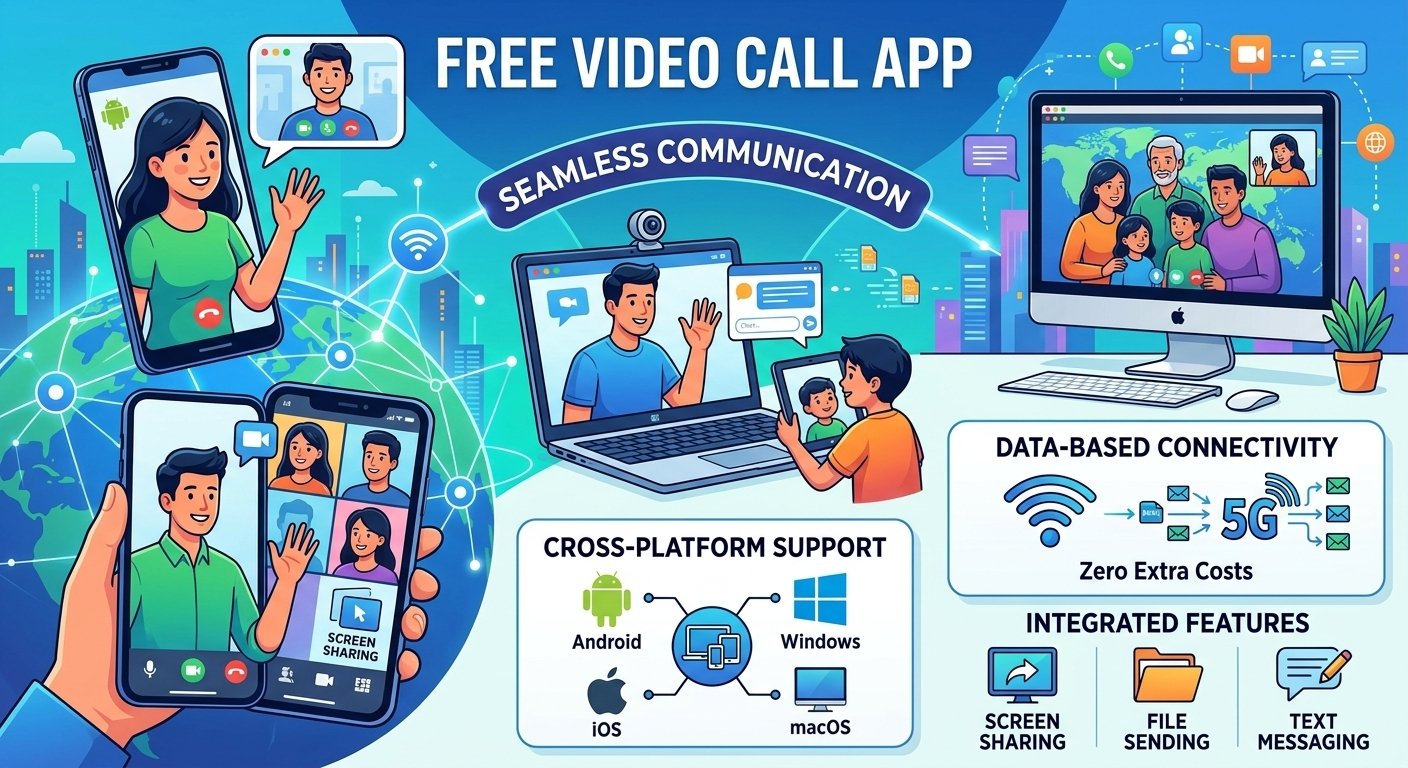
A free video call app is a software program that allows users to make video calls with others for free. These tools remove the need for traditional long-distance fees and instead use data networks instead of voice minutes. The majority of the platforms have user-friendly interfaces, enabling you to start a discussion with a single tap, making them indispensable tools for personal and professional life.
-
Cross-platform support: Many apps allow users on Android, iOS, Windows, and macOS to communicate effortlessly.
-
Data-based connectivity: These services require only a stable Wi-Fi or mobile data connection to function.
-
Integration: Features often include screen sharing, file sending, and integrated text messaging for a comprehensive experience.
Host meetings anywhere, any time
With modern technology, you can meet from anywhere, from home to office to travel. This flexibility means that you can collaborate and socialize without being constrained by geography. With a dependable video conferencing solution, you can instantly turn any room into a professional meeting room.
According to research, almost 70% of the world’s workforce is currently working remotely, underscoring the critical role of effective mobile video solutions. Advanced scheduling capabilities enable you to create virtual rooms in seconds, allowing participants to join easily from their preferred mobile devices or desktops.
Unlimited number of free video calls
The best thing about selecting the right software is that you can make an unlimited number of free video calls. Unlike traditional telephony, these digital options do not cost by the minute, so you can talk to your loved ones for a long time or have long business strategy sessions. Most of the big companies provide unlimited one-on-one calling as a standard service, and many even include group calling.
Easy-to-use meeting app
An easy-to-use meeting app is one that has a simple user interface and is easy to set up. Technical skills should not be required to start or participate in a call. Modern developers strive to make it as easy as possible to connect, even for those who aren’t technically inclined, so that they can navigate the features easily.
Intuitive “join” links, easy invitation systems and clear dashboard buttons are features that make it easy to use. User-friendly software decreases the learning curve, enabling teams to concentrate on the conversation instead of resolving connectivity problems.
Reliable, high-quality experience
The best video chat apps today are characterized by a reliable and high-quality experience. Users are looking for clear sound, rich visuals and low latency, even with varying speeds. Top platforms employ sophisticated compression methods that focus on delivering clear audio and video, guaranteeing that communication is both professional and enjoyable.
Industry reports indicate that low latency is the most important aspect for user satisfaction, since it is the closest to the natural face-to-face conversation flow. When you select applications that are adaptive bitrate streaming, you can be sure that your video call will stay stable even on a poor network.
Why use free video conferencing software?
Free video conferencing software offers a great deal of benefit for personal and professional development. These tools combine social connectivity with organizational requirements and serve as a central point for collaboration. They are intended to make it easier to share information, and to make digital interactions as natural as face-to-face ones.

-
Improved communications
Video tools provide visual cues and facial expressions that are often lost in voice calls or text messages. This clarity minimizes misunderstandings and builds stronger rapport between the participants.
-
Engaging business calls
Business meetings are more dynamic with interactive features such as screen sharing, digital whiteboards, and reaction emojis. These elements help to keep participants engaged and involved in the discussion.
-
Dynamic presentations
Professional grade virtual demonstrations are possible by sharing your screen or presenting slides directly from a video app. This is a must-have for sales presentations, in-house training and educational webinars.
-
Work from anywhere
With the advent of distributed teams, remote access has become a must. Video platforms offer the tools that enable employees to remain productive and on track with company objectives, no matter where they are.
-
Improve efficiency and productivity
By cutting down on travel time and allowing for rapid, spontaneous check-ins, these apps significantly boost daily efficiency. Teams can resolve issues faster and complete projects with greater agility.
8 Free Video Calling Apps: Best Options for Staying Connected in 2026
Free video calling is useful when you want to speak face-to-face without paying traditional international calling charges. Apps such as WhatsApp, Google Meet, FaceTime and Zoom use your Wi-Fi or mobile data connection instead.
The market is filled with various applications, each offering unique strengths. Selecting the best one depends on your specific needs, such as group size, security, or platform preference.
-
WhatsApp: Known for its massive user base, it provides an easy-to-use interface for free video and voice calls.
-
FaceTime: The gold standard for Apple users, offering seamless integration across the iOS ecosystem.
-
Google Meet: Highly favored for its clean design and deep integration with Google Calendar and Gmail.
-
Viber: Offers great privacy features alongside standard video calling capabilities for users globally.
-
Zoom: Widely recognized as a top video chat app for its robust meeting controls and large participant capacity.
-
Discord: Initially for gamers, it has become a powerful platform for communities and group video chats.
-
Microsoft Teams: An all-in-one workspace that excels in corporate environments and complex project management.
-
Facebook Messenger: Very popular for social interaction, allowing for quick transitions from text to video.
A Comparison
| App | Best For | Free Group Limit | Free Meeting Limit | Works in Browser? | E2EE |
|---|---|---|---|---|---|
| Friends & family | Verify | No typical time limit | Yes/limited by platform | Yes | |
| Google Meet | Browser meetings | Verify | Verify | Yes | Not E2EE by default |
| Zoom | Business meetings | Verify | Verify | Yes | Optional/availability varies |
| FaceTime | Apple users | Verify | — | Join via browser supported | Yes |
| Signal | Privacy | Verify | — | No traditional browser client | Yes |
| Microsoft Teams Free | Work/groups | Verify | Verify | Yes | Platform security |
Read More: 961 Area Code: Lebanon Phone Number Format
Can I Make a Free Video Call Without a Phone Number?
Yes, you can make or join free video calls without providing a phone number on some platforms. Services such as Google Meet and Zoom can allow participants to join meetings through an invitation link, although account and host settings may affect how you join.
For example, Google Meet allows guests to join certain meetings without a Google Account. You can open the meeting link, enter your name and request to join. The meeting organizer or another participant may need to admit you.
Zoom also allows people to join many meetings as guests without creating a Zoom account. If browser joining is enabled by the host, you may only need the meeting link, your display name and, when required, a meeting passcode.
This makes link-based video conferencing useful when you don’t want to exchange personal phone numbers with clients, customers or other participants.
However, requirements vary between apps. Signal, for example, lets you use a username so that you don’t have to share your phone number with other people, but a phone number is still required when registering a Signal account.
Can I Video Call Without Installing an App?
Yes. Several video conferencing services let you make or join video calls directly from a web browser, so installing a desktop application isn’t always necessary.
Google Meet is particularly convenient for browser-based meetings. A meeting invitation can be opened on a compatible browser, where you can allow access to your camera and microphone and join the conversation.
Zoom also provides a web-based meeting option. When the meeting host allows browser access, participants can select “Join from your browser” instead of installing the Zoom application. Some advanced features may be more limited in the browser version.
WhatsApp also supports video calling on major browsers, although you’ll still need the appropriate WhatsApp account setup.
Browser-based video calling is especially useful when you’re using a work computer, borrowing another device, or simply don’t want to install additional software.
Before joining, make sure your browser has permission to access your microphone and camera.
Can I Make International Video Calls for Free?
Yes. Internet-based apps can let you make free international video calls without paying traditional international calling rates. WhatsApp, Signal, FaceTime, Google Meet, Zoom and similar services transmit the call over the internet rather than the conventional international telephone network.
For example, someone in the United States can video call a family member in the UK, Australia, Pakistan or another supported country without paying a per-minute international voice charge when both participants are using an internet-based calling service.
WhatsApp specifically states that its one-to-one video calls can be made for free even when the other person is in another country.
There is an important distinction, however: free video calling doesn’t necessarily mean your internet connection is free.
When connected to Wi-Fi, the call uses that internet connection. When using 4G or 5G mobile data, the video call consumes data from your mobile plan. Your carrier may therefore charge you if you exceed your data allowance or use mobile data while roaming internationally.
For longer international video calls, Wi-Fi is usually the most economical option.
Does a Free Video Call Use Mobile Minutes?
No, a standard app-to-app video call normally doesn’t use the voice minutes included in your mobile phone plan. Apps such as WhatsApp, FaceTime, Signal and other internet calling services send audio and video using your internet connection.
That means a video call normally uses either:
- Wi-Fi; or
- 4G/5G mobile data.
For example, if you’re connected to your home Wi-Fi and make a 30-minute WhatsApp video call, the conversation travels through your internet connection rather than being billed as 30 minutes of a conventional cellular voice call.
If Wi-Fi isn’t available, your phone may use mobile data instead. In that case, the call can count against your monthly data allowance.
This is one reason internet-based video calling can be particularly useful for international communication: you can avoid conventional per-minute international calling charges when both sides communicate through the same supported internet service.
However, features that dial conventional telephone numbers or let participants join meetings by phone may be treated differently and can incur carrier or service charges.
How Much Data Does a Video Call Use?
The amount of data used during a video call varies considerably. Video quality, resolution, number of participants, screen sharing, network conditions and the application you’re using can all affect data consumption.
As a general rule, higher-quality video consumes more data than audio-only communication. Group meetings can also require more bandwidth than a simple one-to-one call.
Instead of assuming every app consumes a fixed number of megabytes per hour, check the bandwidth recommendations of the platform you’re using. Many video calling services automatically adjust video quality when the connection becomes slower.
You can reduce video-call data usage by:
- Connecting to Wi-Fi whenever possible.
- Lowering video quality when the app provides that option.
- Turning your camera off when video isn’t necessary.
- Avoiding HD video on limited mobile-data plans.
- Closing unnecessary applications that may also be using your internet connection.
If you frequently make long video calls over 4G or 5G, monitor your phone’s data-usage settings. This provides a more accurate picture of how much data your particular app and calling habits consume.
Can I Make a Free Video Call From a Laptop?
Yes. You can make free video calls from a laptop using either a web browser or a desktop video calling application. Most modern laptops already include the three basic components required: a camera, microphone and speakers.
Platforms such as Google Meet and Zoom support browser-based meetings, while other services provide dedicated Windows or macOS applications. WhatsApp also supports video calling from computers and major browsers.
To make a video call from your laptop:
- Connect the laptop to a stable internet connection.
- Open your preferred video calling service or application.
- Sign in if required.
- Allow access to your camera and microphone.
- Select a contact or open a meeting invitation link.
- Check your microphone and camera.
- Click the video or Join button to begin.
If your laptop doesn’t have a built-in webcam, you can connect an external USB webcam. A headset can also improve audio quality and reduce echo, particularly for business meetings.
For professional calls, test your camera, microphone and internet connection a few minutes before the meeting starts.
Which Free Video Calling App Is Safest?
There isn’t one free video calling app that is automatically the safest choice for every user. Privacy depends on factors such as encryption, account security, meeting settings, software updates and how you use the service.
For privacy-focused personal communication, Signal is a strong option because its voice and video calls are private and protected by Signal’s encryption system. Signal also allows users to connect through usernames so they don’t necessarily have to reveal their phone number to the person they’re contacting.
WhatsApp also provides end-to-end encryption for personal calls and is a convenient choice when both participants already use the service.
For Zoom and Google Meet, security should be evaluated somewhat differently because they’re commonly designed for meetings involving multiple participants. Features such as meeting passwords or passcodes, waiting rooms, participant approval and account authentication can help prevent unwanted access.
Regardless of which video calling service you choose, follow a few basic security practices:
- Keep the app and operating system updated.
- Don’t publicly post private meeting links.
- Use strong, unique passwords for your accounts.
- Enable two-factor authentication where available.
- Review camera and microphone permissions.
- Verify unexpected video-call invitations before joining.
- Use meeting waiting rooms or participant approval for sensitive meetings.
For private one-to-one conversations, an end-to-end encrypted service is generally preferable. For business meetings, security controls, account administration and participant management can be just as important as encryption.
Conclusion
With the development of digital connectivity, online video call free services have become an essential part of our lives. From social apps to enterprise-grade platforms, there are numerous ways to stay connected. Investing in high-quality, reliable, and easy-to-use software can improve communication, increase productivity, and foster effective relationships, no matter the distance. Select the platform that suits your lifestyle and begin to connect with confidence today.
Frequently Asked Questions
-
Which video call is free?
There are many popular platforms such as WhatsApp, Google Meet, Zoom, and Skype that provide free versions, enabling you to make unlimited video and voice calls via the internet without any recurring charges.
-
What app is private video call?
Apps with end-to-end encryption, like WhatsApp, Signal, and Viber, are made to ensure that your video calls stay private and secure from third parties.
-
How to have free video calls?
Download a trusted app, connect to a reliable internet connection, and invite contacts to join the app with your account details to have free video calls.
-
Can you video call on WhatsApp for free?
Yes, WhatsApp has high-quality video calling for free, which works over the internet instead of your cell voice plan, so long as you have access to the internet.
-
Which app is best for video chat?
The best app depends on your needs; Zoom is often cited as the best for group meetings, while FaceTime and WhatsApp are top-tier choices for personal, one-on-one communication.
-
Are video chat apps secure?
Most modern, popular video chat apps implement advanced security protocols, but it is always recommended to use apps with end-to-end encryption and keep your software updated.
-
Can I use these free video call apps on my laptop?
Yes, most video calling apps offer desktop versions or browser-based platforms, allowing you to seamlessly switch between your mobile device and your computer.
-
Do I need a high-speed internet connection for free video call?
Some apps may work with lower bandwidth, but a reliable, high-speed internet connection is strongly recommended for the best video and audio quality during your calls.