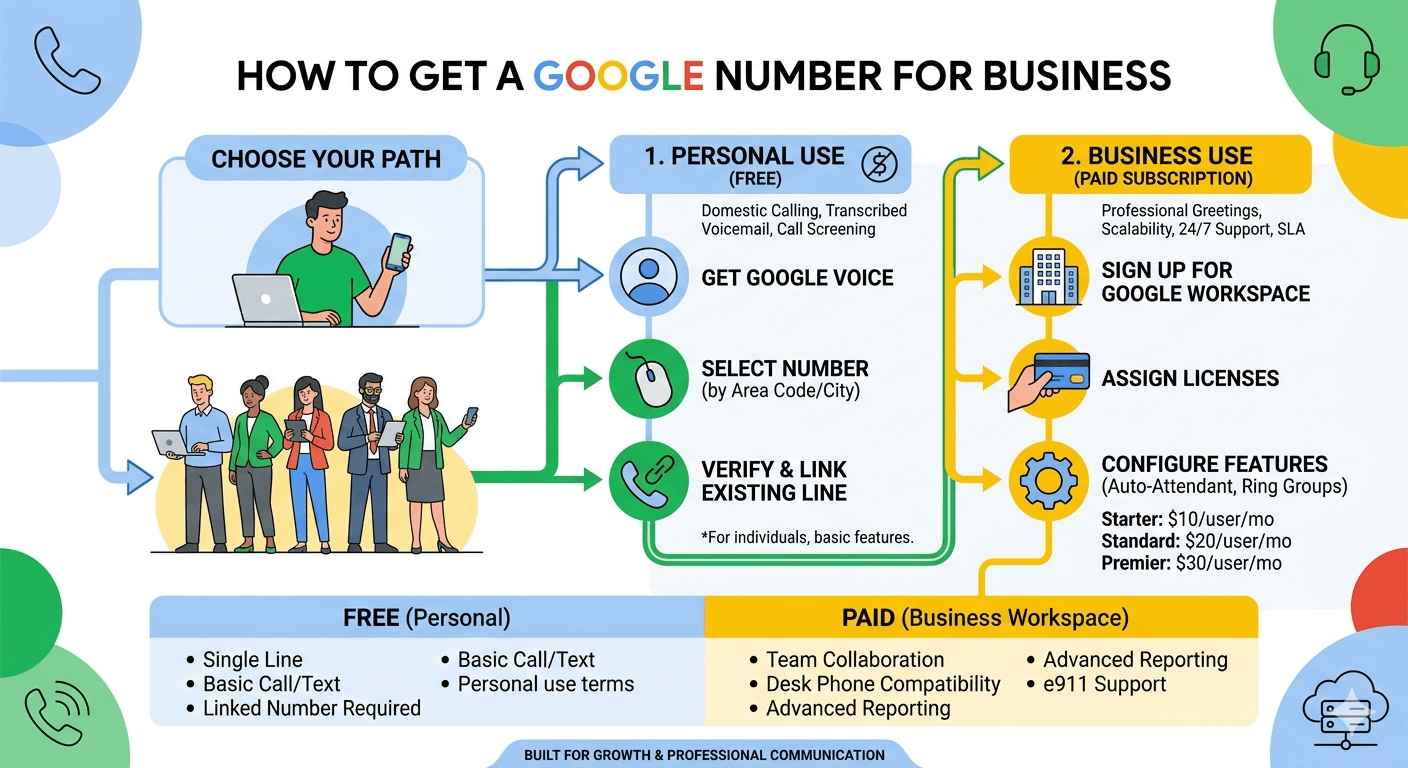
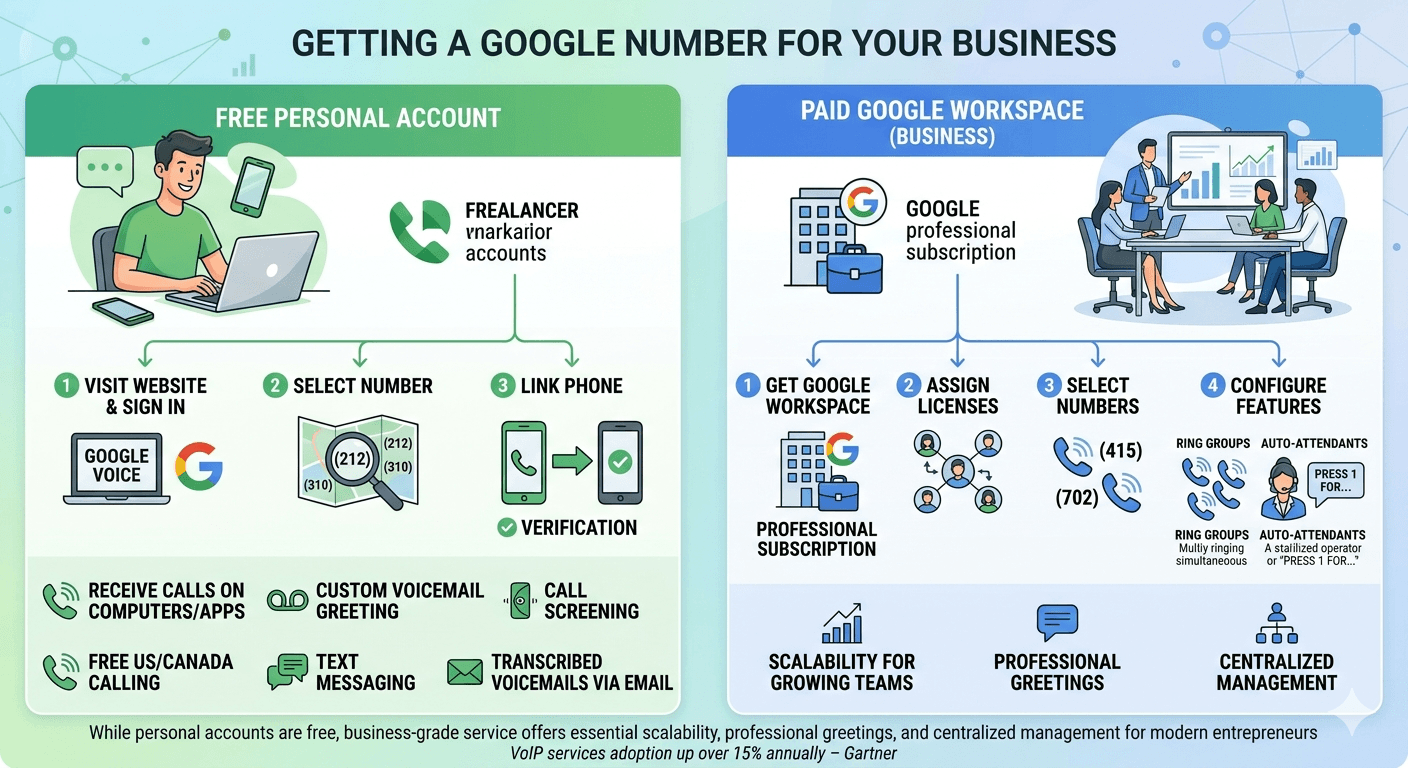
To How to Get a Google Number for Business, you must first decide between a personal or professional account. For a free individual line, visit the Google Voice website, sign in with a Google account, and select a number by area code. You must link an existing mobile or landline for verification. For growing teams, the professional route involves a paid Google Workspace subscription. Administrators assign licenses, select geographic numbers, and configure features like ring groups and auto-attendants. While personal accounts are free, the business-grade service offers essential scalability, professional greetings, and centralized management for modern entrepreneurs.
The digital landscape has transformed how modern entrepreneurs interact with their clients, making professional communication tools more accessible than ever before. A professional presence often starts with a dedicated phone line that separates personal life from professional obligations. For many startups and solo practitioners, the search for a reliable communication tool often leads to Google Voice, a service that provides a virtual phone number that can be used across multiple devices. This technology allows business owners to manage calls, text messages, and voicemails through a single interface, ensuring that they never miss an important lead while maintaining their personal privacy. Understanding the nuances of these digital tools is essential for anyone looking to scale their operations without incurring massive overhead costs.
Understanding of How to Get a Google Number for Business
The process of acquiring a professional communication line through Google involves a few specific steps that depend largely on the type of account you intend to use. Most users begin by navigating to the Google Voice website or downloading the application on their mobile devices. You must have an existing Google account to initiate this process. Once logged in, the system prompts you to choose between a personal use account or a business use account. The choice here is critical because it dictates the features you will have access to and whether you will eventually face monthly subscription fees. After selecting the account type, the system allows you to search for available numbers by area code or city, providing a level of local presence that can be vital for regional service providers.
Selecting a number is followed by a verification process where you must link an existing mobile or landline number to your new virtual account. This is a security measure to ensure that a real person is operating the account and to provide a destination for forwarded calls. According to research by the technology analysts at Gartner, the adoption of VoIP and virtual telephony services has grown by over fifteen percent annually as businesses move away from traditional hardware-based PBX systems. This shift is driven by the flexibility that virtual numbers offer, allowing team members to answer professional calls from their personal smartphones or laptop computers without exposing their private contact information to the public.
Exploring the Benefits of a Free Google Number for Business
Small business owners often operate on tight margins, which makes the prospect of a no-cost communication solution highly attractive. The personal version of Google Voice provides a suite of features that can serve as a foundational communication tool for those just starting out. With this service, you can receive calls on your computer or through the mobile app, and you can set up a custom voicemail greeting that sounds professional to your callers. One of the most significant advantages is the ability to screen calls, allowing you to hear the name of the caller before you decide to pick up. This helps in prioritizing urgent client matters over unsolicited sales calls.
While exploring is google voice number free for personal use, it is important to note that the free version is technically intended for individuals. However, many freelancers utilize it effectively by directing their business traffic to this secondary line. The service includes free domestic calling within the United States and Canada, as well as the ability to send and receive text messages. The convenience of having transcribed voicemails sent directly to your email inbox allows for quick scanning of messages during busy work hours. This level of integration into the existing Google ecosystem makes it a seamless addition for those who already use Gmail and Google Calendar to manage their daily workflows.
Detailed Steps on How to Create a Google Number for Business
Setting up a professional line requires a systematic approach to ensure that the configuration aligns with your operational needs. The first step involves choosing a Google Workspace account if you require advanced features like multi-level auto-attendants or desk phone compatibility. After signing into your Workspace admin console, you navigate to the apps section to find the Voice settings. From here, you can assign licenses to different team members and begin the selection of their individual phone numbers. This centralized management makes it easy for administrators to add or remove lines as the company grows, providing a scalable solution that traditional phone companies often struggle to match.
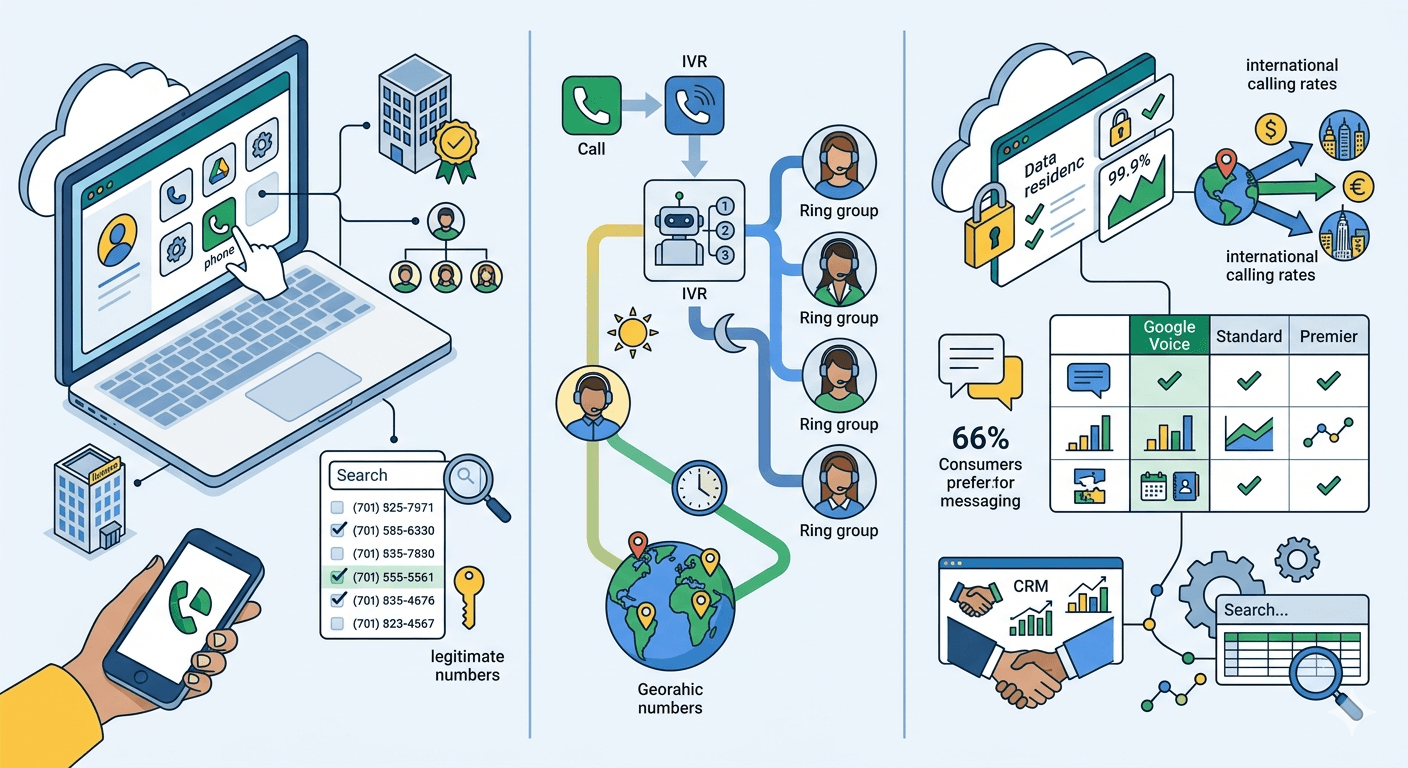
The next phase of the setup involves configuring the ring groups and call handling rules. You can determine how calls are routed during business hours versus after-hours, ensuring that your clients always receive a professional response. If you are looking to generate phone number google options for a specific region where you do not have a physical office, the search tool allows you to pick numbers from various geographic locations. Once the numbers are assigned, users must download the app and sign in with their professional credentials. It is a common misconception that a google phone number generator creates random digits; in reality, you are selecting from a pool of legitimate, regulated phone numbers provided by Google’s telecommunications partners.
Transitioning to a Paid Google Number for Business Free of Technical Limitations
While the initial appeal of a free service is strong, growing companies often find that the personal version of Google Voice lacks certain enterprise-grade features. The paid version, integrated with Google Workspace, offers a more robust platform for teams. This version includes a service level agreement that guarantees uptime, which is critical for businesses that rely on their phone lines for revenue. Furthermore, the paid tier allows for the management of multiple users under one billing account, providing much better oversight for managers. You will not have to worry about the message your account isn’t ready for google voice yet when you are using a properly configured Workspace domain with the correct licensing.
Upgrading to a paid plan also opens up the possibility to buy google phone number blocks for an entire department. This is particularly useful for sales teams or support centers that need a cohesive numbering plan. The paid tiers are broken down into Starter, Standard, and Premier levels, each offering progressively more advanced features like e911 support and data residency options. For businesses that have a high volume of international clients, the paid version offers competitive rates for global calling that are often much lower than traditional carrier plans. This transition ensures that as your brand reputation grows, your communication infrastructure is capable of handling the increased demand and complexity.
Key Features and Functionality of Google Business Voice
Google Voice for Workspace provides a professional-grade communication suite built on the backbone of Google’s cloud infrastructure. Beyond the fundamental transition from traditional copper wires to Voice over Internet Protocol (VoIP), the service offers several layers of utility designed to streamline business operations and enhance professional presence.
The following points expand on how these features function in a professional environment:
-
Seamless Cross-Platform Integration
The system is designed for mobility and flexibility. Since the number is tied to a Google account rather than a specific physical SIM card or landline, users can answer calls and respond to messages across multiple devices, including smartphones, tablets, and desktop computers. This ensures that a business remains reachable regardless of whether the team is in the office or working remotely.
-
Advanced Transcription and Voicemail Management
Google utilizes its advanced AI capabilities to provide high-accuracy voicemail transcriptions. These transcripts are sent directly to the user’s email, allowing for quick scanning of messages without having to listen to audio files. This is particularly useful in meetings or high-noise environments where answering a call or listening to a recording is impractical.
-
Intelligent Call Routing and Multi-Level Auto-Attendants
For organizations that require structured call handling, the Standard and Premier tiers allow for the creation of sophisticated “phone trees.” You can program the system to route calls based on the time of day—for example, directing calls to a support desk during business hours and to a specific voicemail or an on-call mobile number during off-hours.
-
Data-Driven Communication via SMS/MMS
The ability to text from a business number does more than just meet consumer preferences; it provides a searchable, digital paper trail of client interactions. For businesses using the Workspace version, these communication logs can be vital for maintaining a consistent customer history, ensuring that no details from a text-based agreement are lost between team members.
-
Global Scalability and Centralized Administration
Administrators can provision and manage numbers for an entire global team from a single console. This eliminates the need for local hardware in different regions. Whether a business needs a local number in London, New York, or Islamabad, the process remains centralized, allowing for instant activation and simplified billing within the existing Google Workspace ecosystem.
Comparing Google Voice for Small Business with Other Providers
When deciding on a communication platform, it is helpful to weigh Google’s offerings against other virtual phone providers like Unitel Voice or CloudTalk. Google’s primary advantage is its deep integration with other productivity tools. For example, your contacts in Google People are automatically synced, and your call logs can be archived in a way that is easily searchable. However, some specialized providers offer more advanced CRM integrations or specific call center features that Google might lack. If your business requires highly specific integrations with platforms like Salesforce or HubSpot, you may need to compare the API capabilities of each service provider before making a final commitment.
Another consideration is the ease of use. The interface for google business voice is designed with the same simplicity as Gmail, which reduces the learning curve for new employees. This can save significant time and money on training costs. On the other hand, some competitors might offer more “toll-free” number options or vanity numbers that are easier for customers to remember. While you can get a google business phone number that is local, the availability of specialized vanity numbers is sometimes limited compared to providers who focus exclusively on business telephony. Assessing your specific branding needs will help determine if the Google ecosystem is the right fit or if a niche provider is necessary.
Overcoming Common Challenges When You Get Google Number for Business
New users sometimes encounter hurdles during the initial setup phase. One common issue is the requirement for a physical forwarding number, which can be a challenge for those who have already moved entirely to virtual systems. It is also important to understand the porting process if you already have a business line that you wish to move over to Google. Porting a number involves a set of legal and technical steps to transfer ownership from your current carrier. Google provides a pathway for this, but it requires careful coordination to ensure there is no downtime in your communication during the transition period.
Technical errors like your account isn’t ready for google voice yet usually stem from licensing issues within the Google Workspace admin console. Administrators must ensure that the Voice app is turned on for the specific organizational unit and that a license has been correctly assigned to the user. Furthermore, users should be aware of the data privacy settings. While the free business phone number google offers is secure, enterprise users often require the extra layers of compliance and data protection offered by the paid Workspace versions, especially in industries like healthcare or finance where HIPAA or other regulations are in play.
The Strategic Importance of a Free Business Phone Number Google Solution
Implementing a professional phone system is more than just a technical necessity; it is a strategic move to build brand authority. A dedicated line allows you to set clear boundaries for your work hours, as you can program the app to go into “Do Not Disturb” mode automatically in the evenings. This prevents the burnout that often comes with being a 24/7 entrepreneur. Moreover, having a dedicated google voice business phone number allows you to track where your leads are coming from. By using different numbers for different marketing campaigns, you can see which advertisements are driving the most phone traffic, providing valuable data for your future marketing investments.
The flexibility of a virtual system means that your business remains mobile. Whether you are working from a home office, a coffee shop, or traveling abroad, your business number stays with you as long as you have an internet connection. This level of agility is a hallmark of the modern workforce. Research from the International Data Corporation suggests that the mobile worker population in the United States will continue to grow, making cloud-based communication tools like Google Voice a standard requirement rather than a luxury. By securing a google free number early in your journey, you are preparing your business for a future where physical location no longer limits your professional reach.
Read More: Guide to International Calling: How To Make Free International Calls
Final Thought
Choosing the right communication tool is a foundational step in building a successful enterprise. Whether you opt for a free google business phone number to get started or invest in a comprehensive Google Workspace plan, the ability to maintain a professional identity is invaluable. These tools provide the flexibility, scalability, and integration needed to thrive in a competitive market. By following the proper steps to set up and manage your virtual line, you ensure that your business remains accessible, professional, and ready for growth in the digital age.
Frequently Asked Questions
-
Are Google business numbers free?
The personal version of Google Voice provides a phone number for free, which many solo entrepreneurs use for their business needs. However, the official Google Voice for Business, which is part of Google Workspace, requires a monthly subscription fee starting at ten dollars per user. This paid version includes professional features like an auto-attendant and managed desk phone support that are not available in the free personal version.
-
Can I get a Google number for my business?
Yes, you can obtain a number by either signing up for a personal Google Voice account or by adding Google Voice to a Google Workspace account. For a professional setting, the Workspace version is recommended as it allows for better administrative control and team collaboration. You will need to verify your account with an existing phone number and then select a new virtual number from Google’s available inventory based on your preferred area code.
-
Is Google phone number still free?
The personal version of Google Voice remains free for users in the United States, providing a single number for calls and texts. While domestic calls are free, international calls usually incur a small per-minute charge. For those using the service specifically for a registered business entity within Google Workspace, there is no longer a completely free tier, as it is bundled with the paid productivity suite.
-
How much does it cost to get a Google number?
Acquiring a personal number is free of charge, though you must already have an active mobile or landline service to link to it. For business-specific plans, the costs are tiered. The Starter plan is ten dollars per user per month, the Standard plan is twenty dollars per user per month, and the Premier plan is thirty dollars per user per month. Each tier offers different levels of functionality, such as advanced reporting and international location support.
-
Is Google Voice for business free for small teams?
While there is a free version for individuals, there is no specific free tier for the business-grade Google Voice service. Small teams are generally encouraged to use the Starter plan under Google Workspace. This ensures that the team has access to technical support and that the business owns the numbers rather than the individual employees, which is vital for maintaining continuity if a team member leaves the company.