
The best Voxbi alternatives for businesses in Luxembourg are Orange Virtual PBX for a locally supported phone system, 3CX for more control over hosting and SIP trunking, Ringover for CRM-centred calling, and Microsoft Teams Phone for calling inside Teams. The right choice depends on where you need numbers, who will operate the phone system, and which business tools must keep working.
Voxbi is the cloud PBX built by Mixvoip in Luxembourg. Its offer includes self-service and managed options, plus a concurrent-call plan. Its integrations include Microsoft Teams and Odoo. If you already buy numbers and routing from Mixvoip, check whether that carrier relationship needs to change. You can evaluate Voxbi competitors for the phone system and ask separately whether the existing numbers and carrier can remain.
Which Parts Of Voxbi Do You Need To Replace?
Voxbi uses a browser-based administration portal for phone numbers, routing and other settings. Mixvoip describes providing the carrier network underneath, and Voxbi supports bring-your-own-carrier configurations. The independent parts of that setup make several migration paths possible. Review Voxbi’s official plan details and the customer agreement before deciding which Voxbi alternatives to shortlist.
Voxbi One, Managed, And Channel
Voxbi presents self-service plans with per-user pricing, Managed plans with provider assistance, and a Channel model based on concurrent calls. Check your actual tier, service scope and call charges. Numbers, calling and integrations can have different eligibility or prices depending on the plan. New numbers in Luxembourg should be confirmed separately from the list of countries you can call.
Luxembourg Numbers And Cross-Border Calling
Record which numbers are held in Luxembourg and which belong to offices or callers in France, Belgium or Germany. For each one, verify whether you need a new number, a port, or an updated route on a retained carrier. Ask the Voxbi competitors to confirm local address and account requirements and the supported number types. The destination list for outbound calls answers a different question from the availability of local inbound numbers.
Odoo, Teams, And Managed Support
Identify whether users place calls from a browser, desktop app, mobile app, desk phone, Teams or a CRM. If you rely on Voxbi’s Odoo or Teams integrations, list the exact actions employees use, such as making a call from a customer record, automatically logging its outcome, or answering an external call inside Teams. Ask the Voxbi alternatives to show those workflows on the proposed tier. Include response times, deployment support and any data-location requirements in the quote.
Voxbi Alternatives Comparison
Compare the offerings by deployment model and verify the price for your billing market. Retail prices, quotes and capacity-based licences use different units. Review the table notes for the scope of each price and review rating.
| Provider | Best Fit | Buying Consideration | Pricing And Evaluation |
|---|---|---|---|
| Locally Supported Business Voice | Confirm number eligibility, mobile app scope and what local support covers. | Request Luxembourg PricingQuote seats, calls, numbers, devices and deployment.Explore Orange Virtual PBX | |
| Choice Of Hosting And SIP Carrier | Verify current trunk support, hosting, licence edition and peak call capacity. | 8-Call PRO Licence At €380/YearOptional 3CX hosting for this tier is €285/year. Trunk and support are separate.View 3CX Euro Pricing | |
| CRM-Centred Sales And Support | Verify Luxembourg number and port eligibility, CRM edition and feature scope. | Smart From €19/User/MonthFrance list price with annual billing and a three-user minimum. Confirm Luxembourg terms.View Ringover Plans | |
| Calling In A Microsoft 365 Environment | Confirm Teams Phone entitlement, Luxembourg number types and PSTN model. | Request Luxembourg Teams PricingQuote the Microsoft entitlement, calling or carrier plan, and rollout.Explore Microsoft Teams Phone Plans |




Orange Luxembourg’s Trustpilot score covers the operator’s broader customer experience. Microsoft Teams’ G2 score covers the collaboration application. Evaluate the specific PBX or voice plan with a pilot and ask for business references with similar phone requirements.
Best Voxbi Competitors By Phone System Requirement
1. Orange Virtual PBX For Luxembourg-Based Support
Orange Luxembourg describes Virtual PBX as a business voice service with number retention, standard PBX features and multilingual technical support. It also describes the Orange Cloud Phone mobile app for using an extension. It is one of the Voxbi alternatives to shortlist when you want a local operator to supply and support the phone service.
Best fit. A Luxembourg business with a front desk, employees who answer on mobile and a team that wants provider help with deployment. Ask about the support available for the exact service and the handoff between Orange and your internal IT team.
What to test. Use the main number, a shared device and one user on the mobile app. Verify a transfer, the after-hours destination and outbound number presentation. Ask the Voxbi competitors you shortlist how they handle a number that cannot move with the rest of the account.
Buying consideration. Request a written quote for seats, calls, numbers, hardware and porting. If you also need service in another country, ask what Orange will supply directly under the proposed agreement and which parts need another carrier or service.
2. 3CX For SIP Carrier And Hosting Control
3CX is one of the closest Voxbi competitors for businesses that want a PBX with a choice of hosting and a compatible SIP carrier. Its published euro list prices the licence by simultaneous calls and shows separate hosting amounts for eligible configurations. The 8-simultaneous-call PRO licence is listed at €380 per year, and the corresponding hosted option adds €285 per year. Quote the trunk, numbers, traffic and partner services separately.
Best fit. A business with an IT partner or a team that wants to keep a compatible trunk, select a hosting model and manage its own call flow. Verify the supported trunk and edition for the current deployment. If Mixvoip remains the carrier, ask both sides to confirm current interoperability, numbers and support before assuming the old trunk can be retained.
What to test. Build the busiest reception or support route, then place inbound and outbound calls while internal staff transfer calls and use shared devices. Ask the other Voxbi alternatives to use the same peak scenario so you can compare licence and carrier capacity together.
Buying consideration. Confirm who will handle hosting, updates, backups, phone provisioning and first-line support. Ask for a separate scope if Odoo call logging or another CRM integration must be built or supported by a partner. The 3CX alternatives guide covers other PBX deployment models.
3. Ringover For Calling And CRM Workflows
Ringover offers a cloud business phone system with CRM-oriented calling and a coverage page that lists Luxembourg. It is one of the Voxbi alternatives worth testing when sales or support teams want to work primarily in a shared calling application. Verify availability, documentation and portability for each required number before buying a plan.
Best fit. Sales and customer support teams with repeatable calling processes and a CRM they use every day. Test with a smaller team first if you have several departments, particularly if one needs dashboards and recording and another only needs a standard phone line.
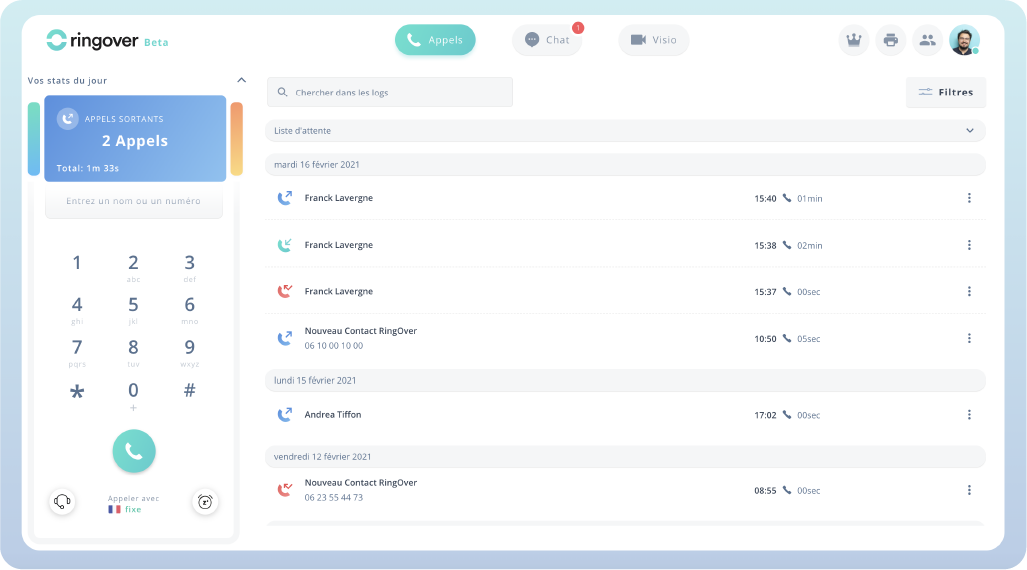
What to test. Place a call from a customer record, answer a queue call and confirm where the completed call and notes appear. Try two customers with the same main company number and see which record the tool opens. Ask Voxbi competitors for the same test and check whether the CRM feature is included on the quoted tier.
Buying consideration. Ringover’s French price page is a regional reference. Its Smart plan advertises a three-user minimum. Confirm the Luxembourg quote, commitment and number terms. If you need Odoo, verify the exact integration and version, along with any cost for permissions, records or support.
4. Microsoft Teams Phone For Calling Inside Teams
Microsoft documents number acquisition and porting for Luxembourg and lists Luxembourg for applicable Microsoft Calling Plans. Teams Phone also supports third-party PSTN options such as Operator Connect and Direct Routing, subject to the chosen operator and deployment. It is one of the Voxbi alternatives to consider if users already work in Teams and you want their external calls to stay there.
Best fit. A business with Microsoft 365 administration and a clear calling requirement, or a cross-border team that wants Teams as the user interface across sites. Confirm the Teams Phone entitlement and how each location gets PSTN calling, numbers and local support.
What to test. Configure an ordinary user and a service number for a main route. Verify the resource account, number assignment, after-hours calls and the device or application that answers. Ask the shortlisted Voxbi competitors who updates schedules, takes carrier escalations and supports different site types.
Buying consideration. Quote the Microsoft entitlements and PSTN service separately, then include number porting, support and any needed SBC. Check whether the proposed Teams setup can preserve your required Odoo, reception, reporting and call-recording workflows.
Check Luxembourg Numbers And Greater Region Coverage
Create a separate entry for every public number and location. Include the carrier holding it, billing account, requested number type, destination route, and whether the company needs the number to stay on existing paperwork or listings. Give the same inventory to shortlisted Voxbi alternatives. Ask each to answer four questions independently: which numbers it can issue, which it can port, which destinations users can call, and where it can provide the support and emergency calling setup your business needs.
Distinguish A Port From A Change Of Route
If you keep the current carrier, it may be possible to change where its calls arrive while leaving numbers with that carrier. Ask it whether this is supported and which trunk, routing changes or contract terms apply. If you change carriers, ask the receiving provider to confirm eligibility, authorization and the account information required for each number group. Check this with the Voxbi competitors before scheduling a move. The provider’s general coverage page is a starting point for those questions.
Use your current bill or approved inventory to verify every number in the batch. Include local numbers, toll-free lines and numbers that reach a service outside the PBX. Record the current carrier and confirm that the business has authority to move the affected numbers. When a reception number appears on signage, websites or customer documents, have the receiving provider explain what happens if it moves separately from the rest of the account.
Price Luxembourg, France, Belgium, And Germany Separately Where Needed
For a Luxembourg headquarters with staff across the border, ask providers to identify how the users will call, which publicly assigned office number they use and whether they need a local number where they work. A remote employee may use one business number. A staffed office may need a local number, its own hours and a separate support contact. Give the Voxbi alternatives a site list that distinguishes those cases.
Do the same for outbound calling. Provide actual destinations, average usage and any business-critical route. Include a local landline, a mobile destination and a common cross-border call in the pilot. Have shortlisted Voxbi competitors confirm which calls are included in the plan and which have separate charges. Verify the rates and support boundaries if you use more than one carrier.
Confirm Messaging, Fax, And Other Number Dependencies
Record numbers that also receive messages or connect to a fax adapter, paging system or a third-party service. Ask if the same number and setup can be kept, when those features are activated and who verifies them. Test two-way use separately before relying on a migrated line. For an outside system, arrange a test with its responsible provider and have someone confirm the result at the customer location.
Choose A Deployment For The Way Your Teams Work
A Local Office That Needs A Main Line And Provider Support
For a shop, clinic or professional office with one main line, start by mapping who answers and who covers when that person is away. Ask Voxbi competitors to quote the front desk, individual calling for the people who need it, and one shared device. Request the service language, the escalation route and an example of how a supported change is made. Ask whether your staff can update the holiday schedule directly or must request it.
Check how calls reach staff who leave the office during the day. Have them answer from a desk phone and the proposed mobile app using an approved test number. Compare Voxbi alternatives on call transfer, voicemail access and how the main business number is presented when an employee returns a call. Verify what happens if the handset, mobile connection or office network is temporarily unavailable.
A Multi-Site Company Retaining An Existing Carrier
Consider a business with a Luxembourg main office and a second office in Belgium, each with a different carrier or number account. Ask the Voxbi competitors to quote carrier retention and a consolidated arrangement using the same set of numbers and service roles. Identify which locations can retain their setup and what network, device or number changes each design requires. Set a single owner for the migration even if the carriers remain separate.
Have the receiving provider demonstrate a transfer between sites and check who updates the route if one office changes hours. Ask the Voxbi alternatives if staff can manage both offices in a central portal while local administrators only see their own settings. Confirm whether both locations receive support under one agreement and which changes remain work for the local carrier.
A Sales Or Support Team That Lives In Its CRM
Use the agents who do the work to measure the difference. Have them find a caller, log an outcome and return a missed call using the proposed tier. Ask Voxbi competitors whether the new phone system can report on those actions and show how the data is filtered by agent and queue. If additional components are needed, have the providers identify who builds, licenses and supports them.
Check for differences between desktop and mobile. A mobile user may need a simpler call flow but still has to receive the right number and leave a record colleagues can find. Ask the service desk to rehearse a reset or device change. Include the effort involved in onboarding new agents and in setting up a new queue or language prompt as the team grows.
Test Reception, Odoo, And Teams With Real Workflows
Start with a pilot that includes an ordinary office user and someone in reception, sales or support. Give all shortlisted Voxbi alternatives the same business hours and expected call paths. Test from the equipment and applications your employees will actually use. A basic inbound call can pass while an important transfer or customer logging step still requires configuration.
Recreate Reception And After-Hours Routing
Call the main number during working hours, after closing and during an overflow situation. Verify the default language, ring group, queue or destination, and what a caller hears if nobody answers. If reception transfers callers across offices, check both announced and direct transfers and confirm who can update the route. Give the Voxbi competitors the same case so you can compare the work needed to provision and support it.
Test the help-desk and office administrator roles as well. A branch manager may need to change a holiday greeting without seeing sensitive recordings or another office’s settings. A central administrator may need access to all locations. Ask how roles are granted, reviewed and removed. Have one local employee change a permitted schedule in the pilot and check that the service desk can find the update.
Verify How A Call Appears In Odoo Or Another CRM
Begin with a customer record, place a call, transfer it, and have the employee record the outcome. Then call the company from outside using the same number. Observe what the CRM opens and how it records ownership, status, notes and links. Ask the Voxbi alternatives to clarify which actions the integration supports and which remain manual. Verify the edition, permissions, user entitlement and deployment method used in your pilot.
Include a customer whose number matches several records, an unanswered call and a callback. Those cases show whether employees can correct a match or add notes without duplicating work. If one of the Voxbi competitors proposes a connector or integration partner, price it separately and ask who resolves problems when the CRM and phone system disagree.
Evaluate Teams Calling And Shared Voice Applications
Confirm whether Teams is the calling application or only a collaboration tool for the pilot group. For a Teams Phone design, identify who provides external calling, the phone entitlement and the site’s support. Test a user number as well as the main number, including any resource account for a queue or auto attendant. Ask the shortlisted Voxbi alternatives to show who can change schedules, number assignments and outbound caller ID.
If some employees stay on desk phones or a separate mobile app, include a transfer between the two groups. Verify what the employee sees when a call comes from another site and whether a call can reach its after-hours destination while an office is closed. Record who handles the handoff between the carrier, PBX and Microsoft support if a call fails.
Check Recording, Reporting, And Data Location
Request the relevant product terms for where the phone platform stores customer data, recordings, call logs and any transcription output. Ask what third-party features or subprocessors are part of the proposed configuration. Voxbi describes running its phone system in Luxembourg. Before choosing a replacement, have each candidate describe the locations and retention controls for the specific products you will buy.
In the pilot, make a test recording and have an authorized person find it and apply the agreed retention setting. Check whether an administrator can export logs or summaries after a user leaves. Ask the Voxbi competitors to identify relevant add-ons, export limits and support processes for an incorrectly matched or missing record. Coordinate approval and operating rules with the people responsible for your customer data.
Compare Per-User, Per-Channel, And Managed Pricing
Have each provider quote the same users, shared devices, public numbers and traffic profile. Separate the phone system, licence, hosting, trunks, usage, number fees, optional integrations, support and deployment. Ask which charges are recurring and which only apply to activation. Compare the quotes with the same VAT treatment and confirm the contract term before using any displayed rates.
Use An Annual 3CX Example To Compare Like For Like
At the published euro prices, 3CX PRO at eight simultaneous calls costs €380 per year for the licence. The matching 3CX hosting line is €285 per year, so those two items total €665 per year, about €55.42 per month. Add your quoted trunk, numbers, calling, partner support and any separately sold features. If you choose another host, use its actual price and management responsibilities in place of the hosting line.
When evaluating per-user Voxbi alternatives, ask whether the quote charges for all staff, only users with a phone entitlement, or additional shared devices. Build a second cost model from your busiest observed hour. Have the providers explain which types of calls count towards concurrent capacity in their proposed design. Verify how PBX capacity and any carrier limit interact. Increasing the licence may still leave the trunk as the constraint.
Model A Small Office And A Busy Support Team Separately
For a small office, quote the front-desk number, one shared phone and the staff who need individual calling. Ask which users can share a device and whether an additional public number changes the monthly rate. For a busier sales or support team, include call queues, recorded calls where needed, reporting, and the expected number of simultaneous calls. Check which quoted features are in the package and which are optional.
Give the Voxbi competitors an ordinary month and a busy month with more cross-border or mobile calls. Ask them to list what changes on the bill and which charges are included in a bundle. For any unlimited plan, check applicable destinations, conditions, account requirements and additional services. Keep one-off porting and implementation separate so that normal recurring charges are clear.
Ask What Happens When Demand Exceeds The Quoted Capacity
Describe the busiest period for your business, such as reception opening alongside a support queue. Ask the Voxbi competitors what callers experience if the quoted capacity is reached and which report shows the event. Verify what happens to internal calls, transferred calls and external routes during the same period. Then ask how quickly the platform or trunk can be upgraded and how the higher level is billed.
Give the Voxbi alternatives a second scenario in which the busiest site keeps its network or device dependency. Ask how the provider verifies the constraint before changing the licence. This exercise helps finance compare the cost of capacity with the cost of staffing a queue, changing a route or keeping a backup line. It also gives the help desk a useful incident test.
Make Support And Administration Visible In The Quote
Ask who configures and updates the system, who replaces a handset, and who handles a failed port or an invoice question. Include staff or partner time for user changes, opening hours and routing. If a contract includes deployment assistance, have the provider list which locations and activities are covered. Ask the Voxbi alternatives how support changes when a site keeps another carrier or uses a locally installed device.
Request the full cost while the old and new systems overlap. Include rentals on any temporary numbers, partner time to configure phones and integrations, and any existing service that will remain. Confirm how you are billed for licences or numbers ordered before employees can use them.
Plan The Migration In Number And Site Batches
Inventory the phone numbers, devices, applications, queues, service addresses and carrier records for each customer or branch. Save approved copies of the information the migration team will need. Ask the Voxbi alternatives to say which objects can be imported, which need to be recreated, and who provides support between provisioning and port completion. Choose one typical office and one with a meaningful dependency for a pilot.
Set A Baseline Before Changing Routes
Write down the expected result of calling the main line, reaching an employee directly, transferring a call and calling after hours. Confirm the intended caller ID and which site or user is responsible for any fallback. Run the tests on the present configuration and repeat them with the Voxbi competitors you pilot. If an expected action requires a change to the CRM or another application, add that task before the wider move.
Check the proposed handsets, apps and shared devices. Test one of every important model and verify how it is released, registered or replaced if needed. Use the provider’s approved procedure to verify emergency calling configuration and service addresses. Where a PBX or carrier remains, check who validates the connection and who is allowed to make changes that affect an operational site.
Agree Who Handles Ports And Delayed Moves
Have the receiving provider confirm planned number groups and who monitors carrier updates. Decide how staff report a partial port and where calls should route if the main number moves late. Confirm who can pause the next batch. Give the team a support contact that works independently of the service being moved. Ask shortlisted Voxbi alternatives to demonstrate the fallback and specify which changes can be made by the business or carrier during the cutover.
Tell site contacts when they should test calls and where to report an issue. Include direct numbers, queues, transfers, messages and any nonstandard devices in the check. If a mobile app or password reset is part of the migration, give users the correct instructions before their number moves. Ask the people running the service to record which actions are complete before closing the relevant part of the old account.
Confirm Who Handles Changes After The Pilot
Have shortlisted Voxbi competitors show the support process after the implementation team leaves. Make a routine request to add a user and an urgent request about a main-line problem. Check which contacts your administrators use, who can approve a temporary route and where they can see status. Include a contact who can work with the local carrier if the new phone platform and the carrier are supplied separately.
Reconcile The First Invoice And Retain Required Records
Compare the deployed users, numbers, calling and integrations with the first invoice. Ask shortlisted Voxbi competitors to explain any unused licence, temporary number or overlap charge. Give finance the approved order and service inventory. Keep authorized copies of needed invoices, call records and other exports available after the old system closes. Follow the agreed porting and cancellation steps after the affected numbers and workflows are working.
Frequently Asked Questions About Voxbi Alternatives
What Is The Best Alternative To Voxbi In Luxembourg?
Orange Virtual PBX is a local option for provider-supported business calling. 3CX fits teams that want more control over the SIP trunk, hosting and PBX. Ringover is worth testing for CRM-based calling, and Microsoft Teams Phone fits businesses that want external calling inside Teams.
Which Voxbi Competitors Can Support Luxembourg Phone Numbers?
Orange Luxembourg offers local business voice, Ringover lists Luxembourg in its coverage, and Microsoft documents Luxembourg number acquisition and porting. With 3CX, numbers come from the selected SIP carrier. Get confirmation for the specific number type, port and business address before choosing an offer.
Can You Keep Mixvoip And Change The Phone System?
It can be possible to retain the carrier if it supports the proposed PBX or connectivity arrangement. Ask Mixvoip and the new supplier to confirm the exact trunk, number routing and support requirements. Test the existing numbers before scheduling wider changes.
How Much Do Voxbi Alternatives Cost?
Request quotes for your exact users, sites and calling volumes. Include the cost of numbers, usage, hosting, integrations and support. If the licence is based on concurrent calls, check your peak call demand and price the carrier separately.
Can Another Provider Replace Voxbi’s Odoo Integration?
Compare the actual actions you use, including click-to-call, matching a caller to a customer record, logging the outcome and permissions. Verify the Odoo version, integration method and support owner on the quoted plan before choosing a provider.
Can You Port Numbers While Keeping The Phone System Running?
Ask the shortlisted Voxbi competitors to confirm the port window, eligible numbers, required records and how they handle exceptions with the receiving carrier. Stage the destination routes, confirm fallback and avoid closing connected services before verifying the numbers and features in scope.
Use Customer Reviews To Pick Pilot Questions
G2 ratings in this comparison cover 3CX, Ringover and Microsoft Teams. The Microsoft Teams listing describes the wider collaboration product. Orange Luxembourg’s Trustpilot listing covers the company. Match the product and sample size to the specific problem your business needs to solve before relying on a score.
Ask the Voxbi competitors on your shortlist for a reference with comparable office locations, devices or CRM requirements. Ask how the supplier handled the first support request, the first invoice and a number that could not move on schedule. Run your own tests of the main number, the busiest route and the integration staff will use every day.
Affiliate Disclosure VoIPCalling may earn a commission if you purchase through an affiliate link.