

The best MyNetFone alternatives depend on whether you are replacing a home phone, a business calling application or the SIP connection to an existing PBX. For business teams, start with KrispCall for shared customer conversations and Calilio for departmental routing and supervision. RingCentral RingEX and Zoom Phone suit broader employee-calling evaluations. Crazytel supplies a residential SIP option, while SIPcity is an Australian business SIP candidate.
There is an important historical distinction. Vonex says it acquired MyNetFone's small-business and residential business in 2021. The former MyNetFone website now redirects to Symbio, whose current site addresses communications infrastructure for enterprises and service providers. The website redirect alone does not identify who supplies or bills your particular legacy account.
Check the latest invoice before choosing a replacement. An old MyNetFone plan name or saved portal bookmark may no longer describe the current service. This guide explains the supplier history, compares six candidates and provides practical checks for Australian numbers, equipment, calling costs and a controlled migration.
The business recommendations use relevant master-sheet partners first. Two Australian specialists supplement them because residential and retained-PBX requirements need different products. Team sizes are suggested evaluation scenarios. We have researched supplier information and review evidence, without claiming independent audio tests or firsthand migrations.
Choose The Right Type Of MyNetFone Replacement
- Small Business Sharing Customer Calls: evaluate KrispCall and the paid functions needed for handoffs.
- Departments Needing Menus And Supervision: demonstrate Calilio Premium against a realistic call flow.
- Office-Wide Calling: compare RingEX's Australian plan with the functions your employees and receptionist use.
- Existing Zoom Workplace: assess Zoom Phone with an Australian regional quote and individual number checks.
- Home Phone Or Low-Usage Residential Line: compare Crazytel's residential SIP charges, number rental and equipment needs.
- Business Keeping Its PBX: qualify SIPcity's trunk configuration, simultaneous calls and written billing terms.
7-Day Free Trial For VoIPCalling Customers: our exclusive KrispCall partner offer lets eligible readers begin an application evaluation through the supplied partner destination. Confirm number and feature access before planning any port.
Start A 7-Day KrispCall Free TrialWhat Happened To MyNetFone?
MyNetFone's small-business and residential business was acquired by Vonex in 2021; the old MyNetFone domain now leads to Symbio. Those are related historical facts, but they should not be collapsed into a claim that every former MyNetFone customer now buys the same product from Symbio.
Vonex's historical migration materials describe moving legacy MyNetFone SIP trunks and residential services to its systems. The residential migration page still contains a promotion ending in June 2023. Treat it as historical context, rather than a current signup offer or evidence that your own account is still awaiting migration.
Vonex also announced its transition into the MaxoTel group in October 2025. If your reason for moving is supplier independence, investigate ownership and the proposed carrier arrangement before counting Vonex and MaxoTel as independent fallback choices. A change of brand does not by itself establish a different underlying dependency.
This matters when comparing MyNetFone competitors. Your current contract may already use another supplier's product and billing system. Compare the service on your present invoice with the proposed configuration, rather than comparing an archived MyNetFone tariff with a modern subscription that includes different functions.
Identify The Service You Actually Have
Record the billing company, account number, plan name, telephone numbers, contract term and support contact from recent documents. Establish whether the service is residential VoIP, a business SIP trunk, a hosted phone system or a bundle containing internet access. If the evidence conflicts, ask the current supplier for a service inventory before requesting cancellation.
You do not need to solve the whole corporate history to move a number. You do need accurate account details, a receiving provider that accepts the number and a clear understanding of any service being left behind. Keep old documentation for reference, but use current account information for the port request.
Compare Six MyNetFone Alternatives For Australian Calling
The table separates team applications from residential and business SIP services. Prices retain their published currencies. A low trunk charge does not include a full employee platform, and a US-dollar licence does not automatically include Australian numbers or unlimited Australian calls.
| Provider | Best Fit | Buying Consideration | Pricing & Trial |
|---|---|---|---|
| Small Teams Sharing Customer Calls | Starter up to 5 users. Advance adds transfers and recording; transcripts/summaries are add-ons. | US$12/user/monthStarter US-dollar reference, annual billing; US$15 monthly. Advance US$32 annually billed, US$40 monthly. Confirm Australian numbers, allowances and tax.7-Day Free Trial for VoIPCalling CustomersStart a 7-Day KrispCall Free Trial | |
| Department Routing And Supervision | Premium for transfers, IVR, business hours and live supervision. Country conditions affect bundled usage. | US$28/user/monthPremium US-dollar reference, billed annually. US$35 monthly. Quote Australian numbers, destination rates and tax.Demo AvailableRequest a Calilio Demo | |
| Australian Workplace Calling | Essentials entry tier, up to 49 users. Standard adds multi-level IVR and on-demand recording. | A$22.99/user/monthAustralian Essentials displayed annual-payment reference. A$25.99 monthly payment. Published minimum including GST A$303.47 over 12 months. Confirm payable total.Free Trial Available. New subscribers, up to 5 users and 2 phones, 50 domestic minutes/user. Hardware-return conditions apply.Start A RingEX Free Trial | |
| Calling Within An Existing Zoom Workplace | Specify Australia/New Zealand calling plan, number types and devices. | Request Current Phone PricingRequest Australian regional pricing for users, numbers, usage, devices, add-ons and GST.Confirm Current Phone Evaluation TermsExplore Zoom Phone For 1–50 Users | |
Crazytel Residential  | Residential VoIP And A Home Number | Residential eligibility; numbers, equipment and optional functions are separate. Craycray is residential-only. | A$0.50/standard SIP trunk/monthPAYG CIS: A$0 base plan fee, plus standard trunk, number rental and calls. Craycray A$8/month; standard trunks included, 1 outbound channel. GST included.Prepaid Service. Confirm Porting And Setup Charges; No Timed Free Trial Claimed.Check Crazytel Residential Plans |
SIPcity  | Australian Business SIP With A Retained PBX | Australian business eligibility; 1 concurrent call at the reference price. Resolve conflicting billing/cancellation wording. | A$17.50/monthPublished monthly SIP reference including GST, 1 local number and 1 concurrent call. Confirm current plan terms and exclusions.Confirm Written Billing And Evaluation TermsCheck SIPcity Australian Plans |




Crazytel's score is a company-wide Trustpilot score, while the other listed scores belong to G2 product profiles. SIPcity's G2 sample is only two reviews. Use those distinctions alongside the practical service checks below rather than ranking the products by decimal score alone.
1. KrispCall For A Shared Business Calling Workspace
KrispCall is our first partner option when a small business wants to replace fragmented customer follow-up with a common calling workspace. Its relevance comes from the employee workflow: colleagues need to see earlier contact, understand who should respond and keep business conversations separate from personal phones.
Suggested Team: two to five employees at an agency, trade office or consultancy sharing incoming enquiries. Starter supports up to five users. Advance supports up to fifty, but headcount is only one buying criterion. A two-person team may still need a paid feature tier that supplies transfers or recording.
Published Starter pricing is US$12 per user monthly with annual billing or US$15 monthly. Advance adds transfers and recording at US$32 annually billed or US$40 monthly; transcription and summaries are add-ons. The free-number inclusion names the US, Canada and UK. An Australian number needs separate pricing, documentation and portability confirmation.
Why Evaluate It: ask two colleagues to handle an evaluation number, deliberately miss an enquiry and have a different colleague return the call. Check whether the earlier contact and next action are easy to find. Compare that result with the way your current team manages a shared mailbox, spreadsheet or individual handset logs.
What To Confirm: the pricing page publishes calling allowances while other comparison and FAQ text retains PAYG wording. Obtain the applicable Australian routes, overages and included inbound conditions in writing. Do not assume a nominal allowance covers every number type, destination or forwarded call.
This is an application candidate, rather than an assumed drop-in SIP trunk for an unchanged PBX. A household seeking occasional calls may have little use for the shared team functions. Our KrispCall review provides additional product and setup context.
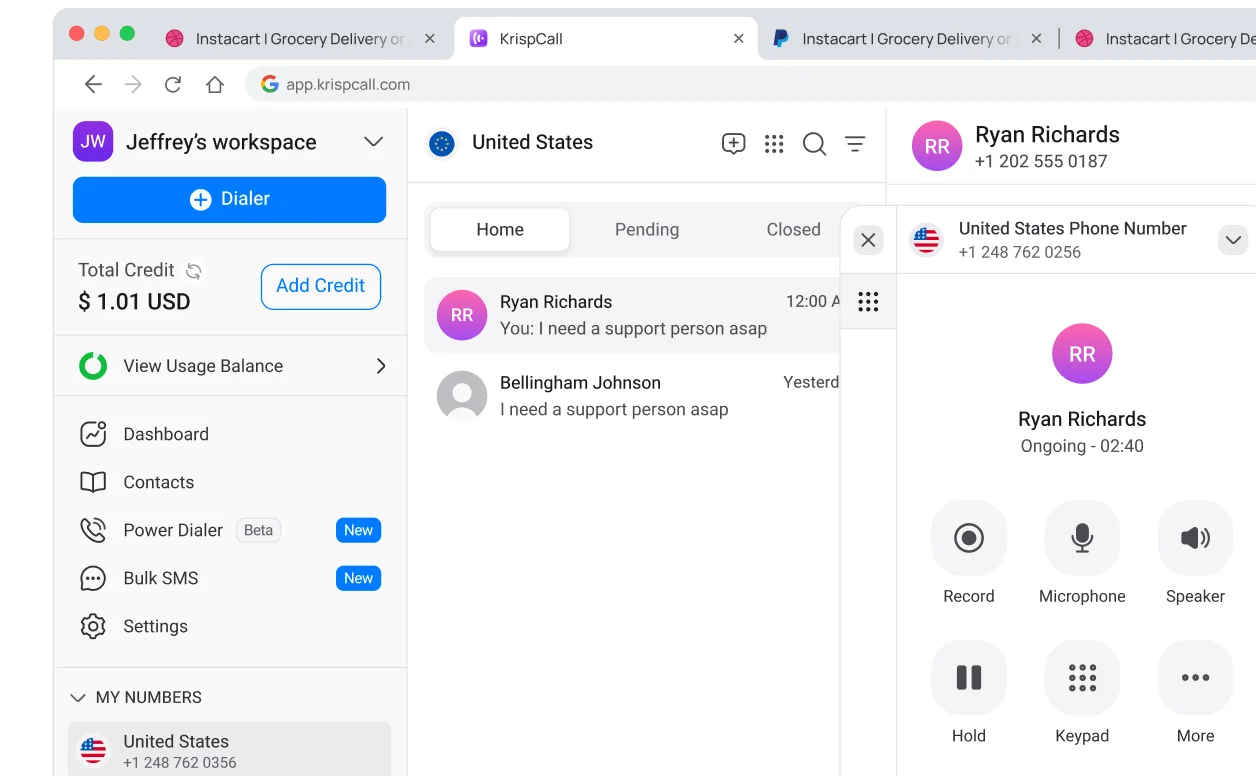
VoIPCalling customers can access an exclusive seven-day KrispCall free trial through our partner link. This partner offer is separate from its public subscription-refund policy.
2. Calilio For Department Routing And Supervision
Calilio is relevant when replacing the current service also means organising how enquiries move between teams. A useful demonstration should show a caller choosing a department, reaching an available employee and receiving a documented follow-up if nobody answers.
Suggested Team: five to twenty sales or support employees across responsibilities such as new enquiries, accounts and existing customers. This is an evaluation scenario. The requirement for structured routing can arise before a company becomes large, particularly when one public number serves several activities.
Premium lists US$28 per user monthly billed annually or US$35 monthly. The published comparison places transfers, IVR, business-hours routing and live listening, whispering and barging in Premium. Standard's lower headline price should therefore not represent a quote for all of those functions.
Why Evaluate It: test a busy department and the fallback path, then ask a supervisor to locate the relevant interaction. Check who owns the callback and what information is visible to the next employee. Record whether the process works on the actual devices used in your office and by remote staff.
What To Confirm: obtain an Australian number and usage quote, including the required recording, storage and transcription allowances. The published call and messaging bundles have country conditions. A free US or Canadian number does not establish a free Australian number or included Australian messaging.
Calilio is better evaluated as a hosted team application than as an automatic replacement for old SIP credentials. Ask about the precise CRM actions you need and distinguish available integrations from upcoming functions. Our Calilio review expands the plan and workflow checklist.
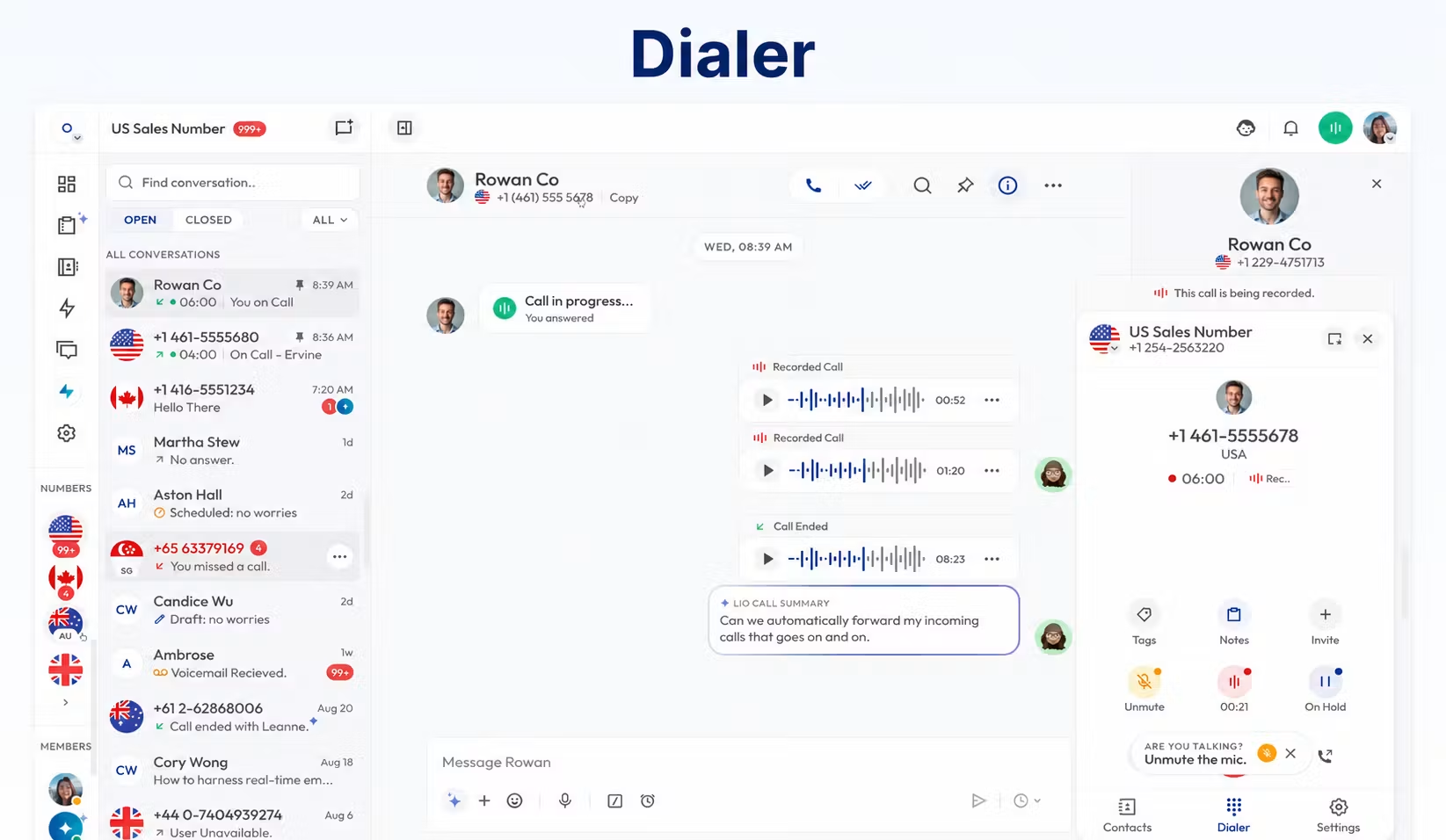
Demo Available: request a demonstration based on your requirements. A demo or small testing credit should not be described as a verified time-limited free trial.
3. RingCentral RingEX For Australian Office Calling
RingCentral RingEX is a candidate when the replacement should cover employee calling and office administration together. It has an Australian plan reference, which helps buyers examine a local service proposition instead of treating an overseas subscription as an Australian quote.
Suggested Team: ten to forty office employees needing consistent calling arrangements and reception coverage. Confirm the required devices, administrator roles and functions. A product that suits remote employees still needs to handle the person answering the main number throughout a busy day.
The Australian Essentials page displays A$22.99 per user monthly with annual payment and A$25.99 monthly payment. It separately states a minimum including GST of A$303.47 over twelve months. Confirm the payable total on the order. Essentials supports up to forty-nine users and includes 250 outbound minutes per user.
Why Evaluate It: demonstrate employee onboarding, user removal, reception handoffs and the reports an office administrator needs. Ask the supplier to map every requirement to the proposed Australian tier. Multi-level IVR and on-demand recording appear in Standard, rather than the entry Essentials proposition.
What To Confirm: device support, number eligibility, extra usage and whether more advanced customer handling needs an additional product. RingEX employee calling should not be confused with a fully configured contact centre. Reusing a phone requires separate confirmation even when a business number can move.
The Australian free trial is qualified: new subscribers, up to five users and two desktop phones, with fifty domestic minutes per user. Trial hardware has return conditions. Review those conditions before arranging a device shipment.
4. Zoom Phone For An Existing Zoom Workplace
Zoom Phone is worth considering when employees already work in Zoom and want to evaluate telephone calling in that environment. Familiarity is useful, but a meetings subscription should not be mistaken for an Australian telephone-number and calling package.
Suggested Team: ten to fifty distributed employees, or a larger business planning office-wide calling. The links below distinguish the small-business and larger-business routes. For either group, qualify reception, shared coverage and administrator requirements before assuming a familiar application will cover the whole deployment.
Zoom's published pricing describes an Australia/New Zealand regional calling model. Request current Australian pricing for the actual licences, numbers, devices, add-ons and GST treatment. The US/Canada amount on a review page does not determine what an Australian customer will pay.
Why Evaluate It: test the transition between a normal workplace conversation and a customer telephone call. Have colleagues handle voicemail, cover an unavailable employee and manage a device change. Inspect the settings needed for the Australian office rather than evaluating only an individual user's dial pad.
What To Confirm: Zoom's APAC porting documentation lists Australian fixed/local, mobile, toll-free and 1300 categories. That describes a supported process, not unconditional acceptance of every number. Obtain approval for the specific number, account and associated range. Ask which required functions need an add-on and distinguish Zoom Phone from Zoom Contact Center.
No Australian Phone trial duration is assumed here. Request evaluation terms for the quoted service and do not schedule a port until the configuration is ready.
5. Crazytel For Residential SIP And A Home Number
Crazytel belongs on the shortlist for former home-phone users because it publishes a specific residential VoIP proposition. That is a closer purchasing category for a household than an employee collaboration licence. It also offers separate business products, which should be used when the intended calling activity is commercial.
Suggested Household: one home number connected through an approved SIP device, with occasional outbound calls or a residential domestic-calling bundle. Confirm that someone can manage the account, prepaid balance and basic device configuration. A low recurring charge does not include an installer or replacement hardware automatically.
The PAYG residential Critical Information Summary lists a zero base plan fee, A$0.50 monthly per standard SIP trunk and separately charged numbers and calls. The website's fifty-cent monthly headline represents that standard-trunk cost; do not add a second fifty-cent base fee. The residential Craycray plan lists A$8 monthly, with standard trunks included and one outbound channel.
Why Evaluate It: compare a simple home-number configuration without paying for team tools you will not use. Confirm the number rental, device and prepaid requirements together. The residential bundle is restricted to residential use, and additional products such as premium features remain separately chargeable.
What To Confirm: the number category and porting charge, exact device support and the complete monthly configuration. The page and service summaries do not use identical porting-category wording. Obtain confirmation for your actual port rather than assuming every old MyNetFone number qualifies for free transfer.
Use the verified residential plan link in the comparison table to inspect this non-partner option. Its Trustpilot company score includes different services; individual mobile-service complaints should not be presented as measured performance for a residential SIP installation.
6. SIPcity For Australian Business SIP Requirements
SIPcity is the business SIP candidate for a company that wants to discuss retaining its PBX and replacing the carrier arrangement. The published service also describes cloud PBX feature access. Establish which architecture is proposed, since keeping a separately maintained PBX and adopting hosted call handling involve different work.
Suggested Business: an Australian organisation with a maintained PBX, a known peak call load and an ABN, ARBN or ACN. The eligibility condition matters: this is a business offer and should not be recommended as a household plan merely because the monthly price looks attractive.
The published monthly reference is A$17.50 including GST, with one local number and one concurrent call. Ask for a quote at the capacity the business needs. A reception service handling several callers cannot be priced accurately from a one-call configuration alone.
Why Evaluate It: compare the carrier layer while preserving a PBX that already provides suitable extensions, menus and recording. Have the maintainer confirm the supported setup and division of fault responsibility. Avoid buying a new employee application to solve a problem confined to the trunk connection.
What To Confirm: the plan page states monthly billing and a one-month term, while the cancellation section also refers to annual prepayment. Resolve those terms in writing, including any unused balance. No free-trial period is claimed in this comparison.
SIPcity's G2 score comes from only two reviews. The sample offers limited evidence and should carry less weight than a successful pilot and a clear written service specification. The official table link lets readers inspect the published non-partner plan.
How To Replace A Legacy Home Phone Without Overbuying
For residential VoIP, start with the home number, calling pattern and supported equipment. A household that mostly receives calls may need a different configuration from a family making regular mobile and international calls. Neither case automatically needs a shared team inbox, CRM integration or employee licence for every family member.
Write down who answers the phone and where the handset must work. An existing cordless base connected through an analogue telephone adapter may suit one household, while another prefers an IP phone or application. An adapter is useful only when its model and configuration are supported and someone can maintain the setup.
Check how the account is funded. A prepaid service can stop working as intended when the balance becomes insufficient, even if the internet connection remains healthy. Ask about balance alerts, recharge rules and recurring number rental, and decide who will receive notices. Include the person who manages family bills in the evaluation.
Check incoming and outgoing service separately. A number may continue receiving calls while outbound calls fail because of a configuration or account condition. Confirm caller identification, voicemail, the dialling format for ordinary numbers and access from the devices actually used at home.
Discuss power loss, internet loss and emergency-calling requirements with the provider. Internet calling depends on more than the handset being charged. Establish an alternative way to call if the broadband equipment or home power is unavailable, and understand any location information the provider requires.
If the line supports an alarm, medical device, lift phone or other specialised equipment, involve the equipment supplier before changing connectivity. A successful ordinary voice call does not establish compatibility for those devices. Keep that service outside a routine residential VoIP migration until its replacement path is confirmed.
Compare Calling Costs Using A Realistic Monthly Pattern
A cheaper MyNetFone replacement must cost less for the complete service you actually need. Include number rental, the trunk or platform subscription, calls, equipment, optional functions and commitment. Do not compare an archived tariff, a promotional credit and a current ongoing bill as though they were equivalent.
Worked Residential PAYG Example
For an illustrative Crazytel residential setup, assume one standard SIP trunk, one eligible A$2 monthly local number, thirty fixed-line calls, twenty Australian mobile minutes and four calls to 13/1300 numbers. Using its published PAYG rates, the calculation is A$0.50 for the trunk, A$2 for the number, A$2.70 for fixed-line calls, A$1 for mobile calls and A$1 for 13/1300 calls.
The result is A$7.20 monthly including GST for those assumptions. Hardware, optional functions, international calls and other traffic are excluded. Confirm the current rental for the actual ported number. This is a worked example, not a quotation or a claim that every household will receive that bill.
When A Residential Bundle Could Be Worthwhile
Under the same one-number example, the A$8 Craycray plan plus A$2 number rental and four chargeable 13/1300 calls would total A$11, subject to the residential and fair-use conditions. It includes the specified domestic calling and one outbound channel. Increasing the PAYG example to two hundred mobile minutes would instead bring its total to A$16.20.
The comparison illustrates why usage matters more than the smallest headline. Under these particular assumptions, the fixed-line and mobile PAYG charges would need to exceed the A$7.50 difference between the bundle fee and the standard PAYG trunk cost. International destinations and additional functions require their own comparison.
Price A Business Workflow Separately
A business team may rationally pay more for shared customer handling, supervision or consistent administration. Measure that value against a specific problem. If missed enquiries are not assigned, test whether the new workspace makes ownership clear. If employees repeatedly rewrite notes, compare the effort after using the proposed tools.
For each proposal, request one cost schedule containing the employee or trunk charges, number rental, usage rules, equipment and mandatory add-ons. Preserve US-dollar prices as US dollars, ask how tax and currency conversion are handled, and distinguish an annual-billing monthly equivalent from a cancellable monthly payment.
Include implementation and overlap. Installer time, porting, training and temporarily running both services can affect the first-year total. A plan that is slightly cheaper each month may take a long time to recover a costly rebuild. Conversely, a higher subscription may be worthwhile when it resolves an evidenced operational problem.
Match A Business Replacement To The Existing Phone System
For a business using a legacy MyNetFone service, identify whether the PBX lives on premises, in a separately managed cloud account or within the current supplier's hosted platform. That determines whether you need another SIP connection or a replacement telephone system. Both can be described as VoIP while involving very different responsibilities.
Keep A Working PBX When The Carrier Is The Issue
If menus, extensions, recordings and reception work well, retaining the PBX can limit the change. Ask the proposed carrier and the PBX maintainer to agree the supported product version, authentication, caller identification, call capacity and fault investigation. Do not assume that a provider's support for SIP establishes compatibility with every existing configuration.
Historical migration instructions can explain what happened to an old service, but they should not be copied into a new installation as current credentials or network settings. Obtain the receiving provider's current instructions for your account. Keep configuration exports and access details secure during the handover.
Replace The Platform When The Workflow Is The Issue
If the business needs shared conversation access, easier employee administration or a different application, compare a hosted platform. List the current call flow and rebuild the necessary behaviour before porting. Include open hours, closed hours, holidays, overflow and unanswered calls, rather than copying only the main greeting.
Record who performs ongoing changes. A small business accustomed to an installer handling everything may find that a new application expects an internal administrator. Ask which changes are included in support, which require a paid implementation service and which are your responsibility.
Count simultaneous calls separately from employees and telephone numbers. A small team can have active calls, queued callers and forwarding legs at the same time. Obtain a proposed capacity model and test the expected busy period. Avoid treating a one-channel trunk price as comparable to an unlimited-capacity office system.
Check Number Portability Before Cancelling Anything
Porting depends on the actual number, account and receiving provider. A general statement that Australian numbers are supported does not establish acceptance of a particular old MyNetFone number. Number availability for new orders, number portability, outbound caller ID and messaging capability are separate checks.
Create an inventory of every public number and its purpose. Distinguish geographic, mobile, 13, 1300 and 1800 services. Record whether numbers are part of a range, associated with internet access or used by equipment outside the ordinary phone system. Ask what happens to services that are not moving.
Use the latest bill to establish the legal account holder, account identifier and service address where required. Submit documents through the receiving provider's approved process. Resolve conflicting company names or account details before choosing a cutover date, rather than guessing from an old branded invoice.
Ask whether the request involves a simple number or a more complex configuration, what information is needed and which charges apply. Crazytel's public page and current summaries use different porting-category wording, which is another reason to confirm the actual order. Do not assume that a free standard port covers every associated service.
Keep the current service active while the port is processed. A number move and an account cancellation are different actions. Ask how a completed port affects remaining numbers, billing, internet access and equipment obligations. Reconcile those separately after the new service is working.
Use forwarding cautiously during evaluation. It may let colleagues try a new application, but it can add charges and does not prove that the number has ported. After activation, test inbound calls from several networks and outbound caller identification, then verify that the intended menus, voicemail and fallback routes are active.
Prepare Devices, Accounts And Everyday Access
Inventory each handset, adapter, headset and softphone before buying. Record the model, ownership, firmware and administrator access. A supplier-provisioned phone may require a reset or a supported configuration change, and existing rental or contract payments may continue after the number moves.
Test the exact device rather than relying on a broad compatibility statement. For a home phone, check cordless coverage, voicemail and the dialling experience. For reception, test extension keys, transfer behaviour, pickup and several callers arriving together. Those are different user needs and may justify different equipment.
Check application access on the intended computers and phones. Include notifications, microphone permissions, headsets and the experience when a laptop sleeps or a mobile changes networks. Make sure the people who will answer calls can use the application reliably during their normal routine.
Establish account ownership and permissions. The business or household should know who controls billing, number changes and password recovery. Avoid leaving the only administrator account tied to a departing employee or a contractor's personal address. Confirm the supplier's process for handing administrative responsibility to someone else.
For business records, request permitted exports of contacts, recordings and relevant call history before closing the old account. Decide what must be retained and who can access it. Moving a telephone number does not necessarily move voicemail, call history, schedules or customer records.
Run A Pilot Before Moving The Public Number
A useful pilot answers practical questions about the proposed paid service. Begin with an evaluation number, representative devices and a written list of required outcomes. Record problems with timestamps and the call route so the supplier can investigate rather than relying on a vague impression that calls sometimes fail.
- Normal Calls: test inbound and outbound Australian fixed and mobile destinations on the intended networks.
- Missed Calls: confirm voicemail, notifications, callback ownership and any associated charge.
- Busy Periods: use several simultaneous calls and check queueing, overflow or the expected busy condition.
- Transfers: try attended and direct transfers on the paid tier and intended reception device.
- Outside Hours: test closed hours, holidays and the path when nobody is available.
- Account Controls: inspect balances, allowances, permissions and adding or removing a user.
- Records: verify required notes, recordings and integration outcomes after the call.
For a household, simplify the test to the actual calling pattern and make sure the least technical person can use the phone. For a business, include the receptionist, a remote employee and the administrator. A demonstration led entirely by a salesperson may miss everyday difficulties your own users encounter.
Discuss power and internet failure, location requirements and emergency-calling arrangements through the provider's approved process. Do not place an unscheduled emergency-number call as part of a normal trial. Agree a practical backup contact method and understand what depends on the local internet connection.
Finish the pilot by checking charges. Confirm that representative calls match the written proposal and that a demonstrated feature remains included after the evaluation. A promotional credit, a refund policy and a time-limited free trial are different offers and should be treated accordingly.
Choose By Household Or Business Need
For A Light-Usage Household: compare a specifically eligible residential VoIP configuration, including number rental, prepaid funding and supported equipment. Crazytel's residential proposition is a relevant candidate in this shortlist. The worked costs are useful only if your real usage and number charges match the assumptions.
For A Shared Customer Team: evaluate KrispCall first and Calilio next against conversation ownership, routing and follow-up. The business case should describe what improves after an unanswered enquiry or a departmental transfer. Confirm the Australian service details before choosing a paid tier.
For A Wider Workplace: compare RingEX's Australian plan and Zoom Phone's regional proposal. Include reception, user administration and required devices. Familiarity with a meeting or messaging application is a helpful starting point, but telephone service still needs its own scope and cost schedule.
For A Retained Business PBX: qualify SIPcity's technical and commercial terms with the system maintainer. If the proposed service does not support the actual configuration, exclude it regardless of the headline price. A hosted team application belongs in a different comparison when the PBX must remain.
Give every remaining task an owner before cutover: port order, device configuration, call-flow approval, employee training and urgent support. Keep the current public-number service available until the receiving provider's process requires the change. After activation, validate calls and reconcile the old account rather than assuming port completion closes every charge.
The strongest MyNetFone competitors for your situation are the ones that meet these specific requirements. A historical brand change alone is not a reason to rebuild a satisfactory service. If the current supplier's configuration still fits, compare a targeted adjustment with the cost and effort of a full move.
Frequently Asked Questions
What Are The Best MyNetFone Alternatives In Australia?
KrispCall and Calilio are relevant for shared business calling, RingEX and Zoom Phone for workplace calling, Crazytel for residential SIP, and SIPcity for Australian business SIP requirements. Select by current service type, number eligibility, devices, required features and complete cost rather than treating all six as equivalent replacements.
Is MyNetFone The Same As Vonex Or Symbio?
The history involves both, but they should not be treated as interchangeable account destinations. Vonex acquired MyNetFone's small-business and residential business in 2021, while the former MyNetFone website now redirects to Symbio. Check your latest invoice and service details to identify the supplier responsible for your account.
Which Alternative Suits A Low-Usage Home Phone?
A residential SIP service such as Crazytel is a closer category match than a team collaboration subscription. Compare the standard trunk, number rental, calls, prepaid requirements and compatible equipment. The cheapest configuration depends on actual usage and the functions your household needs.
Can I Keep My MyNetFone Phone Number?
Potentially yes, if the receiving provider supports the number and approves the port request. Confirm the number category, current account details, documentation and any associated range before scheduling. Keep the existing service active during the receiving provider's process and test the number after activation.
Can I Use My Old VoIP Adapter Or Desk Phone?
Sometimes, subject to model, firmware, ownership, administrator access and supplier support. Ask the new provider to confirm the exact device and configuration. Porting a number does not transfer old credentials or establish that every existing handset will work unchanged.
Should I Choose SIP Trunking Or A Cloud Phone Application?
Choose a supported SIP trunk when keeping an existing PBX; evaluate a cloud application when replacing the employee calling system or workflow. Compare simultaneous calls, numbers and maintenance responsibility for the trunk, and licences, functions and administration for the application.
Which Providers Offer A Free Trial Or Demo?
VoIPCalling customers have an exclusive seven-day KrispCall partner trial, RingEX publishes a qualified Australian free trial, and Calilio offers a demonstration. Confirm the exact product, feature access, usage and equipment conditions. Do not treat prepaid sign-up credit or a refund policy as the same offer.
Will Cancelling My Old Account Move The Number?
No. Cancellation is not a substitute for an approved number-port request. Arrange the move through the receiving provider, maintain the existing service as required and confirm which old services or payments remain afterward. Ask both suppliers about any associated internet service or equipment commitments.
What Customer Reviews Suggest You Should Verify
Crazytel, Trustpilot, July 14, 2024, 5/5: a reviewer specifically described moving from MyNetFone/Vonex and praised the service and technical support, while suggesting it suited people with VoIP experience. This older example makes configuration support a useful question for a less technical household.
Crazytel, Trustpilot, August 20, 2026, 1/5: another reviewer criticised number reputation and connection reliability while discussing a virtual mobile account. That is individual feedback about a different service context, not evidence that every residential SIP installation has the same experience. Test the actual number type and workflow you intend to buy.
KrispCall, G2, October 15, 2026, 5/5: a reviewer praised verification assistance and team setup, while identifying transcription as a paid add-on. Use that feedback to ask what onboarding includes and how the complete proposed workflow is priced.
These are paraphrased customer accounts, not our own testing. Aggregate ratings and selected examples can suggest useful checks, but neither replaces a supported configuration, a successful pilot and clear written terms.
Affiliate Disclosure: VoIPCalling may earn a commission when you purchase through our partner links. Recommendations consider service fit, plan limitations and the household or business requirements discussed in this guide.