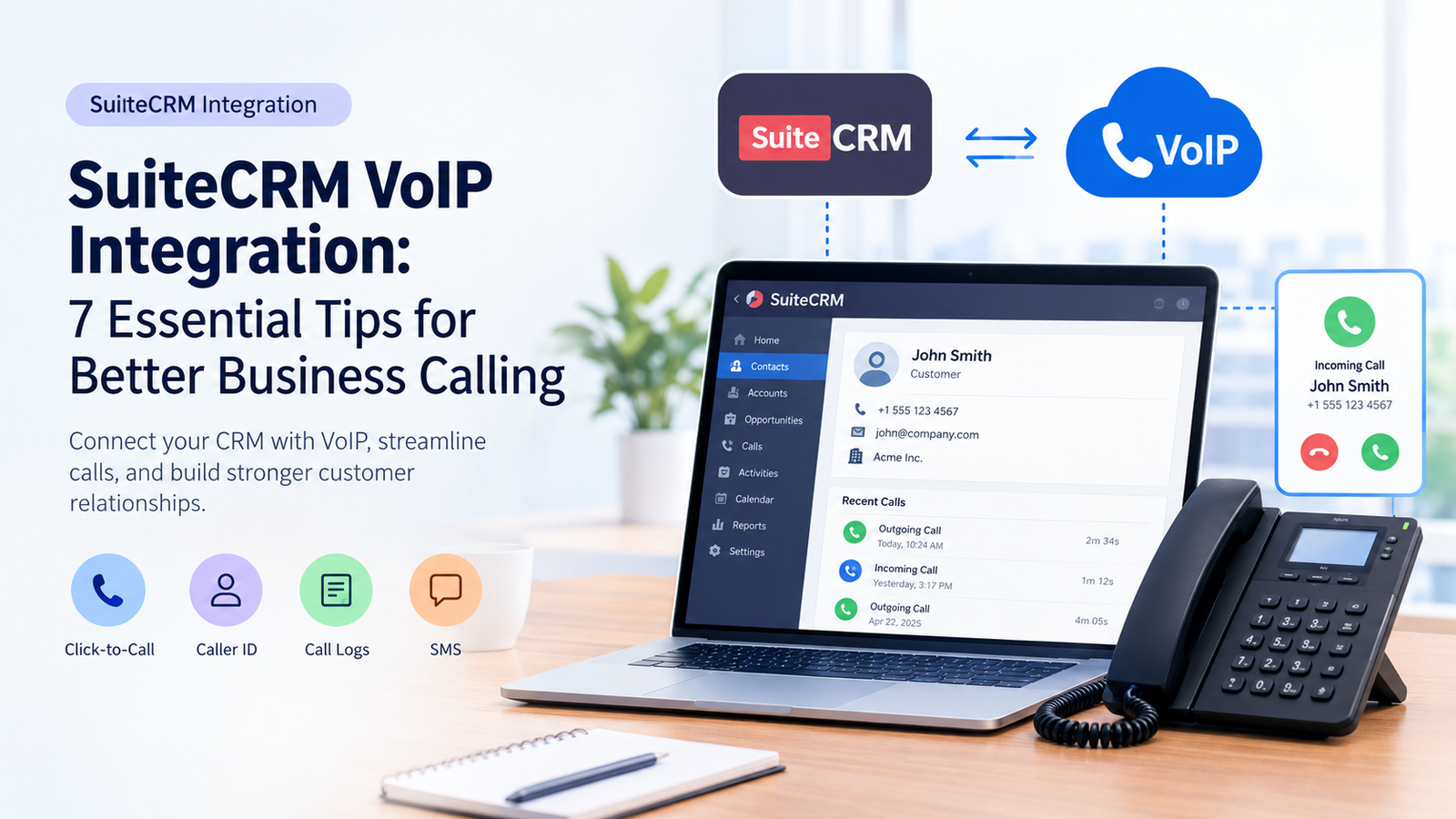
SuiteCRM VoIP integration connects customer relationship management software with a compatible internet-based phone service. Depending on the selected connector, businesses can make calls from CRM records, identify incoming callers, and store call details against customer profiles. Companies can establish this connection through third-party extensions, browser-based tools, or custom API development. The right method depends on the SuiteCRM version, telephone platform, required features, budget, and technical resources. Before installation, verify compatibility, licensing, security requirements, and the availability of essential calling functions.
How Startups Can Integrate SuiteCRM with VoIP Systems
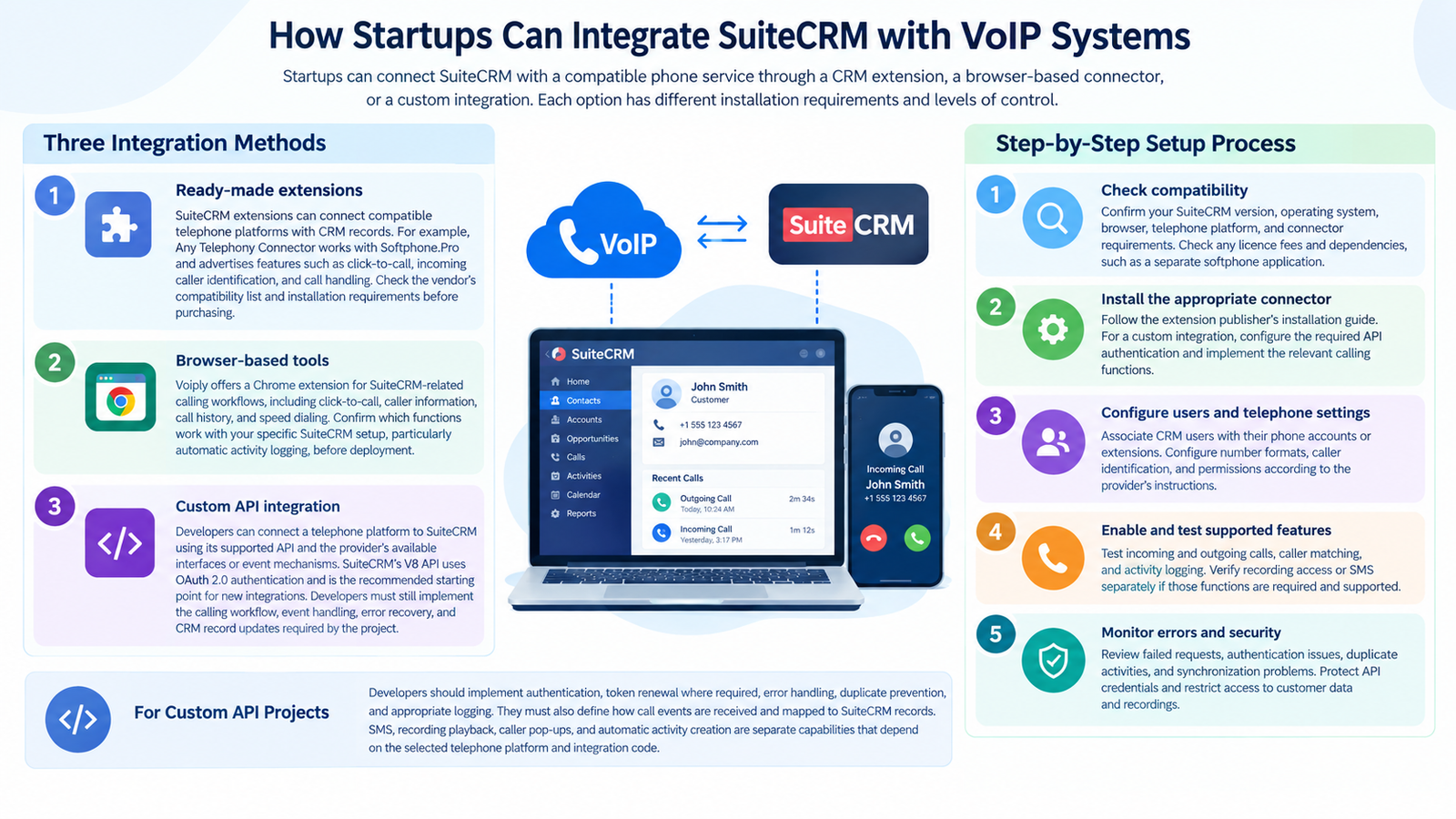
Startups can connect SuiteCRM with a compatible phone service through a CRM extension, a browser-based connector, or a custom integration. Each option has different installation requirements and levels of control.
-
Three integration methods
-
- Ready-made extensions:
SuiteCRM extensions can connect compatible telephone platforms with CRM records. For example, Any Telephony Connector works with Softphone.Pro and advertises features such as click-to-call, incoming caller identification, and call handling. Check the vendor’s compatibility list and installation requirements before purchasing.
- Browser-based tools:
Voiply offers a Chrome extension for SuiteCRM-related calling workflows, including click-to-call, caller information, call history, and speed dialing. Confirm which functions work with your specific SuiteCRM setup, particularly automatic activity logging, before deployment.
- Custom API integration:
Developers can connect a telephone platform to SuiteCRM using its supported API and the provider’s available interfaces or event mechanisms. SuiteCRM’s V8 API uses OAuth 2.0 authentication and is the recommended starting point for new integrations. Developers must still implement the calling workflow, event handling, error recovery, and CRM record updates required by the project.
- Ready-made extensions:
-
Step-by-step setup process
-
- Check compatibility: Confirm your SuiteCRM version, operating system, browser, telephone platform, and connector requirements. Check any license fees and dependencies, such as a separate softphone application.
- Install the appropriate connector: Follow the extension publisher’s installation guide. For a custom integration, configure the required API authentication and implement the relevant calling functions.
- Configure users and telephone settings: Associate CRM users with their phone accounts or extensions. Configure number formats, caller identification, and permissions according to the provider’s instructions.
- Enable and test supported features: Test incoming and outgoing calls, caller matching, and activity logging. Verify recording access or SMS separately if those functions are required and supported.
- Monitor errors and security: Review failed requests, authentication issues, duplicate activities, and synchronization problems. Protect API credentials and restrict access to customer data and recordings.
For custom API projects, developers should implement authentication, token renewal where required, error handling, duplicate prevention, and appropriate logging. They must also define how call events are received and mapped to SuiteCRM records. SMS, recording playback, caller pop-ups, and automatic activity creation are separate capabilities that depend on the selected telephone platform and integration code.
What Is SuiteCRM VoIP Integration?
SuiteCRM VoIP integration connects a business phone system with SuiteCRM. It combines customer records with telephone activities, allowing sales and support teams to access relevant information while handling conversations.
Computer telephony integration (CTI) connects calling functions with CRM records. Depending on the selected connector, available capabilities may include:
-
Click-to-call from telephone fields.
-
Incoming caller identification and record pop-ups.
-
Call duration, direction, and history.
-
Automatic activity logging and recording access.
-
SMS messaging where supported.
The exact feature set depends on the extension, phone service, and software versions. SuiteCRM’s official developer documentation provides API tools for building custom connections.
Why Tech Startups Need SuiteCRM VoIP Integration
Startups often work with small sales teams, limited budgets, and growing customer databases. Connecting calling software with their CRM reduces the need to switch between separate applications or enter the same information repeatedly.
Salesforce’s 2024 State of Sales report found that sales representatives spent approximately 70% of their time on activities other than selling. This survey finding highlights the administrative burden faced by sales teams, although it does not measure the savings produced by CRM–VoIP integration. Connecting calling tools with customer records may reduce repetitive tasks, but the results depend on the workflow, connector, and level of automation implemented.
Key Benefits of Integrating SuiteCRM and VoIP
A well-configured connection makes telephone activity easier to manage and improves access to customer information. The value depends on how closely the selected functions match existing business processes.
-
Faster outbound calling: Click-to-call reduces manual number entry and dialing errors.
-
Better caller context: Screen pops can display matching records before an employee answers.
-
More consistent records: Supported logging features preserve call details against relevant customer profiles.
-
Simpler follow-ups: Previous activities help employees understand what happened during earlier conversations.
-
Improved reporting: Available call records can support reviews of response times, activity levels, and customer interactions.
-
Flexible workflows: API-based development allows technical teams to build specific functions around existing CRM processes.
RT Dynamic has published a guide describing a RingCentral virtual PBX integration with SuiteCRM. Because the guide is dated, treat it as evidence of a documented integration approach rather than confirmation that every described feature remains available. Check current RingCentral documentation and the integration provider’s compatibility requirements before relying on specific functions.
Best Practices for Utilizing SuiteCRM and VoIP
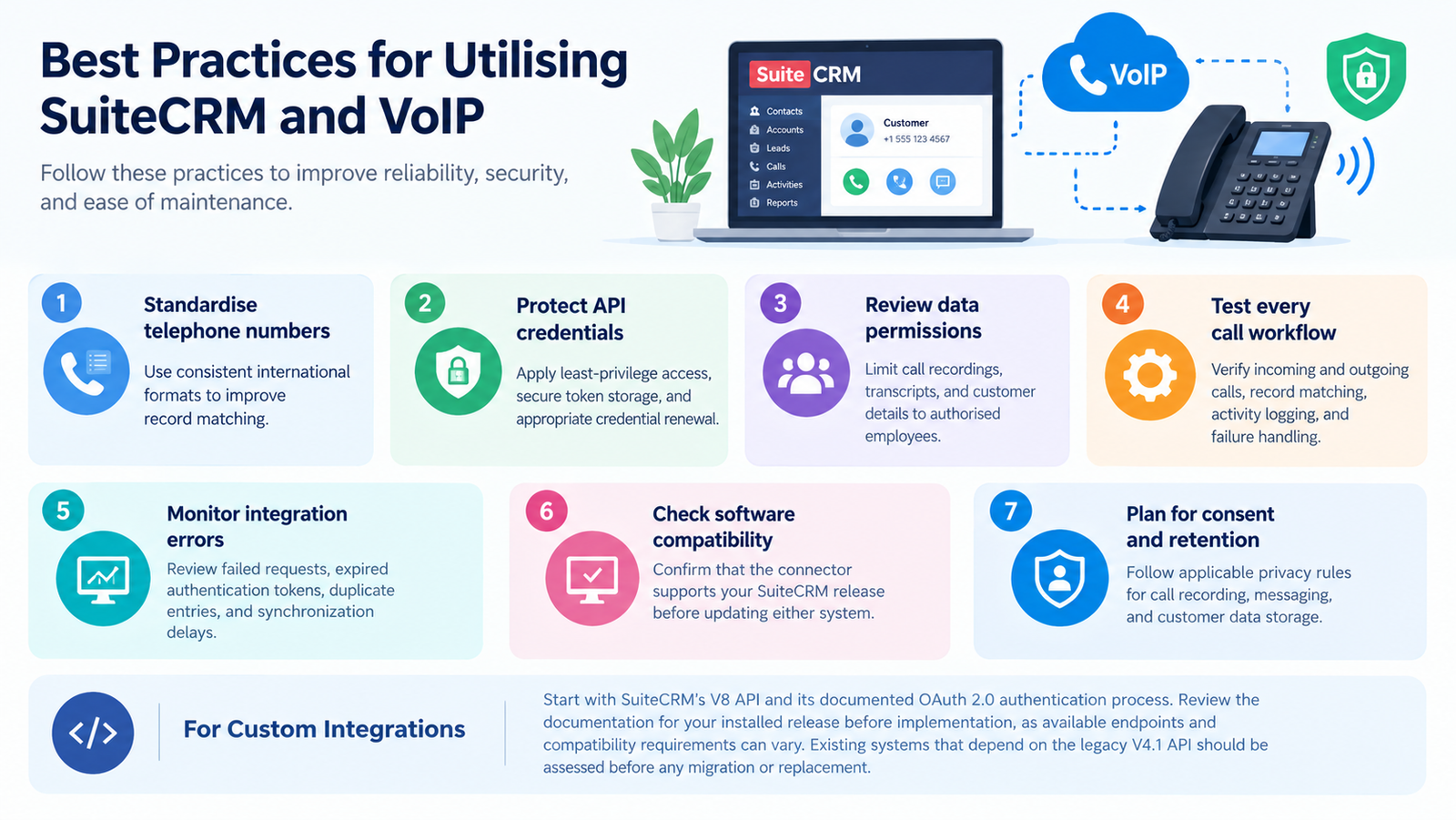
Use the following practices to improve reliability, security, and ease of maintenance.
-
Standardize telephone numbers: Use consistent international formats to improve record matching.
-
Protect API credentials: Apply least-privilege access, secure token storage, and appropriate credential renewal.
-
Review data permissions: Limit call recordings, transcripts, and customer details to authorized employees.
-
Test every call workflow: Verify incoming and outgoing calls, record matching, activity logging, and failure handling.
-
Monitor integration errors: Review failed requests, expired authentication tokens, duplicate entries, and synchronization delays.
-
Check software compatibility: Confirm that the connector supports your SuiteCRM release before updating either system.
-
Plan for consent and retention: Follow applicable privacy rules for call recording, messaging, and customer data storage.
For new custom integrations, start with SuiteCRM’s V8 API and its documented OAuth 2.0 authentication process. Review the documentation for your installed release before implementation, as available endpoints and compatibility requirements can vary. Existing systems that depend on the legacy V4.1 API should be assessed before any migration or replacement.
Top VoIP Providers That Integrate with SuiteCRM
The following options have published SuiteCRM-related integration information. Some are telephone services with integration options, while others are third-party connectors that require a separate phone platform or application. Verify current compatibility, licensing, and supported features before selecting a solution.
| Provider or connector | Published integration capabilities | Important consideration |
|---|---|---|
| Voiply | Browser-based calling workflows, click-to-call, caller information, call history, and speed dialing | Confirm which functions are available for your SuiteCRM configuration, especially automatic call logging. |
| RingCentral with RT Dynamic | Historical documentation describes a virtual PBX connection with SuiteCRM | The reference is dated. Confirm present-day compatibility and feature availability. |
| Any Telephony Connector | Click-to-call, incoming caller identification, and supported call-handling functions | Requires Softphone. Pro and a compatible telephone system. Check the published version range. |
| Twilio Call Integration | Advertised incoming and outgoing calling, call timing, and call-detail updates | Check the extension publisher’s supported SuiteCRM versions, installation instructions, and current maintenance status. |
| RT Telephony | The listing describes calling, SMS, voicemail, and related telephone features | The developer has announced suspended development. Confirm compatibility and support before considering this option. |
The options above are not equivalent: some provide a phone service, while others connect existing telephony software to SuiteCRM. Ask vendors to demonstrate the required functions with your installed version before purchase.
Pros and Cons of SuiteCRM VoIP Integration
The benefits can be substantial, but they depend on connector quality, network performance, and implementation costs.
| Pros | Cons |
|---|---|
| Faster dialing when click-to-call is supported | Some connectors require separate licences or applications |
| Easier access to matching customer records | Incorrect number formats can affect caller matching |
| Less manual entry when automatic logging is available | Some setups require custom development |
| Better visibility into previous calls when records are synchronized | Synchronization errors can produce incomplete records |
| Potentially more organized follow-ups | Internet or service outages can interrupt calling |
| Flexible workflows through custom API development | Custom connections require ongoing maintenance and testing |
Start with the smallest set of essential functions, test them with a pilot group, and expand after confirming that call handling and record synchronization work correctly.
Which Businesses or Industries Suit SuiteCRM VoIP Integration?
This setup suits organizations that handle frequent customer calls and need a central record of communications.
-
Technology startups: Manage prospect calls, product enquiries, and customer follow-ups.
-
Recruitment agencies: Contact candidates, update applicant records, and maintain communication histories.
-
Customer service teams: Identify callers and review previous support interactions.
-
Real estate agencies: Contact leads and organize follow-up activities.
-
Professional services: Coordinate client conversations and retain relevant activity records.
-
Small sales departments: Reduce repetitive dialing and manual documentation.
Suitability depends more on call volume, workflow needs, and technical resources than on industry alone. Businesses with occasional calls may not need a complex integration, while contact-intensive teams may benefit from automated logging and caller identification.
How Many Users Can Use SuiteCRM VoIP Integration?
There is no single user limit for all SuiteCRM telephony integrations. Capacity depends on the connector’s licensing, the telephone provider’s subscription, the number of simultaneous calls supported, and the available infrastructure.
| Team size | What to evaluate |
|---|---|
| 1–5 users | Installation effort, basic calling functions, and per-user costs |
| 6–20 users | User licenses, extension mapping, and shared call routing |
| 21–50 users | Concurrent calls, reporting, access controls, and technical support |
| 50+ users | API capacity, infrastructure, monitoring, redundancy, and service-level commitments |
These ranges are illustrative planning categories, not verified technical limits. SuiteCRM’s core software does not charge per-user licence fees, but third-party connectors, telephone subscriptions, hosting, and implementation may incur costs. Confirm the actual limits with your chosen vendors.
Read More: Freshdesk VoIP Integration: Setup Guide and Best Practices
Final Thoughts
SuiteCRM VoIP integration can bring customer information and telephone activities into a more organised workflow. Choose a connector based on verified compatibility, essential features, total cost, and long-term maintenance needs. A small pilot, followed by careful testing, helps ensure the connection supports your team’s actual requirements.
FAQs
-
What is SuiteCRM VoIP integration used for?
SuiteCRM VoIP integration connects telephone services with customer records. Depending on the connector, it can support click-to-call, caller identification, call history, and automatic logging.
-
Does SuiteCRM include a built-in VoIP phone system?
No, SuiteCRM is a CRM platform rather than a complete telephone service. Calling features generally require a compatible extension, external provider, or custom development.
-
Can I connect a VoIP provider without coding?
Yes, some ready-made connectors and browser extensions offer configuration-based setup. Custom workflows or unsupported providers may require developer assistance.
-
Can calls be recorded inside SuiteCRM?
Some connectors support recording access or links to audio files. Actual recording storage and playback depend on the phone platform, extension, permissions, and configuration.
-
Is SuiteCRM VoIP integration free?
Not always. The core CRM is available without per-user software license fees, but extensions, hosting, phone subscriptions, call usage, and development may incur charges.
-
Can I integrate Twilio with SuiteCRM?
Yes, third-party SuiteCRM extensions advertise Twilio calling capabilities. Check the specific module’s maintenance status, supported software versions, and current availability before installation.
-
Does VoIP integration support SMS messaging?
Some connectors support SMS, while others focus on voice calling. Verify messaging availability, country restrictions, usage charges, and whether messages appear in CRM records.
-
Is a developer required for SuiteCRM telephony setup?
Not necessarily. Ready-made extensions may be installed by an administrator, but custom API connections, advanced routing, or specialised synchronization can require technical expertise.
-
How do I choose the right SuiteCRM telephony connector?
Compare supported features, CRM compatibility, security, pricing, and vendor support. Test incoming calls, outgoing dialing, and record updates before deploying the solution to your entire team.