
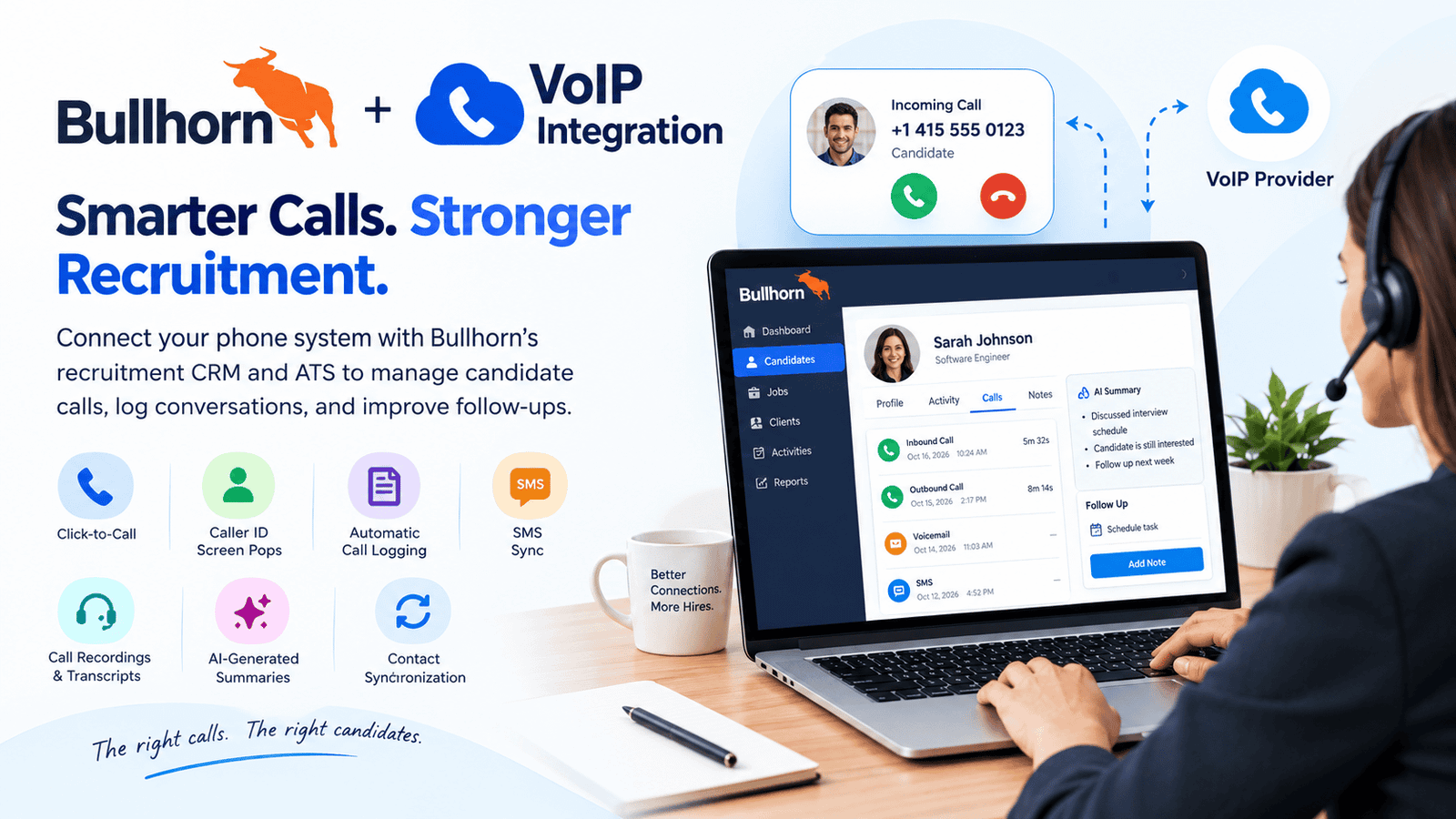
Bullhorn VoIP integration connects a business phone system with Bullhorn’s recruitment CRM and applicant tracking system (ATS), helping recruiters manage candidate calls, log conversations, and improve follow-ups. Depending on the provider and plan, features may include click-to-call, caller identification, automatic call logging, SMS synchronization, call recordings, and AI-generated summaries. Recruitment agencies can choose solutions such as Ringover, CloudCall, Aircall, 8×8, and Vonage based on their team size, budget, and communication needs.
How Does Bullhorn VoIP Integration Work? Technical Overview
Bullhorn VoIP integration uses computer telephony integration (CTI), application connectors, or APIs to link a recruitment phone system with Bullhorn records. When a recruiter places or receives a call, the connected service can identify the candidate, open the relevant record, and save supported call details to the recruitment database.
1. Call initiation and identification
A recruiter clicks a candidate’s phone number in Bullhorn or receives an incoming call. The phone integration may identify the number and display the matching candidate or contact record.
2. Communication and data synchronization
The phone platform handles the call and sends supported information, such as call direction, time, duration, and notes, to Bullhorn through the integration.
3. Record updates and follow-up
Depending on the provider, recruiters can review call history, access recordings or transcripts, and create follow-up tasks without manually entering every detail.
The exact functions depend on the selected provider, Bullhorn edition, permissions, and configuration. For example, Nextiva supports call logging and screen pops for its Bullhorn integration, while Yeastar documents AI call-summary synchronization and contact-creation capabilities for its P-Series integration.
How to Set Up Bullhorn VoIP Integration
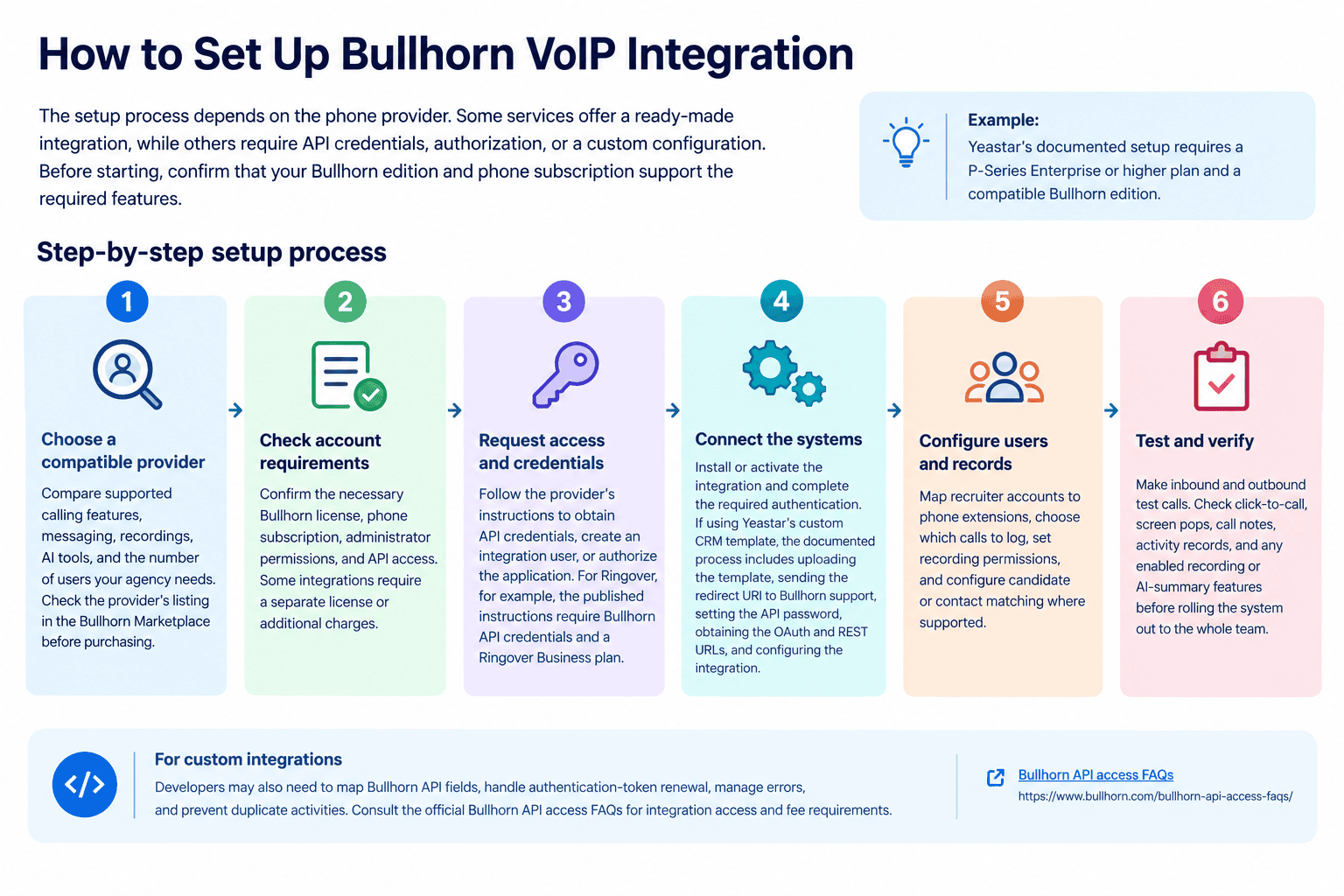
The setup process depends on the phone provider. Some services offer a ready-made integration, while others require API credentials, authorization, or a custom configuration. Before starting, confirm that your Bullhorn edition and phone subscription support the required features.
Example: Yeastar’s documented setup requires a P-Series Enterprise or higher plan and a compatible Bullhorn edition.
Step-by-step setup process
-
Choose a compatible provider: Compare supported calling features, messaging, recordings, AI tools, and the number of users your agency needs. Check the provider’s listing in the Bullhorn Marketplace before purchasing.
-
Check account requirements: Confirm the necessary Bullhorn license, phone subscription, administrator permissions, and API access. Some integrations require a separate license or additional charges.
-
Request access and credentials: Follow the provider’s instructions to obtain API credentials, create an integration user, or authorize the application. For Ringover, for example, the published instructions require Bullhorn API credentials and a Ringover Business plan.
-
Connect the systems: Install or activate the integration and complete the required authentication. If using Yeastar’s custom CRM template, the documented process includes uploading the template, sending the redirect URI to Bullhorn support, setting the API password, obtaining the OAuth and REST URLs, and configuring the integration.
-
Configure users and records: Map recruiter accounts to phone extensions, choose which calls to log, set recording permissions, and configure candidate or contact matching where supported.
-
Test and verify: Make inbound and outbound test calls. Check click-to-call, screen pops, call notes, activity records, and any enabled recording or AI-summary features before rolling the system out to the whole team.
For custom integrations, developers may also need to map Bullhorn API fields, handle authentication-token renewal, manage errors, and prevent duplicate activities. Consult the official Bullhorn API access FAQs for integration access and fee requirements.
What Are the Top Bullhorn Integrated VoIP Solutions for Your Business?
The best provider depends on whether your recruitment agency prioritizes high-volume calling, candidate texting, international communication, AI-generated notes, or a general business phone system. Bullhorn’s own staffing-provider guide and Marketplace identify several options specifically relevant to recruitment workflows.
The following comparison is based on documented capabilities, not a universal ranking. Pricing, availability, and included features must be confirmed directly with each vendor.
| Provider | Best suited for | Key integration capabilities |
|---|---|---|
| 8×8 | Agencies needing business calling and collaboration | Bullhorn call features and call-record creation |
| Ringover | Recruiters using multiple communication channels | One-click calling, call and message logging, AI summaries |
| Aircall | Sales-oriented recruitment and calling teams | Bullhorn synchronization, click-to-call, AI-summarized notes |
| CloudCall | Staffing agencies with frequent calls and texts | Integrated dialing, candidate SMS, recordings, call notes |
| Devyce | Recruitment teams needing mobile and desktop calling | Bullhorn synchronization and AI call summaries |
| Gamma | UK recruitment firms | Horizon caller identification, screen pops, click-to-dial |
| TextUs | Candidate engagement through messaging | Business texting and cloud voice capabilities |
| Vonage | Agencies seeking business telephony and CRM connectivity | Click-to-dial, screen pops, contact synchronization, call notes |
1. 8×8
8×8 is worth evaluating if your agency wants a broader business communications platform alongside recruitment calling. Its 8×8 Work for Bullhorn integration provides access to phone-extension features and lets users create and save call records in Bullhorn. A separate hard phone or softphone is required because the integration itself does not provide the call audio service.
2. Ringover
Ringover suits agencies that want calling and messaging in one recruitment workflow. Its Bullhorn integration supports one-click dialing, synchronization of candidates and contacts, and automatic logging of supported calls and messages. Its published integration guide also documents recordings, transcripts, and AI summaries, with access dependent on the account configuration.
3. Aircall
Aircall is an option for recruitment teams that make frequent candidate and client calls. Bullhorn’s Marketplace describes its integration as supporting calls inside the ATS, AI-summarized notes, and recruiter dashboards. Confirm which features and analytics are included in the specific plan you purchase.
4. CloudCall
CloudCall focuses on communication workflows for staffing and recruitment firms. Its Bullhorn offering supports calling, texting, internal messaging, and the capture of call details. The vendor also describes an integrated outbound dialer and the ability to retain recordings and notes with Bullhorn records.
5. Devyce
Devyce is designed for recruitment teams that want business calling across mobile, desktop, or desk phones. Bullhorn highlights its AI-assisted phone system and synchronization of call summaries and data to recruitment records. It may suit agencies that want recruiters to communicate without exposing personal phone numbers.
6. Gamma
Gamma is worth considering for UK businesses evaluating its Horizon business phone service. Its Bullhorn Marketplace listing describes automatic caller identification, contact screen pops, and click-to-dial. Ask the provider about geographic availability, mobile-working requirements, and which service package supports the integration.
7. TextUs
TextUs is relevant when candidate engagement depends heavily on text messaging. Bullhorn describes it as a real-time communications platform combining business messaging with cloud voice features. Before choosing it as your primary phone system, verify the precise calling functionality and Bullhorn synchronization available in your package.
8. Vonage
Vonage offers a Bullhorn integration through its Vonage Integration Suite. Its official listing identifies click-to-dial, inbound and outbound screen pops, lead and contact synchronization, and call-note functionality. It is worth comparing with other providers if your agency already uses Vonage or needs broader business communications services.
Key Features of Bullhorn VoIP Integration
A well-configured integration helps recruiters keep candidate communication connected to recruitment records. The exact features vary by provider and subscription.
-
Click-to-call: Start calls directly from candidate, contact, or client records instead of dialing numbers manually.
-
Incoming-call screen pops: Identify callers and open matching records when supported.
-
Automatic call logging: Save details such as call time, duration, direction, and notes.
-
SMS integration: Keep supported candidate text conversations associated with recruitment records.
-
Call recordings and transcripts: Review conversations for follow-ups, training, or quality checks where available.
-
AI-generated summaries: Capture conversation highlights and potential action items without writing every note manually.
-
Contact synchronization: Keep supported contact details consistent between the phone platform and Bullhorn.
These capabilities are documented across providers such as Nextiva, Ringover, and Yeastar, but no single provider should be assumed to include every feature in every plan.
The Advantages and Disadvantages of Bullhorn VoIP Integration
-
Advantages
-
-
-
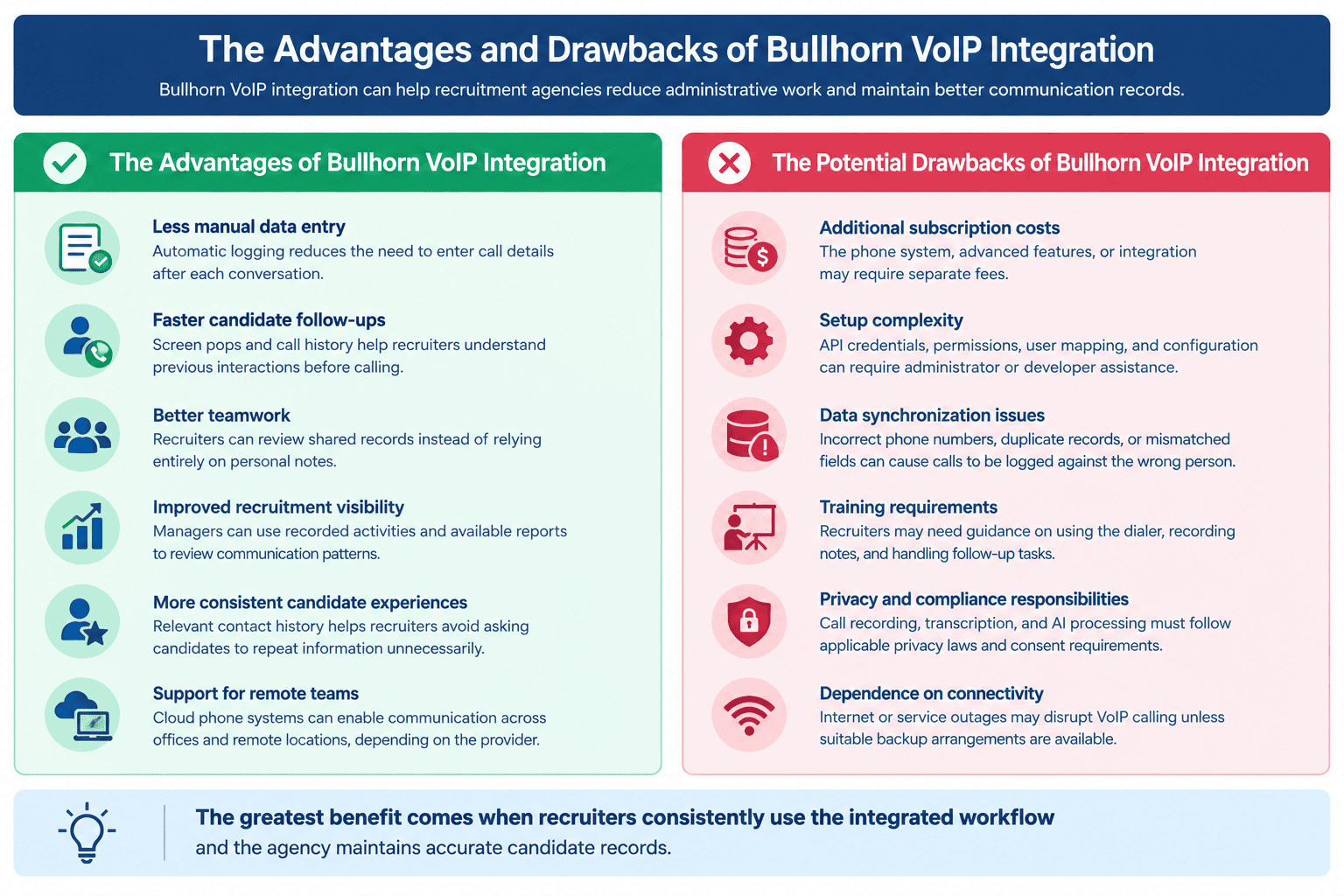
Less manual data entry: Automatic logging reduces the need to enter call details after each conversation.
-
Faster candidate follow-ups: Screen pops and call history help recruiters understand previous interactions before calling.
-
Better teamwork: Recruiters can review shared records instead of relying entirely on personal notes.
-
Improved recruitment visibility: Managers can use recorded activities and available reports to review communication patterns.
-
More consistent candidate experiences: Relevant contact history helps recruiters avoid asking candidates to repeat information unnecessarily.
-
Support for remote teams: Cloud phone systems can enable communication across offices and remote locations, depending on the provider.
-
-
-
Drawbacks
-
-
-
Additional subscription costs: The phone system, advanced features, or integration may require separate fees.
-
Setup complexity: API credentials, permissions, user mapping, and configuration can require administrator or developer assistance.
-
Data synchronization issues: Incorrect phone numbers, duplicate records, or mismatched fields can cause calls to be logged against the wrong person.
-
Training requirements: Recruiters may need guidance on using the dialer, recording notes, and handling follow-up tasks.
-
Privacy and compliance responsibilities: Call recording, transcription, and AI processing must follow applicable privacy laws and consent requirements.
-
Dependence on connectivity: Internet or service outages may disrupt VoIP calling unless suitable backup arrangements are available.
-
-
Which Businesses Need Bullhorn VoIP Integration?
Bullhorn VoIP integration is especially useful for businesses that recruit candidates or manage client relationships through frequent telephone conversations.
| Business type | How integration helps |
|---|---|
| Recruitment and staffing agencies | Track candidate calls, interviews, and follow-ups |
| Executive search firms | Maintain detailed communication histories for candidates and clients |
| Healthcare staffing companies | Coordinate communication with clinicians, facilities, and hiring managers |
| IT and technical recruitment firms | Manage discussions with specialist candidates and employers |
| Temporary staffing providers | Handle high volumes of candidate calls and availability checks |
| Recruitment process outsourcing providers | Maintain consistent communication records across recruitment teams |
It can also benefit internal talent acquisition teams using a compatible Bullhorn product. However, businesses that make very few calls or use a different ATS may find a simpler phone system more practical.
How Many Users Is Bullhorn VoIP Integration Suitable For?
Bullhorn VoIP integration can suit small recruitment teams, growing agencies, and larger staffing organizations. There is no single universal user limit for all Bullhorn phone integrations; capacity depends on the phone provider, license, system architecture, and subscription.
| Team size | Recommended approach |
|---|---|
| 1–10 users | Prioritize simple setup, click-to-call, and affordable per-user pricing |
| 11–50 users | Look for automatic logging, shared communication history, and team reporting |
| 51–200 users | Evaluate role-based permissions, centralized administration, and reliable support |
| 200+ users | Assess scalability, API capacity, advanced analytics, and enterprise support |
These ranges are practical planning categories, not official vendor limits. Request a quote based on active users, concurrent calls, locations, phone numbers, and recording requirements before selecting a plan.
Usage of Bullhorn VoIP Integration: Which Industries Use It?
Although recruitment and staffing are the primary use cases, Bullhorn-connected calling can support several recruitment specializations.
-
Healthcare recruitment: Contact nurses, doctors, healthcare facilities, and other clinical professionals.
-
Information technology: Coordinate technical screening and client interviews.
-
Commercial and industrial staffing: Communicate with temporary workers and employers about vacancies and shifts.
-
Professional services recruitment: Manage candidate sourcing and client relationships for finance, consulting, and other specialist roles.
-
Executive search: Maintain communication histories during confidential, relationship-driven searches.
Bullhorn’s partner ecosystem covers multiple staffing segments, including professional, healthcare, and commercial/light-industrial recruitment. The specific fit depends on the agency’s workflows and the features supported by its chosen integration.
Best Practices for Optimizing Bullhorn VoIP Integration
A successful integration requires more than connecting a phone system to Bullhorn. Agencies should establish consistent processes for communication, data management, and ongoing monitoring.
-
Standardize call logging: Decide which calls, notes, and outcomes recruiters should record.
-
Keep candidate data clean: Maintain accurate phone numbers and merge duplicate records when appropriate.
-
Set access permissions: Limit recordings, transcripts, and personal information to authorized users.
-
Train recruiters: Demonstrate click-to-call, screen pops, note-taking, and follow-up workflows.
-
Monitor integration performance: Check failed synchronizations, missing activities, and incorrect contact matches.
-
Review compliance regularly: Establish appropriate recording consent, retention, and data-handling procedures.
Common Challenges and Solutions
| Challenge | Practical solution |
|---|---|
| Calls are not logged | Check integration permissions, authentication, and provider settings |
| The wrong candidate appears | Verify phone numbers, duplicate records, and contact-matching rules |
| Recruiters cannot use click-to-call | Check browser compatibility, extensions, and user-to-extension mapping |
| Recordings are unavailable | Confirm recording permissions, subscription features, and retention settings |
| Setup takes longer than expected | Assign an administrator and use the vendor’s implementation checklist |
| Costs exceed the budget | Compare per-user fees, add-ons, usage charges, and implementation costs |
For custom integrations, developers should also test authentication renewal, API errors, duplicate-event handling, and field mapping. Bullhorn’s documentation explains that third-party integrations may use Marketplace solutions, custom API development, or professional services.
Read More: The Best 6 Dialers for Cold Calling in the UK (2026): Compared
Final Verdict: Choosing the Right Bullhorn VoIP Integration
The right Bullhorn VoIP integration depends on how your recruitment agency communicates with candidates and clients. Ringover and CloudCall are worth evaluating for recruitment-focused communication workflows, while Aircall, 8×8, Vonage, Gamma, and Devyce offer different approaches to calling and connected communications. TextUs deserves consideration when messaging is a major part of candidate engagement, and Yeastar or Nextiva may suit agencies evaluating their respective phone-system integrations.
Compare the actual features, total cost, implementation requirements, and support before committing. A successful solution should make recruiter workflows easier, keep communication records accurate, and help the agency deliver a more consistent candidate experience.
FAQs
-
Can I integrate my CRM with VoIP?
Yes, you can integrate many CRM and ATS platforms with VoIP systems through native integrations, Marketplace applications, or APIs. Compatibility depends on the software versions, provider, subscription, and required features.
-
What are the top 5 VoIP providers for Bullhorn?
Five providers worth comparing are Ringover, CloudCall, Aircall, 8×8, and Vonage. The best option depends on your priorities, such as recruitment-specific features, messaging, AI summaries, or general business communications.
-
What is Bullhorn software used for?
Bullhorn provides recruitment software, including applicant tracking and customer relationship management tools. Recruitment agencies use it to manage candidate records, job openings, client relationships, and recruitment activities.
-
Which companies use Bullhorn?
Bullhorn is used by recruitment and staffing organizations, including firms serving healthcare, technology, professional services, and temporary staffing markets. Its customer base includes organizations of different sizes; individual customer usage should be verified through official case studies or company announcements.
-
Does Bullhorn have a built-in VoIP phone system?
Bullhorn supports integrations with external telephony providers rather than providing one universal phone service for every customer. Available calling features depend on the connected provider and Bullhorn product.
-
Does Bullhorn VoIP integration record calls automatically?
Some integrations can automatically log call activities and make recordings available in Bullhorn. Whether calls are recorded automatically depends on the provider, configuration, subscription, and applicable consent requirements.
-
How much does Bullhorn VoIP integration cost?
There is no single price for all Bullhorn VoIP integrations. Costs may include phone subscriptions, integration fees, implementation services, and advanced features. Request a provider-specific quote for your required number of users.
-
Can I build a custom Bullhorn phone integration?
Yes, a developer can build a custom integration using Bullhorn’s APIs and a compatible telephony platform. This approach offers flexibility but requires technical expertise, secure authentication, testing, and ongoing maintenance.
-
How long does it take to set up Bullhorn VoIP integration?
The time varies by provider, account permissions, configuration complexity, and data-mapping requirements. A standard integration may need less work than a custom API project, so obtain an implementation estimate from your selected provider.


