
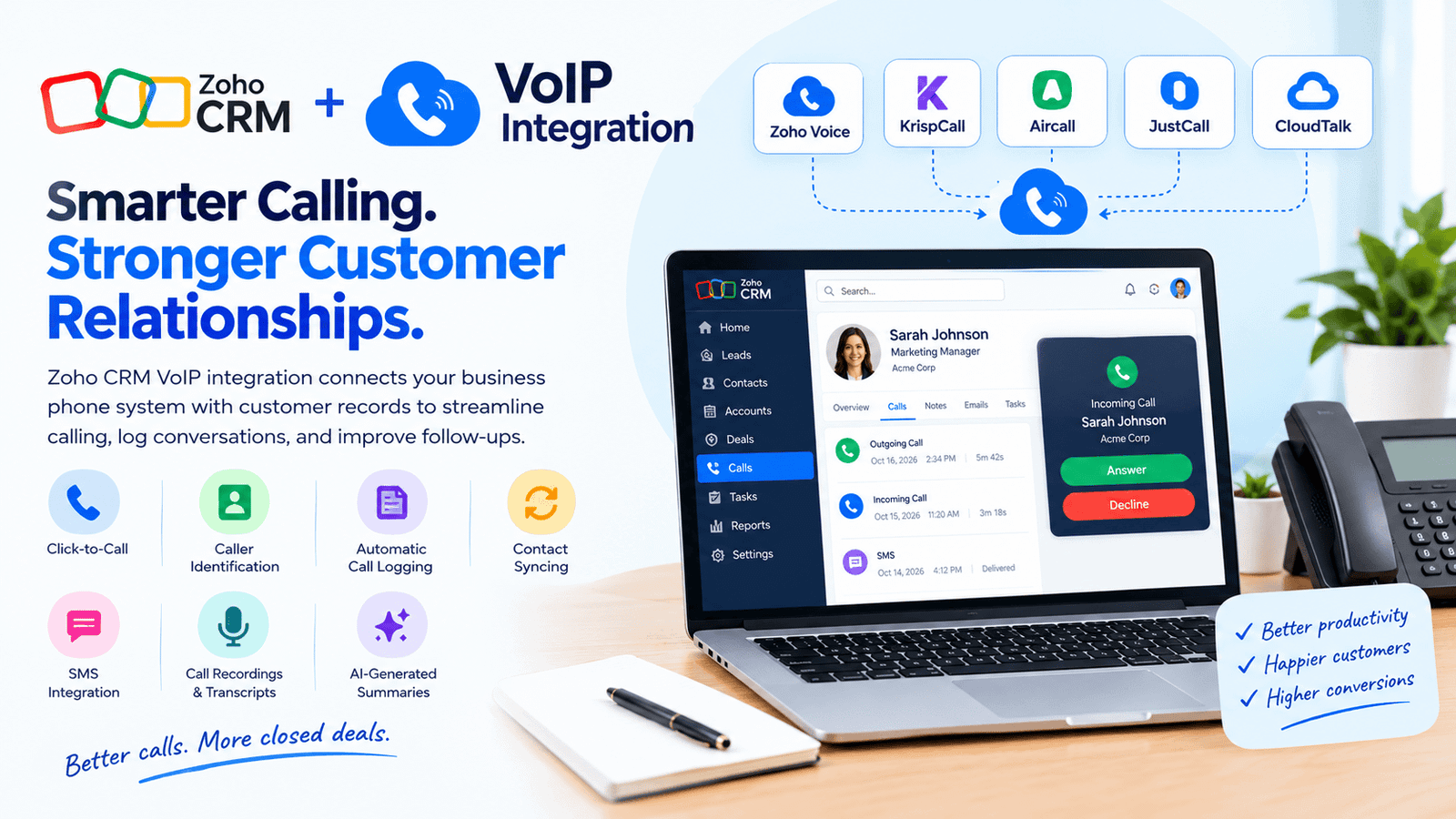
Zoho CRM VoIP integration connects business phone systems with customer records to streamline calling and follow-ups. It supports features such as click-to-call, caller identification, automatic call logging, and contact syncing, depending on the provider and plan. Businesses can choose from solutions such as KrispCall, Nextiva, Kixie, Aircall, JustCall, and CloudTalk based on their team size, budget, and calling needs.
How to Set Up Zoho CRM VoIP Integration
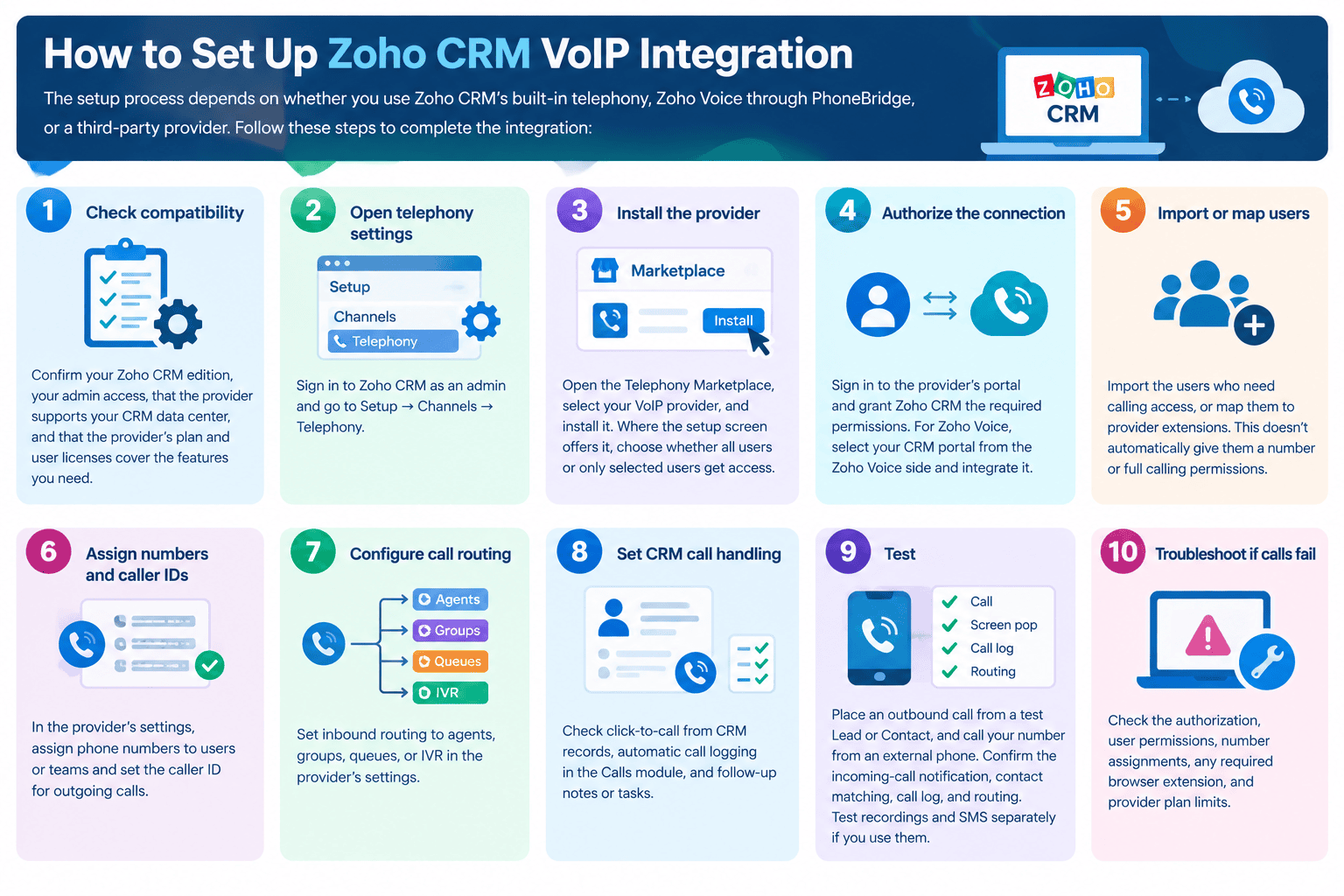
The setup process depends on whether you use Zoho CRM’s built-in telephony or a third-party provider. The following steps explain the main technical requirements.
-
- Check compatibility. Confirm your Zoho CRM edition, your admin access, that the provider supports your data center, and that the provider’s plan and user licenses cover the features you need.
- Open telephony settings. Sign in to Zoho CRM as an admin and go to Setup → Channels → Telephony.
- Install the provider. Open the Telephony Marketplace, select your VoIP provider, and install it. Where the setup screen offers it, choose whether all users or only selected users get access.
- Authorize the connection. Open the Telephony Marketplace, select your VoIP provider, and install it. Where the setup screen offers it, choose whether all users or only selected users get access.
- Import or map users. Import the users who need calling access, or map them to provider extensions. This doesn’t automatically give them a number or full calling permissions.
- Assign numbers and caller IDs. In the provider’s settings, assign phone numbers to users or teams and set the caller ID for outgoing calls.
- Configure call routing. Set inbound routing to agents, groups, queues, or IVR in the provider’s settings.
- Set the platform call handling. Check click-to-call from records, automatic call logging in the Calls module, and follow-up notes or tasks.
- Test. Place an outbound call from a test Lead or Contact your number from an external phone. Confirm the incoming-call notification, contact matching, call log, and routing. Test recordings and SMS separately if you use them.
- Troubleshoot if calls fail. Check the authorization, user permissions, number assignments, any required browser extension, and provider plan limits.
10 Best Phone Systems for Zoho CRM Integration in 2026
| VoIP Provider | Best For | Key Features | Starting Price | Important Considerations |
|---|---|---|---|---|
| KrispCall | Affordable contact-center workflows | Two-way contact syncing, click-to-call, caller identification, automatic call logging | $12/user/month, billed annually | Supports up to five users on the specified plan; calls and SMS may incur additional charges. |
| Zoho Voice | Businesses already using Zoho | Click-to-call, incoming-call pop-ups, call logging, notes, follow-up tasks | Verify current plan pricing | Uses PhoneBridge; separate subscription. Confirm edition eligibility and agent licensing. |
| Nextiva | Unified business communications | Voice, SMS, video, team messaging, call routing | $15/user/month, billed annually | Confirm Zoho compatibility, supported data sync, and any integration add-on costs. |
| Kixie | Sales teams making frequent calls | Bi-directional integration, click-to-call/text, voicemail drop, call recording, live coaching | Contact sales | PowerDialer options include single-line and multi-line dialing. Verify Zoho-specific feature availability. |
| Aircall | Shared calling and team collaboration | Shared call inbox, routing, queuing, recording, transcription, analytics | $30/license/month, billed annually | Minimum three licenses. Some advanced features and AI tools depend on plan or add-ons. |
| JustCall | Calling and business texting | Click-to-call/text, messaging, workflow automation, analytics, AI coaching | $29/user/month, billed annually | Minimum two licenses. Verify compatibility with your Zoho edition; click-to-call has a stated limitation for Zoho CRM Plus. |
| CloudTalk | Sales and support teams handling many calls | Call routing, queues, live monitoring, click-to-call, call logging, contact sync | €19/user/month for Lite, billed annually | Prices vary by currency and plan; some tiers have minimum-user requirements. Verify current regional pricing and integration features. |
1. KrispCall
KrispCall is a budget-friendly cloud phone system with a Zoho CRM integration listed in the official Zoho Marketplace. According to KrispCall’s help documentation, it offers two-way contact syncing, click-to-call from the its interface, caller identification, and automatic logging of inbound, outbound and missed calls and voicemails. Its Essential plan costs $12 per user per month when billed annually and supports up to five users, while calls and SMS are billed pay-as-you-go on top and advanced features sit on higher tiers, so check the current plan comparison before buying.
3. Zoho Voice
It is Zoho’s own cloud phone system, offering business numbers, desktop and mobile calling, and call workflows that vary by setup. It connects to Zoho CRM through Zoho Telephony (PhoneBridge), with documented support for click-to-call, incoming-call pop-ups, automatic call logging, call notes and after-call tasks, and it also works with Bigin and Zoho Recruit. The integration is available only in the Enterprise Telephony edition, and Zoho Voice is a separate subscription that is not included with Zoho One. Zoho CRM’s free built-in telephony runs on Twilio and is a different, more basic service, so get a current quote that reflects whether your agents need full licenses or telephony-user access.
4. Nextiva
Nextiva suits organizations that want voice, SMS, video and team messaging in one platform, with call routing and mobile and desktop apps on its small-business plans. Its Core plan costs $15 per user per month with annual billing, but Nextiva’s pricing page lists the platforms integrations such as Salesforce and HubSpot as an add-on on every small-business plan, and Zoho isn’t named there. Before choosing a plan, confirm how Nextiva would connect to Zoho CRM, which fields sync, whether calls are logged automatically, and what the add-on costs.
6. Kixie
Kixie is built around outbound sales calling, and its pricing page lists three plans: Professional, Single-Line PowerDialer and Multi-Line PowerDialer, which dials up to four lines at once. All three include bi-directional platform integration, click-to-call and click-to-text, voicemail drop, call recording and live call coaching, and Kixie has a dedicated Zoho integration page, so confirm which features work with your Zoho edition. The pricing page didn’t show per-user prices when I checked, so request a quote based on your team size and dialing needs.
7. Aircall
Aircall suits teams that need shared visibility into calls, with a shared call inbox, routing and queuing, call recording and transcription, and analytics, and Zoho is listed among its integrations on every plan. Essentials costs $30 per license per month and Professional $50, both billed annually and both requiring at least three licenses, with Professional adding smart routing, a power dialer, outbound campaigns and AI call summaries. Some AI features depend on the plan or add-ons, so confirm the exact Zoho CRM data sync before subscribing.
9. JustCall
JustCall combines business calling, messaging and workflow automation, with click-to-call and click-to-text available through its Chrome extension. Its help documentation explains how to connect a Zoho account from the Integrations settings, and it notes that the click-to-call icons appear in Zoho CRM but are not yet implemented for Zoho CRM Plus, so verify your edition first. The Team plan costs $29 per user per month with annual billing and requires at least two licenses, while higher tiers add dialers, advanced analytics and AI coaching.
10. CloudTalk
CloudTalk is aimed at teams with structured, high-volume calling, offering queues, routing, live monitoring and optional dialers. Its guide covers outbound calls through the Click-to-Call extension, caller profiles shown before you answer, automatic logging to the Calls module, contact sync and workflow settings. Its pricing page shows plans in the visitor’s chosen currency, and in euros annual billing runs from €19 per user per month for Lite to €25 for Starter, €29 for Essential and €49 for Expert, which requires at least three users. Check the US-dollar prices before budgeting, since integration and dialer features vary by tier.
How Deep Is Each Zoho CRM Integration?
Integration depth can vary significantly. A connection may simply allow users to start calls from CRM records, or it may also sync contacts, log calls, display caller details, and automate follow-ups.
| Integration level | What it means | What to verify |
|---|---|---|
| Basic calling | Users can initiate calls from supported records or a browser extension. | Which Zoho modules and phone fields are supported? |
| Call logging | Call activity is added to CRM records. | Are inbound, outbound, missed, and transferred calls included? |
| Contact sync | Contact changes can move between systems. | Is syncing one-way or two-way? |
| Advanced workflows | Calls can trigger tasks, routing, or other automations. | Is this native, plan-limited, or dependent on an API or third-party automation? |
| AI and recordings | Calls may be recorded, transcribed, summarized, or analyzed. | Which plan includes each feature, and where is the data stored? |
Pros and Cons of Zoho CRM VoIP Integration
Pros
-
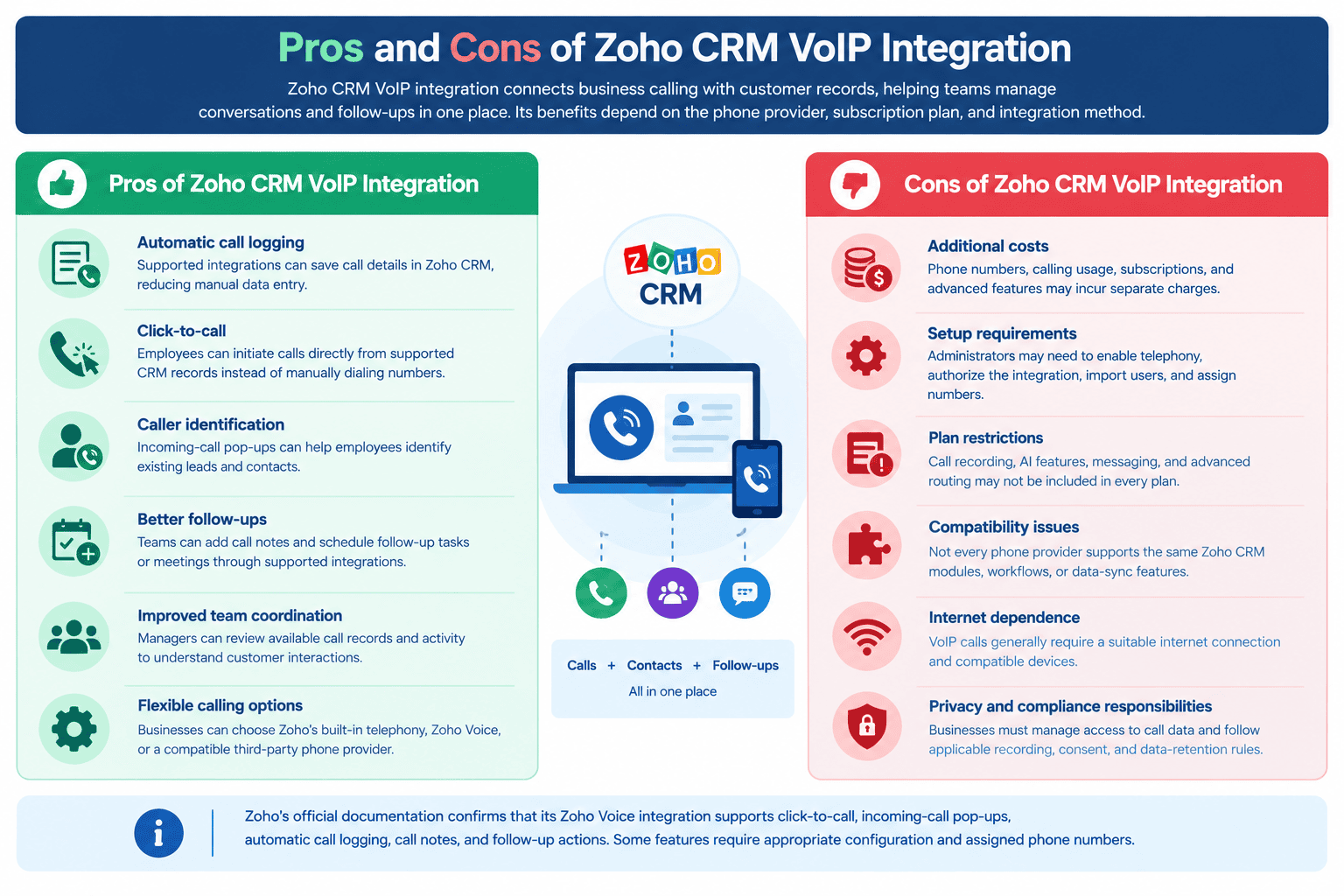
Automatic call logging: Supported integrations can save call details in Zoho CRM, reducing manual data entry.
-
Click-to-call: Employees can initiate calls directly from supported records instead of manually dialing numbers.
-
Caller identification: Incoming-call pop-ups can help employees identify existing leads and contacts.
-
Better follow-ups: Teams can add notes and schedule follow-up tasks or meetings through supported integrations.
-
Improved team coordination: Managers can review available records and activity to understand customer interactions.
Cons
-
Additional costs: Phone numbers, calling usage, subscriptions, and advanced features may incur separate charges.
-
Setup requirements: Administrators may need to enable telephony, authorize the integration, import users, and assign numbers.
-
Plan restrictions: Recording, AI features, messaging, and advanced routing may not be included in every plan.
-
Compatibility issues: Not every phone provider supports the same modules, workflows, or data-sync features.
-
Internet dependence: VoIP calls generally require a suitable internet connection and compatible devices.
-
Privacy and compliance responsibilities: Businesses must manage access to call data and follow applicable recording, consent, and data-retention rules.
How Many Users Is Zoho CRM VoIP Integration Suitable For?
It can suit a business with one calling user or a large team. There is no single user limit that applies to every provider and integration method. The practical limit depends on the its subscription, phone-system plan, licensing model, number of available lines, and provider-specific restrictions.
| Business size | Typical use case |
|---|---|
| 1–10 users | Small businesses that need click-to-call, call logging, and basic customer follow-ups. |
| 11–50 users | Growing sales or support teams that need shared call records and more structured workflows. |
| 51–200 users | Larger departments that may need call routing, team reporting, and role-based access. |
| 200+ users | Enterprises that require scalable telephony, centralized administration, and potentially advanced contact-center capabilities. |
These are practical planning ranges, not official or provider user limits. Its built-in telephony documentation states that there is no limit to the number of users who can be associated with a phone number. However, businesses still need to configure users and permissions and account for applicable usage charges. Other providers may impose different licensing or seat requirements.
Which Industries Use Zoho CRM VoIP Integration?
-
Real estate: Agents can contact prospective buyers, follow up on property inquiries, and record conversations against customer records.
-
E-commerce and retail: Customer service teams can manage order-related calls, complaints, and follow-ups when the relevant data is available.
-
Financial and professional services: Advisors and account managers can document customer conversations, subject to applicable privacy and industry requirements.
-
Healthcare administration: Administrative teams can coordinate appointment inquiries and follow-ups, provided the selected system meets applicable privacy and security requirements.
-
Education and training: Admissions teams can follow up with prospective students and maintain records of enrollment inquiries.
-
Travel and hospitality: Teams can manage booking inquiries, customer requests, and service follow-ups.
-
IT and business services: Sales and account teams can record discussions, coordinate callbacks, and track customer relationships.
-
Centers and outsourced support: Agents can use supported routing and logging features to manage high volumes of inbound and outbound calls.
Common Zoho CRM Phone Integration Problems
-
Incorrect permissions or failed authorization
A connection may fail if the its administrator has not granted the required access. Check the integration’s permissions and reconnect the account if tokens or access settings have changed.
-
Calls are not logged correctly
Confirm that the correct Zoho CRM portal, users, modules, and phone fields are connected. Check whether the provider logs every type you expect and whether logging is included in your plan.
-
Contact records do not match
Duplicate phone numbers, inconsistent number formats, or incomplete contact details can cause caller identification and syncing problems. Standardize phone-number formats and test with known CRM records.
-
Features are missing
Recording, transcription, SMS, power dialing, and AI summaries may require higher-tier subscriptions, add-ons, regional availability, or separate configuration. Verify each requirement with the provider.
-
Recording and privacy concerns
Call-recording laws and consent requirements vary by jurisdiction. Set clear access and retention policies, and obtain any required consent before recording or transcribing customer conversations.
How to Choose the Right Phone System for CRM Setup
Use these steps to narrow the options:
- Define your main use case. Decide whether you primarily need sales dialing, inbound support, shared business communications, or AI-assisted conversation handling.
- List must-have CRM features. Identify whether click-to-call, automatic logging, contact sync, SMS, recordings, or summaries are essential.
- Confirm compatibility. Ask the provider to confirm your Zoho CRM edition, data center, user roles, and required integration method.
- Compare the complete cost. Include user licenses, minimum seats, numbers, charges, messaging, add-ons, and any setup fees.
- Test before committing. Run inbound and outbound calls, check record matching, review activity logs, and test any workflows your team relies on.
- Review security and support. Confirm data access, retention, recording settings, and how support handles integration failures.
Do not choose a provider on starting price alone. A plan that looks inexpensive may not include the integration depth or advanced calling tools your team needs.
Read More: The Best 5 Auto Dialers for Pipedrive (2026)
Conclusion
The best Zoho CRM VoIP integration is the one that fits your calling workflow and reliably records the customer activity your team needs. KrispCall, Aircall, JustCall, and CloudTalk have useful documented Zoho-related integration information, while the exact fit of RingCentral, Nextiva, Vonage, Kixie, and Allo should be confirmed for your product, plan, and workflow before purchase.
Compare the total cost, verify the integration in a demonstration, and test the required features before signing a contract. This is the safest way to avoid paying for a phone system that cannot deliver the customer record workflow your business expects.
Frequently Asked Questions
-
What is Zoho CRM VoIP integration?
It connects a business phone service with Zoho CRM so users can manage calls alongside customer records. Depending on the provider, it may support click-to-call, call logging, caller identification, contact syncing, and follow-up workflows.
-
Does Zoho CRM have built-in telephony?
Yes. Zoho documents a built-in telephony option that uses Twilio infrastructure. Number purchases, calling usage, and related charges depend on the service and destination, so review the current Zoho terms before enabling it.
-
Is Zoho Voice included in Zoho One?
Zoho states that a Zoho One license does not automatically include a Zoho Voice subscription. Check the current Voice plan and telephony-user rules before estimating the total cost.
-
How much does a Zoho CRM phone integration cost?
The total cost depends on the phone provider, plan, user count, calling rates, phone numbers, and optional features. Some providers publish starting prices, while others require a quote. Check the official pricing page before budgeting.
-
Can I call customers directly from a Zoho CRM record?
Yes, when the selected telephony integration supports click-to-call and is configured correctly. The exact modules and phone fields supported depend on the provider and integration.
-
Can Zoho CRM automatically record calls?
Some integrations can automatically log details, but logging is not the same as recording the audio. Audio recording, transcription, and summaries depend on the provider, subscription, configuration, and applicable consent rules.
-
What should I do if calls are not syncing with Zoho CRM?
Check permissions, reconnect the account, verify the selected Zoho data center, and confirm that the relevant phone fields and modules are supported. Then test with a known contact and ask the provider to inspect any integration errors.
-
Can these phone systems support international numbers?
Availability varies by provider, country, and number type. Before purchasing, confirm that the provider can supply numbers for your target countries and check local calling rates, identity-verification requirements, and any usage restrictions.
-
Which phone system is best for Zoho CRM?
There is no single best choice for every business. Compare documented integration features, plan restrictions, support, number availability, and total cost, then test the shortlisted providers against your actual workflow.
-
Can I send SMS from Zoho CRM through a VoIP integration?
Some integrations support business texting or click-to-text, but SMS availability depends on the provider, country, phone number, plan, and platform connection. Confirm that messages can be sent and logged in the way your team requires


