Salesforce VoIP integration connects an internet-based phone system with Salesforce, helping businesses make and receive calls, access customer information, log conversations, and manage follow-ups through their CRM. It can reduce manual data entry, improve customer interactions, and give managers better visibility into calling activities.
This guide explains how Salesforce VoIP integration works, its advantages and disadvantages, suitable businesses, user capacity, industry applications, and the factors to consider before choosing a provider.
How VoIP Connects to Salesforce: Three Methods
Businesses can connect calling with Salesforce in different ways. The appropriate method depends on whether they need basic dialing, deeper CRM integration, or a contact center platform.
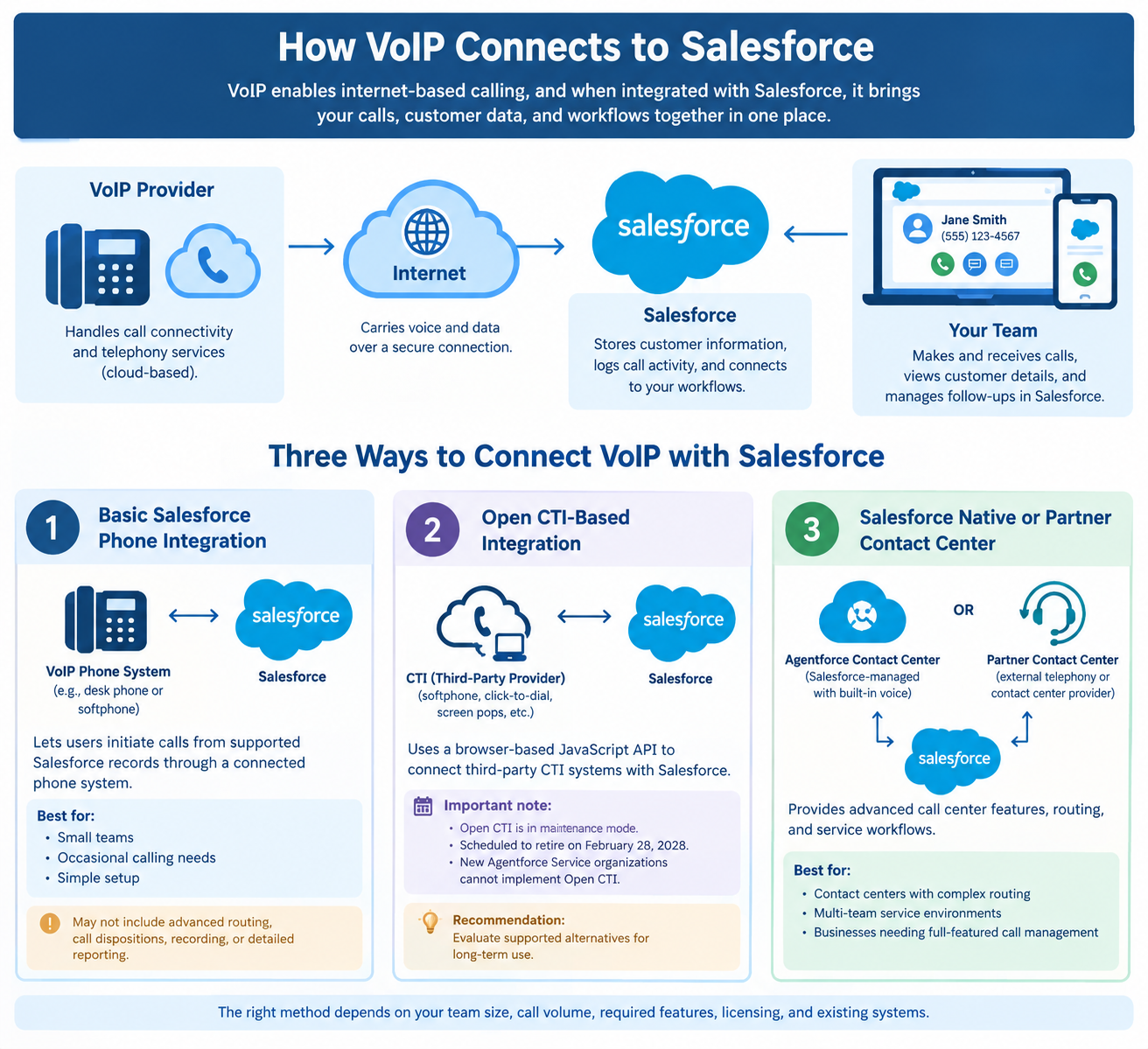
1. Basic Salesforce Phone Integration
A basic phone integration allows users to initiate calls from supported Salesforce records through a connected phone system. It may suit small teams that make occasional calls and need a simple way to contact customers.
For example, a sales representative can click a lead’s phone number rather than copying it into a separate application. However, basic setups may not provide advanced routing, detailed call dispositions, recording management, or comprehensive reporting.
2. Open CTI-Based Integration
Salesforce Open CTI is a browser-based JavaScript API that enables third-party CTI systems to connect with Salesforce. Historically, it has supported softphones, click-to-dial, screen pops, and other CRM-connected calling features.
Salesforce announced on June 25, 2026, that Open CTI is in maintenance mode and scheduled to retire on February 28, 2028. Salesforce also states that newly created Agentforce Service organizations cannot implement Open CTI. Businesses planning a new integration should evaluate supported alternatives rather than assume Open CTI is a suitable long-term choice.
3. Salesforce Native or Partner Contact Center
Salesforce currently describes two contact center approaches: Agentforce Contact Center, which provides Salesforce-managed contact center infrastructure and built-in voice, and Partner Contact Center, which connects Salesforce to an external telephony or contact center provider.
The right choice depends on existing phone systems, required features, licensing, and implementation plans. Contact centers with complex routing and service workflows may need a more comprehensive solution than small outbound sales teams.
Salesforce VoIP Integration vs. CTI vs. Native Calling
These terms are related, but they describe different parts of a calling setup.
| Criteria | VoIP | CTI integration | Native Salesforce calling |
|---|---|---|---|
| Main role | Provides internet-based calling | Connects calls to CRM workflows | Provides calling through supported Salesforce products |
| Best fit | Teams needing cloud telephony | Teams needing phone activity linked to Salesforce | Businesses whose needs match Salesforce’s calling products |
| Call controls | Usually managed by the telephony provider | May be available in a Salesforce softphone | Depend on the selected product and license |
| Customer context | Limited without integration | Can support record matching and screen pops | Depends on the product and configuration |
| Call logging | May require integration | Commonly supported, depending on the solution | Available in supported configurations |
| Routing and reporting | May be managed outside Salesforce | Can connect call activity with CRM workflows | Depend on the selected Salesforce product |
A basic VoIP connection may be enough for simple calling. Teams that need reliable call outcomes, customer context, routing, and reporting should evaluate the complete workflow rather than focusing on dialing alone.
Pros of Salesforce VoIP Integration
- Less manual work: Supported call details can be logged automatically, reducing repetitive data entry.
- Better customer context: Agents can access matching records and previous interactions while handling calls.
- Faster calling: Click-to-call reduces the need to copy and paste phone numbers.
- Improved follow-ups: Call outcomes and tasks help employees track the next steps.
- More useful reporting: Managers can review supported metrics such as call volume, duration, dispositions, and missed calls.
- Remote-work flexibility: Cloud-based calling can help distributed teams work from different locations.
- More consistent service: Routing and customer information can help teams handle inquiries more effectively.
Salesforce’s 2026 State of Sales report found that sales professionals spend an average of 40% of their time selling. The report highlights the time consumed by nonselling activities, making reduced manual administration a relevant goal for sales teams considering CRM-connected calling. Integration alone, however, does not guarantee a specific productivity improvement.
Cons of Salesforce VoIP Integration
- Additional expenses: Costs may include Salesforce licenses, telephony subscriptions, integration fees, usage charges, and implementation.
- Technical complexity: Advanced routing, record matching, permissions, and reporting may require specialist support.
- Provider dependency: Features, call quality, and support vary by vendor and configuration.
- Employee training: Users may need guidance on call controls, dispositions, and activity management.
- Privacy and compliance responsibilities: Call recording, consent, retention, and access permissions require appropriate controls.
- Potential data inaccuracies: Poor field mapping or inconsistent logging can produce incomplete reports.
- Ongoing maintenance: Integrations may need updates, troubleshooting, and migration as products change.
The main drawback is that connecting a phone system does not automatically create a complete calling workflow. Businesses should test real scenarios and confirm which features are included before committing.
Why integrate VoIP with Salesforce?
-
Consolidating communication channels centralizes contact management, ensuring agents review previous interactions seamlessly before engaging with any returning consumer.
-
Implementing automated workflows reduces tedious manual dialing, elevating overall daily output and speeding up complex issue resolution times significantly.
-
Displaying real-time insights during incoming connections equips representatives with the necessary context to achieve immediate resolutions on the first attempt.
-
Enhancing departmental collaboration allows staff members to cross-sell effectively by utilizing synchronized profile histories accessible to everyone.
-
Capturing automatic conversation transcripts guarantees that leadership retains accurate documentation for quality assurance without relying on human memory.
How Many Users Can Salesforce VoIP Integration Support?
There is no single user limit that applies to every Salesforce VoIP integration. Capacity depends on Salesforce licensing, the telephony provider, the selected package, concurrent calls, and the technical design.
| Business size | Potential fit | Key considerations |
|---|---|---|
| Small teams | Basic calling and call logging | Per-user costs, ease of setup, and essential features |
| Mid-sized teams | Connected sales and service workflows | Routing, permissions, record matching, and reporting |
| Large teams and contact centers | Advanced calling and multi-team workflows | Concurrent calls, queues, integrations, capacity, and administration |
These are practical planning categories, not official Salesforce user limits. A configuration that works for 10 users may require additional licenses or capacity to support 100 users. Conversely, a small team handling heavy call traffic may need advanced features.
Before purchasing, confirm the maximum licensed users, concurrent call limits, regional availability, usage allowances, and additional charges directly with Salesforce and the telephony provider.
Which Industries Use Salesforce VoIP Integration?
Salesforce VoIP integration can support many industries, provided the chosen solution meets their technical and regulatory requirements.
- Real estate: Agents can call buyers, sellers, and property leads while maintaining contact histories and follow-up tasks.
- Financial services and insurance: Advisors can manage customer conversations and callbacks, subject to applicable compliance requirements.
- Healthcare: Administrative teams can coordinate appointments and respond to inquiries using appropriate privacy and access controls.
- Education: Admissions teams can track prospective students, enrollment inquiries, and application follow-ups.
- Retail and e-commerce: Support teams can connect calls with customer accounts and relevant order information where supported.
- Technology and SaaS: Sales and customer success teams can manage prospecting, onboarding, renewals, and service escalations.
- Travel and hospitality: Customer service and reservation teams can organize inquiries and maintain customer interaction histories.
- Business process outsourcing (BPO): Contact centers can manage calling workflows and reporting across teams, depending on platform capabilities and contractual requirements.
Salesforce’s 2026 research also found that 48% of sales professionals said they lacked the bandwidth to conduct adequate cold outreach. This supports the relevance of improving outbound workflows, although VoIP integration by itself cannot resolve staffing or capacity constraints.
These examples are potential applications, not guarantees of compatibility. Businesses should verify data protection, call recording, consent, and retention requirements for their industry and locations.
Key features of VoIP Salesforce integration
Implementing a robust telephony link introduces several essential tools designed specifically to refine daily operations. These functionalities target common productivity bottlenecks and provide deep behavioral insights to improve consumer relations.
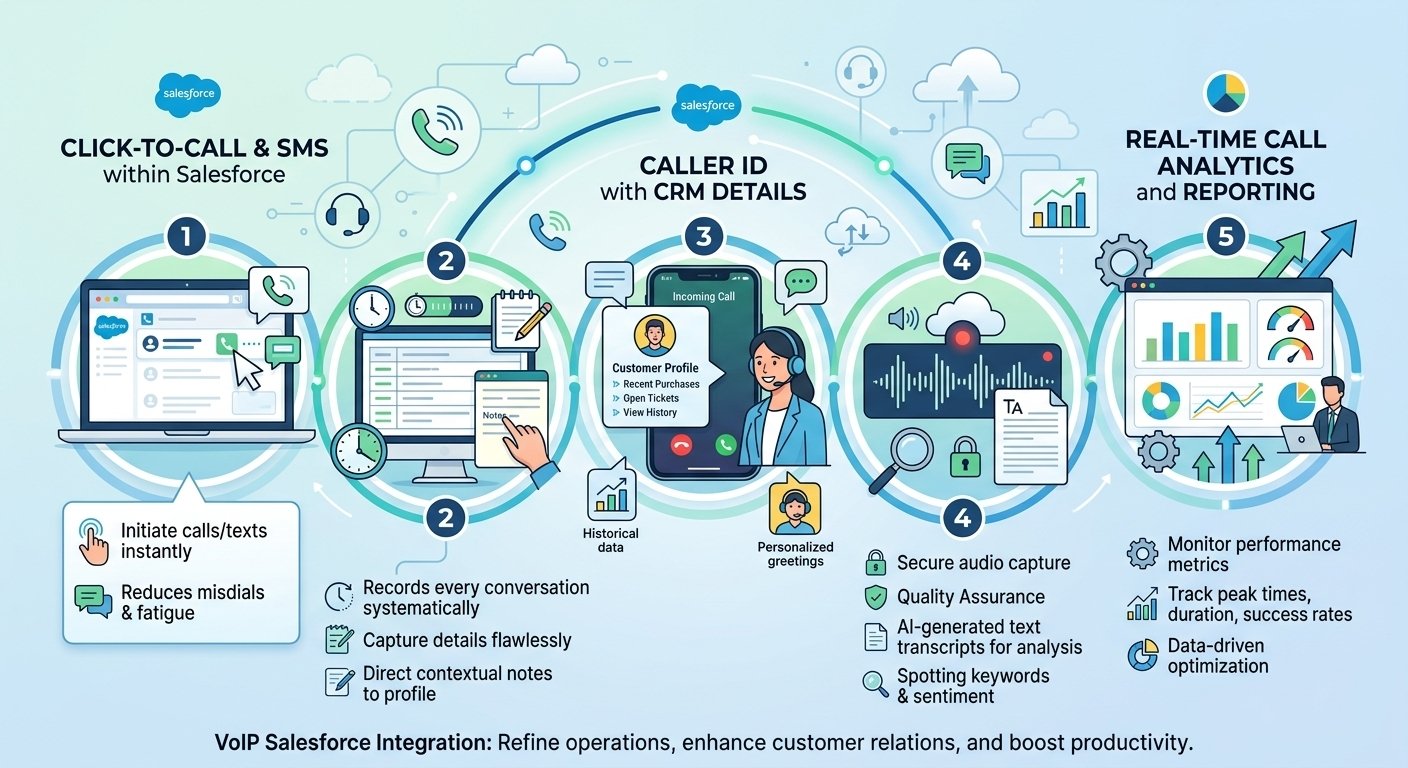
Salesforce VoIP integration streamlines calling workflows and improves customer relationship management through several useful features:
-
Click-to-call and SMS: Lets representatives make calls and send text messages from Salesforce, reducing manual dialing and keeping communication organized.
-
Automatic call logging and notes: Records supported call details, such as timestamps, duration, and participants, while allowing agents to add notes for future follow-ups.
-
Caller ID with CRM details: Displays matching customer records during incoming calls, helping agents understand customer history and respond more personally.
-
Call recording and transcripts: Enables call reviews for quality assurance, training, and dispute resolution. Transcription and AI-based insights depend on the provider and available features.
-
Real-time call analytics and reporting: Provides visibility into metrics such as call volume, handling time, and agent performance, helping managers identify areas for improvement.
Together, these features can reduce administrative work, improve customer interactions, and help businesses make more informed decisions. Actual functionality varies by provider, Salesforce licensing, and configuration.
Common Salesforce VoIP Integration Mistakes and How to Avoid Them
-
Mistake 1: Treating VoIP as the Complete Solution
Internet-based calling does not automatically provide screen pops, advanced routing, complete call logs, or detailed reporting. Map the entire call journey before choosing a provider.
-
Mistake 2: Ignoring Salesforce Record Mapping
Calls must be associated with the correct leads, contacts, accounts, cases, or other supported records. Poor mapping can create duplicate entries, missing activity, and unreliable reports.
-
Mistake 3: Making the Workflow Too Complicated
Excessive clicks and manual steps can discourage employees from using the integration consistently. Test the interface with actual users and remove unnecessary actions wherever possible.
-
Mistake 4: Choosing a Provider Based Only on Feature Claims
Two vendors may both advertise automatic call logging but capture different information. Ask providers to demonstrate your actual workflows and clarify which features require additional licenses or configuration.
-
Mistake 5: Overlooking Product Changes
Legacy integrations may require migration as Salesforce updates its platform. Because Open CTI is scheduled for retirement on February 28, 2028, businesses planning new projects should evaluate supported alternatives and existing users should plan their transition.
Best VoIP providers that integrate with Salesforce
Identifying the ideal telephony partner requires evaluating their specific CRM syncing capabilities and overall digital platform reliability. Several leading platforms consistently deliver exceptional connectivity specifically designed for this exact business ecosystem.
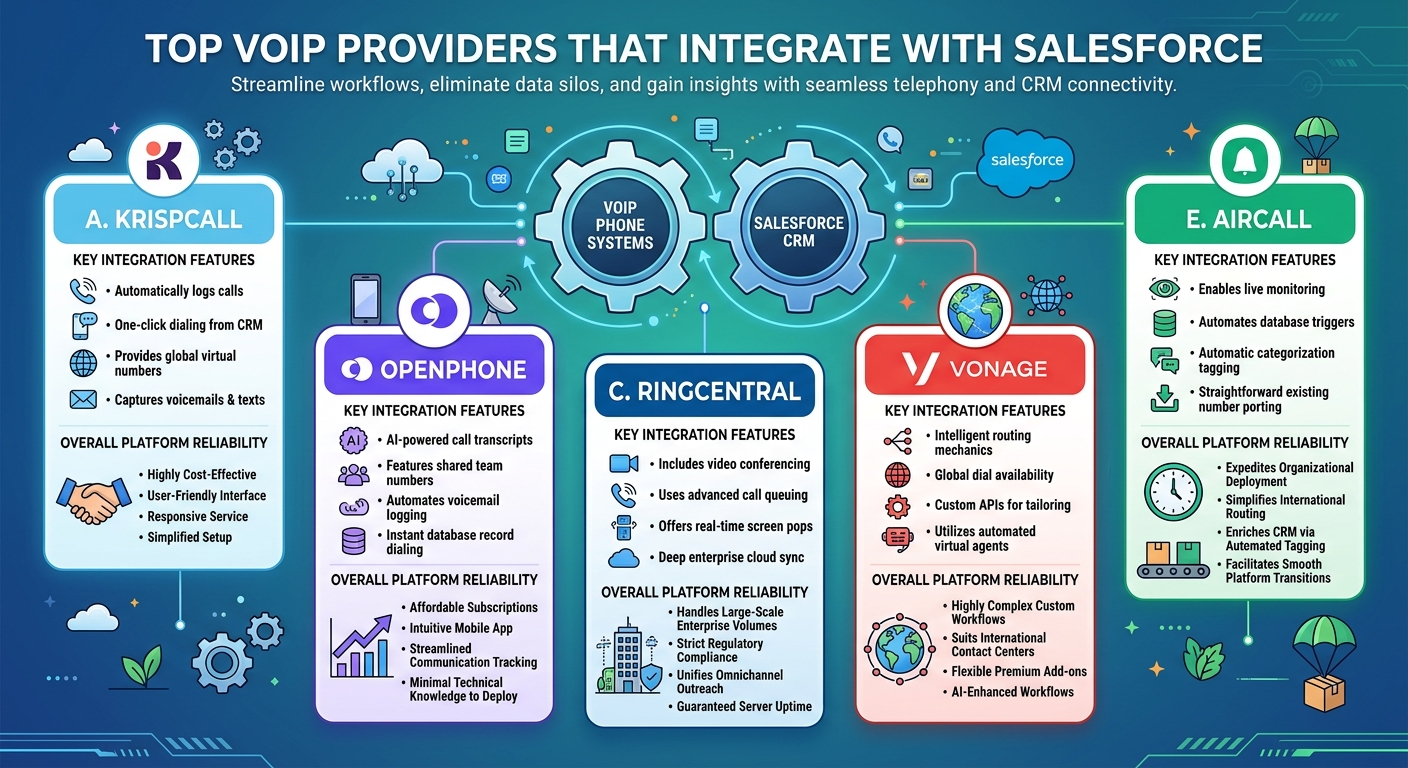
These top voip tools with salesforce crm phone integration eliminate data silos and provide robust analytical tools tailored for enterprise environments. The following vendors stand out prominently in the current marketplace for their seamless architecture.
A. KrispCall
-
Krispcall provides automatic activity logging, seamless one-click dialing functionality, global virtual number support, secure voicemail capturing, and built-in text messaging.
-
Delivers a highly cost-effective pricing structure, features an exceptionally user-friendly interface, guarantees responsive customer service, and simplifies the initial setup.
B. OpenPhone
-
Includes artificial intelligence transcripts, shared team numbers, automatic voicemail documentation, and instantaneous database record dialing functionalities.
-
OpenPhone Offers affordable subscription tiers, provides an intuitive mobile application, streamlines communication tracking, and requires minimal technical knowledge to deploy effectively.
C. RingCentral
-
Ringcentral integrates comprehensive video conferencing, advanced queuing mechanisms, real-time screen pops, and deep synchronization across enterprise cloud environments.
-
Handles large-scale enterprise volumes effortlessly, maintains strict regulatory compliance standards, unifies omnichannel outreach, and guarantees reliable server uptime.
D. Vonage
-
Vonage contains intelligent routing mechanics, global dial availability across numerous countries, custom application programming interfaces, and automated virtual agents.
-
Supports highly complex custom workflows, suits international contact centers perfectly, offers flexible premium add-ons, and utilizes machine learning for workflow enhancement.
E. Aircall
-
Aircall delivers live monitoring capabilities, custom database trigger automation, automatic categorization tagging, and straightforward existing number porting procedures.
-
Expedites organizational deployment significantly, simplifies complex international routing, enriches database entries via automated tagging, and facilitates smooth platform transitions.
Read More: Calilio Pricing 2026: Plans, Costs & What You Really Pay
The sum-up! Why should you choose VoIP Salesforce integration?
Unifying your telecommunication infrastructure with your client management database represents a vital step toward absolute operational excellence. Eliminating disjointed workflows allows your personnel to focus entirely on fostering meaningful consumer relationships rather than managing complex software applications. Accessing critical caller details instantaneously transforms ordinary conversations into highly personalized service experiences that clients remember.
Implementing this synchronized architecture drives substantial growth by streamlining sales cycles and drastically improving daily issue resolution metrics. Upgrading to a salesforce phone integration empowers your workforce to collaborate efficiently and make data-driven decisions confidently every single day. Ultimately, establishing this seamless digital ecosystem secures a definitive competitive advantage in today’s rapid business landscape.
FAQs
-
What are the powerful strategies to improve sales with VoIP Salesforce integration?
Utilizing automated logging, implementing one-click dialing, leveraging real-time caller insights, and employing artificial intelligence transcripts represent the most powerful strategies. These actions eliminate manual administrative burdens, allowing representatives to focus entirely on closing deals and increasing overall revenue output.
-
Does Salesforce have a native VoIP?
The platform does not include a native built-in telephony dialer out of the box for immediate use. Organizations must utilize third-party applications or specialized connector APIs to enable internal dialing capabilities securely within the dashboard.
-
What is the most popular VoIP system for Salesforce?
Leading solutions like CloudTalk, RingCentral, and Aircall consistently rank as the most preferred options among modern businesses. Choosing the correct provider depends entirely on specific organizational requirements, budgetary constraints, and desired advanced functionalities.
-
Can you make phone calls through Salesforce?
Users easily execute outbound calls directly from the interface once a compatible telephony connector is properly installed. Clicking a highlighted contact number initiates the dialing sequence automatically without requiring any external hardware manipulation.
-
How can I integrate my telephony with Salesforce?
Administrators accomplish this by downloading a certified Computer Telephony Integration adapter from the official application exchange marketplace. Configuring this adapter securely links the digital phone accounts directly to the corresponding database profiles seamlessly.
-
Which platforms auto-log transcripts directly without manual entry?
Advanced providers like Dialpad and CloudTalk excel at automatically syncing written conversation text straight into the client profile interface. This automated synchronization ensures zero-touch database hygiene and highly accurate historical record keeping.
-
How do I compare solutions with real-time CRM sync?
Evaluating these platforms requires testing their transcription accuracy, measuring synchronization latency, and reviewing required premium tier subscription costs. Businesses should also determine whether artificial intelligence summaries come bundled or demand extra monthly fees.
-
Where can I find systems that sync data with sales tools?
The official application exchange remains the primary destination for discovering certified and secure communication packages. Additionally, exploring directories associated with major sales engagement platforms reveals highly compatible software alternatives available for immediate deployment.