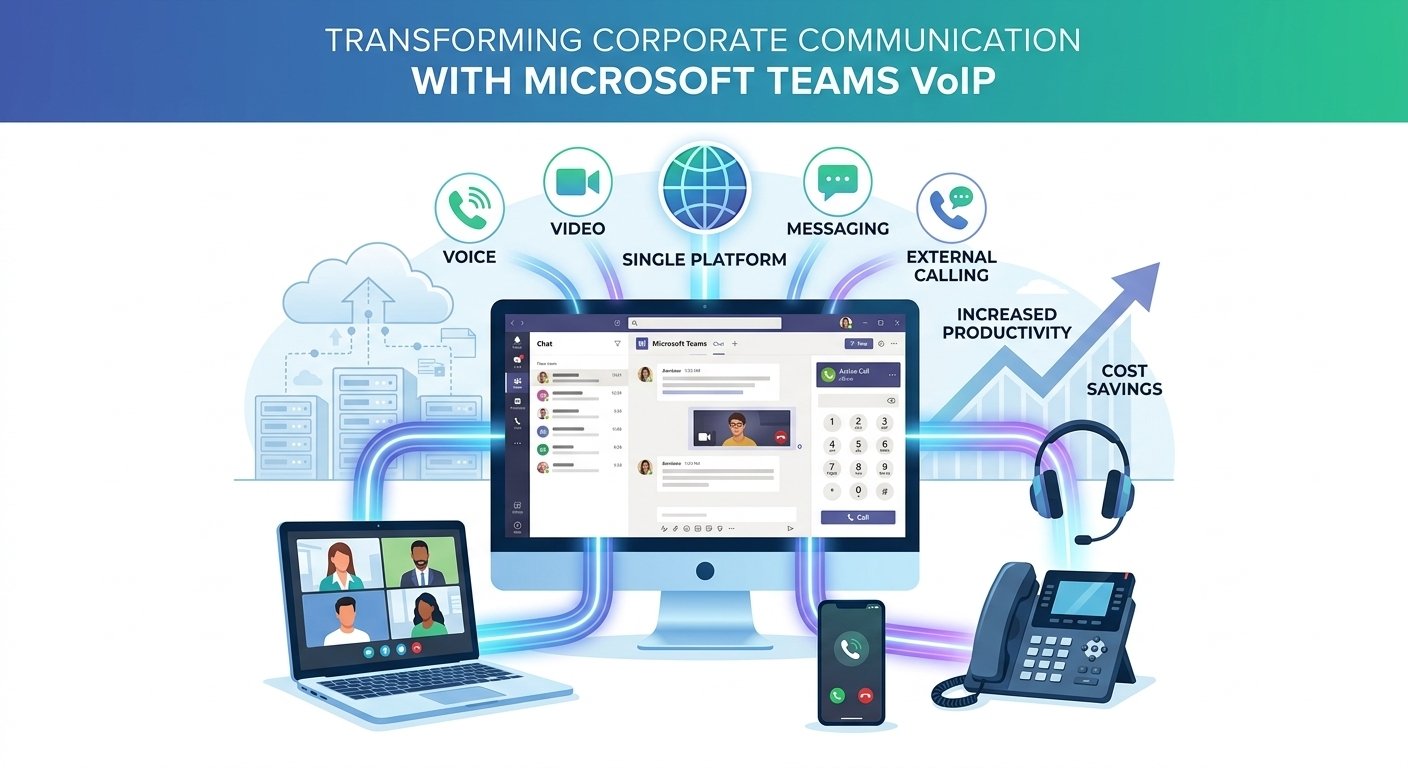
Microsoft Teams VoIP integration enables businesses to make and receive internet-based phone calls through Microsoft Teams while keeping messaging, meetings, and collaboration in one workspace. With the right telephony setup, organizations can connect Teams to the Voip, retain existing business numbers, and manage customer calls more efficiently. This guide explains how Microsoft Teams Phone works, compares calling options, covers setup and pricing considerations, and explores ways to improve call reliability, security, and business continuity without unnecessary infrastructure costs.
Microsoft Teams VoIP Integration
Microsoft Teams VoIP integration connects Teams with voice-over-internet-protocol (VoIP) technology, allowing employees to communicate through internet-based calling instead of relying exclusively on traditional telephone systems.
Teams supports free audio and video calls between users within the platform. However, calling external landlines and mobile numbers requires an appropriate connection to the public telephone network, along with the necessary licenses and phone numbers. Organizations can obtain this connectivity through Microsoft or a participating telecommunications provider.
Microsoft Teams Phone provides business calling capabilities, including call transfers, voicemail, call forwarding, auto attendants, and call queues, depending on the configuration and licenses.
For businesses, integration can reduce the need to switch between communication applications. However, the best setup depends on the company’s existing phone infrastructure, calling requirements, budget, and need for service continuity.
How to Set Up Microsoft Teams VoIP Integration
Before configuring business calling, confirm that Teams Phone and the required Voip connectivity options are available for your users’ locations. Microsoft Calling Plans are not available in every country or region, so international businesses may need to work with a supported operator or use Direct Routing. Four Ways to Configure Microsoft Teams Phone
1. Microsoft Calling Plans
Microsoft supplies the phone numbers and calling service. This is a straightforward option for organizations that want Microsoft to manage their external calling connection. Availability, included minutes, and plan terms depend on the market and subscription.
2. Operator Connect
A participating telecommunications operator provides Voip connectivity through an integration with Teams. Administrators can manage supported numbers and users through the Teams admin center while retaining the selected operator for calling services.
3. Teams Phone Mobile
This option connects a supported mobile operator’s service with Teams Phone, allowing eligible users to use one business number across their mobile service and Teams experience. Availability and capabilities depend on the operator and country.
4. Direct Routing
Direct Routing connects Teams Phone to a compatible Session Border Controller (SBC), allowing businesses to use supported third-party carriers and existing voice infrastructure. The SBC can be hosted in a cloud environment or deployed on-premises. Teams Phone licensing is generally required for users using this method.
Setup Checklist
- Review licensing: Confirm that users have the appropriate Teams Phone licenses and that your chosen Voip connection is supported.
- Select a connectivity model: Compare Calling Plans, Operator Connect, Teams Phone Mobile, and Direct Routing.
- Arrange phone numbers: Acquire new numbers or arrange number porting through the selected provider.
- Configure voice settings: Set up users, calling policies, routing, voicemail, and any required emergency locations.
- Test before deployment: Check inbound and outbound calls, transfers, voicemail, call routing, and network performance before migrating all users.
For Microsoft’s official instructions, see the Microsoft Calling Plans setup guide.
Voice Calling Options and Microsoft Teams VoIP Pricing
Microsoft Teams VoIP pricing depends on the licenses, connectivity method, calling destinations, and services your organization needs. Teams Phone licensing and Voip connectivity are separate considerations: a Teams Phone license alone does not automatically provide a telephone number or external calling service.
-
Microsoft Teams Phone Standard
Teams Phone provides the cloud-based phone system capabilities used to manage business calls. Whether you need an additional license depends on your existing Microsoft 365 subscription and licensing arrangement. Check the official Microsoft Teams Phone pricing page for current regional pricing and eligibility. Following Microsoft’s 2024 global licensing changes, new enterprise customers must now purchase a standalone Microsoft Teams license separately from their base Office 365 or Microsoft 365 suite. You must have this foundational Teams license in place before you can add the Teams Phone Standard license for voice capabilities.
-
Microsoft Teams Domestic Calling Plan
A Domestic Calling Plan includes outbound calling minutes for eligible calls within the user’s assigned country or region, subject to the plan’s terms. Incoming minutes are included, while outbound allowances and overage arrangements depend on the purchased plan and location.
-
Comparing the Main Options
| Option | Best suited for | Main cost consideration |
|---|---|---|
| Microsoft Calling Plans | Businesses seeking a Microsoft-managed service | Phone system licensing plus calling-plan charges |
| Operator Connect | Businesses preferring a participating carrier | Carrier subscription and applicable licensing |
| Teams Phone Mobile | Mobile-first teams | Eligible mobile service and licensing |
| Direct Routing | Businesses needing carrier flexibility | Teams Phone licensing, SBC infrastructure, and carrier charges |
| Integrated third-party softphone | Businesses needing an alternative calling interface | Provider subscription, integration, and service requirements |
These options are not interchangeable in every market. Compare total costs, including licenses, numbers, minutes, implementation, support, and backup arrangements, rather than choosing solely by the advertised monthly price.
How to Use Microsoft Teams VoIP Integration
Once the administrator has configured the phone system and assigned the necessary licenses and numbers, employees can use Teams for everyday business calls.
- Place calls: Use the Calls interface or supported contact and dialing options to reach colleagues and external telephone numbers.
- Receive incoming calls: Answer business calls from a supported desktop, browser, or mobile experience, depending on the configuration.
- Transfer calls: Send a conversation to another employee or an appropriate destination when supported by the calling setup.
- Manage voicemail: Review available voicemail messages and use transcription where the service and configuration support it.
- Route customer inquiries: Use configured auto attendants and call queues to direct callers to the appropriate team.
Administrators should provide employees with clear instructions for transfers, voicemail, caller identification, and handling calls while working remotely. A short training session can help employees use the system consistently and reduce avoidable support requests.
Features of Microsoft Teams VoIP Integration
Microsoft Teams Phone combines everyday calling controls with tools for managing business communications. Available features depend on the assigned licenses, Voip connection, and configuration.
-
Auto attendants: Welcome callers and guide them through automated menu options.
-
Call queues: Distribute incoming calls to designated teams or available agents.
-
Voicemail: Receive and manage voicemail messages through supported Teams applications.
-
Call forwarding and transfers: Redirect calls according to employee availability and business requirements.
-
Media bypass: With supported Direct Routing configurations, route audio between the Teams client and SBC without sending the media stream through the Teams cloud.
-
Call analytics: Examine call-quality information to identify recurring network, device, or connectivity problems.
For organizations with customer support teams, these capabilities can simplify call handling and improve visibility into communications performance.
Benefits of a Microsoft Teams VoIP Integration
Implementing a synchronized communication strategy presents numerous measurable advantages that directly impact overall organizational efficiency and daily operational expenditure. Exploring these specific corporate benefits helps executive decision-makers understand precisely why a Microsoft Teams VoIP integration remains strategically vital for modern commercial expansion.
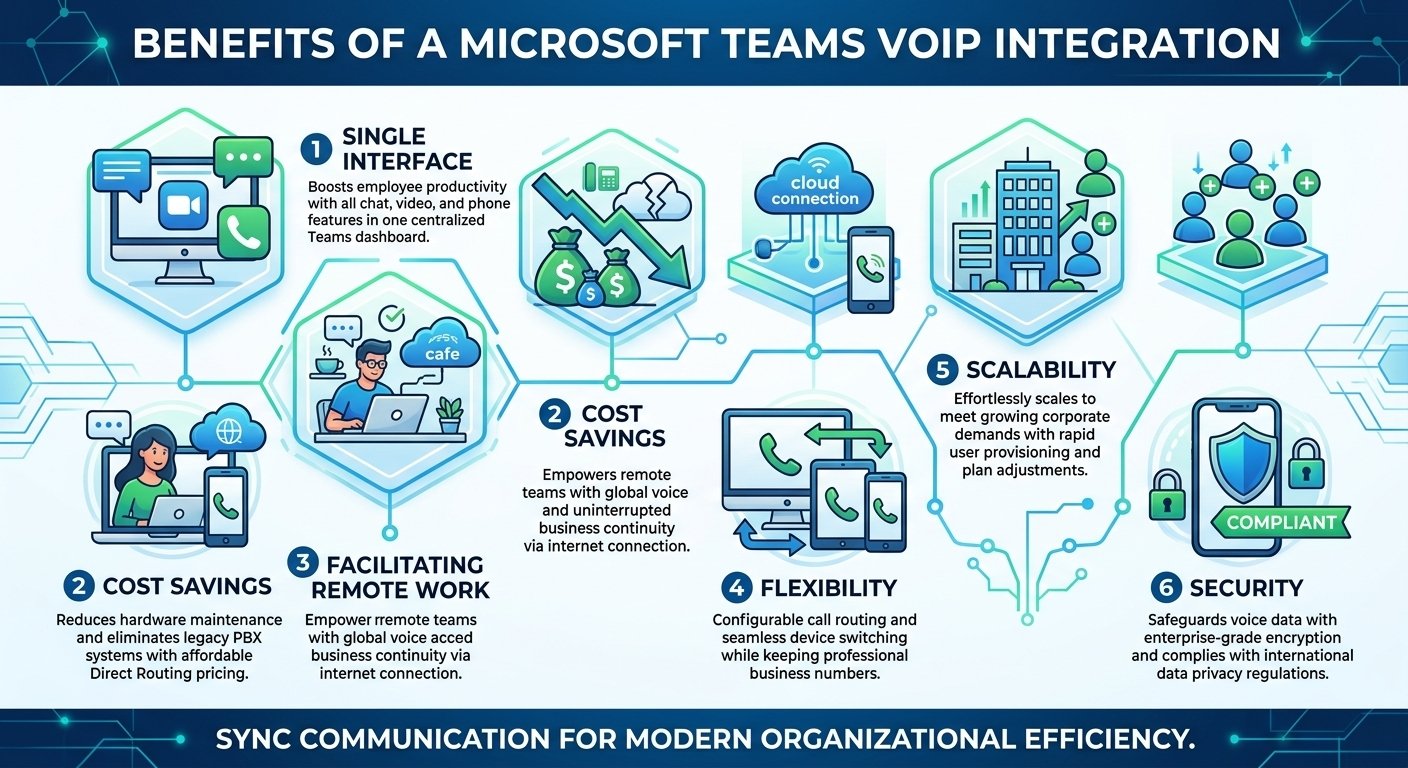
2. Cost savings
Transitioning towards modernized cloud telephony solutions drastically reduces physical hardware maintenance expenses and entirely eliminates the mandatory requirement for legacy private branch exchange systems. Analyzing microsoft teams voip pricing reveals that adopting intelligent direct routing connections proves substantially more affordable than financing outdated analog phone lines or traditional copper-wire telecommunications infrastructure.
3. Facilitating remote work
Equipping geographically dispersed teams with cloud-based digital voice systems empowers remote employees to remain fully accessible regardless of their specific physical location. Off-site workers simply require a highly stable broadband internet connection to handle critical client interactions smoothly, ensuring uninterrupted global business continuity during unexpected regional service disruptions.
5. Scalability
Expanding critical business operations becomes remarkably straightforward because modernized cloud communication systems scale effortlessly alongside rapidly growing corporate consumer demands without necessitating complex hardware installations. Network administrators can rapidly provision new user accounts or seamlessly adjust a microsoft teams domestic calling plan to accommodate seasonal workforce fluctuations efficiently.
6. Security
Protecting sensitive corporate voice conversations requires implementing robust encryption protocols and maintaining strict compliance with international data privacy regulations to actively prevent unauthorized network access. Leading global telecommunication providers consistently deploy enterprise-grade security algorithms, securely safeguarding inbound voice traffic against potential malicious cyber threats and ensuring absolute commercial confidentiality.
Risks and Reliability Considerations
Microsoft Teams VoIP integration introduces operational dependencies that organizations should assess before replacing an existing telephone system.
-
Vendor Dependency and Data Governance
A Microsoft-managed calling service depends on Microsoft’s platform and the applicable service terms. Direct Routing and third-party calling solutions offer different levels of carrier flexibility, but they do not automatically eliminate every dependency on Microsoft.
Organizations operating in regulated markets should assess data-processing agreements, access controls, retention policies, applicable laws, and contractual commitments. European businesses should also evaluate relevant GDPR obligations and cross-border data-transfer requirements with qualified legal and security advisers.
Data residency alone does not resolve every question about data access or jurisdiction. The appropriate safeguards depend on the organization’s data, operating model, and regulatory obligations.
-
Service Continuity During Outages
An internet failure, cloud outage, or local network problem can disrupt calling. Microsoft publishes service commitments for eligible services, but a service-level agreement (SLA) is not a guarantee that every call will always succeed.
For context, Microsoft’s documentation lists a 99.999% reliability SLA for Microsoft Calling Plans. This is a contractual service commitment, not a substitute for testing local connectivity, backup arrangements, or emergency-calling procedures.
-
Strategies for Maintaining Business Continuity
Businesses with critical voice requirements should consider several safeguards:
-
-
Survivable Branch Appliance (SBA): In supported Direct Routing deployments, an SBA can preserve specified calling functions during an internet outage at a branch, provided the local network and relevant equipment remain operational.
-
Media bypass: Supported configurations can keep audio traffic between the Teams client and SBC, potentially reducing unnecessary network routing.
-
Local PSTN fallback: A suitably configured SBC can redirect calls through an alternative local telephony path when the normal route fails.
-
Carrier-level failover: Providers may offer options to redirect incoming calls to backup numbers or alternative destinations.
-
Independent monitoring: Monitor call quality and availability so your team can identify issues beyond individual user complaints.
-
Microsoft documents that SBA mode supports selected calling functions, including making and receiving Voip calls, but not every Teams feature remains available during an outage. It also requires a compatible configuration and supported desktop client. The right resilience plan depends on which failures the business needs to withstand. Test it regularly instead of assuming that a backup configuration will work when an incident occurs.
Troubleshooting Microsoft Teams VoIP
Call problems can result from network congestion, incorrect settings, unsupported devices, licensing issues, or provider outages. Use a consistent troubleshooting process to identify the cause. Common Problems and Practical Fixes are as followed;
| Problem | What to check |
|---|---|
| Cannot make external calls | Verify licensing, phone-number assignment, calling policies, and Voip connectivity. |
| Poor audio or dropped calls | Check network stability, headset settings, Wi-Fi congestion, and packet loss. |
| Incoming calls do not arrive | Review forwarding rules, call queues, number assignments, and provider routing. |
| Voicemail is unavailable | Check voicemail configuration, user settings, and applicable licenses. |
| Calls fail after an outage | Check service status, local connectivity, SBC health, and configured failover procedures. |
Administrators can use the Teams admin center to investigate individual calls and meetings. The Call Quality Dashboard provides broader visibility into organizational call-quality trends, helping teams identify recurring problems rather than troubleshooting every incident in isolation.For persistent problems, document the affected users, call times, error messages, and network conditions before escalating the issue to Microsoft or your telephony provider.
Pros and Cons of Microsoft Teams VoIP Integration
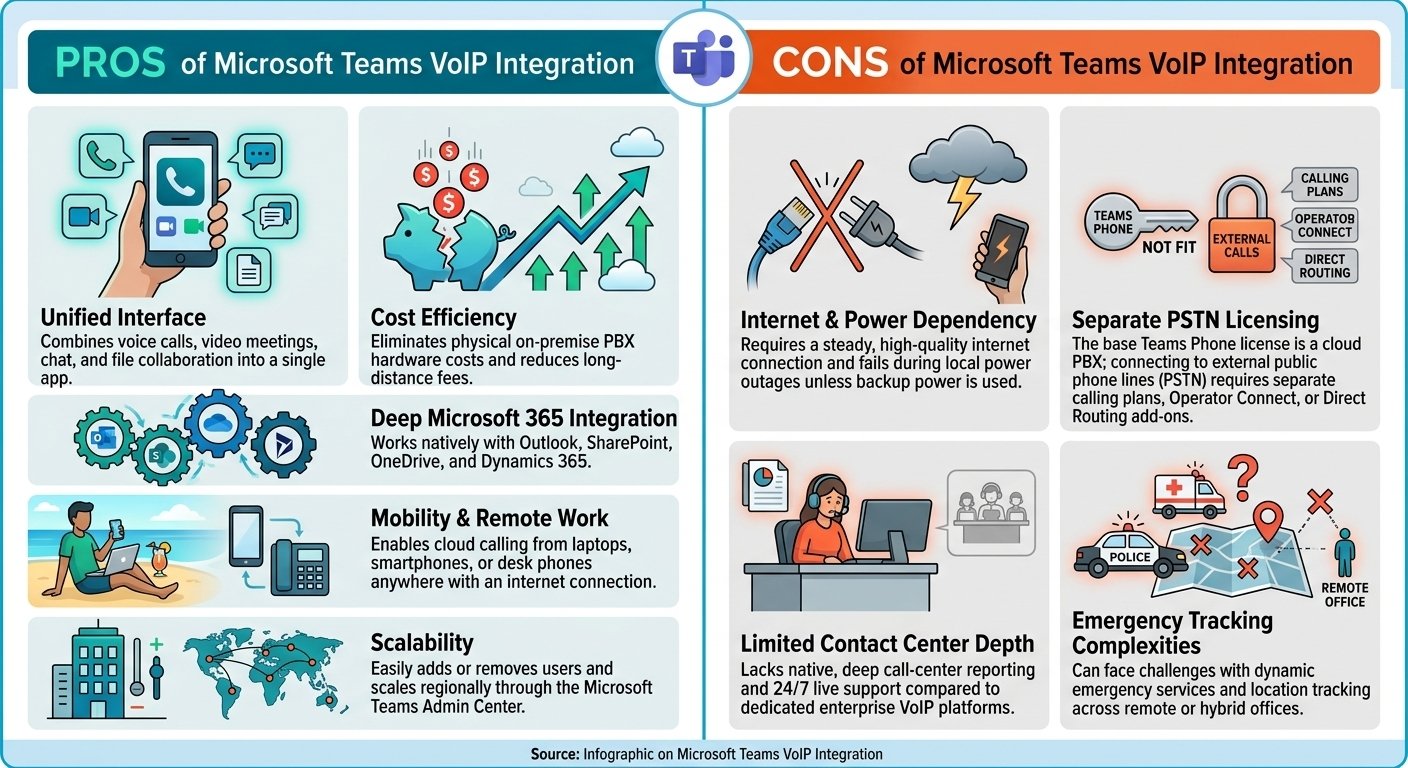
Pros:
-
- Unified Interface: Combines voice calls, video meetings, chat, and file collaboration into a single app.
- Cost Efficiency: Eliminates physical on-premise PBX hardware costs and reduces long-distance fees.
- Deep Microsoft 365 Integration: Works natively with Outlook, SharePoint, OneDrive, and Dynamics 365.
- Mobility & Remote Work: Enables cloud calling from laptops, smartphones, or desk phones anywhere with an internet connection.
- Scalability: Easily adds or removes users and scales regionally through the Microsoft Teams Admin Center.
Cons:
-
- Internet & Power Dependency: Requires a steady, high-quality internet connection and fails during local power outages unless backup power is used.
- Separate PSTN Licensing: The base Teams Phone license is a cloud PBX; connecting to external public phone lines (PSTN) requires separate calling plans, Operator Connect, or Direct Routing add-ons.
- Limited Contact Center Depth: Lacks native, deep call-center reporting and 24/7 live support compared to dedicated enterprise VoIP platforms.
- Emergency Tracking Complexities: Can face challenges with dynamic emergency services and location tracking across remote or hybrid offices.
Which Businesses Does It Suit?
- Microsoft 365-Centric Organizations: Best for companies that already rely heavily on Office 365, SharePoint, and Teams for daily collaboration.
- Hybrid and Remote Teams: Ideal for businesses with distributed, mobile, or work-from-home employees needing a single phone number that follows them on any device.
- Small-to-Enterprise Scaling Businesses: Suited for companies that want to scrap legacy copper phone lines and PBX closets in favor of a flexible, cloud-managed setup.
User Capacity
- User Range: Scales from 1 user up to tens of thousands of users, making it viable for small businesses as well as massive global enterprises.
- Licensing Scale: Supports small business tiers (via Microsoft 365 add-ons) and large enterprise tiers (such as E1, E3, or E5 plans where Teams Phone is either included or added on).
Industries Using Microsoft Teams VoIP
- Corporate & Professional Services: Law firms, marketing agencies, and consultancies needing unified chat, client calls, and document sharing.
- Healthcare & Life Sciences: Administrative and clinical coordination (using compliant Direct Routing or recording options).
- Education & Higher Ed: Schools and universities combining virtual classrooms, staff communication, and campus telephony.
- Finance & Insurance: Firms utilizing integrated call logging, CRM syncing (via Dynamics or third-party tools), and recorded line compliance.
- Tech & Startups: Fast-growing digital-first companies that operate cloud-first and avoid physical desk hardware.
Choosing the Right Microsoft Teams VoIP Integration
The most suitable integration depends on your organization’s priorities.
-
Choose Microsoft Calling Plans if you want a straightforward, Microsoft-managed calling service and it is available in your market.
-
Consider Operator Connect if you prefer to use a participating telecommunications provider.
-
Explore Teams Phone Mobile if mobile-number integration is important to your workforce.
-
Choose Direct Routing if you need greater carrier flexibility, support for existing voice infrastructure, or a customized routing design.
-
Evaluate third-party integrated softphones if maintaining an alternative calling interface or independent telephony infrastructure is important. Confirm the provider’s current Teams compatibility, licensing requirements, security arrangements, and outage behavior before committing.
For a final decision, compare the total cost, supported features, emergency-calling requirements, regional availability, and recovery options. Microsoft’s Voip connectivity documentation provides an authoritative starting point for comparing supported approaches.
Final Thoughts
Microsoft Teams VoIP integration can bring business calling and collaboration into one convenient workspace, but the best solution goes beyond enabling a dial pad. Businesses should choose a supported connectivity model, confirm current licensing and pricing, and plan for network failures and service interruptions. By balancing usability, total cost, carrier flexibility, and resilience, organizations can build a calling environment that supports their employees and customers without creating unnecessary operational risks.
Read More: Calilio Integrations: CRM, Help Desk & Business Apps
FAQs
-
Can I use VoIP with Microsoft Teams?
Yes, organizations seamlessly utilize voice over internet protocol technologies within the collaborative platform by establishing sophisticated direct routing connections or acquiring native commercial telephony licenses. This specialized technical configuration completely enables internal employees to efficiently execute and reliably receive traditional external telephone calls directly through their existing primary desktop collaboration dashboard.
-
How much does Microsoft Teams VoIP cost per month?
Monthly financial expenses consistently vary depending heavily on the specific third-party telecommunication provider selected, the total number of licensed internal users, and the required international dialing capabilities. Generally, incorporating intelligent direct routing connections proves significantly more cost-effective than exclusively purchasing standard native calling plans directly from the primary software developer.
-
Can I use MS Teams to call a landline?
Absolutely, appropriately authorized internal users easily dial any external domestic or international landline globally by manually utilizing the secure digital dial pad perfectly embedded within the application interface. Successfully enabling this specific external outbound dialing capability fundamentally requires properly assigning the correct commercial telephony licenses to every individual corporate employee account.
-
Are traditional phone calls possible through the application?
Traditional telephonic conversations function flawlessly within the unified digital workspace once the central network administrator effectively links a dedicated external telecommunication service to the primary corporate platform. This strategic synchronization effectively eliminates the frustrating necessity for maintaining separate physical analog desk phones or installing entirely disjointed external desktop communication applications.
-
Do users need to change how they work once voice is integrated?
In most operational cases, absolutely no drastic workflow modifications remain necessary because external telephony calling securely integrates directly within the highly familiar primary desktop interface. Internal users seamlessly place and reliably receive traditional phone calls the exact same simplified way they currently join standard digital meetings or initiate internal department chats.
-
Can organizations keep their existing phone numbers during integration?
Yes, establishing a specialized direct routing connection typically allows expanding organizations to successfully retain their deeply established geographic phone numbers and preferred external telephone carriers. This highly advantageous capability completely avoids the severe operational disruption and heavy financial costs generally associated with forcefully porting existing corporate numbers to an entirely new calling plan.
-
How does Teams voice integration affect overall call quality?
Overall audio clarity fundamentally depends entirely on the stability of the underlying broadband network and the precise technical configuration of your dedicated session border controller. A properly configured Microsoft Teams VoIP integration utilizing prioritized digital routing rules easily delivers exceptional audio fidelity perfectly equivalent to any dedicated premium enterprise telephone system.
-
What occurs if the platform experiences an unexpected outage?
A strategically designed Microsoft Teams VoIP integration fundamentally includes specialized automated digital failover options that completely allow continuous external calling functionalities to persist safely outside the primary application. This highly resilient technical architecture completely ensures that critical external commercial voice communication remains entirely unaffected by isolated digital application crashes or unexpected temporary connection pathway failures.