Calilio offers cloud calling tools for sales and support teams, including shared numbers, outbound dialing, live supervision and plan-dependent AI reporting. Premium is the practical package to evaluate for these advanced workflows. Its suitability for a busy inbound call center requires particular care because official materials conflict about call queues.
The important decision is whether Calilio handles your busiest hour, agent workflow and reporting requirements at an acceptable total cost. This guide explains its features, subscription pricing and limitations, with practical pilot scenarios.
Calilio Customer Rating

G2: 4.7/5 from 94 reviews. Customer feedback later in this guide includes positive comments about calling tools and requests for more integrations.
Calilio for Call Centers: Quick Overview

| Area | What to know |
|---|---|
| Likely starting package | Premium for dialer, supervision and advanced handling |
| Monthly subscription | Premium: $35/user/month; $28 monthly equivalent with annual billing |
| Inbound handling | IVR, business-hours rules, transfers and ringing strategies need plan confirmation |
| Call queues | Conflicting official descriptions; require a live busy-hour demonstration |
| Outbound tools | Power dialer and dispositions; do not assume predictive dialing |
| Quality review | Live monitoring, recordings and eligible AI insights |
| Usage | Finite eligible allowances plus applicable communication charges |
| Enterprise | Custom scope; contractual and integration requirements need written confirmation |
What Kind of Operation Is Calilio Designed to Support?
Calilio presents its call-center service as a cloud workspace for inbound and outbound calls. Agents use business numbers and shared conversation records, while managers review activity and coach employees.
That can be useful for a small sales or support team replacing personal phone numbers and scattered call notes. A larger contact center has additional requirements: managing concurrent callers, staffing, service levels, channels and reliable links to customer systems.
Start with the operation rather than the product label. A team receiving occasional enquiries has different needs from a support desk with ten callers waiting while every agent is occupied. Our Calilio review covers the broader phone service.
Inbound Calling: Routing, Availability and Fallbacks
Caller menus and business hours
The main pricing page and plan guide put IVR, business-hours rules and transfers in Premium. Some newer ringing pages describe broader entitlement. Confirm the package in your written order before relying on a departmental menu or after-hours rule.
A useful inbound demonstration starts with a real customer journey: greeting, menu choice, assigned team, unavailable agents and final fallback. Test an invalid menu choice as well as a valid one.
Ring strategies
Calilio advertises simultaneous, sequential and round-robin strategies. Sequential ringing tries agents in a configured order with a chosen duration and fallback. It suits primary ownership with backups; rotating or simultaneous distribution serves different staffing arrangements.
Keep the ringing chain short enough for customers to tolerate. Three unanswered agents ringing for 20 seconds each can create a minute of waiting before the fallback begins. That is an illustrative configuration, not a measured Calilio result.
Missed-call ownership
A shared number gives staff access to customer communications. The team still needs a person responsible for missed calls and a process for marking follow-up complete. Otherwise several employees can see an enquiry while none takes ownership.
Call Queues: A Material Documentation Conflict
Do not assume production queue support without a demonstration. Calilio’s main call-center page advertises call queues. However, its own inbound-software comparison, updated September 10, 2026, explicitly says Calilio has no call queues and recommends it for missed-call handling rather than callers stacking up.
These official descriptions conflict. The evidence does not establish a reliable current queue entitlement or feature specification. Ask whether queues have launched, which package includes them and whether your account can use them now.
A ring strategy selects whom to ring. A queue holds waiting callers while agents are busy. One does not automatically supply the other. For background, our automatic call distribution guide explains the wider routing problem.
| Test | What to observe |
|---|---|
| All agents occupied | What the next caller hears and whether the call stays waiting |
| Several callers arrive | Whether ordering and concurrent waiting behave as required |
| An agent becomes available | How the waiting call reaches that employee |
| Nobody becomes available | Timeout, overflow and final destination |
| Caller abandons | Whether reporting records the event accurately |
| Queue callbacks needed | Whether a real callback function exists and preserves ownership |
If callers regularly wait for available staff, treat this as a purchase gate. Marketing wording alone is insufficient for moving an established inbound operation.
Outbound Sales: Power Dialer and Dispositions
Calilio advertises a power dialer for working through contact lists, with call dispositions to record outcomes. Premium includes these outbound tools in the current plan descriptions.
A disposition such as callback needed is useful only when it produces follow-up staff can find. Demonstrate list preparation, number selection, call results and how an agent returns to unfinished work.
Do not assume predictive dialing, parallel dialing or automated answering-machine detection from the term power dialer. Request the exact supported dialing mode and behaviour for unanswered calls, busy numbers and completed conversations.
Use a representative list with international numbers and duplicates. Confirm caller ID and contact formatting before launching a campaign. Our power dialer guide explains the differences to evaluate.
For a team making many short calls, inspect billed minutes rather than talk time alone. Calilio’s terms round partial minutes up; repeated short connected calls can affect cost.
Live Supervision and Agent Coaching
Calilio’s monitoring materials describe listening, whispering, barging and ending calls. These have different purposes: observing, privately coaching an employee, joining a customer conversation and stopping a call.
Show these functions using a supervisor account and an ordinary agent account. Confirm who can monitor which teams, how the agent recognises intervention and whether a manager can find the correct live conversation quickly.
Build a coaching process around the tools. A supervisor might review selected calls, discuss one improvement and check the next conversation. The presence of monitoring does not establish a formal quality-scoring programme or automated coaching effectiveness.
For remote agents, test under normal internet and headset conditions. An office demonstration does not prove the same audio or notification behaviour at every employee location.
Recording, AI and Performance Reporting
Calilio advertises transcripts, summaries and sentiment insights. Its transcription documentation describes automatic and manual workflows with access through Callbox. Advanced report access depends on the plan.
Use recordings to verify important details in AI outputs. Names, amounts, promised actions and technical terms deserve particular attention. A sentiment label can help prioritise review but should not be treated as a complete explanation of customer satisfaction.
For reporting, define the metric you need before asking for a dashboard. Call count and duration are different from queue abandonment, service level, occupancy or first-contact resolution.
| Requirement | Proof to request |
|---|---|
| Agent activity | Correct incoming/outgoing counts for a known sample |
| Unanswered calls | Distinction between missed, abandoned and failed events |
| Waiting performance | Documented wait-time measure and its starting point |
| Quality review | Recordings and eligible AI output accessible to authorised supervisors |
| Management reporting | Required filters, export and retention |
| Staffing analysis | Demonstration of any claimed forecasting or scheduling capability |
The reviewed materials do not establish a complete workforce-management or workforce-engagement suite. Do not assume forecasting, scheduling, adherence or formal quality scorecards are included.
Calilio Pricing for Call-Center Teams
| Plan | Monthly billing | Annual commitment | Practical scope |
|---|---|---|---|
| Standard | $15/user/month | $144/user/year ($12 monthly equivalent) | Basic communication; up to 10 users |
| Premium | $35/user/month | $336/user/year ($28 monthly equivalent) | Advanced calling tools; paid seats without an advertised cap |
| Enterprise | Custom quote | Custom quote | Negotiated deployment and support |
Premium’s unlimited-user wording means no advertised headcount cap, not unlimited employees for one licence. Confirm whether supervisors and administrators who need calling tools require paid seats.
Eligible US/Canada allowances are 200 outgoing and 100 incoming minutes on Standard, versus 1,000 outgoing and 500 incoming on Premium. SMS allowances are 100 segments each direction versus 500. Confirm allocation and routes; these are not worldwide unlimited bundles.
Current pricing lists recording/storage allowances of 100 minutes on Standard and 1,000 on Premium, with transcription allowances of 10 and 100. Other help materials differ. Obtain the applicable limits in the order.
Total Cost: Agents, Supervisors and Usage
| Paid users | Monthly billing total | Annual billing total |
|---|---|---|
| 5 | $175/month | $1,680/year |
| 10 | $350/month | $3,360/year |
| 20 | $700/month | $6,720/year |
| 50 | $1,750/month | $16,800/year |
Annual totals use the discounted annual rate and require a yearly commitment. These calculations exclude numbers, out-of-bundle traffic, metered tools and applicable taxes.
Illustrative staffing example
Ten agents and two supervisors equal 12 users if all need paid seats. At the published Premium rate, that is $420 monthly or $4,032 annually for subscriptions. Ask which roles require a licence before finalising the budget.
Next add inbound usage, outbound minutes by destination, messaging, number rental, external forwarding and recording/AI consumption. A call-heavy team can exceed allowances even when its seat cost looks modest.
Price a representative peak month rather than a quiet week. Confirm whether allowances are per user or pooled and how partial minutes, voicemail connections and unused allowances are handled. Do not multiply advertised allowances across users without confirming allocation.
Calilio draws applicable usage from wallet funds. Assign a billing owner to monitor replenishment and avoid a calling interruption caused by an empty balance.
CRM and Help Desk Workflows
Pipedrive has documented click-to-call and call logging, but its product page marks several advanced contact-sync and embedded-calling functions coming soon. Demonstrate the specific workflow your agents require.
Pabbly provides an automation route. Its Helpdesk documents call-log syncing and lists contact/SMS additions as future functionality despite broader marketing claims. A call-log event does not prove transcript export or native ticket handling.
For support, ask whether the caller matches an existing requester and whether the interaction updates the correct ticket. For sales, ask where outcomes appear and how follow-up ownership is retained.
Enterprise API/webhook access is marked coming soon in pricing. Do not assume a custom production connector can be built without current documentation and confirmed developer access.
Agent Workspace and Remote Access
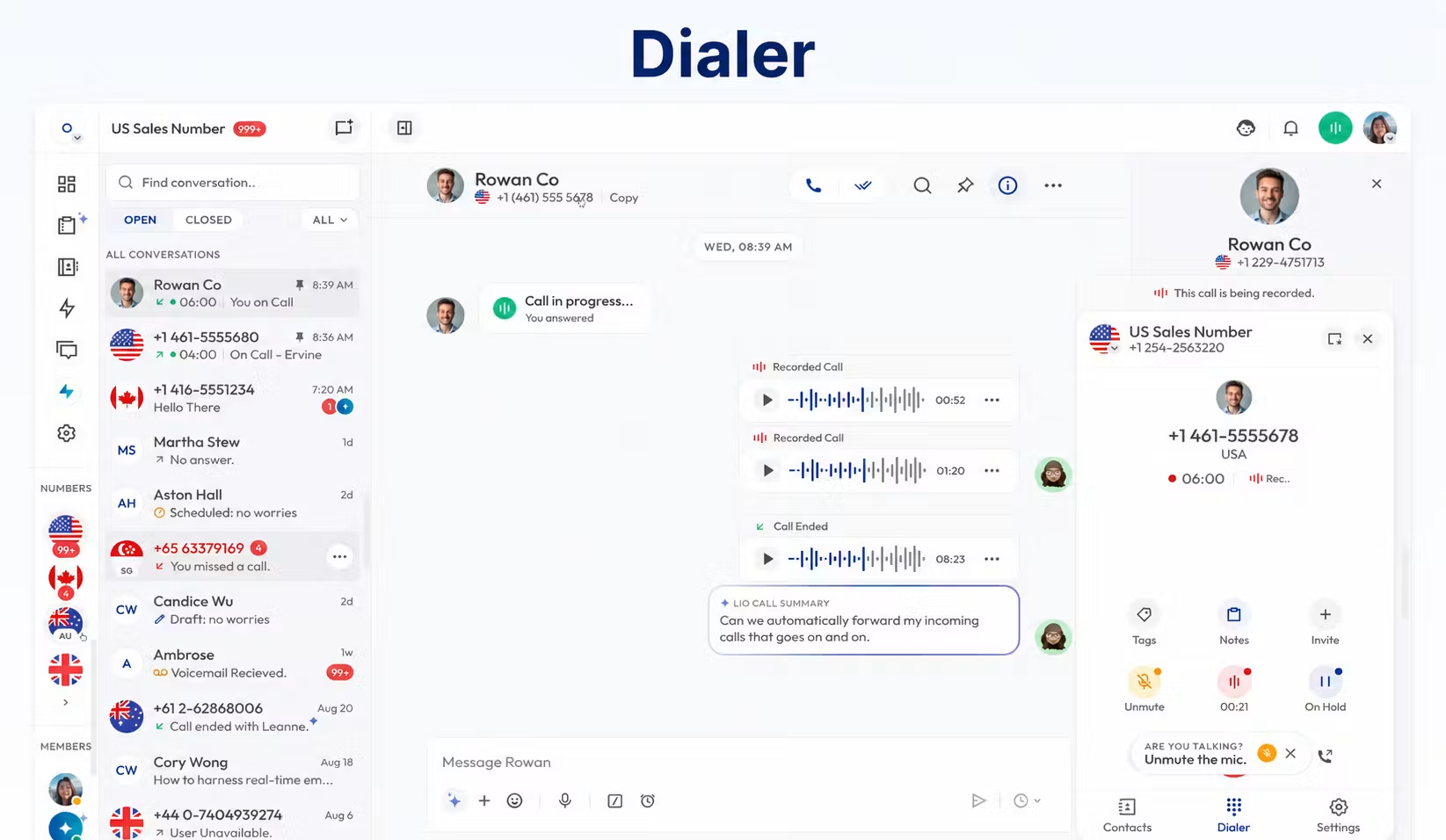
Shared call history, notes and conversation context can help a colleague continue a customer interaction. Define the minimum wrap-up information agents must record before moving to the next enquiry.
Test web/mobile access on staff devices, microphone permissions, headset selection and locked-screen alerts. Staff should identify the correct business line when handling more than one campaign or department.
For a multi-location team, check device behaviour and account access from each working country. Number availability does not guarantee unrestricted app use from every location.
Limitations to Resolve Before Deployment
| Area | Limitation or uncertainty | Required action |
|---|---|---|
| Queues | Official pages conflict | Live concurrent-caller test and written entitlement |
| Omnichannel | Voice/SMS tools do not prove a complete multichannel agent desktop | Demonstrate every required channel and routing rule |
| Staffing | Complete forecasting/scheduling suite not established | Validate requirements or budget a separate tool |
| Integrations | Scope and release status can be limited or conflicting | Test real records and actions |
| Metered tools | Finite recording/storage/AI allowances | Obtain applicable limits and price excess usage |
| Availability | Terms have no default uptime commitment | Negotiate any required contractual assurance |
| Emergency calling | Terms exclude emergency-service calls | Maintain a separate method at every work location |
Also distinguish a conditional refund policy from a free trial. Calilio advertises a 14-day money-back arrangement, but its policy has eligibility conditions and deductions. Agree evaluation terms before running a high-volume pilot rather than assuming all use will be refundable.
The Enterprise label does not by itself prove a particular security certification, service-level agreement or support response time. Request the controls and commitments your procurement process actually needs.
Who Should Consider Calilio?
| Operation | Recommendation | Decisive requirement |
|---|---|---|
| Small outbound sales team | Evaluate Premium | Dialer, logging and total route cost |
| Small support team with occasional enquiries | Pilot the inbound workflow | Missed-call handling and ownership |
| Medium sales/support business | Premium or Enterprise discussion | Departmental access, integrations and reporting |
| Busy inbound center with waiting callers | Proceed only after queue proof | Concurrent waiting, overflow and abandonment reporting |
| 100+ user international operation | Written Enterprise assessment | Countries, capacity, contracts and support |
| Enterprise omnichannel center | Compare dedicated contact-center solutions | All required channels and workforce functions |
These are starting recommendations, not a guarantee based on headcount. The distribution of traffic and complexity of work are more useful than the number of employees alone.
How to Run a Call-Center Pilot
- Write the required call journeys. Include inbound menus, outbound campaigns and missed-call follow-up.
- Confirm the package. Obtain features, usage and support terms in writing.
- Use a pilot number. Complete verification and test voice/message capability.
- Add agents and supervisors. Check permissions with ordinary employee accounts.
- Simulate peak traffic. Keep agents busy and introduce additional callers.
- Test integrations. Inspect the actual CRM or ticket records.
- Review reports and billing. Compare known events with dashboard and wallet entries.
- Approve migration only after acceptance. Keep the old number service active until porting completes.
Include caller abandonment, unavailable staff, unanswered outgoing calls and a disconnected integration. These tests expose requirements that a single successful demonstration call cannot address.
Our VoIP implementation checklist can help plan staff training and the wider move.
Frequently Asked Questions
Is Calilio suitable for a call center?
It is worth evaluating for sales and support workflows using its advanced tools. Busy inbound centers should resolve the queue conflict and demonstrate peak traffic before buying.
Which plan should a call center consider?
Premium is the starting package for the documented dialer and live monitoring. Enterprise is a custom proposal for additional requirements.
Does Calilio have call queues?
Official descriptions conflict. The call-center page advertises queues, while its September 2026 comparison says there are none. Confirm live availability and package scope.
Does the power dialer mean predictive dialing?
No. Ask for the exact dialing mode and campaign behaviour. The term alone does not establish predictive or parallel dialing.
Is international calling included?
Published allowances cover eligible US/Canada traffic. Other destinations need applicable tariffs or a confirmed separate offer.
Can supervisors coach agents live?
Calilio advertises listening, whispering and barging on the advanced package. Demonstrate permissions and the real agent workflow.
Does Calilio include workforce management?
A complete forecasting, scheduling and adherence suite was not established in the reviewed materials. Treat it as a requirement to verify rather than an included feature.
Final Recommendation
Calilio is a plausible shortlist option for a phone-focused sales or support team that values shared context, outbound productivity and live coaching. Premium is the package to evaluate against those needs.
For high-volume inbound work, resolve queue availability first. Then prove the agent journey, reporting and full monthly cost with a representative pilot. Choose the service only when the released product meets the operation’s essential requirements.
Sources: Calilio call-center and monitoring pages, power dialer and sequential ring documentation, AI transcription, pricing and plan guide; Calilio’s inbound-software comparison dated September 10, 2026; integration materials; Terms of Service and refund policy; G2 reviews; Trustpilot’s Calilio listing.
Customer Reviews: Useful Pilot Priorities
Lucy B.’s July 15, 2026 G2 review praised forwarding, recording, international calls and tools such as the dialer and summaries, while requesting more integrations. Claire G.’s June 14, 2026 review highlighted routing, analytics and support and also wanted more integrations.
These are individual user reports, not evidence of your center’s capacity, queue behaviour or contractual reliability. Use them to choose demonstration checks, particularly the integration functions your agents require.
Trustpilot currently displays a guidelines-breach notice and no available rating. A historical score should not be presented as a current measure.
Affiliate disclosure: VoIPCalling.com may earn a commission when you purchase through affiliate links in this article, at no additional cost to you.