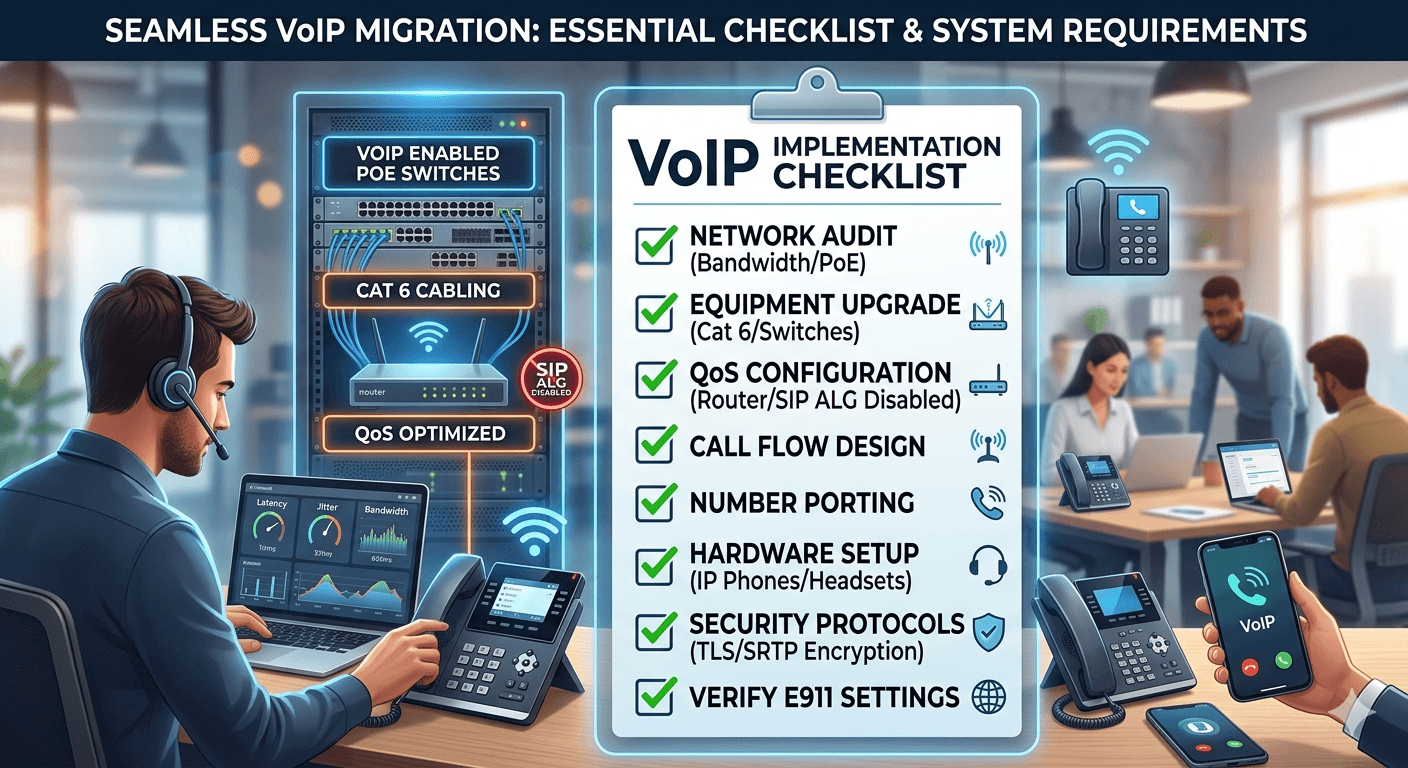
A successful VoIP implementation checklist is essential for businesses transitioning to cloud-based communication. To ensure a seamless migration, start by auditing your network bandwidth and upgrading to PoE-enabled switches and Category 5e/6 cabling. Prioritize voice traffic by configuring Quality of Service (QoS) on your router and disabling SIP ALG. Your checklist should also include documenting phone numbers for porting, designing call flows, and selecting hardware like IP phones or headsets. Finally, implement security protocols such as TLS/SRTP encryption and verify E911 settings. Following these structured steps guarantees high audio quality, minimal downtime, and a scalable digital infrastructure.
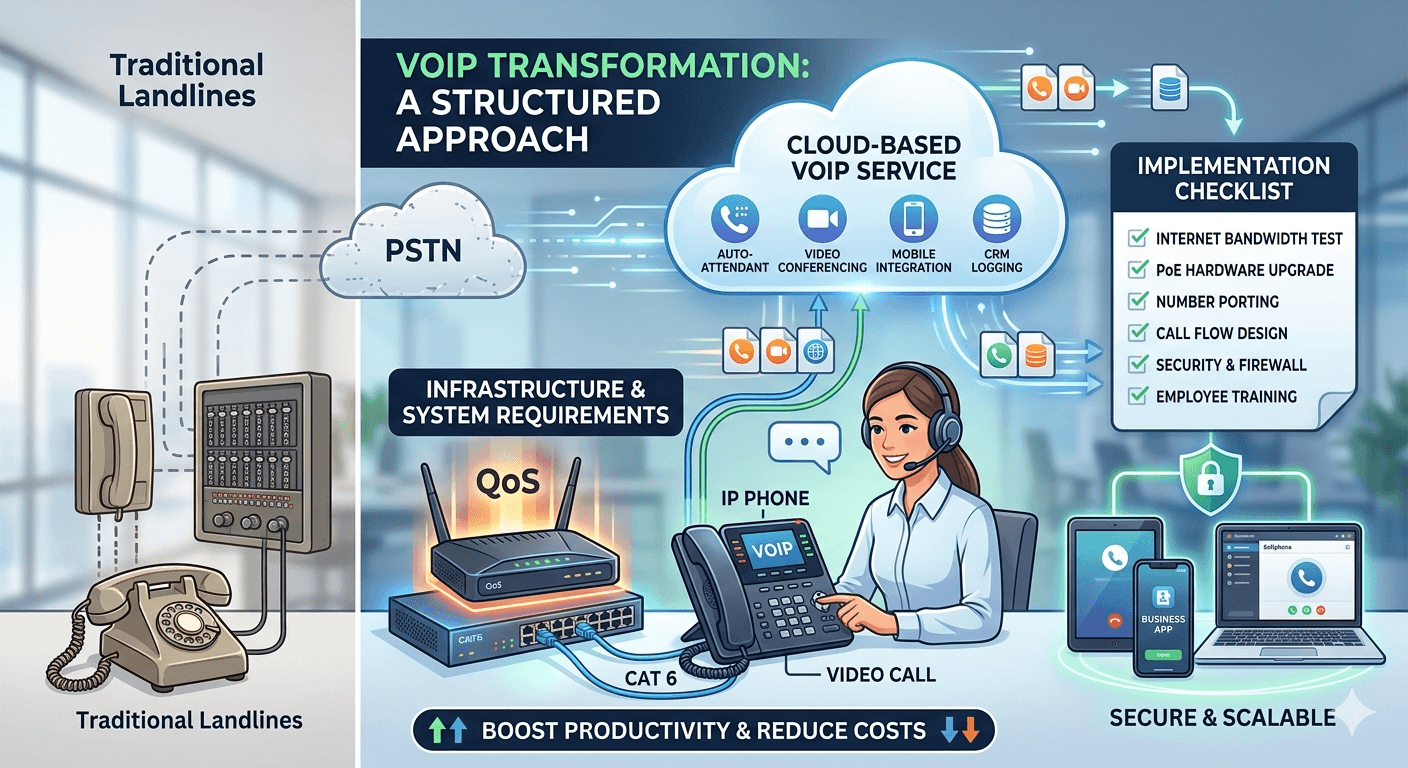
Modern business communication is undergoing a massive transformation as traditional landlines give way to flexible, cloud-based solutions. Transitioning to a digital system requires more than just picking a provider; it demands a structured approach to ensure audio quality remains high and downtime stays at zero. Organizations moving away from legacy hardware must evaluate their existing infrastructure to determine if it can handle the increased data load. This transition is not merely about changing phone sets but about integrating a communication layer into the digital fabric of the company. A well-executed strategy ensures that every department, from customer support to executive leadership, benefits from enhanced features like video conferencing, auto-attendants, and seamless mobile integration.
Assessing Network Infrastructure and VoIP System Requirements
The foundation of any successful digital communication strategy lies in the strength of the local area network. Before looking at software features, companies must conduct a thorough audit of their internet connectivity to ensure it meets the necessary voip system requirements. Unlike standard web browsing, voice data is extremely sensitive to delays and interruptions. Even a split-second lag can cause jitter or dropped packets, leading to a poor user experience. Businesses should start by calculating their concurrent call volume, which is the maximum number of people who will be on the phone at the same time during peak hours.
Network stability is the most critical factor in this phase. Most service providers suggest a minimum of one hundred kilobits per second of both upload and download bandwidth per active call. However, this is a baseline and does not account for other office activities like cloud backups or video streaming. High-quality audio codecs require more room to breathe, so over-provisioning your bandwidth is often a safer bet. Beyond speed, the hardware responsible for routing this data must be capable of prioritizing voice traffic. This brings us to the importance of implementing voice over ip with equipment that supports Quality of Service protocols.
A professional network assessment should also look at the age of the cabling within the building. Using Category 5e or Category 6 cables is standard for modern offices to ensure data travels at gigabit speeds without interference. If an office relies on old wiring, the voice quality might suffer regardless of how fast the external internet connection is. Furthermore, it is vital to check for a feature called SIP ALG on existing routers. While it is intended to help voice traffic, it frequently causes issues like one-way audio or dropped calls in a business environment. Disabling this feature is a standard step in most voip setup requirements for modern enterprises.
Establishing Hardware Standards and VoIP Phone Requirements
Once the network is verified, the focus shifts to the physical tools employees will use to communicate. Determining the specific voip phone requirements depends largely on the roles within the company. For example, a receptionist might need a desk phone with multiple line appearances and sidecars for easy call transferring. In contrast, a remote sales representative might function perfectly well with a high-quality USB headset and a software-based application on their laptop. This flexibility is a core advantage of a diy voip approach where the business chooses the best hardware for each individual user.
When selecting physical desk phones, Power over Ethernet is a feature that significantly simplifies the deployment process. PoE allows the phone to receive both power and data through a single ethernet cable, eliminating the need for bulky power bricks at every desk. If the current network switches do not support PoE, the business will need to invest in PoE injectors or upgrade their switches before the rollout. This is a common oversight in a telephone systems implementation that can lead to unexpected costs during the final installation phase.
In addition to desk phones, businesses must consider the role of mobile devices. Many modern systems allow employees to take their business extension on the go via smartphone apps. This requires a clear policy on device security and data usage. If employees are expected to build your own voip system experience using personal phones, the IT department must ensure these devices meet the minimum operating system requirements to run the provider’s application smoothly. High-quality headsets are also a worthy investment, especially those with noise-canceling microphones, to maintain professionalism in busy office environments.
Step by Step Guide on How to Set up a Small Business VoIP Phone System
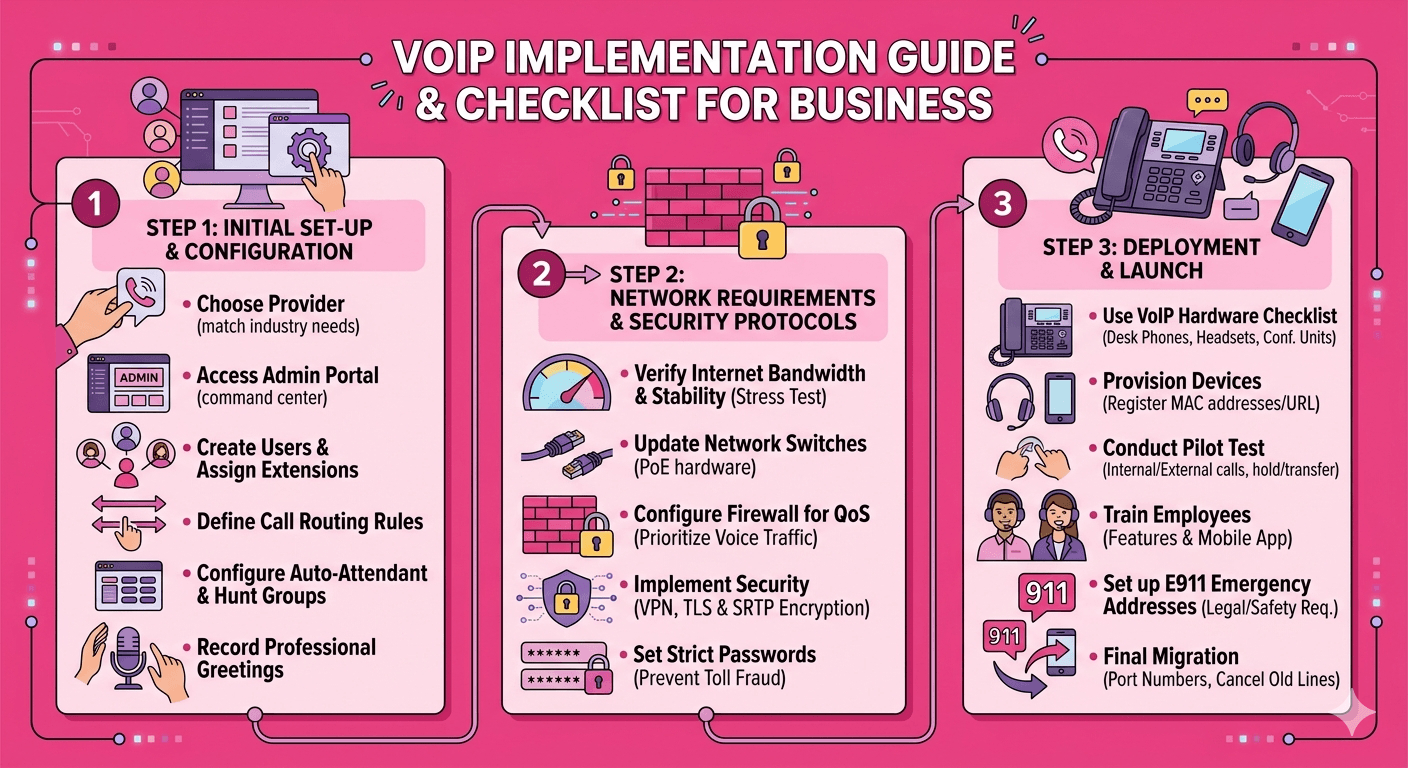
Starting the journey toward a cloud-based system can seem daunting, but breaking it down into manageable steps makes it attainable for any organization. The first step in how to set up a small business voip phone system is to choose a reputable service provider that aligns with your specific industry needs. Some providers focus on heavy call center features, while others prioritize simple internal collaboration. Once a provider is selected, the administrative portal becomes the command center where users are created, extensions are assigned, and call routing rules are established.
The second step involves configuring the auto-attendant and hunt groups. This is where the business defines how an incoming call is handled. A well-designed call flow ensures that customers reach the right department without unnecessary waiting. For instance, you can set up a rule where a call rings the sales team for twenty seconds before overflowing to a general voicemail box. During this stage of setting up voip for small business, it is also essential to record professional greetings. Clear, concise voice prompts improve the brand image and help users navigate the system efficiently.
The final part of the initial setup is the actual deployment of devices. This is where the voip requirements checklist becomes indispensable. Each device must be registered to the provider’s servers, usually through a process called provisioning. In most cases, this involves entering a specific URL or MAC address into the phone’s web interface. Once the phone “talks” to the server, it downloads its configuration and becomes active. Testing each extension by making both internal and external calls is a mandatory part of the voip setup for small business to ensure that two-way audio is functioning and that features like call hold and transfer work as expected.
Managing VoIP Network Requirements and Security Protocols
Security is often overlooked during the initial excitement of a new technology rollout, but it is a vital component of voip network requirements. Because voice calls are now data packets traveling over the internet, they are susceptible to the same threats as email or web traffic. Implementing voip requires a robust firewall configuration that allows voice traffic to pass through while blocking unauthorized access. Using a Virtual Private Network for remote workers is a common way to secure voice data as it travels across public internet connections.
Another critical security measure is the implementation of Transport Layer Security and Secure Real-time Transport Protocol. These protocols encrypt the signaling and the actual audio of the phone call, preventing malicious actors from eavesdropping on sensitive business conversations. Many businesses also implement strict password policies for their web portals and desk phones to prevent toll fraud. Toll fraud occurs when an unauthorized user gains access to a system to make expensive international calls, which can result in thousands of dollars in charges overnight.
To maintain high performance, the network should be monitored for latency and packet loss. Latency refers to the time it takes for data to travel from the sender to the receiver. For a natural conversation, latency should ideally stay below 150 milliseconds. Jitter, which is the variation in the delay of received packets, should be kept under 30 milliseconds. If these metrics exceed these thresholds, the call quality will degrade, sounding robotic or choppy.
According to research by the Telecommunications Industry Association, even a 1% packet loss can significantly impact the MOS (Mean Opinion Score) of a voice call, which is why network health is a non-negotiable part of the implementation voip strategy.
Creating a Comprehensive VoIP Implementation Checklist for Business
A successful transition is rarely an accident; it is the result of following a detailed plan. A voip implementation checklist for business serves as a roadmap that prevents teams from missing critical deadlines or technical requirements. The checklist should begin with a pre-site survey, where the current internet speeds are tested at different times of the day. Following this, the IT team should document every existing phone number and decide which ones need to be ported to the new provider. Number porting can take anywhere from a few days to several weeks, so starting this early is essential.
-
Verify internet bandwidth and stability using a dedicated stress test tool.
-
Update or replace old network switches with PoE-enabled hardware.
-
Document all existing numbers and gather the latest billing statements for porting.
-
Design the call flow, including ring groups, IVR menus, and time-of-day routing.
-
Inventory all hardware, including desk phones, headsets, and conference units.
-
Configure the firewall to prioritize voice traffic via Quality of Service settings.
-
Set up user profiles and assign extensions in the provider’s dashboard.
-
Train employees on how to use new features and the mobile application.
-
Conduct a pilot test with a small group of users before the full company launch.
-
Finalize the migration by cancelling old landline services only after the new system is live.
Using a phone system requirements checklist ensures that nothing is left to chance. This list should be shared among all stakeholders, including management and the IT department. One of the most important entries on the voip hardware requirements list is the emergency 911 configuration. Unlike traditional lines, VoIP phones are not tied to a physical location. Businesses must manually assign an address to each extension so that emergency services know where the caller is located. This is a legal requirement in many regions and a critical safety step in the voip installation checklist.
Strategic Benefits of Implementing Voice Over IP
The decision to move to a digital phone system often stems from a desire to reduce costs and increase flexibility. Research from various industry analysts shows that businesses can save up to 50% on their monthly communication bills by switching to a cloud-based model. These savings come from the elimination of expensive maintenance contracts for on-premise hardware and the reduction of per-minute long-distance charges. However, the benefits of implementing voice over ip extend far beyond the financial balance sheet.
Scalability is a major advantage for growing companies. In a traditional setup, adding a new employee meant calling a technician to run new wires and configure a physical switchboard. With a modern voip business setup, adding a user is as simple as clicking a few buttons in an online portal. This allows companies to scale up or down based on seasonal demand without significant capital expenditure. Furthermore, the integration with other business tools like Customer Relationship Management software allows for features like “click-to-dial” and automatic call logging, which significantly boosts the productivity of sales and support teams.
Data and analytics provide another layer of value. Traditional systems offer very little insight into how phones are being used. Modern systems provide detailed reports on call volumes, average wait times, and missed call rates. This information is invaluable for managers looking to optimize staffing levels or improve customer service protocols. When a company follows a strict voip requirements checklist, they are not just installing a phone system; they are installing a data engine that provides actionable insights into the company’s communication habits.
Training and Support During a Simple VoIP Migration
The technical setup is only half the battle; the human element is just as important. A simple voip migration can quickly become a headache if employees do not know how to use the new tools. Training sessions should be scheduled shortly before the go-live date to familiarize the staff with the new desk phones and software. It is helpful to provide “cheat sheets” that list common functions like transferring calls, setting up voicemail, and starting a three-way conference.
Post-launch support is the final piece of the puzzle. Even with the best planning, minor issues are likely to arise in the first few days of a new voip implementation. Having a dedicated support contact from the service provider or an internal IT lead who is an expert on the system can resolve these issues before they impact business operations. Monitoring the system closely during the first week allows the IT team to tweak the QoS settings or call routing rules based on real-world usage patterns.
Finally, the decommission of the old system should be handled with care. It is a best practice to keep the old lines active for a few days after the new system is live to ensure that all numbers ported correctly and that there are no gaps in connectivity. Once the new system is confirmed to be stable and the staff is comfortable, the old accounts can be closed. This phased approach reduces the risk of missed calls and ensures a smooth transition for both employees and customers.
Final Thought
A successful VoIP implementation is the result of careful planning, technical readiness, and clear communication. By following a structured VoIP implementation checklist for business, organizations can navigate the complexities of network requirements, hardware selection, and user training without major disruptions. The transition to a cloud-based system is an investment in the future of the company, offering unparalleled flexibility and a wealth of features that traditional systems simply cannot match. When the network is optimized and the staff is well-trained, the new communication system becomes a powerful asset that drives efficiency and growth.
Frequently Asked Questions
-
How to set up VoIP for business?
The process begins with evaluating your current internet connection to ensure it can handle voice traffic. Once the network is ready, you select a VoIP provider and choose a service plan that fits your needs. You then configure your call flow, such as your auto-attendant and extensions, in the provider’s online portal. Finally, you connect your hardware, such as desk phones or headsets, and test the system before going live.
-
What is an VoIP implementation checklist?
An implementation checklist is a detailed document that outlines every task required to successfully launch a new system. For VoIP, it includes technical steps like network testing and firewall configuration, as well as administrative tasks like number porting and employee training. It serves as a project management tool to ensure no critical steps are missed during the transition from an old system to a new one.
-
What is required for VoIP setup?
The primary requirements for a VoIP setup include a high-speed internet connection with sufficient bandwidth and a router that supports Quality of Service (QoS) to prioritize voice data. You will also need VoIP-compatible hardware, such as IP phones, or softphone applications installed on computers and mobile devices. Additionally, a subscription to a VoIP service provider is necessary to manage your calls and provide the phone numbers.
-
How does VoIP work for business?
VoIP works by converting voice signals into digital data packets that are sent over the internet rather than traditional copper phone lines. When you speak into a VoIP phone, your voice is digitized, compressed, and routed to the recipient’s device, where it is converted back into sound. This allows for more features than traditional telephony, such as the ability to use your business number on multiple devices simultaneously.
-
What are the hardware requirements for a new VoIP system?
Hardware requirements usually consist of IP-enabled desk phones, which often require Power over Ethernet (PoE) switches to operate without individual power adapters. You may also need high-quality headsets for staff who prefer using computer-based softphones. A modern router and high-quality ethernet cabling (Cat5e or better) are also essential to ensure the physical infrastructure can support the voice data without interruption.