Calilio is a cloud business phone system for managing calls, business messages and customer conversations through an internet-connected workspace. You add or port a business number, assign it to employees and use web or mobile access to communicate. Shared conversation history supports handovers, while higher packages add sales, routing and supervision tools.
The buying decision has three parts: whether the required numbers work, whether the package supports your call flow, and what the complete bill will be. This guide explains those parts with practical examples rather than treating the subscription price as the whole cost.
Calilio Rating

G2: 4.7/5 from 94 reviews. The customer-review section below covers positive feedback and a number-capability complaint.
Calilio Business Phone System: Quick Overview

| Item | What it means for your business |
|---|---|
| Service | Cloud phone system with business numbers and a shared communications workspace |
| Standard | Basic communication package for up to 10 users |
| Premium | Advanced sales and support functions; paid users without an advertised headcount cap |
| Enterprise | Custom deployment and commercial proposal |
| Main devices | Web access, iOS and Android apps; Chrome dialer extension |
| International use | Number availability and calling destinations need separate checks |
| Cost model | User subscription plus applicable numbers, usage and metered extras |
| Evaluation | Book a demonstration and test your actual workflow |
How Calilio Works for a Business
Think of the service as a combination of business numbers, employee access and answering rules. The number is what customers dial. Access determines which employees can use it. Rules determine who rings and what happens when someone is unavailable.
- The administrator creates a workspace and controls membership, numbers and billing.
- The business adds an eligible number or requests transfer of an existing one.
- Employees receive access to the numbers relevant to their work.
- Customers call or send supported messages to those business numbers.
- Staff handle conversations through the configured app or answering route.
- The team reviews history and follow-up in the shared workspace.
Customers do not need a Calilio account to call your telephone number. Your employees need a suitable connection and working audio setup for app-based calling. VoIP carries their audio over the internet instead of requiring an office telephone line for each person.
For more background on the product, read our Calilio review.
The Features That Matter in Daily Work
Shared numbers and Unified Callbox
Calilio supports sharing a number among employees. Unified Callbox brings call activity, supported messaging and voicemail into a common conversation workspace. Notes and tags retain context so a colleague can understand why a customer called and what needs to happen next.
The practical benefit is continuity. If a sales representative is away, the next employee should be able to review the enquiry before responding. Agree what staff must record after calls: the customer’s requirement, the promised action and who owns it.
Call forwarding, voicemail and everyday handling
The feature catalogue includes forwarding, voicemail, call history, blocking and do-not-disturb functions. These are useful for a business that wants customer calls separated from personal communications and a record of missed enquiries.
A feature name does not prove a complete process. Test the unanswered-call route and confirm that the employee responsible for callbacks can find the message. Also check how forwarding is charged if a call is routed to an external telephone number.
Routing strategies and caller menus
The published Standard card lists simultaneous, sequential and round-robin ringing. Sequential ringing tries employees in a chosen order, with configurable ring duration, then uses the configured fallback. It can suit an account owner with designated backups.
IVR menus, business-hours rules and transfers are placed in Premium by the main pricing page and plan guide. Some newer ring-strategy pages describe broader access, creating a documentation conflict. Confirm the package entitlement in writing before using an IVR menu or after-hours rule as a reason to buy.
Sales calling and supervisor tools
Premium advertises a power dialer, call dispositions and live monitoring. A power dialer supports working through an outbound contact list; dispositions record results such as a callback request or unsuccessful contact. These features should be evaluated together, because dialing faster has limited value if outcomes cannot be followed up.
Supervisor functions include listening, whispering and barging. Ask for a demonstration with a supervisor and an ordinary employee account, then verify access permissions. Do not assume an advertised power dialer is a predictive dialer or that it dials multiple prospects simultaneously.
Business Messaging: Check the Exact Number
Calilio offers SMS and MMS where the chosen number and destination support them. Voice capability, SMS capability and MMS capability are separate checks. A country appearing in the number catalogue does not mean every available line supports customer texting.
Before publishing a number, send a message to a representative customer destination and test the reply. Confirm required sender registration and any associated charges. Longer texts and character encoding can affect the number of billable segments.
For a support team, test the conversation from two employee accounts. Both should see the context they need, and the team should agree who replies. Shared access helps cooperation, but it does not remove the need for ownership.
AI Transcription, Summaries and Call Review
Calilio’s transcription feature converts eligible call audio into text, with automatic and manual workflows described in its documentation. The transcript can support searching and reviewing the discussion without replaying the entire recording.
Its advanced AI reporting includes summaries and sentiment insights, subject to the package and usage allowance. Limited transcription on an entry package should not be interpreted as access to every advanced report.
Use a realistic sample call when evaluating AI: your team’s accents, customer terminology and ordinary background noise. Compare the transcript and summary with the audio, especially names, dates, amounts and promised actions. A missed detail can change a customer commitment.
Recording, storage and transcription are distinct budget items. Ask what is included, how consumption is measured and who can access or export the records. Decide your retention process before enabling recording across the business.
Calilio Pricing: Plans and Subscription Costs
The current pricing page uses Standard, Premium and Enterprise. Some product-page copy still refers to Basic and Business; use the current checkout and written order to identify the package you are purchasing. Prices below are US dollars.
| Plan | Monthly billing | Annual commitment | Team limit |
|---|---|---|---|
| Standard | $15/user/month | $144/user/year ($12 monthly equivalent) | Up to 10 users |
| Premium | $35/user/month | $336/user/year ($28 monthly equivalent) | No advertised cap; each user is paid |
| Enterprise | Custom quote | Custom quote | Negotiated deployment |
The eligible US/Canada allowances are 200 outgoing and 100 incoming minutes, plus 100 outgoing and 100 incoming SMS segments on Standard. Premium lists 1,000 outgoing and 500 incoming minutes, with 500 segments in each direction. Confirm allocation to your account.
Current cards list recording and storage allowances of 100 minutes for Standard and 1,000 for Premium, with transcription allowances of 10 and 100 minutes. Other help materials differ. Confirm the applicable limits and excess rates before budgeting.
Current included-local-number wording covers UK, US or Canada; some help/comparison copy mentions only US/Canada. Eligibility and verification still apply. Annual prices are monthly equivalents of a yearly commitment, not month-to-month charges.
What You Really Pay: A Business Budget Example
The complete budget is the subscription plus extra number rental, out-of-bundle calls and messages, metered tools and applicable taxes. International destinations, inbound traffic and external forwarding can change the economics.
| Team | Standard monthly / annual total | Premium monthly / annual total |
|---|---|---|
| 3 paid users | $45 monthly or $432/year | $105 monthly or $1,008/year |
| 5 paid users | $75 monthly or $720/year | $175 monthly or $1,680/year |
| 10 paid users | $150 monthly or $1,440/year | $350 monthly or $3,360/year |
| 20 paid users | Exceeds Standard user limit | $700 monthly or $6,720/year |
These calculations use monthly billing for the monthly amount and the discounted annual rate for the yearly amount. They exclude additional numbers and usage. Premium’s lack of a user cap does not mean one licence covers the entire company.
Illustrative five-person decision
A five-person business fits Standard’s headcount limit. However, if it needs a departmental menu and supervised sales calls, it should evaluate Premium. That changes its subscription from $75 to $175 on monthly billing before usage is added.
Now estimate a representative month: incoming minutes, outgoing minutes by country, text segments, recording time and transcription time. Ask Calilio to price that workload. Comparing the resulting total with another provider is more useful than comparing two entry prices.
Assign someone to monitor wallet funds. The terms state that a zero wallet balance prevents calls and outgoing messages. Include this operational responsibility in the rollout rather than discovering it during a busy customer-service day.
Virtual Numbers and International Calling
Calilio advertises numbers in more than 100 countries, with local, mobile and toll-free types where available. Live inventory, documentation and capabilities vary. Ask about the exact country and number type required, rather than assuming the headline country count covers every requirement.
A virtual number is a business telephone identity managed through the service. It is not a physical mobile SIM, and its availability does not guarantee acceptance by a third-party verification service. Business texting and verification codes are different uses.
International calling is supported to eligible destinations at applicable rates. It is separate from international number availability and is not unlimited worldwide calling. Confirm destination permissions and tariffs before planning regular overseas outreach.
If your existing number is important, check porting eligibility first. Keep the old service active until the transfer completes and both incoming and outgoing communication have been tested. Avoid promising customers a transfer date that the provider has not confirmed.
The App and Dashboard
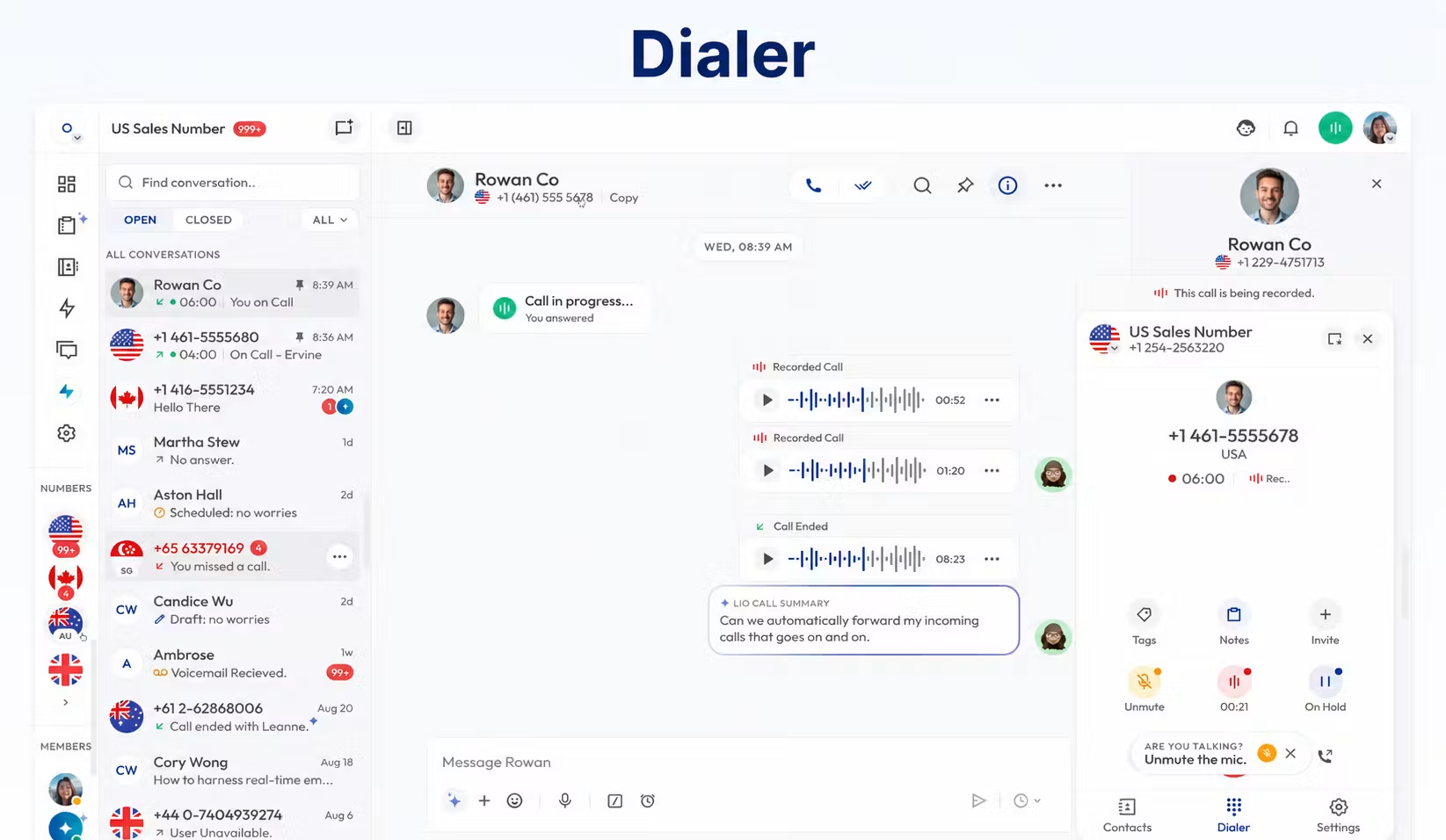
Calilio documents web access and iOS and Android apps. Its download page also lists a Chrome dialer extension. For desktop use, the web workflow is the clearest documented starting point; confirm a native desktop installer separately if that is a requirement.
Test incoming notifications while the mobile screen is locked, browser microphone permissions, headset selection and switching between Wi-Fi and mobile data. Employees should be able to select the correct outgoing business line and find relevant conversation history.
For remote staff, use their normal devices and locations in the pilot. A clear call from the administrator’s office computer does not demonstrate that every employee’s connection and notification settings are ready.
CRM Integrations: Verify the Action You Need
Calilio’s Pipedrive page advertises call logging and click-to-call. It marks unified contact management, bidirectional contact syncing and calling directly within Pipedrive as coming soon. These distinctions matter if the CRM is where your sales team spends its day.
Ask to see one complete workflow: open a customer record, start the call, record the result and find it afterwards. Confirm which fields appear, how duplicates are handled and whether any connector or automation subscription costs extra.
Do not treat a logo or “integration available” statement as proof of two-way synchronisation. The Enterprise pricing page also marks API and webhook access coming soon, so a bespoke integration should be validated before signing.
Our VoIP and CRM integration guide explains how to define the workflow before comparing connectors.
How to Set Up Calilio for Your Team
- Write the requirements. List countries, numbers, devices, users and essential answering rules.
- Choose the package. Match features as well as headcount, then confirm renewal and usage terms.
- Add a pilot number. Complete the necessary verification and check voice/message capabilities.
- Invite employees. Assign the correct number and administrative permissions.
- Configure handling. Establish greetings, ringing and the supported unanswered-call route.
- Test ordinary work. Make and receive calls, send supported messages and review history.
- Test failure cases. Check unavailable staff, microphone problems, missed calls and billing alerts.
- Move the main number. Port only after the pilot meets the business requirements.
Calilio’s calling guide describes selecting an assigned outbound number, choosing the destination and allowing microphone access. If a call fails, first check number assignment, wallet balance, permission and whether the destination is enabled.
Use our VoIP implementation checklist to plan the broader migration and employee training.
Which Businesses Should Consider It?
| Business | Starting recommendation | What decides the purchase |
|---|---|---|
| 5-person startup | Standard for simple calls; Premium for advanced handling | Shared-number workflow and necessary routing |
| 20-person sales team | Premium pilot | Dialer, CRM action and usage economics |
| 50-person remote company | Premium or Enterprise discussion | Notifications, permissions and support across locations |
| Medium business | Premium or Enterprise according to requirements | Departmental handling and reporting |
| 100+ person international business | Enterprise proposal | Country coverage, contractual requirements and total cost |
| Dedicated contact center | Demonstrate the complete agent/supervisor workflow | Routing, reporting, staffing and required channels |
| Budget-conscious SMB | Price a real month before choosing | Total bill rather than entry subscription |
| Enterprise-grade deployment | Written technical and commercial assessment | Controls, integrations and service commitments |
These are evaluation starting points, not automatic winners based on employee count. A three-person firm with complex routing may need more capability than a ten-person firm handling occasional enquiries.
Strengths and Limitations
| Area | Potential strength | Limitation to evaluate |
|---|---|---|
| Team communication | Shared numbers and conversation context | Staff still need clear follow-up ownership |
| Mobility | Web and mobile access | Connection quality and notifications need testing |
| Growth | Advanced package and custom proposal | Additional users and usage increase cost |
| International business | Broad advertised number coverage | Inventory, documents and message support vary |
| AI review | Transcripts and eligible call insights | Finite allowances and output verification |
| Sales workflow | Dialer and supervision options | Package access and CRM actions need proof |
Calilio’s terms exclude emergency-service calling and contain no default uptime commitment. Maintain a separate emergency-calling method at each location. If availability or support response times are purchase requirements, ask for contractual terms rather than relying on general marketing claims.
For a business needing more than voice and supported messaging, list the additional channels explicitly. Do not assume that a business phone system supplies every capability of a broader collaboration suite or enterprise contact-center platform.
Questions to Ask Before Buying
- Does the exact number support our voice, SMS and MMS requirements?
- Which package includes our menu, business-hours rules and transfers?
- What would our representative monthly usage cost?
- Which recording, storage and AI allowances apply to our order?
- Can our required CRM workflow be demonstrated today?
- What support and availability commitments are contractual?
- How do we export records and port the number if we leave?
Have the demonstration follow your own script. A generic tour can look convincing while leaving the most important business requirement unanswered.
Frequently Asked Questions
Is Calilio a business phone system or just a number provider?
It is a business phone system. Numbers are one component; employee access, call handling and shared conversation tools make up the broader service.
Can multiple employees use one business number?
Yes, Calilio supports number sharing. Assign access and configure the answering strategy, then establish who owns missed enquiries.
Is Calilio free?
Its ongoing packages are paid. An included eligible number or usage allowance does not make the service free, and a demonstration is different from a free trial.
Can I use it for international customers?
Yes, subject to supported numbers, destinations, documents and rates. Check calling and messaging separately.
Does every plan include IVR?
The main pricing page and plan guide place IVR in Premium. Some routing pages conflict with that description, so confirm access in your offer.
Do I need desk phones?
Desk phones are not required for the documented web/mobile workflow. Confirm hardware compatibility separately if you intend to reuse office handsets.
Is Standard enough for a small business?
It can be sufficient for basic communication within its user limit. Advanced handling requirements can make Premium the more appropriate package even for a small team.
Final Recommendation
Calilio is worth evaluating when your business needs shared phone numbers, mobile access and organised customer-call history. Choose Standard for a simple workflow only after confirming its functions; evaluate Premium when routing, outbound sales and supervision matter.
The strongest buying approach is a small pilot with real numbers, devices and customer destinations. Resolve documentation conflicts, calculate the complete bill and confirm business-continuity requirements before transferring the main line.
Sources: Calilio business phone system, pricing, features, Unified Callbox, sequential ring, power dialer, AI transcription, downloads and Pipedrive documentation; Calilio Helpdesk service, calling and plan guides; Terms of Service; G2 reviews; Trustpilot’s Calilio listing.
Customer Reviews and What They Mean for Buyers
Lucy B.’s July 15, 2026 G2 review praised forwarding, recording and international calling, and found the dialer and summaries useful. Claire G.’s June 14, 2026 review highlighted routing, analytics and helpful support. Both wanted more integrations.
Andrew M.’s October 28, 2025 G2 review reported that an Irish number did not provide the SMS capability he expected and described a partial-refund dispute. This is an individual account of his experience, not proof that all numbers have the same limitation.
Use the feedback as a demonstration checklist: test the exact number, call flow and connector action before committing. Trustpilot currently displays a guidelines-breach notice and no available rating; do not present a historical score as current.
Affiliate disclosure: VoIPCalling.com may earn a commission when you purchase through affiliate links in this article, at no additional cost to you.