RingCentral RingEX is a cloud business phone and communications platform that combines calling, messaging, video meetings and fax in an app environment. Employees use it to communicate with customers and colleagues, while administrators manage users, numbers and call routes. It is the current name for the product previously called RingCentral MVP.
RingEX can replace an office phone system and support staff working from different locations. Its value depends on whether the selected package covers your routing, integrations and collaboration needs. This guide explains how it works, which features matter, how to assess pricing and when a separate contact-center product makes more sense.
RingEX Customer Rating

TrustRadius: 8.8/10 from 543 reviews and ratings for RingEX. Review examples near the end highlight practical questions about deployment, support and reporting.
RingCentral RingEX: Quick Overview

| Buying point | What to know |
|---|---|
| Product type | Cloud business calling and unified communications |
| Former name | RingCentral MVP |
| Main channels | Phone calls, team messaging, video meetings, business texts and fax; package and regional terms apply |
| Typical fit | Businesses needing employee calling with shared administration and collaboration |
| Plans | Core, Advanced and Ultra references; customer-engagement bundles and add-ons also available |
| Pricing | Request current per-seat pricing for your region, user count and billing term |
| Trial | 14 days for eligible new subscribers; up to 20 phone lines; SMS excluded |
| Separate product | RingCX serves dedicated contact-center workflows |
What Is RingCentral RingEX?
RingEX belongs to the unified communications as a service, or UCaaS, category. VoIP provides internet-based calling; a UCaaS product brings calling together with other employee communication tools. RingEX is therefore more than a personal phone-number app.
RingCentral announced the change from MVP to RingEX in 2024, alongside its AI direction for employee communications. Older documentation and customer reviews may still use the MVP name. Match instructions to the current application and account rather than assuming every older screenshot describes today’s interface.
The product name also matters when requesting a quote. RingCentral is the company; RingEX is one product in its portfolio. A RingEX licence should not be treated as an automatic purchase of every RingCentral sales, receptionist or contact-center capability.
How Does RingEX Work?
RingEX hosts phone-system functions in the cloud rather than requiring the business to operate an on-site PBX for the proposed service. Users connect through supported applications or phones. Calls can connect to ordinary telephone numbers; the other person does not need a RingCentral account.
- The business chooses its numbers and users. An administrator assigns extensions and configures the employee setup.
- The administrator defines call handling. Business hours, greetings, menus and destination rules determine where callers go.
- Employees answer using the configured devices. The workflow can involve an app, a supported desk phone or a forwarding destination.
- Missed calls follow the agreed fallback. The business decides who checks voicemail and returns the call.
- The team manages the conversation afterwards. Staff review the available history, notes and connected application records.
A practical example: a 12-person service business
Imagine a business with reception, sales and an operations team. A customer calls the main number. During office hours, the greeting offers sales or existing-customer assistance. Sales calls reach the sales destination; an unanswered call follows the configured voicemail or overflow route. After hours, the company plays a different greeting and tells callers what happens next.
That is an illustrative workflow, not a claim that every routing option is included in every tier. During the demonstration, ask the provider to build this route in the actual package being quoted. Then test an absence, a busy team and a holiday closure.
RingEX Features: What the Business Can Use
1. Business calling and professional identity
RingEX supports business calling across its device environment. Employees can work with a company identity instead of relying on personal numbers for every customer interaction. Confirm number ownership, caller ID and the supported number types for your market.
2. Auto attendant and call routing
Menus and call-handling rules help direct incoming calls to employees or departments. RingCentral’s feature documentation includes IVR, forwarding, screening, transfers and voicemail. The business should specify opening hours and unanswered-call behaviour before configuring the menu.
3. Call queues and coverage
Queues can help a team share incoming work. Basic employee-phone handling and dedicated agent operations have different requirements. If managers need callbacks, deeper queue insights or specialised supervision, confirm the necessary package or additional product.
4. Team messaging and meetings
RingEX combines employee chat and video with calling. This is useful when someone needs a colleague’s help during customer follow-up. Confirm meeting capacity, recording and guest requirements in the selected offer instead of assuming the phone plan includes every video feature.
5. Business SMS and MMS
Business texting supports customer conversations on eligible numbers. It has allowances, regional conditions and registration requirements. A shared inbox or automated messaging workflow may require an additional product. One message can consume several SMS segments, so compare the allowance with the messages you actually send.
6. Fax and voicemail
RingEX includes fax and voicemail capabilities within its communications environment, subject to the package. These can matter for an office that still exchanges documents by fax. Confirm the number, storage, delivery and access arrangements needed by the staff responsible.
7. Recording
RingCentral distinguishes on-demand recording, started for a particular call, from automatic recording under a configured policy. Its recording documentation lists on-demand access across Core, Advanced and Ultra. Confirm automatic recording, retention and permissions separately.
Recording creates an audio record; a summary is a derived account of the conversation. Decide which record the business actually needs, who can access it and when it should be deleted.
8. Administration and reporting
Administrators manage users, devices and phone-system settings. A growing organisation should evaluate departmental access, site management and the reports managers need. Ask for an example of a missed-call or queue report before treating an analytics label as proof that it answers your questions.
AI Assistant, AI Receptionist and Conversation Intelligence
These names describe different jobs. The Personal AI Assistant helps an employee with conversation notes and communication tasks. AI Receptionist handles caller interactions. Conversation Intelligence supports deeper analysis of conversations. They should be evaluated as separate capabilities.
| Capability | Purpose | What to verify |
|---|---|---|
| Personal AI Assistant | Call notes, transcription, writing and meeting assistance | Available skills, languages and entitlements for the selected tier |
| AI Receptionist | Answer enquiries and route callers | Separate pricing, included usage, setup and handoff to employees |
| Conversation Intelligence | Analyse sales or customer conversations | Licence, coaching workflow, CRM access and reporting |
RingCentral markets Personal AI Assistant access with RingEX, while its pricing page notes that skills differ by tier. Do not infer that the entry subscription includes every receptionist or sales-analysis tool.
Test an unfamiliar name, a price and an agreed deadline. Compare the resulting notes with what was actually said. Confirm retention, access and the announcement settings appropriate to your deployment. Useful AI should reduce follow-up work without creating a second record that employees must constantly correct.
RingEX Pricing: Plans, Add-ons and Total Cost
RingEX pricing depends on the package, number of users, region and billing term. The official pricing page uses a user selector and distinguishes annual payment, but the accessible version reviewed did not expose a reliable current base-price table. Request the live offer rather than treating an older promotional price as your current cost.
| Plan or package | How to evaluate it |
|---|---|
| Core | Ask whether the entry package covers your call routes, recording mode, meeting needs and required connector |
| Advanced | Check the administration and analytics features needed for multiple departments or sites |
| Ultra | Compare the additional entitlements with the work your users actually perform |
| Customer Engagement Bundle | Compare the bundled queue and messaging functions with buying the required extensions separately |
Costs beyond the employee seat
The pricing page separates AI Receptionist, Conversation Intelligence, Call Queues Booster and Business SMS Booster from the base offer. Ask which are included in the proposed bundle and how each is billed. Add-ons may be charged on a different basis from ordinary employee seats.
- Required employee licences and the chosen commitment.
- Additional numbers, toll-free usage and international calling.
- Messaging registration, usage and shared-inbox requirements.
- Recording, storage, analytics or AI extensions needed by the workflow.
- Desk phones, headsets, implementation and any advanced support.
- Taxes, applicable fees and the renewal basis.
A simple budgeting method
For 10 employees, multiply the written seat price by 10, then add the separately quoted services and expected usage. If a proposal offers a hypothetical $30 seat rate, seats alone would total $300 a month. That is an arithmetic example—not a verified current RingEX price.
Compare a complete working configuration with the cost of the services it will replace. Savings are possible if you retire other subscriptions, but they are not automatic. A team that keeps all its old tools may increase its bill even when the new system is useful.
RingEX Apps: Desktop, Mobile and Browser
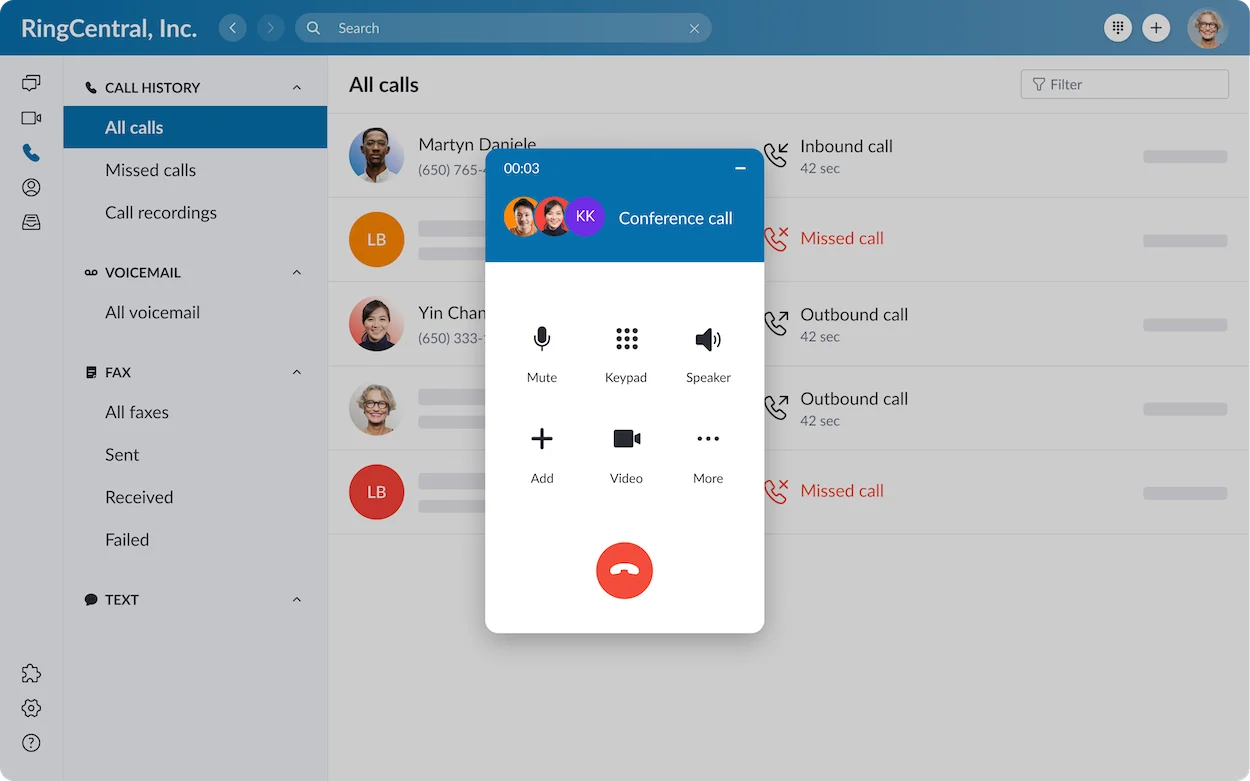
RingCentral’s pricing information lists Windows, macOS, Android and iOS application support. The browser and Admin Portal serve different tasks: employees use their communications environment, while authorised administrators manage the phone system.
During a pilot, test incoming calls while a mobile screen is locked, a warm transfer, voicemail playback and calling back with the business identity. Confirm microphone permissions and notification settings on the devices staff will use.
Supported desk phones remain an option. App-first work can reduce reliance on desk hardware, but reception or shared workspaces may still benefit from a physical phone. Check supported models before assuming existing handsets can be reused.
Integrations: Connect RingEX to the Work Around the Call
RingCentral offers application connections and developer APIs. Its ecosystem includes CRM and collaboration tools such as Salesforce, Microsoft Teams and Zendesk. Connector availability, deployment method and the business application’s own licence still need to match the proposed account.
A useful CRM demonstration should show an incoming caller matched to a customer, click-to-call and the completed activity saved to the correct record. Repeat it for a transferred call and a duplicate contact. Ask whether notes arrive immediately and who can read them.
Developer APIs cover communication and account functions, enabling custom workflows where a ready-made connector is insufficient. Custom development requires its own maintenance, permissions and usage planning.
Our guide to integrating VoIP with a CRM provides practical evaluation questions. Choose the connection that supports the workflow rather than the one with the most attractive integration logo.
International Calling and Global Teams
RingCentral supports global communications arrangements, but number availability, local service, outbound calling and employee location are separate questions. A country advertised for number coverage does not necessarily have the same service or features as another market.
Request a country-by-country proposal identifying number types, porting, documentation, calling destinations, messaging and emergency calling. For outbound calls, ask whether the destination is charged per minute or covered by a specific bundle.
An international business should map its locations before calculating the subscription budget. A US calling offer should not be applied to every employee worldwide without checking the corresponding regional terms.
Reliability, Network Requirements and Security
RingCentral advertises 99.999% availability for RingEX. Confirm the scope of the service commitment in the contract. Provider availability and the quality of a particular office’s internet connection are different parts of the calling experience.
Test connectivity under normal business load, using the actual headsets and devices. Include a home worker and the busiest office. Plan the fallback if the office loses internet or an employee cannot sign in.
Ask the administrator to review identity controls, recording access, retention and user removal. For regulated work, check the actual product configuration and relevant contracts with the responsible team. A general security certification does not establish that every customer deployment meets every requirement.
How to Set Up RingEX for a Business
- List the users and call routes. Separate ordinary employees, reception and dedicated service agents.
- Confirm the package and complete cost. Identify the required recording, messaging, integrations and support.
- Create users and configure devices. Test the apps or supported phones with a small pilot group.
- Build business hours, greetings and fallback routes. Include holidays and unanswered calls.
- Prepare number porting. Confirm eligibility and obtain the documents required for the order.
- Test before migration. Check calls, transfers, voicemail, integrations and the recovery route.
- Move the service and train employees. Validate incoming calls after porting and assign ongoing ownership.
RingCentral’s support documentation describes initiating porting through the Admin Portal. Timing and eligibility vary, so do not promise an instant transfer. Keep the current service available until the port is complete and the new routes are working.
Assign someone to check voicemail, adjust holiday hours and remove access when staff leave. Successful setup includes these ongoing jobs as well as the initial installation.
RingEX vs RingCX: Which Product Do You Need?
| Buying question | RingEX | RingCX |
|---|---|---|
| Primary job | Employee business calling and collaboration | Dedicated contact-center operations |
| Typical user | Employee, receptionist or general business team | Agent, supervisor or contact-center manager |
| Evaluation focus | Numbers, call routes, devices, meetings and integrations | Agent routing, channels, supervision and operational workflows |
| Buying implication | Choose the employee package that covers the work | Obtain a separate contact-center proposal |
An employee phone system can handle a department’s incoming calls without meeting every dedicated contact-center requirement. If supervisors need specialised agent workflows, quality management or multiple service channels, evaluate the appropriate contact-center product separately.
A 100-person company does not automatically need 100 agent licences. Map roles and workloads first, then ask how the employee and agent products should work together.
Who Should Consider RingEX?
Small businesses: Consider it when the business needs professional call handling and more than a simple personal-number app. Compare the required package with the actual jobs staff perform.
Medium businesses: It deserves a shortlist place when departments, locations and application connections require shared administration. Demonstrate permissions and reporting before rollout.
Enterprise organisations: Request a deployment proposal covering locations, roles, migration and support. Evaluate country coverage and governance as carefully as user pricing.
Who should consider another approach? A business needing only a single basic number may prefer a simpler configuration or provider. A dedicated service operation should compare agent products. A team with an essential unsupported country or connector should resolve that limitation before purchasing.
RingEX Pros and Cons
| Strength | Limitation to evaluate |
|---|---|
| Combines several employee communication channels | Savings depend on whether other subscriptions can actually be retired |
| Supports central phone-system administration | More complex deployments need ownership, training and clear permissions |
| Offers a broad application ecosystem | The specific connector and licence must fit the workflow |
| Offers AI assistance for communication tasks | Skills differ by tier; other AI products may cost extra |
| Supports working across devices and locations | Network quality, notifications and device permissions still affect calls |
Frequently Asked Questions
Is RingEX the same as RingCentral?
RingCentral is the company. RingEX is its business-phone and employee communications product. Other RingCentral products serve different purposes.
Is RingEX the same as RingCentral MVP?
RingEX is the current name of the platform previously called RingCentral MVP. Older documentation may retain the previous name.
Is RingEX free?
Ongoing RingEX service is a paid subscription. Eligible new subscribers can access a 14-day trial for up to 20 phone lines. SMS is excluded, and hardware return conditions apply when trial hardware is supplied.
Do I need a desk phone?
Not necessarily. The proposed app setup may suit your employees, while reception or shared areas may benefit from supported desk phones. Test the chosen devices before migration.
Can I keep my business number?
Number porting is available for eligible numbers. Confirm the number, ownership documents and transfer timetable before cancelling the current service.
Does RingEX include every AI feature?
No. Available assistant skills depend on the tier, and receptionist or conversation-analysis products require their own entitlement and pricing checks.
Can RingEX replace a contact center?
It may cover straightforward departmental calling, but dedicated agent operations should be evaluated against RingCX or another contact-center product.
How much will RingEX cost my business?
Request the current per-user offer, then include the required add-ons, numbers, usage, equipment and applicable fees. Compare the complete quote and renewal terms.
Is RingEX Worth Considering?
RingEX is worth a shortlist place when a business needs employee calling, collaboration and shared phone-system management. The decisive questions are whether the package handles your call routes, whether the integrations work and whether the complete cost fits the business.
For further buying context, read our RingCentral review or business VoIP provider comparison. Use a pilot to confirm the configuration before moving the main number.
Customer Reviews: RingEX Feedback from TrustRadius
An incentivized October 1, 2026 administrator review rated RingEX 7/10. The reviewer praised straightforward queues, administration and support, while finding abandoned-call reporting, report subscriptions and analytics choices difficult. This makes reporting a useful demonstration request.
An incentivized September 24, 2026 telecommunications review rated it 10/10 after deployment across 180 sites. It praised deployment and voice quality on a correctly configured network, while criticising first-level support and built-in analytics. Ask who handles escalation in a multi-site rollout.
These paraphrased examples describe individual deployments. They offer practical questions to investigate alongside the product documentation and your own pilot.
Affiliate disclosure: VoIPCalling.com may earn a commission when you purchase through affiliate links in this article, at no additional cost to you.