
RingCentral is a strong UCaaS shortlist choice for businesses that want employee calling, messaging, video meetings and phone-system administration in one platform. Its RingEX product is particularly worth evaluating when departments and locations need shared management. The main trade-offs are package-dependent features, extra services that can increase the bill, and the need to verify reporting and support against your requirements.
This review focuses on RingEX, RingCentral’s unified communications as a service platform, rather than treating every RingCentral product as one subscription. It assesses documented features and customer feedback; it does not claim firsthand testing. RingCX contact-center software, AI Receptionist and specialist conversation-analysis tools require separate buying checks.
RingCentral UCaaS Customer Rating

RingEX on TrustRadius: 8.8/10 from 543 reviews and ratings. The customer-review section near the end examines feedback about administration, deployment and reporting.
RingCentral UCaaS: Quick Overview

| Buying point | Our assessment |
|---|---|
| Product reviewed | RingCentral RingEX |
| Main purpose | Employee business calling and collaboration delivered through the cloud |
| Best fit | Growing organisations with several departments, remote staff or multiple sites |
| Main strength | Connected communication tools with central administration |
| Main trade-off | Required tier, add-ons and usage need a complete cost comparison |
| Pricing approach | Obtain a current quote for your region, seat count and billing term |
| Trial | 14 days for eligible new subscribers; up to 20 phone lines; SMS excluded |
| Contact-center distinction | RingCX is a separate agent-platform buying decision |
What Does RingCentral UCaaS Mean?
UCaaS stands for unified communications as a service. It combines business communication tools in a cloud-delivered service. RingEX brings calling together with employee messaging, video meetings, business texts and fax, subject to package and regional conditions.
VoIP describes internet-based voice calling. UCaaS is a broader category that includes calling and other ways employees communicate. A business may only need a basic phone service; another may benefit from bringing several tools together.
For example, a salesperson could receive a customer call, ask a colleague for help through team chat and arrange a video follow-up. The potential benefit is a more connected workflow. It should be tested against the tools employees already use, rather than assumed from the “unified” label.
Our Verdict: Where RingCentral Adds the Most Value
Our editorial assessment is that RingCentral deserves its strongest shortlist position when the business has a coordination problem: several teams share incoming calls, staff work across locations, and administrators need consistent control. The attraction is the combined operating environment, rather than one isolated feature.
It is a less automatic choice for a very simple business that needs one number and occasional calls. If employees keep using separate meeting and messaging subscriptions, the company may pay for functions it does not use. Ask which existing services can realistically be retired.
For a medium or enterprise operation, match the proposal to user roles. Reception, ordinary employees, administrators and dedicated service agents have different requirements. A single employee-seat price does not describe the cost of every role.
RingCentral UCaaS Pricing: What to Compare
RingEX pricing depends on region, user count, package and commitment. The current official pricing page reviewed uses a user selector, but its accessible version did not expose a dependable base-price table. This review therefore asks buyers to obtain the live offer instead of presenting an older promotional price as a verified 2026 rate.
| Plan or package | When to evaluate it | What the quote must establish |
|---|---|---|
| Core | An entry employee-phone deployment | Required call routes, recording, meetings and integrations |
| Advanced | More departmental or multi-site management | Administration, permissions and analytics entitlements |
| Ultra | Users needing the higher package’s capabilities | Which extra functions will actually be used |
| Customer Engagement Bundle | Teams sharing more customer calls and texts | Included queue and SMS extensions, limits and licence basis |
Do not infer that each feature mentioned anywhere on RingCentral’s website comes with Core. Have sales identify the exact plan or add-on for each essential requirement.
Add-ons and the full invoice
The official pricing page lists separate extensions for AI Receptionist, Conversation Intelligence, Call Queues Booster and Business SMS Booster. Some extensions are included in the Customer Engagement Bundle. Ask how each is licensed and what usage or limits apply.
- Employee subscription seats and billing commitment.
- Extra numbers, international traffic and toll-free usage.
- Messaging registration, allowances and overages.
- Required AI, shared inbox, reporting or queue extensions.
- Devices, implementation and advanced support.
- Taxes, applicable fees and renewal terms.
A useful 25-user budgeting exercise
Take the written per-seat rate and multiply it by 25. Add the services needed by reception and managers, then usage and one-time migration expenses. Compare the resulting total with the cost of the current phone system and any subscriptions you can retire.
Ask for an initial invoice estimate and the renewal basis. Annual payment may lower the monthly equivalent, but it should be compared with the commitment your business is prepared to make. Do not assume a promotional first term defines the ongoing price.
Calling Features: A Strong Reason to Shortlist RingEX
RingCentral’s phone documentation includes auto attendant/IVR, forwarding, transfers, shared lines, voicemail, presence and device switching. These are useful when calls must move between people rather than stay with one personal number.
The practical review question is whether the proposed configuration gets callers to the right destination. Build your opening-hours route, holiday greeting and unanswered-call fallback in a demonstration. Confirm which queue functions are included and which need an extension.
Example: two offices with one customer-facing identity
Imagine two offices sharing a sales number. The company wants customers to reach the available sales team, while each office keeps its own internal users. Managers also want missed calls assigned to someone for follow-up.
RingEX belongs on that shortlist because it supports centrally managed call handling. The business still needs a routing design and an owner for follow-up. A menu does not solve a missed-call problem if nobody checks the destination voicemail.
Recording and conversation records
RingCentral distinguishes on-demand from automatic recording. Its recording documentation lists on-demand recording across Core, Advanced and Ultra. Ask separately about automatic policies, storage, download and administrator access.
A recording stores audio; a transcript or summary represents the conversation in another form. Identify which record the business needs. During the pilot, check whether a transferred call leaves the required record and whether the right employee can retrieve it.
Team Messaging, Video Meetings and Fax
The UCaaS benefit comes from combining channels. Employee chat can support a customer call without requiring everyone to open another tool, while video can handle the follow-up that needs screen sharing. Fax remains relevant for offices that still exchange documents that way.
Compare actual meeting requirements: participants, guest access, recording and the devices employees use. Confirm the entitlements in the phone package. Do not assume every feature in a separate RingCentral video or events product belongs to RingEX.
The platform is more valuable when employees adopt the shared environment. Before migration, decide whether RingEX replaces a current tool or works alongside it. Otherwise staff can end up searching several apps for the same conversation.
Business SMS: Useful, but Check the Allowance
RingEX supports business SMS/MMS on eligible numbers and markets additional shared-inbox capabilities. Texting can help with customer follow-up, but it is not equivalent to unlimited messaging in every market.
Compare the plan’s SMS segments with the messages staff actually send. Long texts and media can affect usage. Confirm registration, number eligibility, overage charges and whether colleagues can manage replies from a shared workspace.
If texting is a major customer-service channel, ask RingCentral to demonstrate handoff between employees and the record left after a reply. Price the required inbox or automation entitlement rather than assuming ordinary user messaging covers the whole workflow.
Integrations: Evaluate the Connector, Not Just the App List
RingCentral’s ecosystem includes CRM and collaboration connections such as Salesforce, Microsoft Teams and Zendesk. Developer APIs also support custom communication workflows. The specific connector, RingEX package and business application licence still have to fit together.
For a CRM-heavy business, demonstrate caller matching, click-to-call and a completed activity saved to the correct record. Repeat the test for duplicate contacts, unanswered calls and transfers. Check whether notes appear quickly enough for the next employee to act on them.
For custom work, budget development, permissions, maintenance and usage. A ready-made integration is preferable only when it handles the job. Our VoIP and CRM integration guide offers practical questions for this part of the pilot.
AI Features: Keep the Different Products Separate
RingCentral markets a Personal AI Assistant for call notes, transcription, message writing and meeting summaries. Available skills differ by tier. The useful question is which tasks your quoted package performs, not whether the platform uses the word AI.
| Capability | What to assess |
|---|---|
| Employee notes and summaries | Accuracy of names, figures, decisions and follow-up actions |
| Writing and translation | Language coverage and suitability for customer-facing messages |
| AI Receptionist | Separate pricing, usage, enquiry handling and transfer to staff |
| Conversation Intelligence | Licence, sales-analysis workflow, CRM connection and management access |
Test a conversation containing an unfamiliar name, a deadline and a change of plan. Read the notes against the conversation. Confirm retention, announcement settings and who can access the resulting records.
A receptionist that handles inbound enquiries and a summary that helps an employee follow up solve different problems. Do not buy an advanced AI service merely to obtain a simpler feature that the employee package already provides.
Mobile and Desktop Experience
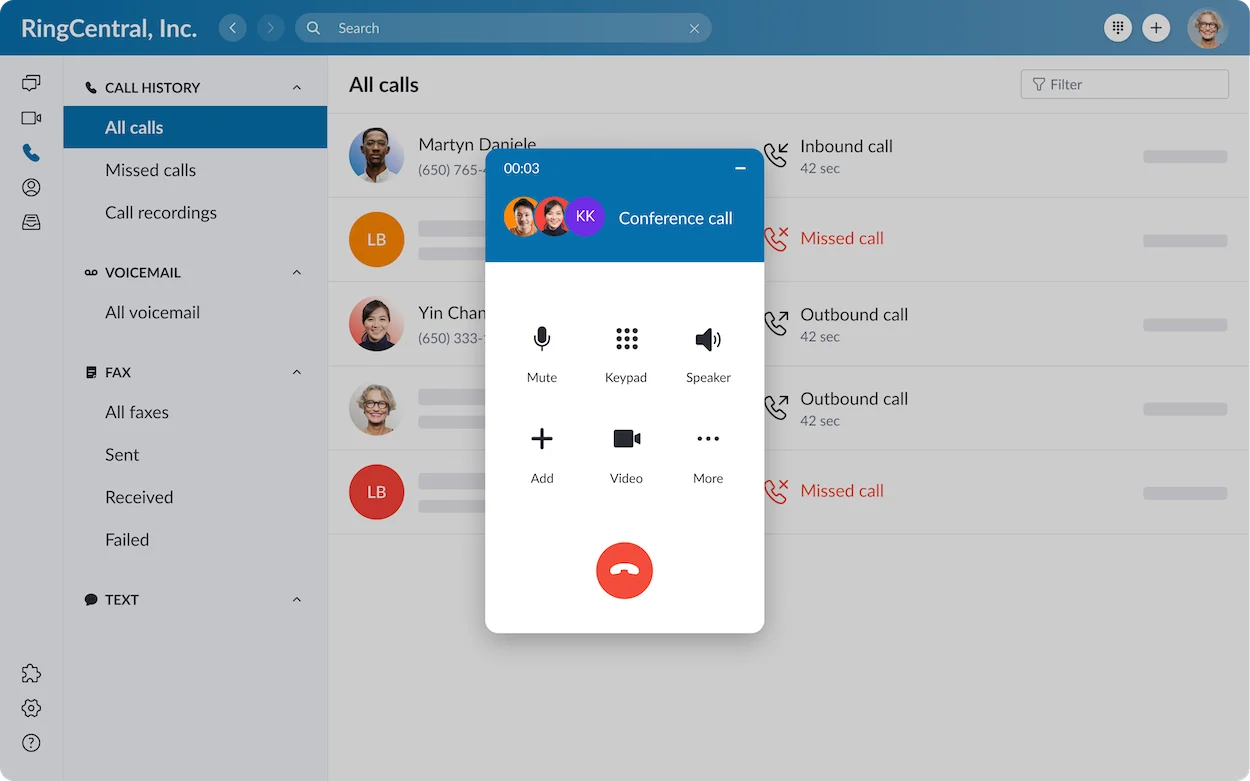
RingCentral supports employee work across its application and supported device environment. Its pricing information lists Windows, macOS, Android and iOS. The employee app and administrator portal serve different jobs, so include both roles in the evaluation.
Test an incoming call with a locked mobile screen, a warm transfer, voicemail playback and a call back using the business identity. Repeat representative calls on an ordinary home connection. Confirm notifications, microphone permissions and the supported devices.
Our assessment is that cross-device working is a meaningful UCaaS benefit, but successful behaviour on the team’s own phones matters more than a polished demonstration. Reception and shared areas may still need physical handsets.
International Calling and Global Scalability
RingCentral offers global communications arrangements, but local numbers, domestic service, outbound destinations and employee location should be checked separately. Number coverage does not establish identical service in every country.
For each market, request number types, documentation, porting eligibility, messaging availability, emergency-calling arrangements and support. Obtain the rate or bundle for the international destinations the team calls.
For an international company, map locations before estimating seats. Do not apply a US offer to the entire workforce without verifying regional terms. A country-by-country proposal is more useful than one headline coverage count.
Reliability, Network Requirements and Security
RingCentral advertises 99.999% availability for RingEX. Obtain the contractual scope and remedies. The provider’s service commitment and the reliability of an employee’s connection are different parts of the overall calling experience.
RingCentral publishes network and system requirements, including firewall and connection guidance. Have the responsible administrator check the current requirements for the proposed deployment. Test under normal business load rather than relying only on a bandwidth headline.
For security, review user access, identity controls, device management and the handling of recordings and AI notes. RingCentral describes its security operations and compliance resources, but the business must verify the relevant configuration and contracts for its work.
Agree the fallback if an office loses internet or an employee cannot sign in. Confirm who changes routes, who contacts support and how customers reach the company while an issue is resolved.
Support and Implementation
RingCentral’s support contact information lists 24/7 technical support and separate advanced-support arrangements. Confirm the channels, language coverage and escalation available to the proposed account. Contract and renewal assistance can follow a different schedule from technical support.
Include porting, training and configuration in the proposal. Have reception, an ordinary employee and an administrator perform real tasks during the pilot. Keep the current service available until the port and incoming call routes have been validated.
Our main support recommendation is to ask who owns a case when a problem spans the provider, network and CRM. The customer feedback below makes escalation and reporting useful topics to investigate before rollout.
RingCentral UCaaS Pros and Cons
| Pros | Cons and limitations |
|---|---|
| Brings employee calling and collaboration together | Value falls if employees retain and depend on all their old tools |
| Supports shared administration across teams and sites | Complex deployments still need configuration ownership and training |
| Offers established phone-system functions | Advanced queue or agent requirements may need another product |
| Provides integrations and developer APIs | Connector entitlement, external licences and custom work can add cost |
| Offers communication AI | Skills vary by tier; specialised AI services may be separate |
| Supports working across devices | Notifications, connectivity and permissions need a real-device pilot |
| Provides reporting tools | Customer feedback raises questions about report clarity and depth |
Who Is RingCentral UCaaS Best For?
| Business | Our recommendation |
|---|---|
| Small business | Shortlist it when professional call handling and shared communication justify the package; compare a simpler system for one basic number |
| Medium business | Strong shortlist fit when departments, remote staff and CRM workflows need common administration |
| Enterprise | Evaluate a governed deployment with roles, locations, support and a country-specific migration plan |
| Dedicated contact center | Compare RingCX or another agent platform separately from employee RingEX seats |
| Business seeking the lowest possible bill | Compare the required working configuration; RingCentral is not automatically the lowest-cost choice |
Dialpad may be worth comparing for a team focused on conversation AI. Nextiva may be worth comparing for a customer-facing SMB prioritising setup and support. Existing software, geography and the required tier should decide between them—not an affiliate relationship.
Our business VoIP provider comparison provides a wider shortlist.
Frequently Asked Questions
Is RingCentral a UCaaS provider?
Yes. RingEX is its cloud employee communications platform, combining business calling with other communication tools.
Is RingCentral UCaaS the same as RingEX?
In this review, RingCentral UCaaS refers to RingEX. Other RingCentral products have separate purposes and purchasing requirements.
Does RingEX include a contact center?
Do not assume an employee subscription includes a dedicated agent platform. Evaluate RingCX or the appropriate contact-center proposal separately.
How much does RingCentral UCaaS cost in 2026?
Request the current RingEX quote for your user count, region and term. Add the services, usage and devices required to make that configuration work. The accessible official pricing page reviewed did not establish a dependable current base-price table.
Can I try RingEX free?
Eligible new subscribers can access a 14-day trial for up to 20 phone lines. SMS is excluded. Confirm signup, cancellation and any hardware-return conditions.
Does unified communications guarantee savings?
No. Savings depend on the selected package, usage and which old services the company can retire. Compare the complete invoice with the current operating cost.
Is RingCentral good for remote work?
It deserves evaluation for remote employee calling and collaboration. Test the actual home connections, mobile devices, notifications and transfer workflows before deciding.
Final Verdict: A Strong UCaaS Shortlist for a Growing Organisation
RingCentral’s appeal is the combination of employee communications and phone-system management. We recommend shortlisting RingEX when a business needs coherent call handling across departments and locations, supported by useful application connections.
The purchase should depend on a successful pilot and a complete quote. Verify the reporting, support path, AI entitlements and geography. If the business only needs a basic number, compare a simpler option; if it needs dedicated agents, evaluate the corresponding contact-center platform.
For more product detail, read our RingCentral review.
Customer Reviews: RingEX Feedback from TrustRadius
An incentivized October 1, 2026 administrator review rated RingEX 7/10. The reviewer appreciated easy queues, administration and access to support, while criticising abandoned-call visibility, report subscriptions and confusing analytics choices.
An incentivized September 24, 2026 telecommunications review rated it 10/10 after deployment across 180 sites. It praised deployment and voice quality with a correctly configured network, while criticising first-level support and built-in analytics.
Another incentivized September 24 review rated it 8/10 for recruitment workflows. It valued CRM call notes and AI summaries but reported delays in note uploads.
These paraphrased examples identify useful pilot questions: can managers find the needed report, can a technical case be escalated, and do conversation records reach the CRM promptly?
Affiliate disclosure: VoIPCalling.com may earn a commission when you purchase through affiliate links in this article, at no additional cost to you.